


Apple Offering T-Shirt Reward in New Mindfulness Monthly Challenge for Employees
Apple has a new employee challenge kicking off this month, this one focused on mindfulness and meditation. Apple is said to have partnered with the app 10% Happier [Direct Link] for the challenge, tasking employees to meditate for a specific amount of time per day for 25 days (via MacGeneration).
While the challenge is focused on 10% Happier, employees can also use any mindfulness app that ties into Apple’s Health app on iOS. One of the areas that Health measures is mindfulness, showing you how many “Mindful Minutes” you’ve accumulated over the past day, week, month, and year. This information can be filled by mindfulness apps like Headspace, Aura, Calm, 10% Happier, and Apple’s own Breathe app for Apple Watch.
Image via MacGeneration
Employees who complete the challenge will be awarded with a T-shirt that displays the Breathe app’s blue and green logo. Apple has held similar internal challenges for its employees in the past, although they have mostly focused on physical exercise of some kind.
In April 2017, employees who completed the stand, movement, and exercise rings on the Apple Watch each day for a month received an Activity rings pin in gold, silver, or bronze, based on how many days in the month they achieved 100% ring completion. Another competition like this was held earlier this year, but the prize was an exclusive Apple Watch band.
Related Roundups: Apple Watch, watchOS 5Tag: BreatheBuyer’s Guide: Apple Watch (Buy Now)
Discuss this article in our forums
U.S. Justice Department Sues California for Reimposing Strict Net Neutrality Protections
On Sunday, California Governor Jerry Brown signed a bill into law that will bring back strict net neutrality protections to users in the state, four months after net neutrality officially expired in the United States thanks to the FCC’s vote to repeal the regulations last December (via USA Today).
Now that California has renewed net neutrality in the state, the United States Justice Department has filed a lawsuit in attempt to strike down the bill. In a statement, the Justice Department says that California’s Senate Bill 822 “unlawfully imposes burdens on the Federal Government’s deregulatory approach to the Internet.”
Attorney General Jeff Sessions and FCC Chairman Ajit Pai also commented on the lawsuit:
Sessions: “Under the Constitution, states do not regulate interstate commerce—the federal government does. Once again the California legislature has enacted an extreme and illegal state law attempting to frustrate federal policy. The Justice Department should not have to spend valuable time and resources to file this suit today, but we have a duty to defend the prerogatives of the federal government and protect our Constitutional order. We will do so with vigor. We are confident that we will prevail in this case—because the facts are on our side.”
Pai: “I’m pleased the Department of Justice has filed this suit. The Internet is inherently an interstate information service. As such, only the federal government can set policy in this area. And the U.S. Court of Appeals for the Eighth Circuit recently reaffirmed that state regulation of information services is preempted by federal law.
“Not only is California’s Internet regulation law illegal, it also hurts consumers. The law prohibits many free-data plans, which allow consumers to stream video, music, and the like exempt from any data limits. They have proven enormously popular in the marketplace, especially among lower-income Americans. But notwithstanding the consumer benefits, this state law bans them.”
California is not the first state to pass its own net neutrality bill, but none have yet been as strict. Under the law, California broadband providers will not be able to slow down or block any websites, charge higher fees to customers to receive faster internet speeds, and the law also limits some zero-rated data plans.
Without net neutrality regulations, internet service providers like Comcast, Verizon, and AT&T have the legal ability to throttle any traffic on their networks, and block access to sites and services completely, as long as they inform their customers of their actions. In essence, many have theorized that this could lead to ISPs bundling “packages” of internet sites and selling them like cable companies, as well as putting high-paying customers in “fast lanes” and everyone else in “slow lanes.”
Net neutrality opponents, like Pai, say this will lead to “better, faster, cheaper internet access for consumers, and more competition.” They also cite the return to an “open” and less regulated internet, seen prior to the 2015 induction of net neutrality.
Numerous technology companies have voiced support of net neutrality over the past year, including Apple, Google, Amazon, Netflix, and more. Apple last year stated that the net neutrality repeal could “fundamentally alter the internet as we know it,” and if it passed it would be put in place to the detriment of consumers, competition, and innovation.
For California, a legal battle will now happen between the state and the Justice Department, with a few other individuals opposing California’s law. This includes U.S. Telecom Association CEO Jonathan Spalter, who said, “Rather than 50 states stepping in with their own conflicting open internet solutions, we need Congress to step up with a national framework for the whole internet ecosystem and resolve this issue once and for all.”
Note: Due to the political nature of the discussion regarding this topic, the discussion thread is located in our Politics, Religion, Social Issues forum. All forum members and site visitors are welcome to read and follow the thread, but posting is limited to forum members with at least 100 posts.
Tag: net neutrality
Discuss this article in our forums
First Case Surfaces of Law Enforcement Forcing Suspect to Unlock iPhone With Face ID
A Forbes report has highlighted the first known case of law enforcement forcing a suspect to unlock an iPhone using Face ID.
The incident reportedly happened in August when federal agents obtained a warrant to search the house of a man in Columbus, Ohio, as part of a child abuse investigation.
Apple marketing image for Face ID
According to case documents, FBI agents got 28-year-old Grant Michalski to put his face in front of his iPhone X to activate the Face ID facial authentication.
After the device was unlocked, investigators looked through Michalski’s chat history, photos, and other files stored on the phone. Evidence discovered on the device was used to charge the suspect later that month with receiving and possessing child pornography.
Several previous cases have occurred where law enforcement has gained access to digital data by forcing people to unlock mobile devices using their fingers. One case even reportedly involved trying to use the finger of a dead person to unlock a phone, which ultimately didn’t work.
However, this appears to be the first case in which Face ID has been used, so it’s likely to reignite debate over where the law stands in relation to biometric authentication methods.
In the United States, forcing someone to give up a password is interpreted as self-incrimination, which is protected by the fifth amendment and against the law. Nevertheless, courts have ruled that there’s a difference between a biometric recognition system like Touch ID and a passcode that you type into your phone.
In the case highlighted by Forbes, the FBI was eventually locked out of the phone and had to gain a second search warrant to allow them to conduct a more thorough search of the device using a third-party unlocking solution, likely similar to Grayshift.
Note: Due to the political nature of the discussion regarding this topic, the discussion thread is located in our Politics, Religion, Social Issues forum. All forum members and site visitors are welcome to read and follow the thread, but posting is limited to forum members with at least 100 posts.
Tags: FBI, Face ID, law
Discuss this article in our forums
Some iPhone XS and iPhone XS Max handsets appear to have charging issues
Owners of some of Apple’s new iPhones appear to be experiencing difficulties charging their device via the cable.
The issue seems to affect the iPhone XS and iPhone XS Max, two of the tech company’s newest phones that started shipping just over a week ago.
A growing number of owners are hitting forums to express their frustration about the problem, which in the worst cases results in a complete failure of the charging process via the Lightning cable.
In a test of multiple iPhone XS and XS Max devices conducted by YouTuber Unbox Therapy, the issue was able to be replicated, though it manifested itself slightly differently with each device. So with some phones, the charging process failed to begin when the phone was in sleep mode and the cable was connected (the screen is supposed to light up to let you know the charging process has started), while in other cases charging would only start once you tapped the screen.
In one odd case, an iPhone XS Max not only failed to light up when the cable was plugged in, but also failed to start charging when the phone came to life via a tap on the screen.
In Unbox Therapy’s experiment, two of the four XS phones lit up and began to charge in the proper way, while only one of the four XS Max phones did so. But some people have also reported how the phone looks like it’s charging but sometimes stops after a short time.
Unbox Therapy also noticed how, on some occasions when it was plugged in, the phone would freeze and stay in sleep mode.
As you can see, the experiences regarding charging issues with Apple’s latest phones are wide and varied, and it’s not clear if it’s down to a problem with the software or hardware. But the fact that some recent commenters are pointing out that they’re suddenly seeing the same problem on older iDevices suggests the former, meaning a fix shouldn’t be too difficult to sort out.
The only apparent workaround is to use wireless charging, which works with Apple’s iPhone X, and the new XS, XS Max, and upcoming XR models. Digital Trends has a page showing some of the best wireless phone chargers currently available.
At the time of writing, Apple hasn’t publicly acknowledged the issue. We’ve reached out to the company for comment and will update this article when we hear back.
It’s not the first time Apple has had to deal with iPhone problems at launch. AntennaGate, for example, saw some owners of the iPhone 4 experiencing call reception issues soon after the device hit the shelves in 2010. The problem occurred when the user placed their hand at the lower left edge of the device, which interfered with the phone’s antenna. Apple discovered that the situation could be resolved by putting a bumper on the phone, and so handed out free bumpers to affected users. And then in 2014 there was BendGate that put the aluminum frame of the iPhone 6 and 6 Plus in the spotlight. Let’s hope we’re not witnessing the beginning of ChargeGate here, and that Apple can resolve this issue, once it’s confirmed, as soon as possible.
Editors’ Recommendations
- iPhone XS review
- How to buy the iPhone XS, iPhone XS Max, and iPhone XR in the U.K.
- iPhone XS Max review
- The best iPhone XS cases
- Apple iPhone XS vs. iPhone XS Max vs. iPhone XR
‘No-selfie zones’ suggested to prevent fatal accidents at tourist spots
Have you ever taken a selfie where, as you try to maneuver yourself into position to get the best shot, you momentarily forget about your immediate surroundings?
Such lapses in concentration, mixed with a determination to score your next awesome Instagram shot, have led to some unlucky folks ending up in hospital, or, in the most tragic cases, losing their life.
The figures are startling, with at least 259 people around the world losing their life while trying to take a selfie between 2011 and 2017, according to researchers at the India Institute of Medical Sciences in New Delhi.
After analyzing the cases, the team has recommended that popular tourist spots introduce “no-selfie zones” to try to improve safety when it comes to taking self-portraits using smartphones.
Led by Dr Agam Bansal, the team said there had been “an exponential increase in the number of selfie deaths from 2014–2015 to 2016–2017.” It put the rise down to the “increased usage of mobile phones, enhanced selfie features on mobile phones, increased availability of selfie sticks, and also promotion of the phenomenon of selfies through events like ‘best selfie prize.’”
About 75 percent of the selfie deaths comprised males, the team said, with most fatalities involving those in their teens and aged up to 30. Selfie-related fatalities are most often caused by drowning, which includes being “washed away by waves on a beach, capsizing of boats while rowing, clicking selfies on shore while not knowing how to swim, or ignoring warnings.” Other common causes include falling from an elevated location, being hit by a vehicle, and fire.
Most selfie deaths currently occur in India, partly because it has such a huge population and also because it has a high share of young people. Russia and the U.S. rank second and third, respectively, for selfie-related deaths.
In a bid to tackle the issue, some tourist locations in India have already begun designating no-selfie zones. In the Indian city of Mumbai, for example, 16 places have banned selfies, while signs started showing up on cliffs and beaches in the Indian state of Goa, which attracts millions of tourists each year. Meanwhile, on Mount Merapi in Indonesia, local officials are preparing a “safe selfie spot” for visitors in a bid to reduce the chance of people risking their lives with shots in precarious spots on the mountain.
The team sensibly underlines the fact that “selfies are themselves not harmful, but the human behavior that accompanies selfies is dangerous.” It adds: “Individuals need to be educated regarding certain risky behaviors and risky places where selfies should not be taken,” and suggests that “no-selfie zones areas should be declared across many tourist areas, especially places such as water bodies, mountain peaks, and tall buildings” to prevent future accidents.
Editors’ Recommendations
- Selfies don’t usually descend into brawls, but this one did
- How to take the perfect selfie
- Samsung Galaxy S8 camera tips that will make you a better photographer
- 6 pro tips for taking amazing portrait photos with the Huawei P10
- What is portrait mode? How tech helps smartphones capture a better you
A Best Buy flub sheds light on a new Chromecast. Here’s what we know so far
It appears certain Google will announce a brand-new Chromecast streaming device at its October 9 event in New York City, alongside a slew of new hardware, including Pixel 3 and Pixel 3 XL smartphones, new Pixel Books, and possibly new Pixel Buds headphones.
First reported by Android Police, a Redditor was accidentally sold a third-gen Chromecast at Best Buy. The Reddit thread creator, GroveStreetHomie, says the item didn’t pop up in Best Buy’s point-of-sale system, so the customer service representative used the SKU from a current-gen Chromecast in order to force the sale through. As such, the streaming dongle was sold for $35. Though we do not expect the new Chromecast to go up in price, the accidental sale is not necessarily indicative of what the final street price might be for the new version.
The new streamer doesn’t come as a surprise, though this Best Buy gaff does reveal a few new details. Since it has been a couple of years since the Chromecast Ultra was announced, we expected a replacement, and aside from confirming the dongle’s existence, an FCC filing reveals the new Chromecast will support Bluetooth outside of utilizing it solely for setup.
Product packaging and the Redditor’s comment shed no light on the Chromecast’s new use of Bluetooth, but it is possible the connection could be used to support wireless keyboards and other peripherals like gamepads. Overall, the details about the new device remain scant. The Reddit poster indicates the device requires a firmware update out of the box, and we don’t anticipate this changing until the device is shipping to the public.
What we do know is that the new Chromecast is slightly thicker than the current version, replaces glossy plastic with a matte-black finish, and uses Google’s ‘G’ logo instead of the company’s Chrome moniker.
This is increasingly looking more like an incremental update and less like the next big thing in streaming. Meanwhile, Roku and Amazon have been busy bringing new devices like the impressively capable $40 Roku Premiere and the cutting-edge Fire TV Cube. The only way the new Chromecast could make significant waves this year is if it housed Android TV on-board. Currently, the Chromecast is basically a dumb dongle — one which requires its users to use their smartphone, tablet, or PC to control the device.
Stay tuned to Digital Trends for updates on Google’s October 9 event and the new devices we expect to see.
Editors’ Recommendations
- Battle of the streaming sticks: Chromecast vs. Roku vs. Fire TV Stick
- Roku adds Google Assistant support as Amazon makes bigger TV moves
- The best streaming devices
- Google has a new Chromecast on the way, but don’t expect a major leap forward
- Google Pixel 3 and Pixel 3 XL: Everything we know
HP Chromebook x2 vs. Google Pixelbook
Mark Coppock/Digital Trends
After a couple of years during which Chrome OS powered mostly low-priced notebooks and the occasional premium 2-in-1, things are starting to look up for Chromebook buyers. A new wave of laptops is arriving over the next several months that promise to be more well-made, innovative, and powerful.
HP has kicked off this new wave with the first Chrome OS tablet that’s not aimed at the education market, and the company obviously designed it to compete with the Chromebook blue blood. That means that HP’s $580 Chromebook x2 takes on Google’s high-end Pixelbook that starts at around $750 on sale. Does the Chromebook x2 has a chance against its entrenched and well-connected competition?
Design
The Chromebook x2 certainly looks and feels the part of a genuine challenger to the Pixelbook. It’s well-built, with its all-metal tablet portion giving off that “solid chunk of metal and glass” feeling that exudes quality. It also has a forward-thinking design, with a keyboard base that the tablet magnetically snaps into and creates a traditional clamshell notebook that’s stable in the lap.
HP also gave the Chromebook x2 some great aesthetics, with the back of the tablet sporting a “ceramic white” color scheme that’s, in fact, an anodized electrodeposition (AED) coating promising to help the tablet stay scratch-free and lovely. The tablet mates with a keyboard base that’s also attractive, with a rubberized surface that looks good and feels great.
The Google Pixelbook also aims for a premium look and feel. It’s blend of metal, plastic, and glass that stands out as well thanks to a design that essentially mimics the company’s Pixel smartphones. The same sort of glass cutout adorns the upper quarter of the chassis’ backside, identifying the Pixelbook as a member of Google’s lineup while simultaneously improving wireless connectivity.
Both 2-in-1s sport bezels that are a little larger than usual, which should make each more comfortable to hold onto in tablet mode. They both also have great keyboards and touchpads for traditional input and control, along with responsive touch displays and active pens.
Frankly, if they both cost the same, we’d call this category a draw. But the Chromebook x2 makes its elegance and robust build available for significantly less money.
Performance
Mark Coppock/Digital Trends
The Chromebook x2 is equipped with a 7th-generation low-power Intel Core m3-7Y30 CPU, 4GB of RAM, and 32GB of eMMC storage. Those components are plenty fast for Chrome OS, which is a relatively lightweight OS that doesn’t put the same demand on the processor, RAM, or storage (thanks to the integrated Google Drive cloud service) as Windows 10. During our review testing, we found the Chromebook x2 to handle whatever we asked of it with alacrity, whether that was running Chrome, Chrome OS apps, or Android apps.
The Pixelbook is even more powerful, with low-power 7th-generation Intel Core i5 and i7 CPUs, up to 16GB of RAM, and up to 512GB of very fast NVMe solid-state drives (SSD) storage. That’s fast enough for Windows 10, and handles Chrome OS like a walk in the park.
Both of the notebooks enjoy 12.3-inch IPS displays running at 2,400 x 1,600 (235 PPI) resolution in the 3:2 productivity-friendly aspect ratio. Both displays are bright, offer excellent contrast and colors, and are joys to use for both working and consuming media.
The Chromebook x2 is plenty fast for Chrome OS, but the Pixelbook is faster, hands-down. Google stacked the deck when it comes to performance, and there isn’t a Chromebook out yet that can keep up.
Portability
The Chromebook x2 packs in 48 watt-hours of battery life, which isn’t a lot for a traditional notebook but it’s at the high end for a tablet. It lasted a solid four hours and 23 minutes on our aggressive Basemark web benchmark battery test, an excellent score the promises all-day battery life. It’s also thin and light as just a tablet at 0.33 inches and 1.62 pounds, although weight jumps to 3.07 pounds with the keyboard attached (it’s a bit heavy, to balance the display in clamshell mode).
The Pixelbook has a smaller 41 watt-hour battery, which nevertheless managed to power the 2-in-1 for a very good four hours and 1o minutes in our Basemark test. That’s only slightly behind the Chromebook x2, and the Pixelbook also ran for a full workday and then some. The Pixelbook is 0.40 inches thick and weighs 2.4 pounds, meaning it’s easier to carry around than the HP unless you leave the latter’s keyboard behind.
The Chromebook x2 and Pixelbook are both highly portable 2-in-1s that can last a long time without being plugged in. We give the nod to the HP, though, because it’s just much more comfortable to use as a slate — particularly if you want to use the pen to draw or take notes.
The cheaper HP Chromebook x2 has the edge
Mark Coppock/Digital Trends
We had some difficulty ranking either of these high-quality and good looking Chrome OS 2-in-1s higher than the other, except in terms of performance. There, the Pixelbook was faster, but the Chromebook x2 was no slouch either. Chrome OS doesn’t ask as much of its hardware as Windows 10 or MacOS, and the Pixelbook’s edge is mostly theoretical at this point.
But the Chromebook x2 beats the Pixelbook in one crucial area: Price. At $580 with the keyboard and pen included, the HP is significantly less expensive than the Pixelbook’s starting retail price of $1,000 (although it’s often on sale for as low as $750). We can’t say with confidence that there’s a compelling reason to spend more when the Chromebook x2 is likely to meet just about any Chrome OS user’s needs.
Editors’ Recommendations
- HP Chromebook x2 Review
- Lenovo ThinkPad T480s vs. Lenovo ThinkPad X1 Carbon
- The best Chromebooks of 2018
- Samsung Galaxy Note 9 vs. Apple iPhone X: Battle of the ultra-premium smartphones
- The Nokia X5 is a budget phone with a premium glass body and a notch
What you missed last week at CordCutters.com
You can spend a fortune on a new TV. But you really don’t have to.
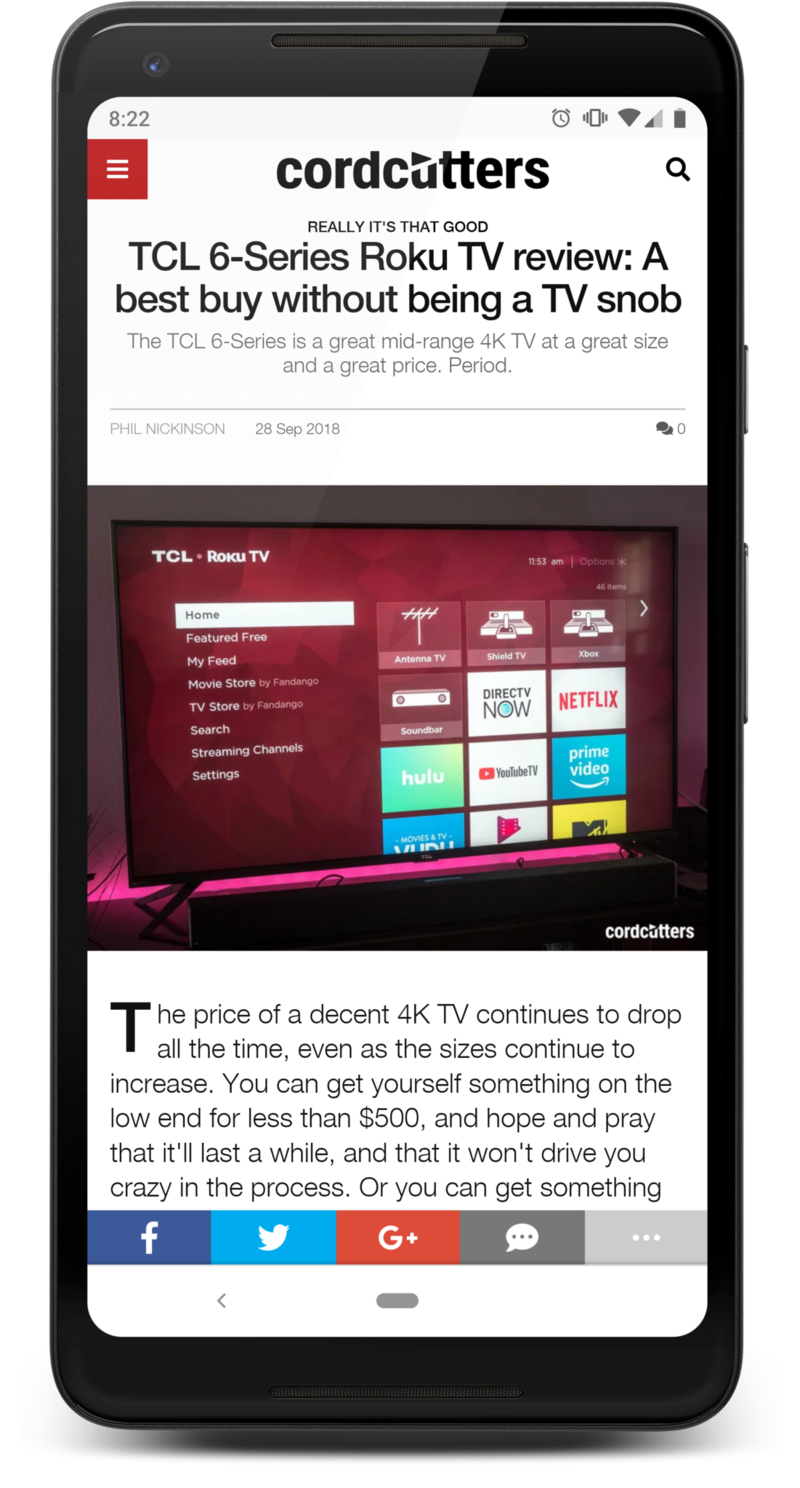 You can spend a couple thousand dollars on a TV. And if you have a couple thousand dollars to spend on a TV, by all means do it. You’ll get something pretty incredible with an OLED panel.
But for those of us who don’t have a couple thousand dollars to spend on a TV, it’s not like we have to settle for some kind of lesser class of living. You can get a really good TV for less than $1,000 these days.
I’ve spent a few months with a 55-inch TCL 6-Series. It’s $649 (retail) for the 55-inch model, and $999 for a 65-incher. 4K resolution, Dolby Vision and HD 10, and Roku built in. For a lot of folks — a whole lot of folks, seeing as how Roku TVs make up a quarter of the smart TV market these days — that’s going to be plenty.
No, it’s not the same as Android TV or Apple TV, though you certainly can plug in a box (and set up the TV to use it by default) if you want to. It’s not quite as quick, perhaps, Roku just has a different feel about it. But if your goal is to just watch your shows on a good (again, really good) TV for the price with a smart system that is easy to use, I’d have a hard time recommending something else at this point.
See at Amazon
Read the full TCL 6-Series review at CordCutters.com
Here’s what else you missed last week at CordCutters.com:
- Maniac on Netflix is really good. And weird.
- PlayStation Vue just got a lot more local channels.
- How about that — there’s a new TiVo roaming around.
- Take a projector with you when camping? Sure, why not.
- Don’t miss what’s on Netflix in October.
- And what’s new on Amazon Prime Video.
- Roku’s wireless speakers for its Roku TVs are now expected in November.
Introducing CordCutters.com
- The hardware you need
- All about streaming services
- What channels are on which service
- FREE over-the-air TV
- How to watch sports
- Join the discussion
- Listen to the podcast
Get the latest deals
What are the best FPV goggles for your DJI Drone?

Best answer: The DJI FPV Goggles are the best pick if you own a DJI Phantom 4 or Mavic Pro, and plan to upgrade from the DJI in the future. For a bit more, the DJI Goggles Racing Edition offer better features if you’re interested in building a non-DJI racing drone.
- Amazon: DJI Goggles FPV Headset Starter Kit ($349)
- Amazon: DJI Goggles FPV Headset RE ($544)
Designed to take advantage of your drone’s best features
Sometimes it’s just smarter to buy your accessories straight from the source, and that’s certainly the case for any owners of DJI’s premium drones — the Phantom 4 series, Mavic Pro, and Mavic 2 series. The DJI Goggles pair seamlessly with your drone and controller using the DJI GO 4 app and offers head-tracking support with your drone’s gimbal with built-in touch controls. For the DJI Spark, you’ll need to buy an additional USB OTG Cable ($5) to create a wired connection from your phone to your DJI controller.
The DJI headset is capable of offering 720p/60fps and 1080p/30fps viewing options with a low latency of just 110 ms, with the Racing Edition offering a sportier look and enhanced connectivity options. You can expect to get six hours of viewing, either as a pilot or passing off the headset to a friend to enjoy the experience. The downside with the DJI goggles might be the overall size — this is a rather large headset that’s been designed to be as comfortable as possible but it might make marathon sessions a bit heavy on the neck and forehead.
Okay, but what if money is no object and I want to look like a cyborg?

If you’ve understood and accepted that FPV drone flying is an expensive hobby to invest in that includes wireless video transmission and want to rock some of the coolest technology out there, you need to check out the Epson Moverio 300FPV Smart Glasses, which offer support for AR and headset display with full support for DJI Drones using the DJI GO 4 app. The advantages offered include a much lighter and more comfortable design and the ability to see a heads-up display of your drone’s camera and readings while maintaining a line of sight with your drone. Set up is also easy as the glasses are built on Android so you can download the DJI GO 4 app and directly connect the smart glasses to your drone via WiFi.
At $699, these smart glasses are simply too expensive to be our top pick for the average DJI drone pilot, but they’re a cool piece of tech that runs on Android and is controlled by a touch controller.
What else do I need for the DJI Spark?
The DJI Goggles require a wired connection to the Spark controller, which means you’ll need the USB OTG adapter for connecting your phone to the headset.
If you bought the Spark because it’s the more affordable DJI drone and doesn’t feel like dropping a cool $350 on DJI’s headset, there’s an affordable workaround for any Samsung Galaxy users. It requires setting up the Spark using the latest Samsung Gear VR ($113) which runs on Samsung Galaxy flagships (S8 or later) with a USB-C port. The DJI forums have a great guide that goes over the eight steps you need to do to set things up. At a third of the price of the DJI goggles and with all the extra fun that’s available in the Oculus Store, this Gear VR workaround is a good option for the thrifty drone pilots.
Our pick
DJI Goggles FPV Headset

$350 at Amazon
$349 at DJI
The best headset for most DJI drone pilots
There are cooler and cheaper options out there that offer FPV views for DJI drones, but DJI’s own goggles are simply the best bet for DJI pilots who want to experience the first-person view when piloting. For the serious drone racing enthusiast, the Racing Edition headset might be worth the extra money.
Best For Drone Racing
DJI Goggles FPV RE Headset

$544 at Amazon
$549 at DJI
Take your drone FPV to the next level!
If you’re interested in drone racing, this is the headset for you! Beyond the stylish black and red look, this headset offers 148° field of view with ultra-low 50 ms latency and the capability of transmitting HD video over four miles. This is the supreme FPV experience for DJI drones!
Expensive and cool
Epson Moverio 300FPV Smart Glasses

$699 at Amazon
The Google Glass of drone FPV!
One of the more high-end options for FPV goggles, the Epson Moverio are powered by Android so you’ll be able to load up and connect the DJI GO 4 app right in the goggles and see what your drone camera sees with minimal set up or fuss.
Additional equipment
DJI Goggles Micro USB OTG Cable

$5 at DJI
For the DJI Spark drone, you’re going to need a create a wired connection from your phone to your DJI controller, but that’s easy with this USB OTG cable, which only costs $5.
Oreo is now running on almost 20% of Android devices
Your (usually) monthly fix on the current state of Android.
About once a month, Google releases distribution numbers that outline the various Android versions and the percentage of current devices they’re running on. This data is meant for developers so they can create and update their apps according to which Android versions are the most popular, but they also give enthusiasts like us a glimpse into how quickly OEMs are adopting the latest and greatest the platform has to offer.

To source this data, Google tracks the Android versions of any devices accessing the Play Store over the course of a 7-day period. This ensures that only active Android gadgets are being accounted for and not your HTC Dream that’s been sitting untouched in a drawer for the past few years.
Any version that accounts for 0.1% or more is listed, but versions that have less than that are ignored.
Without further ado, here’s the current state of Android.
September 2018

August saw the release of Android Pie, and September saw the new version start pushing out to more and more devices, but alas, Pie is not on a big enough percentage of devices to warrant a slice on the pie chart, pun intended. Last year’s Android version, Oreo is now available on 19.2% of Android devices, but over half of the Android devices that visited the Google Play Store this month were still running Nougat or Marshmallow.
While conventional wisdom says the holiday treat that lasts forever is fruitcake, Gingerbread is still hanging on at 0.3%, alongside Ice Cream Sandwich. Here’s to hoping that Google can replace one or both of them with Pie in their pie chart by Christmas.
July 2018

It’s been a hot minute since we got our last batch of distribution numbers, but after skipping over June, Google’s back with an all-new set of data for July.
The biggest highlight for this month shows Android Oreo (8.0 and 8.1) now available on 12.1% of all devices — a huge step up from the 5.7% it saw just a couple months back. That’s still not a great adoption rate, but at least we’re getting somewhere.
The rest of the changes compared to May are as follows:
- Gingerbread — 0.1% decrease
- Ice Cream Sandwich — 0.1% decrease
- Jelly Bean — 0.7% decrease
- KitKat — 1.2% decrease
- Lollipop — 2% decrease
- Marshmallow — 2% decrease
- Nougat —0.3 decrease
- Oreo — 6.4% increase
May 2018

The data for May corresponds to Play Store activity for the seven-day period ending on May 7. Oreo has picked up another percentage point over the course of the month, and is at 5.7% overall — 4.9% being 8.0 and the other 0.8% for 8.1.
Nougat also saw a slight increase from 30.8% to 31.1%, followed by Marshmallow by 25.5%. Here’s the breakdown of how things changed:
- Gingerbread – No change
- Ice Cream Sandwich – No change
- Jelly Bean – 0.2% decrease
- KitKat – 0.2% decrease
- Lollipop – 0.5% decrease
- Marshmallow – 0.5% decrease
- Nougat – 0.3% increase
- Oreo – 1.1% increase
April 2018

For April of 2018, Google tracked Android devices accessing the Play Store for 7 days with the collection period ending on April 16.
The last report from February showed Oreo just barely accounting for more than 1% of Android devices, but that number has since climbed to 4.6% (4.1% being 8.0 and the other 0.5% going to 8.1). Nougat also sees an increase with a jump to 30.8% compared to 28.5% (7.1 and 7.0 combined), and Marshmallow is still trailing in second place at 26%.
Comparing these numbers to February’s findings:
- Gingerbread – No change
- Ice Cream Sandwich – No change
- Jelly Bean – 0.5% decrease
- KitKat – 1.5% decrease
- Lollipop – 1.7% decrease
- Marshmallow – 2.1% decrease
- Nougat – 2.3% increase
- Oreo – 3.5% increase
February 2018

February’s report was the first time Android Oreo crossed the 1% threshold despite that version of the OS being released back in August of last year.
Marshmallow continued with a tight grip at 28.1%, but this also marked the first time that Android Nougat jumped into first place with a combined total of 28.5% – that including versions 7.0 and 7.1.
Additionally, Ice Cream Sandwich (4.0.3 to 4.0.4) also finally dropped to 0.4% from last January’s 0.5%.
January 2018

In January 2018, Android Marshmallow still reigned supreme as the most popular version of the OS at 29.7%. This also saw 8.1 Oreo make an appearance on the board for the first time with 0.2% adoption, and 8.0 remained at the same 0.5% it was at in December.
Jellybean and KitKat both decreased compared to last month’s check-in, but Ice Cream Sandwich and Gingerbread are still holding on at the same 0.5% and 0.4%, respectively.
What version of Android are you running?
What about the phone you’re using? What one is it and what version of Android is it rocking? Sound off in the comments below and let me know!

