


Can Your Phone on Windows 10 keep your phone in your pocket?
Microsoft is trying to connect all of your devices, and Your Phone is the next big step.

Microsoft has been pushing the mobility of experiences across devices for years and the vision is finally coming to fruition. Your Phone allows you to send SMS messages on your PC and view your Android phone’s recent photos by connecting your phone and PC.
It’s the next major step in being able to do all of your work through your PC. The first release of the app works with SMS messaging and photos, and Microsoft has discussed app mirroring coming in future updates.
Note: This app was tested on a Samsung Galaxy S8+, but we expect it to work fairly similarly on all other Android phones.
Your Phone comes as part of the most recent update to Windows 10, the October 2018 Update. That update has been pulled at the time of this article’s publication due to a file deletion bug, but will presumably be available again soon.
Your Phone requires the Your Phone Companion Android app which is free on the Google Play Store.
Download: Your Phone (free)
Easy connection to your phone

Setting up Your Phone is incredibly easy. You just get the companion app on your phone and follow its instructions. Once your phone is connected, your PC and your phone reconnect every time you open the Your Phone app on PC.
Microsoft has had a few different approaches to sending text messages through your PC and I think Your Phone is probably the best one so far. It works relatively quickly, though in my testing wasn’t instant, and the app’s interface is clean and attractive. I think the team behind Your Phone’s design should get some more work across other Microsoft apps. It’s reminiscent of the Messaging app from Windows 10 Mobile that also had a PC equivalent that used to send Skype messages.
The photo syncing functionality probably won’t be discussed as much as SMS messaging. People haven’t been clamoring for a phone syncing app for years as they have for an iMessage competitor. There are also already some other options like OneDrive syncing that do similar functions. But I’m impressed with Your Phone’s photo syncing. You can see the last 25 photos that you’ve taken with your phone and can drag and drop them to your desktop. It’s a feature that many will sleep on, but I think it does a good job building the connection between your phone and your PC.
Can it really keep your phone in your pocket?

Microsoft advertises Your Phone as a way to keep your phone in your pocket while still being able to get things done. I think the first iteration of Your Phone does this well. SMS messaging is the main draw. You could argue that modern smartphones are used more for messaging than calling and the ability to sync SMS messages is the most important connection between these two types of devices.
For my workflow, Your Phone almost completely closes the gap between phone and PC. Many of my apps are available on both and sync across my devices and SMS messaging was one of the last gaps. But for some people, the lack of phone call relay and app mirroring will be more noticeable. Microsoft has discussed app mirroring coming to Your Phone and that will be a great addition. I’d also like phone calls to be able to be relayed.
For now, Your Phone is a handy way to respond to messages from your PC with a full keyboard that also allows you to keep focused on your PC instead of pulling out your phone. Photo syncing is also a nice bonus.
Overall thoughts on Your Phone

Your Phone is the next step in Microsoft’s vision to bring the Windows experience to more devices and to allow people to get things done everywhere. It’s easy to set up and SMS syncing and photo syncing works well.
4
out of 5
Pros
- Easily connects phone and PC.
- Clean and attractive design.
Cons
- No call support.
- Unable to mirror Android apps yet.
The only major knock on Your Phone is that it doesn’t allow you to mirror apps to your PC yet and that it doesn’t relay phone calls. This means that you’ll still need to pull your phone out of your pocket to get some things done.
Download: Your Phone (free)
Aukey’s $12 USB-C wall charger has Power Delivery as well
Your devices need the juice.
The Aukey USB-C 18W wall charger with Power Delivery is down to $11.99 with code 2VD594TN. This charger sells for $20 without the code and never drops to this price directly.

If you don’t care about USB-C or Power Delivery, you can get this fast USB wall charger from Aukey for less than $8 right now. It does have Quick Charge 3.0, which might be a feature you prefer.
The USB-C wall charger delivers a super fast charge to iPhones and Android phones. Any Power Delivery compatible device, like the Nintendo Switch, can take advantage of these charging speeds, too. The foldable plug and compact design let you toss this in your backpack on the way out the door, so you’ll always have a way to plug in no matter where you are. It has built-in safeguards and comes with a two-year warranty.
See on Amazon
The newest PlayStation 4 Gold wireless gaming headset is down to $73 today
This PlayStation accessory is just inches away from being an essential for gamers.

Sony’s PlayStation Gold wireless headset is down to $72.94 via Amazon today. This headset was released in February earlier this year, and today’s deal marks the lowest offer we’ve ever seen on it. It regularly sells for $100 at other retailers such as Best Buy, though it’s been available for around $91 on average at Amazon.
The older version was a really well-liked gaming peripheral, but the new one is getting good critical reviews as well. PC Mag gave it 4 stars. The team here has a breakdown of the differences between the two and talks about whether or not you should upgrade.
The headset has 7.1 virtual surround sound, a noise-canceling microphone, a free companion app, and a comfortable feel for long-term gaming. You can even remove the faceplates and customize it according to your own style. It’s still somehwat new so it doesn’t have a huge amount of user reviews, but close to 190 users give it 3.8 stars out of 5 collectively at Amazon.
See at Amazon
Will my Pixel 2 case fit on my Pixel 3?

Best answer: A Pixel 2 case will fit on the Pixel 3, but it’s certainly not a perfect fit. It’ll work in a pinch until your Pixel 3 case arrives, but it’s not a long-term solution and it may scratch or scuff the Pixel 3 if you use it for a long time.
Amazon: Spigen Thin Fit ($12)
Only use as a temporary solution
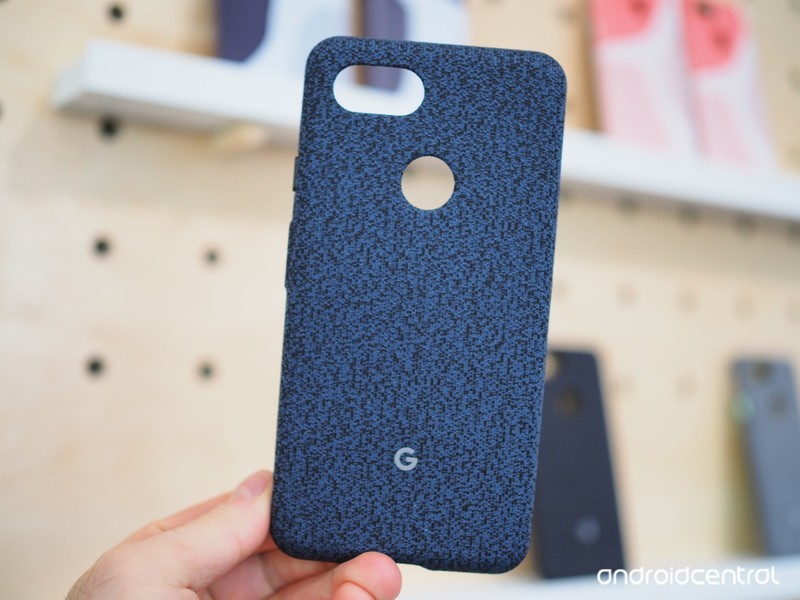
It’s pretty rare these days, but yes, the Pixel 2 and the Pixel 3 are similar enough in size and design for you to get away with using a Pixel 2 case on a brand new Pixel 3. It’s not a precise fit, and a more rigid case is not going to fit as well as, say, the Google-made fabric case that has a bit of elasticity built into its design, but a Pixel 2 case can be fit onto the Pixel 3 for protection.
Of course, this should only be done as a temporary solution if your new phone arrives before you get a chance to pick out a case for it. We are not recommending buying a cheaper Pixel 2 case for your Pixel 3 to save money, as you’re bound to find a comparable Pixel 3 case that’s actually designed to fit the exact specifications of the newest Pixel. We’ve recommended a good case option from Spigen that’s a better option than any Pixel 2 case in your drawer.
Our pick
Spigen Thin Fit

$12 at Amazon
A great place to start
There are bound to be more great cases to come, but for now, we’ll recommend this thin and reliable case option from Spigen.
Will my Pixel 2 XL case fit on my Pixel 3 XL?

Best answer: A Pixel 2 XL case will fit on the Pixel 3 XL, but it’s not a perfect fit — particularly around the camera and fingerprint sensor. It’ll work in a pinch until your Pixel 3 XL case arrives, but it’s not a long-term solution and it may scratch or scuff the Pixel 3 XL if you use it for a long time.
Amazon: Spigen Liquid Crystal ($12)
Not a perfect fit
Depending on the Pixel 2 XL cases you have laying around, you might find that they fit pretty well on the new Pixel 3 XL. You may be tempted to just stick with those cases because “it fits good enough”, right?
Wrong. If you use the wrong case for your phone you’re going to risk scuffing up your phone or causing worse damage with prolonged use. You should notice that things don’t quite line up perfectly around the camera and fingerprint sensor. That may lead to rubbing or let dust and grit get between your phone and the case which can cause scratches and scuffs. Nobody wants that, so as nice as it might have been if last year’s cases fit this year’s phone perfectly, you’re still best off buying a brand new case for your Pixel 3 XL.
Our pick
Spigen Liquid Crystal

$12 at Amazon
Clearly your best option
Everyone loves to show off their brand new phone, and with Spigen’s Liquid Crystal case you can do so while keeping it safe from drops and scuffs.
Best Cases for Google Pixel 3
The Google Pixel 3 is here, and if you’re in the market for a solid Android phone, it’s definitely one of the better ones you can get. The Pixel 3 is a good-looking phone, but thanks to its all-glass back, it’s not the most sturdy you’ll find. Whether you want to keep it protected or just add some pizazz, these are the best Pixel 3 cases you can get.
Affordable and slim
Vinve Carbon Fiber TPU Case

Vinve’s Pixel 3 case offers great protection while still keeping the phone nice and slim. The TPU material is soft to the touch while offering lots of grip and the subtle pattern at the top and bottom is a really nice touch. You’ve also got your choice of Black, Blue, Grey, and Red.
$7.82 at Amazon
Lightweight companion
Spigen Thin Fit

Want to keep your Pixel 3 looking nice without adding too much bulk? The Spigen Thin Fit case is a perfect choice. You’ve got solid coverage against regular wear and tear + accidental drops, but keep in mind that the top and bottom frame of the phone are left uncovered for the name of thinness.
$15 at Amazon
Clearly a good choice
MoKo Clear Case

If you want to show off your new Pixel 3 without running the risk of breaking it, MoKo’s clear case is absolutely worth checking out. You’ve got full 360-degree protection, a soft TPU material that adds a lot of grip, and precise cutouts for the charging port, camera, and speakers.
$8 at Amazon
All-around champ
Spigen Neo Hybrid

$30 at Amazon
The Spigen Neo Hybrid is one of the best cases to ever exist. We gave it an AC Choice Award for the Google Pixel 2, and with the Pixel 3, it’s just as good. There are two colors (Gunmetal and Burgundy), and the two-tone design is absolutely gorgeous.
Fabricy goodness
Google Fabric Case

$40 at Google Store
Google introduced its fabric cases last year with the Pixel 2 series and is bringing it back for another round with the Pixel 3. There are multiple fabric designs to choose from, each with its one distinct look. These cases are on the pricey side, but they’re well, well worth it.
Dual-layer coverage
ASMART Drop Protection Case

$8 at Amazon
ASMART’s case strikes a nice middle-ground of offering ample protection without being too bulky. The dual-layer design consists of a TPU inner case and a hard outer shell that works to keep your phone safe no matter what. AMSART also goes the extra mile with a lifetime warranty to protect your purchase.
Unique design
Ringke Fusion-X

$10 at Amazon
The Ringke Fusion-X is probably one of the more unique-looking cases you’ll find for the Pixel 3. The impact resistant back bumper safeguards the phone against unwanted drops and bumps while the special Anti-Cling Dot Matrix tech helps to keep fingerprints at bay.
Like nothing’s there
Cimo Slim Grip

$8 at Amazon
There are slim cases, and then there’s the Cimo Slim Grip. This is one of the thinnest cases on the market and is an excellent choice to give your Pixel 3 the bare minimum protection while retaining its slim design. There are three colors (blue, white, and purple) and a semi-see-through construction so you can still appreciate the Pixel 3’s good looks.
Guarded against everything
Spigen Tough Armor

$35 at Amazon
Slim cases not your jam? We recommend looking at Spigen’s Tough Armor case. This case offers maximum durability without being overly bulky, and it’s a combination that’s darn near perfect. The ergonomic design is easy to hold and the kickstand on the back is a really welcome touch.
No matter your case preference, there’s something out there for you to outfit your Pixel 3 with. My personal favorite is the Spigen Neo Hybrid, but if that’s not your cup of tea, there’s bound to be something else on this list that catches your fancy.
The best wireless chargers for the Pixel 3 and 3 XL

The Pixel 3 and 3 XL are the first devices of the series to support wireless charging, and there are plenty of great charging stands to choose from. Google’s own Pixel Stand is specialized for the new Pixels, but that doesn’t make it the only option — or even the best option — for everyone.
Made by Google
Google Pixel Stand

The Pixel Stand isn’t just your run-of-the-mill wireless charger. It’s made specifically with the Pixel 3 and 3 XL in mind, and triggers an advanced docked mode with Google Photos galleries and alarms that get gradually warmer and brighter to simulate sunlight. It’s pricey, but its unique features make it worth considering.
$79 at Google
Sit or stand
Samsung Fast Charge Wireless Charging Convertible

Samsung’s convertible stand is one of the most popular wireless chargers around, and as the name implies, it allows you to lay your phone flat or prop it up at an angle so you can still see notifications from your desk. It outputs up to 9W to quickly top up your Pixel 3’s battery.
$55 at Amazon
Plain and simple
Anker PowerWave

The PowerWave doesn’t enable any fancy docked mode or flip between different angles, but it’s a simple wireless charger that runs nearly half the price of Google’s and Samsung’s offerings, and still outputs up to 10W. The downside: Anker doesn’t include a power brick — you’ll need a Quick Charge 3.0-compatible brick to reach maximum speeds.
$30 at Amazon
Fashionable fabric
iOttie iON

If you’d rather your Pixel 3 lay flat than sit propped up, iOttie makes a nice alternative to the Anker PowerWave at roughly the same price. Like Anker’s offering, it outputs up to 10W, and it comes in a nice fabric styling that matches Google’s Pixel cases. Also like Anker’s offering, it unfortunately doesn’t include a power brick.
$29 at Amazon
True wireless power
Mophie Charge Stream Powerstation

The biggest criticism against wireless charging is that it’s not actually wireless — there’s still a wire running to the charger itself. Mophie tackles that problem with a portable battery pack that supports wireless charging — up to 5W of wireless power, or 10W when using a cable.
$80 at Amazon
If you can stand the $79 retail price, the Pixel Stand’s uniquely specialized features make it a great wireless charger for the Pixel 3 — but unless you really need the advanced dock mode, you probably don’t need to spend that much. Samsung, Anker, and iOttie all make great alternatives, and Mophie’s Powerstation lets you go completely wireless and take your charging with you.
Dominate the squared circle with these WWE 2K19 tips and tricks
Dominate the squared circle.

WWE 2K19 is out now. Been away from the ring for a while? It won’t be easy to shake that ring rust off, especially as WWE games have changed quite a bit over the past several years.
But don’t worry, we’re here with a collection of tips and tricks that’ll take you from hopeless jobber up to the WWE Hall of Fame. Let’s not waste any time.
$60 at Amazon
Save your reversals for big moments

If you left the limited reversals options on, you’ll notice a yellow bar at the bottom of your superstar’s health meter. This bar shows you how many reversals you can pull off.
Mostly every superstar should have a minimum of 2-3 reversals, though there are several with 4-5. The number you have is determined by the reversal stat of the character you’re using.
When you’re in a match, try to manage these reversals effectively and save them only for the times you really need them. That is to say, you don’t need to reverse every single ability. A strike or an Irish whip is not going to be more damaging than a grapple, and you definitely want to ensure you have a reversal stored if your opponent is closing in on a finishing move.

Treat your reversals like a valuable resource. They’ll get you out of a bind in crucial moments, and you’ll find that’s often the biggest difference between winning and losing.
One last thing: your reversals do regenerate, but they can regenerate pretty slowly depending on your character, difficulty level, and overall gameplay sliders.
And when you execute a reversal, the progress on filling another reversal bar is completely reset. It may sometimes be appropriate to eat some big damage to ensure you get your next reversal meter filled, so don’t be afraid to let your opponent wail on you a little bit. It’ll hurt now, but your martyrdom should pay dividends throughout the match.
If all that fails, you could always turn the limited reversals option off. (But you’d be robbing yourself of truly great match flow if you do.)
Bait out opponent reversals before using specials and finishers

Staying on the topic of reversals, be sure to bait out your opponents’ stock before trying to hit your most devastating moves. This isn’t always necessary, but you’ll find that your opponents are fairly consistent in their ability to reverse your finishers, specials, and big moves.
Go for a couple of regular moves to see if you can’t get your opponent to waste reversal stock on them before going for the big finisher. You can see exactly how many reversals an opponent has and how close they are to getting their next one, so take that information and use it against them.
Save your Payback abilities until you’re hurting

Along the same vein, try not to hit your payback moves and comeback abilities until you really need to. It can be tempting to kick up out of a powerful move and hit your most powerful attacks five minutes into the match, but most of these abilities are finite and you’ll want to have them to keep the match from getting out of hand in the later stages. Try not to use this stuff until you’re in real danger of losing.
Conserve your stamina
Keep an eye on your stamina gauge at all times. Stamina is another key resource that changes the way your character performs through at a match. The less you have, the slower you move. And we’re not just talking about running — your strikes and grapples are slower too, giving your opponent a bigger window to reverse your moves or recover from attacks.

Things get really tough when your stamina is completely drained. You’ll all due to exhaustion after big moves, and you won’t even be able to pull off specials, finishers, top rope moves, and certain abilities without enough stamina.
In the late stages of a match, be sure you are spacing your attacks out so that your stamina never becomes 100% depleted. You do regenerate a bit over time, so stay topped up just in case you need to hit an RKO out of nowhere.
You have way more moves than you think

Take a look at the list of controls for this game, and you’ll see just how deep it is. While WWE 2K19’s wrestlers are plenty capable even in the newest of players’ hands, they have many more moves that you may not know about.
Moves from the top rope, or ones performed on opponents who are hanging upside down on a turnbuckle, or those which you can do through tables, or ones where you’re on top of a ladder, and when they’re down, and I could go on. There are unique movies for almost every position and scenario, so it’s worth learning them like the back of your hand.
Regular old grapple moves might be the most confusing, funnily enough. You have up to four weak grapples by locking horns with your opponent and pressing X plus any direction on the analog stick. Medium grapples can be performed by pressing X plus any direction on the left stick without locking up. Strong grapples — your strongest base attacks outside of finishers — can be performed by holding the X button while holding the analog stick in any direction.
An easy way to learn all this stuff is to go into your wrestler’s moves editor and view them there. You’ll see all the moves they’re capable of using, as well as the button sequence and positioning scenario needed to do them. You can even practice them right in the editor if you want.
The most fun way you can learn, however, is to go in and just try everything. Press the X button or the square button during random times and in different situations to see what your superstar will do. And while you’re in the match, you can pause the game to view your character’s abilities, special moves, and finishers in case you’re unfamiliar with their move set.
Capitalize on major reversals

There are two types of grapple reversals in WWE 2K19: normal and major. A normal reversal typically occurs at the grappling point of a move (or that moment just before your opponent reaches to grab you).
But some moves have two reversal opportunities. The major reversal opportunity — the indicator for which appears orange in color if you have reversal indicators on — gives you a later chance to reverse a move in progress.
The result is a more powerful reversal move and a debuff that makes it so your opponent can’t reverse moves for a short period of time. Take advantage of these moments whenever you can. Go for your biggest moves here, because your opponent is completely helpless in this state.
Limit your pin attempts

Nothing heightens the drama in a good wrestling match like repeated pin attempts and kick outs. You’ll even get rewarded with a positive rating for doing so in your matches.
You don’t want to make a habit of repeatedly pinning your opponent too early, though. Kickouts — especially those epic last-minute kick outs you tend to see in big-time pay-per-view matches after a finisher — generate a TON of momentum for your opponent. That means they’ll get their special and finisher moves faster, and you want to delay that as much as possible.
Take a breather

Many times, escaping the ring on your own accord is seen as a cowardly act. To hell with that, I say. Run away as long as you need to.
Whether you want to limit your opponent’s ability to pin you, need to recover some stamina, waiting on your reversals to regenerate, or just need some time to think about your strategy, get out of the ring for a second and gather yourself. And when your opponent comes running after you…
Save the environment

Just kidding. DESTROY IT. Weapons are illegal in a typical wrestling match, but the referee won’t say anything if you slam your opponent’s head into a barricade, ring post, or announcement table.
Moves hurt a bit more outside of the ring, so use it to inflict some major punishment on an opponent who dares to come after you. If you find that your opponent is the one dishing out the hurt, well, at least they can’t pin you. (That’s unless it’s a falls count anywhere match, of course!)
Grab an equalizer

Alongside the environment, there are weapons available that can get you disqualified for using them. Look under the ring and you’ll find steel chairs, bats, kendo sticks, sledgehammers, tables, ladders, and did we say chairs? Oh my!
In matches where these weapons are allowed to be used, you’ll want to let your inner demon out. Go to town on your opponent, especially if they’re bigger than you. Some superstars can’t outright lift opponents who are much bigger than them, so these weapons can be used to help inflict damage in place of your wrestling moves.
While these actions can get you disqualified in normal matches, there may still be opportunities to use a weapon, such as if an outside wrestler is distracting the referee. Or, you know, if you just straight up knock the zebra out.
Use your taunts

Taunting is a big part of the wrestling world. Babyfaces use taunts to draw support from the crowd, while villainous heels will use them to draw heat. It helps engage the crowd and makes for more exciting matches.
In WWE 2K19, taunts are used for more than just showboating. A crowd taunt, accessible by pressing left on the directional pad, will let you gain momentum a bit faster. A taunt directed at your opponent, done by pressing right on the d-pad, will make your moves hit a bit harder.
There’s also the wake-up taunt, which can be performed by pressing up on the d-pad. These taunts force your opponent to stand up groggy from a downed state, perfect for lining up your finishers or moves from the top rope. Play to the crowd a bit and give yourself an advantage!
Target the limbs

If you’re more of a technical style of wrestler and prefer to use submissions to make your opponent tap out, you’ll want to know about limb targeting. Every single move in WWE 2K19 targets one or more limbs. A DDT will hurt your head, while an armbar predictably hurts arms.
In addition to pulling off your normal moves, using the limb targeting system is a great way to focus in on a body part. Hold RB and press Triangle, Square, Circle, or X to target the head, left arm, right arm, or legs respectively. You’ll execute a move specifically meant to hurt that body part. The more damage you do, the more likely your opponent is to tap out.
This goes for pin attempts, as well. Your opponents will kick out less often if they have a red body part and you’ve performed a finisher or some other powerful move, so be sure to hone in on your opponent’s weak points to keep the upper hand.
Meet your opponent halfway

No, we’re not asking you to be cordial in a potential bloodbath. Sometimes, you just need an unfair advantage to have a fighting chance. If you don’t want to risk getting disqualified for using weapons in the match, try to attack your opponent before they even get to the ring!
Using the breakout feature, you can interrupt your opponent’s entrance to attack them on their way to the ring. Doing so will allow you to fight on the outside before the match officially begins, as the referee won’t commence with the contest unless both superstars are in the ring. This means you can use weapons without fear of being disqualified. Enjoy your nice head start once the bell finally tolls.
Fight your way to the top
With these tips, you should have a better idea of what you need to do to start winning more matches. You’ll notice a consistent theme here: patience and restraint.
You don’t need to go for the gusto in every match. Let off the gas pedal and go for the more methodical approach. Not only will you win more, but matches will be far more entertaining as you put real thought into your approach instead of mindlessly punching away at whoever happens to be trapped within the squared circle with you.
Above everything else we discussed today, just keep playing and keep practicing. You’ll get better with time, and it won’t be long before you’re searching for someone in the world who can really take you to your limit. WWE 2K19 is out now on PlayStation 4, Xbox One, and PC.
$60 at Amazon
PlayStation 4

- PS4 vs. PS4 Slim vs. PS4 Pro: Which should you buy?
- PlayStation VR Review
- Playing PS4 games through your phone is awesome
Amazon
Google kondigt volledig uitgelekte Pixel 3 en 3 XL aan
Google had tijdens haar hardware-evenement geen verrassing voor ons in petto en kondigde de geheel vooraf uitgelekte Pixel 3 en Pixel 3 XL aan. Er was nagenoeg niets wat we nog niet wisten waarmee de glans er toch wel een beetje vanaf is. De toestellen komen helaas niet naar Nederland maar volgen via grijze import mogelijk alsnog later.
De Pixel 3 en Pixel 3 XL was voor z’n aankondiging al breed uitgemeten in de pers. Iets waar we zelf ook vrolijk aan hebben meegeholpen. De Google Pixel 3 is een 5,5 inch telefoon zonder notch, stereo speaker, enkele camera achterop maar dubbele voorop. Hiermee vergroot Google het schermformaat van de kleinste Pixel naar hetzelfde formaat als de allereerste Pixel XL.
De Pixel 3 en Pixel 3 XL gebroederlijk naast elkaar
De Pixel 3 XL krijgt in tegenstelling tot z’n kleinere broertje een hogere schermresolutie van Quad HD+ op een paneel van 6,3 inch groot. Bovenin zit een overdreven grote inkeping. De diepte van de notch bepaalt de hoogte van de statusbalk waarmee je effectief behoorlijk veel schermoppervlakte kwijt bent. Google past in plaats van een Plastic OLED nu een Flexible OLED-paneel toe van een nog onbekende fabrikant. Google claimt dat de stereo speakers voorop beide toestellen dit jaar 40% luider zijn maar de meeste aandacht ging toch wel uit naar de camera.
 Night Sight op de Pixel 3 in vergelijking met de iPhone XS
Verbeterde camerafuncties
Want Google imponeerde al met de eerste Pixel, de Pixel 2 is momenteel nog steeds één van de beste cameratelefoons van dit moment. Met de Pixel 3 doet Google er nog een schepje bovenop. Aan de hardwarekant lijkt er weinig verschil. Er is nog altijd een 12,2 megapixel camera met f/1.8 lens. En die schiet nog altijd 4K video. Wel zijn er flink meer functies bijgekomen waaronder een nieuwe nachtmodus genaamd Night Sight die veel beter belichte opnames in het donker kan maken dankzij machine learning. Deze functie komt trouwens ook naar vorige Pixel-telefoons. Ook nieuw is ‘Top Shot’ dat nog voor het indrukken van de sluiterknop foto’s schiet om het perfecte moment niet te missen en ‘Super Res Zoom’ waarmee je met één enkele camera toch zonder kwaliteitsverlies kunt inzoomen. Google gebruikt hiervoor technieken die ook in de sterrenkunde gebruikt wordt.

Call Screen en Flip to Shhh
Andere noemenswaardige verbeteringen zijn de nieuwe coating met zowel glossy als matte afwerking een dubbele selfiecamera voor groepsselfies, draadloos opladen en een aparte Titan M-chip dat zorgt voor extra beveiliging. Google kondigde verder verbeteringen aan aan Google Assistant waaronder Call Screen. Dat kan telefoongesprekken voor je aannemen en geeft ze als tekst weer op je scherm. Handig voor wanneer je vermoed dat een call center je probeert te bellen. Heb je echter even helemaal genoeg van alle notificaties dan leg je de Pixel 3 op het scherm om alle berichten te muten. Flip to Shhh heet dat.

Pixel 3 in Nederland
Google brengt de Pixel 3 en Pixel 3 XL uit in de kleuren Clearly White, Just Black en Not Pink. Er zijn geheugenuitvoeringen van 64 en 128 GB groot. Daar houdt het goede nieuws wel op want Google lijkt niet van plan beide toestellen officieel in Nederland uit te brengen. Duitsland, Frankrijk, Italië, Spanje en Engeland zitten wel bij de gelukkige landen. Prijzen beginnen bij 849 euro voor de Pixel 3 en 949 euro voor de grotere Pixel 3 XL. Een upgrade van 64 GB naar 128 GB kost 100 euro meer. Pre-orderen begint vandaag, de eerste exemplaren worden 17 oktober verwacht. Wanneer hij hier te koop zal zijn, mogelijk via import, is nog onbekend maar is wel iets wat we scherp voor je in de gaten houden.
Ontvang een e-mail wanneer de Pixel 3 verkrijgbaar is
Ontvang een e-mail wanneer de Pixel 3 XL verkrijgbaar is
Apple Said to Have ‘Dramatically Reduced’ Multi-Billion-Dollar iPhone Repair Fraud in China
Within the past four years, Apple has managed to “dramatically reduce” the rate of iPhone-related repair fraud in its retail stores in China, according to The Information’s Wayne Ma. The report is based on interviews with more than a dozen former Apple employees who spoke on condition of anonymity.
Image: iFixit
In 2013, Apple is said to have discovered a highly sophisticated fraud scheme in which organized thieves would buy or steal iPhones, remove valuable components like the processor or logic board, swap in fake components, and return the “broken” iPhones to receive replacements they could resell.
Thieves would stand outside stores with suitcases full of iPhones with some of the original components stripped out and replaced with inferior parts, two of the people said. The fraudsters would hire people to pretend to be customers to return them, each taking a device to stand in line at the Genius Bar, the people said. Once the phones were swapped, the actors would pass the new phones to the fraudsters and get paid for their time, the people said.
“In the old-school world, this would be a car chop shop, where you would take all the pieces off and sell them,” said Kyle Wiens, co-founder and CEO of iFixit. “Now they’re doing that with iPhones.”
The report claims most of the schemes originated in Shenzhen, a southern Chinese city known as a hotbed for criminal organizations because of its proximity to gangs in nearby Hong Kong. Shenzhen is also the largest electronics manufacturing base in the world, home to many Apple suppliers like Foxconn.
When the first Apple Store opened in Shenzhen in November 2012, the report says weekly iPhone warranty claims, including repair and replacement requests, jumped from about 200 to more than 2,000 within the first six months—”almost three times more” than Apple’s flagship Fifth Avenue store in New York at the time.
At first, the report says Genius Bar employees would swap broken iPhones for new ones as long as they didn’t appear intentionally damaged, as was the policy elsewhere. But as the problem started to have a material impact on Apple’s financial sheet, to the tune of billions, the company began to take further action.
Hesitant to get Chinese authorities involved, due to the risks of public backlash and negative publicity in state-run media, Apple launched an online reservation system that required proof of ownership, and later developed diagnostic software that allowed retail employees to quickly detect fake parts in iPhones.
Fraudsters found ways to evade these tactics, however, and even went as far as obtaining Apple customer records, including serial numbers, for iPhones that had already been sold in China. Last year, police in China arrested a ring of suspected data thieves involved with the fraud.
An increase in rejected warranty claims sparked angry scenes in Apple Stores, the report says, as customers suspected of fraud “grew irate” when their iPhones weren’t accepted. Partly for this reason, Apple stopped authorizing iPhone replacements in stores and began requiring sending them to off-site repair centers for inspection.
Apple also began dipping batteries in a special dye that could only be seen under a high-frequency light to authenticate them during repairs, the report says. A-series chips in iPhones are also allegedly coated in a waterproof sealant that can be seen under certain wavelengths, offering another countermeasure.
Apple’s efforts appear to have worked, with fraud rates in the Greater China region dropping to about 20 percent of repair claims from more than 60 percent at its peak, according to the report.
Fraudsters are now said to be shifting to Apple Stores in other countries, including Turkey and the United Arab Emirates.
Tags: China, theinformation.com
Discuss this article in our forums

