


The $57 Black+Decker kit includes a cordless drill, hand tools, and more
Good price for one day only.
The Black+Decker LDX120PK cordless drill and battery power project kit is down to $56.50 on Amazon. This is one of Amazon’s daily deals, so the price is temporary. The kit normally sells for around $80, and this is the lowest price we have ever seen.

The full kit includes a 20V Lithium cordless drill, the battery to power it, 68 hand tools and accessories, and a carrying bag for storage or portability. The drill has 11 clutch positions to help keep you from stripping screws. The battery can hold its charge for up to 18 months. The kit comes with a two-year warranty. Users give it 4.2 stars based on 1,571 reviews.
See on Amazon
Declutter with this upgraded version of The Anchor headphone mount
Keep your headphones within arm’s reach.

Messy desks are no help when it comes to getting work done. Luckily, there are several unique methods of keeping your most-used essentials nearby without having them in your way, and one of our favorites just got a major upgrade. Elevation Lab’s Anchor Pro just made its way to Amazon and, using code ANCHORPRO, you can snag one yourself for just $13.
The original, The Anchor, is a small mount that can be adhered underneath your desk to hold two pairs of headphones. It was already a great option for those who are looking to declutter their workspace, but the newest version takes the mount to the next level.
Anchor Pro is a larger, reinforced version of the mount that’s capable of holding even the biggest, heaviest pairs of headphones. Its ultra-strong adhesive has a surface area which is twice the size of the original’s, plus there are a few new additions such as built-in cord management with its Velcro strap. That’ll allow you to keep your headphone’s cord tight along the underside of your desk. There’s also a hook to hang your keys; Elevation Lab suggests threading a charging cable through it, which is a pretty smart idea.
The Pro has a premium glass reinforced composite body offering double the durability of The Anchor’s cast aluminum. Screw mounting hardware is included too, in case you don’t want to use the adhesive method.
See at Amazon
Huawei announces the Mate 20 X — a phone with a 7.2-inch OLED display
The phone’s launching October 26 for €899.
Huawei held an event in London today to announce its new Mate 20 and Mate 20 Pro smartphones. We were fully expecting these handsets to be unveiled, but along with them, Huawei gave us a good surprise by announcing the Mate 20 X, too.

Right off the bat, the Mate 20 X sounds amazing/ridiculous thanks to its 7.2-inch “Ultra Large Display.” It’s using an OLED panel and has a resolution of 2244 x 1080. Under the hood, you’ll find the Kirin 980 processor with a vapor chamber and graphene film plus a 5,000 mAh battery that’s rated to last up to 23 hours for video playback or 6.67 hours of gaming.
That gaming aspect is a big focus for the phone, with Huawei also selling a new gaming accessory to go alongside it and even comparing it side by side with the Nintendo Switch onstage. If doodling is more your thing, it also comes with the M Pen stylus that has 4096 levels of pressure sensitivity.
Other odds and ends include an IP53 dust and water resistance rating, 40MP cameras, and a fingerprint sensor on the back.
The Huawei Mate 20 X goes on sale October 26 for €899 (around $1,041 in USD).
Huawei Mate 20 + Mate 20 Pro hands-on preview: The phones that do everything
Why multi-home support in Google Home matters to everyone

Home View is a beautiful sight to see, and multi-home support means we are so close to a dream my family had for years.
The new Home View experience that Google announced alongside the Google Home Hub made a lot of people cheer, myself included. This simplified, one-stop shop for smart home management and simplified controls was a complete godsend, and the moment that update rolled out to my Google Home app, I immediately dove in to see what other goodies were hiding inside it. My Google Home experience has always been a bit cluttered because all the Chromecasts at my parents’ house are linked to my account — after all, I’m the one usually tasked with setting them up — but in the new Home View, I quickly found that I could clean things up by putting all those devices in a second Home.
And then I cried, because I remembered my grandmother’s house, and how far things have come in just a year.
The personal past of smart home fragmentation

My grandmother lived in her Alabama home — that lovely little brick one-story you see behind her — until the day she died last year. She had lived in that house for longer than I’d been alive, she did not want to leave it, and my father did everything he could to respect her wishes. He flew over every couple of weeks, but to watch over her when he wasn’t there, he bought two Zmodo security cameras. The cameras sometimes watched for intruders, but mostly they were there to tell my father when Grandma was up, how frequently she was moving around the house, what she was doing, and how she looked.
Figuring out what other technology we could use to help my grandmother — who never owned a computer or a smartphone — from hundreds of miles away was something my siblings and I thought of constantly. Could we get a smart thermostat for her? Would one even work with the outdated wiring in that old house? What about some smart lights? Is there any way we could get her Netflix? Could Grandma even use Netflix? God, if we could just get an easy way for her to video call so she could see us. Whatever we bought had to work consistently, it had to be manageable from three states away, and it had to work in a house that only had three-prong outlets in the kitchen.
This was where a large part of my interest in smart homes and especially in Google Assistant came from: figuring out any way I could say yes when my dad asked me about whether or not we could do something. Late last summer, he bought a Google Home for Grandma’s house, hoping she could use it to control the TV through the Harmony hub he’d bought, or ask about the weather, or call him if she misplaced the phone (or, heaven forbid, she fell).
 This little black box gave me so much trouble.
Setting up Harmony Hub commands through Google Home was — and still is — downright tedious, and I couldn’t do it for him the way I had done most of the testing with Google Home. At the time, both the Google Home and the Harmony Hub commands would have to be almost completely redone in Alabama after testing it in Texas, and we ran out of time.
Consistency, control, and collaboration: The beauty of Home View and multi-home support
It’s only been a year, but things have already gotten so much better. You don’t have to set your Google Home up from scratch every time you move it to a new Wi-Fi network anymore; it’ll keep its configuration and just ask for the Wi-Fi password. Google Assistant-powered speakers can also remember multiple Wi-Fi networks, which was welcome news for the TicHome Mini I bring with me on trips.

Google Assistant’s integration with smart home devices and manufacturers has skyrocketed over the last year, too, and it’s now compatible with over 10,000 devices from 1,000 brands. Controls for smart lighting and appliances have become more diverse and more sophisticated — such as the addition of scenes to Philips Hue support — and the ability to control entertainment has improved in both consistency and service selection. Now, crowning these advancements is a streamlined view for all of the smart home devices connected to your Google Assistant account through Home View.


the top of the new Home View in the Google Home app sit a series of quick commands based on what devices are in your home:
- If you have smart lights, you’ll have quick On and Off switches — which can be used be used to control one room of lights or the whole house.
- If you have a Google Home or Assistant-powered speakers, you’ll see a Broadcast option — simply speak your message and it’ll repeat on every smart speaker in your home.
- If you have a smart thermostat like a Nest, you get a Thermostat shortcut — from which you can adjust the temperature or change modes.
- If you have a Google Home, you’ll see the Play option to get the music flowing — though right now you don’t have a choice in music providers or musical content, it just plays the default shuffle.
-
Every Home has the options to Add a dew device or service and Settings to manage a Home and who has access to it.


Below the quick command bar, you can control devices on a per-room and per-device basis, as well as managing which devices are in what room, what groups, or what Home. This layout makes navigating your devices a snap, and when you tap Settings for your Home, you can invite members to join your Home and control the devices and rooms you’ve already set up.
I could set up the full spectrum of smart home gadgets — from the thermostat to the lights to the security system to the speakers, TVs, and smart plugs — and then turn it over to my parents to use through the Google Home app on their phones. If they didn’t have a smartphone or tablet, they could control things through Home View on Google Home Hub, and they could, of course, use voice controls on any Google Assistant speaker to control everything, too.
 Photo frame, recipe holder, and home controller in one sleek package
Smart home control is still not entirely where it needs to be yet, especially for managing a separate smart home for an aging loved one — you still can’t manage a Chromecast or Google Home’s settings unless you’re on the same Wi-Fi network, but you can at least control the lights, thermostat, and home security from afar. We also need the ability to share Google Assistant Routines with a Home and all its Home members, so that any super-handy custom routines I come up with can be used by everyone else in the house. You’re also limited to six members per Home right now, which in the current age of multi-generational housing is really low.
But we’re getting really, really close. It might not have been close enough to help my grandmother, but maybe it will be for other strong, amazing grandmas and grandpas wanting to hold onto independence as long as possible.
Google Hardware

- Google Wifi review
- Google Home review
- Chromecast Ultra: all you need to know
- Which Chromecast should you buy?
Google Wifi: Google
Amazon
Google Home: Google
Best Buy
Chromecast Ultra: Google
Best Buy
Here’s what you get in The Heist DLC for Spider-Man
Forget everything you know about Spider-Man video games. This experience is on a whole new level.

Spider-Man is one of the most iconic fictional characters ever created. The web-head has starred in countless comics, movies, TV shows, and video games but not all of them have bee super high quality. While games like Spider-Man 2 are widely regarded as one of the best superhero games of all time, Spider-Man has also been subjected to some extremely bad video games that many of us try to block out of our memory.
With that said, Ratchet and Clank, Sunset Overdrive, and Resistance developer Insomniac Games is spearheading an exciting new vision for the wall-crawler. While we haven’t played the game yet, the studio has proven themselves time and time again and all the trailers we’ve seen look incredibly promising for PlayStation 4 fans this year.
See at Amazon
What’s new with Marvel’s Spider-Man?
Keep up with Peter Parker if you can. The geeky webslinger is back in his most ambitious game yet, and we have all the latest details for you right here.
October 16, 2018
We knew Felicia Hardy, aka Black Cat, was going to cause Peter some trouble when The Heist dropped as the first of three interconnected DLC dropped. What we didn’t know was what other goodies she’d be bringing with her. According to the PlayStation Blog, you can expect The Heist to include:
- New Enemies
- New Crimes
- New Challenges
- New Trophies
- New Suits
All of this is, of course, on top of the actual story missions associated with this updated. So not a small DLC by any stretch, especially if these new items are scattered throughout NYC like they almost assuredly are.
For the uninitiated, you can pre-order The Heist now for $10 or grab the entire Cite That Never Sleeps trio for $25 and be prepared for all of the other goodies headed to the game next year.
September 11, 2018
If you can’t get enough of Spider-Man you’ll be happy to hear that Insomniac is working on a New Game Plus mode. Going by the wording used in the company’s tweet and how they are “polishing it up,” it sounds like the mode isn’t too far away from gracing our consoles.
Insomniac did not detail exactly how New Game Plus would be implemented, but safe to say you’ll likely be playing through the story once more with even more powerful enemies and a stronger Spider-Man to boot.
August 27, 2018
Sony’s Gamescom booth was dominated by Spider-Man this year, giving it center stage just ahead of its release. Though Insomniac has revealed so much already, that doesn’t mean we can ever have too many trailers, right? The videos below are from a series called Just the Facts, where Insomniac breaks down certain aspects of the game.
And, of course, Spider-Man’s gameplay launch trailer released.
In addition, we also received a little tidbit of information confirming how long the game is, courtesy of Insomniac’s community director James Stevenson, who answered a few questions regarding the game on Twitter.
According to Stevenson, Spider-Man will be “around 20 hours on default difficulty.”
Potential spoilers ahead
Since Spider-Man on PS4 is releasing so soon, spoilers are floating around. One such (potential) spoiler hasn’t come from early copies of the game, but instead from a Funko Pop image. It looks like Spider-Man may make a visit to the Negative Zone as he’s getting a separate Funko Pop with his Negative Zone Suit. Insomniac’s Spider-Man is set to have dozens of outfits for Peter to don, however they’re not all getting separate Funko Pops like this one is, implying it serves a greater purpose within the game.
August 8th, 2018
Ahead of Spider-Man’s release in September, its opening hours showcase the kind of tale that Insomniac is looking to craft. While Spider-Man is, of course, the titular character, the man behind the mask is just as important.
“We wanted this to be our own universe,” explains Jon Paquette, Spider-Man’s lead writer, discussing why the company isn’t adapting a previous storyline from the comics. “And we did a couple of things at the start to hopefully make it feel like it’s different. We are not doing the 15-year-old Peter Parker in high school dealing with girl problems and working as a photographer … We wanted to start (with an older, 23-year-old Peter) because we wanted to tell the story of an experienced Spider-Man who gets to the point where his experience isn’t enough.”
This Peter Parker is no longer a Daily Bugle photographer anymore. He’s now working as a scientist, though his employer is being kept a secret from fans at this time as Insomniac doesn’t want to spoil the reveal. His maturity affects his relationships with those around him. No longer a brash, young teenager, Peter is more assured of himself.
Speaking of his relationships, he and Mary Jane are no longer a couple by the beginning of the game. Despite this, previous videos have shown that she plays an important role in Peter’s adventures. In fact, she’s a playable character.
While she doesn’t have any web-slinging abilities, she does have her wits. As an investigative journalist, she’ll utilize her own skills like her keen observation and reflexes in stealth segments to sneak around and complete her own objectives.
July 30th, 2018
Insomniac has announced that Spider-Man has gone gold. This means the game has been finalized and recorded to a master disc from which all the other copies will be made.
We are pleased to announce that #SpiderManPS4 has GONE GOLD for its worldwide release on September 7th. Thanks to @PlayStation and @MarvelGames for their support in the creation of this original Spider-Man adventure. pic.twitter.com/iD4mJmqGfK
— Insomniac Games (@insomniacgames) July 30, 2018
It’s safe to say that the September 7th release date for the game will hold up and there will be plenty of copies to go around.
July 19th, 2018
What would San Diego Comic-Con be without another Spider-Man trailer? The upcoming Insomniac title just received a story trailer which gave us our best look yet at the threats that Peter and his friends will be facing, as well as introduced Osborn and Silver Sable into the mix.

On top of that, Sony revealed a Limited Edition Spider-Man PS4 Pro that will be gracing store shelves this September, launching alongside the game. As seen above, it sports a sleek glossy red color along with Spider-Man’s iconic symbol. It will be available for $399.99 USD/$499.99 CAD in the United States and Canada. The best part: Pre-orders are already available.
See at PlayStation
June 11th, 2018
As we expected, Sony’s E3 2018 show featured a heavy dosage of Marvel’s Spider-Man, the Insomniac-made game that aims to put all the previous ones to shame. We were treated to loads of new gameplay at the show, with Spidey crashing a prison riot caused by Electro’s shenanigans.
Electro is just one of the many villains present. The trailer also confirmed Rhino, Vulture, and Scorpion. That’s alongside previously-confirmed lesser criminals such as Martin Li and the Taskmaster. There’s also a brand new villain named Mr. Negative, who is making his debut in this very game.
Be sure to check out the full gameplay trailer above, which gives us our deepest look at Spider-Man’s combat yet, as well as some crazy web slinging moves we haven’t yet seen.
The Spidey classics, with a new twist

Insomniac has taken great care with Marvel’s golden boy by working closely with comic-book legends like Dan Slott and Christos Gage to craft an original story for Spider-Man. We all know how Peter Parker got his powers, how he struggles to find his footing as a superhero at first, and all that jazz so Insomniac is going to spare us the classic origin story and thrust into the prime of Spidey’s life. Peter Parker is 23, he has been Spider-Man for eight years and has pretty much gotten this whole superhero thing down to a tee.
In the game’s opening, Spider-Man will take down the infamous criminal mastermind, Wilson Fisk AKA Kingpin. Insomniac Games has noted Kingpin as Spider-Man’s greatest villain at this point in his career and it’s a massive achievement for him when he finally takes him down. Peter Parker’s apartment is also littered with various details regarding his past encounters with criminals like Shocker and Rhino meaning he has tackled some of his famous villains but the biggest baddies like Venom and Green Goblin may not have surfaced in New York yet.
On the opposite side of Peter’s life where he’s not wearing the mask, things are a bit more troublesome. His relationship with the red headed bombshell, Mary Jane Watson, is on the rocks, he’s on the verge of being evicted from his messy apartment, and Aunt May is put into danger when she becomes close with the charitable Martin Li. Li looks like a pretty swell guy on the surface but he holds a dark secret inside of him in the form of his super villain alter ego, Mister Negative. In fear that Li could hurt those closest to him, Peter begins his hunt for Li while tackling plenty of other criminals along the way such as Taskmaster.
Beyond that, it’s come to light that players will actually be able to play as Mary Jane Watson at some point during the story. Insomniac wasn’t too chatty about what sort of role she would have when playing as her, nor do we know how her gameplay mechanics will work. Another interesting character that the player may be able to take control of is Miles Morales.
More than an open outdoor world
As much as those in Peter’s life are important to a good Spider-Man story, one of the most vital characters is the city of New York City itself. As expected, there will be tons of side activities to tackle such as stopping robberies and other crimes. According to Game Informer, when they went hands-on with the game, there will actually be a good amount of interiors to go inside during these crimes so it’s not like other Spider-Man games where you have to chase after a speeding car or beat up some guys on the street.
To make the city feel more alive, Insomniac has built a Marvel universe within it. Players will be able to find the Avengers Tower, the Wakandan Embassy, and likely other major landmarks within the world to help take the worldbuilding to another level. There’s no word on if any other Marvel heroes will show up in the game but it’ll likely be kept to a minimum as they’re trying to make a Spider-Man game, not build an expansive Marvel games universe.
With a heavy focus on story and developing Peter Parker’s life and world, a lesser team could forget to develop a really solid set of gameplay systems, but Insomniac isn’t taking their eye off the ball.
Dynamic movements, killer combat
Many look to Spider-Man 2 as the best gameplay experience in a Spidey game due to the incredible attention to detail and physics based gameplay. The webs attached to walls, Spidey swung like a pendulum, and there was an incredible sense of momentum and speed building as you zipped through the city. With all of the advancements and innovations in games in the last decade and a half, Insomniac is on track to deliver the best Spider-Man game, perhaps superhero game, to date.
The most important aspect of the character is the way he moves through the world. Spider-Man will be as agile and fast as ever in this new game where he acts like a speeding train that has had the brakes ripped out. In Insomniac’s game, Spider-Man is equipped to adapt to his environment on the fly. He’ll never stop moving if you don’t want him to, the game is constantly making adjustments so you’re speeding through the world as the real experienced “masked menace” would.
It’s some of the more traditional Spider-Man combat with elements of the Batman Arkham series mixed in.
If you’re swinging but you’re about to smash right into a wall, Spider-Man will instead prepare to run along the wall in the direction you’re holding the stick. If you’re running along a rooftop with lots of vents and other objects, Spider-Man will parkour over them. If you’re running up a wall with a fire escape, he won’t awkwardly get stuck on it, he’ll bounce off each individual layer of the fire escape like stairs or propel himself through them if he’s coming at them from the side.
There’s an almost dynamic nature to the locomotion of Spidey in this game. His animations are diverse so it keeps this fun and fluid sense of rhythm, he’ll twirl, move his body in cool ways, and all sorts of other things you’d expect him to do when going from place to place. It’s safe to say that it will probably one of the most beautifully animated games to date when it drops.
As for combat, it’s some of the more traditional Spider-Man combat with elements of the Batman Arkham series mixed in. You’ll have your punching and kicking but you can also use some gadgets to help keep things fresh and make things easier on yourself. One gadget Spider-Man has is a web grenade, it detonates and then strings up any nearby enemies so you can swing in and deliver some cheap shots or pick them up and swing them around with a makeshift silk lasso.
If you’re feeling a bit playful, you can use the tripwire which is similar to the web grenade. It sits on a surface and when someone walks past it, it shoots a web out at them and slams them toward the wall. If you manage to latch the tripwire on to a person instead of a wall, it will smash two enemies together like Newton balls. If you also happen to knock an enemy off of a building, a tripwire will automatically be deployed and activated to prevent a foe from becoming a splatter on the sidewalk down below. The city is messy enough and Spider-Man doesn’t kill so the game will help you out there.
If you’re in the heat of the moment and you’re keen on doing that, players will be able to slow down time briefly and analyze the area for their next move. Is it singling out a guy? Choosing where to throw a gadget? Using an environmental object to defeat some evildoers? It’s up to you how strategic you want to be with it.
Missions, Trophies, and so many different suits

Of course, New York City is known as the city that never sleeps so there’s always something brewing on the streets whether it be petty crimes or full-blown robberies. Outside of story missions, our friendly neighborhood Spider-Man will get side activities to go clean up the streets. Crimes will play out differently each time so you’re not doing the same repetitive task over and over again so you can grind for that trophy or special in-game perk. According to Game Informer, robberies can evolve into car chases and so forth so it’s always shifting and keeping you on your toes.
If you’re a bit tired of beating people up (you’re a superhero, it’s your job, get over it), you can go and do some of the collectible missions like finding Peter Parker’s lost backpacks. As we saw in Spider-Man: Homecoming last year, Peter tends to just leave his school bag webbed up in alley ways when he has to spring into action. Of course, this can result in some bags being misplaced so you need to go and retrieve some key mementos of Peter’s. The items in the bags will serve as backstory for Peter Parker and fill in some of the blanks in the story as well as give you little trinkets such as the first pair of web-shooters he ever created.
There are other little side activities sprinkled in the world but Insomniac isn’t going to divulge all of them before launch so that there can be some surprises when you play it. Similarly, they were tight lipped on the suit customization.
While it is now officially confirmed there will be dozens of costumes for Spider-Man inspired by comics, other games, and the movies, they’re not revealing many of the suits yet. So far we know that there will be a more traditional suit that you start the game in, an upgraded one with the white spider which supposedly ties into the narrative, the Noir suit, and the Spider-Punk suit.
Each suit has a unique special ability tied to it, the Spider-Punk suit features the ability to pull out a guitar and strum it really hard to create an AOE attack. The other suits have their own benefits but Insomniac isn’t willing to talk too much about them yet.
Oh, and one last thing: they’re including a killer photo mode in the game. Considering Peter Parker is a professional freelance photographer when he isn’t donning his Spidey suit should mean we’ll have plenty of great tools to capture his musings around New York City.
Alright, when can I buy this?

If you’re as excited as we are for this game, you can pre-order the game for $59.99 at most retailers. If you want to go the extra mile, you can drop $149.99 on the Collector’s Edition which includes a nice looking statue, some digital items such as post-launch DLC missions, and a steelbook case.
Spider-Man will swing onto store shelves on September 7th, 2018 exclusively on PlayStation 4, this is NOT a timed exclusive. It will never be on anything else other than PlayStation.
See at Amazon
Updated September 2018: Insomniac has revealed that the studio is working on a New Game Plus mode to be added to the game at a later date.
PlayStation 4

- PS4 vs. PS4 Slim vs. PS4 Pro: Which should you buy?
- PlayStation VR Review
- Playing PS4 games through your phone is awesome
Amazon
Add powerful functions to your USB-C port with the $30 Anker 3-in-1 hub
Nothing you can’t do.
Anker’s 3-in-1 USB-C hub with Power Delivery is down to $29.99 with code ANKERCC8 on Amazon. That price is $10 off what it normally goes for, and we’ve never seen it drop this low directly.

Plug this adapter into the USB-C port on your MacBook, Chromebook, Dell XPS, or other device and you’ve got three new functions to work with. The hub adds a USB-C port with 60W Power Delivery and charging pass-through, a USB-A 3.0 port for connecting older devices, and 4K 30Hz video through the high-speed HDMI port. It also comes with an 18-month warranty from Anker.
If you really need even more functionality, you can look at other USB-C hubs we have recommended before. Sabrent, for example, has a 10-port USB-C docking station that adds tons of options for $250. Or if it’s just a different kind of functionality you need, like an SD card reader, then look at Aukey’s USB-C hubs which are often favorably priced.
See on Amazon
Lighting hacks for your PlayStation 4

Spice up your setup with some light!
Making your PlayStation 4 stand out a bit from the crowd doesn’t have to mean getting a fancy entertainment center or becoming a guru at cord management. With a few lighting hacks, you can ensure that when you’re gaming, it isn’t quite the same experience everyone else gets when they are at home. Whether it’s disabling your controller’s lightbar or adding LED lights that react to what is going on onscreen, you can use light — or the absence of it — to really change your experience.
We’ve got the details on what you can do right here!
- LED Thumbsticks
- Disable your DualShock 4 controller lightbar
- Adjust your DualShock 4 controller lightbar
- Lightberry LED lights for your TV
Transparent LED thumbsticks

If you’re a fan of being able to tell which accessories are yours with just a glance or you just want everything to glow, then swapping out your stock thumbsticks for a pair of transparent LED thumbsticks might be just the ticket.
You can pick up a pair from Amazon for just $12, which is a serious steal, but to get them installed you’ll need a bit of technical know-how. That’s because you’ll have to take apart your controller and swap out the thumbpads, using solder to connect the LED elements. This sounds a bit more complicated than it is, but you can check out a great YouTube tutorial to get an idea of what you’ll need to do before making a purchase.
See at Amazon
Disable your DualShock 4 controller light bar

The lightbar located at the top of your DualShock 4 controller has been a source of irritation for plenty of gamers over the years. For those players who prefer playing in a dimly lit or dark room, the bright LED can seriously throw you off. We’ve talked before about how you can use decal stickers to hide your lightbar, but there is another option.
There is a way to manually disable your lightbar so that it’s no longer an issue. This is a fairly straightforward process but will require a bit of work on your end. You’ll have to take apart your controller and, using a foreign object, block one of the pins inside from communicating. This allows you to stop your lightbar from doing its job but definitely requires you to know what you’re doing so that you don’t accidentally muck things up.
If you’re worried about the process you can check out a YouTube tutorial that will show you precisely how it’s done.
Adjust your DualShock 4 controller lightbar
If the light bar on your DualShock controller is driving you absolutely batty but you don’t feel totally confident in opening up your controller, there is another option. You can take the easier route and simply adjust the brightness. It’s incredibly easy to do.

From the main menu on your PS4, go to Settings.

Select Devices.

Choose Controllers.

Scroll down and choose Brightness of DualShock 4 Light Bar. You can now select between Bright, Medium, or Dim settings.
Lightberry LED lights for your TV

Adding LED lights to your system or controller isn’t really anything new, which is where Lightberry steps in. Lightberry gives you LED lights that connect to your PlayStation VR in order to react to what is going on on the screen.
This means that you get a pared down light show every time you watch a movie or play a game. Originally built to run off of Raspberry Pi, you can pick up an HDMI connector, which allows you to hook it up to your PlayStation 4 with minimal fuss. This, of course, means not taking anything apart or soldering anything.
All you need to do is open the box and follow the instructions to get your new lights installed, and they will then do the hard work of reacting to what is playing on the screen. Whether you’re trying to save your team in Overwatch or trying not to cry while rewatching Band of Brothers, Lightberry will be ramping up the experience with lights for you.
See at Lightberry
Do you have a favorite hack?
Do you have a lighting hack for PlayStation 4 that we missed here today? Did we cover your favorite? Be sure to drop into the comments below and let us know about it!
Updated October 2018: Updated links and prices.
PlayStation 4

- PS4 vs. PS4 Slim vs. PS4 Pro: Which should you buy?
- PlayStation VR Review
- Playing PS4 games through your phone is awesome
Amazon
Deals: Save $200 on 2018 MacBook Pro, $80 on 2017 iPad, $100 on iPad mini 4, and More
Apple’s 2018 15-inch MacBook Pro with Touch Bar (2.2 GHz, 16GB RAM, 256GB HD) is receiving a discount at a few online retailers this week, marked down to $2,199.99 from $2,399.99 on Adorama and B&H Photo. B&H Photo still has a collection of 2017 MacBook Pros on sale for $200-$900 off select models as well.
If you’re on the hunt for a new iPad, Walmart is offering the 9.7-inch iPad (128GB, Wi-Fi) from early 2017 for $349.00, down from $429.00. This is one of the lowest prices for the 128GB 5th-generation iPad online today, so be sure to head over to Walmart and place an order if you’re interested.

In a separate iPad sale, Best Buy has the iPad mini 4 (128GB, Wi-Fi) for $299.99, down from $399.99. The iPad mini 4 is available in Gold, Space Gray, and Silver, and you can even save a little more money if you’re willing to purchase an open-box item, with prices starting at $281.99. It’s been three years since Apple launched the iPad mini 4, and we’ve yet to see an update for the device line, so if you’re interested in the 7.9-inch form factor this is definitely a good time to jump in on the older-model iPad.
Anker has a new crop of promo codes on Amazon this week, discounting portable battery packs, Bluetooth speakers, car chargers, and more. You can check out all of these accessories and their respective discount codes in the list below, and be sure to notice their expiration dates as some end as soon as this weekend.

-
Qi-Certified Ultra Slim Wireless Charger – $10.99 with code GETWIRELESS, down from $17.99 (exp. 10/20)
-
PowerPort Cube, 3 Outlets and 3 USB Ports with Switch Control – $20.79 with code 20POFFCUBE, down from $25.99 (exp. 10/21)
-
PowerCore 20,100 mAh – $42.49 with code POWERDL2, down from $49.99 (exp. 10/21)
-
SmartCharge F0 FM Transmitter/Bluetooth Receiver/Car Charger – $12.59 with code ROAVFFF2, down from $16.99 (exp. 10/24)
-
Bluetooth Receiver with Bluetooth 4.1 – $10.99 with code B2EVERDL, down from $15.99 (exp. 10/24)
-
6ft Premium Nylon Lightning Cable [2-Pack] (Black, Silver, Red) – $17.99 with code ANKER532, down from $23.99 (exp. 10/30)
-
3.3ft Premium Nylon Lightning Cable [2-Pack] (Black, Silver, Red) – $14.99 with code ANKER532, down from $19.99 (exp. 10/30)
-
PowerCore 10,400 mAh External Battery Pack – $23.99 with code ANKERPC4, down from $29.99 (exp. 10/31)
-
VIVA Alexa-Enabled 2-Port USB Car Charger – $33.99 with code ROAVFF44, down from $39.99 (exp. 11/6)
Below we’ve listed a few other deals going on this week:
-
AT&T – BeatsX (White) for $74.50, down from $149.00
-
Amazon – SanDisk 1TB Extreme Portable SSD for $199.99, down from an original price of $349.99
-
Amazon – Netgear Arlo Baby Monitor with HomeKit support for $159.99, down from $199.99
-
Newegg Flash – Select Pioneer Navigation 7-inch Touchscreen Receivers with CarPlay from $349.99 with promo code and mail-in rebate
You can check out even more information on the latest discounts by heading over to our full Deals Roundup.
Related Roundup: Apple Deals
Discuss this article in our forums
Huawei Mate 20 and Mate 20 Pro hands-on: Cameras, cubed
Way back in October of last year, Huawei introduced the Mate 10 and Mate 10 Pro. These phones were arguably Huawei’s most stylish phones to date, and they were also the first to use Huawei’s Kirin 970 chipset, with its dedicated neural processing unit. Fast forward to March, and Huawei announced the P20 and P20 Pro. These smartphones caused more commotion than nearly any other Huawei phone before them, mostly due to their 40MP camera sensor and new colorful designs.
Read: Everything you need to know about the new Huawei Mate 20 Pro
Now we’re here in October of 2018 (it’s been a crazy month so far), and the Huawei Mate 20 Pro seems to have merged the best of the Mate 10 Pro and P20 Pro into one solid flagship. This is our hands-on of the Huawei Mate 20 and Mate 20 Pro.

For obvious reasons, we need to talk about these devices’ design first.
The Huawei Mate 20 Pro looks effectively the same as any other 2018 flagship from the front, with a relatively shallow, but fairly long notch at the top of the screen. Inside that notch, the Mate 20 Pro features a 24MP RGB sensor, a dot projector, a TOF proximity sensor, a flood illuminator, and an IR camera. All these sensors work together to enable a new face-unlock system that is apparently 30 percent faster than before and can still recognize you if you grow a beard, wear a hat, or start wearing glasses.

The regular Mate 20 doesn’t get these extra sensors, but its notch has a smaller “dewdrop” design, which is objectively less intrusive.

While the Mate 20 Pro looks very similar to every other 2018 phone on the front, it looks extremely different on the back.
Huawei gave the Mate 20 a highly distinctive and recognizable look
Huawei’s P20 was one of the first devices to use three cameras on the rear of a phone, and Huawei has included three here as well. However, the Mate 20 series features the three cameras and flood illuminator in a square formation, instead of the column the P20 featured. Love it or hate it, Huawei definitely gave the Mate 20 a distinctive and recognizable look.

The Mate 20 Pro packs an 8MP 3x telephoto sensor with OIS and a f/2.4 aperture, a 40MP sensor with a f/1.8 aperture, and a 20MP ultra-wide sensor with a f/2.2 aperture and 16mm focal length equivalent. Unfortunately, those who opt for the standard Mate 20 will have to settle for a 12MP f/1.8 sensor in replacement of the 40MP on the Pro, and a 16MP f/2.2 one instead of the ultra-wide 20MP.

Huawei’s new devices bring some extra features to their cameras too. The Mate 10 and P20 sported a single NPU, which helped their cameras recognize up to 500 scenes and change the settings appropriately. With the Mate 20 and the Kirin 980, Huawei has added an additional NPU and upped the recognized scenes to 1,500.
Read: Kirin 980: What you need to know
This all runs Huawei’s Master AI 2.0, which can now do things like auto-selecting the best lens depending on the environment and tracking objects in 3D space to keep them in focus. All of these AI features can still be turned off if you would rather shoot things manually, but Huawei thinks its AI is good enough to help you get some great shots.
The Mate 20 Pro sports a 6.39-inch curved OLED display with QHD resolution and a 19.5:9 aspect ratio, and the Mate 20 has a 6.53-inch Full HD+ LCD display with an 18.7:9 aspect ratio. The glass is curved on all eight sides of this device, so it feels a bit like the Samsung Galaxy S9.
The new Mate 20 Pro is sleeker, faster, smarter
If you have the Mate 20 Pro, you can use your 3D facial data as biometric security, locking apps and other files within a secure vault on the device. The Pro also has an in-screen fingerprint reader, while you’ll have to opt for the standard-fare rear fingerprint reader on the Mate 20.

The Huawei Mate 20 is the first device with the Kirin 980 chipset, the first chipset announced with a 7nm process. Huawei says this chip offers a 20 percent speed increase and a 40 percent power efficiency boost over chips built on the 10nm process, but we’ll have to test it in the real world to see how it actually works.
The Kirin 980 now uses a big.LITTLE.LITTLE setup, instead of a traditional big.LITTLE architecture. This means the chip can allocate less intensive resources to lower-powered parts to increase efficiency.

The Kirin 980 works alongside 4 to 6GB of RAM and 128GB of storage on the Mate 20 and 6 to 8GB of RAM and 128 to 256GB of storage on the Mate 20 Pro. Interestingly, there is expandable memory in both models but not with microSD. Instead, Huawei is introducing the NM (nano memory) storage card format. Not much is known about the standard at the time of this writing.
The Mate 20 Pro also includes IP68 water resistance.
Huge 4,200 mAh battery that wirelessly charges your other devices
This is all powered by a 4,000mAh battery in the Huawei Mate 20 and a 4,200mAh cell in the Mate 20 Pro. Huawei also updated its supercharge technology to 40 Watts, enabling a 70 percent charge in 30 minutes. Unfortunately, the standard Mate 20 doesn’t get this, sticking with the same Supercharge tech as the Mate 10 Pro and P20. Huawei is also adding 15W wireless charging to the Pro model, which Huawei says charges twice as fast as the iPhone X.

Besides having massive batteries, the Mate 20 Pro brings a new feature we’ve been waiting to see in smartphones: the ability to wirelessly charge other devices. This is a pretty huge; it lets you top off any Qi-enabled device by resting it on the back of the Mate 20 Pro. There is obviously going to be some energy lost in the transfer, but if you’re out with a friend who needs a jump, or just want to charge your smartwatch, you won’t be out of luck.

Huawei’s Mate 20 series are the first devices running EMUI 9.0 out of the box. Based on Android 9.0 Pie, Huawei mostly used this update to consolidate settings items and refine UI and app startup speed. This isn’t a major rehaul by any means, but rather a refinement of the previous version of the OS. It also includes things like a new wireless PC projection system as well as a Digital Balance dashboard to help you stay in tune with the things that matter in your life.
The Huawei Mate 20 and Mate 20 Pro will come in Pink Gold, Midnight Blue, Emerald Green, Twilight, and Black. The Midnight Blue and Emerald Green models will have a special “hyper optical display pattern,” which looks almost feather-like and makes a pleasurable high-pitched scratching sound like vinyl when you rub it.


While the Mate 20 and Mate 20 Pro look fairly similar from the outside, you’re missing quite a bit if you opt for the standard model device. If you decide to buy the Mate 20, you’re losing the 3D facial recognition features, wireless and reverse wireless charging, water resistance, and OLED display. In return, you get a much smaller “dewdrop” style notch and a headphone jack.
You’re missing quite a bit if you opt for the standard Mate 20
We’ll be updating this post shortly with Huawei Mate 20 and Mate 20 Pro pricing information, but until then, what are your thoughts on Huawei’s new flagships? Let us know your thoughts down below.
Check out our other Mate 20 and Mate 20 Pro coverage
- Huawei Mate 20 officially announced: here’s everything we know about the new Mate 20 and Mate 20 Pro.
- Top Huawei Mate 20 and Mate 20 Pro features: We take a deep dive into the best features of the Mate 20 and Mate 20 Pro.
- Huawei Watch GT hands-on: Huawei also announced two new wearables: a smartwatch called the Huawei Watch GT, and a fitness tracker called the Huawei Band 3 Pro. We go hands-on!
- Huawei Mate 20 and 20 Pro specs: we take a closer look at all core specs on both the Huawei Mate 20 and 20 Pro.
Huawei Watch GT hands-on: Huawei’s Galaxy Watch competitor
Today, the Huawei Mate 20 and Huawei Mate 20 Pro were announced. Alongside these brand new phones, the company also unveiled its new Huawei Watch GT smartwatch.
At first glance, the Watch GT may look like a Wear OS smartwatch, but it’s a actually a competitor to Wear OS and Apple Watch. The Watch GT runs on Huawei’s own in-house platform LiteOS. Huawei didn’t tell us much about LiteOS, but from our short time with it, it appears to offer many of the same features as other wearable platforms, like exercise tracking, custom watch faces, and notifications. We’ll have to wait to see how well it stacks up against other wearable platforms.
See also
Samsung Galaxy Watch review: The smartwatch that tries to do it all
The brand new Samsung Galaxy Watch could be considered the Swiss Army knife of smartwatches. It tries to do a little bit of everything, from sleep tracking, to fitness tracking, to mobile payments, to all …
With the Watch GT, Huawei had two goals. It wanted to create a smartwatch that looks like a normal watch and has a long lasting battery. The company says the watch will last up to 22 hours on a single charge, with continuous exercise tracking, GPS, heart rate monitoring, and the screen turned on at all times. More impressively, Huawei says the watch will last two weeks on a single charge with heart rate monitoring and 90 minutes of exercise tracking per week. That’s only the middle point of what Huawei is shooting for though. If you only use the watch for messages and calls with heart rate monitoring and GPS turned off, Huawei says the Watch GT will last 30 days.
This all sounds great on paper, but we’ll have to wait and see if it actually lives up to these claims once we get our hands on one for review.



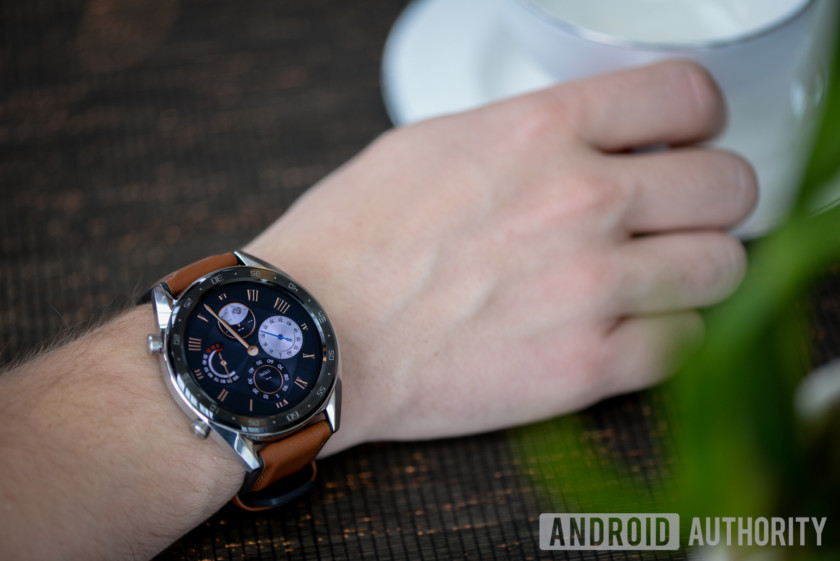
The Huawei Watch GT is quite attractive, offering a classic and elegant design. The watch case is made of 316L stainless steel, with a ceramic bezel on the front and two sizable crowns on the side for interacting with the OS. The Watch GT is 10.6mm thick which made it feel very sleek and less bulky than something like Samsung’s Galaxy Watch. Its a 1.39-inch circular AMOLED display felt large enough for comfortable touchscreen interaction.
Related
Best GPS running watches (August 2018)
There are plenty of great fitness trackers on the market right now, each of which cater to different users with different needs. Just need to keep an eye on your daily activity levels? Maybe the Fitbit …
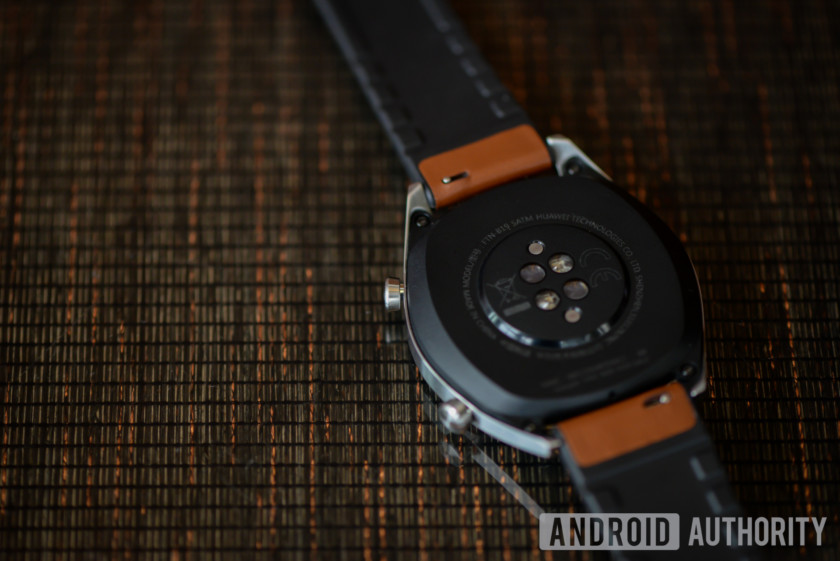
Other specifications for the watch include an altimeter, which is great for hiking, and a heart rate sensor on the back. The heart rate sensor uses what Huawei calls Truseen 3.0 heart rate monitoring, which employs six LEDs and self-learning algorithms for a more efficient and accurate real-time measurement. The watch will learn where it sits on your wrist to get a more accurate reading.
The processor inside uses a double chipset architecture, a low-speed chip for low power consumption and a high-speed chip for more powerful tasks. The AI on board will switch between the two cores depending on what tasks you’re doing to conserve battery or deliver more power. There’s a low consumption mode for sleeping or other sedentary activities, and a normal mode for activities like swimming, running, or hiking.
Right now, we’re not sure about Huawei Watch GT’s price or availability details, but we’ll update this article as we learn more. We hope Huawei will price this watch competitively, but devices like the Apple Watch and Galaxy Watch cost a pretty penny. Expect to pay a few hundred dollars.
Huawei Band 3 Pro



Huawei also took the wraps off a new fitness tracker called the Huawei Band 3 Pro. This multi-sport fitness tracker will last up to 20 days on a single charge, or a full month in standby mode. It’s built with runners, swimmers, and cyclists in mind, and the internal specs and features reflect that. The Band 3 Pro comes with a built-in GPS, multiple swimming modes, and personalized exercise tracking and training modes.
We don’t have price or availability details for the Huawei Band 3 Pro either, but Huawei has traditionally priced its fitness trackers very aggressively. Last year’s Band 2 cost only $70.
Be sure to check out all of Huawei’s other new products at the links below:
- Huawei Mate 20 and Mate 20 Pro announced
- Huawei Mate 20 specs
- Huawei Mate 20 and Mate 20 Pro hands-on
- Top Huawei Mate 20 and Mate 20 Pro features

