


Apple Updates GarageBand, iMovie, and iWork Apps for Mac and iOS
Apple today updated its GarageBand app for iOS devices to version 2.3.7, adding support for keyboard commands when using a Smart Keyboard such as the new Smart Keyboard Folio for the 11 and 12.9-inch iPad Pro models or a Bluetooth keyboard.
The update adds the Wah stompbox pedal and Face Control to the Smart Guitar tool, and Apple says it includes stability improvements and bug fixes.
Apple also updated its suite of iWork apps for iOS and Mac devices, which includes Keynote, Numbers, and Pages. According to the release notes, the update includes performance and stability improvements, which could also include display optimizations for the new iPad Pro models.
The new version of Pages on both Mac and iOS adds support for publishing books directly to Apple Books for download or purchase.
iMovie for iOS gains support for external displays when connected to the new 2018 11 and 12.9-inch iPad Pro models, and it offers several bug fixes.
– Connect an external display to your iPad or iPhone and choose to mirror the iPad display or preview your video fullscreen while you edit — with support for uncompressed 4K video output on iPad Pro 11-inch or iPad Pro 12.9-inch (3rd generation)
– Resolves issues which could cause video distortion when editing a vertical video clip with the iMovie edit extension in the Photos app
– Addresses an issue which could prevent sharing videos through a cellular connection on iPhone or iPad
– Improves stability including an issue which could occur after adding speed change effects to clips in your movie
iMovie for Mac is the final Apple app updated today, with Apple removing the option to share files directly to Facebook. The update also adds a new “Prepare for Facebook” option as a replacement that is designed to export a Facebook-compatible video file to your Mac that can then be manually added to the Facebook website.
GarageBand, iMovie, and the iWork apps can be downloaded from the App Store and Mac App Store at no cost.
– GarageBand for iOS [Direct Link]
– iMovie for iOS [Direct Link]
– iMovie for Mac [Direct Link]
– Pages for iOS [Direct Link]
– Keynote for iOS [Direct Link]
– Numbers for iOS [Direct Link]
– Pages for macOS [Direct Link]
– Keynote for macOS [Direct Link]
– Numbers for macOS [Direct Link]
Discuss this article in our forums
GigSky Announces eSIM Support for iPhone XS, XS Max, and XR
GigSky, a company that offers pay-as-you-go cellular data plans in more than 190 countries around the world, today announced that it now supports the eSIM in the iPhone XS, XS Max, and XR.
eSIM-based GigSky data plans are available on Apple’s new devices through the latest version of the GigSky World Mobile Data app, which was updated today.
Adding a GigSky data plan when traveling can be done by downloading the app on an iPhone XR, XS Max, or XS running iOS 12.1 or later. GigSky says that built-in data connectivity will activate the eSIM with a cellular data only plan with no need to acquire a GigSky physical SIM card.
GigSky offers data bundles from 300MB to 5GB, which span from one day to 30 days. Pricing in select regions in North America, Europe, Asia Pacific, Africa, Latin America, and the Caribbean starts at $10 for 300MB of data. For other countries not included in these regional plans, pricing and data caps vary.
GigSky is one of the only ways for iPhone XR, XS, and XS Max customers to use the eSIM on the new iPhones at the current time.
Apple implemented eSIM support in the recent iOS 12.1 update, but no U.S. carriers support it at this time. Verizon, AT&T, and T-Mobile are working to implement support later this year.
In other countries, eSIM functionality is available from various carriers, with Apple providing a list of all the carriers around the world that support the eSIM at the current time.
Tags: GigSky, eSIM
Discuss this article in our forums
First Impressions From New 2018 iPad Pro Owners
We’ve already seen iPad Pro reviews from media sites that Apple invited to test the tablet ahead of its release, but now that the iPad Pro has officially launched, first impressions from regular Apple customers are now available.
New iPad Pro owners on Reddit, Twitter, and the MacRumors forums have been sharing their opinions on the device, and for those considering a purchase, opinions from average consumers provide useful insight.
MacRumors reader TrueBlou shared some images of the old 12.9-inch iPad Pro next to the sleeker, slimmer 2018 12.9-inch version, providing a look at just how much smaller the new model is. He says the difference is an “incredible improvement.”

It’s an incredible improvement, I really cannot overstate just how much of a difference it is. It’s one of my favourite things about the new iPad.
It’s not just that it’s smaller, lighter and thinner – which of course it is. But the combination of all of those things also changes its centre of gravity a little and it’s really noticeable.
Reddit user SlightCriticism offered up a look at the 10.5-inch iPad Pro on top of the new 12.9-inch model, which gives a good idea of how much bigger the 12.9-inch model is.
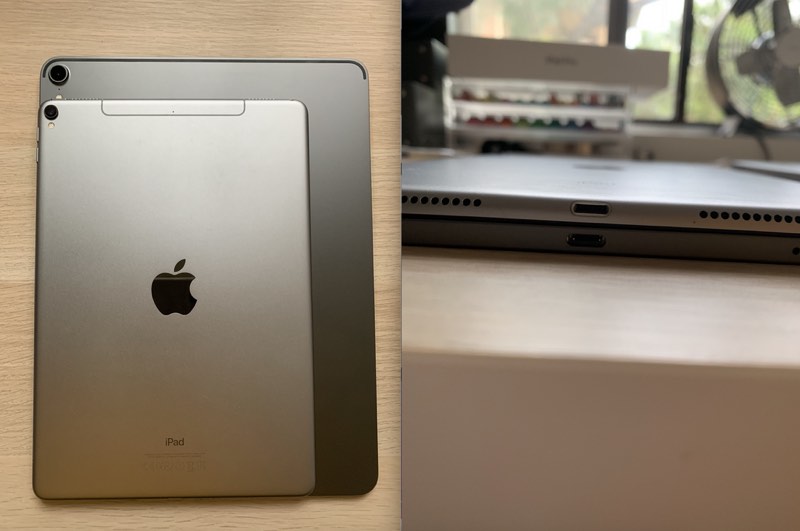
He says he’s ultimately going to swap the 12.9-inch model for the 11-inch because the 12.9-inch model is still too heavy for one-handed use.
I had a first gen 12.9 which was too big and sprung for the 10.5 when it came out last year. I found the original 12.9 to be too difficult to hold on the train etc but the 10.5 has been the perfect companion. I did miss the extra screen space, but its size was harming my productivity and I decided I valued that more. I really thought the size decrease of this gen was going to be the perfect solution for me, and my first impressions were positive, but after using it for a while I’ve found it still a bit too heavy for prolonged one-handed use. Of course this isn’t the case for everyone and I’m sure a lot of people will find it a terrific size.
MacRumors reader ryuok pointed out that because the new 11-inch iPad is using a different aspect ratio, apps that are not updated have black bars on both sides. Apps will get updates eventually, but it’s something to be aware of.
 A 12.9-inch iPad Pro with black bars via MacRumors reader jun180
There are two kinds of black bars:
1) Rounded corner black bars: This is similar to the iPhone X situation, before apps are updated to accommodate the extra spaces extended by the rounded corners. This affects both the 11″ model and 12.9″ model.
2) Aspect ratio black bars: This only happens on 11″, and it is far worse and far more notifiable than the “Rounded corner black bars”. If an app is not coded to dynamically adapt to aspect ratio, you’ll see horrifyingly large black bars especially in landscape mode. It’s almost like seeing an iPad mini sized app, inside an 11″ screen. Populars apps such as Facebook and Netflix are affected by this.
Reddit user atru22 said the new Smart Keyboard Folio takes some getting used to, but he likes it a lot more than the previous-generation keyboard. He also says the 12.9-inch model feels surprisingly small.
 Image via Reddit user atru22
On the topic of the Apple Pencil, Reddit user essjay2009 said that the Pencil feels quite different in the hand and that there’s more friction when using it. Charging and pairing is much improved, of course, since it just needs a magnetic attachment to the iPad Pro.
I will say that the pencil feels very different in the hand. It’s a little shorter but that makes a huge difference. I always thought the gen 1 felt a little ridiculously large (length wise). This feels more like a normal pencil. The double tap feature is really nice and far more forgiving than I was expecting. I thought you’d have to tap specifically on a certain spot, but it seems to just pick up double taps pretty much anywhere reasonable.
Pairing and charging is soo much better. And that’s coming from someone who didn’t have any particular issue with the way the old one charged.
Reddit user dvegi also thought there’s much better drag with the Apple Pencil 2 and the iPad Pro’s new display.
So, just wanted to let you guys know that there is a much better drag with the Apple Pencil 2 and the iPad Pro, than before (a lot of people didn’t like how the pencil felt on glass so resorted to getting a matte screen protector— but no need with the new iPad Pro!)
Reddit user GottaDeal confirms that the new 11-inch iPad Pro on-screen keyboard has a 12.9-inch keyboard layout thanks to the extra room from the removal of the bezels. It offers up tab, caps lock, and left side shift keys, unlike the 10.5-inch iPad Pro.

MacRumors reader ninethirty wasn’t a fan of the Smart Keyboard Folio, calling it a “design nightmare.”
Got my 12.9 today. The iPad itself is absolutely beautiful, but the design of the smart folio keyboard is awful. It doesn’t fold around as easily as the previous keyboard, it makes everything a lot thicker, and quite frankly, the materials of the folio itself feel cheap, which is a shame. But worst of all, when you fold the folio to the back of the ipad, to hold and watch a video or something, the keys are exposed on the back.
MacRumors reader largefarrva disagreed, though, saying that he likes it a lot and is impressed with the key feel.
I actually like it quite a bit. I was a bit worried that the keyboard would feel like the butterfly keyboards of the MacBooks nowadays but it doesn’t at all. Hell, if the MacBooks had keys that felt like this they wouldn’t be nearly as bad. Granted it is very little travel in a keystroke, but the feedback is a ton times better than the MacBook keyboards.
Have a new 2018 iPad Pro? Share your first impressions and photos in the comments below. We’ll have an unboxing video and our own hands-on later today, so make sure to stay tuned to MacRumors for more iPad Pro coverage.
Related Roundup: iPad ProBuyer’s Guide: 11″ iPad Pro (Buy Now), 12.9″ iPad Pro (Buy Now)
Discuss this article in our forums
Apple Seeds First Beta of watchOS 5.1.2 to Developers
Apple today seeded the first beta of an upcoming watchOS 5.1.2 update to developers, two days after releasing watchOS 5.1.1, an updated version of watchOS 5.1 that addressed a bug causing some Apple Watch Series 4 models to be bricked after installing the software.
Once the proper configuration profile has been installed from the Apple Developer Center, the new watchOS beta can be downloaded through the dedicated Apple Watch app on the iPhone by going to General –> Software update.
To install the update, the Apple Watch needs to have at least 50 percent battery, it must be placed on the charger, and it has to be in range of the iPhone.
It’s not yet clear what features will be introduced in the watchOS 5.1.2 update, but as a 5.1.x update, it’s likely to be minor in scale, addressing bug fixes and making other small improvements to the operating system. We’ll update this post if we find anything new in the watchOS 5.1.2 beta.
watchOS 5.1 and watchOS 5.1.1, the current release version of watchOS, introduced support for Group FaceTime in an audio-only capacity, brought new emoji characters, and included a new full-screen “Color” watch face option for the Apple Watch Series 4 models.
Related Roundups: Apple Watch, watchOS 5Buyer’s Guide: Apple Watch (Buy Now)
Discuss this article in our forums
Apple Seeds Second Beta of tvOS 12.1.1 to Developers
Apple today seeded the second beta of an upcoming tvOS 12.1.1 update to developers for testing purposes, one week after releasing the first tvOS 12.1.1 beta and a little over a week after releasing tvOS 12.1.
The new tvOS 12.1.1 developer beta can be downloaded onto the Apple TV via a profile that’s installed using Xcode. Subsequent betas can be downloaded over-the-air.
We’re not yet sure what fixes and changes the tvOS 12.1.1 update might bring, but it’s likely to focus on bugs that were not able to be addressed in the tvOS 12.1 update.
Apple provides little information on its tvOS software and tvOS updates have historically been minor in scale, so we may not know what’s included in this update. Nothing new was discovered in the first beta, but we’ll update this post if any new features are found in the second.
Related Roundups: Apple TV, tvOS 12Buyer’s Guide: Apple TV (Caution)
Discuss this article in our forums
Apple Seeds Second Beta of iOS 12.1.1 to Developers
Apple today seeded the second beta of an upcoming iOS 12.1.1 update to developers, one week after seeding the first beta and a little over a week after the release of iOS 12.1, a major update that brought multiple new features to iOS.
Registered developers can download the new iOS 12.1.1 beta from Apple’s Developer Center or over-the-air once the proper configuration profile has been installed from the Developer Center.
The iOS 12.1.1 update reintroduces the feature that lets you take a Live Photo while on a FaceTime call, and it brings improvements for the FaceTime user interface.
Following the update, FaceTime features a reworked bottom bar that includes quick access buttons for muting a call and flipping the camera. Sliding up on the bottom bar brings up additional options with conversation participants. Previously, FaceTime users were required to tap on three dots to access a secondary menu with these features.
iOS 12.1.1 also adds a new option in Apple News to hide the side bar on the iPad when using the app in landscape mode, it introduces an option to turn off the physical SIM in the device in favor of the eSIM, and it tweaks the icon of the Apple Watch app so it looks like the Apple Watch Series 4.
Related Roundup: iOS 12
Discuss this article in our forums
 AIVAnet