


Apple Watch Heart Study Involved 400,000 Participants
Stanford Medicine has published more details about the future of the Heart Study program it conducted in partnership with Apple, in which it attempted to reliably detect atrial fibrillation in Apple Watch wearers.
The condition, which is characterized by an irregular heartbeat, often remains hidden because many people don’t experience symptoms. Atrial fibrillation can increase the risk of stroke and heart failure.
According to Stanford, the study involved 400,000 participants, making it the the largest screening program for atrial fibrillation ever conducted. A paper has also been published in the American Heart Journal describing the unique design of the clinical trial.
Enrollment began in late 2017 and closed in August. Although some participants were informed in September that their participation in the study was complete, Stanford says it will continue to collect and collate data until early next year, which is consistent with Apple’s original announcement.
“We hope this study will help us better understand how wearable technologies can inform precision health,” said Lloyd Minor, MD, dean of the School of Medicine. “These new tools, which have the potential to predict, prevent and manage disease, are finally within our reach.”
The FDA cleared two Apple Watch medical apps in September. One app uses data from the Apple Watch Series 4 to take an ECG by touching the button on the side of the device. The second app uses data from an optical sensor available on the Apple Watch Series 1 and later to analyze pulse data and identify irregular heart rhythms indicating atrial fibrillation. The Apple-Stanford Heart Study used the second app.
Each year in the United States alone, atrial fibrillation results in 130,000 deaths and 750,000 hospitalizations, according to the Centers for Disease Control and Prevention. The CDC estimates that the condition affects between 2.7 million and 6.1 million people. In addition, another 700,000 people may have undiagnosed atrial fibrillation.
Tags: ResearchKit, Apple Heart Study
Discuss this article in our forums
Apple Maps Gains Indoor Maps at Over 20 Additional Shopping Malls and Airports Around the World
Apple Maps has added indoor maps at over 20 additional shopping malls and airports across the United States, Singapore, Hong Kong, and Denmark.
Newly supported locations:
- Lenox Square in the Atlanta, GA
- Phipps Plaza in the Atlanta, GA
- Perimeter Mall in Atlanta, GA
- Cumberland Mall in Atlanta, GA
- North Point Mall in Alpharetta, GA
- Mall of Georgia in Buford, GA
- The Shoppes at River Crossing in Macon, GA
- Oglethorpe Mall in Savannah, GA
- Peachtree Mall in Columbus, GA
- Mall St. Matthews in Louisville, KY
- Oxmoor Center in Louisville, KY
- Towne Mall in Elizabethtown, KY
- Florence Mall in Florence, KY
- Greenwood Mall in Bowling Green, KY
- Eaton Centre in Toronto, Canada
- Anchorpoint in Singapore
- Harbour City in Hong Kong
- IFC Mall in Hong Kong
- Pacific Place in Hong Kong
- Times Square in Hong Kong
- Sky Harbor International Airport in Phoenix, AZ
- Copenhagen Airport in Denmark
To view an indoor map, open the Apple Maps app on iOS 11 or later, search for a supported location, zoom in, and tap on “Look Inside.”
Indoor maps at shopping malls make it easier to find the exact location of stores, restaurants, and restrooms on each floor, in addition to guest services, parking, escalators, stairs, and so forth. Or, swipe up on the place card to browse by category, such as clothes, shoes, accessories, beauty, food, and drinks.
Likewise, at airports, Apple Maps users can zoom in to view terminals, boarding gates, security checkpoints, airline check-in desks, baggage claim carousels, information kiosks, restrooms, stores, restaurants, parking, and more.
When the feature launched with iOS 11, indoor maps were only available in a handful of airports and shopping malls around the world, but Apple has been steadily adding locations over the past year.
The list includes airports and shopping malls in major cities across North America and Europe, including Baltimore, Berlin, Boston, Chicago, Dallas, Houston, London, Los Angeles, New York, Philadelphia, Portland, San Jose, San Francisco, Seattle, Toronto, and Washington, DC. The full list can be viewed on Apple.com.
Tag: Apple Maps
Discuss this article in our forums
Comparison Drones: DJI Spark VS DJI Mavic
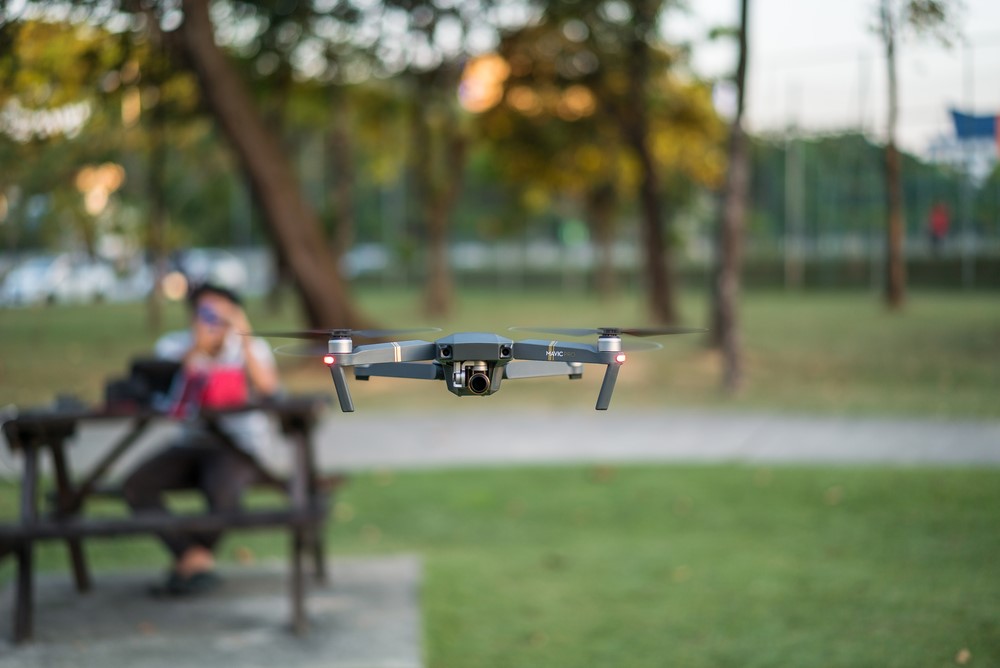
Drones have taken over the market and you might be thinking of buying one. There are so many choices in the market that anyone can become confused about what might be the best one for them. In case, you are confused between DJI Spark and DJI Mavic then, look here for Drone Comparison!
DJI is one of the renowned companies that most people go after when it comes to drones. It has built its image in the market for a while. Buy this company has launched many drones such as DJI Mavic, DJI Spark, DJI Phantom, DJI Inspire, and so on. It becomes really difficult to go with which one. Here, you will find a comparison between DJI Mavic and DJI Spark, two of the most popular drones of DJI.
DJI Mavic was launched in 2016, whereas DJI Spark in 2017. So, let’s get started with features of both these drones!
- Size

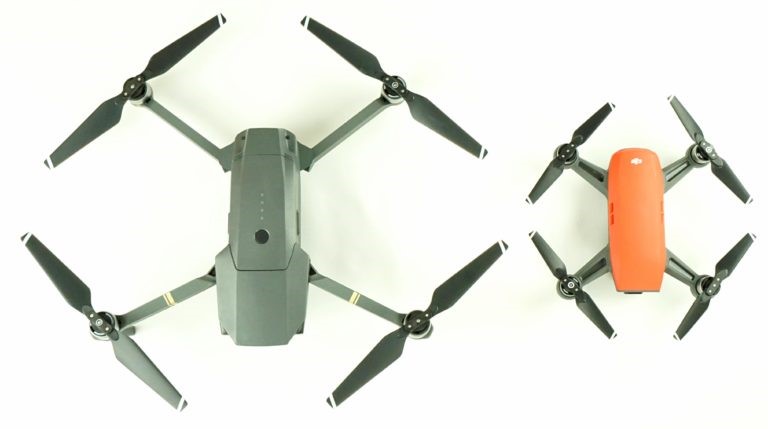
There are some differences between the two drones in terms of design. The biggest difference between Spark and Mavic is their portability and compact size. Mavic has folded arms that make it easier to carry, whereas Spark has rigid arms. On being folded, Mavic becomes much thinner and narrower than Spark.
On the other hand, Spark has a lighter weight as well as smaller size than Mavic. Spark is of 300 grams while Mavic has 430 grams of weight. So, Mavic comes handy when it comes to size and portability.
- Color
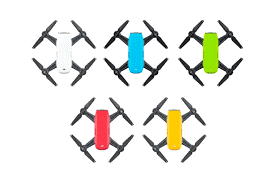
In terms of color, you get less choice with Mavic that offers colors such as Onyx Black, Flame Red, and Alpine White. With Spark, you get drones in colors like Lava Red, Sunrise Yellow, Meadow Green, Sky Blue, and Alpine White. However, color is not a much problem and you should look for other features while thinking of buying a drone for yourself.
- Performance

When compared in terms of performance, Mavic outperforms Spark. Spark offers a flight time of 16 minutes but Mavic goes up to an impressive time of 21 minutes. Mavic can be controlled remotely within a transmission range of 4km while Spark has a 2km transmission range. Mavic flies 5,000 meters above the sea level and Spark, as high as 4,000 meters.
In terms of speed, Mavic wins over Spark as it offers a speed up to 42mph in the mode “Sport”, which is 11mph greater than Spark’s maximum speed of 31mph. however, both these drones can stabilize themselves after flying up to 22mph in a bad weather.
- Camera

Both Mavic and Spark have excellent cameras but surely there’s a difference. Spark has a user-friendly as well as fixed focus camera just like Phantom drones but Mavic has massively improved optics. DJI Spark records video in full HD resolution while DJI Mavic records professional 4k resolution videos at 30 frames a second with a bitrate of 100Mbps up to a maximum. Mavic can also record slow-motion videos in 1080p at 120 frames a second.
In the case of still photography, both cameras offer the same results. Both the drones have ½.3” sensors and f/2.6 aperture lenses that can shoot up to 12Mp stills. However, DJI Mavic comes with an advanced mode for HDR. The three-axis gimbal of Mavic offers extra stability as compared to Spark. All this makes Mavic far more superior than Spark.
- Cost
At the end, you have to make a choice between the two drones keeping your pocket in mind. DJI Spark and DJI Mavic come at different prices. Spark comes at $499 with no additional batteries and no remote. If you want to go with DJI Spark then, it is best to go with Spark Fly-More package that comes with two additional batteries, remote, and a carrying case. This Spark Fly-More package will cost you $699.
DJI Mavic costs $999 while its premium version, Mavic Pro Platinum starts at $1099. It also comes with a Fly-More package at an extra of $300 with some additional batteries, remote, carrying case, propeller guards, and propellers.
However, the prices of these drones keep on changing. You can look for prices on various sites and make a good decision on your own.
After the comparison between Mavic and Spark, it would not be much difficult for you to make a decision. If you want an efficient drone then, you should opt for DJI Mavic as it offers way better features and specifications than Spark. It is a value for money product than DJI Spark.
However, you can go with any drone based on your requirements and needs as both these drones have made a quite popular place in the market. If you are looking something for professional use then, DJI Mavic is the right choice for you. You can even explore other products in the market for a better decision. Hope this Drone Comparison helped you!
Apple Removes 11 Mac App Store Categories From the Categories Tab
Apple has slashed the number of app categories listed in the Mac App Store’s Categories tab, an apparently intentional move that may irk Mac users and developers who rely on the tab to aid app discoverability.
The tab now lists just 10 categories, down from the 21 it had listed ever since the revamped Mac App Store debuted with the launch of macOS Mojave in September. The missing categories include Finance, Lifestyle, Sports, Weather, Medical, Travel, Education, Reference, Entertainment, Health & Fitness, and News. That leaves the following 10 categories that users can still browse individually:
- Business
- Developer Tools
- Games
- Graphics & Design
- Music
- Photography
- Productivity
- Social Networking
- Utilities
- Video
When a developer submits their app to Apple for inclusion on the Mac App Store, they can assign the app a primary category and a secondary category. The primary category is particularly important for discoverability, as this is the one in which the app appears when users browse the Mac App Store or filter search results. Up until yesterday, it also determined the app’s placement in the Categories tab.
@AppleSupport Mac App Store is no longer showing all categories, missing Finance, Medical and other categories. Reproducible on different Macs. pic.twitter.com/PUtN95GxdN
— Debit & Credit (@DebitCreditApp) November 1, 2018
OK, thanks. As it turns out, what you are noticing is expected behavior. We always appreciate hearing customer feedback. You can leave your thoughts here: https://t.co/eTPVYVFyd8
— Apple Support (@AppleSupport) November 1, 2018
It’s unclear at present why Apple has decided to hamstring the Categories tab, as the categories that are missing are still being used to classify apps in the Mac App Store, and Apple’s documentation for developers on choosing a category for their Mac app hasn’t changed. Currently, iPhone and iPad users remain able to browse all 21 categories individually in the iOS App Store app.
We’ve reached out to Apple for comment regarding the change to the Mac App Store and will update this article if we learn more.
Related Roundup: macOS MojaveTag: Mac App Store
Discuss this article in our forums
WhatsApp finally gives in to the lure of cash-generating ads
WhatsApp’s co-founders always promised to keep their app ad-free. But after they both quit, it seemed inevitable that its owner, Facebook, would find a way to incorporate ads as part of efforts to monetize the popular messaging service.
So it comes as no surprise to learn that WhatsApp is gearing up to put ads into its Status feature, the part of the app that lets you share text, photos, videos, and GIFs that disappear after 24 hours — yes, it is a lot like Stories on Snapchat and Instagram.
The news of WhatsApp’s upcoming effort to squeeze some cash out of the smartphone app comes courtesy of WhatsApp vice president Chris Daniels, who told the Economic Times this week: “We are going to be putting ads in ‘Status’.”
The executive added: “That is going to be [the] primary monetization mode for the company as well as an opportunity for businesses to reach people on WhatsApp.”
Daniels didn’t say when the ads will start appearing, but his revelation suggests work on incorporating them into WhatsApp is in the advanced stages of preparation and so they may show up soon.
Facebook acquired WhatsApp in 2014 for a colossal $19 billion. At the time the messaging app had 450 million monthly active users globally, and has since added another billion.
Co-founders Jan Koum and Brian Acton launched WhatsApp in 2004, with its only income generated by a $1 annual fee charged after a year’s use. That was dropped in 2016, making the app free for everyone. Even then, Koum and Acton promised that despite the move to ditch the fee, there would be “absolutely no ads” appearing in the app.
But then, amid reports of tension between WhatsApp’s co-founders and their bosses at Facebook about how to develop the app, Acton quit the company in 2017, with Koum following a few months later.
The pair’s departure opened the way for Facebook to proceed with various changes to WhatsApp, particularly regarding efforts to monetize it, and the incorporation of ads looks certain to be a lucrative move for the social networking giant.
How users will respond to what is essentially a broken promise remains to seen. With so many of them now long-time users of WhatsApp, it’s unlikely that any kind of mass exodus will occur, though Facebook will need to be careful with parameters such as ad frequency in order to limit any irritation among WhatsApp’s community of 1.5 billion people.
Editors’ Recommendations
- Some major Facebook investors want to oust Zuckerberg after scandals
- College students — Instagram is testing a new feature that’s just for you
- Apple acquires music-seeking app Shazam
- Instagram’s co-founders have resigned from the Facebook-owned company
- Spurred by a federal discrimination lawsuit, Facebook is cleaning up ads
Shazam hooks up with Instagram Stories for another way to share songs
Shazam
Shazam’s latest update for iDevices lets you add songs to Instagram Stories in a few taps.
Version 12.3 of Apple-owned Shazam landed this week, and the new feature is super-simple to use.
All you do is Shazam a song in the usual way to identify it, tap on the three dots to the right of the “buy” or “add to” button, and then on the share button at the bottom of the display. You’ll then see a list of options that should now include Instagram Stories. Select it and your Story will display the name of the track, the artist, and how many Shazams it’s received to date.
Any ‘grammers who view the Story can, if they’re not yet using the app, tap on the “more on Shazam” link to learn more about it.
Shazam names any song in seconds
Shazam enables users to identify songs in a matter of seconds simply by listening to it, and works anywhere with any audio source. Once the track has been identified, you get a ton of options about what to do next, such as open it in streaming services like Spotify or Apple Music, buy it on iTunes, or share it via your social media feeds.
The free app has been downloaded over a billion times globally, with people using it to identify music tracks more than 20 million times each day.
Apple completed its acquisition of Shazam in September, 2018, making it free of ads in the process. The Cupertino, California-based tech giant reportedly paid $400 million to close the deal.
“Apple and Shazam have a long history together,” Oliver Schusser, Apple’s vice president of Apple Music, said at the time, explaining that Shazam was one of the first apps available when it threw open the doors to its App Store 10 years ago.
London-based Shazam launched its music ID service in 2002, though it wasn’t until shortly after the arrival of the iPhone in 2007 that it really took off.
The latest update featuring support for Instagram Stories can be found via your smartphone’s app store app, or by hitting this iTunes link. There’s no word yet on the feature coming to Android.
Editors’ Recommendations
- Apple acquires music-seeking app Shazam
- Snap, then shop? Snapchat’s camera will soon buy stuff from Amazon
- Apple Music recommendations could get superpowers thanks to latest acquisition
- The best podcasts of 2018
- The best iOS 12 features
Your Google Home Hub won’t get hacked, but it may be rebooted

Users on the same local network can “talk” to a Google Home Hub using the same API that the Google Home app is using.
Hackers aren’t going to brick your new Google Home Hub, but Google does need to fix a few things when it comes to the smart display’s network security settings. Kind of.
It started when security advocate Jerry Gamblin did what a security advocate does and scanned his local network after he hooked up his Google Home Hub. He found which network ports were open and listening, and what they were probably configured to listen for.
I am not an IOT security expert, but I am pretty sure an unauthenticated curl statement should not be able to reboot the @madebygoogle home hub. pic.twitter.com/gCWFm5Ofyb
— Jerry Gamblin (@JGamblin) October 27, 2018
To most people, this doesn’t mean much, but to others, it shows that:
- The Google Home Hub is an advanced Chromecast (or dumbed-down Android TV device, take your pick) and not an Android Things device like the Lenovo Smart Display and other similar products.
- It’s probably “susceptible” to the same kinds of network commands that Chromecasts are, like this one that will force an OTA update if you would rather not wait in line.
We already knew that the Home Hub wasn’t running the same operating system as other smart displays, as Ars Technica reported. Now we know a little more about what operating system it is running, and how to “talk” to it and make it do things.
The Google Home Hub is really just a fancy Chromecast.
Imagine Android with the things needed to install and run normal Android apps (Dalvik and Bionic if you’re into this sort of thing) removed and a proprietary multicast DNS DIAL (the Discovery and Launch network protocol developed by Netflix and YouTube) style binary blob dropped in their place. If you knew how to communicate with that mDNS software, like say the Google Home app does, you could perform basic device functions using a command line network connection to those open ports Gamblin found.
Eureka! It turns out you can talk to that “secret” API that a Google Home Hub is using to communicate and all the things you can do are slowly but surely being documented.
This includes things like forcing a reboot or even a remote factory reset command. While not ideal, these won’t “brick” your Google Home Hub like we’ve seen being reported, but you could be forced to open the Google Home app on a phone and reconnect. It’s also important to remember that you need to be on the same local network as the Home Hub, so nobody can do any of this over the internet.
Google needs to lock things down so that only the Google Home app can “talk” to the Hub.
Google will have to find a way to clamp this down now that it’s moved away from “hacker” forums like XDA and into the mainstream. The Google Home app still needs to be able to do everything it can do now, but a way to authenticate itself with a Home Hub so another device on the network can’t connect needs to be implemented.
If you just want everything to work, you don’t have to be too alarmed unless you have someone connected to your Wi-Fi that likes to mess with things. If you are one of those people who like to mess with things, I’d recommend you get on it now before Google locks down remote access to the undocumented — and mistakenly open to the public — API.
Either way, the sky isn’t falling and your Home Hub is going to be just fine.
First 2018 MacBook Air Benchmark Shows Moderate Gains Over 2017 MacBook Air and MacBook
The first benchmark for the 2018 MacBook Air surfaced on Geekbench today, giving us our first look at how the low-power 7W Amber Lake Intel chip in the machine measures up to the performance of other Macs in Apple’s lineup.
Equipped with a 1.6GHz Intel Core i5-8210Y chip and 16GB of RAM, the benchmarked MacBook Air earned a single-core score of 4248 and a multi-core score of 7828.
As should be no surprise, it’s significantly better than the previous-generation MacBook Air equipped with a 1.8GHz Broadwell processor, which earned a single-core score of 3335 and a multi-core score of 6119.
It’s faster than the fastest Core M chip in the 2017 MacBook models, but not by much. The 1.4GHz MacBook earned a single-core score of 3925 and a multi-core score of 7567, while the base model with a 1.2GHz Core M chip earned a single-core score of 3527 and a multi-core score of 6654.
Compared to MacBook Pro models, it’s not too far off from the 2018 13-inch Touch Bar MacBook Pro with a 2.3GHz Intel Core i5 processor when it comes to single-core performance, but it can’t compete with the four cores in the 2018 MacBook Pro. That machine earned a single-core score of 4504 and a multi-core score of 16464.
It’s also slower than the 2017 13-inch MacBook Pro sans Touch Bar that Apple still sells, which earned a single-core score of 4314 and a multi-core score of 9071.
Single-Core Performance
- 2018 MacBook Air – 4248
- 2017 MacBook Air – 3335
- 1.4GHz 2017 MacBook – 3925
- 1.3GHz 2017 MacBook – 3630
- 1.2GHz 2017 MacBook – 3527
- 2.3GHz 2018 MacBook Pro – 4504
- 2.3GHz 2017 MacBook Pro – 4314
Multi-Core Performance
- 2018 MacBook Air – 7828
- 2017 MacBook Air – 6119
- 1.4GHz 2017 MacBook – 7567
- 1.3GHz 2017 MacBook – 6974
- 1.2GHz 2017 MacBook – 6654
- 2.3GHz 2018 MacBook Pro – 16464
- 2.3GHz 2017 MacBook Pro – 9071
Previous MacBook Air chips used 15W U-series chips from Intel, but the 2018 model is using a lower-power 7W Y-series chip, and there were some concerns about its performance relative to the rest of the Mac lineup.
Based on these Geekbench scores, which aren’t necessarily indicative of how these machines will perform in the real world, the MacBook Air is superior to the MacBook lineup at this time, but falls short of the base-level MacBook Pro, which is about right given its price point ($1,199 for the Air vs. $1,299 for the Pro). What the Mac lineup will look like if and when the 12-inch MacBook is refreshed remains to be seen.
Additional benchmarking results should be available soon, as the MacBook Air is set to arrive to the first customers on Wednesday, November 7, and MacBook Air reviews should come out before then.
Related Roundup: MacBook AirBuyer’s Guide: MacBook Air (Buy Now)
Discuss this article in our forums
Apple misses estimates for the iPhone, but still made more money than in 2017
Apple is having a pretty good quarter. The company has announced its fourth-quarter 2018 earnings, showing earnings that beat Wall Street estimates, thanks largely to the heightened average selling price of the iPhone.
While Apple sold about as many iPhones as it did in the fourth quarter of 2017, the iPhones it did sell were more expensive, basically meaning that the company made far more than it did with the same number of units last year. The average selling price of the iPhone came in at $793 — up 28 percent compared to 2017’s fourth quarter. The company sold 46.89 million iPhone units in the fourth quarter of the 2018 fiscal year, which didn’t quite hit the 47.5 million units expected.
Interestingly, Apple also announced that it would stop providing data related to the number of units it sold. That’s to say, it will no longer announce how many iPhones it has sold, though it will say how much it made from iPhones. It’s possible Apple has chosen to stop reporting on unit sales due to slowing sales in some market segments, though Apple argued that the decision was because earnings were more important than unit sales anyway.
The iPhone isn’t the only contributor to such high Apple earnings results. Alongside the new iPhone series, Apple also took the wraps off of the new Apple Watch Series 4, which has received excellent reviews since its release. Apple’s gadgets category, which includes AirPods and the Apple Watch, reached $4.23 billion in revenue, which is an increase of 31 percent over last year.
Services is another segment that Apple is doing well in. Services include things like Apple Pay, Apple Music, iCloud, and the App Store, and reached $9.98 billion, which is also up from last year, by 17 percent. Still, that’s not quite as high as what Wall Street estimated at $10.2 billion. Overall, Apple’s revenue hit $62.9 billion, more than the $61.57 billion forecast.
Despite excellent financial results, there is some cause for concern. The rising prices of Apple devices really just offset slowing sales — so while Apple may have made more money than previous years in many segments, it did not sell quite as many devices. Because of that, by the time of this writing Apple shares had fallen 4 percent.
It’s likely Apple’s first quarter of the 2019 fiscal year will be pretty stellar, too. The company recently took the wraps off of a new MacBook Air and Mac Mini, both of which were long overdue updates, and will likely perform well in the holiday season as the new iPhone and Apple Watch will likely do, too. Apple is expected to make between $89 and $93 billion during the holiday season, which is up from the $88.3 billion revenue for the first quarter of 2018.
Editors’ Recommendations
- Huawei overtakes Apple as the second-largest smartphone seller
- Apple iPhone XS: News, release, specs, and more
- Apple iPhone XS vs. iPhone XS Max vs. iPhone XR
- iPhone XS review
- How to buy the iPhone XS, iPhone XS Max, and iPhone XR in the U.K.
Apple misses estimates for the iPhone, but still made more money than in 2017
Apple is having a pretty good quarter. The company has announced its fourth-quarter 2018 earnings, showing earnings that beat Wall Street estimates, thanks largely to the heightened average selling price of the iPhone.
While Apple sold about as many iPhones as it did in the fourth quarter of 2017, the iPhones it did sell were more expensive, basically meaning that the company made far more than it did with the same number of units last year. The average selling price of the iPhone came in at $793 — up 28 percent compared to 2017’s fourth quarter. The company sold 46.89 million iPhone units in the fourth quarter of the 2018 fiscal year, which didn’t quite hit the 47.5 million units expected.
Interestingly, Apple also announced that it would stop providing data related to the number of units it sold. That’s to say, it will no longer announce how many iPhones it has sold, though it will say how much it made from iPhones. It’s possible Apple has chosen to stop reporting on unit sales due to slowing sales in some market segments, though Apple argued that the decision was because earnings were more important than unit sales anyway.
The iPhone isn’t the only contributor to such high Apple earnings results. Alongside the new iPhone series, Apple also took the wraps off of the new Apple Watch Series 4, which has received excellent reviews since its release. Apple’s gadgets category, which includes AirPods and the Apple Watch, reached $4.23 billion in revenue, which is an increase of 31 percent over last year.
Services is another segment that Apple is doing well in. Services include things like Apple Pay, Apple Music, iCloud, and the App Store, and reached $9.98 billion, which is also up from last year, by 17 percent. Still, that’s not quite as high as what Wall Street estimated at $10.2 billion. Overall, Apple’s revenue hit $62.9 billion, more than the $61.57 billion forecast.
Despite excellent financial results, there is some cause for concern. The rising prices of Apple devices really just offset slowing sales — so while Apple may have made more money than previous years in many segments, it did not sell quite as many devices. Because of that, by the time of this writing Apple shares had fallen 4 percent.
It’s likely Apple’s first quarter of the 2019 fiscal year will be pretty stellar, too. The company recently took the wraps off of a new MacBook Air and Mac Mini, both of which were long overdue updates, and will likely perform well in the holiday season as the new iPhone and Apple Watch will likely do, too. Apple is expected to make between $89 and $93 billion during the holiday season, which is up from the $88.3 billion revenue for the first quarter of 2018.
Editors’ Recommendations
- Huawei overtakes Apple as the second-largest smartphone seller
- Apple iPhone XS: News, release, specs, and more
- Apple iPhone XS vs. iPhone XS Max vs. iPhone XR
- iPhone XS review
- How to buy the iPhone XS, iPhone XS Max, and iPhone XR in the U.K.
 AIVAnet