


Google tried to kill ‘www,’ until Chrome users protested the change
Google has made it no secret that it wants to reinvent how you visit websites on your browser by eventually getting rid of web addresses altogether. With the launch of Chrome 69, Google stunned users last week with a surprising decision to no longer display the “www” and “m” part of the URL in the Chrome search bar, but user backlash forced Google to soften its stance. Google’s course reversal, although welcomed by users, is only short term, and the search giant said it will change course once again with the release of the Chrome 70 browser.
“In Chrome M69, we rolled out a change to hide special-case subdomains “www” and “m” in the Chrome omnibox,” Google Chromium product manager Emily Schecter wrote. “After receiving community feedback about these changes, we have decided to roll back these changes in M69 on Chrome for Desktop and Android. ”
Critics have argued that by not displaying the special-case subdomains, it was harder for users to identify sites as legitimate, and the move could lead to more scams on the internet. Others go as far as questioning Google’s motives for not displaying the “www” and “m” portion of a web address, and these users speculated that the move may be to disguise Google’s AMP — or Accelerated Mobile Pages — subdomain to make it indistinguishable for the actual domain.
“Please leave URLs as they are,” one user commented on Google’s feedback forum. “Not always example.com is equivalent to http://www.example.com, so leave the freedom to the user to see what they typed in the address bar.”
Other users were more direct in their criticism of Google’s proposed changes for Chrome 70.
“I remain firmly convinced that some solutions are worse than the problems they address, and that hiding bits of the URL is one of them,” another user commented. “As others have stated previously both here and in other discussions about this, it will not help users learn about URLs if browsers like [Chrome] simplify them to remove complexity at the expense of clarity. Feel free to dim the unimportant parts of the domain name, or make whatever visual tweaks you think will be helpful to emphasize the main component(s) that all users should be aware of, but do not hide anything.”
Before reversing the changes it made, users were able to reveal the full web address — including the www or m subdomains — by double-clicking on the address bar in Chrome 69.
Google plans to initiate public discussions over the proposed changes for Chrome 70, and according to Schecter, the company does not plan to force other browsers into standardizing in the way web URLs are displayed. With the launch of Chrome 70, Google plans on hiding the ‘www’ portion of a web address inside the search bar, but it will continue to display the ‘m’ subdomain. ” We are not going to elide ‘m’ in M70 because we found large sites that have a user-controlled ‘m’ subdomain,” she said. “There is more community consensus that sites should not allow the ‘www’ subdomain to be user controlled.”
Google also made headlines in recent weeks with its intentions on killing off URLs altogether in a bid to make the internet safer.
Editors’ Recommendations
- To make the web safer, Google says URLs must die
- Unlock Google’s cool new Material Design interface hidden inside Chrome 68
- Riddled with problems, Chrome 69 isn’t the celebration Google hoped for
- Chrome 69 arrives in September with Google’s Material Design overhaul intact
- Google completely revamps Chrome to celebrate browser’s 10th birthday
We’re going to the Red Planet! All the past, present, and future missions to Mars
NASA
SpaceX founder Elon Musk says travel to Mars is within reach, with a goal to have one million people living on Mars within 100 years. SpaceX isn’t alone in working toward reaching Mars, however. In fact, there are quite a number of missions, both manned and unmanned, that currently planned or under proposal from government space organizations and private space flight companies across the globe.
Exploration of Mars and eventual human travel to it are nothing new. While manned missions have remained financial and logistical near-impossibilities, unmanned missions began in 1960. There have been 56 Mars missions so far, of which 26 have been successful — a testament to the difficulty in reaching the Red Planet.
As it stands right now, there is one rover currently operational, with another enroute to arrive late this year (as of the writing of this story, Opportunity is stuck in a massive dust storm with low chances for survival). Orbiting Mars are six satellites, providing massive amounts of data on our dusty neighbor.
It doesn’t end there either. Many more missions are planned for the 2020, 2022, and 2024 launch windows, and there are proposals to put humans on Mars by the 2030s.
Operational and En Route Missions
This portion of the list includes the world’s most notable past missions, most of which are still in operation.
Mars Odyssey – 2001
NASA
Named after the iconic sci-fi novel and film 2001: A Space Odyssey, Mars Odyssey is a NASA orbital satellite that is currently about 2,400 miles above Mars’ surface. It launched on April 7, 2001, and holds the record as the longest-operating spacecraft orbiting Mars. Mars Odyssey’s mission was to find proof of past or present water on Mars, using spectrometers and a thermal imager to map out the distribution of water, which was successfully proven on July 21, 2008, by the Phoenix lander. Mars Odyssey also serves as a communications relay between Earth and Martian rovers, the Mars Science Lab, and the Phoenix lander. It is projected to remain in operation until 2025.
Mars Express – 2003
ESA
Mars Express was launched along with the Beagle 2 lander by European Space Agency on June 2, 2003. While Beagle 2 suffered a lander failure, Mars Express has remained in successful communication with Earth. Mars Express was launched with the intent of surveying Mars’ surface using high-resolution camera, radars, and spectrometers. Thus far, Mars Express has discovered water ice and carbon dioxide ice in Mars’ southern ice cap along with an area of liquid water underneath, and has provided better detail of the elemental and chemical makeup of the planet’s surface and atmosphere. The project has also resulting in a topographical map of Mars, high-res surface images, and flybys of Mars’ moon Phobos. This data has been incredibly valuable, and has earned the craft several end-date extensions. It’s currently scheduled to remain in operation until the end of 2026.
Mars Reconnaissance Orbiter – 2005
NASA
On August 12, 2005, NASA launched the Mars Reconnaissance Orbiter (MRO), which entered Mars’ orbit on March 10, 2006. The MRO has been observing the landscape, and has made numerous high-profile discoveries, including the recent observance of flowing salt water on the surface and subsurface of the planet. MRO was also used to find a landing zone for the Phoenix Lander, and also acts as a relay for communications between active rovers and Earth.
Curiosity Rover -2011
NASA
Like nearly all other unmanned craft listed here, NASA’s Curiosity was made to study the landscape and climate of Mars, comprising the rover portion of NASA’s Mars Science Laboratory (MSL). Specifically, Curiosity is looking for potential evidence of microbial life-sustaining conditions — either past or present — and assessing Mars’ habitability ahead of humans contact. It’s most notable discovery so far is the discovery of organic molecules on the planet’s surface in 2018. The rover is equipped with a vast array of instruments and cameras, and has been operational on Mars since 2012.
Mangalyaan (Mars Orbiter Mission) – 2013
The Indian Space Research Organization (ISRO) launched its first interplanetary mission on November 5, 2013. Dubbed “Mangalyaan,” the craft is an orbiter that has primarily been used as a proof of concept for ISRO’s interplanetary tech capabilities, testing various flight and communications systems, and providing telemetry data. Mangalyaan is also outfitted with a small suite of research instruments designed to capture atmospheric data. It is also the cheapest Mars mission to date, costing only $73 million USD.
MAVEN – 2013
The Mars Atmosphere and Volatile Evolution Mission (MAVEN) is currently searching for explanations for how and why Mars’ water and atmosphere have been slowly deteriorating and escaping. After entering orbit in 2014, it was quickly able to confirm that Mars’ atmosphere was escaping into space, and further observations found the planet’s magnetic field is more like a tail, disrupted by the solar wind. This could explain the Red Planet’s loss of atmosphere, but scientists are still investigating.
ExoMars Trace Gas Orbiter – 2016
Launched in 2016, ExoMars is the first in a series of joint Mars missions through a partnership between the European Space Agency and Roscosmos. The mission actually included two probes, the ExoMars Trace Gas Orbiter (TGO) and the Schiaparelli EDM Lander, however the lander crashed on the Mars surface after being delivered by the TGO. Researchers hope to gain a better understanding of methane and other trace gases present in the Martian atmosphere that could be evidence for possible biological activity.
InSight Lander – 2018
Launched in May 2018 and due to arrive at Mars in November, the InSight Lander, short for ‘Interior Exploration using Seismic Investigations, Geodesy and Heat Transport,’ aims to study the core of Mars and observe any possible seismic activity on the planet’s surface. It is hoped through the data collected will lead to better understanding of how rocky planets such as Earth, Mars, Venus, and Mercury are formed. The current plans are for a two month deployment phase upon landing, followed by nearly two years of observations as part of the initial mission.
Overclocking made simple: Nvidia RTX cards will perform task with a single click
If the idea of overclocking your graphics card is scary, intimidating, or just boring, but you want the improved performance anyway, Nvidia’s new RTX-series of graphics cards may be just what you’re looking for. The new cards will be supported by an application called Nvidia Scanner, which will automatically adjust clock speeds and voltages to get the absolute maximum performance from your card with just a single click.
Historically, graphics card overclocking has been more complicated than CPU overclocking. You needed specialist software or a modified BIOS — and even then it was rarely as easy as just upping the multiplier. Today, it’s much easier, with a number of software tools to make the process more layman-friendly (here’s how we do it), but testing for stability can still be a laborious process. Nvidia’s Scanner is designed to be the next step in that evolution, making it possible to overclock your new RTX GPU to the max, without risking crashes or overheating.
With increased power requirements over their last-generation predecessors, Nvidia’s Founders Edition RTX-series GPUs come equipped with dual-fan coolers for the first time. That extra cooling power means that they should have some extra thermal headroom, and Nvidia claims that it planned to leverage that all along with easy overclocking.
An early example of Nvidia Scanner at work in EVGA Precision X1 Nvidia
Nvidia Scanner is a big part of that, but it’s not an application — it’s an API that software partners like EVGA and MSI can utilize for their own overclocking tools. According to PC World, Nvidia Scanner is designed to speed up the often slow process of small speed increases in between stability tests. With the press of the Test button, the API will test your graphics card’s ability at different frequencies and voltages, all the way up to its practical maximum. When Scanner starts to detect low-level mathematical errors, it can shut the overclock down before a system crash occurs, making it much easier to avoid hard reboots and system crashes.
This automated overclocking is claimed to take around 20 minutes to complete, but once it’s there, you should have a pretty stable graphics card overclock that you can then fine-tune yourself if you want to push things further or tweak noise levels and power usage.
There are some drawbacks, namely the limitation to core clock increases and the Turing-series of RTX cards. Nvidia is looking to expand into older GPU generations in the future, and may make it possible to use Nvidia Scanner for automated memory overclocking at some point too.
Editors’ Recommendations
- Everything you need to know about the Nvidia GeForce RTX 2000 series
- Leaked benchmark shows the RTX 2080 outperforming the GTX 1080 Ti
- Nvidia GeForce RTX 2080 Mobile sighting hints at more powerful gaming laptops
- New 3DMark benchmark will support Nvidia’s RTX 20 Series possibly this October
- Nvidia’s GeForce RTX 2060 might launch next year without ray tracing
The 49-inch Samsung CHG90 QLED gaming monitor is absolutely massive
Calling Samsung’s CHG90 an ultrawide monitor feels like selling it short. This is an ultra-ultrawide. Featuring a 32:9 aspect ratio, the curved screen is designed to fill your entire field of view with its 3,840 x 1,080 resolution VA panel. It also supports great gaming features, making this not only a huge display for productivity purposes but a truly immersive gaming experience too. People might be wondering if you really need a 49-inch monitor — and, of course, you don’t. But as with all ultrawide monitors, loading up a game like Battlefield 1 and letting it suck you is an experience unlike any.
The CHG90 also has HDR — though it doesn’t meet the new accreditation standards. It also supports high refresh rates up to 144Hz for fast-paced gaming without ghosting or motion blur and a response time of just 1ms. Even if you do run into lower framerates on really intense games, support for AMD FreeSync 2 means that anyone also running an AMD graphics card will be able to effectively synchronize frame rates without using V-Sync.
For those who aren’t so interested in the gaming features, the CHG90 also has some nice professional features like strong color coverage of the Adobe RGB gamut at 92 percent, with NTSC 1976 at 88 percent. We haven’t fully tested it yet, but thanks to the addition of quantum dot technology, we expect whole visual experience with this display to really pop out of the screen with vibrant color.
Other useful features include Flicker Free and Eye Saver modes which should help avoid eye strain over long periods of usage.
The physical frame of the display is height adjustable and you can tilt and swivel it by a few degrees too, making it easy to find the right physical setting for you. You’ll want to be careful with the adjustments though, because, at 33 pounds, this is not a light monitor.
In terms of connectivity, the Samsung CHG90 comes with a pair of HDMI ports, one DisplayPort connector, a mini DisplayPort connector, a USB hub for updates and charging, and a 3.5mm headphone jack.
If you like what you see, the Samsung CHG90 QLED gaming monitor is available now starting at $1,100.
Editors’ Recommendations
- The best monitors of IFA 2018
- Samsung looks to woo gamers with Thunderbolt 3-equipped curved QLED monitor
- The best ultrawide monitors of 2018
- BenQ EX3501R ultrawide monitor review
- Samsung CF791 ultrawide curved gaming monitor review
This amazingly acrobatic winged robot moves just like a fruit fly
Humans may have to worry about robots taking their jobs, but you know who else should probably be watching their back? Fruit flies! At least, that’s if you’re going by a new robotic creation from researchers at Delft University of Technology in the Netherlands. They have built an awesomely agile, quad-wing flapping robot, which can exhibit the same kind of winged motion as its insect inspiration. It’s the latest robot in a series of so-called DelFly robots created by the researchers — but with one very important twist.
“Our previous DelFly robots had an airplane-like tail, which made it stable, and was used for steering,” Matěj Karásek, who led the work, told Digital Trends. “Fruit flies, but also other insects, have no such tail. Instead, they control their flight by adjustments of the motion patterns of [their] flapping wings. The DelFly Nimble does the same: It uses its flapping wings not only to produce lift force that keeps it flying, but also for control. The loss of tail makes it much more agile, like flying insects.”
DelFly’s four wings let it control three axes of flight. With them, it’s able to exhibit some dazzlingly fly-like moves — and even a full 360-degree flip. At present, it’s able to fly for only around five minutes, however. That limits its usefulness, but with the proper amendments, this could well change in the future.
Previous
Next
1 of 6


“Currently, the robot can already carry a small camera, sending live images to the operator, and can fly for more than a kilometer when fully charged,” Karásek continued. “We are already working on making the drone fully autonomous by adding a camera system as in our previous DelFly Explorer.”
Guido de Croon, another researcher on the project, said that the flapping wing propulsion the team has developed will make it possible to more easily miniaturize versatile flying robots in the future. De Croon imagines “swarms of these tiny, fully autonomous robots pollinating plants in greenhouses, or searching for survivors in collapsed buildings after earthquakes.”
That’s out of reach for now, but — even taken purely as a technical demonstration of the power of biomimicry — the latest DelFly is pretty impressive in its own right.
A paper describing the work was recently published in the journal Science.
Editors’ Recommendations
- Watch this Japanese ‘dragon’ drone slither through the air like a flying snake
- Spirit animals: 9 revolutionary robots inspired by real-world creatures
- Strawberry-picking robots could replace human workers in the field
- Harvard’s latest robot can walk on water. Your move, Jesus
- The best drones under $500
It’s not really a ‘budget’ phone, but the iPhone XR is still a great value
Julian Chokkattu/Digital Trends
Let’s be completely honest — I’m a broke millennial, and don’t have disposable income to splurge on expensive smartphones. But when Apple announced pricing for its new iPhone XS and XS Max, which both broke the $1,000 mark, I didn’t think much of it. Carrier payment plans tend to make every smartphone look less expensive, but then I did the math.
The $750 price tag on the iPhone XR has other tech journalists referring to it as the “budget” option of the new iPhone X lineup, which could easily be misconstrued as translating to mediocre features. In reality, the XR offers a beautiful design, top-tier specs, and most importantly — isn’t all that different from its expensive companions. It’s also the iPhone I’m probably going to buy, and I’m not mad about it.
Following last year’s Apple event in September, I preached that customers should splurge for the $1,000 iPhone X because the iPhone 8 and 8 Plus brought nothing new to the table. Apple simply recycled its old, outdated design to produce an iPhone with the exact same look and feel as its predecessors, aside from the new A11 processor. If you truly wanted something new, then the iPhone X would bring you that, making the price worth it.
Just because the iPhone XR is the cheaper option, doesn’t mean it’s a budget phone.
But the iPhone X was simply the forerunner for what we should expect from Apple for the next several years. Long gone are the days of the home button, thick bezels, and an easily identifiable iPhone. The X brought along a ton of new features that distinguished it from previous iPhones — a notch, TrueDepth camera technology, and edge-to-edge display, to name a few. It made sense to splurge a little, because you were getting an entirely new product that’s different from anything Apple has ever made. But this time around, we’ve been provided with three new versions of that design, which means you’re allowed to be picky about what you choose.
Just because the iPhone XR is the cheaper option, doesn’t mean it’s a budget phone. A true “budget” phone brings low-level specs and major compromises. More often than not, it also looks and feels cheap. At first glance, the only thing that distinguishes the iPhone XR from the iPhone XS is that it has a single lens instead of a dual lens camera.
Julian Chokkattu/Digital Trends
Let’s talk about that camera for a moment. Sure, two lenses are better than one but the camera on the XR is still powerful. At the same 12-megapixels as the iPhone XS and XS Max, it not only has a new sensor since last year’s iPhones but also includes Portrait Mode (thanks to machine learning) and Smart HDR. While the quality of my portraits might not be as strong as it would be with a dual-camera system, it’ll get the job done. I’m also not buying an iPhone specifically for its camera and if I was, I’d probably go with an Android instead.
With a 7-megapixel TrueDepth front camera, you can also take Portrait Mode selfies, use Face ID to unlock your iPhone, and create Animojis with iOS 12 — all of which are also on the iPhone XS and XS Max. The TrueDepth technology was a huge deal on the iPhone X, giving it the ability to do more than any other iPhone ever made. But with no home button, Apple had no choice but to give its cheaper iPhone variant the same complex, sensor-packed, front-facing camera module as its more expensive siblings.
The iPhone XR also has a bigger display than the iPhone XS.
The iPhone XR also has a bigger display than the iPhone XS, coming in at 6.1-inches in comparison to the 5.8-inch on the XS. While it doesn’t have the Super Retina OLED display, it features Apple’s new Liquid Retina HD Display which, as covered in the hands-on by our mobile editor, looks sharp and well saturated. Just by looking at the photos, it’s easy to tell the colors pop.
One other factor of the iPhone XR that might automatically label it as a “budget” phone is the array of colors it comes in. The last iPhone to have the same bright color options was the iPhone 5C, which could be considered as Apple’s true budget phone. Released in 2013, it cost $550 and featured an A6 chip that was released a year prior, an 8-megapixel rear-camera, and a 1.2-megapixel front-facing camera. Not only has it been discontinued, but it also ended operating system updates with iOS 11. The XR is a very different proposition.
Under the hood of the iPhone XR is Apple’s new A12 Bionic chip, that also powers the iPhone XS and XS Max. With a “next-generation Neural Engine,” it not only includes 8 cores but can process 5 trillion operations per second. What that basically means is, the iPhone XR is as powerful as Apple’s iPhones currently get — all for a lot less than $1,000. What more can you ask for? It’s probably the most powerful $750 phone on the planet right now.
I held out on purchasing the iPhone X because I’m used to the large, physical size of the iPhone 7 Plus — knowing full well they’d most likely come out with an iPhone X Plus the following year. That’s why I first had my eye on the iPhone XS Max, but at $1,100, I think a slightly bigger display than what I’m used to will do just fine. With a $350 difference between the two phones, I’m willing to sacrifice the size. Even paying monthly, the 256GB iPhone XR will cost $47, while the XS is $56 and the XS Max is $60. There simply isn’t enough difference to justify that extra expense.
I think I’ll be just fine with my quirky-colored iPhone XR.
With carrier pricing now officially out for the iPhone XS and XS Max, monthly payments over the course of 18 to 24 months may look low but that’s only because both phones require large down payments — and not everyone has hundreds of dollars to shell out up front. If you want to take advantage of the carrier deals, almost all of them require adding a new line which a majority of customers don’t have use for.
With the new notch design also being the one Apple will most likely stick with for a while, you won’t need to buy a new iPhone for the next couple of years. Even though the iPhone XR is cheaper, its cutting-edge specs offer real longevity. This iPhone will be fast enough to handle anything you can throw it at for the next couple of years and probably beyond.
I don’t know about you, but I certainly don’t have $60 to spend on a phone every month, and that’s without counting the phone bill itself. Have I mentioned I’m a broke millennial? I think I’ll be just fine with my quirky-colored iPhone XR which everyone will probably mistake for an iPhone X or XS, anyways.
Editors’ Recommendations
- iPhone XS, iPhone XS Max, and iPhone XR: How to buy Apple’s new phones
- Apple iPhone XR: Everything you need to know
- You can’t buy the iPhone SE anymore, but Apple has cut prices for these iPhones
- Apple iPhone XS, XS Max, and XR: All the hands-on photos you could ever need
- iPhone XR hands-on review
The best gamepad for your Gear VR

We’re a virtual company made up of tech experts from across the globe. So we know that if you’re going to game on a Gear VR, you need a solid controller. We don’t make the rules.
You get a lot more out of your gaming experience in the Samsung Gear VR if you use a quality gamepad, and the best by far for this experience is the one made by SteelSeries. The Stratus XL is a console quality gamepad, but built to connect to mobile devices. It also looks pretty great, which doesn’t hurt.
Our Pick
SteelSeries Stratus XL

$44 from Amazon
If you want the best overall gamepad for your Gear VR, SteelSeries is where you want to be.
Why you should buy this gamepad
Instead of focusing on portability and pocketability like the other controllers in this product line, SteelSeries focused on comfort and capability which makes it an incredible choice for the Samsung Gear VR. It has all the quality of a major console controller, with great battery life and a $40 price tag to match.
Why the SteelSeries Stratus XL is the best
Everything you need in a gamepad you’ll be using without your eyes.
While the Samsung Gear VR comes with its own Controller now, there are plenty of VR games you play on this headset which require or are enhanced by a good ol’ fashioned gamepad. It’s just not as enjoyable to play Minecraft with a motion controller, which is why Samsung continues to support games and gamers who prefer this gameplay mechanic.
Three things matter most when it comes to a VR-friendly gamepad — comfort, battery life, and durability. SteelSeries has checked all three boxes with the Stratus XL. This is an Xbox-esque gamepad that looks and feels familiar with a button layout you will quickly become comfortable with despite not being able to look down at it while in VR. This gamepad will easily survive the occasional drop when you are spooked in VR thanks to its rugged plastic design, and the use of standard thumbsticks means the chances of breaking them on a drop is unlikely. On average this controller will get you through 30 hours of constant use, which means the only way you’re charging this controller once a week is if you are really and truly invested in VR Minecraft. If you do run out of power in the middle of a game, the use of a microUSB port means just about everything can charge this controller quickly.
Is it a good time to buy the SteelSeries Stratus XL?
Absolutely. This controller is fantastic, and has already been available for quite a while. This means it has already seen a couple of price drops, but isn’t ready to be replaced anytime soon.
Reasons to buy
- Solid, durable design
- Quick pairing, easy to use
- Great battery life
Reasons not to buy
- Joysticks are in the Xbox configuration
- Not ideal for smaller hands
Why this is the gamepad for you
Samsung and Oculus designed the Gear VR to be played while sitting down, just like a console. In face, it’s kind of like a console you wear on your face, if you think about it. That means a lot of your games are going to be best played while seated comfortably. Sitting comfortably and holding your hand to your temple to tap the buttons on the side of the headset don’t exactly go together well, which is why you can use a gamepad with almost everything.
If you’re going to use a gamepad while seated comfortably, it might as well be a gamepad of the same quality as what you’d find attached to an Xbox or PlayStation. SteelSeries offers exactly this with the Stratus XL, making it the best overall experience for playing with your Samsung Gear VR.
Alternatives to the SteelSeries Stratus XL
Not everyone wants to carry a heavy controller with them while travelling, and not everyone likes the Xbox layout for gamepads. For you, we have a few alternatives to offer.
Runner-up
Moga Hero Power

If you value portability above all, Moga Hero Power is what you want.
$28 from Amazon
Having an Xbox-style gamepad is great for familiarity, but the Gear VR is a portable virtual reality platform and it makes sense that you’d want the gamepad to be equally as portable. Moga’s Hero Power gamepad offers this exact experience, with buttons and joysticks nearly flush with the casing and shorter palm grips that flow in line with the rest of the body.
Value Pick
Beboncool controller

If you want a better Gear VR gameplay experience without spending a ton, Beboncool has you covered.
$26 from Amazon
It’s portable, it’s plasticky, and at $25 it’s way cheaper than most other Bluetooth gamepads that play nice with the Gear VR. The battery is rated for 12 hours of constant gameplay, but the auto-off feature ensures you’ll only be using power when you’re actually playing.
Credits — The team that worked on this guide

Russell Holly is a Contributing Editor at Android Central. He lives for the shiniest new thing, and loves explaining its potential to improve your life. Whatever you do, don’t tell his spouse about the drawer full of tech under the bed.
Updated September 2018: The SteelSeries Stratus XL is still the best Bluetooth gamepad for the Samsung Gear VR.
Best Backpacks for Transporting Your Drone
Anyone who’s ever crashed their brand new drone knows that they aren’t exactly built Ford Tough. Hell, even in simply transporting them, if you’re not careful, you can bust a blade, scratch them up, or worse. Grab one of these backpacks and keep your drone safe so that it can fly free (in one piece).
Amazon’s Choice
Lowepro DroneGuard BP 250

Lowepro’s drone backpack is the best option for anyone with a DJI Mavic Pro/Pro Platinum, and it can even fit a 15-inch laptop, as well as a 10-inch tablet. Basically, if you need to carry your drone and all the things, this is the backpack. Double-check sizing, as it may fit other drone brands.
$110 at Amazon
Trusted Brand
Manfrotto MB BP-D1
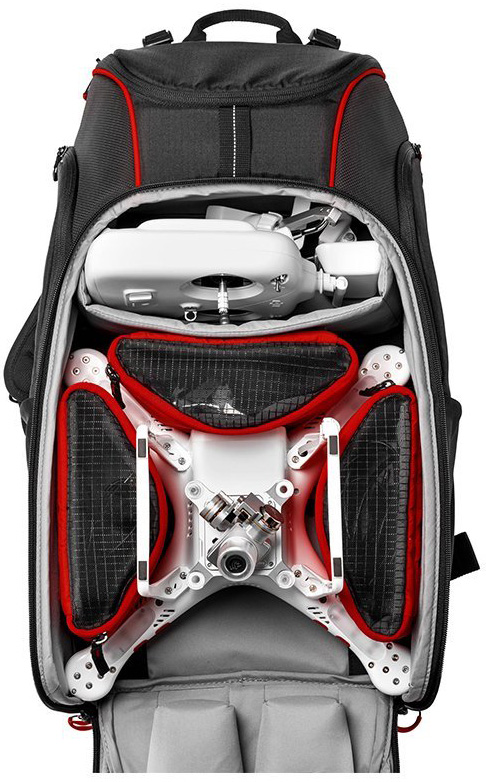
Manfrotto is the best when it comes to bags and cases for professional video and photography equipment, and since that now includes drones, the MB BP-D1 continues that tradition. This one’s designed to specifically fit the DJI Phantom in multiple configurations. Check sizing, since it may also fit other brands.
$138 at Amazon
Pockets for Days
Smatree Phantom 4 Backpack

This backpack is for the DJI Phantom 4/Phantom 4 Pro, and while it has a large main pocket for the Phantom in its original styrofoam case, it also has pockets and compartments for extra batteries, accessories, a tablet, propellers, and much more.
$50 at Amazon
Budget Pick
Powerextra waterproof carrying bag

This large backpack is for the DJI Phantom 3 series, but take a look at sizing and other drones may fit. It’s actually a big foam shell for your drone, rather than a traditional backpack, and it has extra room for more batteries and your controller.
$41 at Amazon
Upgrade Pick
Peak Design Everyday Backpack

Though it’s for much more than just a drone, the Peak Design Everyday Backpack might just be one of the best professional backpacks ever made. It has loads of room for a drone, laptop, tablet, whatever you need to get through the day. It comes in 20-liter and 30-liter options, so you can grab the size that suits your everyday carry.
$260 at Amazon
For Any Phantom
SSE drone backpack

SSE’s backpack can take any drone in the DJI Phantom line, and can likely carry other drone brands as well. This one can be carried as either a backpack or a shoulder bag, and it has enough room for a drone, a controller, three to five batteries, a battery charger, four pairs of propellers, and one laptop (up to 15 inches). It even includes a rain cover and a water bottle holder.
$50 at Amazon
Great mid-range option
HDStars quadcopter backpack

This backpack will fit all drones that measure up to 11.4 x 11.4 x 7.25. It has enough room for the drone, a controller, a phone adapter, two batteries, a charger, and then your memory cards and whatnot. The red and black color scheme is eye-catching, and the bag itself is well-made and sturdy.
$65 at Amazon
Extra Comfort
PolarPro DroneTrekker backpack
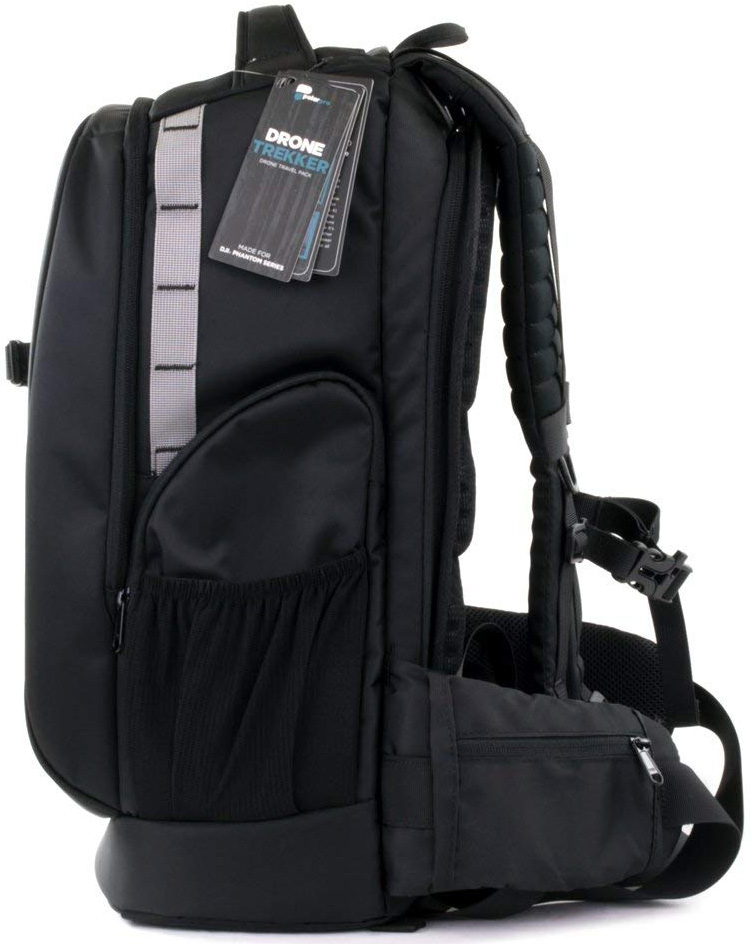
If you’re going to be hiking a good distance with your drone on your back, you might as well do so in comfort. The PolarPro DroneTrekker has extra padding in its straps and an ergonomic design that hugs your sides for extra stability. It also has tons of room for a drone, a laptop, batteries, a water bottle, and lots more. TSA-approved locks too!
$120 at Amazon
If you’ve spent a small fortune on a drone, then the best way to transport it is in a bag or case, and if you have to walk anywhere, one of these backpacks is perfect. For my money, the PolarPro DroneTrekker is a comfy option with enough room for everything you need without being overly bulky.
Routines are working again on third-party Google Assistant speakers

“OK Google, what the heck happened to my routines?”
Google Assistant has only had custom routines for a few months now, but it’s made quite the impression, especially with the scheduled routines option that rolled out the ability to schedule routines so that they activate on a specific Google Assistant speaker at specific days and times. Scheduled, custom routines make Google Assistant my favorite alarm clock, but there’s been a slight snag in using them the last two weeks.
They weren’t working on any Google Assistant speakers outside the Google Home line.
Updated September 14, 2018: Routines are working again; Continued Conversation is not
Voice-activated and scheduled routines have begun working on third-party Google Assistant-powered speakers again for many users who reported the original problem on the Google Assistant Help Community. As a note when testing scheduled Routines on both of my third-party speakers, the first scheduled routines I tested with both speakers failed but every scheduled routine since has been working properly. Continued Conversation is still broken on third-party speakers, but at least Routines are working again.
Insignia Voice users have been the most vocal about Routines being broken, both on /r/GoogleHome and on the Google Assistant Help Community, but users of other Google Assistant speakers including the Sony S50G, the TicHome Mini, and JBL Link speakers have reported Google Assistant Routines failing in the following ways:
- Scheduled routines stopped firing after weeks of consistent performance
- Custom routines that date back to the Shortcuts days were suddenly producing “I don’t know how to help with that yet”
- “Good morning” still seemed to work, but not “good night,” nor any of the other ready-made routines
Since Google Assistant doesn’t have a support line, only Google Home, users who contact Google through the Home app or Google Home website are being told to contact the manufacturers. That said, with the impacts being felt across most if not all third-party Google Assistant speakers, this seems to be a server-side issue on Google’s end. Some Google Home users have been seeing more sporadic issues with Routines the last two weeks, but none of the persistent failures that third-party Google Assistant speakers are seeing.

In my testing, routines are failing altogether on TicHome Mini and Insignia Voice while my Google Home is still executing scheduled and voice-activated routines. The Music action in And then play… for routines now seems locked to the primary music service, whereas before you could specify an alternate music service, but otherwise, Routines are working normally on Google Home.
Are ready-made or custom routines working on your Google Assistant speakers? Can you schedule custom routines and are they actually firing at the designated times? Let us know in the comments below!
Updated September 14, 2018: This post has been updated with the appearance of a fix for routines on third-party Google Assistant speakers.
Dyson cordless vacuums, USB-C hubs, more are discounted today
Whether you’re looking for new tech gear or household items, we’ve got you covered.
We found plenty of great deals today that include big discounts on Amazon’s Kindle Unlimited, Dyson’s Cyclone V10 Animal stick vacuum, the Kingston Nucleum USB-C hub, and more!
View the rest of the deals
If you want to know about the deals as soon as they are happening, you’ll want to follow Thrifter on Twitter, and sign up for the newsletter, because missing out on a great deal stinks!
 AIVAnet