


How to Use the New Augmented Reality Measure App in iOS 12
One of the new features in iOS 12 is an augmented reality app called Measure, which Apple has designed to make it easier for you to measure various real-world objects using 3D spatial detection techniques.
Open up the Measure app.
Follow the on-screen instructions and move your iPhone around the room so that it can get the dimensions of various objects. 
Once it’s calibrated, denoted by a white dot in a circle, you’re ready to start measuring.
To take a measurement, line the white dot up with the corner of an object and then press the “+ button to create an anchor point.
From the anchor point, pan the iPhone over to the other edge of the object. 
Press the “+” button again to get the final measurement of the line.
You can continue using this method to get the full dimensions of different objects in your room, with the ability to set multiple anchor points if desired.
Haptic feedback is included in the Measure app, so you’ll feel little haptic taps whenever you set an anchor point, for physical feedback. Haptic taps are also included whenever the app detects an obvious stopping point for a measurement, such as the end of a wall.
To clear your anchor points and start over at any time, tap the “Clear” button.

Once all of your measurements are in place, tap the white camera button to take a photo that displays all of the measurements overlaid on the object you’re measuring.

You can also tap on the arrow of one of the measurements to get a pop up with the current readings that you can copy and paste into another app like Messages or Notes.
Measurement Automatic Detection
For certain square-shaped objects that the Measure app detects, the detection of the dimensions will be automatic. To get an automatic measurement, choose a square or rectangular object and hold the iPhone in front of it.

If it’s going to take an automatic measurement, you’ll see a yellow square appear, which you can then tap to get dimensions. If it’s not going to do automatic detection, you’re going to need to use the tap method to draw individual lines.
Accuracy
The accuracy of the Measure app depends heavily on the precision of where the end points are placed, so there’s room for error.
It’s great for quick measurements to get an idea of size, but where precise measurements are required, it’s probably best to double check with a physical measuring method.
Level Feature
In iOS 12, the Measure app is also home to the Level feature that lets you use the iPhone to detect whether a surface is level. Prior to iOS 12, the Level feature was in the Compass app, so it’s not new, just relocated.

To use it, tap over to the level portion of the app, which is located at the bottom. Hold the iPhone in either portrait or landscape orientation with no case and balance it on an object such as a picture frame to get a reading.
If you tap the screen when using the level app, you can set a 0 degree reference angle to make measurements from, and laying the iPhone flat allows it to be used as a bubble level.
Related Roundup: iOS 12
Discuss this article in our forums
Giant wind farm in Morocco will help mine cryptocurrency, conserve energy
Soluna Technologies
Unlike traditional mining, cryptocurrency mining doesn’t involve digging huge pits in the ground to remove valuable minerals or other geological materials from the Earth. But that doesn’t mean there’s no environmental impact. Far from it, in fact. While there’s no definitive number that’s been agreed upon, the mining of cryptocurrencies such as Bitcoin consumes a considerable amount of energy — possibly even as much as a country the size of Ireland. Could a new sustainable approach help?
With such an eco-friendly goal in mind, the company Soluna Technologies has announced that it is currently developing a $2 billion, 900MW wind farm power plant in one of the windiest regions of Morocco to help power the blockchain in a more eco-friendly and sustainable way. The broad stretch of land will produce power for carrying out high-density computing tasks — including the aforementioned cryptocurrency mining, along with distributed graphics rendering, file storage, and machine learning computation. This has the potential to be one of the world’s largest off-grid cryptocurrency mining operations.
“Our flagship location in Dakhla, Morocco is better known as the ‘Kitesurfing Capital of the World,’” John Belizaire, CEO of Soluna, told Digital Trends. “Wind travels at over 23 miles per hour for most the year, making the region one of the best wind locations. Our site is very flat, with no sand dunes, and therefore not much in the way of dust or sandstorms. It is twice the size of Manhattan, or 37,000 acres, across sixty miles.”
According to Belizaire, Soluna aims to be the world’s first vertically-integrated blockchain computing company powered by its own green power. This will set it in stark contrast to cryptocurrency miners who have turned to inexpensive but environmentally damaging fossil fuels to power their coin-gathering ambitions.
“Our current plan is to start construction of phase one in early 2019 and complete in early-to-mid 2020,” he continued. “We have started soliciting bids from some of the best turbines makers. They are all excited by the prospects of this project.”
Will Soluna’s ambitions become a reality? We certainly hope so, especially since a demonstration of sustainable innovation in this area should lead others to follow the company’s example.
Editors’ Recommendations
- The browser-based Monero miner Coinhive generates around $250,000 each month
- Building a new home in the U.K.? You may have to install an EV charging station
- Nimble’s battery packs and wireless chargers are eco-friendly
- FormLabs Form 2 review
- The best road trip cars of 2018
Morocco set to host a giant wind farm that will help mine cryptocurrency
Soluna Technologies
Unlike traditional mining, cryptocurrency mining doesn’t involve digging huge pits in the ground to remove valuable minerals or other geological materials from the Earth. But that doesn’t mean there’s no environmental impact. Far from it, in fact. While there’s no definitive number that’s been agreed upon, the mining of cryptocurrencies such as Bitcoin consumes a considerable amount of energy — possibly even as much as a country the size of Ireland. Could a new sustainable approach help?
With such an eco-friendly goal in mind, the company Soluna Technologies has announced that it is currently developing a $2 billion, 900MW wind farm power plant in one of the windiest regions of Morocco to help power the blockchain in a more eco-friendly and sustainable way. The broad stretch of land will produce power for carrying out high-density computing tasks — including the aforementioned cryptocurrency mining, along with distributed graphics rendering, file storage, and machine learning computation. This has the potential to be one of the world’s largest off-grid cryptocurrency mining operations.
“Our flagship location in Dakhla, Morocco is better known as the ‘Kitesurfing Capital of the World,’” John Belizaire, CEO of Soluna, told Digital Trends. “Wind travels at over 23 miles per hour for most the year, making the region one of the best wind locations. Our site is very flat, with no sand dunes, and therefore not much in the way of dust or sandstorms. It is twice the size of Manhattan, or 37,000 acres, across sixty miles.”
According to Belizaire, Soluna aims to be the world’s first vertically-integrated blockchain computing company powered by its own green power. This will set it in stark contrast to cryptocurrency miners who have turned to inexpensive but environmentally damaging fossil fuels to power their coin-gathering ambitions.
“Our current plan is to start construction of phase one in early 2019 and complete in early-to-mid 2020,” he continued. “We have started soliciting bids from some of the best turbines makers. They are all excited by the prospects of this project.”
Will Soluna’s ambitions become a reality? We certainly hope so, especially since a demonstration of sustainable innovation in this area should lead others to follow the company’s example.
Editors’ Recommendations
- The browser-based Monero miner Coinhive generates around $250,000 each month
- Building a new home in the U.K.? You may have to install an EV charging station
- Nimble’s battery packs and wireless chargers are eco-friendly
- FormLabs Form 2 review
- The best road trip cars of 2018
Best Bose QC35 replacement earpads
The Bose QC35s are extremely comfortable to wear, and a large part of this is thanks to the excellent earpads that come installed out of the box. The leather material both looks and feels great, but as we all know, leather isn’t indestructible. Should you need to ever get replacement earpads, these are the ones we recommend buying!
Looks just like the original
Tranesca Replacement Ear Pads

Tranesca’s replacement earpads are made out of top quality protein leather combined with a high-density memory foam. In other words, your ears will continuously thank you for this purchase. You get a 3-month return window, 12-month exchange policy, and only need to spend around $14. Nice.
$13.95 at Amazon
Directly from Bose
Bose Ear Cushion Kit

If you’d prefer to not go with a third party and would rather get the real deal, you can purchase replacement earpads directly from Bose. You’re going to pay a premium at nearly $35, but you’ll be able to rest assured knowing you’ve got the best of the best. Plus, the 1-year limited warranty doesn’t hurt either.
$34.99 at Amazon
Cheap and easy to install
Aurivor Ear Pad Replacement

Another good option for buyers on a budget are the Aurivor replacement pads. Aurivor markets its memory foam as being not too hard and not too loose and has leather that’s imported from Japan. You get a 1-year replacement warranty and three styles to choose from.
$12.99 at Amazon
The most affordable option
Geekria Replacement Ear Pads

Our last pick comes from Geekria and it’s a really great option. Not only will you find memory foam and protein leather, but you’ve also got your choice of five styles — black, dark gray, gray, and two other black and gray ones that also come with covers. Prices start at a little over $11 and there’s a 100% money back fit guarantee.
$11.39 at Amazon
Keep your ears covered
Should your QC35s earpads ever fall apart or break down, you really can’t go wrong with any of the above replacement options. The official Bose earpads are the very best you can get, but if you don’t want to spend over $15, there are plenty of great options from Geekria, Aurivor, and Tranesca. What pair are you going to get?
Call the shots with V-Moda’s $20 BoomPro microphone
Practice your communication skills!
The V-Moda BoomPro microphone for gaming and communication is down to $19.99 on Amazon. This is the lowest price we’ve ever seen for a device that has never dropped below $25.

This is a professional-grade mic enhanced with voice clarity and background noise reduction. If you have a pair of headphones like the $63 Status Audio CB-1 that have a headphone jack but no mic, you can add V-Moda’s device to open up how you communicate. It is detachable and flexible for ideal positioning. It uses a durable, reinforced cable with 24K gold-plated plugs and a SteelFlex boom arm. You can mute and adjust the volume with the in-line controls. Plus, the mic is compatible with smartphones, tablets, laptops, gaming consoles, and anything else with a 3.5mm headphone jack.
See on Amazon
The year-old Google Pixel 2’s camera still beats the brand new iPhone XS

This year-old phone is beating Apple’s latest and greatest.
With staggered release cycles, companies get a short-term upper-hand when they launch a phone against months-old hardware and software from the competition. Right now, the brand new iPhone XS is out — and we’re still about a month away from the Google Pixel 3, so it’s being compared to the nearly year-old Google Pixel 2 instead.
Normally, you’d think that’d put the iPhone XS way ahead — and in many ways, it is, because that’s just how the tech industry works. But one place it seems Apple still hasn’t caught up to Google’s best tech from 2017 is the camera. With iPhone XS phones out in the wild now, a common refrain among reviewers and observers alike is that the Google Pixel 2 still takes consistently better-looking photos than Apple’s new latest $1000 flagship.
Indeed, in the first handful of camera comparisons we’ve done with the two phones (a Pixel 2 XL and iPhone XS Max, in particular), the Pixel continues to flex its software-driven camera capabilities even as Apple touted its new “SmartHDR” camera processing on the latest iPhone. Most of us know the Pixel 2 takes deep, colorful photos with a really good feel for the proper exposure, and you can see in these side-by-side shots the area where it still shines against the iPhone XS’ 12MP f/1.8 setup.


iPhone XS Max (left) / Google Pixel 2 XL (right) — click images to view larger.




Across the board the iPhone XS seems overexposed and soft compared to the deeper colors and sharpness of the Pixel 2. The dimly lit indoor hallway shot in particular shows how well Google manages to smooth details and nail the lighting.
The iPhone XS takes great photos — they just aren’t as great as the Pixel 2.
As is the case in so many camera comparisons, if you were to take the iPhone XS photos alone and analyze them you’d be perfectly happy with the results. They’re better than what the iPhone X was capable of, and probably better than most other phones out there. But it’s interesting to see them beaten by the nearly year-old competition from Google. Other publications and reviewers have observed the same: the Pixel 2 just takes better photos, whether you measure by subjective feelings or objective metrics.
That has me increasingly excited for the Google Pixel 3 and 3 XL, which we’ll see in a matter of weeks. We were rather skeptical of the Pixel 2 and 2 XL’s cameras as the start given their lackluster hardware, but Google blew us away — now with another year of hardware advancement and software improvement, it could widen the gap.
What are your thoughts on the differences between the Pixel 2 and iPhone XS cameras?
Google Pixel 2 and Pixel 2 XL
- Pixel 2 FAQ: Everything you need to know!
- Google Pixel 2 and 2 XL review: The new standard
- Google Pixel 2 specs
- Google Pixel 2 vs. Pixel 2 XL: What’s the difference?
- Join our Pixel 2 forums
Best Buy
Verizon
Google Store
Project Fi
Snag lifetime access to this MBA Bootcamp for just $29!
To succeed in the business world these days takes a lot more than a business school diploma. You need to be a personable boss with the right tools and skills to inspire and lead your employees.
Get this 8-course bundle for just $29! Learn more
If you’ve been looking to get the skills and strategies of a top MBA graduate but don’t have the time or money to invest in going back to school, Android Central Digital Offers has the right deal for you! For a limited time, you can get the Lifetime MBA Bootcamp bundle for just $29!

This eight-course bundle will help guide you with the knowledge and strategies required to be an effective business leader. Each course dives in on one particular topic with hours of content for you to absorb and is taught by a qualified instructor with decades of business and finance experience. The included courses are:
- Introduction To Leadership & Management
- Developing As A Leader & Manager
- Strategy & Business Models
- Communication Influence & Teams
- Finance For Non-Finance Professionals
- Business Writing
- Business Analysis
- Project Management
If you were to source out this educational content yourself you would end up spending over $1600 — or way more in tuition fees — but for a limited time you can snag this bundle for 98% off the regular price.
Don’t miss out on this great deal!
Store 256GB of important data with SanDisk’s $50 USB 3.1 Flash Drive
All the datas.
SanDisk’s 256GB Ultra Fit USB 3.1 Flash Drive is down to $49.99 on Amazon. Except for a very brief drop back in July, this is the lowest price we have ever seen on this drive. Since that July deal, the drive has been selling for around $60, but it was selling as high as $70 before that. This is the best value per GB of the Ultra Fit’s capacities, and the device’s USB 3.0 little brother doesn’t even have 256GB as an option.

This high-speed USB 3.1 flash drive features read speeds up to 130MB/s. You could transfer a full-length movie to it in less than 30 seconds. It’s compatible with laptops, car stereos, game consoles, and more. More than 560 users over at Amazon reviewed this flash drive with 4.1 out of 5 stars collectively.
See on Amazon
Spotify vs. Google Play Music: Which should you subscribe to?
Music subscriptions can help set the tone for your life: they can help keep your energy up and your fingers tapping out a rhythm. As such, I’ve taken a deep look at Google Play Music and Spotify to help you figure out which service is more deserving of your money and music.
Google Play Music
Our Pick
$10/mo at Google
Pros
- Best integration of purchased/uploaded music
- Stable, consistent performance with quick bug fixes
- Cache while streaming builds offline library effortlessly
Cons
- Uncertain future concerning YouTube Music migration
- Low device de-authorization limit
Google Play Music fits users with well-established personal music libraries and those with particular playlist tastes that can’t be satisfied by subscription music catalogs alone. For $2 more, you can also unlock premium features on YouTube and YouTube Music.
Spotify Premium
Algorithmic powerhouse

$10/mo at Spotify
Pros
- Top-notch subscription catalog
- Best-in-class playback handoff between devices
- Best streaming bundle for students
Cons
- 10,000 song library limit is easier to hit over time
- No cloud integration for purchased or uploaded music
- Inferior support experience, especially on Android
Spotify is for social listeners that don’t buy music and trust Spotify to serve up what’s popular or what the algorithms say they like. It’s great for users who just want a bit of music to fill their lives and tech fiends that switch devices too frequently for Google Play Music’s device limit policy.
Sound Quality and Device Limitations
Spotify Premium offers audio streaming qualities up to 320 kbps on “Extreme quality” and up to 256 kbps while playing on Chromecast. Google Play Music offers audio streaming qualities up to 320kbps on both subscription and uploaded music, though the quality of uploaded music is dependent on the quality of tracks uploaded.
| Wear OS app | ✔️ | ✔️ |
| Android TV app | ✔️ | ✔️ |
| Web client | ✔️ | ✔️ |
| Desktop client | Download/upload only | ✔️ |
| Chromecast compatibility | ✔️ | ✔️ |
| Google Assistant compatibility | ✔️ | ✔️ |
| Max audio quality | 320 kbps | 320 kbps |
| Offline limits | 10 devices | 5 devices 10,000 songs |
| Device limits | 10 devices | Only for offline (5 devices) |
Spotify lets you stream Spotify on as many devices as you like but you can only download music for offline playback on five devices, and up to 10,000 songs. Meanwhile, Google Play Music has a 10-device limit for authorizations with a four-device de-authorization limit per year, but on your 10 authorized devices, you can download as much music as can fit on your device’s storage.
Google Play Music has an app for Android TV, both Play Music and Spotify have apps for Android Wear, and both support Google Cast and Android Auto. Spotify uses Spotify Connect to connect to a wider variety of speakers and devices than just Google Cast, including Sonos and car systems.
Read more: What is Spotify Connect and why do I want it?
Library and Features
Both Google Play Music and Spotify have over 30 million songs available to their users to stream. Spotify doesn’t let you upload your own music library, and you can only add 10,000 songs from the streaming catalog to Your Library. Google Play Music lets you upload 50,000 personal songs to your Play Music library and stream them wherever for free, and you can add as many subscription songs and purchased songs to your library as you wish.
| Songs available | 35 million+ | 35 million+ |
| Library limit | Unlimited subscription music, 50,000 song uploads | 10K |
| Playlist size limits | 1,000 songs | 10K |
| Lyrics | Only accessible via Google Search | Genius Lyrics (display on device and Chromecast) |
| Gapless playback | ✔️ | Crossfade only (and not when casting) |
| App theming | White theme, hamburger menu | Dark theme, bottom tabs |
| Support Quality | Quick bug fixes, very responsive support staff, few new features | More new features, very slow to fix bugs on Android, less responsive support staff |
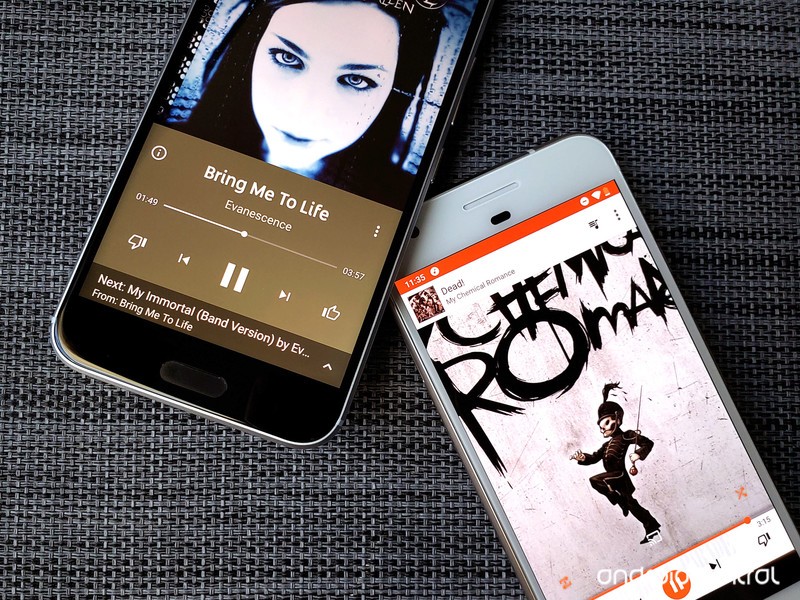
Spotify’s dark theme gives the app a cleaner, crisper look that’s far easier on the eyes during late night jam sessions, and its bottom tab layout is easier for jumping between sections of the app than Google Play Music’s hamburger drawer. Play Music’s Now Playing Queue lets you see ahead over a dozen songs on radio stations and you can swipe away songs you don’t like. Spotify doesn’t really show you what’s coming up on radio stations and queue management is ever so slightly insane.
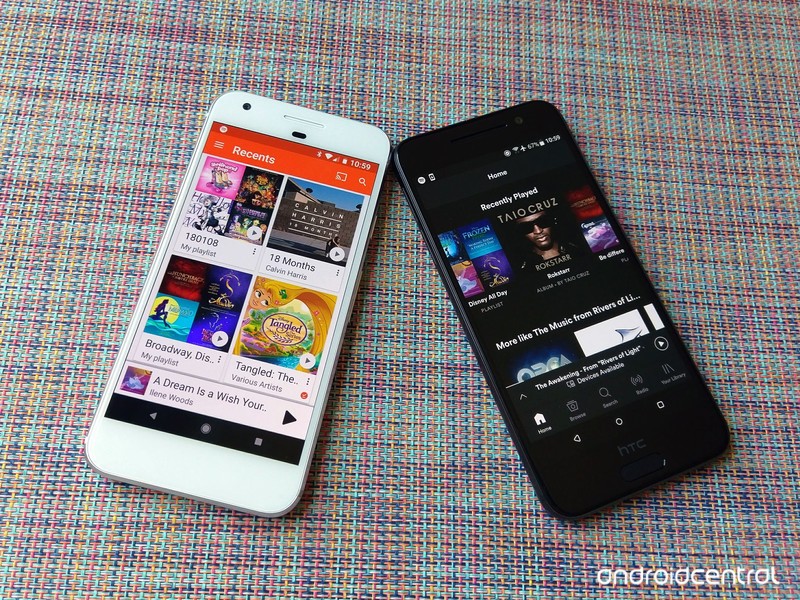
Spotify’s automatic stations and suggested songs seem to be slightly more accurate in their predictions than Google Play Music’s. Spotify also offers up Discover Weekly and Daily Mix playlists to help you keep your music fresh, which trounce Play Music’s Feeling Lucky radio station easily.
Considering how heavily we rely upon our music apps, it is worth mentioning that while Google Play Music is not receiving as many shiny new features as Spotify, bugs are fixed far, far faster on Google Play Music. Google Play Music also has instant chat support as well as over-the-phone support, whereas with Spotify, you can either tweet your problems to @SpotifyCares or using a standard contact form and hoping for a speedy email back.
Plans and Pricing
Spotify Premium for Family and Google Play Music’s family plan are both $14.99 a month and give up to 6 users their own premium subscription account. Everyone on a Spotify family plan has to live at the same address, and you can’t change addresses once it starts; if you move, you have either go to individual plans or delete your accounts and start over. Google Play Music’s family plan does not require everyone to live under the same roof, which Spotify Premium for Family not only requires, but enforces.
| Standard Price | $10/month | $10/month |
| Student Discount? | Nope | $5/month w/ Hulu |
| Family plan? | ❌ | $15/month |
| Music integration offerings | Upload 50K songs for free, Google Play music store integration | ❌ |
| Video bundle offerings | YouTube Premium ($12/month) | Hulu (Bundle is $13/month) |
| Available countries | 63 | 65 |
Spotify Student, which bundles Spotify Premium, Hulu (ad-supported), and SHOWTIME for $5/month is the best deal in media streaming, but if you’re not an American college student, the next best deal on the market is YouTube Premium. For $12/month for an individual — or $18/month for the family plan — you can unlock premium features in Google Play Music, YouTube, YouTube Music, YouTube Kids, YouTube Gaming, and YouTube VR.
Read more: YouTube Premium is Google’s bundle future
Buy-one-get-one music service: A word about YouTube Music
Google Play Music comes with premium access to the “brand-new” YouTube Music, and some YouTube executives keep slipping out bits and pieces about Google Play Music being replaced by YouTube Music. There are a few very important things to keep in mind:
- There’s a lot to like in YouTube Music, but it still very much a beta product with a whole lot of bugs and missing features that it needs to get in order before any migration could occur.
- If/when that migration occurs down the road, your library will migrate over at that time including your uploaded/purchased music locker.
- Google Play Music and YouTube Premium both come with YouTube Music Premium, so you can use both apps and take advantage of their individual strengths — YouTube Music’s unbeatable YouTube-powered selection and Google Play Music’s normalcy and stability.
What YouTube Music means for the future of Google Play Music
Google Play Music
Our Pick

It may not be the most popular, but this two-fer has the best features and value
- $12/month — YouTube Premium
- $10/month — Google Play Music
Google Play Music is the last of its kind on Android: a music service that allows you to integrate subscription music with a personal music locker of purchased and uploaded music. With YouTube Music making a splash, Google Play Music is a top-notch two-in-one service that’s well worth your time, money, and music. It’s also part of the best non-student streaming bundle around: YouTube Premium.
Spotify Premium
Algorithmic powerhouse
$10/month at Spotify
Magical mixtapes and student signups have made Spotify a juggernaut.
Spotify’s student bundle is the best in media streaming today, and it’s hard to break away from the siren song of Spotify’s shuffles once that discount ends. Between its many exclusives, famous algorithms, and the simple magic of Spotify Connect, Spotify is a music service with a lot to love, even if Spotify’s support on Android isn’t quite as good.
Updated September 2018: This guide has been consolidated to help you make your music subscription selection faster and to reflect changes in pricing and Spotify’s upgraded offline limits.
Sony MP-CD1 Mobile Projector review: Pocket-sized and powerful

A great little projector for both work and play!
It’s fair to say that mobile projectors fall into a very niche product category — not substantial enough to anchor your home theatre setup, but still a compelling option for a number of scenarios.
Whether you’re an entrepreneur or college student working on business pitches or presentations, or simply love the idea of enjoying a pop-up theatre in your own backyard — a mobile projector can offer a convenient and fun way for educating or entertaining your audience.
I was sent the Sony MP-CD1 Mobile Projector to test and review, and while I’m not planning to go back to school or make any impromptu business pitches anytime soon, I do love to stream content and play video games, so that’s exactly how I tested it. And this pocket-sized projector really impressed me with how versatile and portable it is.
Lots of fun
Sony MP-CD1 Mobile Projector

$359 at Amazon
An awesome little projector that ticks a lot of boxes.
The Sony MP-CD1 is a great mobile projector that’s bright and easy to set up with your laptop, gaming console, or a streaming box.
The Good
- Ultra compact size
- Projects up to 120″ screen
- Whisper-quiet fan
- Includes Leather carrying case
- Easy to set up and use with most devices
The Bad
- Not inexpensive
- Built-in speaker is not very good
- Requires additional accessories to connect your phone
- Battery life lasts two hours
Sony MP-CD1 Mobile Projector What I like

Right out of the box, I was blown away at the incredibly compact size of this projector. This projector is pocket-friendly and comes with a nice leather carrying case that looks great and also helps protect the projector lens. The package also included an HDMI cable and a USB-C cable for charging the 5,000 mAh internal battery.
There are four ports along the right side of the projector — a USB-C port for charging and providing power to the device, a USB Out port that lets the projector operate as a portable power pack in a pinch, an HDMI port that also supports Mobile High-Definition Link (MHL) for connecting your smartphone, and a 3.5mm jack for connecting external headphones and speakers. On the opposite side, right next to the projector lens, is a slider for controlling focus.

On the bottom is a threaded tripod mount hole that you can use, but I generally found it unnecessary to use because the projector does automatic keystone correction so well — point it at a wall and it will configure the display to create a perfect rectangle no matter how you have it orientated. A flexible GorrilaPod mount will make for a great accessory for this projector if you plan to use it on uneven surfaces or mount it on a railing.
Made a popup theatre in my backyard using @nvidia Shield TV, @Sony mobile projector and a bedsheet. Gotta make the most of these last days of summer!🎥🍿👩💻 pic.twitter.com/kdKdbVZ1Oq
— Marc L Lagace (@spacelagace) September 2, 2018
Regarding performance, the 105-lumen lamp is more than bright enough to use in any dark setting whether that be a classroom, bedroom, or outdoors after the sunset. This works as a short throw projector, creating a 40-inch image when placed just over a meter away, and can cast a 120-inch image from just three meters away.
This allowed me to connect and project my NVIDIA Shield TV to fill an entire wall of my bedroom for a movie theatre experience in my bedroom. Combined with the great sound from my bookshelf speakers, the entire set up was quite brilliant. I also tested the setup outdoors and created a wonderful little backyard theatre for myself in no time at all.
Sony MP-CD1 Mobile Projector What I don’t like

For all the positive qualities I love about this projector, there are a few drawbacks. The first limitation is the battery life — you can expect to get two hours of projection time from a fully charged battery.
This is more than enough battery life to enjoy most movies, but a Netflix binge will most certainly cut short if it’s not connected to a power source. Once the battery is depleted, I’ve found that plugging into a direct power source charges the battery first, and since the lamp uses power faster than the battery can recharge, the projector inevitably dies fast.
There’s no built-in OS for the projector, and I was unable to test connecting my phone via MHL because that required an additional accessory that probably should have been included here. The built-in speaker is sub-par at best, so you’re definitely going to want to use this projector with a set of headphones or speakers.
Sony MP-CD1 Mobile Projector
This pocket-sized projector is one of the coolest accessories I’ve tested in 2018. With a little imagination, you’re able to create a custom theatre experience anywhere inside or outside your home.
4
out of 5
I think this mobile projector would be an especially great accessory for any college student who could make use of it for academic presentations along with a cool theatre setup for gaming or watching movies in the dorm room.
See at Amazon
 AIVAnet