


First iPhone XS, iPhone XS Max and Apple Watch Series 4 Models Begin Arriving to Customers in New Zealand
Apple customers in Australia and New Zealand are always the first to get their hands on new devices on launch day because of time zone differences, and the iPhone XS, XS Max, and Apple Watch Series 4 are no exception.
It’s just after 8:00 a.m. in New Zealand, and customers who pre-ordered one of Apple’s new devices are beginning to receive their shipments and have started sharing the first customer photos of the new device on Twitter, Instagram, reddit, and the MacRumors forums.
Right! Not even 8am!! Let’s play. #iPhoneXSMax @9to5mac @MacRumors #NewZealandgetsitfirst pic.twitter.com/5vSIjOnt2p
— Dan (@danbakes) September 20, 2018
There are no Apple Stores in New Zealand, so customers in Australia will be the first to be able to purchase devices from an Apple retail location. Available stock in Australia should give us an idea of what we can expect in other retail stores as it rolls around to September 21 across the globe.
@tim_cook good morning from New Zealand, and happy iPhone day pic.twitter.com/Fv8Ci30eVp
— Richard Everson (@EversonRick87) September 20, 2018
Following New Zealand and Australia, iPhone XS, XS Max, and Apple Watch Series 4 sales will kick off in Asia, Europe, and finally, North America. Apple Stores globally are opening up at 8:00 a.m. local time to allow customers to pick up reserved devices and make walk-in purchases.
Image via Dan
Apple is likely to have stock available for walk-in customers at most of its retail locations around the world, but supplies of some devices, like the Apple Watch Series 4, could be limited. As always, customers hoping for a new device on launch day should try to get to the Apple Store early.
Other retailers, including carriers and big box stores, are stocking the iPhone XS, iPhone XS Max, and Apple Watch Series 4 and could also have some supply available for launch day purchase.
In the United States, the first new device deliveries will take place on the east coast starting at 8:00 a.m.
Make sure to stay tuned to MacRumors both tomorrow and throughout next week, because we’ll have plenty of iPhone XS, XS Max, and Apple Watch Series 4 coverage to share.
Related Roundups: Apple Watch, watchOS 5, iPhone XSBuyer’s Guide: Apple Watch (Buy Now)
Discuss this article in our forums
Thousands of Customers Waiting in Line at Apple Retail Stores for iPhone XS, XS Max and Apple Watch Series 4 as Global Launch Continues
iPhone XS, iPhone XS Max, and Apple Watch Series 4 have started rolling out in Australia and New Zealand where it is after 8:00 a.m. on Friday, September 21, and in other countries, as the launch date approaches, customers are queueing up with the hopes of purchasing one of Apple’s new devices.
At the Orchard Road store in Singapore, where the new smartphones and watches will be available in a few hours, hundreds of people are waiting and have been camped out since much earlier in the day.
Image via Channel News Asia
It’s hot in Singapore, so potential customers have been provided with numbered wristbands to mark their place in line and are allowed to leave for up to one hour for meal breaks.
There’s a similar scene at Apple’s Berlin store, where customers have been lining up overnight. Berlin customers still have several hours to wait before the new devices are available in the country.
Berlin Apple Store line for tomorrow release pic.twitter.com/BxJavgxCgT
— Fernando Montoya (@montogeek) September 20, 2018
Customers in Austria are also lining up to get an iPhone XS or iPhone XS Max, but with hours to go, the line is still small.
View this post on Instagram
The line started… The queue is small but it will grow! People wait outside the Apple Store for the the new iPhone (2018 colorized) #iphonex #iphone10 #iphonexs #iphone10s #iphonexsmax #iphone10smax #iphonexr #iphone10r #iphone #applestore #vienna #vienna_city #vienna_austria #viennaaustria #wien
A post shared by Sotiris Stilianos (@sotstil99) on Sep 20, 2018 at 9:56am PDT
Most U.S. stores don’t appear to have significant lines, but people will likely start lining up late at night as the launch date approaches.
Apple’s iPhone XS and XS Max were not particularly constrained when pre-orders launched, but some iPhone XS Max models began selling out for launch day shipments within about a half hour of when pre-orders went live. Apple Watch Series 4 models were harder to come by and sold out quickly.
Orders placed for iPhone XS, XS Max, and Apple Watch orders from Apple today will not ship out until October, which is likely why many customers are trying their luck waiting in line for a walk-in purchase.
Customers in the United States who did not pre-order and who are hoping for a launch day device should get to an Apple retail store or carrier store as early as possible.
Are you planning to wait in line for an Apple device this year? Let us know in the comments.
Related Roundups: Apple Watch, watchOS 5, iPhone XSBuyer’s Guide: Apple Watch (Buy Now)
Discuss this article in our forums
Wormlike motion sculptures show how athletes move in 3D
Dynamic 3D-printed “motion sculptures” created by researchers at the Massachusetts Institute of Technology (MIT) offer athletes a unique way to visualize their bodies in motion. The system they’ve developed uses an algorithm that scans 2D videos of a person in motion, identifies key points on their body (for example, hip, knees, and ankles), and generates data points that reflect their movement through space. The data can then be printed into sculptures that intriguingly blend space and time into wormlike structures.
The system, which they’ve dubbed MoSculp, could be used to provide athletes with an all-angle view of their athletic movements, from swinging a tennis racket to throwing a football or shooting a jump shot. By viewing their movement from different viewpoints, the athletes could get a perspective that wouldn’t otherwise be accessible in normal video.
Take, for example, the Golden State Warriors’ three-point shooter extraordinaire, Stephen Curry. It’s hard to imagine that Curry could improve his jump shot. But perhaps with a 360-degree point of view, he and his coaches could identify an area for improvement.
“Motion sculptures are 3D structures, so Curry could explore his move from any angle he likes, even if there wasn’t a camera from that angle when he performed that move,” Xiuming Zhang, a doctoral student at MIT’s Computer Science and Artificial Intelligence Laboratory who worked on the project, told Digital Trends. “Another nice feature of motion sculptures is that they capture the interaction between space and time. For example, Curry is able to read out, from motion sculptures, that his left arm penetrates a plane formed by his right arm moments ago. So there’s a space-time interaction here, which is really hard to make sense of even by repeatedly playing the original video.”
Zhang added that Curry could create a motion sculpture of him performing a slam-dunk, plus one of another ball player such as Kobe Bryant, then compare the two motions in 3D. “This sculpture comparison may reveal differences in their 3D arm motion, which are indistinguishable from 2D videos,” he said. “On a related note, in sports, motion sculpture could potentially function as a form of souvenir. For instance, a decisive shot in the World Cup final could be 3D printed and sold as a souvenir in the arena right after the game.”
In the future, Zhang said he and his team expand their system to highlight interactions between people, such as body language changes, that could be analyzed by social scientists. The researchers will present their project next months at a conference in Berlin.
Editors’ Recommendations
- Brewing nightmare fuel with the FX team behind the ‘Stranger Things’ Demogorgon
- These ‘tentacular’ jellyfish lamps bring the deep sea to the surface
- What is the ‘Soap Opera Effect’ in TV and how can you turn it off?
- Kangaroo’s security system offers home protection at an affordable price
- This cockpit-style simulator will make your VR experiences more immersive
Harvard’s soft robotic exosuit adapts itself to the needs of every wearer
Over the past several years, we’ve seen robot exosuits move from the stuff of sci-fi firmly into the realm of science fact. Alongside this, our vision of what such exosuits may look like has shifted from the bulky “Power Loader” of James Cameron’s Aliens to softer, more personal wearables, which provide the same promise of assistive technology, but in a more practical, slimline form factor.
That’s where a new multi-joint, textile-based soft robotic exosuit created by researchers at Harvard University’s Wyss Institute comes into play. With the future goal of serving soldiers, firefighters, and other rescue workers, it promises to augment wearers’ physical abilities — while personalizing itself according to the unique needs of each user.
“The control tuning method [presented in our latest research] automatically customizes the timing of exosuit assistance to maximize the mechanical power delivered to the user’s ankle joints,” Sangjun Lee, one of the researchers on the project, told Digital Trends. “To be specific, as the delivered power is determined by how the human and the exosuit interact with each other, it is dependent not only on exosuit force, but also on wearer-specific joint motions. This method aims at automatically tuning the timing of exosuit force to make it more in sync with individual walking patterns, by online monitoring and maximizing the interaction power.”
Wyss Institute at Harvard University
The exosuit, which was funded by U.S. defense group DARPA, was recently put through its paces by soldiers. They tested it out on a 12-mile cross-country course, and found that it significantly reduced the metabolic cost of walking.
“Being a DARPA-funded project, military applications were the initial focus, but this is really useful work for anybody who could use some help walking,” Dave Perry, an engineer working on the project, told us. “First responders can use a similar system to help carry their gear up apartment stairs or out into the woods to fight a fire. We’ve partnered with a robotics company called ReWalk, and they’re currently bringing a medical focused device through clinical trials that leverage much of the technology we developed. We’d be excited to work with folks interested in some of the military and commercial applications as well.”
A paper describing the work was recently published in the Journal of NeuroEngineering and Rehabilitation.
Editors’ Recommendations
- LG’s SuitBot wearable exosuit will give workers the extra strength they need
- This myth-inspired, karate-chopping centaur robot could save your life one day
- Meet Fusion: A helpful robotic ‘parasite’ that lives on your back
- DARPA’s latest endeavor is a tiny robotics challenge called the SHRIMP Olympics
- Want an extra arm? A third thumb? Check out these awesome robotic appendages
Joby’s tiny tripods double as selfie sticks and hide four different modes
The company behind the GorillaPod may have just created another tiny tripod that’s just as versatile. On Thursday, September 20, Joby launched the TelePod line, a set of four-in-one tripods that are about as compact as a table tripod but telescope out for a greater height range. The line includes the Joby TelePod Mobile, TelePod 325, and TelePod PRO Kit along with the previously introduced GripTight Pro TelePod.
All the tripods in the series have four different modes. Closed, the tripod doubles as a hand grip; extend the tripod while still closed and you’re now holding an extended grip (which is just a fancier way of saying selfie stick). The tripods can also be used as a tabletop tripod, or can telescope to an elevated tripod.
While the small tripods don’t reach the height of many full-size tripods, the telescoping design makes them taller than a tabletop tripod. The TelePod PRO Kit, for example, reaches up to 27.5 inches. That’s not tall enough for a standing tripod but it is tall enough to sit or kneel rather than laying on the ground with a tabletop option.
The series includes variations to accommodate different gear, including smartphones, action cameras, 360 cameras, compact cameras, lightweight mirrorless cameras, and flashes or video lights. While there are variations within the series, all of the tripods are built with anodized aluminum, stainless steel, glass-filled composite, and ABS plastic materials.
Previous
Next
1 of 4

TelePod Mobile Joby

TelePod 325 Joby

TelePod 325 Joby

TelePod Pro Kit Joby
The TelePod Mobile is designed to accommodate smartphones using Joby’s GripTight One spring mount and uses a ball head to allow users to shoot from different angles. The GripTight Pro TelePod, which launched earlier this year, is also designed for smartphones as well as compact cameras, and includes a cold shoe mount and pin joint mount that allows for more set-ups compared to the TelePod Mobile.
The TelePod Pro Kit is designed for photographers with lightweight gear, with a 360-degree ball head with a 90-degree tilt range. The compact tripod can accommodate gear up to 2.2 pounds — that’s not going to tote around a DSLR or a full frame mirrorless with a high-end lens, but it’s enough to handle a smaller mirrorless with a lightweight lens, along with compact cameras, action cameras, and 360 cameras. The TelePod 325 is similar to the Pro Kit, but is a more compact, entry-level option that can only accommodate about 11 ounces of gear.
All of the tripods keep the legs at the base and use a long telescoping center column. Longer center columns tend to create less stable tripods, but for small gear, the design creates a tripod that’s much easier to carry around. That design will likely work well for minimizing the visible gear underneath a 360 camera.
The smaller design may not work for heavy gear or shooting from a standing height, but the compact size and versatility may prove helpful for travel photography, vlogging, and smartphone photography. The complete line will be available in October, with pricing between $40 and $100.
Editors’ Recommendations
- The best tripods for your DSLR or mirrorless camera
- Photo FOMO: A tripod with literal strings attached, Flickr’s new look for albums
- The Ursa Mini Pro is a cinema camera beast, but an approachable one
- Photo FOMO: Recharge and stash lenses with this smartphone photo bag
- Photo FOMO: Wearable monopod, phone viewfinder are odd, but maybe useful
Chromebook keyboard showcase may have leaked Pixelbook 2 images
Previous
Next
1 of 4


More images of what may well be a second-generation Pixelbook tablet have appeared on the site of an aftermarket keyboard manufacturer. Although that page has now been taken down, the two keyboards it showed are said to be made for use in premium Chromebooks, of which there are precious few. Although it’s possible that the images first found by About Chromebooks show generic Chromebook designs to display what the keyboards might look like when released, there are some noteworthy clues that suggest we could be looking at a Pixelbook 2 with an aftermarket keyboard.
Google’s Pixelbook was quite an anomaly in the Chromebook space when it was first released, as it was the only premium offering and certainly the most expensive. Today, there are a number of premium Chromebook alternatives, with more on the horizon, but hints and rumors of a new Pixelbook have been doing the rounds for a while now, with many expecting it to make its appearance at Google’s upcoming October 4 #madebyGoogle event.
The Wallaby keyboard from Brydge has been known about for a while, according to 9to5Google — even if there have been some name changes along the way. However, it’s one thing spotting mentions in the Chromium repository and another entirely to see pictures of it, especially when some images show it connected to a possible Pixelbook 2 tablet.
The tablet screen in question does have rather thick bezels, which would be a surprise to see on a new Pixelbook, especially when other leaks suggest the Pixelbook 2’s bezels will be almost nonexistent. However, this image does have a bezel-mounted fingerprint sensor, which we are expecting the Pixelbook 2 to have. Wallaby also features a Launcher key with the same icon and placement as the original Pixelbook.
Perhaps what we’re looking at here is the rumored Nocturne detachable version of the Pixelbook 2, while the mainline Atlas design is the more typical 360-hinge laptop with more of the enhancements we’re expecting.
Also of note in this latest leak is that the second keyboard, the Goanna, is said to be designed as a “desktop keyboard for Chrome OS.” While that could just mean it’s more of a fully featured keyboard than the Wallaby counterpart, it could suggest that Google is planning a Chrome OS desktop reveal too.
All of this is speculation for now, and we’ll need to wait until October 4 to find out what Google has really been working on.
Editors’ Recommendations
- Google Pixelbook 2: Everything you need to know
- Google may launch two Pixelbook 2 laptops in October
- Google could release the most powerful Chromebook ever this year
- The Google Pixel Watch: Here’s everything we know
- Google’s Pixelbook 2 ads reveal bezel-less design ahead of October launch
iPhone XS and iPhone XS Max Orders Now Shipping After Erroneous ‘Shipment on Hold’ Status
iPhone XS, iPhone XS Max, and Apple Watch Series 4 orders are now shipping to customers around the world, with the first deliveries set to arrive at doorsteps tomorrow, Friday, September 21.
There were concerns earlier today after some customers noticed their iPhone XS or iPhone XS Max order had been updated with a “Shipment on Hold” status, indicating that “there is an issue with your delivery.” MacRumors has been informed this was in error. Apple has since corrected order statuses.
These customers who saw a “Shipment on Hold” status are now seeing a “shipped” status indicating “your item is on the way,” with initial shipments scheduled to arrive starting this Friday as expected.

As of writing, it’s around 3:00 a.m. in New Zealand, where lucky customers will be among the first to receive their orders in just hours from now. iPhone XS, iPhone XS Max, and Apple Watch Series 4 will also be available to purchase at Apple Stores and select resellers around the world beginning Friday.
Those planning to line up for the chance to buy one of the new devices at an Apple Store tomorrow should arrive early, as queues can get quite long, and supplies are limited. Most locations are set to open two hours early, at 8:00 a.m. local time, so be sure to check Apple’s store list for details.
As a reminder, customers can click “Track shipment” to track their specific order via Apple.com, or by entering a tracking number on the UPS website in countries where that courier is handling deliveries.
Related Roundups: Apple Watch, watchOS 5, iPhone XSBuyer’s Guide: Apple Watch (Buy Now)
Discuss this article in our forums
Apple Maps Now Provides Transit Directions Across New Zealand
Apple Maps now supports transit in New Zealand, enabling users to navigate with public transportation in most populated areas of the country.
In the largest city of Auckland, directions are available for NZ Bus routes, AT Metro trains, or the SkyBus shuttle to the Auckland Airport. In the capital area of Wellington, directions are available for Metlink buses and trains.
Between select destinations in New Zealand, Apple Maps can now provide directions for InterCity buses and Great Journeys trains and ferries.
The feature can be accessed by selecting the Transport tab or button in Apple Maps on iPhone, iPad, Mac, or Apple Watch.
Apple Maps has supported transit since 2015, with an initial rollout in Baltimore, Berlin, Boston, Chicago, London, Los Angeles, Mexico City, New York, Philadelphia, San Francisco, Sydney, Toronto, and China. Since then, Apple has expanded the feature to dozens of additional cities around the world.
Google Maps has supported transit directions for several years now, but Apple Maps is steadily catching up with detailed routing information.
(Thanks, Ram!)
Tags: New Zealand, Apple Maps, transit
Discuss this article in our forums
How to Enable iOS 12’s New Do Not Disturb at Bedtime Feature
There’s nothing worse than waking up in the middle of the night, glancing over at your iPhone to check the time, and seeing a bunch of notifications that demand your attention and distract you from getting back to sleep.
Apple is aiming to prevent this in iOS 12 with a new Do Not Disturb at bedtime feature that prevents notifications from being displayed on the iPhone’s Lock Screen during your downtime, removing the temptation to start opening up apps in the middle of the night.
Enabling Bedtime Mode
Open up the Settings app.
Scroll to the “Do Not Disturb” section and tap on it.
In the Do Not Disturb section, tap on “Scheduled” to toggle it on.
Select your Do Not Disturb time period, which, for most people, should be from when you go to bed until when you typically wake up.
Tap on Bedtime Mode to toggle it on.
With Bedtime Mode enabled, when you activate the display on your device, the entire screen is dimmed and black, offering up only the time, the current device charge, and a notice that Bedtime Mode is turned on.

In this mode, all incoming calls are silenced as are all incoming notification messages. Your notifications are still listed in the Notification Center, accessible by swiping down from the top of the display, but you won’t see them on the Lock Screen.
Bedtime Mode vs. Do Not Disturb
With Do Not Disturb turned on without Bedtime Mode, all of your incoming calls and notifications are still silenced, but the notification messages themselves will all be visible right on the Lock Screen.
Enabling Calls From Certain People
If you want family members to be able to contact you even with Do Not Disturb and Bedtime Mode turned on in case of emergency, there’s a setting for that.
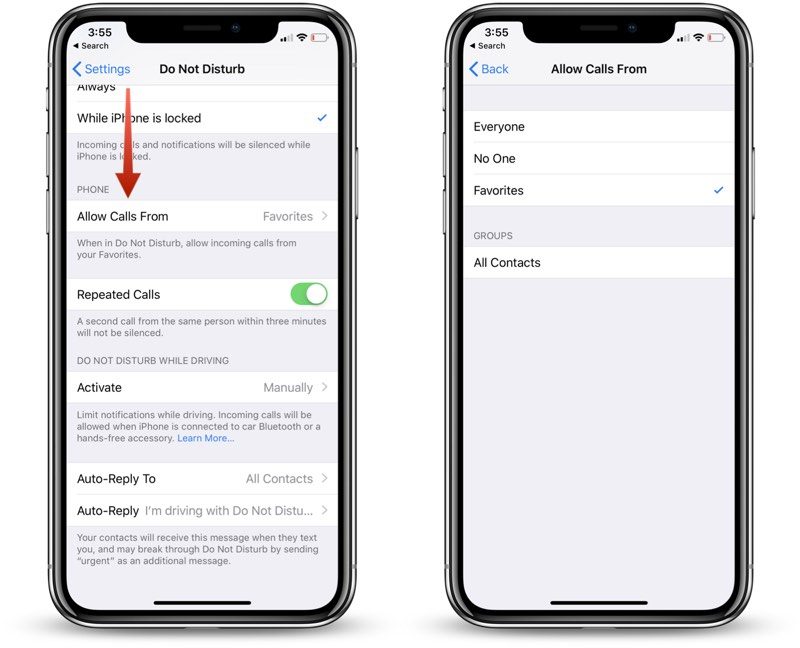
Open the Settings app.
Tap “Do Not Disturb.”
Scroll down to the Phone section where it says “Allow Calls From.”
Select Everyone, No One, or “Favorites,” which can be set up in the Contacts app.
You can also toggle on “Repeated Calls” in the same section of the Settings app so a second call from the same person within three minutes won’t be silenced. This is an ideal way to screen out unwanted calls while still allowing for potential emergencies as most people will try again if you’re unreachable in a crisis.
Waking Up
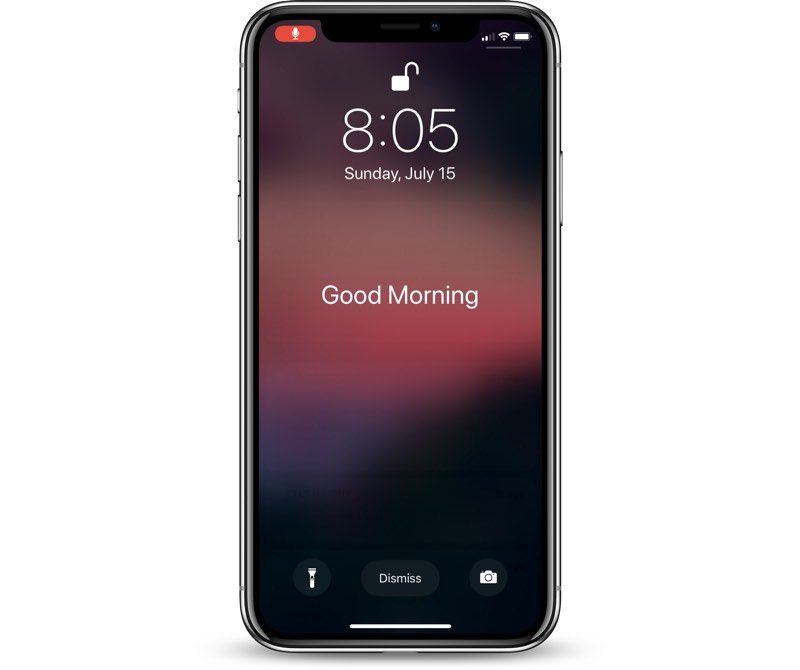
When it’s time to wake up, and when Bedtime Mode is scheduled to go off, your iPhone or iPad will display a “Good morning!” message and it will let you tap to reveal all of the notifications that were silenced during the night.
Turning Off Bedtime Mode
If Bedtime Mode isn’t for you, you can turn it off in the Settings app where it was enabled.
Open the Settings app.
Tap on “Do Not Disturb.”
If you want to turn off your scheduled Do Not Disturb session entirely, toggle off “Scheduled.”
If you want to leave Do Not Disturb on but disable Bedtime Mode, tap the Bedtime Mode toggle to turn it off.
Note: To quickly access Do Not Disturb settings, swipe to open up the Control Center and then 3D Touch or long press on the little moon icon.
This will provide you with options to enable Do Not Disturb for an hour, a few hours, until the end of an event, or until you leave a specific location, and it also offers up a “Schedule” option at the bottom that opens straight into the Do Not Disturb toggles in the Settings app.
Related Roundup: iOS 12
Discuss this article in our forums
Hulu Updates Website With New Design, Picture-in-Picture Browsing, and More
Hulu today is rolling out a new update for Hulu.com, bringing it in line with the design and user interface that users should be familiar with if they use Hulu on smartphones and TVs, like iOS and tvOS. The company is launching the new update to coincide with fall television premieres, which typically kick off around this time, in mid to late September.
The company says that subscribers can expect all of the usual options they need on Hulu.com, including Playback, Show Details, Add to My Stuff, Recording, and Stop Suggesting all featured in the Home section. When watching a video, navigational controls will allow you to skip ahead to the next episode by clicking an “Up Next” button.
The main change is that Hulu.com no longer has a “Watchlist” and now supports the service’s new “My Stuff” feature, which is where you can add shows to watch later. When in My Stuff, it’s easier to track all of the shows you’re watching, and Hulu will notify you when new episodes of a show are added. On Hulu.com’s new splash screen, the company notes that you can sync all of your existing My Stuff shows to the new Hulu.com using a sync option in account settings.

For sports fans using Hulu with Live TV, you can watch multiple games on multiple windows on Hulu.com, and a basic picture-in-picture feature is also supported for other programs. This way, you can keep watching a show while browsing other parts of Hulu on the web, and the small player can be moved anywhere on the screen while multitasking.
Hulu explains that some Hulu with Live TV subscribers have had these updates on the web for a while, and the company has taken feedback from these users for the public launch:
Some of you may be familiar with the new look and feel of Hulu.com. We launched an early version of the new experience just over a year ago to provide our Hulu with Live TV viewers access to all the big games and live TV coverage from their browsers. Since then, we’ve continued to evolve and refine the new Web experience to incorporate user feedback and new, compelling features, updates and configurations that make the most out of the wide range of motion you have with your mouse and how quickly you’re able to point and click.
Hulu first began rolling out its new experience and updated UI in May 2017, launching first on Apple TV, iOS, Xbox One, Android, and Chromecast. The new Hulu design on these apps — now on Hulu.com — includes large pieces of artwork for each show, a curated home screen of show suggestions, and more.
Tag: Hulu
Discuss this article in our forums
 AIVAnet