


Amazon announces upgraded Echo Dot with vastly improved sound quality
The new speaker costs $49.99 and is on sale today.

Amazon’s Echo Dot is one of the most accessible smart speakers on the market, and now it’s getting even better. At the company’s secret event at its HQ in Seattle, Amazon unveiled its third-generation Dot.
The new Dot has a similar footprint compared to the second-gen model but now features a fabric design that looks a lot homier than the hard plastic that was used before. It honestly looks like the love child of an Echo Dot and Google Home Mini, and to be honest, we’re not complaining about that at all.

One area where the Home Mini easily outperformed the second-gen Dot is in sound quality, but with gen-three, that’s something Amazon’s hoping to change. The new Echo Dot boasts a 1.6-inch driver and is rated to be 70% louder than the previous model with much clearer audio.
You can purchase the Echo Dot starting today for $49.99.
See at Amazon
The best controllers for PS4

The stock controller for the PlayStation 4 is very good, but it’s not for everyone. Fortunately, there are a lot of options out there that offer a different experience and cater to different markets. Whether you’re a competitive gamer, have kids who want to play, or just want to sharpen up your experience, a good controller is important. Pick up one of these options if you’re looking for something to change up your play.
Familiar form
Scuf Impact

Scuf controllers are used by a large portion of the pro-gamers who play on console, and the Impact is the company’s latest and greatest effort for the PS4. The basic shape is the same as the regular PlayStation DualShock 4, but the grips are longer and the whole thing is less angular.
$150 at Scuf Gaming
Best in class
Razer Raiju Ultimate

Razer doesn’t mess around when it comes to making gaming peripherals and the Raiju is no exception. With the new and improved Raiju Ultimate model, only available in Europe at the moment, the controller is now wireless thanks to Bluetooth technology. Around the back, you’ve got a couple additional triggers and two more buttons on top next to the bumpers.
€200 at Razer
The forefather
Sony DualShock 4

If it ain’t broke, don’t fix it, right? The DualShock 4 is the standard controller that comes in the box and therefore, comes with the design we’ve come to expect.If you like it already but wish it were a little more interesting, Sony has a range of different colors available. The red one here is pretty hot, but new variants keep appearing all the time.
$47 at Amazon
Asymmetrical goodness
Nacon Revolution

Some folks love PS4 but wish the controller was more like the Xbox One’s with it’s offset analog sticks. Many find this layout more ergonomic, which makes the Nacon Revolution a great option to try. It’s wired, so you can’t sit too far away from the console, but the shape and layout are pretty similar to what you’d find with the Xbox.
$89 at Amazon
Nintendo nostalgia
Hori Mini Wired Gamepad

Need a solid controller for younger, smaller hands that doesn’t cost a lot? Or maybe you’re a traveling PS4 gamer that needs something compact. That’s where the excellent Hori Mini Wired Gamepad comes in. As the name implies, this is a wired controller. The touchpad is missing, which is OK, but there’s a button in place for when you might need it.
$28 at Target
Hello Xbox layout
Hori Onyx

If you’re a PS4 gamer but you’ve always prefered the style and feel of an Xbox controller, I have great news for you. The Hori Onyx controller gives you all the same functionality of a PS4 controller in a different form. You get a wider and beefier grip with offset analog sticks, so you get the same sensation playing on your PS4 as you would on your Xbox.
$80 at Amazon
Updated September 2018: We’ve updated this post with the new Razer Raiju Ultimate model.
Here’s everything Amazon announced today at its new devices event
 Amazon and its 3,000 devices just announced at an event in Seattle.
And we mean they announced pretty much all the things.
We’re live from the Amazon devices event in Seattle. We knew a slew of stuff was on the way, but it’s actually crazy how much new stuff Amazon just dropped.
We’re talking Echo. We’re talking microwaves. (Yes, really.) We’re talking about Echo in your car. We’re talking clocks. We’re talking amps. We’re talking antennas and DVR for Amazon Fire TV.
And we’re breaking it all down below. Click away!
- New Amazon Echo Dot
- New Amazon Echo Plus
- New Amazon Echo Show
- Amazon Echo Input
- Amazon Echo Sub
- Amazon Echo Link and Link Amp
- Amazon Smart Plug
- Amazon Fire TV Recast
- Amazon Basics Microwave
- Amazon Echo Wall Clock
- New Ring Stick Up Cam
- New stuff for Alexa
New Amazon Echo Dot ($49)

We’ve got a brand-new Amazon Echo Dot. It’s smaller. It’s got a new fabric design. It’s 70 percent louder and much clearer, which should help with our biggest complaint about the Echo Dot, thanks to a 1.6-inch driver — a full half-inch larger.
Plus it still has line-out and Bluetooth.


It’s available today for $49.99 and is available everywhere you can get a current Amazon Echo.
See at Amazon
New Amazon Echo Plus ($149)

There’s a new Amazon Echo Plus on the horizon, just a month out from the original. As you’ll recall, the 2017 Amazon Echo Plus shared the same design as the original Amazon Echo — long and lean. This one shrinks things down a bit (more like the current Amazon Echo — yes, it’s a bit confusing.) Basically, we’re just looking at a new design here.
It’s $149 and will ship in October.
See at Amazon
New Amazon Echo Show ($229)

The first Amazon Echo Show was … OK for what it was at the time. But it very quickly was outpaced by things like the Google Smart display. Now Amazon is refreshing things with an all-new screen (going from 7 inches to 10 inches for twice the display area) and an all-new speaker. So it’ll have better sound with dual-firing, side-by-side 2-inch speakers and real-time Dolby processing.
It’s available for pre-order now for $229.
What remains to be seen is if it’ll actually play YouTube natively, but it will have Amazon’s Silk browser, as well as Firefox.
See at Amazon
Amazon Echo Input ($34.99)

This is like an Amazon Echo Dot, only without the speaker. You’ll plug it into an existing speaker that you want to add Alexa functionality to. (So, yes, it’s like a Chromecast Audio, sort of.) It’ll connect with either a 3.5mm audio cable, or over Bluetooth. And it’s got a four-microphone array so you can hit up Alexa from across the room. And it’s small, at just 12.5mm tall.
It’s $34.99 and will be available later this year.
See at Amazon
Amazon Echo Sub ($129.99)

The Amazon Echo Sub is — wait for it — a subwoofer for an existing Amazon Echo or Echo Plus. You can rig them up in a 2.1 or 1.1 pairing. You can preorder it today for $129.
See at Amazon
Amazon Echo Link Amp ($299) and Echo Link ($199)

If you absolutely must have something connected through Amazon that will work with your existing component stereo system, there’s Echo Link and Echo Link Amp. (The latter as the name implies, has a more series amp.) We’re talking 60 watts and two channels, multiple inputs and outputs. But no microphones — you’re going to control these over the internet through an existing Echo speaker.
The basic Echo Link is $199, and the Echo Link Amp is $299. They’ll be later this year.
Amazon Smart Plug ($24.99)

Smart plugs are a dime a dozen these days, but now Amazon has its own. As you’d expect it ties into Alexa. But it’s even easier than that. Just plug it in, and an Amazon Echo will recognize that it’s there and automatically walks (and talks) you through the setup process. You’ll then be able to rename the plug and use it going forward.
And at $24.99, it’s as cheap as any other smart plug we might recommend.
See at Amazon
Amazon Fire TV Recast ($229 – $279)


This is a horrible name for a great little product. It’s an over-the-air streaming box that plugs into an antenna, and then fires that signal over to an Amazon Fire TV or an Amazon Echo Show. (Think HDHomerun, Tablo, or AirTV.) You can also watch on iOS or Android, even outside your home.
Plus, it’s got a built-in DVR. It’ll be available with two tuners and a 500-gigabyte hard drive for $229, or four tuners with a 1-terrabyte hard drive at $279.
See at Amazon
Amazon Basics Microwave ($59)

Yes, Amazon has made a microwave. You’ll use your Amazon Echo to control it (or, ya know, just mash the buttons), and it’ll use presets just like you’d expect. “Alexa, pop some popcorn. Add time.” That sort of thing.
It’s $59.99 and will be available in October.
See at Amazon
Amazon Echo Wall Clock ($29)

It’s an Echo! It’s a wall clock! It, uh, tells time and stuff! It’s also got little LED lights in it that lets you visualize timers, and it will auto-adjust to Daylight Saving’s Time.
It’s $29.99 and will be available later this year.
See at Amazon
New Ring Stick Up Cam ($179)

Amazon now owns Ring, and that means it’s time for a new standalone Ring Stick Up Cam. There are wired and wireless versions, and they’ll tie into your Ring of Security (get it?) to help you keep an eye on your home.
It’ll start at $179.99 and be available in the U.S., France, Germany, Australia and more.
See at Amazon
Amazon Echo Auto

It’s a little thing you’ll plug into your car’s and then you can ask your car things like you’re Michael Freaking Knight. And you can talk to your Amazon Echo to learn more about what your car is up to, like fighting crime on the mean streets of Southern California. It connects via Bluetooth or an Aux port for audio feedback and is dash-mountable. It’ll use your phone for an internet connection and is location-aware, so you can tell Alexa to do a certain thing when you reach a certain place, or open your garage door when you get home.
Yes, that’s a little LED on the front. Just like KITT.
Basically, you’ve got a full-blown Amazon Echo in your car. You can shop on the fly. Or make lists to shop later. Or use drop-in to get with folks back home.
It also has turn-by-turn navigation with audio prompts. Or it can open up Apple Maps, Google Maps or Waze, if that’s your jam. It’ll cost just $49 regularly, or $25 if you’re willing to give feedback to Amazon.
See at Amazon
What’s new with Alexa and other things
- Alexa will be able to understand when you’re whispering, rather than speaking at full volume. And she’ll respond in a whisper, too. So if you whisper, say, “play a lullaby,” she’ll respond in kind and then play quiet lullabies.
- Alexa is also gaining the contextual computing, which basically lets you string together multiple questions, and she’ll understand that one goes along with the other.
- Amazon has a new Frustration-Free Setup that it’s working on for smart home devices. (Like the aforementioned Smart Plug.)
- There’s a new free API for the development community and third-party manufacturers like TP-Link, Eero and others are already on board. It’ll help devices talk to each other and connect more smartly to your home network.
- And current Echo devices will be updated with those APIs as well.
- Alexa Guard combines all of your home security features. Say, “Alexa, I’m leaving,” and it’ll pull in all the info from your various devices, even if they’re not meant to work together. They’re partnering with Ring (which Amazon owns) and ADT for starters. … And when you’re gone for a while, Alexa can automatically turn lights off and on to make it look like you’re home.
- Skype is getting integration with Alexa. So Skype customers can do voice and video calls directly from Echo and Echo Show, in addition to Alexa messaging and phone calls.
Amazon offers its latest Echo devices in discounted bundles, pre-order now
The Amazon Echo Sub is a subwoofer for your Echo speakers
Pre-orders go live today and it costs $129.

While the main focus for Echo gadgets lies with the power and flexibility of Alexa, products like the Echo and Echo Plus can also act as pretty good speakers for jamming out to your favorite music. Now, your Alexa streaming sessions are going to get even more powerful with the Echo Sub.
The Echo Sub is exactly what you’d expect. It’s a subwoofer that connects to your Echo speakers and gives them a nice bit of punch that they were previously lacking. You can connect an Echo Sub to two Echo speakers for a 2.1 surround sound system or with just a single Echo for richer mono audio.
This combo probably won’t be replacing your Sonos setup anytime soon, but it’s a nice addition to the Echo family for users that want a higher-end audio experience without going broke.
Pre-orders officially go live today and pricing is set at $129.99.
See at Amazon
Use mouse and keyboard with these PS4 games

Most people are pretty well aware of the fact that PC gamers are at an advantage when it comes to detailed control. Using a mouse and keyboard certainly has its benefits. However, not everyone is aware of the fact that the PlayStation 4 actually does support keyboard and Mouse input. Here are some of the games that support keyboard and mouse that you might want to try
RPG Fantasy MMO
Final Fantasy XIV

Like so many MMOs, there is a lot going on when you play Final Fantasy XIV. Fortunately, it has native keyboard and mouse support and that might make your life a little easier.
$58 at Amazon
War Simulation
War Thunder

If you are hot for military combat simulators, you are probably already familiar with War Thunder. However, you may not be aware that you can use mouse and keyboard when playing it. Just think about being able to map your zoom command to your mouse wheel. Life is already a little easier!
Free at PlayStation
Fantasy MMO
Elder Scrolls Online

What do you know! It’s another MMO that supports keyboard. Unfortunately, you cannot really use it in the game per say. However, if you have ever spent time trying to send a message to your guildmates with a PS4 controller, you know that a keyboard might make your life a little easier. Fortunately for you, you can use a keyboard for just that. This goes other MMOs as well, such as Neverwinter and DCU Online.
$34 at Amazon
Third person shooter
Paragon

When controlling at a reticle for targeting is important, it’s hard to deny that the most effective method of doing that is with a mouse. Paragon may have you spinning around and trying to line up the bad guys in your target. Fortunately, Paragon is happy to allow you to do so!
$26 at Amazon
Keyboard and mouse support is still pretty limited on PS4. However, it does help with the games that offer it. You actually can by an adapter which will allow you to use keyboard and mouse on any PS4 game. It is important to keep in mind though that by using an adapter you run the risk of getting banned from your favorite game if you try it.
Amazon’s new Echo Show has slimmer bezels and dual side-firing speakers
Pre-orders open today for $229.

Although there was a lot of hype and fanfare surrounding the Echo Show when it first debuted last year, it ultimately failed to live up to everyone’s wild expectations. Amazon’s aware of that, and with the all-new second-gen Echo Show, the company’s hoping to address all of the issues we had the first go around.
From a design standpoint, the new Echo Show looks considerably better than its predecessor. The 10-inch HD screen has much slimmer bezels and allows for two times the display area compared to last year’s model.
Along with the screen, Amazon’s also promoting a vastly improved audio experience. There are now dual side-firing 2-inch speakers that feature real-time Dolby processing. According to Amazon, this setup is now capable of “filling a room.”
There’s still a camera above the screen for video calls, but rather than being limited to just calls with other Alexa users, there’s now new Skype integration so you can make video and voice calls directly from your Echo or Echo Show. Lastly, both the new Echo Show and the previous model will get web browsing support thanks to the Amazon Silk Browser and Firefox.
Pre-orders for the Echo Show go live today with pricing set at $229.
See at Amazon
The Fire TV Recast sends local television to your Echo Shows and Fire TVs
Pricing starts at $229 for a box with two tuners and a 500GB DVR.

While it’s easy to cut the cord and get national TV networks on your television with apps like Sling, YouTube TV, and more, sending local channels from an antenna to a smart device requires a bit more work. If you live in the Amazon ecosystem, things are about to get a lot more exciting thanks to the Fire TV Recast.
Your local TV antenna plugs into the Recast which can be placed anywhere so that you get the best signal possible. The companion app will help with the setup process so that things run as smoothly as can be, and once you’ve found the perfect spot, the antenna sends its signal through the Recast which then beams your local TV channels to your Amazon Fire TVs and Echo Shows.
The Recast is capable of recording two or four shows at a time and allows you to stream your channels to multiple devices at once.
The base model of the Fire TV Recast comes equipped with two tuners and a 500GB DVR. Pre-orders for it are live today at $229. Amazon’s also got an upgraded variant with four tuners and a 1TB DVR that’ll set you back $279.
See at Amazon
SanDisk SSDs, Philips Hue lights, and more are discounted today
Whether you’re looking for new tech gear or household items, we’ve got you covered.
We found plenty of great deals today that include big discounts on SanDisk’s 1TB SSD, Philips Hue multi-color light bulbs, Acer’s gaming laptop bundled with a mixed reality headset, and more!
View the rest of the deals
If you want to know about the deals as soon as they are happening, you’ll want to follow Thrifter on Twitter, and sign up for the newsletter, because missing out on a great deal stinks!
How to install Linux apps on your Chromebook
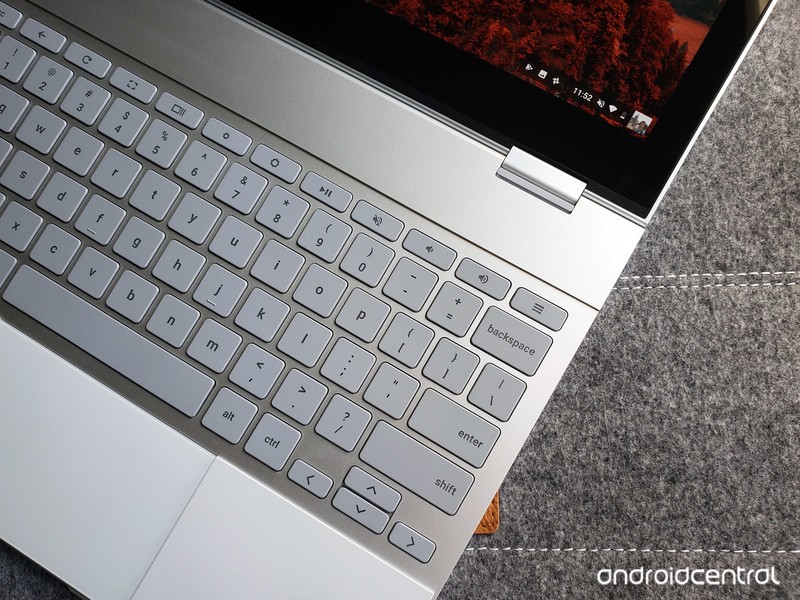
Chromebooks have always been great at the basics like watching Netflix or checking email. Android apps brought a few more productivity tools, but Chromebooks are about to get a lot more useful with the addition of Linux apps.
Products used in this guide
- Amazon: Google Pixelbook – 128GB storage ($999)
Check your Chrome OS version
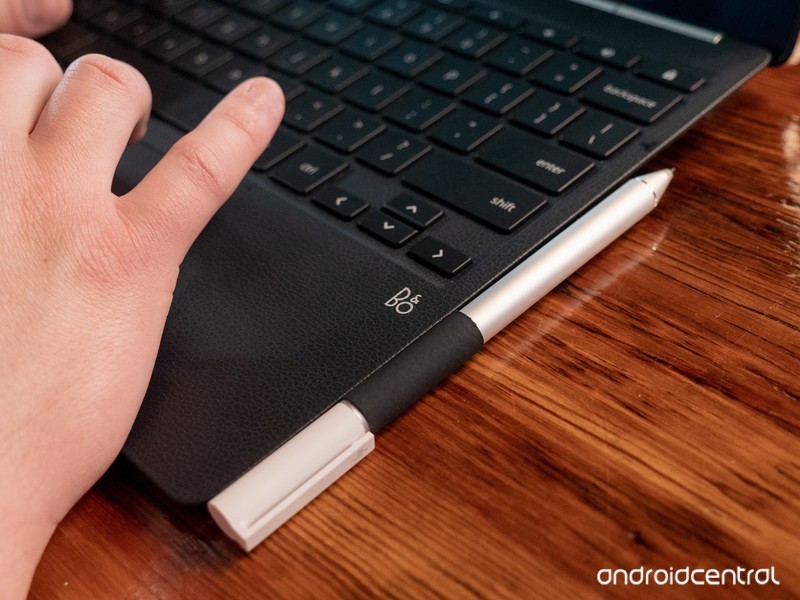
Installing Linux apps requires your Chromebook to be running Chrome OS 69 or later. If you’ve had your Chromebook for a while and want to be sure you’re on the latest software versions, here’s how to check.
Click your profile picture in the lower-right corner.
Click the Settings icon.
Click the Hamburger icon in the upper-left corner.
Click About Chrome OS.
Click Check for updates.
Your Chromebook will make sure it’s on the latest operating system, and download a new one if necessary. When it’s finished downloading, just restart your Chromebook and you’ll be all done!
More: How to change your software channel on Chrome OS
Enable the Crostini flag
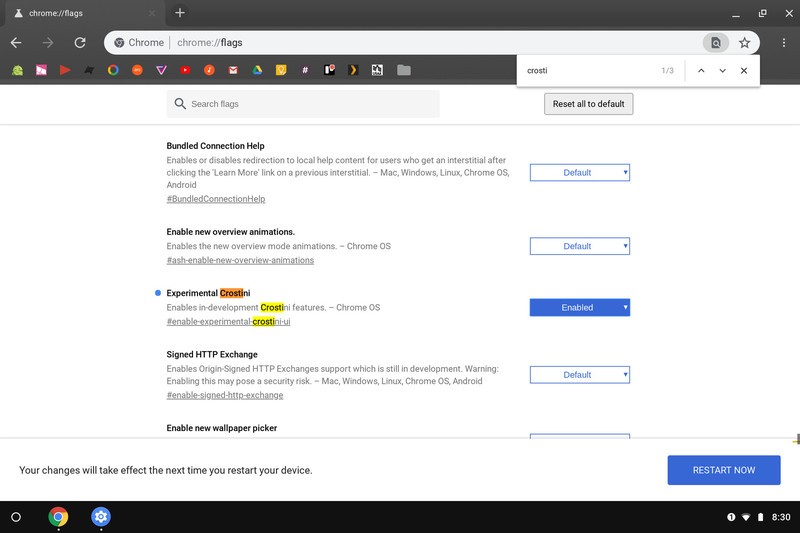
Once your Chromebook is updated to the developer channel software version, you’ll need to change one of the Chrome flags. Flags are semi-hidden settings that let you try experimental features.
Click on the address bar.
Type chrome://flags and press Enter.
Press Ctrl + F on your keyboard.
Type Crostini in the search bar.
You should see the flag titled Experimental Crostini. Click the checkbox, then select Enable.
Click Restart at the bottom of the screen.
Turn on Linux apps
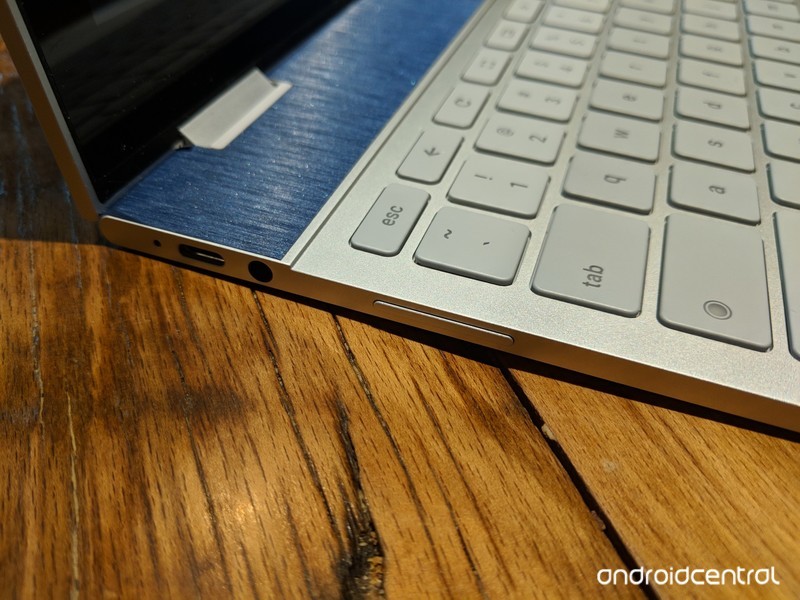
There are just a couple more steps before being able to run Steam and other Linux apps.
Open Settings.
Click the Hamburger icon in the upper-left corner.
Click Linux (Beta) in the menu.
Click Turn on.
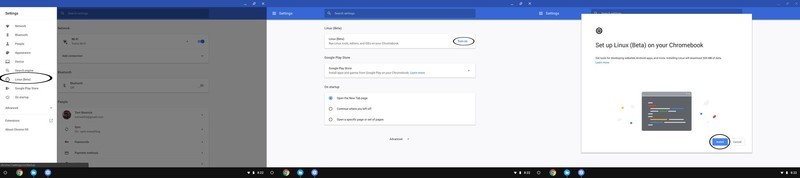
Click Install.
The Chromebook will download the files it needs. When that’s complete, click the white circle in the lower-left corner to open the app drawer.
Click the Terminal icon.
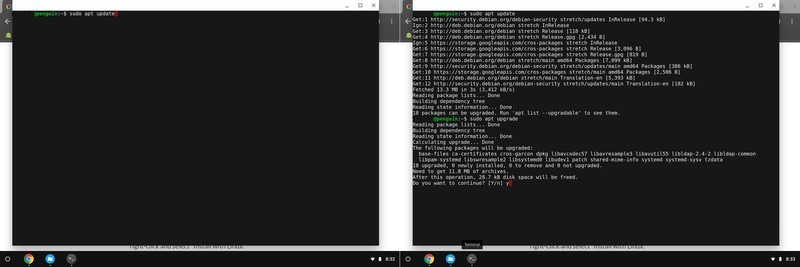
Type sudo apt update in the command window. This will list the Linux components that require an update. Press Enter.
Type sudo apt upgrade in the command window. This will upgrade all the components that were just listed. Press Enter.
When that’s finished, type y to remove excess files. Press Enter.
With that, all the necessary parts of the Linux operating system are installed so you can just install .deb applications from the file browser.
Download and Install an application
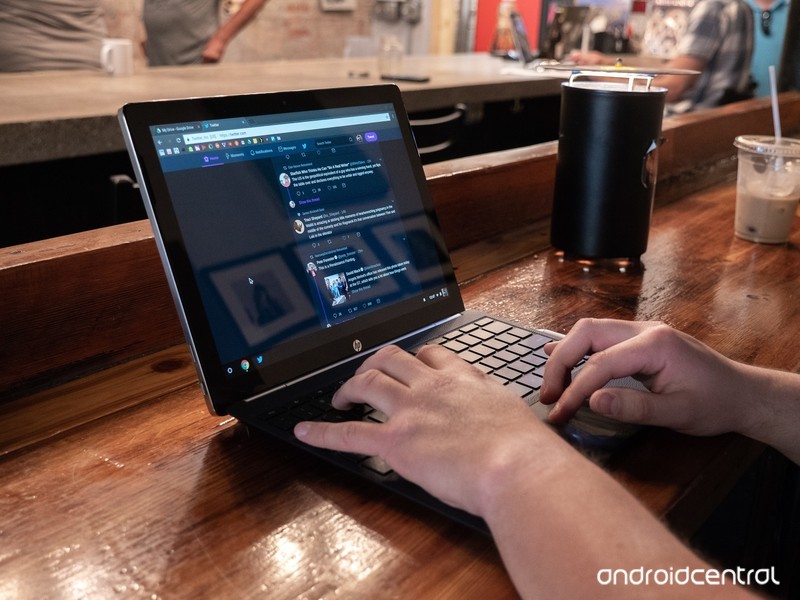
With the prep work done, it’s finally time to install an application. Grab the necessary Linux installation file from your software vendor’s site — we’re using Steam for this guide.
Once the installation file is downloaded, open the File browser.
Click Downloads.
Copy and paste the .deb installation file to the Linux files folder.
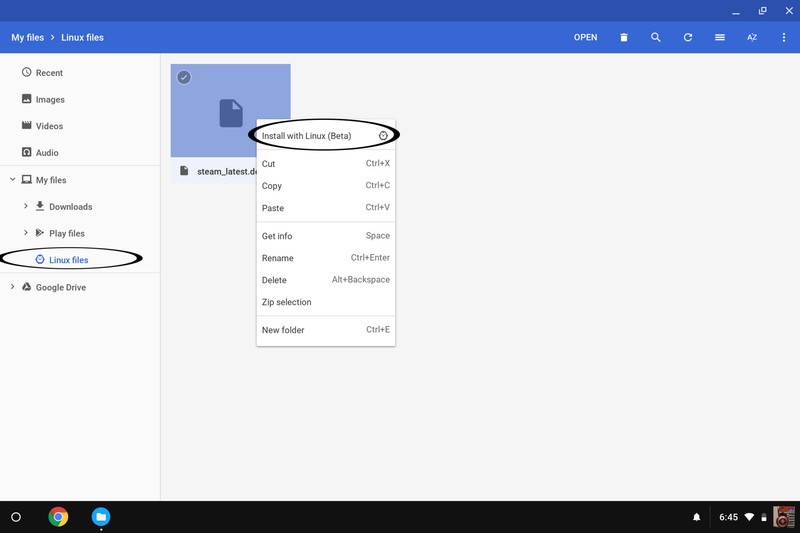
Click Linux files
Right click or two finger tap on the trackpad while your pointer hovers over the file name.
Click Install with Linux (Beta).
The program will install, and when it’s done, you can open it from the app drawer. That’s it!
Our top equipment picks
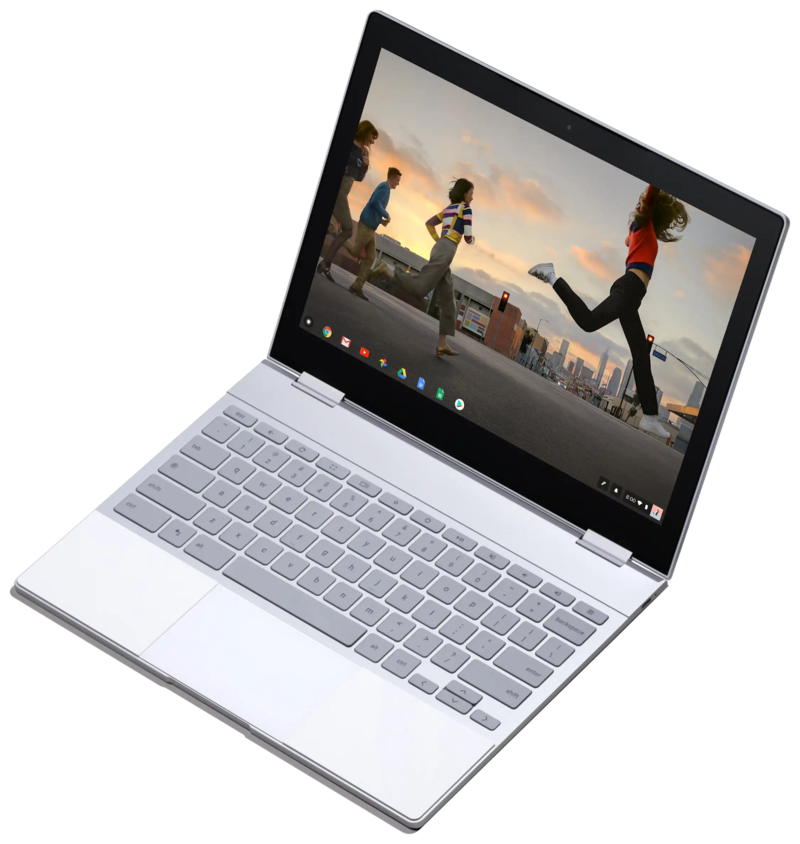
If you’re going to download a lot of Steam games or Linux programs, you’ll want plenty of local storage. Google”s Pixelbook offers just that, as well as a slick design, awesome keyboard and trackpad and enough guts to keep up with your most demanding tasks.
The Chromebook for you
Google Pixelbook
$999 at Amazon
Google’s own Chromebook is the best pick for hardcore Linux users.
If you’re going to get a Chromebook, it should be one with the space and the guts for your favorite applications. The best keyboard, trackpad and screen in the business don’t hurt either.
Any modern Chromebook running the latest software will be able to install Linux apps. But the Pixelbook will provide the best experience for a few reasons: the main one is storage. 128GB of internal storage just means more room for your favorite programs and games. And the other internal specs will be up to the task of running those programs and games smoothly.
Updated September 2018: This article was updated to reflect the fact that Linux apps are now available in the stable channel of Chrome OS.
Amazon offers its latest Echo devices in discounted bundles, pre-order now
Amazon Alexa is now integrated into even more home essentials.
Alexa is getting a makeover! Amazon just announced several new Echo devices which incorporate the Alexa voice assistant. There’s an Echo Wall Clock, an AmazonBasics Microwave, new editions of the Echo Dot and Echo Plus, and even an Echo Input to add Alexa to speakers you already own! Newly announced products rarely receive discounts, but you can already save on these Amazon devices by purchasing them in a bundle of two or more.

One such bundle packages together the new third-generation Echo Dot with Amazon’s Smart Plug for $64.98. While the set doesn’t see a release until October 11, it’d be wise to place your order now and ensure you receive that $10 discount off what they’d cost separately. Another bundle features the Echo Sub with two Echo Plus devices for $329.97. That’s a $100 discount off what they’d cost on their own.
Other bundles you could grab right now include:
- 2-pack Echo Dot (3rd-Gen) for $89.98 (was $100) Must add two to apply discount.
- 2-pack Echo Show (2nd-Gen) for $357.98 (was $458) Must add two to apply discount.
- Echo Plus (2nd-Gen) and free Philips Hue smart bulb for $149.99 (was $165)
- Echo Show (2nd-Gen) and free Philips Hue smart bulb for $229.99 (was $245)
- Echo Show (2nd-Gen) and Ring Video Doorbell Pro for $428.99 (was $479)
You can also save 50% on Echo Auto right now, dropping its price to just $24.99 from $50. However, that deal is by invitation only. You can request an invitation on its product page.
These devices work best if you have a Prime membership at Amazon, considering Prime members can stream over two million songs with Prime Music at no additional charge. Having a Prime membership can also save you monthly on an Amazon Music Unlimited subscription. There are a ton of other Prime-exclusive deals going on right now at Amazon as well, like the Fire Tablet 7’s drop to $35 and the $40 Fire 4K TV.
See at Amazon
 AIVAnet