


Delta tech issue grounds planes, tells travelers to check Wednesday flights
Delta Air Lines suffered nationwide disruption to its flights on Tuesday evening after its systems suffered what the carrier described as a “technology issue.”
The disruption, which had no effect on Delta’s operations outside of the U.S., began early evening ET and was considered serious enough for the carrier to stop all of its aircraft from departing U.S. airports. About an hour in, Delta flights were given permission to take off from all airports except JFK and LaGuardia in New York, and Hartsfield-Jackson in Atlanta.
A short while later, the carrier announced it had resolved the issue and confirmed that all flight restrictions had been lifted.
The issue had been made worse by a problem with Delta’s website and Fly Delta app that prevented many of its customers from logging in to check the status of their flight. Delta says its website and app are once again up and running.
Knock-on disruption
In a statement issued by Delta after the incident, it said that despite the flight delays, it had managed to avoid canceling any of its flights.
But it added that the disruption could result in a knock-on effect for some flights on Wednesday morning, though it expected the impact on its schedule to be “minimal.” Nevertheless, it’s advising anyone flying with Delta on Wednesday to check their flight status on delta.com or on the Fly Delta app before they leave for the airport.
The airline, one of the world’s largest and which handles more than 160 million travelers a year, insisted there had been no impact on safety while the glitch was being fixed, and it apologized to its customers for any inconvenience suffered as a result of the ensuing disruption.
As is usual in the case of such incidents, many passengers stuck inside Delta planes that were about to take off vented their frustration on Twitter.
Sittings inside the airplane for 2 hours in NYC. Problems started at 5:45 so why would @delta keep boarding people knowing that planes can’t take off. #delta
— Jolanta T (@jrtibebu) September 26, 2018
Despite the problems, some managed to inject a bit of humor into their complaint:
Delta flights finally in motion. Waiting in a long line of #delta planes at JFK. Literally have been “driving” for 30min. It appears we will be driving the plane to Las Vegas.
— Brittany Finkle (@BrittFinkle) September 26, 2018
It’s not the first time Delta has been hit by technical issues that have led to widespread disruption. In 2017, computer issues that led to a systems outage forced the airline to cancel flights, and a year earlier, a computer meltdown at its hub in Atlanta, Georgia, saw flights canceled and grounded around the world.
And Delta isn’t the only U.S. airline to experience these troublesome issues, with other giants such as American and United having their fair share of incidents to deal with in recent years.
Editors’ Recommendations
- Airport’s low-tech solution to digital chaos involves the humble whiteboard
- Pilot’s sneaky puff on his e-cigarette causes chaos on passenger plane
- Monoprice Mini Delta review
- The flu is a bad souvenir. Here’s how a pilot stays healthy while flying
- Caltech is training drones to ‘herd’ flocks of birds. Here’s why
Apple Pay to Be Available in 60% of U.S. Retail Locations by End of 2018
Apple Pay is expected to be available in 60 percent of retail locations in the United States by the end of the year, Apple’s VP of Apple Pay Jennifer Bailey told Fortune today in an interview at the company’s Brainstorm Reinvent Conference.
Since Apple Pay’s 2014 introduction, Apple has worked to bring it to 24 countries around the world. Apple has to negotiate deals with each and every country where Apple Pay expands, so it’s been a slow process, but growth is strong even outside of the United States.
Apple has recently been focusing on expanding the usefulness of the Apple Wallet, which houses Apple Pay credit and debit cards. Apple Wallet is now being used for purposes like public transit, customer loyalty programs, student IDs (launching next week), and may soon expand to corporate access and hotel key cards. Apple’s own campus permits employees to enter using Apple Wallet.
“It’s a tremendous new area for us to focus on, which is really access,” Bailey said.
According to Bailey, when Apple Pay was first introduced, Apple didn’t approach the launch with the aim of disrupting the credit card industry. Instead, the goal was to work with credit card companies and introduce “great customer experiences.”
Apple was uninterested in pursuing a bank charter, necessary for introducing Apple Pay as a credit card replacement option, because it didn’t want to face regulation.
“When we thought about Apple Pay, we thought, there are a lot of payments out there that our customers already love and trust,” Jennifer Bailey, Apple VP of internet services and Apple Pay, said Tuesday morning during Fortune’s Brainstorm Reinvent conference in Chicago. “We don’t sit around and think about, ‘what industry should we disrupt?’–we think about, ‘what great customer experiences can we develop?’”
When asked if Apple makes money from Apple Pay transactions, Bailey answered the question with a “perhaps,” but said that other features in the Apple Wallet are about bringing more utility to customers and making sure people “love their iPhones.”
Related Roundup: Apple Pay
Discuss this article in our forums
The ultrathin Dell S2718D 27-inch monitor is on sale for a very limited time
When looking at desktop PCs, it’s easy to get caught up in technical details like CPU clock speeds, whether you need a dedicated GPU, how much RAM to budget for, and so forth. One thing that often gets treated as an afterthought is the humble monitor, which is what allows you to actually interface with all of that shiny hardware.
Dell remains one of the premier makers of desktop displays, and when the Dell S2718D was unveiled at last year’s CES, it was noted for its super-slim design – which was offset by its hefty price tag of $700. This put it squarely into “professional” territory and well out of budget range for most normal PC users, but now, it’s on sale from Staples for just $220, the lowest price we’ve seen yet for this ultrathin display.
“Ultrathin” isn’t just marketing speak here: The Dell S2718D panel measures at just under 7mm thick and features Dell’s InfinityEdge display technology for an extra-slim bezel. The display itself is 27 inches wide, giving you more screen real estate than standard 20- to 22-inch desktop monitors without veering too far into big-screen territory to fit on your desk.
The Dell S2718D 27-inch monitor is an IPS (in-plane switching) display, offering much better viewing angles than the TN displays of yesterday which were notorious for washing out when not viewed head-on. It’s also got a high-definition resolution of 2,560 x 1,440 pixels – crisper than 1080p Full HD – and at its base you’ll find two USB 3.0 ports and a 45-watt USB-C port, which deliver enough power to charge your gadgets. The USB-C port can even juice up larger devices like laptops and tablets.
The list price for the Dell S2718D monitor is $600, but you can typically find it for around $400 at other retailers. Nonetheless, this new low of $220 from Staples ($380 off its current manufacturer recommended sales price) is far and away the best price yet for this ultrathin HD monitor, and we don’t expect it to last long. If you’re in the market for a new desktop display, you’ll be hard-pressed to find a better deal than this one before Black Friday.
$220 | Staples
Looking for more great stuff? Find PC deals and more on our curated deals page, and be sure to follow us on Twitter for regular updates.
We strive to help our readers find the best deals on quality products and services, and choose what we cover carefully and independently. If you find a better price for a product listed here, or want to suggest one of your own, email us at dealsteam@digitaltrends.com.Digital Trends may earn commission on products purchased through our links, which supports the work we do for our readers.
Editors’ Recommendations
- The best monitors of IFA 2018
- Dell’s new 27-inch ultrathin display is less than a quarter-inch thick
- The best monitors of 2018
- How to calibrate your monitor
- AOC makes curved gaming displays more affordable with G1 series
‘Minimal Turing Test’ asks humans to prove they’re human with only one word
A test that is designed to highlight the difference between human and machine — or prove that a human really is a human — is nothing new. In fact, it’s the basis for the Turing Test, a test devised by pioneering computer scientist Alan Turing all the way back in 1950. Here in 2018, machines have gotten considerably smarter, and the idea of a machine that thinks is no longer quite as crazy as it sounded almost 70 years ago. It’s therefore no surprise that the question of what separates humans from machines is at the forefront of a lot of people’s minds — as a new “Minimal Turing Test” makes clear.
Devised by two researchers from the Massachusetts Institute of Technology’s Department of Brain and Cognitive Sciences and the University of Pennsylvania, the new spin on an old classic asked 1,089 human participants to name a single word they would use to explain just what makes humans, well, human.
“We proposed a new method for studying how people think about other kinds of agents, or people that belong to other social groups — essentially give one word to prove your identity,” John McCoy, an assistant professor of Marketing at the Wharton School of the University of Pennsylvania, told Digital Trends. “We asked people to give one word to prove that they’re not a smart robot, and to judge the words of others. We used techniques from natural language processing to cluster the words that people gave, and modeled people’s words and judgments with ideas from game theory.”
The words human respondents used to prove their humanity included “love” (a massive 14 percent of responses), various answers relating to emotions, compassion, religion, and … “poop.” Because what are we as the planet’s current most intelligent beings if not for lovers of toilet humor?
In fact, poop had a whole lot of significance for the project. After the answers had been collected, the researchers randomly formed pairs of words and then told another group of 2,405 participants to choose which word they thought was from a human and which one was from a robot — despite the fact that both were selected by humans. “Poop” was the one that most people thought had been picked by a human. The least successful, for obvious reasons, was “robot.”
“Most of the words make sense once you see them, but they’re not necessarily what I would have predicted ahead of time,” Tomer Ullman, a postdoctoral associate in the Computational Cognitive Science group at MIT, told us. “Some of the words still have us scratching our heads. That the taboo category word beat out everything else isn’t something I would’ve bet a lot of money on before we ran the study, though it may seem obvious in retrospect.”
Editors’ Recommendations
- Algorithm outperforms humans at spotting fake news
- Strawberry-picking robots could replace human workers in the field
- Internet connectivity is a human right, and Rightmesh has a plan to fulfill it
- A.I. players master ‘Quake III Arena,’ manage to outperform humans
- JackRabbot 2 is Stanford’s friendly new campus-roaming social robot
Nvidia GeForce RTX 2070 joins the ray tracing future on October 17 for $499
Riley Young/Digital Trends
If Nvidia’s RTX 2080 Ti is a bit too rich for your gaming blood, you can pick up the RTX 2070 next month instead. Nvidia announced through its GeForce Twitter account that the RTX 2070 will be available on October 17 at a starting price of $499. If you opt for the Founders Edition card, that version will cost $100 more at $599. Like the GeForce RTX 2080 Ti flagship, the RTX 2070 will utilize Nvidia’s new Turing architecture, which will support artificial intelligence-enhanced features, ray tracing, and Deep Learning Super Sampling.
While the RTX 2070 represents a more affordable option for gamers compared to the RTX 2080 and RTX 2080 Ti flagships, it may not be an immediate upgrade compared to the aging GeForce GTX series. In our early benchmarks of both the RTX 2080 and RTX 2080 Ti with current games, we found that the RTX 2080 delivers performance that’s about on par with the GTX 1080. For its part, Nvidia claims that the new RTX series should be capable of up to six times the performance of the GTX platform. However, for this performance to become a reality, you need to wait for games that support ray tracing and Deep Learning Super Sampling (DLSS). And at this time, it’s unclear if ray tracing games will be available when the RTX 2070 launches in October. Without ray tracing and DLSS, gamers won’t be able to realize the card’s full potential.
Nvidia is placing huge bets on ray tracing as the future of gaming. The feature allows scenes to be rendered in real time, showing how light can be absorbed, reflected, or refracted off of surfaces. The effect is similar to computer-generated imagery, or CGI, in movies. In games, Nvidia claims that this will lead to more realistic scenes and animations. However, if you don’t need ray tracing, you may get better bang for your buck by finding a GTX series cards that are being discounted now that the RTX series are starting to arrive.
If you’re interested in investing in Nvidia’s vision for the future of gaming, you can sign up on the dedicated GeForce RTX 2070 portal to be notified when pre-orders go live.
October is shaping up to be a big month for the PC industry. In addition to the RTX 2070 hitting shelves, Microsoft is also slated to take the wraps off of the next major update to Windows 10, which the company is aptly calling the October 2018 Update.
Editors’ Recommendations
- Nvidia’s GeForce RTX 2060 might launch next year without ray tracing
- Nvidia GeForce RTX 2080 vs. GTX 1080
- A.I. makes Nvidia’s RTX 2080 twice as powerful as the GTX 1080
- Nvidia GeForce RTX 2080 vs. RTX 2080 Ti
- Nvidia GeForce RTX 2080 Mobile sighting hints at more powerful gaming laptops
The HP Tango smart printer clearly wants you to confuse it for a book
Previous
Next
1 of 3


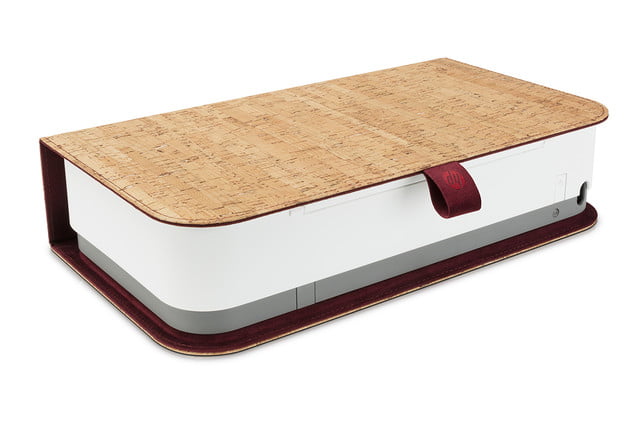
Remember when printers used to look like, well, printers? HP’s latest addition to the world of paper and ink is the Tango — a device designed to look nothing like a conventional printer. At first glance, the HP Tango appears to be perhaps a small fabric layer box, or a very thick book, but within is a small wireless printer boasting some tricks. Starting from $150 for the base unit, and $50 extra for the Tango X model with fabric, the mini-stealth printer might play as more of a centerpiece than something to hide away.
Announced as the world’s first smart home printer, the HP Tango is more than just a little printer with a form factor of 14.8 x 8.1 x 3.6 inches and only 6.8 pounds. Starting with more traditional functions, the Tango can wirelessly print a black print resolution of up to 1,200 x 2,000 dpi and a color resolution of up to 4,800 x 1,200 dpi. The printer itself is a thermal inkjet machine and can print at up to 11 pages per minute. Overall, the HP Tango presents decent specifications for its size to those looking to purchase a new inkjet printer.
But, none of the above functions make this printer any smarter than the one you might already own, so what is it hiding? HP says the Tango gains extra smarts for the home thanks to its ability to allow users to print from anywhere, whether that is on the same Wi-Fi network as the device or half-way around the world. The Tango works in conjunction with the HP Smart app to enable printing almost anywhere.
HP has also squeezed a few other smart features into the app including instant notifications for when you run out of ink, easy scanning of documents with your smartphone’s camera, and a setup wizard for getting your Tango connected and ready. Users can also opt to have the printer automatically order additional ink when it is low thanks to the company’s Instant Ink service.
Lastly, we all know that a device isn’t truly smart unless we can talk to it, and HP has made sure that we are never lonely by bestowing the printer with voice functionality. Currently compatible with Amazon Alexa, Google Assistant, and Microsoft Cortana, you can inform your virtual assistant that you need a specific type of form printed, and it will automatically communicate with your HP Tango.
Buyers looking to get their hands on the new HP printer can begin ordering now; however, the version that includes the linen cover, the Tango X, will be available next month. Owners can pick from either Indio linen or charcoal linen to start, with corck currant coming later this year. Those purchasing the regular Tango have the ability to add on a linen cover after their purchase for an additional cost.
Editors’ Recommendations
- HP slices prices on laptops for its huge back to school sale
- Home printer buying guide: How to choose a printer that best fits your needs
- The best portable photo printers of 2018
- The best printers of 2018
- The best 3D printers under $1,000
Functional Apple-1 Computer Sells for $375,000 at Auction
A rare fully operational Apple-1 computer auctioned off by RR Auction at WeWorks in Boston today fetched a total of $375,000.
The Apple-1 came from a person who purchased the machine from The Byte Shop, the store where Steve Jobs and Steve Wozniak originally sold the computers for $666.66. The seller used the Apple-1 to learn BASIC and wrote small programs before he decided to hold onto it because it “could one day be a piece of computing history.”
Bobby Livingston, Executive VP of RR Auction said that the company was “thrilled” with the price that the Apple-1 earned.
“We are thrilled at the price achieved and that’s why we thought it fitting that the Apple 1 should headline our annual Rare and Remarkable auction– it’s a museum-quality piece that has earned a special place in history.”
Apple-1 expert Corey Cohn restored the machine to its original, operational state in June 2018, and the auction included a comprehensive technical condition report prepared by Cohen. Cohen rated the condition of the computer at 8.5/10 after it worked without fault for eight hours during a comprehensive test.
Over the course of the last few years, several Apple-1 computers have surfaced at auction and have sold for $130,000 to $815,000. The Apple-1 that fetched the highest price as known as the “Celebration” Apple-1 and was ultra rare due to its black “green” PCB board that was not sold to the public and was not part of a known production run.
There are an estimated 60 to 70 Apple-1 computers still remaining of the original 200 machines that were designed and built by Jobs and Wozniak.
Discuss this article in our forums
Camera Comparison: iPhone XS Max vs. iPhone X
Compared to the iPhone X, the iPhone XS and iPhone XS Max offer up an upgraded wide-angle camera with a larger sensor and new features like Smart HDR and Depth Control, all of which bring quite a few changes to photo quality on Apple’s newest iPhones.
We did an in-depth comparison between the iPhone X camera and the camera in the iPhone XS Max to highlight the feature updates and what you can expect to see in your images when upgrading from iPhone X to iPhone XS or XS Max.
Subscribe to the MacRumors YouTube channel for more videos.
Both the iPhone X and iPhone XS Max feature dual-lens camera systems with an f/1.8 12-megapixel wide-angle lens paired with an f/2.8 12-megapixel telephoto lens that enables 2x optical zoom, but there are some notable differences between the two.
The wide-angle camera on the iPhone XS Max is just a bit wider with a 26mm focal length equivalent vs. the 28mm focal length equivalent on the iPhone X, and Apple has introduced a new image sensor that’s twice as fast and 32 percent larger with bigger, deeper pixels that bring out more detail in your photos.

Both iPhones use a TrueDepth camera system with a 7-megapixel front-facing camera for selfies, but the iPhone XS features a faster A12 chip with an upgraded Neural Engine and a new image signal processor, enabling several new features for both the front and rear-facing cameras.
A Smart HDR option offers better dynamic range, bringing out more detail in the highlights and shadows of your images, while a new Depth Control option for Portrait Mode lets you adjust the amount of background blur in your images after a photo is taken. Apple has also introduced improved bokeh, for more aesthetically pleasing blurring of the background details in a photo when using Portrait Mode.

In our experience, Portrait Mode with both the rear and front-facing cameras is improved in the iPhone XS Max compared to the iPhone X with the new features Apple has introduced. The camera is better able to distinguish between the foreground and the background of a photo so it doesn’t blur out as much detail as the iPhone X. It’s by no means perfect and there are still issues with some images, but it’s a definite improvement.

Apple’s Smart HDR feature brings out more detail in iPhone XS Max photos when compared to photos taken with the iPhone X. For example, in images of the sky, the iPhone X will blow out the details due to the variance in lighting, while the iPhone XS Max is able to provide a better photo with the Smart HDR. Smart HDR kicks in often, and paired with the larger sensor, it offers up images with more detail in most photos with low lighting.

Almost all iPhone X photos in low light or with areas where there’s a lot of difference between brightness and darkness overexpose photos or feature too much overcompensation for shadows, a problem that the iPhone XS Max does not have.

Unfortunately, in some situations, Apple’s Smart HDR and/or some heavy-handed noise reduction blurs or smooths out images, something that’s especially noticeable with the front-facing camera in lower light. There is, for example, an entire thread on Reddit filled with users complaining about the ultra smoothing Apple has introduced for the selfie camera.

The strange smoothing effect is primarily noticeable with the front-facing camera when lighting is not great, but it does also affect the rear-facing camera and can sometimes result in soft images that lose their crispness. The iPhone X, which does not use Smart HDR or the same noise reduction algorithms, does not seem to have this issue.

When it comes to capturing video, the experience is nearly the same, though we did feel stabilization was a bit better. The iPhone XS Max continues to be able to record 4K video at up to 60 frames per second, but audio is improved due to new stereo recording functionality.

All in all, iPhone XS Max photos are better than iPhone X photos with a noticeable difference between the two cameras, but there are quirks to be aware of, such as the Smart HDR and heavy noise reduction.
The images featured in the video and in the article can be found in a higher resolution in an Imgur album for clearer comparisons. What do you think of the camera in the iPhone XS and iPhone XS Max? Let us know in the comments.
Buyer’s Guide: iPhone XS (Buy Now)
Discuss this article in our forums
Fight against trackers on the web with Brave Browser (Review)
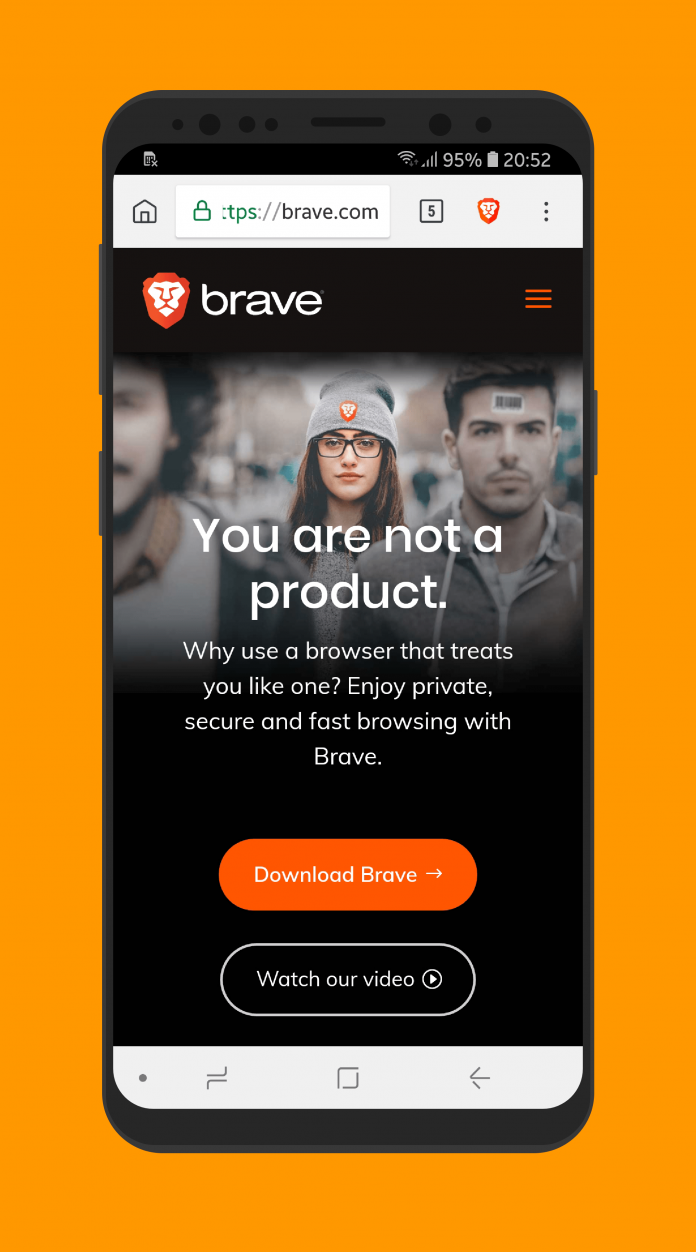
With the increasing number of privacy scandals, leaks of information, and other creepy “features” implemented by websites, the average customer is increasingly worried about the data collected from them and what the companies decide to do with it. In these times 1984-esque times we live in, Brave offers a browsing experience without ads, trackers, and fingerprinting.
Developer: Brave Software
Price: Free
Overview
 After accepting the Terms of Service and Privacy Notice, Brave takes you right into the action and shows you the homescreen. If you feel like the interface looks similar to Google Chrome, it is because Brave is also based on the open-source Chromium project. Brave tries to combine the simplicity, power, and speed from Chromium with security features such as an ad-blocker, tracking protection, enhanced security, and optimizations for consuming less data and battery life.
On the top bar, there is a home icon that (unsurprisingly) takes you to the home page. The address bar works exactly like in Chrome, acting also as a search bar. There’s also a button that lets you see your open tabs, taking you to a screen that resembles what you get when you tap on the Recents button on the navigation bar on your Android device (if you manufacturer hasn’t tampered with it).
The Brave Button
The one interface element that differs from Google Chrome is the Brave button. Upon tapping it you will get information about the additional security measures put in place by Brave. It will show you the number of ads and trackers blocked, HTTPS upgrades (explained in a moment), the number of scripts blocked, and fingerprint methods intercepted.
You can also deactivate all the previously mentioned shields, or do it separately. Block Ads & Tracking, Block 3rd party cookies, and Block Scripts are self-explanatory. HTTPS upgrades is a new functionality in which Brave determines if a site you are browsing under the HTTP protocol has the more secure HTTPS version available. If it does, then it automatically redirects you to ensure you are always navigating securely when it is possible.
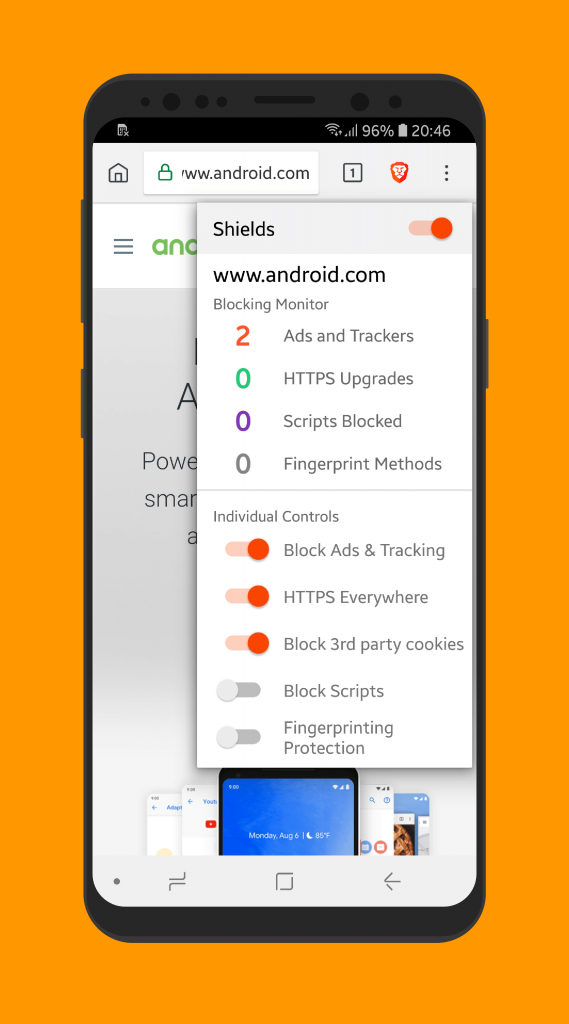
Fingerprinting is a little more complex. The process involves taking information from several sources, such as your IP, country, hardware information, and other similar parameters, and making a fingerprint that allows companies to track your movements across different websites. Brave tries to prevent this by blocking well-known methods of fingerprinting, such as canvas and WebGL. You can read more about it here.
Inside the Overflow
An overflow button lets you go to a bunch of different options, which are all expected if you come from Chrome. Well-known features such as bookmarks, history, downloads, find in page, adding a site to the homescreen, and downloads are all available, thanks to its Chromium roots.
There is a private mode as well, in which the Brave filters and shields still keep working. Inside it, Brave prompts you to switch search engines from Google (which is the default) to DuckDuckGo, a safer alternative that does not track your movements.
Performance
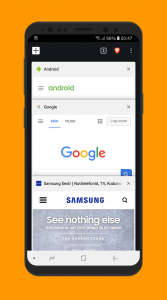 Brave behaves and performs exactly like you would expect from a browser in 2018. Granted, I do all of my tests in a Samsung Galaxy S8, but I also have a Galaxy J5 2017 at hand and it performed wonderfully there as well. Launching the app is within the normal range of apps in both devices.
Sites load fast, scrolling is smooth, and content hardly suffers from any of the built-in protections. It even adopts the navigation bar coloring feature, in which it automatically changes colors based on the site you are browsing. There is no problem watching YouTube videos or streaming content. Because of the numerous shields that Brave has implemented, sites, in theory, should be even faster to load than other alternatives like Chrome and Firefox.
Settings
On the overflow menu, you will find the Settings button. Inside, you will find options to change the default engine, to save passwords, autofill, notifications, and accessibility. These are rather unchanged from Chrome. The one where the Brave team focused the most is in the privacy option. Here you will also be able to turn off a plethora of options that you can also do from the Brave button, such as tracking protection and ad blocking. However, this will do it on a browser level, not on a page level. There is also an option to turn off regional ads.
Unfortunately, I didn’t find a way of activating some kind of syncing of bookmarks between devices. With the big players such as Firefox, Chrome, and Opera offering syncing across devices, it is a glaring omission that could force some power users to look elsewhere.
Conclusion
In an era where every company seems to track your movements everywhere you go, Brave comes to the rescue and tries to mitigate the dangers of browsing the web. The fact that something like this exists is sad, to be honest. However, knowing that there are companies that are still committed to privacy give us a glimmer of hope.
As websites constantly test the patience of its users and cram ads, pop-ups and auto-playing videos, ad blocking has become more and more popular. However, as a site that depends on ads as a source of income, we encourage you to turn them off for sites that you rely on and don’t annoy you. Regardless, if you are looking for a browser that gives you more control on the sites you visit, even with some omissions on their part, Brave is one of the top-notch alternatives on the Play store.
Download and install Brave Browser from the Google Play Store.
Mobile network growth drives new businesses, access to education, report says
The smartphone industry continues to grow, and according to a new report from the GSMA, the industry is having a massive impact on global infrastructure and the number of people with connectivity. According to the report, more than 5 billion people are now connected to mobile networks, and 400 million new subscribers have joined mobile networks since 2015. The GSMA is a trade body that represents the interests of mobile network operators worldwide.
The report, called the “Mobile Industry Impact” report, highlights the UN’s Sustainable Development Goals, or SDGs, of which there are 17. Not all of the 17 goals are related to technology, but mobile network access plays a significant role in many of the goals — especially SDG 9: Industry, Innovation, and Infrastructure. The progress on that goal is the result of almost universal mobile network coverage of some kind, which is driving new business models and the adoption of mobile savings and credit.
“More than two-thirds of the people on the planet are now connected to a mobile network and, for many, mobile is the primary – sometimes only – channel for accessing the internet and life-enhancing services,” said Mats Granryd, director general of the GSMA. “Today’s report outlines how the mobile industry is playing a central role in accelerating delivery of the SDGs and leveraging the power of mobile networks and services to transform lives around the world.”
Thanks to the increased coverage around the world, it’s expected that more than half of the world’s population will be accessing the internet through their smartphones, which is up by 36 percent from 2015.
With internet access comes access to other technologies that could be helpful in developing areas. For example, the study highlights that around 250 million people have started using mobile money since 2015, bringing the total number of mobile money accounts to 690 million around the world. According to the report, this helps “expand financial and social inclusion.”
Education is another big advantage of increased connectivity. The report notes that there are now 750,000 education-related mobile apps available for smartphones, which is up by 62 percent from 2015. The result is that a massive 1.2 billion people are using their smartphones to improve their education or the education of their children. Not only does this help improve overall education in underserved areas, but making education more accessible also helps bridge the gender gap related to education access. Better and accessible education is SDG 4, while gender equality is SDG 5.
It’s likely increased connectivity will impact other UN goals, too. For example, SDG 3 is related to improved health and better access to health care, while SDG 7 relates to clean energy.
Editors’ Recommendations
- Facebook responds to Myanmar genocide report, bans accounts that reached millions
- ‘Destiny 2: Forsaken’: Everything you need to know
- Here is our ‘World of Warcraft: Battle for Azeroth’ leveling guide
- How to Use Facebook: The unofficial user manual
- Just add speakers: The Sonos Amp puts music muscle in smart homes
 AIVAnet