


This autonomous drone ambulance concept won its creator a $20,000 prize
Vincenzo Navanteri
Quadcopters are proving to be an exciting technology in a lot of fields, none more so than emergency services where they can be sent into disaster areas to assess damage, send medical equipment, drop supplies, and help plan airlifts.
The remotely controlled flying machines have been used to lower flotation devices to struggling swimmers, while operators recently used a video stream from a drone’s on-board camera to help lead people to safety during a volcanic eruption in Hawaii.
Inspired by the positive work being performed by drones in emergency situations, Vincenzo Navanteri recently came up with a design for a quadcopter large enough to carry a person to safety.
Judges at the recent World Air Sports’ International Drones Conference were so impressed with Navanteri’s concept design that they awarded him the Prince Alvaro de Orleans-Borbon Grant, worth $20,000.
Accepting the award in Lausanne, Switzerland, the 34-year-old Italian said he’ll use the cash to help him and his team develop the autonomous air ambulance, which, in simple terms, looks like an enormous quadcopter with a stretcher on top.
The design includes an on-board camera and back-up batteries, as well as an oxygen supply unit and health-monitoring technology. Navanteri envisions a machine that can operate in all weathers and in a variety of testing situations, including earthquakes, floods, and even nuclear contamination zones.
The team’s aim is to build a self-flying machine capable of carrying a person — or emergency supplies — weighing up to 265 pounds (120 kg) at speeds of up to 68 mph (110 kmh).
Its unique technology could also see it flying non-stop for up to 95 miles (150 km). The quadcopter’s range, which is the standout feature for Navanteri, would be achieved thanks to its two gas-driven micro-turbines that generate the electricity to power the battery-driven propellers. The creator said he believes the patented technology is “revolutionary” and will help “move drones forward, away from simple 20-minute battery-life.”
Presenting the award, FAI president Frits Brink described Navanteri’s design as “innovative,” adding, “The potential for drones to do good is great, and ideas like this single-person drone ambulance show the potential. The technology underpinning this idea is real — a drone ambulance used in search and rescue is not simply a good idea, it is a realistic one too.”
Editors’ Recommendations
- A single police drone has seriously impacted crime in a Mexican city
- 7 amazing anti-drone technologies designed to swat UAVs out of the sky
- The best drones under $500
- Ohio wants to use camera drones to monitor highway traffic
- Watch as a ‘lifeguard drone’ rescues a swimmer struggling at sea
Asteroid mining is almost reality. What to know about the gold rush in space
Mining resources from asteroids may sound like the stuff of science fiction, but — at least if you believe some very smart people — it’s well on its way to becoming science fact.
What will be mined? Why would anyone want to do this? And who are the main players in this (literal) space? Read on for a beginner’s guide to all things asteroid mining.
I’m still not convinced. This is seriously a real thing?
Well, with that attitude it won’t be! To answer your question: no, it’s not happening yet — but don’t count it out, either. With resources on Earth set to become increasingly scarce, it makes sense that we look further afield.
Artist’s illustration of Deep Space Industries’ Harvestor-class spacecraft for asteroid mining. Deep Space Industries
Depending on their type, asteroids can contain everything from water (useful for long-term space exploration missions) to nickel and cobalt or even valuable metals like gold or platinum. These are often in much higher concentrations than we would find on Earth.
Around 9,000 known asteroids are currently traveling in orbit close to the Earth, and some 1,000 new ones are discovered each year. According to estimates, a one-kilometer diameter asteroid may contain up to 7,500 tons of platinum, with a value of upwards of $150 billion. That’s a reason to get excited in itself.
So is this going to be the next gold rush?
With that kind of money to be made, it certainly could be. While the upfront investment costs means this won’t be quite the free-for-all of the famous 19th century gold rush, there are plenty of big names — ranging from Elon Musk to Jeff Bezos — who are very, very interested.
Think of it as panning for gold, except with the pans replaced by multimillion dollar space launches.
Isn’t that cost a limiting factor?
It very well could be. Simply put: the pricey part of this isn’t the R&D that goes into working out how to do asteroid mining. Nor is it the launches that take place to actually the achieve the goal. Instead, the really expensive bit is getting the materials back to Earth once we’ve mined them.
Given the astronomical amount of expenditure this will involve, there needs to be something seriously valuable to offset the cost of transporting it.
That’s without mentioning the fact that introducing a surplus of new precious materials on Earth would have the effect of greatly lowering its market value.
Who are the big players in this field?
Considering the price tags attached to this mission, a surprisingly large number of companies are currently working in this field. Alphabet’s Larry Page is backing Planetary Resources, although it’s worth mentioning that earlier this year the company was forced to make layoffs and delay its proposed 2020 prospecting mission after failing to raise much-needed money.
Deep Space Industries is another leader, with plans to develop technologies which will make it easier for governments and other private companies to gain access to orbit. Deep Space Industries has said that much of what it plans to mine would be used in space, rather than brought back to Earth (thereby avoiding one of the biggest costs.)
Then there are the likes of TransAstra Corporation, the U.K.’s Asteroid Mining Corporation, SpaceX’s Falcon Heavy rocket system, and more. Some days it seems you can throw a space rock without hitting one of these companies!
How would the mining actually be done?
Nobody has actually done this yet, so it’s still largely hypothetical. A lot of the same mining technologies which are used on Earth could presumably be employed for extracting materials, depending on their specific requirements. Water, meanwhile, could be extracted through heating materials and then distilling the water vapor.
At present, a number of different approaches are being explored. TransAstra Corporation, for instance, wants to use highly concentrated sunlight to break up asteroids for extraction.
What are the big bottlenecks?
Broadly speaking, there are two: the technical challenges and the legal ones. Right now, companies are coming up with ways to gather information about the asteroids in our orbit so as to determine their composition. After this, they will need to establish the most cost-effective way to launch a craft capable of carrying out the mining extraction itself.
Signing of the 1967 Outer Space Treaty. United Nations
The legal challenge is every bit as thorny. Right now, we’re at the earliest stages for ruling who has the right to mine certain asteroids. The United Nations’ 1967 Outer Space Treaty has been signed by 106 countries — but this doesn’t address the topic in any great detail. In the U.S., congress signed the Space Act of 2015 into law several years back. This gives U.S. space firms permission to own and sell the natural resources they mine in space — asteroids included.
Make no mistake, however: This is going to keep lawyers every bit as busy as it will aerospace engineers. And especially if and when the money starts rolling in.
When will this happen?
That’s the $150 billion per asteroid question. J.L. Galache, an advisor to Deep Space Industries, thinks we’ll see the first asteroid mining in 10-20 years. Others predict considerably longer than that. Will it happen in your lifetime? We certainly hope so.
Sign me up. How do I get involved?
Got your eyes on an asteroid-mining fortune, eh? While we’re still a couple of decades (at least) away from the first rocks being mined, there are still ways to get involved. In August this year, the Colorado School of Mines launched the world’s first “Space Resources” degree course — offering proper certification in this sci-fi-sounding topic.
“I would compare this to aviation,” Dr. Angel Abbud-Madrid, director of the Center for Space Resources and Research Associate Professor in Mechanical Engineering at Colorado School of Mines, told Digital Trends. “The first academic programs started just a few years after the Wright brothers [pioneered the first airplanes]. People realized quickly that this was no longer just the field of daredevils and people looking for entertainment; it was going to become very important. The same thing happened with academic aerospace programs shortly after the launch of Sputnik. Even though going to the moon looked far away, there was a realization that this would happen. Universities have to be ahead of the curve so they can start preparing people to enter [new] fields.”
Editors’ Recommendations
- Want a future-proof degree? Head to Colorado for asteroid mining
- We asked Bill Nye about his plan to save Earth from civilization-ending asteroids
- Get your Sagan on with 60 awe-inspiring photos of the final frontier
- Japanese space probe to begin exploring asteroid Ryugu
- Airbus to build Mars rover to get first soil samples back to Earth
Belkin’s special machine puts an end to one hateful aspect of phone ownership
Previous
Next
1 of 8

Andy Boxall/Digital Trends

Andy Boxall/Digital Trends

Andy Boxall/Digital Trends

Andy Boxall/Digital Trends

Andy Boxall/Digital Trends

Andy Boxall/Digital Trends

Andy Boxall/Digital Trends

Andy Boxall/Digital Trends
No-one, absolutely no-one, wants the task of attaching a screen protector to their phone. It’s never simple, and it almost inevitably ends up with dust, hair, or air bubbles between it and the screen. Belkin, the popular mobile accessory manufacturer, has a cool solution we tried out at IFA 2018. It doesn’t just handle the process of fitting the protector, but it avoids all the common pitfalls too.
Belkin already has a range of glass screen protectors for the current Apple iPhone range, and we got a demonstration on the iPhone X. To simplify the application of the screen protectors, and make its products more attractive, Belkin invested in the TrueClear Pro, a machine that does all the work. It’s the company’s own design, and you’ll find it in some Apple Stores now, with more coming to T-Mobile stores in the U.S., and a selection of retailers in the U.K. including John Lewis, Carphone Warehouse, and soon Vodafone stores too.
Think of the device as one of those sandwich makers you see in coffee shops, except instead of bread and a yummy filling being put inside, it’s your phone and a shiny new screen protector. It’s operated by the staff of the store you visit, and isn’t something you personally purchase. After removing the old screen protector and cleaning the screen on our iPhone X, it was placed upside down on a custom tray designed specifically for the phone, which holds it in place with the new screen protector. What happens next is almost magic.
The top is closed, the screen protector backing is pulled from the front of the machine, and the top is opened back up. The protector still has a plastic cover over the top so the glass does not get scratched while the air bubbles are pushed out. This gets ripped off, and it’s done. That’s it. No worrying it’s not on straight, no cat hair underneath, and no swearing as you realize you’ve made a mess and wasted $30.
Perfect fit
We got the ScreenForce Tempered Curve Screen Protector, which costs $40/35 British pounds, and fits the iPhone X perfectly — right down to matching the curved sides of the screen itself. It’s just 0.33mm thin, has a hardness rating of 9H — the highest you can get — and resists fingerprints. It feels very close to the iPhone X’s screen itself, unlike many plastic screen protectors. After it was fitted, there was a small air bubble left at the bottom of the screen, which disappeared the day after. So far, we’re enjoying having it on our phone.
Belkin’s screen protectors did cause some controversy late last year, when previous versions of its InvisiGlass Ultra covers broke quickly after installation. Updated versions returned to Apple Stores in February this year. We did not try out the InvisiGlass version. There are also questions over the effectiveness of screen protectors at all; but we have less of a problem when they don’t ruin the tactility of the original screen underneath, which the Belkin ScreenForce seems to avoid.
Belkin told us it recommends retailers with the TrueClear Pro machine charge only for the screen protector, and offer the fitting service for free. Some retailers may not follow this and charge for a more premium service. Almost regardless, having the screen protector fitted perfectly by someone else removes one of the most hateful aspects of smartphone ownership.
Editors’ Recommendations
- Microsoft Surface Book 2 15-inch review
- Future pain-free microneedles could be inspired by mosquitos
- LG HU80KA laser projector review
- The best waterproof phones of 2018
- With Dropit’s delivery service, you can literally shop till you drop
Huawei’s new software and chip combo is made to make the Mate 20 fly
Previous
Next
1 of 10
Andy Boxall/Digital Trends
Andy Boxall/Digital Trends

Andy Boxall/Digital Trends

Andy Boxall/Digital Trends

Andy Boxall/Digital Trends

Andy Boxall/Digital Trends

Andy Boxall/Digital Trends

Andy Boxall/Digital Trends
Andy Boxall/Digital Trends

Andy Boxall/Digital Trends
Our picture of how the Huawei Mate 20 will be is almost complete. Leaks have shown off the potential design, we know the Kirin 980 processor will be inside, and now we know the software it will run — Huawei’s new EMUI 9.0 user interface, which is built over the top of Android 9.0 Pie. And it’s going to be fast.
Dr. Chenglu Wang, president of software engineering at Huawei, and Mao Yumin, director of software engineering technology and planning, told Digital Trends EMUI 9.0 paired with the Kirin 980 will make the upcoming Mate 20 absolutely fly. Dr. Wang explained the data publicly shared relates to EMUI 9.0’s performance across all Kirin chipsets, but performance will increase a lot when paired with the Kirin 980
“The Kirin 980 chipset with the new EMUI 9.0 will have amazing performance,” he said proudly, and referenced the forthcoming Mate 20 smartphone directly.
Huawei is very proud of EMUI’s performance generally, from how it balances CPU power consumption to how it learns user behavior, along with app optimization and the ability of GPU Turbo for gaming. It is all possible due to Huawei creating both the chipset and the software.
“Others just have the software, or just have the chip, like Qualcomm,” Dr. Wang said. “This is our advantage.”
New look and features
What’s new in EMUI 9.0? The concept behind the software is to create something simple, enjoyable, and consistent. EMUI is six years old now, and has grown considerably in users. In 2016 it had 190 million users, but now there are 350 million global daily active users. While EMUI 9.0 has been announced, Huawei has not shared all the new features yet. What we do know is there are changes to the system layout, new sounds directly influenced by nature, new artwork, better damping when sliding through menus, and improved ergonomics in all the basic apps.
 EMUI 9.0 Beta Andy Boxall/Digital Trends
Greater changes include the introduction of GPU Turbo, which improves games using software and hardware enhancements, a password vault that securely stores passwords in a secure zone on the device and not in the cloud, and a digital wellbeing feature. There are some changes you may not instantly notice too, including a consistent look for buttons across the user interface, making it simpler to use.
The other main addition is a gesture control system for what Huawei describes as devices with immersive screens, which refers to bezel-less and button-free front panels. We took a deeper look at this, and some of the other changes, to understand what goes into making an Android user interface used by hundreds of millions across the world.
Gestures, Assistant, and Wellbeing
EMUI’s gesture controls are similar to the systems we’ve seen on the iPhone X and phones from Vivo and Oppo. Sliding left and right on the screen moves forward and back when browsing, for example, and back through open apps. A cute arrow icon pops in at the side of the screen when you do this, which is genuinely helpful, as other Android systems often leave it to chance that you are getting the gesture right. Slide up from the bottom of the screen to go back home or to enter the open app helicopter view. It worked fluidly on the test device we saw, and neatly flowed between screens and apps.
It replaces the Android soft keys at the bottoms of the screen, which makes summoning Google Assistant a problem, because there is no virtual home button.
“Google doesn’t welcome this kind of innovation, because there is no entrance point for Assistant,” Yumin said.
 EMUI 9.0 Beta Andy Boxall/Digital Trends
While this is fine in China, where Assistant is not used, it’s more of an issue internationally. Therefore, Huawei will make the EMUI 9.0 gesture control system an option internationally, and not the default. It’s the same sensible decision it takes regarding the app tray too. With the gestures activated, Assistant is called up by voice. However, Huawei says in the future a hardware button may be used on immersive devices, or by squeezing the phone like the Pixel 2 or HTC U12 Plus.
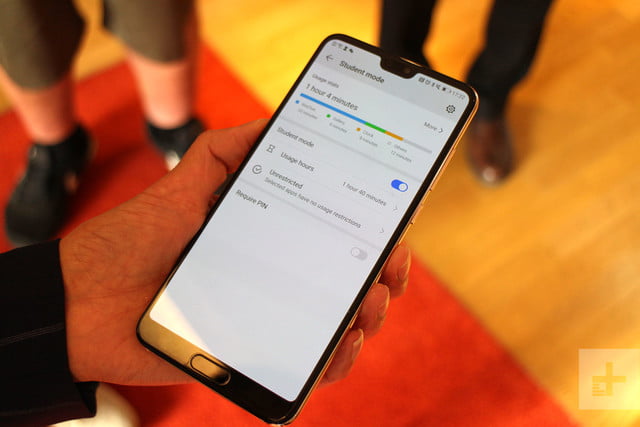
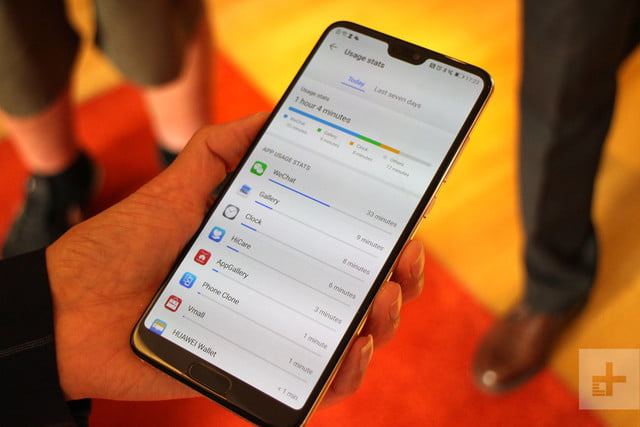
EMUI 9.0 also features a digital wellbeing system, similar to what we’ve seen introduced by Google in Android 9.0 Pie, and by Apple’s Screen Time in iOS 12. Yumin explained why this is beneficial: “Android 9.0 Pie’s digital wellbeing feature is only available on Pixel and Android One phones right now, and is not available in China at all.”
”Manufacturers cannot get this framework from Google,” Wang said, emphasizing the importance of developing its own version.
“At present the ideas [In Google’s version and Huawei’s] are similar,” Yumin admitted, but she did point out some added benefits. For example, the feature in EMUI provides statistics individually for each app, and over a longer period of time.
Balance
Talking about EMUI in general, the enormity of the task for Huawei in making the software suitable for both China and international users. Huawei has global ambitions, Dr. Wang said, adding that underneath the Chinese version and the international version is the same, but the user interface we see is different.
“Born fast, stay fast, the artificial intelligence, and the GPU Turbo are all the same,” Yumin said. “Chinese users like icons across all the screens, and international users like the app drawer.”
 EMUI 9.0 Beta Andy Boxall/Digital Trends
Carriers also try to influence the look and use of EMUI, and Huawei includes a feature where customizations are downloaded and installed when a certain carrier’s SIM card is inserted, to meet their requirements. That’s a user interface that must meet the needs to Chinese and international users, plus carriers around the world too.
Huawei has to maintain a balance here, because it works with carriers on the infrastructure side too. It’s little surprise there are more than 3,000 people working on EMUI. Dr. Wang is pragmatic about the situation. “It’s a challenge, but at the same time it’s a chance to increase our technical capabilities.”
Changes, and testing
EMUI 9.0 has new artwork, and a consistent look across the system, with significant changes over previous versions. How about all those menus, buttons, and options in the Settings menu? There were 940 in EMUI 8, but in EMUI 9.0 they’ve been reduced by 10 percent to 843. For example, the wallpaper options are on a single screen, not under separate menus, and to change the clock from analog to digital, you just tap it. Sensible changes, so why have they not been implemented before?
“It’s very complicated,” Dr. Wang told us, explaining how preferences regarding the haptics, the screen changes, the size of the tabs, and other sensory aspects of the user interface vary from person-to-person, and even age group. It’s finding the right balance that’s hard, right down to syncing the response from eye-to-finger. “It needs a lot of testing. It’s not a theory.”
“The industry doesn’t guide us. We use A/B tests, and gather feedback from end users,” Yumin said. All ages are included in the random test groups, and can total 10,000 people. Huawei is also careful not to introduce massive changes to the user interface, as this can frustrate established EMUI users.
While this process is complete for EMUI 9.0, there is still final testing to be done, and Huawei will open up the software as a beta very soon. A download will be available for the Huawei P20, P20 Pro, a Mate 10, or a Mate 10 Pro, plus the Honor 10, Honor View 10, and the Honor Play. Huawei’s EMUI 9.0 will make its debut on the Mate 20, which will be revealed at an event on October 16.
Editors’ Recommendations
- Third-party call recording apps no longer work with Android 9.0 Pie
- What to keep your phone secure? Here’s how to use Android 9.0 Pie’s Lockdown Mode
- How to use Android 9.0 Pie’s gesture navigation, and how to turn it off
- Android 9.0 Pie vs. iOS 12: How notifications have changed
- The best and worst features of Android 9.0 Pie
Samsung wants to give new features to midrange phones before flagships
Julian Chokkattu/Digital Trends
Samsung is changing its strategy for its midrange phones in order to attract a younger audience and move harder into developing markets, according to an interview with CNBC.
DJ Koh, president of mobile communications at Samsung, said that Samsung will be changing the way it deals with mobile technological advancements. Specifically, it will now be looking to bring more premium features previously only available in flagship phones like the Galaxy Note 9 or the Galaxy S9 to lower-priced, midrange devices like the Galaxy A8 — and may even look at giving midrange phones new features before flagship phones.
“In the past, I brought the new technology and differentiation to the flagship model and then moved to the mid-end,” Koh said to CNBC. “But I have changed my strategy from this year to bring technology and differentiation points starting from the mid-end”. He also mentioned that Samsung would consider launching more than one midrange model per year, if that helped to boost sales.
But with Samsung sat atop the smartphone sales, why is it feeling the need to change a clearly winning strategy? The answer is that many developed markets are reaching “peak smartphone.” This year saw a slump in sales for the Galaxy S9, and while it’s tempting to blame the S9’s lack of massive innovation on the Galaxy S8‘s formula, this could also be due to a larger change in the marketplace. The International Data Corporation confirmed that smartphone sales had slumped in the first part of 2018 — a change that Samsung saw coming.
Smartphones are lasting longer than ever before, so not everyone is seeing the need to upgrade regularly — and that’s putting the kibosh on growth in certain markets. But there are areas where growth is still occurring — markets that crave lower-cost, high-specification handsets. Companies like Huawei, Honor, and Oppo have traditionally ruled these areas with high-spec low-cost phones, and that strategy has led to Huawei overtaking Apple as the world’s second-largest phone manufacturer.
By changing its strategy with lower-cost midrange phones, Samsung is hoping to barge into that marketplace that Huawei, Honor, and others have traditionally enjoyed — and it’s not just developing markets that encompass this either. Younger users who might not be able to afford the latest flagship phones may also be swayed by the idea of a lower-priced Samsung handset with premium features like the DeX desktop mode.
Regardless of what Samsung’s intentions are, this is a positive move for the market as a whole, and we look forward to seeing a premium-midrange phone from Samsung.
Editors’ Recommendations
- Sharp jumps back into the phone market with a trio of midrange devices
- Samsung Galaxy S9 and S9 Plus: Here’s everything you need to know
- The Huawei Mate 20 Lite is A.I.-powered, attractive, and affordable
- New MediaTek chip brings premium features to budget phones
- Samsung Galaxy S10: Here’s everything we know
UK Deal: Add Bluetooth to any speaker with these Mpow receivers, from £10
Just plug it in, turn it on, connect to your favorite Bluetooth device, and start streaming.

As part of its Deals of the Day, Amazon is offering several Mpow Bluetooth receivers for up to 20% off. For around £10, these devices add Bluetooth to your old car stereo or home speaker system and allow you to start streaming your favourite tunes quick and easily.
There are a few different options available, some of which plug directly into the cigarette adapter in your vehicle and some that plug into the 3.5mm headphone jack, so you’ll want to browse them all to see what may work best for your situation.
Some of our favourite deals include:
- Mpow Bluetooth Receiver, 3.5mm Aux Stereo Out – £9.76 (Was £13)
- Mpow Bluetooth 2 in 1 Transmitter & Receiver, 3.5mm Aux Stereo Out – £11.95 (Was £16)
- Mpow Bluetooth Receiver with Dual Microphones – £10.79 (Was £15)
- Car Bluetooth FM Transmitter with USB port – £11.99 (Was £17)
There are are few more options included in the sale so be sure to check out the full range and grab a device that suits your needs. These deals expire today, so take advantage of the savings while you can.
For more UK deals coverage, be sure to keep an eye on Thrifter UK, sign up for the UK newsletter and follow the team on Twitter.
See at Amazon UK
Watch: ZTE Axon 9 Pro hands-on video
Gunning for the high end.
It’s been an incredibly tough year for ZTE, watching its phone sales and revenue tank as it faces sanctions from the U.S. government. But the company hasn’t stopped development of new phones, including the just-announced Axon 9 Pro.
A follow-up to the Axon 7, the new Axon 9 Pro is … well, a bit generic. It’s a big 6.2-inch metal-and-glass slab with some nice colors on the back and a screen notch up front, filled with top-end specs like you’d expect in this segment. There are also two cameras on the back, of course.
The price isn’t too bad, though. When it goes on sale in Europe it will be €650, which somehow seems like a bit of a bargain considering how prices have gone up at the top of the market in the last couple of years.
Check out our hands-on video above, from IFA 2018!
- Android Central on YouTube
- More from IFA 2018
WhatsApp Begins Rolling Out Support for Media Previews in Message Notifications
WhatsApp now supports media previews in new message notifications, according to the latest update for iPhone users running iOS 10 or later.
For as long as WhatsApp has been on iPhone, any images included in messages have been replaced by a camera emoji in notifications, so you had to open the app to see the attached media.
Similarly, GIF messages sent over the chat platform are traditionally represented in notifications by the space invader emoji, requiring users to open WhatsApp to view the content.
That behavior is set to change in version 2.18.90, released today, with support included for full media previews. On devices with 3D Touch, a hard press on notifications should reveal the media without having to open the app. Alternatively, users can swipe left on the notifications and tap View in the revealed menu.
It’s also worth noting that the media preview feature allows users to download images and GIFs directly from the notification if they have disabled WhatsApp’s media auto-download option.
According to WABetaInfo, the media preview feature isn’t working for everyone who has updated just yet, but WhatsApp is apparently aware of the issue and is aiming to fix it server-side within the next few days.
Also in version 2.18.90, WhatsApp is introducing a feature that flags suspicious links sent over the chat platform. When a message is received that contains a link, WhatsApp analyzes the URL characters locally in order to detect if the link is suspicious and alerts the user in the chat thread.
WhatsApp is a free download for iPhone available from the App Store. [Direct Link]
Tag: WhatsApp
Discuss this article in our forums
‘Five Eyes’ Governments Urge Tech Companies to Build Backdoors into Encrypted Services
Five nations including the U.S. and the U.K. have urged tech companies to comply with requests to build backdoors into their encrypted services, or potentially face legislation requiring them to do so by law.
The statement is a result of a meeting last week between the “Five Eyes” intelligence sharing countries, which include the U.S., the U.K., Canada, Australia, and New Zealand.
In a published memo, the governments claim that the use of such backdoors for accessing encrypted data would respect personal rights and privacy, and be limited only to criminal investigations by law enforcement.
Privacy laws must prevent arbitrary or unlawful interference, but privacy is not absolute. It is an established principle that appropriate government authorities should be able to seek access to otherwise private information when a court or independent authority has authorized such access based on established legal standards. The same principles have long permitted government authorities to search homes, vehicles, and personal effects with valid legal authority.
The memo goes on to note that each of the Five Eyes jurisdictions will consider how to implement the statement principles, including “with the voluntary cooperation of industry partners”, while adhering to lawful requirements for proper authorization and oversight.
The statement of principles underlines the fractious relationship between some governments and tech companies regarding encryption over the last few years, in which the popularity of digital messaging services has exploded.
The U.K. government has long argued that encrypted online channels such as WhatsApp and Telegram provide a “safe haven” for terrorists because governments and even the companies that host the services cannot read them.
In 2016, Apple and the FBI were involved in a public dispute over the latter’s demands to provide a backdoor into iPhones, following the December 2015 shooter incidents in San Bernardino.
Apple refused to comply with the request, saying that the software the FBI asked for could serve as a “master key” able to be used to get information from any iPhone or iPad – including its most recent devices – while the FBI claimed it only wanted access to a single iPhone.
In another potential test case, Facebook is currently contesting a demand from the U.S. government that it break the encryption of its popular Messenger app so that law enforcement can listen in to a suspect’s conversations as part of an ongoing investigation into a criminal gang.
Note: Due to the political nature of the discussion regarding this topic, the discussion thread is located in our Politics, Religion, Social Issues forum. All forum members and site visitors are welcome to read and follow the thread, but posting is limited to forum members with at least 100 posts.
Tags: privacy, Encryption
Discuss this article in our forums
‘Creative Selection’ Offers a Behind-the-Scenes Look Into Some Key Moments in Apple’s Design History
Former Apple software engineer Ken Kocienda is releasing a new book entitled Creative Selection today, presenting a look inside Apple’s design process through his involvement with a few key features across a variety of platforms and devices. I’ve had an opportunity to read through the book ahead of its debut, and it offers an interesting perspective on how Apple develops and refines features through an iterative process Kocienda terms “creative selection.”
Kocienda, who joined Apple in 2001 and spent 15 years with the company, identifies seven “elements” he deems essential to Apple’s success in software development, including inspiration, collaboration, craft, diligence, decisiveness, taste, and empathy. He delves a bit into how each of these elements contributes toward Apple’s relentless pursuit of innovative ideas and solutions that end up being intuitive and useful to Apple’s customers.
The process of creative selection is the overarching strategy for Apple’s engineers, with small teams highly focused on rapid-fire demos of their work that allow the engineers to quickly iterate on their ideas and designs, saving the best elements of each iteration to rapidly reach levels of refinement required for Apple’s final product releases.
Back in 2001, Kocienda was part of a team from former Apple engineer Andy Hertzfeld’s software company Eazel that went defunct. Following Eazel’s shutdown, Kocienda and Don Melton were hired on at Apple to develop Safari for Mac, and a number of other Eazel engineers ultimately joined them on the project. But in the first days of Apple’s web browser project, it was Kocienda and Melton who got the ball rolling by trying to figure out how to port Mozilla to Mac OS X.
In Creative Selection, Kocienda spends several chapters walking through those difficult first steps, the inspiration of Richard Williamson to build Safari based on the lean and nimble Konqueror browser rather than Mozilla, and the Safari team’s relentless effort toward building out a working web browser with an obsessive focus on speed.
As we introduced new features like clicking the back button to return you to your previously viewed web page, we found we couldn’t perform the bookkeeping to manage the previous page at quick readiness without impeding the load of all pages. The PLT [Page Load Test] showed the slowdown. When we deemed such features too important to skip but couldn’t figure out how to add them without causing such slowdowns, we instituted a trading scheme, where we found speedups in unrelated parts of our existing source code to “pay for” the performance cost of the new features.
[…]
None of this optimization was easy, and it wasn’t always fun, but Don [Melton] always held the line. And in the year following the Black Slab Encounter [the first time the browser was able to load a real “web page” from Yahoo.com], we succeeded in making our code faster and faster.
Once Safari launched, Kocienda shifted to a project to bring WebKit-based rich email editing to Apple’s Mail app, and he details the lengths he went to in order to make insertion point cursor placement behave properly, a feature that’s more complicated than one might think.
Following a brief stint as a manager of Apple’s Sync Services team for cloud data synchronization in which he found the job wasn’t for him, Kocienda in mid-2005 boldly threatened to quit and perhaps move to Google if he couldn’t be switched to a new role on the “new super-secret project” that was rumored within the company. He soon found himself interviewing with Scott Forstall, who invited him to join Project Purple, the effort to build the iPhone.
Kocienda’s key contribution to Project Purple was the development of the autocorrect keyboard, and he walks through Apple’s early efforts to figure out how a keyboard could work on the small screen of the iPhone. As the keyboard quickly became a roadblock for the iPhone’s software design, the entire fifteen-person team was tasked with developing concepts. In demos for Forstall, Kocienda’s early idea of large keys preserving the QWERTY layout but with multiple letters per key and a dictionary used to predict which word the user was trying to type won out and he was placed in charge of keyboard development.
That was of course just the start of the keyboard project for Kocienda, and he walks through the evolution of the design, the trials and tribulations of building a comprehensive dictionary to drive the autocorrect functionality, and the decision to ultimately go back to single-letter keys with algorithms for key prediction and autocorrect.
Through all of this, Kocienda had never seen the design of the actual iPhone, as hardware design was completely separate from software and his team had been using “Wallaby” prototype devices tethered to Macs as their software development and testing platforms. It wasn’t until late 2006 that Kocienda got his first look at the actual iPhone Steve Jobs would show off just a few weeks later at Macworld Expo.
When Kim [Vorrath] passed the prototype to me, she asked me to handle it gingerly. I took it from her. The glass display was striking—far brighter and sharper than the Wallaby screen we’d been staring at for more than a year. I turned the device over in my hand. It felt solid, like it was filled to the brim with the latest technology, and it was. In fact, at that moment, it was overflowing a bit.
I paced back and forth a few times to feel the freedom of movement that came with untethering from a Mac. The Wallaby experience had been about feeling tied down to a computer on a desk with cabling spidering out everywhere. Now, for the first time, as I put the phone in my pocket, I got an idea of what it would be like to use a Purple phone.
Naturally, I was most interested in the keyboard. I typed out a few words in the Notes app. The keyboard worked without a hitch. My autocorrection code stepped in to fix all the mistakes I made. I could have spent all day with the device, trying out everything I could think of, but other people were waiting for their turn. As I handed the device over, I had no question in mind.
I wanted one.
Kocienda never had the opportunity to demo any of his iPhone work directly to Steve Jobs, but he did get that chance several times during his subsequent work on the iPad’s software keyboard. Kocienda shares the experience of that demo in the very first chapter of his book, describing how he was initially planning to offer users the ability to choose between a Mac-like keyboard layout with smaller keys and a scaled-up iPhone-like keyboard with larger keys more similar in size to physical keys.
He turned to look straight at me.
“We only need one of these, right?”
Not what I was expecting. I think I may have swallowed hard. Steve was still looking at me, and so, with a half shrug, I said, “Yeah . . . uh . . . I guess so.”
Steve sized me up a little and then asked, “Which one do you think we should use?”
A simple question, clearly directed at me and only me. Steve didn’t shift in his chair or motion toward anyone else in the room. It was my demo, and he wanted me to answer.
And then something happened. Standing there, with Steve Jobs staring at me, waiting for me to respond to his question, I realized that I knew what to say, that I had an opinion.
“Well, I’ve been using these demos for the past few days, and I’ve started to like the keyboard layout with the bigger keys. I think I could learn to touch type on it, and I think other people could too. Autocorrection has been a big help.”
Steve continued looking at me as he thought about my answer. He never moved his eyes to anyone or anything else. He was completely present. There he was, seriously considering my idea about the next big Apple product. It was thrilling. He thought for a few seconds about what I had just said and what he had seen on the iPad. Then he announced the demo verdict.
“OK. We’ll go with the bigger keys.”
Overall, Creative Selection is a worthy read, focusing on a few detailed anecdotes that provide a terrific inside look at Apple’s design process. Given Apple’s size and the way the company compartmentalizes its projects, Kocienda doesn’t necessarily have a high-level view of things, but he does a good job drawing on his experiences to discuss his individual philosophy and that of the teams he worked with, extrapolating that to the unspoken criteria used across the company to drive the creative selection process that has yielded the products and features we’ve all come to know.
Creative Selection is available now from Amazon, the iBooks Store, and other retailers.
Tags: Creative Selection, Ken Kocienda
Discuss this article in our forums
 AIVAnet