


The Fire TV Recast sends local television to your Echo Shows and Fire TVs
Pricing starts at $229 for a box with two tuners and a 500GB DVR.

While it’s easy to cut the cord and get national TV networks on your television with apps like Sling, YouTube TV, and more, sending local channels from an antenna to a smart device requires a bit more work. If you live in the Amazon ecosystem, things are about to get a lot more exciting thanks to the Fire TV Recast.
Your local TV antenna plugs into the Recast which can be placed anywhere so that you get the best signal possible. The companion app will help with the setup process so that things run as smoothly as can be, and once you’ve found the perfect spot, the antenna sends its signal through the Recast which then beams your local TV channels to your Amazon Fire TVs and Echo Shows.
The Recast is capable of recording two or four shows at a time and allows you to stream your channels to multiple devices at once.
The base model of the Fire TV Recast comes equipped with two tuners and a 500GB DVR. Pre-orders for it are live today at $229. Amazon’s also got an upgraded variant with four tuners and a 1TB DVR that’ll set you back $279.
See at Amazon
SanDisk SSDs, Philips Hue lights, and more are discounted today
Whether you’re looking for new tech gear or household items, we’ve got you covered.
We found plenty of great deals today that include big discounts on SanDisk’s 1TB SSD, Philips Hue multi-color light bulbs, Acer’s gaming laptop bundled with a mixed reality headset, and more!
View the rest of the deals
If you want to know about the deals as soon as they are happening, you’ll want to follow Thrifter on Twitter, and sign up for the newsletter, because missing out on a great deal stinks!
How to install Linux apps on your Chromebook
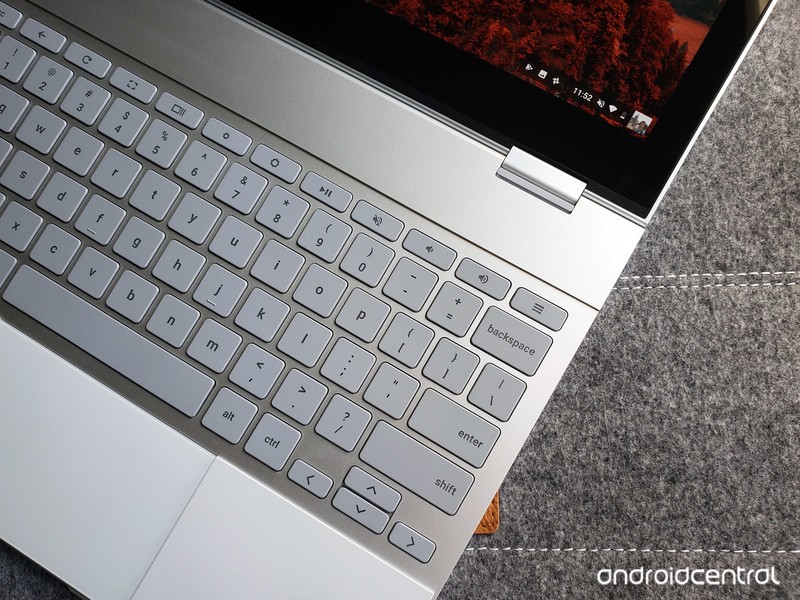
Chromebooks have always been great at the basics like watching Netflix or checking email. Android apps brought a few more productivity tools, but Chromebooks are about to get a lot more useful with the addition of Linux apps.
Products used in this guide
- Amazon: Google Pixelbook – 128GB storage ($999)
Check your Chrome OS version
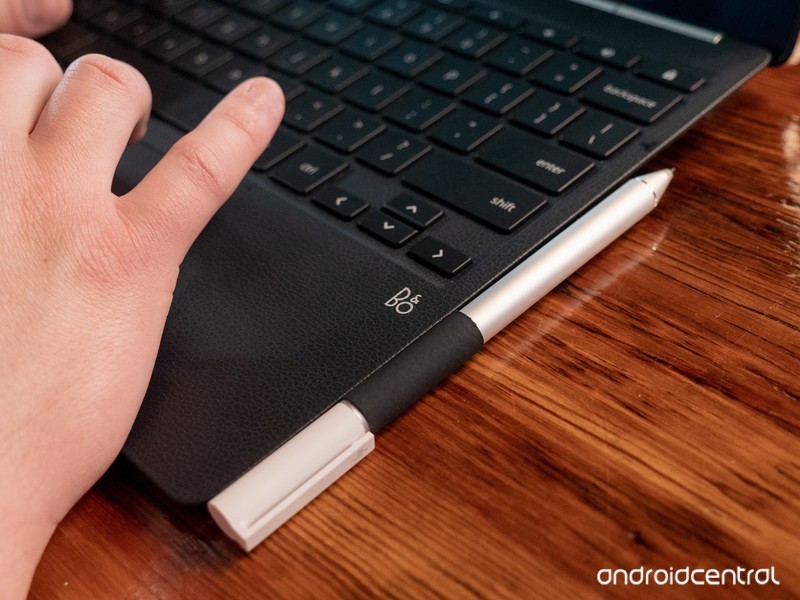
Installing Linux apps requires your Chromebook to be running Chrome OS 69 or later. If you’ve had your Chromebook for a while and want to be sure you’re on the latest software versions, here’s how to check.
Click your profile picture in the lower-right corner.
Click the Settings icon.
Click the Hamburger icon in the upper-left corner.
Click About Chrome OS.
Click Check for updates.
Your Chromebook will make sure it’s on the latest operating system, and download a new one if necessary. When it’s finished downloading, just restart your Chromebook and you’ll be all done!
More: How to change your software channel on Chrome OS
Enable the Crostini flag
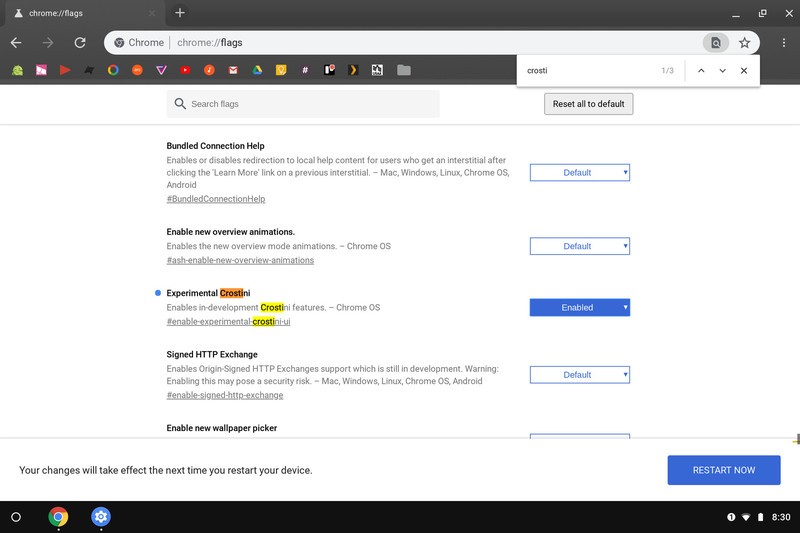
Once your Chromebook is updated to the developer channel software version, you’ll need to change one of the Chrome flags. Flags are semi-hidden settings that let you try experimental features.
Click on the address bar.
Type chrome://flags and press Enter.
Press Ctrl + F on your keyboard.
Type Crostini in the search bar.
You should see the flag titled Experimental Crostini. Click the checkbox, then select Enable.
Click Restart at the bottom of the screen.
Turn on Linux apps
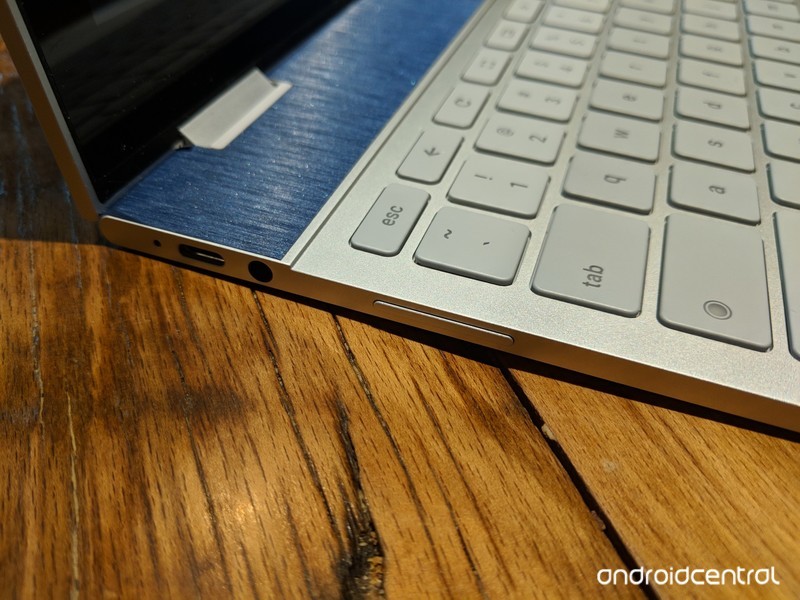
There are just a couple more steps before being able to run Steam and other Linux apps.
Open Settings.
Click the Hamburger icon in the upper-left corner.
Click Linux (Beta) in the menu.
Click Turn on.
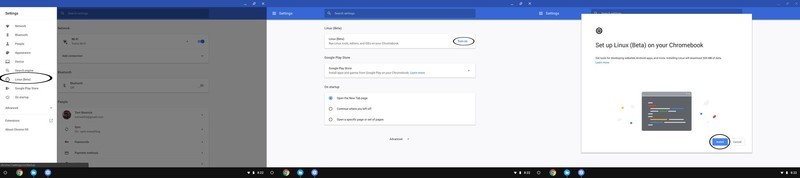
Click Install.
The Chromebook will download the files it needs. When that’s complete, click the white circle in the lower-left corner to open the app drawer.
Click the Terminal icon.
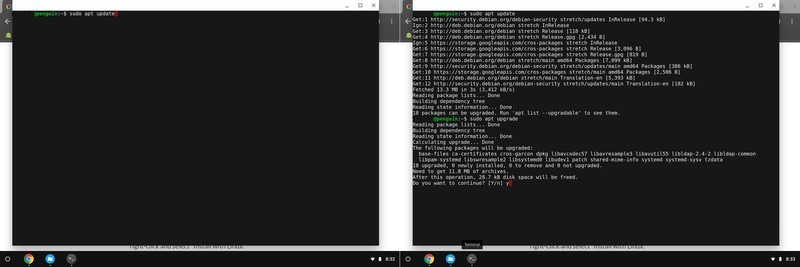
Type sudo apt update in the command window. This will list the Linux components that require an update. Press Enter.
Type sudo apt upgrade in the command window. This will upgrade all the components that were just listed. Press Enter.
When that’s finished, type y to remove excess files. Press Enter.
With that, all the necessary parts of the Linux operating system are installed so you can just install .deb applications from the file browser.
Download and Install an application
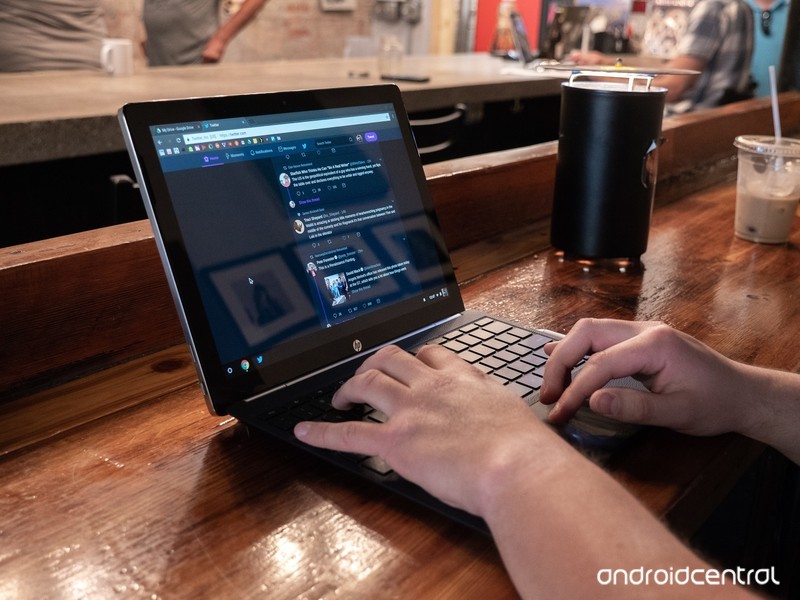
With the prep work done, it’s finally time to install an application. Grab the necessary Linux installation file from your software vendor’s site — we’re using Steam for this guide.
Once the installation file is downloaded, open the File browser.
Click Downloads.
Copy and paste the .deb installation file to the Linux files folder.
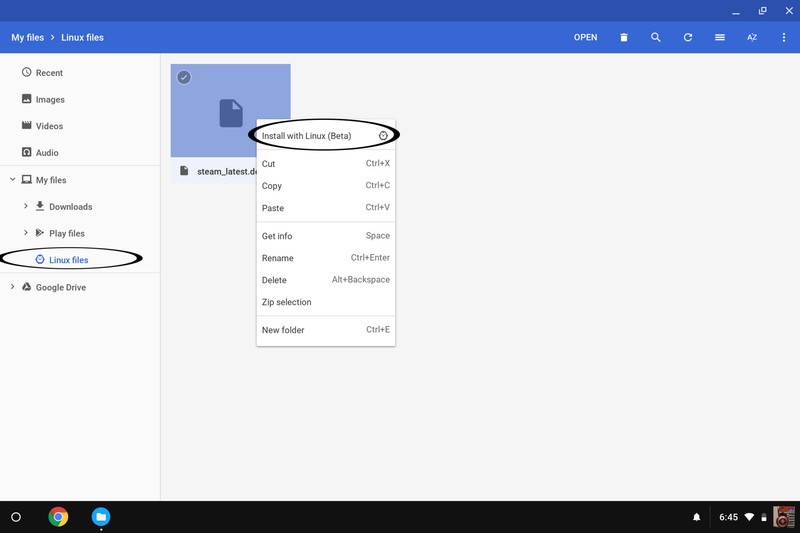
Click Linux files
Right click or two finger tap on the trackpad while your pointer hovers over the file name.
Click Install with Linux (Beta).
The program will install, and when it’s done, you can open it from the app drawer. That’s it!
Our top equipment picks
If you’re going to download a lot of Steam games or Linux programs, you’ll want plenty of local storage. Google”s Pixelbook offers just that, as well as a slick design, awesome keyboard and trackpad and enough guts to keep up with your most demanding tasks.
The Chromebook for you
Google Pixelbook
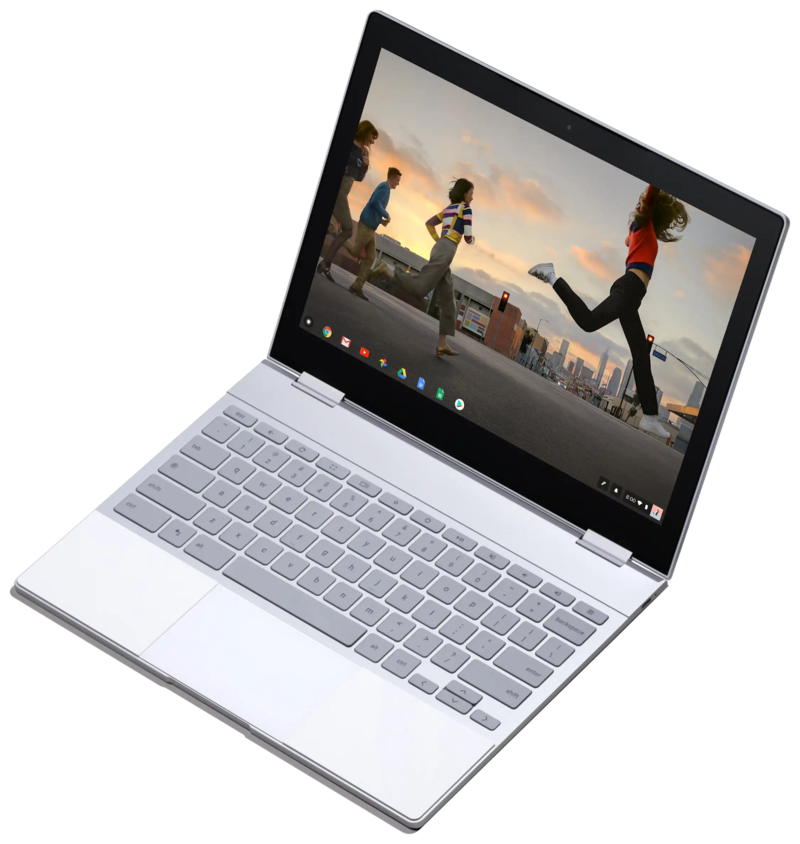
$999 at Amazon
Google’s own Chromebook is the best pick for hardcore Linux users.
If you’re going to get a Chromebook, it should be one with the space and the guts for your favorite applications. The best keyboard, trackpad and screen in the business don’t hurt either.
Any modern Chromebook running the latest software will be able to install Linux apps. But the Pixelbook will provide the best experience for a few reasons: the main one is storage. 128GB of internal storage just means more room for your favorite programs and games. And the other internal specs will be up to the task of running those programs and games smoothly.
Updated September 2018: This article was updated to reflect the fact that Linux apps are now available in the stable channel of Chrome OS.
Amazon offers its latest Echo devices in discounted bundles, pre-order now
Amazon Alexa is now integrated into even more home essentials.
Alexa is getting a makeover! Amazon just announced several new Echo devices which incorporate the Alexa voice assistant. There’s an Echo Wall Clock, an AmazonBasics Microwave, new editions of the Echo Dot and Echo Plus, and even an Echo Input to add Alexa to speakers you already own! Newly announced products rarely receive discounts, but you can already save on these Amazon devices by purchasing them in a bundle of two or more.

One such bundle packages together the new third-generation Echo Dot with Amazon’s Smart Plug for $64.98. While the set doesn’t see a release until October 11, it’d be wise to place your order now and ensure you receive that $10 discount off what they’d cost separately. Another bundle features the Echo Sub with two Echo Plus devices for $329.97. That’s a $100 discount off what they’d cost on their own.
Other bundles you could grab right now include:
- 2-pack Echo Dot (3rd-Gen) for $89.98 (was $100) Must add two to apply discount.
- 2-pack Echo Show (2nd-Gen) for $357.98 (was $458) Must add two to apply discount.
- Echo Plus (2nd-Gen) and free Philips Hue smart bulb for $149.99 (was $165)
- Echo Show (2nd-Gen) and free Philips Hue smart bulb for $229.99 (was $245)
- Echo Show (2nd-Gen) and Ring Video Doorbell Pro for $428.99 (was $479)
You can also save 50% on Echo Auto right now, dropping its price to just $24.99 from $50. However, that deal is by invitation only. You can request an invitation on its product page.
These devices work best if you have a Prime membership at Amazon, considering Prime members can stream over two million songs with Prime Music at no additional charge. Having a Prime membership can also save you monthly on an Amazon Music Unlimited subscription. There are a ton of other Prime-exclusive deals going on right now at Amazon as well, like the Fire Tablet 7’s drop to $35 and the $40 Fire 4K TV.
See at Amazon
Keep a watch on your child at all times with Verizon’s 4G LTE GizmoWatch
Check in at any time.

In today’s era, simply sending your child to school can be worrisome. For parents who’re looking for a bit more peace of mind, Verizon is debuting its GizmoWatch later this year — the first 4G LTE watch for kids powered by Qualcomm.
The GizmoWatch is a successor to LG’s GizmoPal 2, a wearable which allowed for two-way calling with your child and the ability to view the device’s location on your smartphone. The GizmoWatch takes things a step further by implementing Verizon’s 4G LTE network to ensure your child’s calls and texts are sent successfully.
Though the original GizmoPal could only contact two selected phone numbers, the GizmoWatch is capable of calling up to ten numbers which can be set in the GizmoHub app for iOS and Android devices. If your child happens to share their number with someone whose number isn’t on that list, the call won’t go through. The app also allows you to pre-write up to 20 text messages that your child’s watch will be able to send to anyone on the list of contacts.
You’ll be able to track your child’s location using the GizmoHub app too; it can even be set up to send you notifications if your child leaves a predetermined area. The app will show the watch’s battery life and is capable of managing multiple watches too.
For the kids, there’s an integrated fitness and hopscotch tracker where they can keep track of their steps each day. A voice changer has been built-in as well that can make their voice sound like a robot and other fun characters. You’ll have the power to turn off the watch remotely via the app in case you feel like it’s taking attention away from something more important.
The watch is capable of lasting for up to four days depending on usage, and offers seven days of stand-by time. It’ll be released on October 10 to in-store and online at Verizon Wireless for $179.99, though you’ll be able to pre-order beginning on September 20. You’ll also have the option of adding it to your exisiting Verizon plan for only $5 a month (plus taxes and fees).
See at Verizon

Best SD card for the Raspberry Pi 3 B+
We’re a virtual company made up of tech experts from across the globe. We love the Raspberry Pi because it was designed as a learning tool, and it works well for hobbyists due to its low price and extensive support. We also love them for the fact that they’re easy to set up.

SanDisk is the king of flash storage, and its 32GB Ultra card is the best bang for your buck if you’re picking up a Raspberry Pi. You likely won’t need more storage than this, but if you need more, SanDisk and others offer cards with higher capacities.
The SD card for you
SanDisk Ultra 32GB

32GB is plenty for the whatever OS you install on the Raspberry Pi, with some space left over for games, programming environments, and whatever else you want to keep installed. If you intend to install a lot of games though, you may be better served with a higher capacity card.
- $9 from Amazon
A similar card
Samsung EVO Plus 32GB

If for some reason SanDisk’s card isn’t available, this one from Samsung is only a bit more. It’ll be more than fast enough for your Raspberry Pi, and it offers plenty of space for you to tinker.
- $12 from Amazon
More storage
Samsung EVO Plus 64GB

If you’re going to use your Raspberry Pi for gaming or as a desktop computer, more space is always better. This 64GB card is just as fast as the previous one, so it won’t slow your Raspberry Pi down. And it’s only a few dollars more than the 32GB version, but with twice the storage.
$18 at Amazon
Whole lotta space
SanDisk Ultra 64GB

If you’re going to use the Raspberry Pi as a desktop computer or as a game console, you’ll need as much space as you can get for programs and games. This 64GB card is only a little more expensive than the 32GB option but offers twice as much storage.
$25 at Amazon
Less storage, lower price
SanDisk Ultra 16GB

If your Raspberry Pi is being built for one specific application — as a print server, VPN, or another similar task — a 16GB card will be enough space for you. This one from SanDisk is just as fast and reliable as the higher tier models, just with less space.
$8 at Amazon
Bare minimum
Kingston Canvas Select 16GB

16GB is still a lot of space, depending on exactly what you’re using it for. If you need the bare minimum amount of storage for your Raspberry Pi and don’t want to spend any more money than you have to, this is the card for you.
$6 at Amazon
32GB isn’t a lot for our phones, but it’s more than plentiful for the Raspberry Pi 3 B+. You’ll easily have enough space to use the Raspberry Pi as a print server, a VPN, media center or even as a full desktop — so long as you only need basic programs. You CAN get a bigger card — or a smaller one — but the 32GB card is a nice sweet spot. It’s a lot of storage, but you’re not paying for an excessive amount that will just get wasted. And if you find you use your Raspberry Pi for more than the basics, this should be enough space to accommodate you.
Before buying a card, just think about how you’ll use your Raspberry Pi. If it’s only going to be used for something simple, a smaller card will be perfect. If you intend to install a bunch of games or use it as a home movie server, more storage will always be better.
Call of Duty: Black Ops 4’s post-launch content is coming to PS4 first

Everyone’s favorite gaming practice.
Following Call of Duty: Black Ops 4’s release on October 12, Activision and Treyarch are planning to support it with frequent post-launch content activities and events. According to the publisher, these free content drops will be exclusive to PlayStation 4 for the first seven days before making their way onto other platforms.
The following are just a few of the content drops that Activision will be offering after Black Ops 4’s initial release.
- Nuketown: This fan-favorite map returns in November in an all-new take.
- Specialists: The first of several new characters will debut in December.
- Blackout: Launch day is only the start; Blackout will continue to evolve after launch with regular map updates, expansions and new Blackout modes.
- Events: Seasonal, weekly, and time-limited events bringing new game modes and content to players.
Any playable content coming to Black Ops 4 is set to come to PS4 first for one week, including new specialists, maps, and seasonal events.
In addition, PlayStation announced that multiple PS4 bundles will be releasing across Europe after the game’s launch. However, the company did not provide further details. Bundles and prices will vary across regions.
See at PlayStation
See at Amazon
PlayStation 4

- PS4 vs. PS4 Slim vs. PS4 Pro: Which should you buy?
- PlayStation VR Review
- Playing PS4 games through your phone is awesome
Amazon
Has the NVIDIA Shield TV been discontinued?

Best answer: No. The standard 16GB NVIDIA Shield TV has not been discontinued, nor has any other NVIDIA Shield TV model.
Amazon: NVIDIA Shield TV ($178)
Despite rumors, NVIDIA Shield TV has not been discontinued
Due to a lack of stock in late 2017, as well as multiple GeForce forums posts, it was believed that NVIDIA first discontinued the basic 16GB Shield, but then changed its mind and discontinued the Shield TV Pro.
While there may have been plans to discontinue the Pro (many users just connect their own NAS for storage anyway), and it may have even been out of production briefly, you can still very much buy the Pro and three other NVIDIA Shield TV models right on NVIDIA’s website, as well as from Best Buy and Amazon.
There are two NVIDIA Shield TV models to choose from
Not only is the NVIDIA Shield TV not discontinued, but you have three other configurations to choose from, depending on how you want to use it.
NVIDIA Shield TV
This is the basic Shield TV. It features 16GB of onboard storage, 4K HDR support, built-in Google Assistant, as well as all that streaming and live TV goodness.
NVIDIA Shield TV Gaming Edition
This iteration has 16GB of onboard storage and comes with a rumble feedback gaming controller, as well as access to the GeForce NOW beta, which is NVIDIA’s way of syncing gaming across Mac, PC, and your Shield TV. (Yeah, Mac gamers can play on Mac without Bootcamp!)
NVIDIA Shield TV Smart Home Edition
This has 16GB of onboard storage, all the goodies of the original, plus it comes with a SmartThings hub and a SmartThings Link, which transform your Shield TV into a Zigbee and Z-wave smart home hub. If you’re looking to build a smart home around your TV or you simply want an excellent hub, this is your buy.
NVIDIA Shield TV Pro
Despite much speculation, this version is still alive and kicking. It has all of the capabilities of the other iterations, but it has 500GB of onboard storage and the Plex Media Server built in.
Our pick
NVIDIA Shield TV

$178 at Amazon
Sometimes basic is the absolute best.
The OG NVIDIA Shield TV is the way to go if you’re just getting into things. You can just buy the gaming controller on its own or even go for third-party options. There are also many ways to build a smart home, but to enjoy all that the NVIDIA Shield TV has to offer, the basic option is more than enough.
Increase immersion with Bluetooth headphones for the Oculus Go
We’re a virtual company made up of tech experts from across the globe. We’ve spent hours looking at all the best headsets and are always excited to look for the best wireless, Bluetooth-enabled options.

VICSOME True Wireless are currently the best headphones you’re going to find for your Oculus Go. From the noise-canceling abilities to their ability to seem like they’re not even there, these are the perfect fit for the best immersive experience for your virtual reality adventures.
Quality immersion
VICSOME True Wireless Earbuds

- $60 from Amazon
For the most immersion
These earbuds come with a neat little compact that also serves as a charger to help you always keep them together. Fret not about losing your favorite pair of headphones, they’ll stay together for you!
Why the Visome headphones?
Whenever we play VR we want to feel, see, and interact with as little of the real world as we can. Visome delivers this effect by being small enough that you’ll completely forget that they’re there. Besides, the noise-canceling alone is enough to sell me. One of my biggest problems when getting into horror games in VR is always still being able to hear my roommates chatting and cutitng all that extra noise out will only let me get into the game more.
Reasons to buy
- Comfortable
- Noise canceling
- Almost like they’re not there
- Fast charging
- Long lasting battery life
- Built-in microphones
Reasons not to buy
- Pieces are small and could easily be lost
- Charging is a hassle if you lose the device
Why would you want Bluetooth headphones for your VR headset?
When using your VR headset, the biggest problem you’ll encounter is immersion, whether it’s hearing the world around you to accidentally bumping your knee on a coffee table. Every little thing we do to help that truly makes a difference. So, while you can move your furniture to make more room for walking around, you can also upgrade your sound options to better improve your gaming sessions.
3D sound for better immersion in VR, but still comfortable enough to use in everyday life
Outside of using these headphones for your VR sessions, they also come in handy in your everyday life as well. Bluetooth headphones are perfect for taking your morning train, plugging in to tune out, or even daily runs. The more comfortable and durable they are, the more uses you can get out of them. However, buying Bluetooth headphones can be an investment, so you want to make sure you get the best option for you.
While wireless earbuds are the most comfortable for some, others might prefer over-the-ear. Regardless of your preference, there’s a set of headphones for you. Use them with your Oculus Go, your phone, computer, and more!
Alternatives to the Visome headphones
If the Visome headphones aren’t for you, you can always check out the Mpow H5 Bluetooth Headphones or the Hussar Magicbuds. The Mpow H5 is my go-to pick for actual headphones instead of earbuds, and the Hussar Magicbuds will surely form to anyone’s budget. So, whether you have a different preference, or don’t want to spend as much, I’ve got a few options for you.
Runner-up
Mpow H5 Bluetooth Headphones

The best over-the-ear option
$50 at Amazon
Currently Amazon’s best choice, these Mpow headphones are an absolute steal. There are 3 color options and the Bluetooth options work up to 33 feet away by using Bluetooth 4.1!
These over-the-ear headphones are also noise-canceling and made of comfortable protein fibers to not only be comfortable, but durable. If you’re more of a fan of headphones instead of earbuds, these are the choice for you. I’ve even used these headphones while watching ASMR videos on YouTube while trying to sleep. Trust me, if they’re comfortable enough to sleep in they’re perfectly fine for VR games and experiences.
Value pick
Hussar Magicbuds

Save your money with a semi-wired option
$20 at Amazon
You never want to go too cheap when it comes to your tech or you run the risk of having more problems than you started out with. These Bluetooth headphones have a wire going between them (that wraps around your neck) and will be the best option you’ve got on a budget. They’re not noise-canceling or high-tech in their sound options, but they’ll definitely get the job done!
Bottom line
The VICSOME True Wireless is the best choice. The price isn’t too crazy and, for their intended purpose of VR, they’re virtually undetectable. The$60 price tag doesn’t just get you a great pair of earbuds for your Oculus Go, but also one for your everyday use. That’s really what we’re looking for when we’re getting new technology anyway, right? Making sure they have multiple uses and get us the most bang for our buck. Any of the options above would be a great choice, but earbuds will always be my number one.
Credits — The team that worked on this guide

Essa Kidwell is a writer for Windows Central, iMore and Android Central. She’s an avid PC, PlayStation, Nintendo Switch, Virtual Reality, and Xbox gamer. Outside of her love of technology, she runs Zombie Apocolypse LARPs (Live Action Roleplay) for Dystopia Rising by creating and running game content. You can follow her on Twitter @OriginalSluggo.

Tom Westrick is a U.S.-based freelancer. He’s been poking and prodding at Android phones since 2011, and covering various topics for Android Central since 2017. He can often be found with multiple laptops in his backpack and a cup of iced tea in his hand. Follow him on Twitter: @TomWestrick1.
Canada Daily Deals: Ring Video Doorbell bundles, countertop gardening, more
Whether you’re looking for new tech gear or household items, we’ve got you covered.
We found plenty of great deals today that include big discounts the Logitech MX Master mouse, Ring Video Doorbell 2 + Echo Dot bundles, countertop AeroGardens, portable SSDs, and much more!
View the rest of the deals
Each day, the Thrifter Canada team scouts out and shares amazing deals on products you know and love, helping you find the best prices on the ‘net.
For more Canadian deals coverage, be sure to keep an eye on Thrifter CA and follow the team on Twitter.
 AIVAnet