


HP Chromebook x2 Review
Research Center:
HP Chromebook x2
Outside the Pixelbook, most Chromebooks feel like they’ve been cut from the same cloth. There are plenty of good options, though none that feel all that innovative. That’s all changing, though — and the HP Chromebook x2 is proof.
We were sent the $600 version of this detachable tablet, which is well-equipped for a Chrome OS machine with 4GB of RAM, 32GB of storage, and a low-power 7th-gen Intel Core m3-7Y30. Even better, HP includes the keyboard base and active pen, something that competitors like Microsoft sometimes leave out.
The Chromebook x2 has some promising components and an interesting design, but is that enough to give it a leg up on an increasingly intriguing crowd of Chrome OS notebooks?
An attractive, well-built, and slightly wobbly convertible Chromebook tablet
Pull the Chromebook x2 out of its box, and the first thing you’ll notice is that it doesn’t look like any other Chromebook. First, it’s a detachable tablet, meaning that the HP packed the PC components into the display portion that snaps together with a keyboard to provide notebook-like functionality. Next, it’s not a simple gray slab of plastic or metal, but rather it stands out with an attractive “ceramic white” color adorning the back of the tablet to go with chrome trim around the edges and black bezels up around front.
It’s also very well built, especially at this price point. Like all good tablets, and the Microsoft Surface Pro is the best example here, the Chromebook x2 feels like a solid chunk of metal and Corning Gorilla Glass 4. Well, not metal, exactly, because the ceramic-white portion uses a special anodized electrodeposition (AED) process to coat the underlying aluminum and provide some additional strength, durability, and scratch resistance. It’s much better built than the other Chrome OS tablet available today, Acer’s cheaper Chromebook Tab 10, and it’s just as well-built as the Google Pixelbook, a premium 360-degree convertible.
The Chromebook x2 is well-balanced, thanks to a detachable keyboard that’s a bit heavier than usual.
The keyboard is also nicely made, with black metal on the back and a textured, rubberized plastic covering the keyboard deck that makes for a comfortable typing surface. Speaking of the keyboard, the Chromebook x2’s design is more Microsoft Surface Book 2 than Surface Pro. That is, the tablet magnetically connects to the keyboard base, forming a traditional clamshell configuration that’s more stable on the lap than tablets with Surface Pro-like snap-on keyboards.
The design works well, allowing for four useful modes. In addition to the clamshell mode, the tablet can be reversed and used in movie mode, or it can be inserted into the keyboard base and closed into a tablet with the back of the tablet covering the keyboard. That’s a preferable mechanism compared to 360-degree convertible designs where the screen flips all the way around into tablet mode, leaving the keyboard exposed to the elements. And of course, the tablet can be completely removed from the keyboard and used as a standalone slate.
Our only complaint with the design is that it’s a bit wobbly when used in clamshell mode. It’s well-balanced, thanks to a detachable keyboard that’s a bit heavier than usual, and so it’s very Surface Book 2-like in this respect. But unlike Microsoft’s iteration, the Chromebook x2 tablet/display portion flops back and forth quite a bit as you move the combination around and tap on the screen.
Mark Coppock/Digital Trends
We can’t complain about the size, though. The tablet portion is 0.33 inches thin and weighs 1.62 pounds by itself. That compares favorably to the Surface Pro’s identical thickness and slightly heavier weight of 1.69 pounds. With the tablet attached, the Chromebook x2 weighs a heftier 3.07 pounds, though, compared to the Surface Pro’s 2.37 pounds (thanks to a lighter keyboard). HP’s tablet slightly exceeds Microsoft’s in overall dimensions thanks to top and bottom bezels that are just a bit larger but still well within modern tablet standards.
Finally, the Chromebook x2 has a standard complement of ports for a tablet. You’ll find a USB-C port and microSD card reader on the left side and another USB-C port and 3.5mm audio jack on the right side. Both USB-C ports provide data, display, and power support, and both can charge the notebook using the included USB-C charger.
Getting data into this 2-in-1 is pleasant and efficient
The Chromebook x2’s keyboard base is the usual island type with black chiclet keys and white lettering. It’s not backlit, which is disappointing and something other detachable tablets like the Surface Pro and lower-cost Surface Go provide. Even the new Samsung Chromebook Plus V2 includes this feature. However, the key mechanism is nice and snappy, managing to avoid uncomfortably bottoming out despite its average travel. It’s a very good keyboard that allowed us to type at full speed with minimal errors.
The Chromebook x2 provided an experience better than most budget Chromebooks we’ve tested.
The touchpad is just about equal to the one on the Surface Pro’s Type cover, meaning that it’s just large enough to avoid making us feel claustrophobic but not nearly as large as on some other notebooks like the Surface Book 2. It supports the limited set of Chrome OS gestures with no problem, and it provides a comfortable swiping surface.
HP does the buyer a real service by including an active pen, and that, too, works well with the functionality that Chrome OS supports. You can write in compatible apps, use the pen to control the user interface, and take quick screen captures. Chrome OS doesn’t have the same level of pen support as Window 10 Ink, but it’s still a useful addition.
Bright, colorful, and a productivity-friendly aspect
HP equipped the Chromebook x2 with a 12.3-inch QHD (2,400 x 1,600 or 235 PPI) IPS display that runs at the same 3:2 aspect ratio as Microsoft popularized with its Surface line and Google imitated with the Pixelbook. That makes the display better for productivity by providing more vertical space, but it also means you’ll have some letterboxing when watch video.
Mark Coppock/Digital Trends
Once again, Chrome OS limitations mean we can’t subject the display to our usual test, including or objective colorimeter suite of benchmarks. Even so, we can say that the display offers up more than sufficient brightness for environments with significant ambient brightness. The contrast was very good, with black text standing out nicely against a white background, and colors popped.
Whether we were getting some work done, viewing images, or watch video, the display was a pleasure. HP nailed the gamma, because the Avengers trailer that we use for our video loop battery test was neither too bright nor too dark. Given that we’ve watched that trailer hundreds of times, the Chromebook x2 provided at least as nice an experience as the Surface Pro and better than most budget Chromebooks we’ve tested.
HP Chromebook x2 Compared To
Microsoft Surface Book 2 15-inch
Google Pixelbook
Acer Chromebook 15 (2017)
HP Spectre x360 15 (2018)
Lenovo Miix 630
Lenovo ThinkPad 13 Chromebook
Toshiba Chromebook 2 CB35-C3350
Asus ZenBook UX305
Lenovo Ideapad 100S Chromebook
Lenovo Yoga 11e Chromebook
Samsung Chromebook 2
Asus Zenbook UX301LA
Google Chromebook Pixel
Apple MacBook Air (80GB)
Sharp M4000
Overall, the display is at least the equal of the much more expensive Pixelbook, and thanks to that accurate gamma, dark scenes in movies and TV shows are easier to see on the Chromebook x2. The HP’s display is right up there with the very best.
The audio was equally enjoyable thanks to two front-firing speakers — again very Surface Pro-like — that boast Bang & Olufsen tuning along with HP Audio Boost 2’s discrete amplifier. Volume was copious with only a bit of distortion at maximum volume. There was even some slight stereo separation, with solid mids and highs and even a touch of bass. Enjoyably watching a movie or binging a TV show is more than possible without pulling out your headphones.
Snappy performance for a lightweight OS
We can’t run our usual suite of benchmarks on Chrome OS devices, and so it’s always a challenge to quantify their performance. But we can say with certainty that the Chromebook x2 benefits from its 7th-gen Intel Core m3-7Y30 CPU — that would be a low-end processor in a Windows 10 notebook, but it’s more than enough for the much lighter Chrome OS.
The x2 ran faster than any Chromebook we’ve tested and competes well with some Windows 10 laptops.
And in fact, the Chromebook x2 felt much quicker than some of the Pentium-equipped Chromebooks we’ve reviewed. It should be noted it that an 8th-gen version of this chip has recently been announced by Intel, though the Core m3 kept up with everything we threw at it. Compared to the wealth of other Chromebooks we’ve used, Chrome OS itself felt so much smoother and more pleasant to use.
Running the Android version of Geekbench 4 netted a single-core speed of 3,441 and a multi-core speed of 6,685, much stronger than the 1,559 and 4,884 managed by the Pentium N4200 in the Acer Chromebook 15. We also ran the Speedometer 2.0 benchmark, and the Chromebook x2 scored a strong 75.1. That’s faster than any Chromebook we’ve tested so far, and competes well with Windows 10 machines like the Asus ZenBook S with a Core i7-8550U that scored 72.1.
We could almost go so far as saying that Google’s more limited OS becomes that much more competitive when things are this snappy. Combined with a nice keyboard and a lovely display, the Chromebook x2’s performance goes a long way to confirming Chrome OS as a solid choice.
Mark Coppock/Digital Trends
The bottom line is whether you’re running Chrome OS apps, working in the Chrome browser, or accessing the huge library of Android apps, the Chromebook x2 should be able to keep up with whatever you’re doing. The 32GB of eMMC storage isn’t the quickest around, but it can keep up with the operating system’s needs.
That’s a popular size and type of drive for Chromebooks, with only the Pixelbook offering more storage. It’s also a slower option than the PCIe SSDs you’ll find in Windows 10 notebooks, though you’ll be hard-pressed to find one of those in a $600 laptop. Chrome OS demands less local storage than Windows 10, and it doesn’t demand the same performance. However, we would have liked to see HP offer a larger and faster SSD option.
You won’t be disappointed with android gaming on the Chromebook x2.
In comparing the performance against a comparable Windows 10 notebook, we found it to be just as quick if not just slightly sprightlier. Windows 10 makes more demands on a processor, and at this price point, you’ re likely to be getting an 8th-gen Intel Core i5-8250U CPU.
Open the same number of tabs in Chrome on an Asus ZenBook UX330UA, for example, along with some productivity apps and maybe Netflix, and you’ll find the same kind of responsiveness. The same goes for the Surface Pro’s 7th-gen Intel Core i5 or i7. That’s impressive, and will surely make Chromebooks more attractive to those who assume all Chromebooks are sluggish.
If you want to game on a Chrome OS device, then that primarily means picking from among the scads of Android games in the Google Play Store. The Chromebook x2 uses the Intel UHD 615 GPU, which is more than fast enough for Android games. Action games like Asphalt 8 and Fallout Shelter ran well, making for a pleasant – albeit slightly clumsy thanks to the slate’s sheer size – gaming experience. Accordingly, you won’t be disappointed with accessing the Android gaming library on the Chromebook x2.
Enough battery life for a full day’s work
HP packed 48 watt-hours of battery into the Chromebook x2, a piddling amount for a notebook in general but on the high end for detachable tablets. The Surface Pro, for example, has 45 watt-hours.
Also, Chrome OS is a more lightweight OS that typically puts less demand on a battery. We saw this effect In our most aggressive Basemark web benchmark test, where the Chromebook x2 lasted for over four and a half hours and the Surface Pro managed an hour less. The Pixelbook went for 13 minutes less.
Browsing the web in Chrome was a real strength for the Chromebook x2, where it almost managed a full 10 hours. The Surface Pro couldn’t make it to five and a half hours, while the much larger Acer Chromebook 15 lasted for 11 and a half hours.
Finally, the Chromebook x2 was able to loop a local Avengers trailer for just under 10 hours, which is a good result for a tablet. The Surface Pro lasted for just over 10 hours, and the Samsung Chromebook Pro closely matched HP’s 2-in-1.
Simply put, the Chromebook x2 will easy last you a full workday away from a plug, and then some. That can’t be said about every Windows tablet.
Our Take
HP is leading the way in introducing innovative form factors to Chrome OS. The Chromebook x2 mimics the Surface Book 2 in providing a clamshell format detachable tablet, and although HP eschewed Microsoft’s futuristic engineering, the Chromebook x2’s design still works. It’s fast, efficient, and looks great, and it could pull some people over to Chrome OS who’ve been stuck in Windows 10.
Is there a better alternative?
There aren’t currently many directly comparable Chromebooks generally available. The first detachable tablet Chromebook, Acer’s Chromebook Tab 10, is an even lower-priced Chrome OS tablet that’s limited to the educational market. In our review, we found that $330 device to be much more cheaply built and designed than HP’s vastly more elegant Chromebook x2.
There are, though, some 360-degree convertible 2-in-1s available, with the Google Pixelbook being the premium example. And when we say “premium,” we mean it: The Pixelbook starts at $1,000 including its Core i5 CPU, 8GB of RAM, and 128GB of storage. In addition, rumor has it that we could see a revised Pixelbook with a detachable keyboard this October. But until then, the Chromebook x2 is a far better value and comes with the convenience of a detachable form factor.
Then, you could skip Chrome OS and go for a Microsoft Surface Pro. You’ll pay more, starting out at $800 for a Core m3 processor, 4GB of RAM, and a faster 128GB PCIe solid-state drive (SSD). But you’ll also need to shell out at least $130 for a Type Cover keyboard and $100 for a Surface Pen, where HP includes equivalents of both in the box for just $600. And you’ll be switching to Windows 10, which offers some enhance features that you might not care about if you’re in the market for a Chromebook.
How long will it last?
The Chromebook x2 is very well made, feeling solid enough to last through years of use. It also uses fast components that should keep Chrome OS running well even as it continues to evolve. The one-year warranty is the industry standard.
Should you buy it?
Yes. There is a host of Chromebook 2-in-1s coming later this year, and so that’s something to keep in mind. But the Chromebook x2 is fast, well-built, has solid battery life, and makes for an impressive Surface Book 2 clone for only $600.
iPhone XS and XS Max User Guides Reference AirPower, Suggesting Apple Still Plans to Release It
A user guide included with the iPhone XS and iPhone XS Max references the AirPower, suggesting that Apple has not yet shelved the much-anticipated charging mat.
Developer Gavin Stevens shared an image of the guide this afternoon, which clearly has a passage mentioning the AirPower.
“Place iPhone with screen facing up on AirPower or a Qi-certified wireless charger. You can also use the Lightning connector to charge iPhone and connect accessories.”
It’s not clear why Apple left the reference to the AirPower in the iPhone XS and XS Max manuals, but it perhaps suggests that the company planned to ship the charging accessory alongside the new iPhones.
AirPower was not mentioned at the September iPhone event, despite expectations that it would be, and it’s been more than a year since the device was first announced.
AirPower is meant to charge the iPhone, Apple Watch, and AirPods all at the same time. A recent report suggested Apple has run into a number of issues that need to be solved before the AirPower can be offered for sale, including heat management, inter-device communication, and mechanical and interference problems.
The AirPower reportedly produces too much heat at the current time, causing performance setbacks and charging issues. There are also communication issues between AirPower and devices placed on the mat, and the multi-device charging mechanism has resulted in interference that reduces efficiency.
It’s not clear how or when Apple will solve these problems, and almost all mentions of the AirPower have been scrubbed from the company’s website. That the AirPower is mentioned in the packaging materials for the 2018 iPhones suggests Apple is still attempting to solve these issues, so we could see an AirPower launch at some point in the future.
When the AirPower was announced, Apple said it would launch in 2018, but the company has not provided a more specific shipping date and it’s not clear if the 2018 shipping goal is still realistic.
Tag: AirPower
Discuss this article in our forums
Some iPhone XS and XS Max Deliveries May Be Delayed Until Monday in the United States
It appears UPS may be having iPhone XS and XS Max shipping issues in the United States as several MacRumors readers are reporting that their UPS tracking information was recently updated with a Monday delivery date instead of a Friday delivery date.
Affected customers seem to have tracking information that indicates their iPhone orders are located in or have just departed Anchorage, Alaska. Those who have had their shipping dates change seem to have ordered 256GB and 512GB iPhone XS or iPhone XS Max models.
These customers were expecting to get their iPhone deliveries on Friday, September 21, aka launch day before receiving the updated September 24 delivery date from UPS.
It’s possible that the delay listed on the UPS tracking site is in error and that the iPhones will still be delivered on Friday, but some customers may be waiting until Monday to receive their new devices. One Twitter user told us that he spoke to a UPS representative who said that it’s a computer error and the iPhones are still on track for Friday delivery.
I’m so over it Apple needs to completely drop @UPSHelp pic.twitter.com/qRdwGDW4sc
— tyler (@fleetjuice) September 21, 2018
The first customers in Australia, New Zealand, and across Asia who ordered one of the new devices have already started receiving shipments. Deliveries are set to start in a few hours in Europe before expanding to the United States.
Related Roundup: iPhone XS
Discuss this article in our forums
Amazon just asked Alexa to declare war on every smart home company

Anything you can do, Amazon can do cheaper. Look out.
The AmazonBasics Microwave stole many of the headlines as a wacky device that there was no way Amazon was going to actually announce. But today, it did. The microwave itself isn’t interesting in the least — it’s the most generic, cheap-looking microwave this side of a college dorm room. But it, along with the dozen other Echo-related hardware announcements Amazon just made, marks the point at which Amazon declared war on every other smart home device company.
Because anything you can do, Amazon can do cheaper. And in the current world of smart home devices, that’s incredibly important. We’ve mostly left the world of unnecessarily expensive smart home gadgets like $50 connected lightbulbs and such, but this smart home gear is still very spendy compared to the “dumb” versions of these things we already have in our homes.
Everything Amazon announced at its hardware event

Amazon’s economies of scale are going to plow it into the top sales charts of every smart home segment it enters, just as it’s done in so many other industries. There are few companies that can make these smart home products as cheaply as Amazon. The new Amazon Smart Plug is $25. The Echo Input is $35. The Echo Wall Clock is $30. Amazon is selling the new-and-improved Echo Dot and Echo Plus for the same price you’d pay for plain old Bluetooth speakers that have no smart capabilities and probably worse audio quality. And by the way the new Echo Plus has a temperature sensor built in. You won’t be buying one of those separately anymore.
Amazon is amazingly good at making good products for less — now, it can make smart products for less too.
The products that are most interesting in this context are the ones that are actually the least-interesting products (stay with me here). The microwave and clock, for example, are super-basic products that you normally wouldn’t think about or research for more than 10 minutes before buying. They’re impulse-purchase items where you so often make a decision based on price — and Amazon is able to offer these items at competitive prices, delivered tomorrow … but they’re “smart” versions of the products. The use of the AmazonBasics brand is particularly intriguing, because that’s the brand it applies to value-focused products across so many market segments already — and in most cases, they are so good yet so cheap that they kill the competition.
It’s a strategy that’s now going to kill businesses in the smart home segment. Not only can Amazon make and sell solid hardware for the same or less than the competition, it undoubtedly has better name recognition at the same time. And in areas where it doesn’t, it simply buys it — look at the acquisition of Ring as a perfect example. It takes the brand and the product line, and immediately starts iterating on it with those same great economies of scale — and broad Amazon ecosystem synergies — to take on the competition in the home security segment practically overnight.

Once the functionality gets near parity, people start caring about brand name and price — Amazon can win in both.
Amazon’s gunning hard for Sonos, too. The Echo Plus (and even Echo Dot) keeps getting audio improvements, and now the speakers can be paired together, tied to a new Echo Sub, and synced across your home with multi-room audio. Oh and naturally the Echo Plus is cheaper than a Play One, and the Echo Sub is one-fifth the price of the Sonos Sub. A bundle of two Echo Plus speakers and an Echo Sub is less than a Sonos Play:5. Want to link up other speakers instead? You have the Echo Input and Echo Link Amp.
An overwhelming majority of people don’t care that the Sonos has better in audio quality across the board — and when the functionality is effectively the same as the competition, the price is then the killer feature. Amazon always wins in the price category. Sonos will still own the very high-end tier of people who are not price-sensitive and are willing to pay for the brand and the better audio quality, but Amazon’s latest home audio efforts are going to sweep up the (larger) lower end of the market that would normally stretch to buy a few Sonos speakers.

Amazon plays nice with partners — until it wants to enter the same segment itself.
Of course Amazon is playing nice in its forward-facing announcements. It has a new Alexa Connect Kit that’s a plug-and-play all-in-one board for turning companies’ dumb appliances into smart ones with little development work. It’s offering open and free APIs for companies to make their devices work with the larger Alexa ecosystem. But there’s one thread that runs through all of this: these are ways for your products to integrate with Amazon’s platform. It’s a stopgap to get appliances and other smart home tech on board from other companies in segments where Amazon doesn’t (yet) operate. But when you look at the types of products it rolled out today, no product segment can be considered safe.
Other companies will keep making smart home gadgets, and many will even be happy to play in the Alexa ecosystem. But not a single company should laugh off Amazon’s presence in the space. Whether you look at the last two years of Echo sales or the near-dozen new products announced today, it’s clear Amazon has little restraint when it comes to entering new segments. Get ready for a fight.
Win a Lenovo Smart Display from Android Central!

Lenovo’s Smart Display elegantly transitions the Google Assistant onto screens, but it’s the beautiful design and great sound that make it a clear recommendation. The smart display provides visual context to everything, allowing you to see the recipes you’re asking for or watch the news briefs you listen to every morning. It’s also a way to watch video in general, starting with YouTube and Google Play Movies but eventually acting as a Cast target — essentially a small TV or tablet with a built-in Chromecast.
We love this product, and we can’t wait to see how it continues to evolve as future updates roll out. We want you to experience it as well, so we’re partnering with Lenovo to give you all a chance to win one for yourself. Keep reading to enter!
Enter to win a Lenovo Smart Display
THE PRIZE: One Android Central reader will win the Grand Prize of a Lenovo Smart Display in their choice of the 8″ or 10″ model. Additionally, two runners-up will win an 8″ Lenovo Smart Display!
THE GIVEAWAY: Use the widget at the bottom of this page. There are multiple ways to enter, each with varying point values. Complete all of the tasks for maximum entries and your best shot at winning! Keep in mind that all winning entries are verified and if the task was not completed or cannot be verified, a new winner will be chosen. Please note that this giveaway is available in the U.S. only.
The giveaway is open through October 3rd, 2018, and the winner will be announced right here shortly after the closing date. Good luck!
Win a Lenovo Smart Display from Android Central!
By entering you agree to our Privacy Policy and Terms & Conditions.
Here’s how to order Amazon’s upcoming Echo Auto and save 50% in the process
Alexa’s coming along for the ride.

Earlier today, Amazon announced a slew of new products centering around its popular Echo devices like the Echo Dot. While that device is reaching the release of its third generation next month, Amazon just unveiled a new product to the Echo lineup allowing you to bring Alexa along wherever you go: the Echo Auto.
By first connecting with your smartphone, the Echo Auto gains access to Alexa and plays through your car speakers via either Bluetooth or the auxiliary input depending on your vehicle. There are eight integrated microphones designed for in-vehicle acoustics so that the device is able to hear you speak even with the radio playing, the AC running, and the windows rolled down.
Instead of opening pre-orders to all customers like with the rest of the new products, Amazon has made the Echo Auto buying process a bit more complicated. Here’s what you’ll need to do to buy one:
Head to its product page on Amazon
Click ‘Request an Invitation’ which is located where the ‘Buy’ button is regularly found
Keep an eye on your email for further info from Amazon
Even if you’re currently unsure as to whether or not you’re going to buy Echo Auto, you might as well request an invitation in case you decide you want it. The invitation doesn’t require payment and isn’t binding.
Perhaps the best part of this entire process is that, if chosen, you’ll be able to purchase Echo Auto at a 50% discount, bringing the price down to just $24.99.
Having one of these is not only super handy but can be a lifesaver. Instead of having to pick up your device to switch to a different song, you’ll be able to ask Alexa to switch it for you. Instead of having to open an app for navigation to locate a gas station, simply ask Alexa where the closest one is. The device can stream podcasts, listen to Amazon Music and Spotify, and even play Audible audiobooks. Amazon also includes a three-month Audible subscription with its purchase, which is valued at $30 on its own. Call your friends, add items to your to-do list, check your calendar, set reminders and more, all with your voice while driving.
If you can’t wait to access Alexa in a new way, other upcoming Amazon Echo devices are currently discounted by up to $100 when purchased in a bundle.
Request your Echo Auto invitation now
How to Use Automatic Strong Passwords and Password Auditing in iOS 12
In iOS 12, Apple has introduced new password-related features that are designed to make it easier for iPhone and iPad users to create strong, secure, and unique passwords for app and website logins. In this guide, we’ll show you how to use two of those features: automatic strong passwords and password auditing.
Automatic strong passwords ensures that if you’re prompted by a website or app to make up a password on the spot, Apple will automatically offer to generate a secure one for you. Password auditing meanwhile flags weak passwords and tells you if a password has been reused for different account login credentials. Here’s how to use the two features.
How to Use Automatic Strong Passwords in iOS 12
Launch Safari and navigate to the site asking you to create new login credentials, or launch a third-party app asking you to sign up for a new account.
Enter a username or email address in the first field.
Tap on the Password field – iOS will generate a strong password.
Tap Use Strong Password to accept the password suggestion and save it to your iCloud Keychain.Pro tip: Next time you need one of your passwords, you can ask Siri. For example, you could say: “Siri, show me my BBC password.” Siri will then open up your iCloud Keychain with the relevant entry, but only after you authenticate your identity with a fingerprint, a Face ID scan, or a passcode.
How to Identify Reused Passwords in iOS 12
Launch the Settings app on your iPhone or iPad.
Tap Passwords & Accounts.
Authenticate via Touch ID, Face ID, or your passcode.
Scroll down the list of passwords and tap on any entries with a triangular warning symbol.
Tap Change Password on Website to open the associated website and make the change.Note that the last screen shows you on which other websites you’ve used the same password.
Pro tip: You can share passwords with other people directly from the iOS Password Manager via AirDrop. Simply tap the password field and an option to AirDrop the login will appear. The login can be AirDropped to any device running iOS 12 or macOS Mojave.
Related Roundup: iOS 12Tag: Apple security
Discuss this article in our forums
Apple Inks Deal for ‘Defending Jacob’ Series Starring Chris Evans
Apple has given a straight-to-series order for drama series “Defending Jacob,” which will star Chris Evans, known for his roles in “Captain America” and “The Avengers,” reports Deadline.
“Defending Jacob” is a thriller based on William Landay’s bestselling novel of the same title. The book covers the murder of a 14-year-old boy and his friend Jacob, who may have committed the crime.
According to Deadline, the tv adaptation is described as a “gripping, character-driven thriller.”
The series was created and written by Mark Bomback, known for the “Planet of the Apes” trilogy. Morten Tyldum, known for “The Imitation Game,” “Counterpart,” and “Jack Ryan,” is set to direct.
“Defending Jacob” is just one of more than a dozen television shows Apple has in the works. The first of the TV shows could debut as soon as March 2019, and the content may be distributed through an as-of-yet unannounced streaming service.
Related Roundups: Apple TV, tvOS 12Tag: Apple’s Hollywood ambitionsBuyer’s Guide: Apple TV (Neutral)
Discuss this article in our forums
How to Use the New Effects Camera in Messages
In iOS 12, Apple added a new Effects camera in Messages that’s similar to the live camera features in Snapchat and Instagram, allowing you to take a photo in the Messages app and then edit it with stickers, filters, text, and more.
On devices with a TrueDepth camera system, the Effects camera even works with Memoji and Animoji, allowing you to overlay cartoon emoji heads over your own head.
Subscribe to the MacRumors YouTube channel for more videos.
Accessing the Effects Camera
The Effects camera lives in the Messages app, and Apple’s made it easy to locate.
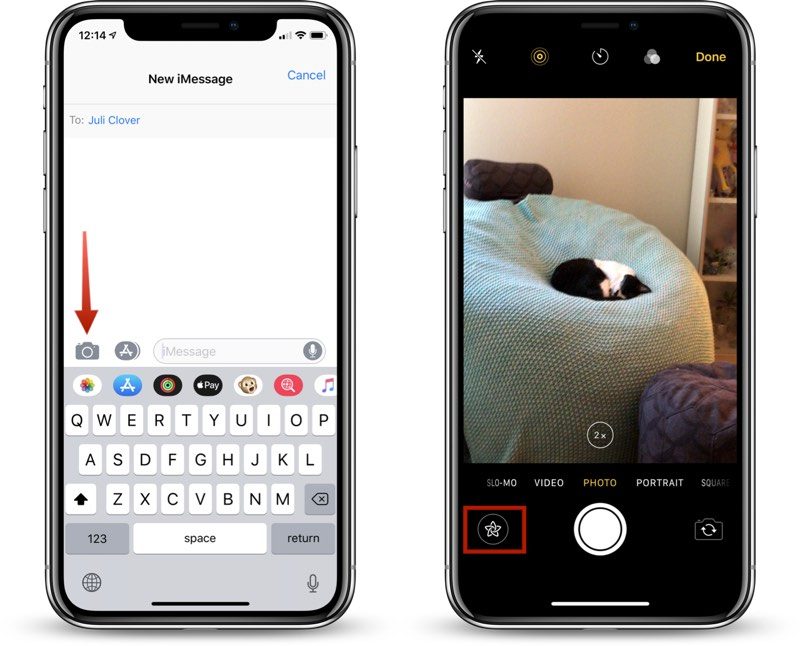
Open the Messages app.
Choose a conversation with someone.
Tap on the Camera icon next to the App Store icon.
Make sure you’re in either standard Photo or Video mode.
To get to the available Effects, tap on the small star-shaped icon to the left of the shutter button.
The Camera in the Messages app is located in the same place that it was in iOS 11, but instead of opening up a smaller camera window that also provides access to your already-captured photos, it is a full-screen camera complete with editing tools.
To get to photos you’ve already taken in the Messages app, you need to open up the app drawer by tapping on the App Store “A” icon and then choosing the Photos icon.
Available Effects Camera Features
There are multiple tools for editing your photos, all of which are displayed in a bar above the camera shutter, organized by icon. Here are the options, in the order that you’ll see them in the app.
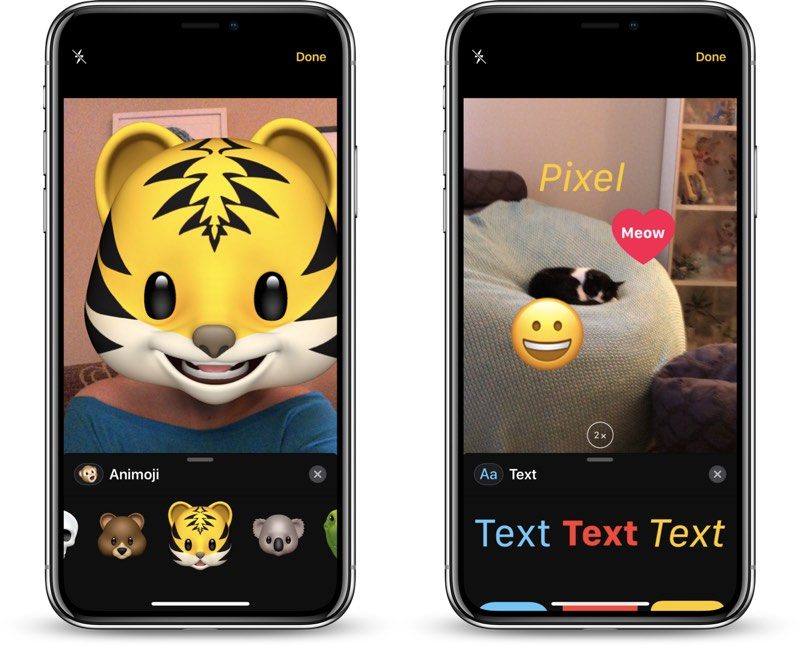
Animoji/Memoji (TrueDepth devices and front-facing camera only)
Filters
Text
Shapes
Sticker packs
After the four main sections, every other icon represents a different sticker pack that you have installed on your device.
All of these options work in photo and video mode with both the rear and front-facing cameras, with the exception of Animoji and Memoji, which only work with the front-facing camera.
You cannot use the Effects camera with slo-mo videos, portrait mode photos, square-shaped photos, or panoramas, but you can access these types of images in the Messages camera.
Animoji and Memoji
With the Animoji and Memoji filters, you can choose an Animoji or a previously created Memoji that will be displayed over your own face when using the front-facing camera of a device with a TrueDepth camera system.
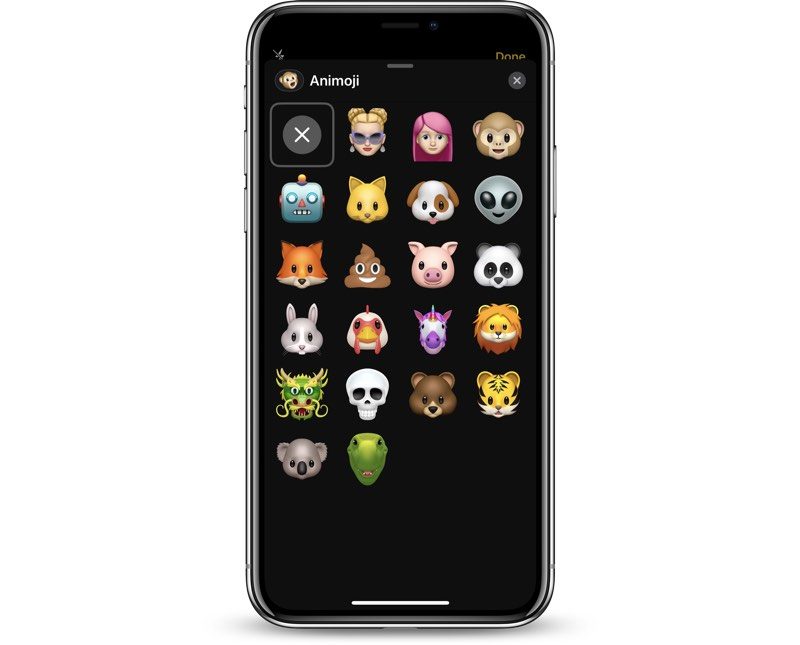
The Memoji and Animoji filter looks similar to what you might expect from a Snapchat filter, and because it uses the TrueDepth system, the Animoji and Memoji stay lined up with your head while you move and talk, mimicking your facial expressions just like when you use Animoji in Messages.
Filters
There are more than a dozen filters you can add to your photos or videos, which display in realtime. The filter section of the Effects Camera is accessed by tapping on the icon that looks like three RBG dots.
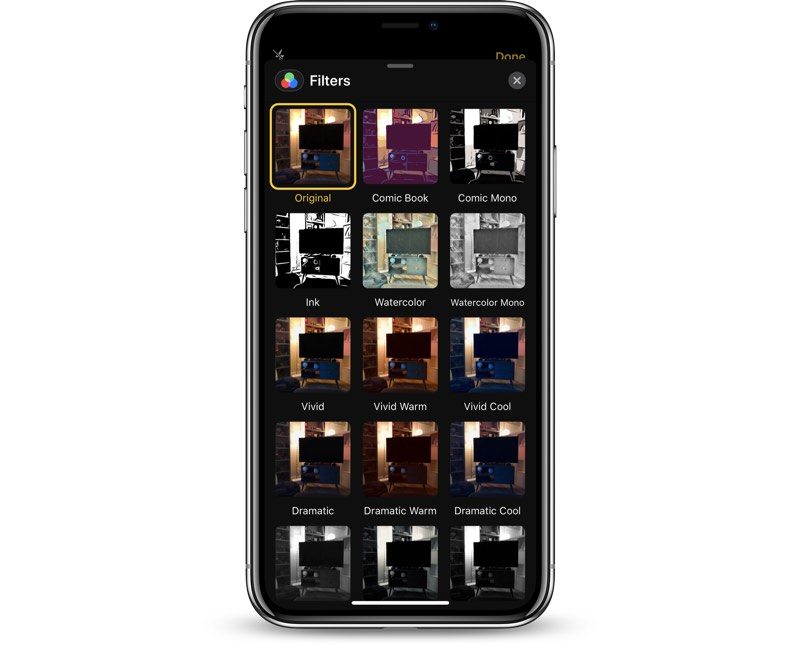
There are standard filters for making a photo or video warmer or cooler, several black and white filters, and a selection of fun filters like watercolor, ink, and comic book, that give you a sketched or painted look.
Text
Text can be added to a photo or video by tapping on the icon that looks like “Aa,” with plain text, text in bubbles, and text in shapes as available options.
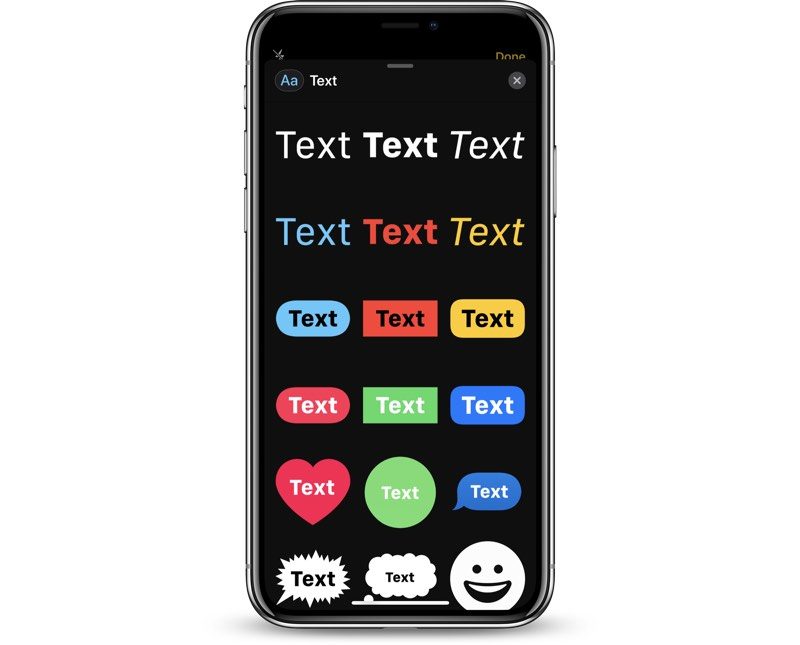
Pick the text design that you want and then type in your message. After you tap “Done,” you can resize the text with pinch gestures.
If you choose the icon that looks like a smiley face, you can add any emoji that you want to the photo or the video, and resize it just like standard text.
Shapes
With the Shapes tool, you can insert a variety of shapes in a sketched style, with options that include arrows, fireworks, circles, checkmarks, and squiggles.
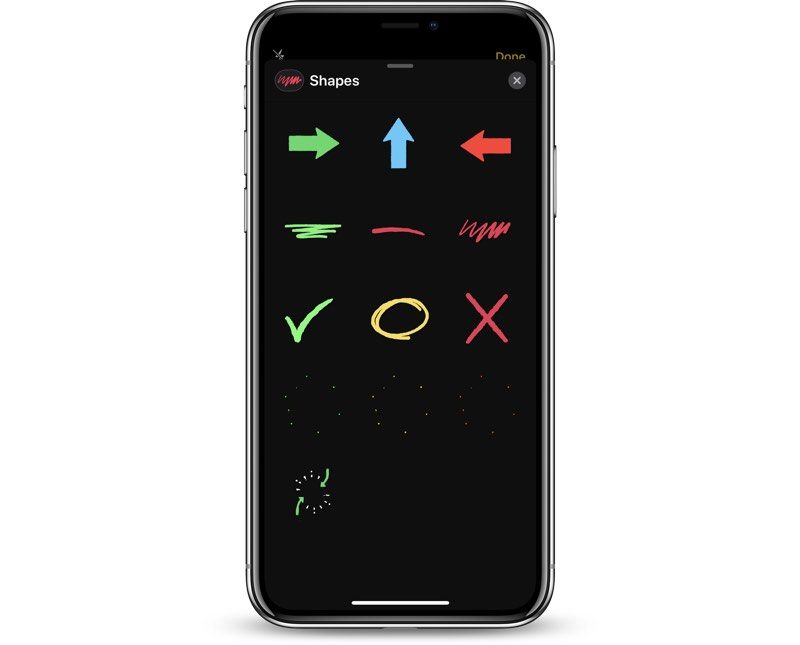
There are no options to draw your own shapes, so you can only use the stock options. Shapes are static when used in photos, but will animate when used in videos.
Shapes can be resized with pinch gestures and relocated by placing a finger on the shape and dragging it to a new location.
Stickers
After the four available built-in options, all of the additional icons in the Effects camera will be the sticker packs that you have installed. These sticker packs will vary based on your own downloads and apps, and it will look different for everyone.
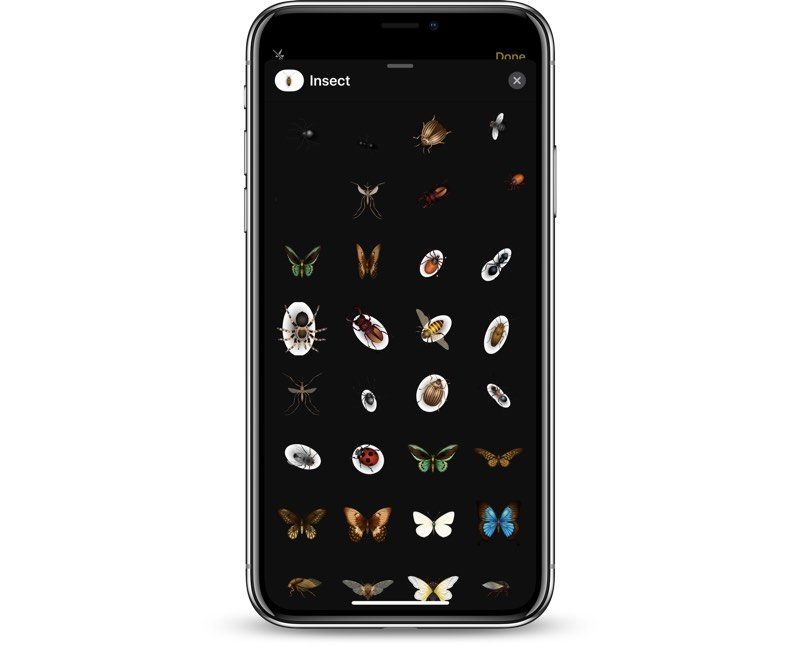
Like Text and Shape Effects, stickers can be placed anywhere on the photo or video and resized using pinch gestures. You can drag the sticker anywhere on the photo and reposition it using the same gestures you would use to put stickers within iMessages.
For stickers that animate, you will see the animations when using them in video mode, but there are no animations in photo mode.
New sticker packs for use with the Effects camera can be downloaded from the Messages App Store using these directions:
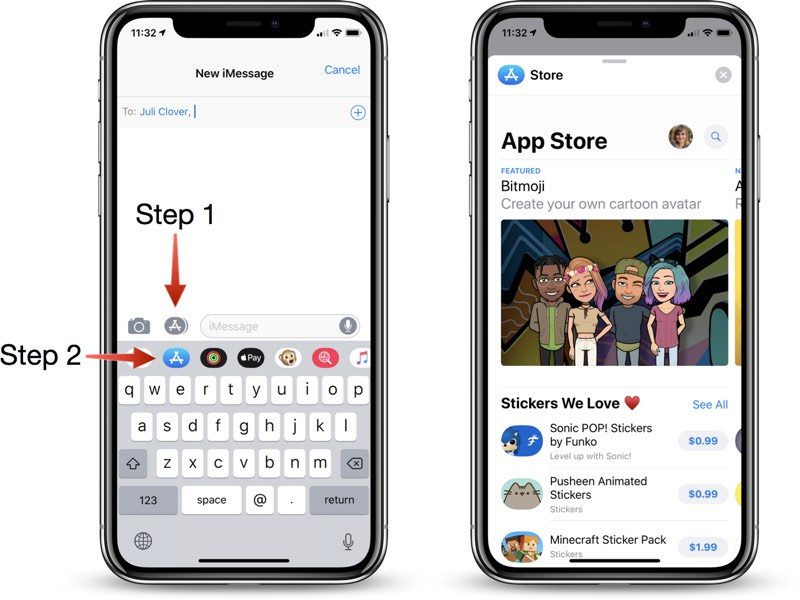
Open the Messages app.
Tap on the gray App Store Icon to make sure the app drawer is open.
With the app drawer open, tap on the blue App Store logo to open up the App Store.
From here, you can browse through popular stickers, search for sticker packs, or find games and apps that come with stickers you can use with the camera.Some of the sticker packs are free, while others are available for $0.99 to $1.99 on average.
Stacking Effects
All of the different effects can be stacked up, so you can combine multiple options. You can use filters with Animoji, for example, and also decorate photos and videos with stickers.
To use multiple effects, select your first option, such as Animoji, and choose what you want to apply. From there, tap the “X” in the upper right corner to go back to the Effects camera options and you can choose another category.
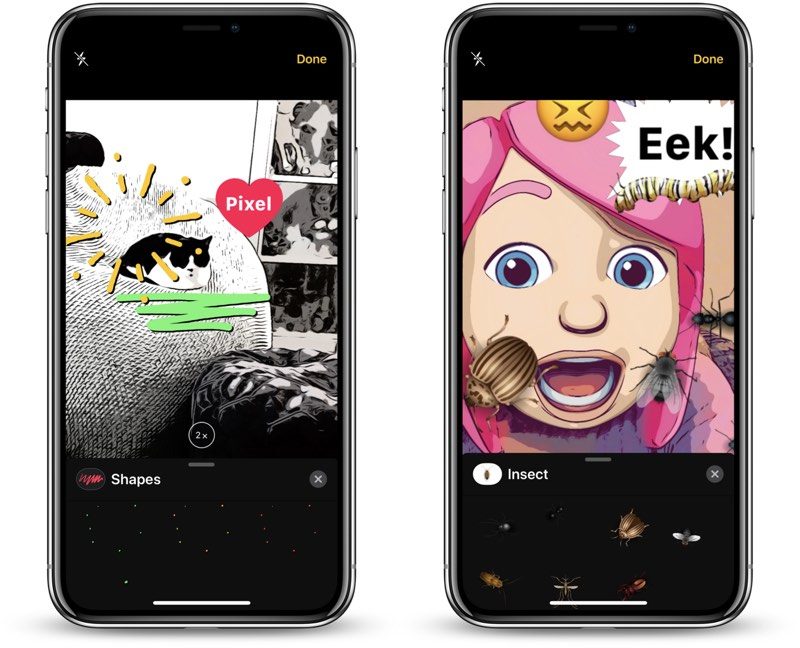
Using this method, you can stack up all of the effects if desired, using filters, stickers, shapes, and text with Animoji and Memoji options.
Make sure not to tap the Effects camera again while applying your different filters and effects because when you tap it, it will clear all of your set options.
Removing Effects
To remove an Animoji or Memoji filter, tap on the Animoji icon and then tap on the big “X” all the way at the left of Animoji/Memoji list.
To remove a photo filter, open up the filter menu and then scroll over to the first option, which is “Original” and select it.
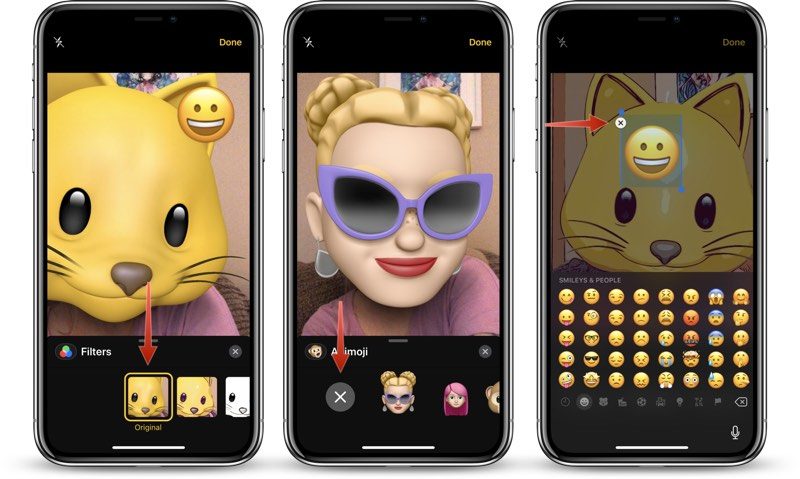
To remove text, stickers, or shapes, tap the item you want to remove in the photo or video field and then tap the “X” to delete it.
If you want to remove all of the effects that you’ve put in place at once, tap the Effects icon again to go back to the main camera interface. This clears all of your settings, and if you tap the Effects camera icon again, you’ll have a blank slate to work with.
Beta Limitations
In the iOS 12 beta, the Camera Effects feature in Messages is only available on iPhone SE and iPhone 6s. It is unavailable on the iPad. These limitations are expected to be lifted when iOS 12 launches in the fall.
Related Roundup: iOS 12
Discuss this article in our forums
12 Awesome Flying Cars And Taxis Currently In Development
We were promised that the future would bring flying cars, right? We were. And the good news is that tech entrepreneurs around the world are finally getting started on creating what are commonly known as VTOL (Vertical Take-Off and Landing, pronounced vee-toll) vehicles designed at car size.
Of course, no one is ready for flying cars quite yet. There’s no infrastructure to support them, and a whole new set of auto laws would have to be drawn up to regulate them (like personal drones, but a thousand times worse). The first commercial VTOLs we will see won’t be hanging out at the local auto dealer—they’ll be taxi services built to shuttle people from part of a city to another.
Here’s all the current projects that want to put you in the seat of a flying car.
Uber’s VTOL taxis
Of all the VTOL taxi projects, Uber’s is the most ambitious. The company is currently planning on launching pilot program for “Uber Elevate” flying taxies in Dallas and Los Angelas. Uber has been working on this project since 2016, and hopes to see results soon.
While Uber has stated that it wants flying cars that can movie horizontally (preferably on road) as well as vertically, the company is keeping largely quiet on just what prototypes it is considering. We know they have five different partners working on creating a flying car model, including a Boeing research lab.
Uber’s expansion is important because it gives us a good idea of the challenges involved in adopting flying cars around the world (which is also kind of a bummer). For example, personal VTOLs just don’t function dependably in a city with lots of harsh weather, so Uber is limited to choosing cites with very mild conditions and little rain for safety reasons—as well as cities with the right shape and metro areas for taxis. Uber also needs real estate partners and friendly governments so they can work out all the associated regulations. Since Uber’s ideal taxis will be electric in nature, the company also needs a very reliable, scalable electrical grid to work with. These requirements add up quickly, and show how much work these flying car entrepreneurs have ahead of them.
AeroMobil’s ambitious prototype
AeroMobil, based in Slovakia, is determined to making a functioning flying car. They are on their fourth prototype, so you know they aren’t joking. All the prototypes are loosely known as the “AeroMobil” and when a commercial launch date is set (the company is hoping for 2020, with finalized version of the model aimed for 2025) it will no doubt continue the brand name.
The company has plenty of concept art to show how car would work in its final form. It’s one of the more notable “hybrid” models, and we aren’t talking about fuel. Unlike true VTOLs, hybrid flying cars are often designed to take off of runways to gain flight, but also have the ability to revert to a more car-like shape that allows them to drive on roads. As you can tell, this requires both retractable wheels and wings, along with a very efficient fuel system. AeroMobil is hoping that it can create a functional electronic model. The company has partnered with notable organizations including Starburst, an aerospace “accelerator” to help get their car to market ASAP.
Airbus Vahana
Project Vahana, via Airbus, seeks to create an electric VTOL aircraft that is entirely self-piloted. There’s a lot of advantages to the self-piloting model. It can save costs when it comes to hiring and training pilots (who typically expect a higher salary than a taxi driver), and software engineers already have plenty of experience creating autopilot system for larger planes that can be applied to these VTOLs. It’s also an ideal way to run a taxi service, since the cars can automatically return themselves to centers for maintenance or take a different route based on current orders.
Of course, it’s also a lot to demand of a flying car. However, Vahana is progressing along a successful development program. In early 2018, the Vahana prototype had its first successful full-scale flight test. It wasn’t much—the 20-foot aircraft simply rose 16 feet into the air, and stayed there for 53 seconds. However, it did this entirely with the autopilot technology, and Airbus is planning on future tests for moving forward and other basic maneuvers.
Kitty Hawk’s flying prototype
Kitty Hawk’s CEO, Sebastian Thrun, claims that flying their latest prototype is, “As easy to use as playing Minecraft,” so we’re already sold—plus this also means there’s currently no pilot’s license required to drive it. The latest prototype, appropriately called “Flyer,” is a 250-pound model created by the startup to show off their ultralight design. Kitty Hawk, started by Thurn and Google cofounder Larry Page, plans on creating both a personal flying machine that’s largely for off-road fun (ultralight vehicles like this can’t fly over urban areas by law), and an air taxi for more urban environments. The small, drone-like personal flyer holds a lot of promise for those who want a quick and dirty flying car experience, but so far it’s only available for test flights on a lakeside training center
Volocopter 2X
The Volocopter design is ambitious. It also looks really cool, a mini-copter designed for personal flight, featuring 18 rotors, controlled via a single joystick, and powered via electric batteries. We’d say that the whole thing isn’t very practical, but then they went ahead and made a full-sized test model and ran it across the stage at CES 2018 thanks to a little sponsorship by Intel.
That makes this model another option that’s relatively close to hitting the market. However, it also appears to be largely recreational or limited to short taxi flights. The latest version has a flight time of 30 minutes and a range of 17 miles between charge centers. Intel’s work on the project includes complex tech, including four independent sensor units to control positioning, nine different electric battery packs with built-in redundancies, and even a parachute stowed on top of the vehicle is something goes wrong. It’s no wonder Volocopter is Dubai’s latest pick for their upcoming air taxi force (although Dubai has dumped other prototypes in the past, so it’s not a guaranteed deal).
Workhouse SureFly
The SureFly is a robust, heavy-duty VTOL that’s aimed at commercial services and personal consumers looking for a durable, self-controlled flying experience — at around $200,000 per unit. It’s not just a concept model, either. The SureFly prototype spent a few days in early May 2018 making its first untethered test flights, which lasted up to 20 seconds at a time. The ideal final model of the SureFly will have a top speed of 70mph and a flight ceiling of 4000 feet. It’s also going to weigh around 1,100 pounds, so it’s no surprise that this VTOL eschews the popular electric battery model and finds power with a more traditional gasoline engine.
Opener BlackFly
Opener
Coming from Canadian designer Opener, the BlackFly is a highly distinctive VTOL that combines personal piloting with a wealth of automatic features, including auto-landing and automated return to home functions, thus enabling flight without the need for formal licensing (a popular trend, as you may have noticed). Despite the design, BlackFly flies via a familiar method. Eight drone-like rotors are positioned across two wings. Taking off, however, is a bit more unique, as the VTOL is made to rock back and forth to literally pick up momentum to launch upward. Specs allow for a lengthy 40-mile range at 80mph, although regulations limit those numbers substantially for those who want to fly their own aerial vehicles.
The Passenger Drone
While Passenger Drone may be a pretty plain name for a flying car, it’s also very accurate. More than most of the ongoing projects, the 16-rotor Passenger Drone looks like a supersized battery-powered drone that’s designed for the urban scene and bypassing long miles of traffic. A couple other interesting things set the PD apart from other VTOLs, too. Instead of focusing on joysticks or traditional controls (although there is a manual joystick), the unit is designed to use a touchscreen that can be programmed with a specific destination. The VTOL then plans out the route and flies on its own, making it an ideal taxi service over a 20-mile range. And a snazzy design is always a plus!
Terrafugia’s Transition
Terrafugia
The Transition is another hybrid model designed to convert between the road and the skies as needed, with retractable wings and wheels. But that’s not the only way that the Transition is a true hybrid model. It also uses a combination of gas and electric engines to help power the model, and a boost mode for an extra burst of speed when flying (which sounds a little dangerous to us, but what do we know). In the past, the Transition was expected to eventually sell at $280,000, but these days the company is refraining from providing a listed price.
Ehang 184
When the Ehang 184 first showed up at CES a few years ago, it seemed pretty impossible – a personal quadcopter VTOL that was fully automated, totally safe, completely comfortable, and powered via a basic touchscreen interface that anyone can use. Frankly, it all seemed like so much vaporware with a bunch of claims that couldn’t really be substantiated. These days Ehang is still making some pretty crazy claims. For example, it’s hard to believe the company has tested its model over a thousand times in all types of situations (including gale force winds, with 500 pounds of extra weight, and so on), as they claim—the only test footage available is decidedly more pedestrian. After all, this sort of thing has happened before.
However, other details give us reason to believe that some version of the Ehang 184 will go into operation. Ehang has specified that each taxi will have a command center that will automatically ground the flying car in poor weather conditions, and that the models are primarily designed to flying in basic U-shapes from one port to another, which sounds much more in line with what other prototypes are capable of.
On the other hand, Ehang filed for U.S. bankruptcy protection in May of 2018. The move was called “strategic,” and the company is still in operation, but it doesn’t exactly inspire confidence.
Joby Aviation’s air taxi
A previous Joby Aviation design from 2014.
After working for years on personal aerial craft, Joby Aviation recently received a massive cash infusion from the likes of Toyota and Intel that provides $100 million to create an electric air taxi. This model is interesting, because it’s larger than many projects (able to seat up to five), and while it is called a VTOL, the model appears to be based on a more traditional aircraft with multiple propellers, which raises a lot of questions about how it’ll work in practice. Hopefully we will be able to see a real prototype before too long.
Boeing’s $2 million design contest
Boeing is really invested in the idea of flying cars, so much so that it created a GoFly $2 million design contest for design teams around the world to design just a really great flying car concept. The first round is already over, and 10 different teams have passed to the next stage, which means they will all be working on build a prototype of their design. You can check out the some of designs in question here, and just how crazy they are. There are hoverbikes, rotary models, UFO-shaped cars, alien-tastic hovering pods, and much more. We really hope that at least a couple of these prototypes end up functioning, and that we get to try them out.
Editors’ Recommendations
- Terrafugia Transition flying car will finally go on sale in 2019
- 6 flying cars that you might actually be able to own (and fly) in your lifetime
- The BlackFly by Opener is a flying car that could turn us all into pilots
- Rolls-Royce wants to put you in a flying taxi come the early 2020s
- The history of drones in 10 milestones
 AIVAnet