


Snag lifetime access to this MBA Bootcamp for just $29!
To succeed in the business world these days takes a lot more than a business school diploma. You need to be a personable boss with the right tools and skills to inspire and lead your employees.
Get this 8-course bundle for just $29! Learn more
If you’ve been looking to get the skills and strategies of a top MBA graduate but don’t have the time or money to invest in going back to school, Android Central Digital Offers has the right deal for you! For a limited time, you can get the Lifetime MBA Bootcamp bundle for just $29!

This eight-course bundle will help guide you with the knowledge and strategies required to be an effective business leader. Each course dives in on one particular topic with hours of content for you to absorb and is taught by a qualified instructor with decades of business and finance experience. The included courses are:
- Introduction To Leadership & Management
- Developing As A Leader & Manager
- Strategy & Business Models
- Communication Influence & Teams
- Finance For Non-Finance Professionals
- Business Writing
- Business Analysis
- Project Management
If you were to source out this educational content yourself you would end up spending over $1600 — or way more in tuition fees — but for a limited time you can snag this bundle for 98% off the regular price.
Don’t miss out on this great deal!
Store 256GB of important data with SanDisk’s $50 USB 3.1 Flash Drive
All the datas.
SanDisk’s 256GB Ultra Fit USB 3.1 Flash Drive is down to $49.99 on Amazon. Except for a very brief drop back in July, this is the lowest price we have ever seen on this drive. Since that July deal, the drive has been selling for around $60, but it was selling as high as $70 before that. This is the best value per GB of the Ultra Fit’s capacities, and the device’s USB 3.0 little brother doesn’t even have 256GB as an option.

This high-speed USB 3.1 flash drive features read speeds up to 130MB/s. You could transfer a full-length movie to it in less than 30 seconds. It’s compatible with laptops, car stereos, game consoles, and more. More than 560 users over at Amazon reviewed this flash drive with 4.1 out of 5 stars collectively.
See on Amazon
Spotify vs. Google Play Music: Which should you subscribe to?
Music subscriptions can help set the tone for your life: they can help keep your energy up and your fingers tapping out a rhythm. As such, I’ve taken a deep look at Google Play Music and Spotify to help you figure out which service is more deserving of your money and music.
Google Play Music
Our Pick

$10/mo at Google
Pros
- Best integration of purchased/uploaded music
- Stable, consistent performance with quick bug fixes
- Cache while streaming builds offline library effortlessly
Cons
- Uncertain future concerning YouTube Music migration
- Low device de-authorization limit
Google Play Music fits users with well-established personal music libraries and those with particular playlist tastes that can’t be satisfied by subscription music catalogs alone. For $2 more, you can also unlock premium features on YouTube and YouTube Music.
Spotify Premium
Algorithmic powerhouse

$10/mo at Spotify
Pros
- Top-notch subscription catalog
- Best-in-class playback handoff between devices
- Best streaming bundle for students
Cons
- 10,000 song library limit is easier to hit over time
- No cloud integration for purchased or uploaded music
- Inferior support experience, especially on Android
Spotify is for social listeners that don’t buy music and trust Spotify to serve up what’s popular or what the algorithms say they like. It’s great for users who just want a bit of music to fill their lives and tech fiends that switch devices too frequently for Google Play Music’s device limit policy.
Sound Quality and Device Limitations
Spotify Premium offers audio streaming qualities up to 320 kbps on “Extreme quality” and up to 256 kbps while playing on Chromecast. Google Play Music offers audio streaming qualities up to 320kbps on both subscription and uploaded music, though the quality of uploaded music is dependent on the quality of tracks uploaded.
| Wear OS app | ✔️ | ✔️ |
| Android TV app | ✔️ | ✔️ |
| Web client | ✔️ | ✔️ |
| Desktop client | Download/upload only | ✔️ |
| Chromecast compatibility | ✔️ | ✔️ |
| Google Assistant compatibility | ✔️ | ✔️ |
| Max audio quality | 320 kbps | 320 kbps |
| Offline limits | 10 devices | 5 devices 10,000 songs |
| Device limits | 10 devices | Only for offline (5 devices) |
Spotify lets you stream Spotify on as many devices as you like but you can only download music for offline playback on five devices, and up to 10,000 songs. Meanwhile, Google Play Music has a 10-device limit for authorizations with a four-device de-authorization limit per year, but on your 10 authorized devices, you can download as much music as can fit on your device’s storage.
Google Play Music has an app for Android TV, both Play Music and Spotify have apps for Android Wear, and both support Google Cast and Android Auto. Spotify uses Spotify Connect to connect to a wider variety of speakers and devices than just Google Cast, including Sonos and car systems.
Read more: What is Spotify Connect and why do I want it?
Library and Features
Both Google Play Music and Spotify have over 30 million songs available to their users to stream. Spotify doesn’t let you upload your own music library, and you can only add 10,000 songs from the streaming catalog to Your Library. Google Play Music lets you upload 50,000 personal songs to your Play Music library and stream them wherever for free, and you can add as many subscription songs and purchased songs to your library as you wish.
| Songs available | 35 million+ | 35 million+ |
| Library limit | Unlimited subscription music, 50,000 song uploads | 10K |
| Playlist size limits | 1,000 songs | 10K |
| Lyrics | Only accessible via Google Search | Genius Lyrics (display on device and Chromecast) |
| Gapless playback | ✔️ | Crossfade only (and not when casting) |
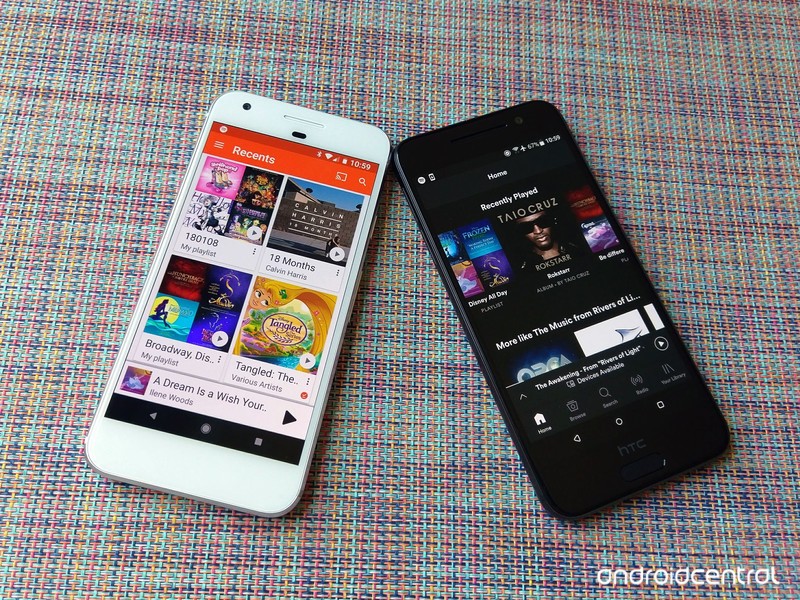
| App theming | White theme, hamburger menu | Dark theme, bottom tabs |
| Support Quality | Quick bug fixes, very responsive support staff, few new features | More new features, very slow to fix bugs on Android, less responsive support staff |
Spotify’s dark theme gives the app a cleaner, crisper look that’s far easier on the eyes during late night jam sessions, and its bottom tab layout is easier for jumping between sections of the app than Google Play Music’s hamburger drawer. Play Music’s Now Playing Queue lets you see ahead over a dozen songs on radio stations and you can swipe away songs you don’t like. Spotify doesn’t really show you what’s coming up on radio stations and queue management is ever so slightly insane.
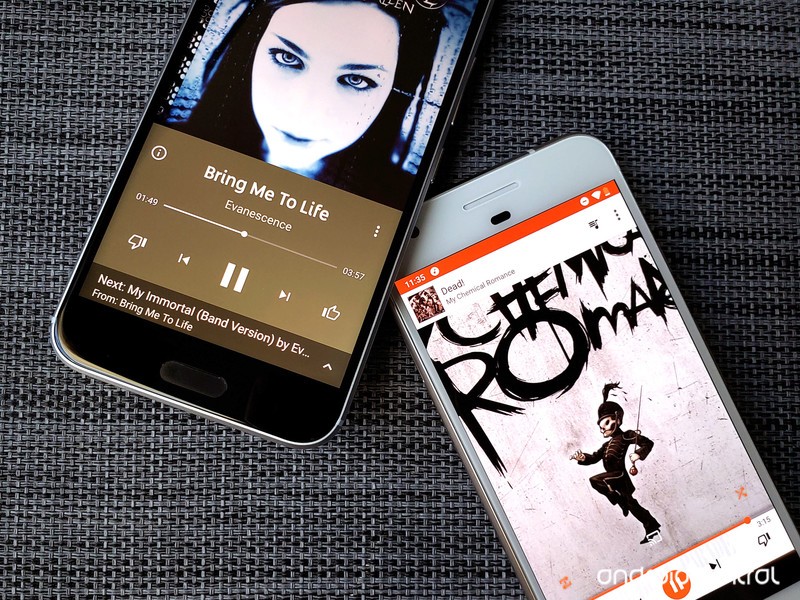
Spotify’s automatic stations and suggested songs seem to be slightly more accurate in their predictions than Google Play Music’s. Spotify also offers up Discover Weekly and Daily Mix playlists to help you keep your music fresh, which trounce Play Music’s Feeling Lucky radio station easily.
Considering how heavily we rely upon our music apps, it is worth mentioning that while Google Play Music is not receiving as many shiny new features as Spotify, bugs are fixed far, far faster on Google Play Music. Google Play Music also has instant chat support as well as over-the-phone support, whereas with Spotify, you can either tweet your problems to @SpotifyCares or using a standard contact form and hoping for a speedy email back.
Plans and Pricing
Spotify Premium for Family and Google Play Music’s family plan are both $14.99 a month and give up to 6 users their own premium subscription account. Everyone on a Spotify family plan has to live at the same address, and you can’t change addresses once it starts; if you move, you have either go to individual plans or delete your accounts and start over. Google Play Music’s family plan does not require everyone to live under the same roof, which Spotify Premium for Family not only requires, but enforces.
| Standard Price | $10/month | $10/month |
| Student Discount? | Nope | $5/month w/ Hulu |
| Family plan? | ❌ | $15/month |
| Music integration offerings | Upload 50K songs for free, Google Play music store integration | ❌ |
| Video bundle offerings | YouTube Premium ($12/month) | Hulu (Bundle is $13/month) |
| Available countries | 63 | 65 |
Spotify Student, which bundles Spotify Premium, Hulu (ad-supported), and SHOWTIME for $5/month is the best deal in media streaming, but if you’re not an American college student, the next best deal on the market is YouTube Premium. For $12/month for an individual — or $18/month for the family plan — you can unlock premium features in Google Play Music, YouTube, YouTube Music, YouTube Kids, YouTube Gaming, and YouTube VR.
Read more: YouTube Premium is Google’s bundle future
Buy-one-get-one music service: A word about YouTube Music
Google Play Music comes with premium access to the “brand-new” YouTube Music, and some YouTube executives keep slipping out bits and pieces about Google Play Music being replaced by YouTube Music. There are a few very important things to keep in mind:
- There’s a lot to like in YouTube Music, but it still very much a beta product with a whole lot of bugs and missing features that it needs to get in order before any migration could occur.
- If/when that migration occurs down the road, your library will migrate over at that time including your uploaded/purchased music locker.
- Google Play Music and YouTube Premium both come with YouTube Music Premium, so you can use both apps and take advantage of their individual strengths — YouTube Music’s unbeatable YouTube-powered selection and Google Play Music’s normalcy and stability.
What YouTube Music means for the future of Google Play Music
Google Play Music
Our Pick

It may not be the most popular, but this two-fer has the best features and value
- $12/month — YouTube Premium
- $10/month — Google Play Music
Google Play Music is the last of its kind on Android: a music service that allows you to integrate subscription music with a personal music locker of purchased and uploaded music. With YouTube Music making a splash, Google Play Music is a top-notch two-in-one service that’s well worth your time, money, and music. It’s also part of the best non-student streaming bundle around: YouTube Premium.
Spotify Premium
Algorithmic powerhouse

$10/month at Spotify
Magical mixtapes and student signups have made Spotify a juggernaut.
Spotify’s student bundle is the best in media streaming today, and it’s hard to break away from the siren song of Spotify’s shuffles once that discount ends. Between its many exclusives, famous algorithms, and the simple magic of Spotify Connect, Spotify is a music service with a lot to love, even if Spotify’s support on Android isn’t quite as good.
Updated September 2018: This guide has been consolidated to help you make your music subscription selection faster and to reflect changes in pricing and Spotify’s upgraded offline limits.
Sony MP-CD1 Mobile Projector review: Pocket-sized and powerful

A great little projector for both work and play!
It’s fair to say that mobile projectors fall into a very niche product category — not substantial enough to anchor your home theatre setup, but still a compelling option for a number of scenarios.
Whether you’re an entrepreneur or college student working on business pitches or presentations, or simply love the idea of enjoying a pop-up theatre in your own backyard — a mobile projector can offer a convenient and fun way for educating or entertaining your audience.
I was sent the Sony MP-CD1 Mobile Projector to test and review, and while I’m not planning to go back to school or make any impromptu business pitches anytime soon, I do love to stream content and play video games, so that’s exactly how I tested it. And this pocket-sized projector really impressed me with how versatile and portable it is.
Lots of fun
Sony MP-CD1 Mobile Projector

$359 at Amazon
An awesome little projector that ticks a lot of boxes.
The Sony MP-CD1 is a great mobile projector that’s bright and easy to set up with your laptop, gaming console, or a streaming box.
The Good
- Ultra compact size
- Projects up to 120″ screen
- Whisper-quiet fan
- Includes Leather carrying case
- Easy to set up and use with most devices
The Bad
- Not inexpensive
- Built-in speaker is not very good
- Requires additional accessories to connect your phone
- Battery life lasts two hours
Sony MP-CD1 Mobile Projector What I like

Right out of the box, I was blown away at the incredibly compact size of this projector. This projector is pocket-friendly and comes with a nice leather carrying case that looks great and also helps protect the projector lens. The package also included an HDMI cable and a USB-C cable for charging the 5,000 mAh internal battery.
There are four ports along the right side of the projector — a USB-C port for charging and providing power to the device, a USB Out port that lets the projector operate as a portable power pack in a pinch, an HDMI port that also supports Mobile High-Definition Link (MHL) for connecting your smartphone, and a 3.5mm jack for connecting external headphones and speakers. On the opposite side, right next to the projector lens, is a slider for controlling focus.

On the bottom is a threaded tripod mount hole that you can use, but I generally found it unnecessary to use because the projector does automatic keystone correction so well — point it at a wall and it will configure the display to create a perfect rectangle no matter how you have it orientated. A flexible GorrilaPod mount will make for a great accessory for this projector if you plan to use it on uneven surfaces or mount it on a railing.
Made a popup theatre in my backyard using @nvidia Shield TV, @Sony mobile projector and a bedsheet. Gotta make the most of these last days of summer!🎥🍿👩💻 pic.twitter.com/kdKdbVZ1Oq
— Marc L Lagace (@spacelagace) September 2, 2018
Regarding performance, the 105-lumen lamp is more than bright enough to use in any dark setting whether that be a classroom, bedroom, or outdoors after the sunset. This works as a short throw projector, creating a 40-inch image when placed just over a meter away, and can cast a 120-inch image from just three meters away.
This allowed me to connect and project my NVIDIA Shield TV to fill an entire wall of my bedroom for a movie theatre experience in my bedroom. Combined with the great sound from my bookshelf speakers, the entire set up was quite brilliant. I also tested the setup outdoors and created a wonderful little backyard theatre for myself in no time at all.
Sony MP-CD1 Mobile Projector What I don’t like

For all the positive qualities I love about this projector, there are a few drawbacks. The first limitation is the battery life — you can expect to get two hours of projection time from a fully charged battery.
This is more than enough battery life to enjoy most movies, but a Netflix binge will most certainly cut short if it’s not connected to a power source. Once the battery is depleted, I’ve found that plugging into a direct power source charges the battery first, and since the lamp uses power faster than the battery can recharge, the projector inevitably dies fast.
There’s no built-in OS for the projector, and I was unable to test connecting my phone via MHL because that required an additional accessory that probably should have been included here. The built-in speaker is sub-par at best, so you’re definitely going to want to use this projector with a set of headphones or speakers.
Sony MP-CD1 Mobile Projector
This pocket-sized projector is one of the coolest accessories I’ve tested in 2018. With a little imagination, you’re able to create a custom theatre experience anywhere inside or outside your home.
4
out of 5
I think this mobile projector would be an especially great accessory for any college student who could make use of it for academic presentations along with a cool theatre setup for gaming or watching movies in the dorm room.
See at Amazon
Already beaten Spider-Man? These games will keep the superhero fun going
Superhero games have never been better.

So, your exploits as the digital Peter Parker have finally come to an end, eh? If you aren’t interested in Spider-Man’s new game plus mode and can’t wait for more story DLC to be out, you’re probably looking for something else to sink your teeth into.
If you liked Spider-Man, we’ve highlighted a few other games worth checking out. Whether you need your superhero fix or you just like punching someone in the face, these recommendations will help you scratch your itch.
- Infamous Second Son
- Batman: Arkham Knight
- Injustice 2
- LEGO Marvel Superheroes 2
Infamous Second Son

We can’t think of a better game to check out than Infamous Second Son. You aren’t quite Spider-Man in this game, but you do get your own unique set of powers and abilities. It’s an open world action game that has you scaling buildings and pulling off insane moves that only superheroes can.
The story takes place in futuristic Seattle, and you’re going up against a corrupt governmental agency which has deemed “conduits,” the name given to those who possess these powers, to be bio-terrorist threats. They want to eliminate you at all costs, and you won’t let them.
$27 at Amazon
Batman: Arkham Knight

The Caped Crusader doesn’t have superhuman strength and laser beams coming out of his eyes or any of that cool stuff, but what he does have is a pretty powerful brain. It makes him the best detective in the history of detectivism, and he can throw a pretty mean roundhouse kick, too.
Batman: Arkham Knight is absolutely worth checking out if you haven’t already. A few odd pacing issues with the vehicle sequences aside, this game helped redefine just how good a superhero video game could be.
$30 at Amazon
Injustice 2

There’s no grand story here, but Injustice 2 brings the best of DC’s superheroes and supervillains into one insanely fun fighting game. Each character boasts a custom move set which allows you to pull off combat that’s even cooler than what the comics and movies have to offer. Plus, the Ninja Turtles are available as playable characters. Need we say more?
$26 at Amazon
LEGO Marvel Super Heroes 2

LEGO games are known for their cutesy presentation and fun gameplay. You’ll get yourself a bit of everything in LEGO Marvel Super Heroes 2. Play as Captain America, The Black Panther, Venom, Spider-Man, Iron Man, Daredevil, and more in a mashup for the ages. It’s like Avengers: The Game, only not quite as serious and without the same level of cinematic epicness.
$25 at Amazon
What are you playing next?
You could take even just one of these games and have enough to keep the superhero fun going for many more hours. Which one will you check out next?
Marvel’s Spider-Man review: Amazing, Spectacular, and a little clumsy
PlayStation 4

- PS4 vs. PS4 Slim vs. PS4 Pro: Which should you buy?
- PlayStation VR Review
- Playing PS4 games through your phone is awesome
Amazon
Amazon’s new Gadgets Toolkit will expand Alexa in all new ways
Amazon’s Alexa is already pretty amazing. With just a simple device like the Echo Dot you can search the Internet, shop online, play your favorite music, and figure out whether you should be wearing a jacket or not. Well, now Amazon has released a beta of the Alexa Gadgets Toolkit, and Alexa’s functionality is going to explode.

The Gadgets Toolkit will allow developers to build their very own Alexa compatible gadgets. With built-in Bluetooth, they can pair to any Echo devices. Once connected, Alexa will then have control of the gadget’s features, including lights, motors, sounds, and more. Build a robot with lips that move when Alexa speaks or a power tool Alexa can run and tell you how to use. The toolkit will come with self-service APIs, interfaces, technical documents, and sample codes. You’ll be able to design your gadgets to directly pair with Echo devices, boost connectivity, and receive over-the-air updates.
Amazon has detailed a lot of the interfaces already available and the ones that will continue to be added over time. Some of the examples include devices that respond to wake word detection, speech synchronization, notification response, timers, alarms, reminders, and visual performances through music.
Many companies like Hasbro, WoWWee Group Limited, BabyPlus, and Novalia, have already gotten on board and started implementing these tools. The new gadgets will be available later this year and include things like dancing plushies, Alexa-powered Big Mouth Billy Bass toys, and more. If you’re looking to develop your own gadgets, you can sign up through Amazon’s page. Otherwise, sit back and relax as we see a whole new wave of Alexa-powered toys, tools, and more this year.
See on Amazon
iOS 12.1 Simulator Supports Virtualized 4K External Displays, Hinting at USB-C Port for iPad Pro
After installing the 12.1 beta, the iOS Simulator in Xcode appears to offer support for virtualized 4K external displays, according to developer Steven Troughton-Smith.
That’s not a feature that’s possible with existing iOS devices using a Lightning to HDMI adapter, which suggests it could be a new option targeted at upcoming iPad Pro models that are rumored to be getting USB-C ports instead of Lightning ports.
New in iOS 12.1: the iOS Simulator supports virtualized 4K external displays. This is not possible on any existing iOS device via the Lightning HDMI adapter — lends credence to iPad perhaps getting a USB-C port for 4K video-out? pic.twitter.com/WfNBerHIrb
— Steve Troughton-Smith (@stroughtonsmith) September 19, 2018
According to well-respected Apple analyst Ming-Chi Kuo, who is well-connected to the Apple supply chain, Apple is planning to replace the Lightning port on the upcoming iPad Pro models with a new USB-C interface.
Apple has been transitioning to USB-C in its Mac lineup since 2016, but despite a rumor here and there, has not adopted USB-C ports for any devices in its mobile lineup. An iPad Pro with USB-C would bridge the gap between the Mac and the iPad, making Apple’s pro-level tablet even more viable as a computer replacement.
Kuo believes the USB-C iPad Pro models will ship with an 18W power adapter with a USB-C port, which would enable faster charging.
We may not have to wait long for Apple to unveil new iPad Pro models. There are new iPad Pros and Macs in the works for fall, and in years when Apple has a lot of fall devices to unveil, it’s held two events, one in September and one in October.
For that reason, we could soon hear news of an October event where new iPad Pro models and new Macs will be introduced.
Along with a USB-C port, new iPad Pro models are expected to have edge-to-edge LCD displays with a TrueDepth camera system for Face ID and no Home button.
Additional details on the upcoming iPad Pro models can be found in our iPad Pro roundup.
Related Roundup: iPad ProBuyer’s Guide: 10.5″ iPad Pro (Don’t Buy), 12.9″ iPad Pro (Don’t Buy)
Discuss this article in our forums
 AIVAnet