


It’s not really a ‘budget’ phone, but the iPhone XR is still a great value
Julian Chokkattu/Digital Trends
Let’s be completely honest — I’m a broke millennial, and don’t have disposable income to splurge on expensive smartphones. But when Apple announced pricing for its new iPhone XS and XS Max, which both broke the $1,000 mark, I didn’t think much of it. Carrier payment plans tend to make every smartphone look less expensive, but then I did the math.
The $750 price tag on the iPhone XR has other tech journalists referring to it as the “budget” option of the new iPhone X lineup, which could easily be misconstrued as translating to mediocre features. In reality, the XR offers a beautiful design, top-tier specs, and most importantly — isn’t all that different from its expensive companions. It’s also the iPhone I’m probably going to buy, and I’m not mad about it.
Following last year’s Apple event in September, I preached that customers should splurge for the $1,000 iPhone X because the iPhone 8 and 8 Plus brought nothing new to the table. Apple simply recycled its old, outdated design to produce an iPhone with the exact same look and feel as its predecessors, aside from the new A11 processor. If you truly wanted something new, then the iPhone X would bring you that, making the price worth it.
Just because the iPhone XR is the cheaper option, doesn’t mean it’s a budget phone.
But the iPhone X was simply the forerunner for what we should expect from Apple for the next several years. Long gone are the days of the home button, thick bezels, and an easily identifiable iPhone. The X brought along a ton of new features that distinguished it from previous iPhones — a notch, TrueDepth camera technology, and edge-to-edge display, to name a few. It made sense to splurge a little, because you were getting an entirely new product that’s different from anything Apple has ever made. But this time around, we’ve been provided with three new versions of that design, which means you’re allowed to be picky about what you choose.
Just because the iPhone XR is the cheaper option, doesn’t mean it’s a budget phone. A true “budget” phone brings low-level specs and major compromises. More often than not, it also looks and feels cheap. At first glance, the only thing that distinguishes the iPhone XR from the iPhone XS is that it has a single lens instead of a dual lens camera.
Julian Chokkattu/Digital Trends
Let’s talk about that camera for a moment. Sure, two lenses are better than one but the camera on the XR is still powerful. At the same 12-megapixels as the iPhone XS and XS Max, it not only has a new sensor since last year’s iPhones but also includes Portrait Mode (thanks to machine learning) and Smart HDR. While the quality of my portraits might not be as strong as it would be with a dual-camera system, it’ll get the job done. I’m also not buying an iPhone specifically for its camera and if I was, I’d probably go with an Android instead.
With a 7-megapixel TrueDepth front camera, you can also take Portrait Mode selfies, use Face ID to unlock your iPhone, and create Animojis with iOS 12 — all of which are also on the iPhone XS and XS Max. The TrueDepth technology was a huge deal on the iPhone X, giving it the ability to do more than any other iPhone ever made. But with no home button, Apple had no choice but to give its cheaper iPhone variant the same complex, sensor-packed, front-facing camera module as its more expensive siblings.
The iPhone XR also has a bigger display than the iPhone XS.
The iPhone XR also has a bigger display than the iPhone XS, coming in at 6.1-inches in comparison to the 5.8-inch on the XS. While it doesn’t have the Super Retina OLED display, it features Apple’s new Liquid Retina HD Display which, as covered in the hands-on by our mobile editor, looks sharp and well saturated. Just by looking at the photos, it’s easy to tell the colors pop.
One other factor of the iPhone XR that might automatically label it as a “budget” phone is the array of colors it comes in. The last iPhone to have the same bright color options was the iPhone 5C, which could be considered as Apple’s true budget phone. Released in 2013, it cost $550 and featured an A6 chip that was released a year prior, an 8-megapixel rear-camera, and a 1.2-megapixel front-facing camera. Not only has it been discontinued, but it also ended operating system updates with iOS 11. The XR is a very different proposition.
Under the hood of the iPhone XR is Apple’s new A12 Bionic chip, that also powers the iPhone XS and XS Max. With a “next-generation Neural Engine,” it not only includes 8 cores but can process 5 trillion operations per second. What that basically means is, the iPhone XR is as powerful as Apple’s iPhones currently get — all for a lot less than $1,000. What more can you ask for? It’s probably the most powerful $750 phone on the planet right now.
I held out on purchasing the iPhone X because I’m used to the large, physical size of the iPhone 7 Plus — knowing full well they’d most likely come out with an iPhone X Plus the following year. That’s why I first had my eye on the iPhone XS Max, but at $1,100, I think a slightly bigger display than what I’m used to will do just fine. With a $350 difference between the two phones, I’m willing to sacrifice the size. Even paying monthly, the 256GB iPhone XR will cost $47, while the XS is $56 and the XS Max is $60. There simply isn’t enough difference to justify that extra expense.
I think I’ll be just fine with my quirky-colored iPhone XR.
With carrier pricing now officially out for the iPhone XS and XS Max, monthly payments over the course of 18 to 24 months may look low but that’s only because both phones require large down payments — and not everyone has hundreds of dollars to shell out up front. If you want to take advantage of the carrier deals, almost all of them require adding a new line which a majority of customers don’t have use for.
With the new notch design also being the one Apple will most likely stick with for a while, you won’t need to buy a new iPhone for the next couple of years. Even though the iPhone XR is cheaper, its cutting-edge specs offer real longevity. This iPhone will be fast enough to handle anything you can throw it at for the next couple of years and probably beyond.
I don’t know about you, but I certainly don’t have $60 to spend on a phone every month, and that’s without counting the phone bill itself. Have I mentioned I’m a broke millennial? I think I’ll be just fine with my quirky-colored iPhone XR which everyone will probably mistake for an iPhone X or XS, anyways.
Editors’ Recommendations
- iPhone XS, iPhone XS Max, and iPhone XR: How to buy Apple’s new phones
- Apple iPhone XR: Everything you need to know
- You can’t buy the iPhone SE anymore, but Apple has cut prices for these iPhones
- Apple iPhone XS, XS Max, and XR: All the hands-on photos you could ever need
- iPhone XR hands-on review
The best gamepad for your Gear VR

We’re a virtual company made up of tech experts from across the globe. So we know that if you’re going to game on a Gear VR, you need a solid controller. We don’t make the rules.
You get a lot more out of your gaming experience in the Samsung Gear VR if you use a quality gamepad, and the best by far for this experience is the one made by SteelSeries. The Stratus XL is a console quality gamepad, but built to connect to mobile devices. It also looks pretty great, which doesn’t hurt.
Our Pick
SteelSeries Stratus XL

$44 from Amazon
If you want the best overall gamepad for your Gear VR, SteelSeries is where you want to be.
Why you should buy this gamepad
Instead of focusing on portability and pocketability like the other controllers in this product line, SteelSeries focused on comfort and capability which makes it an incredible choice for the Samsung Gear VR. It has all the quality of a major console controller, with great battery life and a $40 price tag to match.
Why the SteelSeries Stratus XL is the best
Everything you need in a gamepad you’ll be using without your eyes.
While the Samsung Gear VR comes with its own Controller now, there are plenty of VR games you play on this headset which require or are enhanced by a good ol’ fashioned gamepad. It’s just not as enjoyable to play Minecraft with a motion controller, which is why Samsung continues to support games and gamers who prefer this gameplay mechanic.
Three things matter most when it comes to a VR-friendly gamepad — comfort, battery life, and durability. SteelSeries has checked all three boxes with the Stratus XL. This is an Xbox-esque gamepad that looks and feels familiar with a button layout you will quickly become comfortable with despite not being able to look down at it while in VR. This gamepad will easily survive the occasional drop when you are spooked in VR thanks to its rugged plastic design, and the use of standard thumbsticks means the chances of breaking them on a drop is unlikely. On average this controller will get you through 30 hours of constant use, which means the only way you’re charging this controller once a week is if you are really and truly invested in VR Minecraft. If you do run out of power in the middle of a game, the use of a microUSB port means just about everything can charge this controller quickly.
Is it a good time to buy the SteelSeries Stratus XL?
Absolutely. This controller is fantastic, and has already been available for quite a while. This means it has already seen a couple of price drops, but isn’t ready to be replaced anytime soon.
Reasons to buy
- Solid, durable design
- Quick pairing, easy to use
- Great battery life
Reasons not to buy
- Joysticks are in the Xbox configuration
- Not ideal for smaller hands
Why this is the gamepad for you
Samsung and Oculus designed the Gear VR to be played while sitting down, just like a console. In face, it’s kind of like a console you wear on your face, if you think about it. That means a lot of your games are going to be best played while seated comfortably. Sitting comfortably and holding your hand to your temple to tap the buttons on the side of the headset don’t exactly go together well, which is why you can use a gamepad with almost everything.
If you’re going to use a gamepad while seated comfortably, it might as well be a gamepad of the same quality as what you’d find attached to an Xbox or PlayStation. SteelSeries offers exactly this with the Stratus XL, making it the best overall experience for playing with your Samsung Gear VR.
Alternatives to the SteelSeries Stratus XL
Not everyone wants to carry a heavy controller with them while travelling, and not everyone likes the Xbox layout for gamepads. For you, we have a few alternatives to offer.
Runner-up
Moga Hero Power

If you value portability above all, Moga Hero Power is what you want.
$28 from Amazon
Having an Xbox-style gamepad is great for familiarity, but the Gear VR is a portable virtual reality platform and it makes sense that you’d want the gamepad to be equally as portable. Moga’s Hero Power gamepad offers this exact experience, with buttons and joysticks nearly flush with the casing and shorter palm grips that flow in line with the rest of the body.
Value Pick
Beboncool controller

If you want a better Gear VR gameplay experience without spending a ton, Beboncool has you covered.
$26 from Amazon
It’s portable, it’s plasticky, and at $25 it’s way cheaper than most other Bluetooth gamepads that play nice with the Gear VR. The battery is rated for 12 hours of constant gameplay, but the auto-off feature ensures you’ll only be using power when you’re actually playing.
Credits — The team that worked on this guide

Russell Holly is a Contributing Editor at Android Central. He lives for the shiniest new thing, and loves explaining its potential to improve your life. Whatever you do, don’t tell his spouse about the drawer full of tech under the bed.
Updated September 2018: The SteelSeries Stratus XL is still the best Bluetooth gamepad for the Samsung Gear VR.
Best Backpacks for Transporting Your Drone
Anyone who’s ever crashed their brand new drone knows that they aren’t exactly built Ford Tough. Hell, even in simply transporting them, if you’re not careful, you can bust a blade, scratch them up, or worse. Grab one of these backpacks and keep your drone safe so that it can fly free (in one piece).
Amazon’s Choice
Lowepro DroneGuard BP 250

Lowepro’s drone backpack is the best option for anyone with a DJI Mavic Pro/Pro Platinum, and it can even fit a 15-inch laptop, as well as a 10-inch tablet. Basically, if you need to carry your drone and all the things, this is the backpack. Double-check sizing, as it may fit other drone brands.
$110 at Amazon
Trusted Brand
Manfrotto MB BP-D1
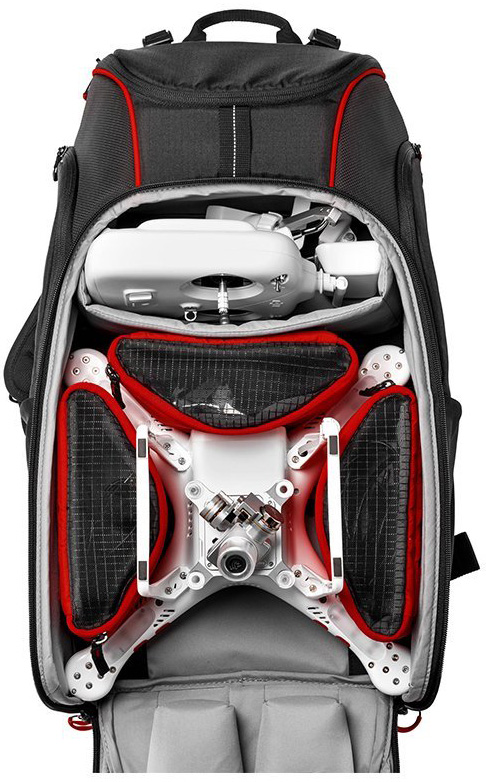
Manfrotto is the best when it comes to bags and cases for professional video and photography equipment, and since that now includes drones, the MB BP-D1 continues that tradition. This one’s designed to specifically fit the DJI Phantom in multiple configurations. Check sizing, since it may also fit other brands.
$138 at Amazon
Pockets for Days
Smatree Phantom 4 Backpack

This backpack is for the DJI Phantom 4/Phantom 4 Pro, and while it has a large main pocket for the Phantom in its original styrofoam case, it also has pockets and compartments for extra batteries, accessories, a tablet, propellers, and much more.
$50 at Amazon
Budget Pick
Powerextra waterproof carrying bag

This large backpack is for the DJI Phantom 3 series, but take a look at sizing and other drones may fit. It’s actually a big foam shell for your drone, rather than a traditional backpack, and it has extra room for more batteries and your controller.
$41 at Amazon
Upgrade Pick
Peak Design Everyday Backpack

Though it’s for much more than just a drone, the Peak Design Everyday Backpack might just be one of the best professional backpacks ever made. It has loads of room for a drone, laptop, tablet, whatever you need to get through the day. It comes in 20-liter and 30-liter options, so you can grab the size that suits your everyday carry.
$260 at Amazon
For Any Phantom
SSE drone backpack
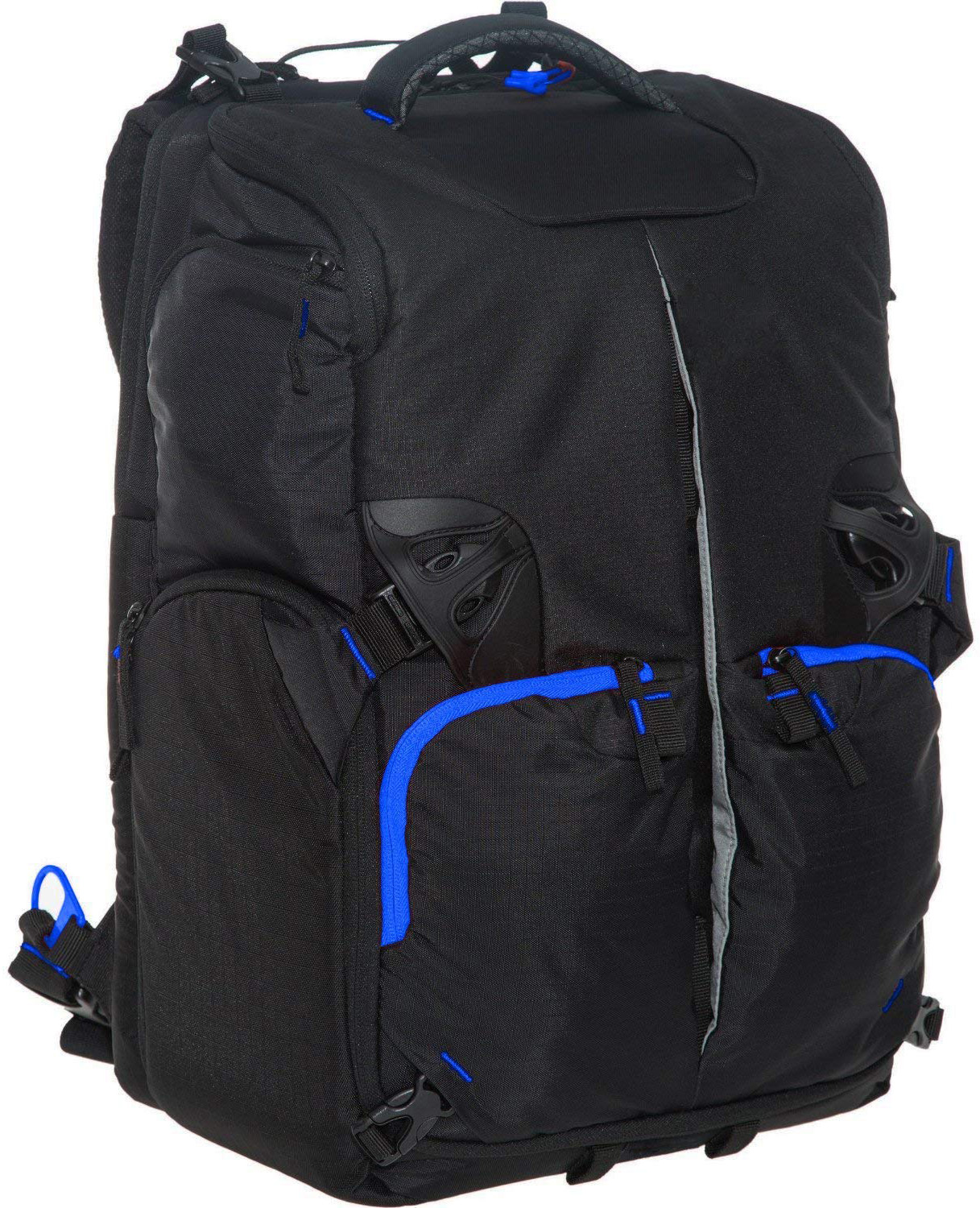
SSE’s backpack can take any drone in the DJI Phantom line, and can likely carry other drone brands as well. This one can be carried as either a backpack or a shoulder bag, and it has enough room for a drone, a controller, three to five batteries, a battery charger, four pairs of propellers, and one laptop (up to 15 inches). It even includes a rain cover and a water bottle holder.
$50 at Amazon
Great mid-range option
HDStars quadcopter backpack

This backpack will fit all drones that measure up to 11.4 x 11.4 x 7.25. It has enough room for the drone, a controller, a phone adapter, two batteries, a charger, and then your memory cards and whatnot. The red and black color scheme is eye-catching, and the bag itself is well-made and sturdy.
$65 at Amazon
Extra Comfort
PolarPro DroneTrekker backpack
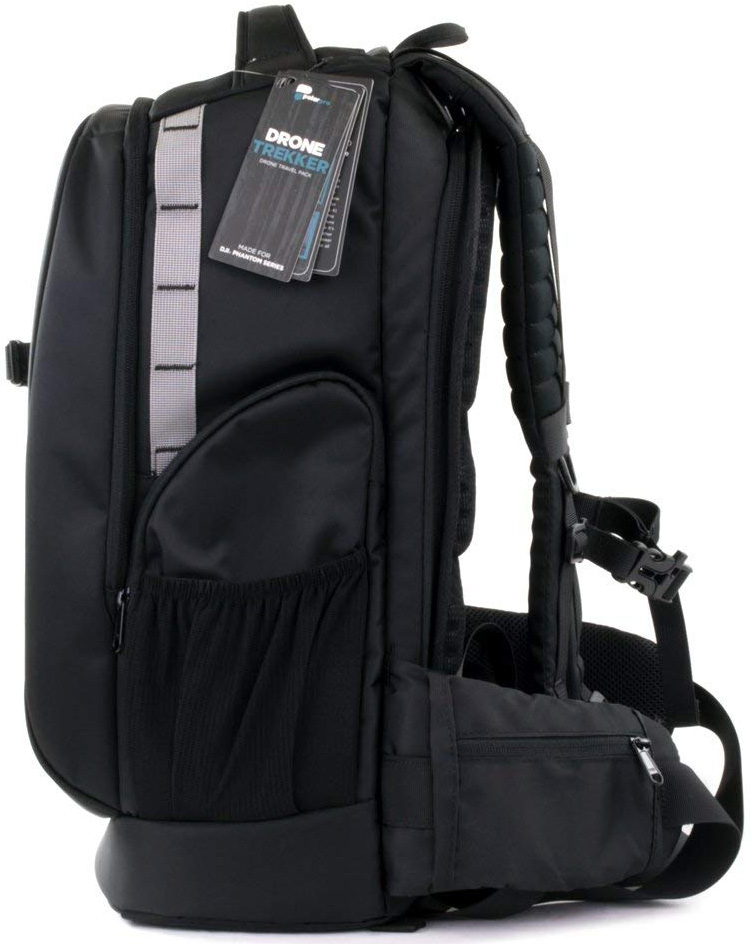
If you’re going to be hiking a good distance with your drone on your back, you might as well do so in comfort. The PolarPro DroneTrekker has extra padding in its straps and an ergonomic design that hugs your sides for extra stability. It also has tons of room for a drone, a laptop, batteries, a water bottle, and lots more. TSA-approved locks too!
$120 at Amazon
If you’ve spent a small fortune on a drone, then the best way to transport it is in a bag or case, and if you have to walk anywhere, one of these backpacks is perfect. For my money, the PolarPro DroneTrekker is a comfy option with enough room for everything you need without being overly bulky.
Routines are working again on third-party Google Assistant speakers

“OK Google, what the heck happened to my routines?”
Google Assistant has only had custom routines for a few months now, but it’s made quite the impression, especially with the scheduled routines option that rolled out the ability to schedule routines so that they activate on a specific Google Assistant speaker at specific days and times. Scheduled, custom routines make Google Assistant my favorite alarm clock, but there’s been a slight snag in using them the last two weeks.
They weren’t working on any Google Assistant speakers outside the Google Home line.
Updated September 14, 2018: Routines are working again; Continued Conversation is not
Voice-activated and scheduled routines have begun working on third-party Google Assistant-powered speakers again for many users who reported the original problem on the Google Assistant Help Community. As a note when testing scheduled Routines on both of my third-party speakers, the first scheduled routines I tested with both speakers failed but every scheduled routine since has been working properly. Continued Conversation is still broken on third-party speakers, but at least Routines are working again.
Insignia Voice users have been the most vocal about Routines being broken, both on /r/GoogleHome and on the Google Assistant Help Community, but users of other Google Assistant speakers including the Sony S50G, the TicHome Mini, and JBL Link speakers have reported Google Assistant Routines failing in the following ways:
- Scheduled routines stopped firing after weeks of consistent performance
- Custom routines that date back to the Shortcuts days were suddenly producing “I don’t know how to help with that yet”
- “Good morning” still seemed to work, but not “good night,” nor any of the other ready-made routines
Since Google Assistant doesn’t have a support line, only Google Home, users who contact Google through the Home app or Google Home website are being told to contact the manufacturers. That said, with the impacts being felt across most if not all third-party Google Assistant speakers, this seems to be a server-side issue on Google’s end. Some Google Home users have been seeing more sporadic issues with Routines the last two weeks, but none of the persistent failures that third-party Google Assistant speakers are seeing.

In my testing, routines are failing altogether on TicHome Mini and Insignia Voice while my Google Home is still executing scheduled and voice-activated routines. The Music action in And then play… for routines now seems locked to the primary music service, whereas before you could specify an alternate music service, but otherwise, Routines are working normally on Google Home.
Are ready-made or custom routines working on your Google Assistant speakers? Can you schedule custom routines and are they actually firing at the designated times? Let us know in the comments below!
Updated September 14, 2018: This post has been updated with the appearance of a fix for routines on third-party Google Assistant speakers.
Dyson cordless vacuums, USB-C hubs, more are discounted today
Whether you’re looking for new tech gear or household items, we’ve got you covered.
We found plenty of great deals today that include big discounts on Amazon’s Kindle Unlimited, Dyson’s Cyclone V10 Animal stick vacuum, the Kingston Nucleum USB-C hub, and more!
View the rest of the deals
If you want to know about the deals as soon as they are happening, you’ll want to follow Thrifter on Twitter, and sign up for the newsletter, because missing out on a great deal stinks!
Turn your phone into a desktop PC with the $42 Samsung DeX Station
Try a new experience.
The Samsung DeX Station Desktop Experience is down to $41.99 on Amazon, which is a new all-time low price. It has been selling between $70 and $100 for the last few months and hadn’t dropped below $70 until a couple of months ago.

This device converts your smartphone into a desktop. It works with plenty of models including the Galaxy Note8, S8 and S9, and the Plus versions. It has a built-in fan to cool your phone while it’s docked. It adds two USB-A 2.0 ports, a USB-C charging port, LAN Ethernet, and more. This lets you add a mouse and keyboard to use with your phone.
The device closes to a flat disk so it’s easy to carry around and comes with a travel adapter and USB-C cable. Users give it 3.7 stars based on over 400 reviews.
See on Amazon
Attach this 360-degree camera to your Essential Phone for just $40
Every degree for every shot.
The Essential 360-degree Camera has dropped to just $40 on Amazon. This 360-degree camera has sold between $150 and $200 on Amazon since the big deals we saw after Prime Day. If you weren’t around for those or just lost them in the chaos, this is a fantastic price. When the camera drops in price like this, it usually only lasts for a short time.

You can capture awesome 360-degree shots showing off everything around you right from your phone. This camera mounts right to the phone using Essential’s magnetic connector and doesn’t require any dongles or cables. It has dual 12MP fish-eye imagers and can capture video at 30fps.
This is the lowest this camera has ever dropped by quite a bit so we don’t expect this to stick around for long. Be sure to grab one now, before they are gone!
If you don’t have the Essential Phone you can grab one for $310 right now, which beats out its usual price of $500 pretty nicely.
See on Amazon
Gas Station Blood Pressure Cuff [#acpodcast]

Russell Holly, Alex Dobie, and Jerry Hildenbrand are here with tons of information to share about the new Snapdragon Wear 3100 chip and Wear OS. Even with the battery improvements being promised by Qualcomm, the world is not without some watch envy when it comes to Apple Watch Series 4.
Apple may have had their moment in the spotlight this week, but there are still many Android devices yet to come in 2018. The team dig into what we know so far about the LG V40, OnePlus 6T, and the throughly spoiled Pixel 3.
All that, and Russell raves about June. It’s a smart oven with sensors out the wazoo, machine learning, and OTA updates that add more cooking features. It’s a high steaks episode!
Listen now
- Subscribe in iTunes: Audio
- Subscribe in RSS: Audio
- Download directly: Audio
Show Notes and Links:
- Everything we know about battery improvements on the new Snapdragon Wear 3100
- iPhone XS and iPhone XS Max: Everything you need to know!
- LG V40 ThinQ: News, Rumors, Release Date, Specs, and More!
- OnePlus 6T: News, Rumors, Release Date, Specs, and more!
- June oven
Sponsors:
- Lenovo Smart Display
The Razer Phone 2 will be announced on October 10
Can the Razer Phone 2 make more impact than the original?

Gaming gear go-to Razer makes top-notch gaming gear for desktop and PC, including the hot, hot, hot Razer Blade laptop line and cross-platform controllers, but their initial foray into mobile hardware was a bit rocky. The Razer Phone sported great specs for gaming and a butter-smooth 120hz screen, but the camera fell flat and that super-smooth display was a creature of the night, unable to stand up to the shine of the sun. Well, it seems that Razer is looking to try again, as they’ve confirmed to stockholders that another Razer Phone is in development in this week’s earnings report.
Updated September 14, 2018: Razer sends out press invites for Razer Phone 2 event

Here it is, folks!
A little over a week since Razer confirmed that a second-gen Razer Phone was in the works, the company has now begun sending out save-the-dates to an event it’s holding on October 10.
The event appears to be titled “Flagship // Gaming”, and following a keynote with CEO Min-Liang Tan, Razer will be focusing on its “Mobility Showcase.”
So, while the Razer Phone 2 isn’t explicitly called out, it’s pretty apparent that it’s going to be the star of the show.
The Razer Phone came out last winter, and while it may not have been a total success, the phone hasn’t been a dud, either. Sporting a battery that won’t quit and a high-refresh touchscreen that was made to play, the Razer Phone was a great phone for gaming and for theming, as it was the first phone to officially ship with Nova Launcher as the system launcher.
Razer said their next-generation products saw over 400% year-on-year growth spurred by Razer Phone sales, with this little nugget at the bottom of the Others section:
Razer is now focusing its resources into the development of the second generation Razer Phone and accompanying software releases which will extend its software and services from PC into the mobile market.
There’s no release window or date given for the next Razer Phone, nor many hints as to what the new model may be sporting in its next incarnation, but one can only hope they improve the camera and the brightness issues so that you can game with a Razer Phone in brightest day or blackest night. With the Razer Phone’s battery and high-refresh screen, a successor with a good camera could be the ultimate Pokemon Go and AR gaming phone.
What would you like to see in the next Razer Phone?
Best Android Phone for Gamers in 2018
Canada Daily Deals: Garmin smartwatches, high-capacity storage and more
Whether you’re looking for new tech gear or household items, we’ve got you covered.
We found plenty of great deals today that include big discounts on the Garmin Vivomove HR smartwatch, high-capacity storage options from SanDisk and Seagate, Contigo travel mugs and much more…
View the rest of the deals
Each day, the Thrifter Canada team scouts out and shares amazing deals on products you know and love, helping you find the best prices on the ‘net.
For more Canadian deals coverage, be sure to keep an eye on Thrifter CA and follow the team on Twitter.
 AIVAnet