


Orbiting satellite offers a unique view of a recent rocket launch
Rocket launches are spectacular whichever way you look at them. In fact, they’re so darn impressive they can even cause drivers to take their eyes off the road, occasionally leading to all kinds of unwanted metallic entanglements.
While footage of most launches is shot by cameras on the ground, we occasionally get a glimpse of a lift-off from another angle, for example, via a camera attached to the rocket itself.
But how about this for something a little different: A rocket launch captured by a camera on an orbiting satellite.
Truly god view, Jilin-1 video satellite shot @OneSpace01 OS-X1 suborbital rocket’s launch at JSLC this noon. pic.twitter.com/KposRHZc4D
— dafeng cao (@dafengcao) September 7, 2018
Spotted by The Verge, the camera on China’s perfectly positioned Jilin-1 satellite captured a rocket launch that took place last week at the Jiuquan Satellite Launch Center in the Gobi Desert, around 1,000 miles west of Beijing.
The Jilin-1 satellite was orbiting at an altitude of around 332 miles (535 km) as the OS-X1 rocket launched from Jiuquan at around lunchtime local time on Friday, news site GB Times reported.
The video shows the early stages of the launch of the solid-fueled rocket, which took just over three minutes to reach an altitude of 22 miles (35 km). The suborbital OS-X1, also known as the Chongqing Liangjiang Star, is operated by OneSpace, a private space company based in Beijing. OneSpace and Jilin-1 owner Chang Guang Satellite were both founded after the Chinese government began to allow private investment in space companies in 2014.
OneSpace has plans to become a major player in the increasingly competitive market of small-satellite launchers, with CEO Shu Chang aiming for 10 launches next year.
How do they capture those incredible pictures?
YouTube is choc full of stunning rocket-launch footage, shot mainly by cameras down on the ground rather than from anything in the air. Earlier this year, YouTuber Primal Space took the time to explain how such extraordinary imagery is captured, and the kind of equipment needed to nail it.
While it’s certainly entertaining for regular folks to watch, the high-quality footage is also useful for space companies as it allows them to analyze their rockets in great detail during the launch sequence.
You can check out Primal Space’s fascinating video here.
Editors’ Recommendations
- SpaceX just landed another of its reusable Block 5 rockets
- The world’s biggest plane now has some rockets to launch
- This crash-tastic video shows why rocket launches aren’t easy
- Japan preps first test for its awesome ‘space elevator’
- SpaceX wins confidence-boosting Falcon Heavy contract with U.S. Air Force
Finally, Apple Pay and Google Pay arrive at 7-Eleven this month
Peter Parks/AFP/Getty Images
You really want convenience stores to double down on convenience at every opportunity, ensuring everything is as convenient as possible the moment you walk through the door. But for fans of Apple Pay and Google Pay, this hasn’t been the case at 7-Eleven. Until this month, that is.
It’s been a long time coming, but 7-Eleven is about to support both of these contactless payment services, banishing the annoyance — or sheer inconvenience — of having to handle fiddly coins or fish around for a bill whenever you hit the checkout.
It means that so long as you have a compatible smartphone or smartwatch, you’ll be able to simply tap your device on the store’s reader when you go to pay for your goods. OK, it’s not quite as convenient as Amazon’s super-convenient Go store, but it’s a step in the right direction, for sure.
Support for Apple Pay and Google Pay is rolling out at the majority of 7-Eleven’s U.S. stores throughout September, adding to the company’s other mobile payment options that also include Samsung Pay.
“Frictionless experiences are the future, and digital payments are key to such experiences,” 7-Eleven executive Gurmeet Singh said in a release.
Singh said 7-Eleven’s aim is to “adopt consumer-facing technology to enhance the customer experiences, as well as the technologies that work behind the scenes to ensure seamless and effortless interactions.”
Other efforts by 7-Eleven in the tech space include its 7-Eleven Now app that allows online ordering, and 7Rewards, an app-based customer loyalty program that lets shoppers earn and redeem points at the checkout. And didn’t it dabble in drone deliveries a while back?
Apple CEO Tim Cook revealed a few months ago that Apple Pay was on its way to 7-Eleven’s 10,000 or so U.S. stores, and now it’s finally landed.
If you’re new to the idea of making contactless payments using your iPhone or Android device, Digital Trends has all the information you need. Check out this page to find out how to use Apple Pay, and this one to learn all about Google Pay. And as we’ve already mentioned it, here’s everything you need to know about Samsung Pay, too.
Editors’ Recommendations
- What is Google Pay? Here’s what you need to know
- Everything you need to know about Samsung Pay
- PayPal no longer the only payment system for eBay – Apple Pay is coming soon
- Apple found guilty of infringing WiLan patents, must pay $145 million
- Forget math. Parents now pay ‘Fortnite’ tutors to improve their kids’ skills
Tesla to Restock Sold-Out Wireless Phone Charger at a Discount
Tesla is notifying customers that it will soon restock its wireless phone charger at a discount, after the device quickly sold out when it was released late last month.
The Verge reports that emails are going out to customers informing them that the Tesla Wireless Charger, originally costing $65, will return to the electric car maker’s online store at a roughly $15 discount, thanks to a higher production run this time around.
The battery-powered Qi-based charger features a sleek white or black enclosure, a 6,000 mAh battery for charging on the go, 5W of output, a built-in USB-C cable for Android devices, and a USB-A port that supports faster wired charging.
Tesla says customers who purchased the charger when it first went on sale in August will be refunded the $16 difference, but the company omitted to mention when the discounted version will be available. We’ll update this post if we learn more.
Tag: Tesla
Discuss this article in our forums
How to install Android Pie-based OxygenOS Open Beta on the OnePlus 6
Be the first to try out all the new features coming to OxygenOS.

OnePlus mentioned at the start of the year that it would do a better job rolling out updates, and that’s exactly what it’s doing. The company has kicked off the Android Pie-based OxygenOS open beta for the OnePlus 6, so if you’re interested in taking a look at all the new features coming to OxygenOS, here’s how you can get on the beta channel.
The Pie-based beta build features a new UI along with a redesigned gesture navigation system, Do Not Disturb mode with more granular controls, and Gaming Mode 3.0.
Before you proceed with the installation, there are a few things to note. First, as this is a beta, you’re bound to encounter glitches and crashes, and Google Pay integration is broken. If you rely on the service a lot, you’re better off waiting for future beta builds. If you don’t use Google Pay and are interested in taking a look at what’s new, read on below.
How to install OxygenOS Open Beta on the OnePlus 6
OnePlus rolled out the OxygenOS Open Beta build last week, and quickly followed it up with Open Beta 2. Installing the build takes just under 10 minutes if you’re upgrading from the stable OxygenOS channel, and the process won’t delete data and apps on your phone. Nevertheless, you should back up important documents and files before you proceed.
The easiest way to install OxygenOS Open Beta 2 is to download the build directly on your phone and move it to the root folder. Here’s how that works:
Go to OnePlus’ download page, scroll down to ROM downloads in the OnePlus 6 section and select OnePlus 6 OxygenOS Open Beta 2 to commence the download (1.49GB).
Open File Manager from the app drawer after the download is finished.
Select Downloads.

Long press the downloaded file to select it, and tap the action menu (three vertical dots) on the top right corner to see file transfer options.
Tap Copy.
Select Internal storage.

Use the Paste command to paste the file in the directory.
Exit the file manager, and open Settings from the app drawer or home screen.
Scroll down to the bottom of the page.

Select System.
Tap System updates.
Hit the gear icon in the top right corner.

Choose Local upgrade.
The build that you placed in the root directory should be listed here. Select the file to install OxygenOS Open Beta 2 on your OnePlus 6.
The installation takes about five to ten minutes, after which you’ll be able to use the Android Pie-based OxygenOS build.

I’ve been using the beta for just over a day now, and I haven’t encountered any major issues thus far. If you’re not willing to try out the beta build, a stable Pie-based OxygenOS build should be arriving sometime by the end of next month if previous beta cycles are any indication.
Already installed the latest OxygenOS Open Beta? Hit up the comments below to share your experience.
OnePlus 6
- OnePlus 6 review
- OnePlus 6 vs. OnePlus 5T: How much changes in six months?
- OnePlus 6 vs. OnePlus 5: Should you upgrade?
- These are the official OnePlus 6 cases
- The OnePlus 6 doesn’t work on Verizon or Sprint
- Join the discussion in the forums
Apple Maps Transit Directions Rolling Out in Alaska, Wyoming and Idaho
Apple recently updated its Maps app to add transit directions and data for areas in Alaska, Wyoming, and Idaho.
Apple Maps users in select cities in these states can now select public transportation routes when getting directions between two locations. In Alaska, for example, there are bus routes and other transit options in cities that include Anchorage, Juneau, and Fairbanks.
In Wyoming, transit options are available in areas that include Cheyenne and Jackson, and in Idaho, transit data is available in Victor.
Transit information appears to still be rolling out in these three states and could expand to additional cities over the course of the next few weeks.
Apple has not yet added Wyoming, Alaska, and Idaho to the website where it lists locations where transit directions are available, but it should be added in the near future.
Transit directions were first added to Apple Maps in 2015 with the launch of iOS 9. Maps initially only offered transit information in a handful of cities, but over the course of the last three years, Apple has worked to expand the feature to additional areas.
Transit information is now live in dozens of cities and countries around the world, with a full list available on Apple’s iOS 11 Feature Availability website.
(Thanks, Ram!)
Tag: Apple Maps
Discuss this article in our forums
AMD Ryzen 2500X and 2300X expand quad-core options for new CPUs
AMD expanded the offerings for its Ryzen 2000 series with two new quad-core CPUs, the 2500X and 2300X. Their specifications aren’t too different front one another, with identical core counts and only a slight bump in base frequency for the 2500X. However, the Ryzen 5 options do come with simultaneous multithreading (SMT) giving it eight threads to work with, rather than the Ryzen 3 model’s four.
Aimed more at manufacturers and system builders, the new Ryzen CPUs flesh out the existing range of chips, which includes the 2600, 2600X, 2700, and 2700X, as well as second-generation Threadripper CPUs. They will sit just under the mainstream portion of the main line up and will provide more options for those buying pre-built systems for mid-level gaming and general usage. Like most Ryzen systems, they should offer strong multithreaded capabilities.
The Ryzen 2500X is a four core, eight-thread CPU with a base clock of 3.6GHz and a boosted frequency of 4.0GHz. Like most of its contemporary desktop CPU in the Ryzen range, it doesn’t sport an onboard graphics core, but thanks to its “X” designation, it does support AMD’s performance boost overdrive feature for potentially greater performance if the cooling headroom is there.
The Ryzen 3 2300X also supports that feature and has the same 65w power requirement as the Ryzen 5 CPU. However, it doesn’t have SMT support, so has only four threads powered by its four cores.
Both chips enjoy the enhancements of the second-generation Zen+ architecture, which added greater efficiency and clock speeds than the first-generation Ryzen CPUs. They can both be overclocked automatically by the system using PBO and XFR, but also manually if system builders wish to do a little tweaking themselves, or indeed the eventual system buyers.
These chips are available now, with the first system sporting the option for their inclusion being the Acer Nitro 50. It comes with the quad-core Ryzen 2500X, between 8GB and 64GB of DDR4, and an AMD RX 580 graphics card. With a starting price of $900, the system could prove a great mid-range gaming system for those not wanting to build one themselves.
If you are interested in putting together your own Ryzen system, you have to opt for one of the more mainstream CPUs. These are the best Ryzen chips you can buy right now.
Editors’ Recommendations
- Intel 9th-generation CPUs are refreshes with slight clock speed bumps
- Qualcomm’s new Snapdragon chips will power next-gen budget phones
- New Intel CPUs bake in gigabit wireless and Alexa support
- 2018 Toyota Tacoma TRD Pro review
- AMD’s new gaming-ready Athlon processor starts at just $55
Apple Pay Now Available in 10,000+ U.S. 7-Eleven Stores
7-Eleven today announced that Apple Pay and Google Pay are accepted at nearly all of its 10,000+ locations across the United States, following a rollout that began in August.
While many 7-Eleven retail locations have already started accepting Apple Pay, the rollout will continue throughout the month of September until “most U.S. stores” support the payments service.
“The ability to pay with their smart device gives consumers one more reason to shop at 7-Eleven,” said 7-Eleven CDO and CIO Gurmeet Singh of the Apple Pay launch.
7-Eleven also highlighted some of the technology improvements that it has introduced recently, including the 7-Eleven NOW app for placing on-demand orders with Apple Pay as a payment option, the 7Rewards loyalty program that allows customers to earn points for purchases, and the 7-Eleven Bot on Facebook Messenger to allow customers to get quick answers to questions.
Apple CEO Tim Cook first announced in July that Apple Pay support would be coming to 7-11 retail locations in the United States, and the wide availability of Apple Pay at 7-Eleven comes just in time for the launch of Apple’s new 2018 iPhones.
To use Apple Pay at 7-Eleven stores, customers will need an iPhone 6, 6s, 6, 7, 8, 6 Plus, 6s Plus, 7 Plus, 8 Plus, SE, or X, and/or a compatible Apple Watch model.
Along with 7-Eleven, popular drugstore chain CVS, once an Apple Pay holdout, is also expected to begin accepting the payments service this fall.
Related Roundup: Apple Pay
Discuss this article in our forums
Apple Highlights Benefits of App Subscriptions With New Developer-Focused Video
Apple this afternoon shared a new “Insights” video on its developer site that is designed to highlight the benefits of using App Store subscriptions as a payment method for apps.
The video focuses on the developers behind Elevate, Dropbox, Calm, and Bumble and how these apps “create great customer experiences by continuing to provide value throughout the subscription lifecycle.”
“The value for a user is that you’re not just buying this one thing at this one point in time, you’re actually buying something that’s evolving,” said Elevate developer Jesse Germinario.
“If you’re a subscription business, your incentives are actually perfectly aligned with your customers, because they need to continue to get value out of the product in order to keep subscribing, which means that you have to continue making the app better,” said Calm developer Tyler Sheaffer.
Apple’s efforts to push developers to embrace subscriptions were first highlighted last month when Business Insider shared details on a secret meeting held in April 2017.
At the meeting, Apple hosted more than 30 software developers and encouraged them to adopt subscription payment models.
Apple told developers that the app model is changing, with paid apps representing just 15 percent of total app sales, a number that is declining. Successful apps, Apple said, need to focus on subscriptions and regular engagement from users rather than one time sales.
Apple’s video on app subscriptions can be watched on the company’s developer website.
Tag: App Store
Discuss this article in our forums
Honor 10 review: a compelling option in the affordable flagship niche
Putting the words “affordable” and “flagship” used to feel like an oxymoron in the recent past. But not anymore, as more and more manufacturers have reached a point where they have achieved a great balance between specs and price.
OnePlus has been spearheading these efforts with its line of premium, yet still affordable products that have, over the years, become an icon of budget excellence. And other Android manufacturers have been quick to jump on board the trend and offer their own takes on this rising category.
Indeed, affordable flagships are a thing now, and they are taking away some of the premium segment’s long-standing appeal. With good reason. After all who wouldn’t want the best specs and features in a cheaper package?
One of the newer affordable flagships was introduced earlier this year by Huawei’s sub-brand, Honor. The Honor 10 is a tremendous device which borrows a lot of features from Huawei’s more expensive P20 flagship. But the big question here is, does it have what it takes to dethrone the OnePlus 6 from its place of glory? We try to give you an idea in what follows.
Design and display
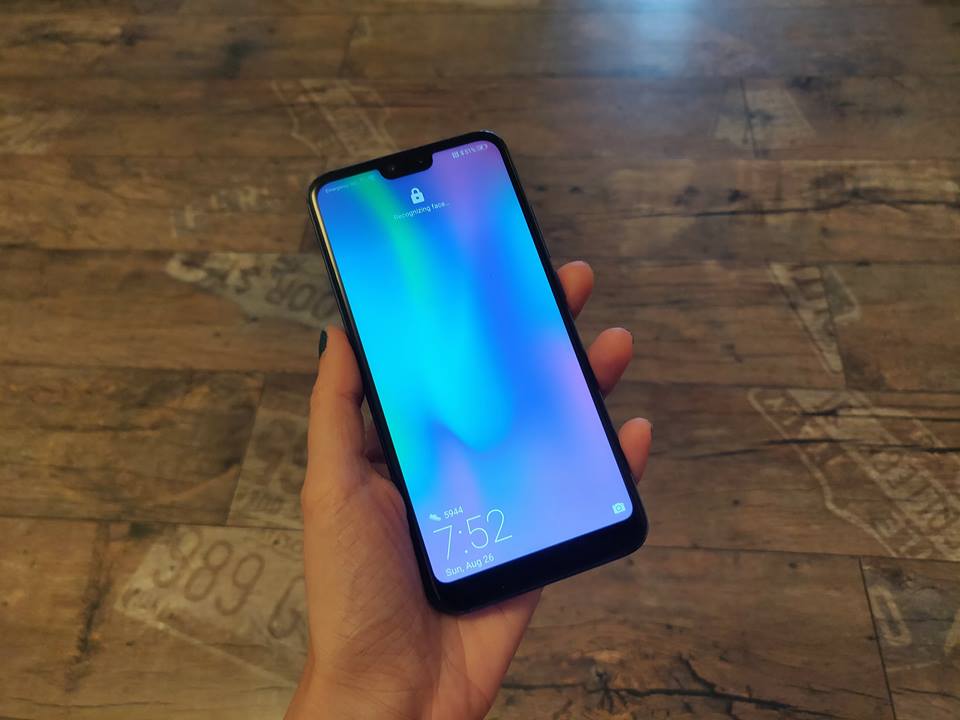
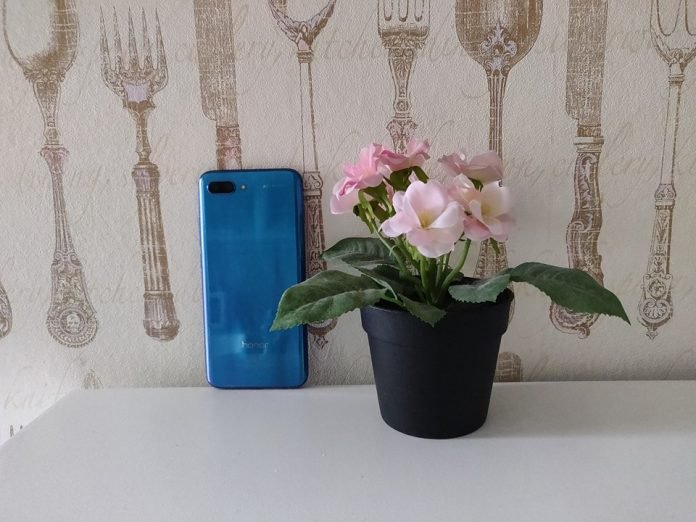
Design was obviously a big focus here. The back of the Honor 10 is reminiscent of the high-end Huawei P20 with a gorgeous Twilight gradient-effect that makes the phone look really unique. This will give you a different shade and look depending on what angle you view the device from.
Honor says it has achieved this super-polished, striking design by stacking more than 15 layers of glass on top of each other. Apart from its unique looks, the Honor 10 features a mixed metal and glass body.
In this respect, it’s not very different from most of the flagships we’ve seen arrive this year. The device has metal sides and a sleek 2.5D glass back that houses the dual-camera setup and the Honor logo at the bottom. While the phone looks quite sleek, it’s shiny back is a magnet for fingerprints. Also, it’s very slippery, so you might use a protective case with it. Our review unit came with a clear case, but unfortunately, we found it was also prone to gathering grime and marks.

The Honor 10 is a trendy device in the sense that it features the all-popular display cutout (aka the notch) at the top of its 5.84-inch LCD panel. But don’t worry if you’re not a big fan of the rectangular bump. Honor provides you with the option of hiding it if you so prefer.
The Honor 10 is indeed quite a looker
The resolution of the screen is only FHD+, which is exactly what it’s direct competitor, the OnePlus 6 is offering too. Overall, we found the display to be bright, clear and vibrant, so we don’t have any major complaints in this department. If you prefer warmer or cooler tones, Honor gives you the option from Settings to tweak the color temperature or contrast. But, we kept it in the out-of-the-box Vivid mode.





Obviously, the phone features a so-called bezel-less design with a minimal chin which houses an under-glass fingerprint scanner, which is wonderfully responsive. So instead of a physical button, you’ll find the Honor 10 has a subtle pill-shaped outline that shows you where your finger should hit the scanner. During the weeks we used the Honor 10, we found ourselves using the fingerprint scanner quite a lot. Although, its placement is less than ideal in our opinion, as we tend to prefer devices that incorporate it on the back.
The phone also features a face unlock feature which is super-fast too. It works incredibly well and is able to recognize you even if you’re wearing sunglasses or a hat.
Like the OnePlus 6, the Honor 10 keeps the 3.5mm headphone jack, which is located at the bottom, next to the USB Type-C port and the speaker. Speaking of the speaker, it offers a moderate performance, but don’t expect anything too spectacular. Yeah, it does its job, but it doesn’t offer anything out of the ordinary. Maybe except for the fact that it doesn’t tend to distort sound at high volumes.
Performance
The Honor 10 is a super-fast phone which has no problem sustaining the most intense sessions of gaming. It’s powered by Huawei’s latest 10nm chipset, the Kirin 970, the same that keeps the lights on the P20 and P20 Pro flagships. Unveiled in October of last year, the chipset features a Neural Processing Unit (NPU) which brings AI capabilities to the device.
Paired with 4GB of RAM and 128GB of storage, the Honor 10 is a beast of a phone. In the two weeks we’ve used the device, we haven’t noticed any slowdowns, freezes or any other weird performance issues. There’s no microSD card slot on board, but the 128GB you get by default should be plenty enough to accommodate all your apps, photos and videos. However, you do get a dual SIM card tray with 4G connectivity for both SIMs. And yes, there’s dual VoLTE too.
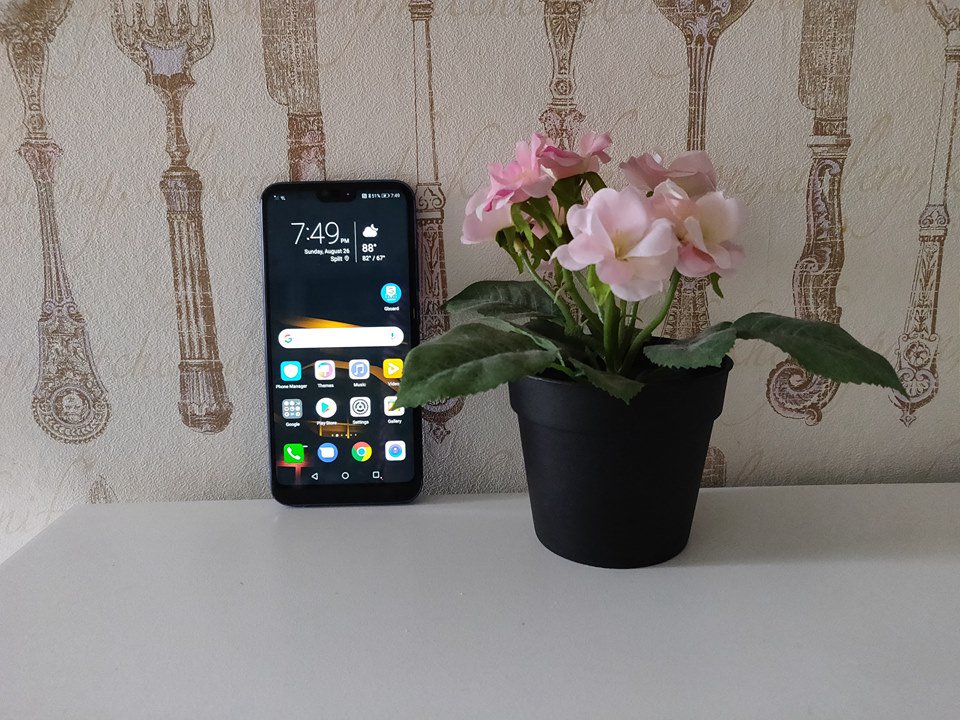
While everything seems peachy in the performance department, one area of concern with the Honor 10 is the battery life. Many reviewers write that the Honor 10’s battery life is pretty great and the phone can easily go through a full day of use and still have 10% left by the time you go to bed. But our experience was a bit different.
Maybe the phone got damaged in the shipping process, but our Honor 10’s battery levels dropped alarmingly fast. With the phone connected to a Wi-Fi, the device lost 10% constantly by just sitting on a table. A factory reset later and the battery was still draining a bit too quickly. With LTE turned on sporadically and doing our normal routine (check emails, spending a lot of time on chat apps, taking and uploading photos, browsing the web etc) we got around nine hours of life. Fortunately, the Honor 10 does have fast charging, so you can juice it up again in under 2 hours or so.
Cameras
Photography is one of the main highlights of this phone. The Honor 10 features a dual 24-megapixel + 16-megapixel arrangement on the back. The first sensor is a monochrome shooter, while the second is color.
And thanks to the imbued artificial intelligence, the Honor 10 can take some awesome photographs. The camera software takes advantage of special algorithms to improve your snaps including brightening areas or changing the focus, so you can get the best results.

According to Honor, the phone can automatically identify 22 different scenes like pets or green landscape and will automatically adjust the settings for you. Above you can see an example of a shot taken with AI and without AI (which can be easily turned off). And if the phone hasn’t enhanced the photo to your liking, you can easily revert to the original.
The phone also offers a lot of Pro features including being able to change the aperture or adjust the ISO and shutter speeds. There’s also a dedicated Monochrome mode and other goodies such as the ability to do a Light Painting, apply filters or add a Watermark.




































The Honor 10 also includes a 3D panorama feature which lets you take a moving panorama picture. You can also take advantage of a 3D creator. This is a feature that scans your face to create a 3D avatar figure of yourself. It’s similar to Samsung’s AR Emoji option. Speaking of which, you can shoot pictures and then add AR characters on top of them.
The phone also has “moving pictures” which is a feature similar to motion photos on the Pixel 2. The device basically records a short video for a few seconds which you will be able to view in the gallery afterwards.
When it comes to editing, there are a few nice surprises here too. Like Splash, a tool that lets you isolate and keep a color, while the overall picture remains monochrome.
The selfie problem…
What about selfies? Well the 24-megapixel secondary snapper offers the promise of great self-portraits. However, we found that the selfies we took looked kind of fake.




Indeed, there’s a beauty mode enabled by default in Portrait Mode. But even if its effect can be toned down, selfies still look like you have foundation on. If you’re the type who loves a natural look, you might not like what the Honor 10 has to offer in this department. Even regular selfies look a bit too perfect.
On the bright side of things, the phone has a lighting effect for your self-portraits including split lightning or soft lighting which will help you enhance your snaps. While most selfies will look pretty good in bright light, these modes will come in handy when you want to take a snap of yourself in the dark.
Software
The Honor 10 ships out with the latest version of EMUI, which is based on Android 8.1 Oreo. Those of you who used a Huawei phone before will feel just at home here. The Chinese company has taken steps to make the interface more-friendly for the Western market, so EMUI 8.1 is a lot more usable than before. For example, you can now add an app drawer, although it’s not enabled by default and you’ll have to do from Settings.







But even so, EMUI is nowhere as clean as stock Android. You’ll find there are a lot of pre-installed apps for Music, Calendar, Email and others, which are quite useless. On the other side of the coin, there’s no shortage of customization options. EMUI is packed with all sorts of tools and features to give you control of your experience.
Just to give a few examples of what you can do:
- Enable/disable the notch
- Take screenshots using knuckle gestures
- Mute notifications by flipping the phone over
- Use Ultra Power saving mode which consists of a minimalist interface
- Answer calls with voice controls
- Enable Navigation dock
- Off-screen navigation button
But a word of warning to you! These options are scattered all over the place, and you’ll have to dig deep to find certain features. Some are filed under Display, others under Smart Assistance and so on. Basically, you’ll have to devote a lot of time if you really want to get to know EMUI in-depth.
Verdict
Priced at only €399 / $467 in Europe, the Honor 10 makes you a proposition you can’t resist. Putting the battery issue aside, the Honor 10 is really an excellent device at this price point. Its major highlights include design, camera, and advanced performance.
Sure at the end of the day, EMUI still won’t be to everyone’s liking. And some sort of waterproofing and a microSD card slot would have been nice. But at this price point, you can really understand why there aren’t there.
In the US you can grab the Honor 10 from places like Amazon. But be warned that you won’t be able to use 4G LTE. Even if the device is listed as compatible with GSM carriers, it doesn’t appear the phone supports any of T-Mobile‘s 4G frequencies.
AOC makes curved gaming displays more affordable with G1 series
AOC is making it easier and affordable for gamers to switch to a curved display with its new G1 series. The G1 monitors come in a variety of sizes and resolutions, and even though the price starts at a low $230, there are still a number of features that gamers will appreciate, including fast 144Hz refresh rate, AMD FreeSync support, and a fast 1ms Moving Picture Response Time (MPRT).
“With a 144Hz frame rate, every frame is rendered sharply and in smooth succession, so users can line up their shots accurately and can appreciate high-speed races in all their glory,” AOC said of its G1 line in a statement.
The CQ32G1 is the flagship model of AOC’s debut G1 series, and it comes with a 32-inch QHD resolution panel. Because of the higher resolution screen, the CS32G1 will be sold at $399 when it becomes later this year. Users who don’t need QHD resolution and are happy with a FHD screen can opt for the C32G1, which shares the same 32-inch size as the flagship CQ32G1 but drops the price down to $299. A 24-inch C24G1 and 27-inch C27G1 round out the G1 series. The 24-inch panel retails for $229 while the 27-inch panel comes with a $279 price at Newegg. All models, except for the CQ32G1, support a full HD 1080p resolution panel. The monitors come with an 1800R screen curvature, with the exception of the 24-inch panel, which uses a 1500R curvature.
The monitors come with thin top and side bezels, making it easy for gamers to connect multiple displays together in a seamless multi-monitor gaming setup. “The frameless curved design results in thin bezels around the top and sides of the monitors for enhanced immersion,” AOC said. “Multiple monitor setups are ideal for an immersive widescreen experience, streaming on Twitch or watching a favorite stream while gaming.” The G1 series comes with flicker-free screen technology to help reduce eye strain and eye fatigue for long gaming sessions.
The G1 is the latest in a series of monitor announcements to occur within the last few weeks to target gamers. A number of manufacturers announced new gaming displays at Gamescom and IFA. If you have a little bit more budget to spend, we rounded up some of the best displays to come out of IFA.
Editors’ Recommendations
- The best monitors of IFA 2018
- Dell’s new fast-refresh Freesync display could be your next great gaming screen
- This 34-inch, curved, ultrawide 144Hz gaming monitor is only $385 on Prime Day
- What is G-Sync? If you’re a gaming fan, you’ll want to know
- Asus ROG Swift PG279Q review
 AIVAnet