


The Xiaomi Mi A2 is now up for sale in India for ₹16,999 ($250)
The Mi A2 is now available on Amazon India, but you’ll have to act fast to get your hands on a unit.

Xiaomi launched the Mi A2 earlier this month in India, and the 4GB/64GB model is now up for sale exclusively on Amazon India for ₹16,999 ($250).
As a refresher, the Mi A2 comes with a 5.99-inch FHD+ display, Snapdragon 660 chipset, the aforementioned 4GB of RAM along with 64GB of storage, dual 12MP + 20MP cameras at the back, front 20MP shooter with an LED flash module and AI-assisted portrait mode, and a 3000mAh battery with Quick Charge 4.0 for India.
The Mi A2 manages to deliver in a lot of areas, and the camera in particular is outstanding. That said, there is no MicroSD slot, and Xiaomi got rid of the 3.5mm jack as well. You do get two SIM card slots, but the phone doesn’t offer dual VoLTE just yet.
Xiaomi Mi A2 review: A great sequel with a fantastic camera
The Mi A2 is available in black and gold color options initially, but Xiaomi will introduce a Lake Blue color variant shortly. The model with 6GB of RAM and 128GB of storage is also slated to arrive in the country at a later date, and if you’re worried about the lack of a MicroSD slot on the device, it makes sense to wait for the 128GB model to make its debut.
If you’d rather not wait, you can get your hands on the 64GB variant of the Mi A2 right away. Xiaomi is once again offering a flash sales model, so if you’re interested in getting your hands on the Mi A2, best act fast.
See at Amazon India
How to use Spotify for your alarm on Google Clock
Waking up to your favorite song is now easier than ever.

Trying to silence your phone while stock alarm tunes blare at max volume isn’t the most ideal way to wake up each morning, but for a lot of us, that’s a process we’re all too familiar with. Thankfully, as part of an update that started rolling out in late July, Google now allows you to wake up to your favorite song on Spotify with its official Clock app.
Starting your day off with Frank Sinatra or Twenty One Pilots is much more ideal than any old preset alarm tunes, so without further ado, here’s how to change your alarm sound to a Spotify song/playlist in Google Clock.
Before we get started, make sure you have Google Clock and Spotify installed on your phone and updated to the latest available version.
Open Google Clock and go to the Alarm page.
Tap on the alarm you want to edit.
Tap the alarm sound icon (the one that looks like a bell).
Tap/swipe over to the Spotify tab.


Here, you can choose to wake up to whatever Spotify song you’d like.
From top to bottom you’ll see a list of the five playlists you most recently listed to and a collection of morning-centric playlists ranging from Rise and Shine, Lazy Mornings, Right Side of the Bed, and Morning Workout. Alternatively, you can search for any specific song, album, artist, or playlist from Spotify’s entire catalog of music.


Once you’ve found the track you want, just tap it, tap the back button at the very top left, and you’re all set!
Good morning!
What song are you going to be waking up to? Let us know in the comments below!
Download: Google Clock (free)
The Echo Dot is just £35 at Amazon UK right now
A great time to add Alexa to your smart home set up.
Amazon’s second generation Echo Dot is available today for just £34.99, matching one of the best prices we’ve ever seen for the device. The Dot regularly sells for £49.99, making this offer a great opportunity to get into the Echo ecosystem or add Alexa to more rooms in your house.

Most will already be familiar with Amazon’s Echo line of products that add smart assistant functionality to rooms in your home. The hands-free, voice-controlled Dot is Amazon’s entry-level Echo, offering the ability to play music, control smart home devices, make calls, send and receive messages, answer queries, read the news, set alarms or timers, among other things.
Featuring an array of 7 mics, it can pick up your commands even when playing music and has a built-in speaker for output (and can be paired to other speakers via Bluetooth or 3.5mm stereo cable for a little extra volume). The Echo Dot is also down to £34.99 at Currys PC World if you prefer to click and collect.
For more UK deals coverage, be sure to keep an eye on Thrifter UK, sign up for the UK newsletter and follow the team on Twitter.
See at Amazon UK
Save big on the Galaxy Note 9 when you pre-order from Verizon or Sprint

The Samsung Galaxy Note 9 is now available for pre-order and that means some sweet deals to go along with it. Both Verizon and Sprint are offering some great discounts when you pre-order the Note 9.
Verizon
Buy a Samsung Galaxy Note 9 from Verizon and get one free (128GB model only). The second phone can also be switched out for a Galaxy S9 or S9+ if that’s more your speed. Both phones do require a new line of service with Verizon with monthly device payments — no trade-in required. The $999 discount will be applied as monthly bill credits over 24 months (within 2 billing cycles).
As an added bonus, if you pre-order by 8/23/2018 you can grab AKG noise-canceling headphone or the Fortnite Galaxy skin with 15,000 V-Bucks for free
See at Verizon
Sprint
Sprint customers can get 50% off a new Samsung Galaxy Note 9 when pre-ordering by 8/23/2018 and signing up for Flex Lease (18 months). The discount is applied as monthly bill credits of $20.84 (applied within 2 bills). The line must stay active for full 18 months to receive full discount. If you cancel your lease early, the remaining balance on the phone will be due.
Also from Sprint, get a bonus AKG noise-canceling headphone or Fortnite Galaxy skin with 15,000 V-Bucks for free!
See at Sprint

What does Android Pie mean for Chromebooks?

Android on a Chromebook is the same Android that runs on a phone or tablet. But not really.
The basics of Android on a phone and on a Chromebook are identical. App developers use the same tools to build the same apps and can then optimize things any way they like. You can already tell this by visiting Google Play with your Chromebook and downloading whatever you like.
Almost every app will open and run, though some will run better than others and some will be better optimized for a much bigger screen (this has always been Android’s curse), so Android is Android. But without the parts needed to control the hardware or make a phone call or talk to Verizon towers — Chrome handles all that without needing help from Android — it’s just a little different.
The current version of Android for Chrome OS (Chromeboxes are also a thing!) is Android 7.1 Nougat. Oreo never arrived for Chrome and instead, the Chrome team spent the time needed to make Nougat features like inline replies and stylized notifications fit in so that Android apps didn’t feel as out of place as they did in the beginning. But Android Pie will be coming to Chromebooks and Chromeboxes, and its arrival not only brings support for the new developer APIs but will also serve to bring the Android experience we already know to the bigger screen we already love.
Starting with Milestone 69 (expected sometime this fall for the stable channel), we’ll be seeing all sorts of goodies!

- A new (and hopefully improved) Tablet Mode is on the way, which is great since Chrome tablets are already a thing. In Tablet Mode all apps will still start in full-screen, but we’ll see better controls in the Chrome shelf and much-improved animations. Chrome tablets are awesome, so let’s hope Tablet Mode gets awesome soon.
- A better split-screen experience will allow for more sizing options and Chrome will be able to know an Android app is running in split-screen instead of “just” running.
- Picture-in-Picture is finally arriving for Android apps and Chrome apps. You’ll be able to resize and move the picture window and all the features available for Android phones for PiP will also work on Chrome.
- Version 69 will bring the full Android IME virtual keyboard to Chrome. You’ll be able to replace the current Chrome virtual keyboard, and even emojis are supported. It’s the full GBoard experience.
- Chrome will support App Shortcuts just like your phone running Android Pie. And developers won’t have to do anything special for that to happen — if they build an App Shortcut, it will work.
- Vulkan 1.1 support is coming and that means kick-ass 3D graphics! Some Chromebooks with the latest Intel architecture, like the Pixelbook, already support Vulkan 1.0 but support for more models comes with the newer version.
- Better Pro Audio support is on the way. Version 65 of Chrome brought MIDI support for the Pixelbook and other models, but starting with Milestone 69 we’ll see support for Multi-channel USB audio and the AAudio API complete with MMAP buffer direct writing. Applications that need low-latency audio (think GarageBand) will have everything they need in place.

The best part of all this is that Google has control over when and how these new features arrive. There are slight differences between models, but once a feature is tdon’t and stable it usually comes to every Chromebook at the same time without any manufacturer involvement. That means your Chromebook will get every feature it can support as soon as possible so you don;t have to have a Pixelbook to enjoy them!
Chromebooks
- The best Chromebooks
- Chromebooks in education: Everything you need to know
- Should you buy a Chromebook?
- Chromebook Buyers Guide
- Google Pixelbook review
- Join our Chromebook forums
Do you love or hate Android Pie’s gestures?
Change is never easy, friends.
If there’s one thing we’ve talked about a lot here on AC over the past few months, it’s Android Pie’s navigation gestures.

This new method of navigating Android is one of the biggest changes to the operating system that we’ve seen in quite some time, and as with any big change, it’s been faced with a mixed bag of reactions.
Pie’s gestures have certainly improved a lot compared to the earlier days of the first public beta, but even so, there are still a few users that aren’t sold on Google’s decision here.
longtime44
08-09-2018 12:40 PM“
Awful, the gestures are terrible so I switched back to the old way (hope Google doesn’t do away with the three buttons in the future). The new swipe up to end apps is the worst thing in the world of Android mostly because if you don’t go 90° straight up then you have to keep trying to close the apps. Straight garbage. Never been so disappointed before in an Android OS before. I may try and go…
Reply
B. Diddy
08-09-2018 12:55 PM“
Gosh, I don’t really see it as that much of a dealbreaker. After doing it for half a day, it’s pretty much second nature for me. I agree it’s nice that we can still use the old method, though.
Also, why are you trying to close apps? Let the system handle when apps are closed out of RAM.
Reply
Almeuit
08-09-2018 01:29 PM“
I personally don’t have that issue. Flick, flick, app closed.
Reply
Morty2264
08-12-2018 11:02 AM“
I am loving the gestures! Sometimes I aim the wrong way by a hair when I swipe up and have to try again; but I’m absolutely loving them and the lack of virtual keys.
Reply
What about you? Do you love or hate Android Pie’s gestures?
Join the conversation in the forums!
Android 9 Pie
- Android 9 Pie review: Greater than the sum of its slices
- Everything you need to know about Android 9 Pie!
- Will my phone get Android Pie?
- How to get Android 9 Pie on your Pixel right now
- Join the Discussion
Augmented Empire review: Your daily dose of quick thinking and heartbreak

It was so much better than I was expecting
AC
Score
4
Usually when you go to get a new virtual reality (VR) game you either get a good story or amazing gameplay, and you rarely get both. When you grab your Oculus Go and head into the store you see a whole boatload of options for mini-games, experiences, and so forth.
But what if you’re looking for more content on your headset? We all want a story that captivates our attention and sucks us into the lore of the world we’re experiencing. Then, we want that game to be fun to play and not just two mechanics complimented by a good story.
Well, VR people, let me tell you about Augmented Empire.
See on Oculus Store
A whole world of a crumbling society awaits
This is a strategy roleplaying game with choices that affect the environment around you. None of the choices you make will change how the story ends. I’ve done two playthroughs, each making the opposite decisions, and always ended up in the same place. That isn’t to be discouraging, as the reactions to your actions still make the story that much more immersive. The creators over at Coatsink did a phenomenal job giving the story a slow build up and then slamming you with a feels train (within the first 20 minutes of gameplay) that causes the entire game to do a 180. I mean, seriously, I live for a great story and this title surely delivers.

Just from the trailer, you can see this game has a very cyber-punk utopia feeling to it, and that was the first thing that caught my attention. You can also see a bit of the gameplay, but this trailer doesn’t show the full extent of it. In this game, you are a man named Craven – who mysteriously can’t talk. When you activate on the table in the center of your office it turns into a 3D map of the world outside. This device will also serve as your main menu. So, why a 3D map of the world? Well, my friend, it’s because you’re in charge of making sure your partner Ashley is going to be okay, and this table can hack any piece of the environment inside of it.
That’s right, they put augmented reality into your virtual reality game. Then they slammed a strategy system on top of it and completed the whole look with a heart-wrenching story. Are you sold yet?
Spectacular gameplay to boot

For each of your turns, you get two actions to either attack, move or use a special ability. When you’re being attacked, you have a chance to evade the hit by either taking less damage or temporarily turning into pixels to avoid the shot altogether. If you hit the sweet spot during an enemy attack you’ll give them a critical hit and take significantly more damage. This game will not only test your ability for quick thinking but your reflexes as well. While the tutorial might be forgiving, by allowing you to try again if you don’t press a button, the rest of the game will not allow any do-overs. This means if a shot comes in you need to be prepared to hit the button while the meter is in the safe zone or you miss your chance to evade.

One of my favorite parts of the gameplay system with Augmented Empire is the fact you don’t have to use all of your turns, and they don’t go to waste either. You can choose to end your turn early, and your character will instead attack the next enemy in their sites during the opponent’s turn. This gives you so many more means for logistical battle plans than your average strategy game.
Found yourself up against a Big Bad? No sweat. Get into a hiding position and end your turn. When he comes around to shoot you try just your best to avoid the attack and your partner will take a shot whenever she gets the chance to. No bullets are wasted here.
Build a team. Hit the vault. Make the trade.

You can find Augmented Empire on the Oculus Store for $9.99, which is an absolute steal considering how much great this game is. There are only two reasons why this game isn’t a 5 out of 5 for me. The first is that I wish your words and actions had more of an impact on the story. I was really hoping to unlock something special in my second playthrough and was kind of sad to get the same ending. The other reason is that I wish there was more content to play. You can complete the entire game in 4-6 hours, depending on your dedication, and it just doesn’t feel like enough. I know there can’t be much done with the memory options on the Oculus Go, but I would love a game with the same lore as Augmented Empire that had some optional side quests to extend the gameplay as well. Instead, I’ll be waiting with baited breath for a sequel, Coatsink.
Tell me what you think of Augmented Empire! Have you tried playing it, or do you intend on trying it out now? Drop a comment below or shoot me a Tweet @OriginalSluggo.
See on Oculus Store
Oculus Go

- A parent’s guide to Oculus Go
- Oculus Go vs. Lenovo Mirage Solo
- Best Gamepad for Oculus Go
- Best Battery Backup for Oculus Go
Oculus Go 32GB
Oculus Go 64GB
Google Coach is reportedly Google’s new health/wellness service for Wear OS
Coach will track your workouts, suggest exercises to do, plan healthy dinners, etc.
Way back in March of this year, I wrote an editorial titled “Android Wear needs way more than just a Wear OS rebrand.” In that piece, one of my main talking points was about how Google desperately needs to overhaul Google Fit if it was any shot at success in the wearable field.

Well, according to a new report from Android Police, it looks like my wish may soon be answered.
Google’s reportedly working on a brand-new health/wellness platform for Wear OS called “Google Coach.” Coach will likely replace Google Fit, as part of its focus will be on tracking your workouts, steps, calories-burned etc.
All the makings are here for an excellent fitness + health platform.
However, Google Coach will go the extra mile by gathering all of the relevant data Google collects about you and use that to help you make better decisions. Some examples of this include:
- Recommending certain workouts to do
- Offer an alternative exercise if you missed your day at the gym
- Track your food intake
- Create a weekly meal plan and build a shopping list based on it
- Use your calendar info to determine how many meals it should plan
It’s said that Google Coach will interact with users via “conversational notifications” as to not bombard people with too many alerts throughout the day. As Android Police notes, “Rather than individual alerts telling you to take medication, get your daily steps, and drink more water, you might get a single notification that incorporates all three suggestions.”
Google Coach will primarily live on Wear OS, but users will also have the option of interacting with it via their phones. Down the road, it’s possible that Coach could expand to things like Google Home, Android TV, and other gadgets.
Based on what we know so far, does it sound like Google Coach has what it takes to make Google a serious contender in the health/wellness/fitness field? Let us know in the comments below!
Android Wear needs way more than just a Wear OS rebrand
Google Wear OS
- The best Wear OS smartwatches
- Discuss Android Wear in the forums!
The best phones on Verizon
We’re a virtual company made up of tech experts from across the globe. We live and breathe Android phones, and use nearly every one to find the best Verizon picks for you.
The Pixel 2 XL is available exclusively through Verizon, and offers everything an Android enthusiast could ask for. Its display has had some issue in the past, but it still offers a great viewing experience with dual front-facing speakers and an 18:9 aspect ratio. Combined with the cleanest build of Android 9 Pie around, the Pixel 2 XL is hard to resist.
Our Pick
Google Pixel 2 XL

$849 from Verizon
Simply as Android as Android gets.
The Pixel 2 XL isn’t just a great phone; it’s Google’s vision of what an Android phone should be. The Pixel 2 XL offers the best Android experience around, and it’s already been updated to Android 9 Pie.
Who should buy this phone?
Customers who value a clean software experience over all else. The Pixel 2 XL features Android in its purest form, with instant updates to the latest versions as they come. It also takes absolutely stunning photos, and its users receive unlimited storage in Google Photos to back up their shots without any loss in quality.
Is it a good time to buy this phone?
Not necessarily. As of August 2018, while the Pixel 2 XL is still a fantastic phone, the Pixel 3 XL is right around the corner. It hasn’t been officially announced yet, but we pretty much already know everything about it.
Reasons to buy
- Stock Android with fast updates
- Excellent camera
- Front-facing speakers
- Unlimited original quality uploads to Google Photos
Reasons not to buy
- No wireless charging or headphone jack
- Display has had a number of problems
There are other great options at Verizon
Verizon was able to snag an exclusivity deal on the Pixel 2 XL, but that’s not the only great phone it offers. Whether stock Android isn’t your thing or you just want a little more from your hardware, you have plenty of other options to choose from to best suit your needs, whether you’re after long battery life, modularity, or just saving money.
For as powerful as the Pixel 2 XL is, it’s missing features like wireless charging and expandable storage. For a phone that does everything you want and more, look no further than the Galaxy S9+.
The jack of all trades
Samsung Galaxy S9+

$929 at Verizon
Master of most.
The Galaxy S9+ is one of the best phones money can buy, featuring a beautiful curved design, one of the best displays on the market, great cameras, and every high-end spec you can name.
The Galaxy S9+ is beautiful and comfortable to hold, and Samsung’s display tech is unrivaled. The cameras are pretty great, too — the S9+ is the first phone to feature dual apertures, allowing for optimal settings in different lighting conditions, along with a second rear camera, used for telephoto zoom.
The workhorse
Samsung Galaxy Note 9

$999 at Verizon
So much room for activities!
If even the Galaxy S9+ feels a little lacking to you, the Galaxy Note 9 might be the perfect solution. It features the same design language as the S9+ with a slightly larger 6.4-inch display and an improved S Pen with wireless capabilities.
The Note 9 will cost you a pretty penny (actually, just a penny under $1000), but it’s the most powerful phone Samsung has ever made, with one of the largest batteries to boot. It packs the same great pair of rear cameras found on the Galaxy S9+, and comes with a Snapdragon 845 and up to 512GB of storage and 8GB of RAM. If you have an insatiable desire for everything high-end, the Galaxy Note 9 is as good as it gets.
The modular phone
Moto Z3

$480 at Verizon
For the tinkerer.
Yes, the Moto Z3 is more or less the same as the Z3 Play we saw earlier this year, but that doesn’t have to be a bad thing. It features a nice 18:9 display, a clean build of Android with useful Motorola add-ons, and support for Moto Mods, which expand its capabilities with projectors, Polaroids, battery packs, and eventually support for Verizon’s 5G network.
The Moto Z3 doesn’t have as powerful a spec sheet as the Pixel 2 XL or Galaxy S9+, but its Moto Mods allow you to add new features at a whim, and the phone still offers a good experience on its own. Its dual cameras are decent for the price, and it’s still powerful enough to handle most tasks with ease.
The video champ
LG V30

$840 at Verizon
A filmmaker’s dream.
If you’re passionate about videography, look no further than the LG V30. Its dual camera module takes stunning photos with options for wide angle or telephoto shots, and the camera app features an incredibly powerful array of video tools, including manual controls and even LOG video with LUTs.
The V30 looks equally great on paper. The Snapdragon 835 processor and 4GB of RAM ensure top-notch performance, and it’s still capable of microSD expandability. The V30 is a great tool for video professionals as well as an excellent and well-rounded phone, and LG’s included quad DAC provides incredible audio quality when using headphones.
Bottom line
If you’re one of the hundreds of millions of people on the nation’s largest carrier, there’s no shortage of great phones for you to choose from. The Galaxy S9+ is a Swiss army knife of a phone that can do just about anything, and the Note 9 is even more crammed full of features. On the other hand, the Moto Z3 has its own advantage with its modular approach, and the LG V30 is unbeatable in the video department.
Still, for hardcore Android enthusiasts like ourselves, the Pie-ified Pixel 2 XL is the way to go. On top of receiving instant software updates, there’s simply no faster, smoother Android experience around, and even a year in, the cameras remain unrivaled. With the Pixel 3 XL right around the corner, it might be worth waiting, but if you need a phone right now, don’t hesitate to snag the Pixel 2 XL.
Updated August 2018: This list has been revamped, with the Galaxy Note 9 finding a spot in the lineup.

Protect your Fortnite account by enabling two-factor authentication
Keep your Fortnite account secure with this simple move.
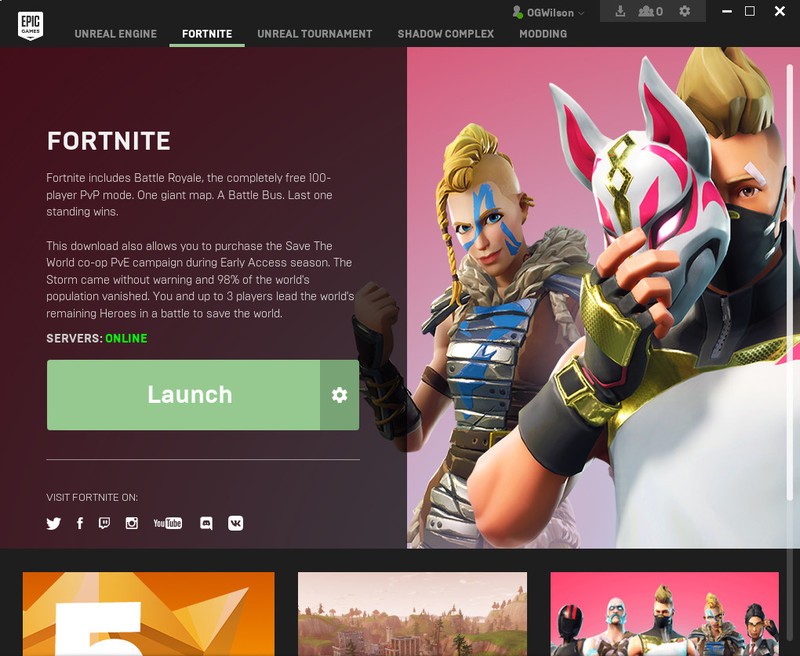
Take a break from getting Victory Royales on Fortnite to read this important piece of advice: you can, and should add two-factor authentication to your Epic Games account. It’s easy and takes all but a few minutes to get it done, and you’ll be glad you did.
What’s two-factor authentication?
Two-factor authentication is a security system that requires two levels of authentication for logging into an account. In most scenarios, the first level will be your typical password, and while a strong password alone is a good start, it’s not foolproof. If someone were to find out your password somehow, they’d be escorted right into your account like they own the place.
But with two-factor authentication, the person trying to break or hack into your account would need a secondary, separate form of authentication to get going. In most cases, this second factor is some sort of security code sent to your email address or phone but could be something as high tech as a piece of hardware that you plug into your computer.
You might already be using two-factor authentication in your life and not even realize it. If you’ve ever been to an ATM to take cash out of the bank, you’ll know that it requires not just the bank card, but also the security code that only you know.
Two-factor Authentication: Everything you need to know
Should you enable two-factor authentication on your Fortnite account?
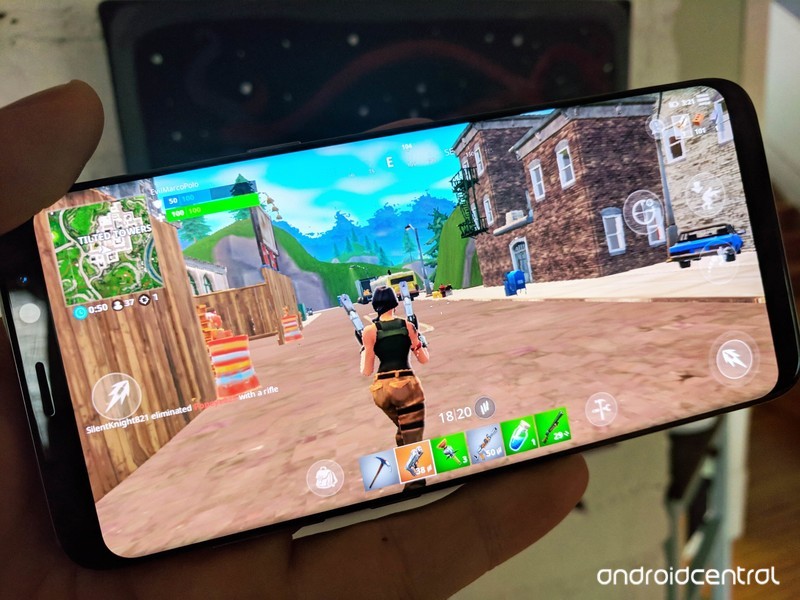
In short: yes. Even if you don’t think someone could possibly get your password, just do it. There are all sorts of phishing scams and schemes out there designed to get you to hand over your password, and even the most eagle-eyed people with an awareness of these schemes could slip up. That’s not to mention what could happen if you’re using the same password in multiple places (which you absolutely shouldn’t do!) and one of those places suffers a breach of security.
By enabling two-factor authentication, you’re ensuring that anyone who happens upon your password can’t truly access the account. It may seem harmless for someone to hack into a user account for a game like Fortnite at first thought, but there’s a lot at risk if it happens.
The biggest risk is for those who have spent money on the game. Not only could someone hijack your account, they can also see your billing information such as your name, your address, and the last four digits of your credit card number. While it’s unlikely someone could figure out how to commit credit card fraud from that data alone, that information could be used to trick, say, a customer service agent into thinking you are the person you’re attempting to fraud.
And that’s not just a concern for your Fortnite account — they can use that information anywhere you do business.
There’s also the matter of someone using your money on skins and potentially sending you into financial peril. It’s just plain annoying to deal with, and it’s certainly something you want to avoid if at all possible.
How to enable two-factor authentication on your Epic Games account
Now that you’ve been informed, it’s time to take action. Thankfully, securing your Fortnite account is quick and easy. Here’s how to do it:
Head to the Epic Games website and sign in.
Hover over your username in the upper-right corner and click Account.
In the left menu, click Password & Security.
Scroll down to the Account Security section and click Enable Two-Factor Sign In.
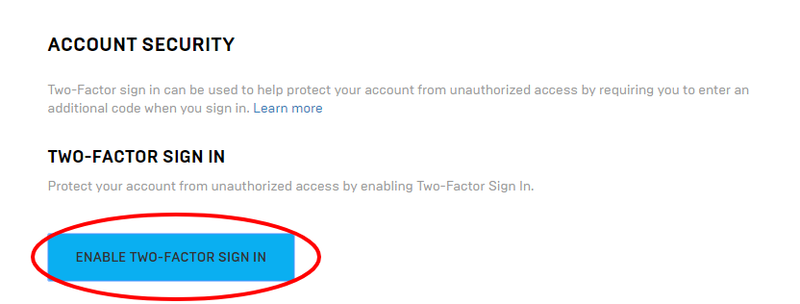
And that’s it. By default, Epic Games will use the verified email address you used to sign up. When attempting to log into the account on a new device or after 30 days of inactivity, they will send a code to that email address which you’ll need to use to complete the login process. Now you can worry less about the nefarious deeds of hackers and more about those of the people trying to keep you from victory in Fortnite!
Fortnite for Android: Everything you need to know
Android Gaming
- Best Android games
- Best free Android games
- Best games with no in-app purchases
- Best action games for Android
- Best RPGs for Android
- All the Android gaming news!
 AIVAnet