


The $1,100 Acer Swift is the lightest 15-inch laptop ever made
Previous
Next
1 of 5


Acer has a large presence at IFA this year, relaunching a number of laptops in both its Swift and Aspire lines. The most exciting of the bunch was an update to the Acer Swift 5, a laptop that claims to be the lightest 15-inch laptop ever made at just 2.2 pounds. It’s a cut down from the 2.4 pounds of the 15-inch LG Gram, which felt impossibly light when we reviewed it earlier this year.
The Swift 5 achieves its light design through the use of magnesium-lithium alloy throughout the body of the device. Acer says these materials ensure durability and prevent any bending or twisting. In addition to cutting some weight, the Swift 5 has also trimmed the bezels, which are now just 0.23 inches and make for a more modern aesthetic. For reference, they’re just a hair thicker than what you get on the Dell XPS 15.
The Swift 5 includes options for either the Core i5-8265U or Core i7-8565U, both new processors announced from Intel at IFA.
“The latest 8th Gen Intel Core processors set a new standard for mobile computing with blazing fast integrated Gigabit Wi-Fi combined with even faster Intel performance, long battery life and enabling more convenient voice and touch interactions,” said Chris Walker, Vice President of the Client Computing Group at Intel. “We have worked closely with Acer to bring these new levels of performance and connectivity to life with the latest Swift models.”
Speaking of connectivity, the Swift 5 also comes with built-in 4G LTE. This positions these laptops as strong competitors to both iPads and the Qualcomm Snapdragon-powered PCs on the market. The Swift 5’s other important specs include fast NVMe storage, up to 16GB of RAM, a 1080p touchscreen display, and a USB-C port. The Swift 5 starts at $1,100 and will ship in North America in January of 2019.
Previous
Next
1 of 4


In addition to the Swift 5, Acer also announced an update to its little brother, the Swift 3. It’s the more affordable option, starting at $800. It’s a 14-inch device that includes a lot of the same features, including the same processor options (with the addition of a Core i3-8145U base model), 1080p display, and built-in LTE support. The one extra feature on the Swift 3 is the addition of an optional GeForce MX150 graphics card, which adds some more casual gaming and video-editing capabilities.
The Switch 3 will be available in North America starting in November, and comes in a variety of different colors, including silver, blue, red, and pink.
Editors’ Recommendations
- The best laptops under $300
- Asus ZenBook UX330UA review
- Acer crams a Ryzen 7 CPU, discrete RX Vega 56 graphics into a 17-inch laptop
- Huawei jumps on AMD’s Ryzen bandwagon via an upcoming 14-inch MateBook D laptop
- Dell XPS 13 9370 review
OneDrive leans on A.I. to simplify searches for multimedia files
Microsoft is leaning on artificial intelligence to help you manage your files and make its OneDrive cloud storage system smarter. Microsoft 365 customers who use OneDrive and SharePoint will soon have access to a number of A.I.-enabled features making it easier to manage and search for multimedia files stored on Microsoft’s cloud.
“Today, we are announcing upcoming capabilities that, along with our recent investments, combine the power of artificial intelligence (A.I.) and machine learning with content stored in OneDrive and SharePoint to help you be more productive, make more informed decisions, and keep more secure,” Microsoft said in a blog post detailing the updates.
One of the big smart changes is that audio and video files stored on OneDrive and SharePoint will get automatic transcriptions. Microsoft says that it is using the same intelligence found on Microsoft Stream. With transcriptions, users can easily search through audio and video files and collaborate with others. Microsoft claims that the feature brings greater accessibility to users as well.
Microsoft will apply A.I. to photo files as well, allowing you to better search for images. Artificial intelligence can be used to analyze a photo, and pull relevant data and information from your captured images, like text, objects in photos, and location information. For example, if you took a photo of your receipt after dinner, you’ll be able to search for “sushi” and have the receipt show up inside your search results.
The Microsoft 365 update also makes it easier to share, collaborate and gain more insights from your files. OneDrive can leverage the power of Microsoft Graph to recommend relevant files to you. The recommendations are based on the A.I.’s understanding of how you work, who you work with, and the type of content you’re working on, Microsoft said. Microsoft will also share some of the insights it learned with you. For example, you can now learn who has viewed your shared files and what they’ve been doing.
And if you’re running a lot of meetings, A.I. will help remind you to share important files, like the PowerPoint slides, meeting notes and handouts, with attendees. “For instance, if you just presented a PowerPoint presentation, you’ll be prompted to share it with the other attendees once the meeting is over,” Microsoft said. “In the OneDrive mobile app, we’ll automatically prompt you to share photos taken during the same meeting, perhaps of a whiteboard where you brainstormed new ideas with your colleagues — all based on your Outlook calendar.”
Microsoft didn’t give a timeline on when these new features are expected to arrive. Likely, some of these features may be showcased at Microsoft’s Ignite conference in late September.
Editors’ Recommendations
- How to transfer files from Android to your PC
- How to convert a PDF file into a Word document
- How to convert M4A files to MP3 format for listening on any device
- How to change file associations in Windows 10
- How to use BlackBerry Locker
Acer’s $349 Chromebook 514 has USB-C charging, Gorilla Glass trackpad
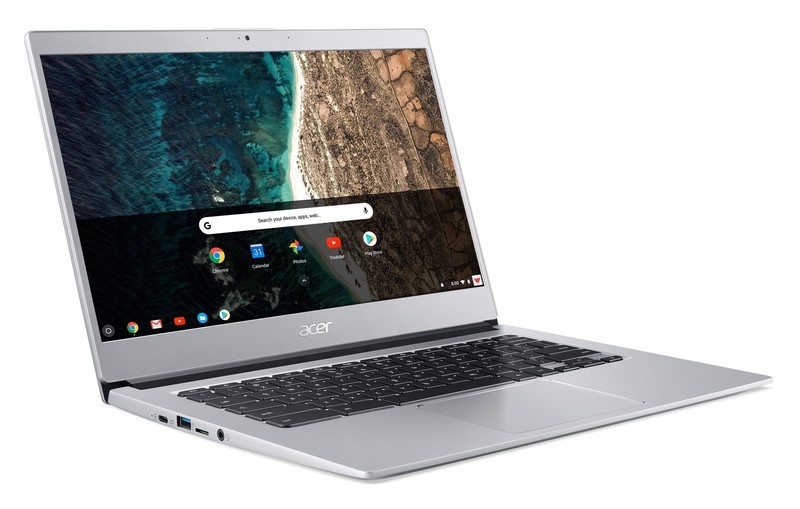
This marks a nice step up from the entry level.
Acer is expanding its Chromebook range with a new model, the Chromebook 514. The new model keeps things inexpensive while adding some nice-to-have hardware features that will separate it from the plastic bargain machines so often associated with the Chromebook name.
There isn’t anything particularly revolutionary in terms of the Chromebook 514’s overall design, but Acer is focusing on the fact that this is a 14-inch screen with small bezels that allow for a smaller footprint. Based on the renderings, it doesn’t look much larger than the current 13-inch Chromebook R13. The display is a 1080p IPS panel, which will get the job done, and there’s a touch screen option — but this isn’t a “convertible” type laptop with an extra-rotating screen.
Acer quotes a very impressive 12-hour battery life figure for the Chromebook 514, though those numbers can vary widely based on what you’re actually doing. But being able to get well into the double digits if you are careful is good no matter how you slice it.
This looks like a nice budget option with some create comforts from a higher-end models.
Because this is a slightly nicer device, Acer is throwing in some creature comforts. You’ll see a backlit keyboard standard, plus a Gorilla Glass-covered trackpad that should dramatically improve point accuracy and feel. Funnily enough, Acer isn’t emphasizing any of the other specs, and isn’t providing a base processor, memory and storage spec for the Chromebook 514; it’s saying that these specs will range widely from region to region. (For a point of reference for what to expect, Acer’s current 15-inch Chromebook 15 has either a duel-core Intel Celeron N3350 or quad-core Pentium N4200, with 4GB of RAM and 32GB of storage, at a similar price.)
In an impressively forward-thinking move, Acer is offering USB-C on the Chromebook 514, with one port on each side. The left port is used for charging, but either one can pick up data duties as well. They come in addition to a pair of standard USB-A ports — what a concept.
In typical Acer fashion, the new Chromebook 514 is still affordable — pricing starts at $349 in the U.S. and €349 in Europe, though the company didn’t detail the pricing range for additional higher-end versions. The Chromebook 514 is likely to come in various different configurations of memory and storage for different regions, so keep an eye out for what models eventually hit your local area.
Press release:
Acer seals its #1 position in the EMEA Chromebook market and US Retail Market with the launch of a new best-in-class Chromebook
IFA, BERLIN (August 29, 2018) – Acer seals its leadership position in the Chromebook market by revealing details at IFA today of the availability of its new Acer Chromebook 514. Aimed at tech lovers, young professionals and college students, Acer’s continued focus on the growing market for Chromebooks, gaming and ultra-portable PCs is proving to be a successful business strategy.
The combination of a metallic chassis, backlit keyboard, Corning Gorilla Glass touchpad, USB Type-C and a 12-hour battery life gives the Acer Chromebook 514 a superior look and feel narrow bezel allows for a 14-inch screen in a smaller footprint and the optional touch screen makes it easy to navigate and control videos on the Full HD IPS display
Stylish Yet Tough and Designed To Be Seen
Continuing a strong track record in bringing to market design, award-winning Chromebooks, the new Acer Chromebook 514 encapsulates strength, durability and stylish good looks in a strong, lightweight aluminium chassis meaning less likely to be bent, warped or dented. The 6mm narrow bezel and wide viewing angle of the Full HD 14-inch IPS screen allow users to enjoy the full majesty of films, videos and TV shows. An optional touch screen makes it easy to navigate and control videos on the 1920×1080 resolution display with 2,073,600 pixels display.
Polished Performance and Easy Productivity
Fast boot times, ease of use, tough security and a 12 hour battery life are some of the advantages of Chrome OS. The fast boot time, simplified interface, integrated malware and efficient use of power means users can enjoy hassle-free computing and staying productive all day, without the need of the power adapter. With Chrome OS, users can still use their favorite software as traditional office productivity programs.
Tougher, Smoother Touch
Tapping, swiping, scrolling and zooming are smoother than ever. The Corning Gorilla touchpad provides a slicker feel than a regular plastic touchpad with the ability to withstand scratches and pits so it will continue to look as slick as the day it was bought. Greater Camera Clarity and Keyboard Comfort
The HDR webcam provides crystal clear clarity and sharpness details whilst the ‘day or night’ backlit keyboard not only looks cool, but also allow users to type comfortably in dimly lit environments.
Port Practicality
One connector is used for ultra-quick data transfer, video streaming, and battery charging. The reversible USB 3.1 Type-C ports are easy to attach to and with a transfer rate up to 5GB/sec, are 10 times faster than USB 2.0.
Pricing & Availability
The Acer Chromebook 514 will be available in North America in October, starting at $349.99; and in EMEA in the approved Chrome OS territories starting at €349.
Exact specifications, prices, and availability will vary by region. To find out about availability, product specifications and prices in specific markets, please contact your nearest Acer office or retailer via http://www.acer.com.
How to build a smart home in an apartment

Discover the fun of running cable channels.
- Find out exactly what you can change
- D-Line cable channels
- TP-Link 5 Port Ethernet Switch
- Nanoleaf Aurora Rhythm Starter Kit
- Philips Hue Starter Kit
- Google Home
- Lenovo Smart Display
- Wemo Mini Smart Plug
- LeFun WiFi Smart Power Strip
- Other tech you can buy
Smart home technology is getting more pervasive, but if you don’t own your space, you may feel a bit left out. Fortunately, it’s still possible to wire up a smart apartment and make everything look great.
Here’s how to build a smart home when you can’t change anything!
Find out exactly what you can change
Before spending any money, it’s worth having a conversation with your landlord to find out what you can and can’t change. Basic stuff like smart speakers, streaming boxes and lightbulbs will almost certainly be fine, but other pieces may not be. Smart Locks and thermostats are a bit tricker, and anything that requires you to put a hole in your wall is probably not going to fly. Have the conversation before losing your security deposit.
D-Line cable channels

Ethernet is still the most reliable way to get data to all of your smart devices, but you can’t route cables behind walls. If you’re going to run Ethernet cables, speakers cables or anything else around, you’ll want some cable channels. There are a few options, but D-Line’s Cable Raceway is probably the best for most folks. It blends right in the base of your walls, and you can paint these any color you’d like to match your walls or baseboards. It’ll also look nice flat on your wall if you need to run cables up to the ceiling. Most importantly, it can be easily removed in a year when you get ready to move somewhere else.
$17.50 at Amazon
TP-LINK 5 Port Ethernet Switch

Rather than running multiple Ethernet cables, it’s easier to group your gadgets together, run one Ethernet cable for the long distance, then split it up with a switch for the shorter distances. I have an Ethernet cable running from my router to my TV stand, then a network switch for wired connections for my Xbox and Nintendo Switch. A network switch is inexpensive and gives you a bit more flexibility when wiring your gadgets.
$11 at Amazon
Nanoleaf Aurora Rhythm Starter Kit

If you want colorful lights without replacing all of your lights bulbs, Nanoleaf’s Aurora lights may be the perfect fit. You get either nine or 15 panels to arrange in any shape you want, and each panel can be given its own individual color. There’s a smartphone app for assigning colors to the panels and turning the array on, or you can purchase an adorable remote that also lights up. Setup is easy: just snap the panels together and plug in the single power cord. And when it’s time to move in a year, the whole array can be moved without being disassembled.
$345 at Amazon
Philips Hue Starter Kit

If you do want to replace your existing light bulbs, Philips is the best name in town. Its Hue starter kit gets you four bulbs and a hub to connect to Google Assistant, Amazon Alexa or Apple’s HomeKit. Once everything is set up, you’ll be able to use your voice to turn on your lights, change the color and more. And since moving the bulbs just requires unscrewing them from the lights, you can re-use the bulbs in your next apartment.
$200 at Amazon
Google Home

There’s nothing permanent about a smart speaker, and Google’s Home speaker is a great option. Google Assistant will integrate with nearly every smart home product, and using Assistant on the speaker is no different than using it on your phone. The Google Home’s speaker is great for what it is, and moving it around your apartment or to a different place entirely is as easy as plugging it into a new power outlet.
$130 at Google Store
Lenovo Smart Display

Take everything that was just said about the Google Home, but add a display to it. You still get the great home automation and good speakers for listening to music and podcasts, but you also get to watch recipes for the food you’re cooking, or watch news broadcasts, or make video calls with Google Duo. The Smart Display is also a Chromecast target, so your Hulu or YouTube TV shows can be right there in your kitchen, without the chance for you to ruin your laptop in the process.
$200 at Amazon
Wemo Mini Smart Plug

If you want to control power to your gadgets — or want an easy way to shut things down if a storm is coming — Wemo’s Smart Plug line is for you. You get a single passthrough plug that connects to your Wi-Fi network that lets you control power through Google Assistant, Amazon Alexa or Apple’s HomeKit. You can also set a schedule for the plug, so your cool home theater gadgets are all powered on by the exact moment you get home. You can also set your lights to randomly turn on and deter intruders when you’re away. When it comes time to move, you just need to unplug the Smart Plug and plug it back in at your new space. Best of all, the Mini Smart Plug is compact enough that two of the plugs will fit on one standard power outlet.
$28 at Amazon
LeFun WiFi Smart Power Strip

If you have more gadgets than one plug can handle, a smart power strip is for you. LeFun’s model lets you individually power each outlet on the strip, and it includes four USB ports for your phone, streaming stick, or another gadget. There’s a generous six-foot power cord, and connecting it to your smart home just requires Wi-Fi. It works with Google Assistant or Amazon Alexa, perfect no matter which smart speaker you own. Finally, there’s a resettable circuit breaker on the strip in case your devices start drawing too much juice. And when you move, just unplug the power strip and take it with you.
$33 at Amazon
Other tech you can buy
You won’t be able to get a smart fridge or smart oven, but you can build most of the pieces of a smart home even if you’re leasing. No one’s going to stop you from using the game console, wireless router or smart speaker you wish. All of these basic pieces aren’t hard to disassemble and move at the end of your lease either.
More: Best Smart Home Tech for an Apartment or Small Space
What say you?
How do you keep your smart apartment connected? Let us know down below!
Amazon drops its 16GB Fire HD 8 tablet down to just $50 for a limited time
Limited time offer.

Right now Amazon has its 16GB Fire HD 8 Tablet on sale for just $49.99, which is $30 lower than it regularly sells for. Amazon regularly sells its Fire 7 Tablet for $50, and that only comes with a base of 8GB internal storage, so with today’s limited time deal, you get a screen that’s an inch larger, as well as twice as much internal storage. The tablet comes in blue, yellow, black, and red.
If you want some extra internal storage, you can opt for the 32GB version for $79.99 instead, which is also a $30 savings. Amazon recently introduced a new Show Mode Charging Dock that turns your Fire Tablet into a large Alexa experience similar to the Echo Show or Echo Spot, and right now you can combo the Fire Tablet 8 with the dock for just $119.98.
The internal storage does fill up quickly on these, so you’ll definitely want to add a microSD card to it so you can hold more movies, music, and apps. This deal is only good through August 30, so don’t miss out!
See at Amazon
How to replace your Gear Fit2 Pro band
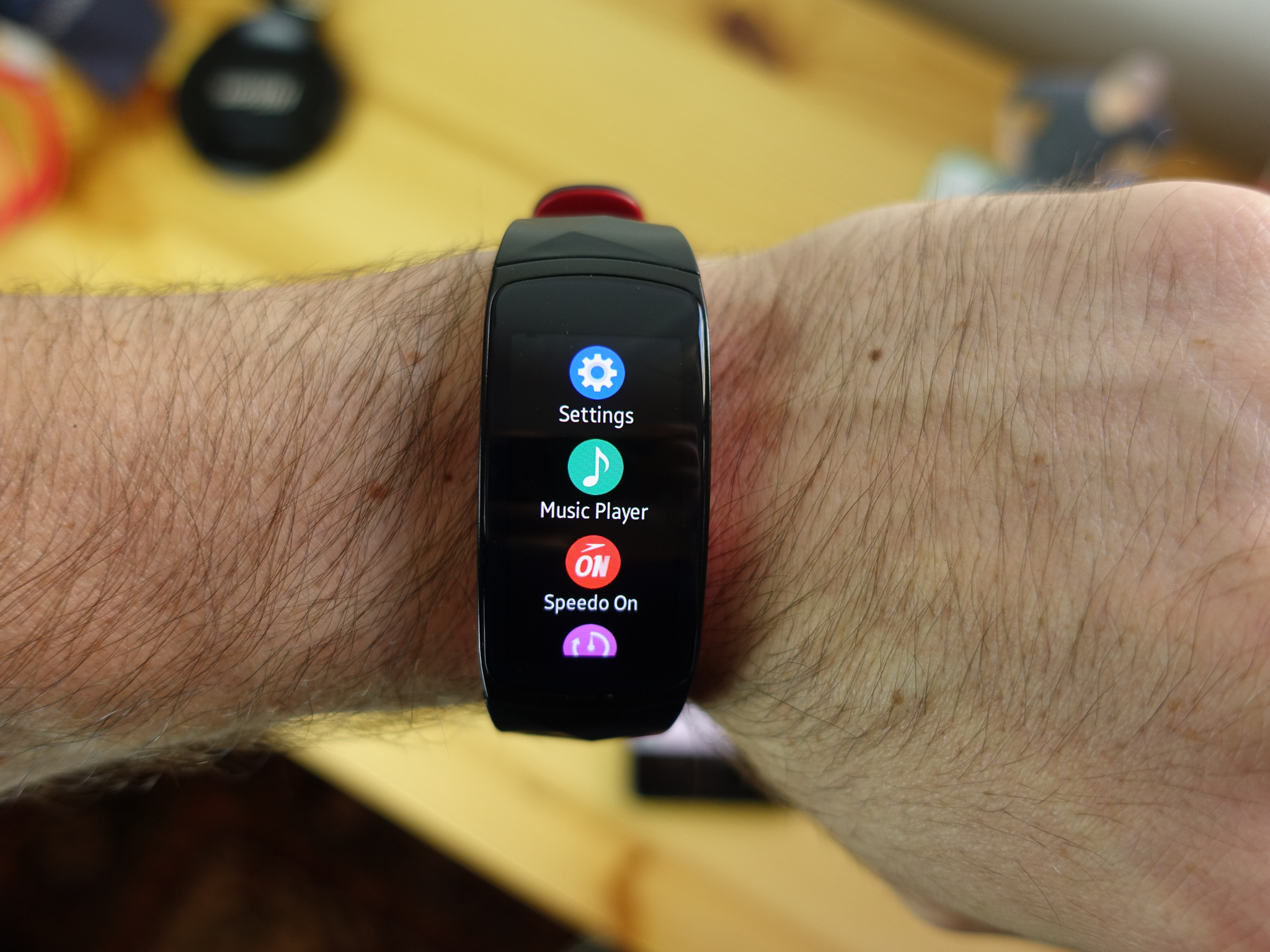
If you’re looking to switch up your look or replace a worn-out Samsung Gear Fit2 Pro band, the process is luckily very easy, since compatible bands simply snap into place. Once you get the hang of it, you might just want to keep several bands on-hands just to switch things up!
Products Used In This Guide
- Amazon: Samsung Gear Fit2 Pro ($149)
- Amazon: OenFoto silicone replacement band ($10 – $25)
How to replace your Samsung Gear Fit2 Pro band
Turn your Gear Fit2 Pro upside-down so that you’re looking at the underside that sits on your wrist.
Use a fingernail to pull the latch securing the band to the screen.
Pull down from the body of your Gear Fit2 Pro.
Repeat for the opposite side.
Slide the new bands into place until the latch clicks.
Run your finger over the bottom of your Gear Fit2 Pro to make sure everything is sitting flush.
That’s all there is to it. No need to remove pins or anything. If you find that the new band is loose, you may have to push the latch back into place that it’s locked properly.
Our top picks
OenFoto makes excellent, affordable bands for a wide variety of wearables, from regular watches to Apple Watch, Wear OS watches, and fitness trackers.
Its silicone bands are particularly popular, coming in many vibrant color options and styles. If you’re looking for an everyday band to replace the one that came with your Samsung Gear Fit2 Pro, it’s hard to do better for the price than the OenFoto silicone replacement band. It’s available in a few different colors, as well as a couple options with holes in them for breathability.
The best part is that you can pick up a 5-pack for $25.
Our Pick
OenFoto silicone replacement band
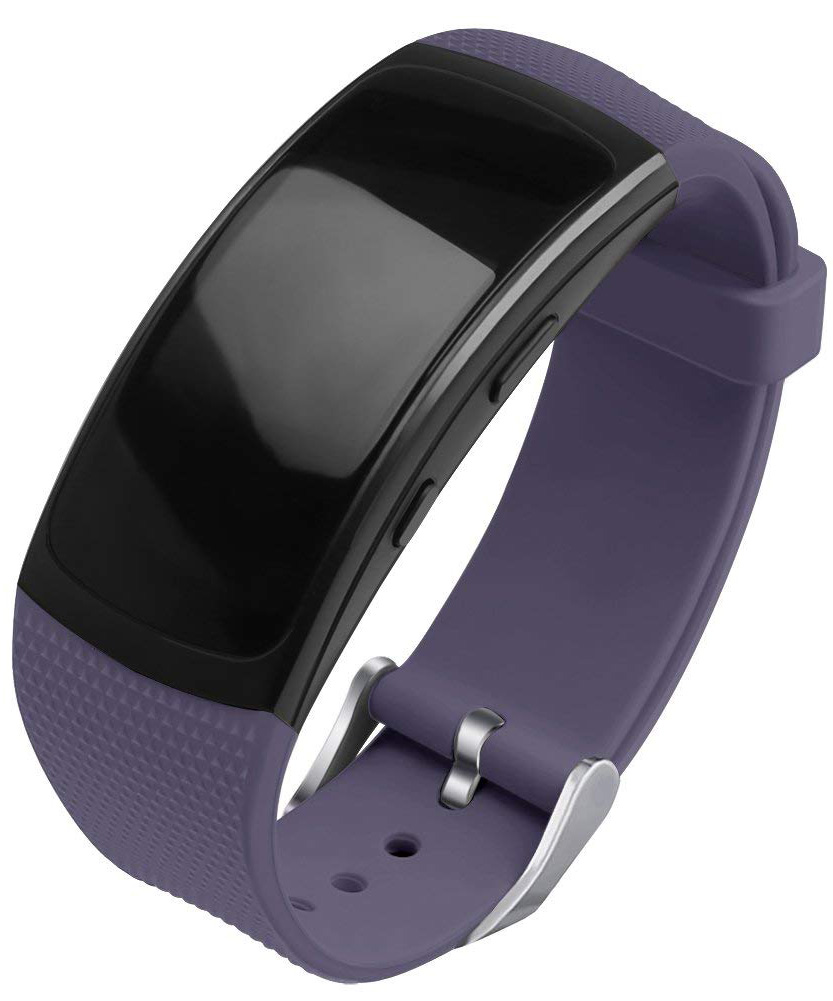
$10 at Amazon
Affordable and durable, OenFoto’s bands’ price belies their quality.
OenFoto’s bands are textured and strong, made from flexible silicone. Many Amazon reviewers even claim they’re better and more comfortable than the band that comes with the Gear Fit2 Pro.
If you’re looking for something a little more rugged in order to protect your Gear Fit2 Pro from the elements, then I suggest Moretek’s strap/case combo.
The More Rugged Option
Moretek rugged protective case with strap
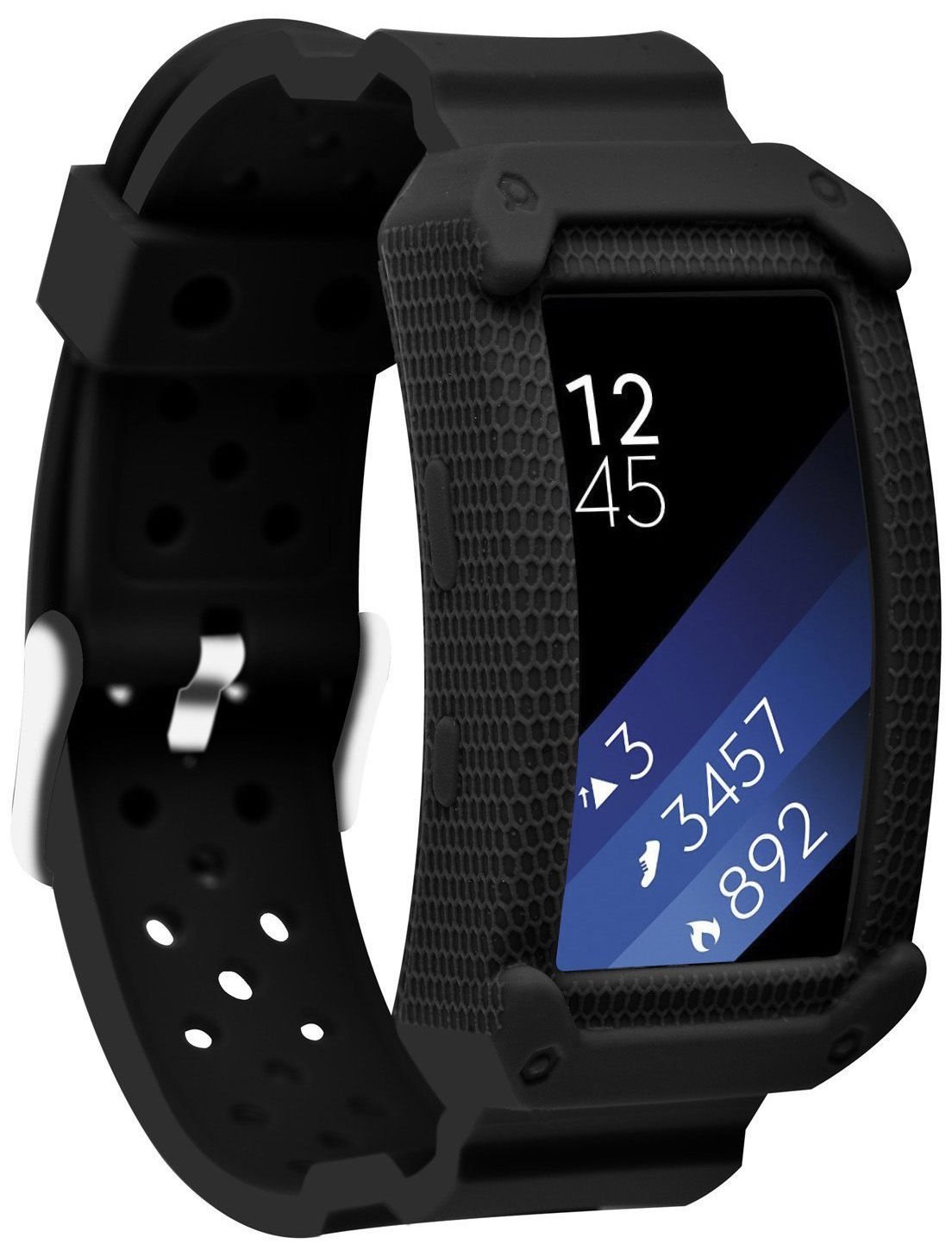
$10 at Amazon
This case/strap combo is made of a sturdier silicone that provides shock absorption while remaining comfortable and pretty cool-looking.
ZENS Announces Trio of New Qi-Certified Wireless Chargers
At IFA Berlin, ZENS today announced a new range of wireless chargers, each including an ultra-thin aluminum design. All of the new wireless chargers will be available beginning September 15.
First is the Single Aluminum Wireless Charger, which is a simple single-device Qi-enabled wireless charging pad, much like those launched from companies including Belkin, Mophie, Anker, RAVPower, and more. ZENS’ solution supports fast charging and has a maximum output of 10 watts, and will cost $49.99 at launch.
The next accessory is the Dual Aluminum Wireless Charger, which can charge two Qi-compatible smartphones at the same time, with a total output of 20 watts. This charger is priced at $79.99.
Lastly, the Dual+Watch Aluminum Wireless Charger also charges two smartphones simultaneously, but includes an additional perch for the Apple Watch. Similar to the Dual Aluminum Wireless Charger, the Dual+Watch accessory supports fast charging and has a total output of 20 watts. This one is also MFI-certified and is priced at $99.99.

Unlike the AirPower, for the ZENS Dual and Dual+Watch Wireless Chargers you will need to place devices in a certain position on the mat to charge. With Apple’s upcoming wireless charger, there isn’t a required “sweet spot” for iPhones or the Apple Watch, as they can be placed anywhere on the mat to be charged.
More announcements are expected to come out of IFA Berlin, which doesn’t officially kick off until this Friday, August 31, and lasts through September 5.
Tag: ZENS
Discuss this article in our forums
Skagen’s Falster 2 Wear OS watch has NFC and a heart-rate sensor
Pricing for the watch ranges from $275 – $295.
Back at CES in January, Skagen announced its first Wear OS smartwatch in the form of the Falster. The Falster was a fine watch, but shortcomings like poor battery life and missing features made it a tough recommendation. Just a few months later, Skagen’s already releasing a successor in the form of the Falster 2.

From a design point of view, the Falster 2 looks very similar to its predecessor. There’s still a metal case with a circular screen, but there are two new physical buttons on the side that can be programmed to open up whatever app you’d like. The case itself is “swimproof” this time around and you’ll find a heart-rate sensor on the bottom that integrates directly with Google Fit.
The Falster 2 also comes equipped with NFC to support Google Pay, a built-in GPS chip so you can track the whereabouts of walks/runs without having to carry your phone, and voice commands via the Google Assistant.
While all of that sounds fine and dandy, the Falster 2 is still powered by the over 2-year-old Snapdragon Wear 2100 chip. Seeing as how Qualcomm’s set to announce its next-gen wearable platform on September 10, the heart of the Falster 2 will be outdated in just a few short days.
If processing speeds don’t matter to you, you can purchase the Falster 2 from Skagen’s site starting today. The silicone and leather band variants cost $275 while the steel-mesh ones are a bit more expensive at $295.
See at Skagen
Google Wear OS
- The best Wear OS smartwatches
- Discuss Android Wear in the forums!
Here’s the full list of countries where the POCO F1 will be available
The POCO F1 is coming to 50 global markets, but the U.S. isn’t on the list.

It’s safe to say that the POCO F1 is one of the most talked-about phones in recent weeks. The Xiaomi sub-brand launched the phone in India earlier this month, and the $300 price point made it an instant hit among Indian consumers. The highlight with the POCO F1 is the hardware — featuring a Snapdragon 845 and 6GB of RAM and 64GB of storage as standard, the phone punches well above its weight in this category.
The POCO F1 will be making its way to 30 European markets over the course of the year. And while the phone is heading to the Americas, just four markets are included — Mexico, Chile, Colombia, and Uruguay. Notably, the phone won’t be sold in China, Xiaomi’s home market. It’s clear that the POCO branding is targeted at a global audience, and the tweaks to the MIUI launcher highlight the same.
Here’s the full list of global markets where the POCO F1 will go on sale:
Europe
- Austria
- Albania
- Belgium
- Bulgaria
- Croatia
- Czech Republic
- Denmark
- England
- Estonia
- Finland
- France
- Greece
- Hungary
- Italy
- Latvia
- Lithuania
- Luxembourg
- Netherlands
- Norway
- Poland
- Portugal
- Romania
- Russia
- Serbia
- Slovakia
- Slovenia
- Spain
- Sweden
- Switzerland
- Ukraine
Americas
- Chile
- Colombia
- Mexico
- Uruguay
Asia
- Bangladesh
- Hong Kong
- India
- Indonesia
- Kazakhstan
- Malaysia
- Myanmar
- Nepal
- Pakistan
- Philippines
- Singapore
- Sri Lanka
- Thailand
- Vietnam
Middle East and Africa
- Bahrain
- Egypt
- Iraq
- Israel
- Jordan
- Kenya
- Kuwait
- Lebanon
- Morocco
- Oman
- Qatar
- Saudi Arabia
- South Africa
- United Arab Emirates
The POCO F1 is available in three versions: a base model with 6GB of RAM and 64GB of storage, a variant with 6GB of RAM and 128GB of storage, and a high-end model with 8GB of RAM and 256GB of storage. There’s also an Armored Edition that has a kevlar back.
Pricing and availability will vary by region, but the phone is now on sale in India for the equivalent of $300.
POCO F1 review: Incredible performance at an unbeatable price
Dell’s new Inspiron 2-in-1 PCs, premium Inspiron 2-in-1 Chromebook debut at IFA

Dell headed to the IFA 2018 convention in Berlin with lots of new products in tow, including new 2-in-1 devices under the Inspiron 7000 and 5000 brands. The company also introduced a new Inspiron-branded 2-in-1 based on Google’s Chrome OS platform. All three families stem from eighth-generation Intel Core processors, while some include additional discrete GeForce graphics provided by Nvidia.
Inspiron 7000 2-in-1 Series
Previous
Next
1 of 3


Here, we have three new models: The 13.3-inch 7386, the 15.6-inch 7586, and the 17.3-inch 7786. They’re based on Intel’s just-launched eighth-generation “Whiskey Lake” processors that replace the mobile-bound chips released in Intel’s first eighth-generation wave in August 2017. These chips provide improved performance-per-watt over last year’s predecessors.
According to the specifications, the two larger units provide options for discrete GeForce MX150 graphics. More specifically, the 15.6-inch model provides options for both the 2GB and 4GB model, while the 17.3-inch version only offers the MX150 with 2GB of dedicated video memory. The 13.3-inch version relies solely on the Intel CPU’s integrated graphics.
Other notable features include 3,840 x 2,160 resolution options on the 7386 and 7586 models, the use of Intel’s Optane memory and DDR4 system memory clocked at 2,666MHz on the two larger laptops, and a USB-C port provided across the board. The laptop’s exterior color will depend on the screen resolution.
7386
7586
7786
Screen size:
13.3 inches (Touch)
15.6 inches
17.3 inches
Screen resolution:
1,920 x 1,080
3,840 x 2,160
1,920 x 1,080
3,840 x 2,160
1,920 x 1,080
Processor:
Core i5-8265U
Core i7-8565U
Graphics:
Integrated
Integrated
GeForce MX150 2GB
GeForce MX150 4GB
Integrated
GeForce MX150 2GB
Memory:
8GB or 16GB
DDR4 @ 2,400MHz
4GB to 32GB
DDR4 @ 2,666MHz
16GB Optane
4GB to 32GB
DDR4 @ 2,666MHz
16GB Optane
Storage:
128GB to 1TB SSD
128GB to 1TB SSD
1TB or 2TB HDD
128GB to 1TB SSD
1TB or 2TB HDD
Camera:
HD Webcam
Connectivity:
Wireless AC
Bluetooth
Ports:
1x USB-C
1x USB-A
1x Audio combo jack
1x HDMI 2.0
1x Micro SD card slot
1x USB-C
2x USB-A
1x Audio combo jack
1x HDMI 2.0
1x SD card reader
1x USB-C
2x USB-A
1x Audio combo jack
1x HDMI 2.0
1x SD card reader
Other:
Fingerprint reader
Active Pen support*
*sold separately
Battery:
38WHr
42 WHr (FHD)
56WHr (4K)
56WHr
Size (inches):
12.11 x 8.36 x 0.53
14.16 x 9.53 x 0.62
16.24 x 10.78 x 0.63
Weight:
3.19 pounds
4.39 pounds
6.39 pounds
Color options:
Platinum Silver (FHD)
Abyss Black (4K)
Platinum Silver (FHD)
Abyss Black (4K)
Platinum Silver
Availability:
October 2
October 2
October 2
Starting price:
$880
$850
$1,100
Inspiron 5000 2-in-1 Series
Previous
Next
1 of 3


Like the refreshed 7000 family, these two 2-in-1s rely on Intel’s new Whiskey Lake processors, although this duo adds the Core i3-8145U chip. Visuals are handled by the processor’s integrated graphics, while the 5482 model includes an additional discrete MX130 graphics chip with 2GB of dedicated video memory.
You’ll see a clear line drawn between these two models regarding their base specifications. The cheaper 5481 model has a 1,366 x 768 resolution, up to 16GB of system memory, and up to 1TB of storage. It’s also limited in connectivity, providing one HDMI port, two USB-A ports, one audio combo jack, and an SD card reader.
The 5482 version provides a higher 1,920 x 1,080 resolution, an option for a discrete GeForce MX130 graphics chip, up to 32GB of system memory, and up to 2TB of storage. It also throws in an additional USB-A 2.0 port and a USB-C port. Both models have an Urban Gray exterior, although the 5482 offers a Platinum Silver option.
5481
5482
Screen size:
14 inches (Touch)
14 inches (Touch)
Screen resolution:
1,366 x 768
1,920 x 1,080
Processor:
Core i3-8145U
Core i5-8265U
Core i7-8565U
Graphics:
Integrated
Integrated
GeForce MX130 2GB
Memory:
4GB to 16GB
DDR4 @ 2,666MHz
16GB Optane
4GB to 32GB
DDR4 @ 2,666MHz
16GB Optane
Storage:
128GB to 256GB SSD
or 500GB to 1TB HDD
128GB to 256GB SSD
and/or 500GB to 2TB HDD
Camera:
HD Camera
Connectivity:
Wireless AC
Bluetooth 4.0 or 5.0
Wireless AC
Bluetooth 4.1 or 5.0
Ports:
1x HDMI 1.4b
2x USB-A 3.1
1x Audio combo jack
1x SD card slot
1x HDMI 1.4b
2x USB-A 3.1
1x USB-A 2.0
1x USB-C
1x Audio combo jack
1x SD card slot
Other:
Spill Resistant Keyboard
Spill Resistant Keyboard
Fingerprint reader
Battery:
42WHr
Size (inches):
13.22 x 9.17 x 0.80
12.91 x 9.17 x 0.79
Weight:
4.22 pounds
3.87 pounds
Color options:
Urban Gray
Urban Gray
Platinum Silver
Availability:
October 2
October 2
Starting price:
$460
$600
Inspiron Chromebook 14 2-in-1
Previous
Next
1 of 4


Finally, we have Dell’s new 2-in-1 Chromebook. There’s only one configuration with this device which features Intel’s Core i3-8130U processor, 4GB of system memory, 128GB of storage, and a 14-inch screen with a 1,920 x 1,080 resolution.
“Thoughtfully crafted in aluminum, the system looks and feels more expensive than composites,” the company says. “Aluminum registers to the touch as feeling cooler than room temperature versus plastic, and provides the kind of aesthetics that other materials can’t come close to offering.”
Dell’s Chromebook ships with an EMR-based stylus that slides into the bottom. Meanwhile, the 2-in-1 form factor enables multiple modes including Laptop, Tent, Stand and Tablet. It’s compatible with Android-based Google Play apps, thus you can turn the Chromebook into a makeshift drawing pad using the included stylus in tablet mode.
- Screen size: 14 inches
- Screen resolution: 1,920 x 1,080
- Processor: Core i3-8130U
- Graphics: Integrated
- Memory: 4GB DDR4 @ 2,400MHz
- Storage: 128GB (eMMC)
- Camera: FHD webcam
- Connectivity: Wireless AC, Bluetooth
- Ports: 2x USB-C, 1x USB-A, 1x Micro SD card slot, 1x Audio combo jack
- Battery: 56WHr
- Size (inches): 12.95 x 9.06 x 0.66
- Weight: 4 pounds
- Color options: Urban Gray
- Availability: October 23
- Starting price: $600
Editors’ Recommendations
- Get the best of both worlds: Enter to win a Dell Inspiron 13 5000 2-in-1 laptop
- Dell XPS 13 2-in-1 review
- Dell’s refresh of the XPS 13 2-in-1 series dips its toes into Intel’s Amber Lake
- Asus claims ‘world’s thinnest’ title with its new Zephyrus S gaming laptop
- Dell XPS 15 2-in-1 ‘urgent’ update calms noisy fans for quieter computing
 AIVAnet