


Reddit’s August 2018 security incident: What you need to know
Here’s what you can do to keep your digital life safe.

Reddit, one of the world’s most popular websites, announced on August 1, 2018, that it experienced a security breach in which some user data was compromised.
The breach mostly affects Redditors that have been on the site since 2007 or earlier, but even if you made your account at a later date, you should still keep reading as there’s a chance some info was still exposed.
What happened?
Between June 14 and June 18 of this year, Reddit says an attacker “compromised a few of our employees’ accounts with our cloud and source code hosting providers.” Although two-factor authentication was set in place, it was done so via SMS and the attacker in question was able to capture the codes using an SMS intercept attack.
The attacker was unable to get write-permissions to Reddit but did manage to obtain read-access to certain site systems.
While doing so, Reddit notes that the attacker obtained:
A complete copy of an old database backup containing very early Reddit user data — from the site’s launch in 2005 through May 2007.
With that database backup, usernames, salted + hashed passwords, email addresses, public content, and private messages were obtained (only if you had a Reddit account between 2005 and May 2007).
Additionally, the attacker also acquired:
Logs containing the email digests we sent between June 3 and June 17, 2018. The digests connect a username to the associated email address and contain suggested posts from select popular and safe-for-work subreddits you subscribe to.
What you can do to protect yourself
None of that’s great, but thankfully, Reddit’s already working to make sure any potentially affected users are protected.
If your account was created between 2004 and May 2007, Reddit’s currently sending out PMs/emails with further instructions on what to do. Furthermore, any accounts that were active during this time are being forced to reset its password.
Even if Reddit doesn’t force you to reset your password, doing so anyways is a good idea just to make sure all of your bases are covered. If you’re not yet using a password manager, now’s the time to change that.
Furthermore, two-factor authentication is something that everyone should be using by now. And, if you have the option, always use this with a token-based system rather than over SMS.
Why you (and your family) should be using 2FA and a password manager
Samsung Galaxy Tab S4 hands-on preview: The two-faced tablet
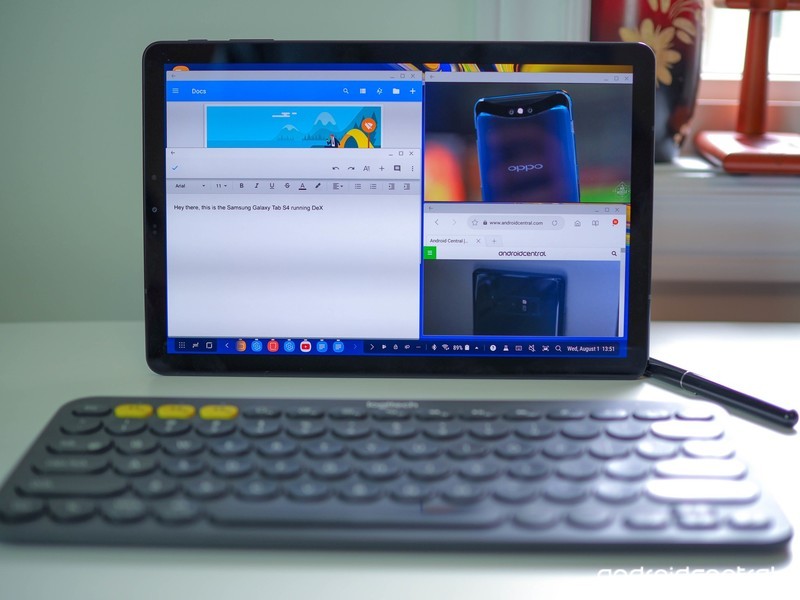
Samsung’s best tablet in years is trying to be all things to some people.
Samsung has returned to the tablet game after a near 18-month hiatus. In that time, the market has shifted to 2-in-1s, and Chromebooks have largely superseded Android tablets in bringing a great mobile experience to the Google ecosystem.
But Samsung lives in its own world, and the stylish, expensive Galaxy Tab S4 tries to work many of the same ideas we’re seeing in the Chromebook and Always Connected PC space into its new tablet.
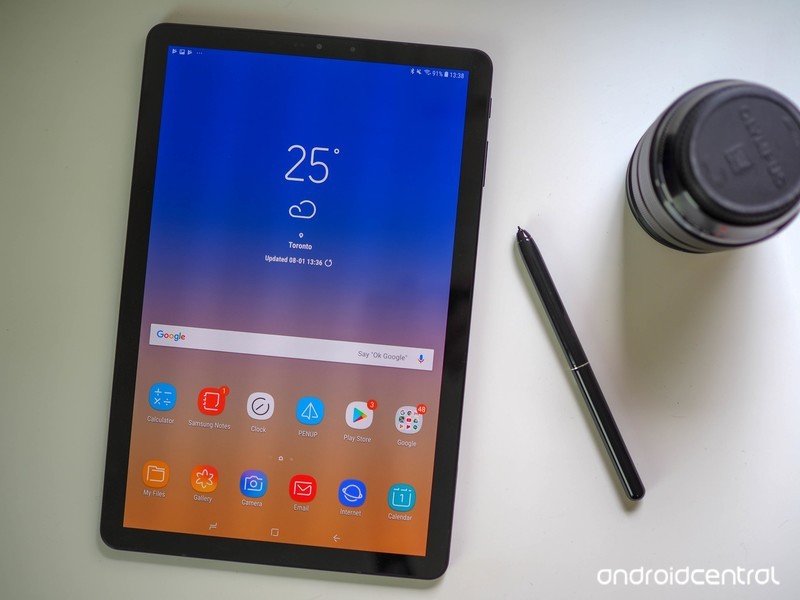
Samsung Galaxy Tab S4 The hardware
| Operating System | Android 8.1 Oreo |
| Display | 10.5-inch Super AMOLED, 2560×1600 16:10 aspect ratio |
| Processor | Snapdragon 835Octa-Core 2.35GHz + 1.9GHz |
| Storage | 64GB / 256GB |
| Expandable | microSD card up to 400GB |
| RAM | 4GB |
| Rear Camera | 13MP, Auto-focus, Flash 1.12µm pixels, f/1.9 aperture |
| Front Camera | 8MP, fixed-focus Iris scanner for face unlock |
| Connectivity | Wi-Fi 802.11ac dual-band, Bluetooth 5.0 Wi-Fi Direct, USB Type-C 3.1, GPSLTE (optional) |
| Charging | USB-C Adaptive fast charge |
| Battery | 7300mAh |
| Input | S Pen4096-level pressure sensitivity |
| Security | Intelligent scan (face unlock + iris scan) |
| Dimensions | 249.3 x 164.3 x 7.1 mm |
| Weight | 482g (Wi-Fi)483g (LTE) |
| Colors | White, Black |
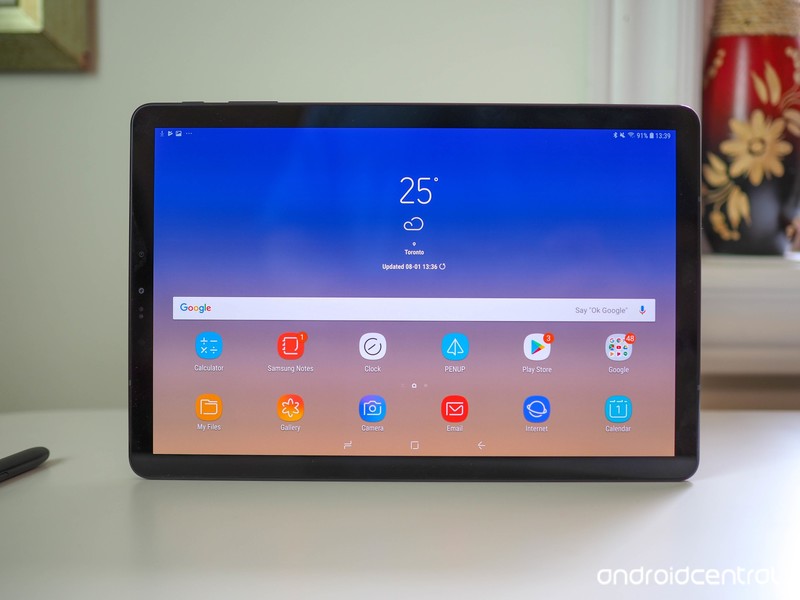
The first thing you’ll notice about this tablet is its display. At 10.5 inches, it’s one of the largest Super AMOLED panels out there, and the fidelity is striking, particularly because Samsung uses bright, colorful wallpapers to show off its vivid 287 pixel per inch density.
The now-16:10 aspect ratio is considerably longer and narrower than its predecessor, the Galaxy Tab S3, which was meant to be used as often in portrait as landscape (and was meant to compete directly with the iPad, which shares a similar shape).
Nearly two years later, the market is full of 2-in-1 Windows and Chrome laptops, and Samsung’s aim is squarely for those always-docked slates — the ones that spend more time in landscape with a keyboard case at a desk than sitting on a coffee table or in portrait mode propped up in your lap.
Both to modernize the tablet’s look and to encourage unfettered use as laptop replacement, Samsung has done away with any buttons on the front — there’s no fingerprint sensor to be found on here — in favor of a larger screen and slimmer bezels. All your unlocking will be done via the combination of iris scanner and front-facing camera, but the effect is a much more streamlined, attractive product, one that looks less a Samsung tablet than a small monitor.
At 7.1 mm thin and 482 grams, the Tab S4 is thicker and heavier than its predecessor, but it’s well balanced. And to be honest, you may not even notice considering the new aspect ratio and laptop-like configuration. It’s still easy to grasp in one hand, though the awkward aspect ratio certainly discourages portrait use as much as possible.
There are four AKG-tuned, Dolby Atmos-optimized speakers positioned on the top and bottom (or two sides, depending on how you’re holding the thing), and from my brief time listening to demos, they sound excellent. On one of the longer sides sits a dock connector, one that facilitates the Tab S4’s transition into a laptop replacement.
These are some of the best-sounding speakers you’ll hear on a tablet today.
Thankfully, there’s still a headphone jack on board, along with a USB-C port for fast charging, and a 13MP camera protruding slightly from the glass back. This is possibly the most understated, unSamsung piece of hardware Samsung has ever built — and that’s a compliment. Note that Samsung didn’t even put its logo on the front of the tablet, only the back (and on the stylus).
Inside, the specs are 2017 smartphone: a Qualcomm Snapdragon 835 platform with 4GB of RAM and 64GB of storage. The 7300mah battery is considerably larger than the one in the Tab S3, and Samsung says it should get many days of mixed use, and about 16 hours of constant video playback.
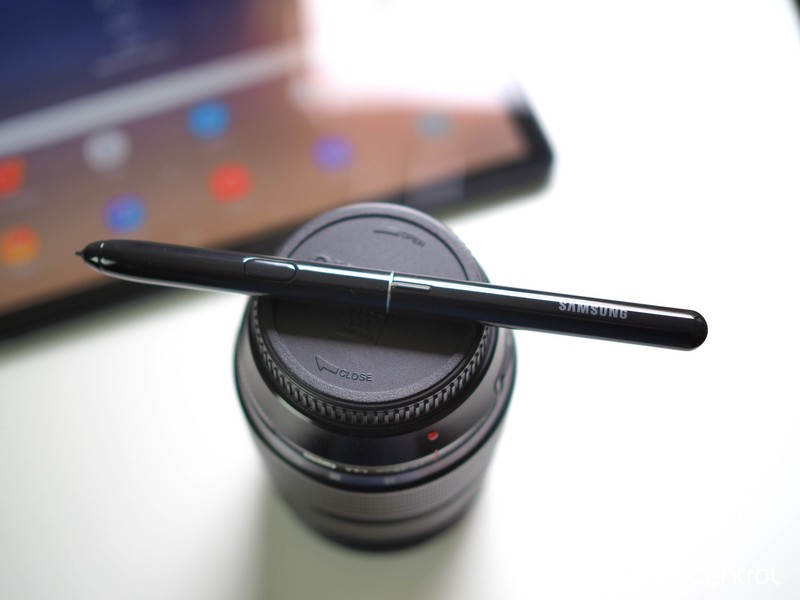
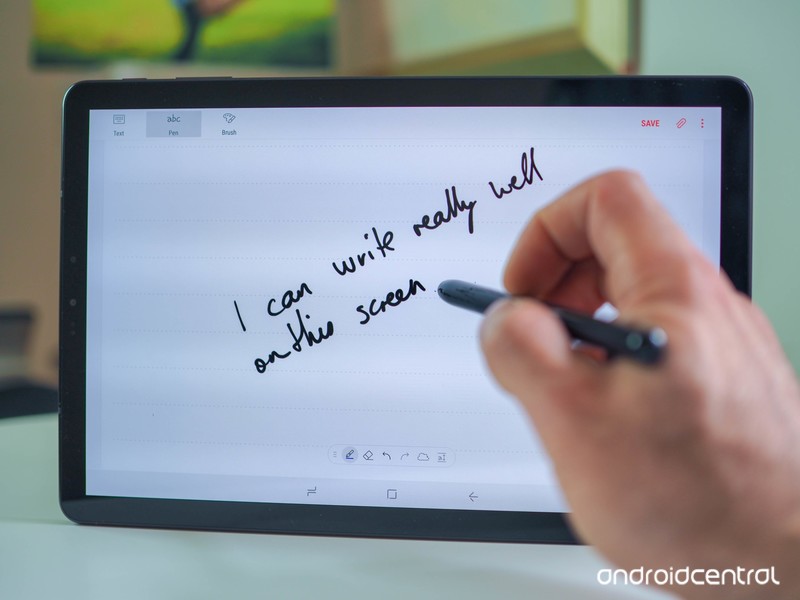
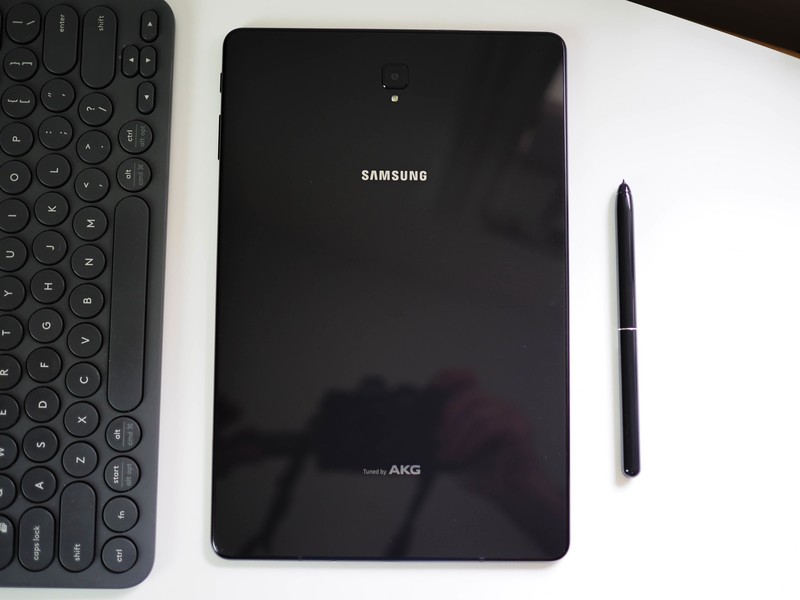
There’s also a redesigned S Pen stylus in the box, and I have to say, despite there being nowhere to stash it like there is in the Note phone series, it’s quite the performer. Thick and weighty like a real pen, Samsung said its aesthetic overhaul was one of its biggest priorities when building this tablet. And it shows.
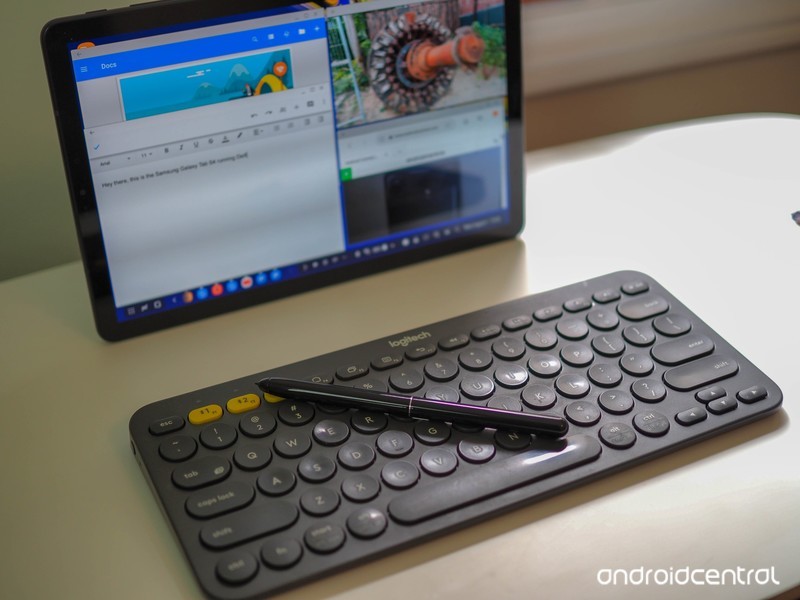
Despite no technical improvements over the last generation — it’s still passive, so no charging, and has 4096 points of pressure — it feels much nicer to use while note-taking or doodling. And if you buy the $150 Book Cover Keyboard, there’s a little slot to stash the stylus, like on the Tab S3’s keyboard, so it won’t get lost.
Enter the laptop
For a great software experience, you’re still at the mercy of Android developers optimizing their apps for tablets.
And chances are, if you’re spending $650 on this tablet already, you’re probably going to want to pick up the Book Cover. While Samsung wouldn’t outright say it, the Tab S4 is basically designed for one function: productivity. It wants to be part of the conversation when you’re thinking about buying a Surface Go or a HP Chrombook X2 or any number of “detachables” that are hitting the market.
That’s why, by default, when you dock the Tab S4 in the Book Cover, it launched DeX, the desktop experience that launched with the Galaxy S8 in 2017 but required an external dock and monitor. DeX works even if you don’t have a keyboard, but it’s a lot better with one. Thanks to the tablet’s beefy hardware (though it really should be launching with a Snapdragon 845 at this price) it can run many windowed apps at the same time, and with a Bluetooth mouse can pass for a Windows or Chrome laptop quite easily.
The problem isn’t the experience — DeX is quite nice to use, in fact — but the quality of the apps. On the Windows 10 side, every app was built with a landscape-oriented screen in mind. Chrome apps were too. (Plus Chromebooks can run Android apps, which for the most part play nice with Chrome.)
Here, you’re at the mercy of whether Android developers have optimized their apps for the big screen, and chances are, given the state of Android tablets these past few years, they haven’t. Even if they have, unless the app is made by Samsung, Microsoft, or Google (or had money thrown at it by Samsung or Google), the feature set of the average tablet-optimized app may not compare to its iOS or Windows counterpart.
Samsung has curated a bunch of DeX-optimized applications, including Microsoft’s suite of Office 365 apps and a bunch of news, to-do, and email apps, but the pickings are slim. The big question I’m going to need to figure out is whether regular windowed Android apps are adequate substitutes for a true Windows, macOS, Chromebook, or even iOS experience. There’s just so much competition in this space right now it’s hard to see how, at $800 with the keyboard, the Tab S4 is worth its asking price.
All about the transition
It takes a few seconds to jump between productivity-forward DeX mode and Samsung’s good ol’ regular Android software. And while that may not seem like a long time, it’s a good example of the two worlds this tablet is attempting to bridge. There’s no question that Android tablets are in a bad place right now, but Samsung doesn’t seem to care; it’s moving in parallel, utilizing Android’s extensibility and scalability to build an entirely new desktop experience on top of its traditional software layer.
As an Android tablet, the Tab S4 is fine. It has a beautiful screen, great speakers, and has hardware more than capable enough to run every demanding game and social media app on the Play Store. But no one is spending $650 for an Android tablet just to browse, read, and watch — there are dozens of sub-$200 choices that will do that just fine.
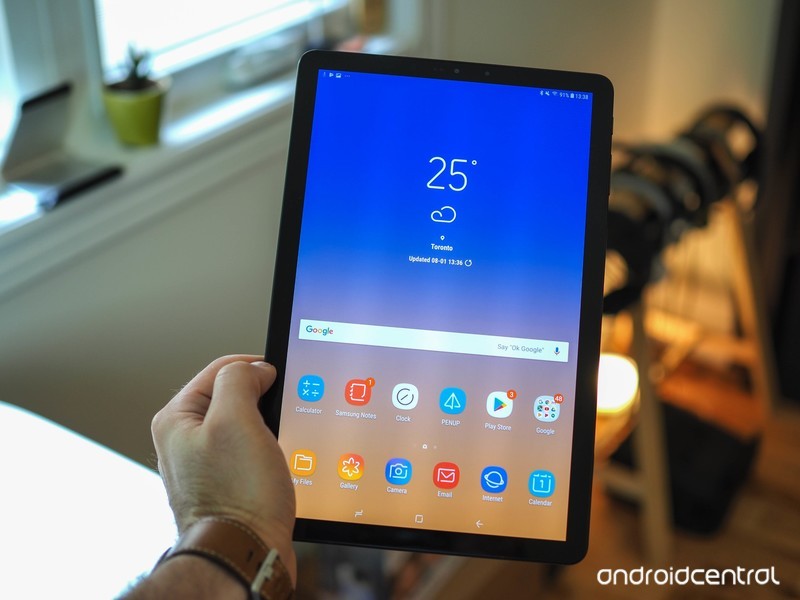
Instead, if you’re considering the Tab S4, you’re likely doing so because you see a world in which it can function as both tablet and laptop, and that experience lives and dies by DeX’s ability to recreate a great desktop experience. At this point, I’m not convinced — but I’m willing, as always, to be proven wrong.
The Wi-Fi version of the Galaxy Tab S4 goes up for pre-order August 3, and fully on sale August 10 in the U.S. and August 22 in Canada. An LTE version will be available later this year for an undisclosed price. The tablet will be available at Verizon, Best Buy, Amazon and Samsung.com, and until August 9, pre-orderers can get the Book Cover for 50% off its $150 retail price.
See at Samsung
Best NFL apps for Android in 2018

Are you ready for some football?.
The 2018 NFL season is nearly upon us. If you don’t already have a healthy rotation of apps and sources to keep up with your favorite teams and players, let us help you. We’ve gone and rounded up the best apps to help you keep up on game day. Whether it’s keeping tabs on the score, watching the action unfold yourself, or fueling your love for the sport with a mobile game to keep you busy, these apps will get you what you need.
Never miss a moment when you use the best apps for NFL on Android!
NFL Mobile


NFL Mobile is the official NFL app which includes news, video clips, and live streaming for NFL Network subscribers. Set your favorite team for quick access to the latest news and analysis from the Stories and NFL Now sections. Tablet users can access NFL Network 24/7/365 and NFL RedZone if they’re eligible subscribers of AT&T U-verse, Charter, Cox, DirecTV, Optimum, Verizon FiOS, DISH, and many more providers. If you’re not a subscriber of any of those service providers, you can check into the NFL Now tab for breaking news and analysis.
Download: NFL Mobile (free)
theScore


If you’re looking to catch up on the news after the game, theScore is widely regarded as the best app out there. You can follow specific teams, get home screen widgets for the latest information at a glance, and notifications when things get crazy with your favorite teams. The best part is, you can keep tabs on any other sports you might happen to be into, including college sports and all the other “football” leagues that the rest of the world follows.
If keeping up to date on football news is your top priority, get theScore.
Download: theScore (free)
Madden NFL Mobile


Fans of EA’s Madden series on PlayStation or Xbox might be wary of diving into the mobile version of the celebrated NFL video game, but there’s a lot to love here. It uses the same card upgrading system that’s become so popular in both mobile games and EA’s Ultimate Team systems alike — not ideal in my mind — but it offers many ways to play and earn coins and XP. There are daily and weekly live challenges (think the mini-games from Madden 2004), a single-player season mode, and time-delayed head-to-head matchups in which you and your opponent take turns on offense. If that sounds a little too casual, you’re right, but it allows you to keep multiple games going at one time without dedicating a huge chunk of time to play a game to completion. And, of course, there’s the constant temptation of microtransactions to upgrade your team in a hurry.
Other than those downsides, the gameplay and graphics are on point and the control scheme is pretty smart as well. Football fans would be remiss if they didn’t at least give Madden Mobile a shot.
Download: Madden NFL Mobile (free)
ESPN

When it comes to sports — especially Football — ESPN is the go-to for ensuring you see the pre-game predictions and analysis, the real action of the game itself, and dissect every moment in the post-game. That attention to detail and love of the game is baked right into their app as well. From up to the minute game scores, news coverage, podcasts, and live play-by-plays of every pass, there is a ton here for you to really dive into.
ESPN’s mobile app gives you access to as much action as it possibly can. You can watch live video — provided you pay for a compatible cable provider — see highlight reels, check the stats after the game, and so much more. Delving into everything they offer will take some time, but for the discerning fan, it is worth it.
Download: ESPN (free)
Are you ready for some football?
Those are our picks, but there are plenty of ways to get in on the action. Do you like to use just one specific app, or do you pick and choose from multiple apps to get everything you want during the season? Let us know about it in the comments below!
Updated August 2018: The NFL season is in full swing. Try these apps to make sure you’re fully equipped for the season at hand.
Reddit Suffers Data Breach With Hackers Obtaining Email Addresses From Some Users
Reddit this morning announced that it has suffered a data breach, with a hacker able to access email addresses from some current accounts and a 2007 database backup that included old salted and hashed passwords.
The data breach occurred between June 14 and June 18, with hackers accessing Reddit employee accounts through the company’s cloud and source code hosting providers rather than the site itself. Those systems used SMS-based two-factor authentication that failed, and the main attack happened through SMS intercept.
Reddit has a detailed list of what was accessed. A complete copy of an old database backup containing early Reddit user data was stolen, and Reddit says that the most significant data in the backup included account credentials (username and salted hashed passwords) email addresses, and public and private messages.
Email digests sent by Reddit in June 2018 were also obtained. This included usernames linked to an associated email address along with suggested posts from select subreddits.
Reddit is sending emails to users affected by the database hack, which does not impact people who signed up for reddit after 2007.
Customers who do not have an email address associated with their accounts or who did not check the “email digests” user preference are not affected by the email digest breach.
Reddit has informed law enforcement and is cooperating with an investigation and has taken measures to ensure privileged access to its systems are more secure.
Reddit says it will be resetting the passwords of affected users, but the site recommends all Redditors consider updating their passwords to something strong and unique, as well as enabling two-factor authentication. Reddit’s two-factor authentication is via authenticator app and is not vulnerable to SMS intercept.
Tag: Reddit
Discuss this article in our forums
Samsung Launches New Galaxy Tab S4 to Compete With iPad Pro
Samsung today announced the launch of its latest tablet, the Galaxy Tab S4, which, like Apple’s iPad Pro, has been designed as a computer replacement with productivity in mind.
The new 10.5-inch Galaxy Tab S4 is described as the “ultimate entertainment and multitasking assistant” thanks to the inclusion of Samsung DeX, which is the first time Samsung has built the feature into a tablet.
DeX is a docking solution that is designed to allow Samsung smartphone owners (and now tablet owners) to connect their devices to a keyboard, mouse, and monitor through a USB-C port, an HDMI port, and two USB ports. DeX on the Galaxy Tab S4 works using a simple HDMI adapter or with the DeX dock options and it offers true multitasking capabilities with users able to open multiple windows at one time.

Samsung is offering a $150 Book Cover Keyboard alongside the Galaxy Tab S4, which can be paired with DeX to transform the tablet into a PC alongside a Bluetooth mouse, but it will also work with any Bluetooth keyboard and mouse option.

Like other Samsung devices, the Galaxy Tab S4 can also be paired with the included S Pen, a stylus for taking notes, drawings, artwork, and other purposes.
Apple’s iPad Pro lineup, comparatively, includes an optional Smart Keyboard and Apple Pencil, along with the ability to pair third-party Bluetooth keyboards, but it does not support mouse functionality.
When it comes to hardware, the Galaxy Tab S4 is equipped with Qualcomm’s octa-core Snapdragon 835 processor, 4GB RAM, 64GB to 256GB of storage space that can be expanded with a microSD card, and a 7,300mAh battery that it boasts offers 16 hours of video playback, outpacing the iPad Pro’s 10 hour battery.

The tablet includes a 16:10 AMOLED display, and there is no Home button or fingerprint sensor on the device, with Samsung instead relying on facial recognition and iris scanning for biometric authentication.
Other features include quad speakers much like the iPad Pro, Bixby integration, 13-megapixel front and rear cameras, and a fast charging feature that charges the battery to full in 200 minutes.
Samsung’s new tablet is priced at $650 for 64GB of storage or $750 for 256GB of storage, which is on par with Apple’s pricing for the 10.5-inch iPad Pro. Apple charges $649 for the 64GB 10.5-inch iPad Pro, $799 for a 256GB version, and $999 for a 512GB version.

Samsung is releasing the new Galaxy Tab S4 on August 10, which is just after the company plans to unveil its new flagship Galaxy Note 9 device.
Apple also has a major tablet upgrade in the works with new iPad Pro models on the horizon, but it is not clear when the company will unveil them. The new tablets could come in September alongside new iPhones or Apple could wait until later in the fall, perhaps hosting a separate October event for new iPads and Macs.
 2018 iPad Pro mockup via Álvaro Pabesio
Apple’s updated iPad Pro models are expected to offer a complete iPhone X-style redesign, doing away with the Home button, introducing slimmer bezels for more available screen space, and adopting Face ID and the TrueDepth camera system for biometric authentication.
Tag: Samsung
Discuss this article in our forums
How to Use macOS Mojave’s New Dynamic Desktop Feature
Apple in macOS Mojave introduced Dynamic Desktops, which are wallpapers that shift with the time of day, changing the lighting and look of the wallpaper with the progress of the sun across the sky.
For example, in the afternoon, the lighting in the wallpaper is at its peak brightness and the image of the Mojave desert is depicted as it would be if you visited it in the daytime with well-lit sand dunes and a bright blue sky.
Subscribe to the MacRumors YouTube channel for more videos.
At night, the sky in the wallpaper shifts to darker blue to reflect that it’s now evening. The shift between daytime and nighttime happens gradually over the course of the day, so you’ll see subtle changes each time you look at your Mac’s display.

Dynamic Desktop is simple to enable. Here’s how:

Open up System Preferences.
Choose Desktop & Screensaver.
Select one of the options from the “Dynamic Desktop” section under “Desktop.”
Using the dropdown menu underneath the wallpaper’s name, make sure “Dynamic” is enabled.
At the current time, there are two wallpaper options in the macOS Mojave beta, which work with both Light and Dark Mode.
You can choose between the wallpaper that depicts the Mojave desert and a Solar Gradients wallpaper that shifts from a lighter sky blue in the daytime to a darker twilight blue. Apple is likely to add additional Dynamic Desktop options in the future.
Apple’s Dynamic Desktop feature relies on your location to be able to match the lighting of the wallpaper with the lighting outside, so to use it, you will need to have Location Services enabled.
Related Roundup: macOS Mojave
Discuss this article in our forums
Apple’s March to Trillion Dollar Market Cap May Take a Bit Longer Based on Latest Share Count
Apple has filed its quarterly 10-Q form with the U.S. Securities and Exchange Commission today, confirming that the company has a total of 4,829,926,000 outstanding shares on the stock market as of July 20, 2018. That’s down from 4,915,138,000 shares three months earlier as Apple has continued to buy back its own stock.
Based on multiplying the latest total by Apple’s closing stock price today of $201.50, the iPhone maker has a market cap of roughly $973 billion, making it ever so close to becoming a trillion dollar company.
The exact moment that Apple crosses the trillion dollar mark will be difficult to determine, as Apple continues to buy back and retire shares, reducing the number of outstanding shares. The total reflected in the 10-Q form is already nearly two weeks old, and has likely decreased over that time.
Everyone from investors to fanatical customers has been closely watching the AAPL ticker on the stock market to see if Apple will become the world’s only and arguably first publicly traded company with a trillion dollar valuation. Tech rivals Amazon, Microsoft, and Google parent company Alphabet are also in the race.
For now, the wait for $1,000,000,000,000 continues, but it doesn’t look like it will take much longer for Apple to pull off the feat.
Tag: AAPL
Discuss this article in our forums
New DHS cybersecurity command aims to protect U.S. from cyberattacks
Homeland Security is leading the charge on Apex. (Image: Modev)
In an effort to prevent and thwart cyberattacks, United States Department of Homeland Security (DHS) Secretary Kirstjen Nielsen announced the creation of a new National Risk Management Center to help protect the nation’s critical infrastructure. The center’s goal of protecting the banking, communications, and energy sectors was outlined at the National Cybersecurity Summit in New York.
Given the rise in cyberthreats against the United States, Nielsen wanted to create a place where private companies can get assistance if they’re experiencing a cyberattack. By creating a central authority where a company experiencing a cyberattack can seek the government’s help early on, the center hopes to be able to learn about the attack to help protect others in the same sector or industry from becoming victims.
“An attack on a single tech company can rapidly spiral into a crisis affecting the financial sector, energy systems, and health care,” Nielsen said, highlighting that the center will serve as a hub that brings together government experts and the private sector. “Our goal is to simplify the process, to provide a single point of access to the full range of government activities to defend against cyberthreats.”
DHS will begin by conducting a number of 90-day “sprints” to identify key priorities and needs. The center will eventually run simulations and cross-sector analyses to identify threats and points of weaknesses in U.S. infrastructure. The vision is to have the center be an emergency response team for public and private organizations undergoing cybersecurity threats.
In essence, the National Risk Management Center is designed to prevent a repeat of the NotPetya and WannaCry ransomware attacks in 2017. Damages from NotPetya are estimated in the billions of dollars, while WannaCry targeted infrastructure, such as airports and hospitals. “Government officials were spurred to create the new measure as security officials have warned that cyberattacks are ongoing and that a hack of key infrastructure could have disastrous effects,” CNN reported.
The center’s announcement comes as Nielsen sided with top U.S. intelligence officials in calling out Russia for meddling in the 2016 presidential elections. “Let me be clear: Our intelligence community had it right,” she said. “It was the Russians. It was directed from the highest levels.” And although the center’s purpose is to protect the financial, telecommunications, and energy industry initially, Nielsen announced that her department will also move forward with an election security task force, Wired reported.
Nielsen is also working with legislators to help expand DHS’ role in combatting cyberthreats.
“I’m working with Congress to pass legislation to establish a cybersecurity and infrastructure security agency within DHS,” Nielsen said. “This would recast what is now the National Protection and Programs Directorate, our cybersecurity arm, into an official, operational agency capable of better confronting digital threats. But we all know that waiting for Congress to act is like waiting for a new Game of Thrones book to come out.”
Editors’ Recommendations
- Are smart cities as safe as we think they are? Security experts say not yet
- Pay-n-pray cybersecurity isn’t working. What if we just paid when it works?
- Duck, cover, and reboot your router? Why the FBI’s new warning is no joke
- Microsoft stops a Russian attempt at hacking 2018 midterm elections
- Homeland Security is worried about Gmail’s confidentiality mode
Samsung Galaxy Tab S4 hands-on review
Research Center:
Samsung Galaxy Tab S4
Android tablets have been floating in limbo for quite some time. Google never pushed developers to create apps designed specifically for tablets, unlike Apple did with the iPad, and that left a lackluster user experience when you wanted to get some work done. A Bluetooth keyboard or stylus never really helped. For productivity, your best bet was going the Windows route with a two-in-one like the Microsoft’s Surface line, or with Apple’s iPad range. Samsung’s trying to change all that with its latest tablet, the Galaxy Tab S4.
At a quick glance, the Tab S4 — a gorgeous device — looks like any other Android tablet. But Samsung has brought over its DeX desktop mode from its smartphones, which enables a far more productive interface. Let’s take a closer look, and we’ll explain what what we mean.
Refined design
The Galaxy Tab S4 has a much more contemporary look over last year’s Tab S3, and that’s thanks to uniform bezels around the 10.5-inch screen. The larger screen size (up from 9.7-inches last year) doesn’t mean the tablet is bigger, as the shrunken bezels helped Samsung maintain almost the same size.
Julian Chokkattu/Digital Trends
There’s no more home button or Samsung logo on the front, so it looks clean and minimal. In landscape orientation, the power button sits at the top edge, next to a volume rocker. You can double-tap the screen to turn it on, eliminating the need for a physical home button.
On the bottom edge in the same orientation is the pogo pin connector that can attach to Samsung’s keyboard cover (more on this later), and on the right edge is where you can plug a USB Type-C cable in to charge the Tab S4. There’s a headphone jack next to the charging port.
The Galaxy Tab S4 has a much more contemporary look over last year’s Tab S3.
Like last year’s Tab S3, there are four speakers tuned by AKG, the Austrian acoustics company, in the four corners of the Tab S4, but Samsung said the tablet sounds “louder than ever before” thanks to support for Dolby Atmos sound. The sound is spatial, but it didn’t get as loud as we’d like in a room with some background chatter. It doesn’t sound as good as the iPad Pro’s quad speaker setup, and we also noticed the Tab S4’s keyboard cover completely muffles the speakers, making them sound incredibly poor. It’s odd, considering you’ll likely want the tablet sitting upright with the keyboard cover when you’re playing music or videos, but we’ll have to do more testing to make sure this is a persistent problem.
The AMOLED screen is a different story — it’s absolutely gorgeous. With a 2,560 x 1,600-pixel resolution, the display is sharp, gets incredibly bright, and is vibrantly colorful. The 10.5-inch size also doesn’t feel too small. It’s lightweight and compact enough to carry around, and it will fit in your backpack or purse without any problems. There’s enough bezel around the screen to comfortably hold the tablet without touching the screen, too.
Julian Chokkattu/Digital Trends
The back of the tablet is all glass, which means you’ll want to take extra care handling it. There’s not much happening on the back — except for all the fingerprints it picks up — but the rear camera design, which seems inherited from early Galaxy devices, looks a little dated.
The Book Cover Keyboard costs $150 (although there’s a deal through September 8 that cuts the price in half), and it’s comfortable to type on. Placing the tablet inside is relatively quick and simple, though it’s due to this keyboard that the audio sounds muffled — there are bumpers covering the speakers, which seems like an oversight. Samsung also has a cover available without the keyboard.
The S Pen looks more like a fountain pen; it’s a lot more elegant.
Attached to the keyboard cover is a little cap you can slide the S Pen stylus into, which is included with the Tab S4. The S Pen looks more like a fountain pen; it’s a lot more elegant than previous iterations. It’s feels nice to hold and use, but we’d have liked if it had a bit more weight to it. It’s a little too lightweight, which makes it feel cheap and easily breakable.
Samsung has brought several S Pen features from the Galaxy Note 8 over to the Tab S4, including Screen Off Memo, which only works in tablet mode, but it lets you write on the screen without having to turn it on. There’s also Air Command, which lets you press the button on the S Pen to open up a list of apps for quick access; Live Message, where you can draw on photos and turn them into animated GIFs; and Translate, which translates text the S Pen is hovering over. In our brief time with it, we still don’t feel like the S Pen is a necessary addition to the Tab S4, and we’re more likely to utilize a Bluetooth mouse.
DeX interface
The highlight of the Tab S4 is the new DeX interface. Previously, you’ve only been able to place a Galaxy S8, S9, or Note 8 on Samsung’s DeX Station or DeX Pad docks, and connect it to a monitor to access Samsung’s DeX Android desktop interface. Now, when the Tab S4 connects to the keyboard, it automatically launches DeX.
Julian Chokkattu/Digital Trends
DeX is Samsung’s desktop Android mode, which adds a traditional operating system dock at the bottom with the Android navigation keys and an app drawer, and there’s a system tray on the bottom right so you can access settings and notifications. Apps sit on the home screen like a Windows laptop. You can open multiple app windows, and you can resize them all to your liking.
It’s immediately clear you’ll want to keep using DeX mode when this device is docked with a keyboard.
While every Android app will work in this mode, not every app will convert to a tablet interface. Almost all of Samsung’s apps will, and the company has gradually been adding support for more third-party apps. We spent a month last year using the DeX interface through a Galaxy S8 as a replacement to our laptop, and it was perfectly capable of handling most of our tasks, though we largely used Samsung’s web browser app. Things might get more tricky if you need to run specialized software, though DeX does work with virtual computers, and you still have access to every Android app available. We’ll be spending more time in this mode to see if it has improved.
Samsung Galaxy Tab S4 Compared To
Microsoft Surface Go
Apple 10.5‑inch iPad Pro
Apple iPad 9.7
Samsung Galaxy Tab S3
Apple iPad Air 2
LG G Pad 10.1
Lenovo ThinkPad 10
Microsoft Surface 2
Razer Edge Pro
Barnes & Noble Nook HD+
Dell Latitude 10
Dell XPS 10
Lenovo ThinkPad Tablet 2
Acer Iconia Tab W700
Acer Iconia Tab A700
You can switch back to the tablet interface at any time. It’s not as fast as we’d like — you need to open the quick settings menu, tap the DeX tile, and it will then take around 3 seconds to swap to tablet mode. A one-button switch on the system tray would have been a nicer alternative.
Standard Android 8.1 Oreo is perfectly capable, though it’s immediately clear you’ll want to keep using DeX mode when this device is docked with a keyboard. We’d have liked Samsung to build a trackpad into the keyboard cover, so we wouldn’t have to rely on the touchscreen or a separate Bluetooth mouse.
Strong specs
The Galaxy Tab S4 is powered by Qualcomm’s Snapdragon 835 processor with 4GB of RAM. We haven’t done a lot of testing yet for this first look, but we didn’t run into any glaring problems with performance. It may be last year’s processor, but it should still be able to run almost everything you throw at it.
There are 64GB and 256GB models available, but a MicroSD card slot lets you add more space if you need it. The Tab S4 has a 13-megapixel camera on the rear and an 8-megapixel camera on the front, though we haven’t had a chance to test either yet.
Samsung has also thrown in a massive 7,300mAh battery inside, which the company said will make the tablet last through 16 hours of video playback. That’s quite impressive if it’s true, and we’ll certainly be testing those claims.
Price and availability
The Galaxy Tab S4 comes in Wi-Fi and LTE variants, though the latter will only be available through Verizon at launch. More carrier support will come in the third quarter, including Sprint and US Cellular.
Both models will be available for purchase starting August 10, with the Wi-Fi model up for sale through Amazon, Best Buy, and Samsung’s website. The 64GB model will set you back $650, and the 256GB version costs $750.
At $650, the Tab S4 is expensive, especially when you factor in an extra $150 for the keyboard cover. At $800, you can get plenty of other excellent Windows laptops, an iPad Pro, or almost any Chromebook. We’ll have to do a lot more testing to see if the Tab S4 is a viable laptop replacement with DeX mode, and whether it’s worth purchasing over the aforementioned products — stay tuned for a full review soon.
Samsung Galaxy Tab S4 hands-on review
Research Center:
Samsung Galaxy Tab S4
Android tablets have been floating in limbo for quite some time. Google never pushed developers to create apps designed specifically for tablets, unlike Apple did with the iPad, and that left a lackluster user experience when you wanted to get some work done. A Bluetooth keyboard or stylus never really helped. For productivity, your best bet was going the Windows route with a two-in-one like the Microsoft’s Surface line, or with Apple’s iPad range. Samsung’s trying to change all that with its latest tablet, the Galaxy Tab S4.
At a quick glance, the Tab S4 — a gorgeous device — looks like any other Android tablet. But Samsung has brought over its DeX desktop mode from its smartphones, which enables a far more productive interface. Let’s take a closer look, and we’ll explain what what we mean.
Refined design
The Galaxy Tab S4 has a much more contemporary look over last year’s Tab S3, and that’s thanks to uniform bezels around the 10.5-inch screen. The larger screen size (up from 9.7-inches last year) doesn’t mean the tablet is bigger, as the shrunken bezels helped Samsung maintain almost the same size.
Julian Chokkattu/Digital Trends
There’s no more home button or Samsung logo on the front, so it looks clean and minimal. In landscape orientation, the power button sits at the top edge, next to a volume rocker. You can double-tap the screen to turn it on, eliminating the need for a physical home button.
On the bottom edge in the same orientation is the pogo pin connector that can attach to Samsung’s keyboard cover (more on this later), and on the right edge is where you can plug a USB Type-C cable in to charge the Tab S4. There’s a headphone jack next to the charging port.
The Galaxy Tab S4 has a much more contemporary look over last year’s Tab S3.
Like last year’s Tab S3, there are four speakers tuned by AKG, the Austrian acoustics company, in the four corners of the Tab S4, but Samsung said the tablet sounds “louder than ever before” thanks to support for Dolby Atmos sound. The sound is spatial, but it didn’t get as loud as we’d like in a room with some background chatter. It doesn’t sound as good as the iPad Pro’s quad speaker setup, and we also noticed the Tab S4’s keyboard cover completely muffles the speakers, making them sound incredibly poor. It’s odd, considering you’ll likely want the tablet sitting upright with the keyboard cover when you’re playing music or videos, but we’ll have to do more testing to make sure this is a persistent problem.
The AMOLED screen is a different story — it’s absolutely gorgeous. With a 2,560 x 1,600-pixel resolution, the display is sharp, gets incredibly bright, and is vibrantly colorful. The 10.5-inch size also doesn’t feel too small. It’s lightweight and compact enough to carry around, and it will fit in your backpack or purse without any problems. There’s enough bezel around the screen to comfortably hold the tablet without touching the screen, too.
Julian Chokkattu/Digital Trends
The back of the tablet is all glass, which means you’ll want to take extra care handling it. There’s not much happening on the back — except for all the fingerprints it picks up — but the rear camera design, which seems inherited from early Galaxy devices, looks a little dated.
The Book Cover Keyboard costs $150 (although there’s a deal through September 8 that cuts the price in half), and it’s comfortable to type on. Placing the tablet inside is relatively quick and simple, though it’s due to this keyboard that the audio sounds muffled — there are bumpers covering the speakers, which seems like an oversight. Samsung also has a cover available without the keyboard.
The S Pen looks more like a fountain pen; it’s a lot more elegant.
Attached to the keyboard cover is a little cap you can slide the S Pen stylus into, which is included with the Tab S4. The S Pen looks more like a fountain pen; it’s a lot more elegant than previous iterations. It’s feels nice to hold and use, but we’d have liked if it had a bit more weight to it. It’s a little too lightweight, which makes it feel cheap and easily breakable.
Samsung has brought several S Pen features from the Galaxy Note 8 over to the Tab S4, including Screen Off Memo, which only works in tablet mode, but it lets you write on the screen without having to turn it on. There’s also Air Command, which lets you press the button on the S Pen to open up a list of apps for quick access; Live Message, where you can draw on photos and turn them into animated GIFs; and Translate, which translates text the S Pen is hovering over. In our brief time with it, we still don’t feel like the S Pen is a necessary addition to the Tab S4, and we’re more likely to utilize a Bluetooth mouse.
DeX interface
The highlight of the Tab S4 is the new DeX interface. Previously, you’ve only been able to place a Galaxy S8, S9, or Note 8 on Samsung’s DeX Station or DeX Pad docks, and connect it to a monitor to access Samsung’s DeX Android desktop interface. Now, when the Tab S4 connects to the keyboard, it automatically launches DeX.
Julian Chokkattu/Digital Trends
DeX is Samsung’s desktop Android mode, which adds a traditional operating system dock at the bottom with the Android navigation keys and an app drawer, and there’s a system tray on the bottom right so you can access settings and notifications. Apps sit on the home screen like a Windows laptop. You can open multiple app windows, and you can resize them all to your liking.
It’s immediately clear you’ll want to keep using DeX mode when this device is docked with a keyboard.
While every Android app will work in this mode, not every app will convert to a tablet interface. Almost all of Samsung’s apps will, and the company has gradually been adding support for more third-party apps. We spent a month last year using the DeX interface through a Galaxy S8 as a replacement to our laptop, and it was perfectly capable of handling most of our tasks, though we largely used Samsung’s web browser app. Things might get more tricky if you need to run specialized software, though DeX does work with virtual computers, and you still have access to every Android app available. We’ll be spending more time in this mode to see if it has improved.
Samsung Galaxy Tab S4 Compared To
Microsoft Surface Go
Apple 10.5‑inch iPad Pro
Apple iPad 9.7
Samsung Galaxy Tab S3
Apple iPad Air 2
LG G Pad 10.1
Lenovo ThinkPad 10
Microsoft Surface 2
Razer Edge Pro
Barnes & Noble Nook HD+
Dell Latitude 10
Dell XPS 10
Lenovo ThinkPad Tablet 2
Acer Iconia Tab W700
Acer Iconia Tab A700
You can switch back to the tablet interface at any time. It’s not as fast as we’d like — you need to open the quick settings menu, tap the DeX tile, and it will then take around 3 seconds to swap to tablet mode. A one-button switch on the system tray would have been a nicer alternative.
Standard Android 8.1 Oreo is perfectly capable, though it’s immediately clear you’ll want to keep using DeX mode when this device is docked with a keyboard. We’d have liked Samsung to build a trackpad into the keyboard cover, so we wouldn’t have to rely on the touchscreen or a separate Bluetooth mouse.
Strong specs
The Galaxy Tab S4 is powered by Qualcomm’s Snapdragon 835 processor with 4GB of RAM. We haven’t done a lot of testing yet for this first look, but we didn’t run into any glaring problems with performance. It may be last year’s processor, but it should still be able to run almost everything you throw at it.
There are 64GB and 256GB models available, but a MicroSD card slot lets you add more space if you need it. The Tab S4 has a 13-megapixel camera on the rear and an 8-megapixel camera on the front, though we haven’t had a chance to test either yet.
Samsung has also thrown in a massive 7,300mAh battery inside, which the company said will make the tablet last through 16 hours of video playback. That’s quite impressive if it’s true, and we’ll certainly be testing those claims.
Price and availability
The Galaxy Tab S4 comes in Wi-Fi and LTE variants, though the latter will only be available through Verizon at launch. More carrier support will come in the third quarter, including Sprint and US Cellular.
Both models will be available for purchase starting August 10, with the Wi-Fi model up for sale through Amazon, Best Buy, and Samsung’s website. The 64GB model will set you back $650, and the 256GB version costs $750.
At $650, the Tab S4 is expensive, especially when you factor in an extra $150 for the keyboard cover. At $800, you can get plenty of other excellent Windows laptops, an iPad Pro, or almost any Chromebook. We’ll have to do a lot more testing to see if the Tab S4 is a viable laptop replacement with DeX mode, and whether it’s worth purchasing over the aforementioned products — stay tuned for a full review soon.
 AIVAnet