


Best Cases for Samsung Galaxy Tab S3 in 2018

Which case you get depends on how you want to use your Tab S3.
There aren’t a ton of great Android tablets options out there, but one of the best is the Samsung Galaxy Tab S3. The Tab S3 includes the S Pen along with the stylish hardware we’ve all come to expect from Samsung.
You can get the Samsung Galaxy Tab S3 for just $450 on Amazon, and use the $50 in savings to buy a functional cover for your tablet that both protects and props it up to assist with productivity or watching Netflix. Here are your best case options for the Galaxy Tab S3.
- Samsung Keyboard Cover
- Samsung Book Cover Case
- BRAECNstock Hybrid Protective Shield w/ Hand Strap
- Fintie Keyboard Case
- ProCase Hard Shell Case
- Poetic TurtleSkin Rugged case
- MoKo Galaxy Tab S3 Slim Folding Cover Case
- SUPCASE Unicorn Beetle Pro Series Case
- BELK Leather Viewing Stand w/ Wallet
Samsung Keyboard Cover

We’ll start with Samsung’s keyboard accessory for its newest tablet. Offering protection as well as functionality, this case includes Samsung’s latest keyboard, featuring chiclet-style keys, along with intuitive POGO pin connectors, which let you set up your tablet in keyboard mode right quick.
Samsung offers a fairly standard look for this keyboard case, featuring a white folding back panel that provides protection for your tablet, while the keyboard is made of gray, physical keys.
While the Galaxy Tab S3 might not be enough to fully replace the functionality of a laptop, this stylish and functional keyboard will let you do more on the go for around $75. If adding a keyboard to your tablet is important to you, this is your best option.
See at Amazon
Samsung Book Case

Starting out with Samsung’s own accessories for its latest tablet, this is the classic folio-style case that offers full-screen protection for storage and travel with a little kickstand-style stand for hands-free media watching.
Because it’s designed by Samsung, it includes some really handy features like a magnetic connection that keeps the cover closed and also turns the screen on or off when it’s opened or closed. Get yours on Amazon in either black or white for just under $38. If stock is low on Amazon, you can buy direct from Samsung — for twice the price.
See at Amazon
BRAECNstock Hybrid Protective Shield w/ Hand Strap
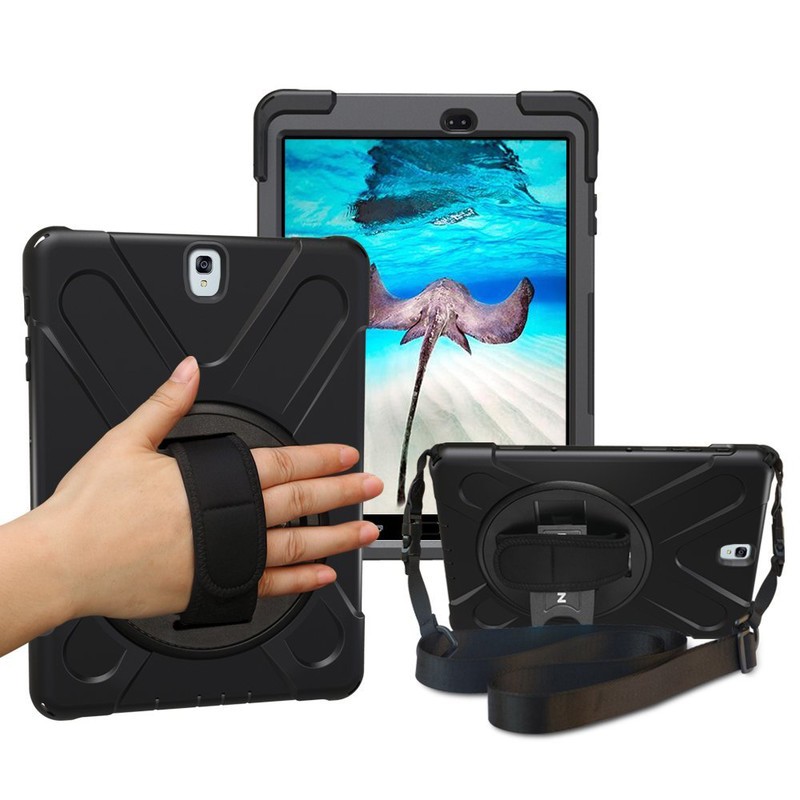
If you fancy using your tablet on the go — whether you take it with you whenever you leave the house, or simply like to walk and watch YouTube around your house — you want a case that ensures you won’t accidentally drop it.
This awesome case features a hand strap mounted on a swiveling mount that lets you firmly hold onto your Galaxy Tab S3 with less grip while still ensuring you won’t drop it. It also includes a shoulder strap that you can clip onto the case for easy carrying when you’re on the go. The case itself is dual-layered with a silicone and polycarbonate shells working together to provide excellent protection for your tablet. There’s still a kickstand hidden underneath the hand strap and it’s a super functional and affordable option at just $24.
See at Amazon
Fintie Keyboard Case

For those looking for a keyboard case at a discount price, Fintie has got you (and your tablet) covered.
This cover includes a Bluetooth keyboard that connects to your Tab S3 magnetically giving you access to a full QWERTY keyboard for all your typing desires.
Unlike other third-party keyboard cases you might have seen, Fintie used classic hard keys like you’d find on a laptop in lieu of those grody silicone keys that can get grimy and gross real quick.
The Fintie keyboard case is available in four colors along with a selection of cool print designs starting at just $32.
See at Amazon
ProCase Hard Shell Case

You don’t need to spend more than $15 for a reliable case for your tablet. Check out this sleek and stylish case from ProCase. Its a basic folio-style case with a synthetic leather finish. The cover can be folded over to create a kickstand for watching your favorite Netflix shows.
Starting at $13, you can choose your favorite color and rock your Tab S3 in style. It’s a great budget option for protecting your Galaxy Tab S3.
See at Amazon
Poetic TurtleSkin Rugged Case

Not a huge fan of all this folio cover business, but want something rugged to protect your tablet in case you drop it or it slips off your living room table? Consider the Poetic TurtleSkin case.
Much like a standard case for your phone, the TurtleSkin case is made of silicone material that’s both grippy and very shock resistant. On the back, it’s got a unique pattern of raised supports helps with grip (and also explains the TurtleSkin name). Most importantly, there are air vents that help keep your Tab S3 cool. You can get yours from Amazon available in four color options starting at just $11.
See at Amazon
MoKo Galaxy Tab S3 Slim Folding Cover Case

MoKo’s lightweight case for the Galaxy Tab S3 features a premium PU leather exterior that keeps your tablet protected from drops and scuffs, while the interior is lined with soft microfiber material to keep your screen scratch-free. Like most folio cases, you’re able to fold the front cover into a viewing stand with multiple angles. The front cover closes with magnets in the corners that allow you to wake your Tab S3 when the front cover is opened, but it won’t interfere with the S Pen. The S Pen also gets some attention itself, with MoKo including a stylus loop to ensure your S-Pen stays with your tablet.
All buttons and ports are left exposed so that there won’t be any fit issues with your accessories, and there’s also a convenient hand strap for one-handed use.
You can get this case in classic single color options or choose from more stylish designs — the choice is yours — for around $11.
See at Amazon
SUPCASE Unicorn Beetle Pro Series Case

SUPCASE makes some outstanding rugged cases for phones under its Unicorn Beetle branding, and you should expect the same level of protection for your Galaxy Tab S3 here as well.
SUPCASE offers full-body protection for your tablet, which includes a protective front casing with a built-in screen protector and a raised bezel to keep that beautiful screen protected. On the back, a dual-layer hybrid casing designed with a shock-absorbing TPU bumper will keep your tablet well-protected from any accidental drops and also features a pop-out kickstand for hands-free viewing.
All your ports and buttons are covered to prevent dust and debris from getting in, making this an ideal case for anyone who likes to take their tablet into the great outdoors. It’s also available in your chose of color — black, blue, pink, and white — so you can pick the one that fits your style. Get it starting at $20.
See at Amazon
BELK Leather Viewing Stand w/ Wallet

Featuring high-quality PU leather, BELK offers a very stylish option for keeping your Tab S3 protected. Your tablet is held in place by the rugged inner shell made of rigid polycarbonate, which leaves ample cutouts around the headphone jack and USB-C charging port.
What also sets this case apart from the others on the list is the slip pockets on the inside cover, which let you store credit cards, business cards or even IDs, along with a pocket for storing cash, passports — whatever you want to have on you at all times. There’s also elastic hand strap which lets you confidently hold your tablet with one hand.
This folio case also lets you fold up the front cover as a kickstand for hands-free viewing, and the whole thing is available in a couple stylish colors, all for $13.
See at Amazon
How do you keep your tablet safe?
During the first week of owning my first tablet, it slipped out of my hands and landed screen-side down. The display (and my excitement for the new device) was shattered. Have you had any tablet trauma stories that taught you to always keep your devices safe… or are you just careful?
Let us know in the comments!
Update August 2018: Updated pricing information. These are your best options for the Galaxy Tab S3!
How to load movies onto your Oculus Go

Loading videos on to your Oculus Go is a breeze. Here’s how to do it!
So you couldn’t resist that great price point and you bought yourself an Oculus Go. You’ve spent a little time with it. You’ve played with a few apps and gotten ensconced in a few games. However, you’re now ready to watch some movies on this modern wonder.
Whether you are working with a Windows system or MacOS, it’s a breeze to do. Here’s how!
Windows
Connect your Oculus Go to your PC with a micro USB cable.
In your headset, you will have to give your PC permission to gain access. Select Allow Access to Data.
Once you are connected to your PC, the Autoplay feature should open. If it does, select Open Device to View Files.
If Autoplay does not start, you can manually browse to Oculus Go Storage through File Explorer. It will be named VR-Headset.
Once you have your VR-Headset open, select Internal Shared Storage.
Open the folder named Movies.
You can now drag and drop videos into the storage of your Oculus Go.
MacOS
Download the File Transfer Tool from Android and install it on your Mac.
Connect your Oculus Go to your Mac with a micro USB cable.
Open the File Transfer Tool you just installed.
In your headset, you will have to give your computer permission to gain access. Select Allow Access to Data.
A folder named VR-Headset should automatically open

Now open the folder called Movies.

You can now drag and drop videos directly into your Oculus Go
Whether you’re watching some home movies or Avengers: Infinity War, you can now kick up your virtual feet and enjoy watching whatever you choose. The virtual world is now your oyster.
August 2018: This article was updated with the most recent information.
Oculus Go

- A parent’s guide to Oculus Go
- Oculus Go vs. Lenovo Mirage Solo
- Best Gamepad for Oculus Go
- Best Battery Backup for Oculus Go
Oculus Go 32GB
Oculus Go 64GB
Bose headphones, mesh networking, Bluetooth speakers, and more are all discounted today
Whether you’re looking for new tech gear or household items, we’ve got you covered.
We found plenty of great deals today that include big discounts on Bose’s QC35 Bluetooth headphones, the TP-Link Deco M5 mesh networking system, the Oontz Angle 3 Bluetooth speaker, and more! Most of these prices will be gone when the day ends, so don’t miss your chance to save big!
View the rest of the deals
If you want to know about the deals as soon as they are happening, you’ll want to follow Thrifter on Twitter, and sign up for the newsletter, because missing out on a great deal stinks!
Google Assistant: Everything you need to know
There’s a lot going on with the Google Assistant — let’s break down the important stuff.

In May 2016, we got our very first taste of the Google Assistant with the debut of Allo. The Assistant was a big draw to Allo at the time, with Google marketing it as a helpful bot that could make restaurant reservations, search the web, and more within your conversations.
Since then, the Assistant has gained heaps of new features and expanded to smartphones, tablets, speakers, and more. Google’s shown no interest in slowing down development for the Assistant, meaning that it’s likely here for the long-haul.
Whether this is your first encounter with it or you just need a quick refresher, here’s everything you need to know about the Google Assistant.
The latest Google Assistant news
August 3, 2018 — Google Home can now understand what room it’s in for contextual light controls
That title might make this not sound all that exciting, but this is actually pretty cool.
Up until now, asking your Google Home to “turn on the lights” or “tune off the lights” without specifying a certain room would result in every single connected light being turned on/off. However, a new update now allows the Google Home to only control the lights in the same room as it when this command is issued.
For example, if you have a Google Home assigned to the same room as the smart lights in your living room, asking that Google Home to turn on the lights will only activate the bulbs in the living room. You can still specify rooms with your voice, but this update should make these interactions a lot more natural.
Following numerous Redditors discovering this feature, Google confirmed to Android Police that this is indeed rolling out to users and will be making its way to everyone over the coming days.
July 27, 2018 — You can now schedule custom routines for specific times/days
Building upon Custom Routines that were added to Google Assistant earlier this year, users can now schedule these routines to go off at a certain time/day. Previously, custom routines you made could only be used after saying a specific command.
While creating a routine, you’ll now see a new “Set a time and day” option under the “When” section. Here, you can choose the time you want it to play and what day(s) it should repeat.
There are a lot of ways to take advantage of this, with one example being to have your coffee pot turn on, crank up the AC, and hear about the weather as you’re waking up without having to ever speak to your Google Home. Neat!
All the important details
Google Now paved the way for Google Assistant


The Google Now page compared to the new Google Feed.
Before there was the Google Assistant, we had Google Now. Google Now was introduced to the world all the way back in 2012, offering contextual info through the Google Now page and helpful answers to random questions with an “OK Google” voice command.
A lot of what made Google Now so great can still be found in the Google Assistant today, with the exception of the Google Now page. The Google Now page used to be home to cards showcasing the weather, information on packages that had shipped from online orders, boarding passes, and more. It’s since been replaced by the Google Feed – a collection of news stories Google thinks you’ll be interested in – and it’s definitely the biggest departure between the two services.
The Google Assistant as a whole is still more powerful than Google Now ever was, but long-time Android users like myself are still mourning the loss of that Now page. RIP, old friend.
Read more: Google Now is being left to wither and die as Google Assistant takes the focus
It’s available on just about everything
In just a few short years, the Google Assistant’s gone from being exclusive to a now-failed chat app to being integrated into just about anything you can think of.
You’ll find Google Assistant built right into most Android phones, it’s the star of the show for the Google Home lineup, and it’s even making its way into sound bars.
Here’s the full list of devices with Google Assistant
Setting up the Google Assistant is as easy or complex as you want
When you set up a device for the first time that has the Assistant, getting started is pretty simple. Accessing it is just a voice command or tap away depending on what gadget you’re using, but if you want to really fine-tune your experience, Google’s got you covered.
Take a quick dive into your Assistant settings and you’ll find options for just about everything – including your weather preferences, changing the Assistant’s voice, retraining your voice model, picking out preferred news sources, and much more.
How to set up and customize Google Assistant
Google Assistant is available in multiple regions and languages
Of course, a smart voice assistant isn’t any good if you can’t actually use it. Fortunately, Google Assistant will be available in 52 countries —adding 38 countries this year — and 17 languages by the end of 2018.
More: Google Assistant will expand to 38 countries and 17 languages in 2018
Google Home’s the premier way to get the Assistant in your house (at least for now)

It’s great to have the Google Assistant on your phone, but if you want to truly experience just how helpful it can be, you’ll want to consider picking up a Google Home.
Google Home is Google’s line of smart speakers that put the Assistant on full-display, allowing you to control smart devices, ask random questions, set timers, play music, and more by just using your voice.
You can spend as little as $49 for the Google Home Mini, $129 for the original Google Home, or a whopping $399 for the Google Home Max.
However, as great as the Home series is, don’t forget that Smart Displays are just on the horizon.
Announced at CES 2018, Smart Displays are essentially smart speakers with the Google Assistant and a touch screen display that can show you helpful visuals when talking to them. It’s basically Google’s answer to the Amazon Echo Show and Echo Spot, and we can’t wait to see more from them.
Everything you need to know about Google’s Home speakers
Then again, is an always-listening speaker the right fit for your home?
However, the convenience of a Google Home (or any smart speaker for that matter) does come at the cost of privacy. Speakers like the Google Home are “always listening”, meaning they’re constantly on the lookout for a hot word to know when you’re talking to it (such as “Ok, Google” and “Hey, Google”).
This means the microphone on a Google Home is always active, but it’s not necessarily storing all the audio it hears when it doesn’t detect its hot word.
Most all speakers allow you to restore some privacy by being able to mute the microphone, but if you want to start asking the Assistant questions, you’ll need to unmute it first.
To learn more about these “always listening” speakers, I’ll pass the mic over to Jerry
Big upgrades are coming to the Assistant on Wear OS


Switching gears for a second, the Google Assistant on Wear OS (formerly Android Wear) is about to get a big upgrade.
In the near future, the Assistant on Wear OS will support Assistant Actions (basically apps for the Assistant) and give you the option to hear its responses through your watch’s speaker or a pair of connected Bluetooth headphones.
Along with this, Google will be adding something called “smart suggestions.” After asking the Assistant for the weather, for example, you’ll see little bubbles for “weather tonight”, “use celsius”, and more so you can continue the conversation with just the tap of your finger. Google Assistant on Android offers something similar, and it’s a great tool to have.
IFTTT supercharges the Assistant’s usefulness

IFTTT (If This Then That) is a powerful online tool that allows you trigger something (that) if a certain event (this) happens. You can connect IFTTT to the Google Assistant to create your own recipes using this formula, and it can allow for some incredibly helpful combinations.
Some of our favorite uses for IFTTT and the Assistant include adding contacts to your Google account, setting your Google Calendar status to Busy for a certain period of time, and much, much more.
Getting started with IFTTT can take some time and patience if you’re new to it, but once you’re all set up and ready to go, it can prove to be a lifesaver.
How to connect Google Home and IFTTT to do amazing things with your connected tech
You’ll get the same experience no matter what devices you use
With so many devices capable of running the Assistant, it’d be easy to think that the experience you get on one gadget would be different from another. This is something that Google struggled with for a while at first, but we’re finally in a position where the Assistant experience you get on a smart speaker, for example, is the same you’ll get on your phone.
There are a handful of features here and there that still create for some discrepency, but for the most part, the Assistant you use on your Pixel 2 is the same one found on Google Home.
Google Home and Google Assistant finally offer the same experience
Google Duplex is actually going to be a thing

Google showed off Duplex — Google Assistant making natural-sounding phone calls on your behalf — at I/O 2018, but quickly noted that it was just an experiment. Flash forward a couple months, and Google announced that certain users have started testing Duplex, and a public release will be here in the next few months. Before you know it, Google Assistant will be able to book hotels, dinner reservations, hair appointments and more without you lifting a finger.
More: What is Google Duplex?
Updated July 2018: Added the Google Duplex and language support sections, as well as links to recent Assistant news.
MacRumors Giveaway: Win Lightning Earbuds With Charging Port From Tech Armor
For this week’s giveaway, we’ve teamed up with Tech Armor to offer MacRumors readers a chance to win Tech Armor Lightning Earbuds that come equipped with an extra Lightning port so you can listen to music while your iPhone is plugged in and charging.
Apple removed the headphone jack from the iPhone 7, and since then, iPhones require headphones that work via Lightning, over Bluetooth, or with a Lightning to 3.5mm headphone jack adapter. These Lightning headphones from Tech Armor are ideal for all devices without a headphone jack, and they also work with iOS devices that are still equipped with a 3.5mm headphone jack.
With rumors suggesting the 2018 iPad Pro models won’t feature a headphone jack either, 3.5mm headphone jacks may be further phased out, making Lightning headphones like these even more useful. Lightning headphones can be inconvenient, but the sound quality is better and the addition of a port on Tech Armor’s solution fixes the charging problem.

Tech Armor’s Lightning headphones, priced at $70, are Made for iPhone certified and plug into the Lightning port of an iPhone or iPad. A Lightning port is built into the inline cable, so you can charge your iPhone or iPad while you’re listening to music or playing a game, and they’re resistant to tangling.

A microphone is included so you can use the headphones for phone calls, and there’s also a remote for controlling the volume, answering/ending calls, or playing/pausing content. Tech Armor includes multiple earbud caps in the package to fit a wide range of ears.

We have ten sets of Tech Armor’s Lightning earbuds to give away to MacRumors readers. To enter to win, use the Rafflecopter widget below and enter an email address. Email addresses will be used solely for contact purposes to reach the winners and send the prizes. You can earn additional entries by subscribing to our weekly newsletter, subscribing to our YouTube channel, following us on Twitter, or visiting the MacRumors Facebook page.
Due to the complexities of international laws regarding giveaways, only U.S. residents who are 18 years or older and Canadian residents (excluding Quebec) who have reached the age of majority in their province or territory are eligible to enter. To offer feedback or get more information on the giveaway restrictions, please refer to our Site Feedback section, as that is where discussion of the rules will be redirected.
a Rafflecopter giveawayThe contest will run from today (August 3) at 11:00 a.m. Pacific Time through 11:00 a.m. Pacific Time on August 10. The winners will be chosen randomly on August 10 and will be contacted by email. The winners will have 48 hours to respond and provide a shipping address before new winners are chosen.
Tag: giveaway
Discuss this article in our forums
Deals: HomePod for $299.99, iPhone SE Free With AT&T Next, and New MacRumors Exclusive RAVPower Sale
Well-known accessory company RAVPower has launched a new series of promo codes this week, available exclusively to MacRumors readers. This crop of codes includes savings on fast wireless charging mats, portable chargers, and car chargers, all of which we’ve listed below. If you find something you like be sure to make your purchase before the codes expire in one month, on Sunday, September 2 at 11:59 p.m. PT.
Note: MacRumors is an affiliate partner with some of these vendors. When you click a link and make a purchase, we may receive a small payment, which helps us keep the site running.
Note: It appears that Amazon will occasionally default the seller option to a third-party and not Sunvalley Brands (RAVPower’s parent company). To ensure that the codes work, double check that the displayed seller is Sunvalley Brands, and if it isn’t then click the “Used & New” button at the top of the product page, find Sunvalley Brands, and then click Add to Cart.
-
40W Dual USB Car Charger – $10.49 with code RUMORSVC7, down from $13.99
-
10,000 mAh Portable Solar Charger – $19.99 with code RUMORS10K, down from $29.99
-
Fast Wireless Charger with HyperAir – $21.99 with code RUMORS134, down from $29.99
-
16,750 mah Portable Charger – $21.99 with code RUMORSPB010, down from $34.99
-
20,000 mAh USB Battery Pack – $26.99 with code RUMORSPB006, down from $39.99
-
25,000 mAh Portable Solar Charger – $39.99 with code RUMORS25K, down from $52.99
-
26,800 mAh USB-C Portable Charger – $45.99 with code RUMORSPB006, down from $58.99
In other deals, Costco today kicked off a notable sale for its members on Apple’s HomePod smart speaker, marking the device down to $299.99 in White and Space Gray, from a regular price of $349.99. While HomePod has been available at a cheaper price point thanks to sitewide sales at eBay and other retailers, this is one of the lowest straight discounts for a new version of the smart speaker we’ve seen, particularly compared to its current full retail price at places like Best Buy and Walmart.

At AT&T, customers can get the iPhone SE 32GB for free when they buy the smartphone on AT&T Next and add a new line of service onto their plan. AT&T says this is a limited-time offer and is not available for customers upgrading from an existing smartphone. Head over to AT&T to find out more information on the offer before it expires.
As the new school year approaches, more companies are opening up back-to-school sales for customers and today the latest addition to this list is Brydge. Under this sale, users can get the Brydge 9.7 for iPad at $99.99, down from $129.99, and the Brydge 7.9 for iPad mini at $39.99, down from $99.99. Check out Brydge’s back-to-school sale page for the full list of discounted items, also including portable batteries, cases, and more.

Lastly, Best Buy has a nice deal of the day going on today for anyone looking to add another Bluetooth speaker into their home, with the retailer marking down the Beats Pill+ to $113.99, compared to its $129.99 price tag at places like Target and Walmart.
Anyone who is interested in jumping into the Alexa ecosystem — or add more products to their existing set-up — should also take a look at Best Buy’s 2-day Amazon sale, with savings on Echo Show ($129.99, down from $229.99), 2nd-Gen Echo ($69.99, down from $99.99), Fire TV Cube ($89.99, down from $119.99), and more.
Head over to our full Deals Roundup for more of this week’s ongoing sales and discounts.
Related Roundup: Apple Deals
Discuss this article in our forums
Dual-SIM Dual Standby Feature May Be Limited to Version of 6.1-Inch iPhone Available Only in China
Rumors have suggested Apple is planning to introduce dual-SIM dual standby functionality in some 2018 iPhone models, which would allow two SIM cards to be used at once, but it appears this functionality could perhaps be limited to China.
According to a new report from Taiwanese site Economic Daily News [Google Translate], a Foxconn source has suggested the dual-SIM dual standby feature will available in a version of the 6.1-inch low-cost LCD iPhone that’s “a unique model for China.”
Dummy models depicting design of Apple’s three rumored 2018 iPhones
Production on the new iPhones slated for a September debut is well underway, with Foxconn employees suggesting Apple is producing four unique model numbers (801, 802, 803, and 804) for the upcoming iPhones, hinting at the extra two SIM model. The site suggests that 801 and 802 correspond to the 5.8 and 6.5-inch iPhones, while the latter two numbers are for separate 6.1-inch LCD iPhones.
Economic Daily News says that Apple is planning to introduce a dual-SIM dual standby iPhone in China because it is common for people in China to have more than one mobile phone number. As many as three to four billion consumers use dual SIM cards, and many smartphones in China already offer support for more than one SIM card. To remain competitive in the Chinese market and lure customers from Android devices, Apple also needs to support the feature.
Respected Apple analyst Ming-Chi Kuo has also suggested that Apple is working on two 6.1-inch iPhone models for launch in 2018, one with dual-SIM dual standby and a second with a single SIM. While he suggested Apple might make the dual-SIM dual standby model more expensive, he did not indicate that it would be limited to China.
Kuo believes that Apple could price the dual-SIM dual standby 6.1-inch iPhone at $650 to $750, while selling the single SIM model at a lower price, perhaps $550 to $650. Both models would also be sold alongside more expensive OLED models in 5.8 and 6.5-inch sizes, for a three-iPhone lineup.
In past notes targeted at investors, Kuo has also said that the 6.5-inch iPhone could include dual-SIM dual standby, but today’s report from Economic Daily News does not mention the possibility.
A separate rumor from the Chinese supply chain has indicated that 2018 iPhones will feature both an embedded Apple SIM and a traditional SIM card tray, so it’s possible that dual-SIM dual standby will be available in non-Chinese devices through this implementation method. The Apple SIM is not available in China, so China would require a separate device with two physical SIM slots.
If this is the plan, though, it is not clear why Apple is not also producing a 6.5-inch iPhone with physical dual-SIM dual standby functionality for China, as plus-sized iPhones are highly popular in the country.
Past rumors suggest the upcoming 2018 iPhone models will use Intel’s XMM 7560 modem chips for faster LTE speeds than are available in the current crop of devices. There were some rumors indicating Apple might also use Qualcomm’s X20 modems, but Qualcomm recently said that Apple will not be using Qualcomm chips in its 2018 iPhone lineup.
Apple’s specific plan for the SIM situation in the 2018 iPhones is a bit murky at this point based on the different rumors we’ve heard, but the new devices are expected to debut in just about six weeks if Apple sticks to its traditional September event, so we don’t have too much longer to wait to find out just what Apple has in store for iPhones in 2018.
Related Roundup: 2018 iPhones
Discuss this article in our forums
Following trailblazer OnePlus, Realme becomes a real smartphone brand
A new smartphone brand has emerged, and although this in itself isn’t unusual, it’s the company’s origins that make it worthy of your attention. Realme is its name, and despite having already launched its debut phone, it only established itself as a standalone company at the beginning of August. Realme’s founder is Sky Li, the former vice president in charge of international mobile business at smartphone company Oppo.
It’s this connection that makes Realme of particular interest. The last time two Oppo alumni got together to form a smartphone company, we ended up with OnePlus, and since that time in 2014, we have continued to be impressed by its smartphones. While there’s no guarantee Realme will have the same eventual impact as OnePlus, its beginnings make it noteworthy, and its early performance shows potential for the future.
Established as a company on May 4, 2018, Li published an open letter on Facebook introducing the brand on July 30, outlining his vision for creating devices aimed at young people, emphasizing style and technology. This reminds us of Honor’s modus operandi, which has allowed it to find considerable success. No one has to wait for Realme’s first phone either, as it has been released already. The Realme 1 hit India in May, and the first batch sold out in two minutes. The brand has since gone on to capture a1.4-percent market share in India.
The Realme 1 costs the equivalent of $200, for which you get a MediaTek Helio octa-core processor, 6GB of RAM, a 6-inch screen with a 2,160 x 1,080 pixel resolution, and a 13-megapixel rear camera. The phone runs Android 8.1, and interestingly comes with ColorOS over the top, which is Oppo’s custom user interface used on its own range of devices. When OnePlus launched, it did so with a device that was available only online (as is true today) and with the Android-based Cyanogen OS software onboard; but it caused controversy with its invitation system at the time.
How about Realme’s further plans? According to the company, the next phone will also launch in India, with further launches in other Asian countries coming over the remainder of 2018. It’s not committing to any time frame for the U.S, the U.K., or Europe; but does indicate a global presence is possible, and says it wants to build a “solid foundation” in each country where its products are sold.
For now, we’re unlikely to be able to easily buy a Realme phone; but all that could change in the future. It will be interesting to follow the company’s progress, and see if lightning can strike twice in the smartphone world.
Editors’ Recommendations
- A cheaper MacBook Air could still arrive in late 2018
- Google Assistant now lets you set Custom Routines to help optimize your life
- OnePlus 6: Everything you need to know
- Everything you need to know about the 6-inch OnePlus 5T
- When is your phone getting Android 8.0 Oreo? We asked every major manufacturer
Apple found guilty of infringing WiLan patents, must pay $145 million
Julian Chokkattu/Digital Trends
Apple was ordered by a California jury on Wednesday, August 1, to pay WiLan, a Canadian patent licensing company, a sum of $145.1 million for damages as a result of patent infringement. The jury backed up WiLan’s claims that some of Apple’s iPhone models infringed on two WiLan wireless communications technology patents.
The patent infringement concerns technology used in Apple’s iPhones, specifically patents concerning “a method and apparatus for allocating bandwidth in a broadband wireless communication system” (U.S. patent 8457145), and another patent concerning “communication systems and to systems and methods for implementing adaptive call admission control” (U.S. patent 8537757). Apple apparently intends to appeal the decision, which likely means the case will bounce around courts for a little while yet.
This is not the first time the two companies have butted heads over patents. In 2013, a Texas jury found Apple not guilty of infringing on another of WiLan’s patents — that time over a patent covering CMDA and HSPA wireless communication technologies.
WiLan, a Quarterhill company, was originally founded in the 1990s as a producer of broadband wireless technologies, but shifted over to licensing its large portfolio of patents in 2013, after some financial difficulties. WiLan styles itself as being “one of the most successful patent licensing companies in the world”, and that it “helps companies unlock the value of intellectual property by managing and licensing their patent portfolios.” However, other sources have gone as far as to suggest that WiLan now makes a living by successfully chasing down companies like Apple over patent issues.
Of course, Apple is no stranger to legal issues over patents. Apple’s and Samsung’s seven-year tussle over the status of patents in Samsung’s Android phones has only just ended, while another case concerning the dual-camera tech in the current line of iPhones is currently ongoing. It has faced even more serious threats than just other companies too, and Apple is facing possible further challenges from the French government. Apple has taken to the offensive in other cases, suing processor manufacturer Qualcomm over allegedly exorbitant royalty fees.
We have reached out to Apple and WiLan for comment on this case and will update if we hear back.
Editors’ Recommendations
- Apple could implement one of the Google Pixel 2’s coolest features
- Apple vs. Qualcomm: Everything you need to know
- The iPhone’s viewfinder might soon let you see both cameras simultaneously
- Patent hints that the iPhone could one day have built-in handwriting recognition
- Apple patents hint at smarter iPhone camera, blood pressure-sensing Watch band
Xiaomi is making a super-cheap feature phone with A.I. and 4G
In something of a surprise move, Xiaomi announced a new feature phone for the Chinese market. Launched through a crowdfunding campaign, the Xiaomi Qin phone will come with access to A.I., a 4G antenna, and a USB-C port — all for just 199 Chinese yuan (about $30).
Pronounced “shin”, the Qin features a T9 keypad, a 2.8-inch screen running a 320 x 240 resolution, and an extremely retro design that harkens back to the golden age of Nokia’s 8810 phone. Like the 2018 reboot of Nokia’s phone, the Qin will have access to some artificial intelligence capabilities (including real-time translation, according to some sources), Bluetooth, Wi-Fi, and 4G connectivity on some models.
The Xiaomi Qin will come in two models. The first, the Qin 1, is the lower powered of the two models, with a MediaTek MT6260A chipset, a single ARM7 CPU core, 8MB of RAM, and 16MB of storage. Yup, that’s MB, not GB. The Qin 1 will only have access to 2G networks, and not have access to GPS or LTE, but it will have Wi-Fi and Bluetooth 4.2 connectivity. It will run on an operating system known as “Nucleus”.
The second, more powerful handset is the Qin 1s, which sports a Spreadtrum SC9820 chipset, two 1.2 GHz Cortex-A53 cores, and a comparatively mighty 256MB of RAM and 512MB of onboard storage. The Qin 1s has access to 4G networks and GPS, and will run on an operating system only referred to as “MOCOR5.” Aside from sounding like one of Captain America’s villains, there is little else known about this OS.
Both handsets will be equipped with a 1480mAh battery that Xiaomi claims will last up to 15 days between charges, making the USB-C charging seem like serious overkill, and also comes with dual-SIM support, an infrared zapper, and a bunch of other features.
The biggest difference between this and other feature phones? Neither model of the Qin phone has a camera on the front or back, or a headphone jack. Those are both major departures for the feature phone crowd and it’s interesting that Xiaomi felt neither were needed any longer.
The Xiaomi Qin is only currently available as a part of the crowdfunding campaign, and will likely never surface outside of China. However, it’s made some of a splash there — the crowdfunding campaign apparently hit 1 million yuan (about $146,000) within an hour of going live, passing the funding target a few times over.
The Qin 1 is available from just 199 Chinese yuan (about $30), while upgrading to the Qin 1s takes the price up to 299 Chinese yuan (about $45). The phone will release on September 15.
Editors’ Recommendations
- The Nokia X5 is a budget phone with a premium glass body and a notch
- The Xiaomi Mi Max 3 has a tablet-sized screen and a huge battery
- Everything we know about the Nokia 6.1 Plus
- New Nokia 5.1, 3.1, and 2.1 boast updated chipsets and bigger displays
- Nokia 7 Plus review
 AIVAnet