


Network routers with roaming enabled are likely susceptible to a new attack
Hashcat creator Jens Steube accidentally discovered a new method to break into network routers while researching new ways to attack the new WPA3 security standard. He stumbled onto an attack technique capable of cracking hashed passwords based on the Wi-Fi Protected Access Pre-Shared Key (WPA-PSK) security protocol.
For starters, WPA is a mechanism in wireless networking that encrypts and decrypts data passed between the router and a connected device. The PSK aspect applies to the network’s password or passphrase, as the router creates a unique 256-character key that is shared between both devices. These keys change periodically to prevent hackers from infiltrating the network.
In a typical attack, the hacker must be in the range of a router and a connecting wireless device, and patiently wait for the latter device to log onto the network. When the wireless device begins the connection process, the hacker must run a tool in the exact same moment to capture the full four-way “authentication handshake” made between the router and the device.
That’s not the case in the new attack. With this method, the hacker needs only a small portion of the handshake called the Robust Security Network Information Element (RSN IE). Even more, the hacker can connect directly to the router and access the needed data rather than lurk in the background and wait for someone to connect.
“At this time, we do not know for which vendors or for how many routers this technique will work, but we think it will work against all 802.11 i/p/q/r networks with roaming functions enabled (most modern routers),” Steube says.
The login aspect of connecting a wireless device to a router consists of a set number of steps or frames. The RSN IE is an optional field within one of those steps that contains the Pairwise Master Key Identifier, a networking component that verifies that both the router and wireless device know the PSK-based password. This component is the new method’s attack vector, retrieving the stored PSK-based password.
According to Steube, the attack requires three available tools: Hcxdumptool v4.2.0 or higher, Hcxtools v4.2.0 or higher, and Hashcat v4.2.0 or higher. The first tool on the list grabs the necessary connection frame and dumps it into a file. The second tool converts the saved data into a format that can be read by Hashcat. This third tool cracks the encryption.
Ultimately, this method reduces the time used to access the stored passwords but doesn’t lessen the time needed to crack the encryption protecting these passwords. The cracking duration depends on the password complexity, thus if router owners never change the password from the factory default, the password should take no time to crack.
To better protect yourself from a possible attack, change the default password on your router. Using your own password is supposedly better than allowing the router to create one for you, and always use a variety of characters: Lower and upper-case letters, numbers, and symbols. If you’re not great at remembering passwords, Steube suggests using a password manager.
Editors’ Recommendations
- New Spectre attack lets hackers steal data without having to run local code on PCs
- How to reset your router
- After 14 years, a new generation of Wi-Fi security is coming. Here’s what to know
- Google Chrome now consumes more memory due to a new Spectre fix
- How to buy a Wi-Fi router
Take 15% off any eBay order over $25 today only
Save big today only!
Today eBay is taking 15% off just about everything with the code PRONTO15. You will need to make a minimum purchase of $25. It has a maximum potential savings of $100, so you will continue to save 15% when buying up to $667 worth of goods. You can only use the code once on one shopping cart, but you can use the code on everything in that cart instead of just one item. This deal expires at 1 a.m. Eastern, August 9.

Today’s deal is more-or-less identical to the 15% off sales we’ve seen recently, and while that’s not quite the best sale we’ve seen from eBay it does mean you have another chance to save on the sort of products we really don’t see go on sale very much. The only exclusions to this sale are warranties, protection plans, and any items from the following categories: Coins & Paper Money, Gift Cards & Coupons, and Real Estate.
If you’re a little unsure about eBay itself, remember that this sale isn’t limited to just auctions. You don’t have to bid on your favorite items and wait to see who else bids. We’re talking about “Buy It Now” products. Also, many major retailers like Best Buy, Newegg, Dyson, and KitchenAid have eBay storefronts where you can find a lot of the items from their main web sites. Stick to those stores, top-rated sellers, and people with a lot of great feedback from the last six months or so. You’ll be taking a lot less risk that way.
A few of the best ways to save include:
- Bose QuietComfort 35 II wireless headphones – $297.49 (from $350)
- Xbox Live Gold membership 12 months – $42.49 (from $50)
- Nintendo Labo Robo Kit – $66.29 (from $78)
- Dyson V6 Motorhead cordless vac refurb – $152.99 (from $180)
- Madden NFL ’19 Hall of Fame Edition – $67.99 (from $80)
See at eBay
5G Moto Mod: Everything you need to know

To unlimited plans, and beyond.
Alongside the Moto Z3, Motorola, along with Verizon and Qualcomm, announced a 5G Moto Mod that’s set to be released in early 2019.
A lot of importance was placed on this announcement, but what’s the big deal? And should you buy a Moto Z3 just so you can be among the first people in America to connect to the next-generation wireless network? Let’s dive into it.
What exactly is this thing?

It’s a Moto Mod, one of the now-plentiful accessories, or modules, that snap via magnetic pins to the back of a Moto Z phone. The line debuted in 2016 alongside the original Moto Z and Z Force, and compatibility has been retained through 2019 when the 5G Moto Mod is set to debut.
So what is it? It’s a relatively chunky piece of plastic that snaps onto the back of the Moto Z3 and “takes over” the cellular connectivity of the phone. Along with the Moto Z3, which is a Verizon-exclusive handset, it offers compatibility with the carrier’s nascent 5G network, which is set to debut in four cities — Houston, Los Angeles, Sacramento, and another unnamed location — by the end of 2018.
So what’s the big deal with 5G?

5G is the next generation of wireless technology, and it’s set to make a bunch of improvements to the speeds at which our phones connect to the networks and the latency at which they communicate with the internet. In other words, faster uploads and downloads, and less time waiting for those connections to begin.
This particular mod is only compatible with Verizon’s 5G network, which is being built on a technology called millimeter-wave, or mmWave. The idea here is that at much higher frequencies than our current networks operate — we’re talking microwave frequencies, between 28GHz and 39GHz — there’s more “space” for the signal to breathe, allowing for incredible speeds. A typical wireless channel in the mmWave range is 100Mhz wide, between five and 20 times wider than our current LTE networks, which typically operate between 600MHz and 3.5GHz.
5G is also much more flexible than our current networks, allowing for all kinds of low-latency, real-time operations like lag-free VR, driverless car communication, and remote surgeries through high-resolution cameras and robotics. Of course, those applications will come later on in 5G’s life cycle. For now, though, when we talk about 5G on phones, we’re talking about faster speeds and lower latency.
So how fast will the 5G Moto Mod go?

According to Motorola, the 5G Moto Mod will support speeds of up to 5Gbps, or five times that of the fastest LTE networks in the U.S. You may have seen Qualcomm, the supplier of the 5G modem in the Mod, tout the “gigabit” capabilities of its recent LTE modems. Well, this is five times that speed. And that’s thanks to the Snapdragon X50 modem inside.
Now, there are a few caveats. The high frequencies that these mmWave 5G networks operate prevent signals from traveling very far. That means, at least for the first few years, you’re unlikely to get a 5G signal while inside buildings. They’re also more susceptible to interference than lower-frequency LTE networks, though the presence of four 5G antennas inside the Moto Mod is an attempt to prevent such interference.
What about when you don’t have a 5G signal?

Good point. When Verizon releases the 5G Moto Mod in early 2019, there will only be a few places that offer 5G signal. So what do you do when you’re out of range of those super fast speeds? Well, you could take the Mod off and return to using the Moto Z3’s regular X16 LTE modem, but there’s an alternative.
See, there’s also a fallback X24 LTE modem in the 5G Moto Mod that’s two full generations newer than the one in the Z3’s Snapdragon 835. The X24 supports 2Gbps LTE and should perform significantly better than the one in the phone itself, offering higher average speeds and better reception all-round.
Does the modem in the phone turn off when the Mod is attached?

Yes, sort of. It goes into a low-power state, but it can’t turn off completely. That’s because in its current configuration, 5G networks only transmit data — they can’t do phone calls. That means when your Moto Z3 receives a call, the X16 modem inside the phone kicks back into gear and shuts off when the call ends.
When you remove the Mod entirely, the phone’s modem once again takes over.
What else can the Mod do?

Because 5G is pretty power hungry, there’s a 2,000mAh battery inside that feeds the monster. It’s unclear whether the phone’s battery will take over once the Mod’s is depleted; Motorola says it’s still figuring that out.
There’s a SIM card in the Mod, too, separate from the one in the phone. It’s unclear right now what the relationship between the phone and Mod will be — again, Verizon and Motorola are figuring this out in real time — but it seems like the Mod will pair with a specific phone, so it may not be usable with another Moto Z3 unit.
Will the Mod work with other Moto Z phones?

Right now, no. The Mod is built specifically for the Moto Z3, and at this time I believe it will need to be activated for a particular phone itself. That means you may not be able to swap the Mod if there’s more than one Moto Z3 in the family. We’ll update this bit as we learn more.
Do you know pricing and availability?

Not right now. The 5G Moto Mod is only going on sale in “early 2019,” according to Motorola, and Verizon isn’t saying much about its own plans at this point. The reality is that Verizon’s 5G network isn’t even close to ready for prime time, and the demos Motorola showed us of the Mod were very early, using unfinished, buggy prototype hardware. Both companies have a long way to go before the 5G Moto Mod is commercially ready.
Why is Motorola even making this?
Verizon and Motorola have a very special relationship dating back to the early Droid days. Back then, Verizon needed an iPhone competitor, and Motorola was one of the biggest handset makers in the world. But since then, Motorola’s leverage has weakened, and it’s forced more closely to meet the demands of its carrier partners. That means when Verizon wants to be the first to market with a 5G mobile product, it turns to Motorola’s scalable, flexible Mods platform for functionality.
In truth, it’s kind of a brilliant compromise, one that favors Verizon and gets Motorola some much-needed positive press. At the same time, the 5G Moto Mod is unlikely to sell in volume, since it’s tied to a phone that, to put it mildly, isn’t going to fly off the shelves.
What next?
We wait until Verizon launches its 5G network in four cities by the end of 2018. The initial rollout will be for home broadband using specialized hardware in specific areas. Once the kinks are worked out, the carrier will expand its 5G footprint to mobile devices, and that’s when the 5G Moto Mod can launch.
I wouldn’t be surprised if “early 2019” is more like March or April, and I still wouldn’t be surprised if that release date gets pushed back to the summer of 2019. It doesn’t make any sense for Verizon to market a product for a network that’s not finished, and with any network rollout, there are inevitably going to be bugs to work out.
Are you excited for 5G?
5G is a big deal — or at least it will be. For now, though, it’s still pretty theoretical. Still, the potential is quite exciting!
Are you excited for it? Let us know in the comments below!
Moto Z3 hands-on preview: A Verizon exclusive with 5G flourish
How to take screenshots in Android Pie
Here’s everything you need to know about screenshots in Android Pie!

Android Pie brings a lot of new features and changes to our favorite mobile OS, and one of the most basic elements of Android — taking screenshots — hasn’t been left out.
Google’s vastly improved the screenshot-taking and editing experience in Android Pie compared to past versions, and today, I’m going to walk you through all the changes to keep an eye out for.
Without further ado, let’s get started!
Quick note — the steps shown below are based on a Pixel 2 running Android Pie. The core elements should remain intact for your device, but depending on the manufacturer, things could look slightly different from phone to phone.
How to take a screenshot
In Android Pie there are two ways to take a screenshot — the old-fashioned way and a new method.
Starting first with the combo we’ve known for years now, you can take a screenshot by holding the power button and volume-down buttons at the same time. That hasn’t changed at all in Pie, and while it still works just fine, the new way might be even easier for you.
Hold down the power button until you see the pop-up menu on the left.
Tap Screenshot.
Once you do this, a screenshot will be captured.
How to edit a screenshot using the built-in Markup tool
No matter how you take a screenshot in Android Pie, there’s now a built-in feature called Markup that allows you to quickly edit screenshots right after you take them.
After taking a screenshot, you’ll get a notification. From that notification, tap the Edit button.


From here, you’ve got a full set of tools for making whatever edits you’d like. Here’s a quick overview of what you can do:
- Crop your screenshots by dragging any of the arrows found on all four corners.
- Write on screenshots with a pen and highlighter tool
- Change the color of the pen/highlighter (black, red, yellow, green, blue, purple, white)
- Undo and redo edits


After you’re done editing a screenshot, you can either save it to Google Photos or instantly share it wherever or with whomever you’d like.
That’s it!
With that said, that’s everything you need to know when it comes to taking screenshots on a phone running Android Pie.
Have more questions? Leave a comment down below and let us know what’s on your mind!
Android Pie: Everything you need to know about Android 9
Android 9 Pie
- Android 9 Pie review: Greater than the sum of its slices
- Everything you need to know about Android 9 Pie!
- Will my phone get Android Pie?
- How to get Android 9 Pie on your Pixel right now
- Join the Discussion
Set yourself up for success every morning with this Coffee Gator gear up to 30% off today
Magic bean juice.

Tons of Coffee Gator gear is on sale today at Amazon. These are all part of Amazon’s daily deals and you can save up to 30% off. The gear includes everything from travel mugs to pour over coffee makers, and it’s all made by Coffee Gator.
This personal travel mug is down to $17.70 as part of this sale. It normally sells for around $27 and has never dropped this low before. It actually works as a pour over coffee maker, too, so you do the pour over thing and your coffee comes in a container that’s ready to travel.
This vacuum-insulated French Press coffee maker has dropped to $29.57. That’s about $14 lower than what it usually goes for and one of its best prices ever.
Check out the full sale before it expires at the end of the day.
See at Amazon
The $110 TaoTronics standing desk converter transitions smoothly between sitting and standing
Up, down, up, down, up, down.

The TaoTronics height adjustable 32-inch standing desk converter is down to $109.99 with code WGZDKREC on Amazon. This desk converter is $170 without the code and was selling around $150 until late July. We have never seen it go this low directly or with other codes.
The device uses a gas spring hovering system so it can adjust smoothly between a sit or stand position. It rises and folds vertically from 6.3 inches to 17.3 inches. The work surface is large enough for dual monitor setups or setups that include a computer and a laptop. You don’t have to spend a lot of time putting it together or anything either because it works right out of the box. Users give it 4.7 stars based on 639 reviews.
See at Amazon
Google Daydream: The Ultimate Guide!

Delivering an excellent way to enjoy VR from the comfort of the couch.
Google is continuing their efforts to deliver a superb virtual reality (VR) experience that is accessible with just your phone, through a new platform they call Daydream. With Cardboard, they introduced a new generation of users to simple and inexpensive VR. The first Daydream headset was absurdly comfortable and started with access to tons of great games and experiences for you to explore. Now, with the next Daydream upgrade, it’s obvious the goal was to refine that experience into something stellar for everyone.
Getting started

You finally broke down and bought yourself a Google Daydream, congratulations! Or, maybe you’re looking into all the reasons you should get one? Regardless, we’ve got all the starting information you’ll need to make the introduction process the easiest it could be. That means it’s time to test out all the things perfect for getting you accustomed to VR. From everything you need to know about your new device to the best apps and experiences to try out first, we’ve got your back.
- Everything you need to know about the Google Daydream
- Pixel phones are perfect for Google Daydream
- The best apps for watching movies
- 5 perfect starter apps
- Browsing the web in VR
- Dealing with nausea in VR
- Keeping your Daydream clean
Helpful how-tos

You definitely want to try out all the new and exciting things you have access to with your new headset. Some of these features might be hidden in the settings or within apps on your device, and we’ve scoured to the ends of VR to gather them all for you in one spot. If you want to take all of your fun to the next level be sure to check them out!
- Casting audio on your Daydream
- Switching hands in Daydream
- Share your adventures on a second screen
- How to set up your bluetooth headphones
- How to set up your external keyboard
Expand your experience with some extras

No matter what it is, from computers to headsets, there will always be a thousand accessories for you to test out. There is absolutely no exception for the Google Daydream, especially since it runs from an Android phone. With so many accessories available it can be a nuisance to try and find the best while you’re searching online, and then it comes down to finding the best bang for your buck. Don’t worry, we’ve gone throughout favorite accessories and found the best of the best for you!
- The best accessories for Daydream
- The best headphones for Daydream
- The best Chromecast to use with Daydream
- The best battery cases and mods for Daydream
Troubleshooting

Just about every piece of technology in our lives are going to give us some issues at some point. We’ve already discovered most of the common, and some rare, problems encountered with the Google Daydream. Don’t let this discourage you. Most of the issues you’ll encounter are small hiccups with quick fixes. If you experience anything below, you can click the link to get yourself out of that pickle! If you’re experiencing something that isn’t listed below be sure to visit our forums or drop a comment below.
- Fixing apps stuck in Daydream mode
- What to do when your daydream controller won’t move
- Dealing with circular glare in Daydream
- How to handle not having headphone jacks
- What to do when games don’t line up
- What to do when your Daydream controller won’t charge
- Fixing image drift
- Dealing with controller issues with the Galaxy s8
- Dealing with display flicker with the Galaxy s8
- What to do when your app is asking for Gear VR instead of Daydream
Finding the best content

Perfect, now you’re all set! Since you’re ready and fully understand all the things your Daydream can do it’s time to check out all the best content for you to try. Here we’ve compiled a list of the best games, apps, and videos for you to boot up in your headset and experience everything VR can do for you.
- Every Daydream app you can install right now
- Best free apps for Daydream
- Best games for Daydream
- Best free apps!
- What you can do with ARCore right now
- Best 180 videos you can watch right now
- Best music vidoes to watch in VR
- Best VR apps you can use while laying down
- The best video app for Daydream
Google’s standalone headset, the Lenovo Mirage Solo

If you love the Google Daydream, chances are you are going to love Google’s next project, the Lenovo Mirage Solo. This is a standalone headset that doesn’t require your phone to run. By only needed to grab your headset and go it takes portable VR to a whole new level. Not just that, but as it only needs it’s own processors to run it meant they could do a lot more upgrades that don’t revolve around a phone to need. This means that they had more of an ability to better enhance the visuals, graphics, and playtime on a broad scale – as opposed to needing the best phone out there to increase your experience. If the Mirage Solo sounds like something you would love, check it out below!
- Lenovo Mirage Solo review
- Should I get a Lenovo Mirage Solo or an Oculus Go?
- How to clean your Lenovo
- How to factory reset your Lenovo
- The best battery backups for Lenovo
- How to backup your Lenovo
- The best micro SD cards for Lenovo
- The best headphones for the Lenovo
- How to share screenshots with your Lenovo
- How to use bluetooth headphones or spearkers with your Lenovo
Questions or comments?
If you still have any questions, or you want to tell us how you feel about the Daydream or the Mirage Solo, sound off in the comment section below!
Google Daydream

- Daydream View review
- The ultimate guide to Daydream
- These phones support Daydream VR
- Every Daydream app you can download
- Catch up with Daydream in the forums!
Google Pixel 3 XL Production Unit Leak Reveals Taller iPhone X-Like Notch
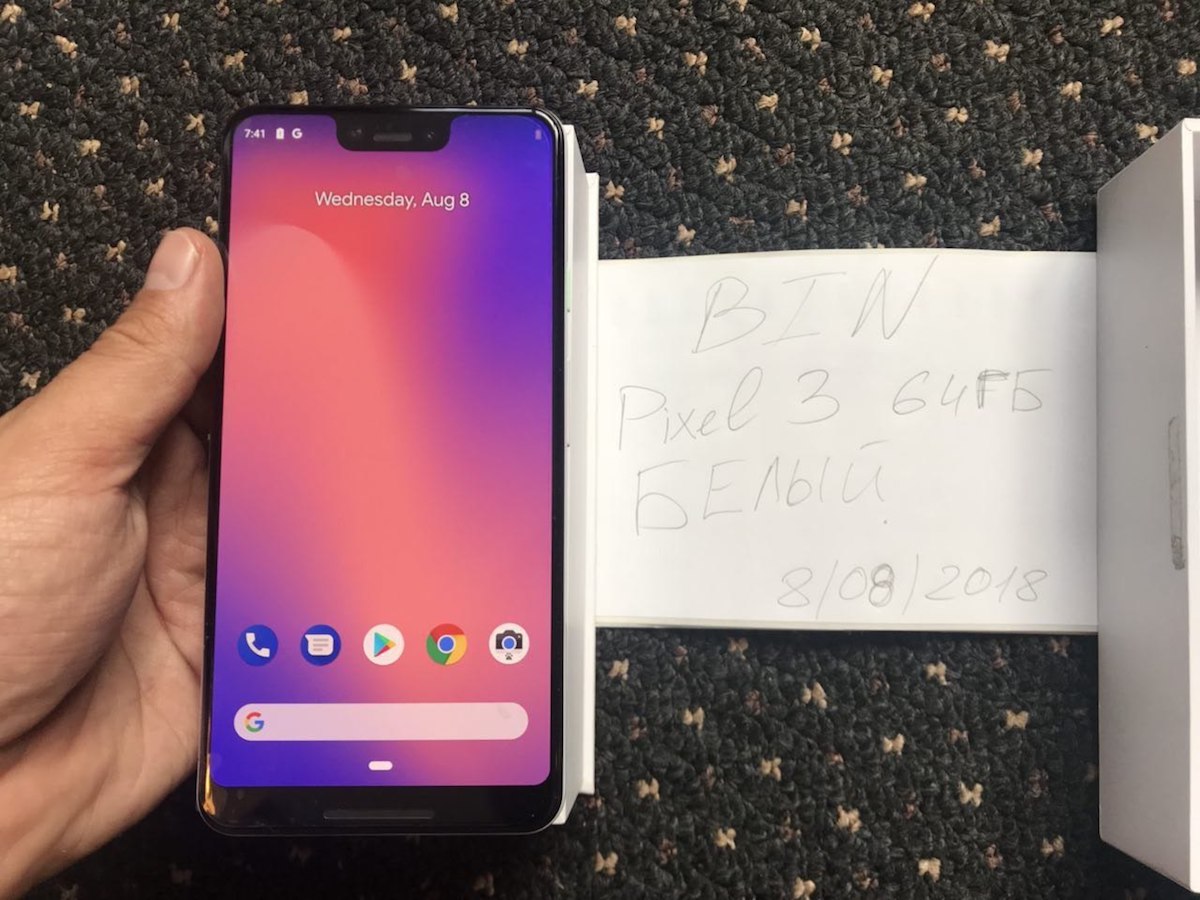
Although Google’s major fall event is still about two months away, typically occurring in October and ushering in a new generation of Pixel smartphones and other products, today leaked pictures have been shared online highlighting the upcoming Google Pixel 3 XL.
Images from Telegram user @LuchkovCh via Android Police
The images depict an alleged “pre-release” final production unit of the Pixel 3 XL smartphone, sourced from a Russian tech blogger (via Android Police). Images showcase the rear and front of the device, with an iPhone X-like notch at the top of the Pixel 3 XL’s display that’s not as wide as Apple’s, but is noticeably taller.
Previous CAD leaks suggest that a smaller 5.4-inch Pixel 3 will not have a notch, while the larger 6.2-inch Pixel 3 XL is what appears in the images today, notch included. It’s believed that Google is using the notch to house improved cameras, including two camera lenses.
Per Bloomberg, from a report in May:
The bigger Pixel will include two camera lenses on the front of the phone inside of the notch, one of the people said.
The notch, or cutout, at the top of the new larger Pixel’s screen won’t be as wide as a similar feature on the iPhone X, but is noticeably taller, according to the people. Google aims to eventually remove the bezels completely in a future Pixel, but is retaining the notch and chin this year to keep stereo speakers on the front of the phone, the people said
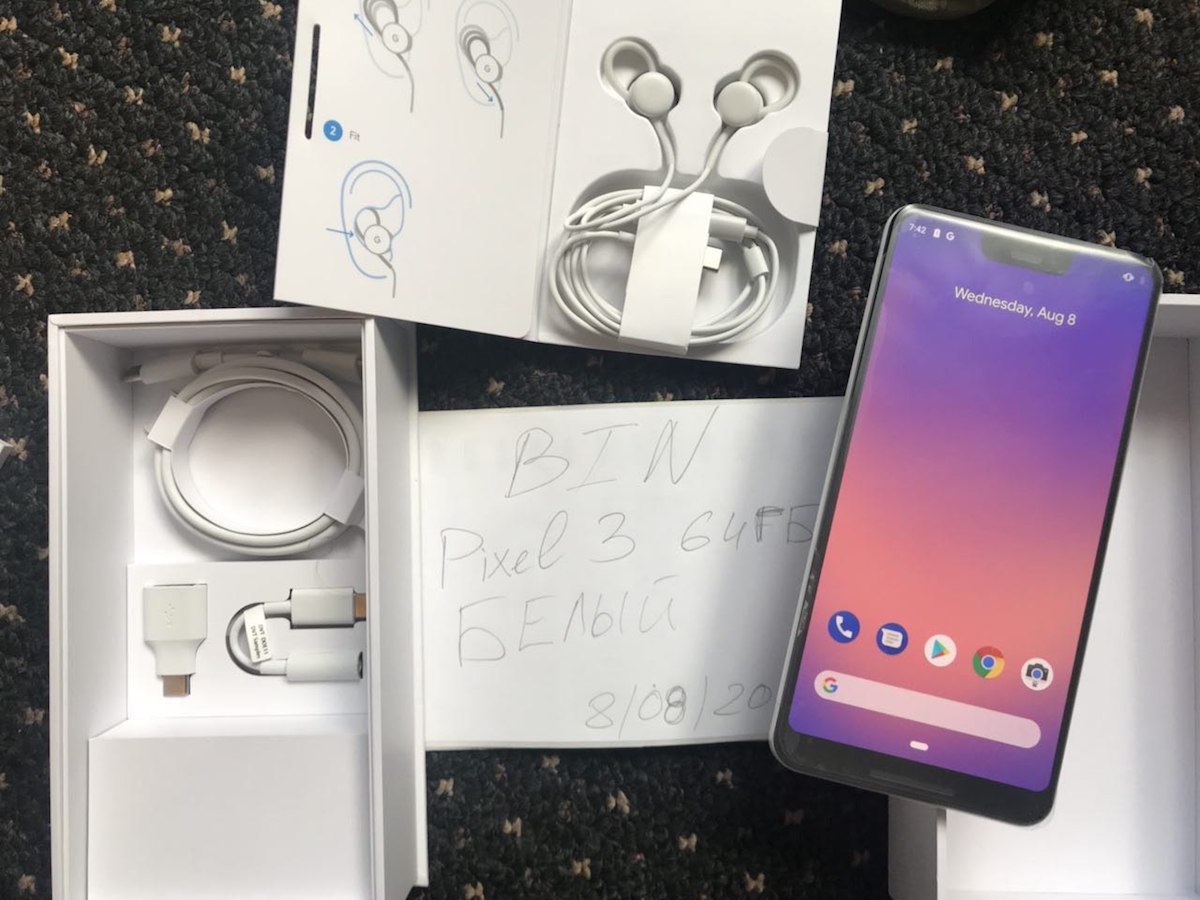
Additionally, the images suggest that customers will get “Pixel Bud-esque” wired USB-C earphones with the Pixel 3 XL. There also appears to be a charging brick, charging cable, and a USB-C to 3.5mm adapter in the box. The unboxing images depict “what looks to be a pretty new iPhone-like wallpaper,” as Android Police points out.
Software running on the units was Android 9 with an 8-core Qualcomm processor and an Adreno 630 GPU. The Pixel 3 XL in the images also has 4GB of RAM and a resolution of 1440×2960 with a pixel density of 494 PPI.
Following the release of the iPhone X in November 2017, clones of Apple’s notch style hardware began surfacing in December and throughout 2018. In March, Google announced Android P, which introduced software support for display notches that are built into the Android smartphones mimicking Apple’s design.
For Apple, the company decided on the notch-style design in order to maximize the available display area of the iPhone X, while also still leaving room for the various sensors and tech that make up the TrueDepth camera system for Face ID. Although Android smartphones are copying Apple’s design, many of them lack the front-facing biometric security features as the iPhone X and instead opt for fingerprint scanners.
Tags: Google, Google Pixel
Discuss this article in our forums
Some 2018 MacBook Pro Owners Experiencing Crackling Speakers
Following the release of 2018 MacBook Pro models last month, some customers have turned to the MacRumors Forums, Apple Support Communities, Reddit, and YouTube to report intermittent crackling from the built-in speakers.
The crackling appears to occur spontaneously during audio playback on both 13-inch and 15-inch models, based on a handful of videos shared by customers. As with many crowdsourced issues, there are a lot of variables involved, making it difficult to pinpoint exactly what may be causing the problem.
Some customers appear to experience the issue while playing music in iTunes, while others are affected when using GarageBand, or playing a YouTube video. Some users also hear the crackling when running Windows via Boot Camp. It’s unclear if the crackling is limited to specific volumes or frequencies.
MacRumors forum members have speculated about possible causes, including radio interference due to a lack of shielding, audio drivers, and the T2 chip.
A few years ago, some customers experienced similar crackling from the built-in speakers on the 2016 MacBook Pro, oftentimes when running Windows via Boot Camp. The crackling was so loud that it often permanently damaged the speakers, resulting in the MacBook Pro needing to be repaired or replaced.
Within days, Apple acknowledged the issues in a support document, and released updated audio drivers for Boot Camp with a fix:
If you installed Windows 10 using Boot Camp Assistant before November 25, 2016 on a MacBook Pro introduced in October 2016, it’s important that you install the Audio Driver Update for Boot Camp using Apple Software Update for Windows to avoid issues with your speakers.
The speaker issues with the 2018 MacBook Pro don’t appear to be as dire, or nearly as widespread, but enough complaints have surfaced that we wanted to bring some attention to the matter in the interest of those affected.
At least one user claims the issue may have been fixed in the latest macOS Mojave betas, which is unconfirmed. Another user claimed that Apple engineers are looking into the matter. Apple did not respond to a request for comment.
Of course, in a production run of millions of new MacBook Pro units, a small percentage may have defective speakers, but this does appear to be an actual issue that hopefully can be or has been addressed in a future software update.
If you are affected by this issue, we recommend contacting Apple Support. In the meantime, some users have shared potential workarounds, such as resetting the System Management Controller and NVRAM, disabling Hey Siri, or simply rebooting, but these solutions may not be ideal or work for everyone.
Related Roundup: MacBook ProBuyer’s Guide: MacBook Pro (Buy Now)
Discuss this article in our forums
Sitewide Sales: Save 15% Off at eBay and 30% Off at Incase for a Limited Time
If you’ve been waiting for eBay’s next sitewide coupon, the retailer today launched a 15 percent off code that lets you save on everything across eBay until 10:00 p.m. PT tonight. Of course, exclusions to “everything” include warranties and protection plans, coins and paper money, gift cards and coupons, and real estate.
Otherwise, once you shop around on eBay and find a few eligible items worth $25 or more, you can check out and enter the promo code PRONTO15 to receive 15 percent off your order. Note that the coupon code will be capped at a maximum value of $100 and must be used within a single transaction, applying to the purchase price and excluding shipping, handling, and taxes.
Note: MacRumors is an affiliate partner with these vendors. When you click a link and make a purchase, we may receive a small payment, which helps us keep the site running.
eBay’s sitewide sales are a great opportunity to buy Apple devices, this time including an open box version of HomePod (White and Space Gray) sold by Best Buy in excellent condition for $284.85, down from $324.99. Other ideas include HomeKit items like Philips Hue and Nanoleaf Aurora, and much more in categories like computers, smart watches, video games, clothes, and appliances.
In another sitewide sale going on today and ending tomorrow, August 9, Incase is offering rare discounts on a wide variety of its Apple-compatible protective accessories. If you use the promo code BTS30 when checking out, you can save 30 percent on the company’s backpacks, MacBook sleeves, and more. There are unspecified exclusions to the sale, but we’ve highlighted a few options available for a discount in the list below to give you an idea of what’s been marked down.

- Frame Case for iPhone 8 & iPhone 7 – $20.96, down from $29.95
- Facet Case for iPhone X – $24.96, down from $34.95
- Classic Sleeve for MacBook Pro 13″- Thunderbolt (USB-C) – $27.96, down from $39.95
- Classic Sleeve for MacBook 12″ featuring Ariaprene – $27.96, down from $39.95
- Portable Power 5400 – $34.96, down from $49.95
- ICON Dot Backpack – $55.96, down from $79.95
- ICON Slim Backpack With Woolenex – $104.96, down from $149.95
- EO Roller – $209.96, down from $299.95
For more sales, be sure to head to our full Deals Roundup.
Related Roundup: Apple Deals
Discuss this article in our forums
 AIVAnet