


Cleaning your PlayStation 4 is a breeze with these tips!

Keeping your console clean is mandatory for the best gaming experience!
Your PlayStation 4(PS4) is a behemoth when it comes to delivering awesome games, movies, and even VR content. However, you may start to notice some slow down if you let dust build up over time, and nobody wants that. To keep your console running as efficiently as possible you definitely need to keep it clean. Thankfully, this is an easy task that should only take about 10 minutes of your time so long as you keep up with the maintenance.
Aside from cleaning processes we also have some tips to help you keep your PS4 clean and ready at all times. Check out everything below and happy gaming!
Get yourself a can of compressed air

One of the things that all tech gurus should have available is a can of compressed air. It’s not only handy with your PlayStation 4, but a lot of your tech gear as well. Thankfully you can grab a pack of Amazon for about $11. That might seem like a high number for a few cans of air, but they’re going to last you quite a bit of time (or at least be massively useful enough to make up for the price)!
See at Amazon.
Using compressed air to clean your PlayStation

Your PlayStation 4 is covered with vents that are located at the front, sides, and back of the system and they have a tendency to get absolutely covered in dust. To take care of this all that you need to do is go ahead and point the nozzle of the can at those vents and then spray in short measured bursts. You ought to see the dust clear out of all the vents very quickly, and since PlayStation 4 consoles are black it’s easy to see where the dust has evacuated the system.
Make sure you aren’t shoving the air tube too far into the console. You want to make sure it’s close enough to get that burst of air, but by no means doe it ever needs to make it’s way directly in the vents. Also, make sure to hold the can upright so no moisture comes out when you spray it. Moisture is incredibly bad, especially if it gets into the inner components. Likewise, you want to ensure that you hit all the vents on the system so you don’t miss built up dust somewhere. By cleaning out all of the vents, you’re ensuring the system is able to expel excess heat which helps reduce strain on the internal components.
Get yourself a microfiber cloth

Microfiber cloths are another endlessly useful tools when it comes to cleaning all of your tech gear. When you think about them you usually only assume they’re good for glasses, screens or computers, but that’s not true! There’s plenty of uses for them with your PlayStation 4 as well. You can stock up on microfibre clothes for cheap with this Amazon Basics 24-pack for $13.50. After that you can read on below to see how to use them to keep your console clean!
See at Amazon.
Using your microfiber cloth to clean your PlayStation

Now if your system frequently turns gray with dust, you might be tempted to hit it with a wet wipe of some kind. Do not, we repeat, do not do that. You never want to introduce any kind of moisture to the system. Instead, what you’ll want to use is a microfiber cloth. Using the cloth you’ll want to wipe the entire system down. This includes the top, sides, front, and back. Depending on how you have your console set up, wiping down the bottom isn’t a bad call either. If you’re dealing with a lot of dust you may need to clean the cloth off a few times, but the shiny black of a clean console is very easy to differentiate.
It’s not a bad idea to give your controllers a quick wipe down either! Save those for last though, as they might be oily from your hands and you don’t want to transfer that oil to the actual console. Another recommended tip is to wipe the console down with the cloth after you’ve sprayed out the vents with your compressed air. This way all the dust particles are already out and in the open for you to banish forever!
Cleaning your Dualshock 4 controllers

Much like your system, if your controllers sit on a rack all day long they are going to accumulate dust. All that you need to do is go ahead and use a cleaning cloth to wipe down the controller. While wet wipes are still a general no-no, they can be used on the controller so long as you are avoiding the headphone jack, and charge port. When wiping down the controller you’ll want to pay special attention to all of the buttons, the analog sticks, and the light bar at the back of the controller.
Specifically, you want to ensure there’s no dust or grime blocking that light bar, especially if you are playing PlayStation VR games since the camera needs to be able to properly see that light bar. Likewise, nobody wants to use a controller with sticky buttons caused by dust or debris. If that’s exactly what you’re dealing with, your best bet is to turn off the controller and then use a wet wipe to clean away the dust and grime. This can also be particularly handy for those times when you can’t actually see what is causing a button of the analog stick to get stuck. Just ensure that the controller has plenty of time to dry out before use, and limit the amount of moisture as much as possible to avoid damage.
If you’re still a little anxious using that kind of moisture on a controller, your best bet is to use the compressed air on the buttons and analog sticks. Keeping it at a safe distance where you’re still able to blow out the dust, this will be the easiest way to get the dust out. It’s great for your controllers, and there is less of a chance of any harm to them since it’s much harder to get to the inside of them.
Cleaning your PlayStation Move controllers

The first thing that you want to do is pick your compressed air back up. With controlled bursts, spray all of the ports and crevices on the controller to make sure there isn’t any dust hiding in a sneaky spot. From there, all you need to do is go ahead and wipe down the rest of the controller with a microfiber cloth. If there is any sticky residue, use a slightly damp paper towel or wet wipe while avoiding all ports.
If you have a pair of Move controller that you want to bust out, but is particularly dusty, there are a few things to remember. The PlayStation camera reads Move controllers by tracking the lights in the bulb of each controller, so you want to ensure that they are as clean of dust and debris as possible. Likewise, cleaning out the ports, and around the button ensures that you won’t get distracted while playing a game.
Tips
It’s basically impossible to keep your system entirely clear of dust, but there are a few things that you can do to help minimize the amount of dust or debris you need to clean. Just keep in mind that the PlayStation 4 console is essentially a dust magnet thanks to that shiny black exterior.
- Keep it away from pets: If you have dogs or cats, try to keep the console as far from the floor as possible so that animal hair isn’t getting stuck on your system.
- Avoid glass entertainment centers: Glass already has a tendency to attract dust, so if you set up your PS4 on a glass entertainment center you can expect your system to need a good cleaning about once a week or so. You can set your system in a vertical orientation or invest in a dust cover to help keep the dust to a minimum.
- Don’t store in an enclosed space Not only can this cause the system to overheat, but dust will also gather up in these spaces.
- Don’t smoke in the house: Cigarette smoke causes faster dirt accumulation, and this definitely includes your console.
- Don’t take your PlayStation apart to try to clean the inside: Not only will this completely void your warranty, there is a higher chance of hurting your PlayStation, especially if you’re not a professional.
Keep it clean

As you can see, PlayStation 4 consoles are going to get dirty; it doesn’t matter if they are sitting up on a shelf or hanging out on the entertainment center. What matters is knowing how to properly clean it up and get it back up and running in tip-top shape after it’s gone gray with dust. Armed with just a microfiber cloth and some compressed air, you can easily dispatch the army of dust bunnies that have taken up residence on your console and its controllers. Do you have a particular tip for cleaning your system? Is there something we missed? Be sure to drop us a comment below and tell us about it!
PlayStation 4

- PS4 vs. PS4 Slim vs. PS4 Pro: Which should you buy?
- PlayStation VR Review
- Playing PS4 games through your phone is awesome
Amazon
Updated June 2018: We’ve updated this guide with all the latest information for keeping your console clean!
Everything that’s new with notifications in Android 9.0 Pie
Android 9.0 Pie is finally here, bringing with it a number of new features and updates that could seriously change your Android experience. Perhaps the biggest of those changes is what Google has done to notifications, which are now much easier to tweak, and much more functional.
Confused about what’s different in Android 9.0 Pie? That’s why we’ve put together this guide. Here are the biggest changes to notifications in Android 9.0 Pie and how you can take advantage of them.
Tweaked notifications shade
Before diving into the nitty gritty of the new features found in Android 9.0 Pie’s notifications, we’ll take a look at the visual changes — and there are a few of them. With Android 9.0 Pie, the notifications shade has been tweaked to look a little more like a card, featuring rounded corners and a new section for each notification.
A few other visual tweaks have also been made — the maximum number of notification icons in the task bar has been reduced to four, and the quick settings have been given a more vibrant color. Last but not least, there’s a new button to “manage notifications” from right under the notifications shade.
Edit the notifications you get
Android 9.0 Pie also makes it a whole lot easier to manage the exact types of notifications you get. Not only can you tweak which apps send you notifications, but you can also get a whole lot more granular and tweak specific types of notifications from those apps. That’s a pretty helpful feature — and there’s a few ways to go about using it.
For starters, perhaps the most useful way to make use of blocking certain notifications is from notifications themselves. If a notification pops up that you don’t consider important, simply hold down the notification, then tap the small information button, represented by an “i” icon, in the top right of that notification. You’ll then be taken to the app’s settings. Tap the Notifications option, and you’ll be presented with a list of notifications being sent by that app, with checkmarks next to each type. To make things easier, the notification that you were sent should be highlighted, so you can quickly uncheck it if you want.
Over time, this should seriously help you refine the notifications you get so that only notifications you find important show up.
Smart replies
Another big change to notifications is that Google is making it easier to do more from them. One way it’s doing so is through Smart Replies, which are essentially automatically generated responses you can send to messages you get. When you get a message from a compatible app, you’ll see the message along with a few generated responses that you can tap on to send — without ever having to worry about typing up a reply. Smart Replies only works with a few apps for now, but it’s likely that list will continue to grow.
Do not disturb
Last but not least is Do Not Disturb, which has once again been tweaked in the latest version of Android. In Android 9.0 Pie, you can manually change the settings of Do Not Disturb. To do so, long press the Do Not Disturb icon from the quick settings, after which you’ll be presented with three options — Behavior, Exceptions, and Schedule.
- Behavior lets you toggle what’s muted in Do Not Disturb. Commonly, everything except alarms and repeat calls are muted.
- Exceptions allows you to whitelist contacts or callers as well as reminders and events.
- Schedule allows you to have Do Not Disturb manually turn on at a certain time, at an event, or while you’re driving.
Editors’ Recommendations
- Android 9.0 Pie: Everything you need to know
- Android 9.0 Pie vs. iOS 12: How notifications have changed
- How to use Do Not Disturb mode in Android
- The best and worst features of Android 9.0 Pie
- How to turn off notifications in Android
Samsung Galaxy Note 9 vs. Huawei P20 Pro: Two high-end phones clash
Julian Chokkattu/Digital Trends
Samsung’s Galaxy Note 9 is finally here, and it’s a magnificent tour de force, representing everything a 2018 Android flagship needs to be. While it’s fresh out of the gate, we had the chance to pair it up against one of the marketplace’s seasoned veterans. The Huawei P20 Pro has a long-lasting battery, super-smooth performance, and an incredible triple-lens camera.
Out of these two amazing flagship phones, which one’s best for you? We pitted them head-to-head to find out.
Specs
Samsung Galaxy Note 9
Huawei P20 Pro
Size
161.9 x 76.4 x 8.8mm (6.37 x 3 x 0.35 inches)
155 x 73.9 x 7.8 mm (6.1 x 2.91 x 0.31 inches)
Weight
201 grams (7.09 ounces)
180 grams (6.35 ounces)
Screen size
6.4-inch Super AMOLED
6.1-inch OLED display
Screen resolution
2,960 x 1440 pixels (516 pixels per inch)
2,240 x 1,080 pixels (408 pixels-per-inch)
Operating system
Samsung Experience UI (over Android 8.1 Oreo)
Emotion UI 8.1 (over Android 8.1 Oreo)
Storage space
128GB (with 6GB of RAM), 512GB (with 8GB of RAM)
128GB
MicroSD card slot
Yes, up to 2TB
No
Tap-to-pay services
Google Pay, Samsung Pay
Google Pay
Processor
Qualcomm Snapdragon 845
Kirin 970
RAM
6GB (with 128GB storage), 8GB (with 512GB storage)
6GB
Camera
Dual 12MP (with OIS) and 12MP zoom (with OIS) rear, variable aperture, 8MP front
Triple lens 40MP, 20MP, & 8MP rear, 24MP front
Video
2,160p at 60 frames per second, 1,080p at 240 fps, 720p at 960 fps
2,160p at 30 frames per second, 1,080p at 30 fps, 720p at 960 fps
Bluetooth version
Bluetooth 5.0
Bluetooth 4.2
Ports
3.5mm headphone jack, USB-C
USB-C
Fingerprint sensor
Yes
Yes
Water resistance
IP68
IP67
Battery
4,000mAh
QuickCharge 2.0
Qi wireless charging
4,000mAh
Huawei SuperCharge fast-charging
App marketplace
Google Play Store
Google Play Store
Network support
T-Mobile, AT&T, Verizon, Sprint
T-Mobile, AT&T
Colors
Ocean Blue, Lavender Purple
Black, Blue, Pink Gold, Twilight
Price
Starting from $1,000
800 British pounds (around $1,030)
Buy from
Amazon, Best Buy, Walmart, Samsung
Huawei, Amazon
Review score
Hands-on review
4.5 out of 5 stars
Performance, battery life, and charging
You will get great performance regardless of which of these two phones you pick. The P20 Pro scored high in our review benchmarks, but it has since been superseded by the raw power of the Snapdragon 845 — the chip you will find in the Note 9, alongside Samsung’s new water cooling system. You would be hard-pressed to tell the difference in most circumstances though, since the P20 Pro’s Kirin 970 provides smooth performance, and didn’t struggle with anything we threw at it.
The Note 9 has an advantage in storage capacity, thanks to the addition of a 512GB model that brings the Note 9 to a theoretical 1TB of storage (with a Samsung 512GB MicroSD card). The P20 Pro only has a single option for 128GB, with no MicroSD card slot. RAM is in the Note 9’s favor too, with the 512GB model coming with 8GB — 2GB more than the 6GB on the P20 Pro.
Both of these phones are packing a 4,000mAh battery, with the P20 Pro managing an incredible two days of battery life. You can expect the Note 9 to manage at least a day, but until we test it fully, we can’t vouch for battery life just yet. Both have fast-charging equipped, but only the Note 9 has wireless charging.
This is an exceptionally tough category to mark, with both devices showcasing incredible performance, but the Note 9 edges the win with slightly faster performance and wireless charging support.
Winner: Samsung Galaxy Note 9
Design and durability
Julian Chokkattu/Digital Trends
Both of these devices are attractive glass and metal builds with a lot to admire. The Note 9’s gentle glass curves are extremely elegant, while the P20 Pro’s constantly shifting colors are beautiful to behold. You’ll find USB-C ports on both, but only the Note 9 has a headphone jack — so keep that in mind if your headphones are important to you. The P20 Pro also has a notched display — a design choice that could put some users off.
There is a bigger gap in durability. While both are fragile glass phones that will probably need a case for your peace of mind, the Note 9 comes with IP68-rated water resistance. That is stronger protection than the P20 Pro’s IP67-rating, and while it might not sound like much, it could make a difference if your phone ends up in the pool. Accidents happen, and it’s good to know that your expensive flagship is well protected.
It’s still extremely difficult to pick between the two in this category — but we think the headphone jack and the increased water resistance squeeze it for the Note 9.
Winner: Samsung Galaxy Note 9
Display
Andy Boxall/Digital Trends
Large OLED displays dominate both of these phones, with the P20 Pro’s screen at 6.1 inches, and the Note 9’s at 6.4 inches. Both are excellent, with bold color reproduction and the deep inky blacks you would expect from OLED displays. However, the Note 9 comes with a considerably higher resolution, which consequently gives it an edge in sharpness. It scores a pixels-per-inch measurement of 516, beating the P20 Pro’s 408 by a distance. The Note 9’s display is just sharper and crisper, and it wins this round.
Winner: Samsung Galaxy Note 9
Camera
Julian Chokkattu/Digital Trends
The Note 9’s main camera suite will come with two 12-megapixel lenses — one equipped with the S9’s variable aperture, the other with a 2x optical zoom lens. We haven’t had a chance to really play with the Note 9’s camera yet, but we’re expecting strong all-around performance. The Note 9 is also able to shoot video in 4K, as well as super-slow-motion video at 960 frames per second. Around the front of the phone, you will find an 8-megapixel lens. The cameras have some artificial intelligence trickery too. The A.I. will notify you if there’s a problem with your photo — like someone blinking — or will alter settings automatically based on scene recognition.
The P20 Pro comes with a staggering triple lens system on the back. It’s made up of a 40-megapixel lens, an 8-megapixel zoom lens, and a 20-megapixel monochrome lens. It’s a staggeringly good camera, with 5x hybrid zoom, and some of the best low-light performance we’ve ever seen. It also shoots video in 4K, and in super-slow motion — and the selfie lens is a huge 24-megapixel monster. Add all this to the P20 Pro’s A.I. assistance that helps you to take the perfect photo and you’ve got a very capable camera.
We’re really torn between these two. This is a draw for now.
Winner: Tie
Software and updates
Andy Boxall/Digital Trends
You’ll find Android 8.1 Oreo on both of these phones, hidden under skins. The P20 Pro has Huawei’s Emotion UI (EMUI) skin — and thankfully, it’s not the burden it once was. It’s smooth, easy to use and is only really shackled by the lack of notch support in Android Oreo — which should be fixed by Android 9.0 Pie. The Samsung Experience on the Note 9 is similar, with good performance and an easy-to-use interface. Neither is close to stock Android, but neither should be too hard to use for anyone with prior Android experience.
You’re probably looking at similar performance for updates, too; not great. Since both use heavily modified versions of Android, neither manufacturer has a strong record with getting updates out quickly. This is a tie.
Winner: Tie
Special features
Julian Chokkattu/Digital Trends
We mentioned the A.I. capabilities in the camera section, but that is not all the Kirin 970’s dedicated A.I. chip is up to. When it’s not suggesting modes on the camera, the A.I. system in the P20 Pro works mainly in the background of the phone, optimizing resources to ensure smooth performance. Over time, the A.I. learns which apps are most important to you, and balances system resources to ensure that you’re getting as good an experience as possible — and this is something that should only get better over time. The P20 Pro also has a speedy face unlock system. It’s not as secure as the iPhone X‘s, so you can’t use it for payment authorization, but it’s extremely fast at unlocking your phone.
Where do we start with the Note 9? First off there’s the S Pen. In addition to familiar features like writing on the display and quick menus, the improved Note 9 S Pen now also works as a Bluetooth clicker, with different functions available in different apps. The Note 9 also debuts a revolution for Samsung’s DeX mode, thanks to improvements that mean it’s now able to work with just a USB-C to HDMI cable — ditching the expensive dock. There’s also Bixby, as well as facial unlocking.
The Note 9 overpowers the P20 Pro with sheer weight of features.
Winner: Samsung Galaxy Note 9
Price
The Huawei P20 Pro is currently available, with prices ranging from anywhere between $800 and $1,100. Unfortunately, it’s not fully available in the U.S., and you’ll be forced to import it after a sale — but be aware it will only work on select networks like T-Mobile and AT&T.
Pre-orders for the Galaxy Note 9 are open now, and the phone will be launching August 24. It’s available in two colors — lavender purple and ocean blue. Pricing starts at $1,000 for the 128GB, going up to $1,250 for the 512GB version. As a Samsung flagship, expect to see it offered on every U.S. carrier.
Overall winner: Samsung Galaxy Note 9
It’s testament to how good a smartphone the P20 Pro is that it’s able to hold the Note 9 to so many draws across our series of categories — but at the end of the day, the Galaxy Note 9 is simply the stronger of the two devices, with a crisper display, a performance edge, and the improved S Pen.
If none of that is particularly exciting to you, and you can deal with the hassle of importing, limited network support, and lack of a headphone jack — then you’ll probably be very happy with the Huawei P20 Pro regardless.
Editors’ Recommendations
- Samsung Galaxy Note 9: Everything you need to know
- Samsung Galaxy Note 9 vs. Galaxy Note 8 vs. Note 5: All the changes of note
- Samsung Galaxy Note 9 hands-on review
- Samsung Galaxy Note 9 vs. Pixel 2 XL: Flagship face-off
- Samsung Galaxy Note 9 vs. Galaxy S9 Plus vs. Galaxy S9: Which is right for you?
What you missed this week on CordCutters.com
A podcast, a Peña, and the Premier League.
 Are we really starting a CordCutters podcast? Why the hell not. I mean, I’ve done a few hundred podcast episodes in my day. The trick, of course, is keeping things interesting, particularly in this age of excellent (if overproduced) podcasts.
We’re going to keep things simple, for now. We’re going to keep things loose. And we’re going to help answer some questions, I hope. So if you’ve got questions, fire ’em on over. Text is great. Or record your question and e-mail it on over. And if you’ve got thoughts on what you’d like to hear discussed, fire those on over, too.
And, mostly, we’re going to have fun. Because there’s no single right way to be a cord-cutter. We each have our different reasons and our different needs and our different ideas about what makes all this worth it.
In the meantime, here’s the first episode — a fun little conversation with some great nerds from Mobile Nations on the announcement of a new Star Trek series with the return of Sir Patrick Stewart:
- Subscribe on Anchor.fm
- Subscribe on Pocket Casts
- Subscribe via RSS
What else you missed on CordCutters.com:
- If you’re paying a monthly fee for a service like Netflix, it’s smart to watch things you might not otherwise bother with. And Extinction on Netflix turned out to be pretty good.
- The English Premier League is back! Here’s how to watch the games in the U.S. if you’ve cut the cord.
- This Vizio sound bar is ridiculously good for $100.
- Roku TVs make up a quarter of the market. Its set-top boxes are extremely popular. And now you don’t even need one to watch free stuff from Roku.
- Wait — YouTube doesn’t consider the iPhone to be a “Signature Device”?!?!
- Finally — the first teaser for the second season of The Marvelous Mrs. Maisel!
Introducing CordCutters.com
- The hardware you need
- All about streaming services
- What channels are on which service
- FREE over-the-air TV
- How to watch sports
- Join the discussion
Get the latest deals
For Monaris, it’s a photography career launched on an iPhone and Instagram
Paola Franqui doesn’t have your typical photographer’s backstory. She didn’t start taking pictures as a kid after a revered family member handed her an old camera. She never even had big dreams of becoming a photographer. Her story started very simply when she downloaded Instagram, and instantly became fascinated with the art and human emotion she found on the network. Six years later, Franqui is now well known by her Instagram handle, Monaris.
The New Jersey-based street photographer has built a career around capturing candid images of people, playing with light and reflection. But while her degree in sociology and criminal justice suggests a long-standing fascination with people, she started photographing anything and everything that inspired her, with just an iPhone.
“When I started taking photos of humans, of people, I got to a point where I can honestly say that it was street photography that made me fall in love with photography,” she told Digital Trends. “There was something about human emotions, human interactions, and life — everyday moments that people are so used to ignoring that they don’t notice it.”
Franqui, who grew up in Puerto Rico before moving to the United States in her early teens, continued shooting with an iPhone for nearly three years before picking up a dedicated camera — and picking up photography tips using YouTube videos. Her early work used the 16:9 aspect ratio, a format that’s cinematic but unusual with Instagram’s love for square images and portrait mode.
Paola Franqui/Instagram
Despite her Instagram success (she has more than 160,000 followers), Franqui says that her photography will always be a work in progress.
“I’m not where I want to be and that’s very inspiring,” Franqui said. “Every time I wake up in the morning, I still have so much to learn and so much to see. That’s what keeps me inspired, the fact that every day that I wake up in the morning, something is different, something has changed. For an artist, that’s very motivating, the fact that life is constantly changing.”
Him and I. #reflectionstories
A post shared by Paola Franqui (@monaris_) on Dec 13, 2017 at 10:28am PST
Along with National Geographic photographer Colby Brown, we followed Franqui around the British Virgin Islands during a press event with Adobe (we were guests of Adobe, but all opinion are our own), where she shared with us her backstory, camera techniques, editing processes, and life as an Instagram influencer.
DT: Where did your handle, Monaris, come from?
Franqui: Monaris is my middle name and growing up I actually wanted to change it. I used to ask my mom why she named me Monaris and she would be like, ‘We were sitting one day before you were born with a bunch of friends and one guy said that you should name your daughter Monaris.’ My mom was like, ‘Oh, that’s a good name’ and so that’s where the name came from.
“When people come up to me and ask, if you’re feeling uninspired, what do you do? I tell them, you switch lenses.”
[When] I downloaded Instagram, my name was taken. So, I said, I’m going to use Monaris. After I started posting, people started seeing me as Monaris. ‘Oh, you’re Monaris.’ And now that’s my brand, my website, my business. I embrace it, even my business cards say Monaris. It’s funny how life does that — something that I hated is now something that I love.
You have a very specific style. How did you work to define your style?
I knew that most street photographers shoot 35mm — you see a scene and it’s wide. And I knew that, from the very beginning, I wanted to do something different. I knew that I wanted to do something that I would be remembered by. I started to play with different lenses. I think that lenses are something that’s very important for a photographer. When people come up to me and ask, if you’re feeling uninspired, what do you do? I tell them, you switch lenses. Lenses push you to see a different perspective.
Paola Franqui/Instagram
I started switching lenses. I went from a 35 to a 55. I felt that it was good, but not good enough. People are used to seeing the whole scene. I started to focus on one person, incorporating one person in the scene. I didn’t care if you were there and a person was next to you, I wanted to focus on you.
To me, human emotion and organic moments are the most important things about my street photography. I don’t want to say all street photography because every street photographer has a different style. To me, that’s what I want to showcase. I want to focus on human emotion.
“As an artist, you can do whatever — there are no rules, it’s your vision, what you want people to see.”
You walk around and see people every day, but you don’t know what they are going through, you don’t know what they are feeling. In my eyes, if I see a subject and take a photo, I want the other person to imagine, even with just a look, it can be sadness, it can be happiness, but I want to showcase that [feeling]…that’s why my photos are one subject. That, to me, is what I want you to see and to feel.
I want you to think a million stories when you look at my photos. And now, I know what I like so that’s why I keep pushing one subject. All my photos feel like they are sad, but they are not, they are just people living their daily lives. I notice those moments that most people would just walk by, but I notice them.
How does editing play a role in that style and your process overall?
To me, editing is one of my favorite things about the whole journey and process of photography. I can take a photo, and once I go home, and I see it and edit it, that’s when everything comes together. It’s like a puzzle piece is missing and I can just put it together and see the whole picture.
I enjoy editing so much, which is funny because most people don’t, they dread the editing process and they say that a photo shouldn’t be edited as much. To me, it’s the complete opposite. As an artist, you can do whatever you want — there are no rules, it’s your vision, it’s what you want people to see…I enjoy changing a photo, if its green and I want to make it blue, I can do that because it’s the way I see the world and the way that I want people to see my work. I enjoy it. I play music, I make a fresh cup of coffee, and I spend hours editing and I enjoy every single second of it.
How has your style played a role in your career as an Instagrammer?
Paola Franqui Hillary Grigonis / Digital Trends
I’m at a point where people know who I am and I think I have been myself throughout this whole process, with Instagram constantly changing and people just posting things that get likes and engagement. Through all of those years, I’ve stayed true to myself and that’s something I tell everyone going through a phase or doing Instagram as a living.
You have to stay true to yourself — you have to show people who you are. You have to embrace your style, embrace your vision and the way that you see the world. That’s something that I’m very proud of, that I haven’t changed — my style has changed, but my love for photography and humans has not.
I think companies see that. If companies want to hire me to travel [like Adobe], it’s because they want me to take my specific style to that country or that city. I’m getting a lot of invites from all over the world because they want me to do what I do and they never ask me to change. They never say you have to shoot sunrise and sunset because that’s pretty and you have to make this location beautiful, they never say that. They want me to do me in every place that I go to. That’s something to me that’s very beautiful, it’s inspiring, the fact that I don’t have to change my style just to travel the world. I’m not going to change, but the opportunities keep changing because of the way that I am.
What advice would you give to people looking to grow their Instagram influence?
I consider myself a photographer, even though I shoot mostly street photography, I shoot everything. I think photography is the way that you see something. It can be a tree, it can be an animal. I always tell people, shoot everything and find what you are really passionate about and then just keep working toward that.
“On Instagram, it’s important to have tones. You have to have a style of editing, something that’s going to attract people.”
Keep getting better, go out there everyday and take millions of photos. I’m the type of person that can go out for three hours and I’m going to have a thousand photos. I just like to shoot, I like to capture every moment out there. Go out there and the more you do it, the better you become. Your eye is going to change.
Find your voice and stick to it until people start seeing you and recognizing you as an artist. Once you have an audience, you can start shifting to something else, but if you don’t have an audience, you can’t do anything. You need to find your fanatics, your fans, the people that say I know who you are because you do this.
He became a part of my world. #reflectionstories
A post shared by Paola Franqui (@monaris_) on May 16, 2018 at 9:37am PDT
People are like, ‘oh you are Monaris, I love you work.’ I love that, I don’t mind that people recognize me for just my street photography and Instagram because I know who I am. Have that in your mind — you know who you are and your aesthetic.
If people scroll through your page and there’s nothing visually interesting, you’re not going to get a follower, they are just going to go back. On Instagram, it’s important to have tones. You have to have a style of editing, something that’s going to attract people. If you don’t have visual aesthetic, you won’t survive. That’s sad, but it goes back again to editing. If I were to have a page with no edits, I would not be here. It’s sad, but it’s true.
When you are taking someone’s photo, do you talk to them first? How do you approach them?
Every single time that I’m out there, it’s always candid. Ninety-nine percent of the photos, I never ask for permission, I never talk to my subject. I never pose them, because I want to them to be as organic as possible. If something is posed, to me, it’s not real, it’s posing.
Paola Franqui/Instagram
After all the years that I’ve been doing street photography, I’ve learned how to work a scene. If I see someone that I want to take a portrait of, I set up, and most of the time, people are going to look at me. Now that my style has developed, I like that they look at me so I wait. At some point, they’ll look, and then I will take it. Then, I smile. I think that a smile goes a long way in street photography. A smile makes them comfortable — you’re not there to make them feel uncomfortable. And then I walk away.
For the most part, everywhere that I’ve been in the world, people react to street photography in a positive way. It has a lot to do with the way that I work and the way that I show them that I’m not doing anything bad, that it’s just a photo, and then I walk away.
Do you think Instagram has lost its original allure?
Instagram is such a big part of the world and humanity and people, people tend to just focus on the app. They just like to post to please other people, and I think it’s important as an artist and as a photographer to just post photos that mean something to you. Post what you love. Embrace the way that you are and the way that you see things. Forget about what people think of you and what people think of your work, if you love it, that should be enough, that should be what’s important. I think people forget that. You need to remind yourself that life is just beautiful and you should just post the type of work that means the most to you.
Editors’ Recommendations
- Instagram isn’t going chronological, and is now telling us why
- Here’s how to hide your active status on Instagram
- How to post GIFs on Instagram
- Instagram now shows when you’re online (don’t worry, it has an off button)
- Have a question? Ask it on Instagram with open-ended questions in a Story
The Perseid meteor shower peaks this weekend! Here’s how to watch
cylonphoto/123RF
If your weather cooperates this weekend, look up towards the constellation Perseus. Why? August 11-13 is the expected peak of the Perseid meteor shower, traditionally one of the best celestial shows of the year. With it being a new moon, natural light pollution is at a minimum, allowing more meteors to be visible.
While astronomers are not expecting a massive burst like they did in 2016 and 2017 due to passing through multiple debris streams of the Comet Swift-Tuttle (the source of the Perseids), the moon phase is in our favor. At its peak, as many as 60 to 70 meteors per hour may be visible, with brief bursts much higher than that.
Observers may see quite a few meteors Saturday night into Sunday morning, however the better show may be Sunday night into Monday morning according to NASA meteor researcher Bill Cooke. You’ll want to look towards the constellation Perseus, which will be high enough in the sky starting around 11 p.m. local time to just lie down flat and look straight up to see the show.
Why are the Perseids such a reliably good show? Comet Swift-Tuttle last passed by Earth in 1992, and will do so again in 2126. Even with such a long orbit, the comet’s large size allows it to leave a far denser debris trail behind it than others. The nucleus — the comet’s icy, rocky core — is some 16 miles across, larger than Staten Island in New York City, and almost twice the size of the object that is believed to have smashed into the Earth 65 million years ago, killing off the dinosaurs.
Don’t panic: Swift-Tuttle is in no danger of striking the Earth anytime soon. Most of these meteors are tiny, posing no threat to us here on the ground. However their breakneck speed — some 132,000 miles per hour — causes even tiny specks of dust to illuminate as they reach temperatures upward of 10,000 degrees Fahrenheit during entry into our atmosphere.
Paul Williams/Flickr
You can tell what the meteor’s made of by the color of its trail: orange-yellow is typically sodium, yellow is iron, blue-green is magnesium, violet is calcium, and reds are caused by nitrogen and oxygen. In the right conditions, meteor showers like what’s expected this weekend can be pretty cool.
But like weather, predicting meteor showers is an imperfect science. Minor miscalculations in where the meteor streams can mess everything up. There have been years where the Perseids have disappointed from time to time (and also surprise, too), and issues such as cloud cover and light pollution also pose a problem.
Weather may pose the biggest problem, especially east of the Mississippi and over the Southern Plains. The best views this year appear to be in the Pacific Northwest and Great Lakes States, with less prime conditions across the Southwest and Southeast. If you’re in the Northeastern U.S., viewing this year’s show will be difficult thanks to clouds and storms that could persist through much of the weekend.
As for light pollution, you’re going to want to get as far away from urbanized areas as possible, otherwise you’ll miss a lot of the smaller meteors. Also keep in mind you’ll need to give your own eyes about 20 minutes to fully adjust to the lower light.
Editors’ Recommendations
- A Japanese startup is planning an artificial shooting star show by 2020
- Canon’s new large sensor is too big for you, but not for scientists
- The best dash cams
- How to use Split View on a Mac
- Google Street View gives woman a special gift — an image of her late mother
By studying patient data, A.I. can limit toxicity in cancer treatment
A cancer diagnosis can be a devastating event. And for patients suffering from brain cancer, the diagnosis carries extra weight. It’s not just the disease that’s taxing — treatment itself can be grueling on both the body and the spirit.
In a bid to improve quality of life for cancer patients, a team of researchers at the Massachusetts Institute of Technology has turned to machine learning to help avoid toxicity from cancer medications. The researchers are specifically targeting glioblastoma, the most aggressive form of brain cancer, which carries a prognosis in adults of less than five years.
Cancer therapies are tough, combining multiple drugs with radiation treatment — a cocktail that can cause crippling side effects. The goal of the MIT project is to use artificial intelligence to figure out the fewest and smallest doses of medication that could still be effective. That way side effects are kept to a minimum.
To pinpoint the smallest effective doses, the MIT team trained their A.I. on models of treatment regimens that are currently in use, adjusting the dosage until it could identify an optimal treatment protocol that carries the lowest potency and frequency for a tumor of a given size. The system simulated 50 trials on patients and managed to decrease the dosage by up to a half of the doctor-recommended doses.
The A.I. was trained using a method called reinforced learning, similar to how trainers teach pets to obey commands. Do the right action, get a reward. Do the wrong action, don’t get a reward (or even a reprimand). For the A.I., the award wasn’t a treat but a positive or negative number that signaled to the algorithm its success.
The A.I. isn’t meant to take over the jobs of physicians altogether. Rather, it’s meant to guide physicians towards offering more suitable treatment options.
“The recommendations from the algorithm can be used by human experts to design safer and more effective clinical trials,” Pratik Shah, a principal investigator at MIT who supervised the research, told Digital Trends. “These digital algorithmic systems may also inform and educate individual patients about potential trajectories their diseases could take in response to treatments.”
A.I. is becoming increasingly valued in healthcare, and is being applied to everything from discovering new medications to diagnosing diseases.
The MIT research will be presented this week at the 2018 Machine Learning for Healthcare conference at Stanford University.
Editors’ Recommendations
- Scientists have mapped the genome of the most common cancer among younger men
- New light-emitting implant zaps cancer tumors with incredible precision
- A.I. detects skin cancer better than dermatologists in international study
- Chinese search giant Baidu creates an open-source A.I. for detecting cancer
- Atari co-founder and video game pioneer ‘Ted’ Dabney dies at 81
Full specs and hands-on photo leak for the BlackBerry KEY2 LE
Like the BlackBerry KEYone? You’re going to love the KEY2 😍

Following a heap of rumors and leaks, BlackBerry finally unveiled the highly-anticipated KEY2 on June 7, 2018. The KEY2 is a direct successor to last year’s KEYone and retains the same general design while offering upgraded specs across the board.
There’s a lot to unpack with the KEY2, so let’s go ahead and get into it.
The latest BlackBerry KEY2 news
August 10, 2018 — BlackBerry KEY2 LE design and specs revealed in new leak

Looks like the KEY2 LE is the real deal!
Our friends at Android Police recently shared a heap of info regarding the phone, including the above picture and a list of its official specifications. As expected, the KEY2 LE looks a lot like the regular KEY2 but trims back some of its internals to allow for a (hopefully) more reasonable price.
The current spec sheet for the KEY2 LE compared to the KEY2 is as follows:
| Display | 4.5-inch 1080 x 1620 LCD | 4.5-inch 1080 x 1620 LCD |
| Processor | Snapdragon 636 | Snapdragon 660 |
| Storage | 32GB or 64GB | 64GB |
| RAM | 4GB | 6GB |
| Rear Cameras | 13MP + 5MP | 12MP + 12MP |
| Battery | 3000mAh | 3500mAh |
| Dimensions | 151.4 x 71.8 x 8.5 mm | 151.4 x 71.8 x 8.5 mm |
| Weight | 168 g | 168 g |
In addition to the difference in specs, it’s also reported that they keyboard will be slightly different. The style appears to be more in-line with that of the KEYone, and unfortunately, it looks like the awesome trackpad functionality won’t be available on the KEY2 LE, either.
July 30, 2018 — BlackBerry’s next phone will be the KEY2 LE

Earlier this month, a hands-on photo appeared showcasing a new BlackBerry phone that’s expected to be a lite version of the recently released KEY2. Following that, an FCC document has now confirmed that this handset will go by the name of the BlackBerry KEY2 LE.
We were previously expecting this phone to be called the KEY2 Lite, but as the branding above shows, BlackBerry is going with KEY2 LE instead.
It’s not entirely clear what LE will stand for, but seeing as how we’re expecting it to be a more affordable version of the KEY2, Lite Edition is the most likely contender.
All the big details
Read our full review!

The KEY2 doesn’t do too much that’s different to the KEYone, but it improves everything in either minor or major ways. Three areas, in particular, get focus: performance, keyboard quality, and design.
There’s no doubt that the KEY2 is a faster, better-looking version of its predecessor, but how do things like the camera, battery, and typing experience hold up in day-to-day use?
For the full lowdown on the KEY2, check out Daniel’s review! 👇
BlackBerry KEY2 review: Just my type
See how it compares to the KEYone

The BlackBerry KEYone was no slouch of a phone, but with the KEY2, BlackBerry made upgrades in just about every area imaginable.
Between higher-end specs, the addition of dual cameras, improved keyboard, and more, the KEY2 is a better gadget in just about every regard.
However, if you already shelled out $550 for the KEYone last year, is it really worth spending another $650 this year? Let Daniel help you out with that dilemma in the comparison below 👇
BlackBerry KEY2 vs. BlackBerry KEYone: Should you upgrade?
The design is mostly the same

One of the main reasons the KEYone stood out so much was thanks to its productivity-focused design. Instead of releasing a glass, all-screen slab like so many other companies, BlackBerry kicked out a chunky, physical keyboard-touting phone.
With the KEY2, that theme is present once again.
The KEY2 measures in at 151.4 mm x 71.8mm x 8.5mm, making it taller, yet thinner, than the KEYone. The screen is once again a 4.5-inch panel with a 1620 x 1080 resolution, and the 3:2 aspect ratio makes a return, too.
You’ve got access to 35 backlit keys on the physical keyboard, and similar to the KEYone, the spacebar doubles as an integrated fingerprint sensor.
It’s got more RAM and a faster processor, but the battery is slightly smaller

Although the KEY2 may look similar to the KEYone on the outside, it’s got a lot of improvements under the hood.
Last year’s Qualcomm Snapdragon 625 processor and measly 3GB RAM have been replaced with a Snapdragon 660 and impressive 6GB RAM. You also have your choice between 64 or 128GB of internal storage, both of which can be upgraded to 256GB via a microSD card.
The battery is ever-so-slightly smaller at 3,500 mAh compared to the KEYone’s 3,505 mAh unit, but thanks to the power-sipping nature of the 660, the KEY2 should still be a battery champ.
BlackBerry KEY2 and 6GB of RAM: Why it’s a big deal
BlackBerry steps up to dual cameras

The single 12MP rear camera on the KEYone was fine. It had the capacity to take decent photos, but often struggled in low-light and produced very shakey 4K video.
You don’t buy BlackBerry phones for their excellent cameras, but this is another area where the KEY2 should offer some serious improvements.
Around back, BlackBerry’s outfitted the KEY2 with dual 12MP sensors. The primary one features a large 1.28um pixel size with f/1.8 aperture while the secondary one touts a 1.0um pixel size and f/2.6 aperture. You can record video in 4K at 30 FPS, dual-tone flash helps to brighten dark scenes, and there’s Phase Detection Autofocus.
In regards to the selfie camera, you’re looking at an 8MP sensor that’s capable of recording 1080p video at 30 FPS.
You’ll need to cough up $650 to own one

As you’d expect, the KEY2’s many enhancements have resulted in a steeper price tag compared to last year’s model.
While the KEYone started out at $550 in the U.S., the KEY2 is $100 more expensive at $650. Elsewhere, the KEY2 will cost €649 EU, £579 GB, and $829 CDN.
Specifics on the U.S. release are still up in the air, but BlackBerry’s since confirmed that the KEY2 is coming to Canadian retailers and carriers in July.
Where to buy the BlackBerry KEY2
BlackBerry KEY2
- BlackBerry KEY2 review
- BlackBerry KEY2: Everything you need to know!
- BlackBerry KEY2 specs
- BlackBerry KEYone review: Coming home
- Join our BlackBerry KEY2 forums!
Buy the BlackBerry KEY2
Updated June 27, 2018: Added our full review of the KEY2.
The best replacement bands for your Samsung Gear Fit 2
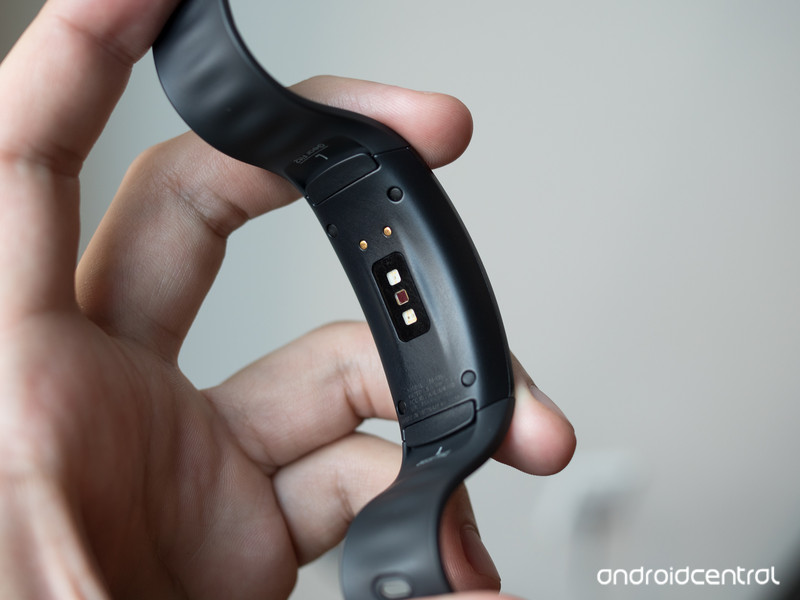
Update the look of your Gear Fit 2 with these stylish band options!
The Samsung Gear Fit 2 is a pretty good fitness band that includes a feature typically found on smartwatches: the ability to swap out the 22mm bands for other colors or styles.
If you prefer to wear yours 24/7, having a couple extra bands can help you accessorize your Gear Fit 2, whether you’re attending a formal affair or just like to spice things up with a fresh splash of color. There’s a number of great, affordable options out there, so let’s dive in!
- MoKo Soft Silicone Replacement Sport Bands
- Moretek Fit 2 Wrist Straps
- V-Moro Metal Replacement bands
- Maxjoy Metal Replacement Straps
- MDW Security Clasps
MoKo Soft Silicone Replacement Sports Bands

MoKo offers a wide range of color options for their silicone straps for the Gear Fit 2. Each strap is adjustable to fit small or large wrists (4.96″ – 8.38″) via the same style of metal plug used on the strap that came with the Gear Fit 2. Bands can be swapped in and out quickly with the one-button quick release for locking the watch band, making it convenient to have a fresh strap to swap out after a sweaty workout.
With a price of only $10 compared to Samsung’s stock replacement for the black, you can economically afford to get a couple of these in your favorite colors, then keep them in a bit of a rotation so your wrist always feeling fresh and looking fine.
See styles at Amazon
Moretek Fit 2 Wrist Straps
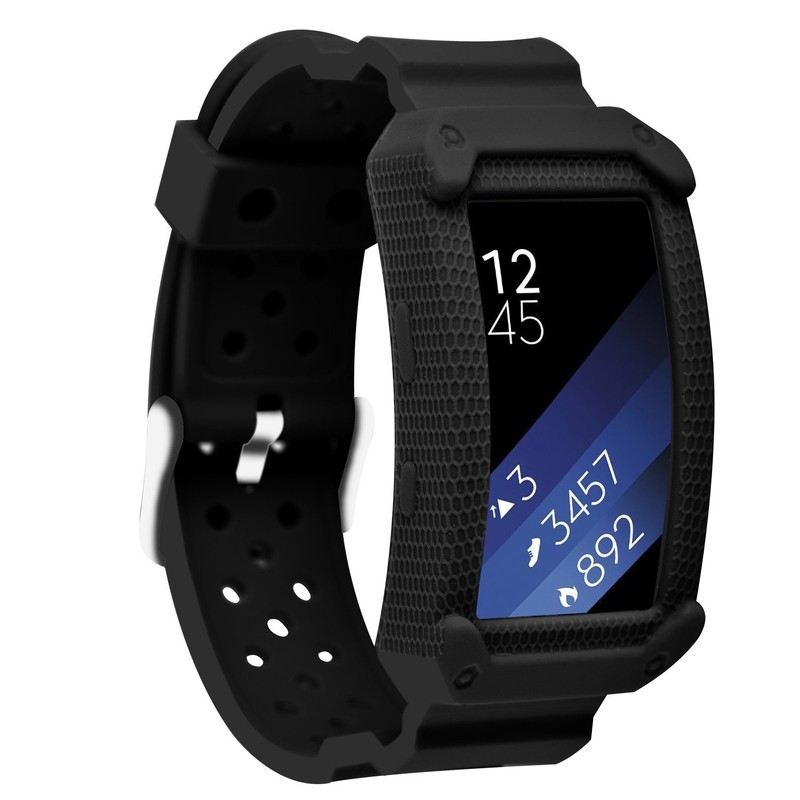
Moretek offers two different styles of wristbands for the Gear Fit 2: a more traditional strap available in 12 different color and pattern options and a rugged strap (pictured) that offers impact protection for your tracker’s watch face. Everything is made of a skin-friendly silicone material and held on your wrist with a traditional watch strap buckle. The rugged bands are definitely going to add some bulk to your wrist, but whether you’re playing a high-impact sport or simply prone to banging it against doorways, that extra protection might save you from incidental damage. Get yours in a funky style for just $10.
See at Amazon
V-Moro Metal Replacement bands

If you’re after a metal strap option for a more stylish look, V-Moro has you covered with two distinct styles — a classic metal link band and a Milanese loop band featuring a magnetic clasp. Both styles are available in silver or black, with the Milanese band (pictured) sold in small and large sizes, so choose accordingly.
The metal band includes a tool for adding and removing links for adjusting sizes. Both are great for incorporating your Gear Fit 2 as an accessory in a professional wardrobe. V-Moro also offers a medium-sized silicone strap on the same Amazon listing. In stark contrast to the stylish metal offerings, these are extremely utilitarian and offer that “classic” fitness tracker look, with five color options to choose from. Get yours for under $20.
See styles at Amazon
Maxjoy Metal Replacement Straps

Not everyone digs the rubber strap look. While it might be ideal for getting sweaty at the gym if you’re planning to wear your Gear Fit 2 out on the town you might be after a classier look.
Maxjoy has a line of stylish metal replacement straps for your Gear Fit 2 that includes Milanese loop bands as well as metal link bands made of high-quality stainless steel. The Milanese bands are available in black, silver, and rose gold for just $17, or you can choose between a black or silver metal link band for just $20. All bands are backed by a 100 percent satisfaction guarantee and a 12-month warranty which means you can buy with confidence.
See at Amazon
MDW Security Clasps
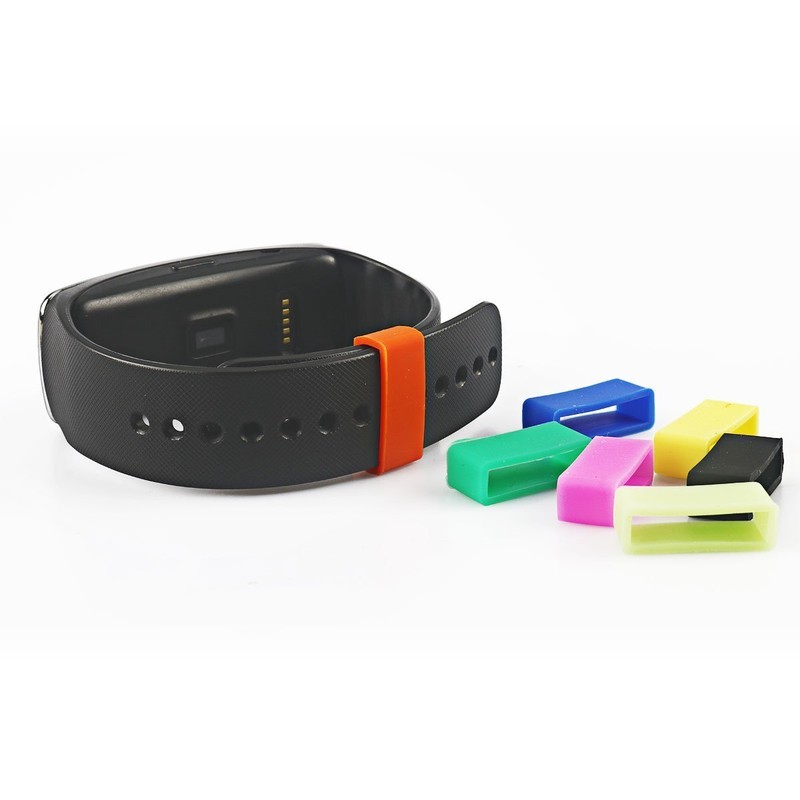
Not digging the band recommendations above? We get it. Frankly, it’s quite alright to love the band that came with your Gear Fit 2. However, there have been reports of bands coming unclasped or otherwise falling off people’s wrists. Maybe this has happened to you.
Allow us to share this recommendation from the comments. You can get a 7-pack of these colorful security clasps for just $6 that fit over the band and ensures your band never pops off. They should offer the extra protection from your Fit 2 falling off your wrist while also letting you add a splash of color.
See at Amazon
How do you accessorize your Gear Fit 2?
Are you a band swapper? What’s your favorite style for your Gear Fit 2? Let us know in the comments!
Updated August 2018: Updated pricing and buy links for our selections. These are still your best options for accessorizing your Gear Fit 2!
Palm is coming back in the most disappointing way possible
This… this was not what I had in mind.

There was a phrase that exemplified Palm devices back in the day: the Zen of Palm. Get the hardware and software out of the way to make everyday tasks quick and simple. I think about it every time I get frustrated trying to edit an alarm on an iPhone.
TCL’s held the defunct Palm brand for several years, but to what end? The leak of a new Palm phone was a surprise in more ways than one.
First, some history…
Palm holds a special place in my heart, and for many old mobile tech nerds. Palm OS was the basis on which Mobile Nations was founded nearly two decades ago.
My introduction to Palm came in 1999 when my father got a Palm Vx PDA. I had Palm Treo smartphones years before the iPhone or Android and immediately hopped on the Palm webOS bandwagon in 2009. It was a graceful and intuitive interpretation of the modern smartphone that made early iPhones and Android seem clunky.
Multitasking app cards? Gesture interface navigation? Web-based apps? webOS, all of it.
The multitasking cards and swipe gestures of Android 9.0 Pie and the iPhone X were established a decade ago by webOS. Web tech app platforms like Proton and PWA are a concept that webOS pioneered. I’m delighted that the spirit of webOS lives on across mobile tech.
Palm and BlackBerry were overwhelmed by iOS and Android. BlackBerry made some tremendously bad bets, but survives today making security software and services, and licenses their brand (today’s BlackBerry phones are made by TCL and Optiemus), Palm’s story is sadder. webOS was a tech media darling, even though the Pre hardware was fragile and anemic. It launched on 3rd-place Sprint and people still lined up to buy it on day one.
Drowning in unsold inventory after Verizon scuttled a marketing deal in favor of Motorola’s Droid, Palm was saved by a $1.2 billion acquisition by HP. A promise of heavy investment bore fruit a year later with the TouchPad tablet, the tiny Veer smartphone, and the Pre3 — the phone fans were waiting for. There were even plans to integrate webOS onto millions of HP PCs.
 The HP Pre3 — the short-lived phone that gave webOS the hardware it deserved.
But… a change in HP’s leadership sapped support for webOS. The new CEO, Léo Apotheker, wasn’t wrong that building webOS into a competitive and profitable platform would take much more investment than the already profitable HP Enterprise business. The TouchPad wasn’t a huge seller at launch and Apotheker quickly shuttered the webOS operation.
tl;dr: webOS was great, Verizon screwed Palm, HP saved Palm, HP screwed Palm and sold it for scrap.
It was one of the dumbest moves in tech history, right up there with Yahoo’s failure to buy Google, or Kodak burying their digital photography tech to protect their film business. The young smartphone market could’ve supported a third ecosystem, but HP cared more about IT services.
HP worked to open source webOS, and LG bought the remaining webOS engineers and assets. webOS lives on today as excellent LG smart TV software.
HP’s surprise 2014 sale of the Palm brand to TCL was a hint of what was to come. TCL was contracted to build BlackBerry’s Android phones, then flipped the arrangement and licensed the BlackBerry brand.
Resurrection
TCL’s teased Palm occasionally through the years, and in early 2018 committed to new Palm devices. It was welcome news for Palm fans — TCL has manufacturing expertise and scale, global carrier partnerships, and has made excellent phones like the Alcatel Idol 4 and BlackBerry Key2.
Good brands are hard. Established brands with positive history are harder. There’s a reason TCL spent millions for rights to the BlackBerry name; same with HMD Global for the Nokia name. Even trusted old Kodak is still licensed and slapped on all manner of garbage.
BlackBerry and Nokia got well-deserved second acts. According to the latest leaks, TCL is giving Palm the opposite. A new Palm phone is coming to Verizon — it’s a tiny thing running customized Android on bare-bones specs. Very little about it evokes the Palm that I knew and loved. It looks like a shrunken iPhone X running Apple Watch software.
 What in the…
There’s a market for small phones, for simple phones, and for cheap phones. None of that’s offensive; today you can make a phone that is all those things and doesn’t suck.
Palm’s phones packed state-of-the-art software and hardware. This “Pepito” has a pitiful processor and memory with barely adequate storage behind a tiny display. Android 8.1 Oreo isn’t bad, but the glimpse of the Pepito’s simplified Android interface is disappointing. Google and Apple have finally caught up to and surpassed most webOS features with Android 9 and iOS 12. I’m fine with that — webOS doesn’t need to return.
What TCL is doing with the Palm brand is the opposite of what most fans would want. An underpowered mini-phone is on few wishlists. Are today’s phones big — perhaps too big? Sure. But a 3.3-inch 720p LCD display with a pathetic 800mAh battery is not the answer.
The window for a high-end Palm resurrection may have passed, as crushing as that realization may be.
All of Palm’s webOS phones were compact, but they didn’t lack oomph. TCL’s Pepito offers a screen that’s barely bigger (3.3 inches) than the decade-old Pre (3.1 inches) — but the Pre at least had a slide-out physical keyboard.
I’ll give TCL credit: they’re doing something different. The Pepito isn’t yet another big-screen slab Android phone. Anybody can do that — TCL does that with their Alcatel brand, so does Samsung, LG, OnePlus, Google, and everybody else. The market for keyboard phones is small and TCL’s BlackBerry will sell you one if that’s your thing. There’s even precedent for small Palm phones — the HP Veer was adorably tiny in 2011 and is even more so today.
From daydream to nightmare
During the launch of another enormous Samsung Galaxy Note, I thought about TCL and Palm. They could use their BlackBerry keyboard expertise to make a modern slider with the comfortable organic curves of a Palm phone. Running Android Pie, it’d be basically a modern descendent of the Pre. Throw in a high-end processor and quality cameras and you’d have one heck of a phone.
The Pepito crushed that dream. Hard.
I know the market for my dream phone is small, as is the cadre of loyal Palm fans. The window for a high-end Palm resurrection may have passed — OnePlus filled that void with smartly-designed phones with top-shelf specs and a minimalist approach to Android.
TCL’s new Palm is not for Palm’s old fans. It’s not trying in vain for a sliver of the high-end market. It’s not even an attempt to recapture the Zen of Palm. It’s a brand that TCL bought without a plan, so they’re putting it on a phone for Verizon customers that have complained that today’s phones are too expensive, too big, and too complicated. It’s an Android-powered Jitterbug.
The Palm I loved is gone. The Palm I want will never be. The Palm we’re getting is a massive disappointment.
 AIVAnet