


Lenovo’s new mobile workstations pack a punch with Xeon CPUs, Quadro graphics
Lenovo introduced two new mobile workstations arriving at the end of August that are based on eighth-generation Intel Core and Xeon processors. The ThinkPad P1 is the thinnest of the two, measuring 0.7 inches, while the bigger ThinkPad P72 is thicker at 1 inch. Both support huge amounts of system memory, Nvidia’s professional graphics and fingerprint scanners so you’re not relying on passwords.
For starters, we have the ThinkPad P72 sporting a 17.3-inch IPS screen. You’ll have a choice of two resolutions: 1920 x 1080 with a brightness of 300 nits, and 3840 x 2160 with a brightness of 400 nits. This latter screen option supports 100 percent of the Adobe RGB space along with a 10-bit color depth, while the 1920 x 1080 panel has a 72 percent NTSC color gamut.
Backing this display is a variety of eighth-generation Core and Xeon processor options, although Lenovo didn’t specify the model numbers (outside mentioning the Core i9) in its announcement. Discrete graphics can be configured up to Nvidia’s Quadro P5200 graphics chip and system memory up to a hefty 128GB (4x 32GB DDR4). You can throw in 16GB of Optane memory too and up to 6TB of storage.
On the connectivity front, the ThinkPad P72 provides two Thunderbolt 3 ports, three USB-A ports, one HDMI 2.0 port, one Ethernet port, a Mini Display Port 1.4 jack, a Smart Card reader, an SD card reader, and an audio combo jack. Wireless connectivity is handled by Wireless AC and Bluetooth 5.0.
Powering this mobile workstation is a 99WHr battery and 230-watt external power supply. Operating system choices include Windows 10 Pro for Workstations, Windows 10 Pro, Ubuntu Linux and Red Hat Linux. It measures 16.4 x 11.1 x 1.0 inches and has a starting weight of 7.5 pounds.
The ThinkPad P72 arrives later this month with a starting price of $1,950.
Next, we have the smaller ThinkPad P1 packing a 15.6-inch screen. Again, the workstation supports a variety of eighth-generation Core and Xeon processors, but it’s a little less packed than the ThinkPad P72 although there’s plenty to love at the lower price.
“When we set out to create the ThinkPad P1, we knew our challenge was to build a mobile workstation that would carry the legacy of professional power and reliability of our ThinkPad portfolio, but also meet our customer’s need for a thin, light, and sleek design,” says Rob Herman, Lenovo’s general manager of workstations.
Here we see the same display resolutions and color space support, but Lenovo specifically lists Nvidia’s Quadro P1000 and P2000 as discrete GPU options. You’ll also see up to 64GB of system memory (2x 32GB) and storage options cut back to 4TB on an M.2 NVMe SSD.
With this laptop, Lenovo throws in an IR camera for facial recognition along with an HD camera. The connectivity and port complement is identical to the P72 although this laptop is powered by a smaller 80WHr battery and an external 135-watt power supply. It measures 14.2 x 9.7 x 0.7 inches and has a starting weight of a lighter 3.76 pounds.
The ThinkPad P1 arrives by the end of August with a starting price of $1,800.
Editors’ Recommendations
- Lenovo’s first VR-certified 15-inch mobile workstation packs a six-core CPU
- Lenovo ThinkPad T480s review
- Dell has a new Developer Edition mobile workstation with Ubuntu, 3 more on way
- Lenovo ThinkPad T480s vs. Lenovo ThinkPad X1 Carbon
- Dell’s refresh of the XPS 13 2-in-1 series dips its toes into Intel’s Amber Lake
Android Pie on the Xiaomi Mi Mix 2S: Everything you need to know
Mi Mix 2S will receive a MIUI 10 build based on Android Pie.

With Android Pie now available, it’s time to take a look at how the beta has fared on Xiaomi’s Mi Mix 2S and when customers can pick up a stable OTA. The Mix 2S is a refreshed variant of last year’s Mi Mix 2 with a Snapdragon 845 chipset and wireless charging, and is one of the best Xiaomi devices available today.
The Android Pie beta on the Mi Mix 2S was highly interesting for a variety of reasons, as it got rid of MIUI in favor of pure Android. With the Android Pie beta program, Google wanted to expand availability to a wider audience, and that’s where brands like Xiaomi come in. It’s an elegant way for consumers to test new features and provide feedback, and for developers to build apps tailored for the latest version of Android. Here’s what you need to know about the Mi Mix 2S and Android Pie.
MIUI makes way for pure Android…

The Mi A2 is the best showcase for what it would be like to run pure Android on a Xiaomi phone, and the Android Pie beta on the Mi Mix 2S follows in the same vein. The current beta build doesn’t have any MIUI elements, and in its place, you get the Pixel Launcher.
Pure Android on a high-end Xiaomi phone is incredible.
Functionally, it is the exact same interface as the Android Pie build on the Pixels, and that’s great. Xiaomi hasn’t quite offered all the beta builds, but I haven’t encountered major bugs even in the earlier builds, and these were ironed out.
But before you get too excited, know that the pure Android build is going to make way for Xiaomi’s custom ROM in the coming months.
… But that will change once Android Pie hits

While it’s great that there weren’t any MIUI customizations during the Android Pie beta, that isn’t set to last. Xiaomi has stated that it will deliver a full-fledged version of MIUI 10 based on Android Pie in the coming months, and the Chinese manufacturer is now conducting beta testing for the same.
Stable Android Pie will see the reintroduction of MIUI.
That was always going to be the case, as Xiaomi sees a lot of value in the host of features it offers with MIUI. There is a case to be made here, as the Android Pie beta gets rid of Xiaomi’s camera interface and instead offers the Snapdragon Camera, which is sub-par, to say the least.
MIUI has slowly been on a path that sees the global ROM diverging from the Chinese build, and while we haven’t seen a lot of new features in MIUI 10, this is the fastest Xiaomi has offered a platform update on one of its devices, and that was also one of the goals with the beta program.
Don’t hold out for Pie on other Xiaomi phones

For now, Xiaomi hasn’t detailed its Android Pie update timeline, and if history is any indication, it’ll be awhile before we see the latest version of Android on Xiaomi’s phones.
Over the years, the brand has prioritised its own MIUI updates, often offering new versions of MIUI to four-year-old devices. While the platform version itself doesn’t change, Xiaomi adds its own set of security fixes and features into MIUI, making it a decent alternative to receiving the latest version of Android.
There’s no mention of when the Android Pie-based MIUI 10 update will roll out to the Mix 2S, but we’re looking at a possible timeframe of two months if previous betas are any indication.
Android 9 Pie
- Android 9 Pie review: Greater than the sum of its slices
- Everything you need to know about Android 9 Pie!
- Will my phone get Android Pie?
- How to get Android 9 Pie on your Pixel right now
- Join the Discussion
Samsung Galaxy Note 9 vs. BlackBerry Key2: Productivity powerhouse punch-out
The Samsung Galaxy Note 9 is all about productivity. From its Bluetooth-enabled S Pen to its newly integrated DeX Mode, the Note 9 offers lots of ways to get work done. But how does the Galaxy Note 9 compare to the recently released BlackBerry Key2? We put the two smartphones head to head find out.
Specs
Samsung Galaxy Note 9
BlackBerry Key2
Size
161.9 x 76.4 x 8.8mm (6.37 x 3 x 0.35 inches)
151.4 x 71.8 x 8.5 mm (5.96 x 2.82 x 0.33 inches)
Weight
201 grams (7.09 ounces)
168 grams (5.92 ounces)
Screen size
6.4-inch AMOLED display
4.5-inch IPS LCD
Screen resolution
2,960 x 1,440 (516 pixels per inch)
1,620 x 1,080 pixels (434 pixels per inch)
Operating system
Samsung Experience 9 (over Android 8.0 Oreo)
Android 8.1 Oreo
Storage space
128GB, 512GB
64GB (U.S.), 128GB (International)
MicroSD card slot
Yes, up to 512GB
Yes
Tap-to-pay services
Samsung Pay, Google Pay
Google Pay
Processor
Qualcomm Snapdragon 845
Qualcomm Snapdragon 660
RAM
6GB, 8GB
6GB
Camera
Dual 12MP (with OIS) and 12MP (with OIS) rear, variable aperture, 8MP front
Dual 12MP, 8MP front
Video
Up to 4K at 60 frames per second, 1080p at 240 fps, 720p at 960 fps
Up to 4K at 30 frames per second
Bluetooth version
Bluetooth 5.0
Bluetooth 5.0
Ports
3.5mm headphone jack, USB-Type C
3.5mm headphone jack, USB-C
Fingerprint sensor
Yes
Yes
Water resistance
IP68
No
Battery
4,000mAh
3,500mAh
App marketplace
Google Play Store
Google Play Store
Network support
Verizon, Sprint, T-Mobile, AT&T
Verizon, AT&T, and T-Mobile
Colors
Ocean Blue, Lavender Purple
Black, Silver
Price
$1,000
$650
Buy from
Samsung, Best Buy
Blackberry
Review score
Hands on
4 out of 5 stars
Performance, battery life, and charging
Julian Chokkattu/Digital Trends
Both the Samsung Galaxy Note 9 and BlackBerry Key2 were created with productivity in mind. With that said, the Key2 features midrange specs compared to the top-of-the-line hardware you’ll find in the Note 9. Sure, they both feature the same 6GB of RAM, but the Snapdragon 845 chip in the Note 9 can run circles around the Snapdragon 660 processor in the Key2. There’s also a more expensive Note 9 model that bumps the 6GB of RAM up to 8GB and storage from 128GB to 512GB.
As for battery capacity, both phones should be able to easily get even the most demanding smartphone users through an entire day. You’ll find a massive 4,000mAh battery in the Samsung Galaxy Note 9. Although the Key2 has a smaller 3,500mAh battery, its smaller display and less-powerful processor actually give it the edge when it comes to stamina. Both phones feature a quick charge option that should get you a few hours of battery life within 15 minutes. The Samsung Galaxy Note 9 does have one major advantage over the Key2 though, and that’s wireless charging.
The Samsung Galaxy Note 9 takes the crown for this round. In addition to higher-end specs, the Note 9 features wireless charging which is sadly missing on the BlackBerry Key2.
Winner: Samsung Galaxy Note 9
Design and durability
Julian Chokkattu/Digital Trends
Put the Samsung Galaxy Note 9 and Blackberry Key2 side by side, and you’ll see a study in contrasts. The Note 9 is a glass sandwich with curves all over, while the Key2 is more boxy with an rubberized aluminum back and a physical QWERTY keyboard on the front. While beauty is in the eye of the beholder, we’d venture a guess the Galaxy Note 9 will make more people swoon than its competition.
In terms of durability, things are a little more clear cut. The Samsung Galaxy Note 9 is all glass — a material that typically doesn’t fare well with drops. The Blackberry Key2, however, has an aluminum body so its likely to better withstand an accidental drop. That said, the Note 9 is IP68 certified meaning your phone won’t be destroyed if you accidentally drop it in water. Unfortunately, the Key2 has no IP rating so an accidental submersion could be the end of the line.
It’s a close call, but we’re giving the win to the Samsung Galaxy Note 9. While both the Note 9 and the BlackBerry Key2 are attractive phones, Samsung’s smartphone is more stylish. The Note 9 is also IP68 certified while the Key2 lacks water or dust protection.
Winner: Samsung Galaxy Note 9
Display
When you compare the Samsung Galaxy Note 9 to the BlackBerry Key2 one of the first things you’ll notice is a massive difference in screen size, largely because of the BlackBerry’s keyboard. The Key2 has a 4.5-inch IPS LCD display while the Note 9 has a Super AMOLED display that’s 6.4-inches. Of course, size isn’t the only difference. The OLED display in the Galaxy Note 9 offers much more vivid colors and inky blacks than you’ll find on the Key2’s LCD display. And when it comes to sharpness, the Note 9 is the clear winner with 516 pixels per inch (PPI), compared to just 434 PPI on the Key2.
For this round, the Samsung Galaxy Note 9 is the clear winner. Its OLED display is nearly two inches larger than what you’ll find on the Key2 and is much sharper.
Winner: Samsung Galaxy Note 9
Camera
Julian Chokkattu/Digital Trends
The Note 9 features a dual camera setup with 12-megapixel sensors, both with Optical Image Stabilization (OIS). There’s also a variable aperture on the Note 9 that can switch from f/2.4 to f/1.5 for better low-light photos.
In addition to impressive camera hardware, the Note 9 packs in some pretty awesome software features as well. Scene detection uses A.I. to adjust color, white balance, and other settings. There’s also a new a flaw detection feature in the Note 9 that will alert you if someone has closed their eyes when a photo is taken.
The Blackberry Key2 has a dual camera module with 12-megapixel sensors as well: The primary lens has an f/1.8 aperture while the secondary lens comes in at f/2.6. While the cameras have somewhat similar specs, the Key2 doesn’t do well in low-light and doesn’t feature any type of A.I. software to adjust the camera settings.
Another round goes to the Samsung Note 9. Its camera is more capable and versatile than what you’ll find on the BlackBerry Key2 and the addition of A.I.-powered scene detection and flaw detection means you’re much more likely to get the perfect shot.
Winner: Samsung Galaxy Note 9
Software and updates
Julian Chokkattu / Digital Trends
If you’re craving Android Pie, we’re sorry to inform you that neither the Samsung Note 9 nor the BlackBerry Key2 ship with Google’s latest OS. Both phones, however, will get updates to Pie in the future. And when it comes to security updates, both Samsung and TCL send regular updates for their phones, though TCL may be a little quicker to update.
Both phones also include productivity suites to help you get work done on the go. On the Key2 you’ll find the BlackBerry Hub suite of apps; the suite includes a calendar app, unified messaging app, and private folder, amongst other things. The Galaxy Note 9, on the other hand, has DeX mode: With DeX mode you can attach the Note 9 to an external monitor to create a mobile work environment.
We’re calling this round a tie. Both phones ship with Android Oreo and should get Pie at some point in the future. And while BlackBerry features its productivity suite, DeX mode on the Note 9 is great for getting work done on the go.
Winner: Tie
Special features
Julian Chokkattu/Digital Trends
The Samsung Galaxy Note 9 has a few special features that makes the phone very enticing. You’ll find a Bluetooth-powered S Pen that can control the phone remotely triggering photos, slide shows, music and other features on the Note 9. DeX mode is also built-in on the Galaxy Note 9, meaning you can use your phone as a makeshift desktop by attaching it to a monitor.
As for the BlackBerry Key2, its main attraction is its physical keyboard. Of course, the keyboard does more than meets the eye. The spacebar houses a discreet fingerprint sensor, and you can run your finger along the keyboard to scroll through webpages. There’s also the Speed Key that allows you to quickly switch between apps.
It’s a close call because both devices have really unique special features, but we’re giving this round to the BlackBerry Key2. While Samsung has really upped its S Pen game with the Note 9, we still think the physical keyboard on the Key2 is more useful for day to day use.
Winner: BlackBerry Key2
Price
The Samsung Galaxy Note 9 is a premium phone that carries a premium price tag to match. The 128GB version comes in at $1,000 and the 512GB variant will cost you a whopping $1,250. The BlackBerry Key2 however sits firmly in midrange phone territory with a more approachable $650 price tag.
Overall winner: Samsung Galaxy Note 9
Julian Chokkattu/Digital Trends
Our face-off ends with the Samsung Galaxy Note 9 as the clear winner. While the BlackBerry Key2 has awesome productivity features, its specs simply pale in comparison to the Samsung Galaxy Note 9, and DeX mode makes the Note 9 even more enticing to enterprise users. Honestly though, if you’re looking for a productivity workhorse, you can’t go wrong with either the Note 9 or the Key2 and BlackBerry’s phone is a lot cheaper.
Editors’ Recommendations
- Samsung Galaxy Note 9 vs. Pixel 2 XL: Flagship face-off
- BlackBerry Key2 vs. BlackBerry KeyOne: A stunning successor
- LG V35 ThinQ vs. Samsung Galaxy S9 Plus vs. Galaxy S9: Flagship standoff
- Blackberry Key2 vs. Samsung Galaxy S9 and S9 Plus: Is it a contender?
- OnePlus 6 vs. LG G7 ThinQ: Can the flagship killer sink LG’s latest?
Bose headphones, monitors, and more are discounted today
Whether you’re looking for new tech gear or household items, we’ve got you covered.
We found plenty of great deals today that include big discounts on the Bose QuietComfort 35 Series II headphones, Corsair’s K70 mechanical keyboard, a 24-inch Acer monitor, and more! Most of these prices will be gone when the day ends, so don’t miss your chance to save big!
View the rest of the deals
If you want to know about the deals as soon as they are happening, you’ll want to follow Thrifter on Twitter, and sign up for the newsletter, because missing out on a great deal stinks!
Save 95% on a Pro Plan lifetime subscription to Animatron Studio
It’s no secret that video animations are great at attracting online viewers. Who doesn’t love a fun and colorful animated distraction? Don’t you wish you could quickly create your own fun animations, or add a splash of magic to your social media?
Save 95% on a lifetime subscription to Animatron Studio! Learn more
Android Central Digital Offers has a great deal for any budding animators out there. Check out this great deal on the Animatron Studio Pro Plan. For just $49.99, you can get a lifetime subscription to this simple and effective animation platform.
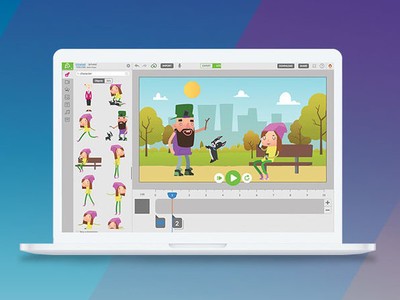
Animatron has designed a powerful tool for creating fun and colorful animated videos that are perfect for storyboarding a bigger film idea, adding a touch of fun to your next presentation, or marketing your small business on social media. You’re able to import and edit your own graphics, photos, and audio to create memorable content, and there are over 500,000 royalty-free assets available for you to use.
Everything you create can be exported to HTML5, SVG, GIF, or to a video format for universal playback. You get 10GB of storage for your movies and 100GB/month of hosting bandwidth.
Create awesome animations for your business or social media! Learn more
A monthly subscription to Animatron’s Pro Plan costs $15/month, so getting a lifetime subscription to these tools for just $59 is an incredible value. Save close to $1,000 thanks to Android Central Digital Offers and only pay once.You don’t need to be a professional animator to create professional-looking animations. Step up your social media game with animations from Animatron!
The Moto X4 is the best phone you can buy for under $400

The Moto X4 is one of the most well-rounded phones on the market. A combination of excellent performance, a great design, and unique camera features give it a leg up in the sub-$400 space.
 Advertisement
Our pick
Moto X4

-$260 from Amazon
-$350 from Motorola
If you have $400 budget, the Moto X4 is your best bet right now.
The Moto X4 is the long-awaited sequel to the Moto X Pure Edition and it’s the best phone you can buy for under $400. It has a striking design, clean software, a great display, and a pretty good pair of cameras on the back.

Advertisement
Who should buy this phone?
The design of the Moto X4 is just as nice to hold as it is to look at, thanks to its gentle curves, and it’s durable with IP68 water and dust resistance. The software is as close as it gets to stock Android without bearing the Pixel brand (even more so with the Android One variant on Google Fi), but you still get all of Motorola’s useful motion gestures for quickly launching functions like the camera and flashlight.
You won’t get support for Motorola’s extensive collection of Moto Mods like on the Z2 Play, nor is the battery life from its 3,000 mAh cell the best we’ve seen. But the display is terrific, performance with its Snapdragon 630 chipset is smooth and speedy, and its dual cameras can take some really great photos.
The carrier compatibility makes it worth it
There’s something about Motorola’s phones that just scream “versatile.” The Moto X4, like many of the company’s unlocked phones, works on every carrier in the U.S., including Verizon and Sprint, something that’s difficult to come by in this price range.
Is it a good time to buy this phone?
Yes, but only at its discounted price. The Moto X4 was released in October 2017, which puts it in line for a refresh soon. At the same time, Amazon’s discounted price of $260 makes it extremely compelling.
Reasons to buy
- Excellent performance
- Great camera quality
- Up-to-date software
- Awesome design and build quality
Reasons not to buy
- Due for a refresh soon
There are other great phones in this price range
You don’t have to look far to find a bunch of great options under $400. While Motorola clearly has the edge here (you’ll see the Moto G6 & G6 Plus in this list, too), there are lots of other choices to pick from, and they’re all very good.
Runner-up
Sony Xperia XA2 Ultra

$360 from Amazon
The Sony Xperia XA2 Ultra is a huge phone with plenty to like.
Sony’s excellent Xperia XA2 Ultra has a 6-inch 1080p panel with slim bezels and a fingerprint sensor on the back. Its Snapdragon 630 platform, 4GB of RAM and 32GB of storage are equal to the Moto X4, but its 3,580mAh battery is ginormous.
Sony may not be super popular in the high-end space these days, but its bread and butter is in the mid-range. The Sony Xperia XA2 Ultra is big and well-designed, and has everything you’d need from a sub-$400 phone. Better yet, the massive battery will definitely last a full day and then some.
Best for outside the U.S.
Moto G6 Plus

£369.00 at Amazon UK
If you can buy it, the Moto G6 Plus is an outstanding, affordable phone.
The Moto G6 Plus is basically a taller, skinnier Moto X4. You get a Snapdragon 630 platform, 4GB of RAM and 64GB of storage, and a great 12MP rear camera with a secondary sensor that does portrait mode and more.
Best for even less
Moto G6

$235 from Amazon
You can’t go wrong with the Moto G6, which is far better than its $249 price tag would suggest.
The Moto G6 is the best budget phone you can buy, and at $249 it’s way below our $400 budget. With Gorilla Glass 3 on the front and back, a dual camera setup, and a spritely but power-efficient Snapdragon 450 processor, the Moto G6 is beautiful and capable.
Both the Moto G6 and the G6 Plus are cut from the same cloth, but because they are so similar, the G6 Plus is only sold in markets the Moto X4 isn’t available. Yes, it’s confusing, but that’s fine: all you need to know is that you’ll probably be happy with whichever model you like.
The Moto G6 series is a bit more modern-looking than the Moto X4, but neither are better phones overall. If you want a phone with a taller screen, you should choose the G6 or G6 Plus over the Moto X4.
Bottom line
The sub-$400 market is both extremely competitive and a little confusing, but there’s never been more great options readily available, and with the emergence of Android One, you can finally count of getting consistent updates without having to buy a flagship phone straight from Google. The Moto X4 and Sony Xperia XA2 Ultra are both great examples of attractive, affordable phones with premium features like water resistance and fast fingerprint sensors. At the same time, devices like the Moto G6 and G6 Plus redefine what it means to be a top-tier budget device.
But if you have a maximum budget of $400, the Moto X4 is the best phone for you.
Updated August 2018: The Moto X4 is still our best phone under $400, while the Sony Xperia XA2 Ultra is our runner-up, and the Moto G6 Plus is now our non-U.S pick. We’ve replaced the Moto G5 Plus with the Moto G6.
Enjoy your music with the $299 Bose QuietComfort 35 II wireless headphones
Active noise cancelling and great sound.
The Bose QuietComfort 35 II wireless headphones are down to $299.99 in Black and Silver on Amazon. Headphones like this don’t drop in price because when you’re the best at something, you make the people come to you. That’s just a law of nature. The only other deals we’ve seen on the Series II have come through eBay’s site-wide sales that just happened to work on these headphones. They don’t usually drop in price on their own like this.

These headphones have a noise-rejecting dual-microphone that allows you to receive phone calls and also access voice assistants like Siri or Google Assistant. It has active noise-cancellation you can adjust based on where you are, Bose quality sound, Bluetooth, NFC, and up to 20 hours of wireless play time. The active noise-canceling will last up to 40 hours if you choose wired listening. Read more about them in our thorough review.
You can grab a carrying case from Amazon for only $13 if you plan on traveling with them a ton. If you prefer earbuds or the neckband-style for headphones, the Bose QuietControl 30 are also on sale today.
See on Amazon
Google offering back-to-school deals on Pixel 2 XL, Pixelbook, Google Home

A great way to gear up for a new school year.
It’s already August, and that means people are well in the swing of buying the tech necessary for the upcoming school year. No matter the grade level, it’s basically a requirement that you have some sort of phone and/or laptop to get the most work done — and Google’s latest products are a great place to start.
To make the purchases a little bit more palatable, Google is running a variety of discounts on its latest and greatest — the Pixel 2 XL, Pixelbook, Google Home, Home Mini, Chromecast Ultra and Pixel Buds. Each of the deals runs for a different amount of time, with a different start and end date. It’s all a bit confusing, but here’s a list of all of the deals and the date range they run.
- Pixel 2 XL: $100 off + $50 store credit + free home Mini (Aug 12 – Sept 1)
- Pixelbook: $250 off the 128GB model (Aug 12 – Sept 3)
- Google Home Mini: $10 off or buy 2 and save $40 (Aug 19 – Sept 3)
- Google Home: $30 off or $65 Home + Home Mini (Aug 19 – Sept 3)
- Chromecast Ultra: $10 off (Aug 26 – Sept 6)
- Pixel Buds: $50 off (Aug 12 – Sept 1)
Some of the deals are better than others. The Pixel 2 XL, Pixelbook and Google Home + Home Mini deals in particular are pretty solid, especially if you were already planning on picking up multiple Google devices at once. All of the deals will be applied automatically when you add the products to your cart at the Google Store — just make sure you’re buying during the listed dates above.
Google Pixel 2 and Pixel 2 XL
- Pixel 2 FAQ: Everything you need to know!
- Google Pixel 2 and 2 XL review: The new standard
- Google Pixel 2 specs
- Google Pixel 2 vs. Pixel 2 XL: What’s the difference?
- Join our Pixel 2 forums
Best Buy
Verizon
Google Store
Project Fi
Security keys are a great fail-safe way to get into your Google account

Two-factor authentication can protect your account, and a security key makes for a great backup if you lose your phone.
We’ve gone over why using two-factor authentication on your online accounts is a good idea, and showed you how to set it up for your Google account as well as how to get started with Authy if you use more than one phone or computer. But we’re not done yet!
Google offers what it calls the Advanced Protection Program for folks who need very tight security and controlled access to their account. People like executives, movie stars, politicians and the like. It uses security keys to validate who you are as a two-factor method. Advanced Protection is probably too much hassle for most of us, but a security key is an awesome little tool. It can do to help secure your Google account, and is also a cover-your-butt backup in case you lose your phone — and the authenticator app you installed on it. They’re relatively cheap, easy to set up and can get you into your Google account from any computer anywhere.
What are you talking about? Why do I want one of these things?

A security key is a small plastic key-shaped device you can plug into a USB port on a Computer or use wirelessly. Some of them light up, some have a small touch-sensitive button, and some have both. But they don’t really do anything, you just plug them in. At least it looks like they don’t do anything.
What you can’t see is the tiny chip inside the plastic. When it’s powered up by putting it in a USB port or pressing the button to connect wirelessly, a secure token can be read. Software on a computer can get this token and compare it against what it expects and see if the two match. That software can use this result to do “stuff.” When you go to log onto your Google account from a computer, the web page code can read one of these keys. If everything matches, you get a green light and can get into your account. If things don’t match, you get an error. Everything is encrypted, everything is safe, and no two keys are the same.
A USB key is like plug-and-play account recovery.
It’s a “thing you have” that can be used to authenticate who you are. When used in tandem with your username and password, it makes things very difficult for someone pretending to be you on the internet. It makes for a great piece of a 2FA scheme, but it’s best to add it as a third authentication method along with the authenticator app on your phone. It’s even a good idea to use more than one of them.
Let’s say you get on a plane and head out somewhere nice for a week or so. During the commotion at the baggage carousel or the rental car desk, you lose (or someone steals) your carry-on. Inside was your smartphone and your laptop. If you have 2FA set up on your Google account and don’t have another computer or phone that’s already logged in you have three options.
- Find those backup codes Google told you were important to print out and keep safe.
- Call Google and work your way through their account recovery process and hope for the best. Also, hope that the information you have on file with Google is correct and you can remember it.
- Scream and shout because you now need to make a new account and will lose everything you had before.
The first option is the best one. Those recovery codes are an easy way in, and Google even tells you how important it is to keep track of them. Mine are … somewhere. The second option can be a crapshoot, and frankly, shouldn’t even exist. Google should never give you access to a 2FA protected account if you can’t provide both methods of authentication. Knowing your mother’s maiden name or the name of your first pet is a ridiculous security challenge, and if I had my phone to take a call and get a code I wouldn’t be asking in the first place. And the third option, well, that would suck. None of us want to think about the third option.
If you had a security key (or two) set up on your account you would have a fourth — log in at any computer, and plug your key in when asked. I have two of them — one on my keychain, and one at my house that I won’t lose.
How to set up a security key

This part is easy. All you need is access to a computer with a USB port or Bluetooth — Chromebooks work just fine — and the key itself. There’s a link to a good one at the bottom of the page.
Visit the web page for your account settings. Here’s a handy link. Click the Sign in & security link near the top, then look for the link that says 2-Step Verification under the Password & sign-in method section. If you’ve never set up two-factor authentication, you’ll be walked through setting it up with either a text message, Google prompt on another phone, or a security key. I’d recommend you also set up another 2FA method, too.

You’ll need to provide your password and you’ll see a link to set up a security key in the list of choices for 2FA if this is your first time using it, or on a tab by itself at the top of the page. Click away.
They’re cheap enough, so buy more than one.
Make sure your key isn’t already plugged in and click that button. Read the instructions that open, but you already removed the key because you’re smart and you read Android Central. Click the Register button and plug in your key when it tells you to plug in your key. If your key has a “button” — a metallic round disk on one side and not really a button — you’ll have to lightly place your finger on it. It’s not reading your fingerprint, it’s just a switch that closes the circuit so Google and your key can sync and set up a token that proves you are really you.
And you’re done. It will tell you that you’re done even. The next time you’re at a computer and asked to log into your Google account, it will ask for your key after you’ve entered your password. You put it in and place your finger on the button if it has one, and it can verify you. If you don’t have your key with you, you can still use another 2FA method like the app installed on your phone. And you can have more than one key attached to your account so you have a backup of your backup.
Stay safe out there!
Feitian MultiPass Bluetooth key at Amazon
Yubico USB key at Amazon
With the Galaxy Note 9, the Note line has a new purpose

Samsung’s repositioning of the Galaxy Note as power-user phone bodes well for the series’ continued prosperity.
We’ve often asked what makes a Galaxy Note phone special. Sure, the Note is able to boast its place in smartphone history as the first mainstream “phablet” device, having first launched way back in 2011. But why buy a Note today when there are so many other great, big phones on the market — many of which sell for a fraction of the Galaxy Note 9’s eye-watering $1000 starting price?
Since Samsung first introduced a larger Galaxy S model with the S7 edge, the question has been even more pressing. The Note, launching later in the year, has also had to compete with a similarly-specced Galaxy S phone. Samsung was competing with itself, perhaps needlessly. (Some opinion pieces around the time of the Note 7 debacle even blamed Samsung’s woes with that phone on the pressure to compete with the larger S7.)
In 2017, the case for the Note’s existence was even more precarious. A second rear camera was added in the Note 8, but at the cost of a smaller battery. The display was only slightly larger than the S8 Plus, but in a much bulkier body.
So why buy a Note? Or, for Samsung, why even build a Note? The company solves the Galaxy Note problem this year by returning the series to its power-user roots. It could be argued that Samsung needed to start competing on raw specs again anyway, in light of even more phones with 8GB of RAM, 256GB or more internal storage, and gigantic batteries, from Chinese competitors. Nevertheless, the significant spec bump brought to bear in the Note 9 also puts the device on firmer footing within Samsung’s own lineup.
Recently, the dividing lines between the Galaxy S and Note lines have blurred considerably, largely to the detriment of the Note.
The Galaxy S and S Plus series are your mainstream flagship phones, coming in both big and not-so-big variants. The Galaxy S gets the new processors and camera tech first. The Galaxy Note, however, is more about those value-added specs: Extra storage and RAM, battery power, and of course the S Pen.
The Note 9’s upgraded, Bluetooth-enabled stylus is also an important part of that differentiation. For years the core technology behind the S Pen has barely changed. It’d become more responsive, with more levels of pressure-sensitivity. But all the new S Pen features were driven by software, not hardware. With the wireless S Pen, a world of new, Note-only features for this remote control come into focus. And an SDK is on the way to allow developers to build more still.
A powered, wireless S Pen presents all kinds of possibilities for future Notes too, if the requisite power and miniaturization hurdles can be overcome. How about gesture input via a built-in gyro, or trackpad input through a sensor on top of the button?
Over the past three years, the dividing lines between the Galaxy S and Galaxy Note lines have been blurred considerably, largely to the detriment of the Note. Now, they’re starting to become more clearly defined. With the Galaxy S10, I expect Samsung to emphasize a sleek, possibly near-bezelless chassis, as the next evolution in its design language. Expect trade-offs in terms of battery size and RAM/storage, as Samsung aims for an affordable “mainstream” price. When it’s Note 10 time, it’ll be bigger, bulkier, with higher prices, more storage, and a more capacious battery. That, after all, is now what makes a Note a Note.
Other mid-August odds and ends:
- Android Pie is a thing, and the finished version of Android 9 has been running well for me on the Pixel 2 XL. The next step: How quickly will beta program devices like the OnePlus 6 get the update? That’s the big payoff that justifies the program’s existence for non-Pixel phones.
- Of course the real test for Project Treble will be phones like the Galaxy S9 and LG G7. How quickly can Trebelized phones running Oreo get their slice of the Pie.
- I’m still using the HTC U12+, post-button-fix-update. It’s still not perfect. The camera’s too slow to start up, the battery life is acceptable but little more. But it’s a fine phone with excellent performance and great photographic capabilities. Check out our revised review and my video review redux, which includes an intro segment laced with HTC nostalgia, and a neon backdrop courtesy of Taipei’s Ximending district.
- I’ve yet to actually hold a Samsung Galaxy Watch but I’m lukewarm based on what I’ve seen so far. When I’m back on a Samsung phone (likely a Note 9), I’ll be sticking with my Gear Sport. This looks like another boring, bulky smartwatch that tries to compete with the Apple Watch on functionality, while largely coasting on the design. Maybe I’ll change my mind when I see one in the flesh, but right now this is just an uglier version of last year’s Gear Sport.
- Also, Samsung isn’t commenting on what’s happening with the Gear brand in future. Galaxy is a stronger brand, sure. But will we see a Galaxy Fit wristband, or Galaxy VR headset in the future? Who knows.
- Oh Bixby!
That’s it for now. I’ll be back with an IFA-themed Editor’s Desk in a few weeks!
-Alex
 AIVAnet