


Firefox mobilizes a three-pronged attack against ad-based tracking
Mozilla said that its popular Firefox browser will eventually block ad-based tracking by default. To get there, the company plans to roll out new features over the next several months, such as a new ad-blocking component that is already available in Firefox Nightly. If this component works as expected, it will go mainstream with the launch of Firefox 63.
But that’s just one-third of Mozilla’s assault on tracking. The company also injected Firefox Nightly with a component that will “strip” cookies and block third parties from storing tracking content on your PC. Mozilla will conduct a “shield study” with a limited number of beta participants and, if the tool performs well, it will be made generally available in Firefox 65.
“In the physical world, users wouldn’t expect hundreds of vendors to follow them from store to store, spying on the products they look at or purchase,” Mozilla says. “Users have the same expectations of privacy on the web, and yet in reality, they are tracked wherever they go. Most web browsers fail to help users get the level of privacy they expect and deserve.”
The first and final prong in Mozilla’s assault on ad-based tracking doesn’t have a planned, definitive release. Instead, the company said that future versions of Firefox will prevent “fingerprinting,” a means to lurk behind the scenes to identify web surfers by their device properties. The company also plans to block cryptocurrency mining scripts.
As Mozilla states, many websites will still require your information in return for their services, but with these components in place, sites must now ask for your information rather than take it by force. Mozilla’s angle is that it’s giving you a “voice,” which started with blocking pop-up ads in 2004.
Mozilla’s plan surfaces after the company introduced a new extension to control Facebook. Called Facebook Container, it essentially locks your identity in a virtual vault so that Facebook can’t track you across the internet through third-party cookies. Mozilla says this extension doesn’t interrupt the services you enjoy.
Mozilla also promotes an extension called Disconnect for Facebook. This tool blocks third-party requests sent to Facebook’s servers, but allows you to use Facebook without any problems. In other words, this extension prevents Facebook from tracking the websites you visit.
“Blocking pop-up ads in the original Firefox release was the right move in 2004, because it didn’t just make Firefox users happier, it gave the advertising platforms of the time a reason to care about their users’ experience,” Mozilla adds. “In 2018, we hope that our efforts to empower our users will have the same effect.”
If you want to see the two new ad-based tracking blocks in action, download the Firefox Nightly build here. After that, navigate to the Control Center menu located to the right of the address bar (the icon with three lines) to access a new “Content Blocking” section in the drop-down menu. It’s toggled on by default.
After clicking “Content Blocking,” you can block third-party cookies that track you across the web and more.
Editors’ Recommendations
- Firefox Quantum review
- The best web browsers
- Firefox’s new Monitor service will let you know if you’ve been hacked
- How to clear cookies
- How to block calls on an iPhone
This Sun Joe pressure washer is down to $140 at a variety of retailers
Make that sidewalk look like new!
The Sun Joe SPX4001 2030 PSI electric pressure washer is down to $139.99 on Amazon. This is $30 off what it normally goes for and a match for the lowest price we’ve ever seen. The last time it dropped this low was back in early July. You can also find this deal at Walmart and Home Depot.

The pressure washer has a 14.5-amp motor that generates up to 2030 PSI cleaning power. The wheels are designed for maximum maneuverability. It doesn’t always have to be at maximum power, either. Choose the low 1450 PSI option for easier jobs like dirt or grease. It has five quick-connect spray tips for a multitude of tasks. The hose reel stretches 20 feet. Users give it 4 stars based on 198 reviews.
See on Amazon
Philips Hue to Implement Support for Siri Shortcuts Later This Year
Philips is planning to introduce support for Apple’s Shortcuts feature in its Hue app in iOS 12, Philips announced today at the IFA electronics trade show in Berlin (via iCulture).
With the integration, Hue owners will be able to add lighting recipes to various Siri Shortcuts, such as shifting the lights in the dining room to a certain color with a Siri voice command like “Dinner Time,” as demoed by Philips.
Siri Shortcuts is a Siri feature designed to allow users to create multi-step shortcuts using first and third-party apps that can be activated by Siri voice command.
Shortcuts are deeply customizable, and third party apps like the Hue app are able to develop quick actions for Siri that can be incorporated into Shortcuts recipes. When Hue integration launches, Hue options will be available in the dedicated Shortcuts app.
The Hue shortcuts will be compatible with other shortcuts, so you can have a whole “Dinner Time” setup that not only changes the lights, but also does things like turn on music and text family members that the food is ready.
Siri is able to suggest frequently used Shortcuts right on the iPhone’s lock screen and Apple Watch, so if there are Hue-related lighting shortcuts that are often used, these options will be able to be implemented with a simple tap.
Right now, the Shortcuts app, which is what’s used to create these Siri Shortcuts, is available to developers in a beta capacity, but it will be released when iOS 12 is released. Sometime after that, Philips will presumably implement Shortcuts support.
Philips today also announced a new power feature that’s designed to allow Hue lights to retain their color and brightness settings after a power outage or after a lamp has been manually turned off, and the company is partnering with new lighting companies that include Makris, Kichler, Busch-Jaegar, Illumra, Koizumi, and John Lewis for its Friends of Hue program.
Discuss this article in our forums
Survey Suggests Customers are More Satisfied With CarPlay Than Android Auto
Customers who use Apple’s CarPlay feature report a higher satisfaction rate than those who are using Android Auto, according to data gathered by a new J.D. Power survey.
On a 1,000 point scale, Apple’s CarPlay earned a satisfaction score of 777, compared to Android Auto’s score of 748.
Though drivers appear to be more satisfied with CarPlay, Google still has an edge over Apple on navigation. Among owners who use their own navigation system, 56 percent choose Google Maps most often, while 16 percent use Waze most often.
Just 23 of respondents percent said that they prefer to use Apple Maps, and even iPhone owners were more likely to use Google Maps. These numbers could shift further in Google’s favor with the release of iOS 12, which will give CarPlay users the ability to use third-party mapping apps in lieu of Apple Maps.
Overall, according to J.D. Power, most consumers consider phone systems like CarPlay and Android Audio better than native systems installed in cars.
“Most consumers consider phone systems better for navigation and voice recognition–and they’re free. ‘Better and free’ are hard to compete with, so automakers will inevitably have to cede this territory and will be much better served by focusing on areas where they are the exclusive provider–like driver assistance and collision avoidance–and continue to hone those systems.”
In fact, 19 percent of new vehicle owners who have factory-installed navigation options don’t use it, and of those people, 70 percent use another device, which is “almost always” a smartphone.
While CarPlay was slow to roll out following its 2015 launch, it is now installed in hundreds of vehicles from nearly all prominent automobile manufacturers. Apple maintains a list of vehicles that include CarPlay support on its website.
CarPlay is also available as an aftermarket option in systems available from companies like Pioneer, Sony, Alpine, and Kenwood.
J.D. Power’s data was gathered from a survey of nearly 20,000 vehicle owners and lessees, and the full report contains additional detail about the highest-ranking vehicles from 2018.
Related Roundup: CarPlay
Discuss this article in our forums
Avido Wiba review: Wireless power, anywhere – but at a price

After raising over $40,000 back in July on IndieGoGo, the WiBa wireless power bank from Avido is finally ready to ship. The WiBa (presumably short for Wireless Bank) is a combination charging dock and external battery bank, both with Qi charging built in. We got our hands on the innovative device, and took it for a test-drive. The WiBa retails for $99, available for pre-order directly from Avido.
Hardware
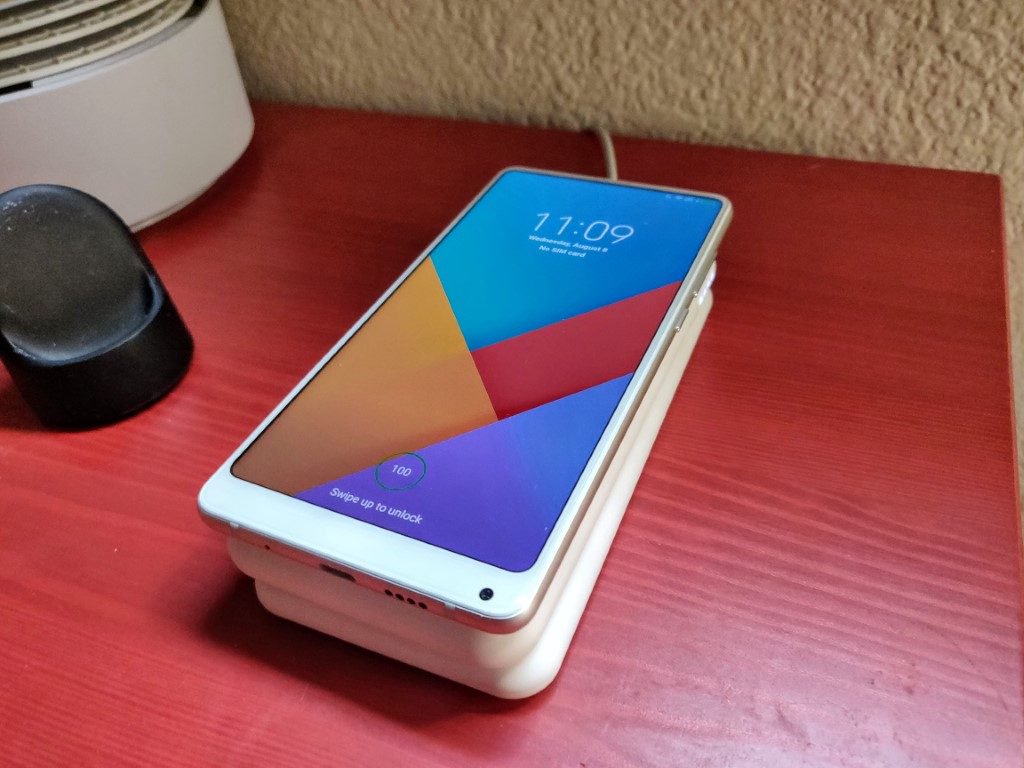
The Avido WiBa is actually two products that function symbiotically as one. The first half of the product is a Qi-charging cradle, with built-in pins to charge the latter piece, which is a 5,000mAh power bank. Said power bank is a little larger than a 6″ phone, and a little thicker as well. It features a Type-C input port (which is all-but superfluous, as you’ll see), USB-A Quick Charge output port, and Qi Wireless Charging on its top face. Its bottom face also features contacts to charge the battery wirelessly – when Avido advertises the WiBa as a wireless charging solution, it means it.
Aesthetically, the WiBa doesn’t try to do anything fancy. It’s made of a soft-touch bone-colored material, which unfortunately doesn’t quite fit in with the standard black of most smartphones these days. It does, however, fit rather perfectly with the white ceramic aesthetic of the Xiaomi Mi Mix 2S – eerily so.
Specs & Performance
Specification-wise, both the Power Bank and Charging Cradle feature standard Quick Charge speeds. The former can charge devices both wired (5V/2.1A) and wirelessly (5V/5W). The latter only charges devices wirelessly – at the fast-charge rated 9V/10W current. But it churns out enough power to charge both the power bank and your phone by stacking them atop one another, which is a great convenience. One cable to the cradle charges both your Qi-enabled phone and the WiBa power bank, and taking them off the cradle is a simple as picking them up. No wires, no cables. It’s pretty cool.

Value
At $99.99, the 5,000mAh Avido WiBa is no cheap buy. Most batteries of that capacity are $20 or less. Even if you include a fast-charging Qi Charger to the cart, you’re only looking at about $40. But the wireless technology in both the charger and battery shouldn’t be underestimated, nor should the convenience of being able to stack a battery and phone on top of the charger for utterly effortless charging.
At this price point, the Avido WiBa is, unfortunately, a rather niche purchase. But if it can sell enough of these to make the investment worthwhile, I have a feeling a WiBa 2.0 could change the way we think about charging. If you just can’t do without the ability to stack your battery and phone atop one-another to charge, the Avido WiBa is up for pre-order for $99 on Avido’s website.

Mophie Unveils New Wireless Charging Options
Mophie today announced the launch of four new wireless charging products designed for the iPhone and other Qi-based smartphones, debuting the Charge Stream Vent Mount, the Charge Stream Desk Stand, and the Charge Stream Powerstation Wireless in standard and XL configurations.
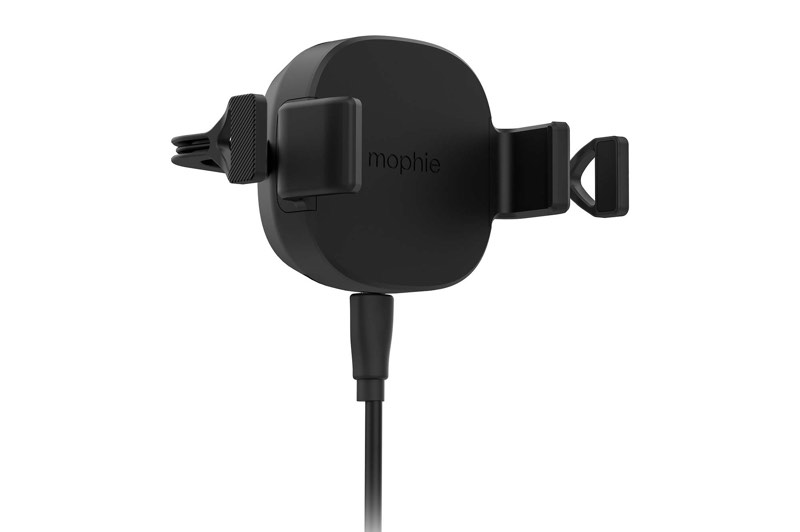
The Charge Stream Vent Mount ($69.95) is designed to fit in most vehicles with a four-prong mount that slips over the air vent. It’s meant to accommodate one-handed smartphone insertion and removal, and should work with most smartphones regardless of size. Rubberized arms hold a device in place while charging, and for iPhones, it supports faster 7.5W charging speeds.
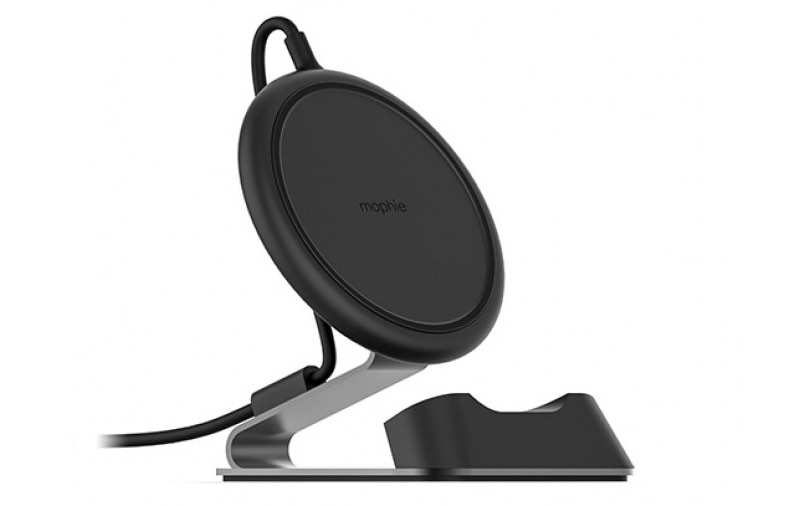
Mophie’s new Charge Stream Desk Stand ($69.95) , which is coming this fall, looks similar to its existing charging pad for iPhones. It offers 7.5W charging speeds while holding an iPhone or other smartphone upright in portrait or landscape mode. The charging pad can be removed from its steel frame and used as a traditional wireless charging pad if desired.
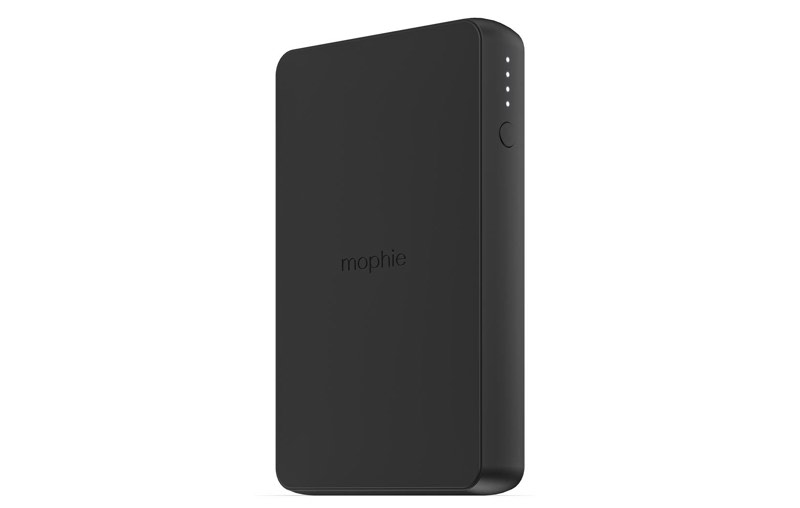
The Charge Stream Powerstation Wireless ($79.95) and the Charge Stream Powerstation Wireless XL ($99.95) work as a traditional wireless charging pad when near a wall outlet and as a 5W wireless charging battery pack when on the go. The Powerstation Wireless features a 6,040mAh capacity, while the Powerstation Wireless XL features a 10,000mAh capacity. An included USB-A port can also charge a second device.
With the exception of the Desk Stand, which is not yet available, all of the new wireless charging options can be purchased from the Mophie website starting today.
Discuss this article in our forums
Google Assistant goes bilingual, lets you speak two languages interchangeably
Whether you’ve come to say “Hola!” or “Bienvenue” or “Auf Wiedersehen,” Google Assistant is ready to answer you right back as the smart assistant becomes the first of its kind to go fully bilingual. Users can now speak two languages interchangeably with the Google Assistant on smart speakers and phones and the Assistant will respond in kind.
As of right now, the Assistant can understand any pair of languages with English, German, French, Spanish, Italian, and Japanese, with more languages to come in the coming months.
Although it’s an advancement for the worldwide market, there have been hints of the new ability coming since the beginning of the year as Google rolled out new features and analysts reverse-engineered the launch of new routines and integrations for Assistant. Google announced at the beginning of the year that it anticipated offering support for up to 30 languages by the end of 2018. In February, it announced a breakthrough feature by which Google Assistant could automatically detect which language a user’s commands were in and respond in kind. Google also published a technical blog post explaining how the speech research team at Google tackled the multilingual problem.
Bilingualism is also likely to lead to multilingualism, a natural progression of Google’s direction. But even the ability to detect and speak two languages simultaneously is a huge win for bilingual communities like Quebec, where most people speak French and English, and India, where demand for bilingual services in Hindi and English is so high that Google recently developed bilingual support for its Feed service (previously known as Google Now), and expects to roll out support for Hindi very soon.
The new bilingual feature will also be particularly helpful for Google Assistant users who speak their native language in their home, but may speak a different language at work or while out with friends.
Previously, Google Assistant was capable of understanding different languages but users had to physically designate a primary and a secondary language in the app’s settings. The new feature goes a long way toward reducing that friction and giving users the organic engagement that is high on Google’s list of goals.
By year’s end, Google’s language support services are expected to allow the company to reach 95 percent of Android smartphones worldwide that are capable of running Google Assistant.
The development is a big leg up for Google and an indication of the strength of its language support and artificial intelligence development. The company has struggled since the launch of the Google Home smart speaker line to compete with Amazon, which launched Alexa earlier but, like Siri, has much more limited language support than Google does.
The announcement included the fact that Google Home Max will launch on Thursday, August 30, in the U.K., France, and Germany. Google Home Max has been available in the U.S., Canada, and Australia for nearly a year.
The mega version of Google’s smart speaker features “Smart Sound,” enabling it to automatically adapt itself based on where it’s placed in the room. The high-end smart speaker also works with more than 150 home automation brands and more than 1,000 smart home devices.
Google also announced that its “ecosystem partners” will be introducing new phones and a range of smart home devices and appliances that support the Google Assistant in Europe in the near future.
Editors’ Recommendations
- Google Docs’ A.I. grammar checker will fix your poor writing habits
- Google Home will stamp its passport in at least seven new countries this year
- Here’s how to change Google Assistant’s voice on your Google Home device
- Google Home adds Spanish speaking and listening capabilities
- Google Assistant: Everything you need to know
Your keyboard could predict if you have early-onset Parkinson’s disease
Keyboards are smart things these days. Some use machine learning to speed up our typing by predicting which letter or word we’ll want next. Others look at our typing habits and try to use this to guess our emotional state. Now, researchers from Australia’s Charles Sturt University have a new idea: Using the subtle clues in a person’s typing to look for early signs of Parkinson’s disease.
Parkinson’s is a progressive neurodegenerative brain disorder, which causes a range of physical and psychological symptoms. More advanced Parkinson’s is noticeable through physical traits, such as involuntary tremors and the distinctive shuffling walk known as Parkinsonian gait. However, it can be tough to spot early on before such symptoms have manifested.
That’s a problem because this period before diagnosis is a crucial time for patients. By the point of diagnosis, 70 percent of the brain’s dopaminergic neurons — the neurons which synthesize the neurotransmitter dopamine — may have already been irreversibly lost. While there is currently no cure for Parkinson’s, there is plenty of active research into finding drugs that will slow or halt its progression. For these drugs to be effective, early intervention is of the utmost importance.
The Charles Sturt researchers have developed software that monitors the time between key presses on a keyboard and uses this as a measure of hand tremor frequency. In tests, the system was able to correctly identify patients with mild Parkinson’s with 78 percent accuracy. While that’s not perfect accuracy by any means, it’s still enough that a person might want to get themselves examined more closely.
“Around 75 percent of PD sufferers have hand tremor as one of their symptoms, so being able to detect that tremor from keystroke characteristics can provide a second cardinal feature to satisfy the clinical diagnosis of the disease,” lead author Warwick Adams told Digital Trends. “What makes this finding so exciting is that it can lead to development of a widely available screening test for early PD: One that will be able to be used by first-level clinicians, as well as by individuals themselves.”
In addition to aiding with diagnosis, the technology could also help monitor the effectiveness of individual medication. Even without a Parkinson’s cure, this could be useful right now, since the required dosage of dopamine replacement medication changes over time.
“The reason for focusing on typing is that it is something that nearly everyone does, and it can be monitored as people use their own computer in their own home, without needing any specialized equipment,” Adams continued. “There is already a patent pending and, over the next couple years, the plan is to commercialize this research — ideally in partnership with a drug company or diagnostic services provider.”
Editors’ Recommendations
- MIT can charge implants with external wireless power from 125 feet away
- Parkinson’s is hard to detect early, but this ingenious mobile app can help
- Tuberculosis is a killer, but scientists are fighting back with nanobots
- By studying patient data, A.I. can limit toxicity in cancer treatment
- Now you can watch free movies and TV shows with the Tubi TV app
Lenovo’s Snapdragon-powered Yoga C630 promises 25 hours of battery life
Previous
Next
1 of 12

Julian Chokkattu/Digital Trends

Julian Chokkattu/Digital Trends

Julian Chokkattu/Digital Trends

Julian Chokkattu/Digital Trends

Julian Chokkattu/Digital Trends

Julian Chokkattu/Digital Trends

Julian Chokkattu/Digital Trends

Julian Chokkattu/Digital Trends

Julian Chokkattu/Digital Trends

Julian Chokkattu/Digital Trends

Julian Chokkattu/Digital Trends

Julian Chokkattu/Digital Trends
Lenovo revealed at IFA 2018 that Qualcomm’s Snapdragon processor is finally arriving on the Yoga laptop. Thanks to the octa-core Snapdragon 850 processor, the Lenovo Yoga C630 Windows on Snapdragon, or WOS, is the first always-on, always connected Yoga convertible in Lenovo’s lineup. By going with a low-power ARM-based Snapdragon chipset, Lenovo claims that the Yoga C930 can deliver more than 25 hours of computing time. Lenovo also introduced a Yoga C930 and Yoga S730.
The battery life gain on the Yoga C630 WOC isn’t without compromises, and users of the system will have to live within the sandboxed environments of Microsoft’s Windows 10 S operating system. This means you won’t be able sideload apps, and your experience will be largely limited to the apps found inside the Microsoft Store. If you can live within these confines, you’ll get a sleek convertible laptop that’s just 0.49 inches thick. The device has an overall footprint of 12.08 x 8.52 inches.
Even though it may run Windows 10, the Yoga C630 WOS shares many traits with modern smartphones. Its LTE modem allows the device to download updates and emails while the laptop is in sleep mode, and the fanless design will result in a very quiet experience. The C630 WOS comes with a polished metal and soft-touch design, Lenovo said, and if you’re an artist or heavy note-taker, you can also add an optional Lenovo Active Pen. The Yoga C630 WOS will be available in November starting at $850.
 Julian Chokkattu/Digital Trends
If you’re after a more premium Yoga experience, Lenovo’s flagship Yoga C930 delivers with a CNC aluminum unibody design that’s 0.57-inch thick and a 360-degree convertible hinge that integrates a sleek Dolby Atmos-optimized soundbar. New this year is Dolby Vision HDR support on both the 13.9-inch 4K and the FHD display options.
Given that the Yoga C930 ships with either an Intel 8th-Gen Core i7 or Core i5 processor and not a Snapdragon CPU, battery life maxes out at 12 hours. The C930 can be configured with up to a 2TB solid-state drive and 16GB DDR4 RAM. Other features include a Windows Hello compatible fingerprint reader and active stylus support, along with a stylus bay to house the digital pen inside the laptop when it’s not being used.
 Chuong Nguyen/Digital Trends
Pricing for the Yoga C930 starts at $1,399 when the device becomes available in October, but if you want a less expensive premium experience, the Lenovo Yoga S730 delivers Intel’s 8th-Gen Core i5 or i7 processor configurations on a Windows 10 Home experience starting at $999. The laptop comes with a smaller 13.3-inch FHD panel and tops out with 16GB RAM and 1TB SSD. Lenovo claims that the display is 15 percent brighter compared to the last-generation Yoga S700 series. Like the more expensive flagship C930, the Yoga S730 comes with far-field microphones and wake on voice for use with a digital assistant. Other features include slim bezels on the sides and top, a new cooling system, and Dolby Atmos support. The Yoga S730 will be available in November.
Editors’ Recommendations
- Lenovo’s keyboard-less Yoga Book now comes with dual screens
- Acer Spin 5 vs. Lenovo Yoga 730
- Lenovo’s Yoga Book with the cool touch keyboard may get a follow-up this fall
- Asus made a dual-screen laptop that looks like the future of computers
- Intel’s latest 8th-gen mobile processors improve battery life and performance
Lenovo brings gaming to the ThinkPad for the first time with its X1 Extreme
Lenovo’s ThinkPad X1 Extreme made its debut at this week’s IFA 2018 convention in Berlin. Ideal for the workplace, this new laptop includes features that enhance security in the office, including a fingerprint reader, an infrared scanner, and a ThinkShutter cover for the built-in webcam. Measuring 0.72 inches thin and weighing up to 4.04 pounds. it’s nice and portable for workers on the go.
Although Lenovo didn’t provide any detailed specifics about the new laptop’s processors, the options will be based on Intel’s eighth-generation “Coffee Lake-H” family introduced in April. There are two Core i7 six-core processors in this family, along with two Core i5 four-core chips.
The processor backs a 15.6-inch IPS screen with two configurations: A 1,920 x 1,080 resolution with a decent brightness of 300 nits, and a touch-enabled 3,840 x 2,160 resolution with HDR support at a brighter 400 nits. These screens are powered by the CPU’s integrated graphics and a discrete GeForce GTX 1050 Ti Max-Q chip for decent gaming when the boss isn’t looking. The GPU includes 4GB of dedicated video memory.
According to the specs, this laptop supports up to 64GB of system memory (DDR4) clocked at 2,666MHz, meaning it can handle up to two 32GB sticks (2x slots). For storage, you can have two stick-shaped M.2 2280 PCIe SSDs supporting up to 2TB of storage (2x 1TB). If you need additional storage, just connect an external drive to one of the laptop’s many ports.
The ThinkPad X1 Extreme includes two USB-A ports (5Gbps), two Thunderbolt 3 ports (40Gbps), one SD card reader, and one HDMI 2.0 port. There doesn’t appear to be an Ethernet port, so networking falls back on the laptop’s Wireless AC connectivity, or an adapter or dock you can purchase separately. Presumably, Bluetooth is also on the menu, although it wasn’t included in Lenovo’s prerelease notes.
Lenovo says the top cover structure consists of four layers of reinforced carbon fiber. It also ships with a stylus that supports tilt and shade functions, and a 135-watt power supply that’s 25 percent smaller than what’s used by other ThinkPad models. An 80WHr rapid-charge battery powers this laptop, promising up to 15 hours of use on a single charge.
Sound is handled by Dolby Audio Premium, which includes support for Dolby Vision and Dolby ATMOS. The laptop weighs 3.75 pounds without the touchscreen and 4.04 pounds with touch intact. The fingerprint reader resides to the right of the backlit keyboard.
The Lenovo ThinkPad X1 Extreme arrives in September with a starting price of $1,860. Here are the specifications at a glance:
- Screen size: 15.6-inches
- Screen resolution: Full HD (300 nits) / 4K with Touch (400 nits)
- Processor: Up to Core i7 with vPro (Coffee Lake-H)
- Graphics: GeForce GTX 1050 Ti Max-Q (4GB)
- Memory: Up to 64GB DDR4 @ 2,666MHz (2x 32GB)
- Storage: 2x M.2 2280 PCIe SSD up to 2TB (2x 1TB)
- Ports: 2x USB-A, 2x Thunderbolt 3, 1x SD card reader, 1x HDMI 2.0
- Audio: Dolby Audio Premium
- Battery: 80WHr
- Camera: HD with ThinkShutter, HD + IR
- Size: 14.24 x 9.67 x 0.72 inches
- Weight: 3.75 pounds (no touch) / 4.04 pounds (with touch)
Editors’ Recommendations
- Lenovo’s first VR-certified 15-inch mobile workstation packs a six-core CPU
- Touchpad on the new Asus ZenBook Flip turns into an LED-illuminated NumberPad
- Dell’s new Inspiron 2-in-1 PCs, premium Inspiron 2-in-1 Chromebook debut at IFA
- Lenovo’s new mobile workstations pack a punch with Xeon CPUs, Quadro graphics
- Lenovo ThinkPad T480s review
 AIVAnet