


Square Upgrades Square Reader for Magstripe With Lightning Connector
Square today announced that it has updated its original free Square Reader for Magstripe with a new Lightning connector, so sellers with the iPhone 7 and above will no longer need to use an adapter to accept payments from customers.
Prior to the Lighting connector update, the Square Reader plugged into the headphone jack on a device. Square users with the iPhone 7 or later were required to use an adapter with the Square Reader as Apple eliminated the headphone jack starting with the iPhone 7.
Square is also introducing support for using the original Square Reader with a computer using the Square Virtual Terminal. This setup is ideal for sellers who do the majority of their business on the computer, and the software is compatible with Apple’s Macs and Chromebooks.
According to Square, users will need to plug the Square reader for Magstripe into the headphone jack on a computer and then open up the Virtual Terminal to begin accepting payments via computer.
Transactions made via the new Square Reader with Lightning or the Square Reader used with a computer incur a 2.75 percent fee per swipe for Visa, Mastercard, Discover, and American Express. Manually entered computer payments incur a fee of 3.5 percent plus 15 cents.
The Square Reader for Magstripe with the new Lightning connector is available from the Square website for $10 or free for eligible merchants.
Tag: Square
Discuss this article in our forums
It flies and floats! The Spry drone wants to master both the sky and sea
The Spry looks like a typical quadcopter — until you flip it upside-down and toss it in the water. Designed by waterproof drone company SwellPro and Urban Drones, the Spry can navigate both in the air and in water with its (also waterproof) controller. Launching on Kickstarter and fully funded in a day, the Spry crosses both aerial and aquatic categories.
The Spry and its controller float in the water, allowing the drone to take off and land in water. Flip the drone over, and the props can help the drone navigate the water, though the company hasn’t yet detailed how fast or how long the drone can maneuver like a boat. While the company has launched air-to-water drones before like the Splash 3, the company says the Spry is the first that can also temporarily navigate underwater like a submarine using the propellers. (once the propellers stop, the floating drone returns to the surface).
In the air, the Spry is a mix between a racing drone and a camera drone. The drone uses a 4K 30fps camera with 12-megapixel stills, but with the GPS disabled, the drone can hit top speeds of more than 43 mph. With the GPS, the drone offers flight patterns like auto follow and object orbit, along with options like returning to the pilot’s position and holding the drone’s position in the air. The mobile app also allows pilots to pre-set a flight path using waypoints.
The camera sensor is from Sony, using the 1/2.3-inch size common in basic point-and-shoots. Controlling the camera from the remote control, the pilot can also tilt the camera to adjust the view from float to fly.
The included controller is also waterproof and floats, integrating a 4.3-inch monitor for live video. The drone’s Wi-Fi allows for streaming the footage to multiple devices at once, the company says, including optional flight goggles.
“The Spry’s ability to submerge under water and fly in the air makes it the most versatile drone ever created. We’ve only seen this in science-fiction movies,” Alex Rodriguez, Urban Drones CEO, said in a statement.
While the water-to-air design is unusual, the drone uses only a vertical axis gimbal mixed with electronic stabilization — there is some noticeable wobble to the sample footage shared by the company. Full specs on how long the drone can move on water — and underwater — also aren’t yet available. And while the Kickstarter is fully funded, there is always a potential risk with crowdfunded projects.
If the project is successful, early backers could pick up the drone for about $770; the company expects the retail price to be about $990. The company anticipates delivering the drones in December.
Editors’ Recommendations
- The Mito drone captures underwater action without the nausea-inducing footage
- This net-blasting security drone can stay airborne forever. Here’s how.
- The best drones under $500
- Some folks still think it’s a good idea to fly drones over wildfires
- DJI Mavic Air review
Next-gen A.I. hearing aid can translate languages, track fitness, monitor falls
We’ve covered some seriously impressive accessibility devices here at Digital Trends, but in most cases, they’ve all got one major limitation: They’re only trying to restore a certain function to the level that you’d expect in someone without a particular disability. That’s utterly commendable, but with modern technology, it’s sometimes possible to go further than this — to actually try and raise certain senses or functions beyond what you might normally expect to find.
That’s definitely the case for a smart new hearing aid from Starkey Hearing Technologies. With its newly launched Livio A.I. device, the company is reinventing the humble hearing aid for the machine learning generation. Not only does the Livio hearing aid enhance your ability to hear things, but it can also automatically translate foreign languages, and even track physical and mental well-being. Think of it like the babelfish from The Hitchhiker’s Guide to the Galaxy — only with some extra cool tech thrown in there for good measure!
“I believe Livio A.I. heralds the hearing industry’s iPhone moment,” Dr. Achin Bhowmik, Starkey’s chief technology officer, told Digital Trends. “The mobile phones prior to the iPhone were single-purpose devices, allowing us to make phone calls. In contrast, today’s smartphones are multipurpose devices. Hearing aids have so far been single-purpose devices as well, helping people hear better by amplifying sound. We are changing that with Livio A.I. With embedded sensors and artificial intelligence, we are turning the hearing aid into a multifunction health-monitoring and multiuse device that will help us lead better lives in many more ways. This is driven by our mission to improve human lives through technology.”
The next-gen hearing aid can translate between 27 languages, courtesy of a companion smartphone app called Thrive. If an English speaker says something they wish to translate, the words will appear in the selected target language on their mobile device so they can show the other person. If, on the other hand, a person says something in a language the wearer doesn’t speak, the words will be directly translated into spoken English via the earpiece.
The device also offers step-counting features, the ability to quantify your “brain score” based on active listening and social engagement, and smart gestures that allow wearers to control the audio stream from a TV by double-tapping their ear, rather than having to stop and search for the remote.
In the near future, Bhowmik said, the hearing aid will also be able to automatically detect if the user falls down using its in-built sensors. If a fall is detected, the hearing aid will then immediately notify designated emergency contacts by sending alert messages.
Editors’ Recommendations
- From translating hearing aids to sign-language gloves, amazing assistive tech
- Portable microphone system transcribes multi-person conversations in real time
- Here’s how to change Google Assistant’s voice on your Google Home device
- Facebook in hot water again over data deals with Huawei, Lenovo and others
- MIT’s bizarre mask can control your mood, make you feel aroused or anxious
Watch as engineers 3D print a bionic eye prototype
University of Minnesota, McAlpine Group
At the beginning of 2015, Ray Flynn couldn’t see a thing in front of him. The 80-year-old suffered from a common disease called dry age-related macular degeneration (AMD), which caused him to lose his central line of sight and required him to rely on his peripheral vision instead. Flynn couldn’t use ATMs and had trouble distinguishing weeds from flowers in his garden. But in June, Flynn received the world’s first retinal implant to treat AMD, a procedure that left the patient with a bonafide bionic eye.
Now, engineers from the University of Minnesota have made another significant step in the development of bionic eyes. In a paper published this week in the journal Advanced Materials, the researchers describe how they 3D printed a prototype for a synthetic eyeball, equipped with photodetectors that allow the device to pick up light. The prototype could help usher in more advanced devices for visually impaired people.
“Here we demonstrate a fully 3D-printed hemispherical photodetector array that can sensitively detect images with a wide field-of-view,” Ruitao Su, a research assistant at the University of Minnesota who worked on the project, told Digital Trends. “The high efficiency of the photodetectors and the ability to readily customize the size and layout of the design render this approach … promising for the creation of bionic eyes.”
To make the device, the researchers began with a hemispherical glass cone, which they used as a sort of canvass to 3D print an array of photodetectors. Silver nanoparticles were used as conductive interconnections, and a couple layers of semiconductive components helped convert light into electricity. Finally, liquid metal was used to print cathodes on top. The whole process, which took about an hour, is pretty complicated but still generates a relatively primitive prototype.
Ideally, the researchers want to be able to print on a soft material, such as tissue, that can be implanted into a real eye. That means they have a lot of work ahead. Their next steps will include scaling down the size and improving the performance of their 3D-printed photodetectors, such that they can compete with commercial ones, and develop the image sensors to support a comprehensive vision system.
Editors’ Recommendations
- Microsoft’s ‘Andromeda’ device may be a phone after all
- See why no one would have bought Samsung’s Project Valley foldable phone
- This prototype chainless bike suggests the future of cycling could be ceramic
- Infiniti Prototype 10 concept is inspired by classic race cars
- Soft robotic hand gives scientists new grip on deep sea life
Leaked benchmark shows the RTX 2080 outperforming the GTX 1080 Ti
A supposed leaked benchmark shows that Nvidia’s new GeForce RTX 2080 graphics card outperforms the current GeForce GTX 1080 Ti in the 3DMark Time Spy benchmark. Note that this performance has nothing to do with the ray tracing aspect, but rather a meat-and-potatoes comparison between the two using the current Time Spy benchmark.
The leaked benchmark appears as a screenshot on Tum Apisak’s Twitter feed, a well-known overclocker. The new card scored 10,030 points versus the GeForce GTX 1080 Ti with 9,508 points and the original GTX 1080 with 7,325 points.
Look a little further and you’ll see the RTX 2080 managed an average of 64.53 frames per second while the GTX 1080 Ti was a lower 61.14 frames per second and the GTX 1080 at 47.19 frames per second. For the second test, the RTX 2080 managed 58.17 frames per second followed by the GTX 1080 Ti (55.17 FPS) and the GTX 1080 (42.44 FPS).
Given Nvidia’s RTX 20 Series is already out of the bag, we know the RTX 2080 hits shelves on September 20. We also know that review units are already out in the wild for testing. What’s interesting is that the leaked benchmark only focuses on the RTX 2080 and doesn’t include the beefier RTX 2080 Ti arriving in September as well.
The actual benchmark appears on 3DMark here, listed as a “generic VGA” card. The RTX 2080 resided in a test bed with the Intel Core i7-7740X processor using driver version 24.21.14.1117. The listing shows a core clock of 2,025MHz, a memory bus clock of 7,000MHz, and just over 8GB of video memory.
If you missed the pre-show Gamescom event, Nvidia’s RTX 2080 consists of 2,944 CUDA cores with a base speed of 1,515MHz and a maximum speed of 1,710MHz. It ships with 8GB of GDDR6 dedicated video memory with a bandwidth of 448GB/s through a 256-bit interface. The Founders Edition version cranks up the maximum speed to 1,800MHz, requiring a bit more power. The starting price is $700.
Meanwhile, the RTX 2080 Ti has 4,352 cores with a base speed of 1,350MHz and a maximum speed of 1,545MHz. It includes 11GB of GDDR6 dedicated video memory with a bandwidth of 616GB/s using a 352-bit interface. The Founders Edition increases the maximum speed to 1,635MHz for slightly more power. The starting price is $1,000.
The big deal with these cards is that they have cores dedicated to real-time ray tracing (RT Cores) and artificial intelligence (Tensor Cores). The problem is that despite Nvidia claiming numbers regarding “giga rays per second” and the related operations per second, there are no benchmarks to confirm these numbers. Nvidia even said benchmarks need to take a different approach.
That said, UL Benchmarks is working on a new 3DMark benchmark based on DirectX Ray Tracing. This is to prevent invalidating previous scores seen in other tests such as Time Spy and Fire Strike. That said, you can still use these tests to benchmark non-ray tracing performance but benchmarking the actual ray tracing aspect won’t be available until later this year in an update to 3DMark.
Editors’ Recommendations
- New 3DMark benchmark will support Nvidia’s RTX 20 Series possibly this October
- Nvidia’s GeForce RTX 20 Series starts at $500 and features real-time ray tracing
- ‘Tomb Raider’ devs respond to RTX 2080 Ti, ray tracing performance concerns
- Nvidia’s Turing chip reinvents computer graphics (but not for gaming)
- Email shows Nvidia’s GTX 11 Series will start being released in late August
How to link Instagram to Facebook
These days, Facebook and Instagram go hand in hand. The two services offer integration you simply won’t find across any other social media platforms. Unlike Twitter, which publishes your Instagram posts as basic web links, Facebook actually lets you share images directly from the photo-sharing app to your timeline and News Feed.
It makes sense for Facebook to provide streamlined features for a popular app like Instagram, especially given the social media giant bought the platform for $1 billion in cash and stock nearly six years ago. That said, the best thing about syncing your Facebook and Instagram accounts is how effortless it is. Before guiding you through the process, let’s take a look at some of the benefits.
What’s not to like?
There are several reasons why you should consider linking Facebook and Instagram. Linking will allow you to post the pics and videos you take or edit using the aforementioned photo-sharing app directly to Facebook. If you’re someone who enjoys getting likes on Instagram — and who doesn’t? — that will translate to Facebook, too. Each image or video shared goes back to its original source, allowing you to drive up engagement, whether from your friends or a wider audience (assuming your posts on both accounts are public).
Facebook also has a significantly larger user base than Instagram, so there’s a chance it could help you to reach more people. And, seeing as Instagram’s algorithmic feed is thought to prioritize posts with higher engagement, the extra likes could help your content rank higher in the News Feed as well. Even for those who are not looking for more exposure, cross-posting could allow your Facebook contacts that aren’t on Instagram to keep up with your activity. You will also be able to more easily recover either account if you ever lose access.
Finally, due to the seamless integration between the two platforms, your Instagram post details (including captions) will be shared to Facebook, complete with any location data, hashtags, and emojis you’ve added. Your uploads will also be saved to Facebook — in their own album, titled “Instagram photos” — allowing you to quickly tag your friends on the social network.
Linking Instagram with Facebook
The process for linking your Facebook and Instagram accounts is almost identical in iOS and Android. Keep in mind, however, that this process can only be done via a smartphone app, not your desktop. To begin, tap the three horizontal lines in the upper-right corner of your profile, followed by Settings at the bottom of your display.
Next, scroll through the list of options and tap Linked Accounts under the Privacy and Security subheading. Here, you will find a list of social platforms that offer Instagram integration, with Facebook at the top of that list. Tap Facebook and sign in using your login credentials either through the Facebook app or your mobile browser.
Once you’ve signed in, that’s it! Your accounts will now be connected and you won’t have to do anything to post simultaneously on both platforms. Every time you wish to share an Instagram photo on Facebook, you can do so by enabling its corresponding button on the caption screen. You can also set it to automatically share all new posts (more on that later).
To share a previous Instagram pic on Facebook, choose the image you’d like to share from your Instagram profile and tap the ellipsis in the upper-right corner. Next, tap Share in the resulting pop-up menu, toggle the slider beside Facebook, and tap the Share button again in the upper-right corner to post the photo to Facebook.
Removing Instagram integration
Keep in mind that, for whatever reason, you can change the app’s permissions or remove its integration with Facebook at any time. To do so, head back to the Linked Accounts menu that you accessed earlier and tap Facebook. Assuming you’re connected to a Facebook account, the icon will be blue and the name associated with the account will be displayed to the right.
The next page will give you some additional options regarding your account, including options to automatically share your posts and Stories to Facebook. To unlink your account, simply tap Unlink Account at the bottom of the page and confirm your decision in the resulting pop-up window. Should you reconsider, just follow the steps outlined above to reconnect them.
Saqib Shah also contributed to this post.
Editors’ Recommendations
- How to factory reset a Galaxy S8
- Galaxy S7 tips and tricks
- Bigger isn’t always better: 5 of the smallest smartphones worth buying
- Dell G3 Gaming Laptop review
- Nuraphone hands-on review
Review: The WiBa Wireless and Stackable Power Bank and Charging Pad is Convenient but Too Expensive
Avido’s new WiBa Wireless and Stackable Power Bank and Charging Pad combines wireless charging with a wireless power bank, allowing for a completely wire-free iPhone charging experience both at home and on the go.
The WiBa kit comes with three pieces: a wireless charging pad, a 5,000 mAh battery pack, and a cable plus power adapter to power the wireless charging portion of the device. The battery pack is designed to charge on the charging pad with the iPhone able to charge on top of the battery pack, so you can charge both the iPhone and the battery pack all at once.
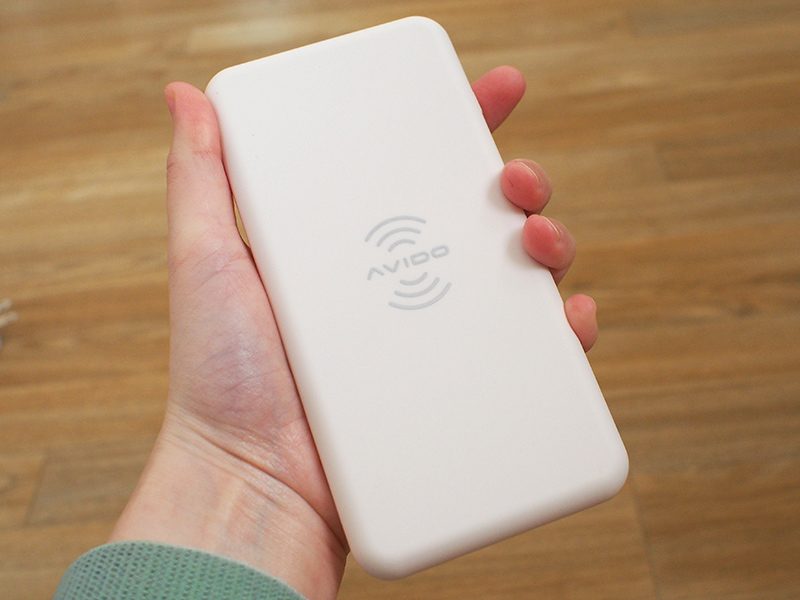
Made from a white plastic with a soft rubber coating, the WiBa wireless charging pad is about the size of the iPhone X when it comes to length and width, but it’s much thicker.
The accompanying power bank is crafted from the same material and is the same size and length as the wireless charging pad. The power bank is even thicker than the pad, which means it’s several times thicker than an iPhone X. Theoretically, you could pocket the power bank just like an iPhone X, but given its thickness, I’m not sure that you’d want to.

The power bank fits better in a bag or a backpack, but it’s still going to take up more room than competing power banks that have the same battery capacity, which is one of the negatives to this accessory.
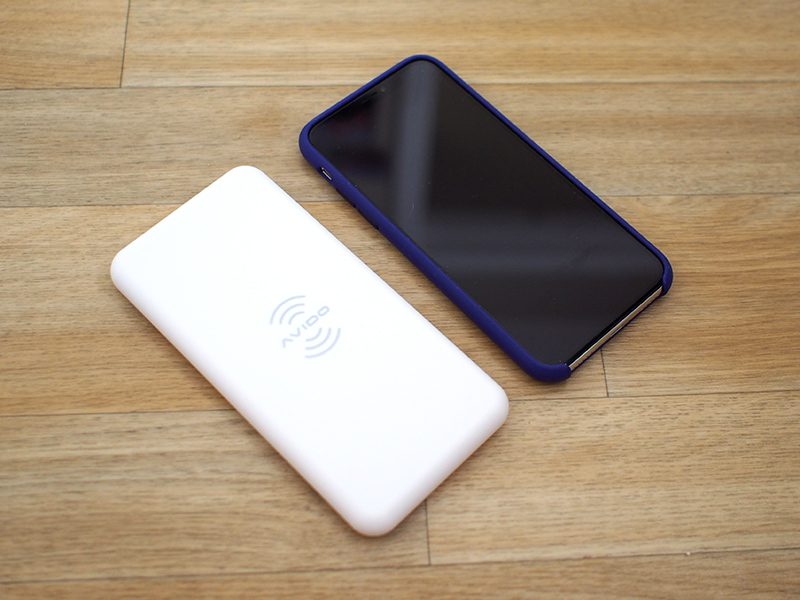
Because it’s the same size as the iPhone X, the wireless charging pad also has a somewhat bigger footprint than most upright wireless chargers, so it’s going to take up more space on a desk than some charging options. Compared to round flat chargers, though, the rectangular shape of the WiBa takes up less overall desk real estate.
At the bottom of the wireless charging pad, there’s a magnetic attachment area where the power bank fits so that it can charge wirelessly. The magnet is nice because the power bank always slips right into the correct place when it needs to be charged with the charging pad, so I never had to fuss with it to find the ideal charging alignment.
There’s also a magnet in the power bank, which works with a separate magnet attachment that’s available for the iPhone to keep it in place while wirelessly charging. My test unit did not come with this accessory so I wasn’t able to try it, but for those who don’t mind a magnet stuck on the iPhone with adhesive, it should make wireless charging via the power bank more convenient.
Sans magnet, it’s not really convenient to charge an iPhone with the wireless power bank unless it’s set on a flat surface because the power bank has no way to attach to the iPhone.
On the wireless charging pad, there’s a single USB-C port to connect it to the included power adapter, while the power bank features both a USB-C port and a USB-A port. The USB-C port can be used to charge the power bank more quickly if you don’t want to use the wireless charging pad, while the USB-A port can be used to charge devices that don’t support wireless charging.

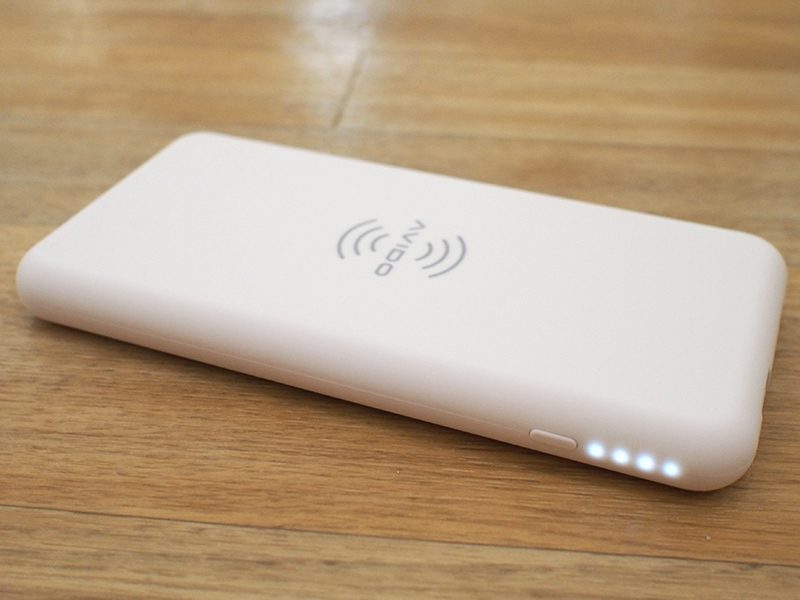
Both the power bank and the charging pad feature an Avido logo front and center, which I wasn’t a fan of. The power bank has four white LEDs on one side that let you know the charge and a bright green LED on the other side when it’s turned on. Both the green LED and the white LEDs come on when the side button is pressed and charging is activated, and the green LED in particular is distracting. It does, however, turn off after a few minutes.
While the iPhone 8, iPhone 8 Plus, and iPhone X support 7.5W wireless charging, the WiBa is limited to 5W charging speeds, which is another downside to the product. It does charge at 10W for Android devices, but Avido told me it was capped at 5W for “safety precautions.”
Avido also pointed out that there’s often not a huge difference between 5W and 7.5W charging, which is not untrue. I’ve tested a lot of wireless charging options both at 5W and at 7.5W. In the best of conditions, you can eke out about 10 to 12 percent more charge over the course of an hour with a 7.5W charger, but the difference can be lower based on temperature and other factors.
I still generally find it worthwhile to choose 7.5W over 5W when possible, so it is disappointing not to see 7.5W support in the WiBa, especially at a $100 price point.
In multiple tests in Airplane mode and starting at a 1 percent charge, the WiBa wireless charging pad and the power bank charged my phone to 28 to 34 percent over the course of an hour, which is what I’d expect to see from a 5W charger. 28 to 34 percent is less than the charge you can expect to see from a wired power bank in an hour’s time, so this isn’t the most efficient on-the-go charging method.

The WiBa boasts a 5,000mAh battery that offers just about enough juice to charge an iPhone X from a dead battery to full once over. In two of my tests, the WiBa power bank charged my iPhone X to 85 percent before dying (again in Airplane mode) but in four other tests, it charged it up to 100 percent with about 5 percent of an additional charge left over.
It’s safe to say that for the iPhone X, and the iPhone 8 Plus, which has a similar capacity battery, you can count on one additional full charge from the fully charged WiBa power bank. You might get one and a half to two full charges for the iPhone 8, which has a smaller battery.

As with the 5W charging limitation, I found the 5,000mAh capacity of the WiBa power bank to be disappointing given the size of the accessory and its price.
Bottom Line
The WiBa charger is a nice idea, and I can’t argue that it’s not convenient, but it doesn’t feel like it’s offering enough utility for the high price tag.
This is essentially a 5W wireless charger paired with a 5,000mAh battery pack. You can buy a 5,000mAh power bank on Amazon for about $10 to $15, and a wireless charger costs right around $15 to $20, for a total of $25 to $35.
That means Avido is charging quite a premium for the sake of convenience. Sure, you don’t need to plug in the power bank while it charges or the iPhone while it charges from the power bank, but what’s that shortcut worth?
I personally would opt for a standalone 7.5W wireless charger and wired power bank over this particular solution, but people who are looking for a grab and go no-hassle solution where the extra battery is simple to charge may prefer the WiBa setup.
I really would have liked to see a higher capacity battery with the WiBa, because a single extra charge for $100 doesn’t feel worthwhile. Power banks that offer three times more capacity don’t even cost $100.
It’s also worth noting that wireless charging may not be the best power bank solution. Most people likely reach for a power bank when an iPhone’s battery is critically low, and faster charging speeds are preferred in these situations. As a reminder, an hour of charging with the WiBa got my iPhone X to about 28 to 34% across multiple tests.
How to Buy
The WiBa Wireless and Stackable Power Bank and Charging Pad can be purchased from the Avido website for $99. An extra 5W charging pad can be added for a total of $139.
Note: Avido provided MacRumors with a WiBa wireless charger and power bank for the purpose of this review, which was returned to Avido at the conclusion of the review. No other compensation was received.
Discuss this article in our forums
Blu VIVO XI+ review: A new direction for the unlocked phone maker

When it comes to smartphones, the term “flagship” is thrown around an awful lot. It seems every 3-6 months you an announcement touting a device as a flagship or flagship killer. And when it comes to Blu, that seems to be the case even more frequently.
In the past Blu would take it rapid fire approach to releasing devices. It would not be uncommon for it to release anywhere from six to eight phones a year. Many of them, sadly, tend to look and sound similar to one another.
As a company who specializes in unlocked devices for GSM phones, Blu tends to focus on the entry-level and mid-range experience. Prices are often a fraction of what you would find in another brand, such as Samsung or LG.

Generally speaking its competitors are usually brands that you’re not too familiar with here in the United States. Sure, its phones can take on the bigger global brands on paper, but in practice it is more akin to “no name” or less recognizable models from overseas.
As a whole, we like the devices that we review from Blu and often find ourselves recommending them for first time users or for customers who need affordable replacements; they make excellent Band-Aid phones, or something to get in a pinch. If you have a young user in your house or are just starting to dabble in smartphones, Blu makes excellent options.
The problem that we run into is that it’s often a what-you-see-is-what-you-get experience from the manufacturer. Software updates are never promised and rarely show up.
As longtime smartphone users, we like to focus on security updates and timely patches, and it’s even here where Blu has a so-so track record. What’s more, it has run into its fair share of vulnerabilities and bad press.
All of this leads to a less-than-stellar experience from the phone maker. Despite its best intentions, Blu struggles to break out of its current mold. Looking ahead, things look to be changing for the company.
Something New?
Today marks the release of Blu’s latest smartphone, the Vivo XI+. Launching with a limited-time price tag of $250, the phone will ultimately stay around $350 when it’s introductory offer expires. It’s not a 24 hour sale but it does have a short time frame.
What can customers expect in the device? You guessed it, another flagship. It arrives on the heels of its predecessor which launched just six months ago, signalling it might not be all that different…
Wait, you’ll want to hear this one out.
What makes the Vivo XI+ so different? For starters there are a number of firsts in this phone. But, before we get into the hardware let’s talk about the new path ahead for Blu.

Slow Things Down
Rather than launching with many devices and flooding the market with confusing and overlapping options, Blu is opting to slow its pace. What’s more, it is taking a strategic approach to software updates and is even making promises. Indeed, this phone comes with the company’s first promised Android update.
One only need look at the recent statement from its CEO to see that Blu understands where it can do better. Assuming things go the way they hope, the horizon looks good for the brand.
VIVO XI+ Impressions
When you look at the hardware on this phone, one finds that it matches up nicely with devices that tend to run a good $700 or more. As we’ve seen from Blu time and again, this unlocked phone works with GSM carriers and features an incredible amount of bang for the buck. Things are no different for the 11th generation of the flagship line.
Key Features
- MediaTek Helio P60 with AI Technology 2.0GHZ Octa Core Processor
- 64GB/128GB internal storage (with microSD slot up to 128GB)
- 6GB RAM
- Android 8.1 Oreo
- 6.2-inch display with 19:9 and 18:9 aspect ratio (1080 x 2246 pixels)
- Dual rear cameras (16-megapixel, 5-megapixel)
- 16-megapixel front-facing camera
- Fingerprint sensor
- 3,050mAh battery
- USB Type C
- Wireless Charging
- 4G LTE: 1/2/3/4/7/12/13/17/28/66
That’s quite a bit of heavy hitting hardware to be sure. And, that’s not really painting the whole picture. There’s a few things going on here that aren’t super obvious when reading bullet points.
As indicated above, this phone launches with Android 8.1 Oreo, the most recent version widely available. Very few others offer Android 9 Pie so it’s nice to see Blu keeping pace with the big brands. According to the phone maker, the Vivo XI+ will see its Android 9 update at some point in the first quarter of 2019.

With a window of around six months to work with it’s not too bad. It could definitely be better but we suspect it will still beat other phones with an update.
What’s Included?
The review unit provided to us by Blu looks to be the same as what consumers will purchase. To that end, this does mark the first time one of its phones came shrink-wrapped in the box. We didn’t see anything inside all that different from previous phones, but we did take notice.
Inside we find the standard fare of Blu pieces and parts. In addition to the phone you’ll get a protective carry case (that matches the box), an already applied screen protector, sticker, SIM key, charger and cable, 3.5mm earbuds, and an adapter.
Although there is no headphone jack on the Vivo XI+, Blu throws in the adapter so you can plug into your car stereo or, of course, the included headphones. Otherwise, feel free to pair your Bluetooth earbuds and rock out.
Design
Constructed from a solid metal body with a curved back design, the Vivo XI+ looks and feels like a solid experience. There’s a good amount of heft to the phone, but we would expect that when we’re approaching small tablet-sized displays and these materials. One glance signals to us that the phone is to be taken seriously.
Powered on we see that Blu has opted to go the same route as nearly every other phone maker. Yes, there’s a “notch” on the display. Not to worry, though, you can toggle it on and off with a simple swiping down gesture from the top left. In essence you can go from 19:9 aspect ratio to 18:9.

You have to look closely to see that there is screen up near the top edge. When not in use you get an image that resembles more traditional smartphone designs. It’s really a matter of opinion and personal preference as to whether the notch works or is necessary.
Internally, we here at AndroidGuys are pretty mixed when it comes to the idea and day-to-day usage. To us, at least, it’s fairly easy to get used to both experiences in the Blu Vivo XI+.
The power button and volume rocker are located to the right side of the display, which is typical for most phones. Across to the left side is where one finds the microSD card and dual SIM card trays.
On the bottom edge of the handset we see the USB Type C port flanked by speaker grilles. We’ve seen Blu dabble with this charging port in other models but it has yet to fully commit to it. Here’s hoping the new direction means a standard approach to devices.
The fingerprint reader is found on the back in the upper center of the phone. It’s right about where your finger wants to fall naturally, but we may have liked for to be just a smidge bigger or maybe even a little more of a pronounced edge. We can find it without looking — but it sometimes blends in a bit too well.
There are two cameras, which are stacked on top of each other, on the rear left of the phone. Below them is the LED flash. We like having these away from this fingerprint reader if only because we’d hate to run our finger across it when blindly unlocking.
Software
If you’ve read our reviews on Blu before, you know we like the experience. It’s a nearly unadulterated version of Android and doesn’t have very much in the way of pre-installed apps. There are usually a couple added but they’re not the invasive carrier-branded stuff you get from wireless providers.
The Vivo XI+ is exactly what we expected: lean and mean Android with a touch of custom Blu flourishes and a sprinkling of apps. The model we received came with Opera, NextRadio, Amazon Prime Video, Wish, and Amazon Shopping.

The first two had icons on the home screen and could not be directly uninstalled; the other three could be uninstalled completely. For what it’s worth disabling NextRadio and Opera ultimately results in them being removed from the phone.
There’s also a couple of smaller apps like Blu Help, Compass, and Data Clone (new phone setup), Torch (flashlight), SIM Toolkit, Sound Recorder, Video Player, Music Player, Notes, and File Explorer. Unfortunately, you can’t remove these or disable them. Thankfully, they are lightweight and take up next to zero space. All in all, it sounds worse than it really is and it definitely beats a bunch of games and apps selected by the carrier.
In terms of Google apps, the gang’s all here. Look for Google, Gmail, Maps, Drive, Play Music, Play Movies & TV, Photos, Messages, YouTube, and Duo.
Performance
We’ve had our unit for approximately ten days as we readied our review. In that time we’ve installed nearly all of the software that we use on a daily basis. Given the hardware we felt no reason it couldn’t meet our demands. To that end we loaded up multiple accounts, and a handful of apps, and games.
We tried as much as possible to use the phone as a “daily driver” over the time we had the review unit. There were times where it did stay back for a few hours while we took a different model with us, but we didn’t mind coming back to it at all.
After living with so many different phones over the years we come to appreciate certain things over time. Take wireless charging, for instance. Once you get used to doing it, you tend to not want to go back. In previous Blu models we couldn’t do this; going from a more feature-rich flagship to other Blu devices left us missing the option.

The same goes for USB Type C. Yes, we still have plenty of reasons for microUSB ports and chargers in 2018, but we don’t rely on it for our phones. Those cables have been replaced either outright or with a wireless dock. It’s nice to see Type C if for no other reason than us not having to swap out car chargers and other cables.
The Vivo XI+ also comes with a few other goodies baked in, too. The Real 3D Face ID lets you unlock your phone using your face. Blu indicates that you can’t trick it with photos, masks, or “even wax sculptures”, adding that its IR sensor aids in detection in all light conditions, including total darkness.
Setting this feature up only takes a couple of moments and it really makes for a hassle-free unlocking experience. We found it to be not only fast and accurate, but true to its promise. There were no instances where we couldn’t get it to register, regardless of environmental light.
It didn’t really matter what apps or games we played as the phone handled the duties in stride. Hopping from one app to another didn’t yield any delays and there were no noticeable lags or stutters.
You can say that an octa-core 2.0Ghz processor doesn’t stack up on paper and be right. But, in practice, you have to run benchmark tests and really look for the differences. Coupled with 6GB RAM, there’s enough horsepower in the Blu Vivo XI+ to qualify the phone as more than capable for demanding users.
There are a handful of gestures and settings that help you really tailor the experience around your personal preferences. It’s not unlike what Motorola offers in that it’s helpful stuff if you want to use it. There’s nothing that is vital to set up; however, playing with stuff like navigation settings, display notch, camera options, and Face ID can make the phone feel like “yours”.
Camera
The phone boasts a dual camera setup on the back, which is “powered by AI technology” for smarter and better pictures. With a 16-megapixel main camera, it has an F/2.0 aperture, 1/3 inch sensor and 5P lens. The 5-megapixel secondary shooter is what captures your depth of field and is what’s responsible for the blurred backgrounds in portrait shots.
The Vivo XI+ focuses on its subject quickly thanks to the Phase Detection Autofocus (PDAF) with Laser Focus. Pictures, even those in taken with filters or additional settings, are captured quickly and accurately.

To be perfectly honest, one of the main reasons we would leave the phone at home in favor of the daily driver (Pixel 2) is because we know what we’re getting in the camera. After having spent most of a year with that one we didn’t want to take a chance on missing out on key moments with a goofy camera app or experience.
Over the last two weeks, though, our anxiety over this has eased. Each time we pick it up and play with the camera we like it more and more. We’re more confident now that we can take it out and capture candid moments and look forward to really using it over the next few weeks.
Click here to see some sample pics taken from the Blu Vivo XI+ in a growing library
With that said, the pictures we’ve taken so far have been solid. The color is accurate and they’re crisp and vibrant. Playing with the different shooting modes is pretty intuitive, giving us pretty much what we could hope for in the end results.
We expected the phone to struggle more in lower lighting if only because of price and previous experience. Blu did well here, providing sensors that capture more light than in its predecessors. It will be fun to figure out where the line is on the Vivo XI+ and learning where its capabilities end.
Conclusion
If you’re on T-Mobile, AT&T, or one of their respective prepaid networks and don’t care about whether your phone has a major brand name, this is an excellent place to start. As an unlocked phone, the Vivo XI+ is compatible with GSM networks [4G LTE (1/2/3/4/5/7/8/12/17/28/66), 3G (850/900/1800/1900), and HSPA (850/900/1700/1900/2100) ]. Like other Blu models, this one comes with support for two SIM cards so feel free to mix and match, especially if you travel.
There may be more exotic or sexier models out there, but you could pay double for that experience. Moreover, we tend to protect our phones with cases, often hiding a glamorous finish or fancy flourishes. When that happens, it’s pretty much a level playing field on the front.

Unfortunately it’s all to easy to look at devices for what they don’t have as opposed to what they do have. After nearly two weeks with the Vivo XI+ we’ve come to like it quite a bit, finding it more in line what we want from a phone.
The things we didn’t love in its predecessor are pretty much addressed and it falls within about $50 of its price. If it’s a case of fixing the little stuff that bothered us, Blu did very well.
We often recommend that anyone considering a first Android phone start with something in the middle of the pack. This way you can figure out whether they want, or need, more later on. Luckily for today’s buyers, the mid-range is more than strong enough to handle daily needs.
You’re going to have a tough time beating this phone’s specs at this price, at least from a brand you’ve heard of before. If you’re looking for a phone for T-Mobile or AT&T in the US, start here and work your way out. Likewise for those overseas considering something new for Orange Vodafone, O2, or other GSM carriers.
It’s a fantastic phone at $350 and an even better buy if you’re an early adopter.

We’re optimistic about the future of Blu, especially if it delivers on its new promises. If it can meet the self-imposed deadline for Android 9, and slow down on the sibling releases, then it will be doing well for itself.
Throwing stuff at the wall so many times a year likely has a negative effect. If it wants us to think its phones are special, it needs to take a more measured approach. There’s nothing wrong with a couple of annual releases but they ought to be spread out across various lines. Here’s hoping that’s what is in store for us.
Availability
The Blu Vivo XI+ is available from Amazon at launch with an introductory, limited time price of $250. This is a $100 off the standard retail cost and is subject to available stock. After the short window Blu will set the price to its everyday sticker of $350. Sold in Midnight Black and Chrome Silver, it comes with free shipping, too.
Even those with (slightly) smaller wrists can wear Casio’s new Pro Trek watch
Casio continues to refine its Pro Trek smartwatch, which is made for those who like nothing more than spending their weekends lost on top of mountains. The company just unveiled the third version — the Pro Trek WSD-F30. For the new model, it has made the case slightly smaller, made the display even more versatile, and added a convenient new feature to its extended battery mode.
The Pro Trek was one of the first Wear OS smartwatches to extend the battery life of the device by turning off the operating system, so it could function simply as a watch. Known as Timepiece Mode on previous Pro Trek smartwatches, the WSD-F30 introduces Multi Timepiece Mode, which adds complication-style features to the monochrome-only time display. For example, it will show altitude and atmospheric pressure alongside the time, on a power-sipping monochrome display, to help hikers. With Multi Timepiece Mode active, the battery life stretches out to a month.
This isn’t the only interesting battery-saving feature. A new Extend Mode fits somewhere in-between Multi Timepiece Mode and the full Wear OS experience, showing the time, altitude, and atmospheric data, plus a color map can be called up with a button tap. The map shows on the F30’s main OLED screen, which also shows Google’s Wear OS operating system, however for Extend Mode Wear OS is put to sleep to conserve energy, resulting in three days battery use while still viewing offline maps. Cleverly, Extend Mode can be scheduled based on your plans for trips away.
Smaller, but only slightly
How much smaller is the F30 compared to the F20 and F10? This is still a Pro Trek watch, so it’s never going to be small and subtle, but Casio has still shaved 3.9mm off the width and 0.4mm off the thickness. This means the Pro Trek F30 still measures 60mm wide, 53mm tall, and 14.9mm thick. Small it’s not, but it is potentially more manageable than before. The case is made from resin with a special metal-like coating, and the strap has been revised too, adding more holes for an improved fit. The whole thing meets MIL-STD-810G standards for toughness.
The dual-layer color OLED, which has a 390 x 390 pixel resolution, and monochrome LCD display measures 1.2-inches. The F30 has GPS, and enough storage for five different offline versions, along with sensors for air pressure and altitude, a compass, an accelerometer, a gyroscope, and a magnetometer. The battery doesn’t have fast charging like we’ve seen on some new Wear OS smartwatches this year, so it will take around three hours to charge, and should return around a day-and-a-half of use, according to Casio.
Casio has several app partnerships suited to those with active lifestyles, and will also introduce a new watch face called Frontier on the WSD-F30. These apps include ViewRanger for mapping, Hole19 that maps 42,000 golf course around the world, the surfing app Glassy, fishing forecast app Fishbrain, MySwimPro for personalised swim training and analytics, equestrian app Equilab, Exercise Timer, Ski Tracks, and fun fitness game Zombies, Run!.
Several will add custom features to the WSD-F30. Glassy adds voice commands and custom feature options for the hardware buttons, ideal for when surfers have wet hands. Fishbrain will add voice commands to see nearby waters and the fish that swim there. Zombies, Run! will allow control of the app on the watch, and Ski Tracks will also operate independently on the Pro Trek WSD-F30.
Three models will be available, in orange, blue, and black. At its launch event, Casio did not reveal the release date or the price. The WSD-F20 costs $500, so we don’t expect the F30 to be much cheaper.
Editors’ Recommendations
- We’re giving away a $500 Casio Pro Trek smartwatch in a flash giveaway
- Win a $500 Casio Pro Trek smartwatch for your next adventure
- Less glitz, more tech for Michael Kors and its new Access Runway smartwatch
- Skagen’s new Falster 2 smartwatch comes with built-in GPS, heart-rate tracking
- Techy and trendy? That’s the new Emporio Armani Connected smartwatch
Forget version 2.0: Diesel’s new smartwatch is so advanced, it’s version 2.5
Diesel has made some of the most distinctive fashion watches out there. If you wear the Mr. Daddy 2.0 watch, with its 57mm case, it’s obvious you’re not afraid to make a statement. We love the brand for this wrist-based madness, and were pleased some of it permeated into the design of the On Full Guard smartwatch, released in 2017. Now, Diesel’s back with the On Full Guard 2.5, its second full-touch smartwatch with Google’s Wear OS, and this time it’s more than just a pretty face.
Technical jump
We know what you’re thinking, did you miss the On Full Guard 2.0? Why is this called the On Full Guard 2.5? In an email to Digital Trends, Andrea Rosso, Diesel’s head of licensing, said it’s “because we made an incredible update on it, taking it to the next level, and we wanted to make it clear starting from the name.”
Bold words. Can it live up to a statement like that? Let’s look at the specification. The 1.39-inch screen has a 454 x 454 pixel resolution, displaying Google’s Wear OS operating system, and powered by the Qualcomm Snapdragon 2100, 512MB of RAM, and 4GB of internal storage. This is the same as the first On Full Guard, and the alterations come with the addition of a heart rate sensor, on-board GPS, NFC, and a high degree of water resistance. The battery also has a one-hour quick charge feature, and is expected to last for a day. Two of these features are standouts for Rosso.
“I am particularly happy of our NFC payment technology, and also of our swim-proof technology that allows you to shower, swim, and dive up to 3 ATM, [while wearing the watch.]”
The first On Full Guard, like most fashion-inspired smartwatches of its time, was relatively light on technology. Adding new features to the sequel, Rosso intimated, was essential.
“In general, I’m proud that now our wearable technology and features match our bold design, and make us competitive in the wearables market.”
Diesel design
The On Full Guard 2.5 is a typical Diesel watch, in that the case is large at 45.5mm and just over 11mm thick. The design is not drastically different from the first On Full Guard — check out the oversize buttons and crown, the big horns, and the chiseled looks — and crucially takes plenty of inspiration from traditional Diesel watches.
“The sculptured shape is one of our key features, something from a traditional watch that we have applied to the new smartwatch as well,” Rosso said.
Interestingly, little was fundamentally changed from a traditional watch to create a smartwatch, as Rosso said the team just “adapted the dimensions to fit the circular touchscreen, and reduced weight to compensate” for the heavy digital parts. While the Diesel On Full Guard 2.5 is made from the same basic materials as the first, including leather, metal, and rubber, Rosso revealed Diesel is “exploring new materials for upcoming watches.”
One size fits all
When you see the On Full Guard 2.5, it’s impossible to ignore its size, and how it’s likely unsuitable for those with small wrists. We asked Rosso if there was interest or discussion in making smaller watches, particularly for women. His answer was surprising, and gave us an insight into how the watch industry differs around the world.
“We’re constantly talking to our customers to make sure our products align with their needs,” Rosso said. “We found out that many female customers, especially in the Asian market, wear bigger watches [even the aforementioned 56mm Mr. Daddy watch, apparently], despite having smaller wrists.”
The decision to not make a specifically female-friendly smartwatch, at least not yet, seems to be because the brand’s signature style appeals across the board.
“When designing our Diesel watches, we design them for the Diesel customer, whether that’s male or female,” Rosso continued. “In fact, some watch designs that would traditionally be considered for men, have female design elements into them, and vice versa.”
Personalization
One design aspect we loved on the first On Full Guard were the iridescent watch faces. What can we expect from the On Full Guard 2.5? Rosso said the most exciting new watch face is the neon Flicker dial, “which changes color automatically throughout the day,” as well as the interactive heart rate dial, “which creates a rippling water effect with the tap of a finger.”
The new On Full Guard 2.5 smartwatch will come in four styles, a matte steel with black leather strap, a gunmetal case with a brown strap, a matte black steel case with a black silicone strap, and finally a gunmetal steel case with a three-link gunmetal bracelet. All On Full Guard 2.5 watches cost $325, apart from the gunmetal version with the metal link bracelet, which costs $350. You’ll be able to buy the new Diesel On Full Guard 2.5 from October.
While the On Full Guard 2.5 will be powered by Qualcomm’s Wear 2100 processor, there are rumors Qualcomm will finally unveil a new successor to the processor that should provide much improved battery life and other features, and we’ll likely learn more at Qualcomm’s September 10 event.
Editors’ Recommendations
- Techy and trendy? That’s the new Emporio Armani Connected smartwatch
- Let Google’s A.I. make a mini version of you with Minis for Gboard
- The latest version of MacOS now supports storing your messages in Apple’s cloud
- Microsoft Office’s new redesign puts web and desktop versions on equal footing
- Less glitz, more tech for Michael Kors and its new Access Runway smartwatch
 AIVAnet