


Sennheiser IE 800 S Flagship In-Ear Headphones Review – Small Upgrade, A Lot of Dough


It’s been a couple years since we’ve looked at the best from Sennheiser with regard to in-ear headphones. The petite IE 800 were an original take on a high-end earphone, deviating from the current trend over-the-ear design and multi-driver configurations. It was surely understated, but the attention to detail is what set it apart, from the elegant, ceramic casing to the super crisp sound.
Well, it’s about that time for a successor, and Sennheiser has debuted it in the form of a IE 800 S. Following in the footsteps of Apple’s naming convention, the “S” means that we’re looking at a refresh of the original flagship rather than something really new. And naturally, that begs to question: Are the tweaks worthy? It’s crucial to note that this update pushes the price back up to the original $999. Let’s find out.

Design
As expected, we’re presented with a very similar form and design as before. That is, tiny tapered earpieces with stubby nozzles and unique dual bass exhaust ports at the rear. Nothing has changed with regard to mechanics. To the disappointment of many, the cable still isn’t removable from the earpieces (which is often a feature in higher-end earphones). You still have that interesting break on the cable’s Y-split, where it detaches via a 2.5mm jack. However, this time, that feature is more functional.

Unboxing the IE 800 S

The unique cable disconnect returns, but the function makes more sense now.
Sennheiser updated the wiring so that the new headphone can be used with Balanced output. And what’s more, the Balance cable isn’t an extra purchase. Sennheiser includes two common standards in the box: 2.5mm (TRRS) and 4.4mm (Pentacon) terminations. The cable detachment now serves as a cleverly quick way to switch cable types.
 The three different terminations that you can choice from: top and bottom are Balanced standards and middle is the typical, Unbalanced 3.5mm jack.
Styling has been given an impactful update, for better or worse. Starting with the earpieces, they’re still made out of durable ceramic, but with now a matte finish instead of glossy. We usually agree with this kind of move. Glossy typically invokes a cheap feel. However, coupled with the ceramic, it gave the original IE 800 a luxurious sense. The new matte finish moves to “understated”, but at a close look, you can see a high quality sheen to it. And we can’t ignore the practically of it. The earpieces aren’t nearly as slippery as before, and fingerprints are no longer a bother either.


The cable got a similar makeover. Instead of the textured, green accented styling from before, the IE 800 S comprehensively pushes the stealthy aesthetic with a more understated, basic smooth black sheathing. Again, it feels higher quality than the standard rubbery plastic used on most earphones, but we can’t ignore how basic it looks for such an expensive unit. We prefer the unique look of the original.
Usability
The box contents with the new IE 800 S have minimally changed from before, Such is the case with the design of the leather case, to our dismay. It’s unnecessarily large (relative to the size of the earphones), and you have to wrap the cord around the sides to utilize it.


A positive is that Sennheiser is now offering a set of foam ear tips (customly made by Comply). Those take place of the oval silicone tips that have quietly disappeared for an unknown reason. Then there’s the new inclusion of two types of Balanced cables that we’ve discussed.
As far as we can tell, Sennheiser hasn’t messed with the shape, angle, or size of the earpieces, so ergonomic-wise, the fit experience is just like I’ve seen with the IE 800.

Their compactness results in a deep insertion. The tips (standard silicone ones) are firm but plenty mold-able. A seal is no problem in my case, but it isn’t the most secure you’ll find. On that subject, we still wouldn’t recommend these for working out, not just because of the delicate fit but also because microphonics noise is still a concern when the cable rubs against you with movement. This is a headphone for sitting still and listening.

Not all of the gripes from before have gone unaddressed. Many users disliked the short length of the cable. Sennheiser listened and added a little length.
Sound
I adored the sound of the original IE 800. Its sub-bass was captivating and treble detail/extension was extraordinary. Sennheiser also has this skillful cleanness and clarity unaccomplished by many. But not everything in its reproduction was as brilliant. Namely, it was lacking a bit too much energy in the mid-range, and thus, some of that pleasurable fullness found in some of the competition.
This is one of the qualities I can hear that Sennheiser tweaked in the IE 800 S. Mind you, it’s not a big change. Nothing with the IE 800 S is a big change, just refinements. In other words, if you’re pondering the upgrade, know that this is still very much a IE 800 sound. It’ll be the same experience for the most part.
 The IE 800 S paired with the Android-powered, HiFi Onkyo DP-X1 in Balanced mode is wonderful.
So where the original IE 800’s frequency response could be deem V-shaped, Sennheiser pushed the mids up to what could be considered U-shaped. It doesn’t sound like much, but is an impactful difference. Vocals, in particular, have more breathing room (rather than being pressed down). It also adds a touch of musicality and fullness that the drivers’ excellent dynamics benefit from. That said, the update doesn’t get the mids even near the rockin’ level of the SE846.
Sennheiser also made tweaks to the sub-bass and treble regions. In contrast to the mids, these changes brought more control to the strongest areas of the IE 800’s sound. Some users found the past sub-bass to be a tad overbearing. Likewise, while the treble output was magnificently detailed and crisp, it could be fatiguing.
The result of taming these regions is an easier listen, while still being able to pick up the high-caliber acoustics. However, on the same token, these critical details aren’t as catching and distinct as they previously were, taking away from the “specialness” of the output. That aspect is important when considering how much you’re paying.
The IE 800 S sounds more “ordinary” in comparison to its predecessor, and it’s harder to make out the benefit of the high cost. It’s totally a game of give and take. It’s apparent that Sennheiser is trying to even out the frequency response for the sake of trueness. The better approach may come down to preference.
All-in-all, the IE 800 S is still a masterful in-ear solution. Articulation and clarity are first-rate. It’ll be hard to go back to ordinary earphones after this. Somehow, these little guys manage to pump out an able soundstage. It’s not the widest, but the 3D space is beautifully perceived and worked within. You’ll excellently identify varying range of depth as different notes hit. It’s still amazes me what these little earpieces can do, with their tiny drivers. The IE 800 S’s output can still stand with today’s best.
Final Thoughts
 Very tough decision at $999.
If you’re nit-picky like I am (and I’d argue that at this price range, you’re allowed to be), you may be plentiful content with this update. My strongest point, especially for IE 800 users, is that the updated sound is more of a tweak than an upgrade. It’s totally on you if that’s worth putting down the dough for the “upgrade”. I honestly wouldn’t say so at this point in time that the originals are at half the cost.
As for interested non-IE 800 owners, I’d recommend being cautious. Get your hands on them for a test listen if at all possible. The sound quality is exquisite, no doubt, but it can be seen as an acquired taste. However, if you’re someone that can appreciate qualities like clarity and detail more than energy and booming bass, then you may recognize the magic within. And once you do, you’ll be hooked.
Don’t Miss
Google Home is awesome; here’s how to make it even better!
Check it out!
Tesla Debuts $65 5W Battery-Powered Qi Wireless Charger [Updated]
Tesla today launched a new battery-powered Qi-based wireless charger that’s designed for iPhones and Android devices that support wireless charging.
Priced at $65, the Tesla Wireless Charger features a 6,000mAh battery so it can be used for charging while on the go. According to Tesla, it’s been constructed using the “same design language” used in Tesla energy products like Powerwall, featuring a sleek black or white enclosure.
In addition to wireless charging, the Tesla Wireless Charger includes a built-in USB-C cable for charging USB-C Android devices. For non-USB-C devices, there’s a USB-A port that can be used for faster wired charging. A built-in USB-A cable is used to charge the Wireless Charger from any USB-A port.

According to Tesla, the wireless charging is limited to 5W, which is slower than the faster 7.5W charging that is available on the iPhone X, 8, and 8 Plus. Other 5W chargers can be purchased on Amazon for as little as $10, which means Tesla is charging quite a premium for the Tesla branding and design of this accessory.

The Tesla Wireless Charger can be purchased from the Tesla website for $65.
Update: It appears Tesla may have removed the Wireless Charger from its website as the store links to the device no longer work nor does a search on the site bring it up.
Tags: wireless charging, Tesla, Qi
Discuss this article in our forums
Who needs bug spray? Wristband scares off mosquitoes by mimicking a thunderstorm
Anyone who has been caught in a summer storm knows that it kind of sucks. Evidently, mosquitoes think the same thing, as they apparently choose to seek shelter when they sense an approaching storm, rather than risk hanging out and biting people. Who can blame them, right? Well, maybe no one can blame them, but smart engineers can certainly jump on that evolutionary quirk to find a new way of fending off everyone’s least favorite blood-drinking insects.
That’s where the Nopixgo wristband comes into play. According to its creators, it emits very weak electromagnetic signals, which essentially convince mosquitos that a storm is brewing and they should probably be packing their bags to leave. It’s a smart solution that protects users without the use of chemicals.
“When mosquitoes enter into the reach of the signal, they become more passive, flying closer to the ground in search of lower vegetation and protection, and their instinct to bite and suck blood is overridden by the instinct to survive,” Johan Niklasson, chief business development officer at NopixGlobal, told Digital Trends. “This is a revolutionary new way to approach mosquito bites. In a way, the mosquitoes’ own genetics is used against them; something they cannot adapt to and avoid. It goes deeper than just repelling with bad smells or irritating sounds. No one has ever tried this before, and the technology has not existed to make this possible until just recently.”
The technology was developed by inventor Kurt Stoll, who learned firsthand what a severe problem it is after meeting children in Africa who had become infected by malaria, one of the diseases frequently transmitted by mosquito. He teamed up with fellow Swiss entrepreneur Richard Karlsson, and together they honed this device over the past two years.
As ever, we offer our usual warnings about the risks inherent in crowdfunding campaigns, of which this is one. However, if you still wish to get involved, head over to the Nopixgo Kickstarter page to pledge your cash. A single rechargeable wristband, which has a battery life of around one week before needing to be replenished, will set you back around $70. Shipping is set to take place in October.
Editors’ Recommendations
- The best mosquito repellent products to keep pesky biting bugs at bay
- Wearable device uses two methods to drive insects buggy, keep them away
- Future pain-free microneedles could be inspired by mosquitos
- The best camping hacks
- The best radar detectors of 2018
As sea levels rise, NASA’s new laser satellite will monitor polar ice decline
Previous
Next
1 of 5

NASA ICE

NASA ICE

NASA ICE

NASA ICE

U.S. Air Force/Vanessa Valentine
Earth’s poles are the frontlines in the dramatic tale of climate change, where the impacts of increased temperatures can be seen firsthand as massive ice sheets break off and crash into the sea. Tracking glaciers helps understand the consequences of climate change elsewhere — see, for example, sea level rise — and scientists will soon have new tools to enable them to measure polar ice decline in unprecedented detail
In September, NASA is scheduled to launch an advanced satellite called ICESat-2 (short for Ice, Cloud, and land Elevation Satellite-2), which scientists will use to measure changes in elevation of land ice in polar regions like Greenland and Antarctica. The satellite’s on-board laser can make a whopping 60,000 measurements each second, with precision to within the width of a pencil.
“The new observational technologies of ICESat-2 — a top recommendation of the scientific community in NASA’s first Earth science decadal survey — will advance our knowledge of how the ice sheets of Greenland and Antarctica contribute to sea level rise,” Michael Freilich, director of NASA’s Earth Science Division, said.
NASA has been using satellites to monitor polar ice for 15 years, but ICESat-2 makes significant advances on the agency’s prior campaigns. Among its technological improvements, the new satellite comes equipped with a highly advanced instrument called the Advanced Topographic Laser Altimeter System (ATLAS). By beaming light particles from space to Earth and back, ATLAS can measure the height of ice by calculating how long it takes the light to return.
“ATLAS required us to develop new technologies to get the measurements needed by scientists to advance the research,” Doug McLennan, a project manager for ICESat-2, said. “That meant we had to engineer a satellite instrument that not only will collect incredibly precise data, but also will collect more than 250 times as many height measurements as its predecessor.”
Polar ice melt is felt around the world. About a third of global sea level rise is attributed to melting ice in Greenland and Antarctica, according to NASA. The rate at which sea level is rising is increasing as global temperatures continue to rise.
ICESat-2 will help track these changes, while monitoring regions beyond the poles. ATLAS is also designed to measure treetops and determine how much carbon is stored in forests around the world.
The satellite is set to launch from Vandenberg Air Force Base in California on September 15.
Editors’ Recommendations
- Get your Sagan on with 60 awe-inspiring photos of the final frontier
- Italian researchers discover what they believe is a lake under ice cap on Mars
- NASA’s planet-hunting TESS satellite: What you need to know
- ‘Waterworld’ no longer seems sci-fi, so an artist designed your future gills
- 2018 Ford Mustang GT Performance Pack 2 review
AllTrails’ Lifeline feature will keep you safe in the backcountry
AllTrails, a website and mobile app (iOS and Android) that offers members access to information on more than 50,000 hiking trails across the U.S. announced a new feature designed to help keep outdoor enthusiasts safer in the backcountry. The company unveiled a service for its Pro members that makes it easier than ever to share information about planned hikes, mountain bike rides, trail runs, and other outings. The service even offers services that make it easy to track progress or alert search and rescue services should an emergency situation arise.
Dubbed Lifeline, the service officially launched on the AllTrails website and mobile apps a few weeks ago. The new feature gives users the ability to choose up to five contacts who they want to share their outdoor plans with, giving them access to vital information about the outing. Those individuals are then sent a specially generated URL that allows them to view the user’s intended route on highly detailed maps, where they plan to begin and end their journey, and their estimated start and stop times. Armed with that information, it will be much easier to know whether or not a hiker is overdue and where to begin searching for them should they become lost or stranded.
But Lifeline also offers the ability to provide live GPS tracking, providing the user’s phone has a data connection. If one of the contacts clicks on the provided link while the hike is in progress, they will be able to see the user’s last known GPS location plotted on a map relative to the route they have chosen. This makes it easy to see how well they are progressing, whether or not they are still on the move, and how close they are to reaching the end of the trail.
Other features of Lifeline include the ability to send short, preset text messages to the contacts providing them with updates on progress or alerting them to an emergency situation. The system will also automatically let the user’s friends know when he or she is overdue, which is triggered when they haven’t completed the route by the time that was designated. That alert even includes the last known GPS coordinates for the hiker.
“The addition of Lifeline to our mobile platform is a huge step in ensuring AllTrails users feel connected and confident while exploring in the outdoors,” AllTrails CEO Jade Van Doren said in a statement. “Made for people heading out on their own, and for those exploring in more remote areas, we felt it was important to provide the peace of mind and security that comes from your loved ones knowing your plan, where you are, and getting automatic alerts if something goes wrong.”
Lifeline is included in the AllTrails Pro membership, which costs $30 per year or $100 for a lifetime subscription. For a limited time, however, users can get a 50 percent discount on an annual membership by using “lifeline” at checkout.
Editors’ Recommendations
- The best hiking apps
- The best hiking GPS devices of 2018
- The AllTrails app gets even better, adds more details in new map layer
- The Bivystick uses satellite technology to send messages from anywhere
- The best sport trackers
The best printers of 2018
Ted Needleman/Digital Trends
More
What to look for in a printer
The best cheap printers
The best 3D printers
Although writing and photography, like so much of life, have largely gone digital, there’s still something useful (pleasant, even) about holding physical, tangible pages in one’s hands. So printers still have a place in the modern world. Whether you need to print out a set of reports for an upcoming business meeting, or you want to render your vacation photos on big, glossy sheets, there is a printer out there for you, and we’ve rounded up some of the best.
The best photo printer
Epson SureColor P400
Why should you buy this? To print gorgeous, glossy photos that won’t cost too much
Our Score
The best photo printer
Epson SureColor SC-P400
The SureColor P400 makes gorgeous prints at an affordable price.
$566.99 from Best Buy
$566.12 from Amazon.com
Who’s it for? Budding photographers who want quality prints without spending a luxury price
How much will it cost? $600
Why we picked the Epson SureColor P400:
Photography is an expensive hobby, and if you’ve invested a lot of money in a great camera, you may want a printer that can do your photos justice. While you can certainly drop a thousand dollars on a premium photo printer, the Epson SureColor P400 offers great prints without the need to tap into your retirement fund.
With its unassuming facade, the P400 may not look like anything out of the ordinary, but it houses an eight cartridge system (seven colors and a “Gloss Optimizer”) that can create prints of “excellent color accuracy and saturation,” as we put it in our review. The P400’s seven ink colors allow for a rich variety of shades, and the gloss optimizer gives photos a slick finish that emphasizes the color saturation.
The P400 can accommodate paper up to 13 × 19 inches, and while those sheets may take a little while to print (several minutes, according to our reviewer), the results are stunning. There may be photo printers with a higher ceiling than the P400, but casual photographers or those still learning the ropes should get the most value out of this entry-level beast.
The best all-in-one office printer
Canon Maxify MB5420
Why should you buy this? The Maxify prints quickly, and can handle a heavy workload
Our Score
The best all-in-one office printer
Canon Maxify MB5420
An economical printer that will delight your coworkers.
$399.00 from Jet
$304.99 from Canon
Who’s it for? Small-businesses or even households that do a lot of printing
How much will it cost? $305
Why we picked the Canon Maxify MB5420:
If you run a small business, chances are you need to print a lot of documents, and not just any printer will do. You’ll want a printer that works quickly (so you don’t have people forming a queue, grumbling angrily), and one that can handle the rigors of frequent printing without breaking down.
Enter the Canon Maxify MB5420. With its compact, cube-shaped body, the MB5420 will fit in any office or house, and while it may not be the prettiest horse in the stable, it can pull a lot of weight. The printer can hold a hefty 500 sheets of paper (spread over two trays), and as we noted in our review, it can print monochrome documents at a rate of 22.2ppm (10ppm for color documents). Critically, it can also stand up to a heavy workload. The printer’s monthly “duty” cycle is 2,000 pages, which will likely be enough for any small business.
As an all-in-one device, the MB5420 can do more than just print; it can also fax, copy, and scan, and as we said in our review, “our scanned documents exhibited accurate colors and fine detail.” While it’s not the cheapest printer in the world, the MB5420 gives you a lot of mileage for the price.
The best laser printer
Brother HL-3170CDW
Why should you buy this? It has a small profile and can knock out lovely prints in no time at all
The best laser printer
Brother HL-3170CDW
This Brother printer is sleek, simple, and quick.
$174.99 from Best Buy
$174.91 from Amazon
Who’s it for? Professionals who need color prints quickly
How much will it cost? $250
Why we picked the Brother HL-3170CDW:
If you want a laser printer for your home or office, the Brother HL-3170CDW is a safe bet, a compact device that you can get at an affordable price. This printer can blaze through jobs at a rate of 23ppm, and it holds 250 sheets of paper; both of these factors make it a good choice for offices, where people may need to print out a lot of documents without waiting for someone else’s job to finish.
The printer isn’t just fast; it also supports duplex printing for double-sided pages. Whatever you print will probably look great, as it can print full-color documents at 600 × 2,400 dpi.
Setting up this Brother model is a cinch, and in addition to its ethernet and USB 2.0 connections, it also supports wireless printing; users can connect with Android and Apple devices, among others.
The best portable photo printer
HP Sprocket
Why should you buy this? It’s convenient to carry and easy to use
The best portable photo printer
HP Sprocket
With the Sprocket, your smartphone photos take on new life.
$129.95 from Amazon
$129.95 from Best Buy
Who’s it for? Smartphone shutterbugs who want a physical rendering of their favorite moments
How much will it cost? $130
Why we picked the HP Sprocket:
For most people these days, their smartphones are probably the main way they take photos. As such, portable photo printers are a nice accessory to have on hand, particularly if you’d rather hand your friends a tangible object, rather than just direct them to your Instagram profile.
At roughly 3 × 5 inches, the HP Sprocket is svelte enough to carry in a pocket, with gently rounded corners and smooth edges for easy handling. To use it, simply pair it with a smartphone via Bluetooth, then launch the associated app.
The Sprocket prints 2 × 3-inch photos, which may not seem all that impressive but make for fun, kitschy mementos. It also uses a nifty printing technology called “Zink,” which prints photos without the use of ink. Zink sheets have layers of clear crystals that, when activated by heat, produce color, so you’ll never need to worry about buying tiny ink cartridges.
The best budget printer
Canon Pixma MX922
Why should you buy this? Although it’s an older model, it’s still a reliable all-in-one
The best budget printer
Canon Pixma MX992
Despite its age, the MX922 still works hard — and well.
$69.99 from Best Buy
$69.99 from Amazon
Who’s it for? People who need a good volume of production on a budget
How much will it cost? $100
Why we picked the Canon Pixma MX922:
We’ve had great praise for other Pixma models in the past. Although the MX922 is a few years old now, like a Roman aqueduct, its sturdy design holds up — unlike its price, which has fallen.
The MX922 holds up to 350 sheets of paper, making it useful for offices or people who simply need to do a lot of printing. The printer has both Ethernet and Wi-Fi connections, perfect for settings where numerous people will want to use the printer. An auto duplex document feeder makes copying a breeze.
The MX922 also uses a five-ink system, and while that may not be the most robust color palette, it does result in good quality photos; the printer also sports a separate paper tray for photo paper, so jumping from printing report to printing photos takes no time at all.
Editors’ Recommendations
- The best portable photo printers of 2018
- Canon drops 5 new printers to round out its PIXMA lineup
- The best 3D printers under $1,000
- Brother launches Work Smart series of compact, connected printers for home
- The best 3D printers of 2018
4K TVs from Panasonic and Samsung are gaining HDR10+ support

If you’ve recently bought a new TV from either brand, it’s about to get better.
If you’ve been paying attention to high dynamic range formats in TVs lately, you might recognize the name HDR10+. No, not just HDR10 — the plus is an important differentiator. Created by Samsung, HDR10+ is a competitor to Dolby Vision and HLG that contains dynamic metadata. Translation: filmmakers can control the dynamic range of their movies down to the frame.
Owners of recent Samsung and Panasonic 4K TVs should start receiving a software update soon that brings support for HDR10+, so long as they were made this year. While there isn’t a ton of supported content available just yet, 20th Century Fox has announced that it will begin encoding new films and content with the format, announcing its planned schedule in the coming weeks.
In addition, all of Amazon’s Prime HDR selection is already available in HDR10+, so you don’t have to wait around for 20th Century Fox — if you have Prime Video, you can already take advantage of the format on your TV.
Introducing CordCutters.com
- The hardware you need
- All about streaming services
- What channels are on which service
- FREE over-the-air TV
- How to watch sports
- Join the discussion
- Listen to the podcast
Get the latest deals
Apple CEO Tim Cook Sells $57.8M in Apple Stock
Apple CEO Tim Cook last Friday was awarded 560,000 shares of Apple stock as payment for his service as Apple’s CEO and Apple’s strong performance under his leadership.
Following the award, Cook this week sold more than 265,000 of those shares at prices ranging from $216.96 to $218.54, netting him nearly $57.8 million. The remaining 294,840 shares worth more than $63 million were withheld by Apple for taxes.
As with all transactions where Apple executives sell stock, the sale was done under a Rule 10b5-1 trading plan that was adopted on May 4, 2018.
The stock Cook received last week included 280,000 vested restricted stock units (RSUs) provided to him as part of his compensation as CEO and another 280,000 vested RSUs awarded because Apple achieved a higher shareholder return than at least two-thirds of other companies in the S&P from August 25, 2015 to August 24, 2018.
Mr. Cook’s award provides that if Apple’s relative TSR performance is within the top third of the companies that remain in the S&P 500 for the entire performance period, the 280,000 performance-based RSUs vest in full. If Apple’s performance is in the middle third, the RSUs will be reduced by 50%, and if Apple’s performance is in the bottom third, the RSUs will be reduced to zero. Apple needed to achieve a TSR of at least 56.23% to outperform the middle third of the companies in the S&P 500 for the performance period, and at least 19.94% to outperform the bottom third of the companies. Apple’s TSR for the three-year period was 89.94%, which ranked 50th of the 423 companies that were included in the S&P 500 for the entire period and placed Apple in the 88th percentile. Therefore, all 280,000 of the RSUs subject to performance requirements vested.
Cook is set to receive an additional 560,000 shares each year for the next three years if he remains Apple’s CEO and Apple’s shareholder return continues to be among the top-third of companies in the S&P 500. Cook will also see 700,000 RSUs vest on August 24, 2021.
After selling the stock that he received this year, Cook continues to own 878,425 shares, worth close to $193 million at today’s closing price of $219.70.
In the past, Cook has said that he plans to donate the majority of his fortune to charity. Cook last week donated almost $5 million worth of Apple stock to an unnamed charity.
Tag: Tim Cook
Discuss this article in our forums
Apeman M4 review: A tiny, compact projector that you can take anywhere
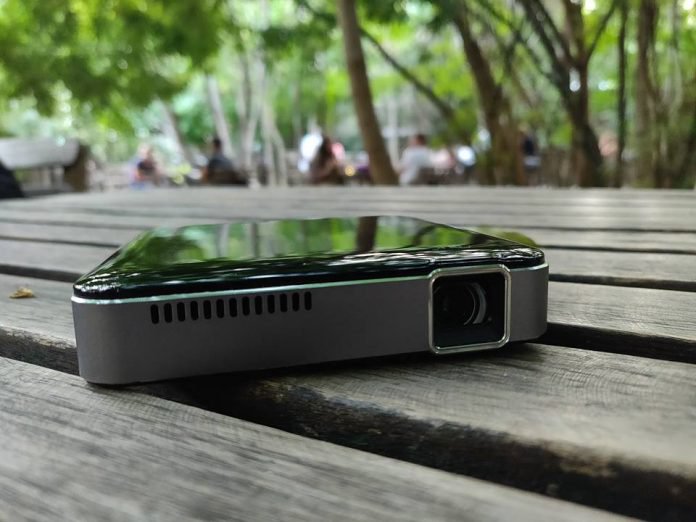
Going camping and need some entertainment? Or you simply want to watch a movie with the whole family and don’t have a big screen TV?
Then a gadget like the Apeman M4 Mini projector might be exactly what you need. We’ve been testing out this particular device for the last few weeks, and here’s what we think of it.
Appearance
The Apeman M4 mini projector comes in a stylish little box that includes the device, an HDMI cable, a tiny tripod, and an AC charger with a USB charging cable.
The M4 looks great. It’s quite small and can easily fit in my hand. It has a nice black shiny finish and an overall minimalist design. The unit measures only 3.86 x 3.86 x 0.85-inches and weighs next to nothing. It can be made to fit anywhere including in the pocket of my pants.
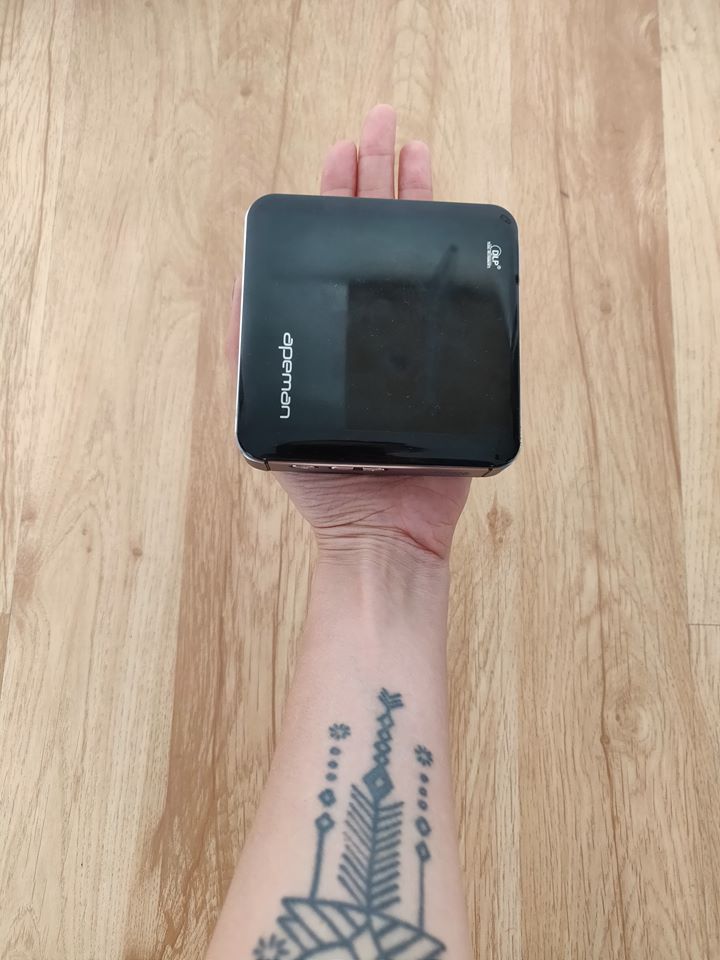
Unfortunately, the top surface is quite a magnet for fingertips which it’s particularly great, but not a deal breaker either. You’ll just need to have a wiping cloth with you at all times.
The projector comes with a large vent at the front, and there’s another one located below. Both are used to dissipate heat. Throughout our testing, the M4 remained quite cool in use and we didn’t notice any overheating.
On the back, you’ll find an HDMI, USB and USB-C ports. The latter is used for charging. There’s also a 3.5mm headphone jack, so you can hook up your favorite headphones.
Functions and use
The M4 is not as feature-rich as some of the other projectors on the market. That’s mostly because it’s a budget affair. However, it does provide more than necessary to get entertainment on the go.
For example, there’s no microSD storage expansion slot. But, the good news is that you can use the USB port to plug in a hard drive. What’s more, the 3,400 mAh rechargeable battery can double as a battery pack to recharge your phone. Which is pretty handy.
The M4 features 50 lumens LED lamp that offers decent quality pictures in a dim or a completely dark room. However, this is definitely not a daylight projector. It has a decent contrast ratio of 1,000:1 but it’s not nearly as powerful as other projectors available on the market today.
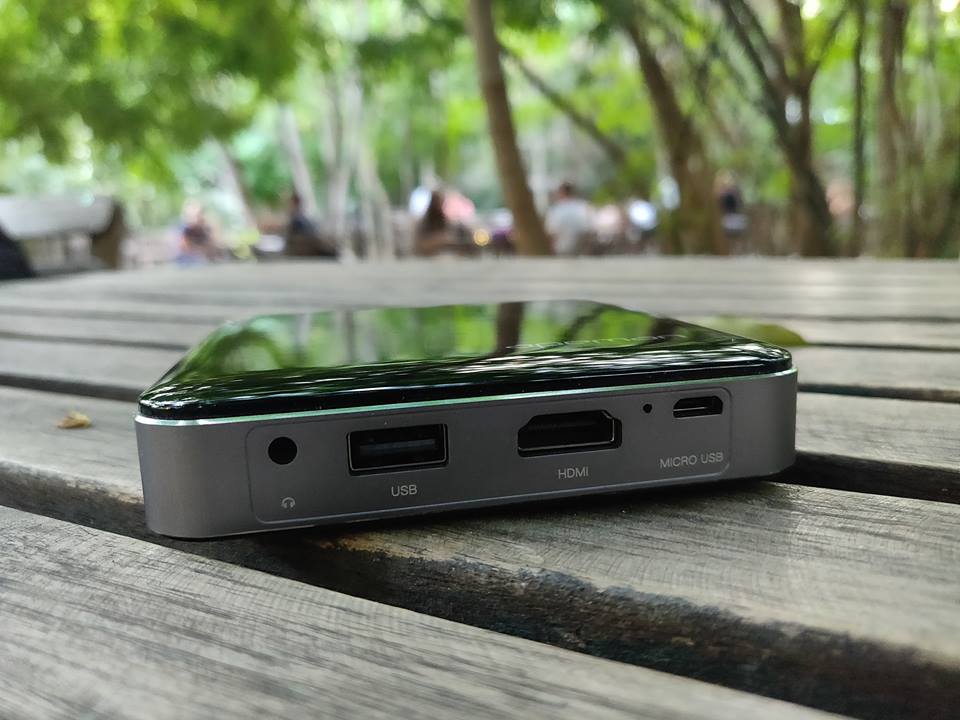
The HDMI port on the M4 makes it fully compatible with any standard media device. However, keep in mind that you’ve got absolutely no wireless connectivity on board including Bluetooth or Wi-Fi. So connecting a smartphone to it is not so simple and would require an additional device like a Roku stick.
A thing I found quite unusual about the Apeman is the lack of software interface. When you turn the projector on, using the power button on the side, you won’t see anything other than the Apeman logo greeting you. No additional Settings options or anything like that. Connect the HDMI cable and you’ll immediately start seeing the projected images.
The upside to this is that the mini projector is really easy to use and works straight out of the box. It doesn’t involve a complicated setup or anything like that. It also comes pre-charged, so simply take it out and start using it.
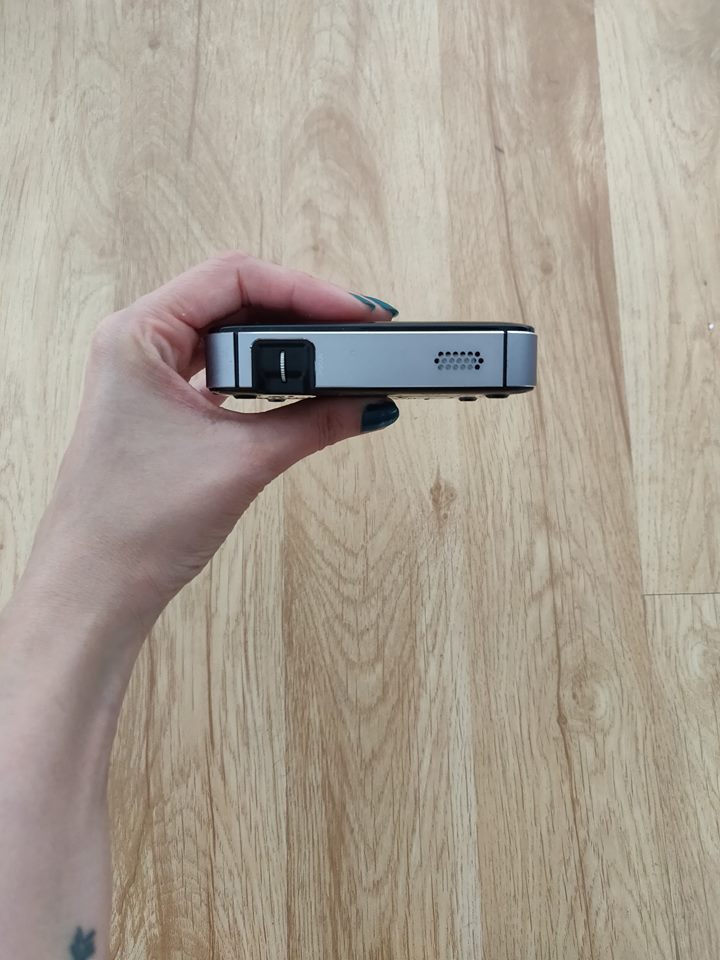
Place the projector at a distance of about two meters for best results. Don’t forget to use the mini tripod that comes in the box; it comes super in handy. Once you’ve found the best distance, all you need to do is manually focus the image and you’re good to go.

In our testing, we discovered that sound quality was pretty impressive for such a tiny device. The M4 features 1-watt stereo speakers which sit on either side of it and can provide loud and clear audio. While the projector’s own speakers can fill up a small room, if you’re looking to use the device in a larger chamber, we recommend you hook up an external speaker (if you have one of those laying around). You can connect them to the Apeman using the 3.5mm audio jack.
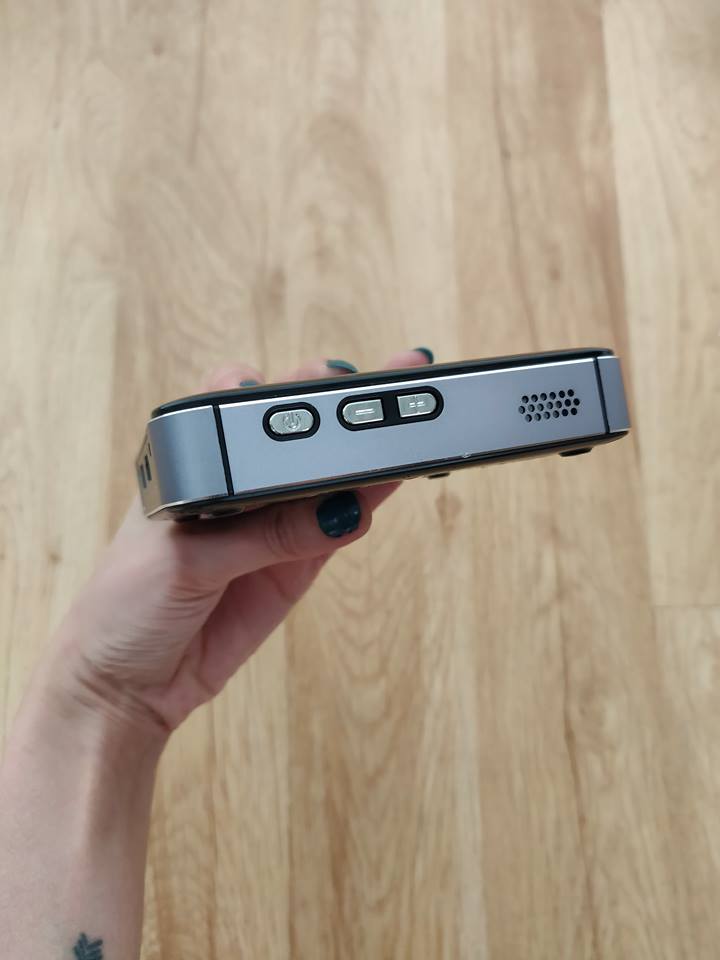
As we mentioned above, you’ll need to be in a completely dark room to take advantage of the full quality of the Apeman. The projector has a native resolution of 854 x 480, but it supports 1080p video input. Although it will downscale it. We know the resolution sounds disappointing, but actually, the projections end up looking quite decent on the wall. Colors are ok and the contrast ratio is good enough to watch a movie or look at a family album.
The internal battery can play up to about 80-90 minutes of content before running out of juice. Once the battery is drained it will take about 3.5-4 hours to fully charge it back up.
Conclusion
The M4’s biggest advantage it’s the fact that it’s such a tiny, portable device, which you can take with you literally anywhere. It’s not the most advanced projector we’ve seen, but it does get the job done when you need some quick entertainment to spice up a boring family evening.
The Apeman M4 is available for purchase for $209.99 from Amazon.
Don’t Miss
Google Home is awesome; here’s how to make it even better!
Check it out!
How to make money on Instagram (even if you don’t have a bajillion followers)
Elementary kids in the 1990s didn’t hold up glittered poster-board signs on career day that said “professional Instagrammer.” But as social media platforms grow, so do the number of people actually using them to make a living. In 2018, “professional Instagrammer” is a legitimate career.
Instagram influencers have one thing in common: reach. With enough reach, brands will pay influencers to post about a product in order to reach those followers. Influencers also tend to focus on one specific topic, posting on fashion, travel, food, or technology, just to name a few. That specific focus attracts brands because they can reach a specific audience.
But how do you go from posting a few photos to actually earning cash from Instagram? And do you really need to wait until you have 100,000 followers before earning money on Instagram? Here are five different options that take the guesswork out of learning how to make money on Instagram — and what you’ll need to do to help your profile make the cut.
What kind of profiles make money on Instagram?
Regardless of how you earn money on Instagram, influencer profiles tend to have a few things in common, both for attracting followers and brands alike. Influencers typically have a narrowed focus, a specific style, interesting visuals, and a “healthy” profile.
Focus: Brands aren’t looking to reach everyone — they have a specific audience in mind of the people most likely to buy their products. A high-end clothing brand will reach out to an influencer because he or she frequently posts about fashion, for example. Start by focusing on a niche area so brands and followers know what to expect when they come to your page — look at what you already have on your profile for inspiration or pinpoint what you’re most passionate about. A focus should be narrow enough to create a specific audience, but not so narrow that you can’t build a large follower count.
Style: No, this doesn’t just apply to fashion influencers. Most influencers have a specific style that gives their profile a cohesive look. Maybe it’s the type of photos, the colors and mood from the editing and composition, or even what’s said in the captions. Whatever it is, find what makes your photos yours and play that up.
Visuals: Instagram is a photo-based social network — there’s no getting around that. If you don’t have a great eye for photos, you’ll have a rough time. While you should have good photos on your profile, you don’t necessarily need fancy equipment or tons of experience. Instagrammer Monaris, for example, started with an iPhone and didn’t pick up a dedicated camera until after her followers had already noticed her style.
A “healthy” profile: Instagram is a good social media platform for becoming an influencer because the platform has a comparatively high level of engagement. But irk your followers, and you’ll lose their attention. Don’t start posting sponsored posts and only sponsored posts. That’s like going to a movie theatre just to watch two hours of commercials — no one is actually going to go to that theatre, or in this case, click that follow button. Be sure to balance with the photos that gained you those followers in the first place. Influencers also don’t disappear for days at a time — they tend to post to Instagram regularly.
How to make money on Instagram
While professional Instagrammers (or those that earn a little cash on the side) tend to have a few characteristics in common, there’s more than one way to make money on Instagram. You can choose the option that’s best suited for what you post, or mix in multiple options to generate a steadier source of income.
Join an Instagram influencer community.
With enough Instagram followers, brands may even reach out to you — but until then, Instagram influencer communities make it easier to find brands willing to pay for your reach, photo skills, and unique voice. Instagram influencer communities create a database of influencers for brands to work with. Brands win, because they can easily find influencers to work with. Instagrammers win, because they can find sponsored posts without a bajillion followers. And the influencer community wins because, well, they do take a cut of what you earn.
There are dozens of different types of influencer communities, and they all have different requirements, perks and persona. Here are just a few to consider:
Heartbeat: A platform focusing on female influencers, Heartbeat’s new app pairs potential influencers with brands looking for a similar audience. Besides the female focus, Heartbeat is different because the software matches Instagrammers to brands based on a series of questions about what you like and what you post. There’s no minimum follower count, but the pay isn’t always monetary — some brands trade for free products instead.
Shoutcart: Like an Amazon for Instagram influencers, influencers in this community build a profile and name a price. Brands can then search through the listings and find the right influencer for a campaign. Once a brand chooses you, the campaign is added to your “cart,” but you can opt out if the campaign might not sit well with your followers.
Tribe Group: Tribe Group is an Instagram influencer community based out of Australia. One of the platform’s biggest perks is that influencers set their own prices. Tribe Group also says they’re designed for creativity, not follower counts and celebrities.
Ifluenze: While this platform requires 5,000 followers, the network allows influencers to submit proposals to different brands. The platform then helps brands manage the accepted proposals and track them. This platform will also allow brands to choose just to buy the photo — and not the reach.
Popular Pays: Popular Pays is a gig-based platform — that means brands post their campaign and influencers create pitches on why they should be the influencer to work the campaign. The software also makes sure that a post is approved before going live and helps creators get paid for their work.
Sell fine art.
Turning your Instagram into a place for ads leave a sour taste in your mouth — or want to generate multiple sources of income? Instagram’s photo focus makes selling the photo itself a good option for cashing in, without posting ads. Apps like 8×10 allow photographers and other visual artists to sell fine art prints of their own work to followers. It’s like giving followers an Instagram post that can live on their walls.
8×10 takes care of all the printing, shipping, and payments. Artists use the app to generate a listing for a limited edition run of prints, which can also include a signature. The app allows users to choose the price. The app will even generate a mockup of the image hanging on a wall to share on Instagram. The app is free to use — 8×10 earns their living by taking a cut of each sale, so if you don’t sell anything, you don’t pay anything either.
Some artists use Instagram for reach, then use their own website to sell the prints. There’s potential to keep more of what you sell, but you still have to manage the printing and shipping or find a website platform or plugin that takes care of the shipping for you.
Sell stock photography.
While Instagram’s audience makes it ideal for artists selling their work, wall art isn’t the only way to do that. Selling stock is another chance to earn cash from photos you’re already taking anyways. You can sell Instagrams to stock photography companies using any company that doesn’t limit where you can post your own images in the terms.
Some platforms may be better suited for Instagram-like photography than others. Twenty20 is a stock photography company designed for Instagram-like photos — the company calls itself “the largest authentic photography marketplace.” Other companies like Foap aim for a more Instagram-like style, but there’s nothing saying you can’t go with a giant traditional stock photo company like Shutterstock, StoryBlocks, or even Getty, if you have the clout. Just make sure to read over the licensing agreements to make sure you’re still allowed to post the same photo on Instagram — some licensing agreements may limit what you can do with the image.
Use affiliate links.
Affiliate links aren’t as popular on Instagram because, well, Instagram doesn’t actually let you add a link to your posts unless you have a business account. But that doesn’t mean affiliate marketing on Instagram is a bad idea, just a more challenging one to tackle.
Affiliate marketing is where you get paid every time someone buys a product because of a link that you shared. You get a unique URL and the affiliate program tracks how many people bought the product through that link and you get a cut of those sales. Affiliate marketing is used on websites and blogs (Digital Trends included), but it’s a possibility on Instagram, too.
The challenge with affiliate links on Instagram is that you can’t actually create clickable links within your posts. Most get around that limitation by posting the affiliate link in the bio section where you’re allowed one link. While it’s more difficult that way and you can only do one affiliate link at a time, you don’t have to reach out to brands to participate. Most affiliate programs are free and easy to sign up for — you’ll just need a significant reach if you want to see a significant amount of cash coming in.
Find your own sponsors.
While there are a number of platforms that help Instagrammers without quite so much of a hefty reach find brands to work with, influencers with larger follower counts can organically find sponsors without a middleman. Sometimes, these Instagrammers report having brands reach out to them first — which is why factors like using the right hashtags are so important. Other influencers reach out to the brands themselves — tagging a brand in a post, creating a Direct Message, or sending a pitch to the company’s marketing department.
Influencers that are able to find their own sponsors have a strong profile and a specific style that attracts those brands. Besides having a larger follower count, you’ll also have to set your own rates. The amount you can get from a post depends on the reach you have — but there are online calculators like this one that you can use as a starting point. Surveys suggest an average of a few hundred dollars per post.
Editors’ Recommendations
- Fortnite Flaming Hoops challenge location guide
- Here’s why you’re not getting Netflix in HD or 4K, and how to fix it
- IGTV is sweet — but you probably don’t need the dedicated app. Here’s why
- How to sync a Fitbit tracker or smartwatch
- The best camera apps for Android
 AIVAnet