


Apple Expanding Pilot Program Allowing Repairs of Select Vintage Macs Worldwide Starting With 2012 MacBook Air
Apple will add 11-inch and 13-inch MacBook Air models released in Mid 2012 to its vintage and obsolete products list on August 31, according to an internal document distributed to Apple Stores and Apple Authorized Service Providers and obtained by MacRumors from a reliable source.
Normally, this would mean the 2012 MacBook Air is no longer eligible for hardware service, except where required by law. However, Apple has decided to include the notebook in its recently launched pilot program that allows for repairs to continue into the vintage period, subject to parts availability.
Apple says 2012 MacBook Air models will remain eligible for service at Apple Stores and Apple Authorized Service Providers worldwide through August 31, 2020, a full two years after the notebook is classified as vintage. Mail-in service will also be an option in the United States and Japan through that date.
Apple launched this pilot program in February, starting with 21.5-inch and 27-inch iMac models released in Mid 2011, but only in the United States and Turkey, so this marks the first time the initiative has expanded worldwide.
The coverage period for the Mid 2011 iMac models was initially set to expire August 31, 2018, but Apple has extended it to January 1, 2019, according to internal documents. However, unlike the 2012 MacBook Air, service for the Mid 2011 iMac remains available in the United States and Turkey only.
 Apple’s pilot program chart reproduced by MacRumors
If parts are unavailable for a specific repair for these vintage Macs, Apple Stores and Apple Authorized Service Providers are instructed to decline service. This is also a pilot program to begin with, so it is subject to change or end at any time.
Apple products become vintage-obsolete five years after they are last manufactured, at which point they typically become ineligible for hardware service. 2012 MacBook Air models were last sold in June 2013, slightly over five years ago, but they’ll now receive an impressive eight years of repair support.
The exact reason for the pilot program is unclear, beyond Apple apparently having a surplus of repair parts for these specific MacBook Air and iMac models. Any extension of hardware service eligibility is certainly a bonus for customers.
MacRumors has reached out to Apple for comment.
Related Roundup: MacBook AirTag: vintage and obsoleteBuyer’s Guide: MacBook Air (Don’t Buy)
Discuss this article in our forums
Instagram now lets everyone apply for a verification badge
If you’re on Instagram and unverified but really like the idea of having a blue badge next to your name, then the route to that goal has become a little bit easier.
We say “a little” because Instagram says the new system, which lets you apply for the verification badge through the app, is mainly for “notable public figures.” With most folks on the planet unable to be classified as such, the coveted blue badge looks set to remain out of reach for many, at least for now.
In a message posted on Tuesday, August 28, announcing the increased access to verification, Instagram co-founder and chief technology officer Mike Krieger described the blue badge as “an important way for you to know that the account you are interacting with is the authentic presence of a notable public figure, celebrity, global brand, or entity,” adding that verified accounts are usually ones that “reach large audiences.” You must also, of course, comply with Instagram’s terms of service and community guidelines to have any chance of being given a blue badge.
How to apply:
If you have a decent-sized following and fancy your chances, here’s how to apply:
First, go to your profile, tap the menu icon, select “Settings” at the bottom, and then choose “Request Verification.” You will need to provide your account username, your full name and a copy of your legal or business identification. Instagram promises that this information will never be shared publicly.
Krieger says that once your request has been reviewed, you’ll receive a message in your notifications tab confirming or declining it, though he doesn’t say how long the process is likely to take. Suspecting that scammers might try to make a few bucks out of the new system, the Instagram co-founder points out that the platform “will never request payment for verification or reach out to ask you to confirm your verification.”
It has actually been possible to get verified on Instagram before now — you’ve no doubt spotted a few of the badges already — but there seems to be some confusion about how the system works.
Other changes being rolled out include new “About” pages featuring more detailed information about an account, including how long it has been on the service, its country location, any username changes, and any ads that the account is running. Launching first for high-profile accounts, you can view the About page by tapping on the profile and then on the menu icon, and finally on “About this Account.”
The changes are part of efforts to reassure followers that the account they’re following is genuine, and follows similar moves made recently by its parent company, Facebook.
Instagram will also soon make it possible for people to use third-party authenticator apps, such as those offered by Google and Authy, to log into their Instagram account more securely. At the moment, two-factor authentication requires a phone number to which access codes are sent. When the option to use an authenticator app goes live, you’ll see it in the list under “two-factor authentication” in Settings.
Editors’ Recommendations
- How to change your Twitter username and display name
- How to change your Gmail password
- Instagram hackers are changing account info into Russian email addresses
- Google offers its own ‘Titan’ USB security key for password-free logins
- How to manage multiple Instagram accounts
Acer targets gamers with new color-rich 4K Predator and Nitro monitors
Acer Nitro VG1
With an eye on gamers, Acer took the wraps off of four new monitors across its Predator and Nitro lines at the IFA 2018 show in Berlin. All four come with fast 144Hz refresh rates to prevent screen tearing when playing fast action games.
At the high end of the spectrum are the 27-inch Predator XB273K and the 27-inch Nitro XV272K displays. The primary difference between these two panels is that the Predator unit comes with support for Nvidia’s G-Sync tech to eliminate screen tearing, while the Nitro series utilizes AMD Radeon FreeSync technology to achieve a similar purpose.
-
1.
Acer Nitro XV3 -
2.
Acer Nitro XV2
“Boasting AMD Radeon FreeSync, the new Nitro monitors’ frames sync with the PC’s graphics cards to support dynamic refresh rates, eliminating screen tearing and minimizing lag. Integrated Visual Response Boost (VRB) decreases blur in fast-moving images to achieve the effect of a 1ms MPRT (Moving Picture Response Time),” Acer said in a statement. Additionally, the Nitro XV273K display also features six-axis color adjustments, so gamers can make adjustments to the color, hue, and saturation. Gamers can also select from 11 black level options using the built-in black boost features to gain a visual advantage when trying to spot enemies in darker game scenes.
Both displays come with UHD 4K IPS panels with a resolution of 3,840 x 2,160 pixels, VESA HDR 400 certification, and support for 90 percent of the DCI-P3 color space. All four displays come with Acer’s VisionCare technology, featuring Flickerless, BlueLightShield, ComfyView, and low dimming technologies to reduce eye strain during long gaming sessions. The Predator display comes with an ErgoStand and shielding hood to minimize distraction during game play.
Acer Nitro XV3
In addition to the 4K configuration, the Nitro series also includes the WQHD Nitro XV272U, which covers 95 percent of the wide color gamut with its IPS display panel. Acer also announced a second WQHD model that uses a twisted nematic (TN) panel in the form of the XF272U. That model has a display that covers up to 90 percent of the wide color gamut.
The monitors also come with a VESA-compatible mount, so you can free up desk space by hanging the displays on a wall. All monitors come with minimal bezels thanks to Acer’s ZeroFrame design, which makes connecting multiple displays more seamless.
Acer’s 27-inch gaming displays will be available in the fourth quarter in North America. The Predator XB273K will start at $1,299, while the Nitro XV273K will start at $899. The WQHD Nitro XV272U will start at $499 and the XF272U will start at $449.
Editors’ Recommendations
- BenQ’s curvy new QHD display for gamers supports AMD’s FreeSync 2 tech
- Dell’s new 27-inch ultrathin display is less than a quarter-inch thick
- The best gaming monitors
- Nvidia GeForce RTX GPUs are coming to Alienware and Predator gaming desktops
- The best HDR monitors
Acer OJO 500 Windows Mixed Reality headset lets you straddle real, virtual worlds
Previous
Next
1 of 5


Acer has announced its newest Windows Mixed Reality headset at the IFA 2018 conference in Berlin. Dubbed the Acer OJO 500, the headset boasts a number of innovative features, such as sound pipe technology, a detachable design, and a new app-based calibration design that Acer claims will lead to sharper, clearer images. Users new to Windows Mixed Reality will be able to pick up a package that includes the two optional Bluetooth motion controllers that sync with the headset. The headset will be available in November, with prices starting at $399 in North America.
“The Acer OJO 500 brings several significant new features to this class of Windows Mixed Reality headsets,” said Andrew Chuang, Acer’s general manager of presence computing. “We’ve improved the user experience with innovative visual and audio technologies and made the headset more comfortable and easier than ever to use.”
“We’ve improved the user experience with innovative visual and audio technologies and made the headset more comfortable and easier than ever to use.”
The headset’s detachable design allows the lens and head straps to be removed, making it easier to store and clean the device. Acer claims that the removable strap design will allow businesses, like car showrooms, for example, to adopt the OJO 500 and keep the experience clean and sanitary for their customers. The OJO can be configured with either a hard or soft strap, and the soft strap is machine washable.
If you need to temporarily pause your journey into the virtual or mixed reality world, you don’t even need to take the OJO 500 off. The headset comes with a design that allows the mask to be flipped up, which temporarily and quickly pauses your mixed reality experience.


When you’re in the mixed reality experience, the OJO 500 doesn’t require headphones for immersive audio. A unique sound pipe helps direct sound from the headset’s built-in speakers to the user’s ears. This open audio design means that you’re not isolated from the real world, making the OJO 500 suitable for use in public spaces where you may not want to be cut off from your surroundings. The audio system comes with a built-in microphone array, embedded speakers, and the sound pipe. If you want a more private audio experience, you can also use the earphones that are built into the hard head strap or use your own headphones with the soft head strap.
For clearer and sharper images, the OJO 500 comes with a built-in interpupillary distance (IPD) wheel. You can also use a software-assisted app to calculate the distance between your pupils and the display to calibrate the screen. The OJO 500 comes with two front-hinged 2.89-inch displays providing a 100-degree field of view at 2,880 x 1,440 resolution. The OJO’s screen comes with a 90Hz refresh rate.
An external camera helps the headset maintain tracking, so you don’t need any extra hardware when the headset is plugged into a PC that supports Windows Mixed Reality. The headset can track backward and forward, up and down, and left and right directions along with pitch, yaw, and roll. The headset connects to your Windows 10 system’s HDMI and USB 3.0 ports via a 13-foot long cable.
Editors’ Recommendations
- The best PS4 headsets you can buy
- Here’s how to turn off camera shutter sound on your Android phone
- The best cheap phones of 2018
- The best Xbox One gaming headsets you can buy
- Moto Z3 Play review
Designed to engulf players, Acer’s Predator Thronos is a titan of a gaming chair
Previous
Next
1 of 2


It’s no coincidence that Acer’s Predator Thronos Gaming Chair has a name that’s similar to that of an evil, world-killing villain from Marvel lore. It’s just as titanic in nature as Thanos, wielding three monitors and a tower desktop. Unveiled at the IFA 2018 convention in Berlin, this isn’t just a chair: It’s also a titan.
Measuring nearly five feet tall, the throne-like Predator Thronos is made of steel and sports a two-tone color scheme: Black with illuminated white accents or black with lit blue accents. It resembles something ripped straight out of science-fiction, providing a “cabin” that reclines up to 140 degrees. Inside is a vibrating chair that reacts to your on-screen action, along with a comfy foot rest.
Slung over your head like a metallic scorpion’s tail is a brace that holds three 27-inch displays – sold separately – in front of your face. This brace appears to be illuminated by multiple variants of the Acer Predator logo stretching out along the top, sides and bottom. The piece joining the two monitor support rails to the overhead brace includes the full, illuminated Predator logo.
But there’s more to the Predator Thronos than just the chair and monitor rails. Everything sits on a huge metallic base complete with illuminated “Predator” wording, illuminated accents and backlighting creeping out from under the chair. There are two handles mounted on each side of the base, so you can drag this huge metallic beast to your favorite spot.
We’re not exactly sure where the desktop — sold separately — resides on this monstrous contraption, and Acer provided very little detail about this product prior to its reveal. Based on the images, it may reside directly behind your back on the other side of the steel structure supporting the seat. Presumably, the Predator Thronos already includes cabling mounted within the brace and through the two display rails so you’re not running crazy-long cables throughout the setup.
“The all-new Predator Thronos reimagines the gaming chair for a new level of gamer,” the company says. “It puts the gamer in the game through deep impact vibration, where the chair vibrates upon in-game impact. Integrated with a Predator PC and triple Predator monitors plus gadgets, the Thronos becomes more than a gaming chair—it’s a gamer’s cave.”
The Predator Thronos is what you could consider as an “extreme” upgrade to the company’s Gaming Chair. This version consists of premium PVC leather, an ergonomic “body-contouring” design, a detachable headrest, lumbar cushions, and adjustable armrests with a 180-degree recline. The chair is mostly black save for a blue highlight that snakes around the front edge of the cushions.
At the time of publication, Acer didn’t say when the Predator Thronos would arrive or how much it will cost. Chances are that it may arrive in the fourth quarter of 2018, along with the company’s other new gaming products introduced during the show. These include new monitors and peripherals based on the Predator and Nitro brands.
Editors’ Recommendations
- The best camping chairs
- The best office chairs of 2018
- The best gaming mouse of 2018
- The best gaming monitors
- Asus ROG Swift PG279Q review
The $1,100 Acer Swift is the lightest 15-inch laptop ever made
Previous
Next
1 of 5


Acer has a large presence at IFA this year, relaunching a number of laptops in both its Swift and Aspire lines. The most exciting of the bunch was an update to the Acer Swift 5, a laptop that claims to be the lightest 15-inch laptop ever made at just 2.2 pounds. It’s a cut down from the 2.4 pounds of the 15-inch LG Gram, which felt impossibly light when we reviewed it earlier this year.
The Swift 5 achieves its light design through the use of magnesium-lithium alloy throughout the body of the device. Acer says these materials ensure durability and prevent any bending or twisting. In addition to cutting some weight, the Swift 5 has also trimmed the bezels, which are now just 0.23 inches and make for a more modern aesthetic. For reference, they’re just a hair thicker than what you get on the Dell XPS 15.
The Swift 5 includes options for either the Core i5-8265U or Core i7-8565U, both new processors announced from Intel at IFA.
“The latest 8th Gen Intel Core processors set a new standard for mobile computing with blazing fast integrated Gigabit Wi-Fi combined with even faster Intel performance, long battery life and enabling more convenient voice and touch interactions,” said Chris Walker, Vice President of the Client Computing Group at Intel. “We have worked closely with Acer to bring these new levels of performance and connectivity to life with the latest Swift models.”
Speaking of connectivity, the Swift 5 also comes with built-in 4G LTE. This positions these laptops as strong competitors to both iPads and the Qualcomm Snapdragon-powered PCs on the market. The Swift 5’s other important specs include fast NVMe storage, up to 16GB of RAM, a 1080p touchscreen display, and a USB-C port. The Swift 5 starts at $1,100 and will ship in North America in January of 2019.
Previous
Next
1 of 4


In addition to the Swift 5, Acer also announced an update to its little brother, the Swift 3. It’s the more affordable option, starting at $800. It’s a 14-inch device that includes a lot of the same features, including the same processor options (with the addition of a Core i3-8145U base model), 1080p display, and built-in LTE support. The one extra feature on the Swift 3 is the addition of an optional GeForce MX150 graphics card, which adds some more casual gaming and video-editing capabilities.
The Switch 3 will be available in North America starting in November, and comes in a variety of different colors, including silver, blue, red, and pink.
Editors’ Recommendations
- The best laptops under $300
- Asus ZenBook UX330UA review
- Acer crams a Ryzen 7 CPU, discrete RX Vega 56 graphics into a 17-inch laptop
- Huawei jumps on AMD’s Ryzen bandwagon via an upcoming 14-inch MateBook D laptop
- Dell XPS 13 9370 review
OneDrive leans on A.I. to simplify searches for multimedia files
Microsoft is leaning on artificial intelligence to help you manage your files and make its OneDrive cloud storage system smarter. Microsoft 365 customers who use OneDrive and SharePoint will soon have access to a number of A.I.-enabled features making it easier to manage and search for multimedia files stored on Microsoft’s cloud.
“Today, we are announcing upcoming capabilities that, along with our recent investments, combine the power of artificial intelligence (A.I.) and machine learning with content stored in OneDrive and SharePoint to help you be more productive, make more informed decisions, and keep more secure,” Microsoft said in a blog post detailing the updates.
One of the big smart changes is that audio and video files stored on OneDrive and SharePoint will get automatic transcriptions. Microsoft says that it is using the same intelligence found on Microsoft Stream. With transcriptions, users can easily search through audio and video files and collaborate with others. Microsoft claims that the feature brings greater accessibility to users as well.
Microsoft will apply A.I. to photo files as well, allowing you to better search for images. Artificial intelligence can be used to analyze a photo, and pull relevant data and information from your captured images, like text, objects in photos, and location information. For example, if you took a photo of your receipt after dinner, you’ll be able to search for “sushi” and have the receipt show up inside your search results.
The Microsoft 365 update also makes it easier to share, collaborate and gain more insights from your files. OneDrive can leverage the power of Microsoft Graph to recommend relevant files to you. The recommendations are based on the A.I.’s understanding of how you work, who you work with, and the type of content you’re working on, Microsoft said. Microsoft will also share some of the insights it learned with you. For example, you can now learn who has viewed your shared files and what they’ve been doing.
And if you’re running a lot of meetings, A.I. will help remind you to share important files, like the PowerPoint slides, meeting notes and handouts, with attendees. “For instance, if you just presented a PowerPoint presentation, you’ll be prompted to share it with the other attendees once the meeting is over,” Microsoft said. “In the OneDrive mobile app, we’ll automatically prompt you to share photos taken during the same meeting, perhaps of a whiteboard where you brainstormed new ideas with your colleagues — all based on your Outlook calendar.”
Microsoft didn’t give a timeline on when these new features are expected to arrive. Likely, some of these features may be showcased at Microsoft’s Ignite conference in late September.
Editors’ Recommendations
- How to transfer files from Android to your PC
- How to convert a PDF file into a Word document
- How to convert M4A files to MP3 format for listening on any device
- How to change file associations in Windows 10
- How to use BlackBerry Locker
Acer’s $349 Chromebook 514 has USB-C charging, Gorilla Glass trackpad
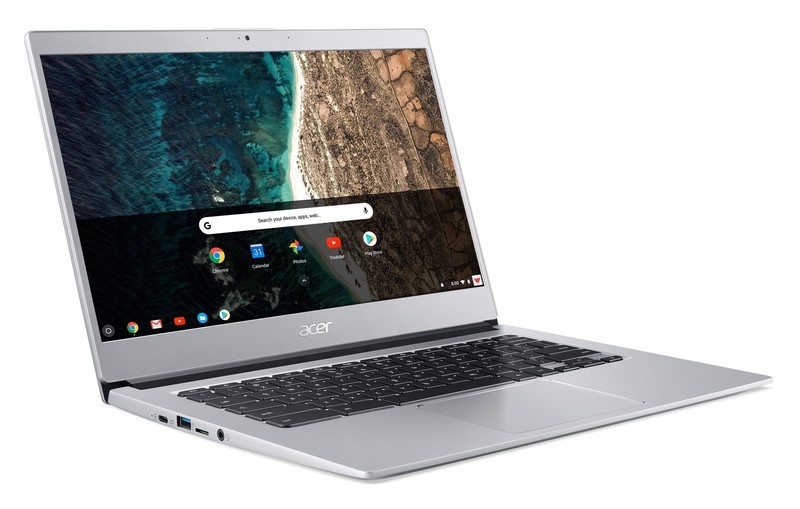
This marks a nice step up from the entry level.
Acer is expanding its Chromebook range with a new model, the Chromebook 514. The new model keeps things inexpensive while adding some nice-to-have hardware features that will separate it from the plastic bargain machines so often associated with the Chromebook name.
There isn’t anything particularly revolutionary in terms of the Chromebook 514’s overall design, but Acer is focusing on the fact that this is a 14-inch screen with small bezels that allow for a smaller footprint. Based on the renderings, it doesn’t look much larger than the current 13-inch Chromebook R13. The display is a 1080p IPS panel, which will get the job done, and there’s a touch screen option — but this isn’t a “convertible” type laptop with an extra-rotating screen.
Acer quotes a very impressive 12-hour battery life figure for the Chromebook 514, though those numbers can vary widely based on what you’re actually doing. But being able to get well into the double digits if you are careful is good no matter how you slice it.
This looks like a nice budget option with some create comforts from a higher-end models.
Because this is a slightly nicer device, Acer is throwing in some creature comforts. You’ll see a backlit keyboard standard, plus a Gorilla Glass-covered trackpad that should dramatically improve point accuracy and feel. Funnily enough, Acer isn’t emphasizing any of the other specs, and isn’t providing a base processor, memory and storage spec for the Chromebook 514; it’s saying that these specs will range widely from region to region. (For a point of reference for what to expect, Acer’s current 15-inch Chromebook 15 has either a duel-core Intel Celeron N3350 or quad-core Pentium N4200, with 4GB of RAM and 32GB of storage, at a similar price.)
In an impressively forward-thinking move, Acer is offering USB-C on the Chromebook 514, with one port on each side. The left port is used for charging, but either one can pick up data duties as well. They come in addition to a pair of standard USB-A ports — what a concept.
In typical Acer fashion, the new Chromebook 514 is still affordable — pricing starts at $349 in the U.S. and €349 in Europe, though the company didn’t detail the pricing range for additional higher-end versions. The Chromebook 514 is likely to come in various different configurations of memory and storage for different regions, so keep an eye out for what models eventually hit your local area.
Press release:
Acer seals its #1 position in the EMEA Chromebook market and US Retail Market with the launch of a new best-in-class Chromebook
IFA, BERLIN (August 29, 2018) – Acer seals its leadership position in the Chromebook market by revealing details at IFA today of the availability of its new Acer Chromebook 514. Aimed at tech lovers, young professionals and college students, Acer’s continued focus on the growing market for Chromebooks, gaming and ultra-portable PCs is proving to be a successful business strategy.
The combination of a metallic chassis, backlit keyboard, Corning Gorilla Glass touchpad, USB Type-C and a 12-hour battery life gives the Acer Chromebook 514 a superior look and feel narrow bezel allows for a 14-inch screen in a smaller footprint and the optional touch screen makes it easy to navigate and control videos on the Full HD IPS display
Stylish Yet Tough and Designed To Be Seen
Continuing a strong track record in bringing to market design, award-winning Chromebooks, the new Acer Chromebook 514 encapsulates strength, durability and stylish good looks in a strong, lightweight aluminium chassis meaning less likely to be bent, warped or dented. The 6mm narrow bezel and wide viewing angle of the Full HD 14-inch IPS screen allow users to enjoy the full majesty of films, videos and TV shows. An optional touch screen makes it easy to navigate and control videos on the 1920×1080 resolution display with 2,073,600 pixels display.
Polished Performance and Easy Productivity
Fast boot times, ease of use, tough security and a 12 hour battery life are some of the advantages of Chrome OS. The fast boot time, simplified interface, integrated malware and efficient use of power means users can enjoy hassle-free computing and staying productive all day, without the need of the power adapter. With Chrome OS, users can still use their favorite software as traditional office productivity programs.
Tougher, Smoother Touch
Tapping, swiping, scrolling and zooming are smoother than ever. The Corning Gorilla touchpad provides a slicker feel than a regular plastic touchpad with the ability to withstand scratches and pits so it will continue to look as slick as the day it was bought. Greater Camera Clarity and Keyboard Comfort
The HDR webcam provides crystal clear clarity and sharpness details whilst the ‘day or night’ backlit keyboard not only looks cool, but also allow users to type comfortably in dimly lit environments.
Port Practicality
One connector is used for ultra-quick data transfer, video streaming, and battery charging. The reversible USB 3.1 Type-C ports are easy to attach to and with a transfer rate up to 5GB/sec, are 10 times faster than USB 2.0.
Pricing & Availability
The Acer Chromebook 514 will be available in North America in October, starting at $349.99; and in EMEA in the approved Chrome OS territories starting at €349.
Exact specifications, prices, and availability will vary by region. To find out about availability, product specifications and prices in specific markets, please contact your nearest Acer office or retailer via http://www.acer.com.
How to build a smart home in an apartment

Discover the fun of running cable channels.
- Find out exactly what you can change
- D-Line cable channels
- TP-Link 5 Port Ethernet Switch
- Nanoleaf Aurora Rhythm Starter Kit
- Philips Hue Starter Kit
- Google Home
- Lenovo Smart Display
- Wemo Mini Smart Plug
- LeFun WiFi Smart Power Strip
- Other tech you can buy
Smart home technology is getting more pervasive, but if you don’t own your space, you may feel a bit left out. Fortunately, it’s still possible to wire up a smart apartment and make everything look great.
Here’s how to build a smart home when you can’t change anything!
Find out exactly what you can change
Before spending any money, it’s worth having a conversation with your landlord to find out what you can and can’t change. Basic stuff like smart speakers, streaming boxes and lightbulbs will almost certainly be fine, but other pieces may not be. Smart Locks and thermostats are a bit tricker, and anything that requires you to put a hole in your wall is probably not going to fly. Have the conversation before losing your security deposit.
D-Line cable channels

Ethernet is still the most reliable way to get data to all of your smart devices, but you can’t route cables behind walls. If you’re going to run Ethernet cables, speakers cables or anything else around, you’ll want some cable channels. There are a few options, but D-Line’s Cable Raceway is probably the best for most folks. It blends right in the base of your walls, and you can paint these any color you’d like to match your walls or baseboards. It’ll also look nice flat on your wall if you need to run cables up to the ceiling. Most importantly, it can be easily removed in a year when you get ready to move somewhere else.
$17.50 at Amazon
TP-LINK 5 Port Ethernet Switch

Rather than running multiple Ethernet cables, it’s easier to group your gadgets together, run one Ethernet cable for the long distance, then split it up with a switch for the shorter distances. I have an Ethernet cable running from my router to my TV stand, then a network switch for wired connections for my Xbox and Nintendo Switch. A network switch is inexpensive and gives you a bit more flexibility when wiring your gadgets.
$11 at Amazon
Nanoleaf Aurora Rhythm Starter Kit

If you want colorful lights without replacing all of your lights bulbs, Nanoleaf’s Aurora lights may be the perfect fit. You get either nine or 15 panels to arrange in any shape you want, and each panel can be given its own individual color. There’s a smartphone app for assigning colors to the panels and turning the array on, or you can purchase an adorable remote that also lights up. Setup is easy: just snap the panels together and plug in the single power cord. And when it’s time to move in a year, the whole array can be moved without being disassembled.
$345 at Amazon
Philips Hue Starter Kit

If you do want to replace your existing light bulbs, Philips is the best name in town. Its Hue starter kit gets you four bulbs and a hub to connect to Google Assistant, Amazon Alexa or Apple’s HomeKit. Once everything is set up, you’ll be able to use your voice to turn on your lights, change the color and more. And since moving the bulbs just requires unscrewing them from the lights, you can re-use the bulbs in your next apartment.
$200 at Amazon
Google Home

There’s nothing permanent about a smart speaker, and Google’s Home speaker is a great option. Google Assistant will integrate with nearly every smart home product, and using Assistant on the speaker is no different than using it on your phone. The Google Home’s speaker is great for what it is, and moving it around your apartment or to a different place entirely is as easy as plugging it into a new power outlet.
$130 at Google Store
Lenovo Smart Display

Take everything that was just said about the Google Home, but add a display to it. You still get the great home automation and good speakers for listening to music and podcasts, but you also get to watch recipes for the food you’re cooking, or watch news broadcasts, or make video calls with Google Duo. The Smart Display is also a Chromecast target, so your Hulu or YouTube TV shows can be right there in your kitchen, without the chance for you to ruin your laptop in the process.
$200 at Amazon
Wemo Mini Smart Plug

If you want to control power to your gadgets — or want an easy way to shut things down if a storm is coming — Wemo’s Smart Plug line is for you. You get a single passthrough plug that connects to your Wi-Fi network that lets you control power through Google Assistant, Amazon Alexa or Apple’s HomeKit. You can also set a schedule for the plug, so your cool home theater gadgets are all powered on by the exact moment you get home. You can also set your lights to randomly turn on and deter intruders when you’re away. When it comes time to move, you just need to unplug the Smart Plug and plug it back in at your new space. Best of all, the Mini Smart Plug is compact enough that two of the plugs will fit on one standard power outlet.
$28 at Amazon
LeFun WiFi Smart Power Strip

If you have more gadgets than one plug can handle, a smart power strip is for you. LeFun’s model lets you individually power each outlet on the strip, and it includes four USB ports for your phone, streaming stick, or another gadget. There’s a generous six-foot power cord, and connecting it to your smart home just requires Wi-Fi. It works with Google Assistant or Amazon Alexa, perfect no matter which smart speaker you own. Finally, there’s a resettable circuit breaker on the strip in case your devices start drawing too much juice. And when you move, just unplug the power strip and take it with you.
$33 at Amazon
Other tech you can buy
You won’t be able to get a smart fridge or smart oven, but you can build most of the pieces of a smart home even if you’re leasing. No one’s going to stop you from using the game console, wireless router or smart speaker you wish. All of these basic pieces aren’t hard to disassemble and move at the end of your lease either.
More: Best Smart Home Tech for an Apartment or Small Space
What say you?
How do you keep your smart apartment connected? Let us know down below!
Amazon drops its 16GB Fire HD 8 tablet down to just $50 for a limited time
Limited time offer.

Right now Amazon has its 16GB Fire HD 8 Tablet on sale for just $49.99, which is $30 lower than it regularly sells for. Amazon regularly sells its Fire 7 Tablet for $50, and that only comes with a base of 8GB internal storage, so with today’s limited time deal, you get a screen that’s an inch larger, as well as twice as much internal storage. The tablet comes in blue, yellow, black, and red.
If you want some extra internal storage, you can opt for the 32GB version for $79.99 instead, which is also a $30 savings. Amazon recently introduced a new Show Mode Charging Dock that turns your Fire Tablet into a large Alexa experience similar to the Echo Show or Echo Spot, and right now you can combo the Fire Tablet 8 with the dock for just $119.98.
The internal storage does fill up quickly on these, so you’ll definitely want to add a microSD card to it so you can hold more movies, music, and apps. This deal is only good through August 30, so don’t miss out!
See at Amazon
 AIVAnet