


Unlock your front door from your phone with August’s $99 3rd-gen smart lock
Leave your keys behind!

Amazon has the 3rd-gen August smart lock on sale for $99.39. This lock normally sells for closer to $150 and has never dropped this low before.
With this, you can use an Alexa-enabled device to lock and unlock your door, as well as your smartphone using the free August app. DoorSense makes sure you are secure by automatically locking after you leave and unlocking when you arrive.
See at Amazon
Why the Lenovo Smart Display is a better investment than a smart speaker
Screen-less smart speakers are so 2017.

Although they were non-existent just a few short years ago, smart speakers have quickly become one of the most interesting gadgets in the consumer tech space. Amazon’s got its Echo speakers, Google has its excellent Home lineup, and then there are all of the Alexa and Assistant-powered speakers from third-party brands.
In other words, the smart speaker market is getting more and more crowded with each day that passes.
The Lenovo Smart Display is the latest entry in this category, but it shakes things up by coming equipped with its own screen. That may not seem like a big difference on paper, but in day-to-day use, proves to be reason enough to buy the Smart Display over anything else.
Here are 6 reasons why the Lenovo Smart Display is better than a smart speaker!
You can watch YouTube videos and TV

For me, one of the biggest reasons the Smart Display takes the cake over regular smart speakers is the fact that you can watch videos on it. This certainly won’t be replacing a proper TV anytime soon, but it’s a great extra screen to have for watching stuff while making dinner, doing laundry, etc.
As it currently stands, you can ask the Smart Display to play videos from YouTube, YouTube TV, and HBO Now. Additionally, it can act as a Chromecast target for Hulu, PlayStation Vue, Google Play Movies, and more.
How to watch YouTube videos on the Lenovo Smart Display
Video calling with Google Duo

If you like to video chat with as a way to stay in touch with friends/family, the Smart Display works exceptionally well here, too.
Using Google Duo, you can make video calls to anyone else that has the app on their phone, tablet, or another Smart Display. The 5MP front-facing camera allows you to talk face-to-face with your loved ones without having to hold onto a phone, and thanks to the Smart Display’s wedge design, you can position it in a horizontal or landscape position during Duo calls to make sure you’re always in the frame.
When you’re not chatting with anyone and would like a bit more privacy, you can move the Smart Display’s physical camera shutter to cover it up until you’re ready to use it again.
Thanks, Lenovo, for including a camera cover on your Smart Display
It’s perfect for following recipes

I’ve found that the kitchen is the perfect room for the Lenovo Smart Display, particularly because the device is perfect for finding and following recipes.
After asking the Google Assistant to find a recipe, tap the one you’d like and you’ll be guided through everything in an easy-to-follow step-by-step manner. You’ll be told what ingredients you need one by one, and once you’ve got everything ready to go, the instructions will be displayed is large text and read aloud so you can follow along with ease.
You can move through the recipe by touching the display, using your voice, and smart suggestions at the bottom will appear if you need to set a timer during a certain step. The whole experience is fantastic and definitely one of the features that I use more than anything else.
On-screen music + smart home controls

There are a lot of instances in which the Smart Display’s screen comes in handy, and along with recipes, another couple use cases I’ve found to be particularly helpful lie with music and smart home controls.
When listening to music on Spotify, you’ll get great on-screen visuals for seeing the song’s album artwork, how much time is left for the track, and controls for pausing or skipping to the next song in the playlist. While none of this is necessarily groundbreaking, it’s great info to have that you simply can’t get on a regular smart speaker.
Along with this, smart home controls are also a joy to use.
You can control smart bulbs, switches, thermostats and more just like you would with a Google Home, and while the voice commands work like you’d expect, the screen on the Lenovo Smart Display allows for even deeper controls.
For example, if you ask the Smart Display to change the temperature on your Nest Thermostat E, the Smart Display will show the current temperature in the middle of a slider. You can then use your finger to move this slider around to further adjust the temperature without having to issue another “Hey, Google” command.
Easily view Google Photos

Google Photos is the best and easiest way to manage all of your memories on any device, and with the Smart Display, you essentially have a digital picture frame for showcasing any pictures that are uploaded to the service.
When you aren’t interacting with the Smart Display, you can choose to have it show a clock, an art gallery that displays “beautiful images and artwork”, or any of your albums from Google Photos.
I’ve had my Smart Display running through a few of my Google Photos albums since I first got it, and it’s been great to walk into the kitchen and see pictures from a recent mini-vacation or from me and my fiance’s engagement shoot.
Visual updates for weather, calendar, etc.

Asking about the weather and upcoming calendar appointments is just about the most basic Google Assistant command around, but with the Smart Display, these sort of questions get new life thanks to the smart visuals that accompany them.
When you ask the Smart Display about the weather for the day, the Assistant does its usual job of reading aloud the current weather conditions and the high and low for the day. However, the Smart Display also shows this info in addition to a breakdown of the weather throughout various hours of the day and a small three-day forecast.
That’s all information you could ask for with separate voice commands, but the fact that they’re already there for you to see just makes everything so much easier.
What do you think?
Why do you think the Lenovo Smart Display is better than a regular smart speaker? What would you like to see added to make it even better? Sound off with your thoughts in the comments below!
See at Best Buy
From the forums: Are you upgrading to the Note 9 from the Galaxy S9+?
Even if you have the S9+, the Note 9 may still be worth looking into.
This past Friday, Samsung officially launched the Galaxy Note 9. We’ve already praised the phone quite a lot in our full review, and while the Note 9 does bring a lot of strong suits to the table, there’s no denying its similarities to past Samsung phones — most notably, the Galaxy S9+.

The Note 9 and S9+ have very similar designs, nearly identical camera packages, the same processor, and an identical software experience.
With all those similarities in mind, why would any S9+ owner consider upgrading to the Note 9? According to the AC forums, there are some reasons you may still want to upgrade.
Mr Segundus
08-25-2018 08:47 PM“
Better battery, for sure.
Reply
lizette1222
08-25-2018 09:40 PM“
For me, the Spen. Bigger battery, bigger screen, more storage, just because it’s a Note!!
Reply
JoBudden
08-25-2018 09:53 PM“
There’s multiple reasons. more storage, more ram, better camera software, bigger battery, bigger screen, spen and upgraded version of Android.
Reply
boltsbearsjosh
08-25-2018 10:51 PM“
For me I like the more squared off corners of the Notes. The S series phones are always too rounded.
Reply
What say you? Are you upgrading to the Note 9 from the Galaxy S9+?
Join the conversation in the forums!
Samsung Galaxy Note 9
- Samsung Galaxy Note 9 review
- Galaxy Note 9 vs. Note 8
- Where to buy the Galaxy Note 9
- Galaxy Note 9 specifications
- Is the Note 8 still a good buy?
- Join our Galaxy Note 9 forums
AT&T
Verizon
T-Mobile
Samsung
The best ways to utilize the S Pen’s remote features on the Galaxy Note 9

The S Pen is more useful than ever before.
A Galaxy Note just isn’t complete without its accompanying S Pen, and that’s truer than ever with the Note 9, whose new and improved S Pen includes a supercapacitor that allows for Bluetooth Low Energy connectivity. That gives it the ability to control your phone from further away than ever before — you’re not limited to being just an inch or so away from the screen anymore, and that opens up a lot of new remote control possibilities.
Samsung has been keen to show off one particular feature of the S Pen’s new remote capabilities — the ability to launch the camera by double-pressing the sole button, then take a photo by pressing it again, effectively turning the powered stylus into a remote shutter. That’s a great feature, and it’s probably the one that consumers will find the most useful, but there’s a lot more you can do with the S Pen.
Let’s stick with the camera app to start. While long-pressing the S Pen’s button will launch the camera app by default, once you’re already in the viewfinder double-clicking will flip the between the front and rear cameras instead. By jumping into the S Pen Remote options within the Note 9’s system settings, you can also change the shortcuts that a single- or double-press of the S Pen’s button will launch. In the camera app, you can change a single press to begin recording video instead of capturing a photo.

Scrolling through that list of settings reveals a lot more than just camera controls, though. You can use the S Pen for media controls, with a single press of the button pausing or resuming music and a double press skipping to the next track. This is great when, for instance, you’re listening to music through Bluetooth speakers or headphones with your Note 9 on the charger, or you’ve been washing the dishes and your wet fingers aren’t cooperating with the Note 9’s screen.
You can customize single, double, and long presses of the S Pen’s button, or disable actions entirely on a per-app basis.
There’s a decently long list of other apps that work with the S Pen’s new remote functionality, including PowerPoint (for moving through slideshows), Samsung’s Voice Recorder (for pausing and resuming audio recording), and the gallery (for scrolling through photos). Most importantly, if any of these shortcuts are bugging you and you find yourself accidentally launching certain app actions too often, you can also set a single or double press to just do nothing — or disable remote controls entirely on a per-app basis.
The best way to fully take advantage of the S Pen is to customize it to your heart’s content. Don’t be afraid to move away from Samsung’s default settings — there are plenty of other shortcuts you can assign within the S Pen settings, and you can even change what long-pressing the button does. If you don’t use the camera often or you don’t find it useful to launch from the S Pen, you can set it to pull down the notification shade, launch a specific app, or plenty of other tasks.
Have you gotten your Galaxy Note 9, now that it’s finally available in stores? If so, what are your favorite S Pen shortcuts? Let us know in the comments below!
See at Samsung
Samsung Galaxy Note 9
- Samsung Galaxy Note 9 review
- Galaxy Note 9 vs. Note 8
- Where to buy the Galaxy Note 9
- Galaxy Note 9 specifications
- Is the Note 8 still a good buy?
- Join our Galaxy Note 9 forums
AT&T
Verizon
T-Mobile
Samsung
Pixel 3 announcement to take place on October 9
Everything we know about what’ll likely be one of the year’s best phones.
Google first introduced its Pixel series in 2016, and since then, has been hard at work to establish itself as a serious player in the smartphone market. Google may be one of the most powerful and iconic companies in the world, but when it comes to hardware, is still very much a newcomer.
We saw vast improvements with the Pixel 2 compared to the original Pixel line, and we’re expecting to get that again with the Pixel 3. Google’s quickly learning what it takes to compete with the likes of Samsung and Apple, and seeing as how the Pixel 2 was one of 2017’s best phones, there’s a lot riding on this year’s entry.
Ladies and gentlemen, here’s everything we know so far about the Google Pixel 3.
The latest Pixel 3 news
August 27, 2018 — Unboxing video shows off the Pixel 3 XL and its packaging, October 9 announcement date revealed
It’s pretty difficult to be surprised by a Pixel 3 leak anymore, but that certainly hasn’t stopped them from flowing in.
Most recently, a YouTube channel by the name of In DIGI uploaded a high-res 1080p Full HD unboxing video that shows the Pixel 3 XL being taken out of its packaging in one of the crispiest clips we’ve seen yet.
In addition to the Pixel 3 XL itself, the box is also home to the Pixel Bud-like wired earbuds that definitely appear to be included with the phone, #teampixel stickers, USB-C charging cable, USB-C to USB-A adapter, a USB-C to 3.5mm adapter, and AC wall adapter. The video gives us an up-close look at the front and back of the phone, as well as a few camera samples.
Lastly, we also got another hint as to when the Pixel 3 will officially be unveiled. In a Bloomberg article published by Mark Gurman this morning, it’s noted that:
Alphabet Inc.’s Google also plans to debut new Pixel phones on Oct. 9 at a media event in New York City, other people familiar with the plans said.
Google declined to comment on this news, but that lines up with earlier rumors and the press events for the company’s previous Pixel announcements for the past two years.
August 23, 2018 — Pixel 3 XL reported to have new Pixel Visual Core and a wide-angle selfie camera
We’ve known for quite some time that the Pixel 3 and 3 XL will have dual front-facing cameras, but up until now, it’s been a mystery as to what the second sensor will actually do. Thanks to a report from 9to5Google, we now have some more info as to what these sensors will be used for.
According to one source the site spoke with, the two cameras will allow for a new “Super Selfie” mode with another mention of there being an “improved Portrait Mode.” A leak from earlier today revealed new Portrait settings in the camera app, so that all lines up quite nicely.
As for the second sensor specifically, another source claims that this will act as a wide-angle lens so that users can fit more people in the frame in a single shot.
Details on the single rear camera are still pretty scarce, but 9to5 also mentions that one of their sources mentioned a “new Visual Core chip” and that Google is “doubling down on making a single camera powerful enough to not need a second camera.”
August 23, 2018 — Another Pixel 3 XL leak highlights an updated camera app, included earbuds, and more
Kicking things off with a bang this morning, Russian website Mobile-Review recently published a “first look” at the Pixel 3 XL using a prototype model that was sent to it by “an anonymous well-wisher.” This hands-on is very similar to other ones we’ve seen already, but there are a couple new tidbits worth mentioning — specifically with the Pixel 3 XL’s camera app.
The UI shown here is a bit different from what we currently have on the Pixel 2. Rather than swiping open a hamburger menu to change shooting modes, the app now has them listed above the shutter button. Users can cycle through Panorama, Portrait, Camera, and Video. Tapping the More icon gives options for Google Lens, Slow Motion video, and Photo Sphere.


Portrait mode now allows you to choose between Natural and Soft face-retouching in addition to toggling it off altogether, a new “Google Lens suggestions” mode is featured, and the rear camera is confirmed to be 12.2MP while the front-facing camera is 8MP. For whatever reason, only one front-facing camera is mentioned in the app despite the Pixel 3 XL clearly having two.
As for the included earbuds, the instruction manual that comes with them indicates you’ll be able to use the in-line controls for controlling music, answering calls, and prompting the Google Assistant.
August 22, 2018 — Stolen Pixel 3 XL handsets are apparently being sold on the Ukranian black market
It’s not an uncommon practice for smartphones to be leaked ahead of their official release, but with the Pixel 3 XL, the quantity and quality of leaks we’ve been getting lately has been somewhat staggering. The first hands-on photos of the Pixel 3 XL were shared all the way back in June, and since then, it’s been a nonstop flood of leak after leak.
According to a new report from 9to5Google, a large portion of the leaks have been appearing thanks to a black market dealer over in Ukraine.
Essentially, this dealer somehow acquired multiple models of the phone and is shipping them from London at a price of $2,000 USD per phone. They’re said to be pre-release versions of the Pixel 3 XL, with it noted that “everything looks and works exactly the same” compared to the final versions that’ll be released in October.
We aren’t sure how many units this seller has or how they obtained them in the first place, but it’s further reported that people are still buying the phones and that more leaks are coming soon.
August 22, 2018 — Pixel 3 XL poses for more hands-on photos, Active Edge appears to be making a return

The Pixel 3 XL has reared its head in a number of hands-on photos at this point, but for the most part, they’ve been pretty low-quality and not the prettiest to look at. Thanks to user @wylsacom on Twitter and Rozetked, that’s no longer the case.
These photos don’t reveal a whole lot that we haven’t seen before, but they show off the Pixel 3 XL in a much more professional manner and, more importantly, a higher resolution.
The notch is as big as ever, the back is definitely all glass, and thanks to a shot of the settings page, it appears that Active Edge is returning so you can squeeze the sides to prompt Google Assistant.
August 22, 2018 — Leaked video confirms wireless charging on Pixel 3 XL; Camera samples shared on Instagram
Thanks to various hands-on photos, we’ve known for a while that the Pixel 3 and 3 XL will come with all-glass backs. However, up until now, it’s been a mystery as to whether or not wireless charging will make its way to the phones.
At least for the larger Pixel 3 XL, a video that was shared by user @khoroshev on Twitter confirms that this feature is, in fact, present.
pic.twitter.com/XtAtAeWreH
— Максим Хорошев (@khoroshev) August 22, 2018
The video above shows the Pixel 3 XL being placed onto a wireless charging pad, and when it makes a contact, a small animation appears on the screen to show the current battery percentage and to indicate that charging has begun. Google’s obviously yet to confirm the legitimacy of this video, but it sure does seem like wireless charging is a go for the Pixel 3 lineup.
Along with the video, that same person also took to Instagram to share a heap of photos that he supposedly captured with the Pixel 3 XL. Just like the Pixel 2 before it, the pictures showcase great dynamic range, excellent colors, and more. We don’t have access to the full-resolution files seeing as how these were uploaded to Instagram, but even so, it’s a great early look at what’s to come.
You can check out all of the photos here and here.
August 17, 2018 — Pixel 3 XL and its unforgiving notch pop up in Toronto

Surprise, surprise — another Pixel 3 XL leak!
A reader of the Canadian tech site MobileSyrup recently snapped the above photo while riding a streetcar in Toronto. As you can see, the phone shown in the picture appears to be none other than the Google Pixel 3 XL.
While Google’s yet to formally unveil the phone, the device lines up with everything else we’ve seen so far. It’s running Android P, has a chin below the display, and its large notch is impossible to miss.
This photo doesn’t reveal anything we didn’t already know about the phone, but the fact that Google’s got people using these out in the wild confirms that we’re not too far off from an official launch.
August 10, 2018 — Another hands-on video shows the Pixel 3 XL in use while also confirming some specs
The same person that shared those Pixel 3 XL photos and unboxing video from a couple days ago has returned with yet another video that reveals even more about the phone.
In this video, we can see the Pixel 3 XL actually being used. It’s running Android 9 Pie (no surprise there) and appears to have the same UI of the Pixel and Pixel 2 running the new software.
A couple benchmarks results are also shown during the video, and as such, a handful of specs have been confirmed. They include:
- 1440 x 2960 screen resolution
- Qualcomm Snapdragon 845 processor w/ Adreno 630 GPU
- 3,430 mAh battery
- 12.2MP rear camera
- 8.1MP front-facing camera (x3)
The most interesting of those specs are the front-facing cameras. Antutu lists three 8.1MP sensors up front, although in the video we can only see two. This could be nothing more than a glitch in the app, or Google could have implemented some sort of mystery camera up there. We really aren’t sure about that one.
August 8, 2018 — Pixel 3 XL appears in more hands-on photos and unboxing video


Previous renders and real-world pictures have already given us a clear look at the Pixel 3 XL’s design, and to help make that image as clear as humanly possible, SlashLeaks recently shared three additional hands-on photos and an unboxing video of the phone.
One of the photos shows the back of the white Pixel 3 XL while the other two showcase the front. We once again see that Google will be sticking with just one rear camera and a rear-mounted fingerprint sensor, and unfortunately, that notch hasn’t shrunk at all since the last time we saw it.
Moving over to the unboxing video, it’s apparent that Google’s using very similar packaging compared to the Pixel 2 and 2 XL. The box does contain a pair of wired USB-C earbuds in addition to the Pixel 3 XL, but seeing as how Google experimented with this idea for last year’s release, we aren’t entirely sure if the free buds will stick around for the final retail packaging.
August 6, 2018 — October 4 launch date leaked for the Pixel 3
While we’ve seen plenty of leaked renders and specs for the Pixel 3, talk about its release date has been fairly quiet. That is, up until now. As spotted by Brandon Lee from the YouTube channel This is Tech Today, the Pixel 3 is shown to be released on October 4 according to the website Famebit.
Famebit is a website that allows companies to connect with content creators and work out deals to create sponsored content for YouTube videos, Instagram posts, etc. An ad on the site was recently created by Google and asks for Canadian creators to switch to the Pixel 3 and then making a video talking about their experience.
In this listing, it’s stated that “The Pixel 3 phone is launching October 4, 2018.”
While there’s no way to confirm if this ad really was created by Google, that October 4 date is what we were previously expecting anyways. That’s the same day Google used to announce the Pixel and Pixel 2 before, so it makes sense that it’d keep the trend going this year.
July 30, 2018 — Clearly White Google Pixel 3 XL shows up in new leak

We just got our best look at the Google Pixel 3 XL courtesy of XDA. The images in question show off the Clearly White color option, and the live photos confirm a cutout at the front and a single rear camera. We can also make out a single speaker located below the display.
The XDA leak once again reaffirms the presence of a glass back on the Pixel 3 XL, with the finish alternating between glossy and matte. A glass back opens up the possibility for wireless charging, but for now there’s no further information as to whether the feature will make its way to the device.
July 28, 2018 — ‘Pixel Stand’ could be a wireless charger for the upcoming Pixels
A teardown of the Google app by the folks at XDA has served up interesting information. The code references something called a Pixel Stand, leading to suggestions that it will be a wireless charging dock for the upcoming Pixels.
According to XDA, the Pixel Stand will feature Assistant integration, and will be able to offer personalized suggestions and answer queries when the phone is docked.
June 27, 2018 — Pixel 3 and 3 XL renders show the phones from every possible angle

As if previous leaks of the Pixel 3 and 3 XL haven’t been revealing enough, MySmartPrice teamed up with OnLeaks to share a boatload of both photo and video renders of the two phones.
These renders confirm a lot of what we’ve previously seen, including things like an all-glass back for both phones, single rear cameras, and a notch on the larger Pixel 3 XL.


However, while earlier rumors suggested that only the 3 XL would have two front-facing cameras, these renders show that the regular Pixel 3 will have them, too.
The Pixel 3’s display is said to measure in at 5.4-inches with an 18:9 aspect ratio, whereas the Pixel 3 XL will have a 6.2-inch screen and 19:9 setup. As for the dimensions, we’re looking at 145.6 x 68.2 x 7.9mm for the Pixel 3 and 158 x 76.6 x 7.9mm for the 3 XL.
June 18, 2018 — Case render confirms Pixel 3 XL design

Ice Universe on Twitter has built up a reputation for being pretty accurate about leaks/rumors in the mobile space, and on June 18, they shared a case render that further confirms the Pixel 3 XL’s design.
Like we saw with the hands-on photos on June 7 and 8, the Pixel 3 XL will have a notch in its screen, dual front-facing cameras, stereo speakers, rear-mounted fingerprint sensor, and a single rear camera.
It’s peculiar that Google’s choosing to use two cameras on the front while keeping just one on the back, but based on how excellent the Pixel 2’s single rear camera is, I don’t expect this will be a downside at all.
June 8, 2018 — Pixel 3 XL shown off in six more hands-on pictures
Less than a day after those first two hands-on photos of the Pixel 3 XL surfaced, six more have appeared.


These additional photos showcase the Pixel 3 XL from every possible angle, and when XDA Developers reached out to their forum member that shared them, they were able to confirm that the phone has a full glass back. In other words, it’s possible this year’s Pixel line may finally adopt wireless charging.


The front and back photos are pretty similar compared to what we saw yesterday, but the other images showcase a reflective glass frame around the phone, volume rocker and power/lock button on the right side, and a USB-C port and SIM slot on the bottom.
Also, as 9to5Google pointed out, that mysterious logo on the back of the Pixel 3 XL was used previously with old Pixel 2 prototypes.
June 7, 2018 — Hands-on photos apparently showcase a Pixel 3 XL prototype


Out of the blue, XDA Senior Member meraz9000 shared two photos on the XDA Forums showing what’s supposed to be a prototype of the Pixel 3 XL. There’s obviously no way we can confirm whether or not this is the real deal, but it sure does line up with the display panels that were leaked last month.
The photos show the Pixel 3 XL from both the front and back, with the front reiterating the point that the 3 XL will more than likely have a notch in its screen. For what it’s worth, it does look like we’ll be getting two front-facing cameras and a chin at the bottom to retain stereo front-facing speakers.
Around back, this Pixel 3 XL prototype looks nearly identical to that of the Pixel 2 XL. The glass panel seems to be ever-so-slightly smaller, but that could just be the way the photo was taken.
In any case, what do you think about how the Pixel 3 XL is shaping up?
June 4, 2018 — Google’s apparently working on a mid-range Pixel phone
According to one tipster, Google’s in the process of developing a mid-range Pixel phone that’s codenamed “Bonito” and is powered by the Snapdragon 710 processor.
Rumors of a mid-range Pixel first popped up in April, but the old claim of it launching this July has since been replaced with a release scheduled for the first half of 2019.
That would suggest that Google may launch this new Pixel phone during I/O next year, but with so much discrepancy surrounding the release date, it’s entirely possible it’ll be announced alongside the Pixel 3 in October.
May 30, 2018 (part 2) — Verizon is said to be the exclusive carrier for the Pixel 3, again 😕
A report from Bloomberg recently surfaced confirming a few details about Google’s upcoming phones per a source that’s familiar with their production. According to the report:
- The Pixel 3 series will once again be exclusive to Verizon Wireless in the U.S.
- A notch will be present on the larger Pixel 3 XL
- Google will announce/launch the phones in October
- Foxconn will manufacture the Pixel 3/3 XL
- Stereo speakers will be present on both phones
- The Pixel 3 XL will have dual front-facing cameras
- “Both models will include upgraded, single-lens cameras on the back”
May 30, 2018 — LG will reportedly manufacture the Pixel 3 XL’s OLED display

Just a couple days after the Pixel 3 XL’s notched panel leaked, a report’s come out of Korea claiming that Google will once again use LG to manufacture and supply an OLED screen for the phone.
Furthermore, an official from LG Display that remains anonymous said, “We have maintained close ties with Google and the volume will not be much different from the previous one (the Pixel 2 XL).”
If this turns out to be true, one can only hope that LG’s improved the quality of its mobile panels since last year. The LG-made Pixel 2 XL display was the center of a lot of controversy for the phone’s first few weeks out in the wild, and Google really can’t afford to go through that again with gen-three.
What do you think about LG making the Pixel 3 XL’s display?
May 28, 2018 — The Pixel 3 goes 2:1 and the Pixel 3 XL gets a notch

Here’s an interesting leak that, while not necessarily all-telling, gives us an indication of where Google is taking the series in 2018. Specifically, the larger Pixel 3 XL looks to have a notch while the smaller Pixel 3, though moving to a 2:1 aspect ratio, will lack one. At the same time, we see some sensors that may indicate Google is adding either a second front camera to the phones or, more likely, some sort of dedicated biometric sensor for faster/more reliable face unlock.
The leak comes from Weibo (by way of Slashleaks) and reportedly shows two front glass panels for the new phones. Given that we’re almost in June, this would be the time for accessory makers to begin testing products for the final phone design. It’s also good to see Google maintaining dual front-facing speakers for the lineup.
What do you think of this latest leak?
May 10, 2018 — The Pixel 3 could be joined by second-gen Pixel Buds and a Pixel Watch
Google’s hardware events surround the Pixel phones with a heap of other product announcements, and this year, it’s reported that we’ll see a second-gen version of Pixel Buds and Google’s first Pixel-branded smartwatch.
Specifics on these gadgets are still up in the air, and as excited as I am to see how Google improves its wireless earbud game, I’m beyond ecstatic to see how the company’s first smartwatch turns out.
Wear OS is in an awkward stage right now, but a proper Pixel Watch and new silicon from Qualcomm could bring it back into the limelight. Assuming Google handles this right, the Apple Watch may soon be faced with some of its stiffest competition yet.
When will the Pixel 3 be released?
In 2016 and 2017, Google held its hardware event on October 4. We don’t have a concrete date for this year’s event quite yet, but there’s no reason to believe Google will deter from this pattern.
A Bloomberg article reports that the event will be held on October 9, and while that’s a few days later than the past two announcements, is still within the general ballpark we were expecting.
Pre-orders for the Pixel 3 will likely open shortly after it’s announced that same day with shipments going out at least a couple of weeks later.
How much will the Pixel 3 cost?
Over the past couple years, pricing for Google’s Pixel phones has remained mostly the same. The MSRP for the Pixel and Pixel 2 series is as follows:
- Pixel w/ 32GB — $649
- Pixel w/ 128GB — $749
- Pixel 2 w/ 64GB — $649
- Pixel 2 w/ 128GB — $749
- Pixel XL w/ 32GB — $769
- Pixel XL w/ 128GB — $869
- Pixel 2 XL w/ 64GB —$849
- Pixel 2 XL w/ 128GB — $949
I imagine we’ll see similar numbers with the Pixel 3, but don’t be too surprised if we get a Pixel 3 XL variant that crosses the $1000 threshold.
Google Pixel 2 and Pixel 2 XL
- Pixel 2 FAQ: Everything you need to know!
- Google Pixel 2 and 2 XL review: The new standard
- Google Pixel 2 specs
- Google Pixel 2 vs. Pixel 2 XL: What’s the difference?
- Join our Pixel 2 forums
Best Buy
Verizon
Google Store
Project Fi
Nokia parent company HMD Global now owns the PureView trademark
One of the mobile industry’s best camera brands could make a return.
HMD Global, the company responsible for the return of Nokia and BlackBerry phones, recently acquired a trademark that used to be synonymous with the best smartphone camera experiences around — PureView.

First spotted by Nokiamob, the PureView trademark was officially transferred from Microsoft to HMD Global on August 23, 2018. If you visit HMD’s page for the European Union’s Intelectual Property Office, the PureView brand is sitting there front and center.
Nokia first introduced the world to the PureView brand back in 2013 with the Nokia 808 PureView. Following that, we saw Nokia attach its PureView branding to a number of Windows Phones such as the Lumia 1520, 1020, and 920.
Cameras on Nokia’s Android phones have been good, yet nothing to write home about. It’s possible the company is getting ready to double-down on its mobile photography game now that it holds the PureView name, but then again, it could just have gotten the trademark for the sake of owning it and nothing more.
Nokia 6.1 Plus preview: The start of something great
Top 7 things you need to know about Fortnite for Android

Read this before you play Fortnite on Android
Fortnite is a massively popular game that’s wildly popular across basically every platform you can game on. But there are some specific quirks for the Android release that you need to know before you play.
It’s nowhere to be found in the Google Play Store
Epic Games decided not to release Fortnite through the Google Play Store which means all the traditional advice about only downloading apps from the Play Store kind of goes out the window. You can’t even search for Fortnite in the Google Play Store, as Google just gives you a little message stating “Fortnite Battle Royale by Epic Games, Inc is not available on Google Play”. Salty.
For parents with kids demanding to play Fortnite on their phone or tablet, you need to know that the game is still in beta and is only available on non-Samsung devices via an invitation from Epic Games. You can go to Fortnite’s Android portal and register your email and device to get an invitation but at this point, it’s all a matter of applying and waiting for your download link to the installer.
Meanwhile, if you’ve got a Samsung Galaxy S7 or better you can pop into Samsung’s Galaxy App store and download the Fortnite Installer app and dive into the game.

There’s no cross-play between mobile and PC or console
You might be wondering if you’ll be able to play against your friend who plays on PC or Xbox One on your phone. Alternatively, it might seem like the dude who just sniped you from across the map is playing on a PC setup.
As it stands, Fortnite players on Android will only ever play against other Android players, and there’s no indication from Epic Games or reason to believe that there will ever be true crossplay. Instead, you’re able to log into your Fortnite account across all available platforms and play when and where you want. This is a good thing because as it stands it is very hard to play Fortnite on mobile for most new players.
And that’s because…
There’s no support for Bluetooth controllers or USB accessories
Perhaps the worst part of waiting so long for an Android version of Fortnite is the fact that there was nothing done to address one of the biggest complaints with the game — the lack of control options beyond the default touchscreen controls.
Support for Bluetooth controllers is coming… eventually.
You can go in and completely customize the layout of the on-screen controls which is good, but if you’ve played Fortnite on console or PC you’re going to have a bad time playing Fortnite on your phone because it controls just awfully. The fact that you also have to switch over to build mode in the heat of a battle just makes it all the more frustrating with any little slip up potentially costing you the match. Even the somewhat glitchy gameplay issues people have been experiencing could be somewhat alleviated with a controller in hand.
With phones like the Moto Z series and ASUS RoG offering gaming accessories for adding controller mods to your phone, and Samsung and others developing docking technology for connecting a keyboard and mouse for a desktop experience, there’s a ton of potential even beyond Bluetooth accessories that may never be fully implemented into Fortnite. It’s a damn shame.

Turn down the graphics if you’re having frame rate issues
Choppy frame rate and game freezes are among the biggest complaints gamers have had playing Fortnite for Android. The game is still in beta and receives regular updates with bug fixes designed to improve the experience overall, but the game still gets sluggish if there’s too much going on — not ideal when you’re in a frantic firefight and getting around five frames per second.
The latest update fixed an issue regarding the graphics settings, so you’re finally able to reliably turn down the graphics to get faster gameplay — this will be extra important if you’re playing on a phone with 4GB as Epic Games has acknowledged performance issues and worked to address them. The downside is turning down the render level can create a new host of problems, where sniping becomes sketchy and the game just looks all blocky and weird.

V-Bucks are non-transferrable between platforms, but the stuff you buy is
If you bought V-Bucks, the in-app currency in Fortnite, on your PC and are confused when you see an empty balance playing on your phone, that’s because the in-app currency you buy on one platform stays on that platform.
However, if you spend your PC V-Bucks on a new outfit, you’ll be able to access that outfit across all platforms. The issue here is if you’ve got some spare V-Bucks on mobile and some on PC or console you’re unable to pool them together.

In-app purchase refunds are available —but you only get three
Speaking of in-app purchases, it’s important to understand the in-app purchasing policies given this game is not regulated by Google’s app store. This game has proven to be a micro-transaction juggernaut for Epic Games with so many cool outfits, emotes, and other cosmetic upgrades to buy.
If you accidentally make a purchase, your kid makes an unauthorized purchase, or you simply have buyers remorse for that new skin you just blew $15 bucks on, you’ll be happy to know that Epic Games has a refund request system built right into the game itself. Fortnite’s refund policy allows you to request a refund three times per account. The refunds can’t be applied to items like the Battle Pass or Battle Pass tiers, only items such as emotes, outfits, pickaxes and such. It’s a fairly reasonable approach that gives the benefit of doubt to players.
It’s worth noting that these refunds are only available for items purchased with your V-Bucks, and not for V-Buck purchases.
That installer vulnerability has been patched
It was recently discovered that Epic’s Fortnite installer for Android contained a vulnerability that would allow malicious apps to be installed. The good news is that there were no reported infections with malware before Epic patched the installer, but the situation is sure to extend the cool relationship between Google and Epic.
Android Gaming

- Best Android games
- Best free Android games
- Best games with no in-app purchases
- Best action games for Android
- Best RPGs for Android
- All the Android gaming news!
Lenovo’s Smart Display single-handedly sold MrMobile on Google Home
I didn’t get the name “MrMobile” by covering a lot of home tech, folks – but when Lenovo revealed back at CES that it was working with Google to graft a display onto a Google Home, I decided that was something worth crossing categories for. Now, after a week of using the Lenovo Smart Display both at work and home, I’m here to tell you that my hunch was correct: this thing has almost single-handedly reinvigorated my enthusiasm for the category (Sorry, Jibo.)
Not that the Lenovo Smart Display is flawless; as an early product just hitting store shelves today, there are a few holes in its functionality. Most notably, you can’t cast to it from your phone yet; there’s no Netflix integration; and the lack of an onboard battery means that moving it from room to room requires a reboot unless you connect it to the mother of all extension cords. But two of those problems are fixable with future updates – and it’s already proven more useful to me in one week than any of my lesser Google Homes (Googles Home?) have in the past year.
Come see why! Join me for the MrMobile Lenovo Smart Display review, and then hit up the rest of the in-depth coverage right here on AC.
Stay social, my friends
- YouTube
- The Web
- Snapchat
UK Deal: Save big on smartphones from Motorola, Nokia, Huawei and more
Prices start from just £59 in this limited time offer
Amazon UK is offering a number of smartphones with up to 35% off, meaning some big savings for those in the market for a new handset. The deal includes phones from Motorola, Nokia, Honor, Huawei and more with over £100 off selected models.
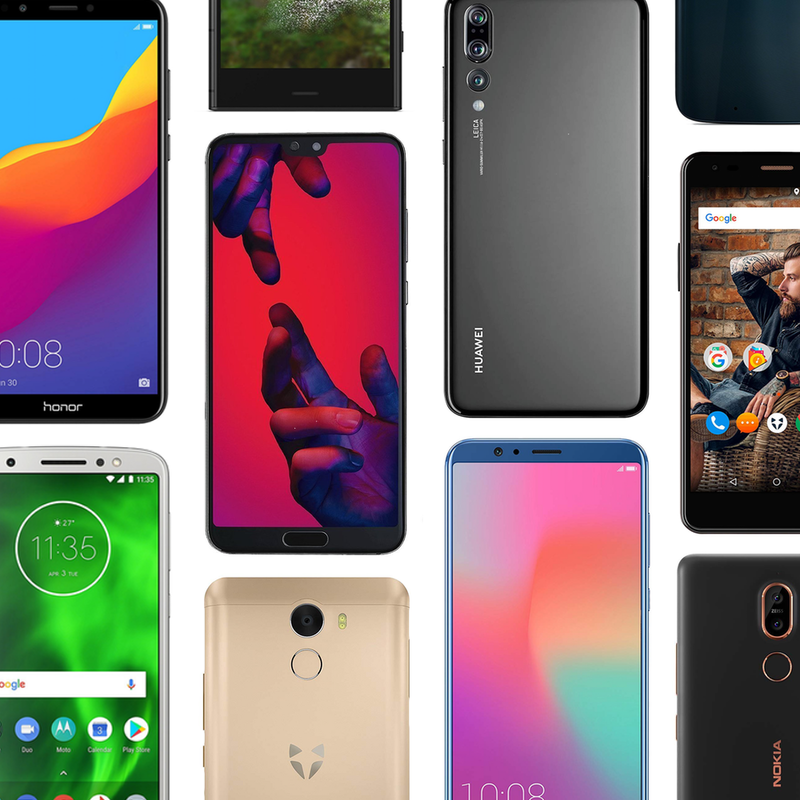
Whether you want the cutting edge camera tech of the Huawei P20 Pro, the balance of price and specs in the Nokia 7 Plus, or the super affordable £59 Spark X from UK brand Wileyfox, there’s something for everyone in this promotion.
Highlights:
- Motorola G6 £199.99 (was £239)
- Nokia 7 Plus £299 (was £349.99)
- Honor View 10 £329.99 (was £449.99)
- Huawei P20 Pro £669 (was £799.99)
- Wileyfox Swift 2 £79.95 (was £109.99)
There are many more smartphones included in the promotion, so be sure to check out the full range. Not a part of the promotion, but still an exception saving, is the Samsung Galaxy S9 at £619. It’s back down to a its record low price with £120 off its usual going rate.
For more UK deals coverage, be sure to keep an eye on Thrifter UK, sign up for the UK newsletter and follow the team on Twitter.
See at Amazon UK
LG V40 appears in more renders and design video
This is LG’s most powerful phone of 2018.
Last year saw a big shift for LG’s V series. Unlike the V10 and V20 that experimented with metal designs, removable batteries, and secondary ticker displays, the V30 introduced a slick glass back, incredibly slim bezels, and a pOLED screen made by LG itself.
We’re anticipating the V40 to share a lot of similarities to its predecessor and this year’s recently announced LG V35, and as new information trickles in, we’ll be regularly updating this guide to help keep you up-date on everything that’s going on.
Without further delay, here’s everything we know about the LG V40!
The latest LG V40 news
August 27, 2018 — V40 leaks again in more high-res renders and 360° design video
Just a few short days after the below renders leaked for the LG V40, OnLeaks and SlashLeaks teamed up to dish out even more renders of the phone.
We once again see the V40’s front and back, but these images also showcase the phone from a couple different angles. Along with the still images, there’s also a design video that gives us an even clearer look at the device.
No new details are revealed with these renders, but even so, it’s still fun to get another glimpse at LG’s next big flagship for the year.
August 22, 2018 — First LG V40 render appears with triple rear cameras and a notched display

After months of waiting, we’ve finally got our first look at the LG V40 thanks to a leaked press render from MySmartPrice.
As you can see from the photos, the V40 retains a lot of the V30 and V35’s design language while making a few big updates. The glass back and metal frame are staples from the past two V handsets, as is the rear-mounted fingerprint sensor. There’s a large display on the front that likely uses an OLED panel, and similar to the G7 before it, the V40 also features a notch at the top. Inside that notch, you’ll find two front-facing cameras and an earpiece for phone calls.

The V40 also appears to be the first LG phone to come equipped with three cameras on the back. We’ve seen other OEMs such as Huawei mess with triple camera setups before, so it’ll be interesting to see LG’s implementation of this.
The LG V40 has a 3.5mm headphone jack, USB-C port, and a third hardware button that’ll likely be used for opening up the Google Assistant.
A date of November 16 on the V40’s lock screen suggests that the phone’s just a couple months away, but this doesn’t line up with an earlier rumor claiming that the V40 would be released on October 5. As more details about this come out, we’ll let you know.
July 19, 2018 — LG to launch the V40 on October 5, reported to have a 90% screen-to-body ratio
A new report from ETNews recently broke, and if you weren’t already excited about the V40, this just may change your mind.
Following last month’s rumor of the V40 having a total of five cameras, ETNews says that three of these will be on the back of the phone and consist of 20MP primary, 16MP wide-angle, and 13MP telephoto sensors. The remaining two cameras will be on the front and allow for a 3D facial recognition system.
Speaking of the V40’s front, it’s said that we’ll be met with an impressive screen-to-body ratio of 90%. LG will apparently have a “different from the conventional” method for keeping bezels so small, suggesting that the company might have found an alternative solution to the notch.
Lastly, LG will reportedly announce the phone during IFA late next month and then begin sales on October 5.
June 26, 2018 — The V40 will reportedly have a total of five cameras, a notch in its display, and face unlock system
News dump alert! Our friends at Android Police recently spoke with a source that’s apparently familiar with the V40’s development, and as such, we’ve got some juicy new details about the phone.
First and foremost, it’s reported that the LG V40 will ship with a total of five cameras. We can’t say with 100% certainty how these will be positioned on the phone, but it’s likely we’ll get two on the front and three on the back. Speaking of cameras, LG’s working on a new face unlock system that could feature 3D mapping technology, not unlike the iPhone X’s Face ID.
Something else to take note of is the fact that the V40 is said to come with a notch in its display. LG will allow you to use software to hide the notch just like it does on the G7, but as expected, this is a trend you just can’t escape for the time being.
Other reported features are the Snapdragon 845, rear-mounted fingerprint sensor, and a dedicated Google Assistant button next to the volume rocker.
May 2, 2018 —It’ll probably use an OLED display
Shortly after the G7 ThinQ was announced, LG confirmed something rather interesting — it only uses OLED screens for phones in its V series.
In other words, that’s about as close of a confirmation as we’ll get that the V40 will come equipped with an OLED panel. We don’t know what the resolution will be or if it’ll have a notch, but OLED is pretty much a guarantee at this point.
April 19, 2018 — “Storm” is the codename for the V40
Evan Blass shared on Twitter that the V40’s codename is “Storm.” This doesn’t provide much insight into specifics regarding the phone, but it is suggestive that LG’s flagship will be big and powerful.
Since there’s not much else to say about this, here are a few storm emojis 🌩🌪☔️
What specs can we expect?
Talk about the V40’s specs is still relatively quiet, but even so, we can make a few guesses about what it’ll come equipped with.
At the heart of the V40 will likely be Qualcomm’s Snapdragon 845 processor. This has been the chipset of choice for most 2018 flagships, and as we’ve seen before, the 845 is a beast when it comes to performance, camera processing, battery life, and more.
Something else the V40 will likely carry is an OLED display. In May, LG confirmed that it reserves its OLED panels for entries in the V series. Unless something has radically changed since then, this is a sure bet that the V40 will be graced with an OLED screen.
Lastly, the V40 will come with at least two cameras on the back. We don’t know what kind of sensors will be used or what the aperture rating will be like, but similar to past LG flagships, we should get a primary lens with a regular focal length and a secondary, wide angle one.
When will the LG V40 be released?
According to one source, the V40 is scheduled for a release in either the late summer or early fall of this year. If accurate, this will see it launched during a similar window compared to the September 21 release of the V30.
Along with this, another publication claims that the V40 will be announced during IFA (late August / early September) and then go on sale about a month later on October 5.
How much will it cost?
We have a pretty good idea as to when the V40 will be released, but what about its price?
Details on this are still few and far between, but to make an educated guess, let’s first look at past retail pricing for other entries in the V series.
- LG V10 — $600
- LG V20 — $830
- LG V30 — $800
- LG V30S — $930
- LG V35 — $900
LG’s been steadily increasing the price of its V phones with just about every release, and based on the most recent V30S and V35, I think it’s safe to say that the V40 will cost around $900 and possibly cross that $1000 threshold.
The V series has never been cheap and the V40 won’t be an exception to that rule.
Samsung Galaxy Note 9 rumors: Release date, specs, price, and features!
LG V30 + V30S ThinQ
- LG V30S hands-on: A 2017 phone with 2018’s buzzwords
- LG V30S specs
- LG V30 review: The no-BS flagship
- Top LG V30 camera features
- Full LG V30 specs
- Join our LG V30 forums
Amazon
Best Buy
Verizon
AT&T
 AIVAnet