


Fitbit Charge 3 vs. Fitbit Versa: Which one should you choose?
Brenda Stolyar/Digital Trends
Fitbit recently launched the latest addition to its fitness tracker lineup — the Fitbit Charge 3. While the Charge 3 is a fitness tracker, it comes packed with smartwatch capabilities. It also comes only a few months after the company released the Fitbit Versa — which acts more like a smartwatch than any of Fitbit’s other wearables on the market.
In addition to tracking health and fitness, both wearables deliver app notifications, the ability to view and reply to text messages, and the option to accept or reject calls, all from your wrist.
Of course, some people prefer smartwatches and others prefer fitness trackers. But what happens when you have a choice between two watches that offer both in one device? Especially when there’s only a $50 difference that stands between them. Below, we pit the Fitbit Charge 3 versus the Fitbit Versa to find out which one is worth the investment.
Specs
Fitbit Charge 3
Fitbit Versa
Display size
18.33 mm (0.72 inches)
34 mm (1.34 inches)
Resolution
100 x 150 pixels
300 x 300 pixels
Color touchscreen
No
Yes
Wireless interface
Bluetooth, NFC
Bluetooth, NFC
Weight
29 Grams
38 Grams
Depth
11.8mm
11.2mm
Interchangeable strap
Yes
Yes
3-axis accelerometer
Yes
Yes
3-axis gyroscope
No
Yes
Altimeter
Yes
Yes
Ambient light sensor
No
Yes
Optical heart rate
Yes
Yes
GPS
No
No
SmartTrack
Yes
Yes
Waterproof
Yes
Yes
Battery life
7 days
4-plus days
Price
$150
$200
Availability
Currently on pre-sale, will be available in October
Now
Review
Hands-on
Full Review
The Fitbit Charge 3 and the Versa are almost identical when it comes to specs. Each one includes a 3-axis accelerometer, altimeter, optical heart rate sensor, and Fitbit’s SPO2 sensor to monitor blood oxygen levels. The Versa also includes a 3-axis gyroscope that helps to improve how some of the fitness features work, while the Charge 3 does not.
Other similarities the wearables share include the fact that they’re both swim-proof up to 50 meters. You can go for a swim or shower without having to worry about ruining either wearable. On the Charge 3, there’s also a swim mode that will show you real-time duration.
Neither the Versa or the Charge 3 include built-in GPS, so you’ll have to stay tethered to your phone to track any run or biking sessions. The Versa offers the ability to run smartphone free by using the Pandora or Deezer app to listen to music on. The Charge 3 currently doesn’t offer any music capabilities, but the company is looking to add music controls and third-party apps in the future.
Even though the Versa does come with the ability to download more apps and store music on the device, the Charge 3 should eventually receive similar features in the future. Overall, the majority of specs are the same, but the Versa edges a narrow win.
Winner: Fitbit Versa
Design and display
Brenda Stolyar/Digital Trends
There’s no denying the Fitbit Versa looks extremely similar to the Apple Watch, in fact, we think it looks slightly better. With a 34mm display, it’s almost twice the size of the Charge 3 and the case is also extremely slim. Playing off its name, it’s also versatile and customizable enough to wear both day and night. But the Charge 3 does pull a lot of design inspiration from the Versa, specifically the aerospace aluminum case and streamlined design, that make both wearables look sleek.
We like that the Charge 3 also has a sleek look, and is even lighter at 29 grams — but it does have a smaller display and thicker case. We are fans of the inductive button with haptic feedback, because it provides a “buttonless” design that made it look even better. While both wearables also include interchangeable watch straps, it’s far easier to change them on the Charge 3 thanks to an easy release button that’s better than the quick release pins on the Versa.
In terms of display, the Versa features a larger, LCD touchscreen that’s vibrant and filled with pops of color. Meanwhile, the Charge 3 has a grayscale OLED display that isn’t as lively and exciting. Both include a touchscreen display, which operates the same — swipe up for personal insights, to the left for exercise modes and apps, and down for app notifications. This is also where you can tap to reply to text messages for those who have an Android device.
In the end, we like that the Versa not only has a large, bright display but that we’re able to mask the fact that it’s a fitness tracker. The Charge 3 is far tougher to disguise.
Winner: Fitbit Versa
Fitness tracking features
Brenda Stolyar/Digital Trends
The Fitbit Versa and Charge 3 include almost all the same fitness-tracking capabilities — they track your metrics, use SmartTrack to automatically recognize workouts, measure heart rate, and there’s also female health tracking that can be added to the dashboard.
One main difference that might be a dealbreaker for some is the Charge 3 doesn’t list as many fitness stats on its display. With the Versa, you can see an overview of your calories burned, steps taken, heart rate, and more over a seven-day span. The Charge 3 also won’t show you your last workout — it only shows you the current day, so you’ll have to refer to the Fitbit app for the rest.
The Charge 3 also includes a new feature called goal-based exercise modes. This allows you to choose whether you want to run a specific distance, burn a particular number of calories, and more. For example, if you set the goal as a two-mile run, the Charge 3 will let you know how much distance you have left to cover.
There’s also an auto-stop feature that runners will appreciate — every time you stop at a traffic light during a run, the Charge 3 automatically pauses exercise mode until you start running again. This will allow you to track your runs more accurately, without having to constantly stop and start your wearable.
The Versa does provide a more in-depth overview of stats but the Charge 3 wins this one. Even though the additional fitness features are minor, it’s the little things that make for an overall better workout experience.
Winner: Fitbit Charge 3
Battery life
Brenda Stolyar/Digital Trends
Since the Fitbit Versa is a smartwatch, one of its main appeals its its four-day-long (or longer) battery life — which is impressive in comparison to other smartwatches on the market that don’t last more than 24 hours. When we tried the Versa, we found the 145mAh battery lasted us about about three and a half days before running out of juice. But we did use it far more than we would on a daily basis, since we had to test out every single feature for the purpose of the review. Regardless, we still found that it lasted us almost the four full days Fitbit claimed it would.
On the other hand, Fitbit says the Charge 3 will last up to seven days. While it does have a smaller battery, 71mAh to be exact, it’s powering a smaller, less graphic intensive display — which doesn’t drain it as much. While the jury is still out on whether or not it actually will be able to last that long, going an entire week without having to charge your fitness tracker is pretty impressive. We’re going to give this one to the Charge 3.
Winner: Fitbit Charge 3
Pricing and availability
Brenda Stolyar/Digital Trends
The Fitbit Versa will cost you $200, while the Special Edition — which includes an NFC chip for Fitbit Pay — costs $230. As for the Fitbit Charge 3, the fitness tracker will cost you $50 less at $150 and the Special Edition is priced at $170. It’s available for presale now, but will be available globally starting in October.
With the Charge 3, you can purchase the Special Edition version and still pay less than you would for the regular Versa. You’ll still receive all the same smartwatch notifications, the ability to send quick replies, and additional fitness features the Versa doesn’t include — all for a cheaper price. The one thing you will sacrifice is the ability of the Versa to easily transition from day to night.
Winner: Fitbit Charge 3
Overall winner: Fitbit Charge 3
Brenda Stolyar/Digital Trends
Fitbit’s wearables place health and fitness at the top of the priority list. While the Fitbit Versa looks more impressive when it comes to both hardware and display, the Charge 3 will give you a better fitness experience. You’ll also have the same smartwatch capabilities — you can receive and answer text messages, get social media notifications, and accept or reject calls.
The fitness features are almost identical — both Versa and Charge 3 owners have access to their own personal dashboard on the display, automatic exercise recognition, and connected GPS — and both are also swim-proof. But the Charge 3 also packs in a few additional perks. With goal-based exercises, auto-stop mode, touchscreen display, and a comfortable inductive button — all within a lightweight and sleek device — the Charge 3 offers more for a bit less.
Editors’ Recommendations
- Fitbit Charge 3 Hands-On Preview
- The Fitbit Versa: everything you need to know
- The Fitbit Charge 3: Everything you need to know
- Fitbit has already shipped a million Versa smartwatches
- How to sync a Fitbit tracker or smartwatch
Pew Research: Even teens think they’re spending too much time on their phones
It should come as no surprise that many parents feel as though their kids spend too much time on their smartphones and other devices, but according to a new report from Pew Research, it turns out many of the kids may feel the same way about themselves.
Around half of teenagers between the ages of 13 and 17 are worried that they spend too much time on their smartphones, according to the report. Not only that, but 52 percent of teenagers have even reportedly taken steps to cut back on the amount of time they spend on their phones, 57 percent have taken steps to cut back on time spent on social media, and 58 percent have taken steps to limit how much time they spend on video games.
The report comes amid growing fears that users, and teens especially, are becoming addicted to their devices. And the report certainly seems to suggest that’s true — 72 percent of teenagers report checking for notifications as soon as they wake up, and 56 percent associate not having their phones with loneliness, being upset, or feeling anxious.
Tech companies have started building features into their devices that limit the amount of time people spend on their phones. Earlier this year, Apple announced that iOS 12, its next major smartphone operating system, would include “Screen Time,” a feature specifically aimed at helping users track how much time they spend on their phones. The feature breaks down usage by app, and allows users to set time limits on specific apps they feel they’re using too much. Google also has its version of the feature, which it calls Digital Wellbeing and breaks things down by time spent in specific apps. Digital Wellbeing also tracks notifications sent and allows users to set timers on their apps.
It’s certainly a strange position for tech companies to be in. On the one hand, they’re building products that they want to be as engaging as possible, but on the other hand, they’re now recognizing that digital addiction is a real issue. It will be interesting to see if and how major tech companies like Apple and Google continue to promote a healthy digital life while still pushing their own products.
Editors’ Recommendations
- Time alerts put the brakes on your Facebook and Instagram consumption
- A cure for phone fatigue? Apple’s Screen Time vs. Google’s Digital Wellbeing
- Facebook wants to help you spend less time on Facebook
- Here’s how Google’s Digital Wellbeing feature looks and works in Android 9.0 Pie
- Sony Cyber-shot RX10 IV review
DJI Mavic 2 Pro vs Mavic 2 Zoom: What’s the real difference?
DJI unveiled the Mavic 2 series of drones today, expanding the Mavic line beyond the highly successful Mavic Pro and Mavic Air. The two new drones, the Mavic 2 Pro and Mavic 2 Zoom, have identical dimensions and flight specifications (here’s our rundown of all the key features) — the only difference is in the cameras, and it’s pretty significant. Take a look at the specs below, or jump to the bottom of table for a breakdown of what they mean.
DJI Mavic 2 Pro
DJI Mavic 2 Zoom
Dimensions
(length×width×height)
Folded: 214×91×84 mm
Unfolded: 322×242×84 mm
Folded: 214×91×84 mm
Unfolded: 322×242×84 mm
Weight
907 grams
905 grams
Maximum flight time
31 minutes
31 minutes
Image sensor
1-inch-type, 20MP
1/2.3-inch, 12MP
Lens
28mm, f/2.8-16
24-48mm, f/2.8 (24mm) f/3.8 (48mm)
Still photo resolution
5472×3648
4000×3000
Still photo filetype
JPEG/DNG (RAW)
JPEG/DNG (RAW)
Video resolution and framerate
4K: 3840×2160 (24/25/30 fps)
2.7K: 2688×1512 (24/25/30/48/50/60 fps)
FHD: 1920×1080 (24/25/30/48/50/60/120 fps)
4K: 3840×2160 (24/25/30 fps)
2.7K: 2688×1512 (24/25/30/48/50/60 fps)
FHD: 1920×1080 (24/25/30/48/50/60/120 fps)
Color mode
DLog-M 10-bit
D-Cinelike 8-bit
Video filetype
MP4 / MOV (MPEG-4 AVC/H.264, HEVC/H.265)
MP4 / MOV (MPEG-4 AVC/H.264, HEVC/H.265)
Price
$1,449
$1,249
Sensors
This is probably the most important difference between the two models. The 1/2.3-inch sensor in the Mavic 2 Zoom is about what you’d expect to find in a smartphone or entry-level compact camera, whereas the Mavic 2 Pro features a larger 1-inch sensor — the same format popularized by Sony in the RX100 series of advanced compact cameras. Not only does it offer higher resolution (20 megapixels compared to 12), but a larger sensor can collect more light and thus produce better image quality — however, that doesn’t necessarily make the Mavic 2 Pro better, as we’ll get into below.
Lenses
As a larger sensor requires larger glass, the Mavic 2 Pro doesn’t have a zoom lens, instead making due with a fixed 28mm (full-frame equivalent). It does have a mechanical aperture, however, with a range of f/2.8-f/11, which lets the camera work in a variety of light conditions without having to ramp up the shutter speed.
The smaller glass requirement of the 1/2.3-inch sensor is what allowed DJI to fit a 2x zoom onto the Mavic 2 Zoom. Here, the modest 24-48mm (full-frame equivalent) zoom range isn’t just about bringing objects closer, it’s also about creative effects. Shooting at 48mm compresses distance and adds drama to the camera moves. For example, with the drone rotating around your subject, the background will appear to move at super speed (for better or worse, it’s a technique Michael Bay utilizes often).
Additionally, a built-in dolly zoom mode makes it easy to capture this classic camera technique — often called the “Hitchcock zoom” for its use in the film Vertigo — where you zoom and dolly (or in this case, fly) at the same time. This causes an unsettling warping of the image and is normally quite tricky to pull off, but DJI makes it easy.
What the heck is DLog-M 10-bit?
This is another feature unique to the Mavic 2 Pro. DLog-M is DJI’s name for its logarithmic tone curve, which is a way for a camera to capture more detail by preserving greater dynamic range. Essentially, it records a very, very low contrast image so that highlights don’t blow out and shadows don’t turn pure black — but the footage has to be color graded before it looks normal. Thus, DLog-M is something professional filmmakers will be very happy to have — but it’s not a feature that will necessarily make things easier for the rest of us.
10-bit refers to the color depth of the image, and is not related to the bitrate of the video file (which is 100 megabits per second on both new drones). We have a more detailed explainer of how this works, but most of the video and images you see online are shot in 8-bit color, which provides 256 levels of luminance per color channel. 10-bit increases that number to 1,024, making for richer colors and smoother transitions between colors. Like DLog-M, this is a feature that really only pros will need.
Which Mavic 2 is right for you?
The general consumer is likely to be happier with the Mavic 2 Zoom. It offers greater flexibility with its 2x zoom lens, opens up some fun and automated creative shots, and it costs $200 less at $1,249.
The Mavic 2 Pro, as the name implies, is better suited for professional users. It has a clear edge in image quality thanks to its larger sensor, 10-bit color, and log gamma. That said, it can’t achieve the same perspectives as the Mavic 2 Zoom — so frankly, pros may want to pick up both. The Mavic 2 Pro retails for $1,449.
Editors’ Recommendations
- DJI Mavic Air review
- DJI Mavic 2 Pro vs. Mavic 2 Zoom: What’s the Real Difference?
- Mavic 2 leaked specs reveal two versions, one with a Hasselblad camera
- DJI’s new Mavic drones are here, and they’re even better than we expected
- Everything you need to know about the Google Pixel 2 and Pixel 2 XL
How to Add an Alternate Appearance to Face ID in iOS 12
When the iPhone X launched, there was no option to record multiple faces like there was to enter in multiple fingerprints with Touch ID, but that’s something Apple changed in iOS 12.
With iOS 12, you can add a second face to Face ID, which is useful if you have a job where your face dramatically changes, such as with a surgeon’s mask or protective goggles.
Face ID can learn to overcome items like hats, sunglasses, and scarves, recognizing you anyway, but having the option for a second face while you’re wearing frequently worn items makes sure Face ID works more seamlessly.
Open the Settings app.
Scroll down to Face ID & Passcode and tap it.
Enter your passcode.
Choose the “Set Up an Alternate Appearance.”
From there, you can set up Face ID as you did when you first purchased and set up your iPhone X for the first time.
The iPhone will walk you through the steps of positioning your face in the camera and then moving your head in a circle.
Once your alternate appearance has been entered, there’s no option to delete it. To re-add an appearance, you will need to tap the “Reset Face ID” button that has replaced the “Set Up Alternate Appearance” option.

Be aware, there’s no confirmation screen when you tap the “Reset Face ID” option. Once it’s tapped, all of your Face ID data is cleared.
Discuss this article in our forums
Survey Explores Why People Switch Mobile Operating Systems
During quarterly earnings calls, Apple CEO Tim Cook often boasts about the high rate of customers who are switching from Android devices over to iPhones. Recent research data has suggested Android switchers account for 15 to 20 percent of iPhone purchases.
A new survey of 2,500 people conducted by PCMag delves into the reasons why iOS users switch to Android and why Android users switch to iOS.
18 percent of customers who switched mobile operating systems went from Android to iOS, while just 11 percent dropped iOS for Android.
47 percent of customers who switched over to iOS from Android said that they chose to do so for a “better user experience,” while 25 percent cited “better features” like camera and design.
11 percent of respondents switched to Android for better prices, while other reasons for switching included more apps, faster software updates, and better customer service.
On the Android side, customers switching to Android from iOS cited better user experience and better prices as the main reasons why they chose to adopt a new operating system.
While there were a small number of switchers among those surveyed, 71 percent have never switched at all, remaining loyal to their operating system of choice. According to data shared earlier this year by Consumer Intelligence Research Partners, both iOS and Android have high customer loyalty rates.

It’s difficult for smartphone companies to get customers to switch operating systems, and this has led Apple to lure Android users through a variety of methods, including trade-in options, ads touting iPhone features compared to Android devices, a Move to iOS app to make transitioning simple, and a “Switch” website dedicated to explaining all of the reasons why the iPhone is better than competing smartphones.
According to PCMag’s survey, operating system isn’t the biggest factor in why customers choose one smartphone over another. 33 percent cited price as the reason for picking an iOS device or an Android device, while 26 percent said brand mattered. 19 percent said that operating system was the main reason for choosing iOS or Android.
PCMag also shared a few other interesting data points that came from the Apple and Android customers it surveyed. Among customers who made a switch to a new operating system or are considering making a switch, 56 percent said they didn’t care about new smartphone releases.
34 percent said they buy a new phone when their contract is up, and 17 percent said they make a new phone purchase only when they break the screen on their current phone.
Apple may see a new wave of Android switchers over the course of the next few months with the launch of the 2018 iPhones. Android switchers typically choose larger “Plus” sized iPhones when switching and Apple is set to debut an iPhone with a 6.5-inch OLED display, the company’s biggest iPhone screen to date.
 Glass panels for the three iPhones coming in 2018
The 6.5-inch OLED iPhone will be sold alongside a 5.8-inch OLED iPhone and a 6.1-inch iPhone with an LCD and a lower price tag, which could also lure Android users. Rumors have suggested the 6.1-inch iPhone, which will offer up Face ID and an edge-to-edge design, could be priced somewhere around $700.
Tag: Android
Discuss this article in our forums
Apple Seeds Tenth Beta of iOS 12 to Developers, 8th Beta to Public Beta Testers
Apple today seeded the tenth beta of an upcoming iOS 12 update to developers for testing purposes, three days after seeding the ninth beta and more than two months after introducing the new software at the Worldwide Developers Conference. Apple has also seeded an 8th beta to public beta testers.
Registered developers can download the new iOS 12 beta from Apple’s Developer Center or over-the-air after installing the proper certificate, while public beta testers can download the beta over-the-air.
Subscribe to the MacRumors YouTube channel for more videos.
iOS 12 brings several major new features, with Apple revamping the operating system from top to bottom to make iPhones and iPads, especially the older models, faster and more responsive.
On the iPhone X, there are new Animoji characters along with “Memoji,” which are customizable, personalized, humanoid Animoji that can be used both in Messages and in FaceTime, and there are new camera effects in both of those apps.
Apple originally planned to introduce Group FaceTime support in iOS 12, but the feature was removed in iOS 12 beta 7 and will not be reintroduced until later this fall in a future update to iOS 12.
Siri is smarter in iOS 12 with a new Shortcuts feature that lets you create multi-step customized automations using first and third-party apps that can be activated with Siri voice commands. Shortcuts can be created through the Shortcuts app, available as a beta from Apple’s Developer Center.
Apple built comprehensive time management and monitoring tools into iOS 12 with Screen Time, allowing you to keep track of how much time you’re spending in apps on your iPhone and iPad. App limits can help you cut back on iOS device usage, and robust parental controls are included for families.

Updated Do Not Disturb options make activating Do Not Disturb more intuitive and simple, and a new Do Not Disturb at Bedtime feature cuts down on nighttime distractions and sleep interruptions.

Grouped Notifications make incoming notifications easier to view and manage, while a new Instant Tuning feature lets you tweak your notification settings right on the Lock screen on a notification-by-notification basis.
Apple News has a new Browse feature, the Stocks app has been redesigned and brought to the iPad, iBooks has been overhauled with a new look and a new name — Apple Books — and Voice Memos has been revamped with iCloud support and an iPad app.
ARKit 2.0 introduces new capabilities like shared experiences that let two people see the same AR environment on separate devices, and persistence, which allows AR experiences to be saved across multiple sessions. There’s also a new Apple-built Measure app for measuring objects using AR capabilities.
iOS 12 includes a revamped and rebuilt Maps app that uses a new Apple-designed Maps engine that will display foliage, pools, buildings, pedestrian pathways, and other map elements more accurately. The new Maps also includes significant improvements to traffic, real-time road conditions, construction, and more, plus it will enable Apple to push out changes and fixes more quickly.

The updated Maps app is available in the Northern California area during beta testing. After iOS 12 launches, Apple will continue rolling out the new maps to additional U.S. locations
New betas of upcoming operating system updates always introduce tweaked features and new functionality, and we’ll be outlining what’s new in the seventh beta below. We also rounded up all of the changes that were introduced in the previous betas: beta 2 and beta 3, beta 4, beta 5, beta 6, and beta 7.
Later betas have had fewer changes because we’re approaching the end of the beta testing period, with a public launch for iOS 12 planned for September alongside new iPhones.
Related Roundup: iOS 12
Discuss this article in our forums
DJI’s new Mavic drones are here, and they’re even better than we expected
Previous
Next
1 of 7


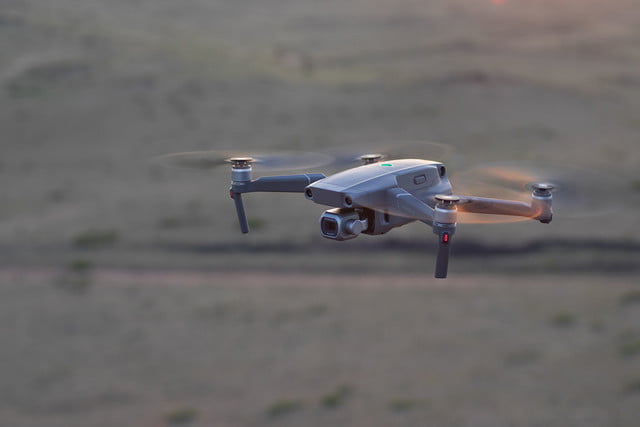


Following months of rumors and leaked photos, Chinese drone manufacturer DJI finally pulled the curtain back on its new Mavic 2 series on Thursday, August 23, unveiling two new camera drones: The Mavic 2 Pro and Mavic 2 Zoom.
Billed as “the most advanced DJI camera drone[s] ever built,” the new Mavic 2 quads are an evolution of DJI’s hugely popular Mavic line. As such, both drones are equipped with many of the same bells and whistles as the first generation Mavic, but with a few notable upgrades. Here’s what’s new:
Upgrades Galore
First of all, it’s important to note that aside from the cameras they carry, both Mavic 2 drones are exactly the same in terms of specs. They both boast a 31-minute maximum flight time, 4K video capture abilities, a top speed of 44 mph, and a range of intelligent flight modes. DJI has also equipped them with new-and-improved versions of its core flight software, including:
- ActiveTrack 2.0, which now not only tracks moving subjects automatically but also helps the drone avoid obstacles. Version 2.0 comes with trajectory algorithms that can predict where your subject will be three seconds in the future, and help the drone stay on target even when the subject moves behind an obstacle.
- OcuSync 2.0, which provides a more stable connection between the drone and your controller. In addition to stronger interference resistance, version 2.0 reportedly enables 1080p video transmission feeds at a distance of up to 5 miles (8km), allowing you to “instantly edit and upload Full HD footage directly from the video cache in the DJI app.”
- DJI’s new FlightAutonomy system, which enables more accurate obstacle sensing and safer flight. To make this possible, Both the Mavic 2 Pro and Mavic 2 Zoom are outfitted with 10 sensors that give them full 360-degree environmental awareness.
All things considered, the Mavic 2 line is a significant improvement over the first generation, despite the fact that the new drones don’t look much different from the old ones.
Sharp Shooters
The only real differentiator between the Mavic 2 Pro and the Mavic 2 Zoom is their respective camera setups (and also the shooting modes that are afforded by those setups).
The Mavic 2 Pro is arguably the more powerful of the two, thanks largely to the fact that it’s the first and only drone on the market that carries an integrated Hasselblad camera. “Housing a 1-inch CMOS sensor with a 10-bit Dlog-M color profile, the camera captures four times as many levels of color per channel compared to Mavic Pro to provide maximum flexibility for photo and video editing;” DJI explains in a press release. “The Mavic 2 Pro can capture 20-megapixel aerial shots with utmost color accuracy using Hasselblad’s unique Hasselblad Natural Color Solution (HNCS) technology, while an adjustable aperture from f/2.8-f/11 provides more control across a wide variety of lighting conditions. With 4K 10-bit HDR support, the Mavic 2 Pro can be plugged into a 4K TV with HLG and will play back footage with the right color tones.”
Unfortunately, the Mavic 2 Zoom doesn’t come with a Hasselblad camera — but what it lacks in color accuracy and sensor size, it makes up for with its unique zooming abilities. Much like Parrot’s new Anafi drone, the Mavic Zoom boasts a lossless digital zoom function — a feature that is relatively rare for consumer drones.
“Powered by a 1/2.3-inch CMOS sensor, the Mavic 2 Zoom is DJI’s first foldable consumer drone with zoom, providing a dynamic perspective that ushers in a new era of creative storytelling.” DJI explains. “With the Mavic 2 Zoom, you can get closer to your subject at a moment’s notice by combining two-times optical zoom (24-48mm) with two-times digital zoom to simulate a 96mm telephoto lens that captures lossless video in full HD resolution. Hybrid auto-focus on the Mavic 2 Zoom combines phase and contrast detection for higher focus accuracy with an increased focus speed of up to 40 percent faster than before.”
This new zoom function also enables an awesome shooting trick that, until now, was rather difficult to achieve with a flying camera: The dolly zoom (also known as the vertigo zoom or Hitchcock zoom). You’ve probably seen this before in movies. It’s the shot where the central subject remains the same size while the background zooms in and out, creating a vertigo-inducing visual effect. DJI’s setup automates the process so you can take dolly zoom shots at the press of a button.
Best of all, both Mavic 2 drones are now available for purchase. The Mavic 2 Pro retails for $1,449, whereas the Zoom can be had for $1,249 — a full $200 less. Stay tuned for our full review in the coming weeks!
Editors’ Recommendations
- Parrot’s new HDR camera drone is a shot across DJI’s bow
- Here’s everything we know about the 2019 iPhone
- From ‘Anthem’ to ‘Smash Bros. on Switch,’ here are the games coming to E3 2018
- Sony Xperia XZ3: Here’s everything we know
- ‘Red Dead Redemption 2’: Everything we know
Sony’s new Aibo First Litter Edition is absolutely adorable (but it costs $2,899)
Previous
Next
1 of 5


Love pets but hate pet hair and poop? Meet Sony’s sixth-generation Aibo robot dog, an adorable, A.I.-powered robo-beast that will learn who you and your friends are and come to love you – just like a real dog.
Sony on Thursday unveiled the limited First Litter Edition Aibo, which goes on sale in a few weeks (just in time for the holidays) for a mere $2,900 – a price certain to have some shoppers barking. The puppy is a technology tour de force, which partly explains the price. It has 22 axes of movement, thanks to new ultra-compact actuators. Its eyes are OLED screens, which are bright and expressive. It’s got a camera in its nose – to recognize who you are — and one just before its tail, which allows it to act as a sort of security device as it roams your house at night. And it comes for the first time with a cloud-connected A.I. system to help the companion robot learn who you are and grow and adapt.
A.I. is on the tip of every tech company’s tongue lately. LG told us earlier this month about its massive investment in A.I., which solves the conundrum that lies at the heart of modern technology, threading its way from your phone to your dishwasher to your air conditioner: “Currently, you need to be smart to use a smartphone,” I.P. Park, president and chief technical officer of LG Electronics, told Digital Trends.
To solve that problem, LG is going all-in on A.I., announcing a major investment in research and development: The company just cut the ribbon on the new LG Electronics A.I. Research Lab in Canada, a five-year research partnership with the University of Toronto and an extension of the newly expanded LG Silicon Valley A.I. Lab in Santa Clara, California, which opened in 2013. LG also has research labs working on A.I. around the globe, including in Russia, Japan, China, Korea, Finland, and India, in addition to the North American spaces.
Samsung announced a similar A.I. push during its recent Unpacked event, where the company announced it was packing A.I. and the Bixby voice assistant not just into smartphones but smartwatches, and ultimately everything the company sells.
Previous
Next
1 of 5

ERS-110 (1999) Digital Trends / Jeremy Kaplan

ERS-210 (2000) Digital Trends / Jeremy Kaplan

ERS-220 (2001) Digital Trends / Jeremy Kaplan

ERS-311 (2001) Digital Trends / Jeremy Kaplan

ERS-7 (2003) Digital Trends / Jeremy Kaplan
For Sony, A.I. is not just a way to smarten gadgets but a way to build companions, products that can connect with owners. Aibo will recognize up to 100 different people, and can recall the various interaction it has had with each one of them.
“This is truly a one-of-a-kind product designed to connect with its owners on an emotional level,” said Mike Fasulo, president and chief operating officer of Sony’s North American arm. “Aibo’s charming personality, dog-like behaviors, and ability to intelligently interact with family members help to create a personal bond. Bringing Aibo back to the U.S. reflects Sony’s broader commitment to provide consumers with products that not only entertain them but also enrich their lives.”
The robo-pups are on display in Sony’s headquarters in New York City, and I spent an hour or so playing with the little guys. Forget the price tag for the time being – Aibo is unquestionably adorable. It learns tricks, and seeing Aibo roll over, wag its tail, or raise a paw to shake with you had me and an entire audience of journalists gushing. Because Aibo grows as it goes, the puppies we looked at were just that: babies, and they have personalities to match. That means they don’t always respond to your commands, just like real puppies. They also expressed very real curiosity: They wanted to play with me as much as I wanted to play with them.
Still, sticker shock may be a factor as Sony aims for the U.S. market. The company has sold 20,000 Aibos in Japan since bringing the beast back in January, Sony announced today, but consider the cost: The Japanese units sold for around $1,800. This model is over $1,000 more expensive.
Editors’ Recommendations
- Why learn to use gadgets when they can just learn to help us? Exactly, says LG
- Nvidia hands out $3,000 Titan V graphics cards for free to A.I. researchers
- YaDoggie Fresh is human-grade dog food you cook in your Instant Pot
- By studying patient data, A.I. can limit toxicity in cancer treatment
- Win a Furbo treat-tossing dog camera for your good boy or girl
Qualcomm Snapdragon reportedly Microsoft’s first choice for Surface Go CPU
Rich Shibley/Digital Trends
Microsoft watcher Paul Thurrott claims that the company originally intended to use Qualcomm’s ARM-based Snapdragon processor in its new Surface Go. But Intel supposedly caught wind of the move and offered “deep discounts” on its Pentium Gold processor that Microsoft simply could not refuse.
Microsoft introduced the Surface Go in July targeting Apple’s iPad. It has a starting price of $400 packing Intel’s seventh-generation Pentium Gold 4415Y two-core processor released in the first half of 2017. The chip has a base speed of 1.6GHz and only draws six watts of power on average. Had Microsoft gone with a Snapdragon 835, the Surface Go would have an eight-core chip with speeds of up to 2.45GHz. Snapdragon chips typically eat up to five watts of power.
As revealed in our tests, the Pentium-based Surface Go lasted just over eight hours in continuous video playback and around five hours in our web browsing loop. The Surface Go relies on a 27WHr battery, so it really can’t be compared against the larger “always connected” Snapdragon-based Windows 10 PCs with larger batteries.
Qualcomm’s Snapdragon chips promise high performance, crazy-long battery life and a constant internet connection. The company teamed up with Microsoft to provide “always connected” PCs in late 2017. The three models currently available include the Asus NovaGo, the HP Envy x2, and the Lenovo Miix 630. The first two claim a battery life of up to 22 hours while the Lenovo model maxes out at 20 hours.
Using Qualcomm’s Snapdragon chip in the Surface Go makes sense given its high portability. But that means the device would need to run Windows on ARM, a modified version of Windows 10 fine-tuned to run on ARM-based processors. ARM licenses out a different CPU design than what’s used with processors by Intel and AMD, requiring a different “language.”
That was Microsoft’s whole problem with the original Surface. Based on the now-defunct Windows RT, the first Surface had a limited app library. Customers were already annoyed with the tile-based Windows 8 interface, but they also couldn’t run their favorite desktop software designed for Intel- and AMD-based PCs. Microsoft is now better prepared with Windows 10 and the Universal Windows Platform.
If you’re not familiar with the Surface Go, it’s a 10-inch Surface-branded tablet with an 1,800 x 1,200 resolution. It runs Windows 10 in S Mode out of the box, meaning there are restrictions in place such as locking software installs to the Microsoft Store. The device includes 4GB or 8GB of system memory and 64GB or 128GB of storage, depending on your budget.
Although the Surface Go doesn’t provide LTE connectivity, you’ll find Bluetooth 4.1 and Wireless AC wire-free networking. The port complement includes one USB-C, a headphone jack, a MicroSD card reader, a Surface Type Cover port, and a Surface Connect port. Given the device relies on a 27WHr battery, taking the Snapdragon road may have extended the video playback time beyond the current nine-hour threshold.
Editors’ Recommendations
- Dell is reportedly working on its dual-screen version of the Surface Phone
- Microsoft’s Surface Tablet clears final hurdle before launch
- AMD’s next batch of Ryzen desktop CPUs may focus on better power efficiency
- Qualcomm’s Snapdragon 850 chip appears in benchmarks with improved performance
- Microsoft’s ‘Andromeda’ device may be a phone after all
Qualcomm Snapdragon reportedly Microsoft’s first choice for Surface Go CPU
Rich Shibley/Digital Trends
Microsoft watcher Paul Thurrott claims that the company originally intended to use Qualcomm’s ARM-based Snapdragon processor in its new Surface Go. But Intel supposedly caught wind of the move and offered “deep discounts” on its Pentium Gold processor that Microsoft simply could not refuse.
Microsoft introduced the Surface Go in July targeting Apple’s iPad. It has a starting price of $400 packing Intel’s seventh-generation Pentium Gold 4415Y two-core processor released in the first half of 2017. The chip has a base speed of 1.6GHz and only draws six watts of power on average. Had Microsoft gone with a Snapdragon 835, the Surface Go would have an eight-core chip with speeds of up to 2.45GHz. Snapdragon chips typically eat up to five watts of power.
As revealed in our tests, the Pentium-based Surface Go lasted just over eight hours in continuous video playback and around five hours in our web browsing loop. The Surface Go relies on a 27WHr battery, so it really can’t be compared against the larger “always connected” Snapdragon-based Windows 10 PCs with larger batteries.
Qualcomm’s Snapdragon chips promise high performance, crazy-long battery life and a constant internet connection. The company teamed up with Microsoft to provide “always connected” PCs in late 2017. The three models currently available include the Asus NovaGo, the HP Envy x2, and the Lenovo Miix 630. The first two claim a battery life of up to 22 hours while the Lenovo model maxes out at 20 hours.
Using Qualcomm’s Snapdragon chip in the Surface Go makes sense given its high portability. But that means the device would need to run Windows on ARM, a modified version of Windows 10 fine-tuned to run on ARM-based processors. ARM licenses out a different CPU design than what’s used with processors by Intel and AMD, requiring a different “language.”
That was Microsoft’s whole problem with the original Surface. Based on the now-defunct Windows RT, the first Surface had a limited app library. Customers were already annoyed with the tile-based Windows 8 interface, but they also couldn’t run their favorite desktop software designed for Intel- and AMD-based PCs. Microsoft is now better prepared with Windows 10 and the Universal Windows Platform.
If you’re not familiar with the Surface Go, it’s a 10-inch Surface-branded tablet with an 1,800 x 1,200 resolution. It runs Windows 10 in S Mode out of the box, meaning there are restrictions in place such as locking software installs to the Microsoft Store. The device includes 4GB or 8GB of system memory and 64GB or 128GB of storage, depending on your budget.
Although the Surface Go doesn’t provide LTE connectivity, you’ll find Bluetooth 4.1 and Wireless AC wire-free networking. The port complement includes one USB-C, a headphone jack, a MicroSD card reader, a Surface Type Cover port, and a Surface Connect port. Given the device relies on a 27WHr battery, taking the Snapdragon road may have extended the video playback time beyond the current nine-hour threshold.
Editors’ Recommendations
- Dell is reportedly working on its dual-screen version of the Surface Phone
- Microsoft’s Surface Tablet clears final hurdle before launch
- AMD’s next batch of Ryzen desktop CPUs may focus on better power efficiency
- Qualcomm’s Snapdragon 850 chip appears in benchmarks with improved performance
- Microsoft’s ‘Andromeda’ device may be a phone after all
 AIVAnet