


From DIY to AAA, here’s how to take a passport photo in 6 different ways
Alexey Ivanov/123RF
Alexey Ivanov/123RF
Applying for your first passport, or renewing an old one? In addition to the documents you need to submit, you’ll also have to provide a photo. But not just any photo will do, as the U.S. Department of State has a list of requirements that must be met. Not meeting one could result in an unwanted — and unfortunate — delay.
There are two approaches to taking a passport photo: Do it yourself for free, or utilize a service for a fee, such as a nearby pharmacy’s photo center. Choosing one will depend on your timing and budget, as well as the amount of effort you want to put in. Regardless of which option you pick, here’s how to get the perfect passport photo. You’ll be jetting off to somewhere far in no time.
Why do you need a passport?
Simply put, a passport allows you travel outside the country and re-enter upon your return. A passport serves as both a proof of identity and citizenship. Possessing a passport is required when you travel outside the United States or its territories.
A passport also works as the ultimate photo ID. Should you misplace your driver’s license or you need a second proof of identification, a passport is universally accepted, whether you’re flying domestically or trying to get into a club.
The official requirements
A passport photo is not the time to submit your Hollywood headshot. In this case, the more natural you look in the photo, the more likely it’ll be accepted by the Department of State. The photo also needs to be taken recently, or at least within the last six months. If you’ve undergone a significant change to your facial appearance — if you’ve grown a beard, for instance — you may also need a new passport with an updated photo.
While there are guidelines to follow, they aren’t necessarily complicated:
- Photo must be in color
- Subject’s background must be entirely white or off-white
- Head should face directly at camera, and face must be in clear view
- Eyes should be wide open (infants’ eyes can be closed or partially open)
- Remove red eyes and shadows (caused by a flash or overhead lighting)
- Keep a neutral facial expression or make a normal smile
- Wear clothing you would normally wear
- Unless it’s for religious reasons, no hats or head coverings
- No objects should be in the photo, such as headphones or pacifiers
Julian Chokkattu / Digital Trends
Julian Chokkattu / Digital Trends
If you need further guidance, here are some examples of what’s acceptable and what isn’t. Also, keep in mind that the State Department does not endorse any particular photo service, even those that claim to be government-compliant. The State Department could still reject a photo if it fails to meet the guidelines listed above.
Ready to have your photo taken? Here are a few options available at your disposal, as well as our preferred method.
Opt for your local drugstore
Jonathan Weiss / 123RF
Jonathan Weiss / 123RF
All major pharmacies with a photo center — e.g., Walgreens, CVS, Rite Aid — offer a passport photo service. Retailers such as Costco, Sam’s Club, Walmart, Target, FedEx Office, and the UPS Store also offer similar services. For many people, these businesses are conveniently located close to where they live or work. Prices range from $5 to $15, and photos can be ready for same-day pickup or even within an hour, which is ideal if you’re in a rush. For the fee, you’ll also get two 2-inch by 2-inch photos.
We recommend that you ask to see the photos before you pay, however, just to make sure you’re happy with the way you look.
Check out your local post office
James Martin / 123RF
James Martin / 123RF
The United States Postal Service can accept (but not process) passport applications and renewals at most branches. Select post office locations can even take your photo for an extra fee, which means you can take care of your entire passport application in one place.
The problem with using the post office is just that — it’s the post office. The government agency isn’t particularly known for its speed or efficiency, and passport services have different hours for different locations. Expect to wait in line if your local post office tends to get busy.
Utilize your AAA membership
Paul Jantz / 123RF
Paul Jantz / 123RF
If you’re an active AAA Premier or Plus member, you can have your passport photos taken for free. Each year, Premier-level members are entitled to four sets (one set equals two 2-inch by 2-inch photos) per household, while Plus-level members receive one set per member. It’s a nice benefit for premium-level members, but it does require trekking to a AAA branch, which may not be convenient for everyone. Basic-level members can also pay $8 for a set, while nonmembers can nab a pair for $12.
Hire a photography studio
The above-mentioned services are convenient, but keep this in mind: The people taking the photos aren’t professional photographers, so don’t expect them to take glamorous headshots for your passport. Most use a basic point-and-shoot camera under fluorescent store lighting. In fact, one AAA office we visited uses a decent DSLR, yet the photos still came out OK. If you’re somebody who cares about portrait aesthetics, consider using a photo studio. Many studio photographers who shoot portraits also offer passport photo services. They are more expensive — one studio we found, charges $20 for basic shots and $40 for ones with studio lighting — but your photos would be taken by someone with a professional eye, who can at least make sure you look your best.
Here’s how to watch Nvidia’s GeForce event at Gamescom
Watch live video from NVIDIA on http://www.twitch.tv
Today is August 20, and that means Nvidia is getting ready to (possibly) showcase its new GeForce RTX 20 Series family of add-in graphics cards for PC gamers. We’re sticking with that name, rather than the previous GTX 11 Series brand, due to today’s date (20th day, eighth month… get it?) and the recent introduction of Nvidia’s “Turing” architecture.
Although Nvidia invited members of the press and individuals attending Gamescom to its event, you can watch the show right here via Twitch or stay put and view it right here. According to Nvidia, the event will reveal “some spectacular surprises,” along with “exclusive” PC game demos running “on the latest GeForce hardware.
Nvidia introduced its “Turing” architecture last week, but not with cards slated for PC gamers. Instead, the company introduced new Quadro solutions for professionals. The big selling point? Cores dedicated specifically for real-time ray tracing. Typically, this job requires loads of computational power and lots of time to render each frame. That’s reportedly not the case with Nvidia’s new Turing design.
So far, we’re only assuming that Nvidia’s new graphics cards for gamers will be based on this design, but for all we know Nvidia may have another architecture up its sleeve. Over the last several months, we’ve seen a hint at Nvidia’s release schedule for the next several months: The 2080 on August 30, the 2070 and 2080 Plus on September 30, and the 2060 on October 30. We assume the prefix will be “RTX” if they’re based on the Turing design and support real-time ray tracing.
The rumored 2080 Plus is particularly interesting. Nvidia may release the 2080 with a mere 8GB of GDDR6 video memory as an “affordable” option while the 2080 Plus will likely have 16GB of on-board memory at a higher “premium” price. The latter card will likely sport higher clock speeds as well.
That all said, we’re extremely anxious to see what Nvidia has to offer during its Gamescom pre-show event.
Editors’ Recommendations
- Email shows Nvidia’s GTX 11 Series will start being released in late August
- Nvidia’s Turing chip reinvents computer graphics (but not for gaming)
- Nvidia GeForce GTX 11 Series’ arrival is uncertain after Computex remark
- Nvidia’s GTX 11 Series may get people ready for the next generation of VR
- Cryptocurrency may be why you still don’t have Nvidia GTX 11 Series graphics
HTC breaks down VR barriers by bringing Oculus Rift titles to Viveport
HTC’s Viveport content platform and subscription service will begin offering Oculus Rift compatible titles to gamers and virtual reality explorer on September 4, ending a long-running devotion to Vive-only games and experiences. The alternative virtual reality content platform has played second fiddle to Steam since its creation, but this could at least make it comparable in terms of support, leading to a larger content library in the long run.
Following a recent partnership with Amazon which will allow prospective VR gamers to buy new games and experiences for Viveport through the retail giant’s website, HTC is now bringing together the two largest VR gaming demographics under one roof. While SteamVR has offered compatible content for both the Oculus Rift, HTC Vive, and Vive Pro headsets for some time, HTC’s Viveport platform has, until now, operated similarly to Oculus own storefront: Hardware exclusive.
Starting September 4 though, Oculus Rift owners will be able to use Viveport just like their Vive counterparts do. While there will likely be a larger library of Vive-compatible content on the store to start with, as developers integrate their applications with the Viveport store, it could become a more even landscape. The store will leverage the same OpenVR compatibility that makes SteamVR work with both headsets, RoadtoVR reports.
Many Viveport titles that are compatible with the Rift will have already been available through Steam though, so arguably the biggest news of this announcement is that Oculus Rift owners will be able to take advantage of the Viveport subscription. The $9 per month service allows VR headset owners to download and play five VR titles a month, with an option to change them for something else every 30 days if they desire.
As much as this is good news for existing VR users though, it won’t do much to pull in new ones. With cost and lack of content cited as some of the biggest barriers to entry in the virtual reality ecosystem, HTC may need to do more if it wants to snowball VR growth over the next few years. The HTC Vive Pro might have been great to use, but it’s hardly a good starting-off point.
Editors’ Recommendations
- The best VR headsets of 2018
- HTC Vive review
- Here’s how and where you can watch the best 4K content
- Huawei has a clever way to put Windows on phones
- Apple Music vs. Spotify: Which service is the streaming king?
7 amazing anti-drone technologies designed to swat UAVs out of the sky
Drones are pretty darn awesome, but that’s not to say they can’t also be troublemakers. Whether it’s delivering contraband to individuals in prison, risking people’s safety by straying into flight paths, or breaching security by snapping photos and video where they’re not allowed, it’s easy to see why there would be demand for anti-drone technologies.
Fortunately for gadget lovers, some of these approaches are every bit as high-tech as the UAVs (unmanned aerial vehicles) they’re designed to bring down.
Here are seven of the most intriguing pieces of anti-drone technology in existence right now. And no, sadly you probably can’t buy most of them as a regular civilian with an eye on annoying your drone-owning next door neighbors.
DroneGun
With a name like “DroneGun,” there’s not too much apparent mystery about this solution — although it’s a bit more nuanced than its blunt force trauma name makes it sound.
Developed by Australian company DroneShield, this bazooka-looking creation works by jamming the signal between drone and drone pilot, thereby grounding unwanted UAVs. The anti-drone weapon tips the scale at 13 pounds, and is reportedly capable of warding off rogue quadcopters from up to 1.25 miles away.
ATHENA
Forget about puny handheld anti-drone weapons: defense giant Lockheed Martin wants to blast offending UAVs out of the sky by using a specially developed giant laser tower like we’re living in the future.
Called ATHENA (Advanced Test High Energy Asset), a 30-kilowatt version of the laser weapon has already been shown off in demos to the U.S. Army Space and Missile Defense Command, where it fried the heck out of five Outlaw drones.
The final version of ATHENA promises to fire anywhere up to a 120-kilowatt laser blast, should your drone problem be big enough.
DroneCatcher
As satisfying as frying drones in midair with a giant laser might be, there are, unfortunately, occasions on which it might not be appropriate. One example? When a drone is being used in restricted areas, and you want to be able to ground it without losing potentially incriminating evidence.
That’s where Dutch firm Delft Dynamics’ DroneCatcher comes into play. DroneCatcher is essentially an anti-drone drone, capable of locking onto an enemy UAV in the air and then catching it in a net from up to 20 meters away.
SkyWall 100
Like a ground-based version of DroneCatcher, SkyWall 100 is a net-launching bazooka that promises to bring down an enemy drone from 100 meters away.
Weighing 22 pounds, the shoulder-mounted cannon uses compressed air to fire its net. To keep the drone in one piece (for all the reasons we mentioned in the last entry), it then deploys a parachute to return its vanquished foe to terra firma.
Heck, it even helps out its operator by using predictive algorithms to help lock on to drones which may be moving at high speeds.
Sky Fence
Drones pose a real threat to prison security, since they’re capable of easily flying over walls and delivering contraband to folks behind bars. With that in mind, a prison in the U.K. this year installed 2,000-foot “drone shield,” designed to incapacitate law-defying quadcopters.
The Sky Fence system incorporates a number of signal disruptors, designed to jam the flight control signal of drones as they fly by. More impressively, it then makes the drone fly back to where it took off from, giving officers the chance to seize the offending pilot.
Eagle power
Remember that scene in Family Guy in which Peter’s new drone was plucked out of the air by an eagle? It may sound crazy, but that’s exactly the low-tech solution that Dutch cops showed off in early 2016, when they demonstrated how UAVs were no match for the sharp talons and eyesight of one of nature’s most awesome flying predators.
What could possibly go wrong, right? Unfortunately it turns out that the eagles didn’t always do what was expected of them during training sessions, leading to the retirement of this particular approach. We’re not sure whether to chalk this up as a win for nature or machine. We totally give them props for trying, though!
Drone malware
Hacking an enemy drone in midair, before it can do any damage, totally sounds like a set piece from one of the Mission: Impossible movies. In fact, it’s the real world concept behind Maldrone, a security vulnerability demonstrated by researcher Rahul Sasi. The malware can be used to remotely hijack drones, kill the on-board autopilot, and then take control remotely.
The process may not be quite so smooth or instantaneous as some of the other approaches on this list, but there’s certainly something poetic about bringing down a drone with its own vulnerabilities. Hey, it’s not like you’ve always got a net-shooting bazooka when you need one!
Editors’ Recommendations
- Prisons are fighting back against contraband-dropping drones. Here’s how
- This net-blasting security drone can stay airborne forever. Here’s how.
- Did a drone help a notorious French gangster escape from prison?
- Watch 958 drones create a 400-foot tall Time cover in lights instead of pixels
- 9 bizarre drones, from web slingers to lake hoppers
Dell’s new fast-refresh Freesync display could be your next great gaming screen
Dell has a pair of new Ultrasharp displays aimed squarely at gamers, and for those who value speed and responsiveness overall, they could be an ideal upgrade avenue in the near future. Sporting refresh rates as high as 155Hz, resolutions up to 1440P, and the option of both 24- and 27-inch panels, there’s plenty to like about the new, Freesync equipped displays. But will they join the pantheon of the best gaming displays available today?
Previous
Next
1 of 6


The Dell 2719DGF is a 27-inch, TN-panel monitor with a clean, professional look to its chassis. The understated aesthetic extends to its bezels, which are wonderfully thin, and the frame’s height and tilt angle can be adjusted, swiveled, and pivoted to help line it up perfectly with your position at your desk.
The native resolution of the display is 2560 x 1440, with a 144hz refresh rate over HDMI 2.0 and DisplayPort — although its overclockable to 155Hz. Response time is as fast as it gets at 1ms, so ghosting will be nonexistent.
Owing to this being a TN panel, color support isn’t as rich as other displays, but it still reaches 84 percent of the NTSC gamut, and has a static contrast ratio of 1,000:1. Viewing angles are restricted to 170 degrees on the horizontal. Port selection includes an HDMI 2.0 connector, a single HDMI 1.4 port, a DisplayPort 1.2 connector, and five USB ports. One USB BC 1.2 charging port and three USB 3.0 downstream ports. There are also headphone and audio line-out jacks.
When it debuts on August 28, the 2719DGF will be priced at $550.
Previous
Next
1 of 5


The Dell 2419HGF is the smaller of the two new displays, but its features are no less impressive. It’s a 1080p display with a TN panel that gives a 1ms gray to gray response time. Its refresh rate is 120Hz native but can be overclocked to enjoy up to 144Hz if desired. It enjoys the same 84 percent of NTSC color gamut support as its bigger brother, and the same 1,000:1 static contrast ratio.
Its ports are a little different, as it drops the HDMI 2.0 port in favor of a pair of HDMI 1.4 ports. It also has a single DisplayPort 1.2 connector and a trio of USB 3.0 ports — two downstream, one upstream. The standard headphone and audio-out jacks are also present.
Both monitors support Freesync (it’s different than G-Sync) and come with full support for Dell’s exhaustive Premium Panel Exchange program, which allows for a free replacement if even one bright pixel is found.
The 2419HGF will retail for $320 when it goes on sale on August 28.
Editors’ Recommendations
- BenQ’s curvy new QHD display for gamers supports AMD’s FreeSync 2 tech
- Computer monitor buying guide
- Philips claims ‘world’s first’ with a new 4K HDR desktop display
- Asus claims ‘world’s thinnest’ title with its new Zephyrus S gaming laptop
- Lenovo’s new mobile workstations pack a punch with Xeon CPUs, Quadro graphics
There’s no reason to not get the Essential Phone at just $224
You’d be hard-pressed to find a better phone deal than this.
Update: Looks like everyone agreed with this, and the discounted batch of Essential Phones has sold out. Be sure to keep an eye out at Thrifter to see if it comes back in stock!
Despite launching with a seriously bad camera, buggy software, and janky performance, the Essential Phone has still remained in the headlines over a year after its release — and for good reason.

For one thing, Essential’s been straight-up killing it when it comes to software updates. Not only has the company issued a heap of camera and performance improvements, but it also kicked out the full Android 9 Pie update to all Essential Phone owners just minutes after Google released it for the Pixel and Pixel 2 series.
Secondly, the Essential Phone has seen a number of big price cuts since it debuted with that staggering $799 price tag. After Essential permanently cut the phone down to just $499, various retailers have been running their own promos here and there to make the phone even more affordable. This past Prime Day saw one of the better deals with the phone being lowered to a mere $250.
This is one of the best values in smartphones you’ll find all year.
We didn’t think we’d see a better deal than that, but to our delight, we’ve been proven wrong. Right now on Amazon, you can pick up the Halo Gray Essential Phone for only $224. That’s it!
The Halo Gray color has a nice matte finish you won’t find with the Black or Pure White variants, and since it’s an Amazon exclusive, it’s also got Alexa baked right into it.
For those 224 dollars, the Essential Phone gets you way more than your money’s worth. The 5.7-inch LCD 2560 x 1312 is bright, crisp, and handles the notch far better than most of the competition since it ushered in the design trend. The Snapdragon 835 and 4GB RAM offer more than enough performance for day-to-day tasks, the 128GB of internal storage ensures you’ll never run out of space, and the combo of ceramic and titanium for the Essential Phone’s construction creates for one of the most premium-feeling phones that’s on the market right now.
Whether you’re shopping for a sub $300 phone, need a backup handset, or have been meaning to see what all the hype for the Essential Phone is about, now’s the time to pull the trigger.
See at Amazon
Essential Phone
- Essential Phone review
- Essential Phone specs
- The latest Essential Phone news
- Join our Essential Phone forums!
Amazon
Best Buy
Sprint
Telus
A Huawei commercial used a DSLR to promote the Nova 3’s selfie camera
That’s a funny-looking phone you’re holding there…oh wait.
Huawei releases a ton of phones throughout the year (we’ve got a handy guide to help you keep track of them right here), and one of its most recent handsets is the Nova 3. The Nova 3 is a pretty typical mid-range Android smartphone, with one of its biggest features being its powerful selfie camera and AI features that accompany it.
A short 30-second ad for the Nova 3 was recently released, and in it, we see a man and women taking selfies in a number of different settings — one of which where the man is trying to take a selfie with the woman but she’s apprehensive as she doesn’t have any makeup on. However, the Nova 3’s AI beauty mode comes to the rescue by digitally altering her face so that it’s shinier and more tone. Pretty typical advertising fluff.
Sarah Elshamy is the actress shown in the clip, and on her Instagram page, she shared a photo while behind the scenes of the commercial. Low and behold, the pictures used in the commercial to showcase the Nova 3’s selfie camera weren’t actually taken with a Nova 3 — they were taken with a DSLR instead.

In the now-deleted picture, we can see the male actor in front of the DSLR holding his hand out and holding absolutely nothing in an attempt to make it look like he’s holding the Nova 3.
This mimicry isn’t entirely unheard of for these sort of commercials (especially from Huawei), but even so, it’s a nice reminder that not everything is as it seems when it comes to these “camera samples.”
Huawei Mate 20 rumors: Release date, specs, price, and features!
These new PlayStation 4 Dualshock controller colors are simply stunning
It will be hard to pick just one of these!
There’s no current shortage of color options on the Dualshock PlayStation 4 controllers, but if you weren’t really into one that you’ve already seen, maybe one of these new ones will do it for you. Sony has announced four new color schemes, Berry Blue, Blue Camouflage, Copper, and Sunset Orange, and they all look awesome. The Sunset Orange option has been available in the U.S. for a little, and will now be making its way to more regions, and the Copper color will be exclusive to GameStop in the U.S. Pre-orders will kick off soon, and they should be officially available to customers in the U.S, Canada, and more in September.

These colors are said to launch at $65. If you’re looking to add a new controller to your collection today, you could grab one from Amazon for $46.96 right now in black, silver, gold, green camo, or wave blue. Be sure to keep it locked here for more information as it becomes available, including a link to grab one of these for yourself.
Which one of the new colors interests you? I’ll be ordering one of the Berry Blue as soon as it’s available, personally.
Fortnite and PUBG are now both on Android. Which is the better game?
Here’s how Battle Royale’s biggest games compare on Android.

Battle Royal games have exploded in popularity, and now that everyone’s addicted these companies are seeing fit to release these games for your smartphones. We’ve been enjoying the mobile version of PlayerUnknown’s Battlegrounds for quite some time, and now Fortnite — the biggest game in the space — has finally made its way to Android.
While there are other Battle Royale games available on the go, these are the two undisputed behemoth kings. In case you’re wondering about the differences between the two (and an honest opinion on which one is better), sit comfortably and read.
What’s Battle Royale?

Let’s start by talking about what Battle Royale actually is. The genre is still relatively new so there’s no hard definition to go by, but the early games typically have one trait in common: that Hunger Games style of stipulation that tasks you with surviving up against a number of other players who are looking to do the same.
Most commonly, these games involve dropping into a big map, finding weapons, attachments, and gear, and racing some sort of shepherding mechanic that eventually forces everyone to fight. The last man standing wins.
Not all Battle Royale games follow this core model, though. Games like Darwin Project, The Culling, and Realm Royale feature unique features such as crafting, a player who oversees the action like a God and influences it with special abilities, or out-of-this-world weaponry like chicken guns. They’re all different, but they’re all still Battle Royale games.
Fortnite for Android vs PUBG Mobile
With a better understanding of what these games are, we can take a look at what makes both of these games unique, as well as other factors — like pricing, availability, and mobile-centric features — which set them apart.
Download Fortnite (free)
Download PUBG Mobile (free)
Which phones can I play on?

Fortnite for Android and PUBG Mobile may be available on the same platform, but that doesn’t mean you can play them on every device. PUBG Mobile is the most ubiquitous of the lot, with more than 500 Android devices being supported. Meanwhile, the list of devices that Fortnite currently supports currently sits at a few dozen.
Fortnite’s system requirements are more stringent if you want the best experience. You’ll need Android 5.0 or higher, 3GB of RAM or higher, and an Adreno 530, Mali-G71 MP20, or Mali-G72MP12 GPU or higher.
Epic actually launched Fortnite for Android as a brief Samsung exclusive, with Samsung flagships from the last few years all being on the initial list of supported devices. That includes the Galaxy S7 and newer, Galaxy Note 8 and newer, and the Galaxy Tab S3 and newer.
Assuming you can get an invite to play the beta, Epic says there’s a chance the game will work on more devices, which means you can install the game on pretty much anything. Epic Games just doesn’t guarantee a consistent experience on anything other than the list of smartphones listed above, so they won’t be able to do much for you if you experience any issues. Here’s a full list of supported devices you can play Fortnite for Android on right now:
- Google Pixel 2 / 2 XL
- Google Pixel / Pixel XL
- LG G7
- LG V35
- LG V30 / V30+
- LG G6
- LG V20
- LG G5
- Essential Phone
- OnePlus 6
- OnePlus 5 / 5T
- Razer Phone
- Huawei Mate 10 / Mate 10 Pro
- Huawei Mate RS
- Huawei P20 / P20 Pro
- Huawei Nova 3
- Honor 10
- Honor Play
- Honor V10
- Asus ROG Phone
- Asus Zenfone 4 Pro
- Asus Zenfone 5Z
- Asus ZenFone V
- Xiaomi Blackshark
- Xiaomi Mi 5 / 5S / 5S Plus
- Xiaomi Mi 6 / 6 Plus
- Xiaomi Mi 8 / 8 Explorer / 8SE
- Xiaomi Mi Mix
- Xiaomi Mi Mix 2
- Xiaomi Mi Mix 2S
- Xiaomi Mi Note 2
- ZTE Axon 7 / 7S
- ZTE Axon M
- ZTE Nubia Z17 / Z17S
- ZTE Nubia Z11
High-end HTC, Sony, and Moto devices are notably absent from this list. While they’re currently unsupported, Epic is working to get the following Android phones working properly as soon as possible:
- HTC 10
- HTC U11 / U+
- HTC U12+
- Lenovo Moto Z / Moto Z Droid
- Lenovo Moto Z2 Force
- Sony Xperia XZ / Xperia XZs
- Sony Xperia XZ1
- Sony Xperia XZ2
PUBG Mobile is a bit laxer. So long as you have 2GB of RAM and are on Android 5.1.1 or higher, you’re good. There’s a chance lesser devices can run the game, too. The best way to see if your phone can run it is to download it from Google Play and give it a shot.

Both games make it easy to customize the graphical fidelity to help you achieve smoother performance. Fortnite lets you change the level of detail from low all the way through Epic, while PUBG Mobile offers similar graphics options and the ability to automatically determine the appropriate level based on your hardware. Play around with the settings to see what works best for you.
One last thing to note: PUBG Mobile is available via Google Play, but Fortnite requires you to install a third-party launcher as a direct download from Epic Games. (The exception to this being Samsung devices, which can get the game from the Galaxy Apps Store.) You won’t have an issue keeping your game updated in either case, but if it’s important that you get all your games from Google Play, it’s something to keep in mind.
Are they free to play?

This is the big question you might be wondering about, because PUBG is notoriously a buy-to-play game on other platforms, while Fortnite’s Battle Royale mode is free for all to download. That’s not the case on Android.
Both PUBG Mobile and Fortnite for Android are entirely free to download and play. The games are supported by microtransactions which give you access to new cosmetics, but otherwise don’t require you to spend a dime if you don’t want to.
PUBG has a selection of premium character and weapon skins to choose from, and these are added to over time. You can purchase things either directly or buy military crates for a chance at random items. There’s also a Royale Pass that lets you earn rewards the more you play, and these rewards are refreshed each season.
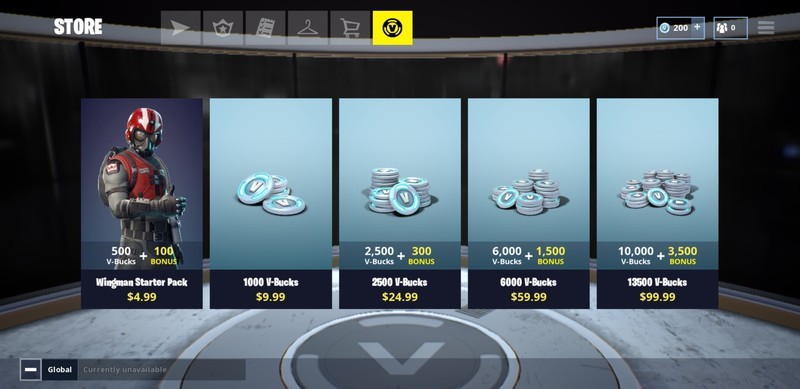
Fortnite, meanwhile, more regularly offers new skins either through direct purchase or by way of the Battle Pass, which allows you to pay a premium to earn exclusive rewards. Fortnite’s cosmetics are also more varied, with things like emotes, loading screen skins, glider effects, and more joining your typical selection of character model and weapon skins.
Gameplay differences

PUBG’s allure is that it’s a more realistic game. The visuals are more lifelike, the weapons are based on actual military equipment, and the ballistics model is made to emulate real life. That means things like bullet drop — which causes damage to fall off at longer range and requires you to adjust your shots to account for distance and height — are emphasized as these mechanics create a skill gap.
On the flipside, Fortnite is about as silly as silly gets. It’s cartoony, it’s unrealistic, and it’s over-the-top. And it’s all great. You can throw grenades that make your opponent dance or instantly erect structures that are several feet high. Run through time travel rifts to be taken to the skies and dropped back down to the ground just as you did when the game started. Use a golf cart to drift, and the finish it all off by dancing in front of a huge birthday cake. Anything can and will happen in Fortnite.

You also have a building system that allows you to use the materials you’ve gathered in the world to instantly create structures to use for cover and shelter. Its shooting model is of the hitscan variety, which means bullets will land perfectly as long as your crosshairs are on your target when you pull the trigger (with the only exception to this being scoped weapons).
Both games are plenty fun and intense in their own ways, and which one does it right really comes down to personal preference. There’s a misconception that PUBG requires more skill because it’s more realistic, but that’s not necessarily true. Both games require different types of skill, and you can play them as casually or as competitively as you want.
Mobile-friendly features

Fortnite and PUBG Mobile both have several features in play to help make the mobile experience easier. You can pick up items and weapons simply by running over them, and doors can be opened by running into them. In terms of shooting controls, Fortnite allows you to auto-shoot, which is a nice feature for those who don’t have the skill to aim, shoot, and build at the same time.
Both Fortnite for Android and PUBG Mobile also allow you to customize a ton of little control options and even resize and reposition HUD elements.
Crossplay
Fortnite is currently the only game in this genre with cross-platform play. You can play with friends on PlayStation 4, Xbox One, Nintendo Switch, or PC if you so choose. We wouldn’t recommend doing that right now, of course, because someone with a proper controller or a mouse and keyboard setup will have a massive advantage. You could even the playing fields by using a Bluetooth controller, which brings us to our next point…
Bluetooth controller support

Neither Fortnite for Android nor PUBG Mobile officially support Bluetooth controllers at this time, meaning you’ll need to use onscreen controls to do anything. Epic attempts to make this easier with auto-shoot mechanics, though it still isn’t going to give you the same level of precision as using a controller would.
In fact, Fortnite takes a massive hit in this category due to its more complicated control scheme. While things are still sometimes awkward to pull off in PUBG Mobile, the fact that there’s no building system makes it a much more mobile-friendly game. All that said, there are plans for Fortnite to get Bluetooth controller support at some point down the line.
There hasn’t been any news on that front for PUBG Mobile. In fact, some believe the developers don’t want to introduce controller support so as to keep the playing field level (which is possible because lack of cross-platform play means they know for certain that everyone playing in a server are playing on mobile devices), so it’s possible we may never see it. That hasn’t stopped players from figuring out ways to use external controls to improve their game, though.
Feature parity

This is an important point to touch on. Those who play the game on one platform will expect a game of the same name to have the same features on another. That isn’t always possible with mobile, though.
To that end, Fortnite for Android offers the most consistent experience across devices and platforms. That’s because the game has to be the same everywhere in order for cross-platform play to truly work. All the new updates and features Epic will introduce on a regular basis will show up quickly, because you wouldn’t be able to play with people on other platforms otherwise.

Meanwhile, PUBG Mobile is kind of operating in its own silo. The PC version is pretty far ahead of what’s available on mobile, and while the mobile experience is mostly in line with the baseline game, there are still new maps, weapons, vehicles, skins, and gameplay changes that will take time to be implemented. It’s catching up, but don’t expect day-one patches like Fortnite.
Fortnite for Android vs PUBG Mobile: Which is better?

As we mentioned before, it’s hard to say which game is better from a pure style standpoint. PUBG Mobile and Fortnite for Android can appeal to the same crowd due to how similar their gameplay models are, and it really is all about your personal preference at the end of the day.
In a world where you wouldn’t mind either style of game, Fortnite is the obvious pick if you play the game on multiple platforms or have friends on other platforms you’d like to play with. It also means you get a more active schedule of updates, with Epic introducing new changes and items on a weekly basis.

However, if you’re having trouble coming to grips with Fortnite’s control scheme, you may enjoy PUBG Mobile a lot more. It’s more customizable in that regard, and because there are fewer mechanics to worry about overall, you don’t necessarily need a Bluetooth controller to make it a pleasant experience. PUBG is also available on a lot more devices, so for some of you, it may be your only option.
We’d also give PUBG the nod for complete newcomers, as the game has a comprehensive tutorial and boasts an excellent onboarding experience that fills your first several games with mostly AI-controlled enemies. This helps ease you into the frying pan instead of having to jump straight into the fire.

No matter which camp you fall in, remember that both games are still changing on a fairly frequent basis, and what may be a point in favor of one game now could change in a matter of weeks. In fact, Fortnite on Android is still considered in beta, so there are likely tons of improvements already in the pipeline.
Fortnite for Android review
Which one do you prefer?
Give us a holler in the comments section to let us know which game you think is better, or simply which one you prefer to play right now!
Android Gaming

- Best Android games
- Best free Android games
- Best games with no in-app purchases
- Best action games for Android
- Best RPGs for Android
- All the Android gaming news!
Which noise-canceling Sony headphones should you buy?

You don’t have to spend hundreds of dollars to get good noise-canceling headphones.
Noise-canceling headphones are all the rage these days. They’re great for long flights and coffee shop writing sessions alike, and best of all you don’t have to pay an arm and a leg to get a decent set anymore. While Sony’s popular WH1000XM2s are still class-leading in their active noise-canceling tech and high-quality audio delivery, there’s a much cheaper pair that’s been getting quite a bit of attention lately, the WH-CH700N.
While neither pair of headphones has a terribly memorable name, they’re both great products that fulfill different needs and uses cases. So which one is right for you and your needs?
Why the WH-CH700N is a great buy

For a couple dollars shy of two Benjamins, the CH700Ns are a great deal for even casual music listeners. Sony advertises a whopping 35 hours of playback on the CH700N’s rechargeable battery, and you can easily pair them to your NFC-capable phone by just tapping it against the left ear cup — of course, simply putting the headphones into Bluetooth pairing mode works just as well.
The CH700Ns are more than enough for most casual listeners who just want some peace and quiet.
Sony is known for delivering great-sounding audio no matter the price, but if you don’t like the out-of-box voicing on the CH700Ns, you can use the Headphones Connect app to EQ to your heart’s (and ears’) content. Of course, these headphones also support noise canceling, and even though it’s digital rather than active noise canceling, it still uses the built-in microphones to listen to the noise around you and adjust the effect accordingly. That’s pretty great for $199 headphones (though they’re down to $128 right now).
You can also use the included cable (assuming your phone still actually supports 3.5mm wired audio) to extend the life of the battery for noise canceling — or if you’re fine without noise canceling, you can listen to wired audio even after the battery is fully depleted. Then again, with 35-hour battery life, you probably won’t need to take advantage of that all too often.
See at Amazon
Why the WH1000XM2 is worth the extra money

The CH700Ns suit the needs of most casual listeners, but if you really need active noise canceling or you’re just after the best audio you can get from a pair of Bluetooth headphones, you may want to shell out the extra money for the WH1000XM2s. Yes, they’re expensive — almost twice the cost of the CH700N — but they’re well worth the money for the right kind of user.
You don’t need to spend hundreds of dollars on headphones, but you probably won’t regret it if you do.
Like the CH700Ns, the 1000XM2s support conveniences like NFC pairing and a rechargeable battery through Micro-USB, but its noise canceling goes much further. Not only does it do a significantly better job at blocking out sound (it’s actively powered, after all), but it features Ambient Sound mode, which pumps some audio back into the headphones while still canceling out the majority of background noise, so that you can still hear and hold conversations, even with the headphones on.
Sony has also built in touch sensitivity on the right cup that allows you to quickly jump in and out of Ambient Sound mode by placing your hand over the cup, or tap and swipe in various directions to play, pause, or skip between tracks without having to pull out your phone. Once you get used to using these gestures, it quickly becomes hard to imagine going back to living without them.
On top of all of its conveniences and noise canceling, the 1000XM2s are just great-sounding headphones. Audiophiles will still scoff at the idea of using Bluetooth audio, and sure enough, you can get better sound quality from similarly priced wired headphones when you aren’t paying for everything else the 1000XM2s do, but to my ears at least, these sound even better than their direct competition, the Bose QC35s.
See at Amazon
Which headphones would you buy?
It’s hard to compare headphones at such vastly different price points, but it gets a little easier when you remember that they’re intended for different users. Yes, of course the WH1000XM2s are better headphones than the WH-CH700Ns for triple the price, but not everybody needs to spend $300 on headphones. For the vast majority of people, the CH700Ns are more than good enough, and they’re a significantly better value.
If, on the other hand, you’re a frequent traveler who doesn’t want to sacrifice audio quality, the 1000XM2s remain not only my recommendation between these two options, but some of my top-recommended headphones overall. The combination of great audio, powerful noise canceling, and convenient features make these headphones worth every penny.
Which headphones would you buy between these two? Have you already been rocking a pair for a while now? Or do you have an alternative you’d recommend over either? Let us know in the comments below!
 AIVAnet