


Walmart Back to College sale: Save big on computers, TVs, tablets, and more
It’s almost time to head back to class, and while many students would be happy if summer never ended, a fresh school year means a year of new opportunities. It also means it’s time for those annual back-to-school sales – something you can take advantage of even if you’re not going to be lugging around a backpack full of books any time soon.
These sales events naturally include a lot of things like school supplies and dorm room essentials, and while Walmart’s Back to College sale is no exception, it’s also your chance to score some great discounts on all sorts of electronics. So whether you’re getting ahead of the new school year or just doing some end-of-summer shopping, we’ve already picked out the best tech deals from Walmart’s big sale.
The best computer deals
For study, work, or entertainment, pretty much everybody today needs a good, reliable computer. These things can get expensive quickly, though, so when it’s time for a new laptop or desktop PC, you’re better off waiting for a sale – and Walmart’s Back to College sale is just what the tech doctor ordered. If these computer deals don’t tickle your fancy, then be sure to check out more laptop deals here.
Our picks:
- Acer CB3-532-C47C 15.6-inch Chromebook — $50 off
- Dell Inspiron 11 3000 2-in-1 11.6-inch touchscreen laptop — $80 off
- Refurbished Apple 11.6-inch MacBook Air — $200 off
- Dell G3 Nvidia GTX 1050TI 15.6-inch gaming laptop — $100 off
- Alienware Nvidia GTX 1060TI 15.6-inch gaming laptop — $310 off
- HP Slim 270-p033w desktop PC: $70 off
- iBuypower WA583RX Radeon RX 560 desktop gaming PC — $100 off
The best TV deals
Parents understandably don’t want their kids lounging around watching TV when they should be studying, but everybody needs a bit of downtime to enjoy some Netflix and gaming after a long day of note-taking, reading, and testing. Of course, you need a good television to do it, and whether you’re furnishing your new dorm room, looking for a new streaming device, or just upgrading to a new HDTV for your home, Walmart’s sale has you covered.
Our picks:
- JVC 55-inch 4K TV — $220 off
- RCA 55-inch Roku smart 4K TV — $470 off
- Samsung 58-inch smart 4K TV — $300 off
- Sceptre 65-inch curved 4K TV — $267 off
- Roku Ultra 4K streaming box — $10 off
The best tablet deals
Daven Mathies/Digital Trends
It’s not hard to see why a tablet would be a perfect tool (or gift) for a student, especially one who likes to take a lot of notes. A good tablet computer with a stylus pen lets you ditch the pencil and paper, while also giving you one handy place to keep all of your important files, projects, and more. Pair it with a folding keyboard case and you’ve got a light, portable, and versatile all-in-one workstation.
Our picks:
- RCA Cambio 10.1-inch tablet with keyboard: $83 off
- Samsung Galaxy Tab E 7-inch tablet: $52 off
- Samsung Galaxy Tab A 8-inch tablet: $80 off
- Apple iPad Mini 7.9-inch table: $100 off
- Apple iPad 9.7-inch tablet: $80 off
The best headphone deals
Another study and entertainment essential is a pair of comfortable, high-quality headphones. Whether your prefer in-ear, on-ear, or over-ear, Walmart’s Back to College sale has it all. Here are some of the best headphone deals that can save you as much as $150 off retail prices.
Our picks:
- Logitech G430 surround sound gaming headset: $12 off
- Apple AirPods wireless in-ear headphones: $14 off
- Beats Solo3 wireless on-ear headphones – $103 off
- Beats X wireless in-ear headphones: $50 off
- Bose SoundSport Free wireless in-ear headphones: $50 off
- Beats Studio3 wireless over-ear headphones: $50 off
The best smartwatch deals
Running late for class? A good smartwatch can help (some can even wake you up by sending gentle alarms right to your wrist from your smartphone). Walmart’s sale even includes a small selection of smartwatches, including some great Fitbit activity trackers that can help you ward off the dreaded “freshman 15.”
Our picks:
- Apple Watch Series 1: $100 off
- Fitbit Charge 2 HR: $30 off
- Fitbit Alta HR: $30 off
- Fitbit Charge 2 Special Edition: $30 off
Looking for more great stuff? Find tech deals and much more on our curated deals page, and be sure to follow us on Twitter for regular updates.
We strive to help our readers find the best deals on quality products and services, and choose what we cover carefully and independently. If you find a better price for a product listed here, or want to suggest one of your own, email us at dealsteam@digitaltrends.com.Digital Trends may earn commission on products purchased through our links, which supports the work we do for our readers.
Editors’ Recommendations
- Walmart slashes Google Home prices for Prime Day
- Upgrade your home theater with a deeply discounted Vizio soundbar system
- The Beats Solo3 wireless headphones are on sale from Walmart for $150 off
- Beat the heat this summer with an affordable air conditioner
- Buy a professionally refurbished iPhone 6 and save $100
Qualcomm’s Snapdragon 850 chip appears in benchmarks with improved performance
Mark Coppock/Digital Trends
WinFuture discovered a benchmark for Qualcomm’s new Snapdragon 850 processor that shows a less-than-stellar increase in multi-core performance over the previous 835 chip. Introduced in June as an alternative to Intel-based processors for Windows 10 PCs, the Snapdragon 850 promises up to 30 percent better “system-wide” performance than the previous generation, yet the benchmark shows that leap only applies to single-core numbers.
Qualcomm’s new Snapdragon 850 chip currently appears in a “Lenovo 81JL” device listed on Geekbench. To gauge the changes in performance, the Asus NovaGo TP370QL 2-in-1 PC sporting the Snapdragon 835 is used for comparison. Geekbench shows that the 850 chip scored 2,263 points in the single-core test while the 835 scored 1,802 points in the same test. That is a single-core increase of around 23 percent.
The performance increase isn’t quite so dramatic in multi-core tests, hence the typical use of the “up to” phrases when companies describe processor performance. When comparing the same two devices again, the 850 chip scored 6,947 points in the multi-core test while the 835 scored a slightly lower 6,475 points. That’s a mere 7.3 percent increase.
Designed for Windows 10 PCs, the Snapdragon 850 is an eight-core chip based on 10nm process technology boasting speeds of up to 2.96GHz. It’s an all-in-one chip sporting LTE connectivity supporting 1.2Gbps download speeds, Wireless AD and Bluetooth 5.0 connectivity, and more. Qualcomm says the chip’s low power draw enables up to 25 hours of continuous use on a Windows 10 PC.
“New and improved features on the Snapdragon 850 Mobile Compute Platform can support on-device experiences for A.I., and users can expect camera, voice and battery life enhancements,” the company boasts. On the A.I. front, Qualcomm claims the chip provides three times better performance than the previous-generation chip.
The Snapdragon 835 is an eight-core chip as well based on 10nm process technology. With speeds of up to a lower 2.45GHz, it includes an LTE modem supporting 1Gbps download speeds, built-in Wireless AC and Bluetooth 5.0 connectivity, and so on. It appeared in the first wave of “always connected” PCs introduced by Qualcomm and Microsoft at the end of 2017.
But keep in mind that the Lenovo 81JL is the only device with Qualcomm’s Snapdragon 850 chip currently listed on Geekbench, thus you won’t find other comparable benchmarks for now. Given the device has yet to hit the market, Qualcomm, Lenovo, and Microsoft may still have work to do in terms of optimizations.
But as WinFuture points out, given the device isn’t listed with an internal name — which is used when devices are still in development and undergoing testing — the Lenovo 81JL may be close to a market launch. Still, the single-core performance increase should be noticeable for customers upgrading to the Snapdragon 850 platform given that apps generally only use a single processor core anyway.
Qualcomm said in June that Windows 10 PCs based on the Snapdragon 850 will arrive “later this year.” Current models that fall under the “always connected” umbrella include the HP Envy x2, the Asus NovaGo, and the Lenovo Miix 630.
Editors’ Recommendations
- Qualcomm Snapdragon 850 is made for Windows PCs with ‘innovative form factors’
- Samsung may be developing a Snapdragon 850-powered Windows 2-in-1
- High-end Always Connected Windows 10 PCs may pack Snapdragon 1000 in 2018
- Leaked Snapdragon 1000 details suggest it could go head-to-head with Intel
- Asus NovaGo review
Samsung Galaxy Note 9 review: Welcome to the one comma club
Samsung is building to lead the state of the market, not the state of the art — and it’s working.

Samsung’s smartphone philosophy follows one clear path: give customers everything they want, and apply all of the best processes, components and engineering you have in order to do it, no matter the cost. There’s no better expression of this philosophy than the Galaxy Note line of phones, which has regularly pushed the envelope of what’s “normal” for a smartphone since the original launched in 2011. After a couple generations that didn’t set the world alight, Samsung is back at it again with an “everything but the kitchen sink” approach in the Galaxy Note 9.

Given its relatively predictable and methodical step-by-step refresh cycle between the Galaxy S and Galaxy Note phones each year, it’s easy to fall into thinking that the Galaxy Note 9 is “just another boring Samsung phone.” But to look at Samsung’s previous phones doesn’t give the Note 9 enough credit for all that it does in a single package — albeit an extremely expensive one. On top of being based on the up-to-this-point best phone Samsung has ever made, the Note 9 added a larger and better display, a bigger battery, a bump up in storage and new S Pen features that continue to be a true differentiator. Here’s how it all comes together to make such an excellent phone.
Samsung Galaxy Note 9

Price: $999+
Bottom line: The Galaxy Note 9 represents the biggest and best that Samsung has ever made. The hardware, specs, display and features are all top-of-class, and the camera is one of the best available. Battery life finally suits the size of the phone, and the S Pen is more useful than ever before. The software continues to be a weak point, but is worth tinkering with to get all of the benefits of this amazing all-in-one power user phone.
See at Samsung
Pros:
- Best screen available today
- Strong battery life
- Beautiful hardware
- Top-notch camera
- Base 128GB storage is great
- Headphone jack
Cons:
- Quick Charge 2.0 isn’t fast enough
- That price tag
- Speakers should be better considering size
- Bixby is primarily a punchline
About this review
I’ve been using a U.S. unlocked Galaxy Note 9 for 8 days, with time split between New York City and Seattle on the Verizon network. The software was version M1AJQ.N960U1UEU1ARG6, with the July 1 security patch, and was not updated during the course of the review. The phone was provided to Android Central by Samsung for review.

The look and feel
Samsung Galaxy Note 9 Hardware, specs and battery life
At its core, the Galaxy Note 9 is a Galaxy S9+. In terms of basic specs, features, connectivity, capabilities, buttons and ports, the phones are indistinguishable. The Note 9 has the same Snapdragon 845 processor, 6GB of RAM and supporting radios for LTE, Wi-Fi and Bluetooth. It has the same stereo speakers, headphone jack, microSD card slot, USB-C port, buttons and fingerprint sensor. The cameras are entirely identical in terms of hardware. It charges at the same max speed, both wired and wireless. It’s water and dust resistant to the same IP68 specification.
This isn’t particularly surprising or even upsetting; the Galaxy S9+ is a wonderful phone with all of the features and power you’d need — and a phone I’ve been happily using for months — so building the Note 9 from that foundation is great. But it can’t be entirely identical, right? Correct, there are some improvements — and they’re in areas that will make Note fans swoon.
| Operating system | Android 8.1 OreoSamsung Experience 9.5 |
| Display | 6.4-inch Super AMOLED, 2960×1440 (18.5:9) |
| Processor | Qualcomm Snapdragon 845 |
| Storage | 128/512GB |
| Expandable | MicroSD up to 2TB |
| RAM | 6/8GB |
| Primary rear camera | 12MP Super Speed Dual Pixel, OIS, f/1.5 or f/2.4 |
| Secondary rear camera | 12MP, OIS, f/2.4, telephoto lens |
| Front camera | 8MP, f/1.7, auto focus |
| Connectivity | Wi-Fi 802.11ac MIMO, 1.2Gbps (Cat-18) LTE, Bluetooth 5.0 LEANT+, NFC, GPS, Glonass |
| Audio | Stereo speakersDolby Atmos3.5mm headphone |
| Battery | 4000mAhNon-removable |
| Charging | Quick Charge 2.0USB-C PDFast Wireless Charging (15W) |
| Water resistance | IP68 |
| Security | One-touch fingerprint sensorIris scannerSamsung KNOX |
| Dimensions | 161.9 x 76.4 x 8.8 mm201g |
| Colors | Ocean Blue, Lavender Purple (U.S.)Midnight Black, Metallic Copper (intl) |
Samsung has finally given the Note a much-needed battery bump — all the way up to 4000mAh, 14% larger than the Galaxy S9+ and 21% larger than the Galaxy Note 8. It always felt a bit odd that the power user-focused Notes have had relatively small batteries, and Samsung has addressed it.
The extra battery capacity has translated directly to battery life that’s above-average for the flagship segment and enough for a complete worry-free day of use. Unlike the Note 8, I’ve been able to end an average day with the Note 9 with roughly 20-25% battery remaining. During my week-long review period I didn’t kill its battery before bedtime once, which I certainly couldn’t say about the Note 8 or even the Galaxy S9+. That extra 15-20% buffer does wonders for confidence, and it enabled me to use the Note 9 longer in heavier use-case scenarios without worrying that I’d be hitting Power Saving Mode in the early evening.
Samsung isn’t making any claim of faster charging speeds, either wireless or wired, despite the increase in battery capacity. It still ships the same Quick Charge 2.0-capable “Adaptive Fast Charging” USB-A wall plug we’ve seen since the Galaxy S6. But there’s more to this story. Thankfully, in my testing the Note 9 pulls a bit more power from this plug than either the Note 8 or Galaxy S9+ — the Note 9 draws about 14.5W from the charger, whereas the Note 8 fluctuates around 13.5-14.5W and the GS9+ fluctuates around 13-14W. The Note 9 also doesn’t drop charging wattage when the screen is on, which is something easily observable on the other two phones — perhaps a benefit of its increased heat dissipation technology.
The Note 9’s larger battery charges in the same amount of time as the Galaxy S9+.
The result isn’t big, but it’s notable: the Note 9 charges its larger battery 0-100% in roughly the same amount time (1 hr 40 min) as the Galaxy S9+, give or take a handful of minutes to compensate for heat and phone usage. It’s also worth noting that the Note 9 charging at effectively the same rate (0-100%, 1 hr 40 min) from any 15W+ USB-C Power Delivery charger, such as the Google Pixel 2’s. Both data points are a relief after being told not to expect a charging speed increase.
I’m still not going to give Samsung a pass for shipping a 4000mAh battery with the maximum capability of Quick Charge 2.0, though. A battery this large in a phone designed for the heaviest users deserves more. Not necessarily in 0-100% charging performance, but in particular with Quick Charge 3.0 and 4.0’s ability to rapidly get a battery from 0-30%, which is the most critical charging time for most people.
Love storage? The Note 9 has you covered. The base storage for the phone has been doubled to 128GB, which is impressive and a welcomed addition — even for someone like me who rarely pushes the limits of a 64GB phone. With over 100 apps installed, multiple accounts syncing and Pocket Casts downloading several gigabytes of audio, I have 97.5GB free on my 128GB Note 9 without using an SD card — that’s plenty.
Most people will be more than happy with 128GB — think twice about that $249 upgrade.
But of course Samsung didn’t stop there — you can pay $250 more for a whopping 512GB. And this isn’t just some special edition model for certain markets — it’s available globally, including from U.S. carriers (except for Sprint, sorry). The 512GB model also makes a bump to 8GB of RAM, which is of dubious value right now (just as it is in the OnePlus 6) but gives you some future-proofing potential, on top of bragging rights. The microSD card slot supports cards of that size (and larger), so with currently available tech you can throw an extra 512GB in the phone for over 1TB of total storage. Even if you want to keep things reasonable (and under $100) and get a 256GB microSD card, that’s 768GB of storage … in your phone. I find it hard to believe anyone needs more than that right now.
The hardware isn’t unique, but it’s near-perfect in materials and execution.
Samsung doesn’t have much of a story to tell in terms of materials or design this time around. It’s no secret that things haven’t changed demonstrably since the Galaxy S7, and the Note 9 only makes incredibly subtle changes from the Note 8 and Galaxy S9+. The metal frame has gone back to being a bit more … metal feeling, with a lightly textured finish and a nicely chamfered edge that makes it stand out and grip a bit easier. But it’s still sculpted to flow gently into the curved glass on both sides of the phone. It’s big and feels amazing, but it doesn’t provide anything new or exciting on the hardware front. That is, unless you count moving the fingerprint sensor to a usable position on the back as “exciting” — I’m glad it moved, but I still can’t believe it was anywhere else on the Note 8.
The Note 9 has the best smartphone display ever made.
When you set a Note 9 next to a Note 8 face-up, you can’t tell them apart. The Note 9 is imperceptibly wider and thicker, which is a necessity due to the also imperceptibly larger display — now up to 6.4-inches from 6.3, and it’s the same 2960×1440 (18.5:9) resolution. The panel itself has received ample improvement across a variety of metrics, though, even though the Note 8 already had the best screen available up to this point. DisplayMate’s testing of the Note 9 yielded record-setting scores in several categories and an overall “A+” rating, with absolutely fantastic marks for color accuracy, peak brigthness, color gamut, contrast ratio, screen reflectance, viewing angles and color variation.
The numbers will get the nerds excited, but the Note 9’s display really passes the eye test. This screen is fantastic in every situation, and I absolutely love looking at it. DisplayMate used the phrase “visually indistinguishable from perfect” and I can’t disagree. Samsung not only bested its own high water mark, but simply furthered its lead ahead of the rest of the industry in display technology.

An unfortunate accident
As Happy Gilmore once said, “I didn’t break it, I was just testing its durability.”
I did have the extremely unfortunate circumstances to test the durability of this metal-and-glass build during my review period. Yes, I dropped my Galaxy Note 9. It slipped out of my hand from about four feet, grazing a concrete wall before landing back-down on the rough concrete floor of my parking garage. Expletives flew as I reached down to pick it up … and to my surprise, things weren’t anywhere near as bad as I expected given the constant commentary about how fragile these glass-backed Samsung phones are.
I feared the worst, but the Note 9 held up to a drop far better than I ever expected.
Two portions of the metal frame have small scuffs where the annodization has worn off — no big deal. Both the top-left and bottom-right corners of the glass have two one-inch cracks. But here’s the interesting part: you can’t actually feel the cracks with a finger or even the pressure of a fingernail, as they’re cracks only on the underside of the glass, not all the way through. They spider out from clear impact points where the glass was pressed to the metal frame, but spread back toward the edges rather than through the middle of the glass. This has undoubtedly compromised the glass to the point where the next major impact will crack the rest of the pane, but I was shocked to see the phone hold up this well to an incredibly gruesome drop onto concrete. Not only did the glass not shatter, you can’t even feel the cracks that did form — and the display and all other functions of the phone are in perfect working order.
Best Samsung Galaxy Note 9 Cases
That’s not to say that the Note 9 is rugged or robust on the same level as an all-metal device that can take more of a beating — but if you’re bold enough to run this thing without a case, it should be able to handle more abuse than you’d think to administer to it. I would never abuse a phone like this on purpose, but given the state of the phones I see around in the wild, many people have done the same as I did this week — I hope their Note 9 survives like mine did.

How it works
Samsung Galaxy Note 9 Software, camera and S Pen
The Note 9’s settings show a bump up to Android 8.1 Oreo and Samsung Experience 9.5, though you wouldn’t know any changes had been made unless you really got into the nitty gritty details with its predecessor beside it. Interface-wise, this is typical Samsung: familiar and powerful to all Samsung owners, and initially frustrating for everyone else. You can argue with Samsung’s focus on quantity over quality when it comes to the software, but you can’t find fault in the fact that so many people love it and give Samsung little reason to change.
The story is the same on the performance front. It feels odd to praise a $1000 phone for having fluid, consistent performance when that is 100% expected from this level of device, but here we are. The Note 9 is incredibly quick to do everything I ask of it, just like the Galaxy S9+ has continued to over six months of use. I couldn’t find anything to make the Note 9 skip a beat, and everything was exactly as fast as I would hope to see from a top-end phone.

An improved S Pen
This is the extra-capable S Pen the Note line deserves, offering far more than just writing and drawing.
The S Pen is the same size and shape as the Note 8’s. But it now has a small supercapacitor (effectively a high capacity, low voltage battery) to provide power for a short period so it can connect to the phone over Bluetooth. It provides 30 minutes of connectivity, and up to 250 clicks before it needs to be recharged. But that’s nothing to worry about, as it goes from 0 to 100% in just 40 seconds while in the phone — and it remains at 100% so long as it’s inside. Even if the S Pen’s battery dies, it still works as a writing implement on the screen exactly as it does on previous Notes — with the fantastic pressure sensitivity and tracking so many people love.
I’m a noted S Pen skeptic, coming from the point of view that I simply don’t prefer to write instead of type and I’m not at all artistically inclined when it comes to drawing. The Note 9’s new Bluetooth-enabled S Pen aims to make this writing implement useful for more than just those areas. And for the limited set of new features it aims to execute, it succeeds.
The depth of the interaction is that you can use the S Pen’s button to perform specific button-related actions on the phone. A long-press on the button can launch any app, and then depending on the app you can perform additional actions using single- and double-clicks of the button. Samsung has configured several of its built-in apps to work with the S Pen — including PowerPoint, Gallery, Camera, Voice Recorder, media playback and more — and each one offers configurability of 1-4 different actions for both single- and double-click actions. For example in the camera, by default a single click captures a photo while a double-click switches between the front and rear cameras — but you can choose instead to have a single click to capture a photo and a double click to start a video.
I’ve used the Note 9’s S Pen more than any previous Note.
What may end up being its most-used feature is as a media controller. The S Pen’s button functions just like a play/pause button does on a pair of Bluetooth headphones, meaning you can easily use it to play, pause and skip tracks in any audio app.
I find it most useful as a camera shutter button when taking either low-light photos (eliminating camera shake by using a tripod or propping up the phone) or selfies (avoiding the “gorilla arm” looking angle). And yes, when I have media playing on my phone while I’m using the S Pen, I like to be able to quickly just hit the button and play/pause the media regardless of what else I’m doing. Then there’s the random times here and there when I want to annotate a photo or sign a document — and knowing the S Pen is there for those features is great, saving me from opening a computer.
The S Pen still remains something that you’re immediately drawn to, or will never pick up.
But I have to be honest, I’m not doing many PowerPoint presentations nowadays. Nor am I hooking up my phone to a monitor to run photo slideshows. So when you take out just two or three of the available features, you realize this wireless S Pen function didn’t add a ton. When you combine a handful of niche use-cases, you don’t get a game-changing feature addition … you get a slightly larger niche.
With this new wireless connection, I used the S Pen more on my Note 9 than I had used on any previous Note just by virtue of having more I could do than just write or draw. That’s huge for the Note line’s ability to appeal to a wider audience — but this remains something you are either immediately drawn to before buying the Note 9, or you don’t get and will never pick up no matter how long you have the phone.

The same (great) cameras
Samsung is talking a big game about the Note 9’s cameras, but let’s cut through the marketing from the start: they’re identical to the Galaxy S9+. The sensors, lenses and hardware support are all the same. Just like the specs discussion above, this isn’t a bad thing, but it’s worth noting that Samsung hasn’t made any hardware upgrades. The only thing that’s changed is the software: there are merely two new “AI” camera features called “scene optimizer” and “flaw detection.”
Let’s cut through the marketing message: the cameras are identical to the Galaxy S9+.
Scene optimizer is a great way for Samsung to put a brand on something it’s already doing, cramming in mentions of “artificial intelligence” and “neural networks” for good measure. It runs algorithms that detect features and objects in scenes, and automatically changes camera settings to get you the best possible photo of that scene. It can detect 20 scenes in total, including all of the usual suspects like snow, street scenes, night time, animals, indoors, beach, text, landscape, people, mixed lighting, food, plants, flowers and animals. Scene optimizer is turned on by default and works in the standard auto mode of the camera, and the only indication it’s working is a small icon in the interface showing when it recognizes something.
It’s difficult to discern the differences between a photo taken with and without scene optimizer.
It’s difficult to discern the differences between a photo taken with and without scene optimizer, as Samsung’s Auto mode is already fantastic at detecting scenes and choosing the right settings to get the best possible photo. This feature purports to go even further in that customization based on the actual elements of the scene, but I couldn’t tell a difference between photos taken with and without it on — nor did I see any difference in quality between the Galaxy S9+ and Note 9 for that matter. This is the type of “smart” camera tech we see in every high end smartphone, and is so often happening behind the scenes anyway — and giving it a brand feels just as forced here as it does on the LG G7 and Huawei P20 Pro.
Flaw detection is legitimately useful with no strings attached. The camera software is trained to detect when it thinks there are major flaws in a photo you just took, including someone blinking, a blurry shot, a smudge on the lens, or poor backlighting. Immediately after taking the photo, you’ll get a tooltip telling you that the photo is likely flawed and you should fix the problem and shoot again. This is useful for those quick shots where things aren’t thought through perfectly … and could save you from frustration later when you go to review the messy photo.


Putting aside the questionable scene optimization, because it doesn’t particularly add to the experience, there’s tons of praise to be heaped upon the Note 9’s cameras. Samsung’s biggest strength in photography is that the quality floor is very high — i.e. every photo you take is pretty good no matter the condition or skill level of the photographer. At the same time, it also has a very high ceiling — so if you spend time to compose, tap to focus, or even use Pro mode, you can get amazing photos.
Questionable ‘AI’ aside, the Note 9’s camera is legitimately great for novices and avid photographers.
Samsung has dialed in its colors and dynamic range to the point where you don’t really think about whether you need to use HDR, mess with exposure or play with the coloring in post-processing. The shots just look great right out of the camera in Auto mode. And the fine details have been refined to such an amazing extent that you don’t see jagged edges or softness even with zooming in for some pixel-peeping.
The low light performance you get out of this primary camera when it switches to f/1.5 aperture is phenomenal, with the same great propensity to have good colors and crisp details even in dim scenes. I do acknowledge that some people don’t like the almost over-sharpened look of the photos, and prefer something a bit more “natural” looking with some texture to it, but I don’t fault Samsung for taking the approach that offers nighttime photos that look similar to its daylight shots. The secondary camera continues to be useless in low-light shots, where the software chooses to use a 2X digital zoom on the main sensor instead — something you actually see in daylight sometimes as well — but with photos this good from the main camera, even when cropped, it’s hard to complain.

The bottom line
Samsung Galaxy Note 9 Review
Galaxy Notes have always represented the pinnacle of Samsung’s smartphone capabilities, but up until this point have for some reason been saddled with a couple shortcomings that didn’t make them automatic recommendations over the latest Galaxy S. With the Note 9, that has changed — it now has the largest battery of the set, plus more storage across the board and the option for more memory as well. All while packing an even larger, and higher quality, display — and being built on the same spec and feature platform throughout the rest of the phone.
This is the complete package — you just have to swallow that $1000+ price tag.
The Galaxy Note 9 truly does everything better than the Galaxy S9+ does — except, of course, the point of affordability. There’s no question that if you want the best phone Samsung makes, you get a Galaxy Note 9 without any hesitation. The only real consideration is whether you see the relatively marginal improvements over the Galaxy S9+ as worth the extra money. The extra battery is a truly useful addition; the extra storage, memory and screen real estate may not be such game-changers for your uses. The S Pen could push you over the top, as it remains unique in the entire smartphone space.
That I’m discussing whether you should by a Galaxy Note 9 or Galaxy S9+ should show you how highly I rate the Note 9 on its core principles to start with. The hardware is gorgeous and surprisingly robust. The spec sheet is bursting at the seams with everything you could ask for. The fundamental Galaxy features throughout the hardware and software are as appealing as they’ve always been. This is the complete package.
4.5
out of 5
It feels odd to unequivocally say a phone that costs at a minimum $1000 is “worth it” when there are so many other phones out there for a fraction of that. But if any Android phone is worth this one-comma price tag, it’s the Galaxy Note 9.
See at Samsung
Samsung Galaxy Note 9
- Samsung Galaxy Note 9 review
- Galaxy Note 9 vs. Note 8
- Where to buy the Galaxy Note 9
- Galaxy Note 9 specifications
- Is the Note 8 still a good buy?
- Join our Galaxy Note 9 forums
AT&T
Verizon
T-Mobile
Samsung
The OnePlus 6T will launch on T-Mobile for $550 this fall
This will mark OnePlus’s first-ever carrier deal in the United States.
Ever since the OnePlus One from 2014, OnePlus phones have been the go-to Android handsets for people that want a flagship experience without the flagship price. However, the lack of carrier availability (at least in the U.S.) is still a barrier for some potential customers that keep them from pulling the trigger.

According to a new report from CNET, that will be changing this year as the OnePlus 6T is expected to be sold both unlocked through OnePlus’s website and by T-Mobile in the United States.
The phone should cost around $550 (a slight step up from the OnePlus 6’s $530 price) and the T-Mobile version will be “optimized for T-Mobile’s network” — specifically the company’s 600Mhz band. While all of this comes by way of a source from CNET, Android Central can confirm the details of the story.
OnePlus CEO Pete Lau said that it was beginning talks with U.S. carriers back at CES this past January, so while we’ve been expecting an announcement like this for some time, it’s exciting to finally know that T-Mobile will be the company’s launch partner in the U.S.
You’ll still be able to purchase an unlocked variant of the OnePlus 6T that’ll work on AT&T and T-Mobile networks, but being sold directly by T-Mobile both online and in-stores will make OnePlus far more visible to U.S. consumers than it’s ever been before.
Are you excited about this news?
OnePlus 6 review: The matter is settled
OnePlus 6
- OnePlus 6 review
- OnePlus 6 vs. OnePlus 5T: How much changes in six months?
- OnePlus 6 vs. OnePlus 5: Should you upgrade?
- These are the official OnePlus 6 cases
- The OnePlus 6 doesn’t work on Verizon or Sprint
- Join the discussion in the forums

Adding a different DNS to your PS4 is easy when you know where to look

Adding a different DNS to your PS4 is easy when you know where to look.
DNS made the headlines recently when Cloudflare announced it’s new 1.1.1.1 service promising speed and security. Google is another high-profile company that offers a free DNS, and in both cases, or with any others you could use, it’ll likely be better than the one your ISP provides.
In the case of the PlayStation 4 you can apply a custom DNS directly to the console. It’s not particularly obvious how to do it, but once you know where to look, it’s pretty easy.
Here’s what you need to know.
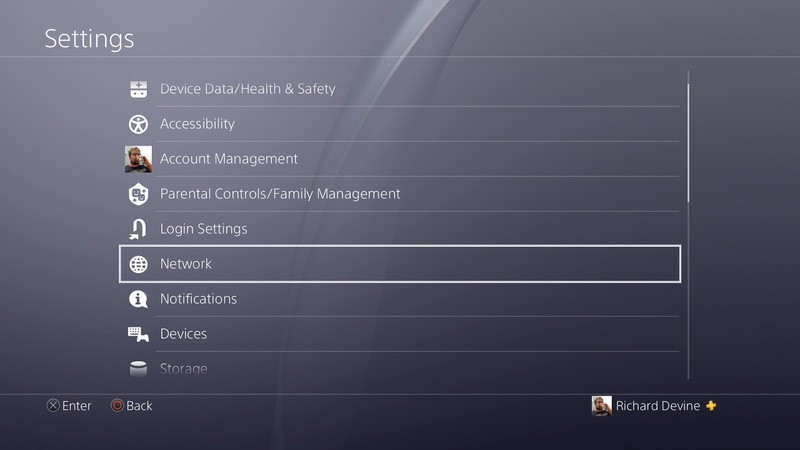
Go to the settings menu on your console.
Select network.
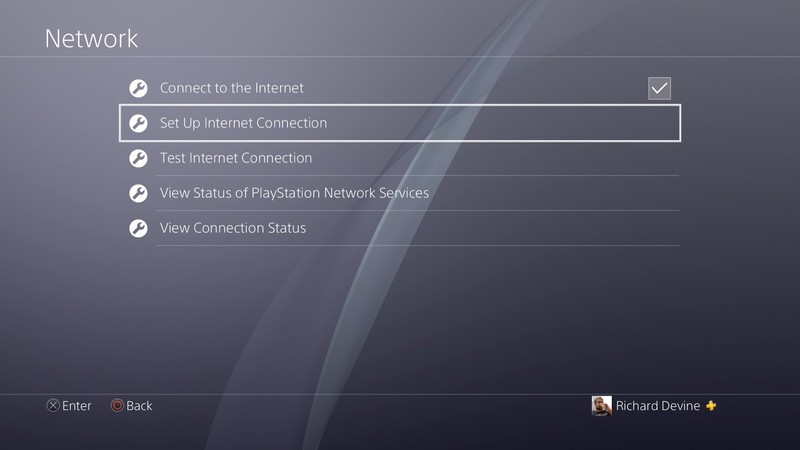
Next, select the set up internet connection option, regardless of whether you already have one set up on your console.
Choose Wi-Fi or LAN depending on your preference.
Select the custom set up option.
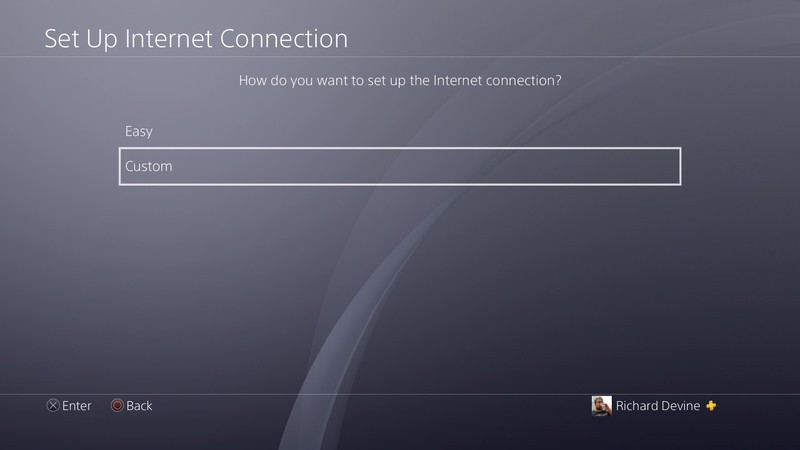
The next steps will refer to IP address and DHCP settings, if you have no preference choose the default for both.
When DNS settings appears, choose manual.
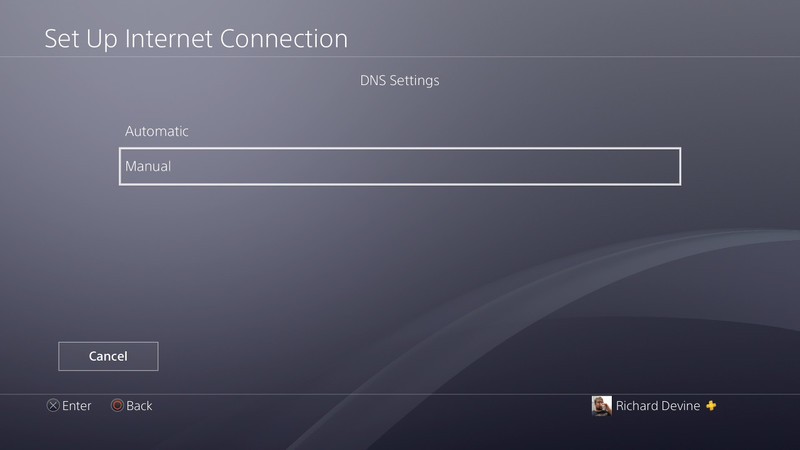
Enter the values for the primary and secondary DNS.
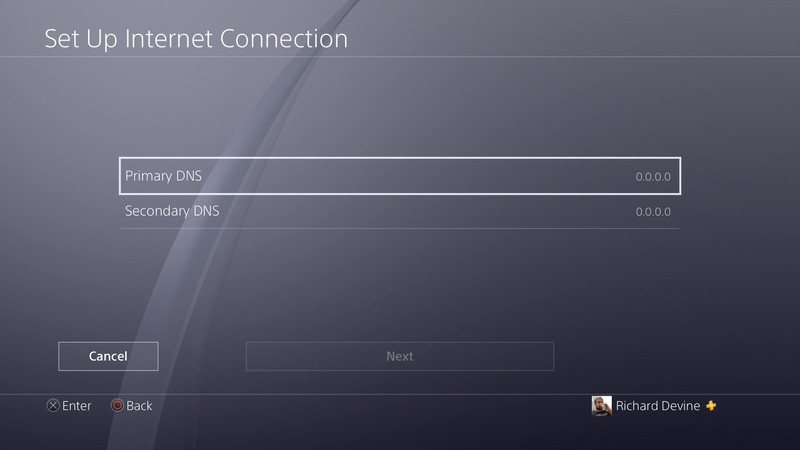
Now, once you complete the setup process, your console will be using the DNS you chose rather than an automatic one. It’s important to remember that you need to follow these steps to apply the change to the console, you can’t simply amend the DNS settings on your existing internet connection.
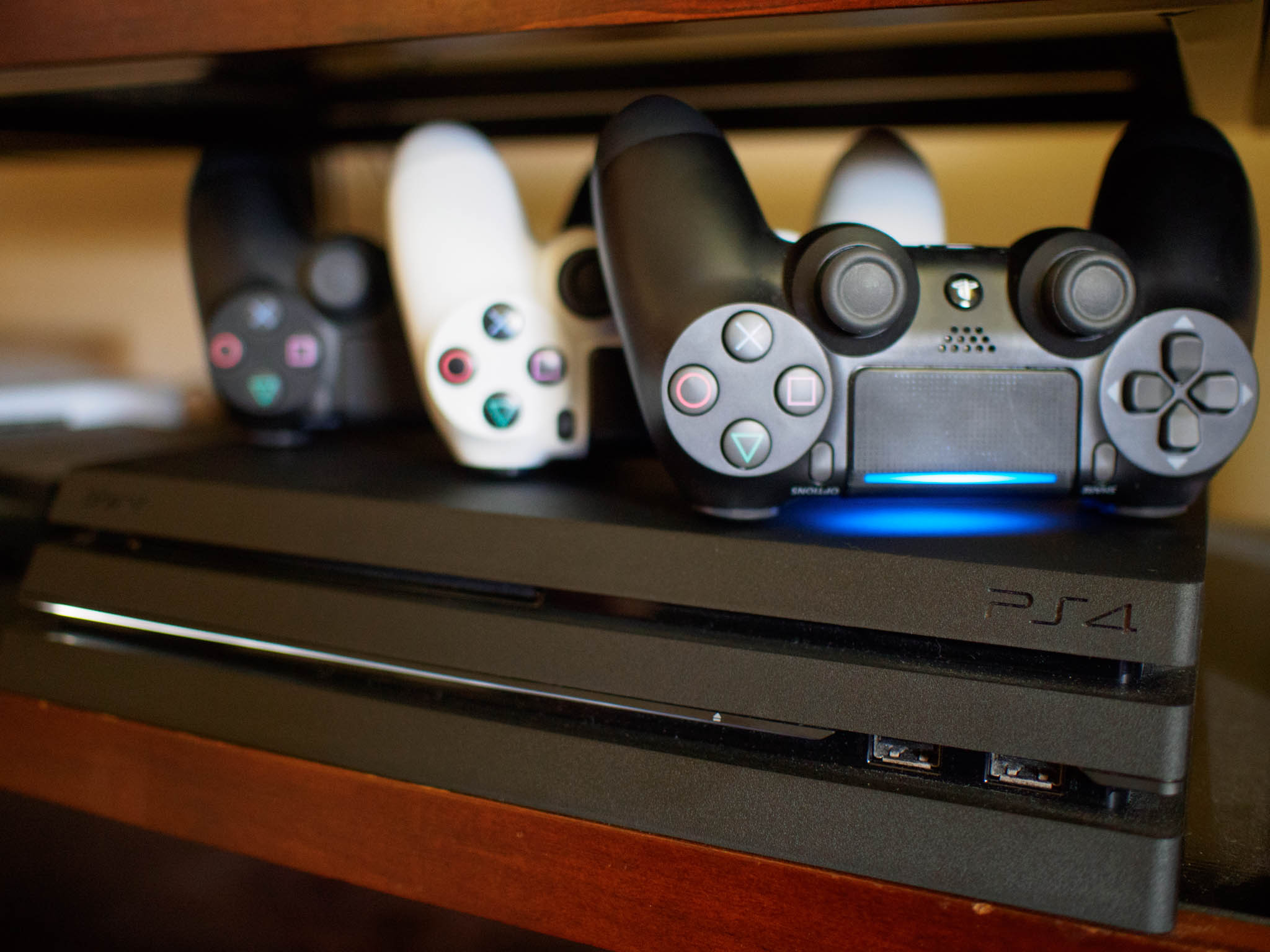
PlayStation 4
- PS4 vs. PS4 Slim vs. PS4 Pro: Which should you buy?
- PlayStation VR Review
- Playing PS4 games through your phone is awesome
Amazon
The RAVPower FileHub Plus wireless travel router is less than $30 today
Go as wireless as possible.
The RAVPower FileHub Plus multi-function wireless travel router is down to $29.59 with code 43G2U2FD on Amazon. The FileHub Plus is $45 without the code and more regularly sells for around $40. The price drop below $30 is one of the best we’ve ever seen.

Consolidate all your storage space with this device. It can help you transfer data between SD cards, USB drives, hard drives, and mobile devices like your phone or laptop to free up space where you need it. You can use it to convert a wired Internet connection to a wireless one so you can bridge multiple devices to the Wi-Fi and share security between them. You’ll be able to seamlessly share your favorite videos, photos, and music with anyone. It can wirelessly recognize your flash drives, SD cards, and more. It also has a 6000mAh external power bank built-in so you can keep your devices charged. Users give it 4.1 stars based on 1,248 reviews.
See on Amazon
Apartment living: Essential smart home tech for a small space

Be ready for a chat with your landlord
As a tech nerd, I’m always thinking of ways to make my home more efficient technologically: how to run Ethernet cables, where to place my desktop, how to rebuild my desk for the millionth time, stuff like that. But there’s an upper limit on just what I can do since I live in an apartment. I want to make the most of my space, but I can’t run Ethernet cables through the walls or mess with any electrical wiring. I also only have so much space, so each piece of technology needs to be justified.
Here are some essential pieces of tech for a small space!
- General rules
- Google Wifi
- Xbox One S
- NVIDIA Shield TV
- Vizio SmartCast Sound Bar
- Google Home
- Other smart accessories
General rules

With a small living environment, you want to make sure every gadget you have can serve multiple functions, if possible. Stuff like network routers and light bulbs will only have one task, but a game console lets you play games, watch content on streaming services, or play DVD or Blu Rays. Your TV can be your computer monitor, and instead of a bulky desktop, you could get a hub for your laptop. It’s also important to remember you’ll likely live in a different space in a year’s time, so your hardware shouldn’t need too much work to set up or tear down.
Google Wifi

You probably don’t have enough space for a mesh Wi-Fi system, but a great router is probably the best investment you can make for your technology use to be better. Have you ever had your laptop or phone take forever to connect to your home Wi-Fi? A new router is probably your best bet.
$125 at Google Store
If you’re using an old router — or worse, using the modem/router your Internet Service Provider gave you — that’s probably why. A slow Internet connection is incredibly frustrating, and I’ve proudly taped an Ethernet cable across my ceiling because Wi-Fi was acting up on my desktop.
I’ve been super happy with an Asus OnHub router I bought about two years ago. It has a nice, neutral design but more importantly: it just works. The only time I’ve had to mess with it was when I moved apartments. I plugged it in at my new place, and it came up like a charm. If I ever do move into a bigger space, I can pick up some Google Wifi routers to build a mesh system. Google provides security updates for its OnHub and Wifi routers automatically, so I don’t even need the (incredibly easy-to-use) Google Wifi app installed on my phone to stay up to date.
One downside to the OnHub and Wi-Fi routers is they only include one Ethernet-out port, so you’ll need a network switch if you have more devices you’d like to use with a wired connection.
Xbox One S

This is probably a no-brainer for most people, but it’s worth mentioning. An Xbox One S goes for $300, and plays all your favorite Xbox games, any DVDs or Blu Rays — including UHD Blu Rays — you have, and you can access almost every video streaming service.
$300 at Amazon
The One S does a lot of things, even if you’re not a hardcore gamer. You get a disk drive for your old DVD and Blu Ray collection, and it’ll even handle newer UHD Blu Rays if you prefer those. You have access to nearly every streaming service, and you can finally watch all of your Movies Anywhere titles in the Xbox’s video player. Most importantly, you get games. Every AAA title is on Xbox, and all of Microsoft’s exclusives — as well as some third-party titles — are available for $10 in Xbox Game Pass.
NVIDIA Shield TV

If you know you don’t care about the disk drive and are okay with some older titles, a NVIDIA Shield TV runs between $180 and $200, and gets you Android TV for all of your streaming services, plus plenty of exclusive games from NVIDIA. With the right TV tuner, the Shield TV can also act as a DVR for live shows.
$180 at Amazon
We can’t say enough good things about the NVIDIA Shield TV. It’s pretty much the face of Android TV, and you get access to Google’s services — including YouTube TV, Google Play Movies & TV and Google Assistant. In addition, mainstay services like Netflix and Hulu are on board, and Amazon Prime Video is also available. You can also stream games from NVIDIA’s servers or your home gaming desktop, or play most of the same Android games that are available on your phone.
VIZIO SmartCast Sound Bar

Soundbars don’t need a lot of space, even with a subwoofer and wireless surround speakers. Vizio makes plenty of soundbars, all of which are great options. They all feature Google Cast support, Bluetooth, optical and 3.5mm in from your TV, and some act as an HDMI hub.
$400 at Amazon
While your TV speakers are okay, a soundbar is so much better. Soundbars may not sound as rich as full surround systems, but they also don’t require as much space and cable management as a full surround system. Soundbars range in price from a basic two-channel bar for $100 to ear-tickling five channel system for $1000, with plenty of price points in between. There are even some bundles with a soundbar, wireless subwoofer and wireless rear surround speakers) to mimic a full surround system but use much less space.
Vizio soundbars feature Chromecast Audio built-in or Bluetooth connectivity, so you can get your jams from your phone in addition to your TV. Vizio is a reputable brand with fair prices, and if you don’t need or want the extra speakers in our pick, there are cheaper models to choose from.
Google Home

A Google Home is an okay speaker, but it’s also a portal into Google’s services. You can set reminders, control your smart gadgets, get the news for the day and even more.
$130 at Google Store
Just because you can’t change all of the hardware inside your home doesn’t mean a smart speaker won’t have value. Both a Google Home and an Amazon Echo are great choices, though a Google Home will likely be more useful if you’ve been using Android phones and Google services for years. You can use the Google Home for playing music or connect it to your soundbar for even better sound. You can set reminders, hear the news, set a routine, and more. If you do get some other smart gadgets, a Google Home will work with those perfectly.
Other smart accessories

At a certain point, you’ll just need to read your lease or talk to your landlord about what exactly you can replace inside your apartment or dorm. Most landlords will let you use a smart thermostat, so long as they install it. Smart lightbulbs are similarly easy: just install them in place of the normal lightbulbs. Tabletop gadgets like a smart coffee maker won’t be a problem either. Smart Locks may be an issue. Again, a five-minute conversation with your landlord is the best idea before spending money on anything.
More: Best Smart Thermostats for Amazon Echo in 2018
What are your picks?
What gadgets do you use to make the most of your small space? Let us know down below!
Google Goggles is finally dead as it’s being replaced by Google Lens
Time to hang your goggles up once and for all.

All the way back in 2009, Google launched its first-ever visual search application in the form of Google Goggles. It was a really exciting app at the time, but seeing as how the last software update it received was in 2014, development for it’s been dead for quite some time.
However, completely out of the blue, Google Goggles recently received its first update in over three years. After opening the app following this update, users are greeted with the below message.

It’s no secret that Lens is a spiritual successor to Goggles, but it’s still funny that Google would bother spending any time updating the app in the first place.
When’s the last time you used Google Goggles?
Six months later, Google Lens still isn’t great
Game of the Week: Let your free time fall into the void with Hole.io!

Hole.io is a wacky game that’s actually worth checking out.
Update August 17, 2018: Our pick this week is Hole.io, a new competitive game that’s oddly satisfying with multiple modes of play!
Holedown
If you’ve been a fan of .io games — slither.io and agar.io — you owe it to yourself to check out the latest game to borrow the formula. In Hole.io, you control a black hole that travels along the ground in a bustling little city as you swallow up anything and everything that can fall into it. You continue to grow in size as you collect more things, until you’re able to gobble up entire city blocks with your massive black hole.
There are four game modes to choose from:
- Classic mode has you competing against online opponents to see who can grow the biggest in just two minutes.
- Battle mode is your typical last-man-standing mode… except with holes.
- Solo mode has you try and clear the entire map in under two minutes.
- Friends mode lets you set up a local multiplayer game using Bluetooth.
The game is free to play with ads that pop up after each game, although you can pay to remove the ads. This is such a simple concept that’s quick to learn, hard to master, and an absolute blast to play in short bursts. If you’re like me, you’ve seen ads for this game plastered all over social media. Usually, that makes be a bit skeptical but I’m glad I checked it out.
Download: Hole.io (Free w/Ads, IAPs)
Android Gaming

- Best Android games
- Best free Android games
- Best games with no in-app purchases
- Best action games for Android
- Best RPGs for Android
- All the Android gaming news!
The Flame Red HTC U12+ is now up for pre-order in the U.S. and Canada

This is HTC’s big flagship for 2018. Thinking about picking it up? Here’s what you should know!
HTC may not be that well-known in the U.S., but if you ever take some time to look at what the company’s kicking out, you’ll see that it knows how to make an excellent phone. There’s a reason it was chosen to create the first-ever Android device, after all!
HTC’s last two flagships, the 10 and U11, were both top-notch phones that flew under the radar for a lot of people. The same will likely be the case for the U12+, and should you decide to pick it up, this is what you can expect.
The latest HTC U12+ news
August 17, 2018 — Flame Red U12+ now up for pre-order in the U.S. and Canada

Since its launch, the U12+ has been available in two colors in the U.S. and Canada — Translucent Blue and Ceramic Black. Now, customers in both countries can pre-order the drop-dead gorgeous Flame Red color.
Pre-orders are live right now, and as usual, the phone will set you back $799 and $1,099 for the United States and Canada, respectively.
See at HTC
July 24, 2018 — The U12+’s buttons are getting fixed
Ffffffffffuuuuuuuuuuf i n a l l y . . pic.twitter.com/r43yzfskjz
— Alex Dobie (@alexdobie) July 24, 2018
The HTC U12 is receiving an update in Europe, a few weeks after the same one was released in parts of Asia, to fix the unreliable volume and power buttons on the phone’s frame. These buttons were largely the reason the phone was lambasted in our review, and a primary purchase concern for many people.
According to AC’s Alex Dobie, who has been using the phone over the past few weeks, the buttons are “noticeably improved.” There’s no word when the update will hit U.S. units, but we’ll keep an eye out for it.
We’ll be updating our review soon, but in the meantime, take a gander at what else it can do.
All the big details
Read and watch our review!
The HTC U12+, when it was released, was a beautiful, feature-rich phone with one major drawback: its capacitive buttons were bad. And that’s being generous.
But in the vein of other 2018 flagships, the phone had other benefits, including one of the best cameras on the market.
Now that there’s an update to fix the phone’s button problems, we’ll be re-evaluating our review, but in the meantime, read up on the phone.
HTC U12+ review: Buttonless blunder
Take a gander at the specs

The U12+ is HTC’s flagship phone for 2018, and as such, it’s equipped with some of the best tech around.
Between the blazing-fast Snapdragon 845, an impressive set of dual cameras, IP68 dust/water resistance, and a large 3,500 mAh battery, the U12+ has everything you could ask for in a 2018 flagship.
HTC U12+ specifications: Dual cameras, BoomSound, Edge Sense 2 for $800
HTC’s got three colors to choose from


If you like to make sure your phone stands out from the crowd, HTC’s got you covered with the U12+.
The phone’s available in three colors, including Ceramic Black, Flame Red, and Translucent Blue.
Ceramic Black is the most subdued of the trio, looking more gray than anything else. However, if you want something that really sticks out, the color-changing Flame Red and see-through Translucent Blue will be right up your alley.
There’s no wireless charging despite the glass back
You might think the U12+ supports wireless charging thanks to its glass back, but similar to the OnePlus 6, wireless charging is nowhere to be seen.
Thankfully, HTC does offer Qualcomm QuickCharge 4.0 to help you refuel the U12+ in no time at all. We certainly would have liked to see wireless charging make an appearance, but c’est la vie.
A word on the U12+’s “buttons”

The power button and volume rocker on smartphones haven’t really changed that much over the years, but for whatever reason, HTC decided to shake things up by removing physical buttons altogether and replace them with button-shaped nobs that don’t actually move at all.
Similar to the Force Touch trackpad on Apple’s recent MacBooks and the home button on the iPhone 7 and 8 series, putting force on the U12+’s “buttons” will trigger a vibration through the phone and perform the desired action — such as turning the screen off or changing the volume.
HTC says they made the change to help with the phone’s IP68 rating, but we came away less than impressed with their performance during our hands-on preview. Thankfully, there’s an update to fix some of the buttons’ most glaring problems.
How does the U12+ stack up against the competition?

In a bubble, the HTC U12+ would easily be the best phone you could buy. However, the Android space is anything but.
We’ve seen a lot of excellent smartphones so far this year, and with prices creeping up all the time, it’s important you spend your money wisely on something that’s going to serve your needs as best as possible.
Here are the most recent phones we’ve put against the U12+:
HTC U12+ vs. Samsung Galaxy S9+: Which should you buy?
HTC U12+ vs. LG G7 ThinQ: Which should you buy?
Edge Sense is more powerful and customizable than ever before

The U11 was the first gadget to tout HTC Edge Sense, allowing you to squeeze the phone to open apps, take pictures, and more.
With Edge Sense 2, HTC made using your phone while laying in bed less of a hassle.
That functionality makes a return on the U12+ in the form of Edge Sense 2, and as the name suggests, lets you do even more than you could on the U11.
Most notably, Edge Sense 2 allows you to trigger certain actions with other gestures instead of hard squeezes, such as light taps. On the U12+, you can double-tap the left or right side of the phone to shrink the UI down to a one-handed mode. Double-tap the right, the screen goes to the right. Double-tap the left, it goes to the left. That might not sound very impressive, but it should prove to be incredibly useful in day-to-day use.
Something else we’re excited about is a sub-feature of Edge Sense 2 called “Smart Rotate.” The sides of the phone can detect how you’re holding it, meaning that even if auto-rotate is on, the screen won’t flip horizontally by accident. If you’ve ever been frustrated by your phone’s UI flipping all over the place while trying to use it while you lie in bed, the U12+ just solved that problem once and for all.
The U12+ is expensive
There’s a lot to like about what HTC’s done with the U12+, but one aspect you may not be too keen about is the price.
If you’d like to own the U12+, you’ll need to cough up a hefty $799 in the U.S. for the model with 64GB storage. Want more room with 128GB? Get ready to pay $849.
HTC does offer 0% interest financing through its website to stretch that price over the course of 24 months, but even so, this is a phone that’s going to put a big dent in your wallet.
See at HTC
To make matters worse, you can’t buy it on any U.S. carrier

The U12+ is being sold through HTC’s own website in the States, but that’s it. Unlike phones from Samsung, LG, and just about everyone else, you won’t find this thing in your local carrier store.
HTC fans or people that want the U12+ bad enough will be able to purchase it just fine, but that lacking carrier support means HTC isn’t getting the U12+ in front of eyes of potential customers that may not even know the phone exists.
Speaking of carriers, the U12+ works on AT&T, T-Mobile, and Verizon
On the plus side, folks that purchase the U12+ shouldn’t have any trouble getting it to work on the carrier of their choice.
The U12+ is compatible with AT&T, T-Mobile, Verizon, and any MVNO that uses those carrier’s networks (such as Cricket Wireless, MetroPCS, etc.)
There’s no support for Sprint, however, so Big Yellow subscribers are going to have to sit this one out.
Updated July 2018: This guide has been updated to reflect an important update for the U12’s buttons.
 AIVAnet