


Latest update to Fortnite appears to fix its biggest performance issues
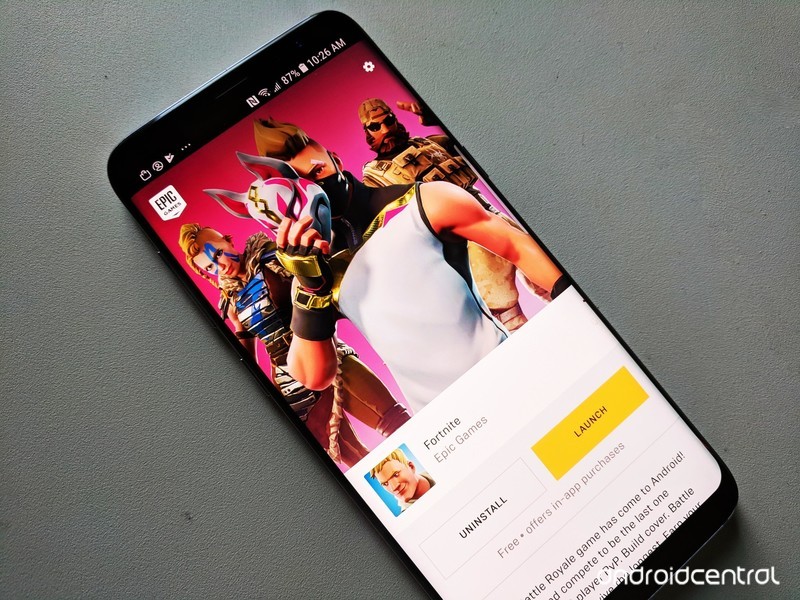
The hottest game of 2018 has finally arrived on Android.
Fortnite has been blowing up lately. Millions of people have become obsessed with the game, both as players and just watching popular Twitch streamers play the game.
Interested to learn more about what the heck Fortnite is all about? Just keep reading.
What’s new with Fortnite?
August 16, 2018 — Update v5.21 addresses Fortnite’s poor performance on most Android phones
On the same day that Fornite started rolling out for non-Samsung Galaxy devices, the Fortnite devs took to Twitter to acknowledge stability issues with the app on devices with 4GB of RAM — which describes almost all Android phones that Fortnite is currently available on.
We have seen reports that some players on 4GB Android devices are encountering an issue causing poor performance. This is due to multiple background applications running–leaving the device without enough memory for Fortnite. We are investigating and working on a fix!
— Fortnite (@FortniteGame) August 14, 2018
That fix arrived with an update to v5.21, which appears to have addressed the abysmal frame rate issues and much of the frustrating performance issues that have plagued Fortnite through its first week on Android.
Other significant additions in the v5.21 update are a couple new game modes: Soaring 50’s and Sniper Shootout. You can check them out for a limited time.
August 13, 2018 — Epic opens the Fortnite Android Beta to a ton of non-Samsung phones/tablets
Fortnite’s short-lived exclusivity on Samsung devices has come to an end. After a few days of being limited to select Galaxy-branded gadgets, Epic’s now expanded its Fortnite Android Beta to a heap of other phones and tablets.
Hey Android owners! We’re excited to open up the #FortniteAndroid Beta to more devices starting… TODAY! Check your email as the first wave of invites have started to go out. Not signed up yet? Head to our website for more info: https://t.co/AvolyySFZ1 pic.twitter.com/DuW5yzpcqd
— Fortnite (@FortniteGame) August 13, 2018
You can find the full list below in the Where can I download the game? section, but some notable additions include the Google Pixel 2/2 XL, OnePlus 6, Razer Phone, and the LG G7.
If you haven’t already received an invite to join the beta, head to Epic’s website, enter your email to sign up, and wait for the invitation to come through.
August 10, 2018 — Google now warns players that Fortnite isn’t available on the Play Store

Epic’s decision to not release Fortnite on the Play Store is a controversial one for a lot of reasons — mainly because it gives crooks a field day with tricking people into downloading fake versions that serve to do nothing but cause trouble.
In an effort to combat this, searching for “Fortnite” on the Play Store now returns a message that reads, “Fortnite Battle Royale by Epic Games, Inc is not available on Google Play.”
It’s a small heads-up to let people know the legit version of Fortnite isn’t anywhere to be found, and hopefully, it’ll be enough to stop people from downloading bad actors.
Users will also see the warning pop up when searching for “Fortnite Battle Royale”, “Fortnite Mobile”, etc.
All the big details
What is Fortnite?
Fortnite is what would happen if you combined two of the most addictive games out there — Minecraft and PUBG.
Fortnite offers a free 100-player Player Vs Player (PvP) Battle Royale game mode. Just like PUBG, you’re dropped onto the large island map and must arm yourself and outlive your competition. But in Fortnite, you always start out armed with a pickaxe which can be used as a melee weapon or to harvest raw supplies for building walls, ramps, and shelters.
It certainly adds extra layers of strategy to the format, creating essentially a perfect storm of addictive gaming action that’s as fun to watch as it is to play. Oh, speaking of storms all the action takes place in the eye of a deadly electrical storm meaning you can’t just hunker down and hide out the whole game. You got to keep moving.
How do you play the game?
Just like PUBG, your goal is to be the last man standing — with up to 100 players involved in each match, that’s no small task.
Each game starts with the players jumping out of the flying “Battle Bus” and parachuting down onto a giant island. Once landed, you must loot nearby buildings for items, guns, and ammo to defend yourself and attack other players.
You also need to keep an eye on the map, as every few minutes the storm closes in on the play area. If you’re caught in the storm, you slowly die so you do not want to forget to regularly check where you are on the map. Eventually, the play constricts to a tiny area for the final showdown between the remaining players — there can only be one winner!
Unlike PUBG, you’re able to carry more than two guns. Instead, you’re limited to the number of weapons and items you can carry at one time. Also, guns are color-coded to denote their rarity — from grey (common) to orange (legendary) — and the rarer the gun, the deadlier it is.
Then there’s the crafting element. Every player starts out with a pickaxe which can be used as a melee weapon or used to break down trees and buildings to harvest the raw resources. You can then use these raw resources to build your own structures, whether it be a defensive wall to provide cover from an advancing enemy, a set of stairs to reach the second floor of a building or your own watchtower to snipe players from across the map. The resources you mine will determine the strength. Steel is stronger than brick, which is stronger than wood.
The latest update to the game for the Season 5 Battle Pass has introduced a slew of new map areas and gameplay features including the All-Terrain Kart (ATK) which let you and your squad move around the map faster than ever before. You can read more about the latest tweaks in the full release notes.
Where can I download the game?
Since Epic Games has decided to release Fortnite for Android outside the confines of the Google Play Store, you’ll need to download the Fortnite Installer APK to get the game on your phone.
Epic struck a deal with Samsung to make Fortnite available for select Samsung devices right now, so if you head to the Galaxy App Store on your Galaxy S9/S9+, Note 8, Galaxy S8/S8+, Galaxy S7/S7 Edge, Tab S3, or Tab S4 and search “Fortnite”, you can download the 4MB installer to get the game on your handset right now.
If you own a non-Samsung phone, you can head to Epic’s website and enter your email to sign up for an invite to the beta. The first round of invitations went out to users on August 13, and according to Epic’s site, Fortnite for Android is compatible with the following:
- Google Pixel 2 / 2 XL
- Google Pixel / Pixel XL
- LG G7
- LG V35
- LG V30 / V30+
- LG G6
- LG V20
- LG G5
- Essential Phone
- OnePlus 6
- OnePlus 5 / 5T
- Razer Phone
- Huawei Mate 10 / Mate 10 Pro
- Huawei Mate RS
- Huawei P20 / P20 Pro
- Huawei Nova 3
- Honor 10
- Honor Play
- Honor V10
- Asus ROG Phone
- Asus Zenfone 4 Pro
- Asus Zenfone 5Z
- Asus ZenFone V
- Xiaomi Blackshark
- Xiaomi Mi 5 / 5S / 5S Plus
- Xiaomi Mi 6 / 6 Plus
- Xioami Mi 8 / 8 Explorer / 8SE
- Xiaomi Mi Mix
- Xiaomi Mi Mix 2
- Xiaomi Mi Mix 2S
- Xiaomi Mi Note 2
- ZTE Axon 7 / 7S
- ZTE Axon M
- ZTE Nubia Z17 / Z17S
- ZTE Nubia Z11
How to download the Fortnite Beta on your phone
Is it free to play?
Fortnite for mobile includes the PvP Battle Royale game that’s free to play across all platforms. The console versions have a paid game mode called Save The World that’s Player vs Environment (PvE). Save The World plays more like Minecraft, where you’re harvesting more resources and stocking up on loot to survive waves of AI enemies in a sort of tower defense-style of gameplay.
The PvE mode will not be available in Fortnite Mobile due to CPU limitations and, frankly, it’s the PvP mode that everyone is crazy for so that’s quite alright with us.
Having said that, there are some reasons to spend money in Fortnite. The best way to spend money is to buy a Battle Pass which gives you daily challenges over the span of a Fortnite Season (typically lasts 10 weeks) which let you unlock a ton of cool outfits, dance emotes, and other goodies to customize your character. You can also spend V-Bucks, the in-game currency, to buy cosmetic items for your player and people sure have been buying stuff. According to this report from Sensor Tower analtyics, Fortnite Mobile players spent more than $1 million during the first 72 hours of its release on iOS. Fortunately, nothing you can buy will give you an actual advantage in the game to prevent people from paying to win. In this case, its a matter of playing to look cool
So, to answer the question, you have the option to spend money on Fortnite if you want a cool looking character, but the game is free to play and you won’t need to pay to win.
Where’s the support for Bluetooth controls?
Epic Games has confirmed that Bluetooth controller support is coming, but as of right now only touchscreen controls are available.
Is it cross-platform?
Epic Games have indicated that you will be able to play Fortnite across all platforms. Your Fortnite profile can be connected to all the platforms you play on so you can add to your stats however you connect to the game.
Don’t be worried about getting mismatched as the one mobile player in a server of PC and console players. If you’re playing solo on mobile, you will only be matched up against other mobile players. If you join a squad with friends playing on another platform, then that squad will be matched against a multi-platform population, essentially making cross-platform play opt-in.
- Learn more about Fortnite Mobile
How does it compare to the PC or console version?
If the iOS version of Fortnite is anything to go by, the Android version will enjoy feature parity with all other platforms, including PS4, PC, Xbox One, and Nintendo Switch. There will be minor differences to account for the form factor, such as (hopefully) support for Bluetooth controls, on-screen controls for those not using a controller, and certainly toned down graphics capability. But if you want to jump in for a quick game of Battle Royale, you won’t need to worry about playing a vastly different game. Fortnite on Android is still Fortnite.
Are you hyped for Fortnite?
We’ll be sure to let you know when the game launches for Android. Until then, you can create your Epic Games account and start playing on one of the other platforms to start getting a handle on the game
Android Gaming

- Best Android games
- Best free Android games
- Best games with no in-app purchases
- Best action games for Android
- Best RPGs for Android
- All the Android gaming news!
LG G7 ThinQ Review – Is LG finally back?
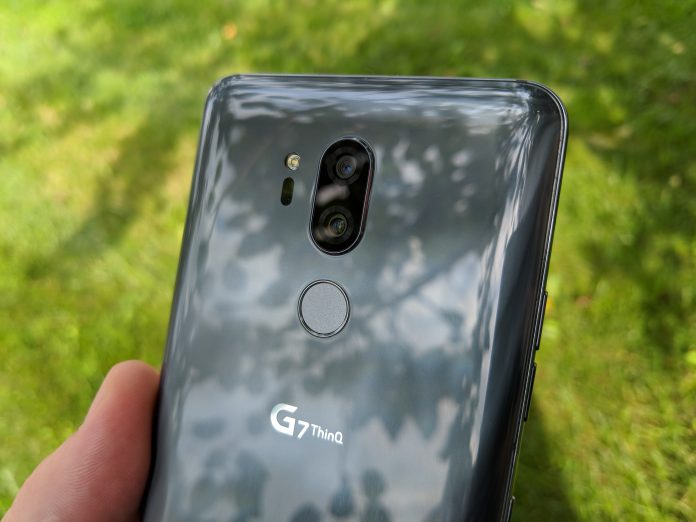

LG has been stuck in a rut for the last few years, similar to other OEM’s not named Samsung. The company has been trying out different tactics, starting with the LG G6 from last year.
In a move that shocked just about everyone, LG released its 2017 flagship, the G6, with 2016 specs, namely the Snapdragon 821 chipset. Sure, this was fine for awhile, but then as we saw the Snapdragon 835 released, the G6 fell to the wayside.
Read more: LG G6 Revisited
Moving into 2018, there were a lot of rumblings about what LG would be doing with its 2018 flagship. Instead of making its debut at MWC 2018, the LG G7 was delayed due to LG’s attempts to change the design and more.
The G7 was officially announced back in May, and actually carries the following name: “LG G7 ThinQ”. I’m not going to continue referencing this phone as the “G7 ThinQ”, so you’ll just see G7.
The device has been out since May, but we really wanted to take our time with the device since this is such an important release for LG. Of course, it’s time to reveal our thoughts on one LG’s latest and greatest.
Design
In order to get started with the design, we’ll have to take another look at the G6. LG moved to glass on the front and rear, while an aluminum frame was sandwiched between.
Previous generations of LG flagships sported plastic builds, which was beneficial in some aspects. However, the introduction of an all-glass design has been a welcome addition for a flagship handset.

The G6 also sported more of a blocky design which was good for some and bad for the others. With the G7, we see some slight improvements, with more curves and less ridges.
The glass seems to melt into the metal frame on both the front and rear of the device. The rear glass is just slightly curved, which provides a very enjoyable experience when using the handset.
Also found on the back is LG’s latest attempt at a dual-camera system. We’ll touch on this setup more later on, but it is orientated at the top, with the LED flash placed to the left and fingerprint scanner mounted below.

Found at the bottom, we have the standard USB-C charging port, flanked by a microphone and bottom-firing speaker. This may seem a bit boring, but there’s a reason behind LG sticking to a single speaker.
Keeping with the frame, the left-side sports the volume rocker and an all-new button. This is dedicated to activating Google Assistant, similar to Samsung’s Bixby button.

On the right side, LG has included a standard power button, removing the button from the fingerprint scanner. Previously, LG integrated the power button into the fingerprint scanner for easy access. It seems that now the company is falling more in line with other OEM’s.
In terms of placement, these are placed quite nicely, save for the occasional accidental press of the Assistant button. Finally, the G7 sports a 3.5mm headphone jack at the top. So there’s no need to worry about losing a dongle in your travels.
Display
All displays are great now. Sure, some are getting brighter or have deeper blacks, but the LG G7’s looks fantastic regardless of those buzzwords.
As for dimensions, we have a 6.1-inch IPS LCD display sporting a resolution of 3,120 x 1,440. With the notch and slim bezels, this equates to an aspect ratio of 19.5:9.
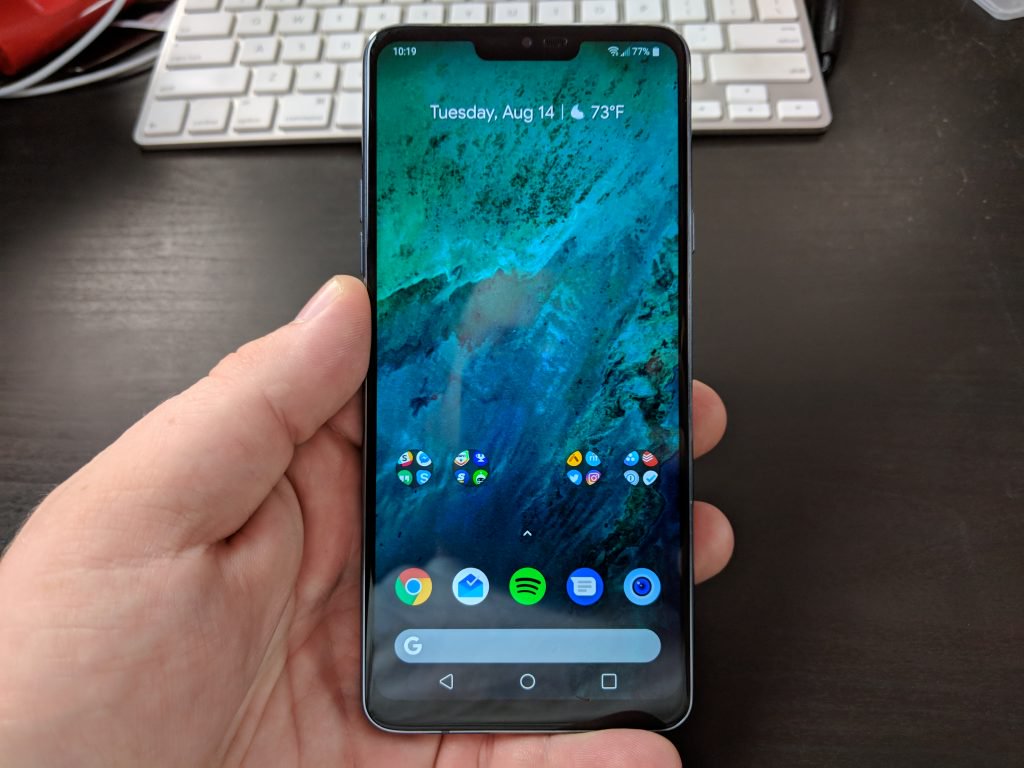
If you are someone who wants more control over what your content looks like, LG has you covered. Hidden in the Display settings, you can adjust the RGB and color temperature sliders, along with using different display modes.
Another neat feature included with the G7 comes in the brightness department. It can be annoying to use your phone in direct sunlight, only to have to squint or shade the display with your hand just to see part of the screen.
This complaint has been removed with the new Super Bright mode. This boosts your G7’s display up to 1,000 nits, making it extremely easy to see what’s going on, regardless of what you are doing.
Notch
You knew it was coming. LG is attempting to keep up with the trends, and it did just that with the LG G7. No, there aren’t six different cameras, but there is a notch on the display.
This notch is a little bit less intrusive than others found on the market, and actually blends into the screen quite nicely. However, if the #notchedlyfe is not your cup of tea, then LG has included a few software tweaks to actually “hide” this.

Instead of just calling it the notch, LG actually calls this portion of the display as the “New Second Screen”. From here, you can use a black wallpaper to hide the notch, or opt for a rainbow theme to have a more unique look.
The second screen is nothing new for LG as a similar feature was released starting with the LG V20. However, the difference is that instead of having two separate displays, the G7’s second screen is a part of the whole display.
Speaker
For years, LG has been integrating a quad DAC system into its flagship smartphones. This brings a higher-quality sound, less distortion, and a better dynamic range.
However, the G7 turns things up to 11 with its new interesting and unique bottom-firing speaker. Instead of opting to use stereo speakers, sound from the G7 will be amplified just by placing it on a flat surface.
You can truly notice the difference when you start the music playing in your hand than placing it down on a table. While this is a neat trick, it’s nothing more than that, and it doesn’t even mimic stereo sound.
It was still a nice touch and something that could be improved upon in future iterations.
Performance
Before jumping too far, let’s take a look at what is powering the G7. LG decided to use the best processor, which is currently the Snapdragon 845 from Qualcomm.
In the RAM and storage department, we have a couple of choices. The standard model comes with 4GB of RAM and 64GB of storage. However, there is a pricier model which sports 6GB of RAM and 128GB of storage.
The storage space should be no concern, as the G7 is equipped with a microSD card slot compatible with a 2TB option. Of course, you can’t exactly get a 2TB SD card just yet, but 400GB should suffice. This is located next to the SIM card within the SIM card slot.
Now that the specs are out of the way, I have to say that the G7 is extremely snappy. I’m not sure if it’s due to “Samsung Experience”, but the G7 feels even faster than my S9 Plus.
Something LG did under the hood has really helped to improve the performance. Playing mobile games, including Fortnite/PUBG is a breeze, and multitasking is everything you could want and more.
The only complaint that I have in the performance department is the battery life. Including a 3,000mAh battery is a real disappointment nowadays, and if you are a power user, be prepared to have a charger handy. The saving grace here comes thanks to the wireless charging, along with compatibility with Qualcomm’s Quick Charge 4.0.
All-in-all, the G7 will definitely swing for the fences, but you may have to take a few hits in the battery department.
Camera
I don’t know if it’s just me or what, but I fell out of love with the wide-angle camera. Including one on the G7 is unique, as others are focused on providing “portrait” images with the secondary rear camera.
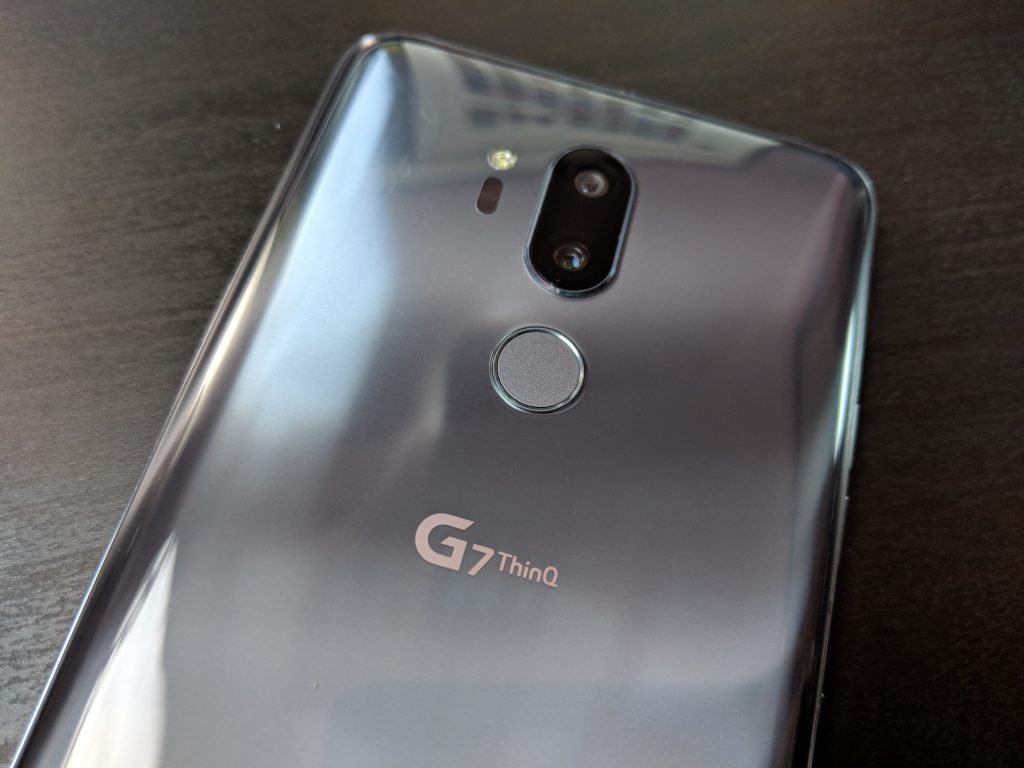
LG is doing the opposite and using a wide-angle 16MP secondary sensor. The lens has a 107-degree viewing range, which is slightly lower than that of previous generations.
Nonetheless, if you are trying to get as many people in the shot as possible, this is the camera for you. LG has really excelled over the last couple of years in the camera department, and this year is no different.
I’m not much of a selfie-taker, but the G7 doesn’t disappoint thanks to the crisp and clear photos. Plus, you won’t have to worry about extra gimmicks to make cartoons of yourself like AR Emoji or Animoji.

Overall, the LG G7 does an extremely good job at being the best camera you can put in your pocket.
Software
For years, LG has wavered between Samsung and Motorola in the software department. It’s not quite a stock Android experience, but there’s not a boatload of extra bloatware onboard.
It seems that the G7 is a fine medium between the two, while still giving enough extra customization options. You don’t have a settings panel for every minute detail, but the main ones can be found with relative ease.
The stock LG launcher is something that I continue to use, even though you can throw the ported Pixel 2 launcher onboard. LG has really improved in the software department, giving the users more control over what they use.
You may have to dive deeper into the settings to add back the app drawer, but it’s still serviceable. Loading up the camera or Google Assistant is a breeze and getting your work done should pose no problems. It still has some overlays from LG, but this software is far from as buggy as others offered.
Final Thoughts
If I am 100% completely honest, it’s difficult to recommend the LG G7 ThinQ. This is in large part to the $750 retail price tag offered through your favorite carriers.
However, the wonderful thing about LG smartphones is the deterioration in pricing. In just a few months, you can already find steep discounts on the G7, even as low as just $550 from eBay.
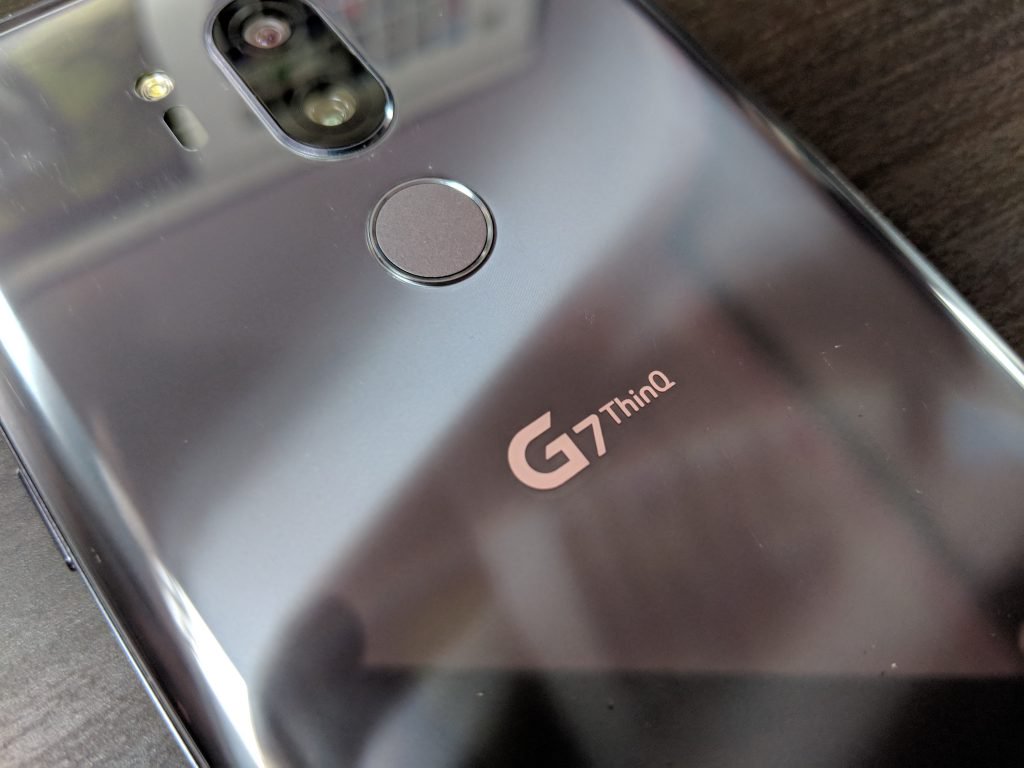
Another hang up that I have is with that wide-angle camera, as I have become accustomed to using a secondary zoom lens. But to each their own, and your experience may differ from mine.
Overall, the G7 ThinQ is still a wonderful device which will power through your work, and allow you to get some gaming done. The notch won’t bother you, especially if you use the software tweaks to hide it.
You just may run into some issues keeping charged up throughout the day.
Don’t Miss
Google Home is awesome; here’s how to make it even better!
Check it out!
How to set up your Lenovo Smart Display
It’s no secret that we love the Lenovo Smart Display (we gush about it in our review). The screened smart speaker with Google Assistant offers some serious competition for the Amazon Echo Show, with a touchscreen for viewing information, watching shows, making video calls, and much more. But before you get to do all that stuff, first you have to link your Smart Display to all the right services. Here’s what you have to do.
Step 1: Download and sign in on the Google Home App (if necessary)
The Smart Display is designed to work with the Google Home app. If you already have the Google Home app downloaded for another device, you don’t need to worry about this step. But if you don’t have it, then you need get the Google Home app and sign into it with your Google Account login before you begin. Don’t worry, you don’t need to have a Chromecast or Google Home device for this to work, the Home app will naturally pair with your Smart Display. The Home App works on tablets, phones or computers.
Step 2: Turn on the Smart Display
Bill Roberson/Digital Trends
With your Google Home ready to go, unbox your Lenovo Smart Display, plug it in, and turn it on. The opening screen will instruct you back to the Google Home app, and the device and your app will instruct you from there.
Step 3: Pair the Display and Home app
You should now see a new notification that says “1 device found” and a prompt to “Set Up.” Select the prompt to begin. You may need to wait a couple of minutes for the notification to appear.
Your Google Home app will now display a short code with the message “See the code?” while your Smart Display will go to a Setup screen and show it’s own four-digit code. Check the codes on both of your devices to make sure that they match. This helps stop Home from accidentally pairing with the wrong device or a neighbor’s Smart Display. In the bottom right of the Google Home app, you’ll see a Yes option. Select the Yes to pair the two devices and continue.
Step 4: Answer Google’s many questions
Now Google Home will ask you a number of questions about Lenovo Smart Display so you can create basic settings for the device. These steps are simple enough, but very important for configuring the Smart Display, so we’re going to go over them one at a time.
- Choose whether or not to “Automatically share device stats and crash reports with Google.” Make your choice based on privacy decisions – this will have no noticeable effect on your Smart Display performance.
- Choose what type of room the Smart Display will be in. Google Home will have you pick from options such as Bedroom, Dining room, Family room, and so on. This helps identify the Display more easily if you end up adding other devices to the Home app, so it’s important to be accurate.
- Pick out a “unique name” for your Smart Display. Name it something obvious so that it’s clear exactly what the name is referring to. This name will be used for internal Home app management.
- Connect your Wi-Fi network. Obviously your Smart Display needs to hop online, so the app will have you choose your Wi-Fi network and, if necessary, input your password.
- Read the privacy terms. Google will present you with information about how it (and Google’s partners) will treat your data, and the data from people you communicate with using the Smart Display. Give it a read, and then choose Next.
Step 5: Customize and add services
Now Google will take you through yet another list of questions and forms. These, however, are more directed at how Google Assistant performs and what tasks the Smart Display can carry out. This part is a bit more involved, so we’ll walk you through the details.
- Choose whether or not to use Voice Match. Voice Match is a service that teaches Assistant to recognize individual voices. It’s most useful if you have multiple people in the house who will be using the Smart Display, so Assistant can tell the difference between them. If it’s just you using the Display, you don’t really need to worry about it. If you choose I Agree, you will have a further option to display personal results (calendars, recommendations, contacts, etc.) when Google Assistant recognizes a particular voice. This is generally a useful feature, but you don’t have to enable it.
- Choose between a couple of voices for your Smart Display. You can play samples of each voice to help you decide which to select. Hit Next when you are done.
- Fill out your address. Your Smart Display is particularly handy for finding traffic and weather information, but first Google Assistant needs to know where you live.
- The Smart Display is a great way to casually catch up on videos or movies. However, you will need to link the right accounts first. Google will ask you to “Add your video services” with options like HBO, Starz, and so on. You will need the account logins and passwords for these services, so have them ready if you want to stream video.
- Input your phone number and verify. This will link your phone number to the Smart Display for video calls. Google will send your phone a verification code to complete the setup process, so have your phone handy if you’re on a different device.
- Pick out some art. When the Smart Display is chilling in “Ambient” mode, it can display some random pretty pictures. You can make those pictures less random by choosing types of photos/art from the Art Gallery as prompted, or choose from your own collection.
- Add credit card information. You can do this if you want to purchase via the Smart Display and voice commands.
- Link music services. You can link your Spotify, Google Play, Pandora, and other music accounts at this point. This is useful if you listen to a lot of music on these services and want your Smart Display to play them on demand.
Step 6: Start using your new Smart Display
Bill Roberson/Digital Trends
You should be finished now. When done, your Smart Display should switch to an intro scene, then a general info screen. Test out Google Assistant by saying “Hey, Google” or “Ok, Google” and asking a question or playing a movie or song, just to make sure everything is working as intended. You may also want to check out some of the other ways you can personalize Google Assistant.
Editors’ Recommendations
- A 10-step guide on Google Home setup for your new device
- Here’s how to unlock your phone automatically with Android Smart Lock
- Google Assistant: Everything you need to know
- Lenovo Smart Display review
- Apple HomePod tips and tricks to get you started
Regular Wi-Fi can accurately detect bombs, chemicals, and weapons in bags
For the last couple of decades, security measures in places like airports, schools, stadiums, and other public venues have continuously ramped up. X-ray machines, surveillance cameras, and bag searches have all become commonplace, but still concealed weapons, bombs, and explosive can slip through the cracks — sometimes with tragically devastating effect.
Looking for a new way to help solve this problem, researchers from Rutgers University, Indiana University – Purdue University Indianapolis, and Binghamton University have found a fresh use for a technology that is ubiquitous in 2018: Ordinary Wi-Fi. Using this radio wave-based connectivity tool, they developed a new type of security screening system which is both low-cost and, potentially, life-saving. It works by detecting suspicious objects by leveraging the fine-grained channel state information (CSI) from off-the-shelf Wi-Fi, without needing to invade the user’s privacy by physically rifling through bags.
“According to our research findings, most dangerous objects are metal or liquid, which create significant interference to wireless signals, while non-dangerous objects and baggage are usually made of fiber, plastics or paper which allows wireless signals to pass through easily,” Yingying Chen, a professor of Electrical and Computer Engineering at Rutgers, told Digital Trends. “Our idea is to capture the various wireless interference caused by the materials and shapes of objects by inspecting the rich information of CSI complex — including both the amplitude and phase information of wireless signals.”
By examining the differences caused by absorption, refraction, and reflection when Wi-Fi signals transmit through or bypass certain objects, it’s possible to get a detailed idea of the object in question — even down to liquid volume estimation for chemicals. The result is an effective first line of defense for detecting hidden suspicious objects, without having to resort to major security checkpoints.
In a proof-of-concept experiment, the researchers tested 15 types of objects in three categories, including metal, liquid and non-dangerous, carried in six types of bags. During repeated testing over a period of six months, the system successfully detected more than 95 percent of suspicious objects in different types of bags and identified 90 percent of dangerous material types.
While anything less than 100 percent accuracy means that more still needs to be done, Chen said that this is something the team is currently working toward.
“We are still working on different algorithms to improve the accuracy in identifying in-baggage objects, and continue to increase the resolution on metal object imaging and liquid volume estimation under complex scenarios,” she continued. “We hope the system could be commercialized in a couple of years.”
A research paper describing the work was recently awarded “best paper” at the 2018 IEEE Conference on Communications and Network Security.
Editors’ Recommendations
- This algorithm identifies the key ingredients to winning a debate
- A new way to ‘freeze’ water could help transform organ preservation
- This robot arm could soon recharge your electric car, no driver effort required
- Like a vice principal in the sky, this A.I. spots fights before they happen
- 6 amazing examples of game-changing technology for the blind community
Australian student hacks into Apple, steals 90GB of data because he’s a ‘fan’
A 16-year-old student attending a private school in Melbourne, Australia, broke into Apple’s network multiple times and downloaded 90GB of “secure” data for an entire year. He hacked into Apple’s network from his suburban home using tools and instructions stored on his PC in a folder named “hacky hack hack,” The Age reports. He accessed Apple customer accounts as well.
So how did this teen infiltrate Apple’s networks for an entire year without getting caught? The details are scarce for obvious reasons, but reports mention the student using virtual private networking (VPN) tools.
If you’re not familiar with VPNs, they essentially create a secure “tunnel” across the internet, mimicking the connection of a local private network. Corporations typically use VPNs to connect to a central network from remote locations, as VPNs encrypt all transferred data and are typically impenetrable by eavesdropping hackers.
VPNs can be used for personal use as well. They not only hide your true IP address, but enable you to choose a specific country where your fake IP address originates. This allows you to access content not available in your region and bypass blocked websites. In this case, the student supposedly used VPN tools to hide his identity, IP address, and physical location.
Throughout the year, he accessed Apple’s internal systems and retrieved highly secure “authorized keys” for logging into customer accounts, relaying his successes through Whatsapp. His Apple-slicing feats supposedly made him well-known in the international hacking community to the point that the details of the case must be refrained. Apple even admitted it was “very sensitive about publicity.”
Once Apple eventually figured out what was going on, the company blocked his access and informed the FBI. Due to the student’s physical location, the FBI informed the Australian Federal Police (AFP), which executed a search warrant in 2017.
According to the prosecutor, officials raided the home and seized two Apple laptops that contained the logged serial numbers used to access Apple’s internal systems and customer accounts. They also confiscated a hard drive and a mobile phone.
What likely happened is that Apple paired the logged serial numbers to the ones listed on the student’s legitimate Apple account and then notified the FBI with its allegations. What’s strange about this case is that the student supposedly hacked into Apple because he was a huge “fan” of the company. He even admitted to the police that working for Apple was his “dream job.”
That said, sneaking into a company’s network, downloading sensitive data, and accessing customer accounts is not a good way to impress a potential boss. The Children’s Court listened to his case on Thursday, August 16, as the student pleaded guilty to the criminal charges. Due to the “complexity” of the case, sentencing won’t take place until next month.
Editors’ Recommendations
- ‘Solo: A Star Wars Story’: News, trailers, and everything we know so far
- Simon Cowell says no longer using a smartphone is a ‘very strange experience’
- Watch as the U.K.’s defense secretary gets ‘heckled’ by Siri during a speech
- iOS 12’s best new features
- Live updates: How to watch Apple’s WWDC 2018 keynote
An ultra-light aerogel made using waste beer could help us live on Mars
Any project which starts with beer and ends with colonizing Mars has our attention. At its highest level, that describes new research coming out of the University of Colorado Boulder — where scientists have developed a new super-insulating gel, created from beer waste, which could one day prove useful for building greenhouse-like habitats for Mars colonists.
“The Smalyukh Research Group at the University of Colorado Boulder has developed a super-insulating, ultra-light, and ultra-transparent aerogel film,” Ivan Smalyukh, a professor in the Department of Physics, told Digital Trends. “Aerogels are extremely porous solid objects that are made mostly from air, and are about 100 times less dense than glass panes. Our aerogel is made from nanocellulose, which is grown by bacteria that eat waste beer wort, a waste byproduct of the beer industry.”
The cellulose enables the researchers’ aerogel to be very flexible and durable. It can be produced very cheaply, and means the team can precisely control the individual size of particles which make up its solid structure. This lets the material allow light to pass through it without significant scattering.
“Our immediate real world use-case is to use our aerogel product to dramatically increase the efficiency of windows in homes and commercial buildings,” Andrew Hess, another researcher on the project, told us. “Replacing inefficient windows is a costly and difficult endeavor, especially for buildings with structural or historical constraints. We aim to commercialize a peel-and-stick retrofitting aerogel film for windows which will effectively turn single-pane into double-pane windows — all at an affordable cost well below that of replacing the windows.”
However, the team also has more far-flung ambitions for their research. The project was recently named one of the winners of NASA’s 2018 iTech competition, which aims to reward technologies that could one day be used to help people travel to space.
“Extraterrestrial habitats will face extreme temperature fluctuations which must be eliminated inside the habitat,” Smalyukh said. “We see our aerogel product as a prime way to accomplish this, additionally allowing for the harvesting and storage of solar energy inside of habitats because these aerogels are transparent to sunlight. Because our aerogel can be made from waste, space colonizers wouldn’t necessarily have to bring the aerogel with them from Earth, which would be expensive. Instead, they could grow, from waste, [and] with the help of bacteria, aerogels to be used in habitats.”
At present, the researchers have demonstrated the aerogel at a proof-of-concept level; creating 6.5-inch aerogels with proven transparency, durability, and insulating characteristics. Next, they plan to come up with a means to scale manufacturing in a way that will make the technology affordable to all.
A paper describing the research was recently published in the journal Nano Energy.
Editors’ Recommendations
- How to use Split View on a Mac
- French chemists have an ingenious new use for rotten, discarded wine grapes
- Microsoft uses fish cams to monitor undersea Project Natick data center
- Why learn to use gadgets when they can just learn to help us? Exactly, says LG
- Ohio wants to use camera drones to monitor highway traffic
The best cases for the Moto X4

Own a Moto X4? These are the cases that deserve your dollars.
The Moto X4 is a big departure from past Moto X devices, but that doesn’t mean it’s a bad phone. In fact, it’s one of the best mid-range Android handsets on the market right now.
It’s the first entry in the Moto X series to feature a glass back, and while it looks downright gorgeous, this also makes the X4 rather fragile and easy to break. To ensure that doesn’t happen and your phone continues to look as good as can, these are the cases we recommend checking out.
- Dretal Full-Body Protective
- Spigen Liquid Crystal
- Mustaner Dual Layer
- Encased Slim Fit Holster Shell Combo
- Swoders Flower Case
- Anccer Colorful Series
- KuGi Flexible Soft TPU
- KwMobile Wallet
- Cimo Heavy Duty
Dretal Full-Body Protective
Budget Option

If you prefer something more traditional, cheaper, and with increased protection, Dretal’s Full-Body Protective case is certainly worth a look. The carbon fiber and anti-stretch TPU rubber design encase the Moto X4 is a durable shell, and the multi-texture design on the back adds a nice bit of flair.
There are a multitude of colors to choose from, including navy, black, gray, red, and mint, and all of Dretal’s products come with a generous 30-day warranty. For under $8, it’s hard to complain about this one.
See at Amazon
Spigen Liquid Crystal
Show it Off

The Spigen Liquid Crystal is a clear case for the Moto X4, and it does an excellent job of showing the sleek look of the X4’s back. The case is made out of a durable and anti-slip TPU material, and in addition to keeping your phone nice and safe, it still manages to remain light as a feather.
Spigen uses a dot pattern for its case, and unlike a lot of cheaper clear options, this helps to drastically cut down on the smudges it picks up. For just under $13, this isn’t a bad choice at all.
See at Amazon
Mustaner Dual Layer
Two-layer Protection

Mustaner’s case features a two-layer design – including a soft TPU base layer and hard shell frame that goes on top of it. This combo allows for maximum safety no matter what happens to your Moto X4, and the built-in kickstand on the back is a really nice touch.
You’ve got six different colors to choose from, and all of this comes in at under $8.
See at Amazon
Encased Slim Fit Holster Shell Combo
Rugged Option

This case is made out of a reinforced polycarbonate frame, and as expected, offers ample protection against any accidental spills. You’ll find a subtle texture on the back for increased grip, and along with a kickstand that can prop up your phone vertically or horizontally, Encased also includes a holster that your Moto X4 can slide into so you can easily attach it to your belt. For less than $14, that’s a steal.
See at Amazon
Swoders Flower Case
Slim Option

A rubberized polycarbonate back combined with TPU bumper shields allows for maximum protection against any accidental drops, and the slim design makes it easy to carry with you no matter where you go.
Better yet, Swoders $8 case has four patterns to choose from (three of which are currently available) of varying flower designs. This helps the Moto X4 stick out from the rest of glass-backed phones on the market, and the end result is actually quite nice.
See at Amazon
Anccer Colorful Series
Most Stylish

The above two cases are great for buyers that prefer function over form, but if you like things the other way around, one of your best bets lies with the Anccer Colorful Series. This is the thinnest case on the list, measuring in at just 0.3mm, but even with the thin design, Anccer’s case still manages to protect against drops, bumps, and shocks.
Available colors include black, blue, red, rose gold, gold, and silver, and these are available in either gravel or smooth finishes. This is a great case for adding some color to the Moto X4 while protecting it at the same time, and you can do so for about $11.
See at Amazon
KuGi Flexible Soft TPU
Non-Slip

The TPU material that’s present on this KuGi case does a fantastic job at housing your X4 in a secure home from just about any element imaginable. Non-slip sides allow you to always have a confident hold on your device, bumper guards protect against unwanted shock during a drop, and the faux-leather material on the back looks and feels like a million bucks.
KuGi sells its case in navy, black, and gray, and you’ll pay just under $8 before applying an extra 8% off.
See at Amazon
KwMobile Wallet
Best Wallet

Available in black, black/brown, and grey/black, for about $11, the fabric design of the case is great for both looking and touching, and the plastic shell the X4 sits in offers ample protection against any mishaps. The front of the case is held together by magnets, and you have access to a three-card compartment for carrying around your most important plastic.
See at Amazon
Cimo Heavy Duty
Heavy Duty

Cimo uses a lightweight design here, and this allows your Moto X4 to stay safe and secure without adding much bulk. The two-layer design offers more than enough protection against most all drops, raised bezels help to protect the X4’s screen, and the grippy back is something we always love to see.
You’ll pay just under $8 for this case, and it comes in armor black, gray, purple, and red color options.
See at Amazon
What one do you choose?
Which of the above cases meets your fancy? Let us know down in the comments below and if there’s another awesome pick we may have missed.
Moto X4 review: A mid-range phone done right
Updated August 2018: Trimmed down the descriptions of the cases so it’s easier to figure out which one you should buy!
AmazonBasics gaming headset review: Mucho boom for your buck

This gaming headset from Amazon provides great entry-level audio for cheap.
Editor’s note: We reviewed this Amazon gaming headset on an Xbox One, but it’s also compatible with PlayStation 4. However, PlayStation users’ experiences may vary slightly due to the console difference.
For gaming accessories, the growing “AmazonBasics” line is among the best when on a budget. Backed by one of the world’s largest retailers, the range strips products down to basics, while still maintaining a benchmark for quality and features. Amazon generally delivers on this claim, through its controllers, chargers, and more for the platform.
After getting hands-on with Amazon’s take on gaming headsets, it provides the familiar blend of strong features at a low price.
Audio from Amazon
AmazonBasics gaming headset
$17.99

Bottom line: Great all-around audio, despite some cut corners.
Pros:
- Great price point.
- Comfortable wear.
- Flexible, clear microphone.
- Additional premium touches are welcomed.
Cons:
- Main headset frame feels cheap.
- Better audio can be found elsewhere.
See at Amazon

What you’ll love about the AmazonBasics gaming headset
Like much of the AmazonBasics range, this headset’s low price is enticing, especially for those on a tight budget. While cutting commodities of some premium alternatives, it often nails the basics, while guaranteeing a high standard of build quality. This headset fulfills this proposition, stripping down to essentials for the average casual gamer. With an Amazon one-year warranty, this is a budget accessory you can buy with confidence.
The main body of the AmazonBasics gaming headset is comprised of a robust yet flexible plastic, featuring an adjustable headband and articulated on-ear speakers. Both units are padded with artificial leather cushions, with a matching padded headband overhead. This makes for a lightweight fit that remains comfortable over long sessions, although the cushions could sit firmer against the ear. This unit also features green highlights across its frame.

Dual stereo speakers output audio expected at this price, suitable for basic listening, but lacking the nuance of higher-end alternatives. You may miss the punch of top-tier audio, but across most games, movies, and music, it covers the average Xbox One owner. This is paired with a fully-retractable microphone arm bound to a fixed 140-degree hinge, which holds up for general voice chat. And when not in use, the microphone remains firmly tucked into the headset body.
The inline headset controls are welcomed, which allow for quick volume adjustment and microphone muting.

What you’ll dislike about the AmazonBasics gaming headset
Although its lightweight frame makes for comfortable wear, the overall presentation of this headset packs sizeable room for improvement. The near all-plastic finish feels cheap in-hand (and on-head) which detracts from some otherwise smart design choices. Comparably priced headsets provide a much more polished feel at a similar price.
You’ll also need to consider what you want from a headset, with alternatives better suited for certain gamers. These cans are well suited for immersive games or blockbuster movies, however, footsteps and directional audio in shooters is less perceivable.

Should you buy the AmazonBasics gaming headset? Yes
For the casual gamer, the AmazonBasics headset could fill a variety of boxes. It’s a comfortable product that delivers on the essentials, while still allowing for a low price. Amazon never fails to deliver when catering to this crowd, sitting among the best low-end headsets to date. Provided its shortcomings aren’t a deal breaker, there’s a lot to love about this product.
4
out of 5
While the AmazonBasics gaming headset retails for $17.99, the accessory is currently out of stock in the U.S. For those in the UK, the headset is now available for £21.26 directly from Amazon UK.
See at Amazon
What are Fortnite V-Bucks and what’s the best way to spend them?

The gear you buy in Fortnite is all a matter of status.
To say that Fortnite is a big deal in the gaming industry right now is a bit of an understatement. It’s now available across all platforms and, as reported by Forbes, regularly rakes in over $100 million on a monthly basis.
That’s a ton of money being pumped into a video game which must beg the question: what’s the smartest way to spend money in Fortnite?
How much is a V-Buck?

Before we talk about getting the best value out of your V-Buck, we should first break down the value attached to the currency itself. The smallest amount you can buy is 1,000 V-Bucks for $10, so that sets the base value of a single V-Buck around one cent, although you won’t find anything in the Fortnite store for less than 500 V-Bucks. That makes the base in-app purchase around $5. Of course, Canadians and anyone living outside the U.S. will end up paying more based on the currency exchange rate.
Here are the pricing levels for buying V-Bucks via in-app in USD:
- 1,000 V-Bucks for $9.99
- 2,500 (+300 Bonus) V-Bucks for $24.99
- 6,000 (+1,500 Bonus) V-Bucks for $59.99
- 10,000 (+3,500 Bonus) V-Bucks for $99.99
It’s worth noting that the V-Bucks you buy on a specific platform stay with that platform, so if you’ve bought 1,000 V-Bucks on Xbox One, you won’t see them in Fortnite Mobile and vice versa. However, once you’ve spent your V-Bucks on items you’ll be able to access them across all the platforms you play. Also, because Epic Games didn’t launch Fortnite on the Google Play Store, you’ll need to authorize payment through another means and can’t use any Google Play credit towards your V-Bucks purchase.
What should you buy with your V-Bucks?
Battle Pass

To keep Fortnite free-to-play, Epic Games have implemented Battle Pass seasons. Each season sees players completing objectives to rank up through tiers and unlock in-game rewards along the way. Players are given a free Battle Pass with its own dedicated objectives and rewards, but the premium Battle Pass, available for 950 V-Bucks, lets you unlock up to 100 in-game rewards throughout the season. By comparison, the free Battle Pass for Season 5 (the current season) is just 16, and they’ve been spaced out over 62 tiers.
Epic Games says that you’ll unlock 25,000 V-Bucks worth of content with a premium Battle Pass, but in case you’re curious what that would actually look like, I’ll break it all down using Season 5 as an example.
If you were to complete all tiers of the Season 5 Battle Pass, which Epic Games says typically takes 75 to 150 hours of gameplay to complete you’d get:
Consumables:
- 1,500 in bonus V-Bucks (15 x 100 V-Bucks).
- 19 XP boosts.
Cosmetic upgrades:
- 7 character skins — two of which are gifted to you to start.
- 2 harvesting tools.
- 2 back blings.
- 4 gliders.
- 5 free-fall contrails.
- 5 emote dance moves.
- 6 toy balls.
Basically useless:
- 14 battle icons.
- 12 emoticons.
- 15 spray designs.
- 12 loading screen images.
Right off the hop, if you’re able to make it through 90% of the season tiers you’ll be able to win back enough V-Bucks to cover the cost of the next season’s Battle Pass — pretty good motivation alone. You’ll also get the hottest skins and features of the season in the form of outfits, harvesting tools, gliders, emote dance moves, and other goodies.
But as we go through the list you’ll notice that out of the 116 total rewards offered, the majority fall under the category I call “basically useless”; these include profile icons, in-game emoticons and tags, and literally new graphics to stare at during loading screens — absolute filler. These represent roughly 50 of the tiers you’re tasked with completing with your premium Battle Pass, so those cosmetic upgrades better be worth it.
If you’d prefer to pay a bit more to avoid grinding through the Battle Pass tiers, you’re also able to buy 10 tiers for 900 V-Bucks. Keep in mind that your premium Battle Pass along with all your progress resets at the end of each season, so you’ll want to buy your Battle Pass earlier rather than later so you have more time to work your way up through the tiers.
Cosmetic upgrades
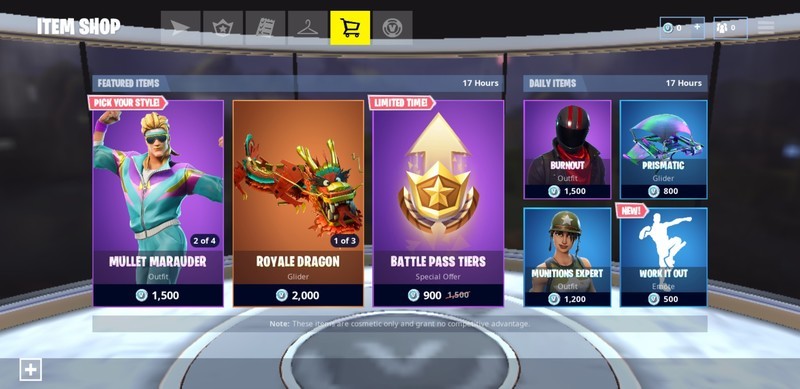
On top of the stuff you can unlock throughout the Battle Pass season, you’re also able to directly buy cosmetic upgrades from the in-game shop. The catch is that only a limited number of items are available at one time, and the items available rotate out every day. I found a great resource for tracking all the Fortnite cosmetics that lets you scope out what’s currently available, wh
There are four categories available on your character to upgrade:
-
Outfits: These affect the overall look of your character and is the most significant cosmetic upgrade. There are a ton of outfits available and while some are much bigger it’s worth noting that a bigger outfit does not necessarily increase your character’s hitbox. It’s also worth considering that the flashier the outfit the more you will stand out in the field, so that’s something to keep in mind if you prefer stealth play. Outfits start as low as 800 V-Bucks for Uncommon outfits and up to 2,000 V-Bucks for Legendary outfits.
-
Harvesting Tool: By default, Fortnite gives you a generic pickaxe for busting down walls and harvesting building supplies but you can swap out your trusty pickaxe with a wide range of crazy skins for your trusty tool. These have no effect on your harvesting ability but can look pretty fun. There’s also typically a corresponding harvesting tool for each outfit if you’re a stickler for continuity. Harvester tools can be bought for as low as 500 V-Bucks and as high as 2,000 V-Bucks.
-
Glider: Upgrading your glider gives you no speed advantages over your opponents, although it can sure look intimidating to see an upgraded glider floating around your landing area at the start of the game. Uncommon Gliders start at 500 V-Bucks, while a Legendary Glider costs 1,500 V-Bucks
-
Emotes: There’s nothing sweeter than busting out a quick dance move after you’ve knocked out an opponent, knowing that the other player has a front row seat for your antics on the kill cam. There are over 80 different Emotes to be unlocked or bought and they start as low as 200 V-Bucks.
What’s the best value?
Buying cosmetic upgrades in a free-to-play video game such as Fortnite is akin to donating to the developer. You get a modest reward that helps your character stand out while investing in the longevity and profitability of the game itself. It’s also 100% optional and can get really expensive if you get hooked on upgrading your character on a regular basis.
Let’s take a look at how much someone could hypothetically spend to fully kit out their Fortnite character, based on the average price of items available in the item shop:
New Outfit: 1,500 V-Bucks
New Harvesting Tool: 800 V-Bucks
New Glider: 800 V-Bucks
New Emote: 500 V-Bucks
Total spent: 3,600 V-Bucks, or $35 in in-app purchases
That’s a sizeable chunk of change for some digital apparel. If you’re a parent with kids begging you to buy them V-Bucks, you ought to know just how easy it is to blow through that $25 in-app purchase in just a few quick taps.
Should you buy V-Bucks?
In my opinion, you should only invest in V-Bucks if you’re a diehard Fortnite player and you play across multiple platforms. A Battle Pass upgrade is a great place to start, as a thriftier gamer with just a Battle Pass upgrade has the potential to unlock a good collection of gear through just one season of play. The $25 pack that gives you 2,800 V-Bucks is probably your best value, as you’ll be able to afford a premium Battle Pass for the upcoming season while maintaining a V-Bucks balance in case something in the item shop really catches your eye.
Android Gaming

- Best Android games
- Best free Android games
- Best games with no in-app purchases
- Best action games for Android
- Best RPGs for Android
- All the Android gaming news!
Philips Hue kits, USB-C adapters, and more are discounted today
Whether you’re looking for new tech gear or household items, we’ve got you covered.
We found plenty of great deals today that include big discounts on a Philips Hue smart lighting kit, a USB-C 5-in-1 adapter, PNY’s portable SSDs, and more!
View the rest of the deals
If you want to know about the deals as soon as they are happening, you’ll want to follow Thrifter on Twitter, and sign up for the newsletter, because missing out on a great deal stinks!
 AIVAnet