


Omega Centauri hosts 10 million stars and probably not an ounce of life
The search for life in outer space is like the holy grail of astronomy. But with some 170 billion galaxies in the observable universe, where do we even begin?
How about with the bright, Christmas lights-like stars of the densely packed globular cluster Omega Centauri? Surely something so spectacular could harbor life.
Not so. According to a paper published this month in The Astrophysical Journal, scientists can safely cross it off their list.
Omega Centauri is a sight to behold. It contains some 10 million stars, making it the largest globular cluster in the Milky Way. And at about 16,000 light years away, the globular cluster is visible to the naked eye and a prime object of observation for professional astronomers. So it makes sense that scientists would home in on Omega Centauri in their hunt for extraterrestrial life.
“In the search for planets around other stars, we are investigating a wide range of stellar environments that are very different from our own system,” Stephen Kane, a professor of planetary astrophysics at the University of California, Riverside, and study lead, told Digital Trends. “In particular, we are looking for planets that lie in the habitable zone where water on the surface of the planet could be in a liquid state, something which is necessary for life on Earth. The results of our study show that it is highly unlikely that the stars in the largest globular cluster to the Milky Way, Omega Centauri, can host a planet in the habitable zone.”
Kane and his colleagues looked at roughly 500,000 stars whose age and temperature could potentially support planets with life. They measured the temperature and brightness using data from the Hubble Space Telescope and calculated how often these neighboring stars would pass directly within each other’s habitable zones.
“The results of our study show that, on average, the stars of the cluster will pass directly through the habitable zone of other stars around once every million years,” Kane said. “This means that for most of the stars, it will be impossible for a planet to remain in the habitable zone of its host star, thus removing the planet from a location where it could maintain a long period of energy and climate stability.”
Kane said it could be possible for Omega Centauri to contain a group of small planetary systems near its core (much like TRAPPIST-1, a promising solar system for harboring life) but that their calculations made the existence of such systems unlikely.
Moving forward, Kane and his colleagues will collect more Hubble data about our neighboring clusters to determine stars’ habitable zones and how often they cross each other’s paths.
Editors’ Recommendations
- Get your Sagan on with 60 awe-inspiring photos of the final frontier
- Astronomers make huge exoplanet discovery haul in record time
- Mars is as near to Earth as it’s been in 15 years, so Hubble took some photos
- Astronomers finally confirm general relativity around a supermassive black hole
- Scientists pinpoint exoplanets where life could bloom like here on Earth
Xiaomi Mi A2 vs. ASUS ZenFone Max Pro M1: Divergence
You can choose between a great camera or outstanding battery life, but not both.

Earlier this year, ASUS turned the tables on Xiaomi with the ZenFone Max Pro M1, a budget phone with a huge battery and enticing hardware that went toe-to-toe with the Redmi Note 5 Pro and came out ahead in a few areas. ASUS not only managed to undercut the Redmi Note 5 Pro but was also able to make enough units available to meet the deamnd for the M1, which Xiaomi still struggles with today.
We’ve already seen how the ZenFome Max Pro M1 fares next to the Redmi Note 5 Pro, but it makes sense to pit the device against Xiaomi’s latest phone as both devices are running pure Android. The Mi A2 falls under the purview of Android One, whereas ASUS is offering a “stock” Android ROM with a few ZenUI underpinnings.
For its part, the Mi A2 has plenty going for it. The device is powered by the Snapdragon 660, which is more powerful when compared to the Snapdragon 636 in the M1, and has class-leading front and rear cameras. With the Mi A2 set to go on sale later this week in India for ₹16,999 ($250) and the ZenFone Max Pro M1 available for ₹12,999 ($185), it’s time to see how the M1 holds up next to Xiaomi’s latest Android One phone.
Xiaomi Mi A2 vs. ZenFone Max Pro M1: Specs

| Operating System | Android 8.1 OreoAndroid One | Android 8.1 Oreo |
| Display | 5.99-inch 18:9 FHD+(2160×1080) IPS LCD panelGorilla Glass 5 | 5.99-inch 18:9 FHD+(2160×1080) IPS LCD panel |
| SoC | Octa-core Qualcomm Snapdragon 6604×2.2GHz Kryo 260 + 4×1.8GHz Kryo 26014nm | Octa-core Qualcomm Snapdragon 636Eight Kryo 260 cores up to 1.8GHz 14nm |
| GPU | Adreno 512 | Adreno 509 |
| RAM | 4GB/6GB | 3GB/4GB/6GB |
| Storage | 32GB/64GB/128GB | 32GB/64GB/64GB |
| Expandable | No | Yes, dedicated up to 2TB |
| Rear camera | 12MP (f/1.75, 1.25um) + 20MP (f/1.75, 1.0um)PDAF, LED flash, 4K video recording | 13MP Omnivision 16880 f/2.2 + 5MP f/2.4 PDAF, LED flash4K video recording |
| Front camera | 20MP (f/1.75, 1.0um)AI portrait modeLED Selfie lightBeautify 4.0 | 8MP f/2.01080p video recording |
| Connectivity | LTE with VoLTEWi-Fi 802.11 ac, Bluetooth 5.0GPS, GLONASS | LTE with dual VoLTEWi-Fi 802.11 b/g/n, Bluetooth 4.2 with AptXGPS, GLONASSMicro-USB, 3.5mm audio jack |
| Battery | 3000mAh batteryQuick Charge 4.0 (India)QC3.0 (ROW)USB-C | 5000mAh batteryFast charging (5V/2A) |
| Fingerprint | Rear fingerprint | Rear fingerprint |
| Dimensions | 158.7 x 75.4 x 7.3mm | 159 x 76 x 8.46mm |
| Weight | 166g | 180g |
| Colors | Black, Rose Gold, Gold, Blue | Meteor Silver, Deepsea Black |
Where they’re equal
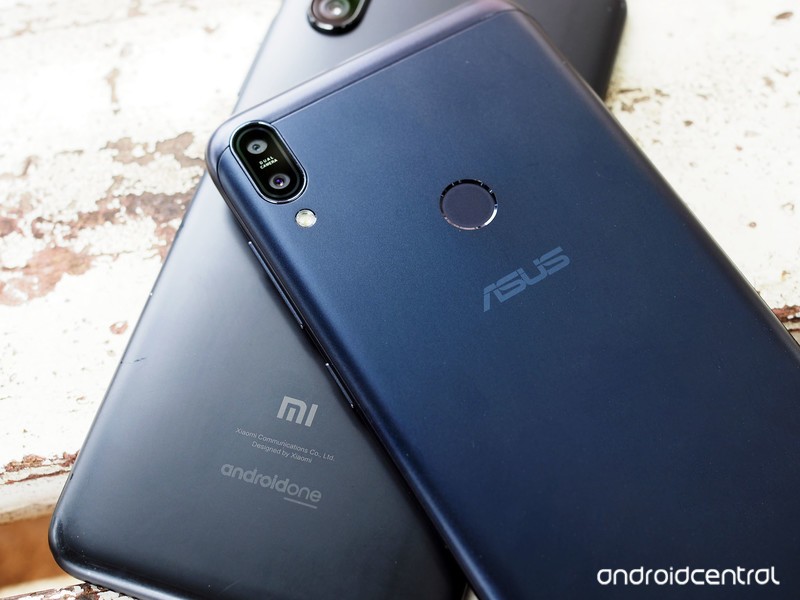
There’s a lot of similarities between the Mi A2 and the ZenFone Max Pro M1. Although ASUS didn’t team up with Google to launch the M1 with Android One, the user interface on the device is near-identical to what you get on the Mi A2.
The Mi A2 is rocking an aluminum unibody chassis, with the M1 offering a metal alloy back with plastic inserts for the antennae and an aluminum mid-frame. Going with a mix of materials has allowed ASUS to cram a monstrous 5000mAh battery in the M1 while still bringing the overall weight down to an easily manageable 180g.
Neither phone stands out from an aesthetic standpoint, and although the Mi A2 feels slightly better to hold in day-to-day usage, it isn’t going to win any design awards.
Both devices feature 5.99-inch 18:9 FHD+ panels, and you get little in the way of display color customization. On the software front, both phones are currently running Android 8.1 Oreo.
What the Mi A2 does better

The Mi A2 is Xiaomi’s most powerful phone in the $250 segment yet, with the device powered by the Snapdragon 660. The M1 meanwhile features a Snapdragon 636, which has similar cores that are clocked lower. You’re not going to see a huge difference between the two devices in real-world usage scenarios, but the Mi A2 has a slight edge when it comes to gaming thanks to higher clocks on the Adreno 512 GPU.
The highlight with the Mi A2 is the front and rear cameras. Xiaomi has mentioned that its main goal for 2018 is to improve the camera quality on its phones, and we’ve seen that over the course of the year with the Redmi Note 5 Pro, Mi Mix 2S, and now the Mi A2.
The 12MP + 20MP cameras at the back do a fantastic job both in daylight and low-light scenarios, and it’s clear that the phone has a considerable edge over the M1 when you look at just a few samples. The 20MP front camera is also a considerably upgrade from what the M1 has to offer, with Xiaomi touting AI-assisted portrait mode along with a front LED module that kicks in during low-light conditions.


Xiaomi Mi A2 on the left, ASUS ZenFone Max Pro M1 on the right.




And while the M1 has an uncluttered user interface, as the device isn’t under the Android One program, there’s no telling when it will pick up the Android Pie update. As for the Mi A2, Xiaomi has stated during the launch that the device will be one of the first third-party devices to pick up the stable Android Pie build, and although we haven’t been told a timeline, it is reasonable to assume that the update will be delivered before the end of the year.
What the Max Pro M1 does better

The ZenFone Max Pro M1 doesn’t hold up to the Mi A2’s cameras, but it utterly destroys Xiaomi’s handset when it comes to battery life. With a 5000mAh battery under the hood, the M1 manages to easily deliver two days’ worth of usage with some charge left over.
Honestly, if you’re looking for a phone with the best battery life in this segment, then the M1 is an easy recommendation. ASUS has also managed to do a better job with the basics — the M1 has a 3.5mm jack as well as a dedicated MicroSD slot in addition to two SIM card slots. The MicroSD slot can fit in a 2TB SD card, and the phone has dual VoLTE.
All of the aforementioned features are integral to budget devices, and they’re missing from the Mi A2. The M1 does one better by including AptX support, which makes a lot of difference when streaming media over Bluetooth.
Finally, the M1 has an edge when it comes to actual sales. All signs point to Xiaomi sticking to a flash sales model for the Mi A2, which if history is anything to go by will make it difficult for customers to get a hold of the device. In contrast, ASUS is selling the ZenFone Max Pro M1 in an open sale on Flipkart. If you’re interested in picking up the device, all you need to do is hit up the link below and shell out ₹12,999 ($185).
See at Flipkart
What should you buy? Down to you

The camera on the Mi A2 is the one to beat in this segment, and if you’re one to take a lot of photos, then the Mi A2 is a no-brainer. The phone is missing the 3.5mm jack and a MicroSD slot, but it isn’t as big a deal when you factor in just how good that camera is in day-to-day usage conditions. Xiaomi includes a USB-C to 3.5mm dongle in the box, and the 64GB of internal storage should be more than enough for most users.
If you require more storage, then you’re better off waiting for the 6GB/128GB variant to launch in the country. There’s no specific timeline for a launch, but it should be in the coming months.
See at Amazon India
If you’re looking for a device with a two-day battery life, then you’ll love what the Max Pro M1 has to offer. ASUS has done a masterful job with the M1, and the device is one of the best budget phones you can buy in 2018.
Sure, the camera isn’t as good as what you get on the Mi A2, but the device has outstanding battery life and has features that target a more mainstream audience, like the 3.5mm jack and a MicroSD slot.
See at Flipkart
Galaxy Note 9’s screen receives record-setting rating from DisplayMate

The unsurprising news continues a fantastic trend for Samsung’s high-end phones.
That Samsung’s phones have the best displays in the business isn’t all that surprising at this point. What’s truly amazing, though, is that they keep getting better at a steady pace despite already being well ahead of the competition. The Galaxy Note 9 marks another leap in display quality for Samsung, with the stylus-packing phone’s display taking home DisplayMate’s highest rating yet.
Samsung is making the best mobile displays available today, and it’s not particularly close.
In DisplayMate’s testing, the Note 9 hit record marks in several areas. It has a record-high Absolute Color Accuracy, which it says is “visually indistinguishable from perfect.” It has record-high color accuracy and intensity, independent of the on-screen image. It has record-high small color shifts, brightness shifts and viewing angles, including when displaying white. And somehow Samsung managed to get the Note 9’s full-screen peak display brightness to 710 nits, which is 27% higher than the already-fantastic Galaxy Note 8; the screen is capable of 825 nits of brightness in situations where 50% of the display is active (aka not black), and 1050 nits for very small portions of the display (1%) are active. The list goes on … here’s a full breakdown of the plaudits:
- Highest Absolute Color Accuracy (0.5 JNCD) – Visually Indistinguishable From Perfect.
- Smallest Change in Peak Luminance with the Image Content APL (2%).
- Smallest Shift in Color Accuracy and Intensity Scale with the Image Content APL (0.7 JNCD).
- Highest Peak Display Brightness (1050 nits with 710 nits at 100% APL).
- Largest Native Color Gamut (113% DCI-P3 and 142% sRGB / Rec.709).
- Highest Contrast Ratio (Infinite).
- Lowest Screen Reflectance (4.4%).
- Highest Contrast Rating in Ambient Light (239).
- Smallest Brightness Variation with Viewing Angle (27% at 30 degrees).
- Smallest Color Variation of White with Viewing Angle (1.3 JNCD at 30 degrees).
DisplayMate’s ultimate rating of the Note 9’s display is “A+” and leaves little doubt as to how great this display is with its conclusion:
The Galaxy Note 9 is the most innovative and high performance Smartphone display that we have ever Lab tested, breaking and establishing many new Display Performance Records that are listed above. The Galaxy Note 9 delivers uniformly consistent all around Top Tier Display Performance and receives All Green (Very Good to Excellent) Ratings in All of the DisplayMate Lab Test and Measurement Categories – only the second display we have ever tested to get All Green in All Categories – the Galaxy S9 was the first. The level of display performance and excellence has been increasing each year, and the Galaxy Note 9 has now raised the bar significantly higher.
DisplayMate’s tests are very much focused on the scientific measurement of the characteristics of displays and how they compare to one another, but the results really do back up the eye test: the Note 9’s display is gorgeous to look at. The Note 9’s display seriously outperforms the competition in just about every respect, and even outperforms its own displays shipped as the latest and greatest just six months ago with the Galaxy S9 and S9+. If you’re a screen quality buff above all else, it’s clear that you shouldn’t look anywhere but the Galaxy Note 9.
See at Samsung
Samsung Galaxy Note 9
- Samsung Galaxy Note 9 hands-on preview
- Galaxy Note 9 vs. Note 8
- Where to buy the Galaxy Note 9
- Galaxy Note 9 specifications
- Is the Note 8 still a good buy?
- Join our Galaxy Note 9 forums
AT&T
Verizon
T-Mobile
Samsung
Apple Hosts Nobel Prize Laureate Malala Yousafzai for Talk at Apple Park
Apple today held an event at its Apple Park campus where Apple CEO Tim Cook and Lisa Jackson, Apple Vice President of Environment, Policy and Social Initiatives, interviewed and honored Nobel Peace Prize Laureate Malala Yousafzai, who spoke to hundreds of young people about her work with the Malala Fund.
“If you stand for truth, you cannot lose.” Honored to host @Malala at Apple Park today with @lisapjackson. We are proud of the work Apple is doing with @MalalaFund to advance girls’ education around the world. pic.twitter.com/weuPiKGCwW
— Tim Cook (@tim_cook) August 13, 2018
Apple in January announced a partnership with Yousafzai’s Malala Fund, which advocates for quality education and equal opportunity for girls around the world.
Through support with Apple, the Malala Fund has said it expects to double the number of grants awarded by its Gulmakai Network and extend funding programs to India and Latin America with the initial goal of providing secondary education opportunities to more than 100,000 girls.
The Malala Fund is also working with Apple’s Developer Academies in Brazil, providing Apple Developer Academy students and alumni in brazil with the opportunity to esign and develop apps aimed at furthering the Fund’s goals.
Apple is helping the Malala Fund scale its organization by assisting with technology, curriculum and research into policy changes needed to help girls everywhere attend school and complete their education.
At the time Apple announced the partnership, Apple CEO Tim Cook joined the Malala Fund leadership council.
Note: Due to the political nature of the discussion regarding this topic, the discussion thread is located in our Politics, Religion, Social Issues forum. All forum members and site visitors are welcome to read and follow the thread, but posting is limited to forum members with at least 100 posts.
Discuss this article in our forums
How lidar technology is working to enhance trucking safety
Getty Images
Traffic accidents on the freeway are a fact of life on both urban and rural interstates. The worst generally involve the largest vehicles, such as Class-A tractor-trailer rigs. With one, two, and even three trailers behind the cab, a fully loaded semi needs about 420 feet to stop from normal highway speeds. When they don’t get the time or space to stop safely, big rigs can tip over, jackknife, or just roll right on over anything in their path.
It’s important to note big rig operators are some of the most highly skilled drivers on our roads. It’s notable that these professionals cover millions of safe and trouble-free highway miles every day, and according to the US Department of Transportation (DOT), fatalities due to accidents with big trucks are down significantly in comparison to previous decades. In 2016, there were 0.144 large truck or bus fatalities per 100 million motor vehicle miles traveled. Truck drivers are doing their jobs, but there are ways that technology is helping make trucking safer in much the same way that new cars are becoming safer.
“… Our technology can see 360 degrees virtually all the time for nearly 1,000 feet.”
“Even the best driver, and they are significantly better trained than normal automotive drivers, still wouldn’t be able to safely stop a rig of that size when cars are cutting in front of them,” said Andrew Nelson, North America commercial vehicles manager at Velodyne Lidar.
Digital Trends encountered Velodyne at the SEMICON West conference in San Francisco. Velodyne representatives were part of the show’s focus on disruptive technology emerging in the transportation sector.
Why lidar can help prevent big rig accidents
Most new passenger vehicles use some combination of cameras, radar, or lidar (laser radar) to look ahead and deliver forward collision warnings or automatic emergency braking. Some can detect pedestrians or animals in the roadway, while others are limited to vehicle-sized objects. The same technology enables speed-changing adaptive cruise control, blind spot monitoring, lane changing assistance, and parking assistance.
By taking the same basic tech and applying it to large Class-A trucks, technology companies and truck manufacturers believe they can make highways safer for everyone.
“We are currently working with a significant number of companies,” Nelson told us. “There are significant applications for a Class-A trucking whether it is manned or un-manned. Even the best eyesight or camera can only see a specific field of view, whereas our technology can see 360 degrees virtually all the time for nearly 1,000 feet.”
Velodyne’s Lidar technology uses infrared lasers, which work at night or in low-light situations and can even see through fog and rain.
Because the lidar can measure physical distance, we have the opportunity to measure four, five, six cars ahead.
“We’ve made significant advances, and there’s always work to do, but we can see significantly better in snow, in rain, working with fog as well,” Nelson pointed out. “Many of Velodyne’s patents are around how we can amplify and apply laser power and be able to look through that. Unlike a camera, if there is stuff on the lens we can actually apply more power in real time to ensure that the light gets to the destination. If a camera is blocked or there are conditions where you can’t see, it’s like a human eye. You can’t focus it any better by applying more power.”
Applications in trucking
One of the biggest benefits of using lidar is that it’s much easier to measure speed, size, and distance than with a camera. With a Class-A truck, the ability to place the lidar high above surrounding traffic also helps paint a complete picture.
“Because the lidar can measure physical distance, we have the opportunity to measure four, five, six cars ahead,” Nelson said. “If the concern is stopping distance for an 80,000-pound Class-A semi, we can see and we can show a physical distance. With a camera, you are taking an image and then having to infer and use algorithms to determine how far something is away.”
The lidar system, like a radar unit, is always measuring the distance to any object making a reflection.
“Because we are using physical distance data, we don’t have to infer from brake lights or infer from a vehicle in front,” Nelson said. “We can see when a car five cars ahead is slowing down, and we can engage braking before the four cars in front of us. So, lidar mitigates stopping distances needed for a Class-A Semi, which is one of the top two reasons that they get into accidents.”
“We’ve made significant advancements and now have the ability to measure the height of a bridge overpass about 820 feet away.”
Nelson noted additional applications include managing bridges and tunnels, enabling effective blind spot detection, and looking far ahead of the truck.
“We’ve made significant advancements and now have the ability to measure the height of a bridge overpass about 820 feet away. We will have sensors for blind spot detection, high and low on the bumper. We have other sensors that can see for 650 feet and can see a vehicle 460 away. We have one that you can place up high that sees 980 feet away and effectively denotes a vehicle 820 yards away.”
Cost is an issue but not for long
One reason truck manufacturers and trucking companies haven’t implemented all this long ago is the cost of lidar systems. However, Velodyne has been working to bring costs down to mass-market levels and develop robust products that will last in the real world.
“Right now, the cost is not really as prohibitive as they may think, due to the fact that we’ve lowered a lot of our prices,” Nelson concluded. “We have some 16-channel lidar units that are available for $4,000. We were able to drive down the cost of this lidar and produce more. In trucking, they see where lidar is going and we believe that with continued decreases the cost will not be prohibitive due to the benefit that it provides. Prices will continue to come down.”
Editors’ Recommendations
- In a smoke-choked port, riding along in Toyota’s hydrogen-powered semi
- 2018 Jaguar XF S Sportbrake review
- 2019 Aston Martin DBS Superleggera first drive review
- The best backpacking stoves
- Tesla wants your input as it begins designing its first pickup
Be a master of your own ever-changing ‘galaxy’ with this kinetic wall art
Looking for some kick-ass art for your home or office? Don’t want to settle for anything as boring as a flat, stationary two-dimensional print for the wall? If so – and if you’re also a bit of a science or tech geek with some cash to splash around — you may be the perfect candidate to enjoy an astonishing creation by former automotive engineer Robert Spillner.
Called the Art Machine, the Germany-based engineer’s stunning work of “kinetic art” is a constantly shifting image that looks like some continuously swirling galaxy or turbulent weather formation, as viewed through a 37-inch-diameter ship’s porthole.
“I wanted to invent a machine which can paint continuous images, but is not a video,” Spillner told Digital Trends. “I can’t say it shorter [than that]. The idea came up to use very small colored particles as picture elements and to set them in motion.”
The artwork employs an aerospace industry dye and some particles that result in a fluid that never completely mixes. The swirling fluid is rotated at frequent intervals by twin electric motors, which help stir up the striking patches of light and dark in the piece. “After a predetermined period of time, the rotational movement is interrupted so that the particles settle to the bottom and the movement of the dye subsides,” Spillner said. “[As a result], the previously introduced [formation] is dissolved. Then the Art Machine is restarted and the process starts again.”
We’ve covered a few kinetic art pieces here at Digital Trends, such as this amazing coffee table featuring a tiny robot making shapes in sand, and a robot-controlled table that lets viewers manipulate liquid rocket fuel with their face. While all three projects are very different in terms of content, Spillner’s creation certainly ranks up there with either in terms of its sheer “wow” factor.
All this comes with a price tag, however. According to this listing on Saatchi Art, would-be customers will have to pay some $6,250 to add the Art Machine to their collection. While that may be a bit too rich for some readers’ blood, we certainly don’t begrudge the person fortunate enough to add this to their collection.
Editors’ Recommendations
- Here’s what art looks like in 2018: Spheres that react to your presence
- Samsung’s updated Frame TV brings an artist’s touch to your living room
- If ‘Rock ’Em Sock ’Em Robots’ debuted today, they’d probably look like this
- A new digital picture frame is nearly indistinguishable from a real canvas
- Sigma 24-70mm F2.8 Art review
How to transfer your contacts between iPhone and Android devices
One of the most annoying aspects of changing phones is ensuring all your contacts are transferred over to your new device. In the “olden days,” this meant manually typing in countless names and phone numbers. Today, our smartphones can do most of the work for us. This guide will show you how to move contacts from iOS to Android and vice versa, so you can alternate between platforms without the hassle. Your best bets? Google Contacts and Apple’s iCloud.
Exporting contacts from iCloud
If you have enabled iCloud on your iPhone, backing up contacts is incredibly easy.
Sign into iCloud on your computer as you would normally and click Contacts. Once you get to the next screen, select All Contacts in the top-left corner and hit Command+A or CTRL+A to select all contacts. Now, click the gear icon at the bottom of the page and click Export vCard. Once the ensuing window opens, select all of your contacts again with Command+A and right-click on any contact. Choose Export vCard, name the vCard, and choose your desired save location.
Your contacts will download as a VCF file you can either email to yourself or directly import to Google. Once you activate your new phone — of any type — set up your email account and import the vCard from your email to upload all the contacts. We recommend saving the email containing the vCard, as it now serves as a cloud-based backup of all your contacts. It’s also a good idea to save them to your desktop, just in case your phone meets with an untimely accident.
Transferring with Google Contacts
First, you’re going to need a Google account, which will simplify moving contacts between platforms. If you don’t have a Google account, quickly sign up for one with Google — you’re going to need one for your Android smartphone anyway. Before you even touch your new Android phone, log into Google Contacts in your browser. Down on the left-hand side, you should see an Import contacts … option. Click on it, then click Choose file and navigate to the vCard that you saved from iCloud.
If you had a Google account prior to this process, you will notice your contacts list is now much larger and likely has some duplicates. If you see duplicate contacts, you may need to spend some time deleting or modifying them. It’s best to do this manually, but Google does offer a Merge contacts tool that is designed to do the same thing. Beware that it’s not always the most accurate.
If you want to give it a try, go to the More button outfitted with the downward arrow that’s located near the upper-left portion of the window while viewing your contacts page. The drop-down menu gives you the option to Find & merge duplicates. Selecting this option tells Google to automatically search your contacts for duplicates.
Transferring contacts to your new phone
Now that you have your contacts in Google organized exactly how you want them, it’s time to put them on your phone. If you haven’t powered up your new phone yet, the transfer will be easy. When you first boot up your new phone, it asks if you want to sync your phone to a Google account. Simply enter in your account information and your phone will automatically import all the contacts from your Google account — no manual upload necessary.
However, if you already turned on your Android phone and didn’t sync it with a Google account, head to the Settings menu and find the Accounts or Accounts & Sync option that shows you every account synced with your phone. At the bottom of the page, you will see a button labeled Add account, where you can now enter your Google login. Once you select your Google account, it will sync all your contacts to your phone, along with Calendar, Chrome, Gmail, and whatever other components you choose to sync.
If you’re switching from Android to iPhone, just hop on your new phone, and go to Settings > Mail, Contacts, Calendars > Add Account > Google. Enter your Google login info and your iPhone will automatically sync the contacts housed within your Google account. If you want it to stay synced and include any new contacts you add, then you’ll also need to go to Settings > Mail, Contacts, Calendars > Contacts > Default Account and select your Google account.
Wasn’t that easy?
Given the current popularity of Google’s services, it’s a breeze to transfer contacts to any new phone. Not only does your Google account sync your contacts in Android, it does so on Windows Phone devices, too. We review phones all the time, and without Google, the process would be insanely painful. There might be other one-time use options that will get the job done, but if you are able to keep your Google contacts up to date, switching smartphones is a walk in the park.
Get an App
If you are in a pinch and need to transfer your contacts fast, there are plenty of apps that help make the transfer easy.
Our favorite of the bunch is My Contacts Backup for iOS and Android, an efficient and easy-to-use app. After downloading and installing the application, tap Backup to create a backup file of all your contacts. Once the backup completes, email the contact file to yourself. When you get your new phone, open the email and click on the VCF attachment, which allows your phone to import the contacts. Once you’re done, save the email in your inbox in case you decide to switch phones again. The app also gives you the ability to set up automatic backups of your contacts, which we recommend scheduling after the application downloads.
If you’re making the move from Android to iOS, then you might also consider Apple’s Move to iOS app. It’s designed to transfer contacts, message history, photos, videos, and more from an Android phone to a new iPhone during the setup process. Install it on your Android device, choose the data you want to transfer, and your new iPhone will create a private connection, protected by a security code, and start transferring the chosen data.
Editors’ Recommendations
- How to back up your iPhone to your computer
- How to factory reset a Galaxy S8
- Selling your phone or tablet? Here’s how to wipe your Android phone
- The best calendar apps for Android and iOS
- Switching from an iPhone to an Android device
Pricing and lack of content are still barriers against the adoption of VR
Tomohiro Ohsumi/Getty Images
A recent survey questioned 595 virtual and augmented reality professionals about their business growth in the consumer and enterprise markets. Conducted by VR Intelligence and SuperData, the survey shows that 24 percent of the respondents report strong sales in the enterprise market while only 18 percent show strong sales in the consumer market.
According to the report, the two main barriers VR needs to overcome are headset prices and a lack of content. Although first-generation headsets like the Oculus Rift ($400) and HTC Vive ($500) have fallen in price since their debut, they’re still a high-dollar investment. These headsets also require a decent desktop capable of rendering the experiences, which could be an additional high-cost expense.
Out of all the respondents, 52 percent believe a lack of content is the largest barrier, down from 62 percent in VR Intelligence’s 2017 survey. Also down is their opinion of HMD pricing, with 52 percent believing price is an issue versus the 60 percent vote in 2017. Meanwhile, motion sickness is the least of their concerns, with 25 percent believing motion sickness is a barrier in 2018, down from 28 percent in 2017.
“The change in opinion on pricing is most likely a reflection of the price drops from major headset manufacturers like HTC, Oculus, and Google; while developments in content creation are starting to alleviate this particular barrier to adoption,” the report states. “Additionally, stand-alone devices like Oculus Go and Lenovo Mirage have brought down the entry point price of high-quality VR as they do not require a console or powerful PC.”
The survey’s respondents believe AR will hit mainstream adoption before VR due to hardware and content. The survey points to Pokémon Go, Nintendo’s highly popular game for smartphones with an AR component. Night Sky will list all the known stars, planets and constellations with a point of a camera while Amazon’s app can place virtual furniture and other goods into your real-world surroundings.
The survey shows that 12 percent of the respondents believe AR will reach mainstream adoption within a year followed by 34 percent believing adoption will take place within two years. Yet 33 percent think adoption will go mainstream in three to four years while 21 percent believe mass adoption won’t take place for five years or more.
As for VR, the survey paints a different picture. Only 6 percent of the respondents believe VR will go mainstream within a year while 27 percent believe it will happen within two years. Other respondents weren’t quite a hopeful, with 42 percent believing VR won’t go mainstream for another three to four years while 26 percent believe VR won’t be mass-adopted for five or more years.
“The wait for consumer adoption has seen many VR and AR companies target enterprise as their source for shorter-term revenue and growth,” the report adds. “From automotive to architecture, retail to tourism, manufacturing to construction, immersive tech is impacting the way companies work, design, communicate and sell.”
For the enterprise, the biggest adoption of VR is within the education sector followed by architecture/engineering/construction, manufacturing, healthcare, automotive, banking and financing, and so on.
Editors’ Recommendations
- Oculus Go review
- VR is in a tailspin, and the sales numbers prove it
- HTC Vive review
- GM’s Maven car-sharing service is convenient, but we’re not giving up our keys
- Qualcomm expected to reveal Snapdragon chip dedicated to VR, AR next month
Kids can now initiate a friend request on Messenger Kids by using a password
Facebook’s controversial Messenger Kids app now allows youth to initiate their own friend requests using a process that still requires a parent’s approval. The under-13 messaging app recently added an option that allows users to ask their parents to add a new friend to the platform by using a passphrase. The latest Messenger Kids update began rolling out on Monday, August 13.
The feature generates a unique passphrase for each child. The potential friend must enter that code in order to initiate a friend request. The parents of both kids need to approve the request before the two users are connected on the platform.
By generating a passcode, Facebook likely aims to prevent unwanted friend requests while still simplifying the process of adding friends on the platform. Since both parents need to approve the request, the update doesn’t alter the rules Messenger Kids already had in place.
What the update does is simplify friend requests, particularly in instances where the parents aren’t also friends. Before the update, parents had to invite other parents in order for the kids to connect on the kid-friendly app. (Messenger Kids also originally required the parents of both kids to be friends before connecting on the platform, a rule that changed earlier this year.) Messenger Kids still requires parents to have a Facebook account, but the update may help simplify friend requests.
The passcode friend request is an optional feature that defaults to off — which means if parents don’t go in and change the Messenger Kids settings, nothing has changed. Turning the feature on could lead to less pestering to add a friend and a shorter process.
The update follows changes earlier this year that allows parents to set a Sleep Mode, which locks kids out during certain times of the day or allows parents to limit how much time kids spend using the app.
Messenger Kids is designed to allow kids to interact under parental supervision while reaching users younger than Facebook’s minimum signup age of 13. Critics of the app cite the increasing time kids are spending on mobile devices, as well as features like the way the app indicates to approved friends who’s online and who’s not.
Editors’ Recommendations
- Amazon Echo Dot Kids Edition review
- The best robot kits for kids
- The best tablets for kids, no matter their age or your budget
- Fitbit Ace kids fitness tracker is now available for purchase
- T-Mobile FamilyMode lets parents control kids’ screen time on any device
An amazing new RWBY game is coming to Android!
My favorite animated stories of the modern era is expanding into another game.
One of the coolest animated series you can watch today, RWBY (pronounced Ruby) is expanding into a mobile game. Unlike the PC game from the folks at Rooster Teeth, RWBY: Amity Arena gives you a less scripted look into the larger world of Remnant.
And, best of all, if you pre-register the game on Google Play right now your character starts off with a 1,000 Lien bonus.
While the trailer for the game gives you brief snippets of gameplay featuring some of the iconic characters from the show, the app description in the Play Store paints a much clearer picture. You get to make your own character from one of the four nations from the series, and have control over what weapon and semblance your character has in the creation. As you play with your team, you can take on real-time opponents to increase your rank and participate in tournaments like the Vytal Festival.
The visuals for this game are clearly designed to bring you a little closer to the series itself. You play as though you are holding a Scroll, the phone-like device from the world, and the online gameplay is describes as being part of the CCTS from the show, which is cute.
RWBY: Amity Arena is slated for a full launch “this fall”
As for the actual gameplay, it looks like RWBY: Amity Arena is jumping into the all-too-popular Active Card Game system. These games are a little more interactive than passive card games like Valkyrie Connect and Age of Ishtaria, but still rely on cards for most of your attack and defense moves in the game. A good similarity, based on the description, would be Sword Art Online: Integral Factor. The cards introduce a level of randomness that can be compensated for in the heat of the moment with purchases. As the game will be free, micro-transactions will be plentiful but not likely to be the kind of thing you absolutely must do in order to remain competitive.
RWBY: Amity Arena is slated for a full launch “this fall” but the pre-registration right now on Android is the reason to care now. That extra in-game currency is likely to come in handy as you start out. And if none of this has made any sense at all because you’ve never seen the show, fix it! There’s a good chance you’ll really enjoy it.
 AIVAnet