


Microsoft finishes turning File Explorer dark in latest Windows update
If you typically work in low ambient lighting conditions, Microsoft’s latest Windows Insider Preview build will help ease eye strain. The most notable feature of Windows Insider Preview Build 17733 is a new dark mode for the Windows File Explorer, which replaces the typical white background of the File Explorer window for a black one.
“With Build 17666 we started our journey bringing dark theme to File Explorer,” Microsoft said in a blog post detailing the new features of the software release. “Today’s build marks the turning point where we’ve finished what we set out to do for this release.”
Image: Microsoft
The dark theme for File Explorer was initially introduced in May, and it appears that Microsoft has completed its work on this feature. General users of Windows 10 who are not part of Microsoft’s Windows Insider program will get to experience this feature this fall when Microsoft releases its Windows 10 Redstone 5 update.
The latest Insider Preview build is available for testers in the Windows Insider program in the Fast ring. In addition to the dark mode, the build also delivers a number of bug fixes and some general improvements for Narrator. This release doesn’t include much in the way of new features.
As with the prior release, Microsoft also outlined a number of known bugs in this release. If you’re running Windows 10 in S Mode, the version of Microsoft Office downloaded from the Windows Store may not run properly, and Microsoft recommends that you can work around this glitch by uninstalling and reinstalling that software package. Like the previous Windows Insider Preview, users of Windows Mixed Reality headsets may need to repair their controllers.
Microsoft isn’t the only one to focus on launching a dark mode. At its developer conference earlier this year, rival Apple introduced a system-wide dark mode that will be part of the new Mojave operating system for Macs. Both Mojave and Microsoft’s Redstone 5 update for Windows 10 will be available for consumers to download this fall. Be sure to check out our guide on how to apply a dark theme for File Explorer and Windows 10 if you’re part of the Windows Insider program today.
Editors’ Recommendations
- MacOS Mojave brings Dark Mode, stacking, and a redesigned App Store to Macs
- Mac owners can now test MacOS Mojave with Apple’s new public beta
- How to enable dark mode in MacOS Mojave
- Windows 10 Mail will let you handwrite your email with a stylus
- Microsoft pulls its ‘Sets’ feature in the latest Windows Insider build
Caltech trains drones to autonomously ‘herd’ flocks of birds. Here’s why
Birds can cause a surprising amount of headaches for airplanes. Perhaps the most famous recent example of this was the 2009 “Miracle on the Hudson” incident, when pilots were forced to land on the Hudson River after U.S. Airways flight 1549 was struck by a flock of geese after takeoff. Engineers at the California Institute of Technology recently turned to science to find a solution to this problem. Their approach involves a new control algorithm that allows a single drone to herd a flock of birds away from an airport’s airspace. The results could potentially save lives.
“The existing bird-scaring techniques employed to avoid bird strikes on airfields include lasers, distress calls, gas cannons, flares, inflatable scarecrows, dogs, radio-controlled planes, shotguns, and live birds of prey,” Soon-Jo Chung, associate professor of Aerospace and Jet Propulsion Laboratory Research Scientist at Caltech, told Digital Trends. “According to surveys by the International Bird Strike Committee, none of those systems work adequately. Simply put, birds are too intelligent!”
Knowing the limitations of solutions like training falcons or having a ground-based pilot control an RC airplane, Chung’s team set out to create an autonomous technology which could help. Their drone-based system works by figuring out the best paths around a flock of birds to effectively herd the flock in a desired direction. To create the algorithm, the researchers modeled flocking behaviors, and then reverse engineered these to establish the ideal flight path for a drone to move the flock away from protected airspace — crucially, without dispersing it in the process.
The drone-based system was recently tested and was shown to be successful. The only current weakness comes when dealing with multiple, or larger, flocks. To that end, the researchers hope to find ways to scale the project to use multiple drones for situations in which there are multiple flocks of birds.
“Bird and other wildlife strikes on aircraft cause well over $400 million in damage annually to U.S. civil and military aviation, and $1.2 billion worldwide,” Chung said. “I also hear [about] wineries battling crows that are eating fruit before the harvest. Imagine a drone taking off autonomously, and herding these live animals away from your protected zone. That’s the future [vision] we are working on.”
A paper describing the work was recently published in the journal IEEE Transactions on Robotics.
Editors’ Recommendations
- Here’s what art looks like in 2018: Spheres that react to your presence
- This bird-inspired morphing drone can slim down to fit through tight spaces
- Bird electric scooters ruffle city officials’ feathers with surprise launch
- Startup Bird is looking to roll up the emerging escooter-sharing space
- Half taxidermy, half robot: Why UC Davis built this crazy realistic robo-bird
Magic Leap One AR headset now available for $2295
Don’t let your wallet read this article.
At the tail-end of last year, Magic Leap finally unveiled its first augmented reality headset that would actually be available for people to buy. After three years of hard work, the Magic Leap One Creator Edition was announced with a 2018 release date and no price.

Today, Magic Leap confirmed that its headset will set buyers back a staggering $2295.
While that is a lot of money, it’s important to remember that Magic Leap isn’t marketing this as a consumer-ready device quite yet. As the name implies, the Magic Leap One Creator Edition is being targeted at developers and early adopters. Similar to Microsoft’s $3000 HoloLens or Google Glass that sold for $1500, Magic Leap’s charging an expected premium for people that want to hit the ground running with its tech before it’s ready for the main spotlight.
Magic Leap says that the Magic Leap One is currently being sold “in cities across the contiguous U.S.” and that “the list is growing daily.”
See at Magic Leap
The best Google Pixel 2 cases

Enhance the funky look of your Google Pixel 2 with the right case!
Whether you love the Google Pixel 2 design and want to enhance it, or you’re simply looking for drop protection for your new phone, there’s a case that’s perfect for you. Google partners with a number of accessory makers for its ‘Made for Google” certification program featured in the Google Store, but you can also find a ton of quality third-party cases to fit your needs. Here are the absolute best cases you can get your Google Pixel 2 — from Google and from Amazon.
- Spigen Neo Hybrid Case
- Google Live Cases
- Google Fabric Cases
- Bellroy Leather Case
- Ringke Fusion Case
- Totallee Case
- Spigen Rugged Armor
- Maxboost Folio Style Wallet Case
- Carved wooden Cases
- RhinoShield SolidSuit Case
Spigen Neo Hybrid Case
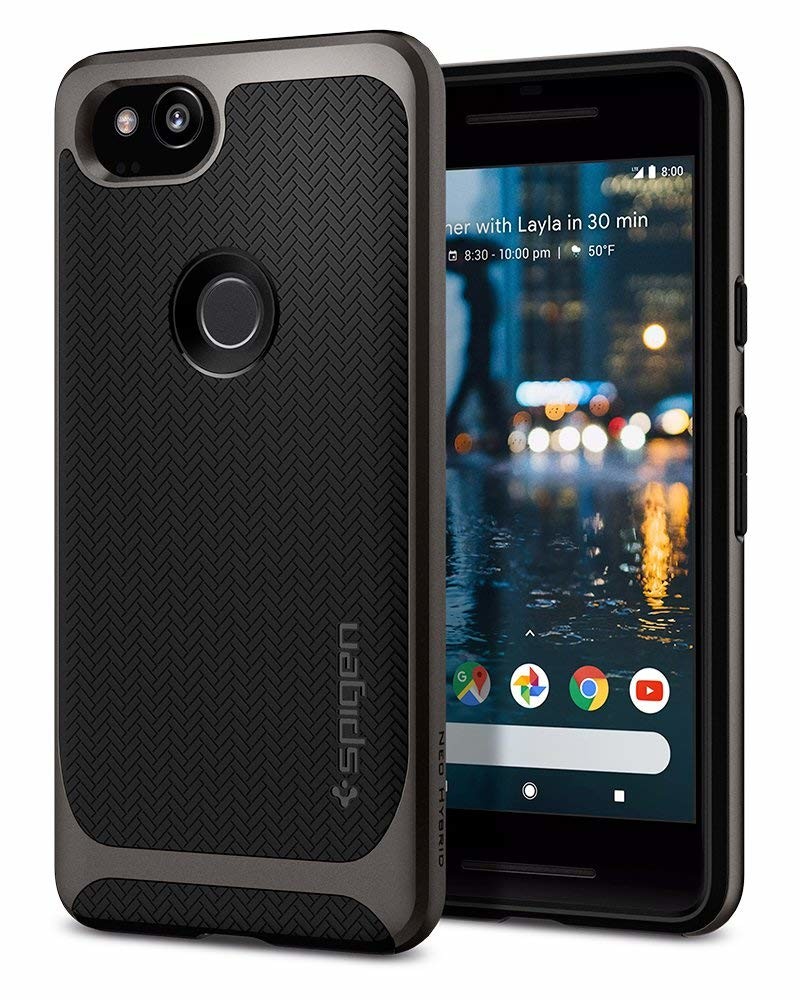
Our favorite case for the Google Pixel 2 doesn’t have the “Made for Google” certification, but the Spigen Neo Hybrid is just about the perfect case line on the market today. We love this case so much, we gave it two Android Central Choice awards — one for the Pixel 2 and one for the Samsung Galaxy S9+.
The Spigen Neo Hybrid’s Herringbone-textured back is smooth but grippy in the hand, and the sculpted curves of the polycarbonate hardshell look stylish and sturdy in equal measure. The port cutouts keep well clear of boxy USB-C cables and OTG adapters, and while it is easy to get the phone in and out of the case, trust me, you won’t want to take it off ever again.
The Spigen Neo Hybrid is $15 at Amazon and comes in two colors: black/charcoal Gunmetal and powder blue/silver Kinda Blue.
See at Amazon
Google Live Cases

Google Live Cases give you the option of customizing the back of your Pixel 2 with a personal photo or a wide range of styles curated by Google — or using your own photo from Google Photos. Choose a gorgeous satellite photo from Google Earth, and the case will pair it with a matching live wallpaper for a seamless look. Artworks Live Case can add some flair to your Pixel with soul-searching ink blots and bold pops of color.
Prices range from $40 to $50 depending on the styling and your choice of a svelte shell or rugged dual-layer case. Create and customize your own case via the Google Store.
See at Google Store
Google Fabric Cases
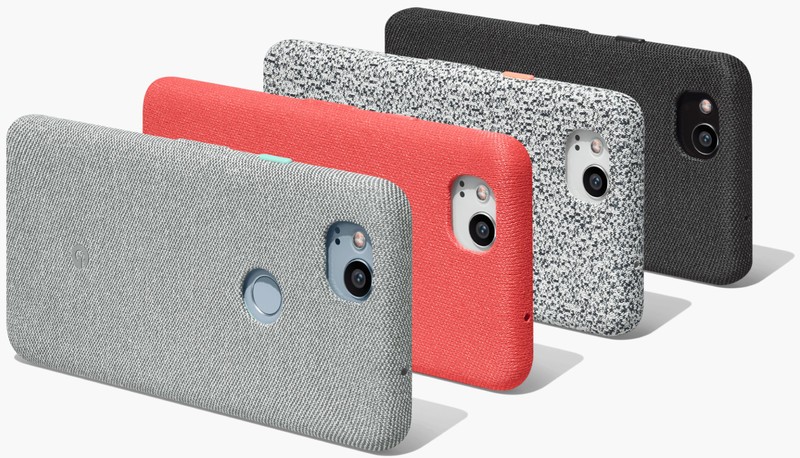
If you like a little texture on your phone case, you’ll love the Google Fabric Case. Similar to Samsung’s Alcantara cases, these crafty cases look — and most importantly feel — like the luxurious fabric on the Google Home Mini or Daydream View.
Designed in-house by Google, you can be sure of the build quality and fit. These cases offer a premium microfiber liner to ensure your device stays scuff-free and your choice of four color combinations for $40.
See at Google Store
Bellroy Leather Case
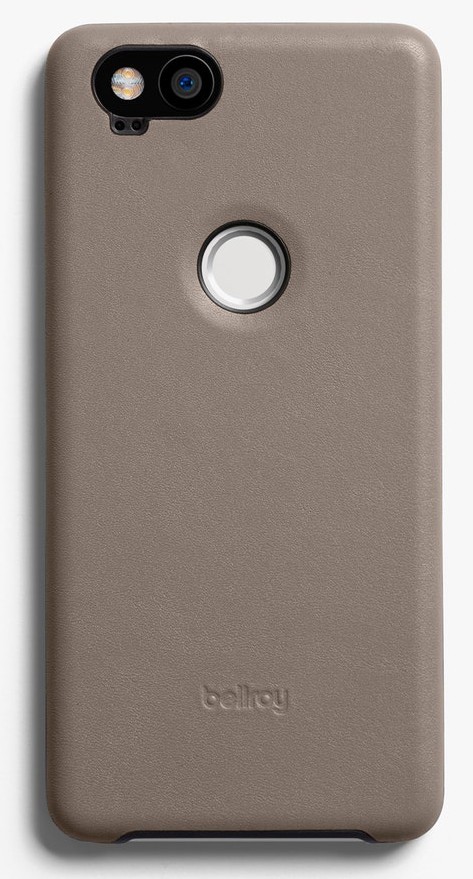
Looking to add a touch of class to your Pixel 2? How about an elegant leather case from Bellroy? Made using premium leather and a soft microfiber lining, this is a lightweight case that will keep your phone well protected and age beautifully over time. It’s also backed by a 3-year warranty from Bellroy, meaning that this case should still be standing when the Pixel 2 reaches end-of-life in October 2020.
You can learn more about the case and materials used at Bellroy.com, then get yours in one of four rich colors — including a gorgeous navy blue — from the Google Store for $45 with free shipping.
See at Google Store
Totallee Case
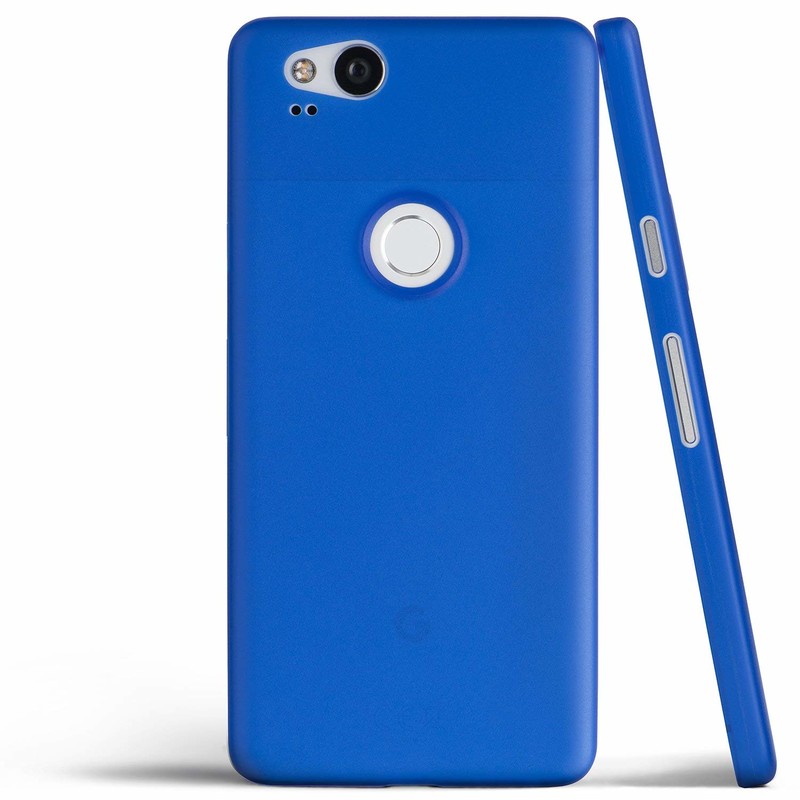
Most people hate cases. Why buy such a slim, beautiful phone if you’re going to have to immediately bulk it back up with an ugly case? Well, Totallee has heard our prayers and designed a case that offers basic protection from small drops and bumps without adding any sort of bulk found with 99% of other “slim fit” cases.
While it looks too thin to do much of anything, you really can rest easy with the Totallee case. You don’t have to worry about smudges, scuffs, scrapes, or chipping the coating Google adds to the Pixel 2. Totallee made this case so you can get a basic safeguard against regular wear-and-tear while also giving your phone a new splash of color.
Totallee case for the Google Pixel 2 comes in 4 colors — including a bold cobalt blue — on Amazon, where you can pick one up for $18.
See at Amazon
Ringke Fusion Case
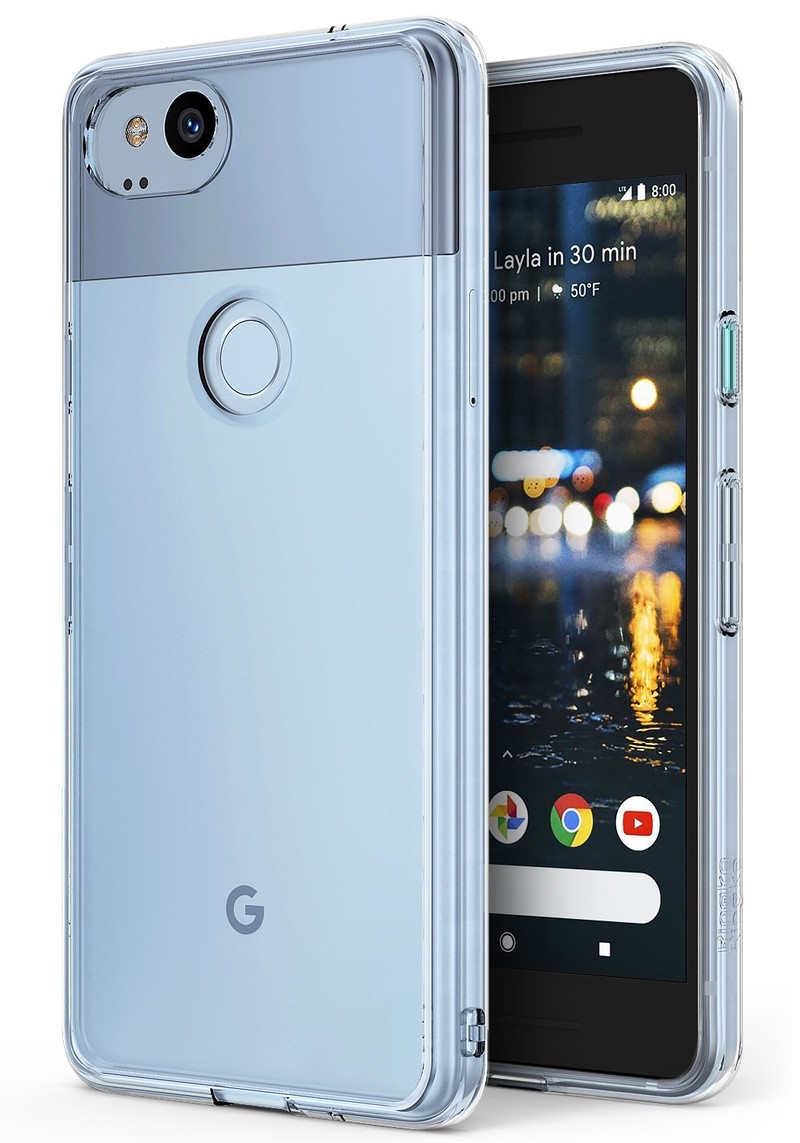
Looking to save some money on your case? Debating whether to cover the design of your Pixel 2 in plastic or gamble by using it without a case? Ringke’s got you covered with an affordable clear case.
Made with a rugged panel of polycarbonate on the back panel and an easy-grip TPU bumper, Ringke’s crystal clear Fusion case will keep your new device protected while also letting the Pixel 2’s design shine through. You’ll also get lifted bezels around the camera and screen to protect those important pieces of glass, along with precise cutouts for the charging port and fingerprint scanner. You can get this reliable case from Amazon for just $11.
See at Amazon
Spigen Rugged Armor
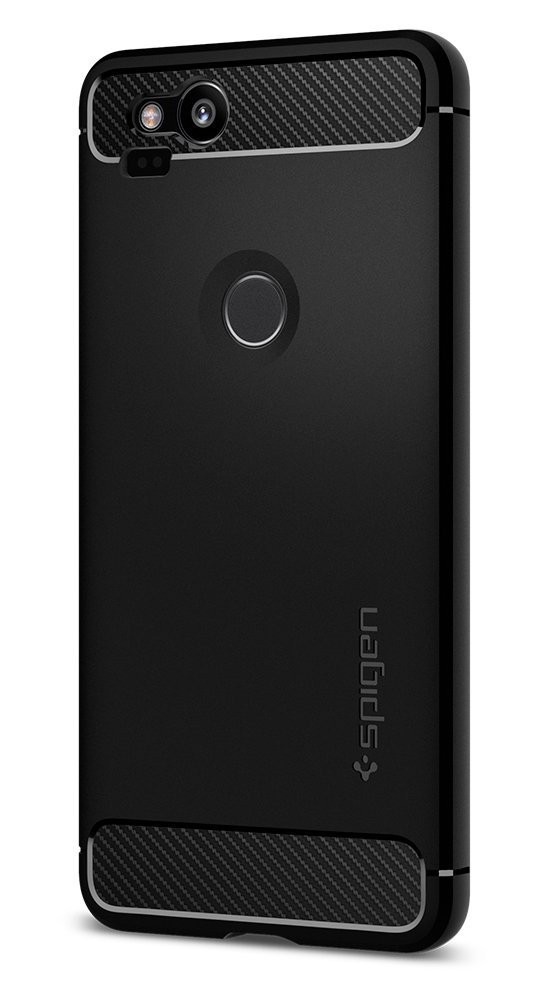
Spigen has a full line of cases available for the Pixel 2 at affordable prices, including the slim-yet-rugged Rugged Armor. This lightweight case features carbon fiber detailing along the top and bottom, and raised edges around the screen and camera protect against scratches and scuffs.
I’ve been using the Rugged Armor case on my Pixel 2 XL and it’s held up against all of my klutziness, which is on full display in our review. If you want great protection for your new phone without the bulk — or high price — of other case options, get Spigen’s Rugged Armor case for just $13 on Amazon.
See at Amazon
Maxboost Folio Style Wallet Case

Maxboost’s wallet case sports a stylish look and all the functionality that you’d expect. We’re talking three card slots on the inside flap, a hidden side pocket for some cash, and a magnetic strap that holds down this lithe wallet and keeps everything secure. Fold the strap and folio behind the phone to use as a kickstand when you’re watching your YouTube videos on that cross-country flight.
Clean cutouts around the camera, fingerprint sensor, and charging port ensure that this case doesn’t interfere with using the phone, and cutouts around the earpiece let you talk on the phone without leaving your wallet open for all to see.
Available for just $13, this four-star case is a great option for your Pixel 2!
See at Amazon
Carved wooden cases

Carved has a bunch of great case options available for phones like the Pixel 2, including 52 stylish pre-made option featuring a mix of cool prints and fancy cut wood designs with prices ranging from $29 to $55, along with a selection of classic wood grain cases for just $24.
Carved also allows you to create your own custom case using an online case designer. They also offer the option to get a section of a map engraved or printed onto the case. With the right eye for design, you could design a case that uses the fingerprint scanner as part of your case’s decoration.
See at Carved
RhinoShield SolidSuit Case
Best Protection
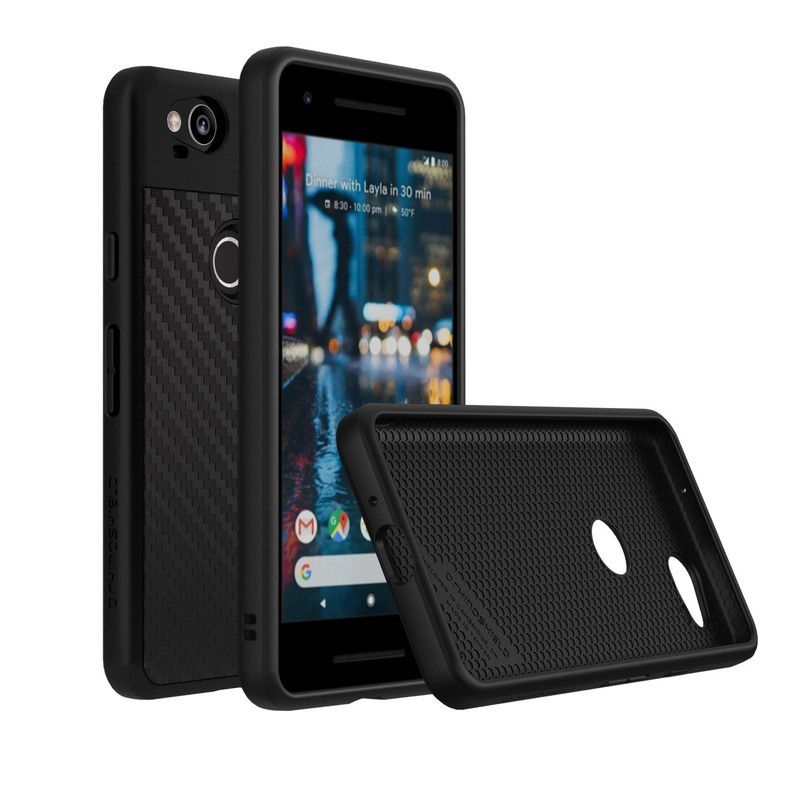
RhinoShield makes some fantastic phone accessories that always seem to go a step beyond. With the SolidSuit case, you get a rugged case that’s designed to both protect your phone and also give you the option of using add-on lens attachments that will enhance the experience of using the superb camera on the Pixel 2. First, you’ll need the $5 lens adapter and then you can start investing in the superb lens kits that Rhinoshield also offers.
The Pixel 2 is a great phone that really shines with the right accessories like this. Don’t miss out on getting this RhinoShield case for just $35 on Amazon.
See at Amazon
Is the Pixel 2 too good looking for a case?
What do you think of the Google Pixel 2’s design? Too cool to cover with a case? Which cases are you interested in? Let us know in the comments!
Updated August 2018: We’ve removed four cases from this list to make room for our new favorite Pixel 2 case, the Spigen Neo Hybrid, and Totallee’s thin delight of a case.
Google Pixel 2 and Pixel 2 XL
- Pixel 2 FAQ: Everything you need to know!
- Google Pixel 2 and 2 XL review: The new standard
- Google Pixel 2 specs
- Google Pixel 2 vs. Pixel 2 XL: What’s the difference?
- Join our Pixel 2 forums
Best Buy
Verizon
Google Store
Project Fi
Get better multiplayer performance by changing your PS4’s NAT type

Your NAT type might well be holding you back in online multiplayer games. Here’s how to open it up.
Network Address Translation (NAT) is a big part of connectivity for online multiplayer games, deciding how incoming traffic is handled. For gamers, NAT can play a huge role in who you can play with, establishing barriers if it’s not set up right.
There are a bunch of reasons you may have a strict or even double NAT showing on your network, but with the help of port forwarding, you can easily overcome the hurdles. It’s not the only method, indeed, for many folks ensuring Universal Plug and Play (UPnP) enabled on their router will be enough.
Here’s how to set it up on the PlayStation 4.
What is port forwarding?

It doesn’t just apply to the PlayStation, in actual fact to achieve an open NAT you’ll hardly touch the console. Port forwarding is done on your router.
Our pals at Windows Central sum it up:
Ports are essentially digital channels for your router, used for sorting incoming and outgoing internet traffic. Port forwarding makes your console more accessible over the internet, allowing for traffic to be routed directly to your device. Using user-created rules to forward specific ports, connectivity can be drastically improved. More importantly, port forwarding can be configured on a per-service or per-game basis, tailoring your network setup for the best connectivity with certain experiences.
So whether you’re on PS4 or Xbox One, you can achieve an ultimately better multiplayer experience with a similar process if you need to.
How to port forward your PlayStation 4
The ports you need to open up for your PlayStation to get an open NAT are the same, but the actual process may differ from router to router. The steps are constant but you may need to dig around your router’s settings to find what you need.
Open the settings app on your PlayStation 4.
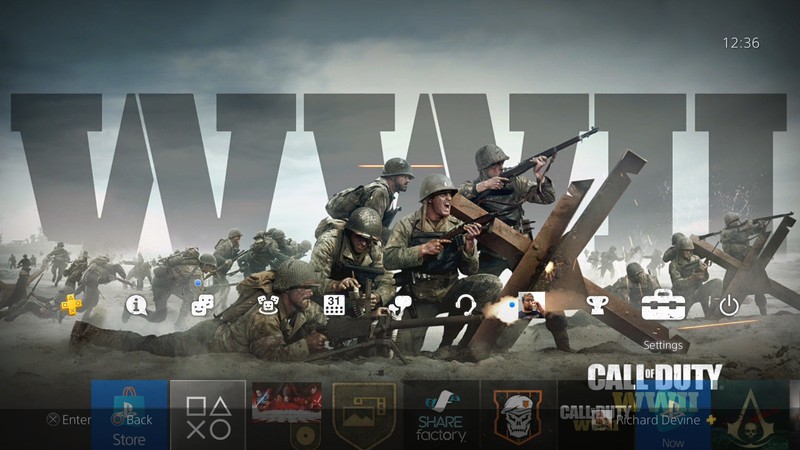
Next, scroll down and setlect network.
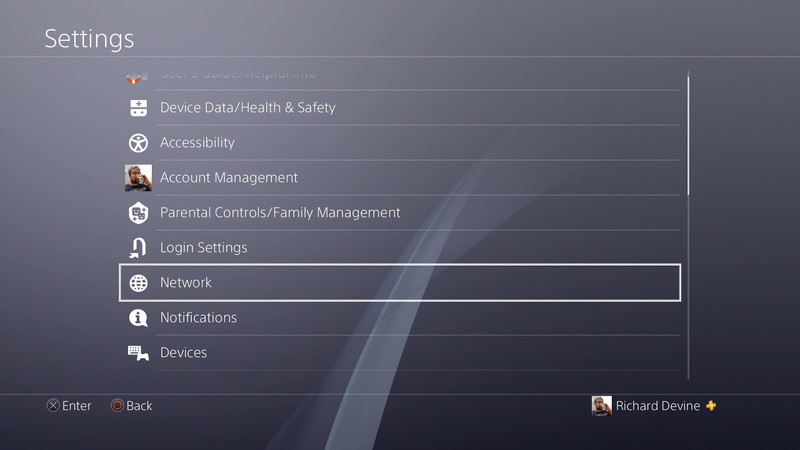
Select view connection status.

Note the IP address of your console. This will be required later in the port forwarding process.
Note the MAC address of your console. This may also be required for later steps.
Log into your router, a good place to start if you haven’t done it before is checking on your router as many will have the information on a sticker.
Manually assign a static IP address to your console, using the data from step four and potentially step five depending on your router. In Google Wifi, for example, you’ll find it in the advanced networking section of the companion app.
Locate the port forwarding rules for your router. Again, using the Google Wifi as an example, you find this also under advanced networking.
Add rules for TCP 80, 443, 3478, 3479, 3480 and UDP 3478, 3479. For more information on this check out Sony’s networking guide.

Now give everything a reboot to make sure it’s all kickstarted properly and you should see an improvement in your NAT type.
Follow the first three steps above to check it out. Best case for most is a Type 2 NAT on PS4 which is moderate, with Type 3 being strict and Type 1 being open. In my case, I used this method and managed to relieve the double NAT caused by using a Google Wifi with an ISP router that cannot be put into modem only mode.
Some games will be harsher on NAT types than others. Call of Duty is notorious for it, and just recently Warframe wouldn’t let me play until I had made the double NAT issues disappear. So it’s certainly worth doing something.
If you have any other tips and tricks for networking bliss on the PlayStation 4 be sure to drop them into the comments below.
How to play PlayStation 4 games on your Android phone
PlayStation 4

- PS4 vs. PS4 Slim vs. PS4 Pro: Which should you buy?
- PlayStation VR Review
- Playing PS4 games through your phone is awesome
Amazon
Audio-Technica headphones, Crucial SSDs, and more are discounted today
Whether you’re looking for new tech gear or household items, we’ve got you covered.
We found plenty of great deals today that include big discounts on the Audio-Technica ATH-ANC9 headphones, Crucial’s MX500 SSD, TP-Link smart plugs, and more! Most of these prices will be gone when the day ends, so don’t miss your chance to save big!
View the rest of the deals
If you want to know about the deals as soon as they are happening, you’ll want to follow Thrifter on Twitter, and sign up for the newsletter, because missing out on a great deal stinks!
Your next great mid-range phone may have the new Snapdragon 670

Every year, flagship phones get more expensive but harder to differentiate from their mid-range and budget counterparts. It’s not that those $700+ phones are getting worse but that, as the technology inside them matures, their features get commoditized and brought down to less expensive silicon.

That’s why the Snapdragon 670 is exciting. It’s the sequel to the Snapdragon 660 we see in devices like the BlackBerry KEY2, but it’s much closer to the newly-announced Snapdragon 710, and even the 845, than any of its 600-series predecessors.
To start, it uses the same Kryo 360 cores as the Snapdragon 845, but limits the performance cores to two, running at 2.0GHz, while it falls back on a cluster of six efficiency cores, each running at 1.7GHz. It’s also the first 600 chip to use Qualcomm’s excellent Adreno 600-series GPU, specifically the Adreno 615. There’s a Spectra 250 ISP for enhanced dual camera support, and an X12 modem with support for speeds of up to 600Mbps down and 150Mbps up, as well. Finally, the Hexagon 685 DSP ensures the chip supports the latest AI platforms from Google and others.

For all intents and purposes, this is a Snapdragon 710 running at slower clock speeds. That means you’re getting support for the latest gaming, camera, and AI features at roughly half the cost of a Snapdragon 845. Except for the LTE speeds, which are limited to 600Mbps and support neither 4×4 MIMO or 4x carrier aggregation.
Given that the 670 strikes a balance between power and efficiency, it’s likely going to offer considerable battery life, especially since it’s built on the same 10nm process as the 710 and 845.
Qualcomm says that it is building this chip because of demand by manufacturers, which means there’s also demand for such handset price points by consumers. Going back to phone prices, most people don’t want to spend $1000 on a device, especially when one that costs half that much can do the job just as well. While no company has made plans for a phone running on the new Snapdragon 670, Qualcomm confirmed that such an announcement is imminent.
The Kindle Fire HD 8 is almost 50% off for a limited time only
Odds are this deal won’t last!

Amazon is running a limited time promotion that drops that price of the Fire HD 8 tablet down to $59.99, a savings of $50 from its regular price. Over the past few months, we’ve seen this tablet sell for as much as $110 but never lower than $80, and in fact, it’s never dropped this low before. It has an 8-inch display and comes equipped with 32GB of storage inside. Per charge, the tablet offers around 12 hours of usage time and it even has Alexa built right in to get your questions answered with ease.
Amazon is selling the 7-inch Fire Tablet with 8GB of storage for $49.99 right now, which means for only $10 more you get an extra inch of screen real estate and quadruple the internal storage. Odds are, at this price, this will begin selling out quickly. Be sure to grab one in black, red, blue, or yellow right now, before they are gone, and also pick up a microSD card so you can store more music, movies, and apps on it.
See at Amazon
Learn about Spider-Man before he slings onto PlayStation 4 later this year
Forget everything you know about Spider-Man video games. This experience is on a whole new level.

Spider-Man is one of the most iconic fictional characters ever created. The web-head has starred in countless comics, movies, TV shows, and video games but not all of them have bee super high quality. While games like Spider-Man 2 are widely regarded as one of the best superhero games of all time, Spider-Man has also been subjected to some extremely bad video games that many of us try to block out of our memory.
With that said, Ratchet and Clank, Sunset Overdrive, and Resistance developer Insomniac Games is spearheading an exciting new vision for the wall-crawler. While we haven’t played the game yet, the studio has proven themselves time and time again and all the trailers we’ve seen look incredibly promising for PlayStation 4 fans this year.
See at Amazon
What’s new with Marvel’s Spider-Man?
Keep up with Peter Parker if you can. The geeky webslinger is back in his most ambitious game yet, and we have all the latest details for you right here.
August 8th, 2018
Ahead of Spider-Man’s release in September, its opening hours showcase the kind of tale that Insomniac is looking to craft. While Spider-Man is, of course, the titular character, the man behind the mask is just as important.
“We wanted this to be our own universe,” explains Jon Paquette, Spider-Man’s lead writer, discussing why the company isn’t adapting a previous storyline from the comics. “And we did a couple of things at the start to hopefully make it feel like it’s different. We are not doing the 15-year-old Peter Parker in high school dealing with girl problems and working as a photographer … We wanted to start (with an older, 23-year-old Peter) because we wanted to tell the story of an experienced Spider-Man who gets to the point where his experience isn’t enough.”
This Peter Parker is no longer a Daily Bugle photographer anymore. He’s now working as a scientist, though his employer is being kept a secret from fans at this time as Insomniac doesn’t want to spoil the reveal. His maturity affects his relationships with those around him. No longer a brash, young teenager, Peter is more assured of himself.
Speaking of his relationships, he and Mary Jane are no longer a couple by the beginning of the game. Despite this, previous videos have shown that she plays an important role in Peter’s adventures. In fact, she’s a playable character.
While she doesn’t have any web-slinging abilities, she does have her wits. As an investigative journalist, she’ll utilize her own skills like her keen observation and reflexes in stealth segments to sneak around and complete her own objectives.
July 30th, 2018
Insomniac has announced that Spider-Man has gone gold. This means the game has been finalized and recorded to a master disc from which all the other copies will be made.
We are pleased to announce that #SpiderManPS4 has GONE GOLD for its worldwide release on September 7th. Thanks to @PlayStation and @MarvelGames for their support in the creation of this original Spider-Man adventure. pic.twitter.com/iD4mJmqGfK
— Insomniac Games (@insomniacgames) July 30, 2018
It’s safe to say that the September 7th release date for the game will hold up and there will be plenty of copies to go around.
July 19th, 2018
What would San Diego Comic-Con be without another Spider-Man trailer? The upcoming Insomniac title just received a story trailer which gave us our best look yet at the threats that Peter and his friends will be facing, as well as introduced Osborn and Silver Sable into the mix.

On top of that, Sony revealed a Limited Edition Spider-Man PS4 Pro that will be gracing store shelves this September, launching alongside the game. As seen above, it sports a sleek glossy red color along with Spider-Man’s iconic symbol. It will be available for $399.99 USD/$499.99 CAD in the United States and Canada. The best part: Pre-orders are already available.
See at PlayStation
June 11th, 2018
As we expected, Sony’s E3 2018 show featured a heavy dosage of Marvel’s Spider-Man, the Insomniac-made game that aims to put all the previous ones to shame. We were treated to loads of new gameplay at the show, with Spidey crashing a prison riot caused by Electro’s shenanigans.
Electro is just one of the many villains present. The trailer also confirmed Rhino, Vulture, and Scorpion. That’s alongside previously-confirmed lesser criminals such as Martin Li and the Taskmaster. There’s also a brand new villain named Mr. Negative, who is making his debut in this very game.
Be sure to check out the full gameplay trailer above, which gives us our deepest look at Spider-Man’s combat yet, as well as some crazy web slinging moves we haven’t yet seen.
The Spidey classics, with a new twist

Insomniac has taken great care with Marvel’s golden boy by working closely with comic-book legends like Dan Slott and Christos Gage to craft an original story for Spider-Man. We all know how Peter Parker got his powers, how he struggles to find his footing as a superhero at first, and all that jazz so Insomniac is going to spare us the classic origin story and thrust into the prime of Spidey’s life. Peter Parker is 23, he has been Spider-Man for eight years and has pretty much gotten this whole superhero thing down to a tee.
In the game’s opening, Spider-Man will take down the infamous criminal mastermind, Wilson Fisk AKA Kingpin. Insomniac Games has noted Kingpin as Spider-Man’s greatest villain at this point in his career and it’s a massive achievement for him when he finally takes him down. Peter Parker’s apartment is also littered with various details regarding his past encounters with criminals like Shocker and Rhino meaning he has tackled some of his famous villains but the biggest baddies like Venom and Green Goblin may not have surfaced in New York yet.
On the opposite side of Peter’s life where he’s not wearing the mask, things are a bit more troublesome. His relationship with the red headed bombshell, Mary Jane Watson, is on the rocks, he’s on the verge of being evicted from his messy apartment, and Aunt May is put into danger when she becomes close with the charitable Martin Li. Li looks like a pretty swell guy on the surface but he holds a dark secret inside of him in the form of his super villain alter ego, Mister Negative. In fear that Li could hurt those closest to him, Peter begins his hunt for Li while tackling plenty of other criminals along the way such as Taskmaster.
Beyond that, it’s come to light that players will actually be able to play as Mary Jane Watson at some point during the story. Insomniac wasn’t too chatty about what sort of role she would have when playing as her, nor do we know how her gameplay mechanics will work. Another interesting character that the player may be able to take control of is Miles Morales.
More than an open outdoor world
As much as those in Peter’s life are important to a good Spider-Man story, one of the most vital characters is the city of New York City itself. As expected, there will be tons of side activities to tackle such as stopping robberies and other crimes. According to Game Informer, when they went hands-on with the game, there will actually be a good amount of interiors to go inside during these crimes so it’s not like other Spider-Man games where you have to chase after a speeding car or beat up some guys on the street.
To make the city feel more alive, Insomniac has built a Marvel universe within it. Players will be able to find the Avengers Tower, the Wakandan Embassy, and likely other major landmarks within the world to help take the worldbuilding to another level. There’s no word on if any other Marvel heroes will show up in the game but it’ll likely be kept to a minimum as they’re trying to make a Spider-Man game, not build an expansive Marvel games universe.
With a heavy focus on story and developing Peter Parker’s life and world, a lesser team could forget to develop a really solid set of gameplay systems, but Insomniac isn’t taking their eye off the ball.
Dynamic movements, killer combat
Many look to Spider-Man 2 as the best gameplay experience in a Spidey game due to the incredible attention to detail and physics based gameplay. The webs attached to walls, Spidey swung like a pendulum, and there was an incredible sense of momentum and speed building as you zipped through the city. With all of the advancements and innovations in games in the last decade and a half, Insomniac is on track to deliver the best Spider-Man game, perhaps superhero game, to date.
The most important aspect of the character is the way he moves through the world. Spider-Man will be as agile and fast as ever in this new game where he acts like a speeding train that has had the brakes ripped out. In Insomniac’s game, Spider-Man is equipped to adapt to his environment on the fly. He’ll never stop moving if you don’t want him to, the game is constantly making adjustments so you’re speeding through the world as the real experienced “masked menace” would.
It’s some of the more traditional Spider-Man combat with elements of the Batman Arkham series mixed in.
If you’re swinging but you’re about to smash right into a wall, Spider-Man will instead prepare to run along the wall in the direction you’re holding the stick. If you’re running along a rooftop with lots of vents and other objects, Spider-Man will parkour over them. If you’re running up a wall with a fire escape, he won’t awkwardly get stuck on it, he’ll bounce off each individual layer of the fire escape like stairs or propel himself through them if he’s coming at them from the side.
There’s an almost dynamic nature to the locomotion of Spidey in this game. His animations are diverse so it keeps this fun and fluid sense of rhythm, he’ll twirl, move his body in cool ways, and all sorts of other things you’d expect him to do when going from place to place. It’s safe to say that it will probably one of the most beautifully animated games to date when it drops.
As for combat, it’s some of the more traditional Spider-Man combat with elements of the Batman Arkham series mixed in. You’ll have your punching and kicking but you can also use some gadgets to help keep things fresh and make things easier on yourself. One gadget Spider-Man has is a web grenade, it detonates and then strings up any nearby enemies so you can swing in and deliver some cheap shots or pick them up and swing them around with a makeshift silk lasso.
If you’re feeling a bit playful, you can use the tripwire which is similar to the web grenade. It sits on a surface and when someone walks past it, it shoots a web out at them and slams them toward the wall. If you manage to latch the tripwire on to a person instead of a wall, it will smash two enemies together like Newton balls. If you also happen to knock an enemy off of a building, a tripwire will automatically be deployed and activated to prevent a foe from becoming a splatter on the sidewalk down below. The city is messy enough and Spider-Man doesn’t kill so the game will help you out there.
If you’re in the heat of the moment and you’re keen on doing that, players will be able to slow down time briefly and analyze the area for their next move. Is it singling out a guy? Choosing where to throw a gadget? Using an environmental object to defeat some evildoers? It’s up to you how strategic you want to be with it.
Missions, Trophies, and so many different suits

Of course, New York City is known as the city that never sleeps so there’s always something brewing on the streets whether it be petty crimes or full-blown robberies. Outside of story missions, our friendly neighborhood Spider-Man will get side activities to go clean up the streets. Crimes will play out differently each time so you’re not doing the same repetitive task over and over again so you can grind for that trophy or special in-game perk. According to Game Informer, robberies can evolve into car chases and so forth so it’s always shifting and keeping you on your toes.
If you’re a bit tired of beating people up (you’re a superhero, it’s your job, get over it), you can go and do some of the collectible missions like finding Peter Parker’s lost backpacks. As we saw in Spider-Man: Homecoming last year, Peter tends to just leave his school bag webbed up in alley ways when he has to spring into action. Of course, this can result in some bags being misplaced so you need to go and retrieve some key mementos of Peter’s. The items in the bags will serve as backstory for Peter Parker and fill in some of the blanks in the story as well as give you little trinkets such as the first pair of web-shooters he ever created.
There are other little side activities sprinkled in the world but Insomniac isn’t going to divulge all of them before launch so that there can be some surprises when you play it. Similarly, they were tight lipped on the suit customization.
While it is now officially confirmed there will be dozens of costumes for Spider-Man inspired by comics, other games, and the movies, they’re not revealing many of the suits yet. So far we know that there will be a more traditional suit that you start the game in, an upgraded one with the white spider which supposedly ties into the narrative, the Noir suit, and the Spider-Punk suit.
Each suit has a unique special ability tied to it, the Spider-Punk suit features the ability to pull out a guitar and strum it really hard to create an AOE attack. The other suits have their own benefits but Insomniac isn’t willing to talk too much about them yet.
Oh, and one last thing: they’re including a killer photo mode in the game. Considering Peter Parker is a professional freelance photographer when he isn’t donning his Spidey suit should mean we’ll have plenty of great tools to capture his musings around New York City.
Alright, when can I buy this?

If you’re as excited as we are for this game, you can pre-order the game for $59.99 at most retailers. If you want to go the extra mile, you can drop $149.99 on the Collector’s Edition which includes a nice looking statue, some digital items such as post-launch DLC missions, and a steelbook case.
Spider-Man will swing onto store shelves on September 7th, 2018 exclusively on PlayStation 4, this is NOT a timed exclusive. It will never be on anything else other than PlayStation.
See at Amazon
Updated August 2018: We’ve received new information on how Mary Jane’s gameplay sections will play out, as well as additional comments from the developer as to why they didn’t adapt a previous storyline.
PlayStation 4

- PS4 vs. PS4 Slim vs. PS4 Pro: Which should you buy?
- PlayStation VR Review
- Playing PS4 games through your phone is awesome
Amazon
Canadian bank Tangerine now supports Google Pay
Here’s what you should know about Google’s big bet to take on Apple Pay.

Gone are the days of messing with Android Pay and Google Wallet. Instead, the home of all things mobile payments on Android now rests on the shoulders of Google Pay.
Google Pay first started rolling out to handsets in early 2018, and while there’s still some work to be done, it’s clear that Google is finally ready to take on Apple Pay with everything it’s got.
From the latest news to all the important details, here’s everything you should know about Google Pay!
- The latest Google Play news
- Everything you need to know
The latest Google Pay news
August 8, 2018 — Tangerine now supports Google Pay
Tangerine, a Canada-based bank that operates entirely online, has finally confirmed that it now supports Google Pay.
The wait is over, Google Pay and Samsung Pay are here!
— Tangerine (@TangerineBank) August 8, 2018
Samsung Pay is also being added along with Google Pay, so no matter which service you prefer to use, your Tangerine card will now work with it without a hitch. Enjoy!
August 2, 2018 — Google Pay comes to Croatia; now available as a payment method in the Starbucks app
A couple Google Pay tidbits have surfaced over the last few hours, starting first with the service coming to Croatia. This is the third nation in Central Europe to get Google Pay, so be sure to keep an eye out for the app if you live in the area.
Secondly, Google Pay can now be used when reloading your card in the Starbucks app. Google Pay is added to your account automatically, and at this time, can only be used for one-time reloads.
All the big details
Google Pay has replaced Android Pay and Google Wallet

Rather than maintaining two separate services for in-store payments and sending money to friends, Google decided to replace Android Pay and Google Wallet with one new app called Google Pay.
There was an awkward transition period at first in which you had to use a separate Google Pay Send app to send/receive money, but Google’s since brought that feature over to the main Google Pay app.
As such, Google Pay is now your one-stop-shop for all things mobile payments if you’ve got an Android phone.
How to get started with Google Pay

That’s all fine and dandy, but how does one actually start using Google Pay?
Thankfully, Google’s made this fairly simple. After downloading the app, you’ll be able to quickly add credit/debit cards, gift cards, loyalty programs, and more.
Need a helping hand? Check out Marc’s how-to guide right here!
What countries are supported?
Google’s regularly adding support for more and more countries that can use Google Pay, and as it currently stands, the list of supported areas is as follows:
- Australia
- Belgium
- Brazil
- Canada
- Croatia
- Czech Republic
- Germany
- Hong Kong
- Ireland
- Japan
- New Zealand
- Poland
- Russia
- Singapore
- Slovakia
- Spain
- Taiwan
- Ukraine
- United Kingdom
- United States
Make sure your bank/card is compatible, too

Live in a country that supports Google Pay? Awesome! However, that’s just half the battle in ensuring you can use the service.
Even if you live in one of the above countries, you still need to have a bank and card that supports Google Pay before you can start making payments in stores with your phone. Thankfully, Google’s been building up this list for quite a few years meaning there’s a good chance you’re covered.
Major brands like AMEX, Capital One, Chase, Discover, and Wells Fargo are all on-board with Google Pay in the U.S. Along with this, you’ll also find a huge list of smaller banks/credit unions that are supported as well.
See the full list here
You can use the app to store boarding passes, event tickets, and more

In addition to your credit/debit cards, you can also use Google Pay to store gift cards, loyalty programs, and most recently, boarding passes and event tickets.
You’ll find all of these items in the Passes section of the app, and if you’ve got a lot stored in there, you can hold down on an item and move it around to make sure everything’s as organized as can be.
Support for passes/tickets is still relatively new, with brands like Southwest Airlines, Ticketmaster, and the Las Vegas Monorail being among the only ones available at the moment. Similar to what iPhone users have been treated to for years with Apple Pay, you’ll now see an “Add to G Pay” button when ordering a ticket from these brands so you can easily store everything under one single app.
Track your payment activity on the web
While you’ll likely interact with Google Pay on your phone the majority of the time, you can access it from your computer, too, by going to pay.google.com.
Here, you can see all of your Google Pay activity, send or request money, edit/add/remove payment methods, manage any active subscription services you have, edit your addresses, and more.
Google Pay is present in Android Messages and the Google Assistant
Google occasionally fails to make its various services play nicely with one another, but thankfully, Google Pay has been an exception to that rule.
While sending money to people is pretty simple through the Google Pay app, you can also do this through Android Messages and by talking to the Google Assistant on your phone.
In Android Messages, just tap the + icon at the bottom left and you’ll see two G Pay buttons for sending or requesting money from the person in your conversation. Just enter the amount you want, tap attach money, and your payment/request will be sent off just like that.
Alternatively, you can simply open the Google Assistant and say something along the lines of “Send Tom $15 for Pizza.” After confirming your identity (e.g. fingerprint or PIN), the Google Assistant will send the money for you — all without having to ever open up the Google Pay app.
 AIVAnet