


Google Contacts 3.0 adds new Material Theme UI
The update is rolling out to the Play Store now.

Thanks to apps like Google News and Tasks, we’ve steadily been seeing Google’s new design language — Material Theme — come to life. Material Theme is slowly replacing the Material Design standard that was introduced with Lolipop in 2014, and the latest app to adopt the upgraded aesthetic is Google Contacts.


Google Contacts 3.0
Version 3.0 of the Contacts app is rolling out to the Play Store now, and while all of the core functionality remains untouched, the user interface is now in-line with Google’s new look. That’s a nice way of saying that there’s a lot more white elements.
The deep blue header has been replaced with an all-white background and “Contacts” branding that’s now centered, and the pink + circle is now white with a subtle blue accent. There’s also a welcome touch of the excellent Google Sans font throughout the entire app.


Google Contacts 2.0
Although I loved the colors of the old Contacts app, I don’t necessarily hate what we have in 3.0, either. Having a consistent look/feel across Google’s apps is something that’s been missing for quite some time, and while we’re still in the early days of Material Theme, that consistency is already starting to take hold.
What do you think about Google Contacts 3.0? Sound off in the comments below!
Download: Google Contacts (free)
Roku gives its users even more free shows — even if you don’t have a device
And you don’t even need a Roku box or stick to watch it.
 The new “Featured Free” section on Roku’s home pages will roll out to users starting today.
Roku today announced its earnings for the second quarter of 2018. From the company’s letter to shareholders:
Roku delivered particularly strong Q2 2018 financial results. Robust active account growth expanded the reach and scale of our TV streaming platform, while at the same time Roku captured a bigger share of TV advertising budgets and continued progress on monetization. Our investments are delivering a better streaming experience for consumers, bigger audiences for content owners, and more effective marketing tools for brands. We are raising our full year 2018 outlook and believe Roku is well-positioned to seize the significant opportunities being created by the transition to streaming.
 The Roku Channel is now available to everyone — for free — via a website.
The big news, though, is that you no longer even need a Roku device — either one of its streaming boxes or sticks, or a Roku TV — to watch free content from Roku. All you’ll need is a Roku account, and to head to TheRokuChannel.com from a web browser to watch the free Roku Channel online, which features free news, movies and other TV shows.
Is this a ploy to get folks to sign up for a Roku account? Absolutely. And it’s a good one. In addition, Roku is changing up its home screen on its devices to surface free content from The Roku Channel, ABC, Fox, The CW, Freeform, Pluto TV, and more, under the “Featured Free” umbrella.
From the announcement:
“We want to be the best destination for free streaming entertainment. We’re delighted to deliver even more value to our customers without subscriptions, complicated logins or fees,” said Rob Holmes, Roku’s Vice President of Programming and Engagement. “By expanding The Roku Channel to the Web, we’re broadening the access points to high-quality, free streaming entertainment. With Featured Free, we’re making it easy for our customers to see the great, free content already available on the Roku platform in one place, while creating value for our content providers by connecting them with Roku’s growing audience.”
Check out The Roku Channel for free
Here’s what else you need to know:
- Roku now has some 22 million active accounts, up 46 percent year over year for the quarter.
- That’s up from 20.8 million active accounts at the end of Q1.
- Roku has added nearly 7 million net new active accounts in the past 12 months.
- Platform revenue was up 96 percent YoT at $90.3 million.
- Gross profit landed at $77.8 million for the quarter — up 107 percent YoT.
- (That’s counting an expected extra $8.9 million from “potential IP licensing liabilities that have not materialized.)
- The number of hours of TV streamed was up 57 percent YoT at 5.5 billion hours.
- The fastest growth for those streaming hours came from Roku TVs, which doubled their streaming time YoY.
Introducing CordCutters.com
- The hardware you need
- All about streaming services
- What channels are on which service
- FREE over-the-air TV
- How to watch sports
- Join the discussion
Get the latest deals
Verizon and Apple Team Up to Offer VZW Unlimited Subscribers Six Free Months of Apple Music
Verizon and Apple today announced a new partnership which will see Verizon Unlimited customers able to sign up to receive six months of Apple Music for free.
Starting on Thursday, August 16, both new and existing customers who have one of Verizon’s Unlimited wireless plans can access a special offer for six months of Apple Music at no cost. Following this period, the subscription will be priced at $9.99 per month, the standard cost for an Apple Music subscription.
This is available to both new and existing Apple Music subscribers. According to Verizon, current Apple Music subscribers will get the same six months of free service as new subscribers, but will be required to cancel and reactivate their Apple Music subscriptions.
Verizon says that once registered, its VZW Unlimited customers will have full access to Apple Music on iPhone, iPad, Apple Watch, Apple TV, Mac, HomePod, CarPlay, PC, and Android devices.
“This first-of-its-kind offer is just the first step in an exclusive partnership with Apple,” said Angie Klein, vice president of marketing, Verizon. “It gives our customers exactly what they want: Apple’s best-in-class music streaming experience, paired with an unlimited plan tailored to them, on the network they deserve. And now that you can mix and match our unlimited plans, every person in your family can stream worry-free on the unlimited plan they need, without paying for things they don’t – and enjoy all the music they want for six months free with Apple Music with this exclusive offer in the U.S.”
Apple normally offers new subscribers three months of free access to Apple Music, so this is double the normal trial period.
Verizon offers three unlimited plans, priced starting at $75 for a single line. All plans offer unlimited text, talk, and LTE data, but offer varying video quality and mobile hotspot limits.
The cheapest Go Unlimited plan includes 480p video streaming and unlimited mobile hotspot access at 600kb/s. The middle tier Beyond Unlimited Plan offers 720p video streaming and 15GB of LTE hotspot data, while the higher-end plan offers up 720p video streaming, 20GB of LTE hotspot data, and other perks like Mexico and Canada Text and Data, and five TravelPasses per month.
Verizon’s cheapest plan offers unlimited LTE data, but warns that customers could be throttled at times of peak usage. The Beyond Unlimited plan lets customers use 22GB of LTE data before throttling, while the Above Unlimited plan provides customers with 75GB of unlimited LTE data before throttling kicks in at times of peak congestion.
Verizon will be providing more information about the partnership with Apple Music on its website on August 16.
Tags: Verizon, Apple Music
Discuss this article in our forums
Gemini Rue review: a game that really knows how to weave a story


Do you happen to be nostalgic about old computer games? Well, the immense app database that is the Google Play Store harbors a few titles that mimic the pixelated graphics of the games of old. Among them is Gemini Rue, a game that was almost single-handedly developed by UCLA undergraduate Josh Nuernberger, who is also known for the La Croix Pan.
Gemini Rue is a 2D point-and-click adventure set in a sci-fi/dark universe. The graphics are intentionally out of sync with today’s more intense high-action games, so that the story becomes the focal point of the experience.
Storyline
So as not to give you any spoilers, I will try to keep things minimal when talking about the storyline. Gemini Rue is about an amnesiac patient called Delta Six who wakes up in some sort of facility. Here people are “re-educated” before they get to go back into the world. At the same time, the story is also about former assassin Azriel Odin. This character is searching for his missing brother in a world controlled by a militia called the Boryokudan.

What I loved about the game is that it doesn’t reveal the whole story from the get-go. At first, you have no real idea what’s really going on, and as the events slowly unfold you become even more curious. You begin to ask questions such as How does this universe work? Are there multiple worlds? Why is Delta-Six locked up? It’s this looming mystery that kept me from abandoning the game at various stages in the experience.
Throughout the game, the two stories will alternate and you’ll either be helping Delta Six hatch up a plan to escape. Or you’ll be uncovering clues with Azriel Odin.
Impressions
But while the storyline is quite stellar, I can’t really say the same for the gaming experience. Playing it on an Android phone, even one with a big screen was definitely not very rewarding.
The pixelated graphics make it quite difficult to notice small details/objects, like the log blocking the door in Azriel’s friend Matthius Howard’s hotel room.You can interact with objects either by touching or kicking them, so you have to pay attention at all times.

I also tend to have a short attention span, so the lengthy dialogue scenes weren’t my favorite part. Sure, you can speed through them. But you’ll most likely miss essential information which you”ll need to solve the puzzles and quests at some point.
You’ll also have to be careful how you choose your answers while interacting with the various characters in the game. This act has consequences in the sense that you might be prevented to complete a quest unless you offer the satisfying answers.
Be prepared to die…multiple times
Another thing I didn’t particularly enjoy were the really awful combat scenes. At least in the mobile version of the game, the system doesn’t work too well. Azriel and Delta six both know how to fire a gun. Yet in Gemini Rue that’s not an easy-to-accomplish task. The biggest problem with the system is that firing the gun is slow.
It’s also quite difficult to watch both a meter and a moving enemy while switching between the two states (shooting mode and re-charging mode). As a result, you end up dying multiple times before finally moving to the next scene. Fortunately, there’s an autosave option, so you won’t have to start from scratch if you perish.

On the bright side, the developer of the game obviously understood the importance of sound in a game such as Gemini Rue. The soundtrack created by composer Nathan Allen Pinard is truly excellent and really helps amplify the dark mood enveloping this dystopian universe. The dialogue is also quite clever and amusing, while the puzzles are intuitive.
As low-resolution and low-fi as it is, Gemini Rue uses these qualities to create a gloomy and intense atmosphere that perfectly complements the story.
Conclusion
It’s quite spectacular how Josh Nuernberger managed to do almost everything in Gemini Rue by himself including writing, animation, and programming. While the game might have its flaws (at least on mobile, I haven’t played the PC game), its well-crafted story was more than enough to make me want to stick around until the end.
Gemini Rue is available to download in the Play Store for $4.99.
Samsung Galaxy Tab S4 hands-on: Dex gets to work
It’s 2018 and the tablet-laptop hybrid craze is still going strong. We recently saw Microsoft unveil the Surface Go, a tablet hybrid bringing premium Windows to the masses, and even Apple launched a more affordable version of the iPad. Now, Samsung wants to get in the mix with the introduction of the Galaxy Tab S4.

Dex makes Android a usable PC
The Tab S4 is an Android tablet, but you probably won’t use the standard Android interface much. The biggest party trick of Samsung’s new contender is its ability to switch into Dex mode, an Android-based interface from Samsung mirroring a traditional PC experience.
Don’t miss
Samsung DeX review – can your smartphone replace a PC?
Alongside its new Galaxy S8 and Galaxy S8 Plus smartphones, Samsung also unwrapped a new docking accessory designed to harness the power of the Galaxy S8. Called Samsung DeX, it’s meant to allow you to use …
Dex is more than a new interface for Android. It allows for floating windows for apps, pinned files on the desktop, and the ability to use Bluetooth accessories like mice. The experience feels pretty full-proof, but we’ll have to test this more before we can recommend it as a dedicated replacement for your laptop.
If you want to use an external monitor, you can use a USB Type-C adapter to interact with Dex on a bigger display. Unfortunately, you won’t be able to use it as an extended monitor. Connecting the tablet forces the Tab S4 into the Android interface while the external monitor maintains the Dex desktop style. Samsung told us that this was to use classic Android apps like YouTube on the tablet while you’re working, but this doesn’t seem very productivity focused. We’re hoping it enables an extended desktop mode in the future.

Made for content consumption and creation
Samsung is known for its panels, and it brought a great one to the Tab S4. The tablet rocks a 10.5-inch 2,560 x 1,600 Super AMOLED display and it looks pretty great. The contrast ratios seemed good during our short span of time with the device, and it’s clear that content consumption was given just as much consideration as productivity.
The bezels on the device have also been significantly reduced from the Tab S3, making it seem much more premium than the last generation. This resulted in the removal of the home button and fingerprint reader, but I prefer the sleekness of the new design. Smaller bezels are less distracting for both work and play, though the loss of biometric authentication is a bit of a drag. You’ll have to type your password for things like banking apps, but you could always use a password manager instead.
More: Samsung Galaxy Tab S3 review

Surrounding those bezels are quad stereo speakers tuned by AKG. The tablet also has Dolby Atmos support, meaning it should sound pretty stellar for the size, especially since the sound emits from all sides.
Fortunately, the Tab S4 packs a big 7,300mAh battery to run this display and speaker system. Samsung says you can expect up to 16 hours of video playback from this device, but video playback is not a good representation of actual battery life, so we’ll have to run our own tests separately.
The new tablet also includes a new S-Pen, which has a much more traditional look and feel than the one in the Galaxy Note line. It supports 4,096 levels of pressure for digital painting, but it feels a little cheap. The housing is made of a light glossy plastic, and it feels like you could accidentally crack this thing if you pressed too hard. The inclusion of the S-Pen is still nice, because other options require a separate purchase.

Phone-level specs on a bigger display
The Samsung Tab S4 is powered by a Qualcomm Snapdragon 835 and 4GB of RAM, which is probably completely fine for light productivity. You won’t be able to run full applications like Adobe Premiere Pro or Photoshop, but the Android versions of some of these apps are optimized for less powerful hardware as it is. You could absolutely edit photos on apps like Adobe Lightroom CC, but don’t expect a whole lot more out of this thing.
Dex mode would also give you a pretty big advantage during mobile gaming sessions. Android accepts Bluetooth mice and such standard, but the bigger screen and more native compatibility could give you an edge in games like Vainglory. I’ll be testing how useful this actually is in my full review, but for now this seems like a pretty nice option.
All this compatibility is perhaps stunted by the 64GB of storage that comes standard in this device. If you’re going to be using this as a desktop replacement 64GB is probably not enough, but you can upgrade the storage up to 400GB via the microSD expansion slot. There is also a 256GB storage variant, but Samsung hasn’t yet disclosed how much this model will cost.
Samsung Galaxy Tab S4 specs
| Display | 10.5-inch Super AMOLED 2,560 x 1,600 resolution 287ppi |
| Processor | Snapdragon 835 quad-core |
| RAM | 4GB |
| Storage | 64 or 256GB |
| MicroSD | Yes, up to 400GB |
| Camera | Rear: 13MP AF with f/1.9 aperture Front: 8MP with f/1.9 aperture |
| Battery | 7,300mAh Non-removable |
| Connectivity | Wi-Fi 802.11 a/b/g/n/ac Wi-Fi Direct Bluetooth 5.0 USB 3.1 USB Type-C |
| Software | Android 8.0 Oreo |
| Dimensions and weight | 249.3 x 164.3 x 7.1mm Wi-Fi: 429g LTE: 434g |
The mediocre keyboard should have been included

Probably the most polarizing part of this device for me is the keyboard case. I’m a tactile junkie at heart, and the keys on the keyboard case felt cramped and mushy. They don’t have the nice tactile bounce of Microsoft’s Surface Keyboard accessory. Unfortunately the keyboard is one of the primary reasons to get this device.
There are POGO pins right above the keyboard section of the case to dock the tablet for a secure connection. The magnets are great and feel really secure, yet easy to remove if you need to close the device quickly. You can change some settings to automatically switch to Dex mode when the keyboard is attached which is really cool, but you’ll have to switch back to the primary Android mode manually.
$150 is a lot to pay for such an essential accessory.
The worst part about the keyboard is the fact that it’s available separately, for $150. The Surface Go also pushes the keyboard as a separate accessory, but the Tab S4 starts at $650. To experience the device as intended, you’ll have to pay a hefty $800, as much as a decent Windows laptop. The focus here is obviously portability though, so you’ll have to decide if the cost is worth it for a Snapdragon-based desktop experience.
If you purchase the Tab S4 before September 8 you can receive 50 percent off the keyboard accessory, bringing the total cost down to $725. This is a nice bonus if you’re really hot on the idea of an Android / Dex combo device, but is still pretty pricey if you’re looking for something to replace your laptop. Still, we need some more time with this thing to really determine if it’s worth your time and money.

The full review is coming soon
The Samsung Tab S4 launches Aug. 10, just one day after the company’s Galaxy Note 9 event. If you’re really antsy, you can reserve your tablet through Samsung.com, but we’ll be putting together our final thoughts before then.
What are your thoughts on the Samsung Tab S4? Let us know in the comments section below.
See it at Samsung
Next: Samsung Galaxy Note 9: All the rumors in one place
Apple’s iOS ‘Health Records’ Feature Now Works With 75+ Providers
Apple’s Health Records feature, introduced in iOS 11.3, now allows iOS users to access their medical records from more than 75 different hospitals and medical providers in the United States.
Apple maintains a list of all of the healthcare institutions that support Health Records on the iPhone, which as VentureBeat points out, was updated in August ahead of a talk from Apple’s Clinical and Health Informatics lead Ricky Bloomfield, M.D. given at the ONC 2nd Interoperability Forum (via EHR Intelligence).
When the Health Records feature first launched earlier this year, it worked with just 12 healthcare providers, a number that Apple has been working to improve. Recent additions include Kaiser in Oregon and Washington, Baptist Health, Buffalo Health, Greater Hudson Valley Health System, UC San Diego Health, UCLA Health, and others.
Health record data is available in the Health app, and allows patients who have multiple healthcare providers to access all of their information in one convenient place.
According to Bloomfield, Apple’s Health app leverages Fast Healthcare Interoperability Resources (FHIR) that were developed to facilitate better data sharing standards. FHIR is in a draft stage and won’t be finalized until the end of the year, but Apple’s adoption may drive widespread adoption of FHIR in the medical community.
Apple is using an “Argonaut” implementation of the Fast Healthcare Interoperability Resources standard, in fact, because it’s simple and will encourage medical providers to adopt it.
The Health Records feature in the Health app is designed to connect with partner systems using FHIR to collect data and display it right on a user’s device.
“It makes it very easy for you to manage your health information,” Bloomfield told attendees of the ONC 2nd Interoperability Forum on August 8. “You as a user have complete control over who has access to the data. If you don’t want to share it, it won’t be shared. It stays private on your device until you decide to share it.”
As Bloomfield explains, Health Records can be accessed in the Health app under the “Health Data” section. After choosing and authenticating with a provider, all relevant medical data is available through the Health app and is updated automatically following doctor visits.
“That significantly reduces the friction typically associated with accessing your health information where you need to remember your credentials, log in, and then get the information,” he continued. “And when you have new information, you may get an email that there’s new information, but you still need to log in to access the information.”
Health Records is designed to display information that includes allergies, vital signs, conditions, immunizations, medications, labs, and procedures.
As with all Apple features, privacy is a key with Health Records. As Bloomfield says, patients have control over who is able to access their data.
Discuss this article in our forums
DTS:X will blow up your living room. Here’s how it works
Ryan Waniata/Digital Trends
When you think about your home theater, chances are good that the picture provided by your TV (or possibly your projector) is the first thing that comes to mind. Many people tend to underestimate the other, equally important component of a great home theater setup, sound. But just like video developments like 4K and HDR, sound — specifically surround sound — has been progressing by leaps and bounds in recent years, thanks in large part to the introduction of object-based surround sound formats like Dolby Atmos and its DTS equivalent, DTS:X.
Object-based or 3D surround sound adds height information to a traditional surround setup, providing a third dimension from above to create a more immersive experience. This may not sound life-changing, but once you have experienced it first-hand, it’s hard to go back to plain old surround sound. It’s no surprise that the two dominant names in cinematic sound, Dolby and DTS, are the leaders in object-based surround sound. But how they go about delivering them — both to you and to movie studios and theaters — have some striking differences. We’ve already covered Dolby Atmos in great detail, so now it’s time to take good, long look at DTS:X.
DTS:X in the theater
While Dolby Atmos is by far the leader when it comes to adoption, DTS:X is more flexible than its rival in theaters. Unlike Atmos, which sets the limit of individual audio feeds at 64 speakers, DTS:X presents no such limitations, meaning theater operators are essentially limited only by the cost of adding extra speakers and amplification. Since DTS:X is more flexible, theater owners can also add DTS:X support to a theater that has already been outfitted for Dolby Atmos relatively easily and affordably. And unlike Dolby products, DTS:X costs theater owners nothing to license.
As for where you can find DTS:X in theaters, that is a bigger question. DTS says movies are being shown with DTS:X sound at “an ever-growing number of theaters” in the U.S., China, and Europe. The low price and relative ease of installation for DTS:X theoretically should mean it continues to gain traction, but the technology is still playing catch-up with Dolby Atmos, which debuted in 2012 (a full three years before DTS:X) and is available in a relatively large selection of theaters worldwide.
DTS:X at home
As with theaters, DTS:X is also more flexible in the home than Dolby Atmos, supporting up to 32 different speaker locations/configurations. This is great if you have a living room where you just can’t move all your furniture around to manage the “perfect” surround sound setup. Instead, DTS:X can adjust to accommodate your speakers. DTS:X is also more flexible when it comes to the number of objects in a scene, supporting virtually unlimited objects while Atmos limits the objects in a scene to 128. Whether or not this will ever actually make a difference in the films you watch is up to professional sound mixers (and remains to be seen).
DTS:X is playing the same game of catch-up at home as it is in theaters. Currently, the format is far behind Dolby Atmos, which seems to be making headway as the preferred format. That’s not to say you won’t find Blu-ray releases supporting DTS:X, but they are far fewer in number than Atmos releases at present and, unlike Atmos, DTS:X is not currently supported by any major streaming service.
A/V receivers
Riley Young/Digital Trends
Hardware is one area where DTS caught up to Dolby very quickly. It is incredibly easy to find a receiver with DTS:X these days, with most major brands offering support for both formats. There are far too many individual models to list, but brands including Denon, Marantz, Onkyo, Integra, Pioneer, Yamaha, and others, offering a wide variety of models with DTS:X support. If you’re looking for a place to start, our list of the best A/V receivers offers plenty of good choices with DTS:X support.
Speaker configurations
You might be used to hearing speaker layouts referred to as 2.1 or 5.1, but when DTS:X was released, DTS chief marketing officer Kevin Doohan referred to the system as “whatever.1” due to the technology’s sheer flexibility. That is true if you’re building a system from scratch, or if you’re adding ceiling-mounted or upward-firing speakers to an existing system, but if you’re using a layout that can also be used with Dolby Atmos, chances are you will find yourself using one of a few different speaker configurations.
DTS:X supports up to 11 speakers along with two subwoofers. This allows for a number of different layouts, from 7.2.4 — seven surround speakers, two subwoofers, and four speakers for height information — to 9.2.2, which would add two height speakers to a standard 9.2-channel surround sound system. There aren’t speakers specific to DTS:X, so virtually any ceiling-mounted or upward firing speakers will work.
Other DTS:X-enabled hardware
If you’re looking for object-based surround sound in a simpler setup, there are soundbars available that feature the technology. These won’t be as immersive as a multi-speaker setup, but they are still a much better option than relying on your TV alone. Some models as of publication include the Pioneer Elite FS-EB70, Sony’s HT-Z9F and HT-X9000F, and Yamaha’s YSP-5600, all of which support both DTS:X and Dolby Atmos decoding.
If you’re wondering whether or not you’ll need a new Blu-ray player to use DTS:X, the answer is probably no. You will need a player that supports DTS-HD Master Audio with bitstream output, and if you have a relatively new Blu-ray player or Ultra HD Blu-ray player, you should be good to go.
Watching movies in DTS:X
As mentioned, Blu-ray and UHD Blu-ray support for DTS:X is lagging behind Dolby Atmos. Lionsgate was an early supporter of DTS:X, and Paramount announced it would release movies with DTS:X in 2016. You will find movies from the Jason Bourne and Fast and Furious franchises in DTS:X, as well as the Harry Potter franchise and a small collection of other titles. Currently, though, Dolby Atmos is supported by a much wider selection of studios, including multiple releases from Disney (and its many properties), Sony, Paramount, Lionsgate, Universal, and Warner Bros., among others.
Unfortunately, one thing you won’t often find is Dolby Atmos and DTS:X on the same disc. While there is nothing technically stopping it from happening, these audio streams take quite a bit of space, and most companies producing Blu-ray and Ultra HD Blu-ray discs would rather stick to one format instead of trying to fit both on a single disc.
DTS Virtual:X
Object-based audio is awesome, but not everyone wants to upgrade their entire home theater in order to experience it. DTS Virtual:X was designed for those people. DTS Virtual:X uses psychoacoustic processing in an attempt to trick your brain into thinking you’re hearing sound coming from surround and height speakers, without the speakers actually being there.
Whereas DTS:X and Atmos benefit immensely from native mixes with object-based height information, DTS says that Virtual:X is designed to work with any content, letting you bask in the immersion without all the extra work. In our experience, virtual surround sound can be hit-or-miss, based on the speakers or soundbars, as well as the environment in which they’re placed, but DTS Virtual:X is a major step forward.
DTS Virtual:X is still relatively new, so while you may not hear about it now, it’s quickly on the rise. Expect to hear much more about it moving forward.
Is DTS:X worth it?
If you take your home theater seriously and you’re looking at buying a new A/V receiver, object-based surround sound — including both Dolby Atmos and DTS:X — is absolutely worthy of investment. When it comes to utilization in your home, you can make use of many of the speakers you have already, so it’s not like you need to overhaul your entire system, and the benefits of object-based audio will become apparent as soon as you hear it in action.
Luckily, while Dolby Atmos is much more prevalent on the content side, you don’t need to settle for one over the other. Any high-end A/V receiver you buy — and many entry-level ones — will include both Atmos and DTS:X.
If you have decided to go all-in on object-based surround sound, be sure to take a look at our A/V receiver buying guide for an idea of what other features you might want to look for.
Editors’ Recommendations
- The ultimate surround sound guide: Different formats explained
- The best A/V receivers
- How do you re-create the air-ripping launch of 11,000-hp dragsters? Dolby Atmos
- Yamaha’s new Aventage RX-A 80 Series A/V receivers are its smartest yet
- Samsung HW-K950 Dolby Atmos review
Don’t bug out: Spider-like microbots will get under your skin … in a good way
It might sound like the beginning of a nightmare, but researchers are developing a line of small, insect-inspired robots that could one day crawl into your body and help fix broken bits. They’re suspicious in their squishiness. Soft, flexible, and shaped like spiders. But their creators think future versions could be designed to perform tasks that are out of reach of humans.
In a paper published recently in the journal Advanced Materials, a team of roboticists from Harvard University’s Wyss Institute for Biologically Inspired Engineering, Harvard John A. Paulson School of Engineering and Applied Sciences (SEAS), and Boston University report that they’ve created these multifunctional microbots thanks to a new fabrication process that lets them build millimeter-scale machines with micrometer-scale features. Similarly sized robots have been created before, but not ones as dynamic as this. To demonstrate their breakthrough, they created a transparent spider bot modeled off of the brilliant Australian peacock spider.
Wyss Institute at Harvard University
“The idea of designing and fabricating a soft robot inspired by the peacock spider comes from the fact that this small insect embodies a large number of unsolved challenges in soft robotics,” Tommaso Ranzani, an assistant professor at Boston University and first author of the study, told Digital Trends. “Indeed it is less than a centimeter wide, has features down to the micron scale, a well defined three-dimensional structure, and a large number of independently controllable degrees of freedom in only a couple of centimeters width. In addition, it is characterized by beautiful color patterns. We saw here an opportunity to advance the manufacturing capabilities in small-scale soft robotics and to demonstrate the capabilities of our process.”
Ranzani and his colleagues developed a fabrication approach they’ve called Morph (or, Microfluidic Origami for Reconfigurable Pneumatic/Hydraulic). To create the robot, they stacked 12 layers of an elastic silicone to form its legs, torso, and abdomen, and used processes like laser-micro-machining to get measurements precise.
The spiderbot isn’t just for show — it’s multifunctional, capable of flexing it’s joint, moving its legs, and even raising its abdomen to mimic its wildlife counterpart. This is done by injecting microfluids into a network of hollow channels running from the spider’s abdomen to its legs.
The researchers think someday their manufacturing process could lead to soft and dynamic microbots that can perform delicate medical tasks inside the body or search and rescue missions in areas too difficult or dangerous for people to access.
Let’s just hope they come up with a less nightmarish design.
Editors’ Recommendations
- ‘Command & Conquer: Rivals’ hands-on preview
- The best smart luggage
- Will Samsung’s massive MicroLED TVs make their way into homes next year?
- Stand up or sit down? Many don’t take advantage of VR’s room-scale experience
- DT Daily: Microsoft plans budget Surface tablet to compete with iPad
Anki’s new home robot is like Alexa with wheels, eyes, and a personality
Sure, home robots such as the Roomba vacuum cleaner are pretty useful, but it’s still a long way from the characterful, interactive droids we were promised by a misspent youth watching Star Wars and Short Circuit. Fortunately, those dark, lonely days without the company of a droid buddy are about to be over — and we’ve got the Kickstarter campaign to prove it.
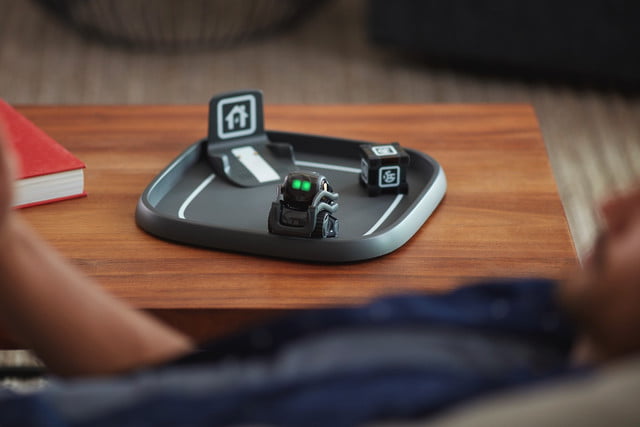
Called Vector, it’s a diminutive always-on, fully autonomous, cloud-connected home robot bursting with personality. Capable of performing around 1,000 different animations, Vector can react to his environment in a way that’s disarmingly lifelike. That includes recognizing individual people courtesy of an in-built HD camera or responding to their touch via a capacitive touch sensor in his back. Oh, and did we mention that you can use Vector as a moving Google Home, Amazon Echo or Apple HomePod-style smart speaker by asking him questions with the prefix, “Hey Vector”?
Previous
Next
1 of 5
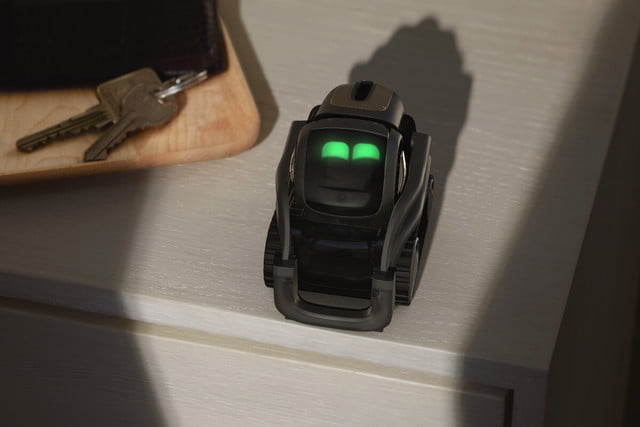

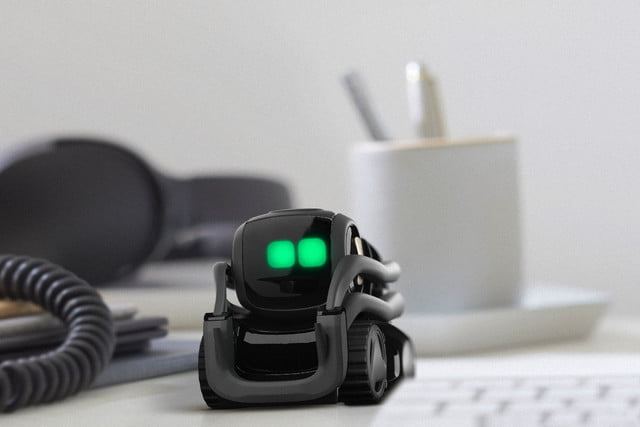
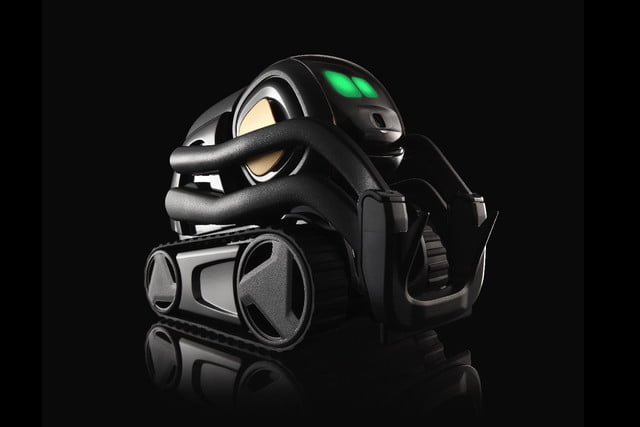
“For over five years, [manufacturer] Anki has brought together a team of experts across various fields to create the world’s first affordable, character-rich robot capable of surprising and delighting humans,” Boris Sofman, CEO and co-founder at Anki, said in a statement. “Vector is the culmination of everything we’ve learned in this journey so far, and a bold next step in our vision for entertaining and purposeful robots in every home, everywhere. Today marks the starting point in an overall expansion for our robotics platform and how we combine the latest technologies in robotics and artificial intelligence with our novel approach to character and interface.”
As ever, we offer our usual warnings about the potential perils of crowdfunding campaigns. However, if you’re aware of these and still want to go ahead and jump on the Vector bandwagon, you can do by heading to Anki’s Kickstarter campaign page.
A Vector robot will set you back $250 and ships with one base charger and early access to the Vector software development kit (SDK) alpha. Shipping is set to take place in October, just a few months away. That way your new robot BFF will have a few weeks to settle in before meeting the friends and family on Thanksgiving!
Moto Z3 vs Samsung Galaxy S9: Which flagship is more worthy?
Motorola has officially announced its flagship for 2018 — the Moto Z3. As the latest addition to Motorola’s Z-series, the Moto Z3 doesn’t bring many changes from the Moto Z3 Play — other than a few new specs and features. Its biggest change is the ability to support Verizon’s 5G network. But how does it stack up against one of the biggest flagships currently on the market? Below, we pit the Moto Z3 vs the Samsung Galaxy S9 to find out which one comes out on top.
Specs
Moto Z3
Samsung Galaxy S9
Size
156.5 x 76.5 x 6.75 mm (6.16 x 3.01 x 0.27 in)
147.6 x 68.7 x 8.4 mm (5.81 x 2.70 x 0.33 in)
Weight
156 grams (5.5 ounces)
163 grams (5.75 ounces)
Screen size
6-inch Super AMOLED display
5.8-inch Super AMOLED display
Screen resolution
2,160 x 1,080 pixels (402 pixels per inch)
2,960 x 1,440 pixels (568 pixels per inch)
Operating system
Android 8.1 Oreo
Android 8.0 Oreo
Storage space
64GB
64GB, 128GB, 256GB
MicroSD card slot
Yes, up to 2TB
Yes
Tap-to-pay services
Google Pay
Google Pay, Samsung Pay
Processor
Qualcomm Snapdragon 835
Qualcomm Snapdragon 845
RAM
4GB
4GB
Camera
Dual 12MP and 12MP rear, 8MP front
12MP (with OIS) rear, variable aperture, 8MP front
Video
Up to 4K at 30 frames per second, 1080p at 60 fps, 720p at 120 fps
Up to 4K at 60 frames per second, 1080p at 240 fps, 720p at 960 fps
Bluetooth version
Bluetooth 5.0
Bluetooth 5.0
Ports
USB-C
3.5mm headphone jack, USB-C
Fingerprint sensor
Yes
Yes (rear)
Water resistance
Splash-resistant coating
IP68
Battery
3,000mAh
TurboPower charging
3,000mAh
Quick Charge 2.0
Qi wireless charging
App marketplace
Google Play Store
Google Play Store
Network support
Verizon
T-Mobile, AT&T, Verizon, Sprint
Colors
Black
Midnight Black, Coral Blue, Lilac Purple
Price
$480
$720
Buy from
Motorola, Verizon
Samsung, Amazon
Review score
Hands-on
4 out of 5 stars
Performance, battery life, and charging
Julian Chokkattu/Digital Trends
If you’re investing in a flagship in 2018, you should expect to find a Snapdragon 845 under the hood — which is what the Samsung Galaxy S9 brings. While the Moto Z3 offers a Snapdragon 835 — which will provide a smooth experience — the Galaxy S9 offers top-notch performance. Both phones come with 4GB of RAM. You can expect the S9 to be faster and more powerful, since it’s running on the latest chipset.
For storage, both the Moto Z3 and Galaxy S9 have 64GB of storage along with a MicroSD card slot to expand on it. You can also get 128GB and 256GB versions of the S9 if you need more internal storage.
While both devices come with the same 3,000mAh battery, you can use a battery mod for the Moto Z3 which adds another 2,000mAh for two-day battery life. It also charges incredibly quickly thanks to Motorola’s TurboPower technology. After testing out the Moto Z3 Play (which has the same size battery), our phone went from 33 percent to 100 percent within 50 minutes. As for the Galaxy S9, we found that it lasted a day long with heavy usage. It does however, support fast wireless and wired charging.
With a more powerful processor and fast wireless charging capabilities, the Samsung Galaxy S9 takes this category.
Winner: Samsung Galaxy S9
Design and durability
Julian Chokkattu/Digital Trends
The Samsung Galaxy S9 and the Moto Z3 aren’t drastically different from their predecessors. Both devices look sleek with slim bezels surrounding the display. But the S9 does a better job at keeping everything more compact — which also makes for a more comfortable hold.
The Moto Z3 includes an unattractive and thick camera bump that makes the smartphone rock back and forth when it’s placed down on a flat surface. It also has the signature Motorola-style design, which we’ve seen time and time again, and the connector on the back for the mods. These issues can be fixed to an extent with Moto Mods, provided you’re willing to shell out a bit more money, but we’d still like the device to look better.
Meanwhile, the Galaxy S9 looks impressive out of the box, even though it’s hard to tell apart from last year’s S8. The infinity display and curved edges make it look far more futuristic than the Moto Z3. On both devices, the power button and fingerprint sensors are easily accessible — but the S9 does include a headphone jack whereas the Z3 doesn’t. You’ll have to use the 3.5mm headphone jack to USB-C dongle in the box to plug older headphones into your Z3.
In terms of durability, both these phones are liable to get damaged easily if dropped, but the S9 offers superior IP68 water resistance, while the Z3 makes do with a water resistant coating.
Winner: Samsung Galaxy S9
Display
Julian Chokkattu/Digital Trends
The Motorola Z3 packs a 6-inch, 2,160 x 1,080-pixel resolution, Super AMOLED display, while the Samsung Galaxy S9’s 5.8-inch Super AMOLED display boasts a superior 2,960 x 1,440 pixel resolution. The display on the Z3 is slightly larger than the S9 and won’t disappoint when it comes to color and brightness, but it doesn’t compare to the S9’s sharper, more vibrant screen. The infinity display also allows the screen to blend in with its edges, which makes for a more immersive viewing experience. For this one, we’re going to have to give it to the Samsung Galaxy S9.
Winner: Samsung Galaxy S9
Camera
Julian Chokkattu/Digital Trends
The Samsung Galaxy S9 and Moto Z3 both offer 12-megapixel rear cameras, though the Z3 features two of them. While we haven’t had a chance to test out the Moto Z3, it has similar specs to the Moto Z3 Play — which we found takes decent low-light photos with good color accuracy The details would sometimes look a bit too over sharpened and overexposed, but overall it took good photos. One difference however, is that the Moto Z3 offers a black and white camera mode that’s exclusive to the device. The Z3 Play made do with a 5-megapixel depth sensing lens as opposed to the 12-megapixel lens you’ll find in the Z3, so we may see a significant improvement in image quality.
While the addition of an extra lens can make for a better camera, that’s not always the case and the S9 has a few tricks of its own. The variable aperture allows the camera to switch between f/1.5 and f/2.4 apertures. It takes noticeably bright and sharp photos in broad daylight without you having to do anything other than open the camera app and tap on the shutter icon. With its multi-frame noise-reduction image processing, photos captured at night don’t look as grainy as they can with other smartphones on the market.
We do need to test the Z3 camera a bit more, but we’re not really expecting it to match the S9.
Winner: Samsung Galaxy S9
Special Features
The Samsung Galaxy S9 is packed with features geared towards entertainment — there’s support for the Gear VR along with the Bixby personal assistant. For productivity, there’s also the Dex Pad and Dex Station which turn your phone into a full-blown Android desktop computer.
Meanwhile, the Moto Z3 makes things a bit more interesting. What could be classified as one of the most important features of the device is its ability to support 5G — complete with a built-in Snapdragon X50 modem. With the addition of a 5G Moto Mod that will ship in early 2019, you’ll be able to connect to 5G networks, but only on Verizon and in places with 5G networks up and running. You’ll also find support for Amazon Alexa for those who don’t want to use Google Assistant, and there are a host of other Moto Mods that add different extras.
Even though the Samsung Galaxy S9 does offer features that make the device extremely versatile, the introduction of 5G on the Moto Z3 is extremely impressive. While we’re unsure how well it will work or what it will cost, the Moto Z3 will be one of the first smartphones with 5G network support, albeit through an add-on.
Winner: Moto Z3
Software and Updates
On both devices, you’ll find Android Oreo. The Z3 runs Android 8.1 Oreo and it’s mostly stock Android — with a few additions from Motorola. Since the device is exclusive to Verizon, bloatware is included. Motorola has confirmed that the Z3 Play will receive both Android 9.0 Pie and Android Q, so we can only assume the same applies to its latest Moto Z3 — especially since it’s launching around the same time we might see Google’s latest operating system launch.
The Galaxy S9, runs Android 8.0 Oreo with Samsung’s Experience skin on top and it works well, offering some handy extras alongside some clutter. We expect the S9 will also receive the next couple of major Android updates, but it may take a while for them to roll out.
Based on speed, we’re going to give this one to the Samsung Galaxy S9 which will most likely receive the update before Motorola. In comparison to Samsung, Motorola still has a long list of devices waiting to receive Android 8.0 Oreo, let alone Android 9.0 Pie.
Winner: Samsung Galaxy S9
Price
The Moto Z3 will cost you $480 and will launch exclusively with Verizon on August 16. On the carrier’s finance plan, you’ll pay $20 per month. Those in the U.S. will receive a $300 trade-in credit towards the device if they switch to Verizon. The Samsung Galaxy S9 is available for $720 from Samsung, or you can purchase it on a monthly payment plan. It’s also available through a variety of carriers.
Overall winner: Samsung Galaxy S9
Snagging almost every category, it’s clear the Samsung Galaxy S9 is the winner. While the Motorola Z3 is a great contender, it’s no match for the S9, which takes on the qualities every flagship should — a sleek design, top-notch processor, and a stunning display. If you’re stuck between the two, the Samsung Galaxy S9 will provide you with the latest, high-end specifications and a more enjoyable user experience, though it will also cost you a fair bit more.
Editors’ Recommendations
- Everything you need to know about the Motorola Moto Z3
- Moto Z3 Play vs. Honor View 10: Which midrange phone should be in your pocket?
- Moto Z3 Play vs. OnePlus 6: Can Motorola’s latest beat our midrange pick?
- Moto Z3 hands-on review
- Moto Z3 Play: Everything you need to know about Motorola’s modular phone
 AIVAnet