


Apple’s Stock Price Crosses $200 Mark to Reach New All-Time High
Apple shares crossed the $200 mark in intraday trading today, setting a new all-time high for the company’s stock.
Apple’s stock is up nearly five percent since the market closed on Tuesday, after the company reported a record-breaking $53.3 billion in revenue, meeting the high end of its guidance and topping Wall Street expectations.
All eyes are on the AAPL ticker as Apple hovers ever so close to a trillion dollar valuation, but the company’s precise market cap can’t be determined until Apple files its quarterly 10-Q form today with an updated total of outstanding shares.
Tag: AAPL
Discuss this article in our forums
Facebook and Instagram Reveal Tools for Managing Your Time, Setting Reminders, and Limiting Notifications
Earlier in the summer, Facebook and Instagram each promised that users would soon be able to access a suite of digital health tools to help them manage their time on the social networks and promote healthier habits. Today, the companies revealed these tools in a press release and confirmed they will be rolling out to all mobile app users “soon.”
The tools will be found within the settings page on both iOS apps — on Instagram it’ll be called “Your Activity” and on Facebook it’ll be called “Your Time on Facebook.” At the top of the page, the activity dashboard will highlight your daily average time for each app on the device you have it installed on, and below that will be a bar graph detailing exactly how long you spent per day in each app over the last week.
We developed these tools based on collaboration and inspiration from leading mental health experts and organizations, academics, our own extensive research and feedback from our community. We want the time people spend on Facebook and Instagram to be intentional, positive and inspiring. Our hope is that these tools give people more control over the time they spend on our platforms and also foster conversations between parents and teens about the online habits that are right for them.
Below that is “Manage Your Time” section with a few features that focus on customizing push notifications. One is a “set daily reminder” option, which is an alert that notifies you when you’ve reached the amount of time you want to spend on Facebook or Instagram for that day. The other is for “notification settings,” where you can access a new “mute push notifications” option to limit your Facebook or Instagram notifications for a period of time (15 minutes to 8 hours).

Apple has its own time management settings coming in iOS 12, called “Screen Time,” with many of the same features as Facebook’s new activity dashboards. In the Settings app in iOS 12, Apple presents information gathered from overall iPhone use on any given day so that users can see which apps they open the most, which send the most notifications, how often they pick up their iPhone, set “Downtime” limits and app limits, and more.
For Facebook, the company says that the new dashboard tools for managing screen time are just a “first step,” and it will continue to work to develop features that promote digital health on its platforms.
Tags: Facebook, Instagram
Discuss this article in our forums
Why learn to use gadgets when they can just learn to help us? Exactly, says LG
A smart dishwasher should sense how caked-on the crud is on your plates and rinse them accordingly. Smart air conditioners should map your room like an air-traffic controller and cool different parts to different degrees. A smart oven should know whether you’ve put in brisket or a spoon roast and cook accordingly.
Today, most appliances aren’t smart, never mind all the years of marketing claims. But they will be — and artificial intelligence is the cornerstone to improving all of those devices, said I.P. Park, president and CTO of LG Electronics.
“Currently you need to be smart to use a smartphone.”
“What AI hopefully will do is solve this problem of using complex systems, so that the devices become smart, and smart devices mean they’ll know exactly what you want,” he told Digital Trends, in an exclusive interview.
This solves the conundrum that lies at the heart of modern technology, threading its way from your phone to your dishwasher to your air conditioner: “Currently you need to be smart to use a smartphone,” he joked.
To make that happen, LG is going all in on AI, announcing Wednesday a massive investment in R&D: The company just cut the ribbon on the new LG Electronics AI Research Lab in Canada, a five-year research partnership with the University of Toronto and an extension of the newly expanded LG Silicon Valley AI Lab in Santa Clara, California, which opened in 2013. LG also has research labs working on AI around the globe, including Russia, Japan, China, Korea, Finland, and India, in addition to the North American spaces.
For competitive reasons, LG can’t disclose how many employees currently working in either facility, but it told Digital Trends that it is investing tens of millions of dollars in the new Toronto AI lab.
“At this stage AI is just the tip of the iceberg of what’s going to happen in the future,” Park said. “When we talk about AI many people think of voice assistants, but it’s much more than that. It’s going to be voice plus vision plus gesture recognition, plus context, plus knowledge … You need to understand what the user wants, in a seamless way. We are not there yet, obviously. But it’s a good beginning.”
Do any LG products feature AI today?
“When you’re driving a modern luxury car most people are probably using only 5 percent of the entire feature set of the car, if you’re lucky,” Park said. “Because it’s too complex. A lot of features are there, but you have to be extremely smart and diligent to use them in the correct way.”
“What AI will hopefully do is solve the problem of using complex systems so that the devices become smart. And smart device will know exactly what you want,” Park added.
“At this stage AI is just the tip of the iceberg of what’s going to happen in the future.”
To see what that looks like, take a look to LG’s current lineup of AI-powered products (the company says that virtually all products are connected and will be AI enabled). Last month LG announced AI-powered air conditioners that save you money by adjusting compressor speed to suit the task at hand — a first in the space.
The LG G7 ThinQ is an AI powered smartphone with a button for direct access to the voice assistant — Google’s Assistant, that is. And an AI Cam mode in the camera automatically identifies the scene you’re pointing the phone at. Try to shoot a sunset and the camera will recognize that fact and compare your scene to images of sunsets to try and offer up the best-looking photo.
Look at the latest OLED TV that has an AI feature, Park suggested. “You can talk to it on the remote. It’s got our own AI platform built in. And it connects to external service providers, for example, Google Assistant. So when you talk to it you can say, ‘make the screen brighter’ or ‘find NBC for me,’ it’ll do that, using the AI. But if you say ‘what’s the best restaurant nearby’ it’ll connect to Google Assistant.”
Many technology companies roll out frequent updates to improve their products, leading many consumers weary of “patch Tuesday.” Even automobiles are currently being given new features via updates. That’s certainly handy, and prolongs the life of a product, but Park said LG’s products will improve simply by learning about the user.
“Eventually you won’t even get a user manual with a product. It just comes to you, and by interacting with it, it does work for you.”
What about Alexa, or Cortana, or Google Assistant, or Siri….?
“The world has become just too complex for any single company to insist on using their own proprietary closed solutions, no matter how big the company is, how capable their R&D is,” Park said. He won’t say it, but I will: Bixby.
“It’s a learning process. This is quite new, but it’s one of our key components for success in the future.”
In early 2017 I flew to Korea to discuss Samsung’s ambitious plans for a new voice assistant, with exclusive access to the company’s hardware and the ability to allow all of the devices it makes to talk, collaborate, and simplify your life. In the year and a half since then, the company has struggled to keep pace with the rapid advancements in voice technology, leaving many questioning the wisdom of wading into a crowded market and trying to catch up. LG has a different strategy.
“It’s a combination of competition and collaboration,” Park said. And that extends not just to the biggest companies like Google and Amazon but smaller startups with big ideas.
Julian Chokkattu/Digital Trends
“I like to think of these startups from Silicon Valley or Israel or Korea or other regions in the world to be an extension of our R&D,” Park said. “Sometimes we work with them together in a joint project, sometimes we invest in them, sometimes we acquire them.”
“It’s a learning process for LG. This is quite new, but it’s one of our key components for success in the future,” he added.
Security concerns?
Privacy becomes an even bigger factor when you talk about products that know more than mere facts about us: they know who we are. How long you take to shower in the morning, what time of day do you usually arrive home, how frequently you wash your clothing. Is that information that should be shared? What about your privacy and security?
LG sets many data collection options in its product to “off” by default.
“We take those two things very seriously,” Park said. LG builds security into its products from the design phase, he said. “We call it LGSDL: LG secure software development lifestyle. Hopefully our products will be secure enough when we launch them to fight against any kind of malicious attack from outside.”
LG does not collect user specific data, he noted, though it does aggregate overall behaviors to try to improve its products. If people only wash their clothing on the weekend, perhaps LG laundry appliances could be put into low power mode during the week.
Laudably, LG sets many data collection options in its product to “off” by default — a policy other technology companies would be wise to imitate. Forcing consumers to opt out of data collection policies sets mistrust from the get-go — LG aims to circumvent that.
So the next time you go shopping for technology, be it a toaster oven or television, look to see if AI is in there — and if it is, rest assured. It’s going to help.
Editors’ Recommendations
- A Florida parrot conquers its household by learning Alexa commands
- Warning: The way your neighbors use Alexa will bore the snot out of you
- Just add whitewater: These are the gadgets pro kayakers use to go ‘500 percent’
- August Smart Lock Third Generation Review
- Google Assistant: Everything you need to know
How (and when) to clear app cache or data on Android

Apps sometimes can misbehave. If it happens to you, here’s something to try.
Every Android smartphone has an application manager that you can get to through the settings menu. It’s usually in the top level somewhere, though it can vary a little by phone. But once you get to it, you’re at the heart of the matter. This is where you can see every application that’s installed on your phone or tablet. And it’s a handy place to clean things up a bit should they go wonky. Here’s what’s up:
Clearing the app cache

As you use applications, they start storing files for reference later. These files are stored in an app “cache.” For instance: When you’re using the Android Central app, it’ll save images and other pieces of the stories you’ve read so that they don’t have to be downloaded each and every single time the app needs them. This saves you time and data.
But maybe you want to clear an app’s cached data, either to regain some used space or to try to fix a misbehaving app. This is where you can do it. Just tap into the app, and then tap the “Clear cache” button. You’ll find that right on the app’s page in the application manager if your phone is running Android 7 or earlier, and if your phone runs Android Oreo you’ll find it under Storage on the app manager page. If you’re not sure, check both places and you’ll find it.
The next time you use the app, it will download everything it needs from the internet like it did the first time you used it. Clearing cached data does not clear other data like logins or saved games.
This often fixes things, especially when an app pulls its content from a website that always changing and adding more content. If this doesn’t work, move to the next step.
Clear app data — or resetting an app

Clearing app data is a little more drastic. You’re wiping the cache, but also clearing any and all settings that go along with that app. You’re basically starting that app over, from scratch, and it’ll behave as it did the first time you installed it. This is generally a last resort type of thing. If you clear app data on, say, the Facebook app, you’ll need to log back in. If you clear data on a game you’ve been playing, you’ll be back at the beginning, as if you’d never played it. (And let’s hope that game is properly saving your place to the cloud.)
Next, open the app and sign in or do anything else you need to get started using it. With no “old” data in place — either stored settings or cached — you’re essentially running the app for the first time again. See if your problem is resolved and if so you’re golden.
One nice thing to do if this fixes any weirdness with an app is let the developer know. It’s mighty hard to keep track of versions and data conversion and everything else about making and publishing a great app and they’ll appreciate the heads up if you found a bug that affects everyone.
When to clear cache or data …
So when should you clear an app’s cache manually? Chances are you’ll never need to. But should an app start to “feel” sluggish or otherwise start misbehaving, this is where I’d start. Clear the cache.
And should an app really go haywire — or if you just want to start it from scratch — you can go all out and clear its data and start over from the beginning. Just tap the “clear data” button. You’ll get a warning asking if that’s really what you want to do. Confirm that, and you’ve reset the app to scratch.
Update July 2018: This post has been updated to make sure the info is good with current versions of Android.
How to play PlayStation 4 games on your Android phone
With a little work, it’s possible to play PlayStation 4 games on your Android device
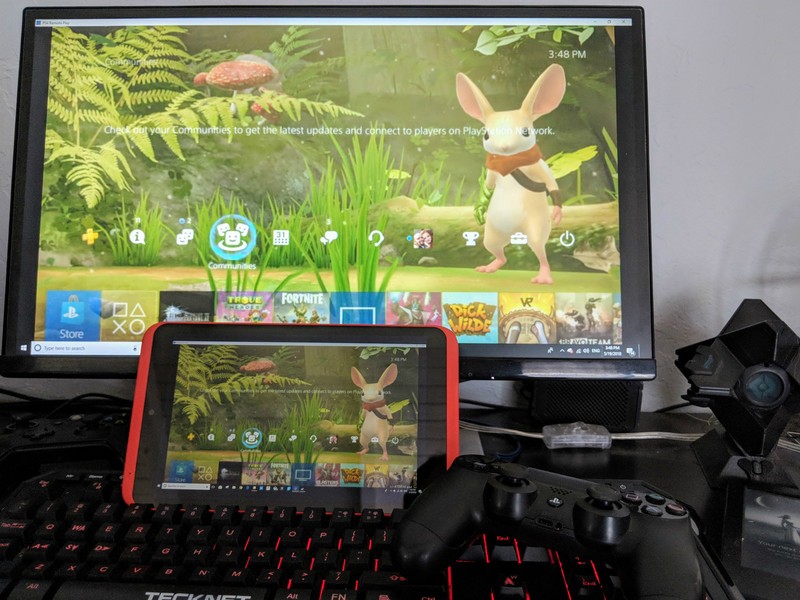
With the Release of the Steam Link beta app from Valve, a whole new world of possibilities has opened up regarding mobile gaming. The Link app allows you to play all of your Steam games on any Android device with Lollipop or above and seems to do it really well from the testing I have done.
The Link app does have another trick up its sleeve though. It is just a sophisticated and smooth running screen mirroring service with wireless input control, which means you can cast anything from your PC to your mobile device including your PlayStation 4! The PS4 allows you to stream your games to your PC, and with the Link, it’s easy to stream those to your mobile device.
Download Steam Link (free)

Step-by-step instructions
First, follow the instructions to set up your Stream Link app.
Follow the Instructions by Sony to set up remote play on your computer.
Start the Remote Play app so you see your PS4 screen on your computer.
Start the Stream Link app.
Tap Start Playing. The computer screen will load into Steam’s Big Picture mode.
Use Alt-Tab to select your Remote Play screen.
Enjoy PS4 on your mobile device!
More details
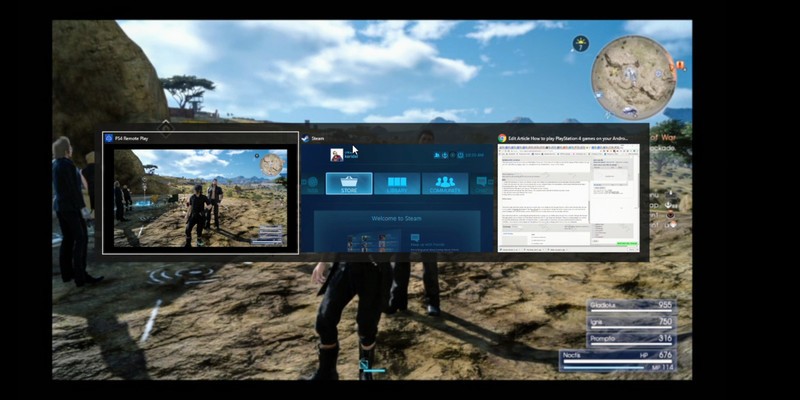
Because of the screen mirroring this will work on any system, not just the PlayStation 4, the Xbox will work too; you just need to Alt-tab over to the correct screen. I’ve even used it to do some 3D design work with my wireless mouse outside in the sun!
One small caveat with this particular mobile PS4 setup is the controller. Because the Remote Play app requires you to connect your PS4 Sixaxis directly into your PC, your range may be limited. There is a wireless adapter you can buy for your PS4 remote, and it does reportedly work with Remote Play, but at the time of writing, I couldn’t confirm that.
One way to get around this is by using two controllers, one to plug into the computer so it recognizes it and one connected to the PlayStation that you can use wirelessly. This seems to work perfectly.
See the adapter at Amazon
So, is it worth doing?
The necessary hoops to get this to work are excessive — Sony is an Android manufacturer and technically could make the Remote Play app work on any Android device — but if you are willing to take the time, playing your PS4 anywhere in your house is excellent fun.
Let us know what you think of this workaround in the comments section.
PlayStation 4

- PS4 vs. PS4 Slim vs. PS4 Pro: Which should you buy?
- PlayStation VR Review
- Playing PS4 games through your phone is awesome
Amazon
How to Use Password AutoFill on Apple TV and tvOS 12
Signing into apps and services on Apple TV can be frustrating when you’re shuttling between characters on the onscreen keyboard, or barking out letters and numbers at your Siri Remote. To make entering login credentials easier, Apple introduced continuity keyboard, an iOS feature that allows users to enter text on their Apple TV using their iPhone or iPad.
In tvOS 12, coming this fall, continuity keyboard has been further enhanced to support Password AutoFill. So whenever you encounter a login screen, you’ll see the following notification on your iPhone or iPad.

Simply tap the alert at the top of the screen to bring up the keyboard, and you should be able to fill in your password credentials on Apple TV by tapping the AutoFill suggestion in the Quick Type bar. And if you’re using the TV remote or Control Center interface with your Apple TV, the same simple login process applies.
The above assumes your Apple TV and iOS device are on the same iCloud account. But say you’re a guest in someone’s home, and you’d like to log in to your account on their Apple TV. What then?

Happily, tvOS 12 also caters for this scenario. Apple TV can now ping the Siri Remote to look for a nearby iPhone. Once it’s discovered your device, your iPhone will ask you to confirm that you want to use AutoFill. It will then prompt you to enter the authentication PIN displayed on the nearby Apple TV.

On authenticating your iPhone with Face ID, Touch ID, or a passcode, you’ll be presented with your passwords list, and the password for the relevant app or service that you want to log in to will appear at the top, ready to send to your friend’s Apple TV at a tap.
Password AutoFill on Apple TV requires the installation of tvOS 12 and iOS 12, both which are due to be released in the fall.
Related Roundups: Apple TV, tvOS 12, iOS 12Buyer’s Guide: Apple TV (Neutral)
Discuss this article in our forums
Apple posts best-ever third-quarter earnings on sales of more expensive iPhone X
Apple’s earnings for the most recent quarter reveal that the company is doing better than ever. Not only did it meet expectations, but it exceeded them too — and things are only likely to get better for Apple as it heads into another iPhone refresh cycle.
Generally speaking, the quarter ending June 30 is the slowest for Apple, at least when it comes to sales of the iPhone and Apple Watch. It’s right at the end of an iPhone’s lifetime — and right before a new set of iPhones take over. This year, however, Apple posted its strongest ever third-quarter earnings, beating expectations.
Apple also said during its earnings call that it expected revenue next quarter to be between $60 billion and $62 billion, which is again ahead of expectations from Wall Street — which come in at $59.47 billion. Meeting that estimate would put represent a hefty 15 percent increase over the same quarter last year.
In terms of units, Apple sold about as many iPhones as it did during the same quarter last year — 41.3 million. The difference this quarter, however, is that the average selling price of those iPhones was quite a bit higher, thanks to the more expensive iPhone X, which starts at $1,ooo.
Apple is also doing excellent in the wearables market. During the call, the company boasted about 60 percent growth in wearables, a segment that includes the Apple Watch, AirPods, and Beats headphones. It’s likely that segment will continue to grow — the Apple Watch is growing in popularity and AirPods have become a hit, too.
Apple is also growing its “services” category, which includes things like Apple Music, Apple Pay, Apple Care, iCloud, iTunes, and so on. Apple posted a hefty $9.55 billion in revenue for this category, which is up a hefty 28 percent from the same quarter a year ago. That segment also beat out Wall Street estimates, which came in at $9.21 billion. According to Apple, the boosted revenue is due to high Apple Pay usage, and an increase in paid subscribers through the App Store.
“Apple Pay continues to expand with well over 1 billion transactions last quarter, triple the amount from just a year ago, with growth accelerating from the March quarter,” said Apple CEO Tim Cook during the earnings call.
Editors’ Recommendations
- Sluggish Galaxy S9 sales lead to second-quarter slump for Samsung
- Apple shrugs off Fitbit and Garmin to remain king of smartwatches
- Smart wearables see big spike as ‘basic’ devices drag down overall market growth
- Apple AirPods review
Xiaomi Mi A2 vs. Xiaomi Mi A1: Should you upgrade?
If you’re looking for a mid-range phone, the Mi A2 should be at the top of your list.

The Mi A1 launched last year for the equivalent of $230, and the Mi A2 is slated to make its debut at around the $280 mark. What set the Mi A1 apart from the smorgasbord of Xiaomi phones available in this segment was the fact that it ran Android One instead of MIUI, and that allowed the device to become a fan-favorite in the budget segment.
Xiaomi is retaining the same formula with the Mi A2, but the phone does offer upgraded hardware and much better cameras. The Mi A2 will be available in over 40 markets around the world, so it’s time to find out if it’s a worthy successor to one of the best budget phones of 2017.
Xiaomi Mi A2 vs. Mi A1: Specs
| Operating System | Android 8.1 OreoAndroid One | Android 8.1 OreoAndroid One |
| Display | 5.99-inch 18:9 FHD+(2160×1080) IPS LCD panelGorilla Glass 5 | 5.5-inch 16:9 FHD (1920 x 1080) IPS LCD panelGorilla Glass |
| SoC | Octa-core Qualcomm Snapdragon 6604×2.2GHz Kryo 260 + 4×1.8GHz Kryo 26014nm | Octa-core Qualcomm Snapdragon 625Eight Cortex A53 cores up to 2.0GHz14nm |
| GPU | Adreno 512 | Adreno 506 |
| RAM | 4GB/6GB | 4GB |
| Storage | 32GB/64GB/128GB | 64GB |
| Expandable | No | Yes, up to 128GB |
| Rear camera | 12MP (f/1.75, 1.25um) + 20MP (f/1.75, 1.0um)PDAF, LED flash, 4K video recording | 12MP (f/2.2, 1.25um) + 12MP (f/2.6, 1.1um)PDAF, LED flash1080p video recording |
| Front camera | 20MP (f/1.75, 2.0um)AI portrait modeLED Selfie lightBeautify 4.0 | 5MP f/2.2 lens |
| Connectivity | LTE with VoLTEWi-Fi 802.11 ac, Bluetooth 5.0GPS, GLONASS | LTE with VoLTEWi-Fi 802.11 a/b/g/n, Bluetooth 4.23.5mm audio jackGPS, GLONASS |
| Battery | 3010mAh batteryQuick Charge 4.0 (India)QC3.0 (ROW)USB-C | 3010mAh batteryQuick Charge 3.0USB-C |
| Fingerprint | Rear fingerprint | Rear fingerprint |
| Dimensions | 158.7 x 75.4 x 7.3mm | 155.4 x 75.8 x 7.3mm |
| Weight | 166g | 165g |
| Colors | Black, Gold, Blue, Rose Gold | Black, Gold, Rose Gold |

What’s the same
At its core, the Android One initiative is all about providing a clean user experience. The Mi A2 comes with Android 8.1 Oreo out of the box, and Xiaomi says it will deliver the Android P update shortly after it becomes available.
Things haven’t changed on the software front, and that’s a good thing.
The fact that the Mi A1 offered a pure Android skin in lieu of MIUI was what made the device such an enticing option last year, and the Mi A2 continues that tradition. There isn’t a shortage of budget phones that offer great hardware — Xiaomi itself has plenty of decent options available — but more often than not, most devices in this category don’t receive timely updates.
Motorola’s Moto G series stood out for that reason, but the current Moto G6 series doesn’t hold a candle to what Xiaomi, Honor, and others are offering in this space.
Battery life is also unchanged from last year. The Mi A2 has a 3000mAh battery — a smidgen less than the 3010mAh battery on the Mi A1 — and you’ll get a day’s worth of usage most of the time. I’ve been using the Mi A2 for nearly a week, and I’m yet to see the battery go below 10% even after heavy use.

What’s different
The key difference between the Mi A1 and its successor is the internal hardware. The Snapdragon 625 chipset in the Mi A1 didn’t set benchmark scores on fire, but it was well-regarded because of its balance between efficiency and performance. The Snapdragon 660 on the Mi A2, meanwhile, is one of the fastest chipsets available in this segment.
The performance on offer with the Snapdragon 660 is on par with the likes of the Snapdragon 820, and the chipset is essentially using the same cores, albeit clocked lower. The Mi A2 also comes with a memory upgrade, and you’ll be able to pick up a variant with 6GB of RAM and 128GB of storage.
The upgrade in storage comes in handy as the Mi A2 is losing the MicroSD card slot. The Mi A1 had a hybrid SIM card tray that lets users slot in a secondary SIM card or a MicroSD card, but the Mi A2 doesn’t have a provision for the same.
Also missing on the device is the 3.5mm jack, as Xiaomi looks to move away from the port entirely. The brand says the decision to remove the jack was borne out of a need to free up internal space, and it is the one area where the Mi A2 is found lacking when seen against its predecessor.
The Mi A2 is one of the fastest phones you’ll see in this segment.
Things haven’t changed much up front in terms of quality, and the 5.99-inch IPS LCD panel continues to be one of the best in this category. The switch to an 18:9 form factor has allowed Xiaomi to cram more screen into a body that’s roughly the same size as the Mi A1, and that’s always a good thing. Furthermore, the Mi A2 finally gets rid of hardware navigation keys, which stuck out like a sore thumb on the Mi A1.
On the subject of improvements, Xiaomi has mentioned that it will offer Quick Charge 4.0 support exclusively for Mi A2 units sold in India, with global units coming with QC3.0 as standard. We haven’t seen a lot of phones with QC4.0 in the market — and definitely not in this segment — and the move is a welcome one. That said, there’s a lack of wall chargers that deliver QC4.0 speeds, and your best bet is to find a USB-PD charger that goes up to 45W. For its part, Xiaomi is including the standard 5V/2A charger in the box.
Finally, the one reason to consider the Mi A2 over the Mi A1 is the camera. The dual 12MP + 20MP cameras at the back do a fantastic job both in daylight and low-light scenarios, and the 20MP front shooter is the best Xiaomi has included on a phone to date.

Should you upgrade?
The Mi A1 has aged well, but the Mi A2 features considerable hardware upgrades, and the camera is likely to be one of the best yet on a $300 phone. Then there’s the fact that the phone is set to debut for just $50 more than the Mi A1, making it an even more attractive option.
If you’re using the Mi A1 and are looking for a phone with more robust hardware and an 18:9 panel, then the Mi A2 is a no-brainer. With the phone set to launch in India on August 8, we should know more about pricing and availability shortly, so stay tuned.
How to delete and reinstall games on your Xbox One
Three years into the life cycle of the Xbox One, storage space has become a valuable commodity. The base model’s 500GB drive doesn’t seem quite so spacious when your “Ready to Install” list is packed with AAA games that can take up more than 50GB, and almost double that if you’re downloading 4K-compatible games on an Xbox One X.
Unless you’ve invested in an external drive to increase your console’s storage capacity, you’ve probably experienced the feeling that comes when you’re forced to delete one of your games to make room for another. If not, the first time can be a harrowing — and confusing — experience. To help you out, we’ve assembled this handy guide on how to delete and re-install your content. It won’t make picking which games to eradicate from your drive any easier, but it will tell you which buttons to press to do so.
Step 1
From the Xbox One home screen, press the Xbox button to bring up the dashboard, then select the “My Games & Apps” tile.
Step 2
Highlight the tile of the game you’d like to remove from your hard drive and press the Menu button on your controller. (That’s the Start button, for most players.)
Step 3
Select “Manage Game” from the pop-up menu that appears.
Step 4
The next screen is divided into two parts. On the left, you’ll see each piece of content related to the game in question, listed under “Installed” or “Ready to install.” From the left side of the screen, you can also manage any saved data that exists for the selected game.
On the right, you’ll see some details about the game, including its file size and a link to the game’s page in the Xbox Store. You can choose to move the data if you have another storage device connected, copy it, or uninstall it entirely. Choose “Uninstall all,” and the game will be removed from your hard drive.
Reinstalling deleted games
If you want to re-install a deleted game, head back to the “My Games & Apps” screen. On the left, you should see “Ready to Install (X)”, with “X” signifying the number of games and apps you own that aren’t currently installed on your hard drive. Selecting a game or application will automatically begin the installation process, assuming you have enough space on your console.
On the left side of the screen, you’ll also now see a “Games With Gold” tab, which will display any games you’ve received through Xbox Live Gold that weren’t already installed.
You can also re-install games from the “Manage game” screen. To do so, select “Ready to Install” on the left. Afterward, install each piece of content individually or install all content for the specified game at once via the “Install all” option. Keep in mind that there’s no re-installing save data once it’s been deleted, however. Once removed, that data is lost forever unless you have connected to the internet prior to deleting the data, in which case it will be reinstalled from the cloud when you choose to reinstall or re-download the game.
Update: We’ve added information on Games With Gold tab.
Editors’ Recommendations
- How to delete and reinstall games on your PS4
- How to fix the most common Windows 10 installation problems
- How to clear cookies
- How to factory reset an Xbox One
- How to factory reset Windows
Apple Has 4 Million Users Beta Testing its Software
Apple has been allowing developers and members of the public to test beta versions of new iOS, macOS, watchOS, and tvOS releases for quite some time now, and during today’s earnings call, Apple CEO Tim Cook provided insight into just how many people try out new software ahead when it’s officially released.
At the current time, Apple has “over 4 million users” participating in its OS beta programs, according to Cook.
Public beta testers have access to iOS 12, macOS Mojave, and tvOS 12, three operating system updates that will be rolling out this fall after an extended beta testing period, while developers have access to iOS 12, macOS Mojave, tvOS 12, and watchOS 5. watchOS 5, a new software update for the Apple Watch, is limited to developers because it’s not possible to downgrade the software on an Apple Watch.
Public beta testers and developers are tasked with testing Apple’s software to help the company suss out bugs and improve features ahead of a public launch.
Apple did not break out how many users participate in each of its beta programs, nor what percentage of those users are developers or public beta testers, but it’s probably safe to say that iOS gets the lion’s share of interest.
Despite Apple’s robust beta testing process, there are still major bugs that slip through on occasion, but Apple offers frequent fixes and updates for all of its operating systems.
Tag: earnings
Discuss this article in our forums
 AIVAnet