


Apple Reintroduces Financing Options in the United Kingdom
Apple has resumed offering financing options in the United Kingdom after eliminating the option earlier this year. Apple has a new financing page on its UK website, outlining its Barclays financing plan.
While the financing page specifically focuses on the Barclays financing options, when checking out, customers can choose installment payments through Barclays or PayPal Credit.
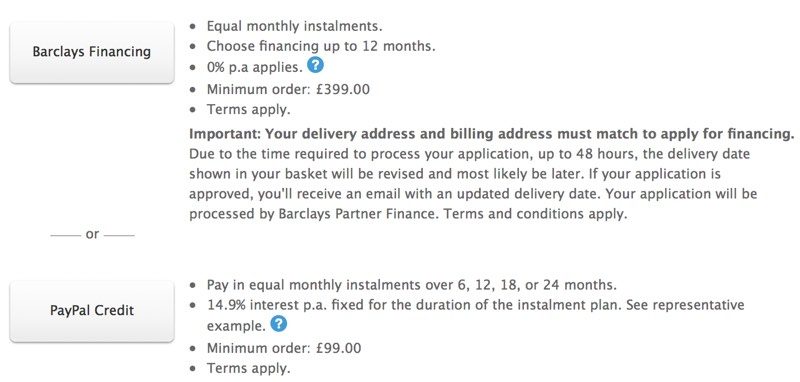
To use the Barclays financing option, customers in the UK must make a purchase over £399. There is no interest for the first 12 months, with purchases split into reasonable monthly payments. PayPal Credit is available for purchases over £99, but there is no interest free option.
It is not clear why Apple temporarily stopped offering financing in the United Kingdom, but full financing is now available once again. The company made the same change to financing in Canada in June of 2017, but has not yet reimplemented the financing options in that country.
Tags: United Kingdom, Apple retail, financing
Discuss this article in our forums
Grab a 4K LG Ultrafine IPS monitor for just $350 with limited-time deal
While 4K monitors may be cheaper today than they’ve ever been, they’re still normally not this cheap. At just $350, the certified refurbished UltraFine 4K monitor is one of the most affordable out there, and with a USB-C port, it makes it a great option for those wanting additional detail for a MacBook.
Typically when buying some of the best 4K monitors, you need to spend upward of $400, or even $500 to get something good. That’s not the case with this new Amazon deal, where the $450 price tag of the LG Ultrafine 4K has been reduced significantly. Unfortunately, we’re coming to this deal a little late, as there were a handful of refurbished monitors going at $200 earlier on, but $350 is still a great price for this ultra-high-definition display.
It is important to highlight, however, that this is a refurbished model, which means that it’s not brand new. As a certified refurbishment though, it is sold with a 90-day manufacturer warranty, so if there are any immediate problems, you can get your money back or a replacement model.
With that caveat out of the way though, the LG Ultrafine is an intriguing 4K display, in that it’s not the typical 4K resolution of 3840 x 2160, nor the projectionist 4K that’s sometimes touted — 4096 × 2160. The LG display is instead 4096 x 2305, which gives it a pixel density of 219 per inch.
That’s on the high-end of most 4K displays, but that’s because this is actually a relatively small monitor by modern standards, at just 21.5 inches diagonally. That’s not to say it’s antiquated. Alongside its impressive resolution, this Ultrafine display also sports a USB-C port, which makes it capable of acting as an external monitor for modern MacBooks, as KnowTechnie highlights. Its bigger brother, the Ultrafine 5K was listed as one of our favorite monitors for MacBooks in our guide, so it’s in good company.
Other notable features of this display include its impressive brightness of 500cd/m², a versatile display stand that can be adjusted to give you the best viewing angle and height for your everyday use, and good color support with 99 percent of the DCI-P3 gamut supported.
Buy it
Editors’ Recommendations
- The best 4K monitors
- The beefy Denon AVR-X4300H 9.2-channel AV receiver is now $499 off on Amazon
- Time to upgrade! Here are the best 4K TV deals for May 2018
- The top 10 budget-friendly GoPro alternatives that won’t leave you broke
- Everything You Need to Know About Ultra HD 4K TVs
Best Smart Light Switches That Don’t Require A Neutral Wire

No neutral wire in your switch box? We have you covered.
Smart light bulbs are awesome, but they aren’t always an option. That’s when you look to the next link in the chain and consider a smart switch. You can control everything on the switched circuit at once, and most are even dimmable with the right lamps. Connecting them is also fairly easy, too — just shut the power down and move the wires from one switch to the other. Unless your switch box doesn’t have a neutral wire.
A lot of switch boxes won’t have a neutral wire because of how the wiring inside the walls was done. A switch doesn’t need a neutral wire — it simply breaks the connection on the line that supplies power to a light or whatever else it controls. But most smart switches, like the ones from Wemo or GE, do require a neutral wire. This is because they need to be powered on all of the time for the Bluetooth or Wi-Fi radio to operate. This can be a problem if you want to build out a smart lighting system.
Never think you know what a wire’s function is based on its color! It’s common for a switch box without a neutral wire to use a white and black wire as the switched “hot” lead because house wire comes in a roll with a black, white, and bare copper lead encased in its shell. In this case, the white wire could have current and should be treated as such. Contact a licensed electrician if you have any doubts about what you see or are uncertain of anything.
If you’re faced with this issue there are several things you can do.
- Bite the bullet and use smart lamps instead of a smart switch. Smart bulbs can be expensive if you need to outfit some lighting fixtures, especially if they use a non-standard base for the individual sockets. But having an electrician rewire the circuit is expensive, too.
- Make sure there isn’t a neutral wire in the switch box. If you see other wires connected by a wire nut in the back of the junction box, there’s a good chance one of them is a neutral circuit. If this is the case, an electrician can tell you if you can tap into it and supply power to a smart switch. Don’t go poking in there unless you know what you’re doing, though!
- Contact an electrician to rewire the switch.
None of those solutions are great, but as of April 2018 all Z-Wave switches require a neutral wire to operate. If you find an older model that works without one, it’s not going to be compatible with any newer parts — and there are a lot of older models still floating around shopping websites and home improvement stores. Thankfully, there are two other solid options.
Lutron Caseta dimmable switches

Lutron makes a complete smart lighting system that will work without a neutral wire. The switches are rated for 150 watts of LED or 600 watts of incandescent/halogen lamps and are fully dimmable.
Each switch comes with its own remote, but you can also use a Lutron bridge to add them to an existing Wink network or control them from your phone with the Lutron app or Google Assistant, an Amazon Echo, Google Home, or through HomeKit. They also come with a designer Claro wall plate and are ready to go out of the box.
Lutron’s smart switches are very highly rated and are high-quality electrical components. You might already have Lutron “dumb” switches in your house. The only drawback to using them is the price. A Caseta starter kit including one switch, one remote, and a Lutron Smart Bridge runs between $90 and $100, and an individual switch with a remote will set you back about $50. You can connect up to 50 Lutron devices to the bridge so you’ll probably only need one. There’s even a starter kit if you don’t know where to… start.
All in all, these are great switches from a company that’s been making electrical since the 1950s and well worth the initial price. They’re also the best option that doesn’t involve calling an electrician for most of us.
See at Amazon
Ecolink Automated Switch Module

Ecolink makes a much cheaper but less elegant option called an Automated Switch Module. It’s a cover that attaches to your existing switch and is controlled via a Z-Wave smart hub like the one from SmartThings. When activated, it physically moves the switch from one position to the other. That’s pretty genius.
It’s also not especially attractive and mechanically moving parts tend to stop moving eventually. But still, this is a novel approach to a difficult problem. We love those! An Ecolink Automated Switch Module costs about $40 and you can still use the switch by hand.
See at Amazon
What’s your solution?
How do you fix smart home issues? Stubbornly? Let us know in the comments!
How to watch the Royal Wedding online

You don’t have to look any farther than YouTube.

Prince Harry and Meghan Markle will wed at 11 a.m. BST on May 19. That’s somewhere in the neighborhood of 6 a.m. on the east coast of the U.S., and 3 a.m. out west.
And we’re told that a few people are interested in the royal ceremonies. And hats. Something to do with hats.
The question, then, is what’s the easiest way to watch — especially in 2018, when a good number of us have gotten rid of cable TV and have moved to streaming. The answer is simple and complex at the same time. For there is more than one way in which one can watch a Royal be wed.
Watch the Royal Wedding on YouTube
See that video up top there? (Or, erm, here.) That’s the easiest way to watch Harry and Meghan get married. For every single streaming platform and every single mobile device has quick access to YouTube. (Or you could just park yourself on this page until the show starts, which is fine by us.)
Why watch this way? For one, YouTube has some real experience when it comes to streaming live events. It also has more bandwidth than just about anyone on the planet (we’re just guessing here, Mr. Bezos), so things should hold up just fine.
Plus, YouTube doesn’t require you to sign up for anything. OK, it’ll push you for a Google account, but even that’s optional.
Watch the Royal Wedding on an over-the-air antenna
Every broadcast network on Planet Earth is all over this thing. Or at least it seems that way. And if you’ve been looking for an excuse to rig up a decent over-the-air antenna, now’s a fine time to do so.
So, first: Find an antenna. We’ve got a great list of the best ones right here. Then you either plug it straight into your TV, or do something much better (and way more nerdy), like plugging it into a HDHomerun or Tablo box. That’ll let you spit the Royal Wedding goodness onto pretty much any connected device in your home, including phones and tablets, set-top boxes — and even just a plain ol’ web browser.
Or watch on a streaming service
Look, the streaming services aren’t ignoring this thing, either. And when it comes to finding a channel that it’s going to be on — say, BBC News, or E!, or Fox News, or whatever — all of the major streaming services will have something showing the royal couple getting hitched.
The question then is which service you should start with. We’ve got a great guide for that . Or if you just want to see which service has which channels, we’ve got a great grid for that.
The point is, there’s absolutely no excuse for not showing up at o-dark-thirty to see if Harry’s shaved his beard. You’ve got options.
Introducing CordCutters.com
- The hardware you need
- All about streaming services
- What channels are on which service
- FREE over-the-air TV
- How to watch sports
- Join the discussion
Get the latest deals
Best Travel Accessories for PlayStation 4

Whether you’ve got the original model, the Slim or the Pro, if you travel with your PS4 these are the accessories to get.
Traditionally you play your games console at home, that is unless it’s a Nintendo Switch. But, it’s not a totally ridiculous idea that you might want to carry your PlayStation 4 around with you, particularly if you’re traveling on a lengthy trip.
It’s not the most convenient thing you’ll ever do, but with the right accessories you can certainly travel both (fairly) light and have a great experience on the road.
- GAEMS Vanguard gaming environment
- Hori HD portable monitor
- Rolling Gaming backpack
- PlayStaton Gold wireless headset
- Controller case
- Portable hard drive
- Game disc carrying case
GAEMS Vanguard

This big beastly thing is an all-in-one travel solution for your PS4 (and Xbox One if you prefer). It combines a durable, protective case with an HD monitor so you can literally play anywhere you have power.
The Vanguard can accommodate a console with its power cord and controller, and it’s built like an absolute tank. Inside there is LED lighting, which is super important, along with a custom fit foam base and accessory bags.
You’ll also get a sling strap to carry it on your shoulder (it’s going to be pretty heavy) and a remote control, and all in it’s a pretty awesome package for $350. You can pack your console inside with everything you need to play and off you go.
See at Amazon
Hori Universal HD portable monitor

In some markets, this monitor comes with an official Sony PS4 license, but it’s also sold without the logo on the back and is otherwise the same monitor. It’s fairly pricey at around $200, but it has things a number of portable PC monitors don’t that mean you can use it with your PS4.
The biggest of those is the HDMI inputs. Many PC portable monitors hook up over USB, so while they’re cheaper, you can’t use them with the PS4. The Hori monitor has two, so you can switch between your console and your laptop while you’re on the road with ease.
It also has stereo speakers as well as a headphone jack and a really nice carry case to keep it safe. It’s only 720p resolution, but at 15.6 inches that’s not the end of the world, especially for console gaming.
See at Amazon
CTA Rolling Universal Gaming Backpack

If the Vanguard isn’t for you but you still need a great way to carry your console and accessories around, this great backpack from CTA is worth consideration. Because it’s also got wheels, when it’s fully loaded you can drag it behind you rather than destroy your back and shoulders.
It’s big enough to accommodate your console, controller, headset, there’s even a special section to slot your game discs into and keep safe. If you want to carry it on your back, just pop the handle away and stick the dust cover over the wheels to keep your clothes from attracting whatever is on the wheels.
The devil is in the detail and in this bag, you’ll find controller straps to keep them organized and safe as well as a dedicated sleeve for slim model consoles to provide extra padding and stop them from rattling around. There’s also space for a couple of water bottles and a headphone port so you can store your smartphone inside but still listen to your favorite tunes. And all for just $40.
See at Amazon
Sony PlayStation Gold wireless headset

This isn’t necessarily the best headset for the PS4, but for gamers on the go, it’s a great buy. Not only is it an official Sony product with a companion app to manage it on the console, it’s wireless, sounds pretty good and importantly, folds away.
The lack of cables and the fact that it folds up nice and compact and stashes away in the included bag makes it perfect for travel. Whatever bag you’re carrying your gear in, it’ll be able to safely find a home without taking up much space, and it charges from the same cable as your DualShock 4 controller.
It’s also now available at a great price of between $60 and $70. If you want something a little better, Sony also has a Platinum model for $120.
See at Amazon
RDS Controller case

While boring, a controller case is an important and inexpensive way to look after it when you’re traveling. No matter how good your bag is, your controller could easily get damaged during travel, especially the sticks.
For $15 you can get this officially licensed case from RDS that has a thick foam interior with a cutout perfectly designed to hug your DualShock 4.
The hard outer shell will protect against knocks and there’s a useful interior pouch to keep your all-important charging cable. And the logo on the outside looks pretty sweet, too.
See at Amazon
Portable hard drive

At home, you may well have a large, powered hard drive with masses of storage to store your PS4 games on, especially if you have a 1TB console. That’s not going to work very well on the road since it’s probably pretty big and something else you’ll need power for.
A portable USB drive, though, won’t be such a hassle. It hooks up over a single USB cable, requires no external power and will slip inside even a small pocket inside your bag. There are plenty to choose from, including branded game drives from Seagate, and a bunch of small drives in various capacities from Western Digital.
See at Amazon
Portable Game Disc Storage Bag

If you have a hefty collection and you want to move it around, this is a pretty good investment. You can toss in all your favorite game discs with their cases. There’s a lot of room inside, enough to fit 20 games, in fact. There’s also an extra storage pouch in the cover of the bag for other miscellaneous accessories.
The case is made of a heavy water-resistant material on the outside, with mesh material lining the inside of the case to help protect your games.
See at Amazon
Keep playing
As you can see here, just because you’re on the road doesn’t mean you have to leave your PlayStation 4 behind. These accessories will let you transport your PS4 with ease, so be sure to grab some before your next trip!
PlayStation 4

- PS4 vs. PS4 Slim vs. PS4 Pro: Which should you buy?
- PlayStation VR Review
- Playing PS4 games through your phone is awesome
Amazon
Prop up your smartphone with this $9 adjustable magnetic desk mount
De-clutter your desk and stay aware of incoming notifications.
While supplies last, you can pick up UGreen’s magnetic phone mount at Amazon for only $8.99 when you enter promo code 87HFODR4 during checkout. This offer saves you $6 off its regular price.
 This aluminum alloy stand helps keep your phone viewable while it’s not in your hand. It comes with a metal plate you adhere to the back of your phone which then securely attaches to the magnetic head to keep your device propped up.
It allows for 360-degree rotation so you can find the angle which is most efficient for you, plus it’s compatible with virtually any phone as it doesn’t feature any brackets or arms to get in the way. A silicone pad is built-in on the bottom of the mount to prevent it from sliding around or scratching your desk.
At Amazon, 70 customers reviewed this item resulting in a rating of 4.3 out of 5 stars collectively.
See at Amazon
This $13 APC wall surge protector has six outlets and two USB ports
Grab one to protect your gear!

It features six surge-protected outlets and two USB ports to keep all of your gadgets and accessories charged up for just $12.66. The two USB ports provide 2.4A of power to easily charge your phone, tablet, and more.
The SurgeArrest Essential provides 1080 Joules of surge protection and plugs right into your wall so there is no long cable to deal with. It does cover both wall outlets, but you gain six additional ways to charge your gear, so there’s no loss there.
Don’t forget to clip the on-page coupon to drop this down to one of the lowest prices we’ve ever seen on it.
See at Amazon
OnePlus 6 vs. Google Pixel 2 XL: Which should you buy?
The Pixel 2 XL is better than the OnePlus 6 but doesn’t offer the same value. Which one is better?

Six months after its launch, the Pixel 2 XL continues to be one of the best phones available today. Its camera holds up to the best that Huawei and Samsung have to offer, and the software experience is unmatched.
OnePlus, meanwhile, has made a habit out of undercutting traditional flagships by several hundred dollars, and the same is true of the OnePlus 6. The phone features a glass back, a new 19:9 display with a cutout at the top for the front camera module, and a new imaging sensor for the rear camera.
The 64GB variant of the Pixel 2 XL retails for $849, or $320 more than the base model of the OnePlus 6 with 6GB of RAM and 64GB of storage, which is available for $529. It’s time to find out if the Pixel 2 XL warrants the premium.
OnePlus 6 vs. Google Pixel 2 XL: Specifications
| Operating system | Android 8.1 OreoOxygenOS 5.1.2 | Android 8.1 Oreo |
| Display | 6.28-inch AMOLED, 2280×1080 (19:9)Gorilla Glass 5 | 6-inch pOLED, 2880×1440 (18:9)Gorilla Glass 5 |
| Chipset | Octa-core Qualcomm Snapdragon 8454×2.80GHz Kryo 385 + 4×1.70 Kryo 385 | Octa-core Qualcomm Snapdragon 835 octa-core4x2.35 Kryo 280 + 4×1.90GHz Kryo 280 |
| GPU | Adreno 630 | Adreno 540 |
| RAM | 6GB/8GB LPDDR4X | 4GB |
| Storage | 64GB/128GB/256GB (UFS 2.1) | 64/128GB |
| Rear camera 1 | 16MP, 1.22μm, f/1.7OIS, EISDual LED flash4K@60fps, 720p@480fps | 12.2MP, 1.4μm, f/1.8OIS, dual LED flash |
| Rear camera 2 | 20MP, 1.0μm, f/1.7 | None |
| Front camera | 16MP, 1.0μm, f/2.0 | 8MP, 1.4μm, f/2.4 |
| Battery | 3300mAh | 3520mAh |
| Charging | USB-CDash Charge (5V 4A) | USB-C |
| Water resistance | Splash resistant (no IP rating) | IP67 dust and water resistance |
| Security | Fingerprint sensorFace unlock | Fingerprint sensor |
| Audio | AptX HD, Dirac HD Sound, Dirac Power Sound | AptX HD, USB-C audio |
| Connectivity | Wi-Fi 802.11ac , 2×2 MIMO, Bluetooth 5.0USB-C (2.0), NFCGPS, GLONASS, BeiDou, Galileo | Wi-Fi 802.11ac , 2×2 MIMO, Bluetooth 5.0USB-C (3.1), NFCGPS, GLONASS, BeiDou, Galileo |
| Network | LTE Band 1/2/3/4/5/7/8/1217/18/19/20/25/26/2829/30/32/34/38/39/40/41/66/714xCA, 256QAM, DL Cat 16, UL Cat 13 | LTE Band 1/2/3/4/5/7/8/1213/17/20/25/26/28/2930/32/38/40/41/66 4xCA, 256QAM, DL Cat 12, UL Cat 13 |
| Dimensions | 155.7×75.4×7.75mm177g | 157.9 x 76.7 x 7.9 mm175g |
| Variants | Mirror Black, Midnight Black, Silk White | Just Black, Black & White |
What’s the same

The OnePlus 6 has a slight edge when it comes to the specs thanks to the generous amount of RAM, but you won’t notice any differences between either device in day-to-day usage. OnePlus devices, in general, are well-optimized, and the OnePlus 6 is no exception. The phone is just as fluid as the Pixel 2 XL, and you’re not going to see any slowdowns whatsoever.
OnePlus has also done a remarkable job with OxygenOS in recent times, striking the ideal balance between customizability and a clean user interface. OxygenOS also picked up iPhone X-style gestures at the start of the year, and they’re included out of the box on the OnePlus 6.
What’s different

There’s a stark difference between the two phones when it comes to the design side of things. OnePlus has switched to a glass back with the OnePlus 6, and Google offers a ceramic coating over a metal back with the Pixel 2 XL. The Pixel 2 XL is the gripper of the two on account of that ceramic coating, and far less prone to fingerprints. The OnePlus 6 with its Gorilla Glass 5-encased back is a smudge magnet.
Things are different up front as well. The OnePlus 6 has a notch at the top of the display — designed to maximize screen real estate — and the Pixel 2 XL does not. The result is that the OnePlus 6 offers a larger display in a smaller body, but the net gain is offset by the fact that there’s an unseemly cutout on the screen.
The Pixel 2 XL may not have a cutout, but its screen issues are well documented, so you’re effectively making a compromise with either device. At least on the OnePlus 6, you can mask the cutout via the settings.
While the OnePlus 6 is resistant to the splash of water, it isn’t certified for dust or water ingress. On the other hand, the Pixel 2 XL is IP67 rated, which means it’s safe to use in a pool. The Pixel 2 XL also has stereo speakers at the front, and while the OnePlus 6 leverages Dirac’s Power Sound to boost the volume from its single speaker, it isn’t quite as loud or detailed as that of the Pixel 2 XL.
However, the OnePlus 6 does have a 3.5mm jack, giving it a distinct leg-up over the Pixel 2 XL in the audio department.
Which should you buy?

Like previous launches, OnePlus has managed to offer a device that delivers 90% of the same user experience as devices that cost several hundred dollars more. The OnePlus 6 builds on that by offering a more premium chassis, upgraded internals, and a 256GB storage option.
I’ll delve into the battery and camera comparisons early next week, but from a value standpoint alone, there’s a lot to like on the OnePlus 6. The phone will go up for sale starting May 22 in North America, and from May 21 in India.
OnePlus 6
- OnePlus 6 hands-on preview
- OnePlus 6 vs. OnePlus 5T: How much changes in six months?
- OnePlus 6 vs. OnePlus 5: Should you upgrade?
- These are the official OnePlus 6 cases
- The OnePlus 6 doesn’t work on Verizon or Sprint
- Join the discussion in the forums
Google Pixel 2 and Pixel 2 XL
- Pixel 2 FAQ: Everything you need to know!
- Google Pixel 2 and 2 XL review: The new standard
- Google Pixel 2 specs
- Google Pixel 2 vs. Pixel 2 XL: What’s the difference?
- Join our Pixel 2 forums
Best Buy
Verizon
Google Store
Project Fi
MrMobile can’t get his head around the LG G7
Part 1:
Part 2:
The LG G7 is tough to wrap my brain around, even given the space of two videos in which to do it. On the one hand, the G7 packs some truly compelling differentiators: the old reliable wide-angle camera on the back; the new Boombox speaker system rumbling away beneath the Raspberry Rose paint; the return of both IP68 ingress protection and MIL-STD 810G ruggedization. On the other hand, it’s shaved off some battery in the transition from the previous generation; traded OLED for LCD; and sacrificed the G6’s distinctive look and feel for a just-another-notched-phone aesthetic that’s fine … but really no more than that.
So is it worth your money? That all depends on what the price tag says when it comes to US carriers in June. I do some speculating in that department at the end of Part 2 – but until then we’ve got a lot of impressions to cover, from the offset earpiece to the still-there headphone jack. Join me for MrMobile’s two-part LG G7 review, stretching from the shores of Jeju Island to the back alleys of Google I/O! Then check out the full Android Central coverage here on the site.
Stay social, my friends
- YouTube
- The Web
- Snapchat
Here’s how to get 25% off almost 200 Osprey products at Amazon

Amazon is offering 25% off a huge selection of Osprey items. Osprey is a brand that rarely goes on sale, and with 195 items to choose from, this is definitely a deal worth checking out.
For instance, the Osprey Farpoint 40 Travel Backpack is down to $119.95. That’s the best price it has been on Amazon since last November. It has 4.6 out of 5 stars based on almost 500 customer reviews, and I personally would highly recommend this bag to anyone. It’s the perfect carry-on size, and it saved my life on a multi-flight vacation where I didn’t want to check any bags. There are compression straps on the inside and outside, and you can convert it from a backpack to a duffel bag at a moment’s notice. It has a few different harnesses that are adjustable for different body types, and there’s a built-in laptop sleeve, too. If you only ever buy one travel bag, it should be this one.
If you don’t need something super heavy-duty, this $49 Osprey Daylite Plus Daypack is awesome and highly-rated. It has tons of storage and different organization options, and it can hold 20 liters worth of stuff. It’s perfect for your everyday carry and then some. A slightly beefier option, the Osprey Nebula Daypack, is down to $84 from an average price of $90.
Finally, this Osprey Men’s Flapjack Backpack is another standout deal. It is on sale for $77, which saves you over $20 off the normal price. Positive customer reviews and a ton of color options seal the deal for this style. It has a zippered top pocket, reflective graphics, tons of quick-access features, and a dedicated laptop/tablet sleeve. It’s a great option for more stylized daily carry needs.
Do yourself a favor and check out the entire sale. Whether you’re on a long-haul flight or commuting to work, there’s something in this selection for you.
See at Amazon
 AIVAnet