


How to transfer your bookmarks and favorites to Google Chrome
New to Google Chrome? Make sure to bring your favorite sites with you!

If you’ve been a power user of the Internet as long as I have, there’s a good chance you have your favorite sites saved to your bookmarks or favorites bar. And if you’re new to Google Chrome, you can easily move all your bookmarks over.
Here’s how to move your bookmarks to Google Chrome!
- Automatically import your bookmarks inside Chrome
- Export your bookmarks from Mozilla Firefox
- Export your bookmarks from Internet Explorer
- Export your bookmarks from Microsoft Edge
- Import your bookmarks inside Chrome
Automatically import your bookmarks from within Chrome
Chrome has a built-in method for importing bookmarks from Firefox, Internet Explorer and Edge. This method should work for you, but we’ll include manual export and import methods below. Here’s how to import your bookmarks!
Open the Chrome browser.
Click the three dot menu in the upper-right corner.
Hover your mouse icon over bookmarks.


Click Import bookmarks and settings.
Select the browser you are importing the bookmarks from.
Click Import.
The bookmarks should be imported, and you’ll see them in the bookmarks bar below the address bar.
Export your bookmarks from Mozilla Firefox
If for some reason the automatic method doesn’t work — or if you just like to do things the manual way — it’s easy to backup your bookmarks yourself. Here’s how to backup your bookmarks from Firefox!
Open the Firefox browser.
Click the bookmarks icon in the upper-right corner.
Hover your mouse icon over bookmarks.

Click show all bookmarks.
Click Import and Backup.
Click Export Bookmarks to HTML.
Choose where you’d like the file to be saved at on your computer.
Click Save.
Export your favorites from Internet Explorer
If for some reason the automatic method doesn’t work — or if you just like to do things the manual way — it’s easy to backup your favorites yourself. Here’s how to backup your favorites from Internet Explorer!
Open Internet Explorer.
Click on the Favorites (star) icon in the upper-right.
Click the down arrow next to “Add to favorites.”

Click Import and Export.
Select Export to a file.
You’ll want to export your favorites, but you can also export feeds and cookies if you’d like.
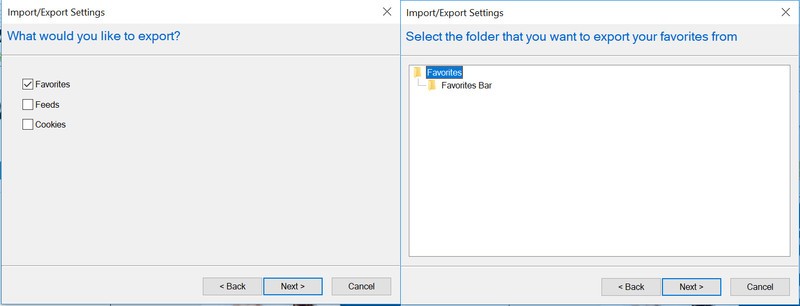
Select the folder of favorites you’d like to export.
Choose where you’d like the file to be saved at on your computer.
Click Save.
Export your favorites from Microsoft Edge
If for some reason the automatic method doesn’t work — or if you just like to do things the manual way — it’s easy to backup your favorites yourself. Here’s how to backup your favorites from Microsoft Edge.
Open Microsoft Edge.
Click on the three dot menu in the upper-right corner.
Click Settings.

Click Import favorites and other info.
Click Export to file.
Choose where you’d like the file to be saved at on your computer.
Click Save.
Now that your bookmarks or favorites are backed up, we can import them into the Chrome browser!
Open the Chrome browser.
Click the three dot menu in the upper-right corner.
Hover your mouse icon over bookmarks.
Click Import bookmarks and settings.
Select Bookmarks HTML File.

Select the file you backed up from another browser.
Click Import.
How often do you switch browsers? Let us know down below!
Chromebooks
- The best Chromebooks
- Chromebooks in education: Everything you need to know
- Should you buy a Chromebook?
- Chromebook Buyers Guide
- Google Pixelbook review
- Join our Chromebook forums
LG G7 vs. Samsung Galaxy S9+: Which should you buy?

Two powerful flagships, two fundamentally different designs.
If you haven’t gotten yourself a new phone in the last year or two and you feel like you’re overdue for an upgrade, you’re in luck: 2018 has produced some amazing new phones, and two of them come straight from South Korea.
The Galaxy S9+ is the current cream of the crop in Samsung’s lineup, with a sleek and curvy design, dual cameras, and one of the best displays we’ve ever seen on a phone. It’s not hard to see why it’s already one of the most popular phones of the year. On the other hand, LG’s new G7 ThinQ offers an alternative option for those who prioritize things like high fidelity audio and wide-angle photography, all without sacrificing anything in build quality or other premium features.
So what do you choose when both options are so compelling?
Specifications

You shouldn’t judge a phone based entirely off of its spec sheet — there’s much more to a phone than the sum of its parts — but comparing the Galaxy S9+ and G7 on paper at least gives you a decent idea of where each device strides (spoiler alert: they’re both almost identical).
| Operating System | Android 8.0 Oreo | Android 8.0 Oreo |
| Display | 6.2-inch 18.5:9 Super AMOLED 2960 x 1440, 529PPI | 6.1-inch 19.5:9 IPS LCD 3120 x 1440, 564PPI |
| Chipset | Octa-core Qualcomm Snapdragon 845, four 2.8GHz Kyro 385 Gold cores, four 1.7GHz Kyro 385 Silver cores | Octa-core Qualcomm Snapdragon 845, four 2.8GHz Kyro 385 Gold cores, four 1.7GHz Kyro 385 Silver cores |
| GPU | Adreno 630 | Adreno 630 |
| RAM | 6GB | 4GB/6GB |
| Storage | 64GB/128GB/256GB | 64GB/128GB |
| Expandable | Yes (microSD slot) | Yes (microSD slot) |
| Battery | 3500mAh | 3000mAh |
| Water resistance | IP68 | IP68 |
| Rear Camera | 12MP f/1.5-2.4 + 12MP f/2.4, PDAF, 4K at 60fps | 16MP f/1.6 + 16MP f/1.9, PDAF + laser autofocus, 4K at 30fps |
| Front Camera | 8MP f/1.7, 1440p video | 8MP f/1.9, 1080p video |
| Connectivity | WiFi ac, Bluetooth 5.0, NFC, GPS, GLONASS, USB-C | WiFi ac, Bluetooth 5.0, NFC, GPS, GLONASS, USB-C |
| Security | Fingerprint sensor (back), iris scanner | Fingerprint sensor (back) |
| SIM | Nano SIM | Nano SIM |
| Dimensions | 158.1 x 73.8 x 8.5mm | 153.2 x 71.9 x 7.9mm |
| Weight | 189g | 162g |
What the Galaxy S9+ does better

With the specs out of the way, now we can get into the good stuff. The Galaxy S9+ is the culmination of all of Samsung’s design prowess over the years, with one of the best industrial designs in the business. The unique curved glass design and metal frame work together to make the phone feel incredibly well-machined, and it’s built to withstand water and dust with its IP68 rating. That glass back also allows for wireless charging — just one of the many perks to Samsung’s feature-packed hardware.
The Galaxy S9+ is a great option for people who can’t stand the 2018 notch craze.
The display is also top-notch — actually, it isn’t. The S9+ is one of the only flagship phones released so far in 2018 that doesn’t feature a notch at the top of display, which is sure to please critics of the design trend pioneered by Apple and Essential. That notchless display is absolutely stunning, with incredibly rich colors and a wide range of brightness, letting you go from nearly pitch dark to bright enough to clearly view under direct sunlight. The curved edges are more about form than function, but they’re entirely without purpose; Edge Panels have become increasingly useful over the years, and the curves help trim down the phone’s width, making it easier to hold.
A few years ago, Samsung’s software would’ve been considered a huge downside, but these days it’s actually a nice add-on to the already great Android platform. Samsung Experience 9.0 is fast and responsive, and offers its own ecosystem of Samsung apps parallel to Google’s, the most useful of which is arguably Samsung Pay, which uses MST to emulate a physical card swipe on terminals, allowing you to use it almost anywhere — even at locations that don’t typically accept mobile payments.
Like the G7 ThinQ, the Galaxy S9+ touts dual cameras on the back, though Samsung’s arrangement of cameras is a bit different than LG’s. The primary camera is a 12MP sensor that’s capable of dual apertures, allowing it to organically switch between f/1.5 and f/2.4 — you can even watch it happen. In addition, the secondary lens allows for 2x zoom, and when combined with the main camera offers a pretty solid portrait mode. More impressively though, the S9+ takes absolutely stunning low light shots, and in video mode it’s capable of shooting at a whopping 960fps for slow motion — though understandably, you’ll have to settle for 720p to get those frame rates.
See at Amazon
What the LG G7 ThinQ does better

Not to be outdone, LG has thrown every feature it possibly could, new and old, into the G7 ThinQ. It adopts new trends like the display notch — for better or worse — yet it still provides the company’s incredibly impressive Quad DAC, which offers better sound through the phone’s 3.5mm headphone jack than any other phone can hope to match. Whether you’re after wireless charging, water resistance, or something else, the G7 ThinQ almost certainly offers it, along with just about every other hardware feature and the kitchen sink.
Perhaps one of the G7’s biggest hardware advantages over the Galaxy S9+ is its fourth hardware button, beyond the power and volume keys. While users and reviewers alike have bemoaned Samsung’s Bixby button since it first emerged on the Galaxy S8 last year, LG is taking a different approach with a dedicated shortcut key to the more popular and often more useful Google Assistant. It’s also positioned quite a bit lower than Samsung’s extra button, making it harder to mistakenly press — that’s a big win if you ask me.
You should definitely pick up the G7 ThinQ if you prefer wide-angle over telephoto.
Some of the most high profile benefits of the G7 ThinQ come in the form of the cameras. Most people who have used both will agree: wide angle on a phone is more useful and allows for more creative shooting than a zoom lens. LG’s phones have been making use of wide-angle secondary sensors for years, and the G7 has the company’s best implementation yet. Wide angle isn’t all the G7 is good for, though; like the Galaxy S9+, it excels in low light thanks to pixel binning technology, and the phone’s AI enhancements (this is where the ThinQ moniker comes from) help it better understand when to automatically switch to different shooting modes to optimize for settings like food, outdoors, and portraits.
The G7 ThinQ pulls ahead in various smaller ways, as well. Though it only has a single rear-firing speaker, the output is shockingly loud — loud enough to fill a room, and with good sound quality to boot. The G7 also provides excellent haptics, maybe the best on Android, and while it seems like an inconsequential factor (and for many, it probably is) it makes the software feel more interactive, more alive; particularly in the camera software, you can feel the interface ticking and clicking at you while you adjust certain settings, almost as if you were interacting with a physical dial.
Oh, and let’s not forget LG’s renewed commitment to timely and consistent software updates. That’s hugely important for users that want to stay up to date with the latest versions of Android and the most recent security patches, and it’s something that Samsung historically just can’t match.
See at LG
Which is right for you?

Both phones are absolutely incredible devices, each an accomplishment of different design philosophies. Where the Galaxy S9+ feels like an evolution of last year’s S8+, the G7 ThinQ takes a different direction than LG’s previous models with a display notch and a larger focus on AI. As for which phone is worth your hard-earned dollars, that’ll depend on where your priorities lie in a few key aspects.
If you just can’t yet cope with the idea of a notch at the top of your display, the choice is obvious — get the Galaxy S9+. On a less superficial note, you should also grab the S9+ if you’re interested in Samsung’s ecosystem as much as you are in Google’s; Knox is a huge boon for the security-focused, and Samsung Pay allows for more flexibility than any other mobile payment service. The Galaxy S9+ also offers more options for security than LG; in addition to the fingerprint sensor, the Galaxy S9+ touts both iris scanning and facial recognition, and can use all three methods in tandem to quickly authenticate you in any situation.


On the other hand, the G7 ThinQ could be the better option for creative minds that really want to make use of that wide-angle secondary lens. Save for attaching huge and clunky third-party lenses to the back of your phone, there’s just no way to get that wide-angle effect on the S9+, and it allows the G7 to capture shots that no other phone can. The G7 is just as great for media playback, as well, thanks to its incredible Quad DAC that was once exclusive to LG’s V series, and the loud speaker output. If you’re equal parts creator and consumer of content, it’s hard to argue with the G7 ThinQ.
If you were stuck trying to choose between these two powerhouses and this comparison helped you make your decision, let us know in the comments below! What phone would you choose, and if you’re already rocking the S9+ or you’re planning on pre-ordering the G7, what feature or trait do you wish you could take from the other phone?
Samsung Galaxy S9 and S9+
- Galaxy S9 and S9+: Everything you need to know!
- Galaxy S9 review: A great phone for the masses
- Complete Galaxy S9 and S9+ specs
- Galaxy S9 vs. Galaxy S8: Should you upgrade?
- Join our Galaxy S9 forums
Verizon
AT&T
T-Mobile
Sprint
How to View All Events as a List in Your Mac’s Calendar App
Some third-party calendar apps (Fantastical, for example) allow you to view all your upcoming events as a vertical list. Many users find this sort of viewing mode beats staring at the regular calendar interface, since it provides a quick at-a-glance summary of their entire schedule over the coming days and months.
Fantastical 2 for Mac
On the face of it, Apple’s Calendar for macOS lacks an equivalent feature. However, there is one way to force a list view that includes all your events, which we’ve detailed below. The trick even works with iCal going back at least to OS X Mountain Lion, which makes us wonder why Apple doesn’t make the option a bit more obvious.
How to View All Events as a List in Calendar
Launch the Calendar app on your Mac.
Click the Calendar button.
Select which calendars you want to include in the list view using the checkboxes.
Click the Search field in the upper right corner of the Calendar window and type two double quotes (“”) to generate a list of all upcoming events.
We find the list view makes it easier to copy multiple events and paste them into other apps in chronological order. For example, to copy several contiguous events, hold the Shift key, click the two outlying events bordering a given period, right-click (or Ctrl-click) an event in the selection, and select Copy from the contextual dropdown menu. You can then paste the events (including their details) straight into a document in date order.

To copy non-contiguous events in your calendar, simply perform the same action but hold down the Command key instead of Shift. (Note that you can also open multiple event info boxes using the same method – just select Get Info from the contextual dropdown menu.)

Tag: Calendar
Discuss this article in our forums
Fire! Gadgets thrown in the trash are causing battery blazes at waste centers
We’ve read countless stories over the years of unstable lithium-ion batteries suddenly exploding, including in smartphones, hoverboards, and vape pens — sometimes with tragic consequences — so it’s kind of surprising we’re not more careful about how we dispose of them.
Left inside trashed electronics that can include anything from those listed above to laptops, cameras, and power tools, the batteries are causing fires at garbage and recycling centers across the country, according to a USA Today report.
Take California. The state blamed exploding batteries for 65 percent of fires at its waste facilities in 2017. The issue has become so serious that it’s launched an awareness campaign to highlight the dangers and to ask consumers to stop throwing their old battery-powered gadgets into the trash.
New York, too, is facing similar challenges. USA Today’s report points out that in March a battery caused a fire at a recycling facility in Queens that burned for two days and caused disruption to nearby train services.
Garbage truck workers are also at risk. An incident in New York City last year saw a lithium-ion battery explode as the truck compacted the trash, setting fire to the burnables inside.
The problem is that if the battery’s exposed metal parts touch something metallic, sparks can fly, resulting in a blaze. Damaged batteries can also malfunction with similar results.
George Kerchner, executive director of the Rechargeable Battery Association, told the news outlet that some consumers get rid of the batteries without too much thought, “hoping that somebody at the end of the line will recycle them eventually.”
But he cautioned that “these are high-energy batteries, no question about it. If they’re not properly handled, they can catch on fire.”
With demand for the technology continuing to rise, it’s all the more important that consumers understand the possible consequences of tossing used batteries into the garbage.
For ways to recycle them, try doing an online search to find local services willing to handle them. Call2recycle, for example, is a useful source of information.
Alternatively, save them up for your next visit to a Home Depot, Best Buy, or Lowe’s, all of which recycle lithium-ion batteries for free.
To be on the safe side, when you’re done with a removable lithium-ion battery, be sure to place it by itself inside a closed plastic bag to isolate the terminals, or simply put tape over them. That way you’ll reduce the chances of your battery ending up in the news for reducing a garbage truck to a burned-out shell, or worse.
Editors’ Recommendations
- Autopsy confirms exploding vape pen caused Florida man’s death
- Another smart luggage startup packs its bags following stricter airline rules
- Say hi to Daisy, an Apple-made robot that recycles old iPhones
- Tesla’s giant Australian battery reduced service costs by 90 percent
- Mini built a gasoline-free classic car, but you can’t have one
TeenSafe phone-monitoring app leaks ‘tens of thousands’ of accounts
Richard Baker/Getty Images
Account information belonging to “tens of thousands” of TeenSafe accounts has reportedly been exposed online.
The cross-platform service allows parents to track the smartphone usage of their children, including their social media interactions, web history, call logs, installed apps, and real-time location. The Los Angeles-based company behind the service says more than a million parents currently use the service.
But a U.K.-based security researcher recently discovered that at least one of its servers has leaked numerous accounts belonging to parents and their children, ZDNet reported on Sunday.
The server in question had been left unprotected, meaning anyone with the know-how could access it. After informing TeenSafe of the issue, the company acted swiftly to fix it.
“We have taken action to close one of our servers to the public and begun alerting customers that could potentially be impacted,” a TeenSafe spokesperson told ZDNet. The company promised to offer further information as its investigation progresses.
Data in plaintext form
Particularly concerning, however, is the claim that the exposed data had been stored in plaintext form. This includes parents’ email addresses, as well as children’s Apple ID email addresses — some associated with their high schools — and associated passwords.
As noted by the news outlet, TeenSafe requires that two-factor authentication be turned off, so a hacker with the relevant data would have little trouble accessing an exposed Apple ID account.
It may offer little comfort to those affected, but none of the records on the leaky server included any location data linked to parents or children.
To confirm the authenticity of the data obtained by the security researcher, ZDNet used iMessage to contact 12 parents whose details showed up on the server. While not everyone responded, those who did confirmed that the emails and passwords shown on the database were in fact genuine.
If you use the service and are yet to hear from TeenSafe, you’ll be wise to change any associated passwords as a precautionary measure.
While services like TeenSafe may provide comfort for parents anxious about their children’s online behavior, they also face criticism from privacy advocates.
TeenSafe suggests that a child doesn’t even need to know that they’re bing monitored by a parent. “Every parent’s situation is unique and only a parent can decide whether to inform their teen of their intent to use the [service]” the company says on its website.
In light of this recent leak, parents who use the service secretly will now have to either tell their child, or find another way to get them to change their Apple ID password.
Editors’ Recommendations
- Email encryption flaw gives hackers full access to your secret messages
- How to reset your Apple ID password and gain control of your account
- Some Gmail users woke up to find spam sent from their accounts
- Twitter urges its users to change their passwords due to a bug
- How to get iMessages in Android
OnePlus 6 is now up for sale in India; pop-up stores going live later today
You can now purchase the OnePlus 6 in India.

The general sale of the OnePlus 6 kicks off tomorrow, but the phone is now available in an early access sale on Amazon India as well as OnePlus’ own website.
The 6GB version of the OnePlus 6 with 64GB of storage is available for ₹34,999, and the 8GB/128GB model is retailing for ₹39,999. The device is available in three color options — Mirror Black, Midnight Black, and Silk White — but the latter two options are limited to the 8GB variant. Today, you’ll be able to pick up the Mirror Black version in 6GB/8GB variants, as well as the 8GB Midnight Black option. The Silk White model will go on sale June 5, and if you’re looking for the variant with 256GB of storage, you’ll have to wait until May 29 to pick up the Avengers edition for ₹44,999.
To incentivize the launch, OnePlus is rolling out a ₹2,000 cashback offer for SBI debit and credit card holders, with the cashback reflecting by end of August. You’ll also be able to avail no-cost EMIs for up to three months from leading banks in the country.
If you’d like to get a feel for the device before going through with the purchase, OnePlus has announced that it will launch pop-up stores in eight cities starting later today. Just to make the occasion that much more special, OnePlus will host a celebrity at each pop-up store, and the first customer to pick up the OnePlus 6 at each store will be able to unbox the device with the celebrity.
The pop-up stores will be live on May 21 (3:30 pm to 8:00pm) and May 22 (11:00 am to 7:00 pm), and you’ll be able to pick up the OnePlus 6 as well as interact with members of the OnePlus community in India. Here’s the list of locations as well as the celebrities that will be attending the events:
- Mumbai – High Street Phoenix – Chitrangada Singh
- Delhi – DLF Place Saket – Guru Randhawa
- Hyderabad – The Forum Sujana Mall – Aditi Rao Hydari
- Bangalore – OnePlus Experience Store – Bani J
- Pune – Phoenix MarketCity – Mithila Parkar
- Ahmedabad – Gulmohar Park Mall – Dharmesh Yellande
- Kolkata – South City Mall – Nusrat Jahan
- Chennai – The Forum Vijaya – Nikki Galrani
The OnePlus 6 will go up for general sale starting tomorrow at Amazon India, OnePlus’ website, as well as hundreds of Croma retail stores across the country.
Will you be picking up the OnePlus 6 today? If so, let me know what variant you’re purchasing in the comments below.
See at Amazon India
OnePlus 6
- OnePlus 6 review
- OnePlus 6 vs. OnePlus 5T: How much changes in six months?
- OnePlus 6 vs. OnePlus 5: Should you upgrade?
- These are the official OnePlus 6 cases
- The OnePlus 6 doesn’t work on Verizon or Sprint
- Join the discussion in the forums
Thousands of Apple ID Passwords Leaked By Teen Phone Monitoring App Server
ZDNet reports that a server used by an app for parents to monitor their teenagers’ phone activity has leaked tens of thousands of login credentials, including the Apple IDs of children.
The leaked data belonged to customers of TeenSafe, a “secure” monitoring app for iOS and Android that allows parents to view their child’s text messages and location, call history, web browsing history, and installed apps.
The customer database was reportedly stored on two servers hosted by Amazon Web Services, where it remained unprotected and accessible without a password. The discovery was made by a U.K.-based security researcher specializing in public and exposed data, and the servers were only taken offline after ZDNet alerted the California-based company responsible for the TeenSafe app.
“We have taken action to close one of our servers to the public and begun alerting customers that could potentially be impacted,” said a TeenSafe spokesperson told ZDNet on Sunday.
The information in the exposed database included the email addresses of parents who used TeenSafe, the Apple ID email addresses of their children, and children’s device name and unique identifier. Plaintext passwords for the children’s Apple ID were also among the data set, despite claims on the company’s website that it uses encryption to protect customer data.

Compounding the lax security is the app’s requirement that two-factor authentication is turned off for the child’s Apple account so that parents can monitor the phone without consent. This means a malicious actor could potentially access a child’s account using the login credentials that were stored on the exposed server.
TeenSafe counts over a million parents as customers, although the database was reportedly limited to 10,200 records gleaned from the past three months of customer usage. The company said it would continue to assess the situation and provide additional information to customers as soon as it became available.
Tag: security
Discuss this article in our forums
China is creating a ‘magpie bridge’ to the far side of the moon
Chinese Academy of Sciences
China’s newly invigorated space program has some ambitious goals, and one of them is something that’s never been done before — landing a spacecraft on the far side of the moon. The Queqiao relay satellite, launching today from the Xichang Satellite Launch Center in southwest China, will provide a vital link back to Earth.
Although it’s sometimes called the “dark side” of the moon, it’s not actually dark. The moon circles the Earth and gets illuminated by the sun in a tidal lock orbit, meaning the orbital period matches its rotational period. In other words, the same side is always facing us, and that’s where nearly all lunar missions have landed.
The Chang’e 4 mission will land on the surface and dispatch a rover for observation and analysis. Direct communication through the enormous mass of the moon is not possible, so Queqiao will provide a relay link to Chinese mission control. It will station itself at a Lagrange Point, a spot of gravitational equilibrium “behind” the moon as viewed from Earth.
The name Queqiao means “bridge of magpies” and it comes from a folklore tale, as the state-owned Xinhuanet media outlet explains: “In a Chinese folktale, magpies form a bridge with their wings on the seventh night of the seventh month of the lunar calendar to enable Zhi Nu, the seventh daughter of the Goddess of Heaven, to cross and meet her beloved husband, separated from her by the Milky Way.”
As detailed by Spaceflight Insider, Queqiao is part of Chang’e 4, China’s fourth lunar mission. The two Chang’e 1 and Chang’e 2 probes orbited the moon in 2007 and 2010, and Chang’e 3 landed a rover on the moon’s surface in 2013. The experimental Chang’e 5 T1 mission, launched in 2014, sent a capsule around the moon and returned to Earth. The capsule demonstrated its capability by surviving re-entry, and in 2019 Chang’e 5 will land on the lunar surface, collect rock and soil samples, then lift off and return them for scientific study.
The Netherlands Chinese Low-Frequency Explorer (#NCLE) successfully passed the last assessment by the Chinese space agency! The instrument will be launched on board the Chinese Chang'e 4 relay satellite to a position behind the Moon in May. @RadRadioLab @isis_space pic.twitter.com/dyjjrKA3Zq
— ASTRON (@ASTRON_NL) April 24, 2018
Aside from its relay duties, Queqiao also includes a radio scanner known as the Netherlands-China Low-Frequency Explorer. Because it’s in the “shadow” of the moon, unaffected by the Earth’s interference, it can search for ancient radio signals of very low frequencies dating back to the early formation of the universe and perhaps even the Big Bang itself.
“Underlying the strong humming sound from the Milky Way, there are some emissions from the early phase of the universe and it will recur at certain frequencies,” astrophysics professor Heino Falcke told Quartz. “If you don’t have much background noise you may be able to see some certain frequencies and that tells us something about the universe. It requires an extremely quiet environment.”
The lander-rover duo Chang’e 4 will launch and land on the moon later this year, and China has made no secret of their plans for a manned mission to the moon in the future.
Editors’ Recommendations
- Get your Sagan on with 60 awe-inspiring photos of the final frontier
- NASA abruptly shuts down its planned 2022 moon rover mission
- NASA reveals its plans to have astronauts orbiting the moon by 2025
- Hello, moon! The lunar surface is set to have 4G network in 2019
- NASA’s virtual tour of the moon in 4K will blow your mind
OnePlus 6 review: It’s settled
The OnePlus 6 delivers in almost every way.
With OnePlus releasing a new phone every six months, it’s safe to say that the OnePlus 6T, likely coming in November, will offer a few select upgrades to the company’s tried-and-true formula — along with a modest price bump.

But if you’re in the market for a phone right now, and don’t want to spend more than you need to on a well-rounded Android experience — heck, smartphone experience in general — the OnePlus 6 is your absolute best option.
Whereas previous models had notable drawbacks, particularly around camera quality, OnePlus has seized on a confluence of factors to release a phone that has no major flaws, at a starting price few believed was possible.

About this review
I (Daniel Bader) am reviewing the OnePlus 6 after spending just over a week with the phone running on the Freedom Mobile LTE network in Toronto, Canada.
The phone shipped with build 512 but was updated to 513 shortly before the phone was announced on May 16. The model tested was the Mirror Black variant with 8GB of RAM and 128GB of storage.

The nitty gritty
Let’s talk hardware

The OnePlus 6, despite sharing nearly identical dimensions with its all-metal predecessor, has gained a bit of thickness and a sizeable amount of weight, and that’s owing to its Gorilla Glass 5 housing, a first for the OnePlus series. It looks better than any OnePlus phone to date, for sure, but it also looks quite a lot like quite a few other phones on the market right now, including the LG G7, Huawei P20 Pro and, increasingly, others.
Such is the price of maturity, and the OnePlus 6 wears it well. Yes, there’s a notch on the 6.28-inch Optic AMOLED display, but the phone is no larger than the OnePlus 5T — OnePlus merely expanded the usable real estate. And while there are some software quirks associated with the notch, particularly in the now-truncated status bar, for the most part, it’s not distracting, and the whole thing just works. The screen is good — bright and vibrant, with plenty of calibration options — but like Huawei’s flagships, OnePlus continues to resist the urge to move to QHD.
This phone feels expensive.
Is that a problem? Not at all. Comparing the OnePlus 6’s display to the current market leader, the Galaxy S9+, reveals no serious handicaps. Reds aren’t quite as punchy, and the phone doesn’t reach the same levels of brightness as Samsung’s latest flagship, but in all but the brightest conditions, it won’t matter. If you can handle the notch, and I implore you to get over it, you will love this screen.
To accommodate a diminished set of antenna lines, the OnePlus-hardware-staple mute switch has been relocated to the right side of the phone. Given that the right-side power and left-side volume controls are in the same relative positions, this change isn’t that important, but being right-handed I did find it easier to use. Lefties may not feel the same way. At the same time, the mute switch now works as it should, shuffling between ringer, vibrate and mute without interfering with Oreo’s Do Not Disturb settings. That means if DND is enabled, the mute switch is largely useless — the phone cedes to the software — but that will be fixed in Android P.
The phone may look familiar, but the quality is second to none for this price.
Around back are where you’ll find the biggest aesthetic changes to the OnePlus 6: not only has the dual camera shifted vertical, but the makeup of that second camera is a bit different, too. Actually, that’s not quite true, but the intent of the second camera has changed, which we’ll get to a bit later.
The rear fingerprint sensor, which was originally added to the OnePlus 5T, is now oblong and ever-so-slightly lower down on the phone, but I’ve come to use it less and less now that the phone’s face recognition is so reliable. Frustratingly, OnePlus 6 lacks the option for a swipe gesture on the fingerprint sensor to bring down the notification shade, but given that it’s available on the 5T, it’s only a matter of time before OnePlus adds it.

The OnePlus 6 still has a headphone jack on the bottom, along with a single downward-facing speaker — loud, but not beefy — and USB-C port. And for better or worse (but mainly worse), it’s got the same buzzy, overwrought vibration motor as its predecessor. After using the phone for well over a week, the low-quality vibration motor is my primary fault against the phone, and makes me less likely to use it in the long-run than, say, a Galaxy S9 or LG G7. At the same time, my colleague Alex Dobie, who has used the OnePlus 6 for the same length of time, finds no issue with the haptics, and even prefers them to more expensive phones, so your mileage may vary.
With the addition of a glass back, it’s almost an insult not to add wireless charging.
The lack of wireless charging galls a little, but not too much; worse is the exclusion of the USB Power Delivery standard in favor of OnePlus’s proprietary (and admittedly faster) Dash Charge. It claims that wireless charging is a regression over fast wired charging, but the reliance on OnePlus’s specific cables and AC adapters undermine that argument. I don’t want to have to buy a second or third Dash Charger just to reach peak speeds in my office, bedroom, and car. At nearly $30 for just the car charger, for instance, the decision may prove profitable for OnePlus, but it’s decidedly customer-unfriendly.
As far as hardware goes, you’re getting a lot for your money, but it’s clear that OnePlus is still saving strategically, and it’s the small things — screen resolution, haptics, speaker output, wireless charging — where its more expensive competition is taking the conversation.

The specifications you need
Power. Full.
| Screen | 6.28-inch OLED |
| SoC | Snapdragon 845 |
| RAM | 6/8GB |
| Storage | 64/128/256GB |
| Camera 1 | 16MP rear, ƒ/1.7, OIS |
| Camera 2 | 20MP rear, ƒ/1.7 |
| Battery | 3300mAh |
| Connectivity | Gigabit LTE, 27 LTE bands |
| Security | Fingerprint, face unlock |
| Dimensions | 155.7 x 75.4 x 7.75 mm |
| Weight | 177 grams |
| Colors | Mirror Black, Midnight Black, Silk White |
| Price | $529, $579, $679 |
As with all of OnePlus’s updates, specs rule the show here. In addition to upgrading to 2018’s staple flagship platform, the Qualcomm Snapdragon 845, OnePlus is for the first time offering a $629 256GB storage option to go along with 8GB of RAM.
The $529 base model still comes with 6GB of RAM and 64GB of storage, which should be more than enough for most people, but without expandable storage, many will likely choose to go with the $579 middle option, which pairs 8GB of RAM with 128GB of storage, and also comes in two additional colors — Midnight Black and, starting June 5, Silk White — to go along with the standard Mirror Black.
OnePlus 6 specs: More expensive, more swagger
(All three colors are gorgeous, by the way.)
Like I said before, aside from a few smaller omissions, it’s really difficult to fault the company for any of its specification decisions here, especially if you’re a number counter like many OnePlus customers are. This is the first OnePlus phone to reach gigabit speeds, thanks to Qualcomm’s X16 baseband and the antenna density to support 4×4 MIMO. Unfortunately, despite having the CDMA and LTE bands to support Verizon’s network, the phone is only certified to work on AT&T and T-Mobile in the U.S. Oh, well.
Using the phone on Canada’s Freedom Mobile network, which is more akin to T-Mobile than AT&T, I consistently reached speeds of 50Mbps. Wi-Fi and Bluetooth were solid, as was GPS. I didn’t make many phone calls, but the ones I made (over a 3G connection — Freedom doesn’t support VoLTE) were loud and clear.

On the upside, the OnePlus 6 is unlocked and has two SIM slots, both of which can access LTE — a first for the OnePlus line.
The 3300mAh battery inside the OnePlus 6 is unchanged in capacity from the OnePlus 5 series, and is down slightly over the OnePlus 3 series, but the company says this one is the longest performer yet thanks to processor efficiencies and software improvements, and I’ve found that claim to be true. Indeed, the OnePlus 6 didn’t quit on me before the end of the day even once during my testing period, and there are more than enough power-saving settings to extend the life of even the heaviest of users.
If you’re after a pure numbers game, the OnePlus 6 dominates the industry.
In particular, at night I found myself enabling OnePlus’s excellent Reading Mode instead of the blue light-killing Night Mode, largely because the monochrome palette accomplishes the same thing and encourages me to read the many books I have waiting for me in the Kindle app rather than spend my evenings scrolling through Instagram. It’s a win-win and, more importantly, a beautifully-implemented feature.
Finally, despite lacking an IP rating for water resistance, OnePlus claims that the OP6 can withstand a “standard” amount of water exposure in daily use. Basically, don’t submerge it in the pool or expect it to survive a romp in the washing machine. But I decided to take my chances with the phone during a recent downpour — and I’m talking a severe thunderstorm, not a minor drizzle — by making a phone call and taking a few photos, and it held up well. It remains to be seen if, unlike IP-certified phones like the Galaxy S9 and Pixel 2, there will be any long-term damage from water exposure, but right now I’m happy it’s still alive.

It’s a good camera, Brent
Finally, a camera worth singing about
Every smartphone is only as good as its camera, and the OnePlus 6 makes some important changes to shore up that side of things. But to understand the OnePlus 6’s camera setup, we have to go back to the OnePlus 5, where the dual-sensor combination took shape.
With the 5, OnePlus decided to follow Apple’s and Samsung’s lead by giving its second shooter a focal length double that of the primary, allowing both for “telephoto” shots and, more importantly, bokeh effects through its portrait mode. Like any feature borne of algorithms, OnePlus’s portrait mode wasn’t great at first but improved significantly through software updates. By the time we got the OnePlus 5T, the feature was reliable and, more importantly, fun.

But the 5T changed the core idea of the secondary camera, shooting for better low-light shots with a sensor that only kicked in under dark conditions. Unfortunately, it didn’t work that well for such a task, and the OnePlus 5T maintained the company’s reputation for below-average nighttime photography.
With the OnePlus 6, the company is taking a deliberately simple approach — one that’s worked for Samsung, Apple, Huawei and many others. It’s increasing the size of the main sensor — it’s still 16 megapixels, but the individual pixel size has grown to 1.22 microns from 1.12 in the OnePlus 5 series — which, along with optical image stabilization (OIS) and a wide ƒ/1.7 lens, should make for much-improved low-light photography. (The IMX519 sensor found in the OnePlus 6 is brand new and other than the Oppo R15, which formed the basis for the OP6’s design, it’s yet to ship in volume.)

And the 20MP secondary sensor? Well, it’s the same one used in the OnePlus 5T, but its sole purpose is to add depth information for the phone’s much-improved portrait mode. No low-light tricks; no telephoto gimmicks.
OnePlus can’t make up its mind about the purpose of its phones’ secondary camera, so dedicating it to portrait mode makes sense in a reductive way.
Thankfully, that change paid off. The OnePlus 6 takes incredible photos in daylight, replete with to-die-for bokeh on stationary subjects and, thanks to the included optical stabilization, phenomenal action shots. I was able to capture clear photos of my always-moving dog, that, for one reason or another, more expensive phones can’t get. That’s mostly owing to OnePlus’s algorithms, which have always been willing to go to maneuver from one extreme — super-fast shutter speeds — to another — grain-producing light sensitivity.


The reason this approach doesn’t backfire in 2018 the way it did in previous years is because OnePlus is finally working with hardware that can keep up with its software tuning.
Specifically, the newer, larger IMX519 sensor captures more light than on any previous OnePlus, and the Qualcomm Snapdragon 845’s image signal processor is able to slice off some of that grain in low-light situations.


Actually, let’s talk night photography, because that’s traditionally where OnePlus phones have struggled in the past. Recall the OnePlus 3 series: both phones had OIS, but were let down by the rest of the hardware. Here, not so much. In extreme low light, the OnePlus 6 still falls behind phones with larger sensors or wider apertures like the Huawei P20 Pro and Galaxy S9, but in situations one would consider “normal” night shots — a dimly-lit bar, or a street lit by a single overhead lamp — the phone is neck-and-neck with its more-expensive counterparts. It’s a remarkable achievement, especially given how far behind the OnePlus 5T was in this area.
At the same time, OnePlus must also be commended for its camera software, which is just as easy-to-use and powerful as ever. The phone’s various modes, from timelapse to slo-mo to the excellent Pro features, are a swipe away, while video and portrait are accessible in single taps.
 An example of the OnePlus 6’s excellent portrait mode.
That portrait mode suffers from the same edge detection problems as every other phone, from the Pixel 2 to the iPhone X and Galaxy S9+, but I’m pleased with how far OnePlus has come in just a year. It does better with people than, say, dogs or inanimate objects, which isn’t shocking, but unless you’re really pixel-peeping, you’ll be happy to share the results on social media. OnePlus says it plans to make further improvements to the portrait mode in an upcoming update, in addition to bringing it to the selfie side, but at the time of writing, it’s pretty great as-is.
On the front, we’re looking at the same 16MP sensor as the last two generations, because if it ain’t broke, don’t fix it. (That selfie camera also enables the excellent and super-fast face unlock feature, which I use far more than the rear finger biometric.)
As for video, OnePlus outdid itself, choosing to focus on the fundamentals of the hardware than super slo-mo gimmicks like Samsung and Sony. Indeed, we have 4K video at 60fps (in addition to 30fps), which despite lacking the company’s excellent electronic stabilization and being limited to 5-minute spurts, is absolutely gorgeous. Dropping to 1080p (at either 30 or 60 frames per second) engages both electronic and optical stabilization, and it’s a pleasure to look at. It’s not quite as holy sh!t stable as the Pixel 2, but it’s close.

Then there’s the slow motion modes — 480fps at 720p and 240fps at 1080p — which are a joy to use and limited to a minute of real-time footage (translating to over 10 minutes of slo-mo video at 480fps). That’s a lot of breathing room compared to the 0.3 seconds at 960fps on phones like the Galaxy S9 and Xperia XZ2, and much more practical. It’s great to see OnePlus pushing the Snapdragon 845 as far as it will go while also making practical user experience decisions.
It can’t be overstated how much of an impact a great camera has on using the OnePlus 6. I use every phone out there, which makes me more scrupulous than the average consumer. Saying that I would happily use the OnePlus 6 as my main camera — even without a second sensor that does anything besides enabling portrait mode — is high praise, and one that I don’t offer lightly. It’s not the best camera on the market — that honor is still reserved for the Huawei P20 Pro — but it’s a remarkable one for the price.
OnePlus 6 cases

As it does with every phone, OnePlus has announced a bunch of first-party cases in a number of materials, colors, and levels of protection. From the simple red silicone to a new ultra-protective and grippy nylon bumper, there’s something for everyone here.
These are the official OnePlus 6 cases you can buy at launch

Full of Oxygen
Software simplicity
I have very little to complain about when it comes to OnePlus’s OxygenOS software. This is about as unadorned an Android 8.1 experience as you’ll find today despite the addition of a few features that may have a considerable impact, or none at all, depending on the type of phone user you are.

If you’ve used a OnePlus phone over the past couple of years, you know what to expect. But what continues to surprise me is just how fluid and stable OxygenOS has become — we’ve seen examples of “stock” Android on devices like the Essential Phone that are more buggy than an ant hill. Using the OnePlus 6 has largely been problem-free, with no major app compatibility issues from the notch, nor the camera instability I experienced on the OnePlus 5 series.
If you’re into gestures on Android, OnePlus’s implementation is as good as you’re going to get right now.
I’m no fan of OnePlus’s home screen “Shelf”, which is where Google’s Feed should be, but that’s a minor nit to pick, especially given how easy it is to switch launchers. More importantly, OnePlus has shown considerable restraint in the number of features it’s added to the software — you can count them on one hand, and they’re all pretty useful.
The new Gaming Mode isn’t something I’m going to use on a daily basis, but given the phone’s inevitable owner demographic, the addition makes a lot of sense. OnePlus has optimized not just the loading speeds of the top 100 games in the Play Store (something about caching a portion of the game in memory upon install), but it’s offering extensive and granular battery controls for those who don’t want a PUBG session eating too much into their uptime. I particularly appreciate the optional “Network Boost” feature, which prioritizes a game’s packets over those of other apps on the phone.

The only other major software addition isn’t really new to the OP6: the iPhone X-like software gestures that debuted on the OnePlus 5T’s Open Beta last year are now a standard, though opt-in, option for users to navigate the OS. I gave the gestures — swipe up from the bottom middle to go home, swipe up from the bottom left or right to go back — my best shot, but ironically they’re better on the 5T because that phone has a larger chin, which positions the screen edge higher up. That means less traveling for the thumb and less awkwardness when typing.
I’m going to keep at it to see if I can grow used to the gestures because the additional screen real estate is wonderful, but at this point, I’ll stick to the what I know and love.
Let’s talk about updates, because despite OnePlus’s improvements in this particular column, it’s unclear how quickly the OnePlus 6 will receive Android P. The company can’t be faulted for the cadence of its dot updates — bug fixes and minor feature additions — but given its participation in Google’s nascent beta program, there’s no excuse for a slow rollout of the final build.

The question is settled
Should you buy it? Yes!
If you’re in the market for a OnePlus phone, it’s likely because you get great value for your money. Starting at $529, the OnePlus 6 is a $30 from the 5T, which itself was a $30 jump from the 5, and so on. That’s been OnePlus’s strategy since its first device, the OnePlus One, was released for $299 in 2014 — slowly up the cost every generation, and improve just enough to justify it.
If you can wait it out, and can justify the extra $50, the Silk White model is worth it.
As for the colors, I got a chance to use all three, including the limited-edition Silk White, which debuts two weeks after the other two versions in just one configuration. And as much as I like the shiny, fingerprint-attractive Mirror Black version, and as comfortably familiar as is the matte-finish Midnight Black model, I’m hoping to get my hands on the Silk White at some point. The textured white back, coupled with subtle gold accents, is a sight to behold, and an even better phone to hold.
The Good
- Great OLED display
- Much-improved camera
- Attractive design with high-quality materials
- Top-notch specs
- The price is right
- Software is fast and fluid
- Headphone jack
The Bad
- Haptics aren’t great
- Software lacks a few niceties
- Proprietary Dash Chargers are expensive
- Wireless charging would have been nice
4.5
out of 5
The OnePlus 6 is a very good phone. It lacks a couple of features I enjoy on devices that cost considerably more — wireless charging and a high-quality vibration motor, to be specific — but there’s very little else about it with which I can find fault. At $529, this is the best smartphone deal in town, and one of the best phones you can buy right now.
See at OnePlus
OnePlus 6
- OnePlus 6 review
- OnePlus 6 vs. OnePlus 5T: How much changes in six months?
- OnePlus 6 vs. OnePlus 5: Should you upgrade?
- These are the official OnePlus 6 cases
- The OnePlus 6 doesn’t work on Verizon or Sprint
- Join the discussion in the forums
How to disable the notch on the OnePlus 6
There’s an easy way to get rid of that annoying cutout.
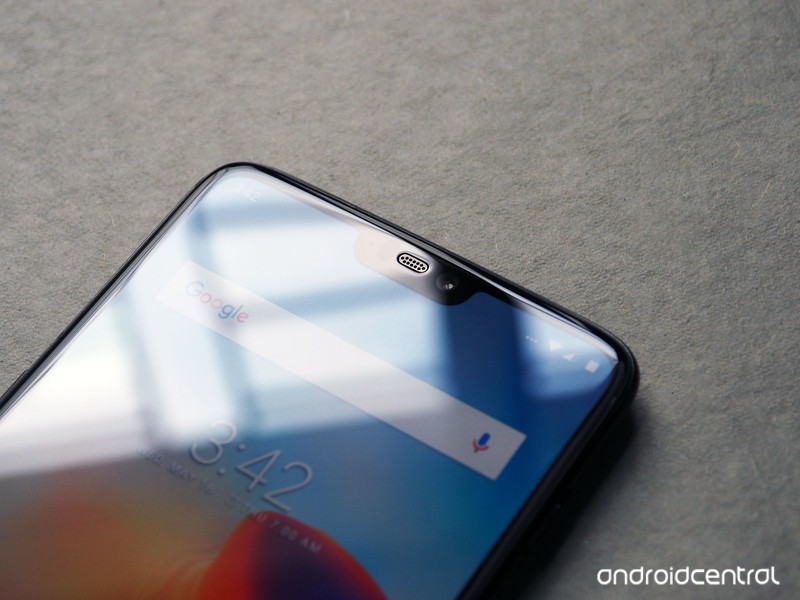
One of the more controversial design choices in the OnePlus 6 is a cutout at the top of the display, which bumps the overall screen size to 6.28 inches while retaining the same overall height as the 6.0-inch OnePlus 5T.
ASUS, OPPO, Vivo, and Huawei have already introduced devices this year that feature the notch, and it looks like this unwelcome trend is only set to continue as the year progresses.
What’s particularly irksome is that the notch doesn’t really add a lot of value to the OnePlus 6, as there’s a chin at the bottom. The notch works on the iPhone X because it creates an all-screen front — where the bottom bar is the same width as the bezels at the top.
That, however, isn’t the case on the OnePlus 6 or any of the other Android copycats we’ve seen so far. The OnePlus 6 has a noticeable chin at the bottom, and there’s a mismatch in the width of the bezels at the top and bottom.
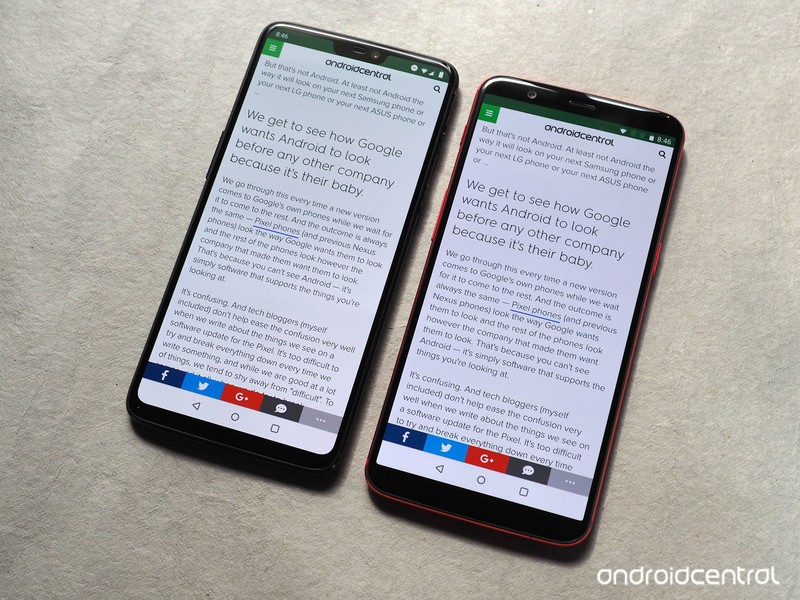
While OnePlus says the notch was designed to maximize the screen real estate, the added 0.28-inch screen size doesn’t amount to much in real-world usage. With the notch enabled, you get to see two extra lines of text when browsing on the OnePlus 6 (versus the 5T), and one added line in the settings pane.
There’s no difference between either device while viewing videos, as most streaming services still deliver videos in 16:9 or 18:9. So it’s easy to see that the notch doesn’t offer any tangible gains when using the phone, but it does stick out like a sore thumb.

Thankfully, you can easily hide it away by heading into the phone’s settings. OnePlus did a much better job than Huawei when it comes to making sure that content doesn’t get hidden behind the notch when you disable it.
Here’s how you can disable the notch on the OnePlus 6.
Open Settings from the app drawer or home screen.
Scroll up to the Device sub-menu.
Tap Display.
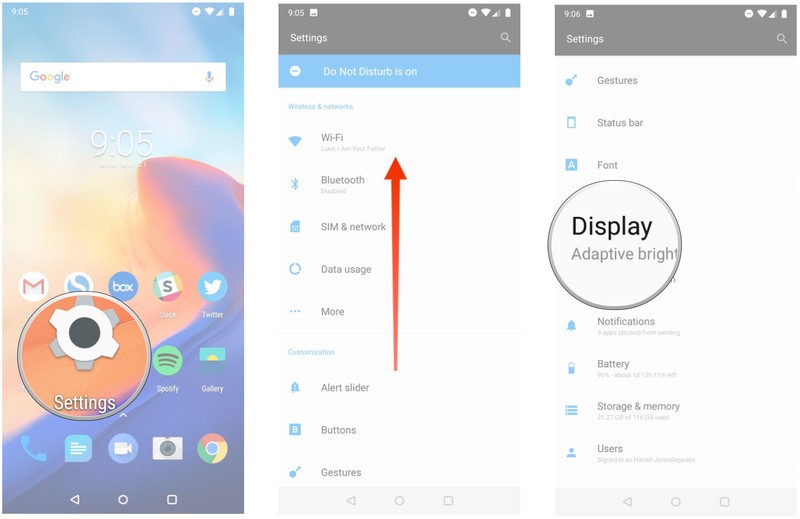
Select Notch display.
Tap Hide the notch area.
You’ll now see black bars on both sides of the notch.

Hiding the notch eliminates most of the annoyances associated with its inclusion in the first place. You’ll still be able to see the cutout when viewing the display under harsh sunlight, but the black bars are otherwise effective in hiding the notch in everyday usage scenarios.
OnePlus 6
- OnePlus 6 review
- OnePlus 6 vs. OnePlus 5T: How much changes in six months?
- OnePlus 6 vs. OnePlus 5: Should you upgrade?
- These are the official OnePlus 6 cases
- The OnePlus 6 doesn’t work on Verizon or Sprint
- Join the discussion in the forums
 AIVAnet