


The best monitors for photo editing
Many of the most prominent sales pitch features of monitors are a focus on gaming. They highlight displays’ refresh rates, frame syncing technologies, and response times. As important as those are for those looking to win the next round in their favorite multiplayer title, they’re not needed by professionals. For those planning to use a display for a detailed task like photo editing, you need something a little different.
The best monitor for photo editing is one that’s large and has a great resolution, but most importantly has as-near-perfect color accuracy as possible. We took all of those factors and more into consideration in putting this list together, so that you can make your next professional monitor purchase an educated one.
The best
BenQ SW271 ($1,100)
Considering how much we loved the older SW2700PT, it should be no surprise that the BenQ SW271 tops our list of the best photo editing monitors out there. This 27-inch IPS display ticks just about every box you could hope for: 4K resolution, HDR, and great color support. BenQ claims it can handle 100 percent of the sRGB gamut and 99 percent for Adobe RGB. At a brightness of up to 350 nits too, it should be bright enough for most users’ tastes.
Thanks to being an IPS panel it enjoys a near 180-degree viewing angle horizontally and vertically and it has a native contrast of 1,000:1 for deep blacks and stark whites. It’s not the biggest display out there, but 27-inches is a good sweet spot for pixel density and gives you enough room to appreciate the detail offered by the ultra-HD resolution and HDR support.
With a whole host of connection options too, from USB-C, to HDMI 2.0, to DisplayPort 1.4, you can have your pick of how it connects up to your system. The built-in calibration tools will make sure that it looks the part the first time you turn it on. At around $1,000 too, it’s not the most expensive monitor in the world, but if you’re happy to sacrifice resolution to save a little, the SW2700PT with its QHD display is still a solid choice.
Buy one from:
Amazon
The rest
BenQ PD3200U ($800)
Bill Roberson/Digital Trends
Another great photo editing display is the BenQ PD3200U, which at $800 is one of the more affordable options out there — especially considering its feature set. At 32-inches diagonally with a 4K resolution, you get a lot of screen real estate for your money, making it easier to pick out individual details of your photos. It also has near perfect color-accuracy, which is easily one of the most important features of any monitor competing in this space.
With a brightness of 350 nits and a native contrast ratio of 1,000:1 (we found it more like 670:1 in our testing) this IPS panel has a lot going for it. The only real area we found it let us down was in its color gamut support. Although BenQ claims 100 percent coverage for the sRGB and Rec.709 gamuts, when it came to AdobeRGB we found it fell behind the competition and only managed 75 percent.
Still, with everything else going for this display, it’s definitely one worth considering for your next upgrade.
Read our full review of the BenQ PD3200U here.
Buy one from:
Amazon, Newegg
Eizo ColorEdge CS2730 ($1,300)
Eizio monitors don’t have the same flash and pizazz in their bezel and frame designs as some displays, but what they lack in exterior aesthetics, they more than make up for in display quality. In the case of the CS2730, it’s hard to find a monitor that delivers a better picture for photo editing.
Although lacking a full 4K resolution, the IPS panel used in this display is still QHD (2,560 x 1,440) with gorgeous color support at 99 percent of the AdobeRGB gamut. It also has a great brightness of 350 nits and a solid contrast ratio of 1,000:1.
Some of the additional features of the CS2730 really help it stand out from the others however. Alongside the monitor itself, you also get Eizo’s quick color matching software, which automatically adjusts your monitor, printer and retouching software to create a uniform look for your images.
Buy one from:
Amazon, BHPhotoVideo
HP Z27s ($500)
Ranked in our roundup as one of the best 4K displays out there right now, HP’s Z27S impressed us with its new perfect color accuracy and solid feature set. With support for 99 percent of the sRGB gamut, this IPS panel has a lot going for it, despite the relatively diminutive price.
Although it debuted at $700, it now enjoys a substantial price cut, which makes this 4K panel the most affordable of all the monitors we recommend for photo-editing. While it suffers from some of the physical-styling blandness of some of the other professional grade monitors, that’s hardly a concern when you’re looking for substance over style.
With a full range of connections, from HDMI to DisplayPort and miniDisplayPort, you have plenty of ways to connect it up to your system. It even has easy big-screen functionality for mirroring a laptop or smartphone screen to it.
Read our full review of the previous version here.
Buy one from:
HP, Amazon
Asus Designo MX27UC ($550)
Although most known for its gaming displays, Asus does create some effective professional ones too. As one of the nicest looking monitors on this list, it’s hard not to be impressed with your first glance of the Designo MX27UC. It might be a little old as far as designs go, but it has a lot going for it, and the thin bezels make it look right at home with more modern display options.
With a 27-inch IPS panel and 4K resolution, the MX27UC has great clarity and pixel density, pairing nicely with its 100 percent support for the sRGB color gamut. Its brightness is a little lower than others, but at 300 nits is perfectly acceptable. It also has a claimed contrast ratio of 1,300:1, which is a welcome increase over most of the competition.
Better yet, it’s one of the most affordable displays on this list. Although there are better monitors out there, for $550 you get a lot for your money and a display that looks the part too.
Buy one from:
Amazon
Editors’ Recommendations
- The best refrigerators you can buy right now
- The best 4K monitors
- The best monitor you can buy
- Vizio’s 2018 TV lineup includes models as low as $350, and a quantum surprise
- The best stealth gaming laptops
Best Android Games as of May 2018

Don’t settle for anything less than the best!
If you’re looking for the best new games available in the Google Play Store, you’ve come to the right place. We update this list whenever a new game comes out that’s worthy of being added to this list, so you’ll always know about the latest and greatest games.
Whether you’re new to Android and need some fresh, new games to start building out your Google Play library or simply looking for the latest trendy games that are worthy of your time and attention, these are the best Android games as of
May 2018!
- PUBG Mobile
- The Room: Old Sins
- Dissembler
- JYDGE
- HQ Trivia
- Death Road to Canada
- Stranger Things: The Game
- Reigns: Her Majesty
- Causality
- Framed 2
- Island Delta
- Fire Emblem: Heroes
The Room: Old Sins
The Room: Old Sins is the latest epic puzzle game from Fireproof Games and the 4th in the award-winning ‘The Room’ puzzle game series. You are exploring the home of an ambitious engineer who has gone missing when you find a rather peculiar dollhouse in the attic.
Using a sophisticated eyepiece you’re able to explore different rooms in the dollhouse that are filled with incredibly sophisticated puzzle boxes and contraptions. There’s something really weird going on here, so maybe if you can solve all the puzzles you’ll figure out what happened to the missing engineer and his wife.
If you’ve never played a game from “The Room” series before, just get ready for one of the more engrossing games you’ll ever play on a mobile phone. The graphics and audio come together to create a wonderfully creepy vibe as you carefully inspect intricate objects and unlock secrets to help you on your journey.
If you want to catch up with the other games, you can snag The Room, The Room Two, and The Room 3 at discounted prices.
Download The Room: Old Sins ($4.99)
PUBG Mobile
It’s pretty incredible how well PUBG Mobile plays on Android. This is a massive PvP battle royale game that pits 100 players against each other on a massive island loaded with weapons, ammo, tactical gear, and vehicles. You drop in as a solo player or as part of a team and must use all your best skills to take down your opponents until you’re the last man standing.
It’s not unheard of for a popular PC or console release to find its way to Android, but you’ll be surprised at how well PUBG plays on a smartphone. The developers have made it easier for mobile players to pick up and manage items, and have also added bots in the lowest ranks to help ease players into the game experience. Bluetooth controller support would be a nice addition, but the touch controls are some of the best I’ve seen for a shooter on mobile.
It also allows you to scale back the graphics so you can enjoy smooth gameplay even when playing on an older device. If you’ve got a newer device, crank those settings to the max and enjoy one of the best looking mobile games I’ve played in a long while.
PUBG Mobile somehow delivers all the epic moments you’d expect the PC game scaled down perfectly for mobile devices. Best of all, it’s free to play and currently devoid of any in-app purchases. Get your squad together, and I’ll see you on the battlegrounds!
Download: PUBG Mobile (Free)
Dissembler
Dissembler is a colorful and abstract game that, from the outset, might seem like another standard tile-swapping match three game. Instead, Dissembler unravels itself to be one of those puzzel games that almost trancends the genre, offering a relaxing exploration of patterns in abstract designs.
It starts out nice and easy as the game lays out the basic principles before gradually presenting you with more complex puzzles — check out the trailer above to see what I mean.
With over 120 puzzles to play with no time limits, move limits, or in-app purchases or ads to deal, this game absolutely deserves a spot on this list.
Download: Dissembler ($2.99)
JYDGE
JYDGE is a gritty and violent top-down twin-stick shooter that is an absolute blast to play. You are the JYDGE, a cybernetic enforcement officer who uses his Gavel (see: BIG freaking gun) to dole out RoboCop-style justice.
Each level features different challenges that are required to progress but never feel like a slogging chore. Confiscating illegal cash along the way, you’re able to upgrade JYDGE and his gavel with a deep selection of accessories. In that way, JYDGE retains the rogue-like element from its predecessor Neon Chrome by encouraging you to replay levels with different upgrade combinations until you complete all the challenges.
With a game that has you replay levels over and over again, it’s imperative for a game to find that mix of great gameplay with an interesting soundtrack that isn’t super annoying or repetitive — and JYDGE absolutely delivers.
Check out my full review if you need more convincing.
Download: JYDGE ($5.99)
HQ Trivia
It’s the app that started the new craze of live trivia game shows on your phone HQ Trivia is a daily trivia game show where you simply need to answer 12 questions to win a split of the pot. The daily weekday cash pot has risen to $5,000 with a Sunday evening game that usually around $25,000.
It has turned regular host Scott Rogoswky into an internet celebrity as he provides an entertaining performance as the quiz master extraordinaire. The app itself has steadily improved since launching last year, with new features letting you play along with friends in the app. Millions of people play each week because it’s free and you just might win some cash!
That’s right, you’re playing for real cash via PayPal. Even if you only win a few bucks you can cash out at any time and buy yourself a coffee.
HQ Trivia for Android: Everything you need to know
Download: HQ Trivia (Free)
Death Road to Canada
Death Road to Canada is a $10 game — I want to open with that just to get the sticker shock out of the way before I talk about how awesome this freaking game is. (It’s currently on sale for a dollar, though, which makes it an even better purchase.)
Facing a zombie apocalypse, you must lead a scrappy squad of somewhat interesting characters on a deadly mission to the relative safety of Canada. Along the way, you’ll need to explore and loot places for supplies, while also managing your team’s health and morale.
Everything in Death Road to Canada is randomly generated, making every play-through a unique experience in this dynamic road trip action-RPG. You can randomly generate your character and buddy or custom design your starting characters with different attributes to help them stay alive, but you probably don’t want to get too attached unless you’re a really good shot.
The controls admittedly take some getting used to, and there’s a pretty steep learning curve as you learn which weapons are most effective and which times it’s better to fight or run. And you will die, early and often, although that’s part of the fun of a zombie apocalypse, right?
There’s a ridiculous amount of depth in this game, including 10 different game modes to unlock. The price might seem a little steep, but if you’re a fan of rogue-like zombie games, it’s well worth the investment!
Download: Death Road to Canada ($9.99)
Stranger Things: The Game
Stranger Things: The Game is the tie-in mobile game that other companies wish they could churn out. It’s a full-fledged action adventure game with a full cast of playable characters, tons of collectibles, and a retro graphical style that fits into the show theme and setting.
The game presents the entire town of Hawkins, Indiana along with the adjacent Mirkwood Forest to be explored. It plays like a classic Zelda-style adventure game, with the ability to switch between characters lending itself to creating complex puzzles.
Credit Netflix’s marketing team for spending the time to make sure the developers at BonusXP Inc. delivered something special for fans of the series. They’ve created a real winner here, and a true contender for game of the year — and I’m not even a huge fan of the source material.
The controls are optimized for mobile and there’s great game design on display here. The overworld is vast and filled with secret areas to explore and familiar items from the show scattered throughout as collectibles.
There’s just so much to appreciate here. Not only is it a faithful adaptation of the show, it’s available for free with no in-app purchases or ads — although you can certainly count the game itself as being an ad for the second season of Stranger Things. Here’s hoping it ushers in a new trend of substantial mobile games based on TV shows and movies.
Download: Stranger Things: The Game (Free)
Reigns: Her Majesty
Reigns was one of the best games of 2016 and actually won the first ever Google Play Indie Games contest. So needless to say we were pumped to check out the sequel.
In Reigns, you play as the monarch of the land and make decisions that affect four aspects of the kingdom: the church, the people, the army, and the royal wealth. Your goal is to keep all four in balance — if any meter fills to the max or is entirely depleted your reign is over… and a new reign begins!
The sequel plays nearly identically to the first game, except this time you play as the Queen instead of the King, complete with new characters to interact with and multiple branching storylines to discover. The gameplay is as easy as swiping left or right on cards and if it’s anything like the first game there’s a ton of great easter eggs to find along the way!
I would hate to spoil anything for this new game, but if you played the first one and are afraid that it’s going to be too similar, I can assure you there are plenty of new mechanics to make this one of the best titles of 2017.
Download: Reigns: Her Majesty ($1.50)
Causality
Causality is a mind-blowing puzzle game that’s all about manipulating time. This is just a brilliant game where you control time and make adjustments to the level and alter the sequence in such a way that you help your stranded astronauts reach their goals.
Set in simplistic-yet-beautiful alien landscapes, this stylish game will have you wracking your brain as you try to figure out how to guide each astronaut to their color-coded exit within the allotted time. Of course, you have full control over the timeline and can jump to any point in time and change an aspect of the level. There are 60 mind-bending puzzles to unlock and complete in this outstandingly polished and challenging game.
Download: Causality ($1.99)
Framed 2
Get ready for more comic book stylized fun in Framed 2! This is a standalone prequel to groundbreaking mobile game Framed developed by Hideo Kojima back in 2014.
As the story unfolds, you control the action by rearranging the comic book panels to help your character make his way through each section. It’s a totally unique way to play a game and is unlike anything else you’ve likely played on Android. It’s got a cool noir look and feel to it, with an engaging story to keep you hooked.
If you love the format, you can pick up the first Framed game for just $3. Really worth your time if you’re into unique puzzle games.
Download: Framed 2 ($4.99)
Island Delta
Island Delta is a very stylish top-down action-adventure-puzzler developed by Mantisbite out of Finland. Explore the mysterious retro-futuristic island lair of Doctor Gunderson as our heroes, Zoe and Baxter.
Using your anti-gravity gun, you must work your way past mechanical minions, traps, and guards as you solve puzzles to make it through to the end of each level. At its best moments, Island Delta feels like a stripped down, third-person version Portal, which is something I wasn’t aware I needed in my life. The cartoony graphics and outstanding level design will immediately draw you in.
You can read our full review here before deciding to buy it. It’s available for $2.99 from the Google Play Store.
Download: Island Delta ($2.99)
Fire Emblem: Heroes
Fire Emblem: Heroes represents Nintendo’s first foray into developing games for Android (ignoring last year’s Miimoto app) and is the eighth title in the popular strategy-RPG franchise to be released on North American shores.
Heroes brings all of your favorite Fire Emblem characters together for a brand new story that pits the noble Askran Kingdom against the power-hungry Emblian Empire, which wishes to rule all worlds. You play the role of a mighty summoner who has the power to bring Fire Emblem’s best heroes together to help defend the kingdom. Battle takes place in arenas where you must strategically move your Heroes around to attack and defend against your opponents.
Play through the Story Mode to unlock new game modes, including Special Maps, Arena Duels, and the Training Tower. Arena Duel is the multiplayer aspect of the game that will keep you busy beyond the single-player campaign.
You can read our full review to learn more.
Download: Fire Emblem: Heroes (Free w/IAPs)
Update May 2018: Spring is here, so we cleaned up our best games list with the best new games to land on Android.
Android Gaming

- Best Android games
- Best free Android games
- Best games with no in-app purchases
- Best action games for Android
- Best RPGs for Android
- All the Android gaming news!
The $200 Uno synth crams a ton of features into a small package
IK Multimedia is known for its wide variety of music gear, including MIDI controllers, mixers and instrument interfaces. Now the company has just launched its first analog synth, a compact little machine named Uno.
The company’s own Erik Norlander (one of the designers behind Alesis’ Andromeda synth) collaborated with Italian boutique synthesizer maker Soundmachines to create the Uno. The device has a small footprint, though it packs a ton of manual controls for easy programming. It’s made to serve both newbies and veterans: Uno has a two octave touch-sensitive keyboard and 100 different presets, along with selectable scales and an arpeggiator to make getting up and running easy.
Underneath it all is a powerful synth engine with an all-analog audio path. It has two independent voltage-controlled oscillators (VCOs) with saw, triangle and pulse waveforms, a noise generator, and a multimode voltage-controlled filter (VDF) and amplifier (VCA). The Uno also has seven low-frequency oscillators (LFOs) that modulate pitch, filter, amplification and wave shapes to create all those cool deep monophonic synth sounds in the video below.
The 40 onboard controls let you tweak your sounds on the fly, but there’s also a Mac/PC editor if you want to create your sounds before heading out to the club. The keys have 27 notes that can be played as a regular chromatic keyboard or as a predefined scale board, with 13 different scales available. The arpeggiator has 10 different modes and a four octave range. The keyboard also doubles as a controller surface for the built-in sequencer. You can use it to program sequences in real time or in steps, making the Uno a pretty useful bit of gear for its price. Uno is battery- or USB-powered, like many of IK Multimedia’s instruments, and can be used on its own or as a MIDI controller, as well. You can even connect other audio devices to Uno (like a drum machine) via the included audio interface.
The Uno is available for pre-order now, and will ship to customers in July of this year for a fairly inexpensive $200.
Source: IK Multimedia
Streaming TV firm Philo is offering three months of Pandora Premium
Streaming TV upstart Philo is giving customers a freebie: three months of Pandora Premium for new and existing subscribers to either of its packages. Pandora’s on-demand music service already offers a 60-day trial, but those who take up the deal will get three months of free music.
Philo’s 37-channel package includes AMC, Comedy Central, MTV, History and Food Network for $16/month. The larger bundle adds Nicktoons, Cooking Channel and seven others for an extra four bucks. Philo is able to keep the cost lower than most competitors as it does not stream more expensive channels like live sports, news networks and broadcast networks. (Sling, however, includes CNN and a few ESPN channels in its $20/month bundle.) Philo also offers a 30-day DVR, live TV pausing, and a three-day catch-up window on missed shows.
If the promo’s successful, it might pave the way for a deeper pairing between Philo and Pandora, as part of a trend in companies teaming up to bundle their services. Last month, a package of Spotify Premium and Hulu Limited Commercials became available for $13 per month, saving subscribers of both $5 a month. Netflix, meanwhile, has been part of cable bundles for years, and last month, announced a deeper partnership with Comcast.
Via: TechCrunch
Source: Philo
BMW, Ford and GM want to bring blockchain to your car
Seemingly every company is determined to hop on the blockchain bandwagon, and that includes automakers. BMW, Ford, GM, Renault and and a string of tech partners (including Bosch and IBM) have formed the Mobility Open Blockchain Initiative, a group that hopes to use blockchain’s distributed, decentralized ledger technology across many aspects of your experience, even when you’re not driving. They hope to create standards that allow for secure payments for everything from autonomous car hailing to congestion charges to ridesharing.
It could be useful for car-to-car data sharing, too. And behind the scenes, blockchain should be useful for vehicle ID (such as tracing stolen cars or collision histories) and bolstering the supply chain.
The move is undoubtedly super-trendy, and there’s no firm timeline for when any blockchain technology might show up in cars. However, this could have some very tangible real-world benefits. As there would be fewer (if any) gatekeepers, this could reduce the cost of the services you use without compromising on security — a trip in a self-driving taxi might be slightly more affordable.
Via: Coindesk
Source: Newswire, MOBI
DC’s streaming service has a name and a new show
DC’s streaming service is no longer quite so mysterious. The unlimited video offering is now called DC Universe (not to be confused with the DC Extended Universe), and has a landing page to whet your appetite. There’s a new show to go alongside the announcement, as well — DC has unveiled Swamp Thing, an adaptation of the classic comic series. This version has CDC researcher Abby Arcane studying a swamp virus in Louisiana and falling in love with fellow scientist Alec Holland, only to ‘lose’ him. Needless to say, he isn’t really gone — and he’s key to fending off “powerful forces” that want to use the swamp for nefarious ends. It premieres sometime in 2019.
The series will have a strong pedigree. Saw director James Wan is serving as the executive producer alongside Mark Verheiden (conveniently involved in the related show Constantine), Gary Dauberman (It) and Michael Clear (Annabelle: Creation).
The service already had four animated and live-action shows lined up, including Titans (which includes characters like Robin and Supergirl), Harley Quinn, Young Justice: Outsiders and the Superman-themed Metropolis. DC pitches it as more than a straightforward subscription service with fan interaction that involves both comics and shows. In other words, it’s not just attaching itself to a partner as with Marvel. It’s wagering that it can offer more with its own service (albeit one made with Warner Bros.’ help) than tying itself to someone else.
Via: Deadline, Variety, Newsweek
Source: DC Universe, DC Comics
Google’s first VR Doodle honors filmmaker Georges Méliès
Visit the Google home page tomorrow (May 3rd) and you’ll find an unusual Doodle of a stick-thin man with a pristine suit. Click and you’ll be presented with a YouTube player that brings the quirky figure — French filmmaker Georges Méliès — and his creations to life in a wonderfully animated 360-degree short. Google is calling it a VR Doodle, which it is, sort of. Back to the Moon will be available through the Spotlight Stories app, which works with Cardboard and Daydream headsets. The YouTube version, then, is both a stand-alone piece and a teaser for Google’s mobile VR platform.
Various Spotlight Stories, including Pearl, Buggy Night and Son of Jaguar, have been released on YouTube before. But they’ve never been promoted on the Google home page — a surefire way to attract thousands, if not millions, of extra eyeballs. Not once has the program, which started with Windy Day on the Moto X in 2013, tackled a historical figure like Méliès, either. They’re usually about original characters: a mouse chasing an orange hat on a blustery day, or a security guard pursuing Santa Claus on Christmas Eve. Some have promoted well-known properties, including The Simpsons and Gorillaz, but these are hardly Doodle material either.
Google Doodles, meanwhile, have celebrated holidays, sporting events and historical figures like programmer Ada Lovelace and scientist Subrahmanyan Chandrasekhar. Helene Leroux, a Doodler in London, pitched a Méliès tribute to Google last summer. The director, who lived between 1861 and 1938, pioneered a host of special effects, including the substitution splice — an early version of the jump cut — multiple exposures and time-lapse photography. He made more than 500 films throughout his career, among them A Trip to the Moon, The Impossible Voyage and The One-Man Band. He often starred in his own films and contributed to almost every aspect of their production, from set designs to directing actors.
Initially, Leroux wanted to make a Doodle video, possibly with a mixture of animation and live action. Google encouraged her to make a VR film instead, which quickly led to a conversation with the Spotlight Stories team and Nexus Studios, a London company that specializes in film, animation and interactive stories. Nexus had worked on Rain or Shine, another Spotlight Story that was adapted into a full VR experience last year. By sheer chance, Leroux knew the team — she had interned there a few years ago — and was good friends with François-Xavier “FX” Goby, a French filmmaker who became the project’s co-director.
Next, Leroux contacted the Google Arts & Culture team in Paris. The department had a relationship with Cinémathèque Française, a French film organization that holds one of the largest movie archives in the world, including what’s left of Méliès’ work. Last November, Leroux and Goby visited Paris and pored over everything in the collection, including costumes, drawings and, of course, Méliès’ films. “Being there and seeing the real things, it was extremely inspiring,” Goby said.
Leroux, Goby and the rest of the team then worked on the Doodle in earnest. They took imagery from Méliès’ most iconic films — the lunar landing from A Trip to the Moon, for instance — and developed a simple story that included Méliès’ wife, who appeared in many of his films, as a capable princess and love interest. Finally, the team sought out the best example of each special effect that Méliès had invented. These include the duplication and double-exposure trick from The One-Man Band and the replacement maneuver — in which Méliès would stop the camera, switch characters and start filming again — from The Living Playing Cards.

It all comes together in a Toy Story–inspired piece starring Méliès, the princess and some musicians in a room filled with giant books, games and props. They dance and briefly travel underwater before vanquishing a villain with a well-timed “cache” — a black board that Méliès used to make certain elements “disappear” during his monochrome films.
The wraparound view meant it was difficult to plan and choreograph. The team broke it down into three layers — the main action, the background musicians and the circular set — to make the storyboarding process a little more manageable. “I remember freaking out about the storyboard,” Leroux said. “Because you don’t have any frames, per se, where you can draw your compositions. So it’s like, what do you start with? The backgrounds or the main action? After a while, we just created a layout of the scene and took it from there.”
It’s a simple story to follow, and most of the action takes place right in front of you. The viewer is free, however, to look elsewhere, and if you’re using the Spotlight Stories app, the movie will adapt accordingly. If you look at the musicians, for instance, the main action — Méliès and his wife — will wait off-screen until you turn your head back. That’s possible because of some special Google software called the Spotlight Stories Editor, which allows for nodal-based logic, similar to what’s used in a video game.
“It’s immersive theater much more than it is a film.”
Mark Davies, a CG supervisor at Nexus Studios, says it works like punch-drunk-style theater. “It’s immersive theater much more than it is a film,” he said. “Because the actor is there, and if they see that you’re staring at the floor, the ceiling or something else, they’ll wait for you to turn around, and go, ‘Oh, yes, I can begin acting again.’” It’s a subtle technique that most viewers won’t even notice. “It’s really there as a mechanism to vary the pace of the story depending on the attention of the audience,” Jan Pinkava, creative director of Google Spotlight Stories, added.
The new Doodle has a wonderful score by Mathieu Alvado, who took inspiration from ragtime music and the dramatic sounds of early cinema. “Musically, we wanted to make you feel as though you were watching an old movie, but with a modern touch,” Goby said. The final track was recorded at AIR Studios with the prestigious London Symphony Orchestra.
Back to the Moon isn’t the most ambitious Spotlight Story, but that’s by design. For many people, this will be their first exposure to 360-degree video, and Nexus Studios didn’t want to bombard them with wild character movements and multiple, simultaneous storylines. It’s also why the movie starts with a two-dimensional depiction of Méliès, before expanding to a spotlight and finally a brightly lit room. “You’re taken by the hand,” Goby said, “so within 30 seconds you understand that you can look around; however, it’s not overwhelming from the first frame.”
The Spotlight Stories team is also realizing that confining the action to a portion of the scene can be more impactful and enjoyable for the viewer. “I think with experience we’re realizing that people actually like it when the action is set in front of you and not all around,” Leroux added.
The Doodle is being released on May 3rd, 106 years after the premiere of The Conquest of the Pole, one of Méliès’ greatest films. It’s a charming and, more important, educational short. One that will inspire some people to research Méliès and learn more about his surreal, experimental effects.
For Google, of course, it’s also an opportunity to lure people into its VR ecosystem. Cardboard has sold well enough, but Daydream adoption has been slow, in part because so few smartphones support it. The other problem is content: Google needs to prove that Daydream has a library worth paying for. Back to the Moon is a great showpiece, and putting it on the front page of Google is a blunt but effective way of attracting attention to mobile VR. “It’s a wonderful stage on which this production can exist,” Pinkava said. “It is perhaps the most theatrically developed Doodle that Google has ever done. And so to be part of that is absolutely fabulous.”

Source: Back to the Moon (YouTube)
Spotify Now Has 75M Paid Subscribers, Apple Music Has 40M
Spotify this afternoon reported its first quarterly earnings since its February IPO filing, and in the report, the company revealed that it now has 75 million paid subscribers.
The 75 million number is up from the 71 million paying subscribers that Spotify reported at the end of February, and it’s almost double the number of subscribers who pay for Apple Music.
Apple in April said that it had 40 million paid subscribers across 115 countries and an additional eight million people using the service through the free three-month trial.
Though it has 75 million paid subscribers, Spotify’s total subscriber base is much larger at 170 million subscribers due to the free tier that it offers.
While Spotify has more paying subscribers than Apple Music, the latter service has been gaining new subscribers at a quicker rate. A recent report from The Wall Street Journal suggested Apple Music is on track to overtake Spotify in U.S. subscribers as soon as this summer because its five percent growth rate per month outpaces Spotify’s two percent growth rate.
Spotify last month beefed up its free tier with on-demand playlists, song recommendations, and a new low-data mode with the hopes that a more robust free tier will convert more listeners into paid subscribers.
Spotify stock is down following its earnings release as its $1.36 billion in revenue fell short of the $1.4 billion in revenue estimated by Wall Street.
Tags: Spotify, Apple Music
Discuss this article in our forums
Mad Skills BMX 2 review: Addictive racing at its best

A lot of racing games offer great graphics and animation, they can oftentimes leave you bored after a while, with stale game play. Mad Skills BMX 2, from the developer Turborilla, challenges that notion with a free, family-friendly title that I keep going back to again and again. Check it out and see if it’s a racer you would be interested in.
Setup
Setup couldn’t be simpler: just download from the Play Store, click on the icon, and you’re in. From there you jump into some short tutorials, and then you’re into the meat of the game.


Mad Skills BMX 2 is a sequential racer, meaning it’s kind of like a campaign; your racer progresses through the game by beating each level (and your AI opponent) in sequential 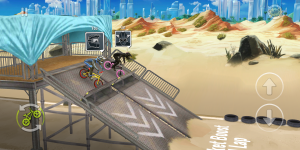 order, not moving to the next level until you “win” the current one.
You are given several “worlds”, or track series, with multiple specific tracks within each. Like a campaign-style game, the first levels withing each series start out easier, but progress in difficulty as you go along.
Gameplay
One of the reasons Mad Skills BMX 2 is so fun to play is its nuanced use use of game  controls and course challenges. To race your bike, you only have two main controls: up & down arrows on the right side of your display. The down arrow lets you pump or wheelie down hills and over whoops faster, and the up arrow let you bunny-hop, which helps get more air off ramps and other jumps.
That’s it for controls. There are a couple of other buttons available (rocket button for a limited turbo boost, flip button to do backflips), but they don’t affect the core gameplay.
The key is your timing in your approach to each dip, whoop, bump, and ramp on each track. Each of these obstacles provide their own challenges, but the almost endless combination of them provide the equally almost endless challenge in mastering your touch & timing. Getting to a point to beat my opponent, and the intense satisfaction that comes with doing so on each level, was more than enough to keep me coming back for more. This is a true case where simplicity and nuance brings much more to a game than a clustered collection of controls and options.
One of my favorite part of the game is that it allows you to play previously-beaten levels/tracks, racing yourself as you best raced it last, trying to create new personal records.
Add-Ons
As you progress through the game, you collect cash and gold bars, and with these you are offered several ways to upgrade your gear for the next race:
- Clothing/helmet upgrade: This is aesthetic only; can’t say it appealed to me that much.
- Bike upgrades: You can upgrade your general speed, your pump ability, or your jumping ability.
- New bikes: The holy grail! With enough money collected you can switch out to a completely new ride (complete with speed, pump, and jump attributes to fill out as you go).
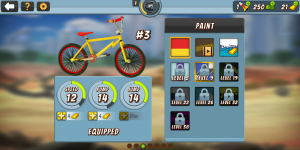 If I had one disappointment, it is with the amount of ‘boost’ each upgrade gives you. I really couldn’t see or feel the difference after dropping hard-earned money for one or more attribute upgrades. I would appreciate it more if more impact was given to these.
You do collect rockets from time-to-time….these allow you to hit the icon for a short-term turbo boost in a race. These are pretty rare (provided you’re not paying real in-game cash for them), so you need to take care in using them up. Believe me, they go fast!
Overall
It sounds odd, given the lack of crazy controls, gameplay, and other game mechanics, but Mad Skills BMX 2 is a rare game I enjoy playing more than a few days before moving on. It’s still on my device, and I say it should be on yours, too.
Download Mad Skills BMX 2 from the Play Store.
LG G7 ThinQ vs. LG V30: Which LG flagship phone is best for you?
Julian Chokkattu/Digital Trends
With a notchy new look, a super bright display, and a bucket load of A.I. smarts the LG G7 ThinQ is LG’s latest flagship. But how does it compare to the South Korean manufacturer’s last big phone, the LG V30? They may look similar, but there are quite a few differences here. Let’s take a closer look and find out.
Specs
LG G7 ThinQ
LG V30
Size
153.2 x 71.9 x 7.9mm (6.03 x 2.96 x 0.31 inches)
151.7 x 75.4 x 7.4 mm (5.97 x 2.97 x 0.29 inches)
Weight
162 grams (5.71 ounces)
158 grams (5.57 ounces)
Screen size
6.1-inch IPS LCD
6-inch P-OLED display
Screen resolution
3120 x 1440 pixels (564 pixels-per-inch)
2880 x 1440 pixels (537 pixels-per-inch)
Operating system
Android 8.0 Oreo
Android 7.1.2 Nougat (upgradeable to 8.0 Oreo)
Storage space
64GB, 128GB
64GB, 128GB (on the V30 Plus)
MicroSD card slot
Yes, up to 2TB
Yes, up to 256 GB
Tap-to-pay services
Android Pay
Android Pay
Processor
Qualcomm Snapdragon 845
Qualcomm Snapdragon 835
RAM
4GB, 6GB
4GB
Camera
Dual 16MP (with OIS) and 16MP wide angle rear, 8MP front
Dual 16MP and 13MP wide angle rear, 5MP wide angle front
Video
Up to 4K at 30 fps, 1080p at 30 fps, 720p at 120 fps
Up to 4K at 30 fps, 1080p at 30 fps, 720p at 120 fps
Bluetooth version
Bluetooth 5.0
Bluetooth 5.0
Ports
3.5mm headphone jack, USB-Type C
3.5mm headphone jack, USB-Type C
Fingerprint sensor
Yes
Yes
Water resistance
IP68
IP68
Battery
3,000mAh
Fast charging, wireless charging (Qi standard)
3,300mAh
Fast charging, wireless charging (Qi standard)
App marketplace
Google Play Store
Google Play Store
Network support
All major carriers
All major carriers
Colors
Aurora Black, Platinum Grey, Moroccan Blue, Raspberry Rose
Cloud Silver, Moroccan Blue
Price
TBA
$800
Buy from
TBA
Sprint, Verizon, AT&T, T-Mobile
Review score
Hands On
4 out of 5 stars
Performance, battery life, and charging
Julian Chokkattu/Digital Trends
While the LG V30 relies on last year’s Snapdragon 835 processor, the LG G7 ThinQ sports Qualcomm’s latest Snapdragon 845 processor. That means it will be faster and more power efficient. Both phones have 4GB of RAM, though you can jump up to 6GB with the new G7 ThinQ, which might prove handy for serious multitaskers.
On the battery front we’re surprised to find that the V30 has a larger 3,300mAh battery, compared to the G7 ThinQ’s 3,000mAh battery. It’s not a huge difference, and the more efficient processor might compensate. LG also said it managed to reduce the display’s power consumption over from the LG G6, so we expect battery life to be similar.
Both phones support fast charging and Qi wireless charging. Only the LG G7 ThinQ supports Qualcomm Quick Charge 4.0, though, which promises five hours of charge from 15 minutes of charging. Sadly, if you want to take advantage of it, you have to buy a QC 4.0 adapter separately because there isn’t one in the box.
Winner: LG G7 ThinQ
Design and durability
Julian Chokkattu/Digital Trends
Superficially there are a lot of similarities between these two phones, but as you look closer you’ll find some important differences. The most obvious is the presence of a notch at the top of the display on the LG G7 ThinQ. It’s customizable, so you can make it blend in like a bezel if you prefer. By default, you’ll be able to see system information on the sides of the notch, such the time, battery life, and signal strength.
The G7 ThinQ is a touch taller and thicker, but not quite as wide as the V30. On the back of the G7 ThinQ, the camera module is stacked vertically instead of horizontally and the fingerprint sensor doesn’t double as a power button – there’s a separate power button on the right spine. There’s also a dedicated A.I. key that triggers Google Assistant below the volume controls on the left edge. Both phones have USB-C ports for charging, but the V30 has its headphone port up top, whereas the G7 ThinQ has it on the bottom alongside the charging port.
In terms of durability, both phones boast an IP68 rating, so they can handle a short dunk. They also both meet military drop test standards, but we’d advise a case if you really want to keep them in good condition.
There’s very little to separate them here, but the G7 ThinQ is slightly easier to manage one-handed and offers some useful additions such as the dedicated A.I. key.
Winner: LG G7 ThinQ
Display
Julian Chokkattu/Digital Trends
Things get interesting in the display section. The V30 has a 6-inch P-OLED screen with a 2880 x 1440 pixel resolution, giving it 537 pixels per inch (ppi). There were complaints about LG’s OLED screen, mostly leveled at the Pixel 2 XL, but we felt the issue was overblown. However, LG has chosen to go with a 6.1-inch IPS LCD in the LG G7 ThinQ. The company said it’s reserving its OLED screens for the V-series.
We think Samsung’s AMOLED screens are the best in the business right now, and OLED tech offers some advantages over LCD, specifically truly inky blacks. On the other hand, one of the advantages of LCD is brightness, and LG has included a Super Bright Display feature which boosts the screen to 1,000 nits (for three minutes) so you can see clearly outdoors, which is a common problem on sunny days.
At 3,120 x 1,440 pixels the LG G7 ThinQ scores a slightly sharper 564ppi rating. Of course, the notch is still the most noticeable difference. It means the G7 ThinQ has an aspect ratio of 19.5:9 instead of the 18:9 you’ll find in the V30, but the extra screen space isn’t really usable a lot of the time. Both phones support HDR content.
We think the G7’s screen is vibrant and colorful, and while blacks don’t get as dark as on the V30, we prefer the brighter screen. If you’re not a fan of the notch, you can easily mask it away with black bars around the notch, making it hardly visible.
Winner: LG G7 ThinQ
Camera
Julian Chokkattu/Digital Trends
At first glance, it doesn’t look as though LG has made a lot of changes to the camera — the G7 ThinQ has a dual lens main camera both rated at 16-megapixel, whereas the V30 pairs a 16-megapixel and a 13-megapixel lens. The secondary lens in both cases offers wide-angle shots, which we like. The G7 ThinQ also has an 8-megapixel front-facing camera, whereas the V30 makes do with 5 megapixels.
It turns out there are some improvements, but they’re in the software. LG did release a new version of the V30, dubbed the V30S ThinQ, which introduced some A.I. smarts into the camera for scene and object recognition, but the G7 ThinQ takes this further. It also boasts a super bright mode for low-light conditions, allowing you trade off some detail for a clearer photo. There’s also a new portrait mode that works with the main and front-facing cameras.
We were a little disappointed in the V30 camera when we tested it head-to-head with some of the top competition, so we’re hopeful the G7 ThinQ will perform better.
Winner: LG G7 ThinQ
Software and updates
Julian Chokkattu/Digital Trends
The LG V30 shipped with Android 7.1.2 Nougat, though most handsets should have received at OTA update to Android 8.0 Oreo by now. The LG G7 ThinQ ships with Android 8.0 Oreo out of the box. Both have LG’s user interface on top which makes quite a few tweaks to stock Android and adds a handful of extras. We don’t think it’s the best user interface around, but it’s not the worst either.
LG is really talking up the A.I. advances in the G7 ThinQ and there are even some custom Google Assistant commands, a smart bulletin screen that’s supposed to learn your preferences and display relevant information, and the camera improvements. Combine that with the fact that the G7 ThinQ, as the newer phone, will likely get updates for longer and it’s the obvious winner here.
Winner: LG G7 ThinQ
Special features
Julian Chokkattu/Digital Trends
If you’re looking for something special that the G7 ThinQ has over the V30, beyond the notch in the display, then you might take note of the dedicated A.I. key on the left edge. Press it once to trigger voice recognition with Google Assistant or hold it down for a walkie-talkie mode so you can talk continuously. You can double click it to launch Google Lens vision recognition. There are also some unique G7 ThinQ commands, such as “take a photo with Super Bright Mode.” Whether this is useful to you will depend on your relationship with Google Assistant – if you use it a lot then this should be a welcome addition.
Both the V30 and G7 ThinQ have a Quad DAC which should improve your listening experience when you have headphones plugged in, but the G7 takes it all a step further with its Boombox Speaker. It only has one mono bottom-firing speaker, but LG removed the module covering the speaker, and turned the whole phone into a resonance chamber. That means the audio sounds like its coming out of the whole phone; it gets incredibly loud, and sounds really rich as well.
The V in V30 stands for video and so Cine Mode was the main special feature it boasted. It offers a bunch of cinematic effects for shooting video in different styles. We found it fun to use, but you could probably achieve a lot of the same results with apps and filters.
Winner: LG G7 ThinQ
Price
At $800 the LG V30 is an expensive phone, but if you shop around you’ll find it a bit cheaper than that now. We’re waiting for final confirmation on the pricing of the LG G7 ThinQ, but we expect it to be cheaper. Both phones will work on all the major carriers, and the G7 ThinQ will be available in the U.S. in the first week of June.
Overall winner: LG G7 ThinQ
It would obviously be disappointing if LG’s newest flagship didn’t improve on its last phone, but the LG G7 ThinQ definitely does. The faster processor, design tweaks, and injection of AI should all make for a better experience. If you’re shopping today and choosing between these two, then the G7 ThinQ is the obvious pick. For owners of the V30 thinking about upgrading, it’s not quite as clear cut because there isn’t a world of difference between these two phones.
Editors’ Recommendations
- LG G7 ThinQ hands-on review
- Here’s everything you need to know about the LG G7 ThinQ
- Here’s absolutely everything we know about the LG V35 ThinQ
- The LG V30: Everything you need to know about LG’s flagship smartphone
- LG V30S ThinQ hands-on review
 AIVAnet