


Best text messaging apps for Android as of May 2018

There are plenty of great text messaging apps to choose from, and these are some of our favorites.
Text messaging is a big part of phone use for many people, and while all phones come with native messaging clients, they can be painfully, horribly bad. Some native text messaging apps don’t handle MMS the way we’d like. Some native text messaging apps are laid out poorly. Some are just lacking. Thankfully we have the option to use one of many, many third-party SMS clients — some of which are minimal messaging apps, and others that offer features above and beyond the rest.
Textra

A long-time favorite, Textra is a clean-looking SMS app with plenty of features for hardcore users. Textra offers a slew of customization options with various theme colors, notifications, and per-contact settings. Want to make your text messages look like iMessage? Textra can look amazingly like an iPhone. Want to set special colors and notification tones for texting your boyfriend versus texting your parents? Textra is there to help. There’s built-in SMS scheduling, quick replies, improved group messaging, SMS blocking and more.
Download Textra (Free, in-app purchases)
Android Messages

Android Messages is the rebranded version of Google’s Messenger app, and it features a simple interface and plenty of features for the average user without going overboard with bells and whistles. It also supports Google’s RCS features, which allow for iMessage or WhatsApp-like features like read receipts and larger file transfers as long as your carrier supports it. If you’re just looking for a dependable, simple text messenger that will work well, support RCS, and do MMS right, Android Messages has got you. Messages has also implemented Android Oreo’s notification settings to allow you to set individual notification tones and settings on a per conversation basis.
Download Download Android Messages (free)
Pulse SMS
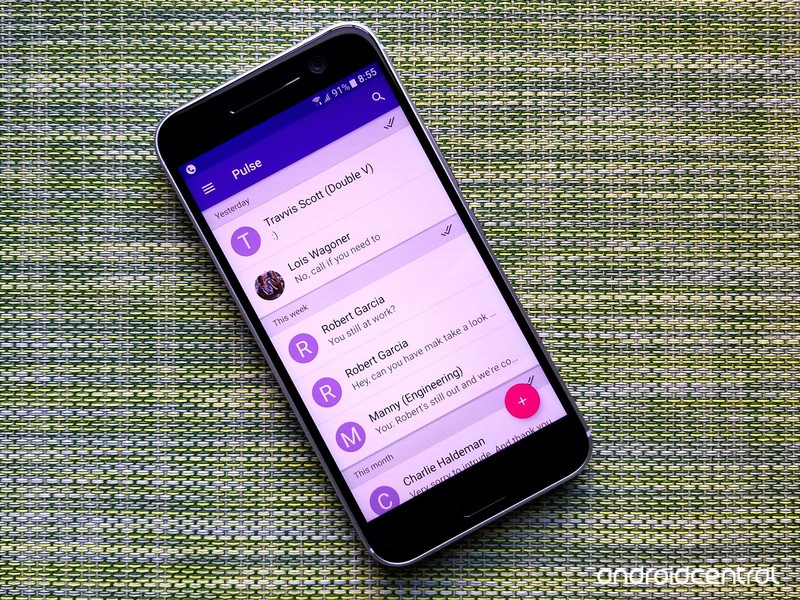
Pulse SMS is an interesting and very, very customizable text messaging app in its own right, but that’s not the real draw for Pulse. Pulse is a text messaging app that helps bring your text messages to all your other devices, too, from tablets to computers. It’s a paid service, but one that multi-device users will find quickly pays for itself. Pulse has also added password-protected private conversations box, in case you need to protect the identity and messages of your sources or your side piece. Pulse, like Messages, has implemented Android Oreo’s notification settings to allow you to set individual notification tones and settings on a per conversation basis.
Download Pulse SMS (Free, in-app purchases)
Mood Messenger

Mood Messenger wants to be a fusion of web messengers and text messengers, and it’s certainly a tantalizing idea. If you have enough people who actually use Mood to use it as a WhatsApp alternative, great for you, but for the rest of us, Mood is still worth a look as a solid SMS app with an interesting UI, dedicated themes, and excellent developer support. Mood also had the option for a Quick Compose persistent notification with a user-selected group of contacts so that they can quickly rattle off a quick text without having to go to the full app, and it is the easiest app to set custom notification tones for contacts in.
Download Mood Messenger (Free)
Your favorite?
What are some of your favorite text messaging apps? Hit up the comments and let us know!
Updated May 2018: We’ve updated this article to reflect Android Oreo notification channels and recent updates to the apps.
What are your first impressions of the LG G7 ThinQ?
A mixed bag of reactions.
Following months of rumors, leaked images, and reports that the phone had been killed off entirely, LG has finally unveiled its latest flagship – the G7 ThinQ.

At first glance, the LG G7 has most of what you’d expect from a 2018 flagship. There’s a 6.1-inch bezel-light screen with a notch at the top, Snapdragon 845 processor, dual-rear cameras, and IP68 dust/water resistance.
LG’s trying to make the G7 stand out with a wide-angle secondary camera on the back and a 3.5mm headphone jack with a quad DAC, but will these little touches be enough to steer people away from the likes of the Galaxy S9 and Pixel 2?
A lot of our forum users have already started sharing their thoughts on LG’s latest, and this is what they have to say so far.
chanchan05
05-02-2018 09:48 AM“
If you’re already on the V30, don’t bother. If coming from the G6 or earlier, it’s a no brainer.
Reply
D13H4RD2L1V3
05-02-2018 10:34 AM“
One word. Meh
The phone looks alright and it does many things we’d have expected but LG still doesn’t get launches.
There’s still no launch info yet. Maybe it’ll be out tomorrow (hopefully) but if LG mucks this one up again, it will once again be under appreciated
Reply
eak1570
05-03-2018 01:07 AM“
This is a nice phone but unfortunately I think LG will be late again. ( I had LG V30 and really like the phone)
1. No release date yet again (I don’t know why LG always announced the phone with pre-production software and no release date) Big Company like Apple , Samsung , You can pre order the phone within 3-4 days and the phone will ship in 2 weeks.
2. Upcoming Oneplus 6 ( Oneplus will…Reply
gendo667
05-02-2018 11:43 AM“
Just watched a couple of videos on my break and I’ll consider this device. Like Daniel Bader said, I’m cautiously optimistic. I also want to see if the new HTC device comes to the states.
Reply
What’s your take? Are you excited about the LG G7 ThinQ?
Join the conversation in the forums!
LG G7
- LG G7 hands-on preview: All about that bass
- LG G7 Specifications: Everything you need to know
- Join the LG G7 forums
Best Chromebook for Students in 2018
- Best overall
- Best for younger students
- Best big screen
- Best high-end
Note: These are the best Chromebooks for students right now, but that could be changing. Acer, ASUS, and Lenovo have some exciting new models on the way and one or more may belong here.
Best overall
ASUS Chromebook C202

See at Amazon
A student needs a laptop that is reliable, affordable and robust. The ASUS Chromebook C202 fits the mold. The Chromebook C202 was designed for students to carry back and forth to class without worry because of its rugged build and the balance of features and price make the Chromebook C202 the best choice for most people.
The bottom line: The Chromebook C202 is great for a busy student. Chrome and Android app support means you’ll be able to use it to get things done and be able to play games or watch a video during the downtime.
Why the ASUS Chromebook 202 is the best
For around $200 you can get a Chromebook that’s powerful and productive, and has extras like a rugged frame and spill-resistant keyboard tray. The Intel dual-core processor and 4GB of RAM means there is enough under the hood to get things done and the modest 16GB storage is still enough for a bit of offline storage when paired with Google Drive and docs. Android app support is an added bonus that means a student will be able to find the app they need to be productive in class.
The ASUS Chromebook C202 is exactly what most people think of when you mention a Chromebook — an inexpensive laptop designed to be easy to use and productive. You can buy Chromebooks that look nicer or have a better display if you need to, but the Chromebook C202 delivers exactly what a student needs at an amazing price.
Best for younger students
Lenovo Flex 11

See at Lenovo
The Lenovo Flex 11 is the perfect Chromebook for a younger student. Far from the most attractive laptop you’ll run across, the Flex 11 more than makes up for it by being built with rugged materials and designed to survive a 2.4-foot drop on a hard surface. Combined with its water-resistant keyboard, the Flex 11 can survive more of the rough-and-tumble treatment a youngster will dish out.
The Flex 11 has an industry standard MediaTek processor with 4GB of RAM and 32GB of storage, so performance and usability are on par with most other models. Android app support is an additional plus, especially when paired with the many educational apps in Google Play.
Bottom line: If you are shopping for a younger student or anyone who is a little accident-prone, the Flex 11 will take a lot more abuse than most other models and has a modest price tag.
Best big screen
Acer Chromebook R13

See at Amazon
The Chromebook R13 offers a lot for its higher-than-average price. It has a solid metal build and nice-looking screen, with a solid (but quite standard) keyboard and trackpad. It isn’t particularly light, but much of that is because of its large battery. The only real concern here is performance and configuration options, as you’re getting a MediaTek ARM processor and can only choose to get 16, 32 or 64GB of storage — there’s no choice to get a higher-end processor or more RAM.
The addition of Android apps and a full touchscreen just add to the list of reasons why this is the right Chromebook for any student who needs something bigger.
Bottom line: If you’re happy with the base configuration and don’t need something that’s hyper-portable, this is going to be a great choice for a student who wants something a little larger than the ASUS Chromebook Flip.
Best high end
Samsung Chromebook Plus

See at Amazon
Samsung and Google have built one of the best Chromebooks you can buy with the Samsung Chromebook Plus. It’s incredibly well built, has one of the best displays of any laptop and has the horsepower to handle anything you throw at it. And handle it well. That makes it perfect for the student who needs the very best.
The bottom line: For anyone who wants to use a Chromebook on a regular basis, and values getting extra performance and hardware quality at an added price, Samsung has made the Chromebook for you.
One more thing: There’s also a Samsung Chromebook Pro, built with a slightly faster Intel processor and available for a bit more money.
Conclusion
There are plenty of great Chromebooks for students right now, but the ASUS Chromebook C202 finds the right balance between performance and price. If you want something a bit bigger, the Acer Chromebook R 13 is cheaper and not quite as powerful, but has a great big touchscreen, while Lenovo’s Flex 11 can take a spill, and Samsung’s Chromebook Plus comes with a stylus for added productivity in certain apps. All these laptops run Android apps.
Best overall
ASUS Chromebook C202
See at Amazon
A student needs a laptop that is reliable, affordable and robust. The ASUS Chromebook C202 fits the mold. The Chromebook C202 was designed for students to carry back and forth to class without worry because of its rugged build and the balance of features and price make the Chromebook C202 the best choice for most people.
The bottom line: The Chromebook C202 is great for a busy student. Chrome and Android app support means you’ll be able to use it to get things done and be able to play games or watch a video during the downtime.
Update, April 2018: We’ve swapped out our top choice for the ASUS Chromebook 202, which is the perfect balance of price and performance for most students.
Chromebooks
- The best Chromebooks
- Chromebooks in education: Everything you need to know
- Should you buy a Chromebook?
- Chromebook Buyers Guide
- Google Pixelbook review
- Join our Chromebook forums
Nokia 6.1 officially launching in the U.S., costs $269
Available Sunday, May 6 from Amazon and Best Buy.
At the very beginning of the year, HMD Global launched a successor to the Nokia 6 in the form of the Nokia 6.1. The phone has already made its way to China and India, and now it’s officially heading to the United States.

Beginning Sunday, May 6, you’ll be able to purchase the Nokia 6.1 from Amazon and Best Buy in the U.S. Pricing is set at $269, making it a tad more expensive than the Nokia 6’s launch price of $229.
Even with the increased cost, the Nokia 6.1 still looks to be an incredible value. The phone features a 6000 series aluminum unibody design, 5.5-inch Full HD display housed under 2.5D curved glass, and a 16MP ZEISS rear camera. Other notable specs include a Snapdragon 630 processor, 4GB RAM, and Android Oreo backed by Google’s Android One program.
Although sales don’t officially begin until this Sunday, you can already place early orders through Best Buy’s site right now.
See at Best Buy
Xiaomi expected to go public with $10 billion IPO [Update]
If true, this will be 2018’s largest IPO to-date.
Updated 5/3/18 – A few short days after these rumors began, Xiaomi has officially filed to become a publicly traded company. As expected, the company’s hoping to raise $10 billion with an overall valuation of $100 billion. With these numbers, Xiaomi stands to become the third largest technology brand in all of China and the world’s biggest IPO raise ever since 2014 when Alibaba went public.
Depending on where you live, Xiaomi is either huge in your country or hardly known at all. The 8-year-old company is currently the fifth largest smartphone brand in the world, and according to people familiar with the matter, is expected to go public with an Initial Public Offering (IPO) of 10 billion USD.

Assuming this turns out to be true, this would make Xiaomi’s IPO the largest the world has seen so far in 2018. That may sound like exciting news for potential investors, but the way Xiaomi’s going to handle itself as a public entity could present them with a difficult decision.
The majority of Xiaomi’s earnings will come from software and services — not hardware.
As noted by Radio Free Mobile, Xiaomi will initiate a hardware margin limit of 5%. In other words, Xiaomi plans on earning little-to-no money on hardware and instead will rake in its cash through software and services. Xiaomi’s often credited as being China’s Apple, and while its hardware may take a lot of inspiration from the iPhone, MacBook, etc., this profit strategy is anything but.
Some of the services Xiaomi makes money through include advertising in its apps and paid subscriptions for digital book and video content. The company’s work here shouldn’t be discredited, but purposefully limiting itself to just 5% for hardware sales is an interesting move.
It’s expected that Xiaomi will submit plans for the IPO by the end of this week and go public as early as June, but at this time, the company’s yet to officially comment on any of this speculation. When that happens, we’ll be sure to let you know.
The T-Mobile / Sprint merger could be great for consumers, but it probably won’t be
I’m okay with the Sprint/T-Mobile merger as long as it doesn’t affect Project Fi

As long as Fi sticks around, Google users will always have a cheaper alternative to potentially tyrannical carriers.
There’s a lot to say about the recent news of T-Mobile and Sprint joining forces — most of the initial takes around the web, including ours, haven’t been entirely optimistic. Mergers of this magnitude historically haven’t often been great for customers in the long run, though both T-Mobile CEO John Legere and Sprint CEO Marcelo Claure have continuously asserted otherwise.
I’m no business analyst — and most of the inner workings of a merger are admittedly way over my head — but there’s one T-Mobile/Sprint partnership that’s already been around for years, and I’d hate to see it vanish in the wake of this merger: Project Fi.
In case you’re unfamiliar, Project Fi is a prepaid carrier run by — you guessed it — Google, focused on simplified billing for users that don’t need unlimited data. Instead, you pay by the gigabyte, and you’re credited back whatever you don’t use at the end of each billing cycle.
Fi runs off of both Sprint and T-Mobile towers, along with US Cellular, which is part of the reason it only works on a few supported devices, namely Google’s own Pixel lineup. The idea is to always use whatever signal is best in your given area; if you’re on the road and hit a T-Mobile dead spot, you’ll automatically switch over to Sprint or US Cellular’s towers, and vice-versa.

Perhaps best of all, Fi works outside of the U.S. as well, supporting 135 countries without any additional cost. I took advantage of this a few years ago when I went to Berlin, Germany to cover IFA, and it worked seamlessly; as soon as I deboarded my plane, my Nexus 6 immediately connected to local towers and I was back online.
I’m no longer a Fi customer, because I simply use too much data to pay by the gigabyte, but for the majority of people who only use 3-5GB a month, the service can offer potentially tremendous savings over alternatives like AT&T or Verizon, and yes — even T-Mobile or Sprint in some cases. So what will become of Fi once two of its three constituents form a single entity?
Fi targets a different demographic than T-Mobile and Sprint, which hopefully means there’s no reason to kill it off.
Hopefully, nothing. While Project Fi could seemingly cannibalize some of the merged company’s business with its lower data rates, T-Mobile and Sprint have made unlimited data a large focus over the last few years, and it’s something Fi can’t quite compete with. For heavy data users like myself, Fi can become unnecessarily expensive, and T-Mobile offers a similar international plan — though with considerably slower data rates. With this in mind, there may not be any reason to back out of providing Fi’s coverage.
So long as Fi sticks around, I’ll be cautiously optimistic about the merger. As a former T-Mobile employee of four years, I’ve seen the ups and downs of John Legere’s boisterous leadership, and I’m hopeful that he’ll continue to make low costs and large data allotments a priority. But in the worst case scenario, Fi will hopefully remain as a cheap, comprehensive alternative.
What’s your take? Do you think the T-Mobile/Sprint merger will mark the eventual death of Project Fi, or will it stand strong as an alternative for Google devotees? Let us know in the comments!
Sign up for Project Fi

Google Assistant now works with over 5,000 smart home products, big brands pledge support

A smart home is only functional if everything operates together.
Google Assistant isn’t just there to set timers and tell you when Michael Jordan was born (February 17, 1963, by the way) — it’s capable of being a central control system for all of your smart home tech. And today, Google has announced that Assistant hit a huge milestone in the smart home: it can now control over 5,000 distinct devices, up dramatically from 1,500 since the start of the year.
These products and services work with Google Home
Having thousands of devices available for use with Assistant is great, but it only matters if the ones you actually have in your home (or are planning to get) are supported. That’s why Google’s working with as many of the biggest and most popular names in smart home tech as possible. These are some of the latest announcements on that front:
In the coming months, the DISH Hopper DVR will integrate Google Assistant, enabling you to talk directly to your TV system and ask for specific programming from DISH. Google is also simplifying and improving Logitech Harmony hub voice controls for media, so you can go directly to favorite channels, control the volume and play or pause programming.
You won’t use more than a couple dozen smart home products, but having choice is always great.
On the security system front, Nest products obviously work with Google Assistant. But Google is also announcing partnerships with a whole slew of big-name security companies that will integrate with Google Assistant, including alert notifications and live video streams, soon. Google specifically names security systems from ADT, First Alert, and Vivint Smart Home; smart door locks from August and Schlage; and security cameras from Panasonic and Arlo.
Google also has a massive list of companies on board with their standard appliances. These are just a handful of the well-known brands with Assistant-ready products on the way: ADT lights, Xiaomi lights, Hunter Douglas window treatments, HiSense A/C and dehumidifiers, and new LG appliances.
Google Home Mini review, 6 months later: The smart speaker that should be in everybody’s home
It’s a lot to take in, I know — and you aren’t likely to just pick and choose all of these products based solely on their support for Google Assistant. But knowing that all of these big name brands are ready to work with Google Assistant means you’ll have more choices and a better chance of a (near) seamless integration of new products to your existing smart home system if you’re already using Assistant. Expect to see specific announcements about availability and support of individual products later this year.
Google Hardware

- Google Wifi review
- Google Home review
- Chromecast Ultra: all you need to know
- Which Chromecast should you buy?
Google Wifi: Google
Amazon
Google Home: Google
Best Buy
Chromecast Ultra: Google
Best Buy
Turning your house into a smart home with the Google Assistant
How many times have you crawled into bed and realized you forgot to turn off the living room lights? Or tried to catch the last minutes of the game but couldn’t find the remote? These are the moments we ask ourselves: how is this still a thing?!
With the Google Assistant we’re working to make this experience a lot better, so you can easily control all the devices and appliances in your home with just your voice. Over the past year, we’ve made great progress ensuring that the Google Assistant can work with all types of connected devices, and now every major device brand works with the Assistant in the U.S.
Just how many devices is that? Today, the Google Assistant can connect with more than 5,000 devices for your home—up from 1,500 this January. That includes cameras, dishwashers, doorbells, dryers, lights, plugs, thermostats, security systems, switches, vacuums, washers, fans, locks, sensors, heaters, AC units, air purifiers, refrigerators, ovens … we can keep on going!
Here are just a few of the new ways you can make your home smarter with the Google Assistant:
Turn your living room into a smart entertainment center
One of the most popular ways people use the Google Assistant in their homes is to watch TV and play music. In fact, media and entertainment queries like “play SportCenter,” have increased 400 percent over the past six months.
Millions of people already have access to the Assistant on smart TVs powered by Android TV, and we’re still seeing tremendous growth. We’re also making it easy to turn any TV into a smart TV with Chromecast, so you can easily control what you’re watching with the Google Assistant on smart speakers like Google Home. And we’re working closely with partners to build the Assistant into the next generation of TVs available later this year.
We’re also bringing the Google Assistant to more set top boxes and remotes. Rolling out this month, DISH’s Hopper family of receivers will work with the Google Assistant, so people in millions of U.S. homes can operate their TV using their voice and a Google Assistant device. Just say “Hey Google, play ESPN on the Hopper” to your Google Assistant and your TV will automatically tune to the right channel. And soon, it’ll be even easier to control home entertainment using Logitech Harmony hub-based remotes with the Google Assistant. The new, simplified voice commands will let you go directly to your favorite channels, control volume, or pause a show.
Get helpful alerts from your security camera
Security cameras and smart doorbells let you keep tabs on activity around your home, and we’ve worked to ensure that the Google Assistant works seamlessly with these devices. If you have a Nest Hello doorbell, the Assistant will alert you if someone rings the doorbell, sending a chime to your smart speaker or phone with the option to view the live stream right from your phone, TV or our new line of Smart Display devices available later this year. This Nest product was the first to ship with this feature, and we’ll enable Assistant notifications on more home security devices from other popular brands later this year.
We’re also adding more popular security alarm brands that will now work with your Google Assistant, including ADT, First Alert, and Vivin Smart Home, smart door locks from August and Schlage, and home security cameras from Panasonic.
Turn on all the things with the Google Assistant
With the Google Assistant, you can easily control all the connected devices in your home, from lights, to thermostats, to appliances, all in one simple place. You can do this with your smart speaker like the Google Home Mini, or with the Google Assistant app on your smartphone, turning your phone into your own personal home control hub even when you’re away from home.
We’ve been working with device brands around the world to ensure the Assistant works with all the most popular home control devices. We recently announced support for IKEA lights and Deutsche Telekom’s Magenta hub which enables dozens of devices to be controlled by Google Assistant. Our partners are continuing to add even more devices that work with the Google Assistant across the home in the coming months, including ADT lights, Xiaomi lights, Hunter Douglas window treatments, Hisense Portable AC and Dehumidifiers, Arlo security cameras, and new LG appliances (from air purifiers to TVs).
Try it out today
With more than one million Actions the Google Assistant can help you with today, we bet you’ll discover something new you never knew the Assistant could do. Some of the most popular smart home actions with the Google Assistant are “Hey Google:
- Turn on the lights
- Set the temperature to X degrees
- Turn on the TV
- Dim the lights
- Arm the security alarm
Give it a try today – check out the Explore page to see all the actions the Assistant can help you with.
HTC U12: Rumors, specs, and latest news!
The HTC U11 was one of 2017’s most underrated phones, so you’d be a fool to let the U12+ slip under your radar.
There were a lot of excellent phones that came out in 2017, and while much of the limelight was reserved for the likes of the Galaxy S8, Google Pixel 2, and Apple’s iPhone X, HTC also kicked out a truly awesome phone with the U11. The U11 didn’t receive anywhere near the amount of attention as it should have, and while it’s unclear if the U12+ will be able to change this, one thing is certain – it’ll be a darn nice phone.
| Operating System | Android 8.0 Oreo with Sense 10 |
| Display | 6-inch WQHD+ 18:9 aspect ratio |
| Processor | Qualcomm Snapdragon 845 |
| Storage | 64GB or 128GB |
| RAM | Up to 6GB |
| Rear cameras | 16MP + 12MP |
| Front camera | 8MP |
| Battery | 3,420 mAh |
| Water resistance | IP68 |
| Security | HTC Face Unlock |
May 3, 2018 — A big announcement is coming on May 23
HTC’s been rather quiet regarding its flagship for this year, but that recently changed with a Tweet the company shared today. Above a picture teasing a May 23 announcement date, HTC says “Coming Soon. A phone that is more than the sum of its specs.
Coming Soon. A phone that is more than the sum of its specs. pic.twitter.com/m2skJSK0qt
— HTC (@htc) May 3, 2018
In other words, we’re just a few short days away from the HTC U12+.
March 15, 2018 — HTC may scrap the regular U12 and just release the U12+
According to a new report, HTC is apparently scrapping its plans to release two flagships this year and instead focus on one. Rather than releasing the U12 and U12+, the company is shifting its efforts to just the U12+.
With the U12+, it’s expected that HTC will outfit it with all of the makings of a 2018 flagship – including a bezel-light 6-inch display, Snapdragon 845, dual rear cameras, etc.
Bezels will be a lot smaller compared to the U11

Get ready to say goodbye to these massive bezels 👋
Although the U11 was one of 2017’s most eye-catching phones when viewed from the back, its front resembled a device that could have been released in 2015. Large bezels don’t necessarily make or break a phone, but when the U11 was fighting against the Galaxy S8 and LG G6, its traditional front design could quickly lead you to believe it was outdated when compared to the competition.
Thankfully, the HTC U12+ will adopt a much more modern design. A device render from early January showcased a phone with very minimal bezels (at least from what we could see), and this was followed up by hands-on photos of what’s being reported as the U12+ in the flesh.


It’s possible that the phone in the hands-on photos is nothing more than a dummy unit HTC is using to test out 5G speeds, but even if that’s the case, it’s likely the U12+ will end up closely resembling it.
The back won’t be a fingerprint magnet

While the U11 looked outdated on the front, its back design remains stunning to this very day. We’re expecting the U12+ to retain the same general design with a metal frame sandwiched between glass on either side, but according to HTC Source, at least one variant of the U12+ will look slightly different.
Per sources that are familiar with the U12+, HTC’s creating a version of the phone with a matte white finish on the back. It’ll still be made out of glass, but the matte design should both look great and help to drastically reduce the number of fingerprints that pop up.
You’ll still be able to get a U12+ with a reflective design, but I’m personally much more interested in seeing what the matte aesthetic looks like.
It’ll be powered by the Snapdragon 845

Qualcomm’s latest and greatest mobile processor for 2018 is the Snapdragon 845, and we have no reason to believe that the U12+ will ship without it.
The 845 is one beast of a CPU, offering substantially faster performance, improvements in the camera department, increased data speeds, and much more. The HTC U11 provided an incredibly slick user experience with the Snapdragon 835, and we can only imagine how zippy the U12+ will be thanks to the faster silicon.
Full support for Project Treble
Since the U12+ will be launching with Oreo out of the box, it’ll be rocking support for Project Treble. LlabTooFeR notes that HTC will also offer A/B updates, meaning that new software releases should be available on the U12+ not too long after Google’s Pixel devices get them.
Squeeze controls aren’t going anywhere

Edge Sense – the feature that allows you to squeeze your phone to perform a variety of commands – first debuted on the HTC U11. Google integrated the tech as a way for quickly prompting the Google Assistant on the Pixel 2, and it made a return later in the year with the HTC U11+.
There was a lot of doubt surrounding Edge Sense’s usefulness following the announcement of the U11, but once the phone was released and people started getting their hands on it, it became clear that it was way more practical than anyone was expecting it to be. Edge Sense isn’t the sole reason to buy a U11 or Pixel 2, but it’s one of those things you come to appreciate the more you use it.
It’s reported that Edge Sense 2.0 will make a debut on the U12+ this year, and while we don’t know quite yet how this will be different from the current version of Egse Sense, we’ll likely see deeper customization of how it can be used, more apps/commands it can tie into, etc.
What are you hoping to see?
As information regarding the U12+ slowly trickles in, what features or specs are you looking forward to the most? Will a refreshed design be enough to keep you interested, or would you like HTC to try something new like it did last year with Edge Sense? Let us know in the comments below!
HTC U11
- HTC U11 review
- HTC U11 specs
- Manufacturing the U11: Behind the scenes
- Join our U11 forums
- HTC U11 vs Galaxy S8
- HTC U11 vs LG G6
Amazon
Sprint
HTC
Updated 5/3/18 — Added all new info about the HTC U12+!
Best Reddit apps for Android

Whether you’re here for insight, community, knowledge, or animals giving terrible advice, Reddit has an Android client for you.
Reddit calls itself the front page of the internet, but it’s a little more difficult than that to define to outsiders. It’s part social media, part news, and a big part entertainment. There are scores of things you can learn on Reddit, and you can actively kill brain cells in some of the subs. In short, Reddit is many things to many people, but no matter how you perceive the platform, there are a lot of very different ways to actually see and use the service on Android.
For years, Reddit relied on third-party apps for its mobile users, not launching an official Reddit app until 2016. Since then, the race for best Reddit readers has definitely tightened up, and here are the leaders of the pack.
- Reddit, the official app
- Boost for Reddit
- Bacon Reader
- Relay for Reddit
Reddit, the official app: First-party is finally best party



As we just mentioned, Reddit’s official app is a relative newcomer to the Reddit Android app space, but in that time it’s quickly won millions of users. Reddit’s official app has over 10 million downloads, and while being the official app certainly gives it a boost in the marketing department, the Reddit app has more than earned its place as the only Reddit app on millions of users’ phones.
Reddit’s UI is clean, unencumbered, easy to get around in. The app features five tabs at the bottom, like YouTube or Spotify, and left to right they are: Home page, Subreddits, Post to Reddit, Reddit Chat, and Inbox. If you have a subreddit open in the Subreddit tab, you can quickly switch to Inbox to deal with a new comment and moderator message and then switch back to the subreddit without losing your place. Reddit also has a handy toggle at the top of the home page and every subreddit for you to switch between Card and Compact views, but unfortunately it reverts to your Settings-defined Default view every time you switch subreddits.


Reddit consistently gets notifications quicker than the third-party apps using the Reddit API. It was a minute ahead of some clients and 5-10 minutes ahead of others, but Reddit’s notifications were always first, even with the notification check intervals turned up on other clients. Reddit has a night theme and AMOLED night theme for us dark souls, and the rest of its settings are blissfully short. That means there’s not a ton of customization here that you’ll find on other Reddit clients, but you can disable autoplay outside Wi-Fi to save data and turn on or off NSFW content if you dare.
If I have one flaw to the official Reddit app, it’s that it doesn’t have the “Fancy Pants” editor for text replies and posts that the Reddit website does, mean you’ll need to remember how to format your post yourself. It’s basic Markdown formatting, but for newer redditors, you might need to get yourself a cheat sheet.
Reddit official app (Free)
Boost for Reddit – best for layout-switchers and comment-surfers


Think of Boost for Reddit as a Swiss Army knife compared to Reddit Official’s switchblade. While Reddit Official is limited on settings and customization, just about anything you can think of is customizable in Boost. For instance, most Reddit apps have two or three views; Boost has 8: three Card view variants, two list views, two image-centric views, and a Swipe view, for those who want surf Reddit the way they surf Tinder. #SwipeRight
When browsing comments on a Reddit post, Boost allows you to collapse all threads to just the parent comment using the collapse all button within a Floating Action button menu. This allows you to see how each thread starts and how many children it has thanks a numeric badge next to the comment’s karma. This is a fantastic tool for megathreads as well as subreddits like /r/WritingPrompts/ where you don’t want to break up the entries. When replying to comments or posting a text post in Boost, the bottom bar of the window becomes a swipeable carousel of formatting, preview, and media options.


As I mentioned before, there seems to be an option in Boost for just about everything, and so it’s little wonder that when you get into Boost’s settings, you can get a little overwhelmed. There are 14 sections in Boost’s settings, and while each section is aptly named and somewhat easy to navigate, it is a lot to take in. For power users, Boost’s settings are a delight, you can get your link-handling preferences and media preview settings exactly the way you want to. If it’s a bit too much for you, it’s okay, there are other Reddit apps out there.
Boost for Reddit (Free, $2.49)
Bacon Reader – still sizzling after all these years


If you go looking for Reddit apps, or suggestions about Reddit apps, you will soon hear a sizzle. Bacon Reader is one of the best-known Reddit clients on the market, and has a long, long track record of success and support. It has a dedicated following, a very stable performance record, and while it has delicious, fatty Bacon its name, there is not an ounce of fat anywhere in this lithe Reddit app.
Bacon Reader’s two layouts, list and card, are both fairly standard and easy to read, though card view shows fewer non-imgur/non-i.redd.it previews than the thumbnails on list view. When you open a post, be prepared to scroll, as BaconReader lacks a good thread-jumping feature in its comment views short of collapsing all threads. On that note, if you tap a comment, all its children are minimized, as opposed to requiring a long-press on most Reddit apps. In order to upvote, downvote, or reply a comment, you’ll long-press the comment to the left to reveal the options.


Bacon Reader’s settings are even more paired-down than Reddit’s official app, and while the simplicity has a definitely appeal, the appeal of having gifs or videos only autoplay on Wi-Fi, the ability to toggle volume on for v.redd.it videos outweighs it. Also, while you can set a Font size in Appearance settings, it does not apply to the Settings menu, the main menu, or the reply window, so replying to comments can be a strain for those of us with inferior vision.
Bacon Reader (Free, $1.99)
Relay for Reddit – best for media and AMA skimming


Relay for Reddit is a Reddit client with a slightly funky UI that absolutely zooms and will help you zip through megathreads and especially AMAs like a pro. Unlike most Reddit clients, it has not enabled a full-size Card view yet, but it is coming. While we don’t have big, beautiful cards, you can tap the thumbnail to preview most images gifs and videos. Most non-YouTube video previews are muted by default, too. Relay’s in-app browser also lets you flip between an article and the comments swiping the action bar up and down the screen.
That said, the real post-surfing magic comes into play with massive posts like Official Discussions and AMAs. If you tap a comment, all its children are minimized, even better and more compact than Bacon Reader, and to comment/vote, swipe left on it. When replying, the compose window is a lot like the Fancy Pants editor on Reddit’s website, complete with automatic imgur uploading of photos for easy linking and attaching.


Then there’s the Floating Action Button in a post. If you tap this button, you’ll get three bubbles that slide out: Previous thread, Thread options, and Next Thread. Thread options allows you to see how many Comment Threads are in a post, highlight recent comments from a user-definable time range, search the comments for specific words, gilded comments, and comments by the original poster. Then there’s also an IAMA Mode, which will take you to the comment above a reply by the original poster.
Relay for Reddit (Free, $2.99)
Your turn
What are you using for Reddit? Have you converted to the official app, or do you still rock a third-party client? Are you all-in on cards or do you still prefer the old-school lists? I’ll confess that Relay has been what I seem to gravitate back to between my my updates of this article for about the two years, but what can I say? I’m a gif-lover, and being able to quickly collapse comment threads with a quick tap is more satisfying than the long-press.
Whatever you’re using, we want to know! Tell us in the comments what you’re using and why it is Reddit gold to your mind.
Updated May 2018: This article has been completely rewritten for a more in-depth evaluation of the Reddit apps chosen, and Reddit’s official app has overtaken Relay for top billing.
Where to buy the LG G7 ThinQ
Your guide for buying the G7 in the U.S. and Canada.
LG’s playing it safe this year with the G7 ThinQ, but that doesn’t necessarily mean it’s a bad phone. In fact, based on what we’ve seen so far, the G7 will be one heck of a smartphone that could be very well-deserving of a place in your pocket.

If you live in the United States or Canada and are interested in picking up the G7 ThinQ for yourself, here’s everything you need to know.
United States
AT&T
We fully expect AT&T to sell the LG G7, but at this time, the carrier’s yet to share any concrete details on the phone. The pre-order date and pricing should line up closely with what we see from other carriers, and we’ll be sure to update this and all other listings accordingly as we get more info.
See at AT&T
Sprint
If Sprint’s your carrier of choice, you’ll be able to place pre-orders for the phone beginning May 25. Following that, regular sales will begin online and in-stores on June 1.
See at Sprint
T-Mobile
Jumping over to T-Mobile, the Un-Carrier isn’t nearly as specific as its newly acquired partner.
T-Mobile notes that it’ll get the G7 “later this spring”, but that’s all we know for the time being.
See at T-Mobile
U.S. Cellular
Similar to Sprint, U.S. Cellular will also start selling the G7 on June 1. The phone will be available in-stores and at uscellular.com, but there’s currently no word on pre-orders through the carrier.
See at U.S. Cellular
Verizon
Last but not least for U.S. carriers, Verizon has confirmed that it’ll open pre-orders for the G7 on May 24 – a day before Sprint.
There’s no word on an official launch, but it’ll likely line up with the June 1 date we’re seeing from everyone else.
See at Verizon
Canada
Bell
It’s been confirmed that the LG G7 will launch on Bell, and it’ll do so on June 1.
See at Bell
Freedom Mobile
Just like Bell, Freedom Mobile will also begin carrying the G7 on June 1. However, further details are currently unknown.
See at Freedom Mobile
Rogers
Once again, Rogers will begin selling the LG G7 on – you guessed it – June 1.
See at Rogers
SaskTel
Ready for a curveball? SaskTel will allow you to purchase the G7 on June 1.
See at SaskTel
Telus
Lastly, Telus has also been confirmed for a June 1 date on which it’ll open sales for the G7.
See at Telus
LG G7
- LG G7 hands-on preview: All about that bass
- LG G7 Specifications: Everything you need to know
- Join the LG G7 forums
 AIVAnet