


F8 proved there’s no escape from Facebook
During a keynote about privacy at F8, Facebook’s Chief Security Officer Alex Stamos shared an image of the world that used light to show the sheer size of the company’s network. It was intended to highlight all the places where people are using a Facebook product, and as you might expect, there weren’t many dark spots.
This year, Facebook’s F8 developers conference was bound to be different. After all, the company is still dealing with the aftermath of the Cambridge Analytica (CA) data privacy scandal. But, Zuckerberg said during the opening keynote he was ready to “move forward,” and instead he came to talk about how Facebook plans to light up the rest of Stamos’ map.
The goal, Zuckerberg said, is to make the world smaller by building products that will help people connect in “meaningful ways,” no matter where they are or what device they’re using. With more than 2.2 billion monthly active users, Facebook alone is already hard to escape. How else will you find out about your next high school reunion or when your distant cousin has a baby? For millions it’s their preferred means of communication, and for an alarming amount of people, it’s how they get their news.
Facebook has also found ways to inject itself in people’s lives in an almost unthinkable way. If you want to donate to charities, you can do that on Facebook. Want to promote your bands show, it has you covered. And with Groups, which it now plans to make more of a centerpiece of its site, you can be in touch with like-minded individuals who you may never meet in person.

This reach is magnified even further when you remember that Facebook owns some of the other most popular social apps and services across the globe. This includes Instagram, which has more than 800 million monthly users (and will likely hit a billion soon); WhatsApp, which has 1.5 billion monthly users (almost as many as Facebook); and Messenger, the standalone chat app that now has more than 1.3 billion monthly users.
Oh, and let’s not forget about Oculus, which Facebook bought in 2014 and is arguably the most promising virtual reality company. Oculus just launched its first mobile VR headset, the Go, with a $200 price tag that puts it in impulse purchase territory.
VR hasn’t gone mainstream yet, but Facebook has a chance to make that happen with its Oculus Go. One of the ways it plans to do that is by making virtual reality social, with features that will let users “hang out” with others in digital, 360-degree spaces. You can be watching a movie with friends and it’ll be like going to the theater, except you won’t be there physically and you’ll have a headset strapped to your face. Facebook is also rolling out similar experiences for live events, including concerts and sports matches.

Bloomberg via Getty Images
All of this is to say Facebook has something for everyone, whether you want to stay in touch with your older relatives (Facebook), make new friends (Instagram), chat with friends overseas (WhatsApp) or soak in the future of entertainment (Oculus). And as the company continues to grow, it will only collect more data on you and everyone you know.
Simply put, Facebook doesn’t just want to be a part of your life, it wants to be your life.
And the company isn’t done yet. At F8, it announced that it would be taking on Tinder with its own dating service, which is scheduled to launch in the next few months. With the billions of dollars it makes every quarter, Facebook could’ve just bought Tinder and called it a day. But why spend all that money when it can just build a similar experience and, perhaps, make it even better?
Facebook’s hefty user base will make it an immediate threat to other matchmaking offerings. We don’t know yet if Facebook’s matchmaking feature will be a hit, but with the amount of data it already has on people and the resources at its disposal to create seamless apps, no one will be surprised if it simply makes all other dating services obsolete.
Case in point: When the company reportedly failed to buy Snapchat in 2013 for $3 billion, it went ahead and just cloned its most popular feature, Stories, which is now a big part of the Facebook and Instagram apps. It didn’t take long for Snapchat to start losing users as a result, and it also affected its bottom line, as advertisers flocked to Facebook’s product. Instagram is now at 300 million daily active users, compared to Snapchat’s 191 million. It’s clear this has paid off for Facebook, which says Stories will soon be the most popular way people share updates.

We should be concerned with the growing reach of Facebook.
Michael T. Zimmer, Associate Professor at The School of Information Studies, UCM
“We should be concerned with the growing reach of Facebook,” said Michael T. Zimmer, an associate professor at the School of Information Studies at the University of Wisconsin-Milwaukee. “The rise of Messenger — especially once it spun into a standalone app — was a big step in its reach into our daily activities. But more than that, the ubiquity of ‘Like’ buttons and ‘Login with Facebook’ features across the web means it is nearly impossible to avoid touching Facebook in your daily online activities.” Zimmer added that whether or not users take control of their privacy settings when they post on Facebook, which is what Zuckerberg focuses on when asked about privacy, nearly everyone will still be subjected to “Facebook’s immense apparatus of tracking and data collection.”
“Either you give enough people in the world what they want, or you don’t succeed. And Facebook over and over again is giving people what they want.”
Other academics don’t see an issue with Facebook becoming too powerful. “The success of Facebook in these various things that it does, and the fact that it just keeps doing more and more, is a reflection of the fact that [it’s] doing something right [and] that people are enjoying by and large what they’re doing,” said Paul Levinson, professor of communications and media studies at Fordham University. He noted that, while it’s obvious that Facebook has made mistakes and it’s not perfect, its success shouldn’t come as a surprise. “Either you give enough people in the world what they want, or you don’t succeed,” Levinson said. “And Facebook over and over again is giving people what they want.”

Some have even raised the “M” word when talking about Facebook. Senators Lindsey Graham (R-SC) asked Zuckerberg directly during his congressional hearing: “You don’t think you have a monopoly?”
“It certainly doesn’t feel like that to me,” the embattled Facebook CEO answered with a nervous smirk, which drew laughs, including from Graham. It may not feel like it to Zuckerberg, but the truth is that Facebook really doesn’t have any competition — Twitter and Snapchat’s combined have around 400 million monthly users. That’s nowhere near Facebook’s 2.2 billion — and that’s not even counting Instagram or WhatsApp.
Even with the massive web it’s already created, Facebook says there are still more than 3 billion people who don’t have access to the internet, and by extension, it’s services. It wants to change that by building fast and cheap networks that will make internet accessible in every part of the globe. Theoretically, whether or not you use Facebook is up to you, though at the end of the day it may not feel like you have much of a choice.
Images: Getty Images
Click here to catch up on the latest news from F8 2018!
MacRumors Giveaway: Win a Rugged 100W USB-C Cable From Nomad
For this week’s giveaway, we’ve teamed up with Nomad to offer MacRumors readers a chance to win a rugged, high-quality USB-C cable designed for Apple’s latest Macs that use USB-C and other USB-C accessories like the Nintendo Switch or Android smartphones.
Priced at $39.95, Nomad’s USB-C cable supports full 100W power transfer and 10Gb/s USB 3.1 data transfer speeds, making it compatible with all of Apple’s USB-C devices. It will charge your MacBook, 13-inch MacBook Pro, or 15-inch MacBook Pro at full speed paired with an appropriate power adapter.
With more and more device manufacturers adopting USB-C, it’s always useful to have an extra USB-C cable around, especially because Apple’s USB-C power adapters designed for MacBook and MacBook Pro models don’t ship with USB-C cables. If you want to pick up a spare, you’ll need to buy a cable separately.

Nomad describes its USB-C cable as “ultra rugged” because it’s made from a braided ballistic nylon and an extra thick wire gauge with a polyamide core, making it resistant to wear and tear from daily use. Nomad has also included reinforced RF shielding for fast data sync, along with a thick fire resistant PVC jacket.

The cable measures in at 1M in length, an ideal size for use at home or when traveling, and you can be sure that it’s going to hold up well even if you’re a little rough with it.

We have eight of Nomad’s USB-C cables to give away to MacRumors readers. To enter to win, use the Rafflecopter widget below and enter an email address. Email addresses will be used solely for contact purposes to reach the winners and send the prizes. You can earn additional entries by subscribing to our weekly newsletter, subscribing to our YouTube channel, following us on Twitter, or visiting the MacRumors Facebook page.
Due to the complexities of international laws regarding giveaways, only U.S. residents who are 18 years or older and Canadian residents (excluding Quebec) who have reached the age of majority in their province or territory are eligible to enter. To offer feedback or get more information on the giveaway restrictions, please refer to our Site Feedback section, as that is where discussion of the rules will be redirected.
a Rafflecopter giveawayThe contest will run from today (May 4) at 11:00 a.m. Pacific Time through 11:00 a.m. Pacific Time on May 11. The winners will be chosen randomly on May 11 and will be contacted by email. The winners will have 48 hours to respond and provide a shipping address before new winners are chosen.
Tags: giveaway, Nomad
Discuss this article in our forums
Mercedes-Benz’s New MBUX System Will Feature Wireless CarPlay
Mercedes-Benz has confirmed that its new MBUX infotainment system will feature support for wireless CarPlay in future vehicles.
The all-new 2019 A-Class will be Mercedes-Benz’s first vehicle equipped with the MBUX system when it goes on sale later this year, according to a spokesperson for the automaker’s parent company Daimler in Germany. Wireless CarPlay will expand to other new Mercedes-Benz vehicles in 2019, the spokesperson told MacRumors.
The automaker previously announced that the 2019 A-Class will be available in a sedan model in the United States, while a hatchback version will also be sold in Australia, Canada, the United Kingdom, and select other regions. The spokesperson said wireless CarPlay will be available in all of those markets.
A spokesperson for Mercedes-Benz in the United States declined to comment on MBUX’s wireless capabilities until midsummer. It’s still early, so it’s possible the company’s exact vehicle and market rollout of wireless CarPlay could change.
Barring announcements from other automakers, Mercedes-Benz will likely become the second to offer vehicles with wireless CarPlay functionality, after BMW rolled out the feature starting with its 2017 5 Series a few years ago. Apple first introduced wireless CarPlay in 2015 alongside iOS 9.
Alpine Electronics also offers an aftermarket infotainment system with wireless CarPlay for self-installations in other vehicles.
Every other automaker that offers CarPlay currently uses a wired implementation that requires connecting the iPhone to the system with a Lightning to USB cable. The platform is available in well over 300 vehicle models, and it’s generally considered to be a highly desired feature with strong customer satisfaction.
Related Roundup: CarPlayTag: Mercedes-Benz
Discuss this article in our forums
LG Denies Copying iPhone X’s Notched Design With New G7 Smartphone
LG has denied copying the iPhone X’s notched design with its latest G7 ThinQ smartphone, unveiled on Wednesday, according to The Korea Herald.
“We planned the notch design before Apple,” said Hwang Jeong-hwan, chief of LG’s mobile division, in an interview. “The display design may look similar to that of other smartphones, but boasts differentiated features.”
LG is one of several Android smartphone makers that have unveiled iPhone X lookalikes in the months following the debut of Apple’s flagship handset, alongside the likes of Asus, Huawei, and others. One notable holdout is Samsung, with its latest Galaxy S9 devices retaining uniform top and bottom bezels.
Google introduced support for “the latest edge-to-edge screens” with a “display cutout for camera and speaker” in Android P, the next major version of its mobile operating system that will be seeded to devices like the G7 ThinQ.
Apple has previously said the iPhone X reflects the next decade of smartphones, suggesting the controversial notch will remain for the foreseeable future. However, a questionable report from Korean website ET News recently suggested that Apple may remove the notch from iPhones starting with 2019 models.
Tag: LG
Discuss this article in our forums
Next Year’s iOS 13 Update to Feature iPad-Focused Upgrades Like Revamped Files App
Apple has several major iPad-focused features planned for next year’s iOS 13 update, codenamed “Yukon,” according to information shared by Bloomberg reporter Mark Gurman on Twitter.
Apple is said to be working on a revamped Files app, in-app tabs similar to the tabs that are available in macOS apps, support for using the same app side-by-side in Split View multitasking mode, and unspecified improvements to Apple Pencil. Some of this information was previously shared by Gurman in reports on Bloomberg, but details such as a revamped Files app are new.
Gurman also previously said that some features originally planned for iOS 12 will be pushed back to iOS 13 to allow Apple to work on bug fixes and performance improvements. These features include a redesigned Home screen (which will include changes on the iPad) and a revamped Photos app.
Somewhat. iOS 13 “Yukon” will have a big iPad-focused feature upgrade as well, including an updated Files app. some other things in the works are tabs in apps like in MacOS, same app side by side, Apple Pencil stuff. The home screen redesign is iPad focused.
— Mark Gurman (@markgurman) May 4, 2018
iOS 11, the current version of iOS, was also an iPad-focused update, introducing the Files app, a revamped iPad dock, a new App Switcher, Drag and Drop support, new Apple Pencil features like Instant Markup and Instant Notes, a redesigned QuickType keyboard, and more.
iOS 12, coming this year, will offer fewer new features than Apple had originally planned, but Gurman believes Apple will introduce at least one major change that also affects macOS 10.14 – support for cross-platform apps. Apple is said to be working to implement features that would allow apps designed for the iPhone and the iPad to run on the Mac, but there has been some disagreement over when this feature will debut.
Daring Fireball’s John Gruber says Apple will not introduce this functionality until iOS 13 and macOS 10.15, so it is unclear if it will indeed be coming in iOS 12. Gurman does, however, often share accurate information on Apple’s software updates ahead of their release.
Other features planned for iOS 12 include additional Animoji characters, a new Animoji interface and Animojis on iPad, FaceTime support for Animoji, updated parental controls with a new Digital Health tool to allow parents to better monitor screen time, a revamped Stocks app, an enhanced version of Do Not Disturb, and support for multiplayer augmented reality games.
Apple will unveil iOS 12, macOS 10.14, tvOS 12, and watchOS 5 at its upcoming Worldwide Developers Conference that kicks off on Monday, June 4. The first day will include a keynote event where Apple will share all of the new features coming in the software updates, and following the keynote, developers will be provided with access to the software to begin to prepare their apps ahead of a fall public launch.
Related Roundups: iPad Pro, iPad, iOS 12Buyer’s Guide: 10.5″ iPad Pro (Caution), 12.9″ iPad Pro (Neutral), iPad (Buy Now)
Discuss this article in our forums
iTunes Chief Eddy Cue to Testify in Qualcomm v. Apple Lawsuit
iTunes chief Eddy Cue will be forced to testify in the ongoing Apple v. Qualcomm legal dispute, reports Bloomberg.
A San Diego judge on Friday ordered Cue to be deposed in the case, siding with Qualcomm and ignoring Apple’s arguments against the deposition. Eddy Cue handles Apple’s services businesses, including Apple Music, Apple’s television products, iTunes, and more.
In November, Qualcomm filed a motion to depose Cue. Apple pushed back stating that Cue’s role overseeing services made him unrelated to the case. Qualcomm cited past Apple statements pinpointing Cue as one of the lead negotiators when the iPhone launched in 2007 exclusively on AT&T Inc.’s network in the U.S.
As previously shared, Apple CEO Tim Cook is also set to provide testimony in the Apple v. Qualcomm trial on June 27. It’s not clear when Eddy Cue will be interviewed.
Along with Cue and Cook, other Apple executives including Chief Operating Officer Jeff Williams, marketing chief Phil Schiller, and vice president of hardware technologies Johny Srouji will be involved in the case.
Apple and Qualcomm have been facing off in a legal battle since the beginning of 2017, when Apple sued Qualcomm for $1 billion for charging unfair royalties on Apple products.
Apple claims Qualcomm charges excessive fees for “technologies [it] has nothing to do with,” while Qualcomm claims its technology is “at the heart of every iPhone.”
Qualcomm has since countersued Apple for a licensing breach, and both companies have levied patent lawsuits against one another. Qualcomm has also been seeking import and export bans on some iPhones in the United States and China.
Tag: Qualcomm
Discuss this article in our forums
Gear Up: Belkin USB Type C chargers and cables
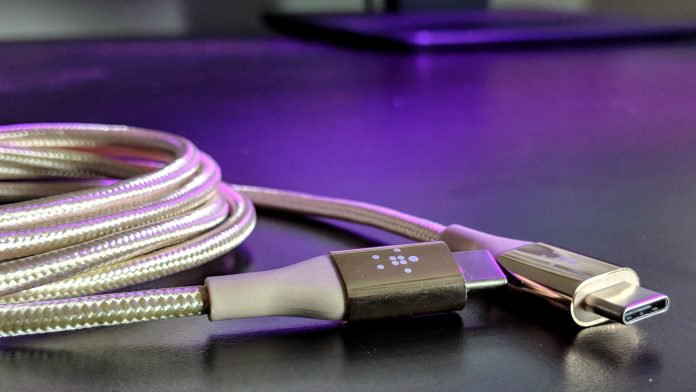
With so many smartphones and electronics having transitioned over to USB Type C for charging, it stands to reason you might need to pick up a couple of new cables or chargers. Sure, you get one with pretty much every device you buy, but who wants to drag a cord around the house or lug it back and forth to school or work?
If you’re the proud owner of a new flagship phone, you probably have a handset that relies on USB Type C for its charging port. Moreover, laptops, Pixelbooks, and gadgets like the Nintendo Switch also feature the new standard plug.
We were recently sent a handful of products from Belkin which center around the Type C plug. Having spent some time playing with them and putting them in our cars, home, and office, we’ve found each to be helpful in their own respect.
If you’re looking to pick up some cables or chargers for your devices, check out Belkin’s selection. Without further ado, here’s some info on the various products we’ve tested and are happy to recommend.
USB-C Charger Kit + Cable
This three pack bundle includes a 15W USB-C Home Charger, 5W USB-C Car Charger, and a USB-C to C cable. The 15W allows for safe, and really quick charging of smartphones and tablets. This is roughly 50% faster than what you’d get out of a normal 5W charger.

The cable, which is Type C on both ends, can connect to both the wall charger and the car charger. Moreover, you can use it for file transfers or sharing photos between devices. And, at five feet long, it’s the kind of cable you can tuck away behind a hard-to-reach spot under the desk. Pick this kit up for about $50 directly from Belkin.
BOOST↑UP Quick Charge 3.0 Home Charger with USB-A to USB-C Cable
When what you really care about is charging and getting back out there, you want something that’s super fast. That’s what you get here in the 18W charger that features Qualcomm Charge 3.0 technology. Backwards compatible with QC 2.0 devices, it’s smart enough to know what speeds your device needs.

The included cable is USB C on one end and traditional USB A on the other. At four feet long it’s tested to be tough and works great for syncing files or devices. Add it to the charger and you’re looking at about a half hour to go from empty to around 80 percent full. Now, get back out there. Belkin offers this two-piece kit for around $35.
MIXIT↑ DuraTek USB-C Cable Built with DuPont Kevlar (USB Type-C)
If you’re the type of person who does need to carry a cable with you, the build quality makes all the difference in the world. Chances are you’ve seen a regular cable break at the charging port or even split along the line. That doesn’t happen to strong cables with Kevlar and braided coating.

Backed by a five year warranty, this cable comes in four color options: Black, Gold, Silver, and Rose Gold. You’ll have a hell of a time trying to tangle this one up. The cable is as flexible as anything else you’ve used, but it’s a lot tougher and a whole lot smarter.
The intelligent chip supports up to 60W optimal charging and up to 480Mbps data transfer. Oh, and kiss those breaks goodbye as this cable features a longer neck at the end which can withstand more than 5,000 charges when the cable is bent at 180 degrees. Grab yours for about $30 at Belkin’s website.
LG G7 ThinQ vs. LG G6: Out with the old, in with the new
Julian Chokkattu/Digital Trends
LG officially launched its latest flagship — the LG G7 ThinQ. The latest addition to LG’s flagship G series, the G7 ThinQ brings a list of changes — from an updated look to a few new features. As the successor to the LG G6, how do the two stack up against each other? Let’s take a closer look and find out.
Specs
LG G7 ThinQ
LG G6
Size
153.2 x 71.9 x 7.9mm (6.03 x 2.83 x 0.31 inches)
148.9 × 71.9 × 7.9 millimeters (5.86 × 2.83 × 0.31 inches)
Weight
162 grams (5.71 ounces)
163 grams (5.75 ounces)
Screen Size
6.1-inch IPS LCD touchscreen
5.7-inch IPS LCD touchscreen
Screen Resolution
3,120 x 1,440 pixels (564 pixels-per-inch)
2,880 × 1,440 pixels (564 pixels-per-inch)
Operating System
Android 8.0 Oreo
Android 7.0 Nougat (upgradeable to 8.0 Oreo)
Storage Space
64GB, 128GB
32GB, 64GB, 128GB
MicroSD Card Slot
Yes, up to 2TB
Yes, up to 400GB
Tap To Pay Services
Android Pay
Android Pay
Processor
Qualcomm Snapdragon 845
Qualcomm Snapdragon 821
RAM
4GB, 6GB
4GB
Camera
Dual 16MP (with OIS) and 16MP wide angle rear, 8MP front
Dual 13MP (with OIS) and 13MP wide-angle lens, 5MP front
Video
Up to 4K at 30 fps, 1080p at 30 fps, 720p at 120 fps
Up to 4K at 30 fps, 1080p at 30 fps, 720p at 120 fps
Bluetooth Version
Bluetooth 5.0
Bluetooth 4.2
Ports
3.5mm headphone jack, USB-Type C
3.5mm headphone jack, USB-Type C
Fingerprint sensor
Yes
Yes
Water resistance
IP68
IP68
Battery
3,000mAh
Fast charging, wireless charging (Qi standard)
3,300mAh
Fast charging, wireless charging (Qi standard)
App Marketplace
Google Play Store
Google Play Store
Network support
All major carriers
All major carriers
Colors
Aurora Black, Platinum Grey, Moroccan Blue, Raspberry Rose
Astro Black, Ice Platinum, Terra Gold, Marine Blue, Mystic White, Raspberry Rose, Moroccan Blue, Lavender Violet
Price
TBA
Starting at $650
Buy From
TBA
AT&T, Verizon, Sprint, T-Mobile
Review Score
Hands on
4.5 out of 5 stars
Performance, battery life and charging
Julian Chokkattu/Digital Trends
The LG G7 ThinQ packs a Qualcomm Snapdragon 845 processor, which is a major upgrade from LG G6’s Qualcomm Snapdragon 821. You can expect the G7 ThinQ to be much faster and far more powerful since it’s running on one of the latest chipsets. As far as RAM, both phones offer 4GB but you can opt for 6GB instead with the G7 ThinQ if you need the extra memory.
When it comes to the battery, the LG G6 packs a larger 3,300mAh battery in comparison to the LG ThinQ’s 3,000mAh battery. But in our LG G6 review, we saw poor battery life in the beginning until a software update improved the situation. LG also says that it has reduced the screen’s power consumption over the LG G6 by 30 percent, and the new processor is more power efficient, meaning the LG G7 ThinQ could potentially offer better battery life, even though capacity is smaller.
The LG G6 only supports Qualcomm’s QuickCharge 2.0 while the LG G7 ThinQ supports QC 3.0 and 4.0. With QuickCharge 4.0, LG claims it can give you up to five hours worth of charge in only 15 minutes — but you need to purchase a specific adapter separately.
With a more powerful processor, fast-charging capabilities, and a battery-saving feature, the LG G7 ThinQ takes it for overall performance.
Winner: LG G7 ThinQ
Design and durability
Julian Chokkattu/Digital Trends
If we’re talking trends, the LG G7 ThinQ is definitely following the latest one in the world of smartphones these days — by including a notch. But if you’re not a fan, there are options to customize it via the settings. When it comes to size, it’s only slightly longer and heavier than the LG G6 and every bit as thin. By comparison, the LG G6 looks a little dated — even with a similar rounded design, its thicker bezels along the top and bottom make it look like the cheaper option.
Another difference you’ll find is that the LG G7 ThinQ has a button on the side to activate Google Assistant. If you long-press it, you’ll activate its walkie-talkie feature which keeps Assistant listening for as long as you are pressing the button. By double-tapping the button, you will have access to Google Lens — which uses object identification with the phone’s camera. You also find the camera is placed vertically above the fingerprint sensor rather than horizontally like it is on the G6. For charging, both phones include a USB-C port but when it comes to the headphone jack, you will find it on the bottom of the LG G7 ThinQ and on the top of the G6.
As for durability, both phones are made of metal and glass with Gorilla Glass 5 on the back making them equally as delicate. The same goes for water-resistance, as both the G7 ThinQ and G6 come with IP68 water-resistance. Either way, you’re going to want to put a case on both of these phones to protect from damage.
With an upgraded design and features that are more easily accessible, such as Google Assistant via the A.I. key, the LG G7 ThinQ is designed to offer a better user experience.
Winner: LG G7 ThinQ
Display
Julian Chokkattu/Digital Trends
The LG G7 ThinQ packs a 6.1-inch display with a 3,120 x 1,440 pixel-resolution, while the LG G6’s 5.7-inch IPS LCD touchscreen has a 2,880 x 1,440-pixel resolution. The G7 ThinQ has a bit more screen real estate, but they are identical in terms of sharpness. Rather than OLED, both phones use IPS LCD which allows for a brighter screen. The LG G7 ThinQ even has a Super Bright Display feature that allows you to boost the screen to 1,000 nits (for three minutes at a time) during days when it’s super sunny outside. As mentioned earlier, it can also limit screen power consumption (at 500 nits) so you won’t have to sacrifice battery life for a bright, vivid display.
While we found the G6 had a stunning display — filled with color, warmth, and detail — it can’t match the G7 ThinQ. Its successor has a slightly taller screen thanks to its 19.5:9 aspect ratio — in comparison to the G6’s 18:9 aspect ratio. One trait the phones do share in common is that they both have support for HDR 10.
Even though both phones have LCD displays, the tech is improving all the time, so the LG G7 ThinQ wins this round.
Winner: LG G7 ThinQ
Camera
The LG G7 ThinQ has a dual-lens camera on the back, both rated at 16 megapixels, along with an 8-megapixel front-facing camera. It’s definitely an upgrade from the dual 13-megapixel lenses and 5-megapixel front-facing camera in the G6. The G7 ThinQ also has optical image stabilization and the wide-angle lens can take photos with a 107-degree angle. By comparison, the LG G6 has a wide-angle lens with a 125-degree angle, but you will see more distortion at the edges of shots. Both also have a manual mode for those who want to adjust the settings.
The G7 ThinQ also has artificial intelligence integrated into its camera — if you point at an object, the A.I. will identify what it is, whether it’s a plant, soda can, etc. There is also Portrait mode available on both the rear and front-facing cameras which we found worked well for the most part.
The LG G7 ThinQ’s camera allows you to take pictures in low light with its Super Bright Camera mode which darkens images by enlarging its pixels. We found the G6 ‘s camera seemed to struggle on days that were overcast, but took great nighttime shots, especially when using the wide-angle lens with the right lighting. Photos taken in the daytime were extremely crisp and bright as well.
When comparing both specs and photos, the G7 ThinQ is the obvious choice. The camera’s software has far more features that allow you to be even more creative with your pictures and the hardware is slightly improved.
Winner: LG G7 ThinQ
Software and updates
Julian Chokkattu/Digital Trends
The LG G7 ThinQ ships with Android 8.0 Oreo, and we didn’t experience lag or slowdown. There wasn’t too much bloatware loaded on the device either. Meanwhile, the G6 ships with Android 7.0 Nougat which launched two years ago. It was recently announced that the G6 would soon be receiving the Android 8.0 update, but it hasn’t at the time of writing. Both have LG’s user interface placed over Android with a few additions to make the experience better.
With the release of Android P coming up, it’s unclear when the G7 ThinQ will receive the update. But of the two, you’re better off with a device that comes with Android’s most recent operating system right out of the box and we would expect the newer G7 ThinQ to receive updates for longer.
Winner: LG G7 ThinQ
Special features
Julian Chokkattu/Digital Trends
As mentioned previously, the G7 ThinQ includes an A.I. key on the left side which allows you to enable voice recognition with Google Assistant. By holding it down, you can also use the walkie-talkie feature to speak to Google Assistant for even longer. Both devices also include a headphone jack along with QUAD DAC.
Music lovers will also appreciate the boombox speaker on the G7 ThinQ. By removing the module that originally covers the speaker, LG managed to turn the whole phone into a resonance chamber providing enhanced, loud sound for audio.
The G6 isn’t as impressive — with only new software features to highlight, like the Square Camera which splits your screen, with the top half for square format pictures and the lower half for either custom shots or previews.
Winner: LG G7 ThinQ
Price
We’re still waiting on the final price for the LG G7 ThinQ but as a flagship, we do expect it to be around the same price or more expensive than its predecessor. You can purchase the G6 starting at $650, or even less if you shop around. Both phones will work on all major carriers, and those in the U.S. will be able to snag the G7 ThinQ starting the first week of June.
Overall winner: LG G7 ThinQ
As the successor to the LG G6, you would expect the G7 ThinQ to take the winning title. Not only does the G7 ThinQ have a more powerful processor under the hood, it offers a larger display, A.I. features, and an upgraded look. If you’re stuck between the two, the G7 ThinQ will provide you with the latest, high-end specifications, and a better user experience.
Editors’ Recommendations
- LG G7 ThinQ vs. LG V30: Which LG flagship phone is best for you?
- LG G7 ThinQ vs. Samsung Galaxy S9 Plus: Clash for the heavyweight title
- LG G7 ThinQ hands-on review
- The LG G7 ThinQ: Here’s everything you need to know
- The LG V30: Everything you need to know about LG’s flagship smartphone
Galaxy S9 camera tips and tricks

The tools are there — now let us show you how to get the most out of them.
The new sensor and lens combination in the Galaxy S9 is extremely capable, and the Galaxy S9+ takes it a step further with a dedicated telephoto lens as well. But in photography, the tools only get you so far — at some point, the only way to advance further is to better utilize those tools with new knowledge (and lots of practice).
That’s where we come in: we want to help you take better photos with your Galaxy S9 or S9+, starting with the simplest of tweaks and going up to using more advanced features. Whether you use one or all of these tips and tricks, you’ll be taking better photos than you were before.
Clean your camera lens
Samsung has thankfully moved its fingerprint sensor from the insane side-mounted position it had before, but the oblong-shaped sensor is still lacking considerable separation from the camera lens(es) directly above it. That means you’re still likely to smudge your camera lens over time when you use that fingerprint sensor, on top of the general grease and grit it’ll pick up from the rest of your daily use.
The easiest thing you can do to improve every photo you take with any phone is to just clean the camera lens. You don’t have to bring a microfiber cloth around with you, either — just give the lens a little wipe with the edge of your shirt or pants pocket. Anything will be better than leaving it look like you just smeared a piece of pizza across it.
Customize your shooting modes

Samsung’s new camera interface introduced with Oreo has a clever swiping mechanism to switch between different shooting modes like Auto, Pro, Super slow-mo and more. One of the best parts about it is your ability to customize the order and placement of these modes, keeping the ones you use the most close to Auto and leaving the rest further away or completely disabled. Go into your camera settings and find “Edit camera modes” to get started. (Note: you can configure modes for the rear and front cameras independently.)
Once in the settings, you have check boxes on the left side to completely disable individual modes. Perhaps you don’t want to see Food or AR Emoji modes because you never use them — easily done! The only one you can’t remove is Auto.
On the right side, you can use these arrows to drag the shooting modes around and choose their order. Note that Auto will always be the default that your camera opens to, so the modes on either side of it will be just a swipe away in either direction. I keep Pro to the left and Super Slow-mo to the right, flanked further by less-used modes like Panorama, Live focus and Hyperlapse.
Turn on viewfinder grid lines

Any time someone wants a quick tip to help improve their smartphone photography, I tell them to turn on viewfinder grid lines. They will help you align horizons to get the perfect perspective on a shot (and not just on sunset photos!), but also help you properly proportion a scene so it inherently looks great. By having a simple grid on your viewfinder you can get your subject set right where you want it, and have it well-positioned to have the rest of the shot complement it.
To turn on viewfinder grid lines on the Galaxy S9, go into the camera settings and scroll down to find Grid lines. Most people will benefit from the “3 x 3” option, but Samsung also has a somewhat-odd “Square” option that simply frames in the center of the viewfinder as a square for moderate scene composition help.
Tap to focus when shooting at f/1.5
The camera’s physically adjustable aperture is an engineering marvel, and it lets the Galaxy S9 take great low-light shots at f/1.5 by letting more light hit the sensor. And the camera actually uses f/1.5 far more often than you’d think, as Samsung sets the threshold for switching to the f/1.5 aperture at any ambient light condition less than bright outdoor sunlight.
f/1.5 has many benefits, but the shallow depth of field can be a downside.
The one downside of shooting at this wide of an aperture is that the depth of field is extremely shallow, meaning the amount of the photo that’s in focus front-to-back is very small. Sometimes if you’re taking a macro-style shot, or even a portrait, the camera can focus on something you don’t want it to, and because the depth of field is so shallow it can actually make your subject soft or de-focused. So when you take a photo and you think it looks soft or blurry, don’t just check your camera lens for smudges — you can fix it in your next shot.
The way to fix this for certain is to just tap on the portion of the scene you want the camera to focus on before capturing. This is extremely important in macro shots where a differing focal point can make a huge difference in the look of the photo. Provided you’re not too close to focus, the camera will always focus on the point you tap until you move the phone and re-frame entirely.
Zoom using the shutter button
One of Samsung’s smartest camera interface elements is one you don’t know is there until you stumble across it: you can slide the shutter button back and forth to zoom the camera in and out. This function is not-so-transparently noted by the two dots on either side of the shutter button.
When holding the camera in landscape, just slide the shutter button up (zoom in) or down (zoom out) until you get to where you want to be, anywhere between 1X and 10X zoom. In portrait, sliding to the right (zoom in) or left (zoom out) accomplishes the same thing. On the Galaxy S9+, it will automatically switch to the secondary camera (light permitting) for anything beyond 2X.
You’ll never want to zoom in the camera any other way once you get used to this. It’s particularly useful when using the camera in one hand, so you don’t have to fumble around to hit the screen or use a volume key to zoom.
Tips for shooting in 960 fps slow-mo
The Galaxy S9 introduces super-high-frame rate slow-motion video, and while Samsung makes it pretty easy to switch to this mode and capture, there are a few things you should keep in mind when using 960 fps.
- Light is the most important factor: By taking video at nearly 1000 fps, you dramatically reduce the amount of ambient light getting into that camera sensor, which considering its size is already hard-pressed to get enough light. For the best 960 fps video, you need to ideally shoot outside or in an extremely well-lit room. Don’t be surprised if you see grainy, soft 960 fps video when shooting in anything but absolutely great lighting.
- “Auto” mode is usually best: The camera will let you switch to a “Manual” capture mode where you choose where to slow down the video capture, but because the window for capture is only 0.2-seconds, it’s incredibly tough to do right. Using the “Auto” mode to let it capture on its own when motion is detected in the designated portion of the screen is typically best for those dramatic shots of fast-moving objects.
- Choose multi-take or single-take: In the camera settings, you can switch between being able to take one burst of super slow-motion or multiple in the same clip. The single-take is the easiest to manage and edit, but multi-take is useful if you don’t want to stop and start a new recording for each slow-motion clip you plan on capturing.
- Edit the clip after capture: Even in Auto capture mode, your super slow-motion may not come off perfectly the way you want. But that’s okay, because you can edit it! Just open up your video clip in Samsung’s own Gallery app, and you can actually trim and manage the slow motion parts as well as the bookend pieces of normal-speed video. You can also turn off the sometimes mismatched auto-generated music overlay on the clips.
- Don’t be afraid to drop to 240 fps: 960 fps seems fantastic, but it has limitations like needing lots of light and only outputting 720p resolution. If you don’t need that dramatic of a slow-motion effect, you can move to the regular slow-mo mode and capture at 240 fps, which is still very slow and will let you record for much longer at a higher resolution.
Press and hold the record button to preview video

This one’s another hidden feature you won’t know about unless someone tells you. Other than slow-motion, there’s no dedicated “video” mode in the Galaxy S9 camera — you just get a video record button in the main interface, right next to the regular photo shutter button. The problem is that photos are taken in a 4:3 aspect ratio, but video is recorded at 16:9, so when you tap that record button the interface switches over and so does your perspective on the scene.
To save yourself from having to edit out the first few seconds of every video you take because you’re re-framing your shot, press and hold the video record button when you want to start shooting video. As you hold the button, the interface will switch to a “video” mode and show you what you’ll actually be recording — and when you release the button the recording will actually start.
It’s a small thing, but one that will save you frustration (and editing time) with every single video that you record on your phone.
Take these tips and get out there taking better photos with your Galaxy S9!
Samsung Galaxy S9 and S9+
- Galaxy S9 and S9+: Everything you need to know!
- Galaxy S9 review: A great phone for the masses
- Complete Galaxy S9 and S9+ specs
- Galaxy S9 vs. Galaxy S8: Should you upgrade?
- Join our Galaxy S9 forums
Verizon
AT&T
T-Mobile
Sprint
Save hundreds on a two-year NordVPN subscription!
The internet is a wonderful place, but that doesn’t mean there aren’t people out there who want to take advantage of weak security and exploitable loopholes. On the same note, our privacy is dwindling, with data containing our information being sold to the highest bidder. A VPN can help keep you safe and keep your information your own.
Get a two-year NordVPN subscription for just $69! Learn more
There are countless VPN services on the market, but you don’t want to just jump on the first one you see. Paid services are generally best (you know how they’re making money), and NordVPN is among the top contenders in the market. Right now, Android Central Digital Offers can save you hundreds of dollars on a two-year NordVPN subscription. Instead of paying $286, you’ll instead pay just $69. That’s 75 percent off!

Whether you’re at home or abroad, on your PC, tablet, or phone, NordVPN’s suite of intuitive apps will keep you protected while you browse the internet. Connect up to six different devices at once, and enjoy unlimited data and uncapped speeds.
Up your security with a two-year subscription to NordVPN! Learn more
Sick of feeling like you’re being spied on while you browse the internet? Worried about your data being intercepted while you sit in a cafe or hotel? Grab this two-year subscription to NordVPN and browse safely!
 AIVAnet