


Kendrick Lamar’s using AR to sell pairs of the new Cortez Kenny on tour
Your ticket to the next Kendrick Lamar concert could potentially help you get more than just a raucous show. During Top Dawg Entertainment’s (TDE) Championship Tour, Lamar and Nike will enable fans at select shows to use the augmented reality camera in Nike’s SNKRS app to purchase a pair of his new Cortez Kenny III sneakers.
At a random moment during the concert, fans will receive an alert via their SNKRS feed — along with the arena screen — that the SNKRS Stash for the Cortez Kenny III has been activated. Unlike previous SNKRS Stash Spot activations, however, these won’t be digitally buried in secret locations but rather, attendees can claim a pair of the shoes anywhere in the arena. The Stash Spot activation will run as long as there are still pairs available.
The first Stash Spot activation of the tour occurred on May 10 at The Forum in Los Angeles, California. TDE has four more scheduled to take place with the next on May 19 at The Cynthia Woods Mitchell Pavilion in Houston, Texas. The last three are on May 29 at Madison Square Garden in New York City, June 5 at the Xfinity Center in Boston, Massachusetts, and June 15 at the Hollywood Casino Amphitheater in Chicago, Illinois.
Fans who can’t make either of these shows won’t miss out completely as they’ll still have a chance to the Nike SNKRS app to secure a pair of Cortez Kenny III’s — as well as select clothing from Lamar and TDE’s collaboration with Nike. At each tour stop listed above — as well as Toronto, Ontario — Nike and TDE plan to sell items from the pair’s latest collaboration at pop-up retail locations the day of the show.
Though this isn’t the first time Nike’s leveraged the AR technology native to its SNKRS app, it does mark its first foray into using it at concert venues. Typically, for a SNKRS Stash activation, app users within a designated area will be presented with three 360-degree photos hinting at where the Stash Spot is located. Once someone thinks they’ve found it, they simply tap I’m Here on the SNKRS app, verify their location in the app, and (if all checks out) a 3D rendering of the sneaker appears, allowing them officially claim their new sneakers.
Think of it as Pokemon Go for kicks. It’s part of a larger push by Nike to use AR in an attempt to “everyone and everything” a Nike store.
Editors’ Recommendations
- 50 years in, Nike’s new digital studio defends its title as the king of kicks
- Nike takes big step into connected tech by testing it in limited-edition sneakers
- Google just simplified virtual tour creation — using new images or Street View
- The evolution of sneakers and basketball, told by the NBA legends who lived it
- Nike’s 3D-printed uppers take weight off your feet
XGIMI CC Aurora review: Android smart projector that falls short in important places

Chinese manufacturer XGIMI has its share of expensive smart projectors, but the company is back with a more affordable projector: the XGIMI CC Aurora. “Aurora” means “dawn,” and I don’t think the name is a surprise when you consider all the device does (and doesn’t) have to offer. It’s a start, a leap into a market that few have considered worthy of such an endeavor, and XGIMI both surprises and underwhelms.
Hardware

The XGIMI CC Aurora comes in a compact CNC Alloy case at 5.43 inches x 5.31 inches x 4.69 inches. The device resides in a stylish gray box with a zipper across it and a space at the top for the brown leather, XGIMI-branded strap to sit.
Upon opening the box, one discovers a pair of rechargeable, 3D glasses for content viewing alongside the CC Aurora smart projector, warranty information, and projector manual.
A separate, rectangular box provides an adjustable tripod stand for projector mounting on flat surfaces that you can turn in various directions. The front of the 1.5kg or 3.3-lb. device, a small door with “JBL by Harman” branding, slides down to reveal the projector lens.

The top of the CC Aurora features a brown leather strap that attaches to the projector by way of cylindrical, silver knobs.
The top back of the device features four dots that serve as the CC Aurora’s battery charging indicator. Directly beneath the dots are large volume indicators on the far left (volume down) and far right (volume up), and three audio buttons for rewind, fast forward, and pause/play options. The back of the device features the charging adapter port, two USB ports, an HDMI port, and a headphone jack.

 Two audio speakers sit horizontally beneath the connection ports and provide excellent sound.
There’s one piece to the equation that I can’t leave out: it concerns the CC Aurora’s projector XGIMI-branded, rectangular remote along with two AAA batteries. The white remote contains black, functional buttons for power, voice command, projector settings, scrolling and selection, back, home, and volume up and volume down.
Setup

To set up the CC Aurora, you need only slide the small door down the front of the device to uncover the lens. Give it a minute or so to run through some initial projector presentation images. Connect the Aurora projector to your home Wi-Fi network to get started.
Once you complete the initial setup, the Android-powered smart projector’s desktop will appear. Use the hardware remote to navigate the desktop, and click “ok” when you want to open an app or access a service.
My first recommendation to get the most out of the CC Aurora is to first visit System Setup > About > System Update and download any system updates available. If you don’t see an “Aptoide TV” on your desktop where YouTube is, then you need to install a system update. Without Aptoide TV, there’s little to do.
Software and Services
Once at the desktop, you’ll first be greeted with four pre-installed apps: YouTube, Web Browser, WPS Office, and FileManager. YouTube is a welcome app here, as so many Android users love the service.
The hardware remote works fine if YouTube is the only reason you’ll use the projector, and WPS Office should be okay too. However, if you want to use the Web browser or Aptoide TV you’ll need to download XGIMI’s “XGIMI Assistant” app from Google Play on your smartphone to type words, letters, and search terms in Aptoide TV, among other things.
YouTube

The YouTube experience works here on the CC Aurora as it does on your smartphone, tablet, and smart TV, so you need not worry about the unexpected. You’ll be able to use the hardware remote without trouble, but you’ll need the VControl app (XGIMI provides this on the Aurora’s main desktop) to access voice commands and voice search for videos. YouTube remembers search terms and brings up your favorite videos with one letter typed.
XGIMI Assistant
The XGIMI Assistant app can be downloaded from the Google Play Store, and it provides a virtual remote control on your smartphone from which to navigate the user interface of the CC Aurora.

You can use your Android smartphone as a remote control when you don’t have the hardware remote nearby or the remote batteries die out.
The XGIMI Assistant app has a few modes that you’ll need to get a handle on so as to navigate web browsers, Netflix and Hulu logins, and so on. One mode is the virtual remote, while another mode, “TouchPad,” allows you to use the remote as a computer mouse. This will come in handy with regard to Google’s search engine, the in-built Google web browser, as well as privacy-friendly web browsers (you can find these private web browsers at Aptoide TV).
Some games in the Aptoide TV app store demand a mouse, while others demand a gamepad. While the “TouchPad” mode on the XGIMI Assistant app provides the mouse you’ll need, XGIMI doesn’t provide a virtual gamepad whatsoever. Real Racing 3 and the original classic Sonic the Hedgehog can’t be played with the virtual TV remote.
Aptoide TV (Smart Projector App Store)

With access to YouTube on an Android-powered smart projector, you’d expect the CC Aurora to dazzle users with Google Play Services and Google Play Store integration. Sadly, I have to inform you that it does not.
There is no Google Play Services integration here, so the best you can hope for is app selection by way of XGIMI’s third-party app store, “Aptoide TV.” Once you download an app from Aptoide TV, it will appear on your desktop automatically.
Aptoide TV has some options, including FreeCell (Solitaire), Real Racing 3, Mahjong, old Sega Genesis games such as Sonic the Hedgehog 1 and 2, and newer games such as Candy Crush and Clash of Clans, but the app selection is rather underwhelming.
Some sections of the Aptoide TV app store have nothing in them, many with only 5-6 titles (max) available for purchase. Skype and Facebook are here, but you don’t get Facebook Messenger, WhatsApp, or Google Duo, if you’re wondering.
You do get CBS, ABC, NBC, and even popular services such as Netflix, Hulu, and CBS All Access, but you don’t get YouTube TV because, as the screen popup says, “YouTube TV won’t run without Google Play services, which are not supported by your device.” Of course, the same popup appears for Mahjong Village but you can still play Mahjong (it even has Facebook social sharing integration).

If you’re a parent looking for cartoons and kid content, PBS Kids is an excellent choice. I was able to go online to PBS Kids on my smartphone and enter an access code and immediately gain access. I’ve watched “Ready Jet Go!,” “Arthur,”
Do note that you only have 16GB of internal storage with the CC Aurora, so don’t get too program-happy when selecting programs to view. XGIMI says that its 16GBs of storage can hold 4,000 songs and 10 movies, so you can download music to your heart’s content.
Charging and Battery Life

The XGIMI CC Aurora smart projector charges by way of the supplied adapter, but it takes about 4 hours for the device to charge. It’ll charge up to three of the battery “dots” in about 2.5 hours, but don’t expect the remaining battery dot to charge quickly.
Four hours of charging is quite a lot, but the additional misfortune is that the CC Aurora will only last 4 hours on a single charge. XGIMI says that the short battery life of the CC Aurora is “enough for an outdoor party,” and the CC Aurora still outlasts the 2.5-hour battery life of the LG MiniBeam Projector, but the battery life is a disappointment.
Price and Availability
The XGIMI CC Aurora costs $699 at Amazon.com, but you can get it for either the typical $699 price at eBay or the discounted price of $625 at eBay. The MSRP is $569, so you’ll likely pay a slightly steeper price for access to the smart projector that can do a little of everything.
What the XGIMI CC Aurora smart projector does right
The following are strengths of the XGIMI CC Aurora smart projector:
- Easy Setup: The XGIMI CC Aurora is easy to set up and easy to use
- Audio by JBL (Harman) is excellent: The audio quality in internet TV streaming is where the JBL/Harman audio shines
- Multipurpose: The CC Aurora is many things at once: a Bluetooth speaker, music player, internet browser, TV/movie-watching machine, game console, etc., all in one device.
- Price: While some may not want to pay around $600 (around $569) for a smart projector, I think the price is acceptable for its capabilities.
- Connect to other devices: One doesn’t need a smart projector to watch Netflix and Hulu, but might want to stream Spotify or Pandora through the CC Aurora.
Where the CC Aurora smart projector could improve
- Size: The CC Aurora isn’t terribly heavy but it isn’t as lightweight as, say, the one-pound ZTE Spro2 smart projector from 2015. A more compact feel and look would sell the device even more.
- Battery life: The CC Aurora only provides about 4-4.5 hours of battery life.
- Resolution: 720p content viewing is acceptable at times but appears washed out at other times. The CC Aurora projects 180 inches across walls; I’d like to see 720p become 1080p or 2K (4K viewing is ideal).
- Storage: 16GB of storage is okay for music because you can store up to 4,000 movies, but 10 movies (max) on a home theater device is insufficient.
- Controller: XGIMI includes a pair of 3D glasses in the box of every CC Aurora smart projector, but some games in Aptoide TV “require a GamePad”. I think that XGIMI should either add a GamePad.G
- Google Play Store and Google Play Services: This is one of the biggest drawbacks that XGIMI must fix. It seems odd that the company offers an Android-powered smart projector that has YouTube, Chrome web browser, Google Translate, and the Google search engine but doesn’t include Google Play or Google Play Services.
- Water and dust resistance: Water and dust protection would make the smart projector more kid-friendly.
Final Thoughts
The XGIMI CC Aurora deems the smart projector to be an all-in-one substitute for TV, music player, Bluetooth speaker, computer, tablet, and smartphone. As an ambitious device that looks to supplant all others in the coming years, the CC Aurora must do more to meet the needs of consumers who might expect a “galaxy” device for $600.
The nature of the smart projector creates the “everything” problem. If a product promises to be “several devices into one,” then the product must make good on that claim. The CC Aurora fails on some important fronts, and this must change if XGIMI has ambitions to corner the American smart projector market.


Robocall case results in record $120 million fine for Florida man
Discussing robocalls in 2017, Ajit Pai, chairman of the Federal Communications Commission (FCC), said Americans are “mad as hell” about them.
That doesn’t come as much of a surprise when you learn that U.S. consumers receive an estimated 2.5 billion robocalls a month.
The automated, prerecorded calls result in the FCC receiving 200,000 complaints annually, with ongoing efforts to stamp them out apparently making little headway.
This week the commission hit a Florida man with a $120 million fine for an operation that resulted in 96 million robocalls nationwide, all of which were made across a single three-month period in 2016.
The allegation against Miami-based Adrian Abramovich was originally made by the FCC in 2017. It proposed the huge financial penalty at the same time, but only finalized it this week. The FCC said it’s the largest fine it has ever imposed.
Abramovich has denied involvement, insisting he was not “the kingpin” behind the dubious enterprise.
The FCC described the three-month robocalling operation as “massive” and said it was geared toward selling timeshare packages and other travel deals to members of the public. Of particular concern was the perpetrator’s use of fake numbers to make recipients of the calls think they were coming from the local area, a practice known as “neighbor spoofing.” Consumer complaints about neighbor spoofing have more than doubled in the first few months of this year, the FCC said in a statement issued on Thursday, May 10.
The FCC also highlighted how the messages purported to be from well-known travel or hospitality firms such as Marriott, Expedia, Hilton, and TripAdvisor, with consumers encouraged to “press 1” to hear about “exclusive” vacation deals.
“Those who did were transferred to foreign call centers where live operators attempted to sell vacation packages — often involving timeshares — at destinations unrelated to the named travel or hospitality companies,” the commission said.
The neighbor spoofing and wrongful use of well-known company names made the case particularly troubling, according to the FCC. “The Truth in Caller ID Act prohibits callers from deliberately falsifying caller ID information with the intent to harm or defraud consumers or unlawfully obtain something of value,” it said in its statement.
The commission said it received “numerous” complaints not only from members of the public, but also from the likes of TripAdvisor, which itself received complaints from consumers who believed the robocalls had come from the company.
Abramovich now has to pay the fine or take the dispute to federal court.
Tricky nut to crack
In 2016, the FCC launched a “robocall task force” aimed at finding solutions to “prevent, detect, and filter” the annoying calls. More than 30 tech firms participated, but while a subsequent report outlined several ideas for dealing with the challenge, it nevertheless concluded that “there is no ubiquitous solution” for the issue.
With no end in sight for the unwanted calls, what can we do by ourselves to deal with them? The FCC offers a list of tips that include being aware that Caller ID from a “local” number may not be what it purports to be. It also tells people to reject calls from unknown numbers, and to never provide personal information to suspicious callers should you inadvertently find yourself engaged in conversation.
It also suggests periodically reviewing all of the blocking tools offered by your phone company, and to file a complaint with the FCC after receiving a nuisance call.
Editors’ Recommendations
- You talkin’ to me? Google Duplex tech takes A.I. chatbots to the next level
- A phone scam is nabbing millions of dollars from the U.S. Chinese community
- T-Mobile slapped with $40 million fine for playing fake ringtones on rural calls
- Congress is looking to bring fiber internet to you faster with the Dig Once bill
- Federal investigation into Equifax hack said to wither, even with more data exposed
Grim Soul – Don’t Starve meets Dark Souls, in the worst possible way.

I wanted to like Grim Soul; really I did. It sounded great. The dark, gothic fantasy of Dark Souls mixed with the crafting and survival mechanics of Don’t Starve – what could go wrong?
A lot, as it turns out.
Starting Out

The first thing one does when loading up the game is log in to Play Games – so far, so good. Then you load into a grim, foggy forest next to the corpse of the last unfortunate adventurer that played this game. You get some loot from his body, and then you’re turned loose into the region. This first area is your “Stronghold.” There are a couple minor enemies, as well as wood, stone, and fiber you can loot or harvest. This lets you build tools and a rudimentary shelter – and not much else.
To progress any further into the game you need to explore other areas by running into the mist surrounding your Stronghold. This brings you to a world map, filled with other, randomly generated areas, as well as the Strongholds of rival players. And it’s here that the game falters. As with many mobile games these days, you have an Energy Meter that limits the number of things you can do before you have to wait for the meter to recharge.

In this case, that meter drains when you travel from one area to another. These areas are populated much like your starting one – enemies, wildlife, and natural materials. So similar, in fact, that it doesn’t feel like you’re doing much of anything. You find a baddie, you swing at him a few times until he dies, and you go back to collecting.
Eventually – after perhaps two or three enemies and a lot of farming – you’ll level up, and gain access to a new research point to craft a new item. But frankly, the amount of time you invest into leveling isn’t worth the payoff of actually getting there. It doesn’t feel fulfilling or gratifying – it’s a grind in the truest sense of the word.
Graphics

It’s tough to really evaluate the quality of the graphics in this game. It’s too dark, drab and foggy to see much of anything at all. The weapons, armor, and enemies in the game are distinctly reminiscent of the Dark Souls games. It can be a little tough to distinguish between enemy types at times, especially between the standard Leper enemies and the faster, more dangerous Damned.
The color palette is painfully drab. All grays, browns, and blacks, with barely any color to speak of. While clearly inspired by Dark Souls, that franchise knows when to inject brilliant moments of beauty into its games to break up the utter hopelessness of the environment. Grim Soul, however, does not. Every part of the game is as gray and wretched as the next.
Mechanics & Economy

Grim Soul teases you with the future – you can see your entire skill tree at any time. It teases you with the prospect of riding a horse, of building a castle, of sailing to another land. But the time investment required to attain these things is prohibitive, at best. It took me hours upon hours just to reach level 7. To build that ship to sail across the seas? Level 75.
Time waste and intentional grind aside, the game plays pretty well. The crafting is decently balanced, with challenging but attainable requirements to craft each item. As is typical with survival games, there’s very little tutorial or guidance. But this one seems a little more casual and lenient than most, presenting you with plentiful resources in your starting region and marginal threats.

One problem you’ll run into right off the bat, though – inventory space. There’s not enough of it, and it looks like a bigger bag is hidden behind an IAP. You can craft one pretty early on – it provides you a whopping six more slots. It’s rough. When you die – and you will, often – you drop everything you were carrying, and it’s lost forever. So when you go to explore, it’s best done with an empty bag, everything else safely stored in a chest in your Stronghold.
Combat is a bit of a slog. There’s one attack button, no special abilities to speak of, and only rudimentary sneaking mechanics. As such, it seems like the game has a bit of an identity problem. Does it want to be an action game? A survival game? A stronghold-building game? An exploration game? It does a little bit of all these things, but none of them particularly well.
Value
Honestly, I got bored of Grim Soul after my first couple sessions. You can’t level up in the amount of energy you’re given, even at low levels, and there aren’t enough crafting options to make that grind worthwhile. This is a simple case of a game with potential, ruined by IAPs and bad economy/tuning.
Download Grim Soul on the Google Play Store
No notch, no bezels: Lenovo’s Z5 phone looks incredible
If you haven’t paid much attention to Lenovo’s smartphones in the past, that’s about to change. The Lenovo Z5 is coming, and this concept sketch shows just how excited we should be about it. This is no source-less leak either, it was shared by Lenovo’s mobile group product manager Chang Cheng on the Weibo social network, so we can be assured it’s not only genuine, but also representative of what the Z5 will really be like.
This isn’t the first time Cheng has mentioned the Lenovo Z5 either, having also shared a teaser image a few days before the concept sketch, hinting at just how much screen the phone will have. He asks followers to guess the screen-to-body ratio, giving four options from which to choose, culminating in a whopping 95 percent. While he doesn’t give an answer, we’re going to assume he’s saying the Z5 will reach the highest number. For reference, the Essential PH-1 leads the current pack with an 84.9 percent screen-to-body ratio.
While the concept sketch shows the bezel-less design we’ve all dreamed of, mainly because it doesn’t have an opinion-splitting notch, it raises plenty of questions. Where is the selfie camera? Where are the sensors for ambient light and proximity? How about the speaker? Cheng writes the Z5 contains 18 patented technologies, which may help answer these points. Other companies have also addressed these problems in different ways, from the pop-out selfie camera on the Vivo Apex, to placing the speaker and associated sensors behind the screen on the Xiaomi Mi Mix.
There’s no indication when the Lenovo Z5 will be announced, although unsubstantiated reports claim it will launch on June 14, which may only be taken from the numbers on the phone’s screen in the teaser image. When it does arrive, do not expect it to be cheap. When Xiaomi pushed the design envelope with the original Mi Mix, it cost at least $1,000, a price tag shared by the equally innovative Apple iPhone X. Lenovo sells its phones internationally, primarily through its own online store, so at least if you do eventually want one, and can stomach the cost, there’s a strong chance you’ll be able to buy a Z5.
We’ll keep you updated about the Lenovo Z5 here, so check back for more news soon.
Editors’ Recommendations
- Here’s everything we know about the Motorola Moto Z3 and Z3 Play
- Everything you need to know about the HMD Global 2018 Nokia X
- Apple iPhone X Plus: News, rumors, specs, and more
- Nokia 9 rumors suggest a strong 2018 for the reinvigorated company
- Xiaomi unveils the near bezel-free Mi Mix 2S with dual camera
Eight best educational apps for teens

Teenagers and smartphones are an unstoppable force. It would be extremely hard today to find a single high school in the Western world where the hallways aren’t crowded with teenagers texting or taking selfies.
Bu this trend has spiked a wave of worry among adults. Is all that time spent messaging, listening to music and playing gamers really good for kids? Opinions vary, of course. But we can all agree that if used right, technology can become a powerful educational tool.
So rather than trying to enforce strict time limits for phone use, parents might want to consider getting educational apps on their teenagers’ devices. A well-chosen app can boost a child’s learning or even help him/her overcome a specific challenge.
Here are eight great apps that you may want to encourage your teen to use.
The Moron Test
What it is:
Developed by DistinctDev, the Moron Test is a fun app which challenges players to solve seemingly simple yet tricky puzzles and tasks.
Why we like it:

- It has simple but cute, colorful graphics. The background looks like a piece of paper and the numbers and images that appear look like things you’d normally hang on the wall of a classroom.
- Each puzzle comes with its own set of instructions, so learning how to play it’s easy. Some are to the point, while others require you to pause and think a bit before acting.
- The game includes six different sections including Skip Day, Food Fight and Tricky Treat featuring hundreds of puzzles. Want more puzzles? You can install and download The Moron Test 2.
Install The Moron Test
TED
What it is:
TED is a nonprofit organization dedicated to sharing important ideas on a variety of topics. It brings together the world’s most innovative people, including teens to deliver short powerful talks on certain issues. The TED app offers access to all these talks.
Why we like it:

- Provides access to the entire TED Talks video library, with subtitles in over 100 languages.
- Easily lets teens learn something new by letting them browse certain categories (for example: What would it be like to live on another planet or The evolution of music). You can also browse by mood.
- Allows users to download the talk in video or audio format for later offline use.
- Great for fostering curiosity in young minds.
Install TED
Lumosity
What it is:
A compelling brain training app developed by Lumos Labs, which aims to help you develop your memory, attention and more.
Why we like it:

- There’s actual science behind this app. Games are based on common and neuropsychological tasks that challenge core cognitive skills.
- On top of its database of games intended to work your cognitive skills (like information processing or spatial orientation), the app has also a Mindfulness category that includes meditation sessions.
- The app is available in various languages including English, German, Japanese, Portuguese or Korean.
Install TED
Narrate
What it is:
Narrate is an app that can teach teens the benefits of keeping a dairy, as expressive writing is known for being a pathway to psychological healing.
Why we like it:

- Narrate demonstrates journal-keeping is not as overrated as one might think. The app has a beautiful, minimalist interface that’s bound to inspire users to record their thoughts and experiences.
- Gives you the ability to sync your journal across all the devices you own, so you can access your diary everywhere.
- Let’s you save photos and to categorize them using tags.
Install Narrate
Ready4Sat
What it is:
An app developed by Ready4 and aimed at teens who are prepping for their SATs. It gives students access to over 1,000 questions with detailed answer explanations and more.
Why we like it:

- Turns your teen’s smartphone into a personal tutor. Includes intuitive lessons which go through must-know SAT concepts step-by-step.
- Gives access to hundreds of flashcards.
- Includes customizable practice tests.
- Comes with a list of 400+ colleges and universities and also offers additional info on each institution like the average SAT score you need to be accepted.
Install Ready4Sat
SoloLearn: Learn to Code
What it is:
An app designed to help teach kids (but not only) the essential skill of coding. It covers different languages including CSS, PHP, C++ and Java.
Why we like it:

- Coding is becoming the most in-demand skills across industries, so the sooner kids start learning it the better. This app allows teens interested in technology to absorb the basics on their own.
- The app includes a free mobile code editor, so you can write, run and share code right from your smartphone.
- When users eventually get stumped on a concept or lesson, they can turn to the SoloLearn online community to get help and guidance.
Install SoloLearn
Toshl Finance
What it is:
An app developed by Toshl Inc. can be a great tool for parents who want to teach their teens financial literacy.
Why we like it:

- The app looks like a serious digital money manager for adults, but it does pack a lot of handy features which makes it right for the teen crowd. For example, the app focuses on analyzing spending habits and helps you identify potential areas for saving.
- It includes features like bill organizer, receipt database and currency converter.
- Toshl is packed with fun monsters that offer occasional budget tips and tricks.
Install Toshl Finance
Wattpad
What it is:
Wattpad is an app (and a site) where teens and adults alike can publicly share their fiction writing in a blog-like format as well as read and comment on other people’s works.
Why we like it:

- The app encourages teens to read, but also to share their creative efforts.
- Wattpad is also a social app, as it allows you to join the community and connect with authors and readers from across the world.
- The app also has a section dedicated to well-known writers, where you can find works from iconic authors like Dan Brown, Paulo Coelho, Margret Atwood or Kevin J. Anderson.
Have you tried any of these apps before? If not, which would you try first? Let us know what you think in the comment section below.
Web trackers aren’t just spying on you; they’re slowing you down
Chris DeGraw/Digital Trends
(in)Secure is a weekly column that dives into the rapidly escalating topic of cybersecurity.
Trackers are something that most internet users tolerate, though few have much fondness for. At a time when Facebook and other online entities are being called out for their privacy problems, trackers are certainly part of that conversation. But a new study from anti-tracking extension maker, Ghostery, is equally concerned about trackers’ ability to slow down web browsing itself.
Hidden from view behind the pretty front end of modern websites, trackers make up a major portion of the web browsing experience. From managing personalized adverts, to social network integration, they have an important part to play in how the internet works today, but does all of that come at the cost of a fast and efficient internet?
The tracker tax
Ghostery is a tool that is decidedly anti-tracker (it’s not the only one), in that it makes it easy for web users to block any they want, and anonymize the information harvested by ones that they don’t. With its new “Tracker Tax” study though, Ghostery looked into the performance benefit of doing so, as well as the implicit privacy implications of not.
“We were fairly confident that websites perform better and work faster when trackers are blocked,” Ghostery’s director of product management, Jeremy Tillman told Digital Trends. “The purpose of the study was really trying to quantify that impact. Is it a minor thing, is it somewhat rare, or is a major thing that’s widespread?”
Jeremy Tillman, director of product management at Ghostery
The study focused on the top 500 sites as listed by Alexa, which they claim is where the vast majority of traffic in the US spends its time. In addition, Ghostery identified them websites as the websites that implement a lot of third party tracking technologies.
The results were rather stark too. Ghostery found that just under 90 percent of the websites investigated contained some form of third-party web tracker. Those trackers, whether small or many in number, proved to have a significant impact on page load speed too.
The average page load times were around 20 seconds , but when all trackers were blocked, that time dropped to just under nine seconds.
To draw these load times, Ghostery employed a custom-built web crawler that was said to be comparable in usage to a consumer browser like Chrome or Firefox. However, the web crawler didn’t look at websites in the same way a human would. It was focused entirely on a “complete” state of a website’s generation, where there was nothing left to load. In reality, many sites would be functional before then, but that, according to Tillman, is half the problem.
“The truth is that a lot of websites are never that functional, in no small part because the trackers on those pages don’t stop loading,” he explained. “Many sites out there, if you go there without Ghostery, there’s almost like a slow leak because they […] never stop communicating with their servers and for some of these sites the lagginess that results […] is persistent and it never goes away.”
Ghostery’s study suggests that some sites never do quite finish loading. In the case of the slowest sites out there – Ghostery calls out Cracked.com, Si.com and Chron.com as the worst offenders – they could take as long as two minutes to register as “complete.”
“A lot of websites are never that functional, in no small part because the trackers on those pages don’t stop loading.”
Even if those sites become functional for the user before then, Tillman suggests that there is still an unnecessary drain on the website load speed, its responsiveness and on the end user’s system resources.
“New ad placements are being loaded, new trackers are being loaded, information is constantly being sent back and forth, so it’s a constant, persistent drag on the browser’s processing power,” he said.
Living tracker free
Clearly Ghostery’s intent with this study is to highlight not only the impact of trackers, but the effectiveness of its own tracker-blocking tool at remedying the problem. But do we actually want to live in a world that is entirely devoid of trackers? What kind of sites did the study discover that have no trackers at all?
“Craigslist would fall in that category,” Tillman said. “If you’ve ever been to it, it’s almost like a website from the 1990s, just a bunch of hyperlinks.”
No one is suggesting all websites should be like Craigslist, though. Indeed Tillman said that in some cases, trackers can offer benefits to people. Though typically they’re website owners, rather than website visitors.
“It’s hard to say that any one tracker is good or any one tracker is bad,” he said. “There are some that can sort of enhance the functionality of a page. A lot of website owners benefit from this out of the box nature of trackers, so without having to build that feature yourself, within minutes you can have a fully featured video player by using a third party technology.”
“It’s hard to say that any one tracker is good or any one tracker is bad.”
While those widgets may provide a quick ‘upgrade’ for a website’s functionality though, is that worth their cost in privacy and performance impacted by the trackers that go hand in hand with them?
“In those situations where a user is getting a deeper, more meaningful user experience, you could say that those trackers are providing utility to the user,” he said. “[That said,] from a user’s perspective, are any trackers good? It’s a different question.”
Meeting in the middle
Often times the modern web browsing experience can seem like a battle of two camps: The website owners and the users. One side wants to make money from their service, track how its used, and continue to improve upon it. The other wants to use websites with as little intrusion into their personal privacy or finances as possible.
Both sides are entirely justifiable in their goals, but the difficulty comes from how opposed they are. One cannot exist without the other and in some cases, many modern web features require the use of trackers to facilitate much of what we’ve come to rely on as mainstay internet features. How then can we create a web that doesn’t impact the privacy or performance of web users, whilst still giving website owners the necessary tools to run their sites well into the future?
Ghostery’s solution is the “trust” system, that allows users to whitelist sites that they want to support by allowing them to run trackers and adverts.
“The homespun example we give is if your friend has a blog and you want to support it, you can use the trust function in Ghostery to do just that,” Tillman said. If a publisher or website owner does have a very clear sort of value exchange in mind, as long as it makes that easy for the user and the user says yes, then there’s nothing wrong with that.”
Ultimately, Tillman said, Ghostery would like to see more websites be upfront and honest with users about how the content is monetized. After all, if a website is free to access, then the costs of running it must be recouped somewhere, whether through adverts, selling user data, or something a little different like cryptocurrency mining.
“Most of our users […] support publishers finding ways to make money.”
“For the most part, most of our users, more so than the average user, support publishers finding ways to make money,” he said. “The problem is most of them are opposed to the models that are available today. They are opposed to the data collection (especially implied data collection ) practices of website, as well as the forced ad model especially when it’s coupled with poor website performance and really creepy ad targeting technologies.
While a solution to the current tracker climate of web browsing will need cooperation from users and website owners on a grander scale than seems imaginable at the moment, Ghostery does – of course – have recommendations for those wanting to avoid the “tracker tax” in the meantime.
“I recommend they use a browser like Cliqz [developed by Ghostery’s parent company] and a tool like Ghostery and those two things together provide the most complete privacy protection solution,” Tillman said, whilst also highlighting the availability of Ghostery extensions for Chrome, Firefox, and mobile platforms like iOS and Android.
“Fundamentally [people] need to proactive to protect their own privacy,” he said. “Relying on government regulations and self-regulating by companies like Facebook, users will never fully be protected and I think that creates a false sense of security. Using tools to protect your privacy is the best and most direct way to do that.”
Editors’ Recommendations
- Is tech finally killing radio? Don’t let iHeart’s bleeding fool you
- 16 things you might not know Amazon’s Alexa can do for you
- Here’s all the best gear and gadgetry you can snag for $100 or less
- Still using a home phone? Here’s everything you need to know about MagicJack
- RocketBody tracks your metabolism to tell you when to eat and work out
Urban Armor Gear Pathfinder case for OnePlus 5T review
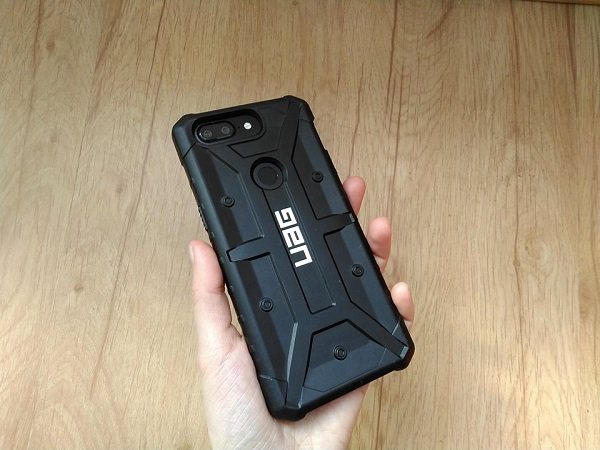
The OnePlus 5T is a great smartphone coming with top specifications and a fair price. Even so, it’s far from being a perfect handset. For example, while the device feels good in hand, it’s extremely slippery.
OnePlus solved this with the Sandstone White version of the flagship. With a matte finish and slight texture, it provides significantly more grip. But if you own the Midnight Black model, it’s highly recommended that you use a protective case with your phone.
There’s no shortage of covers for the OnePlus 5T out there, but if you’re looking for something more rugged you should probably check out what Urban Armor Gear has to offer.
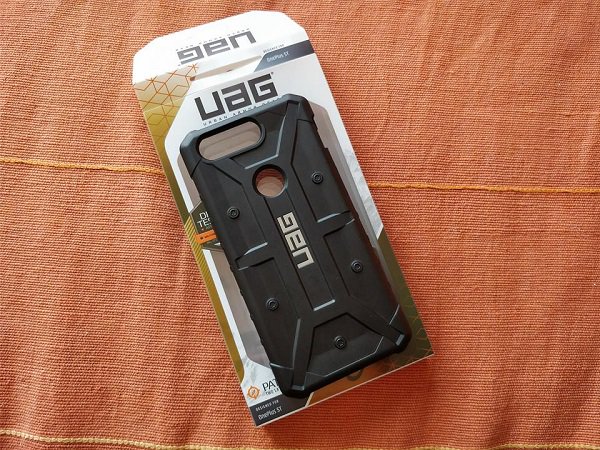
Part of the Pathfinder series, the Urban Armor Gear case for the OnePlus 5T is among the lightest cases ever designed by UAG.
Unfortunately, it does add some bulk. Without a case, the OnePlus 5T is a very sleek device. But snap the UAG case on and the device automatically loses its slimness and becomes more voluminous.
On the bright side of things, the case provides two-layer protection and is military standard MIL-STD 810G-516.6 compliant. Consumers can trust MIL-STD-810G as a primary indicator that the case was designed to, at minimum, survive a four-foot drop and come out unharmed. The case’s armor shell and impact resistant soft core see to that.
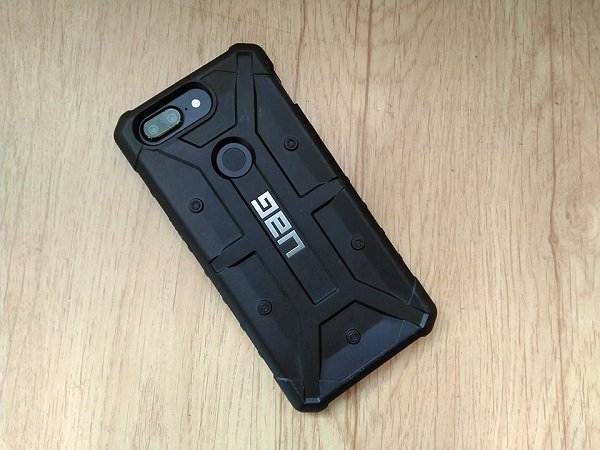
The case features oversized tactile buttons and facilitates easy access to the touchscreen and ports. The protective cover offers full compatibility with the OnePlus 5T’s fingerprint scanner, frontal and rear cameras, including face unlock.
The highlight here is represented by the oversized clicky buttons for power and volume which provide a rewarding user experience.
Most rugged cases are usually too bulky to support wireless compatibility with NFC payment systems. However, this particular case is slim enough so you can still use services such as Google Pay.
Does the case protect against falls as advertised?
Yeah, it does. The bumper is raised around the glass to help protect the display, so even if you drop your phone on the floor or on the sidewalk, the screen will come out unharmed. I’m usually pretty clumsy, which makes me prone to dropping phones a lot. But with the UAG case on, I don’t have to worry about shattering the OnePlus 5T’s beautiful AMOLED display anymore.
So should you invest in a UAG case for your OnePlus 5T? Yes, because the accessory can provide great protection. Mind you, it’s not a versatile case, meaning it does not double as a stand or anything like that. But it gets the job done. It will keep your phone away from harm’s say.





Yet, two things keep me from recommending this case wholeheartedly. First off, it’s pretty bulky. The OnePlus 5T is a sleek, beautiful device. But slapping the UAG case on it will transform it into a sturdy beast. I over exaggerate a bit, but you get the point.
Secondly, the case costs $39.95, which is quite a lot to pay for an additional accessory. Especially when there are more affordable options available. For example, the Anccer Ultra-Slim Hard Case keeps the flagship killer beautiful and only costs $12.
On the other hand, OnePlus’ official cases aren’t exactly cheap either. The OnePlus 5T Bumper Case in Ebony Wood/Rosewood or Carbon will take you back with $29.95.
Behind the wheel with Volvo’s Android infotainment system
Thanks to Google’s Android Auto and Apple’s CarPlay, the vehicle infotainment experience has drastically improved over the past few years. You get quicker and easier access to your tunes, maps, contacts, and more, matching our current digital lifestyle. But these services still require you to plug your phone in to work. Google’s going a step further by working with manufacturers to integrate a custom Android P-based operating system (OS) directly into cars.
Volvo’s senior vice president of research and development, Henrik Green, told Digital Trends that the idea came about quite a few years ago when the company first started integrating Android Auto and Apple CarPlay into the existing vehicle OS.
“You would mirror your phone up on the screen, which is a great system, but then it sort of immediately came to me that this should be an integrated OS, part of the ecosystem by itself, not through a smartphone you’re carrying and a cable,” he said. “And then we met with the Google team, and they have had the same thought for a while, and presented their idea, and we sort of connected around that idea.”
So how does Android look built into a car? We got a close look in a prototype Volvo, which is also the first automaker that announced it will be using Google’s services and Android for its first vehicle next year, and then with more car models after that.
A smarter experience
Like Android on smartphones, carmakers will be able to add their own “skin” or theme to the Android P-based operating system, so the car can feel more like the brand. For example, Android in the Volvo demo car looks very similar to Volvo’s Sensus interface in current vehicles. There’s also a pure Google version of the OS as a reference design, but it’s unclear if any car brand will opt for it.
You can pair several phones to the car, and save them as different users. Each user’s seat position, favorite music app or radio station, and other details are saved as a profile, so when you switch to another user, the car immediately swaps everything to the new user’s preferences. It feels futuristic, especially when the car seat automatically starts to move.
With the new Android P-based operating system, you have access to the Google Play Store, Google Assistant, and Google Maps. Having the Play Store at the ready means you’ll have access to a greater ecosystem of apps, though not the all apps on the Play Store on Android are available. It largely means we can expect developers to create more apps tailored for the car experience.
There’s a notification drawer as well, but Google said it’s still working with manufacturers like Volvo to figure out a safe way to alert drivers. Currently, you can mute conversations from messaging apps in Android Auto.
Google Maps is a little more optimized in this native car experience — there are actually three ways to see your current route information: The main central hub shows traditional-looking Google Maps navigation, then the cluster display in front of the driver shows more streamlined information about the route, and then you can even see turn-by-turn navigation details on the windshield. Google also had to optimize Maps to make use of the large and oddly shaped screen size in the car.
Dan Baker/Digital Trends
The Google Assistant is the main way to interact with the car, and you can access it via a button on the steering wheel. You can ask it to tell you more about certain features in the car, and even to control things like the car temperature. Naturally, you can also ask the Assistant to play music, ask search queries, control smart home products, and more. Voice control in cars has typically been a rubbish experience, so it’s refreshing to see it drastically improve thanks to Assistant.
Just because Volvos and other cars may be powered by Android, doesn’t mean you’ll need an Android phone for it to all work. Even if you have an iPhone, just pair your phone via Bluetooth to receive calls and messages, and you’re good to go.
“The services should be a big improvement for the consumer,” Green said. “They will be always connected — we’re shipping these together with connectivity.”
We’ll likely learn more about development towards the end of the year, as Volvo expects to have Android in its first car by 2019.
Editors’ Recommendations
- Volvo is bringing Google Assistant to your car, even if you don’t use Android
- What is Android? All your questions about the operating system answered
- Android Go: Everything you need to know
- Android P hands-on review
- You can now set Amazon Alexa as the default home assistant on your Android
Lenovo wants to give the convertible PC a flexible, wraparound display
The U.S. Patent & Trademark Office has published a patent application submitted by Lenovo that describes a laptop sporting a flexible screen that wraps around the lid. This screen is divided into two areas: the main window (front) that you typically view on laptops, and the wrap-around area that may or may not stretch across the lid’s surface (back).
Lenovo is seemingly taking notes from Samsung, only on a larger, laptop-class scale. Samsung introduced its first “Edge” phone in 2015 featuring a flexible screen that bends around the sides without spilling onto the back. These two “edges” can provide useful information while the main screen is off such as notifications, news feeds, weather, and more.
Lenovo is targeting a similar idea. In one diagram, Lenovo illustrates a laptop that merely bends the display around to a small area on the rear surface. With this example, the flexible display would only present notifications along the side and across a narrow vertical strip on the rear. Presumably this feature would be useful when the laptop lid is closed, making it actually scrollable while the main screen remains off.
Another diagram shows the design extending the flexible display across the entire backside rather than just around the lip. Additional microphones and cameras are also present on the rear panel “to provide a field of view and audio field directed away from the rear side.” Based on the diagram, Lenovo is trying to support video calls without everyone hovering over the keyboard.
The patent application suggests that Lenovo is looking to improve if not redesign the convertible PC. Although these devices have 360-degree hinges enabling four different form factors, Lenovo argues that they’re problematic given how they’re made and switch between physical form factors.
“Complex interconnection assemblies are utilized to enable the display to rotate, slide, flip, or otherwise turn,” the patent states. “The complex interconnection assembly increases the potential for mechanical and/or electrical failures over an extended period of time.”
To that extent, Lenovo’s patent becomes clearer. Rather than fold the keyboard back under the display to use the PC as a tablet, simply close the laptop’s lid and use the rear display for tablet functionality instead. Laptop mode would utilize the main front screen while theater mode would utilize the secondary rear screen. For notifications, Lenovo’s design determines which display is currently active and renders the message appropriately.
What the patent doesn’t address is content management. A recent patent application filed by Dell addresses digital rights management (DRM), but that laptop design describes two physical screens relying on two DisplayPort connections. Lenovo’s patent may not apply because the laptop consists of a single flexible display divided into two viewable areas.
“The flexible display layer may be elongated and may include a continuous homogeneous two dimensional (2D) rectilinear array of digital pixels arranged in rows and columns that traverse the primary and secondary viewing regions between opposite edges of the flexible display layer,” the patent explains.
Lenovo filed the patent application from its North Carolina headquarters on November 4. 2016.
Editors’ Recommendations
- Dell’s new patent application shows how a two-screen laptop deals with DRM
- A future Microsoft laptop could have a foldable touch screen
- Moto G6 vs. Moto G6 Play: Is the G6 worth the extra cash?
- Here’s how to use split-screen mode on your Android phone
- Lenovo’s Mirage Solo headset and VR camera are available for pre-order
 AIVAnet