


YouTube Music review: A mixtape full of promise

Guess who’s back, back again. YouTube Music’s back. Tell a friend.
AC
Score
4
YouTube is one of the most-used video platforms in the world, and much of that popularity comes from the diversity and depth of music it offers. It’s no surprise that YouTube would seek to capitalize on its massive library to try and better market itself to music lovers, but the original YouTube Music that launched back in 2015 was too limited, too clunky, and had too little cooperation from the music labels. By the time it got its act together, everyone had written it off.
This time, Google has learned from its mistakes. It has worked extensively with record labels. It has consolidated its music teams and completely overhauled the app design and how it presents traditional music alongside its ever-growing library of music videos, live concerts, covers, remixes, and user-uploaded music.
This time, YouTube Music is ready to rock you. Well, almost ready.


Jump right in — YouTube already knows what you like
For most music services, when you sign up and start using it, you have to suffer through a setup process. you pick a few genres or artists that you like, and then the service will generate suggestions based on your choices. YouTube Music will let you tell it what artists you like if you want to, but honestly, if you already had a Google account — and thus a YouTube account — YouTube probably already knows what you like.
When you open YouTube Music for the first time, the only thing it’ll ask you off the bat — apart from if you want to subscribe to YouTube Music Premium — is to access your location so that it can suggest music based on where you are and what you’re likely doing.
The constantly shifting recommendation carousels on the Home feed are based on your location, history, and time of day, and they’re really useful, especially when you’re building up a traditional “library”.
But if you want to be scared by how well YouTube Music knows you, start Your Mixtape.


Your Mixtape is an endless mix of videos YouTube compiles based on your library and history — and if you want to know just how dead-on YouTube Music knows you, this is the best way to tell. My first time firing up Your Mixtape, I hit the thumbs down and next track buttons 5-6 times in the course of an hour. I’m three days in with the new YouTube Music, though, and I’m not reaching for my phone to change the songs anymore.
Instead, I’m reaching for my phone so I can add the current track to my library.
Not only does YouTube Music learn your tastes faster than Spotify, it has way, way more music to serve up, thanks to a library that has just about every song you could ever search for.

YouTube Music has everything: mainstream music, 500 kinds of covers, and more pirates than Disneyland
YouTube is one of the most-used sites on the internet, and as such, it is home to an ungodly amount of uploaded music. Some music has been uploaded by the legal owners and record labels, like Ariana Grande and Daughtry. Some music has been remixed 12 ways to Sunday or covered by an up-and-coming musician. And then there’s a lot of music that was uploaded without copyright consent.
YouTube Music is great because it knows what I like, and has all the obscure stuff I go to YouTube for anyway.
YouTube Music serves all of them up in the same app and in the same search results.
To its credit, YouTube does the best it can to comply with international copyright and media laws and has cooperated extensively with record labels in recent months and years to improve the legal music offerings on the platform.
One of YouTube Music’s tentpole features is the addition of official album, single, and song listings for tens of millions of tracks from most of the top labels. This makes YouTube Music look and behave a little more like a traditional music player, and it makes this label-uploaded music easier to distinguish as it sits in the Song and Album categories rather than the free-for-all that is Videos.


But there’s a vast, vast amount of music which either can’t be uploaded by the labels or has not been commercially released — unreleased demos, tracks stuck in a vault, soundtracks from the Disney Parks firework shows — and the only reliable place to look for this music is YouTube.
This kind of music being included in YouTube Music is priceless. It allows normal users to try and patch the holes in YouTube’s library — much like the music locker on Google Play Music — and it allows users to mix that music they won’t find anywhere else with the latest songs from their favorite artists in one place.


Everything ties to YouTube, for better or worse
Speaking of one place, YouTube Music is fed by — and feeds back to — your YouTube account. Just as YouTube Music pulled on your YouTube history to attain its stunning recommendations, everything you listen to in YouTube Music goes onto that same YouTube history. All of your YouTube Music searches appear in your previous searches when you search on YouTube. This can be an annoyance when trying to dig through your YouTube histories for a video you want to rewatch, but the real double-edged sword is this:
Every album you add to your YouTube Music library populates in the main YouTube app in your Playlists as a ‘saved playlist’ titled “Album – ALBUM NAME HERE”. Every playlist you make or save to library from YouTube’s recommendations is added to your Playlists in the main YouTube app, too. For many users, this is good news, as it means that you can access your playlists and albums from either app or website, should you only have access to YouTube but not YouTube Music on a device.


However, for YouTubers that actively use playlists in the main YouTube app, be prepared for your Playlists list to explode, especially on the YouTube app where you can’t filter your playlists between created and saved playlists. If you’d like to filter your playlist to only show playlists that you made and curated, you’ll want to head to your Channel page and click “Created playlists”.
Hopefully with this overhauled YouTube Music experience, YouTube will either give us a way to quickly filter out YouTube Music playlists and watch history in the main app when we want to just look at the videos we’ve been watching — or even better, give us playlist folders so we can keep the Album playlists out of the way — but for now, you have one YouTube watch history, one YouTube search history, and very limited options on playlist organization.


YouTube Music (Key) Beta 2.0
Regardless of the hype around YouTube Music right now, this highly revised service is still very, very clearly unfinished. Not all albums are populating in search results properly, even when they’re in the system. Not all albums for an artist are appearing on their page, even if songs from those albums are appearing in their song lists. Downloaded music storage is displaying oddly on phones with microSD cards, like the Samsung Galaxy S9.
Casting from YouTube Music is a bit of a roulette game right now. Your playback queue can change order (and even content) when it begins casting, and shuffle and repeat vanish from your playback controls while casting. Some of the casting quirks date back to the previous versions of YouTube Music, but they need fixing now more than ever.

That said, almost every single UI change that comes with the new YouTube Music is an improvement. The options menu that pops up for songs is more robust — even if it has a tendency to scroll when to try to hit an option — and YouTube Music’s Last Played section of the Library tab is a godsend, especially when trying to start back up a station or playlist you stumbled upon days ago. Tapping a playlist opens it to view rather than autoplaying it, a welcome change.
Download controls are easier to find and use for albums and playlists, and the Downloads section is the first category in your Library so that you can switch to offline tunes quicker when you’re on the go. Of course, Downloads are only available to YouTube Music Premium subscribers…

What is YouTube Music Premium and why do I want it?
YouTube Music has two tiers of service, like most music services: Free and Premium. YouTube Music Premium is $9.99/month for an individual, and it is included in your current subscription if you subscribe to Google Play Music Unlimited or YouTube Red. Family plans for YouTube Red/Google Play Music are available for up to 6 people at $14.99/month. YouTube Music Premium has a short but highly important feature list:
- Removes ads
- Enables Background playback, which allows you to listen to music with the screen off or while using other apps on your phone
- Enables Offline playback, allowing you to download music for listening to when you’re out and about without burning through your data cap
- Google Home integration allows you to play albums/stations/artists via Google Home and on Chromecast Audio. With a Free account, you can only cast to TVs
If you’re going to purchase YouTube Music Premium, you should splurge $2/month more for YouTube Premium, which extends the ad-removal, background playback and offline playback to the main YouTube app, as well as giving you access to YouTube Originals.

Jump on this bandwagon, because it is going places
Many look at YouTube Music and wonder if it’s going to last. Listen to the app for one day and I can all but guarantee you’ll know that answer is ‘no’. Even if YouTube Music’s recommendations weren’t uncannily accurate, even if its selection didn’t trounce any other music subscription on the market today, and even if it weren’t the streaming platform with a damn-near universal sharing option — a YouTube link — we know YouTube Music is a long-haul endeavor for Google.
They’ve been building up the team and the contracts behind this for years, and Google intends to make it their only music service in a few short years. That’s right, Google Play Music — and its free, 50,000 music locker — is going to be (eventually) migrated to YouTube Music, which means not only is YouTube Music going to have the best selection and the best algorithms, it’s going to have the best music locker service, too.
So does YouTube Music have some kinks to work out? Absolutely. Is it worth your time, attention, and your money? You bet your Bluetooth headphones, it is. Now if you’ll excuse me, I have some unreleased Disney Parks music to go savor.
See at YouTube
Unlocked Moto Z and Z Play being updated to Android 8.0 Oreo in the U.S.
The update is rolling out to users now!
This August will mark the one-year anniversary when Android Oreo was first released to the public, but as the Android world often goes, there are still plenty of handsets not running this version of the OS. Thankfully, owners of the unlocked Moto Z and Z Play in the U.S. don’t have to wait for the update any longer.

As spotted by Android Police, Android 8.0 Oreo is now rolling out to owners of the first-gen Moto Z and Z Play. The update weighs in around 1.4GB, and it includes all of the Oreo features you’d expect — including picture-in-picture, notification dots, Android’s new emoji style, and plenty more.
The Moto Z Play is also updated to the April 2018 security patch with this update, but for whatever reason, the regular Moto Z is only upgraded to the March 2018 one.
You should be notified of the OTA update soon if you haven’t gotten it already, but as always, you can do a manual check by going to Settings -> About phone -> System update -> Check for updates.
If you’ve got a Moto Z or Z Play, have you updated to Oreo yet?
YouTube Music review: A mixtape full of promise
Android Oreo
- Android Oreo review!
- Everything new in Android Oreo
- How to get Android Oreo on your Pixel or Nexus
- Oreo will make you love notifications again
- Will my phone get Android Oreo?
- Join the Discussion
How to download music in YouTube Music for offline playback

One of YouTube Music’s original flaws has turned into an awesome feature.
Keeping some music offline is critical, because networks fail, Wi-Fi gets spotty, and we all get trapped in a car for hours on end at some point, with only our offline music to save us. YouTube Music is no exception to this rule, and while most of YouTube Music’s download settings are pretty straightforward, there’s a diamond hiding in the rough here that can keep you bouncing to new music every day even while offline.
As a reminder, offline playback is a feature of YouTube Music Premium. In order to download music, you need to be a subscriber. If you’re a Google Play Music, YouTube Red, or YouTube Premium subscriber, YouTube Music Premium is included in your subscription.
Now then, let’s get down(loading) with our bad selves!
- How to change your download quality
- How to download an individual song
- How to download a playlist
- How to download an album
- How to download your Offline mixtape
- How to disable streaming over mobile data
How to change your download quality
Selecting your download quality is more important in YouTube Music than it might be in other music apps because YouTube Music can download video or audio, and that choice can have drastic differences in how much space your music takes up. So before we get to downloading, let’s get this set the way we want it.
Tap your avatar in the top right corner of the screen.
Tap Settings.
Tap Downloads.

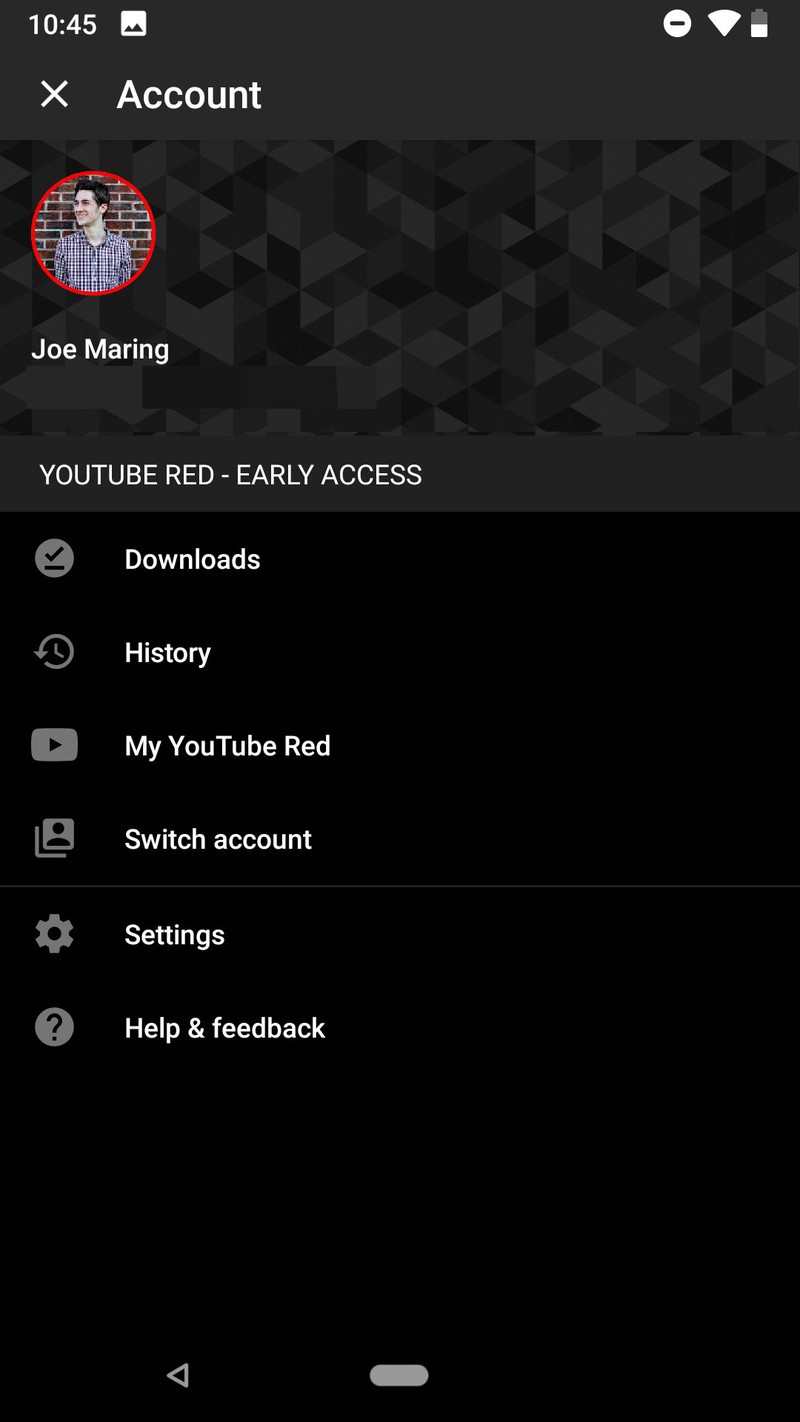

Tap Media quality.
Select the quality level you desire.
- Audio only will only store the audio of any video or song downloaded. This will allow you to download higher quality audio without dealing with the extra storage space HD video uses.
- Medium 360p downloads the video and audio at a lower SD quality.
- High 720p downloads the video and audio at HD quality.


You can also choose the download quality during your first video or playlist download. The main YouTube app has a download quality option to Ask each time, which would be nice for YouTube Music where you might want mostly audio only except for a few lyric videos or favorite music videos. We can only hope that’ll migrate to YouTube Music in the future.
How to download an individual song
While browsing YouTube Music, you’ll no doubt come across a song or 50 that you’ll want to download so you can listen to them later. Unlike Google Play Music or Spotify, you can download individual songs or videos without having to download an entire album or playlist, and it is easy to do.
Tap the three dot menu icon to the right of a song’s title on the playback screen, album listing, or search results.
Tap Download.


How to download a playlist
Downloading individual songs is nice, but it can get time-consuming. Downloading playlists is much more efficient for downloading songs in bulk, and the option to download them isn’t hidden in an options menu anymore.
In the Library tab, tap Playlists.
Tap the playlist you want to download.
Tap the download icon, the down-arrow icon between the playlist thumbnail and three-dot menu icons.


How to download an album
Now that traditional albums are a part of YouTube Music, you can download them just as you can playlists and videos, and the download button for albums isn’t hiding in a menu like it is for songs and playlists!
In the Library tab, tap Albums.
Tap the album you wish to download.
Tap the download icon, the down-arrow icon between the Add to Library and three-dot menu icons.


How to download your Offline mixtape
Offline mixtape is an automatic playlist that YouTube Music will build and download based on what it thinks you like and how many songs you want it to download. The feature was YouTube Music’s original offline option, and for much of its previous life was the only way to download music for offline playback.
These days, Offline mixtape isn’t your only option, but it’s one you’ll definitely want to use. Offline mixtape is refreshed every 24 hours and tweaked according to what you’re listening to. Think of it like a Spotify Daily Mix, except that it’s available offline and you can control how big or small the playlist is.
Here’s how to get it set up:
In the Library tab, tap Downloads.
YouTube will suggest that you download Offline mixtape. Tap Turn On.

The default Offline mixtape will download the next time you are on Wi-Fi. To adjust this, tap the settings gear.
Drag the songs slider left or right to the number of songs you want.


Offline mixtape can have anywhere between 1 and 100 songs right now. It will download immediately if you’re on Wi-Fi and re-download itself on Wi-Fi every day or so.
How to disable streaming over mobile data
Music apps can burn through a data cap if you get into a good groove and forget you left your Wi-Fi off, but YouTube Music, which is built upon video, and burn through your data cap as quickly as a Netflix or Hulu binge if you’re not careful. If you’ve got unlimited data, lucky you, but for the rest of us with a cap, you’ll want to consider disabling streaming over Wi-Fi, especially if you don’t use Audio-only mode.
Tap your avatar in the top right corner of the screen.
Tap Settings.
Tap Stream via Wi-Fi only.

Time to download the party
No matter how much or how little you download for offline playback, you should probably keep something downloaded, just in case there’s a major network outage or you get stuck on a Wi-Fi-less plane with triplets crying two rows behind you. Music makes us better, keeps us sane, and we should always have some on-hand.
Read the full YouTube Music review!
Huawei says it’ll stop offering bootloader unlock codes [Update]
The service is being stopped for all phones on May 24.
Updated 5/25/2018 — Shortly after this news broke, Huawei reached out to Android Central with an official response. The statement is almost identical to the one found in the pop-up on the company’s unlocker site, with the addition of citing “system failure, stuttering, worsened battery performance, and risk of data being compromised” as the risks involved with ROM flashing and the ultimate reason this decision was made.
If you’re big into the Android modding community, chances are you’ve taken a liking to Huawei. Huawei’s gradually become one of the more developer-friendly companies in the Android space, but that’s all changing.

According to a pop-up found on the company’s unlock page:
To provide better user experience and avoid issues caused by ROM flashing, the unlock code application service will be stopped for all products launched after 2018-5-24. For products released prior to this date, the service will be stopped 60 days after this announcement. Thank you for your understanding. We will continue to provide you with quality services.
In case you don’t know, unlock codes are required for phones to perform deeper system modifications, such as installing a custom recovery like TWRP, flashing custom ROMS, gaining root access, etc. In addition to Huawei phones, this change holds true for Honor ones, too.
This obviously isn’t something that’ll affect the majority of users, but for those that like digging into Android’s more technical side of things, this is disappointing news, to say the least.
Where to buy the Huawei P20 Pro in the U.S. and Canada
An Amazon Echo sent someone’s private conversation to one of their contacts [Update]
Time to bust out the tinfoil hats.
Updated 5/25/2018 — Amazon has since reached out to Android Central with a statement about why this situation might have happened. According to the company, “Echo woke up due to a word in background conversation sounding like ‘Alexa.’ Then, the subsequent conversation was heard as a ‘send message’ request. At which point, Alexa said out loud ‘To whom?’ At which point, the background conversation was interpreted as a name in the customer’s contact list. Alexa then asked out loud, ‘[contact name], right?’ Alexa then interpreted background conversation as ‘right’. As unlikely as this string of events is, we are evaluating options to make this case even less likely.”
Amazon’s Echo gadgets have exploded in popularity over the past couple years, but some folks have been reluctant about the idea of having an always-listening speaker in their home. Thanks to a report out of Seattle, a lot more people might switch to that mindset.

According to KIRO 7 News, an Echo Dot recorded the private conversation of a husband and wife in Portland, Oregon and sent it to the husband’s colleague all the way in Seattle. The colleague then called Danielle (the woman involved) and told her to immediately unplug all of her Echo speakers.
Per KIRO 7 —
“We unplugged all of them and he proceeded to tell us that he had received audio files of recordings from inside our house,” she said. “At first, my husband was, like, ‘no you didn’t!’ And the (recipient of the message) said ‘You sat there talking about hardwood floors.’ And we said, ‘oh gosh, you really did hear us.’”
Danielle proceeded to call Amazon about why this had happened, and according to a representative she spoke with, “He told us that the device just guessed what we were saying.” However, Danielle says that her Echo never gave off any indication that it was recording/sending the message.
KIRO 7 later reached out to Amazon for comment, and this is what the company had to say:
Amazon takes privacy very seriously. We investigated what happened and determined this was an extremely rare occurrence. We are taking steps to avoid this from happening in the future.
Even if this is a “rare occurrence,” it begs the question of how in the world this was allowed to happen in the first place. Not only that, but has this happened to any other Echo users? What about Google’s Home speakers?
If you use an Amazon Echo or Google Home, will you continue to do so in spite of this story? Let us know in the comments below.
Amazon Echo
- Tap, Echo or Dot: The ultimate Alexa question
- All about Alexa Skills
- Amazon Echo review
- Echo Dot review
- Echo Spot review
- Top Echo Tips & Tricks
- Amazon Echo vs. Google Home
- Get the latest Alexa news
See at Amazon
Best Samsung Galaxy S9 & S9+ Deals and Promotions
Save the Galaxy — spend less money.
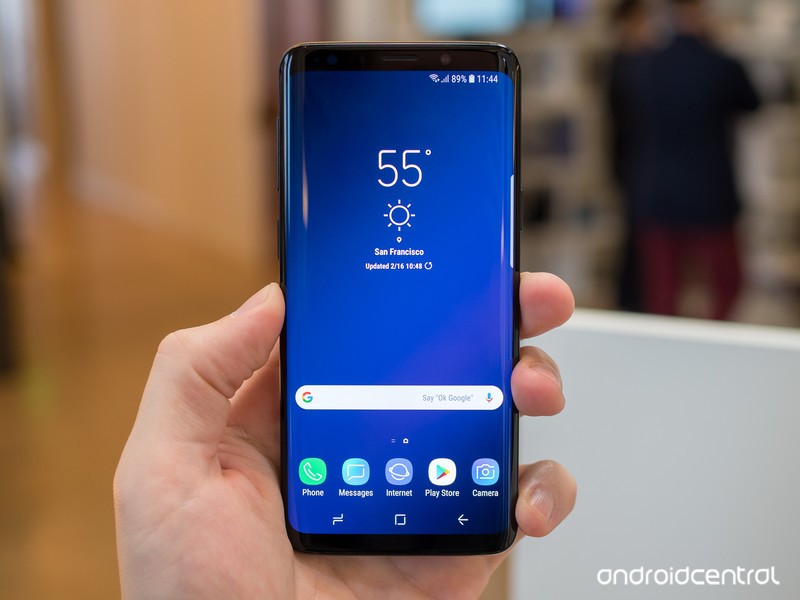
The Galaxy S9 and S9+ are now available to purchase in many countries around the world. Carriers are falling over themselves to give you a good deal on an early purchase of Samsung’s latest phones. Here are all of the latest deals from the top carriers and retailers.
U.S.
Verizon
You can pick up the Galaxy S9 for $33.33 per month and the Galaxy S9+ for $38.75 per month. Both of those are the prices over 24 months, meaning you’ll ultimately pay $799 for the S9 and $929 for the S9+. Ouch. To help reduce those costs, you can trade-in an eligible phone on Verizon and take up to 50% off. The exact details are as follows:
- Galaxy S9 for $16.66/month: Trade in iPhone X, iPhone 8/8 Plus, iPhone 7/7 Plus, iPhone 6S Plus, Pixel 2/2 XL, Pixel/Pixel XL, LG V30, LG G6, Moto Z2 Force, Moto Z Force, Galaxy Note 8, Galaxy S8/S8+, Galaxy S7 Edge.
- Galaxy S9+ for $19.37/month: Trade in iPhone X, iPhone 8/8 Plus, iPhone 7/7 Plus, Pixel 2/2 XL, LG V30, Moto Z2 Force, Galaxy Note 8, Galaxy S8/S8+.
- Galaxy S9 for $21.66/month: Trade in iPhone 6/6 Plus, iPhone 6S, HTC 10, LG V20, LG G5, Moto Z2 Play, Moto Z Droid, Galaxy S7, Galaxy S6/S6 Edge/S6 Edge+, Galaxy Note 5.
- Galaxy S9+ for $25.18: Trade in iPhone 6S/6S Plus, Pixel/Pixel XL, HTC 10, LG V20, LG G6, Moto Z Force, Moto Z2 Play, Galaxy S7/S7 Edge, Galaxy Note 5.
- Galaxy S9 for $25.00/month: Trade in iPhone SE, HTC One M9/M9+, LG V10, LG G4, Moto Z Play, DROID Turbo 2, Galaxy S5, Galaxy Note 4, Galaxy Note Edge.
- Galaxy S9+ for $29.06/month: Trade in iPhone 6/6 Plus, iPhone SE, HTC One M9/M9+, LG V10, LG G5, Moto Z Droid, Moto Z Play, DROID Turbo 2, Galaxy S6/S6 Edge/S6 Edge+, Galaxy Note 4.
See the Galaxy S9 at Verizon See the Galaxy S9+ at Verizon
AT&T
AT&T has upped the price for the phones beyond what you’d pay unlocked or from T-Mobile. The carrier is advertising $26.34 per month for the GS9 and $30.50 per month for the S9+ – but that’s over 30 months, so the full price comes out to $790 and $915, respectively.
For a limited time, though, AT&T is offering 50% off the S9 or $395 off the larger S9+. You must purchase the phones on AT&T Next, start a new line of service, and sign up for a DirecTV or Internet plan.
Those are a lot of hoops you need to jump through, but if you were already planning on getting the S9 or S9+ on AT&T, you might as well look into this.
See at AT&T
T-Mobile
T-Mobile is matching the unlocked pricing of $720 for the Galaxy S9 and $840 for the S9+. T-Mobile says that the S9 series plugs into its new 600MHz spectrum, which offers more coverage in rural areas.
There aren’t any sales on the S9 series right now for regular consumers, but if you qualify for T-Mobile’s military/veteran pricing, you can get 50% off.
See at T-Mobile
Sprint
On Sprint you’ll pay $792 for Galaxy S9 and $912 for Galaxy S9+, but they’re also available through Sprint’s Galaxy Forever lease program, which allows you to upgrade to the newest Galaxy after 12 months, for $33 per month for S9 and $38 per month for the S9+.
There aren’t any deals for buying the S9 series outright from Sprint, but you can save quite a bit with the Galaxy Forever program right now.
Instead of $33/month for the S9 and $38/month for the S9+, you’ll spend just $16.50/month for the S9 and $21.50/month for the S9 Plus. No trade-in is required for this promotion, but you will need to add a new line of service.
Once the order is made, you should see your monthly bill credit applied within two billing cycles.
See at Sprint
Amazon
Amazon matches every other retailer with U.S. unlocked pricing at $719 and $839, with all three colors of both sizes of the phone available. When shopping at Amazon, be sure to get the proper U.S. model rather than the international models that can also be found from third-party sellers — buying an international model may be a tad cheaper in some cases, but won’t come with a warranty.
See at Amazon
Best Buy
You can buy the carrier versions of the Galaxy S9 and S9+ for Verizon, AT&T and Sprint, plus the unlocked version (we recommend that one) at their usual prices. Best Buy runs its own trade-in program, and also typically matches whatever the carriers are offering directly in terms of incentives. Best Buy also offers 24-month no-interest financing if you have a Best Buy credit card.
See at Best Buy
Samsung
If you prefer buying your phones directly from the manufacturer (consider it!), without all the bloatware and potential SIM locking, Samsung is offering both the S9 and S9+ unlocked. In the U.S., you’ll pay $719 for the Galaxy S9 and $839 for the Galaxy S9+, but both are available with Samsung’s financing program if you’d prefer to pay over several months.
Samsung also sells the carrier variants of both phones, matching the pricing you’d find from the carriers but not necessarily any of the other incentives above and beyond that.
One big advantage Samsung has over everyone else is that it’s the exclusive place you can buy the 128GB and 256GB configurations for the S9 and S9+. You’ll pay $50 more per each storage upgrade, resulting in the following pricing:
- Samsung Galaxy S9 w/ 128GB – $769.99
- Samsung Galaxy S9 w/ 256GB – $819.99
- Samsung Galaxy S9+ w/ 128GB – $889.99
- Samsung Galaxy S9+ w/ 256GB – $939.99
Samsung’s got a couple killer deals right now, one of which gets you an instant $350 trade-in credit when you purchase an S9 through the Samsung Upgrade Program. Alternatively, buying the S9 or S9+ will give you the option of getting a free pair of Gear IconX (2018) earbuds or buying the Gear S3 for just $99.
See at Samsung
Canada
Rogers
It shouldn’t come as much of a surprise that Rogers has the Galaxy S9 and S9+. The amount you pay depends on which plan type you choose, with the pricing working out as follows:
- Premium+ Tab: $249 for the Galaxy S9 / $379 for the Galaxy S9+
- Premium Tab: $449 for the Galaxy S9 / $579 for the Galaxy S9+
- Smart Tab: $599 for the Galaxy S9 / $729 for the Galaxy S9+
- Talk & Text or No Tab: $999 for the Galaxy S9 / $1129 for the Galaxy S9+
If there’s a Rogers store near you, you can grab the Galaxy S9 for $0 (that’s right, $0) when you purchase it on one of the carrier’s Share Everything plans after completing an eligible trade-in.
For online shoppers, Rogers is giving out a coupon for 15% off select accessories when you actvate a device from its website and waiving its $30/line Connection Fee.
See at Rogers
TELUS
In addition to Rogers, you can also get the Galaxy S9 through TELUS. The regular S9 costs between $250 and $450 upfront depending on which plan you choose, with the same holding true for the S9+ that varies at $380 and $580.
See at TELUS
Bell
Bell is selling the S9 and S9+ for $250 on a 2-year term with an $80/month contract, or $450 for a $70/month contract. It’s $1019 outright. The S9+ costs $380 and $580 in the same configurations. As with all other carriers, the phone comes in either grey or purple.
If you’re interested in the smaller Galaxy S9, Bell’s letting you pick it up for $0 if you trade-in an eligible device and sign up for a 2-year Premium Plus plan with data.
For this offer, you’ll only be able to redeem it at one of Bell’s physical retail stores.
See at Bell
Unlocked
In Canada, Samsung is selling the Galaxy S9 and S9+ unlocked, starting at $960 for the smaller phone and moving up to $1100 for the larger one. Both phones remain unlocked once you put a SIM card into them, but they download (and keep) the carrier details from the first SIM that was inserted into them, much like their carrier counterparts. In Canada, Samsung is offering only the Lilac Purple and Titanium Grey models.
See at Samsung
UK
O2
O2 in the United Kingdom is selling the Galaxy S9 for £49.99 upfront and then £56 per month for 24 months. If you want the larger and more impressive Galaxy S9+, you’ll pay the same £49.99 upfront cost but a more expensive £61/month charge.
Thanks to the O2 Recycle program, you can score £100 off the purchase of either phone when trading in the Galaxy S7, S7 edge, S6, S6 edge, or S6 edge+.
See at O2
Vodafone
Vodafone is also offering the Galaxy S9 series in the UK, and for the regular S9 you’ll pay £29 upfront followed by £59/month. If you want to step up to the Galaxy S9+, you’ll pay a bit more ay £49 upfront and then £69 per month.
You can currently score an extra 5GB of data when purchasing the regular Galaxy S9 and gong with the S9+ will let you get a free wireless charger.
See at Vodafone
EE Mobile
For EE Mobile customers, you can get the Galaxy S9 for £58 per month and the S9+ for £68 per month. The former comes with 64GB of storage while the latter has 128GB, but no matter which you choose, you’ll be able to get the phones in either Lilac Purple, Coral Blue, or Midnight Black.
See at EE Mobile
India
The Galaxy S9 and S9+ are now available for purchase in India, with prices starting at ₹57,900 ($890). Both devices are on sale direct from Samsung India as well as Flipkart and Paytm Mall, and will be heading to thousands of retail stores across the country.
Both the 64GB and 256GB storage configurations are available in India, but if you’re interested in picking up the 256GB model, you’ll have to buy from Samsung India’s store. Samsung is rolling out a ₹6,000 ($90) cashback to those picking up the phone via Paytm, and HDFC credit and debit card users can also get ₹6,000 off on either device. Here’s how much the Galaxy S9 and S9+ cost in India:
- 64GB Galaxy S9: ₹57,900 ($890)
- 256GB Galaxy S9: ₹65,900 ($1,000)
- 64GB Galaxy S9+: ₹64,900 ($1,015)
- 256GB Galaxy S9+: ₹72,900 ($1,120)
See at Flipkart
Update, May 25: This article was overhauled with new deals, promotions and discounts for the Galaxy S9 and S9+. Because you deserve it.
Samsung Galaxy S9 and S9+
- Galaxy S9 and S9+: Everything you need to know!
- Galaxy S9 review: A great phone for the masses
- Complete Galaxy S9 and S9+ specs
- Galaxy S9 vs. Galaxy S8: Should you upgrade?
- Join our Galaxy S9 forums
Verizon
AT&T
T-Mobile
Sprint
Samsung is launching an AI Centre in Toronto
The Centre’s in the MaRS Discovery District.
Artificial intelligence is becoming more prominent in our world with each day that passes, and today Samsung’s furthering that initiative by opening up a new AI Centre in Toronto, Canada.

This is the second AI Centre Samsung’s launched in North America, the other of which is found in Mountain View, California.
The AI Centre will be used to further Samsung’s development of artificial intelligence in the region, with the Co-Head of Global Artificial Intelligence Research, Dr. Larry Heck, saying —
Toronto and the GTA are epi-centers of machine learning and one of the world’s foremost hubs for AI research and development. Home to not only world-class talent, but also some of the most innovative start-ups in the artificial intelligence field. We are looking forward to contributing to this vibrant AI community and to help push the field forward as we move towards our goal of making all Samsung connected devices intelligent by 2020.
Samsung’s Toronto AI Centre will focus its efforts on computer vision technologies that’ll eventually be integrated into products like self-driving cars, smartphones, smart appliances, and more.
HTC U12+ vs. Samsung Galaxy S9+: Which should you buy?
Customize your entire home with Philips Hue smart lighting systems on sale today
Make your home beautiful.
This sale on Philips Hue lighting is not messing around. There are a dozen different deals available right now, and they include everything from multi-color LED smart bulbs for $42.47 to the 80-inch voice-controlled multi-color light strip for $76.47.

If you’re new to the Philips Hue ecosystem, start with this four-bulb starter kit for $169.99. It normally sells for $200, so you’re saving $30 off the regular price. Plus, it comes with the Philips Hue bridge, which is essential to the entire process. You can buy the bridge on its own for $50.99 and customize your individual purchases based on all the deals available today. Either way, the bridge is how you can control all your bulbs and strips at once and then connect them to your Google Home, Amazon Echo, or other device to add voice control.
Some of the other deals worth noting include the Philips Hue motion sensor for $33.99, a wireless dimmer kit with switch and bulb for $29.74, and a 40-inch LightStrip extension for $25.49.
All of these smart bulbs can be controlled by the Philips Hue app, and it has plenty of great features like the ability to access your home’s lights remotely, scheduling, and soon a feature that will let you capture the glow of your favorite cities around the world.
Almost all of these deals are available through Best Buy’s Memorial Day sale as well.
See on Amazon
Why is Fortnite so damn popular?

Epic Games’ battle royale hit has literally taken the world by storm. But why?
I won’t tell you how much money I’ve spent in Fortnite, buying skins and pickaxes and stupid little dances for my character to perform. I’m not even very good at it, but I’ve lost track of the hours I’ve spent jumping out of that bus and getting shotgunned in the face.
Fortnite was not a battle royale to begin with, and it had a fairly slow start, perhaps due to being behind the paywall of owning the main game to get access.
But that was then. Now we’re at a point where Epic Games has pledged $100 million in prize money to competitive Fortnite tournaments, an unprecedented figure in the world of esports. And there’s not even a proper Fortnite competitive mode yet!
It’s impossible not to have heard of this game. Mainstream media is picking it up, sensationalist headlines are appearing about parents “losing their children” to Fortnite, it’s causing issues within professional sports teams, and it’s one of the hottest things on the planet right now.
But why? I have a few ideas.
See at Epic Games
1. It’s free. Very, very free.

I’ve previously written about how Fortnite is free-to-play done right, and that’s absolutely the case. Normally you’d expect a free game to have some kind of paywall, somewhere you’ll eventually feel the need to empty your pockets to get a better experience.
Not in Fortnite. Nothing in the core gameplay is hidden behind a paywall. The paid stuff is all cosmetics. If you want to look like John Wick or the Raven, or an Easter Bunny or a leprechaun, there’s going to be money involved. But you can be as good as Ninja without paying a dime.
Epic is still making an obscene amount of money from Fortnite, though, because for whatever reason everyone wants those skins. Whether it’s buying the Battle Pass for the season or V Bucks to buy individual items, Epic is printing money. But, you can play for free and still have a great time. Your character just won’t look as cool.
Being free also has other advantages. PUBG costs $30, and especially on Xbox it’s still in pre-release in the Game Preview program. If you don’t have $30 to spend, or you just don’t think it’s worth it, Fortnite offers an alternative 100-player battle royale experience for zero money.
That’s also a reason why it’s so popular with the younger crowd.
Should you buy Fortnite for PS4, or is the free version good enough?
2. It offers something different in a busy space

The battle royale formula is pretty consistent across the different titles, but Fortnite has an instant twist on it thanks to the building mechanics. Simply put, if you can’t build, you’re not going to be very good. (That’s why I’m not very good.)
Watching the best players build a ridiculous structure in seconds, then still circle behind an enemy and deliver a well-timed blue pump to the head is a thing of beauty.
It’s also bringing a very unique style to things. PUBG has quite realistic-looking surroundings and weaponry; Fortnite looks like a cartoon and has a disco bomb that makes your opponents dance.
17 Fortnite tips, tricks, and cheats to help you win a Victory Royale
3. It offers effective cross-platform gameplay
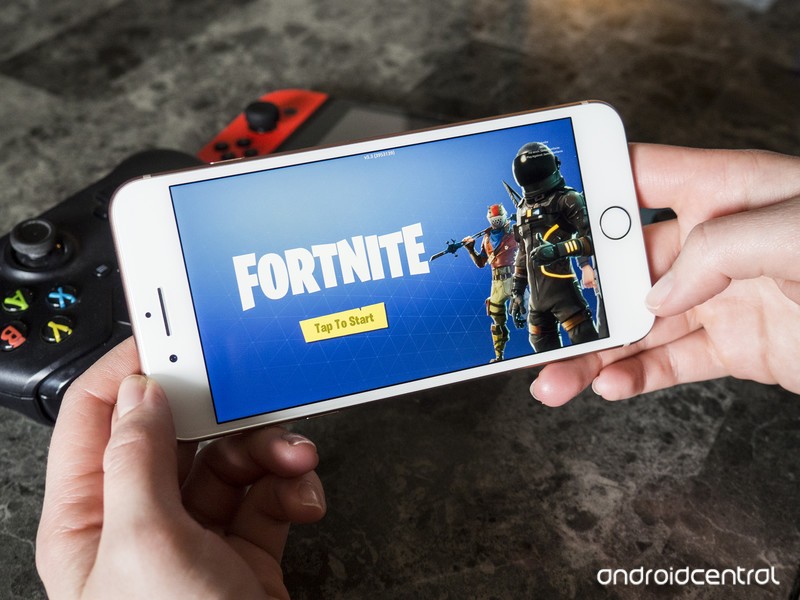
Fortnite is one of the best examples of cross-platform play. You can’t play Xbox versus PlayStation 4, and that’s because of (most likely) Sony. But folks on an iPhone can play with folks on a console and a PC, and vice-versa, and soon, Android users will be able to join in the fun.
It’s opt-in, and you cannot choose to play with phone players from your PC, but you can conceivably play a match with a buddy on an iPhone and another on Xbox while you play on your PC.
You might well get utterly demolished playing on a phone coming up against PC players, but the idea is sound. No-one is left out. If Sony decides to play ball, you’ll get one giant, all-inclusive battle-royale family.
4. It’s fun and frustrating … in a good way

When you first start playing, or if you’re struggling to get your building skills nailed, Fortnite is frustrating as hell. You’ll see an opponent throw up a bunch of ramps, get above you, and obliterate you in seconds.
But you’ll go back to the lobby and you’ll try again. And again. And again. That’s because it’s a lot of fun, and it’s very entertaining.
Hit YouTube and check out the highlight reels from some of the big streamers. Yes, you can ride a rocket across the map and hit someone with an epic no-scope snipe. It’s not easy, but it’s possible, and the entertainment value is unlimited.
And it’s only just begun …
Thanks to the variety of weapons, skins, locations, the building mechanics, and the way the map in Fortnite evolves, it all combines to make a game that’s never the same on different days. Season four started by dropping a meteor into the middle of the map, subsequent updates are seeing parts rebuilt.
Fortnite’s battle royale mode is a living entity, evolving with every update, and Epic Games is doing an incredible job at keeping the community engaged with fresh content. And that always provides a reason to come back. Now the company is providing huge cash prizes, so no doubt everyone wants to become a Fortnite pro player.
These are some of the main reasons why people keep coming back to Fortnite. Epic Games is onto a winner here, and it’s not going to slow down any time soon.
A beginner’s guide to Fortnite: Battle Royale
See at Epic Games
Everything that’s new in OxygenOS

Have a OnePlus phone? Here’s what’s new with your latest update.
OxygenOS is the software that powers OnePlus phones, and even if you’re not enrolled in the Open Beta, it’s still frequently updated with new features and bug fixes to keep an eye out for.
It can be tough to keep track of what’s new, so we’ll be updating this guide with each new OxygenOS update that’s rolled out.
May 25, 2018 — Face Unlock comes to the OnePlus 3/3T with OxygenOS 5.0.3
The OnePlus 3 and 3T may be getting up in their age, but that doesn’t stop OnePlus from pushing new features to them. OxyenOS 5.0.3 is rolling out to the phones now, and the highlight here is easily the addition of Face Unlock.
This is the same technology introduced on the OnePlus 5T, allowing you to quickly unlock your 3 or 3T by just looking at it. Other items included with the update are as follows:
- Android security patch updated to May 2018
- Refined UI for the Shelf
- New app shortcuts design
- More options when long-pressing an app icon
- OnePlus Gallery gets Places menu, ability to share photos to Shot-On-OnePlus, and Recently Deleted collection
- Large Files category in File Manager
- OnePlus Weather app gets new widget, improved positioning accuracy, and refresh interval setting
May 24, 2018 — OxygenOS 5.1.5 adds May security patch and super slow motion video to OnePlus 6
OnePlus just opened sales for the OnePlus 6 a few days ago, but even so, the company already has a new software update that’s rolling out to it.
This isn’t a particularly big update, but two notable additions include the May 2018 Android security patch and a super slow motion mode for the camera that records video in 720p at 480 FPS and 1080p at 240 FPS.
Other goodies include:
- Preloaded OnePlus Switch app
- Toggle for showing/hiding the display notch
- Quick capture when the camera’s in portrait mode
- More actions for recently deleted files
OnePlus 6
- OnePlus 6 review
- OnePlus 6 vs. OnePlus 5T: How much changes in six months?
- OnePlus 6 vs. OnePlus 5: Should you upgrade?
- These are the official OnePlus 6 cases
- The OnePlus 6 doesn’t work on Verizon or Sprint
- Join the discussion in the forums
 AIVAnet