


FreedomPop is launching UNREAL Mobile to compete with T-Mobile and Sprint
Unlimited plans will start out at just $15/month.
T-Mobile and Sprint made headlines in late April after announcing that the new companies were merging together as “The New T-Mobile”, and as a direct response to that, U.S. MVNO FreedomPop is launching a new company called UNREAL Mobile.

Where FreedomPop is meant to compete with the likes of Cricket Wireless, Boost Mobile, and other pre-paid MVNOs, UNREAL Mobile will be marketed as a proper alternative to post-paid plans offered by T-Mobile, Sprint, etc.
Commenting on the announcement, FreedomPop Senior Vice President of Strategy and Carrier Relations, Mauricio Sastre, said —
A year ago, there was no way Sprint would have allowed us to offer UNREAL. Today, however, their hands are tied, as Sprint and T-Mobile are held up in regulatory approvals contingent on their ability to demonstrate that competition won’t suffer. Given that FreedomPop’s platform is enabling large companies like Dish to launch new MVNO brands in months, we decided to use it for our own purposes.
UNREAL Mobile will use Sprint’s 4G LTE network for coverage and unlimited plans are said to start out at just $15/month. The exact details of that plan are still unclear, but with UNREAL Mobile’s CEO, Samantha Lewe, noting that “more than half of Americans use less than the nationwide average of 1.6GB of data per month”, it’ll likely come with a small amount of 4G LTE data while the rest of your “unlimited” bucket is limited to slower, 3G speeds. When specifics on this are made available, we’ll let you know.
Along with the traditional offering of unlimited talk, text, and data, UNREAL Mobile will also offer its customers a VPN, built-in encryption, mobile-ad blocking, and the ability to use your number on a variety of devices (such as tablets, computers, etc.).
UNREAL Mobile will be launching in early summer of this year and you can get early access via a beta.
Sign up for the UNREAL Mobile beta

Best LG G7 Cases

Protect your glass.
The LG G7 is one of the latest flagships released in 2018 and it’s got a lot of things going for it — the display looks fantastic, the sound is ridiculously good, the cameras are impressive, and the whole thing is packaged in a slick all-glass body.
To avoid the heartbreak of cracked glass on your brand new phone, you should absolutely consider a case when you’re pre-ordering your new phone. To help, we’ve rounded up the best cases available for the LG G7. Let’s dive in!
SUPCASE Unicorn Beetle Pro case

Starting with one of the most popular heavy-duty case options for practically any phone on the market, the SUPCASE Unicorn Beetle Pro case is a great option to consider.
Featuring a dual-layer design that combines a rigid polycarbonate shell with a flexible bumper, the refined design here will keep your phone well protected from the nastiest of drops. It also features a built-in screen protector to protect against scratches, and the precise cutouts and buttons mean the functionality of the phone will never be impeded.
You can get this case in all-black for just $20, or opt for a more colorful style for $22 on Amazon.
See at Amazon
Ringke Air thin case
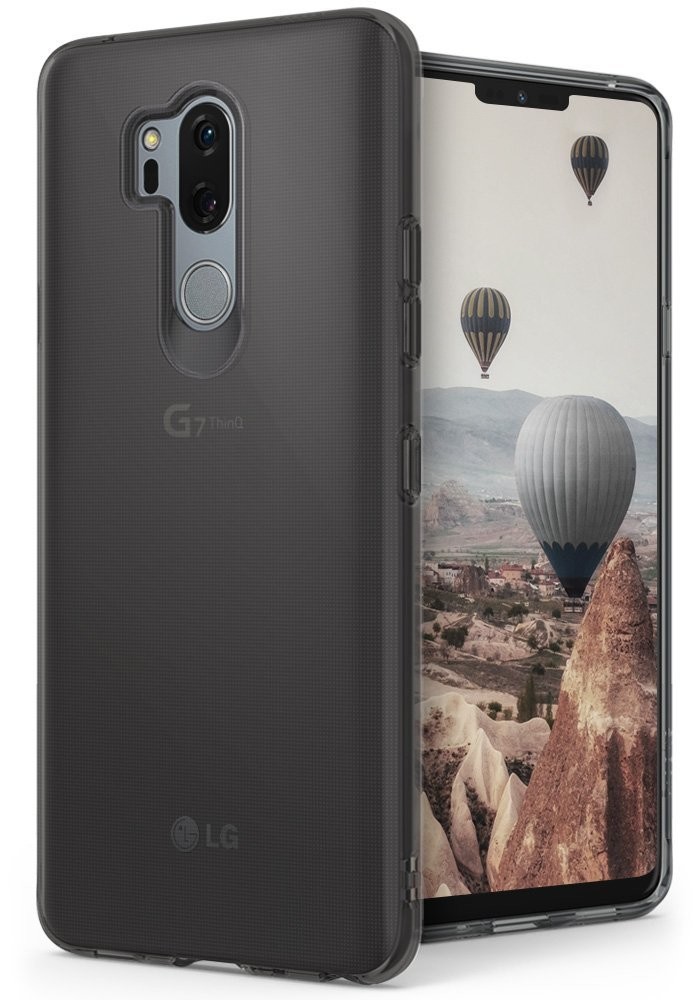
For those of us who demand our cases be thin and let the phone design peek through, there’s this slim case option from Ringke.
The Ringke Air is lightweight and transparent and made of flexible TPU so it’s easy to install. A case like this is going to protect against drops and scratches on the back glass, while also providing a buffer for the camera and fingerprint scanner on the back.
It’s available as a clear case or tinted with Smoke Black or Orchid Purple for just $10 on Amazon.
See at Amazon
Ringke Fusion-X rugged case

Ringe offers a ton of case styles for a crazy number of phones, and there are three other styles available from Ringke for the LG G7. But we’ll focus on the Fusion-X for combining the views of a clear case with a reinforced bumper for rugged protection.
You’ll appreciate the added grip that this case provides and the clean design that lets you show off the G7 (ThinQ) branding on the back.
Available with a black, gray, or lilac purple bumper, you can get this case for $13.
See at Amazon
Spigen Rugged Armor case

Spigen’s Rugged Armor case is about as good as it gets for a single-layer case. It adds barely any bulk to the phone itself while improving the in-hand comfort with a matte finish featuring carbon fiber accents at the top and bottom.
Thin enough to allow wireless charging yet rugged enough to protect against nasty drops, this case is a minimalist workhorse that looks great in all black.
Get it for just $13 for your LG G7.
See at Amazon
Spigen Liquid Crystal case

Another classic design from Spigen, the Liquid Crystal case is perfect if you want that ‘naked’ look for the LG G7 but also don’t want to unnecessarily risk your phone taking damage.
You may ask what could really differentiate between clear cases, and the answer from Spigen would be its Air Cushion technology. Each corner is designed with a little pocket of air that creates a gap between the phone and the ground for added protection. Made of a single piece of crystal clear TPU, this case is a great minimalist option that won’t disappoint.
Get it for just $12 on Amazon.
See at Amazon
VRS Design Single Fit case

If you’re looking for something that offers great protection with a flashy design, you’ve got to check out VRS Design’s cases. To start, we’ll suggest this wavy case that offers a really cool design for a one-piece TPU case.
The back is designed to be extra grippy and rugged with a matte black finish on the waved texture. The VRS branding is also pretty well implemented — It’s just got a sleek and cool look to it that will accentuate the design of your phone.
Get this case for just $13 on Amazon.
See at Amazon
VRS Design Layered Dandy wallet case

For fans of wallet cases, VRS Design has this very stylish looking case that has a genuine leather look that’s actually synthetic. This is a folio-style wallet case with a magnetic strap to keep things closed.
On the inside, you’ll find more synthetic leather along with three card slots and a pocket for cash or receipts. It’s also compatible with wireless charging which is rare to see with wallet cases.
For an extra functional case that will help you cut down on your pocket carry, get this wallet case from VRS Design for your LG G7 for just $17.
See at Amazon
OtterBox Defender Series case

OtterBox has a full line of cases coming soon for the LG G7. The most popular Defender series case (pictured) will be available for $50, while the slimmer Symmetry series case will be available for $40.
OtterBox has shifted away from including built-in screen protectors with their cases, instead offering its own case-compatible screen protector for $40. It’s a steep price compared to the other cases on this list, but if you’ve ever dealt with OtterBox’s warranty process or customer service you know that you really get what you pay for in terms of product support.
OtterBox’s cases aren’t on sale yet, but you can sign up to be notified as soon as they’re available.
See at OtterBox
LG G7
- LG G7 hands-on preview: All about that bass
- LG G7 Specifications: Everything you need to know
- Join the LG G7 forums
What’s new on Hulu for June 2018

And what’s leaving, too.

Now that we’ve got the second season of The Handmaid’s Tale behind us, it’s time to see what’s up next in June on Hulu.
And while we’re lacking any huge original releases like Handmaid’s, there’s still a ton of great shows coming up on Hulu’s video-on-demand service. (Which also includes available premiums like HBO and Showtime.)
Have a look through the list here — there’s definitely something for everyone.
Sign up for Hulu
Coming to Hulu on June 1
- 1492: Conquest of Paradise (1992)
- 2 Days in the Valley (1996)
- A Beautiful Mind (2001)
- A Better Life (2011) (*Showtime)
- Bridget Jones: The Edge of Reason (2004) (*Showtime)
- Across the Universe (2007)
- Allan Quatermain and the Lost City of Gold (1987)
- Apollo 13 (1995)
- Beer for My Horses (2008)
- Bio-Dome (1996)
- Blue Like Jazz (2012)
- Boots on the Ground (2017)
- Bowfinger (1999)
- Brokeback Mountain (2005)
- The Brothers Grimm (2005)
- Burnt Offerings (1976)
- Bull Durham (1988)
- The Burbs (1989)
- Chinese Box (1997)
- Drive Me Crazy (1999)
- Drop Zone (1994)
- East is East (1999)
- End of Days (1999)
- Escape from Alcatraz (1979)
- Event Horizon (1997)
- The Eye (2005)
- The Frozen Ground (2013)
- Hard Rain (1998)
- Harley Davidson and the Marlboro Man (1991)
- Harsh Times (2005) (*Showtime)
- Hellboy (2004)
- The History Boys (2006)
- House of D (2005)
- I Am David (2004)
- Inside (2018)
- Into the West (1992)
- Leprechaun (1993)
- Leprechaun 2 (1994)
- Leprechaun 3 (1995)
- Leprechaun 4: In Space (1996)
- Leprechaun 5: In the Hood (2000)
- Leprechaun 6: Back 2 Tha Hood (2003)
- Leprechaun: Origins (2014)
- Life During Wartime (2009) (*Showtime)
- The Lord of the Rings: The Fellowship of the Ring (2001)
- The Lord of the Rings: The Return of the King (2003)
- The Lord of the Rings: The Two Towers (2002)
- Lucky Break (2001) (*Showtime)
- Margin Call (2011) (*Showtime)
- Mindhunters (2004)
- Mistrust (2018) (*Showtime)
- Mrs McCutcheon (2017) (*Showtime)
- Mutant Species (1995)
- My Left Foot (1989)
- Nanny Mcphee (2006)
- Nurse 3D (2014)
- Our Lady of the Assassins (2000) (*Showtime)
- Panic (2000)
- The Pink Panther Strikes Again (1976)
- Punch Drunk Love (2002)
- The Quick and the Dead (1995)
- Rare Birds (2002)
- Religulous (2008)
- Restoration (1995)
- Revenge of the Pink Panther (1978)
- The Running Man (1987)
- Scary Movie 2 (2001)
- Sleepwalkers (1992) (*Showtime)
- Spawn (1997)
- Stanley & Iris (1990)
- Steel Magnolias (1989) (*Showtime)
- The Sum of All Fears (2002) (*Showtime)
- Sweeney Todd: The Demon Barber of Fleet Street (2007)
- Swing Away (2016) (*Showtime)
- Tamara (2006)
- Trainspotting (1996)
- The Triumph of Love (2001) (*Showtime)
- Universal Soldier (1992)
- Vantage Point (2008) (*Showtime)
- We Blew It (2017)
- Where the Skin Lies (2017)
- Windwalker (1980)
Coming June 2 to Hulu
- 68 Kill (2017) (*Showtime)
- Blade Runner 2049 (2017) (*HBO)
- The Gunman (2015) (*Showtime)
Coming June 3 to Hulu
- Max 2: White House Hero (2017)
- The Promise (2016) (*Showtime)
- Stargate (1994)
Coming June 5 to Hulu
- The Bold Type (Season 2 Pre-Premiere)
- My Hero Academia (Complete Season 2 Part 2, Dubbed)
- So You Think You Can Dance (Season 15 Premiere)
- Lions for Lambs (2007)
Coming June 6 to Hulu
- Gintama (2017)
- Out of the Dark (2014)
Coming June 7 to Hulu
- Allure (2017)
Coming June 8 to Hulu
- Abandoned (Complete Season 1)
- Black Market (Complete Season 1)
- Black Market Dispatches (Complete Season 1)
- Bong Appetit (Complete Seasons 1-2)
- Cloak & Dagger (Series Premiere)
- Cyberwar (Complete Seasons 1-2)
- Flophouse (Complete Season 1)
- Fuck That’s Delicious (Complete Seasons 1-2)
- Gaycation (Complete Seasons 1-2)
- Hamilton’s Pharmacopeia (Complete Seasons 1-2)
- Hate Thy Neighbor (Complete Season 1)
- Huang’s World (Complete Seasons 1-2)
- Nashville (Season 6 Midseason Premiere)
- Party Legends (Complete Seasons 1-2)
- Weediquette (Complete Seasons 1-3)
- What Would Diplo Do? (Complete Season 1)
- Woman (Complete Season 1)
Coming June 9 on Hulu
- American Made (2017) (*HBO)
- Pork Pie (2017) (*Showtime)
- Precious (2008)
- Simon Says (2006)
Coming June 10 on Hulu
- Ghost in the Shell (2017) (*Showtime)
Coming June 12 on Hulu
- Disney Fairy Tale Wedding (Series Premiere)
Coming June 13 on Hulu
- Bad Blood (2016)
Coming June 14 on Hulu
- 24 Hours to Hell & Back (Series Premiere)
- Dirk Gently’s Holistic Detective Agency (Complete Season 2)
Coming June 15 on Hulu
- Marlon (Season 2 Premiere)
- 35 and Ticking (2011)
- Breakup at a Wedding (2013)
- Cabin Fever: Patient Zero (2014)
- The Clintons: An American Odyssey (2012)
- Hellbound: Hellraiser II (1988)
- The House October Build (2014)
- The House October Built 2 (2017)
- Hunstville (2017)
- In Too Deep (1999)
- Low Down (2014)
- Middle of Nowhere (2010)
- Nina (2016)
- Playin’ For Love (2013)
- Sirens (1993)
- Smoke (1995)
- So This is Christmas (2013)
- Tell Them Anything You Want: A Portrait of Maurice Sendak (2009)
- The Second Mother (2015)
- Walking Out (2017) (*Showtime)
Coming June 16 on Hulu
- “Silent Witness (Complete Season 10-21)
- Baby Mama (2008)
- Killing for Love (2017)
- The Mountain Between Us (2017) (*HBO)
- Rebel in the Rye (2017) (*Showtime)
- Transformers: The Last Knight (2017)
Coming June 17 on Hulu
- Punisher: War Zone (2008)
Coming June 18 on Hulu
- “Shades of Blue (Season 3 Premiere)
Coming June 22 on Hulu
- “The Other Guy (Complete Season 1)
Coming June 23 on Hulu
- Rick & Morty (Complete Season 3)
- Curious George 3: Back to the Jungle (2015)
- Kingsman: The Golden Circle (2017) (*HBO)
- Love Means Zero (2017) (*Showtime)
Coming June 25 on Hulu
- Ballet 422 (2014)
Coming June 26 on Hulu
- Shutter Island (2009)
Coming June 27 on Hulu
- Swan Princess 8 (2018)
- The Thousand Faces of Dunjia (2017)
Coming June 28 on Hulu
- Cairo Time (2009) (*Showtime)
Coming June 29 on Hulu
- 10 x 10 (2018)
Coming June 30 on Hulu
- EuroTrump (2017)
- IT (2017) (*HBO)
What’s leaving Hulu on June 30
- 30 Beats (2012)
- 5 Days of War (2010)
- A League of Their Own (1992)
- A Simple Plan (1998)
- Accepted (2006)
- Agent (2017)
- Alter (2017)
- As I AM: The Life and Times of DJ AM (2015)
- Bad News Bears (2005)
- Basic Instincts (1992)
- Billy the Kid (2013)
- Cool Runnings (1993)
- Death Becomes Her (1992)
- Desperately Seeking Susan (1985)
- Eye for an Eye (1996)
- Fever (2017)
- Home of the Brave (2006)
- Horsemen (2009)
- I’m Gonna Git You Sucka (1988)
- Internal Affairs (1990)
- Jane Eyre (1996)
- K2 (1992)
- Knock Knock (2015)
- Ladybugs (1992)
- Legionario (2017)
- Life Stinks (1991)
- Marathon Man (1976)
- Married to the Mob (1988)
- Mystery Team (2009)
- Private Violence (2017)
- Project Nim (2011)
- Quigley Down Under (1990)
- Roxanne (1987)
- Shanghai Surprise (1986)
- Small Soldiers (1998)
- Snake Eyes (1998)
- Spanglish (2004)
- Stand Up Guys (2012)
- Standing in the Shadows of Motown (2002)
- Stories We Tell (2014)
- Superstar (1999)
- Tenderness (2009)
- Texas Killing Fields (2011)
- Thunder Soul (2011)
- Trading Mom (1994)
- Up In Smoke (1978)
- Uptown Girls (2003)
- Wishmaster (1997)
- Wishmaster 2: Evil Never Dies (1999)
- Wishmaster 3: Beyond the Gates of Hell (2001)
- Wishmaster 4: the Prophecy Fulfilled (2002)
- Zodiac (2007)
- Zombie Decadence 2 (2017)
Introducing CordCutters.com
- The hardware you need
- All about streaming services
- What channels are on which service
- FREE over-the-air TV
- How to watch sports
- Join the discussion
Get the latest deals
Gmail for Android: How to do everything

It’s time to take control of Gmail.
With over a billion monthly active users, Gmail is one of the most popular email clients around. The service has come a long way from its inception in 2004, and has recently picked up a host of new features. If you’re new to Android or are just looking for ways to get the best out of Gmail, read on.
Gmail is a part of Google Mobile Services, a collection of apps and APIs that are pre-installed on every Android phone certified by Google. If you have an Android phone that has the Play Store pre-installed, you’ll also find Chrome, YouTube, Drive, Maps, Photos, Hangouts, and Play Music available out of the box.
As with all important accounts, you should have two-factor authentication for your Google account if you haven’t done so already. Security breaches are inevitable, and having an added layer of protection for your email account makes all the difference in the world.
Already set up two-factor authentication? Let’s take a look at what Gmail has to offer on Android.
- How to send email using Gmail
- How to format emails and add emojis in Gmail
- How to add attachments in Gmail
- How to add a secondary Google account in Gmail
- How to add an Outlook or Yahoo Mail account in Gmail
- How to merge inboxes in Gmail
- How to snooze emails in Gmail
- How to disable Smart Reply in Gmail
- How to adjust preview settings in Gmail
- How to add a signature in Gmail
- How to prioritize your inbox in Gmail
- How to mute emails in Gmail
- How to archive or delete emails in Gmail
- How to recover deleted emails in Gmail
How to send email using Gmail
Open Gmail from the home screen or app drawer.
Select the floating action button (circular button with a pen icon in the bottom right corner) to compose a new mail.
Enter the recipient’s email address in the To field.

Use the downward arrow symbol to see Cc and Bcc options.
Enter the subject and body of the text.
Tap the arrow button to send the email.

How to format emails and add emojis in Gmail
Google added rich text formatting in Gmail for Android earlier this year, giving you the ability to add text colors and underline, italicize, and bold text. And yes, you can also send emoticons within an email.
Select the desired text with a quick double tap.
Tap the Format button from the action menu.
Select from bold, italics, or underline. You can also change text color and background.

To add emoji, tap the emoji button.
Select your desired emoji and add it to the text.

How to add attachments in Gmail
With Gmail, you can attach local files — including documents, photos, or videos — or send files stored on Box, Dropbox, Google Drive, and other cloud storage services. Local attachments are limited to 25MB, and for anything larger than that you’ll have to upload the file to Drive first. Doing so lets you share files up to 10GB in size.
Select the floating action button to compose a new mail.
Tap the attach button to select files.
Choose Attach file to insert local files or use Insert from Drive to attach Drive files as links within the mail.

Using the Attach file option is straightforward. Select the file from the menu to embed it in the mail.
Insert from Drive follows a similar flow.
Once you select the attachment, you’ll see a preview at the bottom of the mail.

How to add a secondary Google account in Gmail
Tap the hamburger menu on the top left corner.
Select the arrow next to the account name.
Tap Add account.

In the set up email section, select Google from the list of services.
Enter your Account email ID and password.
If you’d like to create a new account, select Or create a new account.

You can also add a secondary Google account by heading into your device’s settings:
How to add a secondary Google account on your phone
How to add an Outlook or Yahoo Mail account in Gmail
Gmail also allows you to add email accounts from third-party services like Outlook, Yahoo Mail, Exchange accounts, or your own mail server.
Tap the hamburger menu on the top left corner.
Select the arrow next to the account name.
Tap Add account.
Select your desired email service from the list.
Add your email ID and password.

How to merge inboxes in Gmail
If you have two or more email accounts on the same device, you can see all emails in a single view.
Tap the hamburger menu on the top left corner.
select All inboxes.
All your emails will be displayed chronologically in the All inboxes view.

How to snooze emails in Gmail
The ability to snooze emails is one of the new features that made its way into Gmail with the 2018 redesign. The snooze option is ideal if you’re looking to file away a particular mail to resurface at a later date. You’ll be able to choose when the mail shows up in your inbox again — the options include later the same day, the next day, weekend, or a custom day and time. Here’s how to snooze emails in Gmail:
Select the email you want to snooze by tapping the sender icon.
Tap the action menu (three vertical dots) in the top right corner.
Hit Snooze.
Select the time and date based on when you want the email to resurface in your inbox.

How to disable Smart Reply in Gmail
Google introduced smart replies in Inbox, and brought them over to the Gmail web and mobile apps earlier this year. Smart Reply automatically scans the context of a message and populates a list of responses — along the lines of “Thank you” or “See you there.” If you’re not a fan of the feature, however, there’s an easy way to turn it off.
You’ll have to disable the feature for each email account you’re signed into on Gmail. Here’s how you can disable Smart Reply:
Tap the hamburger menu (three horizontal lines) on the top left corner.
Scroll up to access the settings.
Tap Settings.

Select the Email account for which you want to disable the feature.
Scroll up to access the General account settings.
Tap the checkmark next to Smart Reply to turn off the feature.

How to adjust preview settings in Gmail
If you’re using a device with limited screen real estate, or would like to see more text in the email preview, you can disable sender images.
Tap the hamburger menu on the top left corner.
Go to Settings.
Select General settings.

Deselect the Sender image checkbox.
Now you’ll be able to see more preview text in your inbox.

How to add a signature in Gmail
Tap the hamburger menu on the top left corner.
Go to Settings.
Select the account for which you want to add the signature.

Tap the Signature field.
Enter the desired signature text.
The signature text will be added at the bottom of every email.

How to prioritize your inbox in Gmail
Tap the hamburger menu on the top left corner.
Select Priority Inbox.
Emails that are directly addressed to you will be surfaced above promotional messages.

You can also mark emails manually to let Gmail know that they’re valuable to you. That way, upcoming mails will be sent to Priority Inbox.
Long press anywhere on a mail or select the sender image to show the action menu.
Tap the three dots in the top corner to bring up the menu options.
Select Mark as important. Doing so will change the priority of the email.

How to mute emails in Gmail
If you’re part of a mail chain that is getting out of hand, you can mute the conversation. Doing so moves the mail thread to the archived section, and you won’t be notified of any incoming messages in the chain. The mail will still be marked unread.
Long press anywhere on a mail or select the sender image to show the action menu.
Tap the three dots in the top corner to bring up the menu options.
Select Mute.

How to archive or delete emails in Gmail
Long press anywhere on a mail or select the sender image to show the action menu.
Select the archive icon to archive an email.
Select the delete icon to move it to the trash.

You can archive or delete multiple emails in one go. After selecting a mail, press the sender image for subsequent mails you wish to move to the trash or archive. You can also use quick actions to delete or archive a mail by swiping left or right on the mail. To select the default action for the swipe gesture, do the following:
Tap the hamburger menu on the top left corner.
Navigate to Settings.
Select General settings.
Tap Gmail default action.
Select between Archive and Delete.

How to recover deleted emails in Gmail
If you’ve deleted a mail by mistake, you can recover it by navigating to the trash.
Tap the hamburger menu on the top left corner.
Navigate to Trash.
Select the mail by a long press action.

Tap the three dots in the top corner to bring up the menu options.
Select Move to.
Choose Inbox to move the deleted mail back to your inbox.

Your turn
That’s a quick look at what Gmail has to offer on Android. Interested in knowing more? See how to search your mailbox using various parameters, use labels and filters effectively, add aliases to Gmail, and more in our Gmail productivity guide. In the meantime, let us know what tricks you rely on to manage your inbox.
Gmail: Boost your productivity with these tips and tricks
Update, May 2018: This article was updated with new explanations for Smart Reply and Snooze on Gmail.
WeMo’s WiFi-enabled smart light switch is down to just $30
Control it by touch or your voice.

The WeMo Wi-Fi light switch is $29.99 on Amazon. It’s only ever sold for less than this one time in the past, and that was during Black Friday where it was $1 cheaper. This is the lowest it’s been since that sale.
You can control this switch from the wall, the WeMo app, and your Alexa or Google Assistant device. You don’t need anything special other than Wi-Fi. With this switch, you can schedule your lights to do what you want. Adjust them with the sunset or sunrise. Turn off your lights with your phone when you’re at work and realize you forgot to — or from bed when you’re like me and being extra lazy. Set your lights to turn on slowly and help you wake up. The dimmer switch has 3.9 stars based on more than 10,500 reviews.
See at Amazon
What’s new on Netflix for May 2018
 Simone Missick and Mike Colter in Luke Cage on Netflix. (Image credit: Netflix)
And what’s leaving, too.

Strap in, boys and girls. June’s going to be a while ride on Netflix. Sense8 gets a final couple of hours, thanks in no small part to fan reaction after the sci-fi who was initially canceled. The finale airs June 8.
Plus, Luke Cage is back on June 22 for Season 2.
And the Gorgeous Ladies of Wrestling — GLOW — is back on June 29.
Basically, you have no reason to leave the house this summer.
Sign up for Netflix!
Coming soon to Netflix (TBD)
- iZombie: Season 4
- Life Sentence: Season 1
- Supergirl: Season 3
Coming to Netflix on June 1
- Assassination Games
- Blue Jasmine
- Busted! (Season Finale)– NETFLIX ORIGINAL
- Disney’s 101 Dalmatians
- George Balanchine’s The Nutcracker
- He Named Me Malala
- Joseph Campbell and the Power of Myth
- Just Friends
- Miracle
- National Treasure
- Nick and Norah’s Infinite Playlist
- November 13: Attack on Paris– NETFLIX ORIGINAL
- Outside In
- Righteous Kill
- Rumor Has It
- Singularity
- Taking Lives
- Terms and Conditions May Apply
- The Boy
- The Covenant
- The Departed
- The Prince & Me 4: The Elephant Adventure
Coming to Netflix on June 2
- The King’s Speech
Coming to Netflix on June 3
- The Break with Michelle Wolf (Streaming Every Sunday)– NETFLIX ORIGINAL
Coming to Netflix on June 5
- Marvel Studios’ Thor: Ragnarok
Coming to Netflix on June 7
- Hyori’s Bed & Breakfast: Season 2 (Streaming Every Thursday)
- The Night Shift: Season 4
Coming to Netflix on June 8
- Alex Strangelove– NETFLIX FILM
- Ali’s Wedding– NETFLIX FILM
- Marcella: Season 2– NETFLIX ORIGINAL
- Sense8: The Series Finale– NETFLIX ORIGINAL
- The Hollow– NETFLIX ORIGINAL
- The Staircase– NETFLIX ORIGINAL
- Treehouse Detectives– NETFLIX ORIGINAL
Coming to Netflix on June 9
- Wynonna Earp: Season 2
Coming to Netflix on June 10
- Portlandia: Season 8
Coming to Netflix on June 14
- Cutie and the Boxer
- Marlon: Season 1
Coming to Netflix on June 15
- La Hora Final
- Lust Stories– NETFLIX FILM
- Maktub– NETFLIX FILM
- Set It Up– NETFLIX FILM
- Step Up 2: The Streets
- Sunday’s Illness– NETFLIX FILM
- The Imaginarium of Doctor Parnassus
- The Ranch: Part 5– NETFLIX ORIGINAL
- True: Magical Friends– NETFLIX ORIGINAL
- True: Wonderful Wishes– NETFLIX ORIGINAL
- Voltron: Legendary Defender: Season 6– NETFLIX ORIGINAL
Coming to Netflix on June 16
- Grey’s Anatomy: Season 14
- In Bruges
Coming to Netflix on June 17
- Club de Cuervos presenta: La balada de Hugo Sánchez– NETFLIX ORIGINAL
- Marvel’s Agents of S.H.I.E.L.D.: Season 5
Coming to Netflix on June 18
- Encerrados
Coming to Netflix on June 19
- Hannah Gadsby: Nanette– NETFLIX ORIGINAL
Coming to Netflix on June 22
- Brain on Fire– NETFLIX FILM
- Cooking on High– NETFLIX ORIGINAL
- Derren Brown: Miracle– NETFLIX ORIGINAL
- Heavy Rescue: 401: Season 2– NETFLIX ORIGINAL
- Marvel’s Luke Cage: Season 2– NETFLIX ORIGINAL
- Us and Them– NETFLIX FILM
Coming to Netflix on June 23
- Disney’s Tarzan
Coming to Netflix on June 24
- To Each, Her Own (Les Goûts et les couleurs )– NETFLIX FILM
Coming to Netflix on June 25
- Hotel Transylvania: Season 1
Coming to Netflix on June 26
- Secret City– NETFLIX ORIGINAL
- Star Wars: The Last Jedi
- W. Kamau Bell: Private School Negro– NETFLIX ORIGINAL
Coming to Netflix on June 29
- Churchill’s Secret Agents: The New Recruits– NETFLIX ORIGINAL
- GLOW: Season 2– NETFLIX ORIGINAL
- Harvey Street Kids– NETFLIX ORIGINAL
- Kiss Me First– NETFLIX ORIGINAL
- La Forêt– NETFLIX ORIGINAL
- La Pena Maxima
- Nailed It!: Season 2– NETFLIX ORIGINAL
- Paquita Salas: Season 2– NETFLIX ORIGINAL
- Recovery Boys– NETFLIX ORIGINAL
- TAU– NETFLIX FILM
Coming to Netflix on June 30
- Fate/EXTRA Last Encore: Oblitus Copernican Theory– NETFLIX ORIGINAL
- Mohawk
What’s leaving Netflix in June
All good things must come to an end. Here’s what’s leaving Netflix in June.
- 50 First Dates (June 1)
- 8 Mile (June 1)
- Gridiron Gang (June 1)
- J. Edgar (June 1)
- Men in Black (June 1)
- My Left Foot (June 1)
- Neerja (June 1)
- Out of the Dark (June 1)
- Princess Kaiulani (June 1)
- The Angry Birds Movie (June 1)
- The Brothers Grimm (June 1)
- The Spy Next Door (June 1)
- The Young Victoria (June 1)
- Training Day (June 1)
- Untraceable (June 1)
- Vice (June 1)
- What Our Fathers Did: A Nazi Legacy (June 1)
- While You Were Sleeping (June 1)
- Shark Men: Season 3 (June 2)
- Grace of Monaco (June 8)
- The Trials of Muhammad Ali (June 9)
- Bonnie & Clyde (June 10)
- Drillbit Taylor (June 15)
- Naz & Maalik (June 15)
- The Giver (June 15)
- The Great Gatsby (June 15)
- Underdogs (June 15)
- Anthony Bourdain: Parts Unknown: Seasons 1-8 (June 16)
- Backstreet Boys: Show ‘Em What You’re Made Of (June 16)
- Curious George (June 16)
- Super (June 16)
- Cedar Cove: Seasons 1-3 (June 18)
- Cake (June 20)
- Baby Daddy: Seasons 1-6 (June 21)
- Sin City: A Dame to Kill For (June 22)
- Curious George 3: Back to the Jungle (June 23)
- Marvel Studios’ Captain America: Civil War (June 24)
- Alpha and Omega (June 26)
- Bad Grandpa .5 (June 29)
- On Golden Pond (June 30)
Introducing CordCutters.com
- The hardware you need
- All about streaming services
- What channels are on which service
- FREE over-the-air TV
- How to watch sports
- Join the discussion
Get the latest deals
How to Delete or Deactivate Your Apple ID Account and Data
Apple has launched a new Data and Privacy website that enables users to request a copy of all of the data associated with their Apple ID accounts that the company maintains on its servers. The page also provides options to delete or deactivate an Apple ID by following the step-by-step instructions outlined below.
While any customer anywhere can delete an Apple ID account, Apple says the ability to deactivate an Apple ID account is limited to accounts with locations set in the European Union, Iceland, Liechtenstein, Norway, and Switzerland. Apple intends to roll out the deactivation option around the world “in the coming months.”
Keep in mind that deleting an Apple ID account and any associated data is a permanent, irreversible* action. After your account is deleted, Apple can’t reopen or reactivate your account or restore any of your data, and you will no longer be able to access any of the content and services listed below.
- Photos, videos, documents, and other content that you stored in iCloud are permanently deleted
- You will no longer receive any messages or calls sent to your account via iMessage, FaceTime, or iCloud Mail
- You will no longer be able to sign in to or use services such as iCloud, the App Store, iTunes Store, iBooks Store, Apple Pay, iMessage, FaceTime, and Find My iPhone
- Your paid iCloud storage plans if any will be canceled
- Any remaining Apple Store appointments and support cases are canceled, but any AppleCare plans you may have purchased remain valid
Content without Digital Rights Management, such as iTunes music purchases, continue working normally when your account is deleted or deactivated. However, any DRM-free content stored in iCloud Music Library isn’t accessible or playable.
If you aren’t planning to use your Apple ID for now, but may in the future, Apple recommends temporarily deactivating your account where possible instead of deleting it. Apple IDs can be reactivated by contacting Apple Support and providing the unique access code received during deactivation.
Apple also recommends that you take the following steps before you request deletion or deactivation of your account:
- Back up the data that you store in iCloud, including content for any Apple or third-party apps that store data using iCloud
- Download any DRM-free purchases, iTunes Match tracks that you don’t have copies of, and any other music and media
- Review any active subscriptions, as any remaining subscriptions are canceled at the end of their billing cycles, even during deactivation
- Save copies of any Apple-related information that you currently need or expect to need
- Sign out of all your devices to avoid issues with apps that use your Apple ID account or iCloud. If your account is deleted, you can’t sign out of iCloud or turn off Find My iPhone Activation Lock on your devices. If you forget to sign out, you might not be able to use your device when your account is deleted.
How to Delete Your Apple ID Account
Open a web browser on your Mac, PC, or iPad, and navigate to privacy.apple.com. The option is not available on iPhone.
Enter your Apple ID email and password. Answer any security questions or authorize two-factor authentication on another device if prompted.
On the Apple ID & Privacy page, select Continue.
Under Delete Your Account, select Get Started.
Select a reason for deleting your account from the dropdown menu, such as “prefer not to say,” and select Continue.
Review the checklist of important things to know before deleting your account and select Continue.
Review the deletion terms and conditions, check off the read and agree box, and select Continue.
Choose how to receive account status updates: the email used to create the Apple ID, a different email address, or by phone. Then select Continue.
Print, download, or write down the unique access code, which is needed to contact Apple Support regarding your request, including if you wish to change your mind about deleting the account for a short period after the request is submitted. Then select Continue.
Enter the access code to confirm that you have received it. Then select Continue.
Review the list of important details one more time and select Delete Account.
Apple will confirm it is working on deleting your account on the website and in an email. Apple says the process may take up to seven days. Your account will remain active while verification is in progress.
Remember to sign out of the Apple ID on all devices and web browsers before the account is deleted.
How to Deactivate Your Apple ID Account
Open a web browser on your Mac, PC, or iPad, and navigate to privacy.apple.com. The option is not available on iPhone.
Enter your Apple ID email and password. Answer any security questions or authorize two-factor authentication on another device if prompted.
On the Apple ID & Privacy page, click Continue.
Under Deactivate Your Account, select Get Started.
Select a reason for deactivating your account from the dropdown menu, such as “prefer not to say,” and select Continue.
Review the checklist of important things to know before deactivating your account and select Continue.
Review the deactivation terms and conditions, check off the read and agree box, and select Continue.
Choose how to receive account status updates: the email used to create the Apple ID, a different email address, or by phone. Then select Continue.
Print, download, or write down the unique access code, which is needed to contact Apple Support regarding your request, including if you wish to reactivate your account at any time. Then select Continue.
Enter the access code to confirm that you have received it. Then select Continue.
Review the important details one more time and select Deactivate Account.
Apple will confirm it is working on deactivating your account on the website and in an email. Apple says the process may take up to seven days. Your account will remain active while verification is in progress.
Remember to sign out of the Apple ID on all devices and web browsers before the account is deactivated.
These new options satisfy the requirements of the European Union’s new General Data Protection Regulation (GDPR), enforceable starting May 25, but Apple plans to make them available around the world.
* For a short time, you can enter a unique access code provided by Apple during the deletion process should you change your mind about deleting your account. Apple will notify you when your account has been irreversibly deleted.
Tag: Apple ID
Discuss this article in our forums
Comcast Confirms Plans to Outbid Disney for Fox’s Assets With ‘Superior’ All-Cash Offer
Last December, The Walt Disney Company outlined plans to acquire 21st Century Fox and a collection of its subsidiaries for $52.4 billion in stock. Those plans have been under regulatory scrutiny for months and have yet to be finalized, and now Comcast has confirmed it is in “advanced stages” of sending Fox a “superior” all-cash offer in hopes of besting Disney’s all-share offer (via Bloomberg).
Previous reports about Comcast’s potential bid also referenced an all-cash deal, and put an estimate above Disney’s to as much as $60 billion in cash from Comcast for the designated Fox assets. Comcast’s press release today does not disclose an offer amount, but the company says the structure and terms of any offer would be “at least as favorable to Fox shareholders as the Disney offer.”
Comcast says that its work to finance the offer for some of Fox’s assets is “well advanced,” and the company has already prepared to file key regulatory statements. Of course, no final decision has yet been made, but analyst Daniel Ives notes that, “If Comcast won these assets from the arms of Disney, it would be a devastating blow to [Disney CEO] Bob Iger.”
In view of the recent filings with the U.S. Securities and Exchange Commission by The Walt Disney Company (“Disney”) and Twenty-First Century Fox, Inc. (“Fox”) in preparation for their upcoming shareholder meetings to consider the acquisition of Fox by Disney, Comcast Corporation (“Comcast”) confirms that it is considering, and is in advanced stages of preparing, an offer for the businesses that Fox has agreed to sell to Disney (which do not include the Fox News Channel, Fox Business Network, Fox Broadcasting Company and certain other assets).
Any offer for Fox would be all-cash and at a premium to the value of the current all-share offer from Disney. The structure and terms of any offer by Comcast, including with respect to both the spin-off of “New Fox” and the regulatory risk provisions and the related termination fee, would be at least as favorable to Fox shareholders as the Disney offer.
As of now, recent reports have stated that the Comcast/Fox offer’s final fate may rely on the government’s decision regarding AT&T’s acquisition of Time Warner. Similar to AT&T owning DirecTV, Comcast owns NBCUniversal, and both companies are looking into purchasing large TV programming entities.
Because of this, it’s believed Comcast will take a wait-and-see approach, and if a U.S. judge rules against AT&T on antitrust grounds in a trial coming next month, Comcast is expected to back off of Fox’s assets. If AT&T wins the case and Comcast moves forward with a bid, Bloomberg Intelligence analyst Paul Sweeney says the Disney vs. Comcast bidding war would be intense: “Disney is likely to put up quite a fight.”
Disney and Comcast are looking at Fox’s entertainment assets in hopes of expanding their reach outside of the United States, as well as stocking their streaming back catalogs with a quick rush of content. Movie assets that either company could gain from 21st Century Fox include Fox Searchlight Pictures and Fox 2000, homes of movies like Avatar, X-Men, Fantastic Four, Deadpool, The Grand Budapest Hotel, The Shape of Water, and Gone Girl.
For TV shows, Fox’s TV production companies include Twentieth Century Fox Television, as well as FX Productions and Fox21, which bring viewers shows like The Simpsons, This Is Us, and The Americans. Notably, the winning bidder would gain Fox’s 30 percent stake in Hulu, and if Disney acquires the company it would become a majority shareholder of the streaming service.
Tags: Disney, Comcast, Fox
Discuss this article in our forums
Foxconn’s Wisconsin Plant Pivoting From Large to Small-Medium Displays in Cost-Cutting Measure
Apple supplier Foxconn Technology Group is making a shift in its expansion plans to Wisconsin in the United States, where it will now produce small to medium-size displays for Apple and other customers. This is a change from its original plan of having the Wisconsin plant produce large television displays, and the move to smaller displays is said to help lower initial costs at the factory (via Nikkei).
In total, Foxconn’s Wisconsin plant will make displays for car infotainment systems, personal computers, tablets, smartphones, smaller televisions, and other “niche products.” If the supplier kept on track with building large TV displays, the output would have required a “more complete” local supply chain lacking in the state, and a greater initial monetary investment for production equipment.
“Previously, Foxconn planned to build a 10.5th-generation display manufacturing factory, which is more suitable for large-sized displays,” supply chain sources told Nikkei.
“But later they figured out that it might be more feasible and efficient to build a sixth-generation display plant or an 8.5th-generation factory from which they could move some equipment from Asia.”
The incomplete local supply chain is believed to have been one of the bigger obstacles to Foxconn’s large panel plans in Wisconsin. Sources speaking to Nikkei said, “It would require other companies like Corning to also set up a glass substrate facility nearby, as it’s almost impossible to ship fragile, huge size glass materials from a distant place.”
Foxconn has been open to building a facility in the U.S., with news becoming more frequent in late 2016 and the eventual Wisconsin home tipped by sources speaking with The Associated Press in June 2017. Foxconn confirmed the Wisconsin/TV display plant later in the summer, with plans of investing $10 billion into the location and initially employing 3,000 workers, with the potential to expand to as many as 13,000.
As Apple CEO Tim Cook pointed out in a recent interview, many parts of the iPhone are created in the U.S. (like the display glass and Face ID module), but the components manufactured in the U.S. are then shipped abroad, with devices assembled by suppliers like Foxconn in China. Because of this, Cook said: “It’s not true that the iPhone is not made in the United States. We have always made the parts here. People just look at where the final product is assembled.” In a global world, Cook explained, manufacturing and assembly needs to be done in a variety of places.
Tag: Foxconn
Discuss this article in our forums
Facebook Marketplace Now Lets You Hire Home Service Professionals
Facebook today updated its mobile Marketplace to include home service professionals, such as house cleaners, plumbers, and contractors.
The company says that Marketplace will integrate with existing service professional marketplaces like Handy, HomeAdvisor, and Porch to provide users with an all-in-one location for finding help around the house. In total, there will be hundreds of thousands of top-rated professionals available across the United States to browse through.
Similar to other Facebook pages, professionals will have ratings, reviews, credentials, and their location to ensure that they’re nearby. When you find multiple people who might be a match for your project, you can describe the task and use Messenger to send it to multiple professionals at once and judge their responses.
According to Facebook, there have been an increasing number of users asking for recommendations related to home services, totaling “millions of people” since the beginning of 2018, leading to the launch of the new feature.
The updated Facebook Marketplace is starting to roll out today on iOS and Android, and the social network says that it will be available for all U.S. users in the coming weeks.
Tag: Facebook
Discuss this article in our forums
 AIVAnet