


Thousands of Apple ID Passwords Leaked By Teen Phone Monitoring App Server
ZDNet reports that a server used by an app for parents to monitor their teenagers’ phone activity has leaked tens of thousands of login credentials, including the Apple IDs of children.
The leaked data belonged to customers of TeenSafe, a “secure” monitoring app for iOS and Android that allows parents to view their child’s text messages and location, call history, web browsing history, and installed apps.
The customer database was reportedly stored on two servers hosted by Amazon Web Services, where it remained unprotected and accessible without a password. The discovery was made by a U.K.-based security researcher specializing in public and exposed data, and the servers were only taken offline after ZDNet alerted the California-based company responsible for the TeenSafe app.
“We have taken action to close one of our servers to the public and begun alerting customers that could potentially be impacted,” said a TeenSafe spokesperson told ZDNet on Sunday.
The information in the exposed database included the email addresses of parents who used TeenSafe, the Apple ID email addresses of their children, and children’s device name and unique identifier. Plaintext passwords for the children’s Apple ID were also among the data set, despite claims on the company’s website that it uses encryption to protect customer data.

Compounding the lax security is the app’s requirement that two-factor authentication is turned off for the child’s Apple account so that parents can monitor the phone without consent. This means a malicious actor could potentially access a child’s account using the login credentials that were stored on the exposed server.
TeenSafe counts over a million parents as customers, although the database was reportedly limited to 10,200 records gleaned from the past three months of customer usage. The company said it would continue to assess the situation and provide additional information to customers as soon as it became available.
Tag: security
Discuss this article in our forums
China is creating a ‘magpie bridge’ to the far side of the moon
Chinese Academy of Sciences
China’s newly invigorated space program has some ambitious goals, and one of them is something that’s never been done before — landing a spacecraft on the far side of the moon. The Queqiao relay satellite, launching today from the Xichang Satellite Launch Center in southwest China, will provide a vital link back to Earth.
Although it’s sometimes called the “dark side” of the moon, it’s not actually dark. The moon circles the Earth and gets illuminated by the sun in a tidal lock orbit, meaning the orbital period matches its rotational period. In other words, the same side is always facing us, and that’s where nearly all lunar missions have landed.
The Chang’e 4 mission will land on the surface and dispatch a rover for observation and analysis. Direct communication through the enormous mass of the moon is not possible, so Queqiao will provide a relay link to Chinese mission control. It will station itself at a Lagrange Point, a spot of gravitational equilibrium “behind” the moon as viewed from Earth.
The name Queqiao means “bridge of magpies” and it comes from a folklore tale, as the state-owned Xinhuanet media outlet explains: “In a Chinese folktale, magpies form a bridge with their wings on the seventh night of the seventh month of the lunar calendar to enable Zhi Nu, the seventh daughter of the Goddess of Heaven, to cross and meet her beloved husband, separated from her by the Milky Way.”
As detailed by Spaceflight Insider, Queqiao is part of Chang’e 4, China’s fourth lunar mission. The two Chang’e 1 and Chang’e 2 probes orbited the moon in 2007 and 2010, and Chang’e 3 landed a rover on the moon’s surface in 2013. The experimental Chang’e 5 T1 mission, launched in 2014, sent a capsule around the moon and returned to Earth. The capsule demonstrated its capability by surviving re-entry, and in 2019 Chang’e 5 will land on the lunar surface, collect rock and soil samples, then lift off and return them for scientific study.
The Netherlands Chinese Low-Frequency Explorer (#NCLE) successfully passed the last assessment by the Chinese space agency! The instrument will be launched on board the Chinese Chang'e 4 relay satellite to a position behind the Moon in May. @RadRadioLab @isis_space pic.twitter.com/dyjjrKA3Zq
— ASTRON (@ASTRON_NL) April 24, 2018
Aside from its relay duties, Queqiao also includes a radio scanner known as the Netherlands-China Low-Frequency Explorer. Because it’s in the “shadow” of the moon, unaffected by the Earth’s interference, it can search for ancient radio signals of very low frequencies dating back to the early formation of the universe and perhaps even the Big Bang itself.
“Underlying the strong humming sound from the Milky Way, there are some emissions from the early phase of the universe and it will recur at certain frequencies,” astrophysics professor Heino Falcke told Quartz. “If you don’t have much background noise you may be able to see some certain frequencies and that tells us something about the universe. It requires an extremely quiet environment.”
The lander-rover duo Chang’e 4 will launch and land on the moon later this year, and China has made no secret of their plans for a manned mission to the moon in the future.
Editors’ Recommendations
- Get your Sagan on with 60 awe-inspiring photos of the final frontier
- NASA abruptly shuts down its planned 2022 moon rover mission
- NASA reveals its plans to have astronauts orbiting the moon by 2025
- Hello, moon! The lunar surface is set to have 4G network in 2019
- NASA’s virtual tour of the moon in 4K will blow your mind
OnePlus 6 review: It’s settled
The OnePlus 6 delivers in almost every way.
With OnePlus releasing a new phone every six months, it’s safe to say that the OnePlus 6T, likely coming in November, will offer a few select upgrades to the company’s tried-and-true formula — along with a modest price bump.

But if you’re in the market for a phone right now, and don’t want to spend more than you need to on a well-rounded Android experience — heck, smartphone experience in general — the OnePlus 6 is your absolute best option.
Whereas previous models had notable drawbacks, particularly around camera quality, OnePlus has seized on a confluence of factors to release a phone that has no major flaws, at a starting price few believed was possible.

About this review
I (Daniel Bader) am reviewing the OnePlus 6 after spending just over a week with the phone running on the Freedom Mobile LTE network in Toronto, Canada.
The phone shipped with build 512 but was updated to 513 shortly before the phone was announced on May 16. The model tested was the Mirror Black variant with 8GB of RAM and 128GB of storage.

The nitty gritty
Let’s talk hardware

The OnePlus 6, despite sharing nearly identical dimensions with its all-metal predecessor, has gained a bit of thickness and a sizeable amount of weight, and that’s owing to its Gorilla Glass 5 housing, a first for the OnePlus series. It looks better than any OnePlus phone to date, for sure, but it also looks quite a lot like quite a few other phones on the market right now, including the LG G7, Huawei P20 Pro and, increasingly, others.
Such is the price of maturity, and the OnePlus 6 wears it well. Yes, there’s a notch on the 6.28-inch Optic AMOLED display, but the phone is no larger than the OnePlus 5T — OnePlus merely expanded the usable real estate. And while there are some software quirks associated with the notch, particularly in the now-truncated status bar, for the most part, it’s not distracting, and the whole thing just works. The screen is good — bright and vibrant, with plenty of calibration options — but like Huawei’s flagships, OnePlus continues to resist the urge to move to QHD.
This phone feels expensive.
Is that a problem? Not at all. Comparing the OnePlus 6’s display to the current market leader, the Galaxy S9+, reveals no serious handicaps. Reds aren’t quite as punchy, and the phone doesn’t reach the same levels of brightness as Samsung’s latest flagship, but in all but the brightest conditions, it won’t matter. If you can handle the notch, and I implore you to get over it, you will love this screen.
To accommodate a diminished set of antenna lines, the OnePlus-hardware-staple mute switch has been relocated to the right side of the phone. Given that the right-side power and left-side volume controls are in the same relative positions, this change isn’t that important, but being right-handed I did find it easier to use. Lefties may not feel the same way. At the same time, the mute switch now works as it should, shuffling between ringer, vibrate and mute without interfering with Oreo’s Do Not Disturb settings. That means if DND is enabled, the mute switch is largely useless — the phone cedes to the software — but that will be fixed in Android P.
The phone may look familiar, but the quality is second to none for this price.
Around back are where you’ll find the biggest aesthetic changes to the OnePlus 6: not only has the dual camera shifted vertical, but the makeup of that second camera is a bit different, too. Actually, that’s not quite true, but the intent of the second camera has changed, which we’ll get to a bit later.
The rear fingerprint sensor, which was originally added to the OnePlus 5T, is now oblong and ever-so-slightly lower down on the phone, but I’ve come to use it less and less now that the phone’s face recognition is so reliable. Frustratingly, OnePlus 6 lacks the option for a swipe gesture on the fingerprint sensor to bring down the notification shade, but given that it’s available on the 5T, it’s only a matter of time before OnePlus adds it.

The OnePlus 6 still has a headphone jack on the bottom, along with a single downward-facing speaker — loud, but not beefy — and USB-C port. And for better or worse (but mainly worse), it’s got the same buzzy, overwrought vibration motor as its predecessor. After using the phone for well over a week, the low-quality vibration motor is my primary fault against the phone, and makes me less likely to use it in the long-run than, say, a Galaxy S9 or LG G7. At the same time, my colleague Alex Dobie, who has used the OnePlus 6 for the same length of time, finds no issue with the haptics, and even prefers them to more expensive phones, so your mileage may vary.
With the addition of a glass back, it’s almost an insult not to add wireless charging.
The lack of wireless charging galls a little, but not too much; worse is the exclusion of the USB Power Delivery standard in favor of OnePlus’s proprietary (and admittedly faster) Dash Charge. It claims that wireless charging is a regression over fast wired charging, but the reliance on OnePlus’s specific cables and AC adapters undermine that argument. I don’t want to have to buy a second or third Dash Charger just to reach peak speeds in my office, bedroom, and car. At nearly $30 for just the car charger, for instance, the decision may prove profitable for OnePlus, but it’s decidedly customer-unfriendly.
As far as hardware goes, you’re getting a lot for your money, but it’s clear that OnePlus is still saving strategically, and it’s the small things — screen resolution, haptics, speaker output, wireless charging — where its more expensive competition is taking the conversation.

The specifications you need
Power. Full.
| Screen | 6.28-inch OLED |
| SoC | Snapdragon 845 |
| RAM | 6/8GB |
| Storage | 64/128/256GB |
| Camera 1 | 16MP rear, ƒ/1.7, OIS |
| Camera 2 | 20MP rear, ƒ/1.7 |
| Battery | 3300mAh |
| Connectivity | Gigabit LTE, 27 LTE bands |
| Security | Fingerprint, face unlock |
| Dimensions | 155.7 x 75.4 x 7.75 mm |
| Weight | 177 grams |
| Colors | Mirror Black, Midnight Black, Silk White |
| Price | $529, $579, $679 |
As with all of OnePlus’s updates, specs rule the show here. In addition to upgrading to 2018’s staple flagship platform, the Qualcomm Snapdragon 845, OnePlus is for the first time offering a $629 256GB storage option to go along with 8GB of RAM.
The $529 base model still comes with 6GB of RAM and 64GB of storage, which should be more than enough for most people, but without expandable storage, many will likely choose to go with the $579 middle option, which pairs 8GB of RAM with 128GB of storage, and also comes in two additional colors — Midnight Black and, starting June 5, Silk White — to go along with the standard Mirror Black.
OnePlus 6 specs: More expensive, more swagger
(All three colors are gorgeous, by the way.)
Like I said before, aside from a few smaller omissions, it’s really difficult to fault the company for any of its specification decisions here, especially if you’re a number counter like many OnePlus customers are. This is the first OnePlus phone to reach gigabit speeds, thanks to Qualcomm’s X16 baseband and the antenna density to support 4×4 MIMO. Unfortunately, despite having the CDMA and LTE bands to support Verizon’s network, the phone is only certified to work on AT&T and T-Mobile in the U.S. Oh, well.
Using the phone on Canada’s Freedom Mobile network, which is more akin to T-Mobile than AT&T, I consistently reached speeds of 50Mbps. Wi-Fi and Bluetooth were solid, as was GPS. I didn’t make many phone calls, but the ones I made (over a 3G connection — Freedom doesn’t support VoLTE) were loud and clear.

On the upside, the OnePlus 6 is unlocked and has two SIM slots, both of which can access LTE — a first for the OnePlus line.
The 3300mAh battery inside the OnePlus 6 is unchanged in capacity from the OnePlus 5 series, and is down slightly over the OnePlus 3 series, but the company says this one is the longest performer yet thanks to processor efficiencies and software improvements, and I’ve found that claim to be true. Indeed, the OnePlus 6 didn’t quit on me before the end of the day even once during my testing period, and there are more than enough power-saving settings to extend the life of even the heaviest of users.
If you’re after a pure numbers game, the OnePlus 6 dominates the industry.
In particular, at night I found myself enabling OnePlus’s excellent Reading Mode instead of the blue light-killing Night Mode, largely because the monochrome palette accomplishes the same thing and encourages me to read the many books I have waiting for me in the Kindle app rather than spend my evenings scrolling through Instagram. It’s a win-win and, more importantly, a beautifully-implemented feature.
Finally, despite lacking an IP rating for water resistance, OnePlus claims that the OP6 can withstand a “standard” amount of water exposure in daily use. Basically, don’t submerge it in the pool or expect it to survive a romp in the washing machine. But I decided to take my chances with the phone during a recent downpour — and I’m talking a severe thunderstorm, not a minor drizzle — by making a phone call and taking a few photos, and it held up well. It remains to be seen if, unlike IP-certified phones like the Galaxy S9 and Pixel 2, there will be any long-term damage from water exposure, but right now I’m happy it’s still alive.

It’s a good camera, Brent
Finally, a camera worth singing about
Every smartphone is only as good as its camera, and the OnePlus 6 makes some important changes to shore up that side of things. But to understand the OnePlus 6’s camera setup, we have to go back to the OnePlus 5, where the dual-sensor combination took shape.
With the 5, OnePlus decided to follow Apple’s and Samsung’s lead by giving its second shooter a focal length double that of the primary, allowing both for “telephoto” shots and, more importantly, bokeh effects through its portrait mode. Like any feature borne of algorithms, OnePlus’s portrait mode wasn’t great at first but improved significantly through software updates. By the time we got the OnePlus 5T, the feature was reliable and, more importantly, fun.

But the 5T changed the core idea of the secondary camera, shooting for better low-light shots with a sensor that only kicked in under dark conditions. Unfortunately, it didn’t work that well for such a task, and the OnePlus 5T maintained the company’s reputation for below-average nighttime photography.
With the OnePlus 6, the company is taking a deliberately simple approach — one that’s worked for Samsung, Apple, Huawei and many others. It’s increasing the size of the main sensor — it’s still 16 megapixels, but the individual pixel size has grown to 1.22 microns from 1.12 in the OnePlus 5 series — which, along with optical image stabilization (OIS) and a wide ƒ/1.7 lens, should make for much-improved low-light photography. (The IMX519 sensor found in the OnePlus 6 is brand new and other than the Oppo R15, which formed the basis for the OP6’s design, it’s yet to ship in volume.)

And the 20MP secondary sensor? Well, it’s the same one used in the OnePlus 5T, but its sole purpose is to add depth information for the phone’s much-improved portrait mode. No low-light tricks; no telephoto gimmicks.
OnePlus can’t make up its mind about the purpose of its phones’ secondary camera, so dedicating it to portrait mode makes sense in a reductive way.
Thankfully, that change paid off. The OnePlus 6 takes incredible photos in daylight, replete with to-die-for bokeh on stationary subjects and, thanks to the included optical stabilization, phenomenal action shots. I was able to capture clear photos of my always-moving dog, that, for one reason or another, more expensive phones can’t get. That’s mostly owing to OnePlus’s algorithms, which have always been willing to go to maneuver from one extreme — super-fast shutter speeds — to another — grain-producing light sensitivity.


The reason this approach doesn’t backfire in 2018 the way it did in previous years is because OnePlus is finally working with hardware that can keep up with its software tuning.
Specifically, the newer, larger IMX519 sensor captures more light than on any previous OnePlus, and the Qualcomm Snapdragon 845’s image signal processor is able to slice off some of that grain in low-light situations.


Actually, let’s talk night photography, because that’s traditionally where OnePlus phones have struggled in the past. Recall the OnePlus 3 series: both phones had OIS, but were let down by the rest of the hardware. Here, not so much. In extreme low light, the OnePlus 6 still falls behind phones with larger sensors or wider apertures like the Huawei P20 Pro and Galaxy S9, but in situations one would consider “normal” night shots — a dimly-lit bar, or a street lit by a single overhead lamp — the phone is neck-and-neck with its more-expensive counterparts. It’s a remarkable achievement, especially given how far behind the OnePlus 5T was in this area.
At the same time, OnePlus must also be commended for its camera software, which is just as easy-to-use and powerful as ever. The phone’s various modes, from timelapse to slo-mo to the excellent Pro features, are a swipe away, while video and portrait are accessible in single taps.
 An example of the OnePlus 6’s excellent portrait mode.
That portrait mode suffers from the same edge detection problems as every other phone, from the Pixel 2 to the iPhone X and Galaxy S9+, but I’m pleased with how far OnePlus has come in just a year. It does better with people than, say, dogs or inanimate objects, which isn’t shocking, but unless you’re really pixel-peeping, you’ll be happy to share the results on social media. OnePlus says it plans to make further improvements to the portrait mode in an upcoming update, in addition to bringing it to the selfie side, but at the time of writing, it’s pretty great as-is.
On the front, we’re looking at the same 16MP sensor as the last two generations, because if it ain’t broke, don’t fix it. (That selfie camera also enables the excellent and super-fast face unlock feature, which I use far more than the rear finger biometric.)
As for video, OnePlus outdid itself, choosing to focus on the fundamentals of the hardware than super slo-mo gimmicks like Samsung and Sony. Indeed, we have 4K video at 60fps (in addition to 30fps), which despite lacking the company’s excellent electronic stabilization and being limited to 5-minute spurts, is absolutely gorgeous. Dropping to 1080p (at either 30 or 60 frames per second) engages both electronic and optical stabilization, and it’s a pleasure to look at. It’s not quite as holy sh!t stable as the Pixel 2, but it’s close.

Then there’s the slow motion modes — 480fps at 720p and 240fps at 1080p — which are a joy to use and limited to a minute of real-time footage (translating to over 10 minutes of slo-mo video at 480fps). That’s a lot of breathing room compared to the 0.3 seconds at 960fps on phones like the Galaxy S9 and Xperia XZ2, and much more practical. It’s great to see OnePlus pushing the Snapdragon 845 as far as it will go while also making practical user experience decisions.
It can’t be overstated how much of an impact a great camera has on using the OnePlus 6. I use every phone out there, which makes me more scrupulous than the average consumer. Saying that I would happily use the OnePlus 6 as my main camera — even without a second sensor that does anything besides enabling portrait mode — is high praise, and one that I don’t offer lightly. It’s not the best camera on the market — that honor is still reserved for the Huawei P20 Pro — but it’s a remarkable one for the price.
OnePlus 6 cases

As it does with every phone, OnePlus has announced a bunch of first-party cases in a number of materials, colors, and levels of protection. From the simple red silicone to a new ultra-protective and grippy nylon bumper, there’s something for everyone here.
These are the official OnePlus 6 cases you can buy at launch

Full of Oxygen
Software simplicity
I have very little to complain about when it comes to OnePlus’s OxygenOS software. This is about as unadorned an Android 8.1 experience as you’ll find today despite the addition of a few features that may have a considerable impact, or none at all, depending on the type of phone user you are.

If you’ve used a OnePlus phone over the past couple of years, you know what to expect. But what continues to surprise me is just how fluid and stable OxygenOS has become — we’ve seen examples of “stock” Android on devices like the Essential Phone that are more buggy than an ant hill. Using the OnePlus 6 has largely been problem-free, with no major app compatibility issues from the notch, nor the camera instability I experienced on the OnePlus 5 series.
If you’re into gestures on Android, OnePlus’s implementation is as good as you’re going to get right now.
I’m no fan of OnePlus’s home screen “Shelf”, which is where Google’s Feed should be, but that’s a minor nit to pick, especially given how easy it is to switch launchers. More importantly, OnePlus has shown considerable restraint in the number of features it’s added to the software — you can count them on one hand, and they’re all pretty useful.
The new Gaming Mode isn’t something I’m going to use on a daily basis, but given the phone’s inevitable owner demographic, the addition makes a lot of sense. OnePlus has optimized not just the loading speeds of the top 100 games in the Play Store (something about caching a portion of the game in memory upon install), but it’s offering extensive and granular battery controls for those who don’t want a PUBG session eating too much into their uptime. I particularly appreciate the optional “Network Boost” feature, which prioritizes a game’s packets over those of other apps on the phone.

The only other major software addition isn’t really new to the OP6: the iPhone X-like software gestures that debuted on the OnePlus 5T’s Open Beta last year are now a standard, though opt-in, option for users to navigate the OS. I gave the gestures — swipe up from the bottom middle to go home, swipe up from the bottom left or right to go back — my best shot, but ironically they’re better on the 5T because that phone has a larger chin, which positions the screen edge higher up. That means less traveling for the thumb and less awkwardness when typing.
I’m going to keep at it to see if I can grow used to the gestures because the additional screen real estate is wonderful, but at this point, I’ll stick to the what I know and love.
Let’s talk about updates, because despite OnePlus’s improvements in this particular column, it’s unclear how quickly the OnePlus 6 will receive Android P. The company can’t be faulted for the cadence of its dot updates — bug fixes and minor feature additions — but given its participation in Google’s nascent beta program, there’s no excuse for a slow rollout of the final build.

The question is settled
Should you buy it? Yes!
If you’re in the market for a OnePlus phone, it’s likely because you get great value for your money. Starting at $529, the OnePlus 6 is a $30 from the 5T, which itself was a $30 jump from the 5, and so on. That’s been OnePlus’s strategy since its first device, the OnePlus One, was released for $299 in 2014 — slowly up the cost every generation, and improve just enough to justify it.
If you can wait it out, and can justify the extra $50, the Silk White model is worth it.
As for the colors, I got a chance to use all three, including the limited-edition Silk White, which debuts two weeks after the other two versions in just one configuration. And as much as I like the shiny, fingerprint-attractive Mirror Black version, and as comfortably familiar as is the matte-finish Midnight Black model, I’m hoping to get my hands on the Silk White at some point. The textured white back, coupled with subtle gold accents, is a sight to behold, and an even better phone to hold.
The Good
- Great OLED display
- Much-improved camera
- Attractive design with high-quality materials
- Top-notch specs
- The price is right
- Software is fast and fluid
- Headphone jack
The Bad
- Haptics aren’t great
- Software lacks a few niceties
- Proprietary Dash Chargers are expensive
- Wireless charging would have been nice
4.5
out of 5
The OnePlus 6 is a very good phone. It lacks a couple of features I enjoy on devices that cost considerably more — wireless charging and a high-quality vibration motor, to be specific — but there’s very little else about it with which I can find fault. At $529, this is the best smartphone deal in town, and one of the best phones you can buy right now.
See at OnePlus
OnePlus 6
- OnePlus 6 review
- OnePlus 6 vs. OnePlus 5T: How much changes in six months?
- OnePlus 6 vs. OnePlus 5: Should you upgrade?
- These are the official OnePlus 6 cases
- The OnePlus 6 doesn’t work on Verizon or Sprint
- Join the discussion in the forums
How to disable the notch on the OnePlus 6
There’s an easy way to get rid of that annoying cutout.
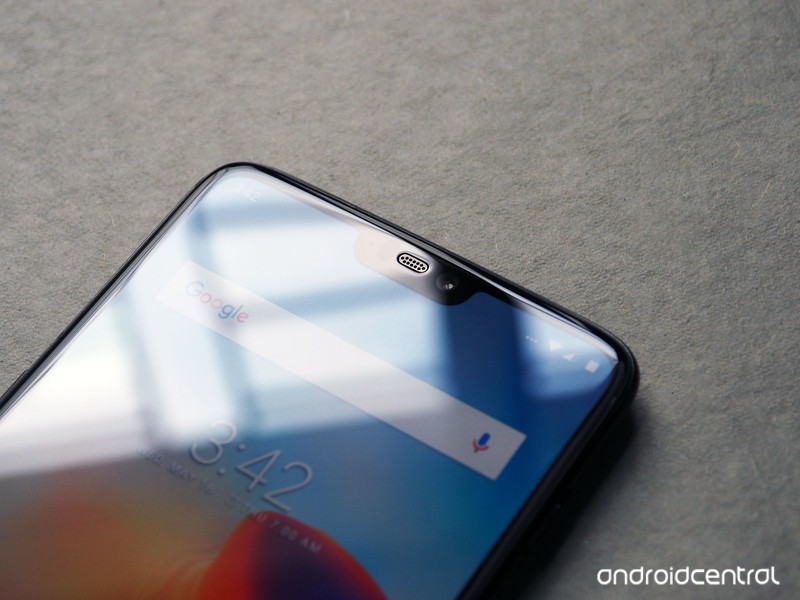
One of the more controversial design choices in the OnePlus 6 is a cutout at the top of the display, which bumps the overall screen size to 6.28 inches while retaining the same overall height as the 6.0-inch OnePlus 5T.
ASUS, OPPO, Vivo, and Huawei have already introduced devices this year that feature the notch, and it looks like this unwelcome trend is only set to continue as the year progresses.
What’s particularly irksome is that the notch doesn’t really add a lot of value to the OnePlus 6, as there’s a chin at the bottom. The notch works on the iPhone X because it creates an all-screen front — where the bottom bar is the same width as the bezels at the top.
That, however, isn’t the case on the OnePlus 6 or any of the other Android copycats we’ve seen so far. The OnePlus 6 has a noticeable chin at the bottom, and there’s a mismatch in the width of the bezels at the top and bottom.
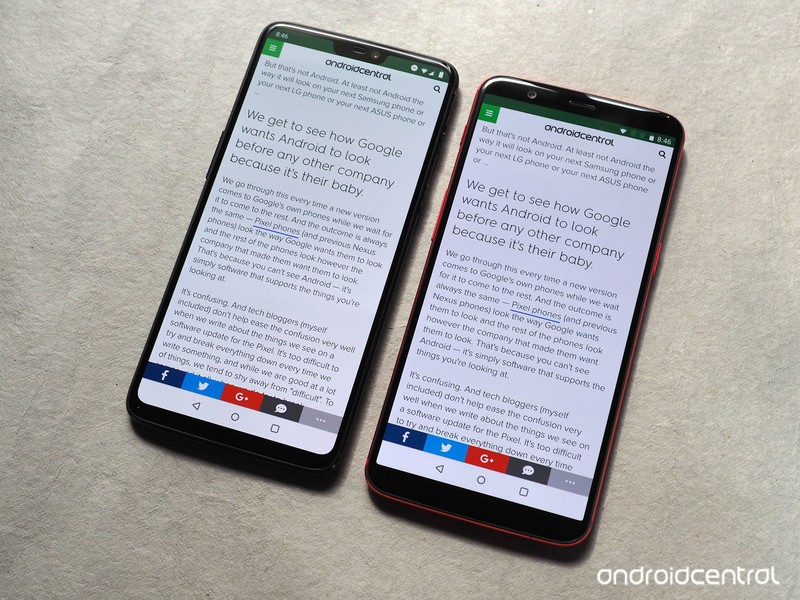
While OnePlus says the notch was designed to maximize the screen real estate, the added 0.28-inch screen size doesn’t amount to much in real-world usage. With the notch enabled, you get to see two extra lines of text when browsing on the OnePlus 6 (versus the 5T), and one added line in the settings pane.
There’s no difference between either device while viewing videos, as most streaming services still deliver videos in 16:9 or 18:9. So it’s easy to see that the notch doesn’t offer any tangible gains when using the phone, but it does stick out like a sore thumb.

Thankfully, you can easily hide it away by heading into the phone’s settings. OnePlus did a much better job than Huawei when it comes to making sure that content doesn’t get hidden behind the notch when you disable it.
Here’s how you can disable the notch on the OnePlus 6.
Open Settings from the app drawer or home screen.
Scroll up to the Device sub-menu.
Tap Display.
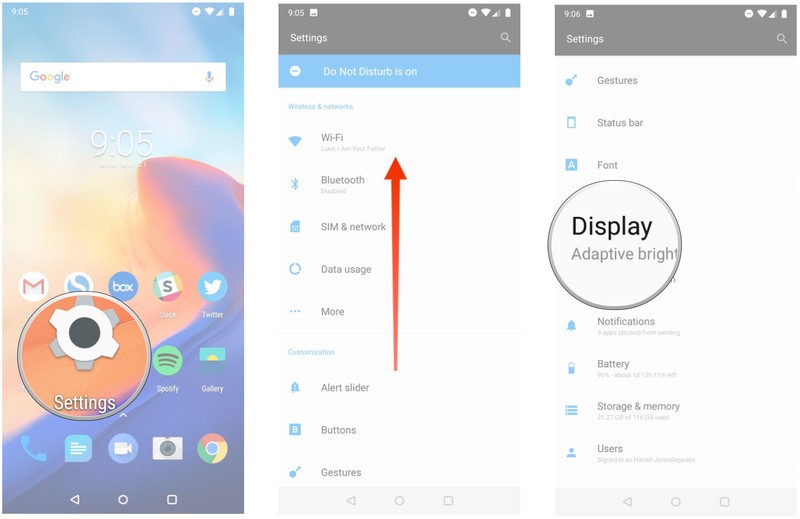
Select Notch display.
Tap Hide the notch area.
You’ll now see black bars on both sides of the notch.

Hiding the notch eliminates most of the annoyances associated with its inclusion in the first place. You’ll still be able to see the cutout when viewing the display under harsh sunlight, but the black bars are otherwise effective in hiding the notch in everyday usage scenarios.
OnePlus 6
- OnePlus 6 review
- OnePlus 6 vs. OnePlus 5T: How much changes in six months?
- OnePlus 6 vs. OnePlus 5: Should you upgrade?
- These are the official OnePlus 6 cases
- The OnePlus 6 doesn’t work on Verizon or Sprint
- Join the discussion in the forums
The best headphones are the ones you love

Because you’ll actually have them with you.
The tech world is in a headphones frenzy these days because phones are losing their headphone jacks and dividing the world into haves and have-nots. The have-nots are largely choosing to ignore the included dongles (and rightfully so) and moving to Bluetooth; the haves are doubling down with audiophile-quality wired headphones that require powerful amps and expensive DACs to extract the best sound. The audio industry is in a state of flux, and it’s difficult to know where to spend your money.
The last week or so I’ve been using OnePlus’s new Bullets Wireless headphones, and they’re great — I’ll say that up front. I was initially quite skeptical given their $70 price tag, but what’s won me over more than the sound quality is the sheer convenience and user-friendliness of the whole package — the way they magnetically attach to one another to turn off and automatically connect to the most recent phone once they’re pulled apart.
I love great-sounding headphones. But what I love more are headphones that I’m actually going to wear every day.
I appreciate that they charge via USB-C, and that, thanks to the standard’s higher output, I only have to top them up for 10 minutes to get a full day’s use from them. I love how comfortable they are, both in my ear and across my neck — anyone who’s worn neckbuds knows the benefits of resting the hardware on one’s nape or collarbone to shift the pressure from the ears themselves, and despite the Bullets’ resemblance to Apple’s BeatsX (or perhaps because of it), I feel entirely at ease using them for long periods of time. They’re just well designed.
Their sound quality is, honestly, the lowest priority me, a stark change to my would-be wireless headphone narrative just a couple of years ago. The signature is pretty good, don’t get me wrong — tight mids, strong but not overpowering bass, and smooth, sibilant-free treble — but they’re not going to overshadow Sony’s gorgeous-sounding WI1000X or Bose’s superlative QC30’s. And they’re not trying to — they’re going up against the Ankers and Plantronics’, at $70, find a pretty nice sweet spot.

It’s not without a healthy glob of irony that OnePlus announced the Bullets Wireless minutes prior to the unveiling of the OnePlus 6, a phone that makes a big show of retaining the beleaguered headphone jack. In fact, it’s one of the few high-end phones offering the port these days (the Galaxy S9 and G7 are the others). That’s why, after using the Koss Porta Pro Wireless, I question the fruitfulness of the “wireless-ization” of older, popular products. At least not without a good reason for doing so.
Koss has been making the Porta Pros since the 80s, and the design shows. They’re light and portable and prized for their warm, articulate sound — not just at their normal $40 price point, but at any price. They sound incredible. So too do the wireless versions, but in shedding wires, Koss didn’t think through what customers would be losing in the process.
The electronics and battery hang down below the wearer like a necklace, which quickly becomes distracting. Worse, a blue LED blinks the entire time it’s connected to a phone or laptop. Who thought that was a good idea? At $80, they still fall into the affordable category for wireless headphones, and their sound is largely unchanged from their forebear’s, which is a notch in the plus column.
But despite the Koss’s better sound, I’m going to choose the Bullets Wireless’s portability and convenience every time, and I have no doubt many would do the same.
Apple removes apps with CallKit framework from the app store in China
Peogeo/123RF
It’s been nearly a year since Apple began removing all VPN apps from the App Store in China, and now the iEmpire is bringing down the hammer on another type of app. Following the enforcement of new regulation from the Chinese Ministry of Industry and Information Technology, Apple is removing apps that use the CallKit framework. This allows developers to integrate their calling services with other call-related apps, providing the calling interface but allowing developers to handle the back-end communication with their own VoIP service.
Apple has begun notifying developers who use this framework that they cannot use this functionality as per new government regulations. In order for their apps to be displayed in the app store, they’ll have to remove any CallKit features. This move doesn’t really come as a surprise, given that popular messaging app WeChat was forced to remove its own CallKit integration after implementing it very briefly.
While it’s not entirely clear why the Chinese government is disallowing CallKit, it’s likely due to the VoIP functionalities, which are generally not permitted in the nation. When Skype was removed from the app store last summer, it was for a similar issue. These VoIP services could allow users to dodge censorship and surveillance, as they make it difficult for government officials to monitor communication.
Apple has come under fire previously for bending too quickly to China’s will when it comes to app censorship. Not only have users protested the company’s seemingly quick adherence to rather far-reaching rules and regulations designed to stymie communication, but U.S. lawmakers have also expressed their displeasure — last year, senators released a letter noting that they were “concerned that Apple may be enabling the Chinese government’s censorship and surveillance of the Internet.”
Apple has also been noted to be taking down apps in China at a much faster clip than normal, as per a study in 2017. In fact, the company was seen to be removing around 58,000 apps in just a two week period, which 9to5Mac described as a “drastic increase compared to normal” around this time last year. We’ll just have to see what apps fall victim next.
Editors’ Recommendations
- Apple is removing apps that overshare your location data with third parties
- Secure your home from your wrist with an August lock and Apple Watch app
- The best weather apps for Android
- The best Wear OS apps
- These apps will help you make the most out of your Apple TV
The Google Play store hosted malware meant to steal from North Korean defectors
McAfee researchers have discovered that hackers with links to the North Korean regime managed to make Google complicit in stealing information from defectors from the nation. As per a recently published blog post, the Google Play store has apparently been playing host to at least three apps designed to collect data from specific individuals. Two of these apps were posing as security apps, while the third claimed to provide food ingredient information. But what they really did was steal information from devices and receive certain code that allowed them to further access data like photos, contact lists, and even text messages.
In most instances, McAfee found the apps were generally sent to select users, generally by contacting them via Facebook. By the time McAfee privately notified Google as to the existence of these apps, 100 folks had already downloaded them, and the apps had been live in the Google Play store for three months — from January to March. Alas, this highlights the shortcomings of Google’s filters that are intended to keep out malware.
The alleged actor behind these apps doesn’t appear to be a new player in the hacking scene. Back in January, McAfee noted that it had found malicious apps intended to infect North Korean journalists and defectors’ devices. The group behind these apps was subsequently named Sun Team, and is apparently the same group behind these latest apps.
At the very least, the apps were all linked to the same developer email address. Moreover, McAfee found that the words used in the control servers were common in North Korea, but not South Korea. There was also a North Korean IP address discovered in a test log file of some Android devices connected to account used to send out the malware. This has led researchers to believe that the attacks are based in the isolated nation.
“These features are strong evidence that the actors behind these campaigns are not native South Koreans but are familiar with the culture and language,” McAfee researchers wrote. “These elements are suggestive, though not a confirmation, of the nationality of the actors behind these malware campaigns.”
Editors’ Recommendations
- Mi-Cam baby monitors are easily hackable, so you may want to turn yours off
- Scientists hunt meteorites in Antarctica with metal-detecting snowmobiles
- The best movies on Netflix right now (May 2018)
- Researchers claim hackers can create havoc in the Oculus Rift, HTC Vive
- Everything you need to know about Samsung Pay
The Google Play store hosted malware meant to steal from North Korean defectors
McAfee researchers have discovered that hackers with links to the North Korean regime managed to make Google complicit in stealing information from defectors from the nation. As per a recently published blog post, the Google Play store has apparently been playing host to at least three apps designed to collect data from specific individuals. Two of these apps were posing as security apps, while the third claimed to provide food ingredient information. But what they really did was steal information from devices and receive certain code that allowed them to further access data like photos, contact lists, and even text messages.
In most instances, McAfee found the apps were generally sent to select users, generally by contacting them via Facebook. By the time McAfee privately notified Google as to the existence of these apps, 100 folks had already downloaded them, and the apps had been live in the Google Play store for three months — from January to March. Alas, this highlights the shortcomings of Google’s filters that are intended to keep out malware.
The alleged actor behind these apps doesn’t appear to be a new player in the hacking scene. Back in January, McAfee noted that it had found malicious apps intended to infect North Korean journalists and defectors’ devices. The group behind these apps was subsequently named Sun Team, and is apparently the same group behind these latest apps.
At the very least, the apps were all linked to the same developer email address. Moreover, McAfee found that the words used in the control servers were common in North Korea, but not South Korea. There was also a North Korean IP address discovered in a test log file of some Android devices connected to account used to send out the malware. This has led researchers to believe that the attacks are based in the isolated nation.
“These features are strong evidence that the actors behind these campaigns are not native South Koreans but are familiar with the culture and language,” McAfee researchers wrote. “These elements are suggestive, though not a confirmation, of the nationality of the actors behind these malware campaigns.”
Editors’ Recommendations
- Mi-Cam baby monitors are easily hackable, so you may want to turn yours off
- Scientists hunt meteorites in Antarctica with metal-detecting snowmobiles
- The best movies on Netflix right now (May 2018)
- Researchers claim hackers can create havoc in the Oculus Rift, HTC Vive
- Everything you need to know about Samsung Pay
OnePlus 6 vs. Samsung Galaxy S9 Plus: Which big phone is better?
You like big screens and you cannot lie — and the recently revealed OnePlus 6 has one of the biggest in the business. But the “flagship killer” isn’t the only large display in the Android game, and the Samsung Galaxy S9 Plus is one of the best premium, large-screened phones that you can get.
With tip-top performance and the latest technology, both phones are amazing choices — but which one deserves your hard-earned money? We took a look to find out.
Specs
OnePlus 6
Samsung Galaxy S9 Plus
Size
155.7 x 75.4 x 7.8 mm (6.13 x 2.97 x 0.31 inches)
158.1 x 73.8 x 8.5 mm (6.22 x 2.91 x 0.33 inches)
Weight
177 grams (6.24 ounces)
189 grams (6.67 ounces)
Screen size
6.28-inch AMOLED display
6.2-inch AMOLED display
Screen resolution
2,280 x 1,080 pixels (402 pixels per inch)
2,960 x 1,440 pixels (529 pixels per inch)
Operating system
Android 8.1 Oreo
Android 8.0 Oreo
Storage space
64GB (with 6GB of RAM), 128GB, 256GB (both with 8GB of RAM)
64GB, 128GB, 256GB
MicroSD card slot
No
Yes, up to 256GB
Tap-to-pay services
Google Pay
Google Pay, Samsung Pay
Processor
Qualcomm Snapdragon 845
Qualcomm Snapdragon 845
RAM
6GB, 8GB
6GB
Camera
Dual 16MP and 20MP rear, 16MP front
Dual 12MP (with OIS) and 12MP (with OIS) rear, variable aperture, 8MP front
Video
2,160p at 60 frames per second, 1080p at 30/60/120, 720p at 480 fps super slow motion, HDR
2,160p at 60 frames per second, 1,080p at 240 fps, 720p at 960 fps
Bluetooth version
Bluetooth 5.0
Bluetooth 5.0
Ports
3.5mm headphone jack, USB-C
3.5mm headphone jack, USB-C
Fingerprint sensor
Yes (back)
Yes (back)
Water resistance
No
IP68
Battery
3,300mAh
DashCharge
3,500mAh
QuickCharge 2.0
Qi wireless charging
App marketplace
Google Play Store
Google Play Store
Network support
AT&T and T-Mobile
T-Mobile, AT&T, Verizon, Sprint
Colors
Midnight Black, Mirror Black, Silk White
Midnight Black, Coral Blue, Lilac Purple
Price
$530
$840
Buy from
OnePlus
Samsung, Amazon
Review score
Hands-on review
4.5 out of 5 stars
Performance, battery life, and charging
Make no mistake, these are two fast phones. Both are powered by Qualcomm’s new Snapdragon 845, which gives blisteringly good performance, and top-tier real world speed. You’ll find the same amount of RAM in the Galaxy S9 Plus and the OnePlus 6’s 64GB model, but the OnePlus 6 does have more RAM in the 128GB and 256GB models, giving the challenger something of an edge — even if that edge is minimal.
Moving to battery life, there’s not much in it again. The Galaxy S9 Plus is rocking a larger battery, but the lower resolution on the OnePlus 6 should see some power savings there. The OnePlus 6’s Dash Charge leaves the Galaxy’s QuickCharge 2.0 in the dust — but the Galaxy S9 Plus has the convenience of wireless charging.
We’re finding it too difficult to separate these two in this category. While the OnePlus 6 has a larger amount of RAM, the performance impact from that is likely to be minimal. The same goes for the S9 Plus’s larger battery. Until we’ve had more time with the OnePlus 6, this is a tie.
Winner: Tie
Design and durability
Andy Boxall/Digital Trends
2018 is calling with two of the best looking phones of the year. No matter which of these two behemoths you pick, you’re getting a phone worth gazing at. OnePlus has broken its love affair with metal to give the OnePlus 6 a full glass construction and a gorgeous bezel-less design, and while the Galaxy S9 Plus is very similar to the previous S8 range, that’s not a bad thing, since the S9 Plus is utterly stunning. Both phones get full marks in the design category.
Things start to go downhill when we look at durability, though. Glass is, well, fragile — even if it is Gorilla Glass — and you’re probably going to want a case for both of these phones. However, this is where the Galaxy S9 Plus starts to show some of its premium quality, with an IP68 rating which indicates that it can handle a short dunk. The OnePlus 6 lacks any water resistance, making it a phone you’re going to have to be careful with around the bath or toilet.
While both of these phones are neck and neck in looks and design, the Galaxy S9 Plus really pulls ahead with that water-resistance — and that wins it the round.
Winner: Samsung Galaxy S9 Plus
Display
Julian Chokkattu/Digital Trends
Both of these devices showcase great visual fidelity with their massive AMOLED screens, and you might be hard pressed to notice any differences at first glance. The differences are definitely there once you look for them, though — you’ll find a 2,280 x 1,080-pixel resolution on the OnePlus 6’s 6.28-inch screen, which just isn’t as sharp as the 2,960 x 1,440 pixels on the Galaxy S9 Plus. The OnePlus 6 also has the notch at the top of the screen, extending the available screen real estate — but possibly at the expense of style, if you’re not a fan of the notch trend.
While the difference between 1080p and 1440p might not be hugely noticeable on screens this size, we have to award this to the phone with the objectively better display.
Winner: Samsung Galaxy S9 Plus
Camera
Andy Boxall/Digital Trends
Camera quality has become a serious battleground for higher-end phones, with recent phones seeing some serious upgrades in this area. The OnePlus 6 isn’t necessarily focused on the camera, but that doesn’t mean OnePlus has slacked off. You’ll find two lenses arranged vertically on the back of the OnePlus 6 — a 16-megapixel and 20-megapixel lens — as well as a 16-megapixel selfie shooter around the front. Both the front and back cameras are kitted out with Portrait Mode selective blur, and the few sample pictures we took looked good.
In contrast, the Galaxy S9 Plus was focused on the camera, and comes with two 12-megapixel lenses, and an 8-megapixel lens at the front. The S9 Plus has all the same selective blur trickery, but Samsung has really upped the game here with a variable aperture that does the business in strong and low light, and provides good pictures across the board.
Moving over to video, both offer support for shooting in 4K at 60 frames per second, but the S9 Plus delivers super slow-motion at 960 fps, while the slow-motion option in the OnePlus 6 is limited to 480 fps.
We’re hesitant to declare a winner before we’ve had a proper chance to play with one of the cameras, so this is a tie for the moment.
Winner: Tie
Software and updates
Andy Boxall/Digital Trends
Being flagships of their respective brands, you’ll find the top tier of Android on both of these, albeit with both manufacturers having placed their own skins over the top.
OnePlus can be pretty speedy in getting new versions of Android out to its phones, with the OnePlus 3 and 3T receiving updates to Android 8.0 Oreo in November of last year. By contrast, Galaxy S8 users had to wait until February 2018 to get Oreo on their phones. While it was longer until the OnePlus 5 and 5T got the Oreo update, based on previous performance we’re confident that OnePlus will have an Android P update out faster than Samsung.
Winner: OnePlus 6
Special features
Being a phone focused on bringing great performance to a lower price bracket, the OnePlus 6 doesn’t have all that many special features to call its own. There’s a face unlocking feature, as well as the Shelf, which contains recently used apps and the like — but otherwise, it’s fairly barren in this regard.
By contrast, the Galaxy S9 Plus is stuffed with features. If you’re into using your phone as a workstation, there’s the Dex Pad or Dex Station. If trying your hand at VR sounds like fun, the Gear VR is there. There’s Samsung’s built-in voice assistant Bixby too, not to mention AR Emojis.
The Galaxy S9 Plus has so many extra features built-in that this is simply one-sided.
Winner: Samsung Galaxy S9 Plus
Price
You’ll be able to pick up the OnePlus 6 from May 22, with prices starting at $530 for the 64GB model, but the handset will only work on AT&T and T-Mobile. The Galaxy S9 Plus is a lot more expensive, starting at $840 for the 64GB model, but it will work on all the major U.S. carriers.
Overall winner: Samsung Galaxy S9 Plus
While this result may mean the OnePlus 6 falls short of its reputation as a flagship killer, don’t let that put you off. With all the latest hardware and software, the OnePlus 6 is a force to be reckoned with, and it delivers all the power and performance you’d expect from a phone that costs hundreds of dollars more — it’s only in the peripheral areas that it falls short, like water-resistance, special features, and not having a 4K resolution. These are areas that most people can afford to ignore or may not notice. If you’re restricted to around $500 for a phone, then the OnePlus 6 is one of the best phones you can buy, maybe the best.
However, if money is no object, then it simply has to be the Samsung Galaxy S9 Plus. Yes, it’s over $300 more, but money really does talk, and in this case it means an extra level of polish that the OnePlus 6 simply doesn’t have the budget to meet. It has the power, the performance, the display, the design, and that amazing camera which all adds up to a seriously tempting smartphone.
Editors’ Recommendations
- The Galaxy S9 Plus vs. Galaxy Note 8: Samsung’s heavyweights slug it out
- OnePlus 6 vs. OnePlus 5T vs. OnePlus 5: Is it worth it to upgrade?
- Huawei P20 Pro vs. Samsung Galaxy S9 Plus: Are three better than two?
- Samsung Galaxy S9 vs. Apple iPhone X: Heavyweight smartphone clash
- Flagship face-off: Samsung’s Galaxy S9 Plus vs. Google’s Pixel 2 XL
It’s easy to get serious about self-care with the quirky, fun Aloe Bud app
Brenda Stolyar/Digital Trends
App Attack is a weekly series where we search the App Store and Google Play Store for the best apps of the week. Check out App Attack every Sunday for the latest.
More often than not, life can become busy and stressful — which means self-care gets put on the back burner. This week we have an app that will help make it easier and more enjoyable to check in with yourself each day.
Aloe Bud is a self-care companion app that gives users gentle reminders via push notifications. Whether it’s staying hydrated throughout the day or making sure you’re taking a break from work, you have the freedom to choose from a variety of different activities to set for yourself.
How Aloe Bud grew into an app
The idea for Aloe Bud came to fruition when creator and entrepreneur Amber Discko was looking for a tool that would help motivate her to keep up with self-care in a positive way. Having just finished working on the Hilary Clinton campaign in 2016, Discko realized their own personal needs were severely neglected throughout the process. But having noticed the lack of apps out there for simple self-care reminders, Discko turned to the Calendar app on their iPhone — until the notifications started to become too much.
“I had my calendar booked by the half an hour and I was trying to find a way to separate my personal from my professional because it was so important. I tried different apps and I just felt like I wasn’t sticking with it… and I felt really guilty. So, I decided that I needed to build something for myself that I knew what would work for me,” Discko told Digital Trends.
Brenda Stolyar/Digital Trends
Aloe Bud first started as a free online survey check-in tool, which Discko posted to the online community they founded called Femsplain. After thousands of people (a majority of which were mobile users) took the survey, Discko started receiving requests to turn it into a mobile app.
Having had prior experience in fundraising to bring Femsplain to life, they were able to raise the funds needed to create Aloe Bud. With a background in computer science, Discko also teamed up with a development team to help build the app into what it is today.
While the concept of Aloe Bud clearly resonated with a large group of people, there were also those who were puzzled by its simplicity.
“When I did the Kickstarter campaign people were like, ‘Who needs an app to be reminded to drink water?’ and … a lot of people do … Establishing routines is not the easiest thing,” Discko said.
Using Aloe Bud on a daily basis
When you first download Aloe Bud, you’re brought to your personal dashboard where you can start to add in activity cards. After tapping on the plus sign in the left-hand corner, you can then choose your activity and begin to customize it. For example, by choosing ‘Move’ as my activity type, I can then add in what day and time I’d like the push notification as well as what the reminder will say. You can either choose from the custom reminders already written out or you can write your own. You can also pick whether you want the notifications to repeat everyday, every work day, every weekend, or only on specific days of the week you set.
I was immediately drawn to how light and airy it felt when it comes to its look and features. In comparison to other self-care apps, Aloe Bud goes against the grain to remind users that taking care of yourself doesn’t have to feel like a chore and that it can actually be fun. Filled with bright colors and pixel art illustrations, the app gives off a nostalgic vibe to it that feels comforting.
For someone like me who tends to lose track of time when there’s deadlines or will sometimes become so hyper-focused on what I’m doing, I can forget to complete essential tasks that are crucial to my mental health. Even though it may not seem like it in theory, taking a walk or rehydrating can do a lot for one’s mental clarity. Seeing the push notifications on my phone gently nudging me in a way that’s nurturing, makes me want to stay committed to checking in and completing the activities.
But while you can find yourself wanting to set notifications for every activity, Aloe Bud does remind you to set them sparingly, for the most effective results. That way, you can avoid “notification fatigue” and won’t feel like you’re receiving too many alerts or taking on too much.
In addition to checking in, Aloe Bud also includes a feature that allows for self-reflection. Instead of choosing to check-in with each notification, you can choose the reflection option instead. This will prompt questions like “What are you currently grateful for?” or “What have you been reading lately?” followed by a space to write up to 350 characters with your particular thoughts. That way, you’re also able to use the app as your own personal journal to help express how you’ve been feeling. While I specifically stuck to the check-in feature, I like how convenient it is to be able to jot down quick thoughts throughout the day that you otherwise wouldn’t reflect on.
Aloe Bud is free to use but there’s in-app purchases to allow you to further customize your experience. Ranging between $2 and $5, you can add bundles that give you the ability to unlock more gentle reminders or write your own personalized reminder messages.
Setting the tone for self-care
While Discko set out to keep the aesthetic of Aloe Bud cute and enjoyable, they also stressed the importance of the language. Rather than being told to do an activity such as “drink water, or “take a break” the app uses specific language that feel less overbearing.
“I spent months developing that because I wanted to make sure the words that we use weren’t triggering to anyone, or made people feel irritated by them,” they eplained. “For example, ‘fuel’ before was obviously ‘food’ or ‘eat’ and those words [were] not the tone that we wanted.”
Aloe Bud also includes plenty of customization options in order to make the app feel as tailored to the user as possible. While using the app, I’m easily able to delete specific activities, edit the day and time I want to receive the notifications, and even snooze reminders right in the check-in screen. Discko stressed this type of personalization was key — especially on days when you feel like you’re really struggling with your mental health.
“I’ve lived with depression my entire life and I completely understand not wanting to be told to do something you know you’re supposed to do. And so … I made sure to include or to promote that these [activities] can be adjusted at any time” Discko said, “I’ve seen it in people’s posts saying that, ‘While it can be annoying, I’m still doing it and that’s important for me — to say that I’m actually doing one of the three things I have set.’”
While Aloe Bud can be used as a tool for mental health, it’s not a replacement — especially for those seeking serious help. Included within the app’s settings is a tab for mental health resources, which will bring you to Aloe Bud’s site where a page lists the National Suicide Prevention Lifeline and tons of other help lines to refer to.
Discko explained that since talking about mental health is extremely important, they save the discussions for Aloe Bud’s social channels. Whether it’s on Twitter, Instagram, or Facebook, each account acts an extension to the app with positive and uplifting content, while still encouraging an open dialogue.
In the future, Discko plans on adding more features to Aloe Bud — starting with more options for reminders. Rather than having the reminder go off each day, she’d like to give users the ability to set it within intervals — like being able to set reminders to go off five times between 10 AM to 6 PM. Or, also having the option to set a reminder to go off once every two weeks. They also hope to have Aloe available in other languages as well, for those using the app outside of the U.S.
Currently, Aloe Bud is only available for iOS. But Discko is raising funds via Patreon to develop an Android version, which will be available for the platform sometime next year.
Editors’ Recommendations
- 20 awesome indie games you should be playing right now
- 2018 Volkswagen T6 Transporter California first drive review
- Google Home review
- Help us, our sides have split: The best 2018 April Fools Day gags
- Guns N’ Roses alum Matt Sorum rocks beyond blockchain to fight labels, YouTube
 AIVAnet