


Twitter finally details new API, screws third-party apps — again

Twitter has finally announced details for it’s new Account Activity API, which replaces the Streaming API third-party clients have relied on up until now — and the news isn’t good.
Today we’re excited to announce the general availability of Account Activity API. Now developers can get started for free, upgrade to premium as they scale, and move to enterprise when they need even more subscriptions or enterprise functionality. https://t.co/AkMCDNOxbs
— Twitter Dev (@TwitterDev) May 16, 2018
This API suits Twitters goal of feeding analytics and entertainment products, but it’s a heavy blow to developers of third-part Twitter apps like Twitterrific and Tweetbot, and services like the already shutting down Favstar. Here’s why:
There’s no streaming connection capability as is used by only 1% of monthly active apps. Also there’s no home timeline data. We have no plans to add that data to Account Activity API or create a new streaming service. However, home timeline data remains accessible via REST API.
— Twitter Dev (@TwitterDev) May 16, 2018
So, to start with, third-party clients will have to discontinue features like live updates and activity information. Developers at The Iconfactory, which created the first-ever third-party Twitter Client, Twitterrific, have been sharing their reactions:
The public pricing that I’m seeing shows Twitter’s Account Activity API pricing as $2,899/month to get activity updates… for 250 users.Needless to say, we have more than 250 users.It’s possible an “enterprise” deal could be made, but it seems unlikely to be affordable.
— Sean Heber (@BigZaphod) May 16, 2018
The math works out to about $10 per user a month to get push notifications. On a platform where people balk at spending 99¢…
— Craig Hockenberry (@chockenberry) May 16, 2018
Make it $14 or more once associated costs are added and implemented, which would be untenable.
It’s possible Twitter will work with developers to come up with affordable alternatives and even feature workarounds. There are no guarantees, though. And the bigger problem remains: Twitter, for years now, has through action and innaction been terrorizing the developers that helped make the service popular in the very early days of the service.
Favstar has already announced it’s shutting down due to the uncertainty and constraints Twitter continues to introduce.
August 16, 2018 is the new end-of-life date for the old Streaming API. We’ll have to wait and see how many third-party apps and services it takes along with it.
How to get the most comfortable fit for your Oculus Go

If you find the Oculus Go to be a bit uncomfortable, there are a couple of things you can do to ease the pressure.
The first day I had my Oculus Go I began fiddling with how to make it fit right. It’s not that I have the straps too tight or the viewfinder askew. It’s that the darn thing is so top-heavy that my cheeks start to hurt after just a few minutes. I would eventually find myself lifting, pulling, twisting, and doing all manner of things to try to ease the pain, but to no avail.
After a few weeks, I’ve pretty much figured out the most comfortable positioning I can manage (though it still starts to hurt after about 30 minutes). If you’re struggling to get the right fit with your Oculus Go, check out some of my suggestions.
Adjust the strap arms upward

I know, it seems counterintuitive, especially if you’ve got a small head. Rotating the strap arms (the brace that holds the nylon strap) upward is actually intended to make the headset more comfortable for larger heads. It adds a bit of slack to the top strap.
Thanks to a tweet from Car, I learned that by rotating the strap arms upward, it relieves some of the pressure from the cheeks. I tried it out and it really helped a lot. It redirects some of the pressure to your forehead, which is much better at handling extra weight than cheeks.
The only downside to this is that it lets in just a tiny bit of light under the nose curve, which leads to my second suggestion.
Adjust the headset downward toward your nose more

To relieve some of that cheek pressure, get the bottom of the headset over the cheekbones as much as possible. I can position the headset so that the inner nose arc rests lightly on the bridge of my nose while the view is still clear.
This, combined with the raised strap arms, lifts a lot of pressure off of the cheeks. Keep in mind that if your strap arms aren’t rotated upward, you might put too much pressure on your nose, which is just as uncomfortable as putting pressure on your cheeks.
Wear a cap

This isn’t ideal — you don’t want to worry about fashion while you’re playing games in VR, but a backward ball cap or a beanie cap can really make a difference when you’re trying to stay comfortable for long periods of time.
This is especially helpful if your head is small enough that the tightest strap adjustment is just a bit too big.
If you’re wearing a ball cap, be sure to put it on backward so the bill is on the backside of your head.
Try to position your hat low enough on your forehead and the headset high enough that the latter rests on the former. This helps pull the headset away from your cheeks a bit more and relieves some pressure from your forehead.
Your best practices for a perfect fit?
Everyone’s head shape is different, so everyone is going to have a different method for getting the most comfortable fit with their Oculus Go. Do you have any tips for adjusting for the best fit? Put them in the comments.
Oculus Go

- A parent’s guide to Oculus Go
- Oculus Go vs. Lenovo Mirage Solo
- Best Gamepad for Oculus Go
- Best Battery Backup for Oculus Go
Oculus Go 32GB
Oculus Go 64GB
Today’s best deals you won’t want to miss
Whether you’re looking for new tech gear or household items, we’ve got you covered.
Today you can get big discounts on the AMD Ryzen 5 2600X processor, the Razer Phone, Gerber knives, and more! Don’t pass these up.
View the rest of the deals
If you want to know about the deals as soon as they are happening, you’ll want to follow Thrifter on Twitter, and sign up for the newsletter, because missing out on a great deal stinks!
Hulu adds a slew of improvements for when you’re on the road
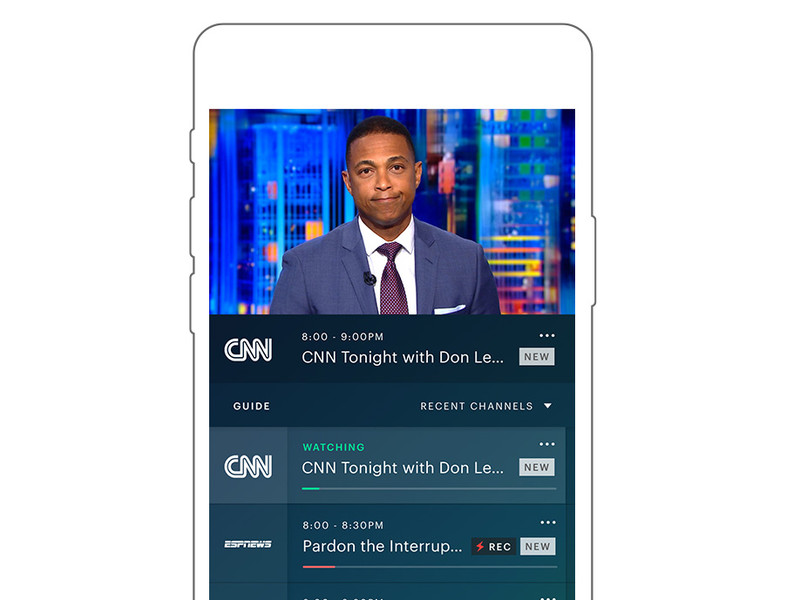
Better playback on phones, laptops, HDMI and Chromecast are on tap.
A lot more people are watching Hulu these days, and a lot more of them are watching on their phones. According to the company, we’re talking about 84 percent more hours a month compared to a year ago.
Same goes for laptops, of course. When you’re on the move, those are two of the most likely devices to be with you. And in that spirit, Hulu has announced a bunch of improvements for viewing video on your phone or laptop.
First, Hulu is adding a “dedicated live TV destination” that’ll quickly take you right back to the last channel you were watching. It’ll come in the form a lightning bold on your nav bar. The mobile experience alway will get that fancy new live TV guide, so you can see what’s coming up over the next day, and make it easier to switch channels.
There’s also a new portrait-mode player, so you can view the guide while you’re watching something else. (As someone who hopelessly flips around looking to see what else is on, that’s greatly appreciated.)
Also, scrubbing is being improved so you get a preview of where you’re seeking to.
All in all, yeah, those are features that Hulu probably should have already had. But it’s nice to see them added now, anyway.
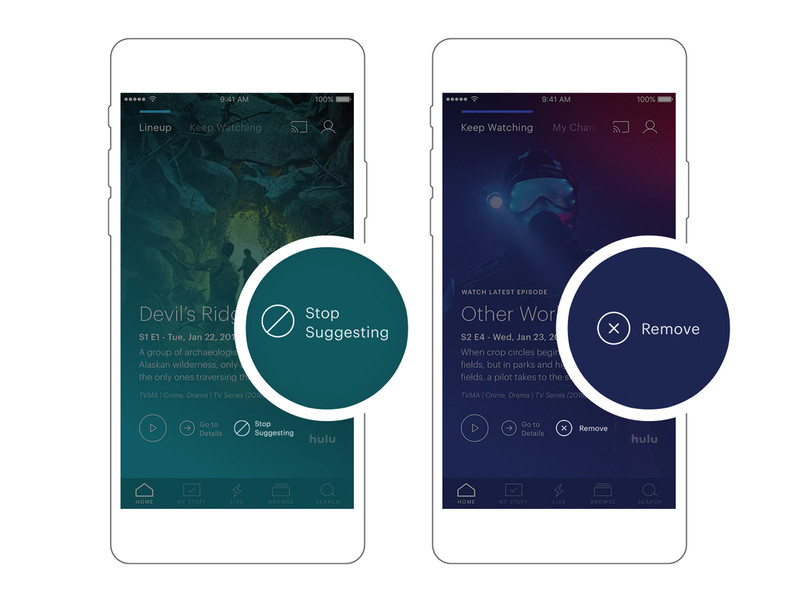
Hulu also is making it easier to control recommended shows. There’s a new “Stop Suggesting” button that will — wait for it — stop suggesting a specific show. And they’re also adding a dedicated “remove from watch history” button that’ll get those embarrassing binges out of your history.
And finally, Hulu says it’s adding HDMI support for iOS and improving Chromecast playback for those times you’re on the road but have access to a nice big TV. And the new guide experience is coming out of beta and will be available for everyone at new.hulu.com.
Introducing CordCutters.com
- The hardware you need
- All about streaming services
- What channels are on which service
- FREE over-the-air TV
- How to watch sports
- Join the discussion
Get the latest deals
A startup called Wonder is building an Android-powered Switch competitor
The gadget is scheduled to come out at some point in 2019.
No matter how heavy of a gamer you are, you’ve likely heard about the Nintendo Switch somehow. Whether you spent the first few weeks of March last year trying to seek one out at your local retailer or know about the console through your gaming-inclined friends, the Switch has become something of a phenomenon.

Now, a startup by the name of Wonder is looking to take the Switch’s formula and replicate it using Android.
In an interview with The Verge, Wonder CEO and Co-Founder Andy Kleinman gave the site an early look and what’s to come. When you buy Wonder’s product, you’ll get a smartphone with a “massive screen,” a docking station that’ll connect it to your TV, and a controller that can be used to play games on the big screen or dock the phone into for gaming on the go. The phone will be powered by the Android-based WonderOS, and similar to a gaming PC, Wonder’s custom software will allow its GPU to be overclocked to get the best gaming experience possible.
Along with the hardware, Wonder will also offer a paid subscription service. As noted by The Verge —
The software services will supposedly range from access to original games from existing game makers, licensed and mobile-optimized third-party titles, streaming game and media options, and other entertainment hub-like features. There’s no word yet on pricing, or even the specs of the phone itself.
Wonder wants to create an ecosystem for gaming/entertainment enthusiasts similar to what Apple has with its products, and while that’s an admirable goal, it’s also an incredibly daunting one. The idea of having one device to act as your smartphone, game console, and entertainment hub is exciting, but one of the reasons the Switch works so well is that it focuses its efforts solely on gaming. There’s no YouTube app, internet browser, etc. The Switch is all about games, and that limited focus is why it thrives.
Can Wonder succeed where others have failed?
Gadgets of the past that have tried to be an all-in-one solution have ultimately failed, and previous Android gaming efforts from NVIDIA and OUYA didn’t catch on with mainstream consumers. That’s not to say Wonder can’t achieve success, but it’s looking at a steep uphill battle in order to do so.
Wonder expects to launch its hardware and subscription service at some point in 2019, meaning we’re still a ways off before seeing any of this come to light. I’m certainly intrigued by what the company wants to do, but I think it’s important to be cautiously optimistic until more details come out.
Are you interested in what Wonder’s creating?
Google reportedly working on ‘Yeti’ gaming hardware and streaming service
The U.S. Senate voted 52-47 in favor of restoring Net Neutrality
Even if the vote passes the Senate, there’s still a long battle ahead.
Updated 5/16/18 — The Senate’s final vote is in, with the official number being 52 – 47 in favor of restoring Net Neutrality! While this is an exciting and unexpected development, the battle to completely reverse FCC Chairman Ajit Pai’s actions is far from over. The CRA will now go to the House of Representatives where Republicans currently hold the majority at 236 to 193. If it by some miracle passes through the House, it then needs to be approved by President Trump who will more than likely veto it. Net Neutrality still has a chance, but we’re going to have to fight tooth and nail to make sure it sticks around.
In mid-December last year, the FCC voted to repeal Net Neutrality. That repeal will officially go into action on June 11, but not before the U.S. Senate votes to hopefully restore it.
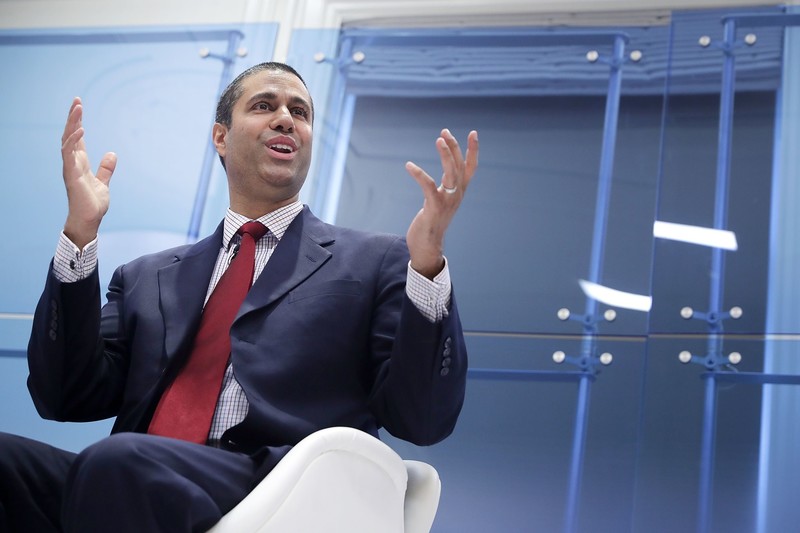
FCC Chairman Ajit Pai
On May 14, Democratic Senator Ed Markey announced that he and other fellow Democrats have pushed the U.S. Senate to vote on whether or not the FCC’s repeal of Net Neutrality should be reversed. The vote will take place on Wednesday, May 16, and it’s being done as part of a Congressional Review Act (also known as a CRA).
Commenting on the announcement, Senator Markey said –
By passing my CRA resolution to put net neutrality back on the books, we can send a clear message to American families that we support them, not the special interest agenda of President Trump and his broadband baron allies. May 16 will be the most important vote for the internet in the history of the Senate, and I call on my Republicans colleagues to join this movement and stand on the right side of digital history.
So far, 50 of the 100 Senators have said they’ll vote to restore Net Neutrality (one of which is a Republican). Considering this and the fact that Republican Senator John McCain will be absent due to his current health conditions, there’s a chance the Democrats could get the vote to go through.
If that happens, however, that doesn’t necessarily mean Net Neutrality will once again be alive and well. After the Senate, the vote will then need to through the House of Representatives where Republicans have the majority of seats at 236 to 193. If it by some miracle gets through the House, there’s still the chance that President Trump will veto it.
Even with those obstacles in mind, it’s still somewhat reassuring to see that action is being taken to roll back FCC Chairman Ajit Pai’s decision.
What do you expect will happen this Wednesday?
Net neutrality, consolidation, monopolies, and you
Apple Accessory Sales: Get 25-45% Off iPhone/iPad Cases and More at Speck and Belkin
Accessory maker Speck today launched a notable sale that discounts products by 45 percent across its online storefront, ranging from smartphone cases to bags, screen protectors, cables, and more. To see the sale prices, find an item to add to your cart, click “View Cart” in the pop-up menu, then enter the discount code SUPER45 in the box at the bottom lefthand corner of the screen.
Note: MacRumors is an affiliate partner with these vendors. When you click a link and make a purchase, we may receive a small payment, which helps us keep the site running.
Speck offers free U.S. shipping and $5 two-day shipping on all orders, and the 45 percent discount will be applied to the total order cost, so multiple products can be purchased at once. Note that if Speck’s products already have a promotion running, like the current offer for $10 off MacBook cases, then the 45 percent savings won’t get applied in the cart. The company also limits the color options available under the promo code in some cases.
Speck’s sale runs through Friday, May 18, so check out a few ideas on items to buy in the list below, and head over to Speck’s dedicated Apple section for more discounted Apple accessories. If you have non-Apple products, the sale also covers accessories for products from Samsung, Microsoft, Google, and others.
iPhone Cases
-
Presidio Grip iPhone X / iPhone 8 – $21.97, down from $39.95
-
Presidio Inked iPhone X / iPhone 8 – $24.72, down from $44.95
iPad Cases
-
Balance Folio for 9.7-inch iPad – $21.97, down from $39.95
-
Balance Folio for 12.9-inch iPad Pro – $27.47, down from $49.95
-
Durafolio for iPad Air 2 – $32.97, down from $59.95
Belkin also has a sale going on this week, offering customers the chance to get 25 percent off select products on its Steals and Deals page using promo code STEAL25. Products available in the sale include USB car chargers, iPhone armbands, iPad cases, Apple Watch bands, USB-C and Lightning cables, and more.
Our exclusive deals with Anker are also ongoing this week, so if you haven’t taken a look at the discounted products be sure to visit our blog post on the sale. Anker’s devices marked down include iPhone X cases, Lightning cables, wall chargers, a wireless Qi mat, and more. The exclusive promo codes will last through May 31, 2018.
Visit our full Deals Roundup for more information on this week’s sales.
Related Roundup: Apple DealsTags: Belkin, Speck
Discuss this article in our forums
Hulu for iOS Gaining Live TV Guide, Enhanced Scrubbing and Options to Better Tailor Recommendations
Hulu today announced several features that are coming to the web and its mobile apps for iOS and Android to optimize the mobile viewing experience.
Hulu’s Live TV guide, which debuted last week on the Apple TV, Xbox One, Amazon Fire TV, and Nintendo Switch, will be added to mobile devices, allowing users to get to live TV with fewer clicks, see what’s on, and see what’s coming up.
On iOS and Android devices, a portrait player will let users see what’s on and switch between channels without having to browse in landscape mode. Rotating the phone horizontally will then launch into full screen mode. When watching on-demand content, Hulu will offer up recommendations on what to watch next when the phone is rotated into portrait mode.
For Watch History, Hulu is adding “Stop Suggesting” and “Remove” toggles to allow users to better tailor their recommendations to their tastes.

Hulu also plans to enhance scrubbing and frame previews, so it’s easier to navigate through shows and movies to find a specific scene, rewatch content, or skip ahead.
HDMI support is being added to iOS to allow an iPhone to be connected to a TV with a Lightning to HDMI adapter, and on the web, live TV subscribers will have access to the new Hulu experience for web.
All of these features will begin rolling out to Hulu users starting next week.
Tag: Hulu
Discuss this article in our forums
OnePlus Again Pokes Fun at Apple’s Headphone Jack Removal During OnePlus 6 Announcement
OnePlus today announced the launch of its latest flagship phone, the OnePlus 6, and the company couldn’t resist taking yet another jab at Apple and its decision to remove the headphone jack from its flagship iPhones.
During the event, OnePlus introduced new $69 OnePlus Bullets Wireless headphones that are shipping alongside the new OnePlus 6. “Just one thing though. I wonder. If you can connect your earphones using Bluetooth, you don’t need a headphone jack anymore, do you?” said Carl Pei, OnePlus co-founder.
Pei’s headphone jack joke starts at 1:14:00
Pei was making a joke at Apple’s expense, as despite the inclusion of Bluetooth headphones with the OnePlus 6, it continues to include a headphone jack. “And yes, there’s still a headphone jack,” Pei said during the unveiling of the OnePlus 6.

OnePlus made a similar joke on stage last year, after Apple eliminated the headphone jack from the iPhone 7 and the iPhone 7 Plus, a move that proved to be unpopular with some customers despite the introduction of the AirPods.
“On the bottom, you’ll notice that we ditched the 3.5mm headphone jack. The elegance of the overall design is instantly heightened. And who needs a headphone jack anyway? That’s why Bluetooth exists, right? Just kidding. Of course the OnePlus 5 has a headphone jack.”
Design wise, though it includes a headphone jack, the new OnePlus 6 takes other design cues from the iPhone X, like many Android smartphones this year. It features a 6.28-inch AMOLED display with minimal bezels and a notch at the top to house the front-facing 16-megapixel camera, along with a glass body. There are two vertically positioned cameras at the rear of the device.

Inside, the OnePlus 6 sports a Qualcomm Snapdragon 845 processor, 6GB to 8GB RAM, and a minimum of 64GB of storage. It comes with facial recognition capabilities, which the company says uses more than 100 identifiers for security purposes, and it also features a fingerprint sensor at the back. Other features include support for dual SIM cards, fast charging, rain resistance, and the ability to run the latest versions of Android, including the current Android P beta.

Pricing on the OnePlus 6, which launches on May 22, starts at $529. The device is available in several colors, including Mirror Black, Midnight Black, and Silk White. The OnePlus Bullets will be available on June 5 for $69.
Tag: OnePlus
Discuss this article in our forums
U.S. Senate Votes to Restore Net Neutrality, Now Expected to Face Major Hurdle in House
The United States Senate today voted to repeal the Federal Communication Commission’s “Restoring Internet Freedom” order, which was enacted last December and reverses Obama-era Net Neutrality rules. Today’s decision ended with a vote of 52-47 in favor of restoring Net Neutrality protections, with supporters totaling all 47 Democratic Senators, two independents, and three Republican Senators.
The Senate Democrats used the Congressional Review Act to call for the vote to halt Net Neutrality’s repeal. The law gives Congress 60 days to review and potentially reverse regulations passed by a federal agency, in this case the FCC.
Under the act, the decision will now move onto the House of Representatives, where it’s expected to not make it past the Republican-majority House. If the measure ultimately makes it to President Trump’s desk, it’s likewise believed that he wouldn’t back the decision to go against a regulation created by his own FCC chairman Ajit Pai.
Net Neutrality has been an increasingly heated debate since momentum gathered in the Republican-controlled FCC last fall, predicting the repeal of the rules that eventually came in December. If the new efforts fail, Net Neutrality rules will officially end in the U.S. in less than a month, on June 11, 2018.
The reversal of Net Neutrality protections classifies internet service providers as “information service” providers, as they were prior to the advent of Net Neutrality in 2015. While supporters of the rollback describe the move as a return to a less-regulated internet, opponents fear that ISPs will be able to slow down internet speeds — or block access completely — to any website they see as a competitor.
Some ISPs have come out stating they would not slow down a user’s internet in any way, including AT&T. In January, the carrier pledged a commitment “to an open internet” in an open letter written by CEO Randall Stephenson. The letter explained that AT&T has not and does not plan to block websites, censor online content, or throttle, discriminate, and degrade network performance based on a website’s contents, although Stephenson didn’t mention some topics of concern for Net Neutrality supporters like online fast lanes and “paid prioritization.”
Apple’s comment on the topic last year stated that the Net Neutrality repeal could “fundamentally alter the internet as we know it,” and if it passed it would be put in place to the detriment of consumers, competition, and innovation. Around the same time last August, the FCC received a record-breaking 22 million comments from the public who voiced their opinions on the controversial issue in the months leading up to the December vote.
Note: Due to the political nature of the discussion regarding this topic, the discussion thread is located in our Politics, Religion, Social Issues forum. All forum members and site visitors are welcome to read and follow the thread, but posting is limited to forum members with at least 100 posts.
Tag: net neutrality
Discuss this article in our forums
 AIVAnet