


U.S. Senate votes to overturn FCC’s repeal of net neutrality protections
Congressional Quarterly/Getty Images
The United States Senate on Wednesday voted in favor of reversing the Federal Communications Commission’s recent order to end net neutrality protection in a narrow 52-to-47 victory. In order for bill to pass the Senate, a simple majority was needed, but 50 senators had already declared support for the preservation of net neutrality prior to Wednesday’s vote. Senate Democrats used the powers granted to the legislative branch under the Congressional Review Act to potentially overturn regulations created by federal agencies, like the FCC’s decision to end requirements for net neutrality.
All 49 Democrats in the Senate voted in favor of the bill, along with Republicans Susan Collins of Maine, John Kennedy of Louisiana, and Lisa Murkowski of Alaska. The bill is now headed to the House of Representatives, where Democrats must convince at least 25 Republicans to cross the aisle in a similar simple majority vote. Democrats argue that the net neutrality regulations would create an open internet, as it prevents internet service providers (ISP) from discriminating against certain types of web traffic. Many Republicans consider these requirements burdensome for internet providers, and that competition in an open market will allow industry players to self-govern.
In the House of Representatives, the bill faces a tougher uphill battle. In order for House Democrats to use the Congressional Review Act, they must collect signatures from a full majority of the House — the Senate only required 30 signatures — just to bring the issue up for vote. If it’s passed by the House after a vote, it needs to be signed by President Donald Trump to be enacted into law. If the measure is ultimately unsuccessful, the FCC’s repeal of the 2015 Open Internet Order would take effect starting June 11, according to FCC Chairman Ajit Pai.
Prior to the Senate vote, lobbyists for cable companies, telecoms, and mobile phone companies stated that legislation is unnecessary, and that internet service providers will self-regulate within the industry, a point that Democrats argued was false, citing the industry’s recent practices of throttling and data prioritization. Senator Ed Markey of Massachusetts argued that “net neutrality is the free speech issue of our time,” according to Ars Technica.
One of the reasons why the FCC decided to end its net neutrality protection is because the agency believes that its authority extends only in the regulation of broadband networks, whereas websites and services are under the domain of the Federal Trade Commission. Republicans used this talking point to argue that ISPs shouldn’t be forced to operate under different rules than websites in their support for ending net neutrality protections.
Editors’ Recommendations
- Oregon is the latest state to jump on the net neutrality bandwagon
- Congress is looking to bring fiber internet to you faster with the Dig Once bill
- U.S. Senate forces a vote that could restore net neutrality
- FCC puts a date on net neutrality’s tombstone ahead of Senate vote
- Vermont becomes fifth state to sign order supporting net neutrality
Alienware Area-51 R5 review
Research Center:
Alienware Area 51 R5
The Alienware Area-51 has always been a striking machine. With its angled edges, pyramidal design, and gently glowing LED lighting, there’s just nothing else like it. The unusual case design is typically paired with extravagantly powerful hardware and the Area-51 R5 is no exception.
Our review unit featured a liquid-cooled overclocked 18-core Intel Core i9-7980XE processor, two liquid-cooled Nvidia GeForce GTX 1080 graphics cards running in SLI, 64GB of RAM, and a 1TB M.2 SSD with a 2TB mechanical hard drive backup.
Basically, the Area-51 R5 has everything pushed to its logical extreme — even its price. All this hardware and expert engineering will run you about $6,709. The Area-51 is billed as a gaming desktop, but with price like that, and such unfettered power humming away inside this thing, it is wasted to be used on gaming alone. Let’s show you what all this thing can do.
A real eye-catcher
Just look at this thing. Like we mentioned, it’s entirely unlike anything else on the market. The Area 51’s iconic “triad” design has served Alienware well over the years, and the Area-51 R5 features the second-generation version with a few internal tweaks and refinements.
Despite its unusual shape, we actually didn’t have any trouble fitting it under desks, on top of desks, or anywhere really.
Externally, the Area-51 pretty much looks the same as it always had — and that’s not a bad thing. It’s just kind of polarizing. This is a very large computer, and its design doesn’t lend itself to being tucked away under a desk, toiling in obscurity. This is a desktop computer that begs to be seen, to be displayed, and its size makes it a little hard to find space for it.
The angles on the case make it a bit longer than a typical PC. Despite its unusual shape, we actually didn’t’ have any trouble fitting it under desks, on top of desks, behind monitors. It’s big and heavy, but it’s not as big as it seems. Still, that extra weight means you’ll definitely need a sturdy desk.
For the Alienware Area-51 to truly be a desktop computer, you’re going to need a pretty substantial desk. Its overall footprint isn’t that much bigger than a traditional gaming desktop, but it is a bit different. It’s taller, for one, and a little thicker.
All the ports, and then some
Due to its unusual shape, you might be wondering about the ports. Rest assured, they’re all where you’d expect them to be — with a few convenient changes. First, replacing the top-side ports on many desktops, the Alienware Area-51 R5 features four USB ports on the front of the chassis. It’s angular design actually makes them more easily accessible than typical front-facing ports when it’s under a desk.
Alienware Area 51 R5 Compared To
Falcon Northwest Tiki (2018)
Dell Inspiron Desktop 5680 (2018)
Intel Hades Canyon NUC8i7HVK
Dell Inspiron 5675
Dell XPS 8930 Tower
Origin Millennium
Asus G11DF-DBR5-GTX1060
Origin Neuron
Alienware Area 51 (2017)
AVADirect Avant Mid-Size Dekstop
Digital Storm Velox (Kaby Lake)
Cybertron CLX Ra
Origin PC Omega
Digital Storm Velox
Falcon Northwest FragBox
Otherwise, the external connectivity around back is about what you’d expect, nine USB ports, not one but two ethernet ports, a USB-C port, and there’s even a convenient little button that turns on a small external light, so you can see the ports more easily.
Spacious interior
With such an unusual exterior design, you might expect the interior of the Alienware Area-51 to be cramped or awkward, and you’d be wrong. Once you unscrew the exterior lock on the Area 51’s case, all you need to do open it is pull a pair of switches along the top-side of the case. The panels pop open like car doors.
Without moving a single internal component, you have access to the RAM, the graphics cards, the power supply, and the fan assemblies.
Once you remove the panels, you’ll see what we meant about the interior. It’s luxurious. There’s plenty of open space, but it’s not wasted! The inside of the front panel is where you’ll find an intake fan, and two of the fans connected to the liquid cooling units on the graphics cards. The rear panel is hooked up to the liquid cooling block on the CPU.
Cables are neatly zip-tied together according to their purpose, power cables are labeled and elegantly strung through the case without unnecessary slack. Try as you might, you won’t find a single tangled cable in here — not even on the back-side of the motherboard, where cables typically go to braid themselves into dense brambly nests. Nothing. Just simple, straightforward cable management with an eye toward accessibility and future upgrades.
Without moving a single internal component, you have access to the RAM, the graphics cards, the power supply, and the fan assemblies. Because of the superb cable management here, performing routine maintenance is a breeze. Removing hardware components is almost entirely tool-free, thanks to the clip that holds the graphics cards in place. There’s even a battery-powered work light that turns on when you open the case, so you can see every port, cable, and plug.
These little details are an important part of what you get when you invest in a system like the Area 51. Sure, you could just pick up all of its internal components and put it together yourself, or buy an identically-outfitted PC from any other manufacturer. But what you get by going with the Area-51 is an unparalleled level of engineering and intuitive internal design.
A souped-up daily driver
For everyday workloads, running Word, Excel, even egregiously, insanely intensive web-browsing, the Area-51 R5 is a champ. Between its Core i9 processor and 64GB of RAM, an average office workload isn’t going to anywhere near the limit of this machine’s capabilities.
One thing is abundantly clear; our standard test suite may not be able to keep up with this machine.
To give you some context, we threw absolutely everything we could think of at the Area-51 R5. We opened up four browser windows, with 25 live tabs running a 4K video in each one, ran Geekbench 4, and a Deus Ex: Mankind Divided benchmark, all simultaneously while we wrote this review. We didn’t notice even a single moment of slowdown in Word, not a hitch, stutter or hiccup.
Even the Area-51 R5’s hard drives are impressive. Well, one of them is. Our review unit featured a 1TB M.2 SSD — about the size of a stick of gum — and a regular-sized mechanical drive packing an extra 2TB of storage space.
Clearly the Area-51 R5’s SSD isn’t the quickest we’ve ever seen, but it’s very quick for its size. Coming in with a read speed of 1,734 megabytes-per-second it’s about a third slower than the 2TB M.2 drive in the Falcon Northwest Tiki, and the 512GB M.2 drive in the Origin Millennium.
The mechanical drive performed well for a mechanical drive, topping out at a 195 MB/S read speed and a 193 MB/s write speed. Still, moving massive files around on the M.2 drive was just as quick as you’d expect. The same M.2 drive is available in 256GB and 512GB configurations, with the 2TB mechanical drive as backup.
So, if a standard office workload on steroids won’t trip up the Area 51, that begs the question: What will?
Keeping up with an i9
The Alienware Area-51 R5 is available in configurations with Intel Core i7-7800X, i7-7820X, and i9-7980XE processors. Our review unit is the monstrous 18-core i9-7980XE variant. To get an idea for just how powerful the hardware inside the Alienware Area-51 R5 really is, we gave it a run through Geekbench 4 — and the results are definitely instructive. Looking at single core performance, it’s clear this overclocked Core i9 is an above average performer.
It is outperformed by 8th-generation Core i7-8700K processors here, but that’s to be expected, these are six-core processors, so each core is a little quicker than each core in the Core i9-7980XE, which is an 18-core processor. Multi-core performance is where the Core i9 really shines. The 18-core processor easily outruns the stock Core i7-7700K and even the 8th-generation Core i7-8700K in multi-core performance.
One thing is abundantly clear, our standard test suite may not be able to keep up with this machine. Looking at how quickly the Area-51 R5 crunched our 4K video encode, you can see what we mean.
The Area-51 R5 just obliterated our test here. It crunched the 4K encode so fast we had to run it a couple times to make sure we set it up right. It finished the encode in just 123 seconds, or just two minutes, three seconds. That’s the quickest we’ve ever seen — by a significant margin.
GPU Performance
Our Alienware Area-51 R5 review unit is, as we mentioned, basically maxed out. It has one of the most powerful processors on the market, 64GB of RAM, and two high-end graphics cards. It should be no surprise to say that it handles most games with aplomb.
Looking at its performance in 3DMark you can get a good sense for how well it performs running actual games. With its dual GTX 1080 graphics cards, its overall score in both Fire Strike and Time Spy easily eclipses the scores we saw out of single-card machines like the Falcon Northwest Tiki and Velocity Micro M60. Compared to the Origin Millennium, with its dual GTX 1080 TI graphics cards though, the Alienware Area-51 R5 slips behind a bit.
That’s not too much of a problem, considering you can spec the Area-51 R5 with dual GTX 1080 Ti graphics cards for similar performance.
It’s a trend we see here in our 1080p performance, with the Area-51 R5 taking a close second to the Origin Millennium and its quicker SLI setup. Still, it’s important to point out that the performance gap is small in most cases, and even a single 1080 Ti like the one in the Falcon Northwest Tiki, is more than capable of running your games maxed out at 1080p.
In fact, SLI setups are more than a little overkill for 1080p, as you can see from these figures. But, if you have a high refresh rate monitor, an SLI setup is an easy way to hit a framerate high enough to take advantage of a 144Hz refresh rate.
Moving on to 1440p, we can see performance dip appropriately across the board. Looking specifically at the results for Deus Ex: Mankind Divided at Ultra settings, we see something interesting. There’s no denying that running two graphics cards in SLI or Crossfire mode will give you a performance boost. And if you’re looking for top-tier performance it’s a great way to achieve it. But looking at these results there’s only a small margin between the best-in-class performance you see on the Origin Millennium, with its two GTX 1080 Ti graphics cards, and the performance you see in a single-card machine like the Tiki or Velocity Micro M60.
The difference between 70 and 88 FPS is big on paper but when you’re actually playing a game it’s not as noticeable as you might think. Still, it’s appropriate to point out here that all of these machines performed exactly as we’d expect given the strength of their hardware.
Our 4K figures here make one thing abundantly clear: 4K is still very hard on gaming hardware. A well-optimized game like Battlefield 1 will give you the best results, with framerates in excess of 100 FPS if you’re running an SLI setup. But highly-detailed, environment-dense games like Deus Ex: Mankind Divided will give you a bit more trouble. You’re still going to hit good framerates like 45 FPS with all the settings maxed out, but barely. For most games 60 FPS is ideal, 30 is playable, and anything less is well, anything but.
In VRMark, the Area-51 R5’s powerful hardware pushed it to the top of the pile. You should have no trouble at all running the most demanding VR games on this machine, but these benchmark scores illustrate that while the R5 is powerful, VR is still very graphically intensive and doesn’t always make the best use of SLI setups.
It’s as striking as it is functional, and it would serve you well no matter what hardware you pack inside.
The Area-51 hit a score of 9,534 in the entry-level Orange Room benchmark, which is a little lower than what we saw out of the Falcon Northwest Tiki — it hit 13,276 on the same benchmark. There’s a reason for that. While the Alienware Area-51 R5 is a much more powerful computer overall, VR and these VR benchmarks don’t always use a dual graphics card rig as well as they could. That means you might see better performance out of a system running a single 1080 Ti than you would out of a system with two regular 1080 graphics cards.
Of course you could always spec up to a dual 1080 Ti version of the Alienware Area-51 R5 to solve that problem. Still, it’s something to keep an eye on if you plan on buying one of these PCs to run VR demos. Spring for the 1080 Ti instead.
Revamped, refreshed command center
Proprietary software isn’t usually all that noteworthy, but the new Alienware Command Center is definitely an exception. The software unifies the Area 51’s lighting, fan control, and even its overclock settings. Putting everything under one roof makes it easy to manage the Area 51’s various features, and the interface lays everything out in a way that makes sense.
Even if you’ve never used Alienware’s proprietary software before, you should be able to find anything you need just opening the new command center. Change the lighting on the case, turn the factory overlock on or off, or even adjust your power saver settings, all in one place.
Our Take
Judging a desktop like the Alienware Area-51 R5 is tough, but there are a few main points to consider. First, the design and internal layout. These elements are going to be the same no matter what hardware you pick for it. Whether you down-spec the Area-51 to a more affordable $1,900, or crank it all the way up past $8,000, the case, the layout these are the constants you should look at — and in the Area-51 R5’s case, these two elements are world-class.
While the design may be atypical, it’s incredibly thoughtful and intuitive and absolutely stands the test of time. When it comes to hardware, our review unit is kitted out with the best of the best and it shows. Let’s break it down.
Is there a better alternative?
If you’re in the market for a gaming desktop with a design that’s going to weather the ravages of time, the Alienware Area-51 R5 is hard to beat. It’s built like a tank but features a unique and uniquely intuitive design. Taking out the graphics cards can be done without a single tool, same with the RAM. Everything is laid out exactly where it should be, and no single component obscures another. Compared to a standard boxy desktop case, performing standard maintenance or removing components from the Area-51 R5 is an absolute breeze — no matter how much you spent on it.
That’s an important point because it’s a big part of what makes the Alienware Area-51 R5 stand out in a crowded field. Still, you could pack this hardware into just about any other major manufacturer’s gaming desktop — the Origin Neuron comes close, so does the Falcon Northwest Tiki.
The powerful processor, maxed out RAM, and dual graphics cards make for a very powerful machine, but it’s performance you can get elsewhere for about the same price. If you invest about $6,700 at other manufacturers you’re going to end up with very similar hardware.
The special sauce here is the the expertly engineered case and internal layout. In that regard, there really isn’t a better alternative if you don’t mind the Area 51’s size.
How long will it last?
The construction of the Alienware Area-51 R5 is incredibly robust. You’ll notice that when you first pull it out of its shipping box. Its size and weight inspire confidence that this desktop will take whatever you can throw at it. Because of its internal design and the ease with which you can perform routine maintenance, you might find yourself doing it more often which could absolutely lengthen the lifespan of the hardware inside.
If you went all-in and picked up an Area-51 R5 with specs similar to our review unit, it’s safe to say you’re going to be in good hands for at least four to five years — probably longer. Our review unit’s hardware was incredibly powerful and absolutely has the performance headroom to stand up to increasingly demanding software — and games.
The Area-51 R5 features a standard one-year warranty, but you can buy additional support from Dell, up to five years if you don’t mind spending another $813. The standard warranty isn’t bad, it’s what we’d expect from most manufacturers. But it’s a far cry from what you get from Falcon Northwest with its above-and-beyond overnight service and three-year warranty.
Should you buy it?
Yes. If you’re in the market for a desktop PC, and you need something with incredibly powerful hardware and a unique interior and exterior design, then you should absolutely buy the Alienware Area-51 R5.
Even if you scale down the hardware to a configuration a little more reasonable for some mid-range gaming, the Area-51 R5 is a great choice. The design is definitely a little out there, but it grows on you, and it never feels like Alienware sacrificed function for form. The case is as striking as it is functional, and it would serve you well no matter what hardware you pack inside.
Scientists will use use stem cells to grow ‘mini brains’ using Neanderthal DNA
Did we somehow wake up in a Michael Crichton novel without realizing it? First, Harvard University sets out to bring the woolly mammoth back to life. Now, researchers from Germany’s Max Planck Institute for Evolutionary Anthropology have stated their intention to create miniature brains containing Neanderthal DNA.
If you’re wondering where Neanderthal DNA — referring to the genetic code of the archaic humans who lived up to 250,000 years ago — came from, the answer is a previous project from many of the same researchers. Starting around a decade ago, the Neanderthal genome project set out to sequence the DNA of ancient man. This DNA was first recovered from the femur bones of three 38,000-year-old female Neanderthal specimens from Croatia, along with other bones discovered in Spain, Russia and Germany. The project’s findings were ultimately reported in late 2013.
Jump forward to the present day, and the DNA is being used to create brain organoids — referring to simplified, miniature versions of organs. These miniature brains are about the size of a pea and do not exhibit any thought, but nonetheless showcase realistic basic micro-anatomy. They are being developed using a type of stem cell called induced pluripotent stem cells (iPSCs), which have been edited using CRISPR gene editing to contain Neanderthal versions of multiple genes.
The researchers hope that by examining these genes they will be able to highlight the differences between Neanderthals and modern man. Interestingly, it may also help shed light on a number of modern conditions. That’s because the Neanderthal genome project helped reveal that many living people today have miniscule traces of Neanderthal DNA in their genes. According to some theories, this is responsible for aspects of our immune system and skin color. Being able to analyze this in detail could help answer some of those questions.
“Pluripotent stem cells from diverse humans offer the potential to study human functional variation in controlled culture environments,” the abstract for a recent research paper about the work explained. “A portion of this variation originates from ancient admixture between modern humans and Neanderthals, which introduced alleles that left a phenotypic legacy on individual humans today. Here, we show that a large repository of human induced pluripotent stem cells (iPSCs) harbors extensive Neanderthal DNA, including most known functionally relevant Neanderthal alleles present in modern humans. This resource contains Neanderthal DNA that contributes to human phenotypes and diseases, encodes hundreds of amino acid changes, and alters gene expression in specific tissues. Human iPSCs thus provide an opportunity to experimentally explore the Neanderthal contribution to present-day phenotypes, and potentially study Neanderthal traits.”
Editors’ Recommendations
- Genetic engineering innovation makes plants more efficient at using water
- Engineers want to 3D print stuff in space using recycled astronaut poop
- Robotic exosuits will make us better, stronger, faster, right? Not necessarily!
- In new breakthrough, CRISPR tools target RNA to tackle dementia
- Gaming is just the beginning. Here are 8 innovative ways VR is being used today
OnePlus 6 hands-on: Glass on glass
Learn more about OnePlus 6
It’s been six months, so get ready for another OnePlus phone. The company is known for pumping out devices faster than you can buy them, but we’re always surprised what it can whip up in such a short period of time.
We’ll find out if the OnePlus 6 is just as much a “flagship killer” as its predecessors in our full OnePlus 6 review later on. For now here’s a sneak peak.
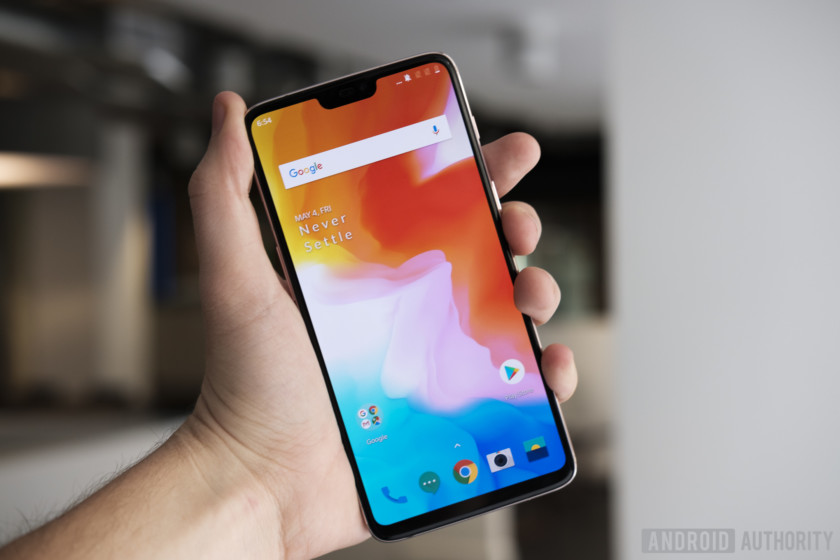
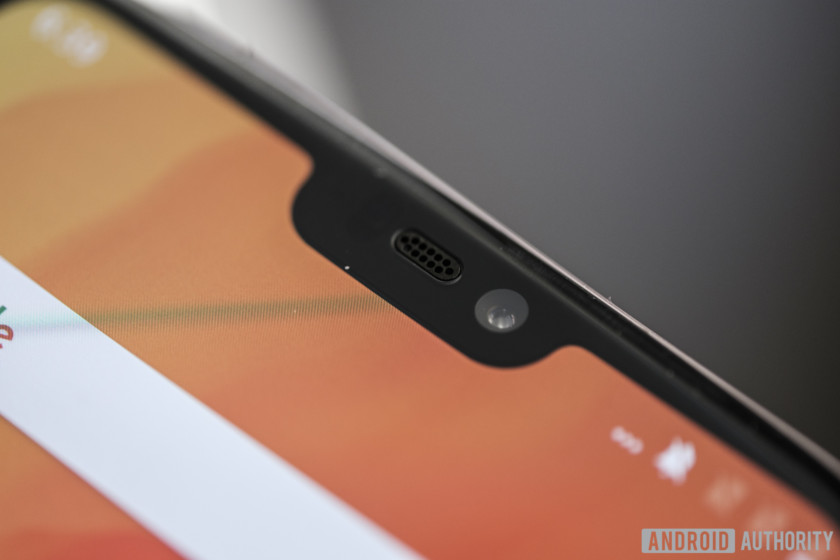
Probably the most obvious design change this year is in the display. From a topological view, you might not be able to tell it apart from nearly every other flagship Android phone released this year. The infamous notch fills a small portion of the screen at the very top, but this is necessary for the screen’s enormous 19:9, 6.28-inch footprint. The body is about the same size as OnePlus 5T, but the added screen real estate is a very welcome addition.
This screen is still 1080p resolution at 1,080 x 2,280 and it’s just as great a panel as we’ve come to expect from OnePlus. Colors are nice and vibrant. I’ve often said that screen resolution past 1080p doesn’t matter much on phones as long as you have a quality panel, and that remains true here.
This new design is quite striking – a clear departure from the metallic chassis of the last generation.
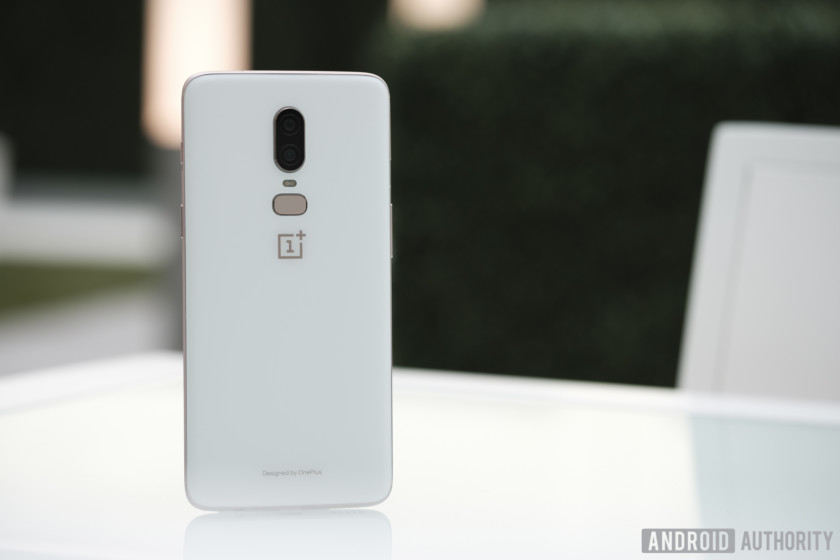
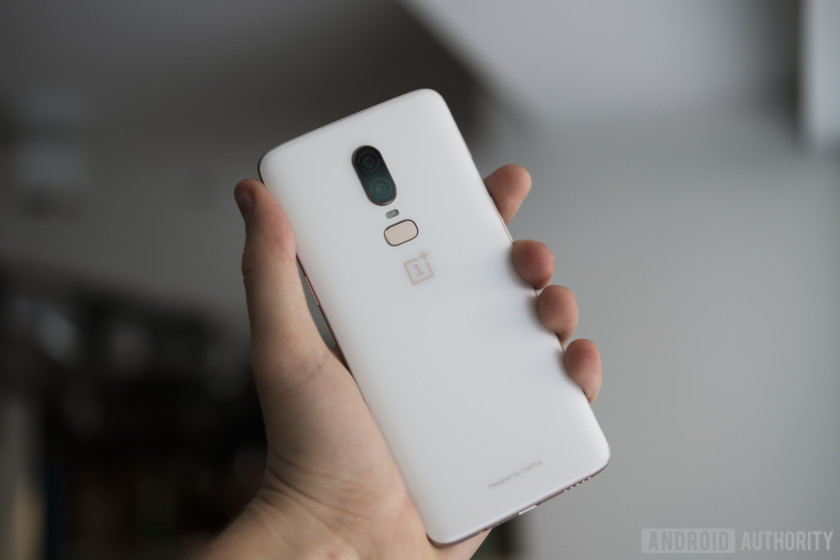
The phone starts to distinguish itself from other flagships on the back. The OnePlus 6 sports an all-glass Gorilla Glass 5 design, which looks quite striking, but leaves me worried about durability. Other unibody glass phones like the iPhone X crack very easily when dropped, since Gorilla Glass is designed to protect against scratches and not so much cracks and breaks.
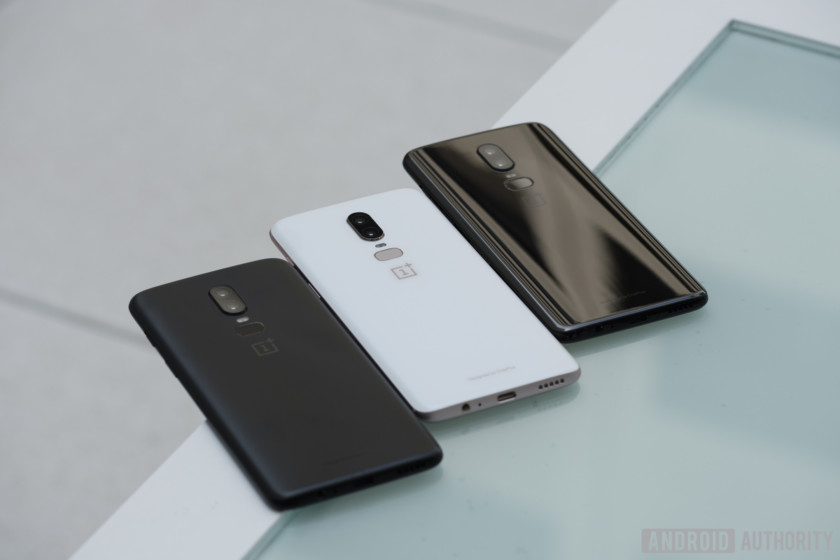
Don’t miss: OnePlus 6 colors: midnight black, mirror black, and silk white
Unfortunately, the all glass design doesn’t bring wireless to the OnePlus 6. OnePlus told me Dash Charge is so far ahead of wireless charging and it wants to maintain a positive experience with consumers. I really would have preferred it was included. Wireless charging is much slower than wired charging, but a lot of customers like the convenience of grabbing their phone off the charging pad and walking out the door. While I don’t personally use wireless charging, I would have liked OnePlus to take advantage of the materials and include it.
See also: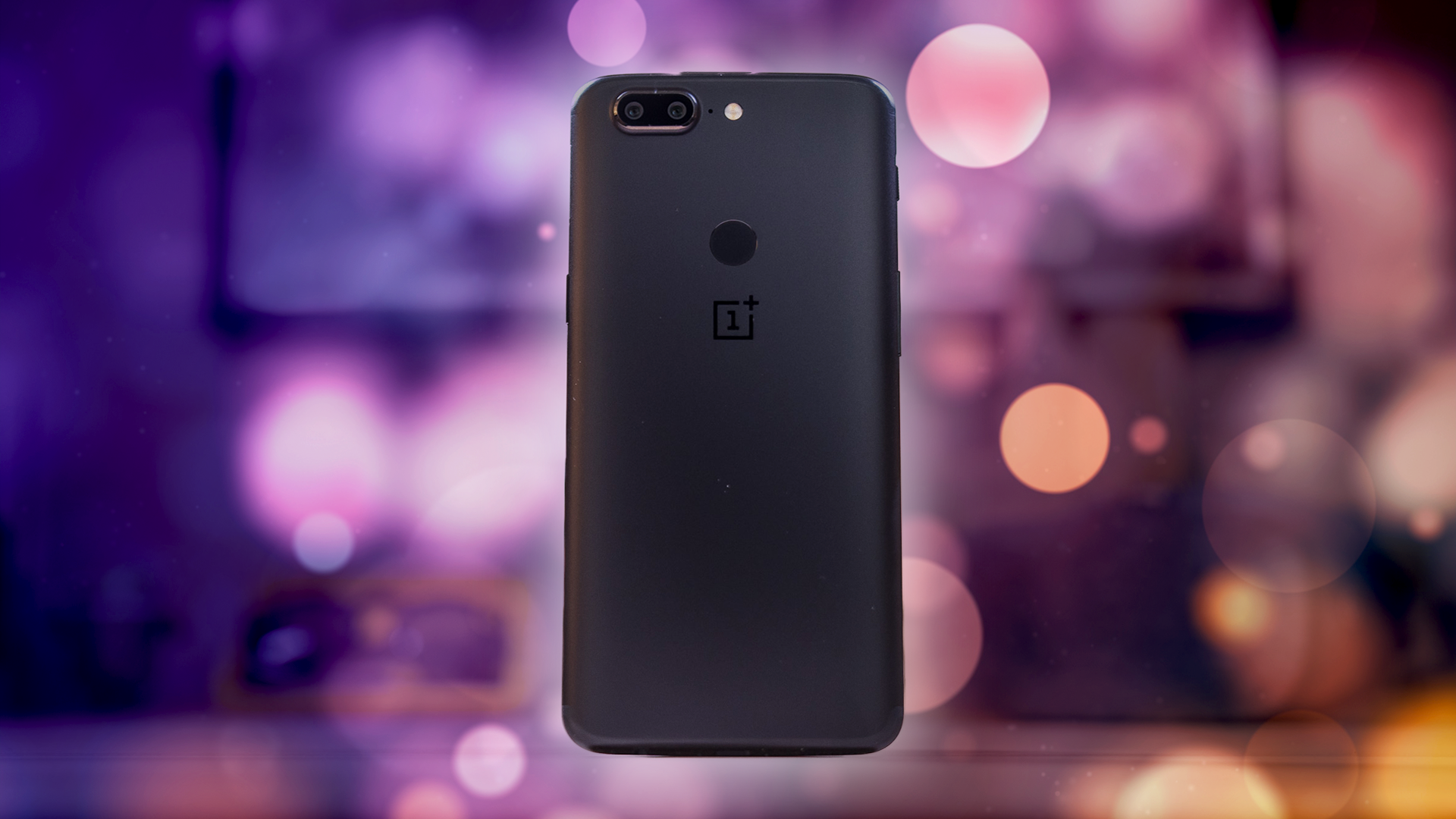
OnePlus 5T review: it’s all about that screen
Buy now from OnePlus
With the OnePlus 3T, we got virtually the same body as the OnePlus 3, but packed with a new processor, more RAM, and a bigger battery. This year though, there isn’t a …
This phone has not been officially IP certified for water resistance, but OnePlus tested it to ensure it could survive a drop in a puddle or a walk in the rain. I’m quite curious to see how this actually holds up in real-life usage, because use in the rain damaged my Pixel 2 XL’s speakers, and that phone is rated IP67. Since the speakers are bottom firing in this device though, I’m sure it will hold up just fine.
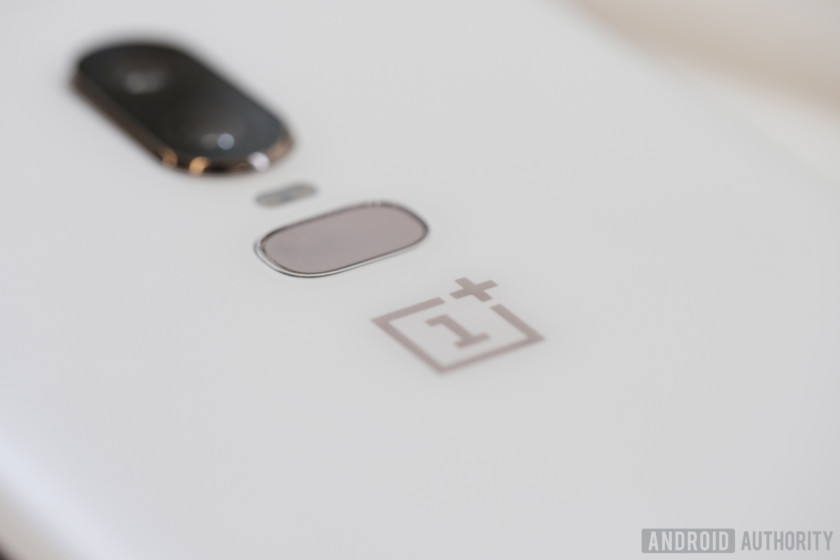
The fingerprint reader remains in the same place as the 5T, this time with a more oblong shape reminiscent of the Samsung Galaxy S9. I asked OnePlus why the change was made, and I was directed to the company’s first three phones, which had fingerprint readers in that shape on the face of the device. I don’t think this shape particularly helps the sensor be more accurate in any way, but OnePlus wants to return to its roots, making sure each design seems more like an evolution than a complete redesign.
OnePlus assures me this fingerprint reader is still the fastest available on the market today, with the ability to unlock the device in under .2 seconds. I didn’t get a lot of time to test the device during our hands on, but I’ll be sure to verify this in our full review. Face unlock is an option here as well, and we’ll have to test how much better it’s gotten since the last iteration.
The cameras have been rotated to appear more fashionable.
Just above the fingerprint reader you’ll find a set of dual cameras, now rotated and centered to fit a more balanced aesthetic. These are 16 and 20MP cameras with an f/1.7 aperture, and the pixel size has been increased by 19 percent to 1.22μm for better performance in low light. Portrait mode is returning on this camera as well, and we’re hoping it’s just as good if not better than the 5T. So far the camera seems quite good, though the environment we had to work with had great lighting. We’ll be sure give this a real spin later on.
The main camera is outfitted with optical image stabilization (OIS), so it should record smooth video and take more stable photos. OnePlus even included a slow-motion video mode, enabling 720p video at 480fps and 1080p video at 240fps. The phone now also supports 4K video at up to 60fps, a feature usually reserved for the highest end phones. There is even a built-in video editor, so you can shoot, edit, and upload directly to social media.
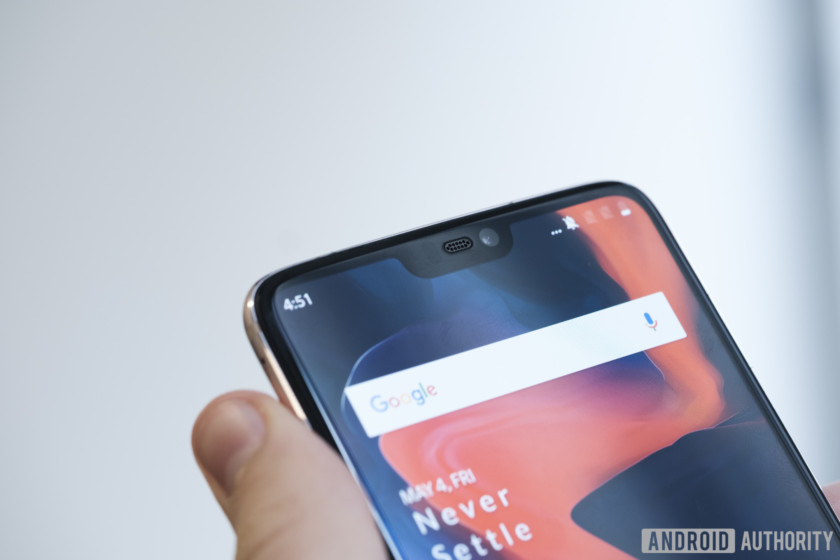
The front-facing camera is 16MP, and so far it seems very good. This is the same sensor that’s found in the 5T. The selfie portrait mode will come to the phone in a software update soon after launch. The Pixel 2 and LG G7 are some of the only cameras with selfie portrait capabilities as it stands, and we’re hopeful OnePlus’ implementation will be competitive with the rest of the pack.
Also read: OnePlus Bullets Wireless have fast charging and magnetic controls
Around the right side you’ll find the power button and the signature physical notification switch, while the volume rockers reside on the left. There is a USB Type-C port nestled in the bottom, surrounded by a speaker and — drumroll — a headphone jack! OnePlus is sticking with this “legacy” port for at least a little while longer. When I asked how long the company would commit to keeping the port, I was told until the industry is ready to let it go.
These are probably the best specs in an Android phone to date.
Inside, you’ll find specs rivaling the highest end phones on the market. The OnePlus 6 sports a Qualcomm Snapdragon 845 processor, 6-8GB of RAM, and 64, 128, or 256GB of storage, depending on the model you get. Actually, the top-end variant has just about the best specs you can possibly find in an Android device today. Pair that with the fact that it is running OxygenOS-based on Android Oreo (with the option of joining the Android P beta) and you’ve got a phone that should fly through nearly every use case you throw at it.
The battery is 3,300mAh, which is curiously the same capacity as the OnePlus 5T. OnePlus says the Snapdragon 845 should help reduce battery drain by up to 10 percent, but that seems a bit like wishful thinking. With a screen this much larger, we’ll have to see if the new phone can hold up to a day’s use.
Read more about the OnePlus 6 specs here.
This phone is OnePlus’ first Gigabit LTE device. The infrastructure for this to be useful hasn’t rolled out in many countries other than South Korea, but it’s nice to know you’ll get faster speeds if your county ever adopts the technology. OnePlus is also aware how many people have sub-optimal connections, and is rolling out a new feature to gaming mode that should help your game keep a stable connection. When gaming mode is turned on, the phone will reduce the allocated bandwidth to background applications. This ensures you don’t drop frames at critical moments, and you can even limit the graphics performance if you want to make sure you have the best frame rate.
I know what you’re all wondering. Yes, the OnePlus 6 is more expensive than the 5T.
Despite this, the company continues to provide more value than just about any other manufacturer on the market.
Learn more about OnePlus 6
The OnePlus 6 will cost $529, $579, and $629, depending on your configuration, making it about $30 more expensive than the OnePlus 5T. It will be available in Midnight Black, Mirror Black, and a limited edition Silk White. This is OnePlus we’re talking about though, so we’re sure more color options will pop up as we as the OnePlus 6T gets closer. For more pricing and availability details, head here.
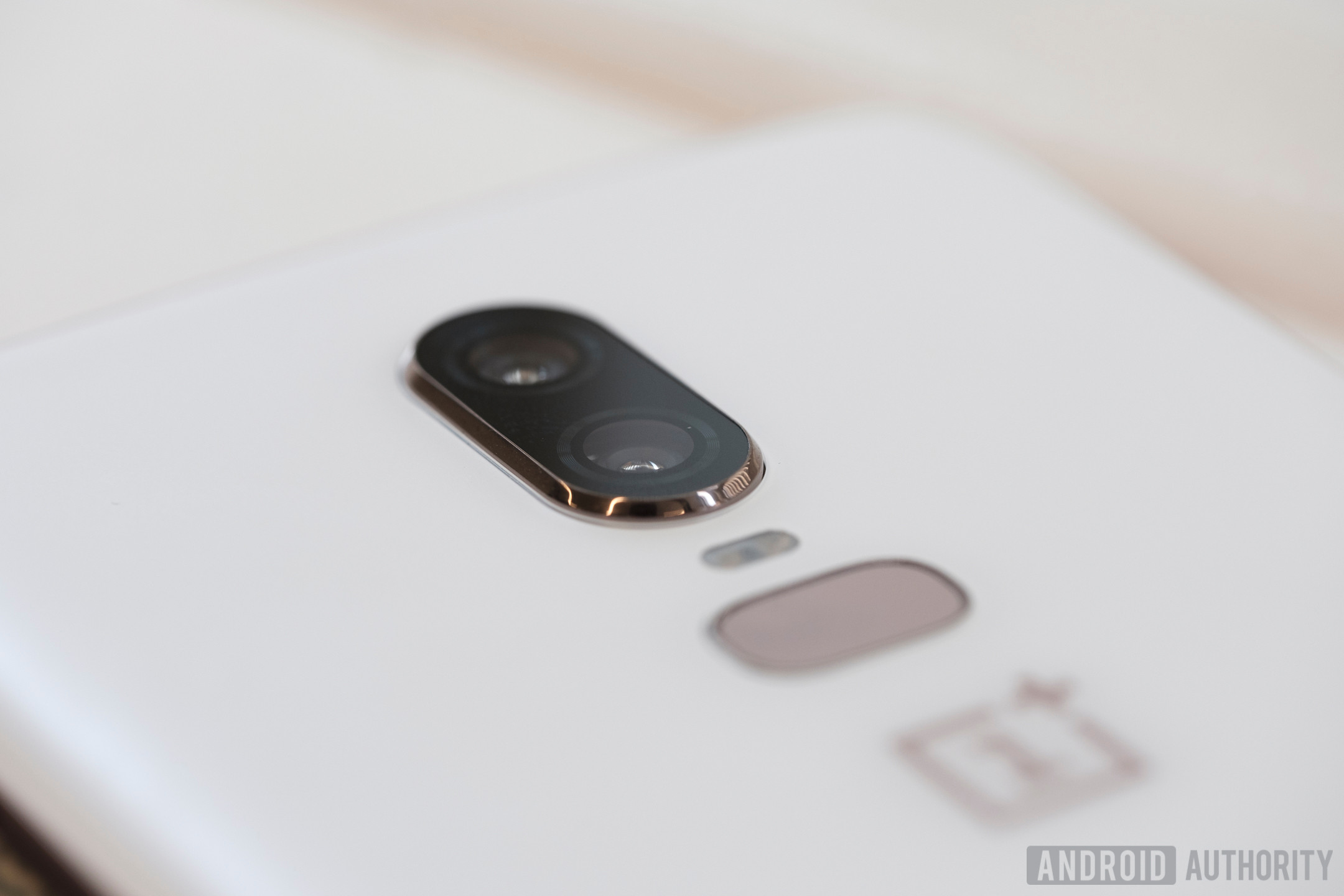
What are your first impressions of the OnePlus 6? Let us know your thoughts in the comments section below, and stay tuned for our full review coming soon.
Autopsy confirms exploding vape pen caused Florida man’s death
An autopsy has confirmed that a vape pen was to blame in the tragic death of a Florida man on May 5. This incident marks the first confirmed case in which an e-cigarette explosion resulted in a fatality. The 38-year-old was killed when his vape pen exploded, which sent projectiles into his head, and started a small fire in his home in St. Petersburg, Florida.
According a report from the Tampa Bay Times, Tallmadge D’Elia was found on May 5 in bedroom of his family’s home. The autopsy lists cause of death as “projectile wound of head” — when the pen exploded, at least two pieces of shrapnel struck him in there. Moreover, the victim suffered burns on about 80 percent of his body.
While there have been at least 195 incidents in which a vape pen or e-cigarette exploded or caught fire between 2009 and 2016, no deaths were reported in that time period. However, those incidents did result in 133 injuries, 38 of which were severe, the U.S. Fire Administration reports. The explosions generally are sudden, “and are accompanied by loud noise, a flash of light, smoke, flames, and often vigorous ejection of the battery and other parts.” A majority of the incidents also started fires in or on nearby objects.
As with other exploding pieces of technology (namely smartphones and hoverboards), it would appear that the problem is linked to lithium-ion batteries.
“No other consumer product places a battery with a known explosion hazard such as this in such close proximity to the human body,” the Fire Administration’s report notes. “It is this intimate contact between the body and the battery that is most responsible for the severity of the injuries that have been seen. While the failure rate of the lithium-ion batteries is very small, the consequences of a failure, as we have seen, can be severe and life-altering for the consumer.”
In the aftermath of the Florida tragedy, there may finally be some regulations placed around the batteries of e-cigarettes. As it stands, none exist, though the Food and Drug Administration is said to be considering them already. In the meantime, the Centers for Disease Control and Prevention has a few safety recommendations with regard to e-cigarettes and vape pens. The agency cautions users from carrying e-cig batteries loose in their pockets, “especially where they might come into contact with coins, keys or other metal objects which can cause the battery to short out.”
You should also avoid using your phone or tablet charger to recharge your device. Only use the charger that was intended for the e-cigarette. Furthermore, you shouldn’t charge your vape while sleeping or leave it unattended, and should always charge it on a flat surface away from anything flammable. If batteries are damaged or get wet, replace them, and don’t mix and match different battery brands or old and new power sources. Finally, avoid altering the device, and do not leave it in extreme temperatures, such as in direct sunlight or in a freezing car overnight.
Editors’ Recommendations
- What is vaping? A beginner’s guide to vaporizers and ecigs
- ‘Call of Duty: Black Ops 4’ is real, and it’s out in October
- This is the moment a portable charger caught fire in a plane’s overhead bin
- ‘Burnout Paradise Remastered’ crashes onto consoles March 16
- 50 Cent made thousands, not millions, from Bitcoin — and doesn’t have any of it
OnePlus 6 vs. OnePlus 5T vs. OnePlus 5: Is it worth it to upgrade?
Julian Chokkattu/Digital Trends
The OnePlus 6 is the latest flagship killer from OnePlus, offering top specs at a price hundreds of dollars lower than market-leading flagships. However, how does it stack up against the last generation, the OnePlus 5 and OnePlus 5T? If you’re using either of the last two OnePlus models, is it worth upgrading to the latest model? We took a look to find out.
Specs
OnePlus 6
OnePlus 5T
OnePlus 5
Size
155.7 x 75.4 x 7.8 mm (6.13 x 2.97 x 0.31 inches)
156.1 x 75 x 7.3 mm (6.15 x 2.95 x 0.29 inches)
154.2 x 74.1 x 7.3 mm (6.07 x 2.92 x 0.29 in)
Weight
177 grams (6.24 ounces)
162 grams (5.71 ounces)
153 grams (5.40 ounces)
Screen size
6.28-inch AMOLED display
6.0-inch AMOLED display
5.5-inch AMOLED display
Screen resolution
2,280 x 1,080 pixels (407 pixels per inch)
2,160 x 1,080 pixels (401 pixels per inch)
1,920 x 1,080 pixels (401 pixels per inch)
Operating system
Android 8.1 Oreo
Android 8.1 Oreo
Android 8.1 Oreo
Storage space
64GB (with 6GB of RAM), 128GB, 256GB (both with 8GB of RAM)
64GB (with 6GB RAM), 128GB (with 8GB RAM)
64GB (with 6GB RAM), 128GB (with 8GB RAM)
MicroSD card slot
No
No
No
Tap-to-pay services
Google Pay
Google Pay
Google Pay
Processor
Qualcomm Snapdragon 845
Qualcomm Snapdragon 835
Qualcomm Snapdragon 835
RAM
6GB (with 64GB storage), 8GB (with 128GB or 256GB of storage)
6GB (with 64GB storage), 8GB (with 128GB storage)
6GB (with 64GB storage), 8GB (with 128GB storage)
Camera
Dual 16MP and 20MP rear, 16MP front
Dual 16MP and 20MP rear, 16MP front
Dual 16MP and 20MP rear, 16MP front
Video
2160p @ 30 fps, 1080p @ 30/60/120, 720p @ 480 fps super slow motion, HDR
2160p @ 30 fps, 1080p @ 30/60 fps, 720p @ 30/120 fps, HDR
2160p @ 30 fps, 1080p @ 30/60 fps, 720p @ 30/120 fps, HDR
Bluetooth version
Bluetooth 5.0
Bluetooth 5.0
Bluetooth 5.0
Ports
3.5mm headphone jack, USB-C
3.5mm headphone jack, USB-C
3.5mm headphone jack, USB-C
Fingerprint sensor
Yes (back)
Yes (back)
Yes (front)
Water resistance
No
No
No
Battery
3,300mAh
DashCharge
3,300mAh
DashCharge
3,300mAh
DashCharge
App marketplace
Google Play Store
Google Play Store
Google Play Store
Network support
AT&T and T-Mobile
AT&T and T-Mobile
AT&T and T-Mobile
Colors
Midnight Black, Mirror Black, Silk White
Midnight Black, Lava Red, Sandstone White
Midnight Black, Slate Gray
Price
$530
$500
$480
Buy from
OnePlus, Amazon
OnePlus, Amazon
Amazon
Review score
Hands-on review
4.5 out of 5 stars
4 out of 5 stars
Performance, battery life, and charging
While you’re looking at similar specs across the board between all three phones, it’s the upgraded processor in the OnePlus 6 that elevates it above the older models. OnePlus said the Snapdragon 845 in the OnePlus 6 is 30 percent faster than the Snapdragon 835 in the OnePlus 5 and OnePlus 5T, and after seeing the impact that the latest Snapdragon processor has had on phones like the Galaxy S9, we believe them. The OnePlus 6 is the faster phone, but it’s not like the Snapdragon 835 is slow. It’s still a perfectly capable, speedy processor that’s more than sufficient for even power users.
All three phones are equipped with hefty 3,300mAh batteries, and come with OnePlus’ Dash Charge technology for super-fast recharging. We got good performance out of the OnePlus 5 and 5T during our reviews, with more than a day’s worth of battery life from a full charge of each device. We expect similar performance on the OnePlus 6, and though the screen is likely to be a larger power draw, we believe that will be balanced out by the Snapdragon 845’s power efficiency.
While there’s a lot to like from all three phones, the OnePlus 6 is objectively the more powerful phone.
Winner: OnePlus 6
Design and durability
Andy Boxall/Digital Trends
With chunky bezels and an old-school iPhone aesthetic, it’s fair to say that the OnePlus 5 loses out to the two more modern bezel-less designs of the newer phones. But between the more recent two, which triumphs? The OnePlus 5T was the first OnePlus phone to come with trimmed bezels, and it’s still a great-looking phone even when compared to the slightly newer design on the OnePlus 6, which has even slimmer bezels. There’s an elephant in the room, though — the OnePlus 6’s notch. We don’t mind notches — the cutout at the top where the front camera and earpiece sit — but there has been a lot of vocal opposition to the design ever since it arrived in the Essential Phone and the iPhone X. You’ll be able to hide the notch via software in a later update, if it really puts you off.
The OnePlus 6 also feels slightly more high-end due to the company’s first-ever use of Gorilla Glass 5 on a phone’s body. It doesn’t add wireless charging, and the use of glass is purely for aesthetic purposes. It does mean either side of the OnePlus 6 may shatter on impact in the event of an accidental drop — not something you have to worry about much thanks to the metal body on the OnePlus 5T. The camera has also been moved to make the setup more central on the OnePlus 6, with the fingerprint sensor placed underneath the vertically stacked camera.
We like the updated design on the OnePlus 6, but we can’t deny the use of glass — with no wireless charging benefits — doesn’t help the phone’s durability. Neither phone is water resistant. This one’s a tie.
Winner: Tie
Display
Andy Boxall/Digital Trends
In terms of pure screen tech, there’s not much of a difference between the three models, as each model has its own AMOLED display that delivers great color reproduction and crisp quality. Display technology has improved, and it’s likely the OnePlus 6 has the best of the lot, but it’ll be tough to notice. However, there’s a clear difference in screen sizes. The OnePlus 5 comes with a 5.5-inch AMOLED display, while the OnePlus 5T — thanks to the bezel-less design — was able to up that even further to 6-inches. Now, the OnePlus 6 will come with a massive 6.28-inch display that dominates the phone’s front.
Since the underlying tech is so similar, it ultimately comes down to your personal preference on size. If you look at each phone’s dimensions, you’ll notice that they aren’t hugely different in size. The reduction of bezels allows for a bigger screen, while still maintaining a similar body size. We’re giving the OnePlus 6 the win for its larger screen.
Winner: OnePlus 6
Camera
Andy Boxall/Digital Trends
The camera megapixel count on all three phones hasn’t changed at all, but there are a few changes and tweaks to each phone’s camera. Each of these models sport a dual-camera setup on the rear comprised of a 16-megapixel and a 20-megapixel lens, as well as a 16-megapixel lens on the front of the phone. In practice, most users will find the cameras on the OnePlus 5T and OnePlus 6 to be superior, thanks to an increase in aperture size.
OnePlus says it’s taken the tech on the OnePlus 6 even further than the 5T, with an increase in sensor size and improvements to the optical image stabilization system. There’s also an A.I.-assisted Portrait Mode with selective blurring available on both the front and rear cameras.
It’s not just the photo camera that has benefited from upgrades — the OnePlus 6 also comes with support for super-slow motion 480 frame-per-second video in 720p quality, and it can record 60 frames per second video at 4K resolution. We’re confident that the OnePlus 6 will outpace its predecessors here, and while we’ll have to do more testing, it takes the win.
Winner: OnePlus 6
Software and updates
Julian Chokkattu/Digital Trends
All modern OnePlus phones run on OxygenOS, OnePlus’ modified version of Android, and all of them are currently running on the latest version of Android 8.1 Oreo. The OnePlus 6 will receive more major Android updates, and will be supported by a greater number of security patches going forward. At this time, these three phones are neck-and-neck in terms of software — but the OnePlus 6 has been confirmed to be able to enter the Android P beta. In our mind, that gives it the edge in this category, but it’s a small edge. The OnePlus 5 and 5T will likely get Android P when it rolls out later this year.
You’ll find facial recognition on the OnePlus 6, and it’s nearly identical to the version we saw on the OnePlus 5T. It’s still not secure enough to act as any sort of security clearance, which is a shame, but when it’s this fast, we don’t mind. The OnePlus 6, like the OnePlus 5T, can utilize gestures to navigate throughout the operating system, similar to the iPhone X.
The OnePlus 6 is getting a Gaming Mode, which allows people to play games without having notifications disrupt the experience. It also reduces latency by lowering the amount of data assigned to apps running in the background, allocating those resources to the game you’re playing. This capability is currently available via beta to the OnePlus 5 and 5T.
We’re giving the win to the OnePlus 6, since it will be supported with updates for a longer period of time.
Winner: OnePlus 6
Price
The OnePlus 6 with 64GB of storage and 6GB of RAM will start at $530, and will be available from OnePlus and Amazon starting May 22. The OnePlus 5 and 5T have technically been discontinued, but you can still pick one up from Amazon or other retail websites.
Overall winner: OnePlus 6
We’d be scratching our heads if the OnePlus 6 didn’t come out of top against its predecessors. While OnePlus isn’t offering any sort of huge advancement over the formula we saw in the OnePlus 5T, it’s the small changes that make the biggest difference — such as the upgrade to the Snapdragon 845 and the slightly larger screen.
If you’re new to OnePlus, we recommend going with their current flagship, the OnePlus 6. If you’re using a OnePlus 5 or 5T, we don’t see much of a reason to upgrade just yet. It’s likely there will be a OnePlus 6T later this year, and it may have more compelling reasons to upgrade.
Editors’ Recommendations
- OnePlus 6: Everything you need to know
- Everything you need to know about the 6-inch OnePlus 5T
- OnePlus 6 hands-on review
- LG G7 ThinQ vs. LG V30: Which LG flagship phone is best for you?
- LG G7 ThinQ vs. LG G6: Out with the old, in with the new
Powered by a laser, this insect-sized RoboFly can take off and land wirelessly
Researchers from the University of Washington have developed a fly-sized robot they think could be used to access places inaccessible to regular-sized drones. The RoboFly, which is only marginally heavier than a toothpick, can take off and land completely wirelessly. To do this, it uses tiny wings — rather than the more common propellers — to keep it airborne. While it can only launch itself off the ground a short distance at present, the team hopes to be able to improve the tiny robot’s aerial capabilities so that it can hover and fly about.
“Our RoboFly is a wirelessly powered flapping-wing robot about the size of a real insect, complete with power electronics and computation,” Vikram Iyer, a doctoral student in the UW Department of Electrical Engineering, told Digital Trends. “The exciting thing here is that we demonstrate the first robot of this kind that can actually lift off without any wires. We do this by aiming a laser at a small solar cell on the robot to deliver power. The solar cell converts laser light into electrical power, which then goes through our custom circuit that actually flaps the wings to lift it off the ground.”
University of Washington
Shyam Gollakota, an associate professor in the university’s School of Computer Science & Engineering, said that small flying robots such as this one may be useful for performing a variety of tasks. These could include search-and-rescue missions, where their small size would make them more cost effective to produce at scale and deploy in large numbers. They could also be utilized for inspection tasks, such as checking gas pipelines for leaks or monitoring agricultural crops on a smart farm.
Mechanical engineering doctoral student Johannes James told DT that the team plans to expand the project by making the RoboFly more adept at maneuvering tricky terrain. “We also intend to develop abilities to navigate difficult environments, such as moving along the ground,” James said. This may involve incorporating tiny batteries into the robot or allowing it to harvest energy from radio frequency signals as a power source.
The team will be presenting its findings on May 23 at the International Conference on Robotics and Automation in Brisbane, Australia.
Editors’ Recommendations
- Tipoon is a tiny pop-up camper that triples in size
- The best speakers
- This super-sized drone has several tricks up its sleeve
- Inside the Intel lab that put a legit gaming desktop in the palm of your hand
- The best camping hacks to keep you prepared on the trail
Microsoft’s latest Windows 10 Insider Preview release all about fighting malware
Microsoft’s latest Windows 10 build 17672 is now available for download, and there’s one big new change in this version. Build 17672 is a Windows Insider preview build available to those who registered for the Fast ring or for Skip Ahead releases, so the software is in testing and isn’t finalized yet for general consumers. There are a number of improvements introduced in this build, but the biggest change is that third-party antivirus software is now handled differently on the platform.
This latest security change stipulates that antivirus software — like those made by Norton Symantec, McAfee, and Kaspersky Lab — must run as a protected process. Microsoft announced system protected processes beginning with the release of Windows 8.1 as a security measure to defend against malicious attacks on system-critical components.
“The protected process infrastructure only allows trusted, signed code to load and has built-in defense against code injection attacks,” Microsoft said at the time. “After the anti-malware services have opted into the protected service mode, only Windows signed code or code signed with the anti-malware vendor’s certificates are allowed to load in that process.”
On build 17672 this means that the default Windows Defender Antivirus that ships with Windows 10 will be enabled and run alongside any antivirus product that has not registered as a protected process. “Products that have not yet implemented this will not appear in the Windows Security UI, and Windows Defender Antivirus will remain enabled side-by-side with these products,” Microsoft detailed in a blog post.
Microsoft is allowing testers to disable this behavior with the creation of a registry key, but this workaround will be removed closer to the consumer release of the next big Windows 10 update.
Other notable fixes include improvements to the Microsoft Edge browser, an update to the recently released Timeline feature that allows users to cycle through tabs, and low battery alerts for compatible Bluetooth-connected devices. Users of Microsoft’s Windows Mixed Reality experience may want to avoid this build for now, as there are a few known issues with this release. Motion controllers may not be recognized in some apps, and your headset may display a black screen.
If you’re looking for malware defense — in addition to or in lieu of Windows Defender — be sure to check out our list of the best free antivirus software. We also have rankings for the best free antivirus tools for MacOS users if you’re in the Apple camp.
Editors’ Recommendations
- The best free antivirus for Mac
- Intel, Microsoft using integrated graphics to thwart next Meltdown-style threats
- Microsoft Windows Defender extension offers Chrome users extra protection
- Hackers can bypass the Windows 10 S lockdown due to security flaw
- Windows Defender thwarts major malware attack directed mostly at Russian users
You won’t even need to dress yourself in the future — thanks to robots like this
Chalk it up to a misspent youth watching The Jetsons if you want, but we’ve always kind of liked the idea of a home robot that can dress you in the morning. Forgot the mundane chore of pulling on our own pants and shirt; this is one job we’d happily hand over to machines without a second thought. Sadly, while cooking, cleaning, and even ironing robots are a real thing, breakthroughs involving dressing robots have been in disappointingly short supply.
We may not yet have gotten there, but research coming out of the Georgia Institute of Technology suggests that it’s not out of the question for the near future. Engineers at Georgia Tech have developed a robot that is able to assist users in putting on a hospital gown. Although it’s still at a very early stage — capable of just putting on a single sleeve of the gown — the technology it uses to do this is actually pretty darn smart.
“At a high level, we have taught the robot, a PR2, how to consider what people physically feel when receiving assistance,” Zackory Erickson, lead researcher on the project, told Digital Trends. “In a sense, the robot is able to take on a human’s perspective when providing dressing assistance. In doing so, we observed emergent behaviors in which the robot was able to fully dress a person’s arm and mitigate the chance of the garment getting caught on the person’s body.”
Georgia Institute of Technology
The robot learned to perform the task by carrying out thousands of virtual dressing attempts using a physics-based simulation. By making mistakes, the robot was able to learn from scenarios such as cloth getting caught on a body part without putting users at risk — or, in the real world, making you suffer through thousands of mornings of failed dressing scenarios before the robot finally works correctly. From this simulation, the robot’s recurrent neural networks were trained to estimate the forces a garment exerts onto a person during dressing.
Rather than relying on vision, the robot uses haptics to predict how clothing will interact with a person’s body during assistance. That’s because clothing typically hides a person’s body, and therefore makes it difficult for a robot to see what is happening.
“Robot-assisted dressing is an application that merits investigation due to the number of people who could benefit from it,” Professor Charlie Kemp told DT. “We’re making progress, but there is still much to be done. In the meantime, we’re optimistic that aspects of our work will be broadly applicable.”
For now, the researchers are continuing to work with PR2 — including simulated demonstrations showing how it could be used to put on a person’s T-shirt, shoes, and even a cardigan.
Best Google Pixel 2 XL Cases

What are the best cases for the Google Pixel 2 XL?
The Google Pixel 2 XL is a beautifully designed phone — especially if you snagged the panda/Stormtrooper Black and White edition. But as much as you’ll want to show it off, you’re also going to want to protect a phone that cost you close to $1000.
We’ve rounded up the best case options specifically for the Pixel 2 XL.
- Google Live Cases
- Google Fabric Cases
- Bellroy leather case
- Incipio Esquire Series
- Spigen Tough Armor
- Spigen Thin Fit
- Supcase Unicorn Beetle Pro
- Ringke Fusion
- Caseology Vault Series
- i-Blason Ares
- Vena vCommute wallet case
- Carved wooden cases
Google Live Cases

Just like the smaller Pixel 2, Google offers its customizable Google Live Cases for the Pixel 2 XL with a personal photo or a wide range of styles curated by Google.
Maybe you’ll decide on a gorgeous satellite photo from Google Earth which also pairs with a matching live wallpaper for a cohesive look around your device. Looking to add a bit more of an artistic flair to your case? Check out the Artworks Live Case and find something that matches your style.
Google has curated a great selection of cases that feature artwork, photos from space, and naturally beautiful images that are really quite stunning. Prices start around $50 depending on whether you choose a minimalist shell or a more rugged dual-layer case. Create and customize your own case via the Google Store.
See at Google Store
Google Fabric Cases

If you prefer your phone case to have some texture for grip, you’re probably going to love the Google Fabric Case. It features the same fabric finish look found on other recent Google products such as the Google Home Mini.
Designed in-house by Google, you can be sure of the build quality and fit for your Pixel 2 XL. These cases offer a premium microfiber liner to ensure your device stays scuff-free and your choice of four color combinations for $40.
See at Google Store
Bellroy leather case

Another great option offered by Google itself is the Bellroy leather case. This is a premium case that combines leather, flexible polymer, and a microfibre lining on the interior to create a great case that looks great with a streamlined design to keep things sleek in your hand.
It’s available in four color choices — Black, Navy, Caramel, and Stone — and is backed by a 3-year warranty from Bellroy. You can get this premium leather case for your Pixel 2 XL for $49.
See at Google Store
Incipio Esquire Series

Like the concept of the Google Fabric Case but don’t like the idea of spending $50 for it? You’ll definitely want to check out the Incipio Esquire series case.
This case is made of an impact-resistant TPU frame that will keep your phone protected, but the real eye-catching feature here is the ultra-soft fabric finish on the exterior of the case. There is a nice-sized cutout around the fingerprint sensor and camera on the back but it’s otherwise a very sleek and minimalist design.
You can get yours from Amazon for roughly $35.
See at Amazon
Spigen Tough Armor case

Spigen has a very solid lineup of cases for the Pixel 2 XL, but one of the more rugged and functional cases they sell is the Tough Armor style. The combination of a flexible TPU sleeve and a rugged outer shell provides great dual-layer protection for your phone, with Spigen’s air cushion technology offering support in the corners. Despite its rugged design, the Tough Armor case is still mightly slim adding just 2.5 mm of thickness.
Another great feature is the pop-out kickstand built into the shell. There are so many handy reasons to have your phone propped up, and having this feature built right into the case means you don’t need to add a pop socket or style ring. For all its durability and functionality, the Tough Armor case is just $17 on Amazon.
See at Amazon
Spigen Thin Fit

It can be an issue finding a case for larger phones like the Google Pixel 2 XL that doesn’t add too much bulk to your phone. The Spigen Thin Fit case is about as minimalist as phone cases get.
Available in black, this case will match the look of the Pixel 2 XL and features precise cutouts around the fingerprint scanner and camera on the back. It’s thin enough to keep the Active Edge compatibility fully intact and yet still features Spigen’s Air Cushion technology in the corners for added drop protection.
Keep your Pixel 2 XL safe from scuffs and scratches without sacrificing the slim design with the Thin Fit case for just $12.
See at Amazon
Supcase Unicorn Beetle Pro case

When you name your phone case after the Unicorn Beetle — one of the gnarliest looking armored bugs in the natural world — you better back it up with a rugged case. Combining a polycarbonate outer shell with a flexible and shock-absorbing TPU sleeve around back, the Unicorn Beetle Pro goes an extra step further by including a built-in screen protector to provide maximum protection for your Pixel 2 XL. There’s also an optional belt clip holster if it’s convenient for you.
It’s otherwise a pretty standard design for a rugged case: beefy in the corners where it needs to be yet slim and sporty enough as to not turn your phone into a thick brick of plastic. You can get yours from Amazon starting at $18 for the black style, with three other styles available for $20.
See at Amazon
Ringke Fusion

Looking for a reliable clear case for the Pixel 2 XL at a very reasonable price? Check out the Ringke Fusion case.
Starting at just $10 for a crystal clear version, these cases offer two layers of protection for your phone — a rugged and shock-resistant TPU bumper combined with a ridged PC panel covering the back. There’s a protective lip around the front to save the display glass from harm, and there are precise cutouts around the fingerprint sensor, camera, and USB-C charging port.
Get the clear version if you want to preserve the original look of the Pixel 2 XL, or opt to spend $11 on the Rose Gold or Smoke Black versions.
See at Amazon
Caseology Vault Series

Caseology has a couple different cases available for the Pixel 2 XL. We recommend the Vault Series ($15) because it’s got a classic design. Made of flexible TPU, it features a sleek finish along the back and textured grip around the edges. It’s available in black and should look great whether you went with the Just Black or Black and White Pixel 2 XL.
If you’re looking for something a bit more substantial, check out the Parallax Series ($16) which offers a slim, two-piece design to keep your Pixel well-protected. It’s also available in some really cool color combinations. Or consider the Legion Series ($14), which offers a more rugged matte shell around the back of the case.
See at Amazon
i-Blason Ares

If you’re looking for a solid case that provides optimum protection for your Pixel 2 XL, and you’re ok with adding a little bit of bulk to your already large phone, then i-Blason’s Ares case is the one you want. It has extra reinforcement in the corners to provide superior drop protection, has a built-in screen protector, and a transparent back so you can still enjoy the look of your phone.
Pricing starts around $18 for the black version, but you can also snag four other color combinations for around $20 apiece.
See at Amazon
Vena vCommute wallet case

Vena’s sleek wallet case isn’t your typical folio-style wallet case, and it’s the perfect way to cut down on pocket carry with your Pixel 2 XL. This case features a magnetic flap on the back that covers a slot big enough for about three cards or a couple cards and some cash. There’s a raised lip in the card slot, so even if you only have on card, you can still slide it out easily.
The folding magnetic flap doubles as a kickstand so you can watch video hands-free, at starting at $16, it’s an excellent value.
See at Amazon
Carved wooden cases

Carved has a bunch of great case options available for phones like the Pixel 2 XL, including 52 stylish pre-made option featuring a mix of cool prints and fancy cut wood designs with prices ranging from $29 to $55, along with a selection of classic wood grain cases for just $24.
Carved also allows you to create your own custom case using an online case designer. They also offer the option to get a section of a map engraved or printed onto the case. With the right eye for design, you could design a case that uses the fingerprint scanner as part of your case’s decoration.
See at Carved
How will you keep your phone protected?
Are you going to be picking up a case for your Pixel 2 XL? Let us know if you’re getting one off our list or opting for a different option in the comments below!
Updated May 2018: Added the Bellroy leather case and Carved cases to our list. Your phone will have never felt so good in your hand!
Google Pixel 2 and Pixel 2 XL
- Pixel 2 FAQ: Everything you need to know!
- Google Pixel 2 and 2 XL review: The new standard
- Google Pixel 2 specs
- Google Pixel 2 vs. Pixel 2 XL: What’s the difference?
- Join our Pixel 2 forums
Best Buy
Verizon
Google Store
Project Fi
 AIVAnet