


Apple Partners With French Cable Company Canal+ to Offer Apple TV 4K as Cable Box Alternative
Apple has partnered up with French cable television Canal+ to allow 5.2 million Canal+ subscribers in France to opt to receive an Apple TV 4K in lieu of a traditional cable box.
Customers who choose the 4K Apple TV will need to pay Canal+ an equipment rental free of 6 euros, equivalent to approximately 7 dollars. This is the same price that Canal+ charges to rent a standard cable box.
In a statement to French site Numerama (via VentureBeat), Canal+ Deputy General Manager Frank Cadoret said that the company’s goal with the Apple TV offer is to reach a younger clientele and to offer existing customers a second box.
Apple vice president of Apple Music and International Content Oliver Schusser also told the site that Canal customers will be able to “enjoy a rich experience” with access to iTunes movies and the App Store in addition to regular cable programming that will be accessible through a Canal app.
Canal+ customers will be able to choose an Apple TV over a cable box starting on May 7.
Related Roundup: Apple TVBuyer’s Guide: Apple TV (Neutral)
Discuss this article in our forums
Can the $99 Crazybaby Air Nano earbuds beat the Apple Airpods at their own game? (review)
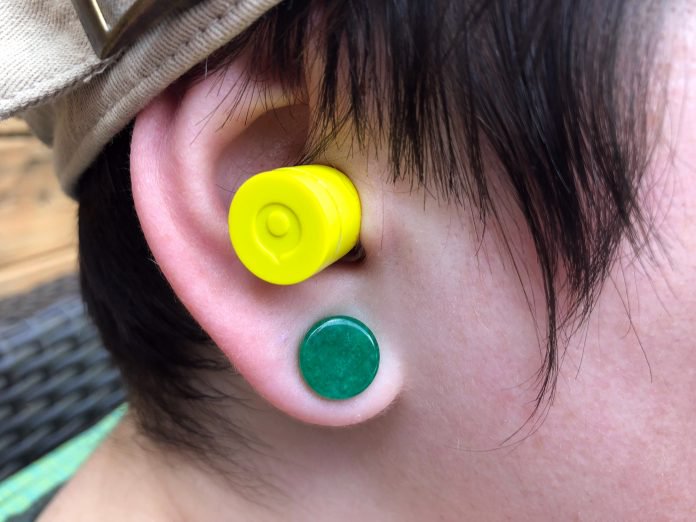
Truly wireless earbuds are fantastic. Not dealing with any wires at all really makes you feel like you’re living in the future. Just pop earbuds in, fire up your music and you’re on your way. Or so you’d think, right?
With as cool as these sound, truly wireless earbuds come with a lot of disadvantages too. Whether that be connection issues, battery problems, or something else, there are a lot of areas of concern to consider when picking up a pair of wireless earbuds.
That’s why it’s so refreshing to find a pair of great earbuds in 2018. More and more, earbuds are hitting the market, but how do you know if they’re really any good? Sure, you could go pick up a pair Apple Airpods and know what you’re getting, but not everyone is comfortable with a $159 price tag, or handing over their cash to Apple.
That’s why there’s a massive fight to be an Airpods competitor right now. We’ve taken a look at several models from Anker, Syllable, YEVO, Optoma, and Rowkin, among others. But, the most promising candidate might be the latest offering from Crazybaby.
The Crazybaby Air Nano truly wireless earbuds are compact, sound great, and won’t break the bank. But, are they all they’re cracked up to be?
Sound Quality
We have spent the better part of the last two months using the Air Nanos as our “daily driver” earbuds. We were initially impressed with the sound quality that these little guys put out and that hasn’t faded.
It stands to reason when you miniaturize everything, you will have to sacrifice something. Normally that’s either battery life (more on that later) or sound quality. We were pleasantly surprised that Crazybaby figured out how to keep the audio quality with the Air Nanos.
Bass response is very strong considering the size of the drivers. We found that the Air Nanos often delivered as much, or more, bass as bigger, wired earbuds. That’s truly impressive.
The mids and highs were just okay and nothing really to write home about, but nothing offensive either. Listening to strong female vocalists can be a painful experience with low-quality earbuds, but we found sounds from Hayley Williams, Ariana Grande, and Demi Lovato (stop judging me) to be pleasant, but not great.
Overall, the Crazybaby Air Nanos aren’t going to reignite your long lost love for music, but they’re “fine.” They sound bad next to any decent quality wired earbuds or headphones, but for wireless earbuds, they get the job done adequately.
You’re always going to give up some sound quality with truly wireless earbuds and that’s a compromise you have to be willing to make to get rid of cables.
Battery
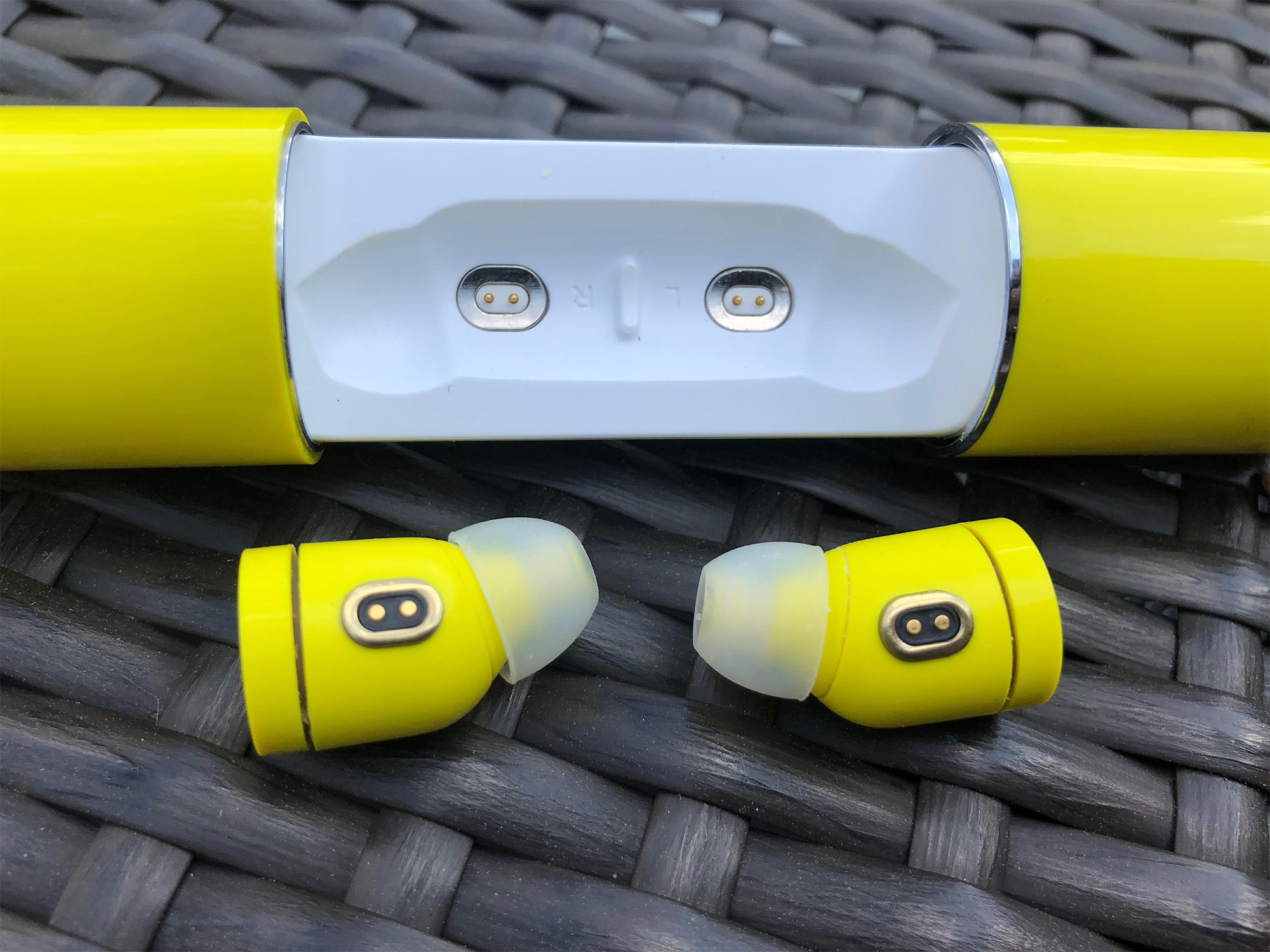
Battery life was just okay. We could stretch out the listening time to about two hours with the volume near 50% on our device. When you pop the volume up, you get closer to an hour of battery life. Not ideal, especially for those long workout sessions that we routinely participate in (totally). Crazybaby says that the Air Nanos are rated for three hours but we never got close to that number.
The charging case is also supposed to recharge the earbuds a total of three times (for a theoretical 12 hours of listening time). In practice, we got a little over two charges from the battery case, although your mileage may vary. The battery case also has some quirks like the fact that it won’t charge the earbuds if you’re also charging the case. This led to some frustration on a long car trip, but, hey, at least it uses USB type-C to recharge.
Build
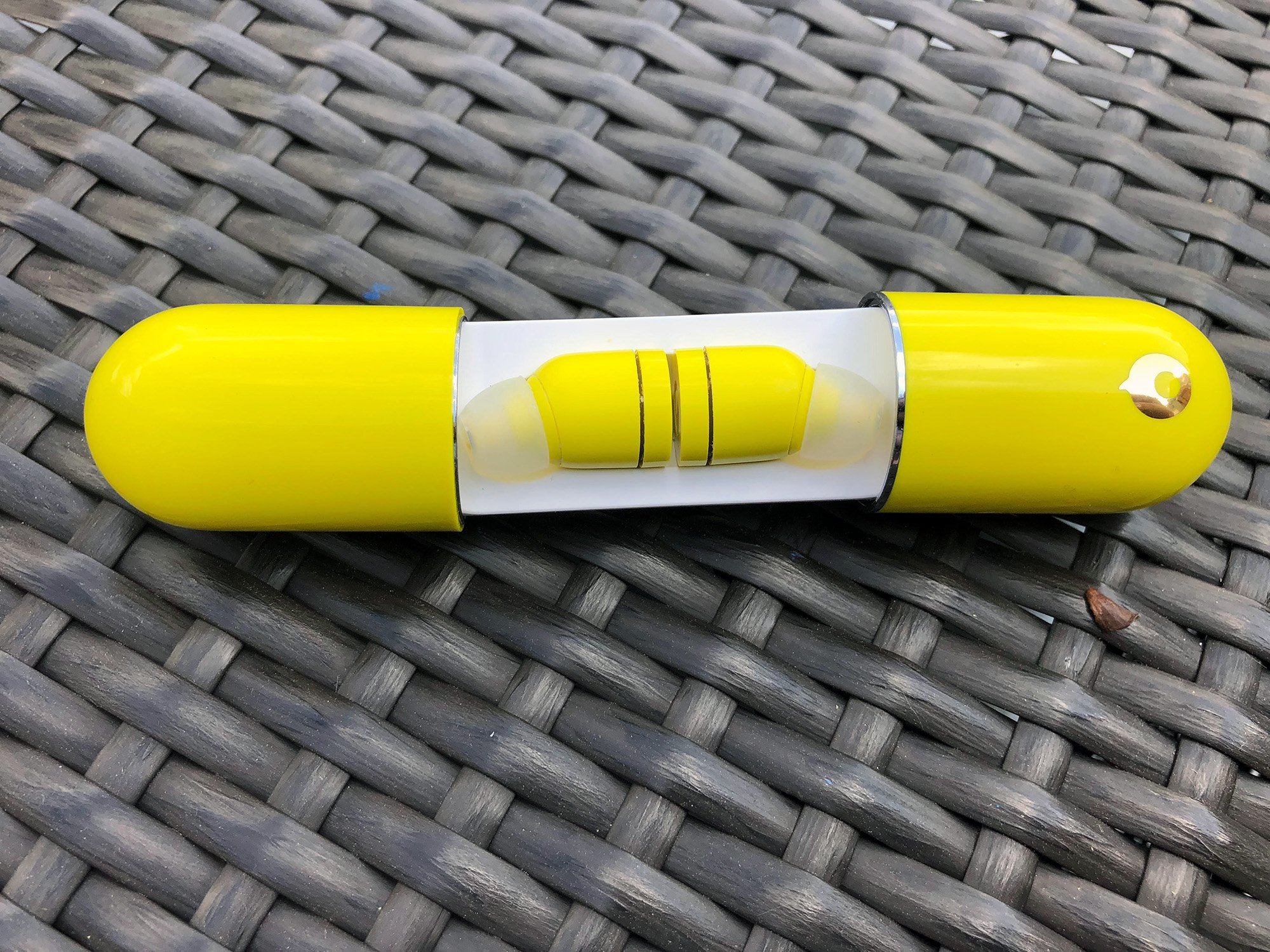
If there’s one thing that Crazybaby absolutely nailed, it’s build quality. The Air Nanos feel dense and solid, like a quality product. I don’t have any doubt that they would stand up long term.
The soft rubber tips that enter your ear are comfortable and provide a nice seal, keeping out outside noise. While we wouldn’t call these noise isolating, it does help keep out most outside noise for a pleasurable listening experience.
The charging case is similarly well built. It feels like it is made of high-quality plastics and has strong magnets to keep it closed when its supposed to be. With a little force, the case opens up to reveal the earbuds. The case has metal contacts that the earbuds to sit in to recharge.
We did experience a few times where the Air Nanos weren’t seated perfectly and therefore didn’t fully charge. Overall, it’s a pretty good experience, but not perfect.
Conclusion
Generally speaking, we really enjoyed our time with the Crazybaby Air Nano truly wireless earbuds. Are they perfect? No, far from it. Battery life is on the poor side and the charging situation can be sometimes frustrating.
But, when they do work, they’re a contender. Sound quality isn’t anything to write home about, but it gets the job done. The Air Nanos are some of the smallest earbuds out on the market today and do offer decent sound quality.
The bass is very present and you can tell that Crazybaby was going for a more “Beats” sound signature here. While the bass can be a bit all over the place, we’re just happy that there’s some here at all.
If you decide to pick up a pair of the Crazybaby Air Nanos, you have to keep in mind the sacrifices you’re making to stay wireless. If those are sacrifices you’re comfortable making, we can recommend these.
Crazybaby Air Nano purchase links: Crazybaby
HP just unveiled your next laptop – all 11 of them to be exact
Your current laptop probably feels and works good enough, maybe even great. No matter: HP wants to replace it. And it has just the product for you – eleven of ’em, to be precise.
At a day-long event in New York City, the world’s leading laptop maker unveiled a dizzying array of products that amounted to a complete revamp of its entire premium portfolio of laptop and convertible 2-in-1 products in the Envy and EliteBook lines, as well as a smattering of interesting accessories – monitors, docking stations, and a classy as hell all-in-one computer with a staggering 34-inch screen and Alexa built right into the base station.
It’s important to note the word premium above. HP has five laptop brands; the unveiling focused on the two “premium-est” premium brands. That’s the consumer-focused Envy lineup, and the commercial-focused Elite products. The company glossed over recent changes to the ZBook line, which is aimed at creative professionals, and only briefly touched on updates to the gaming-focused Omen products. The Spectre brand (also top of the line stuff) was mentioned, but not updated.
HP says it aimed to bring innovations introduced at the high end of its product portfolio down to more mainstream models, and it envisions more consistency across product lines. All of it is meant to address younger users who have very different ideas of what work means – and how technology should enable it.
“It’s not that crazy to work from everywhere right now,” explained Rachel Sumekh, CEO of Swipe Out Hunger, who spoke on a panel at the event featuring members of the Forbes 30 Under 30 list. “A typical day for me is anywhere from 12 to 14 hours,” explained Karan Jerath, another panelist.
Across the new products, you’ll see several elements touching on a few big themes.
Privacy: In 2016, HP announced that it was building 3M’s privacy screens directly into its laptops. We tested them out at the time, and if you’re into privacy, you’ll find them pretty awesome. That said, the technology was limited to lower resolution displays. The new lineup includes a second generation Sure View filter that allows for more vivid colors and supports brighter, higher resolution screens, although it still doesn’t work with 4K.
Security: Thanks to a custom chip on the motherboard called the HP Endpoint Security Controller, HP claims to have baked in security. It powers things like HP Sure Start, a “self-healing BIOS” that makes it easier for you to recover from a corrupt BIOS or a faulty system image. Several models also include a physical shutter over the laptop camera.
Speed: An HP Fast Charge feature on several models works akin to fast charging on your cell phone. Rather than sipping from the outlet to charge your laptop over the course of several hours, HP’s laptops can chug DC current to rapidly charge the battery. The Envy x360 15 goes from zero to 50 percent in about 45 minutes for example – something anyone with a brief layover in the airport will appreciate.
Collaboration features: HP unveiled keyboards designed for collaboration two years ago — they include dedicated keys to answer and place calls, reply to texts, and so on. Collaboration is a key part of the laptop, so this year the company revealed “world-facing mics” on several products. This is a third microphone on the cover of the laptop, facing the world when the display is open. It helps the system correctly cancel out ambient noise. Look for HP PhoneWise as well, software to lets you integrate your phone with your laptop. You can read and reply to messages and even place calls directly from your laptop.
Inking: A new generation of pens is available for some models, which include tilt sensors to support delicate shading work and have a button on the end to launch apps via Bluetooth. They also include a clever design touch — slide the pen open to reveal a USB Type C port for charging. There’s also a proximity alert, to prevent you from leaving the pen in a conference room.
Design: HP has attempted to improve the look and feel of its laptops across the board, with a move toward higher end, CNC-machined aluminums and a more premium look and feel. It’s noticeable, and something customers will certainly appreciate. There are also design flourishes of note throughout the line. HP’s Envy laptops have a unique pattern discretely laser etched on them to replicate the look of Damascus steel, a pattern often seen on fancy chef’s knives. And the Envy all-in-one’s base has a subtle woodgrain pattern.
It’s also worth noting how many of these systems include some form of discrete graphics. While HP didn’t focus on gaming – that’s what the Omen brand is for – these laptops can let their hair down when it’s time to have fun. We’re pleased to see discrete graphics fan out across HP’s product line, as it ultimately means a better overall experience for everyone who buys one.
HP Envy x360 15 hands-on review
Research Center:
HP Envy x360 15
Stylish, powerful, and refined, the Envy x360 15 should be a dream. It’s convertible, supports tablets and inking, and has powerful internal components. You get the option of either a standard Intel offering or an AMD-powered model which includes Radeon Vega graphics onboard to boot. On top of that, it looks simply gorgeous.
A few quirks to the product left us scratching our heads, but we’re hoping production models iron out the wrinkles.
Premium as a master chef’s kitchen
The design is unquestionably premium: The Envy x360 is made from a smoked gray, CNC-machined aluminum (HP calls it “Dark Ash Silver,” even though it isn’t silver at all), and feels great in the hand. Cheap laptops are simply cases that hold components, frames for a screen and a keyboard. HP has carefully beveled the back edges and polished them to give the machine an angular profile, and a subtle “Damascus steel” pattern is etched into one of the faces. Damascus steel, HP notes, is commonly used in fancy chef’s knives, and often have a distinct pattern. Go check out your fancy knives, and you’ll see what it means.
Jeremy Kaplan/Digital Trends
Beyond just the material, there’s the 2-in-1 design of course. The Envy x360 has geared hinges that let you flip the screen around to enter either tent mode or full on tablet mode. At 4.85 pounds, it’s a bit heavy to carry around, especially compared to the lightweight 13-inch laptops that have become so popular, notably Dell’s XPS 13. To compete, HP offers the Envy x360 13, of course, which weighs just 2.87 pounds and has a Gorilla Glass 4 coating on its screen for added durability.
The Envy x360’s hinge isn’t strong enough to support the screen.
To talk about 2-in-1s is to talk about hinge design, which is a Thing. Microsoft made a point of underscoring the work that went into the fulcrum hinge on its Surface Book lineup, while the Lenovo Yoga 920 has a very different take on what a hinge should be. HP’s geared hinge – which actually has mechanical gears inside it, that mesh and ensure smooth motion – may not be the best of the bunch.
We often carry our laptop by the corner near the keyboard, an admittedly precarious way to treat a precision piece of equipment but a very common one nonetheless. The Envy x360’s hinge isn’t strong enough to support the screen like this, drifting slowly back until parallel before ultimately bending backward, 270 degrees from the keyboard. That ain’t good. It also means that the pressure of your finger from routine use of the touch display will gradual push the screen back toward the desk behind it. Again, not good.
HP Envy x360 15 Compared To
Dell Inspiron 13 5000 2-in-1
Acer Nitro 5 Spin
Dell XPS 15 2-in-1
Dell XPS 13 2-in-1
HP Envy x2 (2017)
Asus NovaGo
HP Spectre x360 15-bl075nr
Acer Spin 7
Dell Inspiron 17 7000 2-in-1 (2016)
Acer Switch Alpha 12
HP Spectre x360 13-w023dx
Huawei Matebook
Dell Inspiron 11 (2015)
Toshiba Satellite Click 2 Pro
Acer Aspire P3
We asked HP, which suggested the hinge was preproduction and the issue might be fixed before the unit finally ships. We hope so. That’s one small misstep in an otherwise beautiful design, of course.
Great for typing purists, despite an odd choice
Speaking of that beautiful design, the keyboard is fantastic. It feels great to type on, with a satisfying key depth that made this reviewer want to type and type. And it makes very little noise at all – although mechanical keyboard fanatics will lament the silence. People, please: Enjoy the silence.
Jeremy Kaplan/Digital Trends
But before you get to enjoying the keys, you’ll probably notice the keyboard and trackpad are weirdly misaligned, something HP swears customers prefer. The off-kilter keyboard accommodates a numeric keypad, which some will call a godsend and others will regard as an artifact. Who does data entry anymore? Because of the keypad, the resting position of your fingers on the ASDF and JKL; keys aligns you with the left half of the screen. And the touchpad is centered with them, rather than the center of the display.
It threw us off at first, but it’s something business-focused people will definitely appreciate.
The 4K screen – FHD resolution, meaning 1,920 × 1,080 pixels — is sharp and crisp and really bright. It caught our eye from across the room like a movie star. We didn’t have enough time to benchmark the system, of course — we’ll leave to our full review. But in our brief experience, apps launched promptly, and the entire system felt zippy. It’s worth noting that the Envy x360 turns on in the blink of an eye as well. Open the cover, and the system is instantly on and awake. It feels very responsive overall.
Support for inking via HP’s newest pens is a very good thing – and so are those pens. The latest models have tilt support, which lets you shade you in a sketch, and a button on the end that can launch apps via Bluetooth, a la Microsoft’s Surface pens. We didn’t have a chance to test this out, unfortunately.
The Envy x360 15 starts at $870 for a model with the 8th-gen Intel Core i5, 8GB of RAM, a 256GB SSD, and onboard UMA graphics. If you opt for AMD, you can the alternative of a cheaper configuration, starting out at $760, packing a Ryzen 5 CPU and 128GB of SSD storage. As a bonus, you should get some better graphics performance with the AMD option, pushing up to Radeon RX Vega 10 for the spendier configuration.
AMD’s ready to do work with Ryzen Pro Mobile, coming to a laptop near you
Pairing Ryzen CPUs with Radeon Vega graphics is a great idea. It goes far beyond what’s possible with Intel’s onboard graphics options, and distinguishes AMD a bit from its competition. However, not many manufacturers have included these APUs in laptops or desktops so far.
That’s beginning to change, though. At a press event last Friday, AMD announced a series of new APUs made for enterprise laptops, but more importantly, some significant support from the biggest PC manufacturers. AMD says that with the inclusion of these new APUs, this is the broadest portfolio it’s ever had.
Ryzen Pro Mobile APUs
AMD announced three new mobile APUs, which have been picked up in a variety of new systems from different OEMs. They’re all quad-core CPUs using the Zen architecture and include Radeon Vega graphics onboard.
Here’s the specs you can expect from the three levels of Ryzen Pro APUs:
APU
Pro 2300U
Pro 2500U
Pro 2700U
Processor
Ryzen 3
Ryzen 5
Ryzen 7
Graphics Version
Radeon RX Vega
Radeon RX Vega
Radeon RX Vega
Compute Units
6
8
10
Cores
4
4
4
Threads
4
8
8
Base Clock Speed
2.5GHz
2.0GHz
2.2GHz
Boost Clock Speed
3.4GHz
3.6GHz
3.8GHz
Wattage
12-25W
12-25W
12-25W
If you’re familiar with the matter, you might notice these Ryzen Pro not all that difference from the previous Ryzen APUs we’ve seen. When it comes to pure specs, they’re nearly identical. But as with previous iterations of Ryzen Pro, the major differentiator is in security and reliability. These chips come with features like memory encryption and image stability, which should make IT managers happy. Those features won’t get the average person excited, but apparently it was enough to win over some important relationships with laptop manufacturers.
Lenovo, Dell, and HP were all present at the event, each showing off a portfolio of new products that put the Ryzen Pro chips to use. All these laptops are enterprise-focused, and can be configured with any of the three Ryzen Pro APUs.
Dell will be launching the 14-inch Latitude 5495, which look very familiar if you’ve seen a Latitude before. From Lenovo, we’re getting a continuation of the ThinkPad A-series, which debuted the with the AMD APUs in its classic black box. The new ThinkPads come in the 12 and 14-inch variety, the ThinkPad A285 and ThinkPad A485.
HP presented the EliteBook 600 series, as well as the more affordable ProBook 645 G4. The HP EliteBooks are definitely the most interesting option of the bunch. With some slick new security features, the most modern chassis, and trimmed-down bezels, the EliteBooks look like the kind of a laptop we could easily see an executive taking on work trips.
We don’t yet have pricing information on the Dell and Lenovo laptops, but the EliteBook will start at $1,000 and hitting shelves this month. The cheaper ProBook 645 G4 will also be available in May and will start at $760.
It should be noted that all of these commercial-class AMD-powered laptops also have Intel alternatives, which leaves the option up to individuals and IT departments to decide which they’ll choose. When asked why they wanted to work with AMD to produce these laptops, executives from each of the manufacturers cited benefits like increased graphics capabilities, security features, and access to a new segment of the market.
AMD says more consumer-level products will be coming out later this year, so expect some more laptop announcements from these partnerships soon.
Desktop Ryzen Pro APUs
In addition to the two desktop-level APUs that were previously announced, the 2400G and 2200G, AMD now has 35W CPUs made for compact PCs. Again, in terms of specs, there’s not a whole of difference between the 65W Ryzen Pro chips and the previously-announced APUs.
Here’s what you’re looking at for these new desktop Ryzen Pro APUs.
APU
Pro 2200G
Pro 2200GE
Pro 2400G
Pro 2400GE
Processor
Ryzen 3
Ryzen 3
Ryzen 5
Ryzen 5
Graphics Version
Radeon RX Vega
Radeon RX Vega
Radeon RX Vega
Radeon RX Vega
Compute Units
8
8
11
11
Cores
4
4
4
4
Threads
4
4
8
8
Base Clock Speed
3.5GHz
3.2GHz
3.6GHz
3.2GHz
Boost Clock Speed
3.7GHz
3.6GHz
3.9GHz
3.8GHz
Wattage
65W
35W
65W
35W
The OEM partners also showed off a slew of new desktop products that utilized these new pro-level APUs, in both the 35-watt and 65-watt variety. From Dell, you’ve got a fairly basic business tower, the OptiPlex 5055. Lenovo brought two ThinkCentre M7x5 towers: A full-sized unit with the 65-watt APU and a compact desktop using the 35-watt variety.
The most compelling desktop option came again from HP. The company showed off its EliteDesk G4 in three sizes: Tower, Mini, and SFF. The towers more standard fare, but the HP EliteDesk 700 Mini G4 is a bit more interesting of an offering.
It’s a tiny PC that attaches to the back of a monitor, clearing desk space of cords and clutter. Even more impressive, the compact PC includes the full 65W APU and options for a Radeon 560 discrete GPU. HP says that setup would support up to seven displays at once.
Editors’ Recommendations
- Dell’s latest Inspiron notebook packs in AMD’s Ryzen APU with Vega graphics
- AMD combats upgrade woes with ‘crates’ featuring discounted hardware bundles
- HP targets gamers on a budget with new Pavilion notebooks, desktops, and more
- AMD’s second-generation Ryzen desktop CPUs hit the market starting at $199
- HP’s mainstream Pavilion PCs refreshed with latest AMD Ryzen, Intel Core CPUs
Miss Windows XP? Watch this concept video that reimagines it for 2018
As far as Windows has come in the nearly two decades of this century, there are still many who hark back to some of the style choices prevalent in its earliest days. That is, they miss Windows XP. But what if their eternal longings could be met? One YouTuber has put together a short video mockup of what a 2018 version of Windows XP might look like, complete with modern features, placed over the older operating system’s classic style.
In the video, made by “Avdan,” we see an operating system with the clean look and “fluent design” choices of Microsoft’s more modern operating systems like Window 10, but with color palettes and layouts more akin to Windows XP. It even comes complete with the original backdrops and login screens and brings back the Microsoft “Rover” pixellated dog character to preside over search results.
Fans of “Windows XP 2018 edition” have been highlighting their favorite elements. OnMSFT particularly likes the reimagined Start menu, which includes live tiles, but in a much more simplified, XP-style. We liked how it blends the transparent user interface elements of Windows 10 with the color palette of the original XP.
The whole video has gone down so well that many commenters have raised the question of whether Microsoft could release a new theme for Windows 10 which would allow such an art style and layout type to be used with Windows 10.
This isn’t the first concept of a potential alternative modern Windows that Avdan has put together. Just a few months ago, Avdan released a video of a conceptual “Windows 11” which looks even cleaner than the retro-future XP idea does. It too borrows elements from Windows 10, but streamlines the user-interface and introduces visual elements to enhance features like weather reports that can cross between interfaces and windows.
Although we can’t promise that you’ll find one that will make your Windows 10 PC look and feel like Windows XP or the mythical Windows 11, Microsoft does have some themes available in its store — some free, some requiring payment. For more on Windows themes and how to install them on your Windows 10 machine, check out our guide to Windows customization.
Editors’ Recommendations
- Get the top-notch Dell XPS 13 laptop with Core i7 processor at a $400 discount
- The XPS 15 2-in-1 is Dell’s version of a concept car. Here’s how it was built
- Dell XPS 13 9370 review
- Dell XPS 15 9560 review
- Dell XPS 13 vs. HP Spectre 13
The S8 Lite appears to be Samsung’s response to a slowing flagship market
It looks like Samsung may be looking to bolster its smartphone lineup with a revised version of last year’s Samsung Galaxy S8.
Samsung used part of its financial report for the first quarter of 2018 to warn investors that there’s a smartphone market slump on the horizon — warnings that seem to have been proven correct by a marked decline in global sales of smartphones. With Samsung’s apparent clarity on the subject, it doesn’t seem surprising that the company is trying something new to mix up its offerings and try to reinforce its position as one of the smartphone market leaders. Here’s everything we know about the budget Samsung Galaxy S8 Lite.
Design
It seems that Samsung had a whole lot of Galaxy S8 parts left over, because leaked press renders of the proposed Galaxy S8 Lite look almost exactly the same as a standard S8.
So if you’re a fan of the Galaxy S8’s design, but not its price tag, then there will be a lot to love here. There’s a Bixby key, the gorgeous Infinity Display, and the fingerprint sensor (unfortunately) to the side of the single camera lens. It seems that the phone will also be coming in two colors — red and black.
The recycling of the S8’s design isn’t a terrible choice by any means — Samsung lifted most of the same design choices for this year’s Galaxy S9 — but it’s still a tad disappointing to see the return of the fingerprint sensor to the side of the camera lens. It’s just too easy to miss and accidentally tap the lens instead, leading to smudged photos. Still, a good case helps to keep that at bay, and you do grow used to it.
Slashleaks
The display will be a 5.8-inch Infinity Display, as mentioned, and will presumably still be an AMOLED screen in order to achieve the Galaxy series’ celebrated curve. There have been some cutbacks made to the screen’s resolution however, with the S8 Lite only being able to display up to 2220 x 1080 — but that’s still sharp enough for most people.
The heart rate sensor from the Galaxy S8 (formerly on the opposite side of the camera lens, under the flash) has also disappeared, but is the sole physical casualty of the drop to a lower price range. At this time we’re not sure about the materials used in the build, so we can’t say for sure whether the glass and metal build of the S8 or its waterproofing will make their way to the S8 Lite. If these leaks are correct, then the S8 Lite could be a strong contender in the midrange market.
Specs
While rumors about the design of the S8 Lite leave the outside of the phone relatively unchanged, the whispers about the internals point to more drastic changes from the original S8.
While rumors say that the S8 Lite will be packing the same 4GB of RAM and 64GB storage space from the standard S8, the central processing unit will be changing from the Snapdragon 835 to a Snapdragon 660. That’s not likely to be as dramatic a drop in performance as the numbers might suggest — the Nokia 7 Plus uses the Snapdragon 660, and we found the performance on that snappy enough. While you’re not going to get the same level of speed as you would with a Snapdragon 835, we anticipate that the Snapdragon 660 should perform admirably — and provide some additional battery life thanks to its power efficiency.
Speaking of the battery, those same rumors say the S8 Lite will come with a 3,000mAh battery — the same as the standard S8. With so much staying the same, these whispers do seem likely.
Camera
At this time, most leaks point at the S8 Lite coming with a 16MP camera mounted on the rear — which may well be an upgrade from the Galaxy S8’s 12MP camera. While great on launch, the S8’s camera has slowly been outclassed by later smartphone releases, and while the S8’s camera can still hold up very well, there are definitely cameras that do it better now. The S8 Lite could be Samsung’s chance to send out a slightly updated version of that camera tech. There has been no confirmation yet that the S8 Lite will include the dual-sensor tech that allows single camera setups to perform “bokeh” selective blur trickery.
We always enjoy testing Samsung’s camera tech, and we look forward to giving the S8 Lite’s camera a spin.
Release
There is no solid information on whether this phone will launch in the U.S. — Samsung hasn’t even tehcnically admitted it exists yet — but leaks point to the phone being released in China on May 21. Pricing is another finicky area — but with the Galaxy S8 having seen significant price cuts that take it down to $600, it’s not at all unfair to assume that the Galaxy S8 Lite would be priced at $500 or below.
Editors’ Recommendations
- Samsung Galaxy S8 vs. Galaxy S8 Plus: Which galactic star should you pick?
- The best screen protectors for the Galaxy S8 and S8 Plus
- Galactic battle: How the Galaxy S9 Plus camera compares to Samsung predecessors
- Microsoft is selling its own customized version of the Samsung Galaxy S9
- The best Samsung Galaxy S9 cases to keep your new phone safe, looking good
iPhone explodes, catches fire in terrifying Las Vegas security footage
Samsung might not be the only smartphone maker with exploding handsets in its portfolio — chief rival Apple may be feeling the heat as well. In a rather alarming surveillance video, an iPhone can be seen exploding and subsequently catching fire in a store in Las Vegas.
In a video taken on Friday, May 11, an employee of an as-of-yet unidentified store can be seen working at a counter when suddenly, an iPhone a couple of feet away on the counter quite literally goes up in flames. The employee, startled, moves far away from the handset as it continues to burn. No one was hurt in the incident.
The store specializes in phone repairs, but apparently, this was one mobile device that was suffering from significantly more than just a cracked screen. Indeed, it would seem that in some cases, a damaged mobile device can be a fire hazard.
While the surveillance video makes it difficult to ascertain exactly what device exploded on the employee’s desk, ABC affiliate KTNV, which first reported the news, notes that the handset was an iPhone 6S. This is not the first time that an Apple phone has exploded and caught fire. Last December, security footage showed an iPhone 6 exploding in a man’s hands, and previously, iPhone 8 batteries have also reportedly swollen and cracked, which is often seen as a precursor to more dangerous combustion.
To be fair, there aren’t any handsets that are entirely risk-free when it comes to explosion. The vast majority (if not all) of phones depend upon lithium-ion batteries, which tend to be dangerous if they’re either damaged or defective. Batteries, indeed, were the culprit behind the issues with the now infamous Samsung Galaxy Note 7 — Samsung ultimately determined that the handsets overheated due to defective batteries supplied from two different companies and eventually recalled all Note 7 phones. And seeing as the exploding iPhone was in the midst of a repair when the explosion happened, it’s possible that the battery had already been damaged.
As Mashable reports, another possible scenario was that the iPhone was left in the heat for too long, causing battery damage. And seeing as the incident took place in Las Vegas, a city not known for its cool temperatures, it could be the case that the iPhone was suffering from a sort of mobile heat stroke.
Editors’ Recommendations
- This is the moment a portable charger caught fire in a plane’s overhead bin
- Flaws, failures, and flops: These are the worst smartphones ever made
- No one injured as another Samsung washing machine explodes
- Apple facing complaints over its iPhone battery-replacement pledge
- iPhone X: Here’s everything you need to know about Apple’s best phone yet
Can’t get enough of ‘Doom’? A.I. can generate an infinite number of new levels
Tech companies like Google DeepMind have demonstrated how cutting-edge artificial intelligence can learn how to play classic video games better than most human players. But could an A.I. design classic video game stages as well as human designers? That’s a question posed by researchers from Italy, who have developed an artificial neural network that’s capable of generating a theoretically infinite number of new levels of the classic 1993 first-person-shooter Doom. If you’ve spent the past 25 years wishing Doom would never end, today is your lucky day!
To create the new levels, two deep-learning neural networks were shown 1,000 existing Doom levels. This gave them the ability to learn the features found in popular levels, and use these as the basis for generating new ones. The researchers didn’t directly have any input on the levels generated. However, their selection of the levels used to teach the network allowed them to exert a small amount of control — like the parent who tries to shape their kids’ music tastes by only playing them classic albums produced during the golden age of, say, 1988 to 1997.
“There are no explicit bias encoded in the networks that generate the levels, but we expected — and found in our analysis — the networks generate levels that share similarities with levels used for training,” Daniele Loiacono, an assistant professor at Italy’s Politecnico of Milano, told Digital Trends. “Accordingly, choosing the set of levels to use for training makes it possible to affect the quality and the characteristics of the levels generated.”
So what does this mean for future game design then? Are tomorrow’s AAA developer jobs going to snapped up by bots instead of human creators? Not necessarily.
“We think that this work, as well as several recent works in the game research literature, suggest that it would be possible very soon to develop better design tools, where A.I. could assist human designers with the game content creation,” Loiacono said. “Such ‘intelligent’ design tools could save time for human designers and, at the same time, allow them to work at a higher level of abstraction. Our other work deals with using A.I. to generate game content, including tracks for racing games, 3D assets, weapons and maps for FPS, and levels for platformers. In particular, this approach could be applied to generate maps also for real-time strategy, multiplayer online battle arena, and RPG games.”
Along with Loiacono, other researchers on the project included former Politecnico di Milano student Edoardo Giacomello and Pier Luca Lanzi, a full professor at the university. You can read their paper here. The project’s repository is also available for examination on Github.
Editors’ Recommendations
- Baidu’s new A.I. can mimic your voice after listening to it for just one minute
- A new A.I. can guess your personality type based on your eye movements
- Stimulating brains with lasers can create ‘Matrix’-like false experiences
- The best tablets you can buy
- Social media is flooded with illegal wildlife trade but A.I. can help
How to change the Google Assistant voice on your phone and Google Home
Hey Google, I like the sound of that.

Google Assistant is pretty powerful, and it’s getting even better. Recent announcements from Google I/O suggest that Assistant will soon be a lot more powerful with new “Continued Conversations,” a new addition makes it an even better experience right now.
That’s because Google has added six additional voices to Assistant, nearly tripling the total after it added a male voice in October of 2017. So how do you change to one of these new voices on your phone or Google Home? It’s actually quite simple.
How to change the Google Assistant voice on your phone
To change the Google Assistant voice to one of the six new options on your phone, you have to get into the Assistant’s settings.
Note: Your phone must be running Android 6.0 Marshmallow or above to have access to Assistant.
Long-press the home button to activate Google Assistant.
Press the blue explore button in the top right corner.
Tap the three-dot menu button.
Tap Settings.

Tap Preferences.
Tap Assistant voice
Tap the voice you want.

The new voices range from soft to deep, from male to female. According to Google, all of the new voices are completely computer-generated, but they sound amazing. I like Voice 5, what about you?
How to change the Google Assistant voice on your Google Home
The procedure to change the Assistant voice on your Google Home is pretty similar since your account shares the voice between phone and speaker. In this example, though, we’ll be using the Google Home app.
Open the Google Home app.
Open the left-side menu.
Tap More settings.
Tap Preferences.

Tap on Assistant voice.
Select the new voice.

That’s it! Now your voice should be different on both your phone and your Google Home series.
Unfortunately, it seems like this time it’s not possible to have a different voice between your phone and your Google Home — unless you register your Google Home devices on a different Google account. The new voices are also limited to U.S. users at the moment, anyone who sets their Assistant’s language to ‘English (U.S.)’
Google Hardware

- Google Wifi review
- Google Home review
- Chromecast Ultra: all you need to know
- Which Chromecast should you buy?
Google Wifi: Google
Amazon
Google Home: Google
Best Buy
Chromecast Ultra: Google
Best Buy
 AIVAnet