


Save up to $90 on select Amazon Key bundle configurations
Embrace the future of in-home deliveries.

Amazon currently has select Amazon Key configurations on sale for a limited time. The minimum discount is $69.99, though some of them are discounted by up to $89.99. With this price drop, the base kit goes from $290 down to $219.99, and when you pair that with the recent feature additions to the service, it makes for quite a compelling offer.
You’ll have to build your kit and add it to your cart to see the final discount. They all come with Amazon’s Cloud Cam (Key Edition) and then you can pick between a couple of Kwikset and Yale smart locks. The locks come in a few different color options as well, so be sure to pick the one that matches your home the best.
Amazon recently increased the number of lock options from three to eight and added a number of other great features as well. Non-Prime members can now use it, and guest codes can be set to let people inside your home without a key. These codes can expire once used, making it easier to let in your house cleaner, dog walker, children and more.
If you’ve been considering one of these kits, now’s the time to buy.
See at Amazon
Google Assistant: Everything you need to know
There’s a lot going on with the Google Assistant — let’s break down the important stuff.

In May 2016, we got our very first taste of the Google Assistant with the debut of Allo. The Assistant was a big draw to Allo at the time, with Google marketing it as a helpful bot that could make restaurant reservations, search the web, and more within your conversations.
Since then, the Assistant has gained heaps of new features and expanded to smartphones, tablets, speakers, and more. Google’s shown no interest in slowing down development for the Assistant, meaning that it’s likely here for the long-haul.
Whether this is your first encounter with it or you just need a quick refresher, here’s everything you need to know about the Google Assistant.
May 9, 2018 — Google announced a heap of new features at I/O

To little surprise, the Google Assistant was the star of the show for a good chunk of I/O’s opening keynote this year.
A lot of new features were announced for the Assistant, including new voices, the ability to ask follow-up questions without having to say “Hey, Google” each time, and an option for making your own custom Routines.
However, the most exciting thing was a system called Google Duplex. With this, the Assistant can call businesses and make appointments/reservations on your behalf. It’s wickedly cool and definitely one of the wildest things to come out of this year’s conference.
What’s new in Google Home and Assistant at Google I/O 2018
Google Now paved the way for Google Assistant


The Google Now page compared to the new Google Feed.
Before there was the Google Assistant, we had Google Now. Google Now was introduced to the world all the way back in 2012, offering contextual info through the Google Now page and helpful answers to random questions with an “OK Google” voice command.
A lot of what made Google Now so great can still be found in the Google Assistant today, with the exception of the Google Now page. The Google Now page used to be home to cards showcasing the weather, information on packages that had shipped from online orders, boarding passes, and more. It’s since been replaced by the Google Feed – a collection of news stories Google thinks you’ll be interested in – and it’s definitely the biggest departure between the two services.
The Google Assistant as a whole is still more powerful than Google Now ever was, but long-time Android users like myself are still mourning the loss of that Now page. RIP, old friend.
Read more: Google Now is being left to wither and die as Google Assistant takes the focus
It’s available on just about everything
In just a few short years, the Google Assistant’s gone from being exclusive to a now-failed chat app to being integrated into just about anything you can think of.
You’ll find Google Assistant built right into most Android phones, it’s the star of the show for the Google Home lineup, and it’s even making its way into sound bars.
Here’s the full list of devices with Google Assistant
Setting up the Google Assistant is as easy or complex as you want
When you set up a device for the first time that has the Assistant, getting started is pretty simple. Accessing it is just a voice command or tap away depending on what gadget you’re using, but if you want to really fine-tune your experience, Google’s got you covered.
Take a quick dive into your Assistant settings and you’ll find options for just about everything – including your weather preferences, changing the Assistant’s voice, retraining your voice model, picking out preferred news sources, and much more.
Let Tom walk you through everything with his full guide
Google Home’s the premier way to get the Assistant in your house (at least for now)

It’s great to have the Google Assistant on your phone, but if you want to truly experience just how helpful it can be, you’ll want to consider picking up a Google Home.
Google Home is Google’s line of smart speakers that put the Assistant on full-display, allowing you to control smart devices, ask random questions, set timers, play music, and more by just using your voice.
You can spend as little as $49 for the Google Home Mini, $129 for the original Google Home, or a whopping $399 for the Google Home Max.
However, as great as the Home series is, don’t forget that Smart Displays are just on the horizon.
Announced at CES 2018, Smart Displays are essentially smart speakers with the Google Assistant and a touch screen display that can show you helpful visuals when talking to them. It’s basically Google’s answer to the Amazon Echo Show and Echo Spot, and we can’t wait to see more from them.
Everything you need to know about Google’s Home speakers
Then again, is an always-listening speaker the right fit for your home?
However, the convenience of a Google Home (or any smart speaker for that matter) does come at the cost of privacy. Speakers like the Google Home are “always listening”, meaning they’re constantly on the lookout for a hot word to know when you’re talking to it (such as “Ok, Google” and “Hey, Google”).
This means the microphone on a Google Home is always active, but it’s not necessarily storing all the audio it hears when it doesn’t detect its hot word.
Most all speakers allow you to restore some privacy by being able to mute the microphone, but if you want to start asking the Assistant questions, you’ll need to unmute it first.
To learn more about these “always listening” speakers, I’ll pass the mic over to Jerry
Big upgrades are coming to the Assistant on Wear OS


Switching gears for a second, the Google Assistant on Wear OS (formerly Android Wear) is about to get a big upgrade.
In the near future, the Assistant on Wear OS will support Assistant Actions (basically apps for the Assistant) and give you the option to hear its responses through your watch’s speaker or a pair of connected Bluetooth headphones.
Along with this, Google will be adding something called “smart suggestions.” After asking the Assistant for the weather, for example, you’ll see little bubbles for “weather tonight”, “use celsius”, and more so you can continue the conversation with just the tap of your finger. Google Assistant on Android offers something similar, and it’s a great tool to have.
IFTTT supercharges the Assistant’s usefulness

IFTTT (If This Then That) is a powerful online tool that allows you trigger something (that) if a certain event (this) happens. You can connect IFTTT to the Google Assistant to create your own recipes using this formula, and it can allow for some incredibly helpful combinations.
Some of our favorite uses for IFTTT and the Assistant include adding contacts to your Google account, setting your Google Calendar status to Busy for a certain period of time, and much, much more.
Getting started with IFTTT can take some time and patience if you’re new to it, but once you’re all set up and ready to go, it can prove to be a lifesaver.
How to connect Google Home and IFTTT to do amazing things with your connected tech
You’ll get the same experience no matter what devices you use
With so many devices capable of running the Assistant, it’d be easy to think that the experience you get on one gadget would be different from another. This is something that Google struggled with for a while at first, but we’re finally in a position where the Assistant experience you get on a smart speaker, for example, is the same you’ll get on your phone.
There are a handful of features here and there that still create for some discrepency, but for the most part, the Assistant you use on your Pixel 2 is the same one found on Google Home.
Google Home and Google Assistant finally offer the same experience
Do you think you’ll get the OnePlus 6?
The phone will be here in just a couple days.
On May 16, we’ll finally be able to stop with rumors and leaks to officially feast our eyes upon the OnePlus 6. The phone is shaping up to be OnePlus’s most impressive device yet, and thanks to tipsters and OnePlus itself, we already have a good idea of what to expect from it.

Some of our forum users recently started talking about whether or not they’ll ditch their current phone for the OnePlus 6, and everyone seems to be split across the board.
Certain users are ecstatic to get their hands on OnePlus’s latest, but there are others that couldn’t care less.
Ca_lvn
05-12-2018 05:07 PM“
I have the 5T and will switch to the 6 its a very impressive phone , best bang for the buck I’ve ever had in a phone.
The XL leaves to much to be desiredReply
mustang7757
05-12-2018 07:17 PM“
I like what one plus is doing with their upcoming phone, but my interest is focused on pixel 3
Reply
Theot
05-12-2018 07:46 PM“
No interest, I don’t expect the camera to be better but also I just don’t trust that company.
Reply
bhatech
05-13-2018 01:00 PM“
I’m going to probably pick up one when released, will be my daily driver for few days/weeks and then will decide to keep the OP6 or sell it. Pixel 2 XL stays until next Pixel
Reply
What about you? Do you think you’re going to buy the OnePlus 6?
Join the conversation in the forums!
Could Android P’s beta expansion lead to more phones with ‘Pixel’ Android?

I’d love to see an even longer list of supported devices with Android P’s official release.
Remember a few years back, when certain phone manufacturers participated in this little thing called the Google Play Edition program? If you loved the hardware on phones like the Galaxy S4 or the HTC One but couldn’t stand the customized software, this was a perfect solution — Google Play Edition phones came with stock Android software, give or take a few minor tweaks to accommodate for device-specific features.
Unfortunately, the Google Play Edition program has been dead in the water for a while now; while it was never officially discontinued, there hasn’t been a new Google Play Edition phone since 2015. Sure, you could still flash stock Android ROMs onto your phone if you were willing to jump through the hoops of the rooting process, but that comes with its own caveats — the risk of bricking your phone, voiding your warranty, and breaking security-based features like Google Pay.
There’s still hope, though! Android One has seemingly replaced the Google Play Edition program as a sort of spiritual successor. Some phones, like the Moto X4, are available in two versions; one with Android One, and another with some of Moto’s own software customizations. Other phones, including Nokia’s entire lineup moving forward, offer Android One as the only software option.

This is great news for stock Android fans who want to be able to choose from more than just the latest Pixels, but they’re not the only ones who benefit. Android One works just as well on a budget device as it does on a flagship, and more importantly, it comes with the promise of regular software updates for at least two years. This is already good news for those who buy a new flagship every other year, but it’s even more significant for customers with low-end phones that rarely ever see a security update, let alone updates to newer versions of Android in the future.
What we saw at Google I/O was different, though. We’re used to seeing Google roll out beta previews of new Android builds at its I/O keynote, but this is the first time we’ve seen Google expand the beta program to non-Google devices. This even includes unreleased devices like the OnePlus 6, but if you have a phone like the Essential PH-1 you can get in on the Android P goodness right now. So what does that mean for future updates?
If you’ve flashed the Android P beta preview on your non-Pixel phone, it’ll work exactly as a Pixel would … except that you won’t be able to receive OTA updates for future builds. Any new software updates come out, you’ll have to dive into your terminal and flash the update all over again. That’s fine for the people who like to tinker in ADB, but for the rest of us … well, I just want my phone to work like everyone else’s.
The shortlist of Android P-compatible devices is great, but I’d love to see it expand to more popular phones.
Maybe this limitation will change once Android P is officially released. That won’t be for a little while now — we still don’t even know what dessert P will be named after — but once it does, I’d be interested to see if non-Pixel phones will suddenly be able to receive regular updates. I’d also love to see Google expand its list of supported devices as we get closer to Android P’s official launch. Phones from Sony, Xiaomi, and the like are great options, but imagine if more popular phones like the Galaxy S9 could run stock Android. I know I’d be interested.
Of course, none of this really matters if the manufacturers aren’t interested. Samsung puts a lot of time and effort into its custom software, as do other companies like LG and Huawei. Whether you love or hate the software, it helps each company differentiate its products from the competition, and it’s easy to see why a company would be hesitant to devote even more time into a separate team that strips that differentiation away.
This is largely why Google Play Edition was brought to an end, but Android One hasn’t exactly been bad for business. Nokia has largely made a resurgence in the smartphone industry in the last year or so, and a lot of that is thanks to its embracing of Android One. The promise of timely updates alone gave Nokia a huge advantage over competing budget options like the Moto G.
Stock Android on a phone as mainstream as the Galaxy S9 may just be wishful thinking — there are just too many Samsung-centric features tied into the phone, and the Samsung Experience software is pretty good these days anyway. But even if the only option is to flash Android P onto the phone manually, I’d just be happy to see the option officially sanctioned by Google and the respective hardware manufacturers.
Android P
- Android P: Everything you need to know
- Android P Beta hands-on: The best and worst features
- All the big Android announcements from Google I/O 2018
- Will my phone get Android P?
- How to manually update your Pixel to Android P
- Join the Discussion
Researchers Discover Vulnerabilities in PGP/GPG Email Encryption Plugins, Users Advised to Uninstall Immediately
A warning has been issued by European security researchers about critical vulnerabilities discovered in PGP/GPG and S/MIME email encryption software that could reveal the plaintext of encrypted emails, including encrypted messages sent in the past.
The alert was put out late on Sunday night by professor of computer security Sebastian Schinzel. A joint research paper, due to be published tomorrow at 07:00 a.m. UTC (3:00 a.m. Eastern Time, 12:00 am Pacific) promises to offer a thorough explanation of the vulnerabilities, for which there are currently no reliable fixes.
There are currently no reliable fixes for the vulnerability. If you use PGP/GPG or S/MIME for very sensitive communication, you should disable it in your email client for now. Also read @EFF’s blog post on this issue: https://t.co/zJh2YHhE5q #efail 2/4
— Sebastian Schinzel (@seecurity) May 14, 2018
Details remain vague about the so-called “Efail” exploit, but it appears to involve an attack vector on the encryption implementation in the client software as it processes HTML, rather than a vulnerability in the encryption method itself. A blog post published late Sunday night by the Electronic Frontier Foundation said:
“EFF has been in communication with the research team, and can confirm that these vulnerabilities pose an immediate risk to those using these tools for email communication, including the potential exposure of the contents of past messages.”
In the meantime, users of PGP/GPG and S/MIME are being advised to immediately disable and/or uninstall tools that automatically decrypt PGP-encrypted email, and seek alternative end-to-end encrypted channels such as Signal to send and receive sensitive content.
Update: The GPGTools/GPGMail team has posted a temporary workaround against the vulnerability, while MacRumors has compiled a separate guide to removing the popular open source plugin for Apple Mail completely until a fix for the vulnerability is released. Other popular affected clients include Mozilla Thunderbird with Enigmail and Microsoft Outlook with GPG4win. Click the links for EFF’s uninstall steps.
Tags: security, Encryption
Discuss this article in our forums
How to Remove GPGTools/GPGMail Encryption Plugin From Apple Mail
Security researchers are warning users of PGP/GPG email encryption plugins not to use the software, after critical vulnerabilities were discovered that could potentially be used reveal the plaintext of encrypted emails.
The official advice from security researchers is to disable and/or uninstall the affected software until the vulnerabilities are disclosed and fixes can be issued. In the meantime, users are advised to seek alternative end-to-end encrypted channels such as Signal to send and receive sensitive content.
This short how-to guides users through the steps necessary to remove the popular open-source encryption plugin GPG Tools (GPGMail) from Apple Mail. GPGTools has also since published a temporary workaround that it believes mitigates against similar so-called “Efail” attacks.
How to Uninstall GPG Tools from Apple Mail
Quit Apple Mail if it is running (Mail -> Quit Mail in the menu bar).
Click on the desktop and in the Finder menu bar, select Go -> Go to Folder….
In the Go to Folder dialog that appears, type /Library/Mail/Bundles and click Go.
Delete the GPGMail.mailbundle file by either dragging it to the trash in your dock or by right-clicking (Ctrl-clicking) it and selecting Move to Trash in the contextual dropdown menu. If you don’t see the mailbundle file, return to the previous step but type ~/Library/Mail/Bundles in the Go to Folder dialog (note the tilde (~) character denotes your home folder). 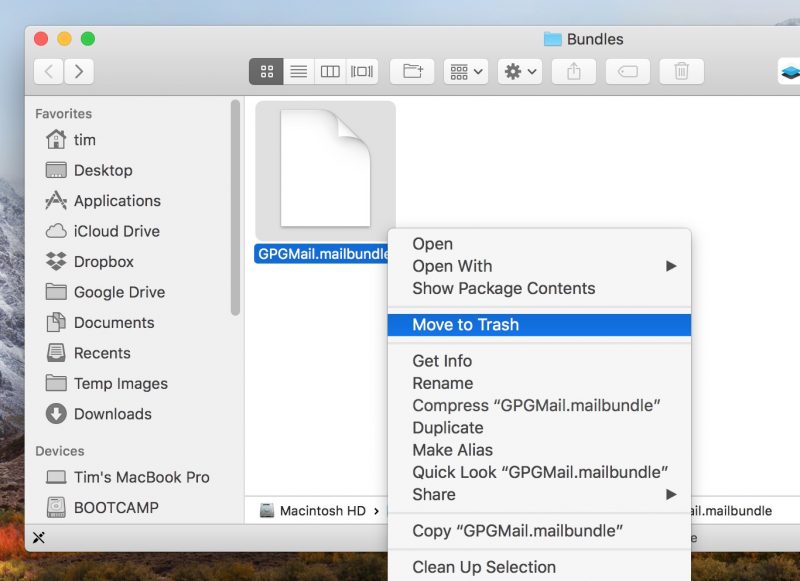
Enter your administrator password if prompted to confirm the action.
After following the above steps, the GPG Tools email plugin will be gone from Apple Mail the next time you launch the client.
Related Roundup: macOS High SierraTag: apple mail
Discuss this article in our forums
Dating Apps that Are Popular Around the World
Social networks and modern technologies have made our life as simple and convenient as possible. Now you can work from anywhere in the world, order food in one click, and get acquainted with the “man or woman of dreams” with a special application for your tablet or smartphone. Studies of recent years have shown that many couples (including happily married ones) have found each other on dating sites. We have collected five excellent applications that will help you find a pleasant companion, Russian brides or just sex.
- Tinder
One of the most popular and well-known applications for iOS and Android Tinder helps people get acquainted. This dating app appeared in 2012 and immediately became popular. Everything is very simple. You just download and install the application, register via Facebook, and start searching for a couple. You will see photos on the screen. If you swipe to the left, then it means that you don’t like a person, to the right – like. If any person forces your heart to beat more often, you can send “like” and then this person feels that someone really likes him/her very much. Unfortunately, in Tinder, the number of sympathies that can be expressed throughout the day is limited. To make their number unlimited, you need, of course, to buy a premium subscription.
- Badoo
This is one of the most popular applications in the world for dating! More than 180 million people have chosen Badoo for communication, dating, and meeting people. This application can help find out who dances with you in a nightclub, sits in a cafe, restaurant, and other places. You can agree on a dinner with a person who is currently somewhere near you. Also, a chat room where you can talk with someone who lives nearby is at your disposal. Another important advantage of Badoo is the possibility of not only textual communication but also video chats. It’s very cool for this type of application. You can chat in video mode and it’s not so terrible to go on a date, at least, you know that a person is real.
- Happn
Happn is an online dating site from France. It is aimed at people who are somewhere near or use similar routes. This application takes the data about your location as a basis so that it shows possible people for dating. If you are near a person who suits you according to requirements, characteristics, and interests, then his/her profile rises to the very top of the search. After that, you can see his/her photo, send “like”, and start a conversation.
- Pure
Dating for singles Pure will help you find the right couple. To do this, just upload your photo, specify a gender and get acquainted with people who are currently in the vicinity. According to the idea of the creators of the application, this service is an ideal tool for a quick acquaintance. You can tie up the communication in the following way: find a person you like and send a request for additional photos, while not spending time chatting.
- DOWN
This is another version of dating sites but only for casual sex. Here a partner for a pleasant pastime will be chosen from your friends on Facebook. How does it work? Choose a sexually nice friend from Facebook and wait: if this person also has an installed application and you coincide in intentions, you will receive a notification. If a person you like doesn’t answer reciprocally, it’s okay – he/she will never know about your interest and “like”. The main thing is that the application connects only those whose interest to each other is mutual. You can even choose all your friends – they will not suspect your insidious plans on their account.
Driverless pods could be used to ferry tourists around a U.K. national park
Anyone who has ever visited England’s Lake District in the height of summer will know from bitter experience how the roads can become clogged with cars as travelers from around the world explore one of the country’s most beautiful national parks.
The operator of the park recently tested an electric-powered driverless pod as part of a pilot program to gain public feedback on how it feels to use the technology. The aim is to explore the possibility of integrating the autonomous pods in the local transportation system to help cut pollution and ease congestion on the park’s busy roads.
Developed by Westfield Technology Group, the diminutive vehicle uses sensors and cameras to detect road conditions and obstacles as it transports up to four people along designated routes.
It’s hoped the pods could be useful for last-mile journeys inside the park, for example, from the station to the hotel, or from the hotel to the top of a valley to start a hike.
“We’re constantly looking at new ways to balance the needs and enjoyment of people as they visit and move around the Lake District, whilst being mindful of the impact on the environment,” Richard Leafe, chief executive at the Lake District National Park, said in a release.
Leafe added: “Driverless pods are a really interesting concept and while this is not necessarily something that will be seen on the Lake District streets soon, it’s vital we explore a range of solutions for sustainable travel. We’re excited to see the pods in action this week and to hear from the public on whether they would use this type of transport in the Lake District.”
Julian Turner, boss of Westfield Technology Group, said his firm was using the Lake District project to identify “possible routes for the pod and talking to the local community about how we could meet their transport needs.” He added that the collaborative effort “will allow us to create a sustainable and accessible transport mode for journeys in the future.”
The feasibility study will run until June with the results helping the park to decide if this type of transport would suit the Lake District and be a good fit for those who live and visit there.
Similarly designed pods are already transporting passengers around Heathrow Airport, and have also been tested in parts of London, but it seems this is the first time the vehicle has been taken onto roads in the countryside.
Editors’ Recommendations
- Get seasick? Then this floating hotel room ‘pod’ is definitely not for you
- Tipoon is a tiny pop-up camper that triples in size
- DeLonghi EC685 Dedica review
- ‘Pollution Pods’ let you choke on the air of the world’s most polluted cities
- Ford’s self-driving cars are now delivering pizza in Miami
OnePlus 6: News, Rumors, Release Date, Specs, and more!
This is everything you need to know about the OnePlus 6!
OnePlus has been on a cycle of releasing two smartphones per year: a major release in the spring, and a minor tweak of that previous phone in the fall. It’s nearly spring 2018, which means it’s nearly time for another OnePlus phone. Here’s everything you need to know about the upcoming OnePlus 6!
May 14, 2018 — OnePlus 6 leaks in ‘Mirror Black,’ will cost €519 in Europe

The latest OnePlus 6 comes by way of Germany’s WinFuture, and shows off official-looking renders of the upcoming phone. The publication also revealed that the phone will cost €519 in Europe, via an Amazon Germany listing that has since been deleted. Based on previous launches, it’s safe to assume the OnePlus 6 will retail for the $519 price point in the U.S.


The leak also highlights two variants of the OnePlus 6: Mirror Black and Midnight Black. With the launch event scheduled for May 16, we should know more about the OnePlus 6 in the coming days, so stay tuned.
May 2, 2018 — OnePlus will host pop-up events in North America, Europe, and Nordic
Similar to the launch of the OnePlus 5T, there will once again be pop-up events to ring in the OnePlus 6. OnePlus will host the events in various parts of North America, Europe, and Nordic, with some including special guests like MKBHD, iJustine, and others.
During the events, OnePlus will let fans be among the first to try (and buy) the OnePlus 6, grab exclusive swag, and enjoy free snacks with members of the OnePlus team.
See the full list of locations here
April 25, 2018 — The OnePlus 6 will be announced on May 16
At long last, OnePlus has confirmed when we’ll get to learn all about its latest smartphone.
OnePlus will take the stage in London on May 16 to officially unveil the OnePlus 6, and following that, India will be one of the first markets where sales will begin on May 21.
Learn more here!
April 23, 2018 — Pete Lau confirms glass back for the OnePlus 6
In a forums post detailing the design of the OnePlus 6, OnePlus CEO Pete Lau has confirmed that the upcoming flagship will offer a glass back.
The design

The OnePlus 5T was the first time the company increased the size of its displays, and it looks like there will be more refinements coming with the OnePlus 6. The 6 will keep the stretched out design, but will add a notch up top, similar to… some other phones you may have seen. In addition to a high-quality display, OnePlus is also expected to move to a glass back, hopefully including Qi wireless charging in the process.
According to the image, the fingerprint reader will still be mounted on the rear of the phone, though earlier rumors suggested there would be an in-display fingerprint sensor. The dual cameras are still present, though this time in the center instead of the upper left. Of course, this is a leaked image and should be taken with a grain of salt until the official announcement is made.

Not too long after that first photo was shared, Evan Blass shared the above one on Twitter – further confirming much of what we were already expecting. The dual cameras are positioned in a vertical fashion, the fingerprint sensor lies below them, and there’s a 3.5mm headphone jack (yay!).
However, unlike the previous photo, Blass’s shows the back of the OnePlus 6 to have a textured, wood-like finish. OnePlus experimented with a lot of different back materials with the OnePlus One in 2014, and finishes like Sandstone White and Lava Red for the 5T show that the company is trying to stand out with its design. I’m guessing this isn’t the only special back material we’ll see for the 6, and it’ll be exciting to see what else OnePlus has up its sleeve.

Official picture of the OnePlus 6’s notch.
And, of course, the OnePlus 6 will have the infamous notch. This is something we were already anticipating, but OnePlus confirmed our suspicions while speaking to The Verge on March 28.
OnePlus’s reasoning for the notch is that it gives users more screen real-estate as opposed to using a more traditional design, and co-founder Carl Pei argues that it’s more thought-out than a lot of the notches we saw during MWC 2018.
The notch will be hidden whenever you’re watching a video, the clock has been moved to the left of the status bar, and we’ll also see the same gesture system that OnePlus added to the 5T with its OxygenOS Open Beta in late January.
More: OnePlus 6 supposedly leaks with iPhone X notch and glass back
Specifications

Of course, a phone isn’t just a pretty external design. The internal hardware needs to be up to snuff to push pixels and take all of our lovely Instagram photos. Fortunately, it seems the OnePlus 6 will be up to the task. Early benchmarks suggest the phone will ship with Qualcomm’s Snapdragon 845, the same chip that will likely be found in every other flagship device this year. Benchmarks have been gamed in the past — so take this all with the same grain of salt as before — but it’s a safe bet for OnePlus to include all the latest internal hardware with the OnePlus 6, just like they’ve done in previous generations.
A new image recently popped up revealing numerous specs for the OnePlus 6, and while we can’t confirm any of the information presented, it does allow us to build the following spec sheet:
| Operating System | Android 8.1 with Oxygen OS |
| Display | 6.2-inch OLED with notch 2160x 1080 resolution, 18:9 aspect ratio |
| Processor | Qualcomm Snapdragon 845 |
| Camera | 12MP + 20MP rear combo |
| RAM | 8GB |
| Storage | 256 GB |
| Battery | 3300mAhNon-removableDash charging (assumed) |
| Water resistance | No |
| Colors | Black |
More: Exclusive: OnePlus 6 has 19:9 notched display, Snapdragon 845, top benchmarks
The software

We haven’t seen any leaks for specific software features coming with the OnePlus 6, but it’s safe to expect the same vanilla Android style that OnePlus has used since 2014. OxygenOS is a known quantity at this point, featuring a few key improvements over what ships in Google’s Pixel line. There will surely be an Open Beta for users who like to live on the bleeding edge and try new features at the cost of stability. Expect a true dark theme, expect gesture controls and a few other little niceties that add up to a great software experience.
Price and availability
This is still up in the air at this point, but we can make an educated guess based on OnePlus’ previous devices. The OnePlus 5 retailed for $479, while the OnePlus 5T goes for a cool $499. It’d be nice if the OnePlus 6 kept that same price, but another small price increase isn’t out of the question.
That same leaked image mentioned above suggests that the OnePlus 6 will cost as much as $749, but it’s unclear what currency this is representing. The same post compares the OnePlus 6 against the iPhone X and Galaxy S9+ with $1517 and $1200 price tags, respectively, so either way, we can probably expect OnePlus’s next flagship to cost a good deal less compared to most other OEMs.
As for availability, the OnePlus 3 was released in June of 2016, and the OnePlus 5 in June of 2017. Some early reports suggest we may see an earlier release this year, but June is a safe bet.
Stay tuned for more!
This is what we know — and a bit of what we’re guessing — about the OnePlus 6 for now. We’re expecting an earlier than normal release this year, so stay tuned for more coverage!
OnePlus 6
- OnePlus 6: News, Rumors, Release Date, Specs, and more!
- OnePlus 5T review: Come for the value, not the excitement
- OnePlus 6 has 19:9 notched display, Snapdragon 845, top benchmarks
- Join the discussion in the forums
Update, May 2 – Added info about pop-up events.
How to get iMessages in Android
Let’s get straight to the point: You can now get iMessages on your Android device! Thanks to a crafty, 16-year-old developer, you can send and receive iMessages using both the iOS and Android platforms. To do this, the messaging app WeMessage uses your Mac as a proxy, allowing it to send messages through Apple’s messaging servers directly to your phone.
There have been similar apps over the years that have tried to address the problem of connecting Android users with their iPhone-sporting friends via various hacks and exploits, but most, if not all, ended up getting shut down for violating Apple’s terms and services. The technology behind WeMessage is not against any of Apple’s current policies, though, there is a small catch associated with the trick — you’ll need a Mac to use it.
In order to get iMessages on your Android device, you’ll need to have a Mac that’s on and tethered to your phone at all times. Here’s how to do it.
Setting up WeMessage on your computer
Let’s start with the computer side of things first. First, you’ll want to start by making sure you have Java installed on your MacOS machine. Chances are you probably already have Java, but if not, you can download it for free from Oracle’s website. Once installed, you’ll need to allow Terminal to make changes to your computer. Terminal is the command line program that comes preinstalled on your Mac by default, so rest assured that we’re not doing anything crazy. We’re simply giving the utility a bit more access.
To do this, go to System Preferences and select the Security and Privacy tab. Next, click Privacy, select Accessibility, and click the lock icon in the lower-left corner of the window, which will allow you to make changes to your settings. Then, enter your password, click the addition sign, and add Terminal, which is located under Applications in the Utilities folder.
Next, you’ll need to download WeServer, which will act as a bridge from your computer to your phone and allow you to access iMessage. Once done, open the .zip file and select “run.command.” If you receive a message saying that the program is from an “unidentified developer,” head to your System Preferences pane, select Security & Privacy section, and go to the General Tab. Afterward, click the Open Anyway button in the bottom-right corner — within the “Allow apps downloaded from” section — followed by Open.
Once done, return to Terminal. The program will open and you’ll be prompted to enter your email address and password. You’ll need to use the email associated with your iMessage account, but the password doesn’t necessarily need to be the one associated with your Apple ID, just one that you can use within the app.
Once the server has been activated, you’ll need to figure out what your public IP address is and set up port forwarding on your router. The easiest way to figure out your IP address is to type “what is my IP” into Google, however, the process for port forwarding varies depending on what type of router you have. The video above outlines how to set up port forwarding using a FIOS router, but you may need to do some research to get yours connected.
Once properly set up, we can turn our attention to your Android phone.
Setting up WeMessage on your phone
Next, you’ll need to download the WeMessage app on your phone. It will ask for your IP address, email, and password, which should be identical to what you entered when you set up the server on your computer. It’s also worthwhile to sync your contacts between your computer and your phone, so you don’t have to remember everyone’s phone number and email address. To do this, click the Sync Contacts button in the upper-left corner of your screen. A pop-up window will then appear on your computer, requesting that you give Terminal access to your contacts.
Tap the addition sign to start a new conversation, or select one of the options from the list of conversations on the main page. Keep in mind, however, that you have to keep your computer on in order to utilize the software, and you need both Terminal and iMessage running. If you lose that connection, you won’t be able to send messages until the connection is restored. WeMessage does have a queue feature that will store your unsent messages until you’re connected again, but there’s nothing else you need to do, except maintain your connection.
Now, let’s just hope Google introduces its rumored iMessage competitor sooner rather than later.
David Cogen — a regular contributor here at Digital Trends — runs TheUnlockr, a popular tech blog that focuses on tech news, tips and tricks, and the latest tech. You can also find him on Twitter discussing the latest tech trends.
Editors’ Recommendations
- How to send a text message from a computer
- How to block a website
- Common iOS 11 problems and advice on how to handle them
- The best VPN services
- How to find your IP address
 AIVAnet