


Pick up a 12-pack of Soylent for as little as $24 and put an end to skipping meals
Here’s your impulse buy of the day.
Update: This deal has returned!
 Unless you live under a rock, odds are you’ve heard of Soylent before. This meal replacement drink has been the center of attention for quite some time, and people seem to really love it. Right now, you can save 20% on a variety of flavors by clipping the on-page coupon here before checking out. These rarely go on sale during the year, and most of the discounts tend to take place during January for those kickstarting a New Year’s resolution.
This deal must be completed using Amazon’s Subscribe & Save option. That will sign you up to receive shipments of Soylent at monthly intervals of your choice, however you can cancel your subscription immediately after this purchase is made so it doesn’t renew or charge you anything else.
This discount drops a 12-pack of the original flavor down to just $25.50, or you can try the coffee flavor or vanilla for less than $4 more. If you don’t need the premade drinks, you can pick up just over 2 pounds of the powder for $25.50 as well.
With Soylent being a full meal replacement, this is a great way to get those meals in during your busy times. We’ve all been there before, caught up at the office, sitting for long hours in front of our monitors, and the last thing on our mind is food. It’s not healthy, so stop doing it and put the excuses behind. Use this discount to make the first step towards a healthier you.
Our pal Mark Guim has had amazing success using Soylent. He says:
I’ve been drinking Soylent for about two years and I absolutely love it. When I have a busy schedule, I prefer to drink it rather than order delivery or cook a meal. Ordering out can get very expensive and cooking can take a long time.
When trying to lose weight in the past year, counting calories has been important. Tracking with Soylent is easy because I know every bottle is 400 calories. I don’t drink Soylent for all my meals, but I’ve lost over 30 pounds this year by going to the gym 3-4 times a week and keeping my intake to about 2,000 calories a day.
See at Amazon
How to unblock someone on Instagram
Living in the public eye is a defining aspect of social media; even if you’re not an actor or musician, your life might be on display for the rest for the world every time you post a picture on Instagram. Occasionally, there might be people you don’t want seeing your posts. Maybe you’ve got an ex-lover keeping tabs on you. Maybe you don’t want your grandparents to see those photos of you doing Jägerbombs. Maybe you’re late with the rent, and don’t want your roommates to see that avocado toast you had for breakfast. Whatever your reasons, you may have needed to block someone at some point.
But what if you decide to let them back into you (online) life? Fortunately, unblocking someone on Instagram is easy — read on for a step-by-step how-to. Our ultimate guide to using Instagram is chock-full of other useful tips, so you may want to check that out, too.
On mobile
If you’re using the Instagram app on your phone, tap the humanoid icon in the bottom right to open your profile.
Next, tap the menu icon in the upper right (the three dots) to bring up the options menu.
Scroll down to the Account settings and tap Blocked Users.
Here, you will see every user that you have blocked. Click on them to go to their profile. Then, simply tap Unblock.
Instagram will ask if you’re sure; tap Yes, I’m sure.
On desktop
Although most us likely have access to our phones at all times, you can also unblock people from a computer. Instagram’s web portal isn’t quite as fleshed out as its mobile app, but it still lets you control most of the aspects of managing your account.
First, navigate to the Instagram website and log in to your account. The website doesn’t give you the same options menu that you have in the mobile app, so you can’t simply pull up a list of blocked users. Instead, you need to type the name of the person you want to unblock into the search bar.
Once you pull up their profile, click the menu icon (three dots) next to their username and select Unblock this user.
Note: Just because you’ve unblocked someone, doesn’t mean you’re necessarily friends again. When you block someone, it removes them from your followers, and you from theirs. Furthermore, according to Instagram, people you unblock will not receive a notification about it. As such, you will need to follow them again if you want to see their posts back in your feed, and you may have to let them know they can follow you to see your posts once again. Hopefully, they won’t ask any awkward questions about why you blocked them in the first place, but if they do, well, you can always just block them again.
Editors’ Recommendations
- From grit to sparkle: How to clean up your Instagram account
- How to use Instagram
- How to go live on Instagram
- How to use Instagram Stories: Everything you need to know
- Inbox full of spam? Here’s how to block an email address in Gmail
Sony Xperia Ear Duo wireless earbuds launching May 25 for $280
Pre-orders are open now on Amazon.
Despite being released well over a year ago, the Android space has yet to get a true alternative to Apple AirPods. Sony’s the latest company throwing its hat in this ring with the Xperia Ear Duo, and we now know they’ll officially launch on May 25.
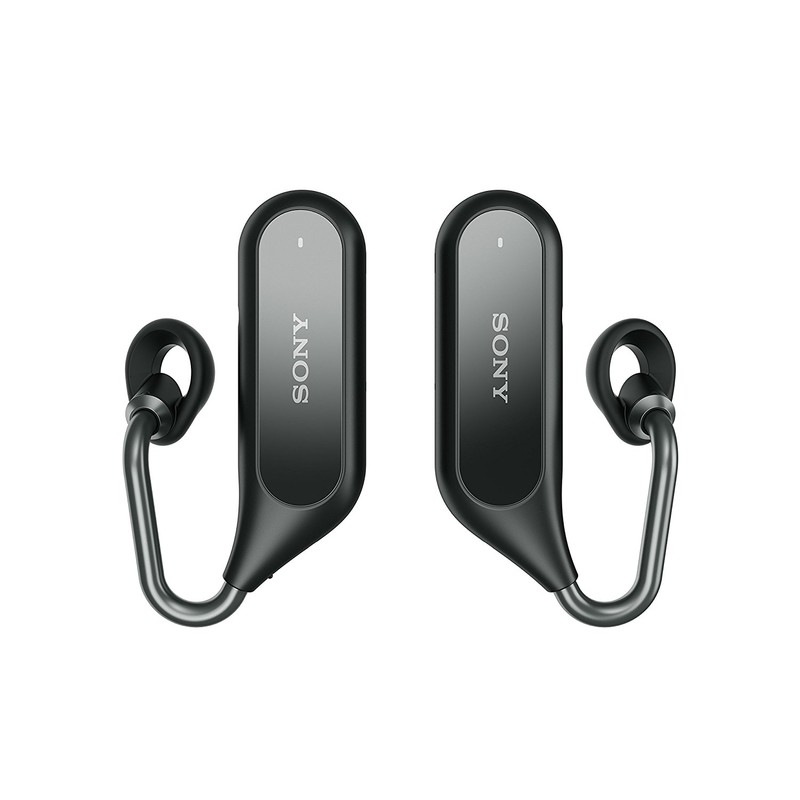
Although the truly wire-free design isn’t necessarily new anymore, Sony’s approaching this form factor a bit differently than we’ve seen from other brands. The Ear Duo hooks underneath your ear rather than just hanging out of it and this allows for a more ergonomic design and the ability to still easily hear the world around you.


Other useful features include volume levels that automatically adjust based on ambient noise in your environment, head gestures, Google Assistant and Siri support, 4 hours of playback with 3 full recharges in the included charging case, and just 7 minutes of charging will get you 1 hour of use.
Sony’s trying a lot of cool things with the Xperia Ear Duo, but that also results in a very steep price. If you want to secure a pair for yourself, you’ll need to hand over $279.99 – $120 more than AirPods.
If you’re interested, you can place your pre-orders on Amazon right now and get the Ear Duo in Black or Gold.
See at Amazon
Best Android Phones Under $300 as of May 2018
- Best overall
- Best for navel-gazing
- Best for stock Android
Note: While the Moto G5S Plus is still a great option, the Moto G6 is on its way and may be worth waiting for.
Best overall
Moto G5S Plus

See at Motorola
The Moto G5 Plus was already one of our favorite phones in the sub-$300 price range, but the newer Moto G5S Plus (the ‘S’ stands for “Special Edition”) makes some small improvements that lead to an even better phone that still won’t break the bank.
With the Moto G5S Plus, you get terrific build quality, an eye-catching Blush Gold finish, and a dual camera system — on top of all the other benefits the Moto G5 Plus already included, like a large 1080p display, a fast fingerprint sensor, and the useful Moto Actions gestures. Better yet, if you can’t front the cost, Motorola offers financing through Affirm when you order from its online store.
Bottom line: The Moto G5S Plus offers great value for a phone under $300 and sets a new standard for powerful, inexpensive phones moving forward.
One more thing: Best Buy has the Moto G5S Plus for $40 off, so you can pick up our top recommendation for just $239.99.
Why the Moto G5S Plus is the best
In our review of the G5S Plus, we still recommended the standard Moto G5 Plus over the special edition because the difference in price didn’t quite justify the latter option’s minor improvements, but with Best Buy’s discounted price, it’s a different story.
The Moto G5S Plus has just about everything you could ask of a phone at this price. The design is attractive and well-built, the software is clean yet clever with the addition of Moto Actions and Moto Display, and the speaker sounds great. The best part? The Moto G5S Plus works on all U.S. carriers — yes, even Sprint and Verizon.
Best for navel-gazing
Honor 7X

See at Amazon
If you like a little pizazz, the Honor 7X is a great alternative to the Moto G5S Plus with a more modern design. Its 18:9 display is big and vibrant, and the dual cameras are some of the best in its price range. The Kirin 659 chipset keeps things running smoothly, and the 3,340mAh battery provides excellent longevity. Stock Android purists may not love its EMUI software, but the recent update to Android Oreo and EMUI 8.0 keeps it feeling modern.
Bottom line: The EMUI software isn’t for everyone, but at $200, the Honor 7X is a terrific phone with good camera performance, great battery life, and a more modern design than any other phone on this list.
One more thing: The Honor 7X is not compatible with the major CDMA networks in the U.S.
Best for stock Android
Nokia 6 (2018)

See at Amazon
At $269, the Nokia 6.1 (otherwise known as the 2018 Nokia 6) is the best way to get stock Android for cheap. It’s part of Nokia’s Android One lineup, combining unadulterated stock Android with an aluminum unibody design that feels far more premium than its pricetag would have you believe. The 5.5-inch 1080p LCD display looks fantastic, and it has one of the better cameras in its segment. On top of that, Nokia releases monthly security updates to keep its phones protected — a rarity for low-cost phones.
Bottom line: You’d be hard-pressed to find a better-made phone at this price point, and the regular software updates are icing on the cake.
One more thing: The Nokia 6.1 ships with Android 7.1.1 Nougat, though Nokia has said that an Oreo update is already in the works.
Best overall
Moto G5S Plus
See at Motorola
The Moto G5 Plus was already one of our favorite phones in the sub-$300 price range, but the newer Moto G5S Plus (the ‘S’ stands for “Special Edition”) makes some small improvements that lead to an even better phone that still won’t break the bank.
With the Moto G5S Plus, you get terrific build quality, an eye-catching Blush Gold finish, and a dual camera system — on top of all the other benefits the Moto G5 Plus already included, like a large 1080p display, a fast fingerprint sensor, and the useful Moto Actions gestures. Better yet, if you can’t front the cost, Motorola offers financing through Affirm when you order from its online store.
Bottom line: The Moto G5S Plus offers great value for a phone under $300 and sets a new standard for powerful, inexpensive phones moving forward.
One more thing: Best Buy has the Moto G5S Plus for $40 off, so you can pick up our top recommendation for just $239.99.
Update May 2018: Replaced last year’s Nokia 6 with the newer Nokia 6.1, and added a disclaimer about the upcoming Moto G6.
These are the Chromebooks that can run Android apps from Google Play

Android — and 1,000,000+ apps — on your Chromebook is awesome.
Not every Chromebook available today was released with Android app support out of the box — these need to be updated after the fact to add Google Play support. Many will be updated, but are in a long testing process.
We all hate waiting. And we all hate updates that break things. Google and the people who made your Chromebook are trying to make sure everything is good and keep the wait time to a minimum, but still — we all hate waiting!
Things are progressing. Here’s the current state of Android on Chromebooks and Chromeboxes.
Chromebooks with Android apps available in the stable channel
Make sure you have the latest version of Chrome and look in your settings if you don’t have a Play Store app. You can enable it there by checking the box.
Acer
- Acer Chromebook R11
- Acer Chromebook R13
- Acer Chromebook Spin 11
- Acer Chromebook 14 (CB3-431)
- Acer Chromebook 14 for Work
- Acer Chromebook 15 (CB3-532. CB5-571, C910)
- Acer Chromebook 11 N7 (C731, C731T)
- Acer Chromebook 11 (C771, C771T, C740)
AOpen
- AOpen Chromebox Mini
- AOpen Chromebase Mini
ASUS
- ASUS Chromebook Flip C100PA
- ASUS Chromebook Flip C101PA
- ASUS Chromebook Flip C213
- ASUS Chromebook Flip C302
- ASUS Chromebook C202SA
- ASUS Chromebook C300SA / C301SA
CTL
- CTL NL61 Chromebook
- CTL Chromebook J2 / J4
- CTL J5 Convertible Chromebook
Dell
- Dell Chromebook 11 (3180, 5190)
- Dell Chromebook 11 Convertible (3189, 5190)
- Dell Chromebook 13 (3380, 7310)
eduGear
- eduGear Chromebook M Series
- eduGear Chromebook K Series
- eduGear CMT Chromebook
Edxis
- Edxis Education Chromebook
- Google Chromebook Pixel (2015)
- Google Pixelbook
Haier
- Haier Chromebook 11e
- Haier Chromebook 11 C
- HiSense Chromebook 11
HP
- HP Chromebook 11 G5
- HP Chromebook 11 G5 EE
- HP Chromebook 11 G6
- HP Chromebook x360 11 EE
- HP Chromebook 13 G1
- HP Chromebook 14 G5
Lenovo
- Lenovo Flex 11 Chromebook
- Lenovo N23 Chromebook
- Lenovo N23 Yoga Chromebook
- Lenovo IdeaPad N42 Chromebook
- Lenovo N22 Chromebook
- Lenovo N42 Chromebook
- Lenovo Thinkpad 11e Chromebook (Gen 3)
- Lenovo ThinkPad 11e Chromebook (Gen 4)
- Lenovo Thinkpad 11e Yoga Chromebook (Gen 4)
- Lenovo Thinkpad 13
Medion
- Medion Chromebook S2015
Mercer
- Mercer Chromebook NL6D
Multilaser
- Multilaser Chromebook M11C
NComputing
- NComputing Chromebook CX100
Nexian
- Nexian Chromebook 11.6″
PCMerge
- PCMerge Chromebook PCM-116E
- PCMerge Chromebook PCM-116T-432B
Poin2
- Poin2 Chromebook 11
- Poin2 Chromebook 14
Samsung
- Samsung Chromebook 3
- Samsung Chromebook Plus
- Samsung Chromebook Pro
Sector 5
- Sector 5 E1 Rugged Chromebook
Viglen
- Viglen Chromebook 11
- Viglen Chromebook 360
Chromebooks with Android support in the beta channel
You’ll need to switch to the beta channel to enable Android support. Further instructions on switching channels can be found here.
- Toshiba Chromebook 2 (2015)
Chrome devices that will be supported sometime in the future
These are the devices that will officially be updated to use Google Play. There is no word on when to expect the update, only that they will be supported.
Acer
- Chromebook 11 CB3-111 / C730 / C730E / CB3-131
- Chromebook 15 (CB3-531)
- Chromebox CXI2
- Chromebase 24
AOpen
- Chromebox Commercial
- Chromebase Commercial
Asus
- Chromebook C200
- Chromebook C201PA
- Chromebook C300
- Chromebox CN62
- Chromebit CS10
Bobicus
- Chromebook 11
CTL
- N6 Education Chromebook
Dell
- Chromebook 11 3120
Edxis
- Chromebook
Haier
- Chromebook 11
- Chromebook 11 G2
Hexa
- Chromebook Pi
Lava
- Xolo Chromebook
HP
- Chromebook 11 G3 / G4 / G4 EE
- Chromebook 14 G4
Lenovo
- 100S Chromebook
- N20 / N20P Chromebook
- N21 Chromebook
- ThinkCentre Chromebox
- Thinkpad 11e Chromebook Gen 2
- Thinkpad 11e Yoga Chromebook
Medion
- Akoya S2013
M&A
- Chromebook
Samsung
- Chromebook 2 11″ – XE500C12
Senkatel
- C1101 Chromebook
Toshiba
- Chromebook 2
True IDC
- Chromebook 11
Updated April 2018: Updated as models move from planned to stable.
We will continue to monitor the list and add any new Chromebooks that Google notes will support the feature.
Chromebooks
- The best Chromebooks
- Chromebooks in education: Everything you need to know
- Should you buy a Chromebook?
- Chromebook Buyers Guide
- Google Pixelbook review
- Join our Chromebook forums
Amazon launches kid-focused Prime Book Box subscription
Get 2 or 4 handpicked books for $23 per box.
Although Amazon Prime may be getting more expensive for subscribers over the coming month, the online shopping giant just announced a new perk for its members to hopefully ease the pain of the higher yearly fee. Prime Book Box is the name of that new perk, and it’s a subscription box that delivers children’s books right to your doorstep.

For $22.99 per box, Prime members can choose to receive 2 hardcover books or 4 board books every one, two, or three months. Amazon notes that you can save up to 35% on the cost of the books compared to buying them normally and notes that it “provides the best value on books sold by Amazon.com.”
After signing up for the service, you’ll create a profile for your child to ensure they get the books best suited for them. Books you’re offered are based on your kid’s age, and all of the titles are handpicked by Amazon Books editors. If you don’t like the books included by default, you can swap them out from a short list of other options for that month.
In addition to being exclusive for Prime subscribers, Prime Book Box currently requires an invitation to join. The service should be available for all Prime users later this year, but in the meantime, you can request your invitation via the button below.
See at Amazon
Are the Galaxy S9-style stereo speakers better than front-facing speakers?

They might not sound quite as good, but they’re less intrusive to the phone’s overall design.
Built-in audio has never been a particularly strong suit for most phones. Manufacturers are usually happy to just drill a couple of holes into the bottom of their devices and call it a day, but the end result is usually a tinny, thin-sounding speaker that’ll leave you connecting to headphones or Bluetooth speakers more often than not.
Every once in a while, though, we see a phone that actually makes onboard audio a priority. HTC is probably best-known for this, putting a big focus on its front-facing BoomSound speakers when it launched the legendary One M7. Since then, a number of other companies have tried their hand at front-firing speakers, but eventually even HTC gave up on the idea, because it just gets in the way of a beautiful design.
They’re both better than a mono speaker grill, but one boasts superior audio while the other saves room for design.
The HTC 10, along with the newer U11 and U11+, forego the dual front-firing speakers and instead opt for a combination of the earpiece speaker and a speaker grill along the bottom edge. Apple lifted this layout starting with the iPhone 7, and most recently, Samsung has started doing the same with its Galaxy S9 and S9+ — but why has this become the new norm?
This stereo speaker configuration makes a lot of sense from a design perspective. Nearly every phone is built with these two components in mind (save for a few devices with oddities like bone conduction), so there’s nothing to change as far as the outward appearance goes. The same can’t be said about the dual front-facing speaker layout, which is becoming increasingly less viable as the market shifts towards bezel-less phones with taller aspect ratio displays.

Imagine a phone with front-facing speakers and a notch. Once you’re done screaming and swearing, you’ll get an idea of why the stereo speaker configuration is becoming so popular lately; it doesn’t get in the way of any modern design trends, and most people aren’t buying their phones based off of speaker choices anyway. If you want small bezels, you’re going to have to live without front-facing speakers — or, in the case of the Pixel 2 XL, get both in exchange for a huge chassis, because internals still have to go somewhere.
I’m personally a big fan of the newer dual speaker design. I love the utility of a big screen, but I still want a phone that fits comfortably in my hand and pocket, so a phone with minimal bezels is ideal. That’s why I carry phones like the Galaxy S9 and iPhone X — both of which utilize the earpiece/speaker grill combo. Sure, it isn’t as loud or full-sounding as a pair of true front-firing speakers, but it’s still a hell of a lot better than something like the Galaxy S8, and I don’t mind connecting to my Bluetooth headphones when I really need better audio.
What’s your take? Do you, like me, favor the speaker combination implemented on newer phones like the Galaxy S9, or do you long for the days of BoomSound? Let us know in the comments below!
Prepay for one month of DIRECTV NOW and score a complimentary Roku Streaming Stick
A new offer worthy of your time.

DIRECTV NOW is back with another great promotion on some streaming hardware, this time offering a Roku Streaming Stick at no additional cost when you prepay for one month of service. This steaming device normally sells for close to $50, but with this offer you can get it for just $35 with a month of access to DIRECTV NOW.
You will need to be a new customer to take advantage of this offer and the Roku Streaming Stick will be shipped to you via FedEx within 1 to 2 weeks from the time you sign up. Simply click the “Redeem & Stream” button on the page to get yourself started.
How to sign up for DIRECTV NOW
DIRECTV NOW does automatically bill each month, so if you only want to do the required two months for this promotion, be sure to cancel the renewal once you complete the checkout process. If you’d prefer an Apple TV 4K, you can get one for no cost when you prepay for three months of service.
See at DIRECTV NOW
Google I/O 2017 report card: Successes, failures and no-shows
Has Google made good on the promises from last year?
Google’s annual developer keynote is a fantastic spectacle. New things are announced every couple of minutes, ranging from developer tools to new apps to hardware you can purchase moments after seeing it for the first time. It’s a lot of fun, but with so many ideas flying your way it can be easy to forget what actually launched successfully and what hasn’t yet come to pass.
This video serves as a quick glance at the things we saw at IO last year, and what became of the announcements from that event. Be sure to drop a note in the comments if you find something we missed!
Facebook is moving Groups into the spotlight
At the Facebook Developers conference today in San Jose, California, Chris Cox noted that the use of Groups is on pace to outgrow the main Facebook experience itself, with 1.4 billion users currently. Cox revealed that Facebook has been working with leaders of large, one-million-plus groups to help admin better serve these intentional communities. Facebook is rolling out a new Groups tab that will help you navigate to your existing groups, interact with content there and eventually join new groups.
Cox mentioned Females in Nigeria, a one million plus strong group headed up by former Nigerian journalist Lola Omalola, and Physician Mom’s group, a Facebook community of mothers who are also doctors. Facebook sat down with these and other group administrators to find out how to make things better for them and their members.
Click here to catch up on the latest news from F8 2018!
Source: Facebook
 AIVAnet